Evervictory Electronic COOLER445 Cooler Amplified BT speaker System User Manual x
Evervictory Electronic Company Limited Cooler Amplified BT speaker System x
User manual
CoolerAmplifiedBT
speakerSystem
COOLER‐445
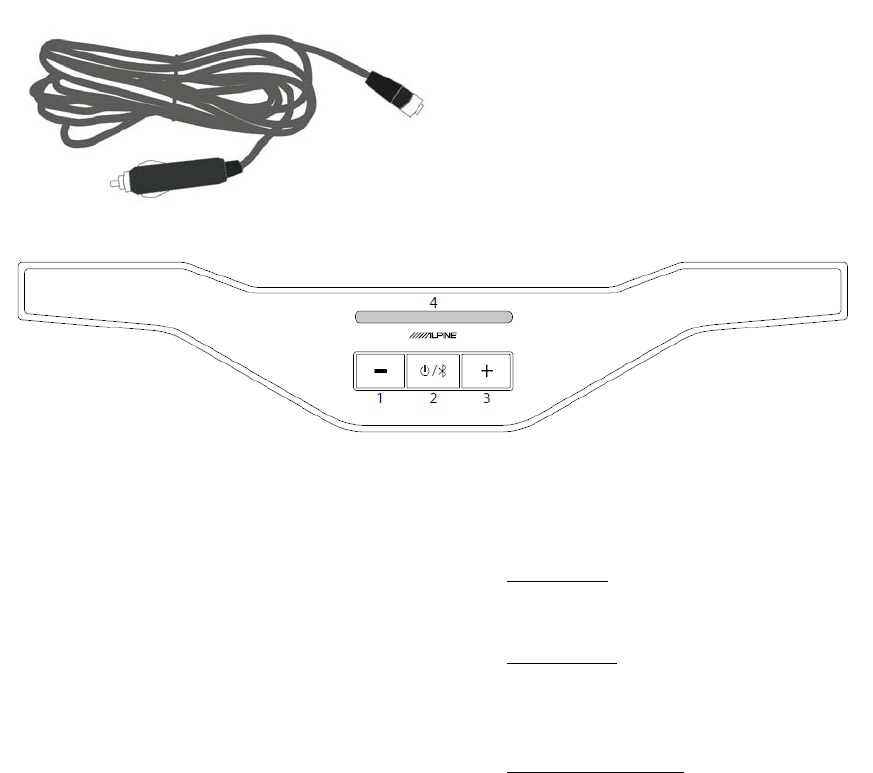
IncludedAccessories:
DCCigaretteLighterAdapter(5m)
Connectthesuppliedpowercable
beforecontinuing
PowerON
PressthePowerButton(2)
PowerOFF
HoldthePowerbuttonfor5secondsand
release
AdjustingVolume
PressVolumeUp③toincreasethe
volume
PressVolumeDown①todecreasethe
volume
SourceSwitching
PressthePower(2)buttontoswitch
betweenBluetoothandAuxinput
OutputModes
Pressandholdbuttons(2)and(3)to
switchbetweenloudandsuperloud
OutputMode LEDON
Loud 3
SuperLoud 5
BatteryIndicator
ShowsthecurrentDCpowerstatus.
(!)TheLEDswillblinkRedwhenthe
connectedDCPowersupplyislow
BluetoothPairing
BluetoothisdiscoverablewhenPWD‐CB1
ispoweredON.
SearchforAlpinePWDCB1usinga
Bluetoothcompatibledevice.Once
connectionisestablished,theBluetooth
andIndicatorBarwillbeON
SourceBluetoothand
BatteryIndicator
LED
Color
Bluetooth
Pairing
mode
Blinking Blue
Bluetooth
Paired ON Blue
AuxInpu
t
ON Green
SourceSwitching
PressthePower(2)buttontoswitch
betweenBluetoothandAuxinput.
(!)IfanAuxdeviceisconnected,the
sourcewillswitchtoAux.
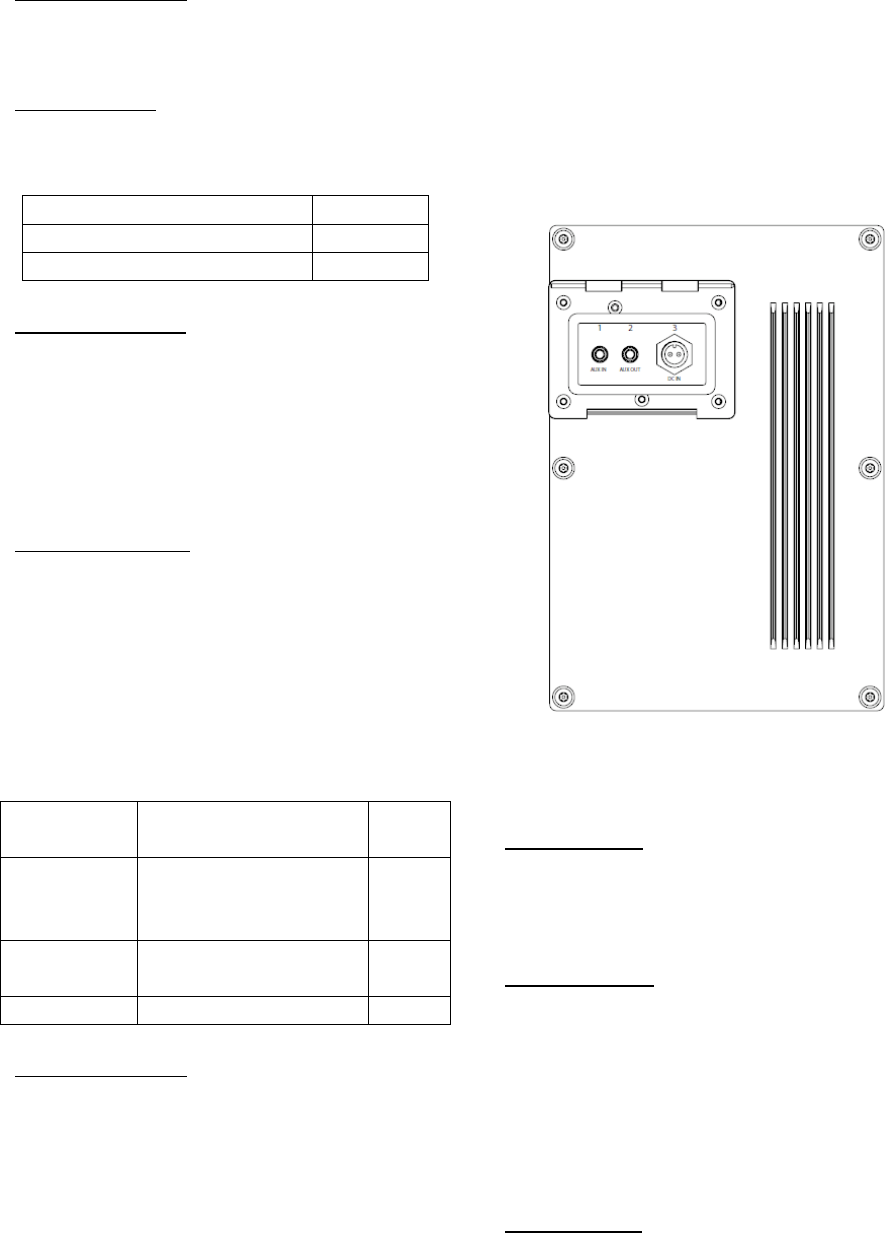
AudioandDCinputsarewaterproof
whenthecoverissecurelyclosed.
AudioInput(1)
Connectanaudiodeviceusinga3.5mm
stereoheadphoneadapter.
AudioOutput(2)
Usea3.5mmStereoM/Mplugtoconnect
twoPWD‐CB1together.
(!)Connectingheadphonewillcause
damagetohearingandmaydamagethe
amplifier
DCPowerIn(3)
Connectthesuppliedcigarettelighter
powercable.
(!)Caution:keepclearfromanyliquidsor
objects
ImportantSafetyInstructions
1. ReadInstructions–Allsafetyand
operationinstructionsshouldbe
readbeforetheproductisused
2. RetainInstructions–Thesafety
andoperatinginstructionsshould
beretainedforfuturereference
3. HeedWarnings‐Allwarningonthe
productandintheoperating
instructionsshouldbeadheredto.
4. Followsuppliedoperational
instructions.
5. Disconnectanypowersources
beforecleaning.
6. Cleanusingamixtureofdishsoap
andalightabrasivebrushonthe
cooler.
7. Donotuseapressurizedwater
sourcetoclean.
8. OnlyuseAlpinerecommended
accessories,failuretodosomay
causeinjury,ordamagetothe
product.
9. KeepthePWD‐CB1inawell
ventilatedareatoensurereliable
operationandtoprevent
overheating.
10. Placecooleronastablesurfaceto
avoidbodilyinjuryordamageto
thecooler.
11. Donotalterthepowercordinany
wayformorfashion.
12. Routethepowersupplycordsso
theywillnotbecompressed,
pinchedorbent.Securethecordif
necessary.
13. DonotoverloadanyoutletsorDC
suppliesasthiswillresultinan
increasedriskoffireand/or
electricshock.
14. Userecommendedratedfusesonly.
This equipment has been tested and found to comply
with the limits for a Class B digital device,
pursuant to part 15 of the FCC Rules.
These limits are designed to provide reasonable
protection against harmful interference in a
residential installation. This equipment generates,
uses and can radiate radio frequency energy and, if
not installed and used in accordance with the
instructions, may cause harmful interference
to radio communications. However, there is no
guarantee that interference will not occur in a
particular installation. If this equipment does
cause harmful interference to radio or television
reception, which can be determined by turning the
equipment off and on, the user is encouraged to try to
correct the interference by one or more of the
following measures:
—Reorient or relocate the receiving antenna.
—Increase the separation between the equipment and
receiver.
—Connect the equipment into an outlet on a circuit
different from that to which the receiver is
connected.
—Consult the dealer or an experienced radio/TV
technician for help.
This device complies with part 15 of the FCC Rules.
Operation is subject to the following two conditions:
(1)This device may not cause harmful interference,
and
(2) this device must accept any interference received,
including interference that may cause undesired
operation.
changes or modifications not expressly approved by
the party responsible for compliance could
void the user's authority to operate the equipment.