FZONE TECHNOLOGY U3 MICROPHONE WIRELESS SYSTEM User Manual

SHENZHEN FZONE TECHNOLOGY CO.,LTD MICROPHONE WIRELESS SYSTEM

user_manual

R210-119489China Patent Numbers ZL 2016 3 0165464.82nd floor, Building 12, Xicheng Industrial Area, Xixiang Town, Baoan District, Shenzhen Guangdong China.E-mail: nancy@xviveaudio.com
MANUALMICROPHONE WIRELESS SYSTEM
R210-119489WARNING : TO REDUCE THE RISK OF FIRE OR ELECTRIC SHOCK: DO NOT REMOVE SCREWS. NO USER-SERVICEABLE PARTSINSIDE. REFER SERVICING TO QUALIFIED SERVICE PERSONNEL.WARNING : TO REDUCE THE RISK OF FIRE OR ELECTRIC SHOCK, DO NOT EXPOSE THE APPLIANCE TO RAIN OR MOISTURE.CAUTIONRISK OF ELECTRIC SHOCKDO NOT OPENCERTIFICATIONThis Class B digital apparatus complies with Canadian ICES-003.Radio Approvals: FCC Part 15.249, FCC Part 15 B, RSS-210 (Canada), EN 300 440 (Europe), EN 301.489 (Europe), Japan MIC Notice No.88 Appendix No.43The CE Declaration of Conformity & California 65 Test Report can be obtained at http://www.xviveaudio.com/productInfo.asp?id=35401
THIS DEVICE COMPLIES WITH PART 15 OF THE FCC RULES. OPERATION IS SUBJECT TO THE FOLLOWING TWO CONDITIONS: (1) THIS DEVICE MAY NOT CAUSE HARMFUL INTERFERENCE, AND(2) THIS DEVICE MUST ACCEPT ANY INTERFERENCE RECEIVED, INCLUDING INTERFERENCE THAT MAY CAUSE UNDESIRED OPERATION.WARNING: Changes or modifications not expressly approved in writing by Xvive may void the users authority to operate this equipment.RF EXPOSURE STATEMENT: This transmitter must not be co-located or operated in conjunction with any other antenna or transmitter.NOTE: This equipment has been tested and found to comply with the limits for a Class B digital device, pursuant to part 15 of the FCC CERTIFICATIONFCC Rules. These limits are designed to provide reasonable protection against harmful interference in a residential installation. This equipment generates, uses and can radiate radio frequency energy and, if not installed and used in accordance with the instructions, may cause harmful interference to radio communications. There is no guarantee that interference will not occur in a particular installation. If this equipment does cause harmful interference to radio or television reception, which can be determined by turning the equipment off and on, the user is encouraged to try to correct the interference by one or more of the followingMEASURES:- Reorient or relocate the receiving antenna.- Increase the separation between the equipment and receiver.- Connect the equipment into an outlet on a circuit different from that to which the receiver is connected.- Consult the dealer or an experienced radio/TV technician for help. 02
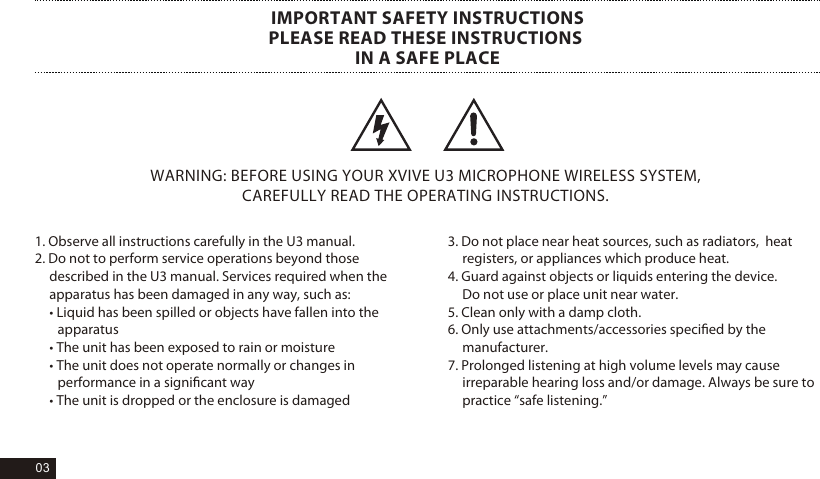
1. Observe all instructions carefully in the U3 manual. 2. Do not to perform service operations beyond those  described in the U3 manual. Services required when the  apparatus has been damaged in any way, such as: • Liquid has been spilled or objects have fallen into the apparatus • The unit has been exposed to rain or moisture • The unit does not operate normally or changes in performance in a significant way • The unit is dropped or the enclosure is damaged WARNING: BEFORE USING YOUR XVIVE U3 MICROPHONE WIRELESS SYSTEM, CAREFULLY READ THE OPERATING INSTRUCTIONS. IMPORTANT SAFETY INSTRUCTIONSPLEASE READ THESE INSTRUCTIONS IN A SAFE PLACE3. Do not place near heat sources, such as radiators,  heat registers, or appliances which produce heat. 4. Guard against objects or liquids entering the device. Do not use or place unit near water.  5. Clean only with a damp cloth. 6. Only use attachments/accessories specified by the manufacturer. 7. Prolonged listening at high volume levels may cause irreparable hearing loss and/or damage. Always be sure to practice “safe listening.” 03
PRODUCT INTRODUCTION•  2.4Ghz band is optimal for microphone wireless, approved for use in Europe, South America, Asia and Australia.•  Less than 5ms Latency, Simultaneous broadcasts on 6 channel.•  Broad 20Hz – 20KHz frequency response•  Indoor: Up to 90 feet(actual range depends on rf signal absorption, reflection and interference )•  5 Hours of battery life ( rechargeable battery for both Transmitter & Receiver)•  Working with dynamic microphone•  High Resolution 24-bit/48kpbs Audio•  Dynamic Range is 110dB•  Signal to Noise Ratio is 110dB•  U3 wireless aims to take the complexity and frustration, out of traditional wireless microphone systems. Creating a flexible, all-in-one solution that makes any your favorite microphones into wireless.1PCS1PCS1PCS1PCS1PCSU3 Transmitter U3 Receiver  USB Cable ManualBagPACKAGE DETAILS04
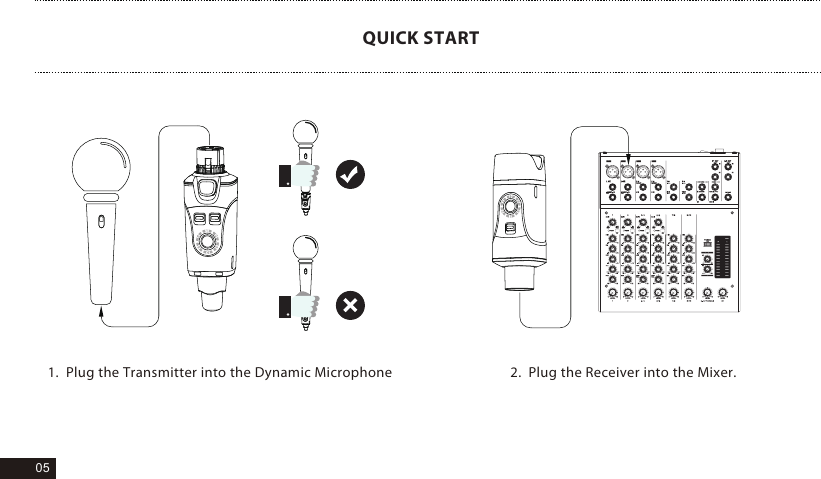
05QUICK START1.  Plug the Transmitter into the Dynamic Microphone 2.  Plug the Receiver into the Mixer.
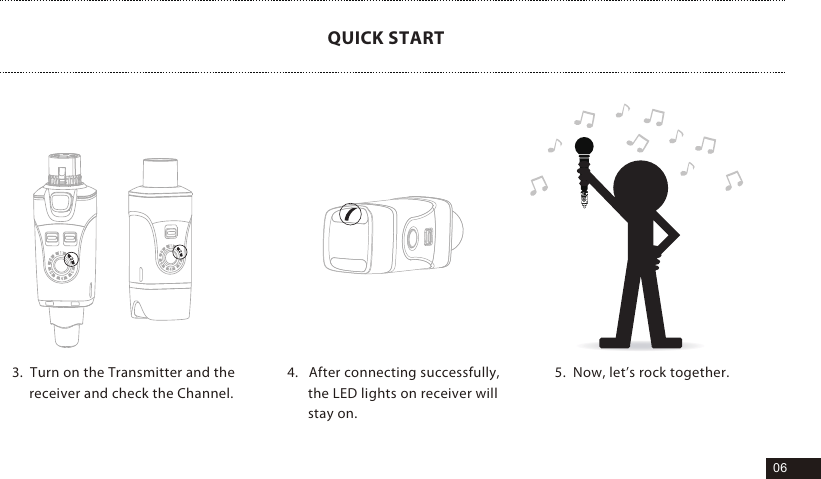
06QUICK START3.  Turn on the Transmitter and the      receiver and check the Channel. 4.   After connecting successfully,      the LED lights on receiver will      stay on.5.  Now, let’s rock together.
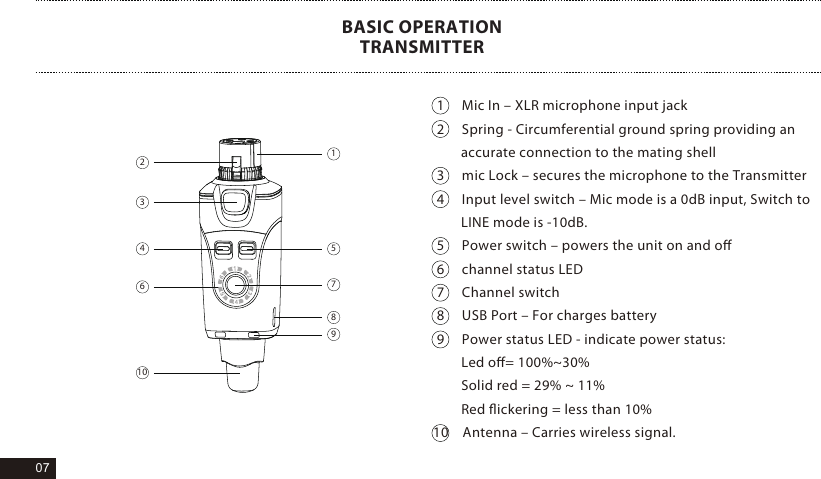
071     Mic In – XLR microphone input jack2     Spring - Circumferential ground spring providing an        accurate connection to the mating shell3     mic Lock – secures the microphone to the Transmitter4     Input level switch – Mic mode is a 0dB input, Switch to        LINE mode is -10dB. 5     Power switch – powers the unit on and off6     channel status LED7     Channel switch8     USB Port – For charges battery9     Power status LED - indicate power status:  Led off= 100%~30%  Solid red = 29% ~ 11%  Red flickering = less than 10% 10    Antenna – Carries wireless signal.BASIC OPERATIONTRANSMITTER234 51789610
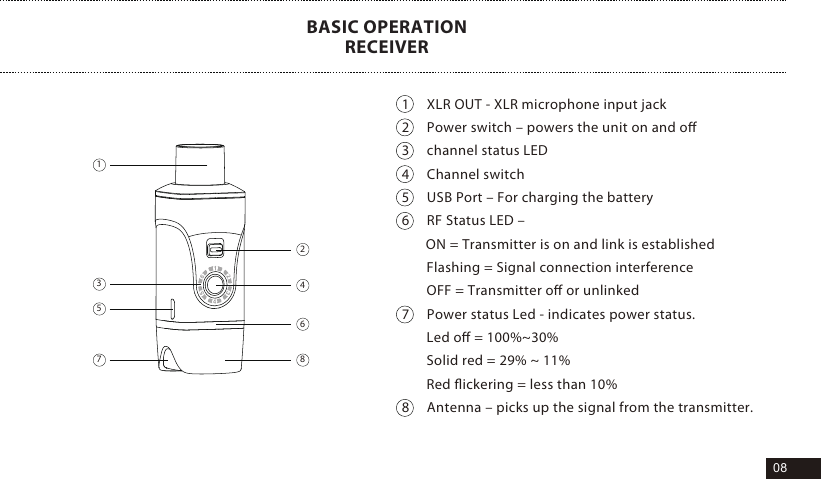
081     XLR OUT - XLR microphone input jack2     Power switch – powers the unit on and off3     channel status LED4     Channel switch5     USB Port – For charging the battery6     RF Status LED –        ON = Transmitter is on and link is establishedFlashing = Signal connection interferenceOFF = Transmitter off or unlinked7     Power status Led - indicates power status.Led off = 100%~30%Solid red = 29% ~ 11%Red flickering = less than 10% 8     Antenna – picks up the signal from the transmitter.BASIC OPERATIONRECEIVER14628753
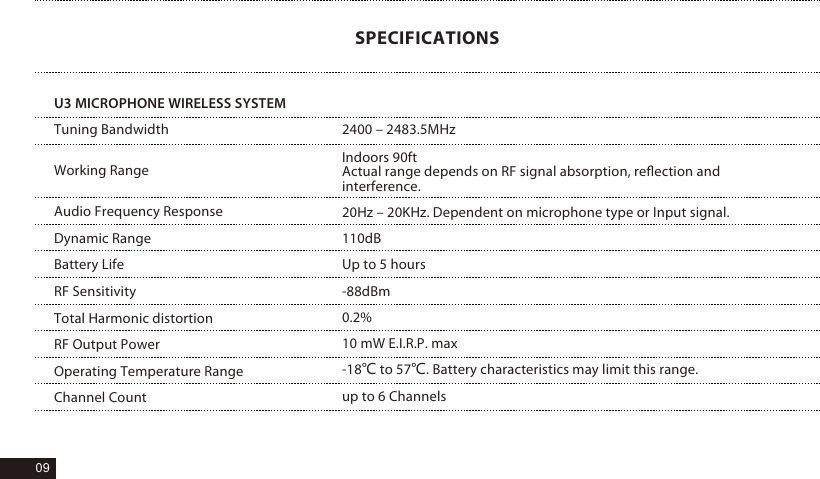
Tuning BandwidthWorking RangeAudio Frequency ResponseDynamic RangeBattery LifeRF SensitivityTotal Harmonic distortionRF Output PowerOperating Temperature RangeChannel Count2400 – 2483.5MHzIndoors 90ftActual range depends on RF signal absorption, reflection and interference.20Hz – 20KHz. Dependent on microphone type or Input signal.110dB Up to 5 hours-88dBm0.2%10 mW E.I.R.P. max-18℃ to 57℃. Battery characteristics may limit this range.up to 6 Channels09SPECIFICATIONSU3 MICROPHONE WIRELESS SYSTEM
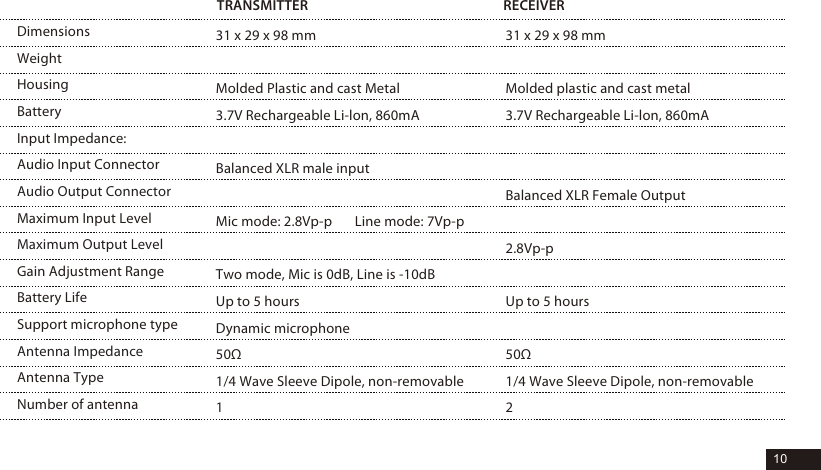
10DimensionsWeightHousingBatteryInput Impedance: Audio Input ConnectorAudio Output ConnectorMaximum Input LevelMaximum Output LevelGain Adjustment RangeBattery LifeSupport microphone typeAntenna ImpedanceAntenna TypeNumber of antennaTRANSMITTER RECEIVER31 x 29 x 98 mmMolded Plastic and cast Metal3.7V Rechargeable Li-lon, 860mABalanced XLR male inputMic mode: 2.8Vp-p       Line mode: 7Vp-pTwo mode, Mic is 0dB, Line is -10dBUp to 5 hoursDynamic microphone50Ω1/4 Wave Sleeve Dipole, non-removable131 x 29 x 98 mmMolded plastic and cast metal3.7V Rechargeable Li-lon, 860mA Balanced XLR Female Output2.8Vp-pUp to 5 hours50Ω1/4 Wave Sleeve Dipole, non-removable2
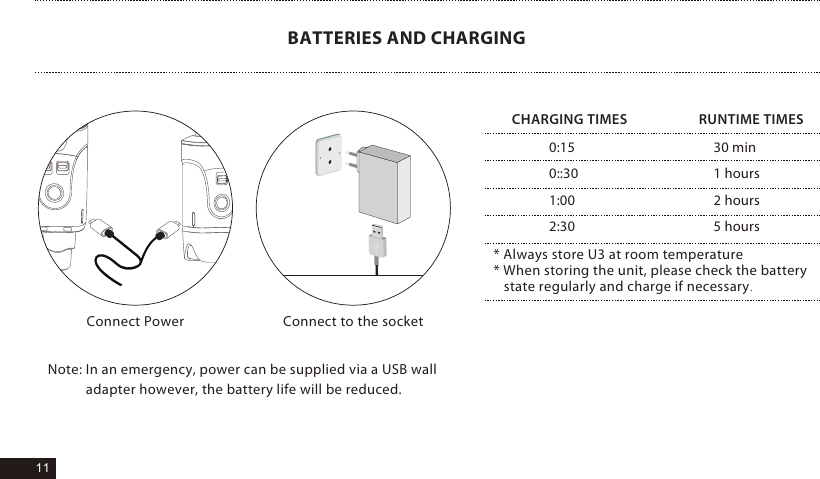
11BATTERIES AND CHARGINGNote: In an emergency, power can be supplied via a USB wall            adapter however, the battery life will be reduced.* Always store U3 at room temperature* When storing the unit, please check the battery    state regularly and charge if necessary.0:150::301:00 2:3030 min1 hours2 hours5 hoursCHARGING TIMES                     RUNTIME TIMESConnect to the socketConnect Power
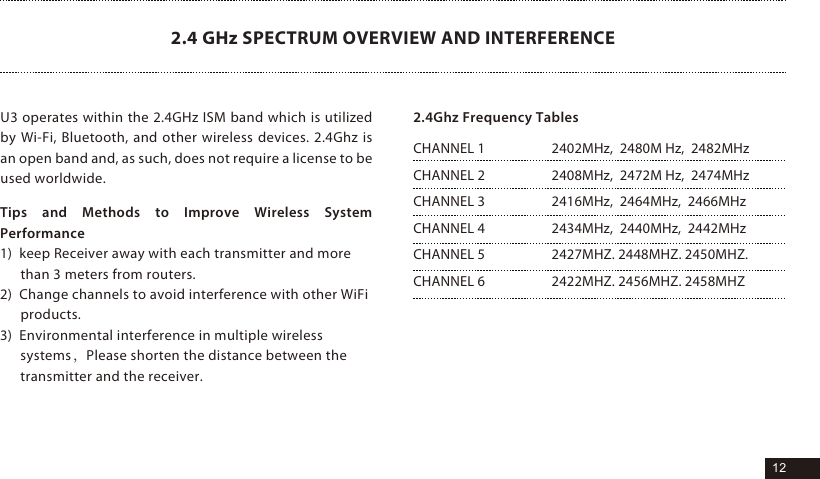
12Tips and Methods to Improve Wireless System Performance1)  keep Receiver away with each transmitter and more than 3 meters from routers.2)  Change channels to avoid interference with other WiFi products.3)  Environmental interference in multiple wireless systems,Please shorten the distance between the transmitter and the receiver.2.4 GHz SPECTRUM OVERVIEW AND INTERFERENCE2402MHz,  2480M Hz,  2482MHz2408MHz,  2472M Hz,  2474MHz2416MHz,  2464MHz,  2466MHz2434MHz,  2440MHz,  2442MHz2427MHZ. 2448MHZ. 2450MHZ.2422MHZ. 2456MHZ. 2458MHZCHANNEL 1CHANNEL 2CHANNEL 3CHANNEL 4CHANNEL 5CHANNEL 62.4Ghz Frequency TablesU3 operates within the 2.4GHz ISM band which is utilized by Wi-Fi, Bluetooth, and other wireless devices. 2.4Ghz is an open band and, as such, does not require a license to be used worldwide.
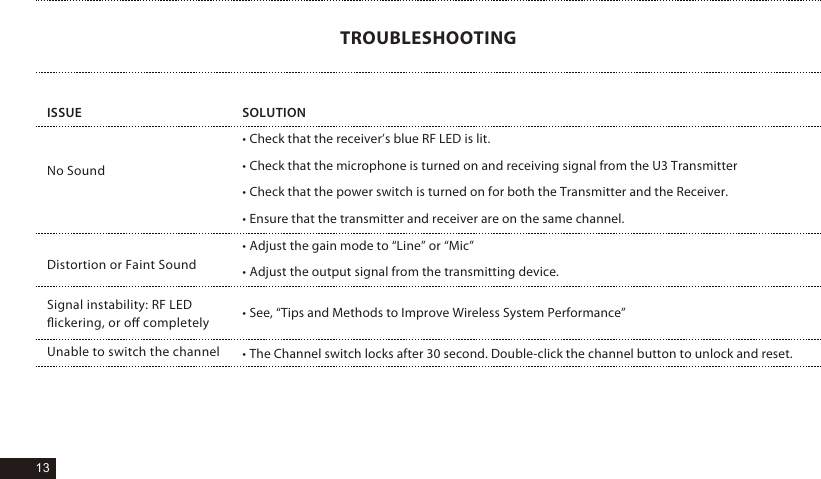
13ISSUE• Check that the receiver’s blue RF LED is lit.• Check that the microphone is turned on and receiving signal from the U3 Transmitter• Check that the power switch is turned on for both the Transmitter and the Receiver.• Ensure that the transmitter and receiver are on the same channel.• Adjust the gain mode to “Line” or “Mic”• Adjust the output signal from the transmitting device.• See, “Tips and Methods to Improve Wireless System Performance”• The Channel switch locks after 30 second. Double-click the channel button to unlock and reset.SOLUTIONNo SoundDistortion or Faint SoundSignal instability: RF LED flickering, or off completelyUnable to switch the channelTROUBLESHOOTING
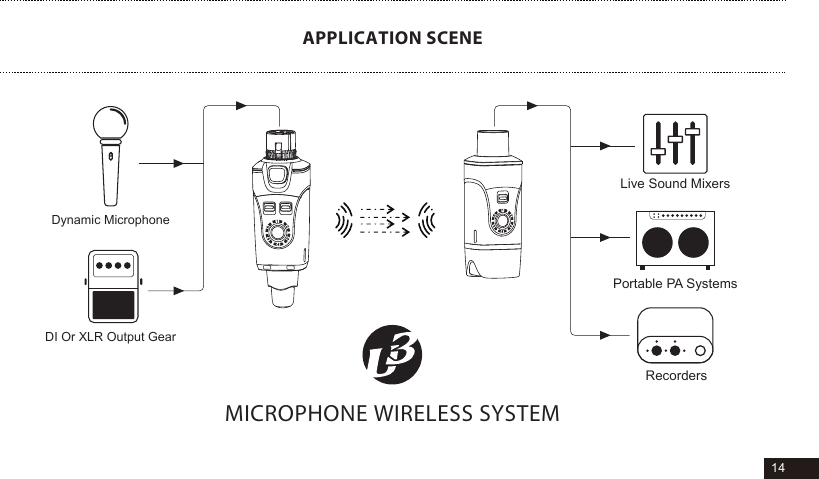
14APPLICATION SCENEDI Or XLR Output GearDynamic MicrophoneLive Sound MixersPortable PA SystemsRecordersMICROPHONE WIRELESS SYSTEM

Navigation menu