Fego Precision Co FPG2003B FEGO BLE GlucoPedo Pedometer and Blood Glucose Monitoring System User Manual Rev 01 150129

Fego Precision Industrial Co Ltd FEGO BLE GlucoPedo Pedometer and Blood Glucose Monitoring System Rev 01 150129

User Manual-Rev.01(150129)
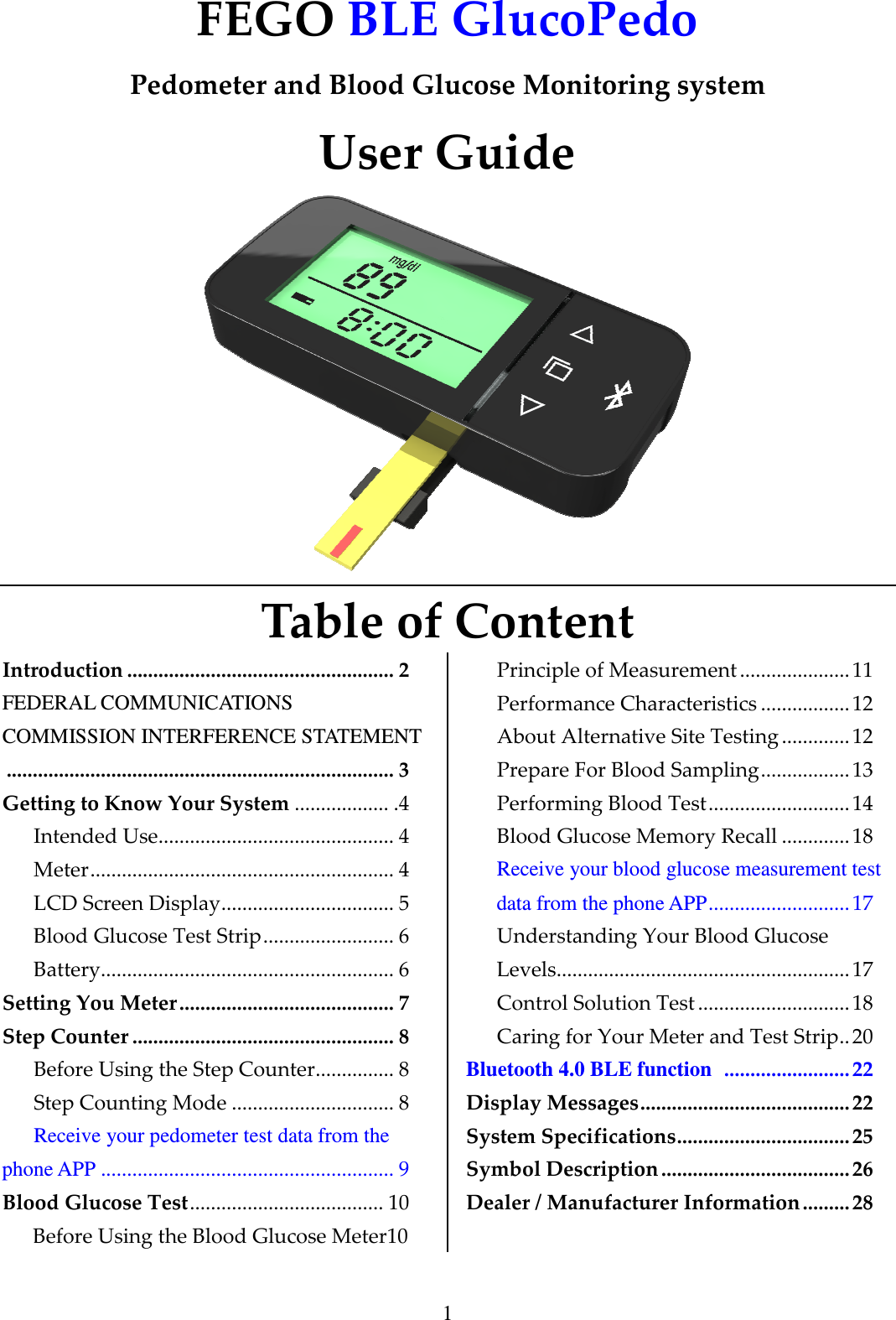
1 FEGO BLE GlucoPedo  Pedometer and Blood Glucose Monitoring system User Guide  Table of Content Introduction ................................................... 2 FEDERAL COMMUNICATIONS COMMISSION INTERFERENCE STATEMENT .......................................................................... 3 Getting to Know Your System .................. .4 Intended Use............................................. 4 Meter.......................................................... 4  LCD Screen Display................................. 5 Blood Glucose Test Strip......................... 6 Battery........................................................ 6 Setting You Meter......................................... 7 Step Counter .................................................. 8 Before Using the Step Counter............... 8 Step Counting Mode ............................... 8 Receive your pedometer test data from the phone APP ........................................................ 9 Blood Glucose Test..................................... 10 Before Using the Blood Glucose Meter10 Principle of Measurement ..................... 11 Performance Characteristics .................12 About Alternative Site Testing ............. 12 Prepare For Blood Sampling.................13 Performing Blood Test........................... 14 Blood Glucose Memory Recall .............18 Receive your blood glucose measurement test data from the phone APP...........................17 Understanding Your Blood Glucose Levels........................................................ 17 Control Solution Test .............................18 Caring for Your Meter and Test Strip..20 Bluetooth 4.0 BLE function  ........................22 Display Messages........................................22 System Specifications.................................25 Symbol Description.................................... 26 Dealer / Manufacturer Information ......... 28
2 Introduction Thank you for choosing BLE GlucoPedo. The BLE GlucoPedo system allows you to record daily steps, measure your blood glucose values, and use as a USB driver.   Please read all instructions carefully before use. To ensure you operate the BLE GlucoPedo correctly to measure the accurate blood glucose (blood sugar), read all instructions thoroughly and practice the test. Call your local agent or contact our sales representative if you have any question.   IMPORTANT SAFETY INFORMATION    Please read all instructions before use and follow below precautions.  Use the device only for the intended use described in this manual.  The product has measurement and record function. If the time and date are not set correctly, the data might get loss or error. Please set the current time and date correctly before use. Time setting is guided in the manual.  No modification is allowed on the product.  If the electromagnetic field is too strong, it will interfere with the correct operation of BLE GlucoPedo. Do not use the product at a place close to strong electromagnetic radiation.  To avoid the generation of static electricity, please do not use the product in a very dry environment, especially in the artificial synthetic material environment.  Close supervision is necessary when the device is used by, on, or near children, handicapped persons or invalids.  Please discard the product properly according to the regulations of your country.    Do not use the device if it is not working properly, or if it has suffered any damage. CAUTION:  Please keep all small parts out of the reach of children. The bottle cap, the test strip, and the lancets may cause a choking hazard. Please do not swallow. Go to the doctor immediately if accidentally swallowed.   Keep the user guide in case of emergency.
3 FEDERAL COMMUNICATIONS COMMISSION INTERFERENCE STATEMENT    This equipment has been tested and found to comply with the limits for a Class B digital device, pursuant to Part 15 of the FCC Rules. These limits are designed to provide reasonable protection against harmful interference in a residential installation.   This equipment generates, uses and can radiate radio frequency energy and, if not installed and used in accordance  with  the  instructions,  may  cause  harmful  interference  to  radio  communications.  However, there is  no  guarantee that interference will  not  occur in  a particular  installation.  If this equipment does cause  harmful  interference  to  radio  or  television  reception,  which  can  be  determined  by  turning  the equipment  off  and  on,  the  user  is  encouraged  to  try  to  correct  the  interference  by  one  or  more  of  the following measures:    -- Reorient or relocate the receiving antenna.   -- Increase the separation between the equipment and receiver.   -- Connect the equipment into an outlet on a circuit different from that to which the receiver is connected.   -- Consult the dealer or an experienced radio/TV technician for help.    CAUTION:   To assure continued FCC compliance:   1. Any changes or modifications not expressly approved by the grantee of this device could void the user's authority to operate the equipment.    FCC Label Compliance Statement: This device complies with Part 15 of the FCC Rules. Operation is subject to the following two conditions: (1)  this  device  may  not  cause  harmful  interference,  and  (2)  this  device  must  accept  any  interference received, including interference that may cause undesired operation.
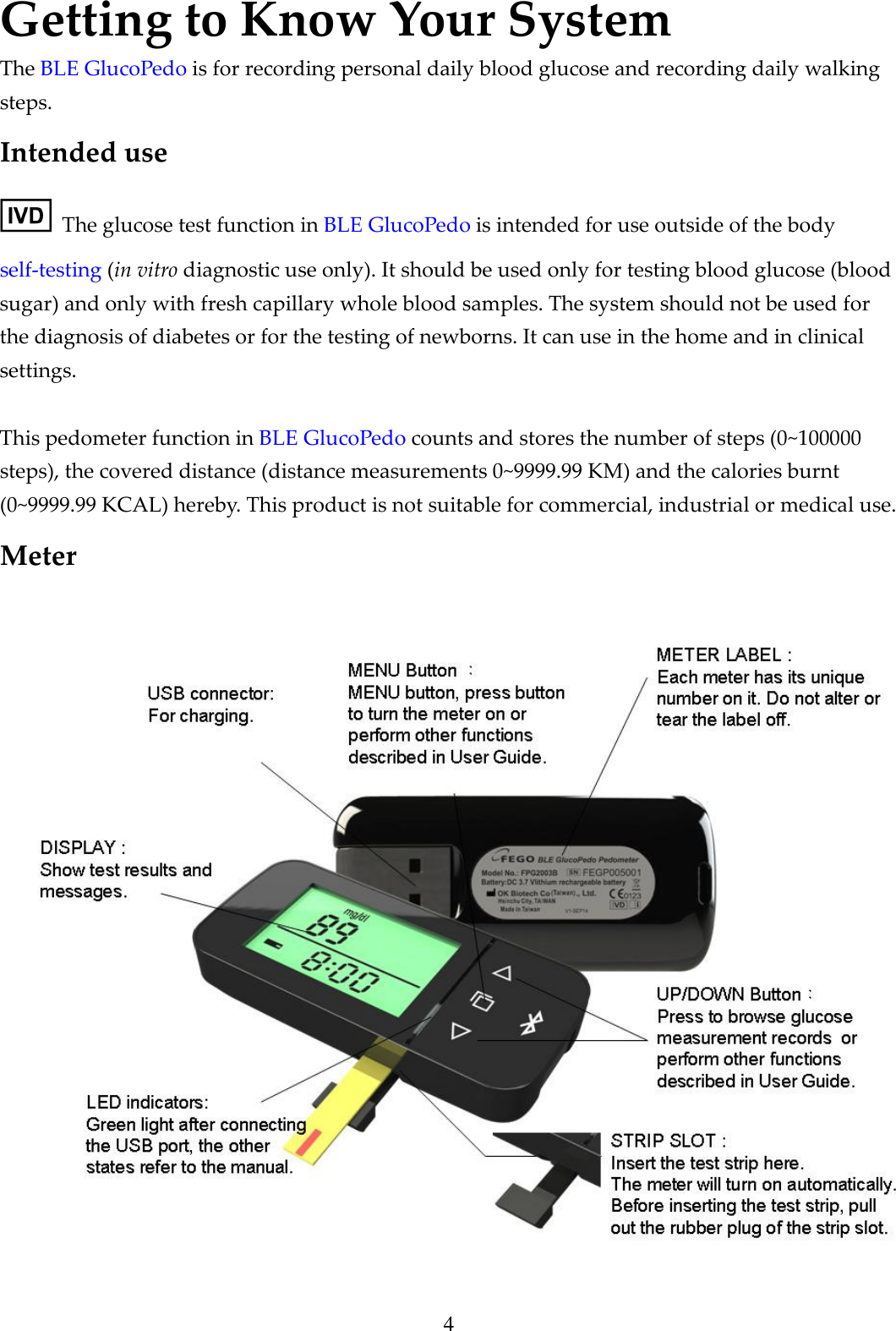
4 Getting to Know Your System The BLE GlucoPedo is for recording personal daily blood glucose and recording daily walking steps.   Intended use   The glucose test function in BLE GlucoPedo is intended for use outside of the body self-testing (in vitro diagnostic use only). It should be used only for testing blood glucose (blood sugar) and only with fresh capillary whole blood samples. The system should not be used for the diagnosis of diabetes or for the testing of newborns. It can use in the home and in clinical settings.    This pedometer function in BLE GlucoPedo counts and stores the number of steps (0~100000 steps), the covered distance (distance measurements 0~9999.99 KM) and the calories burnt (0~9999.99 KCAL) hereby. This product is not suitable for commercial, industrial or medical use. Meter
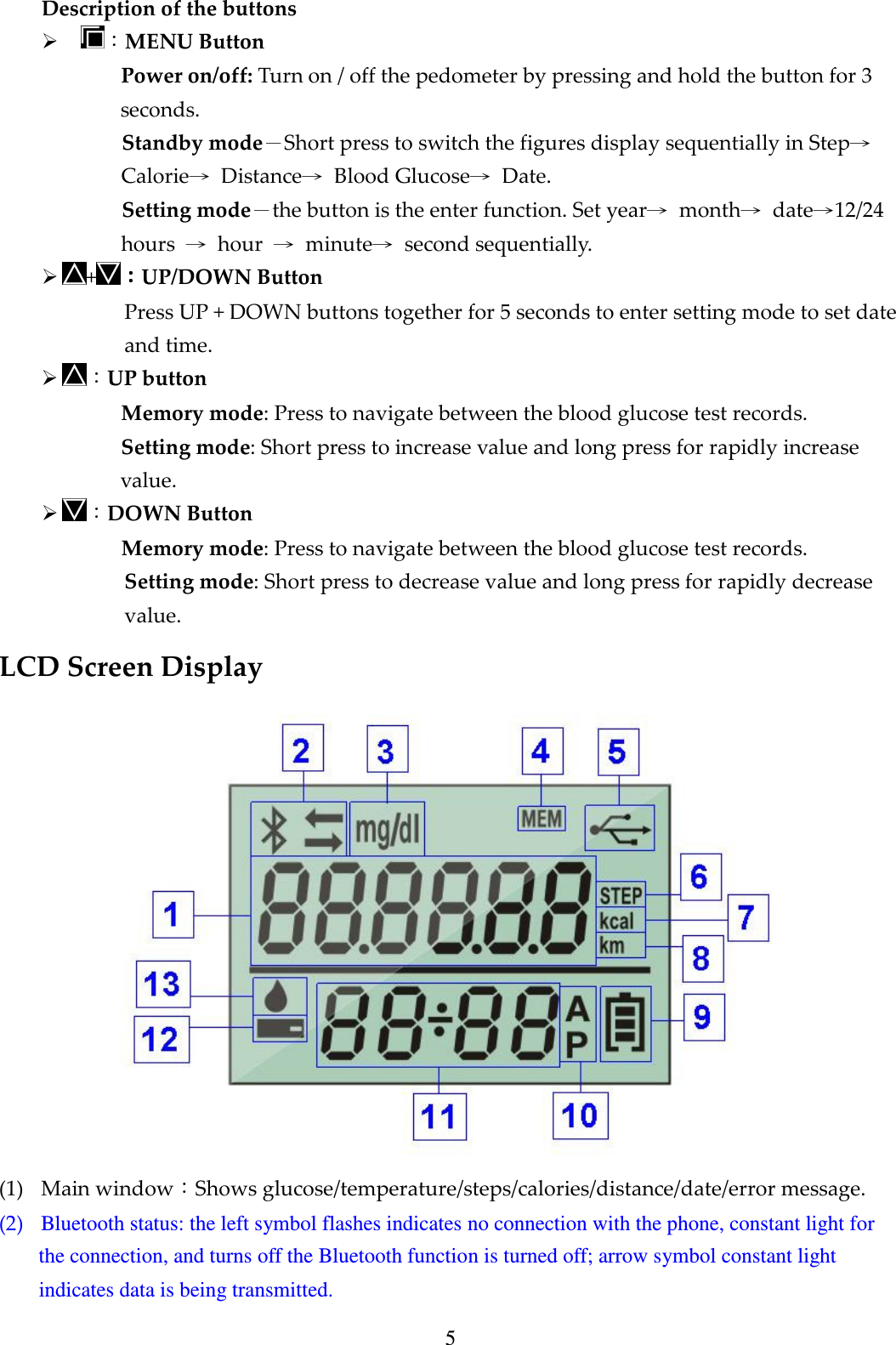
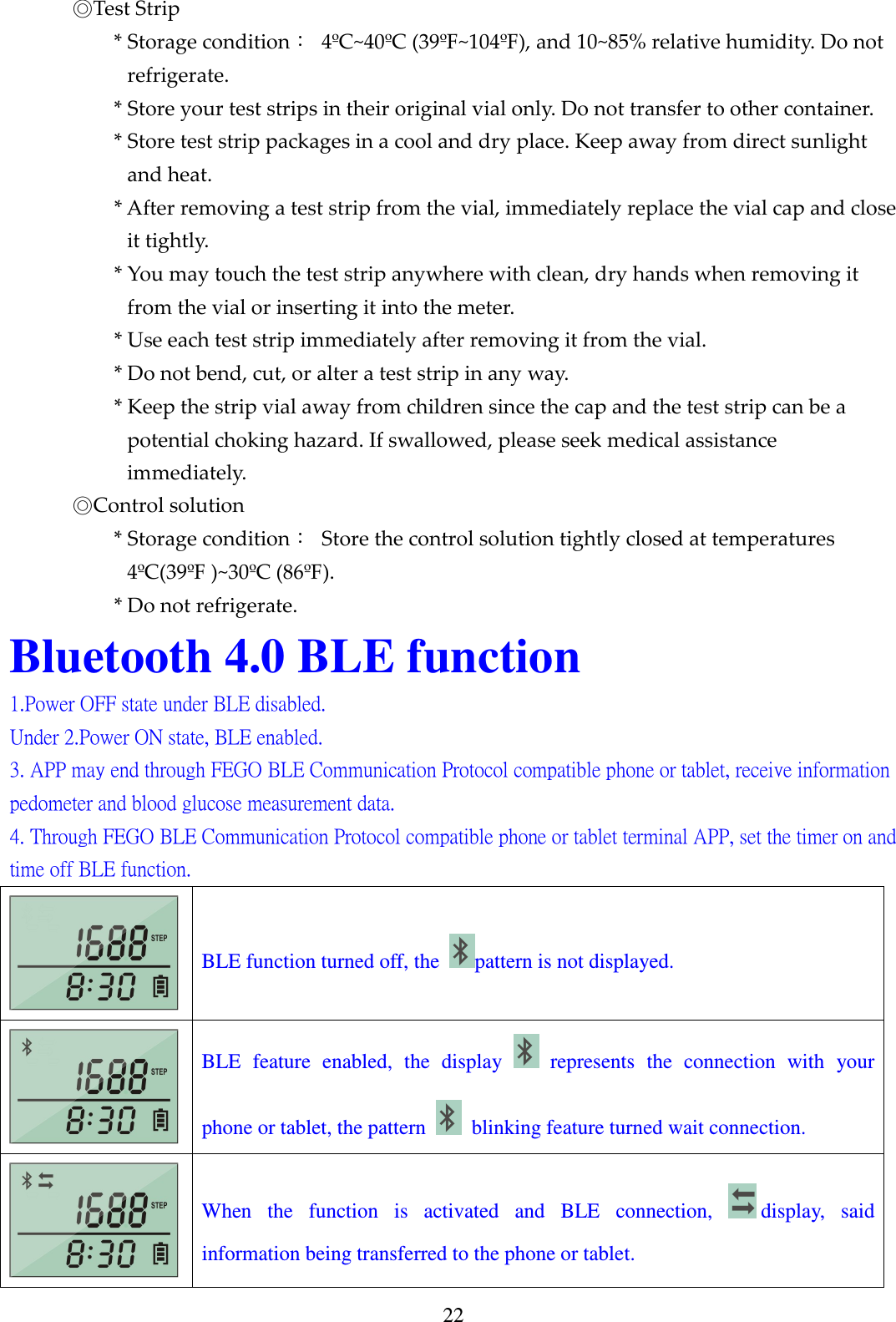
5 Description of the buttons  :MENU Button Power on/off: Turn on / off the pedometer by pressing and hold the button for 3 seconds.   Standby mode-Short press to switch the figures display sequentially in Step→ Calorie→  Distance→  Blood Glucose→  Date. Setting mode-the button is the enter function. Set year→  month→  date→12/24 hours  →  hour  →  minute→  second sequentially.    +::::UP/DOWN Button Press UP + DOWN buttons together for 5 seconds to enter setting mode to set date and time.  :UP button Memory mode: Press to navigate between the blood glucose test records. Setting mode: Short press to increase value and long press for rapidly increase value.  :DOWN Button Memory mode: Press to navigate between the blood glucose test records. Setting mode: Short press to decrease value and long press for rapidly decrease value. LCD Screen Display     (1) Main window:Shows glucose/temperature/steps/calories/distance/date/error message. (2) Bluetooth status: the left symbol flashes indicates no connection with the phone, constant light for the connection, and turns off the Bluetooth function is turned off; arrow symbol constant light indicates data is being transmitted.
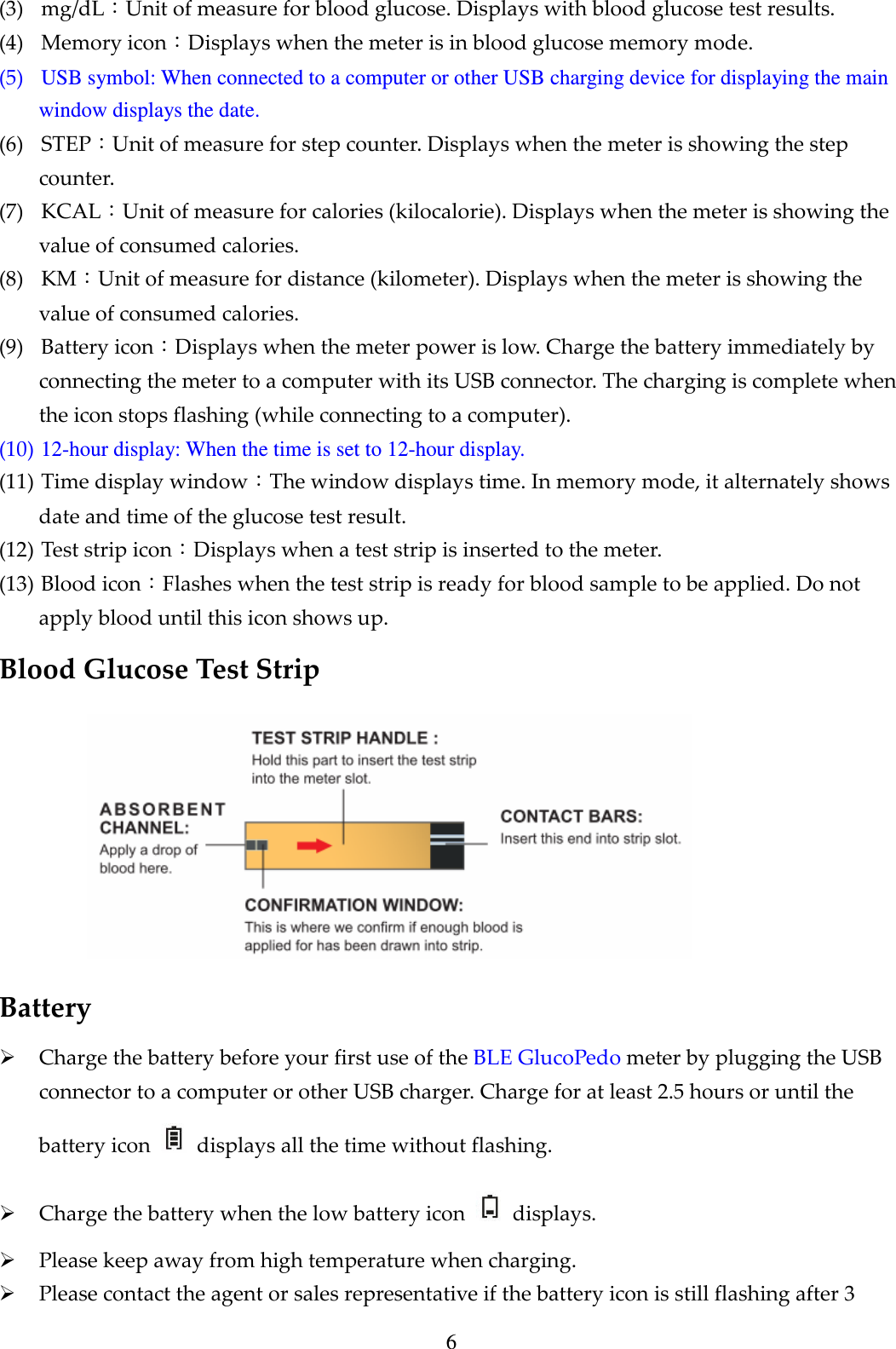
6 (3) mg/dL:Unit of measure for blood glucose. Displays with blood glucose test results.   (4) Memory icon:Displays when the meter is in blood glucose memory mode. (5) USB symbol: When connected to a computer or other USB charging device for displaying the main window displays the date. (6) STEP:Unit of measure for step counter. Displays when the meter is showing the step counter. (7) KCAL:Unit of measure for calories (kilocalorie). Displays when the meter is showing the value of consumed calories. (8) KM:Unit of measure for distance (kilometer). Displays when the meter is showing the value of consumed calories. (9) Battery icon:Displays when the meter power is low. Charge the battery immediately by connecting the meter to a computer with its USB connector. The charging is complete when the icon stops flashing (while connecting to a computer). (10) 12-hour display: When the time is set to 12-hour display. (11) Time display window:The window displays time. In memory mode, it alternately shows date and time of the glucose test result. (12) Test strip icon:Displays when a test strip is inserted to the meter. (13) Blood icon:Flashes when the test strip is ready for blood sample to be applied. Do not apply blood until this icon shows up. Blood Glucose Test Strip    Battery  Charge the battery before your first use of the BLE GlucoPedo meter by plugging the USB connector to a computer or other USB charger. Charge for at least 2.5 hours or until the battery icon    displays all the time without flashing.  Charge the battery when the low battery icon    displays.  Please keep away from high temperature when charging.  Please contact the agent or sales representative if the battery icon is still flashing after 3
7 hours charging.  The battery of this product is not intended to be changed.
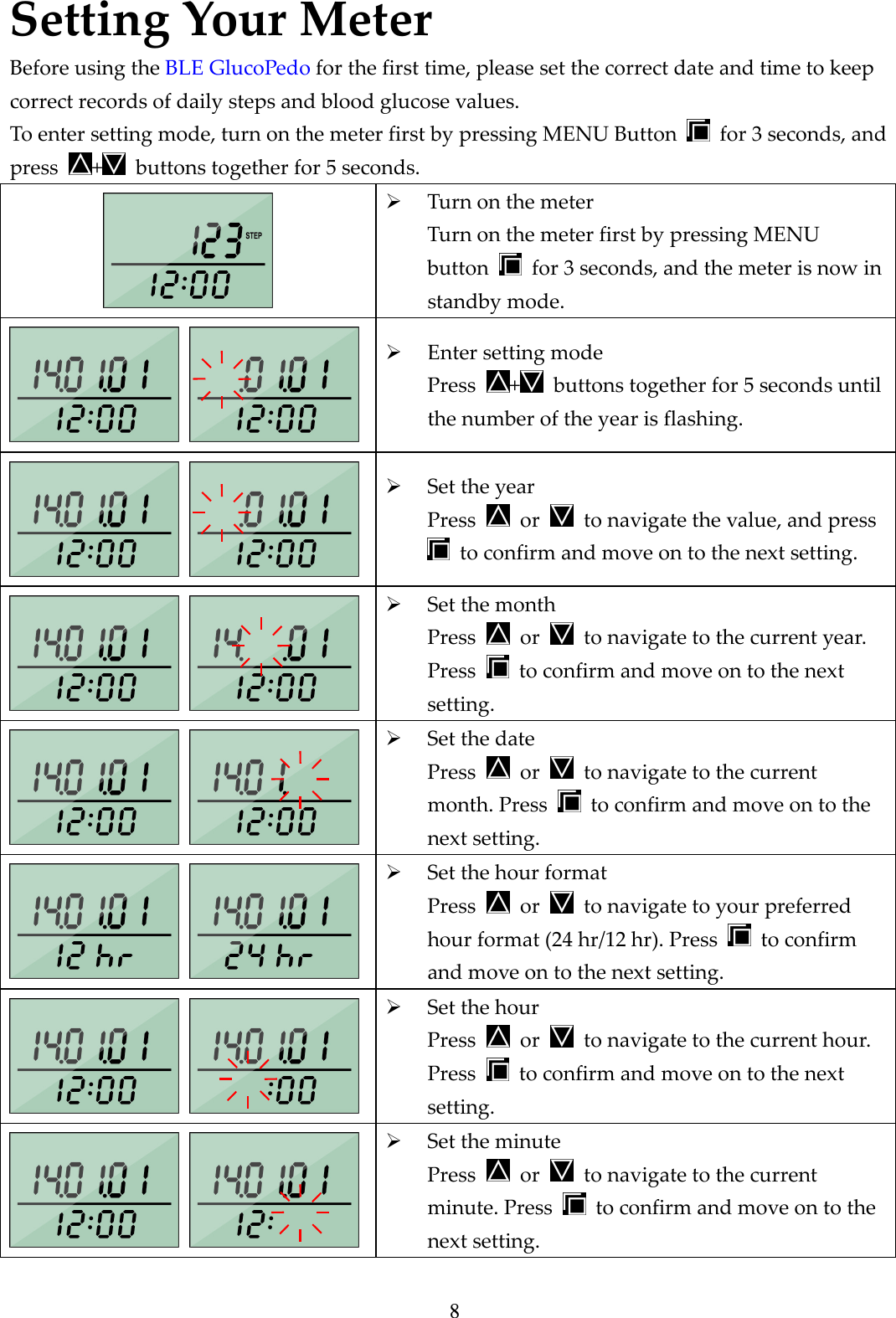
8 Setting Your Meter Before using the BLE GlucoPedo for the first time, please set the correct date and time to keep correct records of daily steps and blood glucose values. To enter setting mode, turn on the meter first by pressing MENU Button    for 3 seconds, and press  +   buttons together for 5 seconds.   Turn on the meter Turn on the meter first by pressing MENU button    for 3 seconds, and the meter is now in standby mode.     Enter setting mode Press  +   buttons together for 5 seconds until the number of the year is flashing.     Set the year Press    or    to navigate the value, and press   to confirm and move on to the next setting.     Set the month Press    or    to navigate to the current year. Press    to confirm and move on to the next setting.      Set the date Press    or    to navigate to the current month. Press    to confirm and move on to the next setting.     Set the hour format Press    or    to navigate to your preferred hour format (24 hr/12 hr). Press    to confirm and move on to the next setting.      Set the hour Press    or    to navigate to the current hour. Press    to confirm and move on to the next setting.     Set the minute Press    or    to navigate to the current minute. Press    to confirm and move on to the next setting.
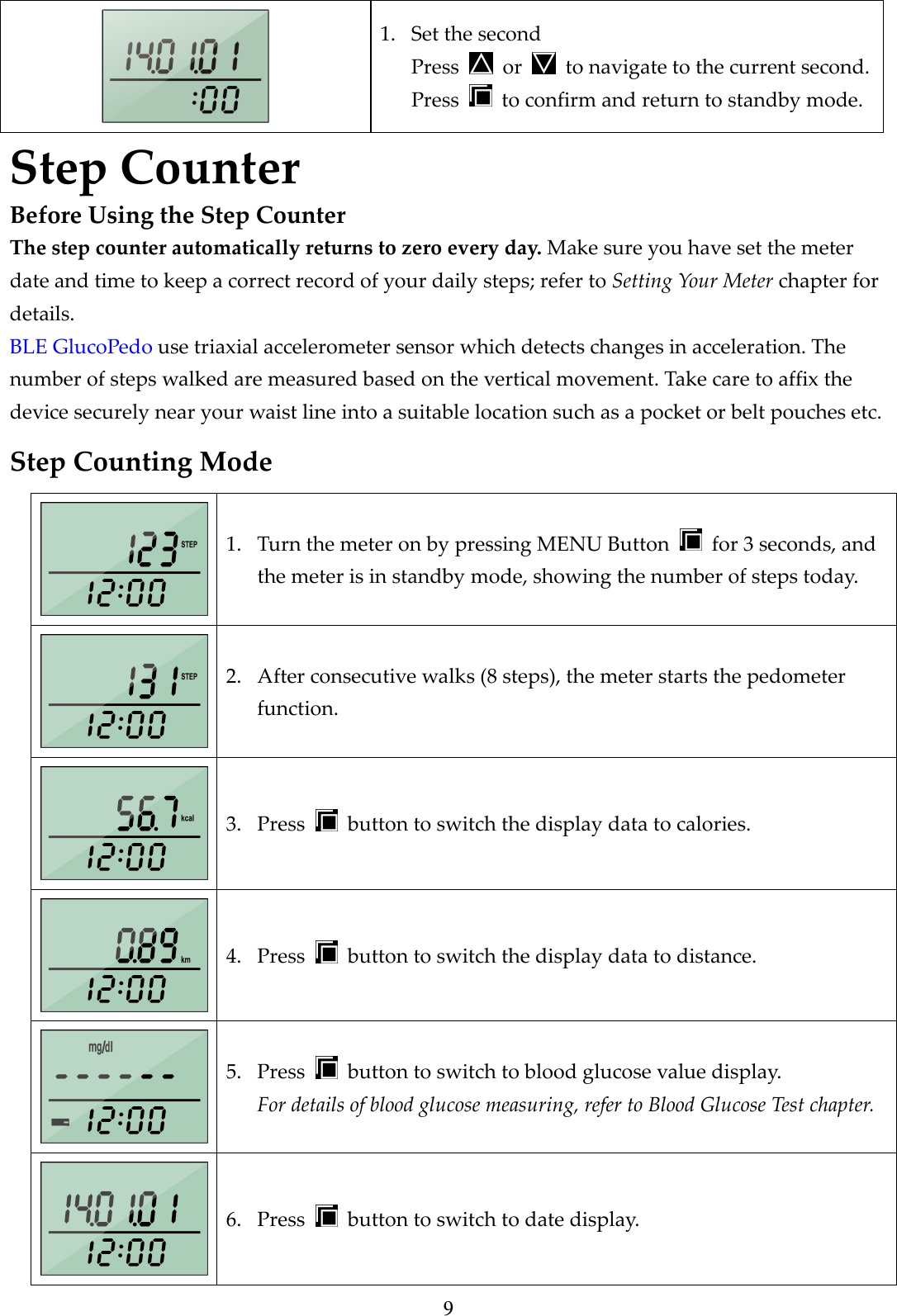
9  1. Set the second Press    or    to navigate to the current second. Press    to confirm and return to standby mode. Step Counter Before Using the Step Counter The step counter automatically returns to zero every day. Make sure you have set the meter date and time to keep a correct record of your daily steps; refer to Setting Your Meter chapter for details. BLE GlucoPedo use triaxial accelerometer sensor which detects changes in acceleration. The number of steps walked are measured based on the vertical movement. Take care to affix the device securely near your waist line into a suitable location such as a pocket or belt pouches etc. Step Counting Mode  1. Turn the meter on by pressing MENU Button    for 3 seconds, and the meter is in standby mode, showing the number of steps today.  2. After consecutive walks (8 steps), the meter starts the pedometer function.  3. Press    button to switch the display data to calories.  4. Press    button to switch the display data to distance.  5. Press    button to switch to blood glucose value display. For details of blood glucose measuring, refer to Blood Glucose Test chapter.  6. Press    button to switch to date display.
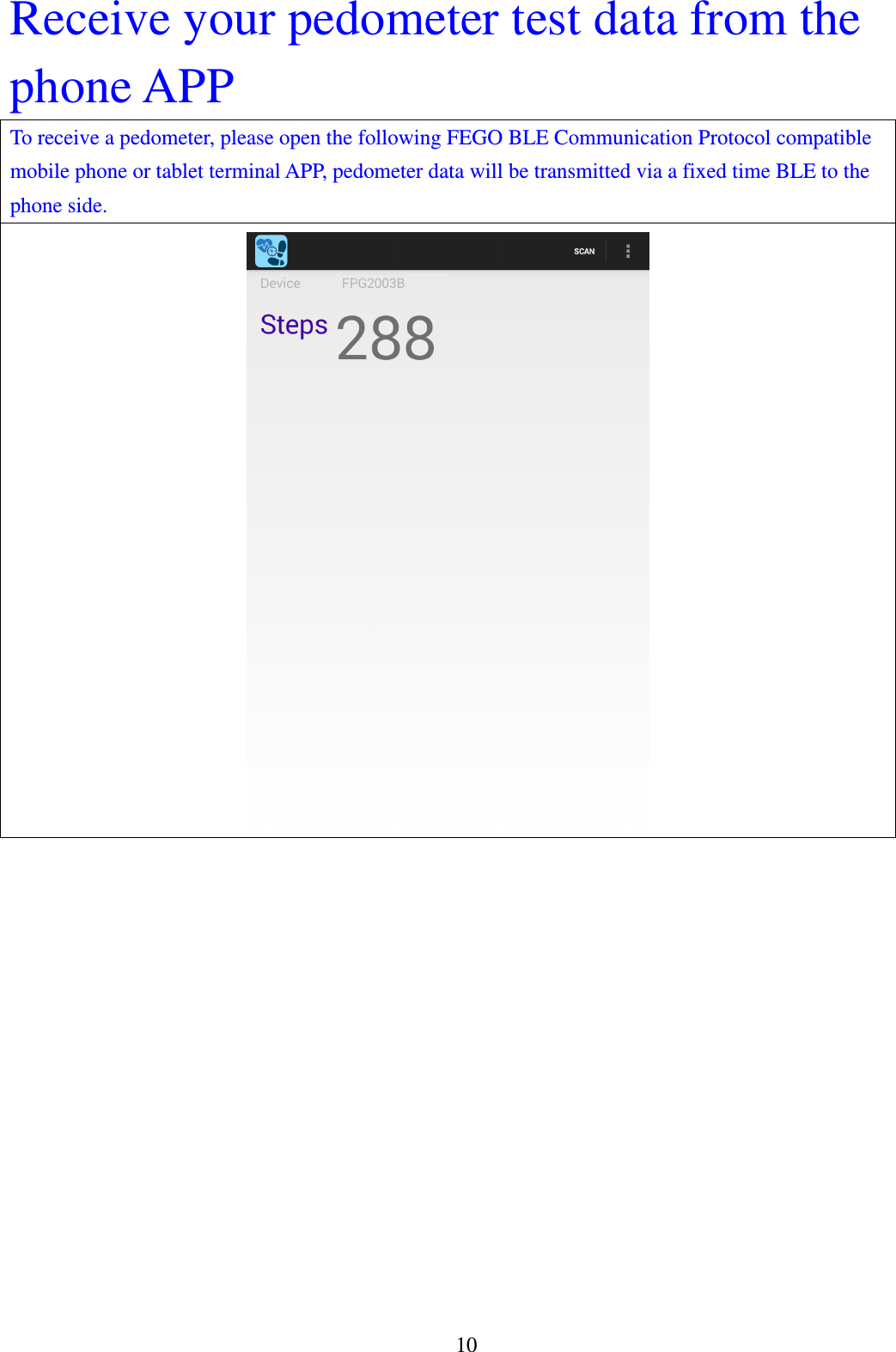
10 Receive your pedometer test data from the phone APP To receive a pedometer, please open the following FEGO BLE Communication Protocol compatible mobile phone or tablet terminal APP, pedometer data will be transmitted via a fixed time BLE to the phone side.
11 Blood Glucose Test Before Using the Blood Glucose Meter Before using the product to test your blood glucose value, read all instructions thoroughly and practice the test by using the control solution. Do all quality control checks as directed. Make sure you have set the correct date and time for the meter; refer to Setting Your Meter chapter for details. CAUTION::::  To measure the accurate glucose value, please do not use test strips and control solutions which are not supplied by the manufacturer.   CAUTION  The measured blood glucose is for reference only. It is not to be used for the diagnosis of diabetes. The user should not take any decision of medical relevance by the meter. Please consult the doctor or medical practitioner for further instructions.  If you experience symptoms that are not consistent with your blood glucose test result, please repeat the test. If the second test result is still inconsistent, please call your doctor immediately.  If the blood contains high concentrations of vitamin C, uric acid or other reducing substances, it may cause inaccurate measurement result. Please consult a physician before testing.  High attitudes above than 3,402 meter (11,161ft) may affect the test result.  Temperatures outside the range of 10°C to 40°C (50°F to 104°F) may affect the test results. Do not test beyond of temperature range.  Important health information  Apply only capillary whole blood sample to test your blood glucose. Applying other substances or plasma, serum will cause wrong results.  Severe dehydration and excessive water loss may cause false low results. If you believe you are suffering from severe dehydration, consult your healthcare professional immediately.  Test results below 60 mg/dL (3.3 mmol/L)*1 indicates low blood glucose (hypoglycemia). Test results greater than 240 mg/dL (13.3 mmol/L)*2 indicates high blood glucose (hyperglycemia).If your results are below 60 mg/dL (3.3 mmol/L) or above 240 mg/dL (13.3 mmol/L), repeat the test, and if the results are still below 60 mg/dL (3.3 mmol/L) or above 240 mg/dL (13.3 mmol/L), consult your healthcare professional immediately.  Inaccurate results may occur in severely hypertensive individuals or patients in shock. Inaccurate low results may occur for individuals experiencing a hyperglycemic-hyperosmolar state, with or without ketosis. Critically ill patients should not be tested with blood glucose meters.  Abnormal red blood cell counts (hematocrit level below 20% or above 60%) may cause false
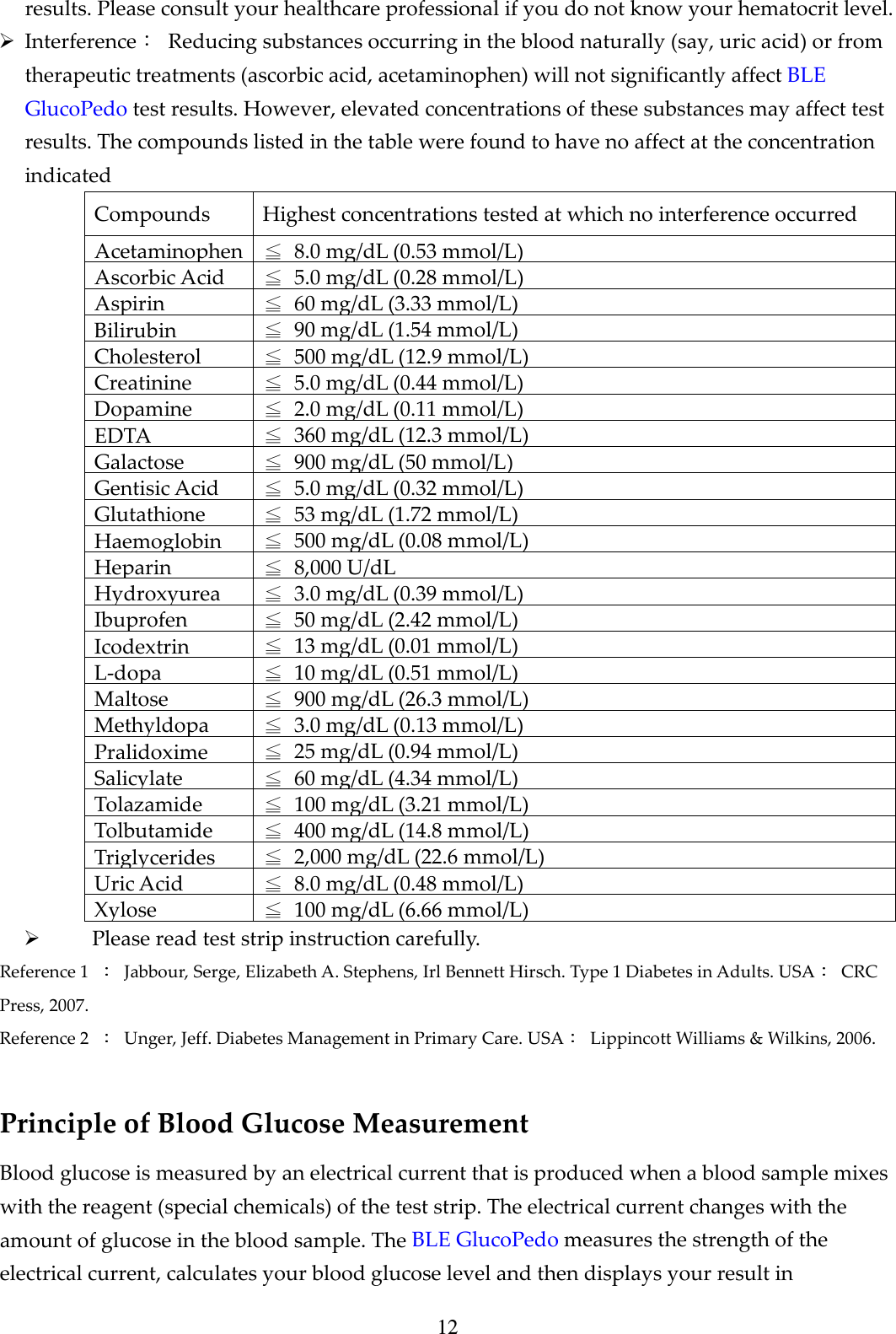
12 results. Please consult your healthcare professional if you do not know your hematocrit level.    Interference:  Reducing substances occurring in the blood naturally (say, uric acid) or from therapeutic treatments (ascorbic acid, acetaminophen) will not significantly affect BLE GlucoPedo test results. However, elevated concentrations of these substances may affect test results. The compounds listed in the table were found to have no affect at the concentration indicated Compounds  Highest concentrations tested at which no interference occurred Acetaminophen ≦  8.0 mg/dL (0.53 mmol/L) Ascorbic Acid  ≦  5.0 mg/dL (0.28 mmol/L) Aspirin ≦  60 mg/dL (3.33 mmol/L) Bilirubin ≦  90 mg/dL (1.54 mmol/L) Cholesterol ≦  500 mg/dL (12.9 mmol/L) Creatinine ≦  5.0 mg/dL (0.44 mmol/L) Dopamine ≦  2.0 mg/dL (0.11 mmol/L) EDTA ≦  360 mg/dL (12.3 mmol/L) Galactose ≦  900 mg/dL (50 mmol/L) Gentisic Acid ≦  5.0 mg/dL (0.32 mmol/L) Glutathione ≦  53 mg/dL (1.72 mmol/L) Haemoglobin ≦  500 mg/dL (0.08 mmol/L) Heparin ≦  8,000 U/dL Hydroxyurea ≦  3.0 mg/dL (0.39 mmol/L) Ibuprofen ≦  50 mg/dL (2.42 mmol/L) Icodextrin ≦  13 mg/dL (0.01 mmol/L) L-dopa ≦  10 mg/dL (0.51 mmol/L) Maltose ≦  900 mg/dL (26.3 mmol/L) Methyldopa ≦  3.0 mg/dL (0.13 mmol/L) Pralidoxime ≦  25 mg/dL (0.94 mmol/L) Salicylate ≦  60 mg/dL (4.34 mmol/L) Tolazamide ≦  100 mg/dL (3.21 mmol/L) Tolbutamide ≦  400 mg/dL (14.8 mmol/L) Triglycerides ≦  2,000 mg/dL (22.6 mmol/L) Uric Acid ≦  8.0 mg/dL (0.48 mmol/L) Xylose ≦  100 mg/dL (6.66 mmol/L)  Please read test strip instruction carefully. Reference 1    Jabbour, Serge, Elizabeth A. Stephens, Irl Bennett Hirsch. Type 1 Diabetes in Adults. USA   CRC Press, 2007. Reference 2    Unger, Jeff. Diabetes Management in Primary Care. USA   Lippincott Williams & Wilkins, 2006.  Principle of Blood Glucose Measurement Blood glucose is measured by an electrical current that is produced when a blood sample mixes with the reagent (special chemicals) of the test strip. The electrical current changes with the amount of glucose in the blood sample. The BLE GlucoPedo measures the strength of the electrical current, calculates your blood glucose level and then displays your result in
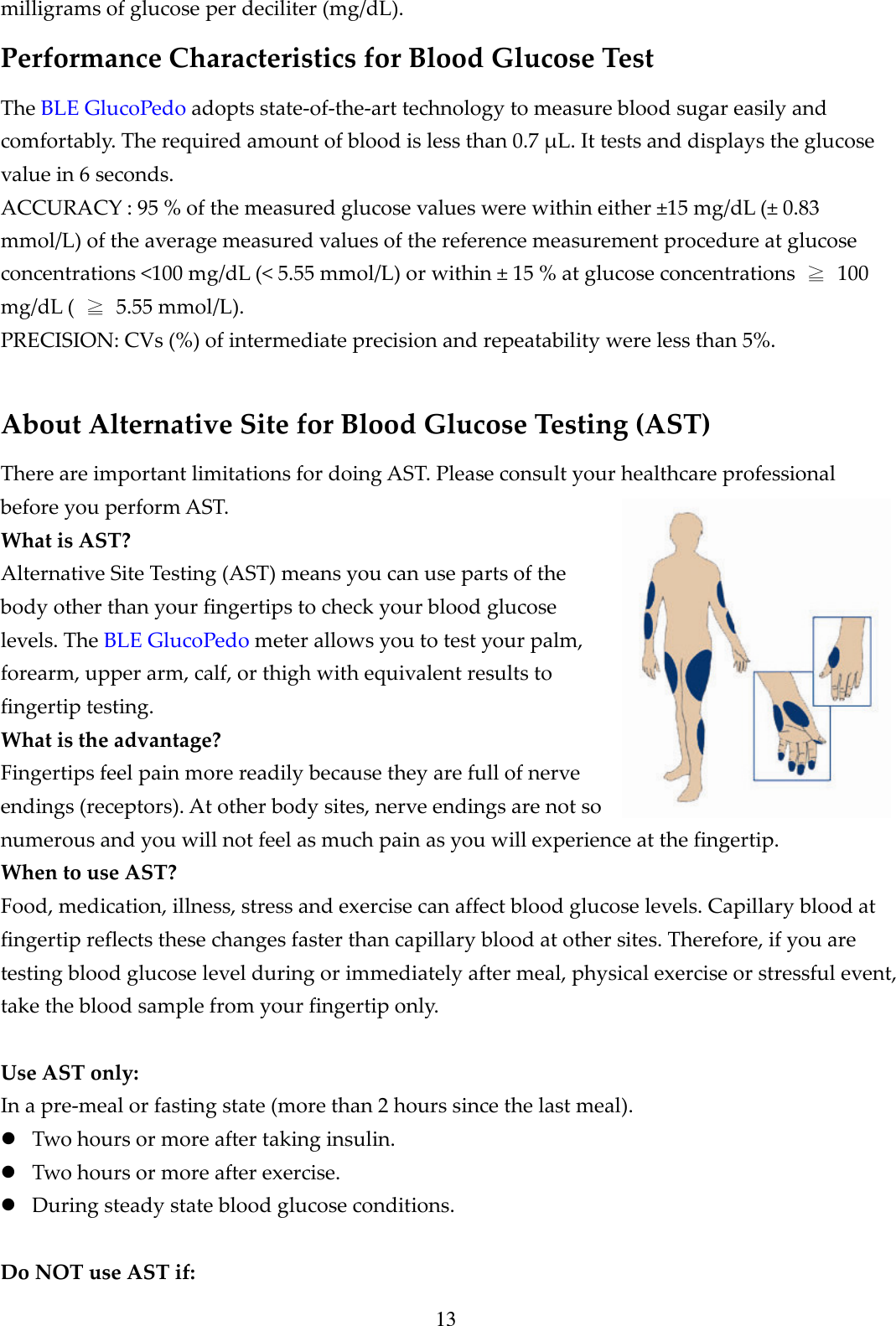
13 milligrams of glucose per deciliter (mg/dL). Performance Characteristics for Blood Glucose Test The BLE GlucoPedo adopts state-of-the-art technology to measure blood sugar easily and comfortably. The required amount of blood is less than 0.7 μL. It tests and displays the glucose value in 6 seconds. ACCURACY : 95 % of the measured glucose values were within either ±15 mg/dL (± 0.83 mmol/L) of the average measured values of the reference measurement procedure at glucose concentrations <100 mg/dL (< 5.55 mmol/L) or within ± 15 % at glucose concentrations  ≧  100 mg/dL (  ≧  5.55 mmol/L).   PRECISION: CVs (%) of intermediate precision and repeatability were less than 5%.  About Alternative Site for Blood Glucose Testing (AST) There are important limitations for doing AST. Please consult your healthcare professional before you perform AST. What is AST? Alternative Site Testing (AST) means you can use parts of the body other than your fingertips to check your blood glucose levels. The BLE GlucoPedo meter allows you to test your palm, forearm, upper arm, calf, or thigh with equivalent results to fingertip testing. What is the advantage? Fingertips feel pain more readily because they are full of nerve endings (receptors). At other body sites, nerve endings are not so numerous and you will not feel as much pain as you will experience at the fingertip. When to use AST? Food, medication, illness, stress and exercise can affect blood glucose levels. Capillary blood at fingertip reflects these changes faster than capillary blood at other sites. Therefore, if you are testing blood glucose level during or immediately after meal, physical exercise or stressful event, take the blood sample from your fingertip only.  Use AST only: In a pre-meal or fasting state (more than 2 hours since the last meal).  Two hours or more after taking insulin.  Two hours or more after exercise.  During steady state blood glucose conditions.  Do NOT use AST if:
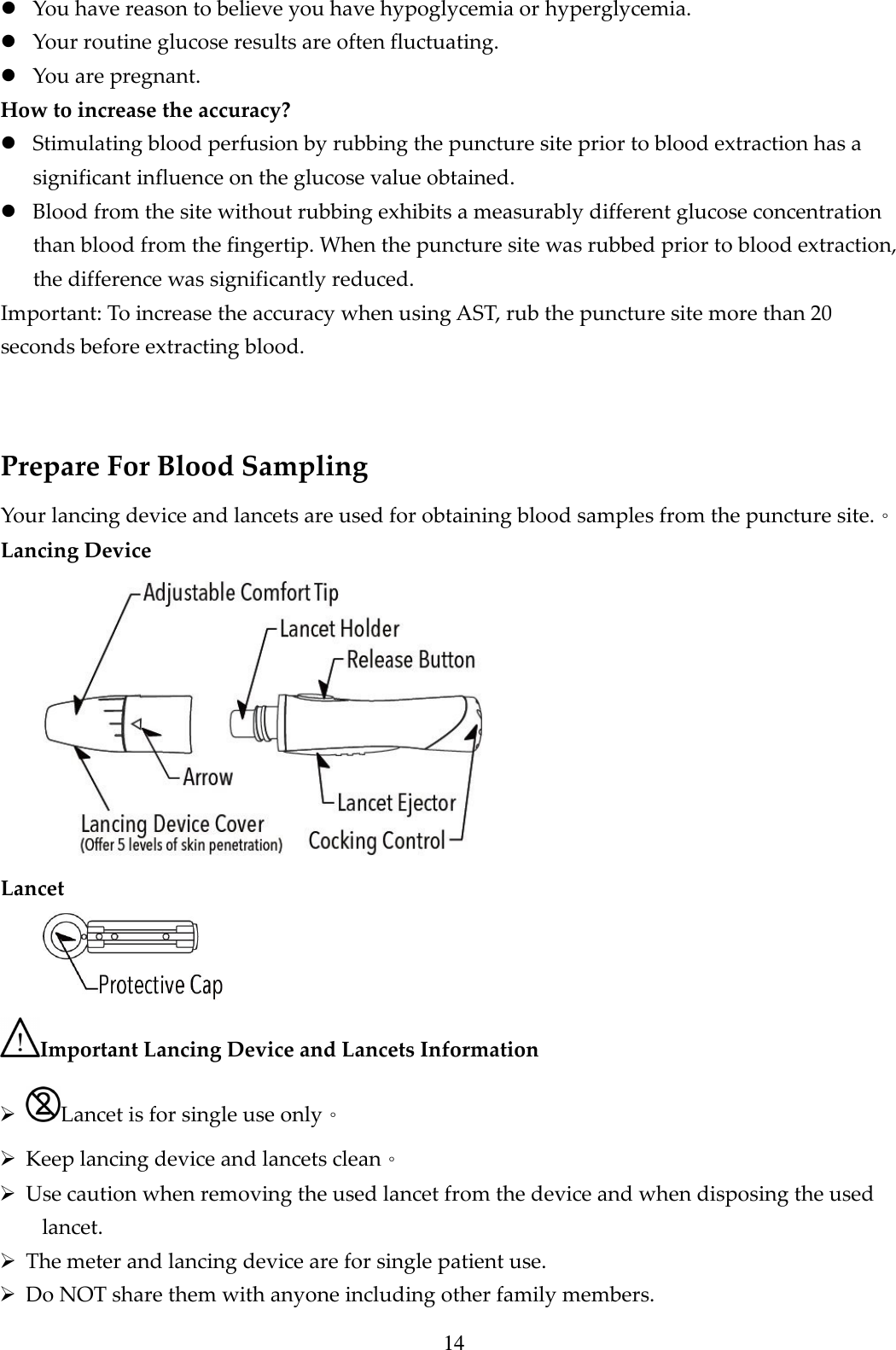
14  You have reason to believe you have hypoglycemia or hyperglycemia.  Your routine glucose results are often fluctuating.  You are pregnant. How to increase the accuracy?  Stimulating blood perfusion by rubbing the puncture site prior to blood extraction has a significant influence on the glucose value obtained.  Blood from the site without rubbing exhibits a measurably different glucose concentration than blood from the fingertip. When the puncture site was rubbed prior to blood extraction, the difference was significantly reduced. Important: To increase the accuracy when using AST, rub the puncture site more than 20 seconds before extracting blood.  Prepare For Blood Sampling Your lancing device and lancets are used for obtaining blood samples from the puncture site.。 Lancing Device  Lancet  Important Lancing Device and Lancets Information  Lancet is for single use only。  Keep lancing device and lancets clean。  Use caution when removing the used lancet from the device and when disposing the used lancet.  The meter and lancing device are for single patient use.    Do NOT share them with anyone including other family members.
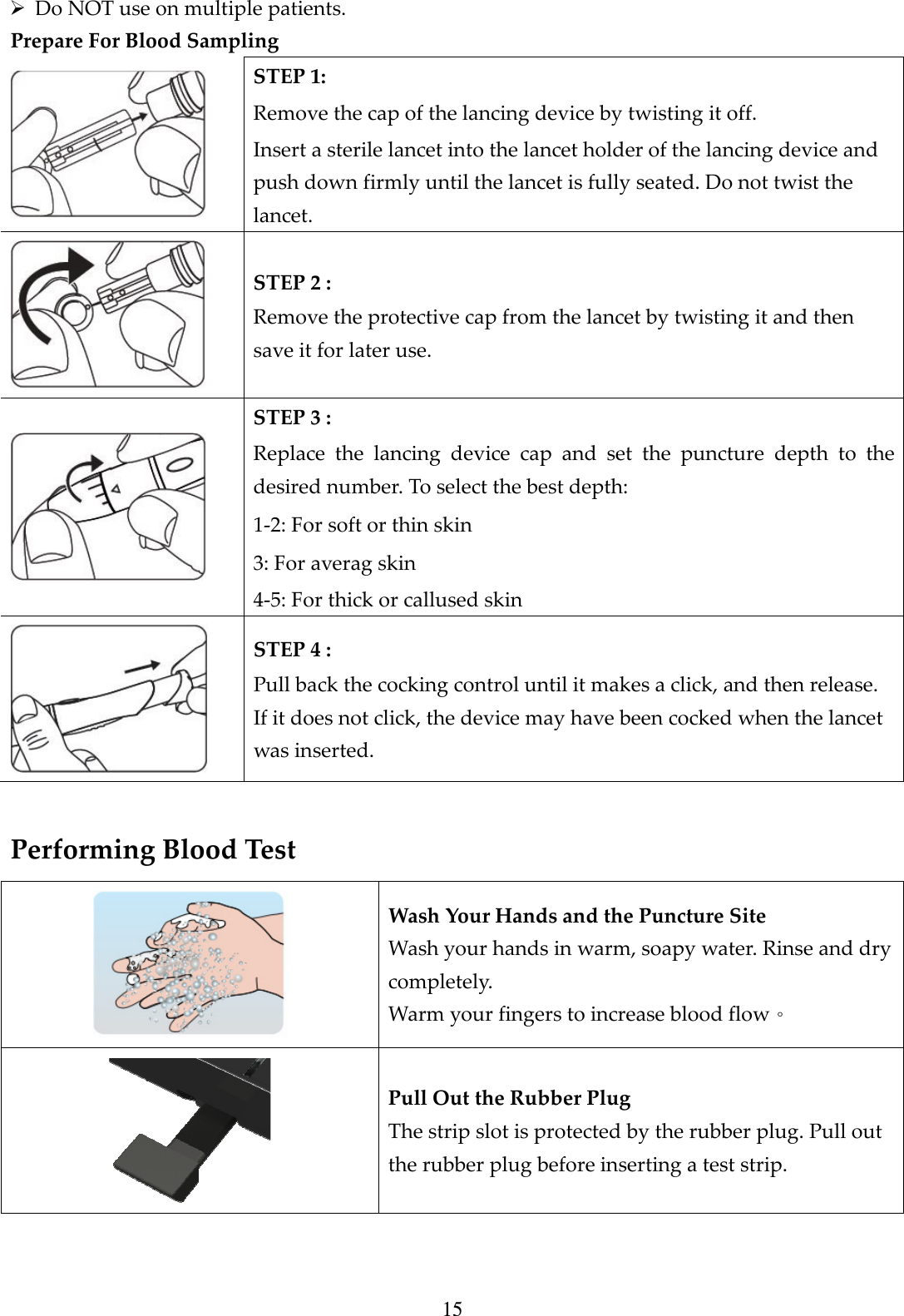
15  Do NOT use on multiple patients.   Prepare For Blood Sampling  STEP 1:   Remove the cap of the lancing device by twisting it off.   Insert a sterile lancet into the lancet holder of the lancing device and push down firmly until the lancet is fully seated. Do not twist the lancet.  STEP 2 :   Remove the protective cap from the lancet by twisting it and then save it for later use.  STEP 3 :   Replace  the  lancing  device  cap  and  set  the  puncture  depth  to  the desired number. To select the best depth:   1-2: For soft or thin skin   3: For averag skin   4-5: For thick or callused skin  STEP 4 :   Pull back the cocking control until it makes a click, and then release. If it does not click, the device may have been cocked when the lancet was inserted.  Performing Blood Test  Wash Your Hands and the Puncture Site Wash your hands in warm, soapy water. Rinse and dry completely. Warm your fingers to increase blood flow。  Pull Out the Rubber Plug The strip slot is protected by the rubber plug. Pull out the rubber plug before inserting a test strip.
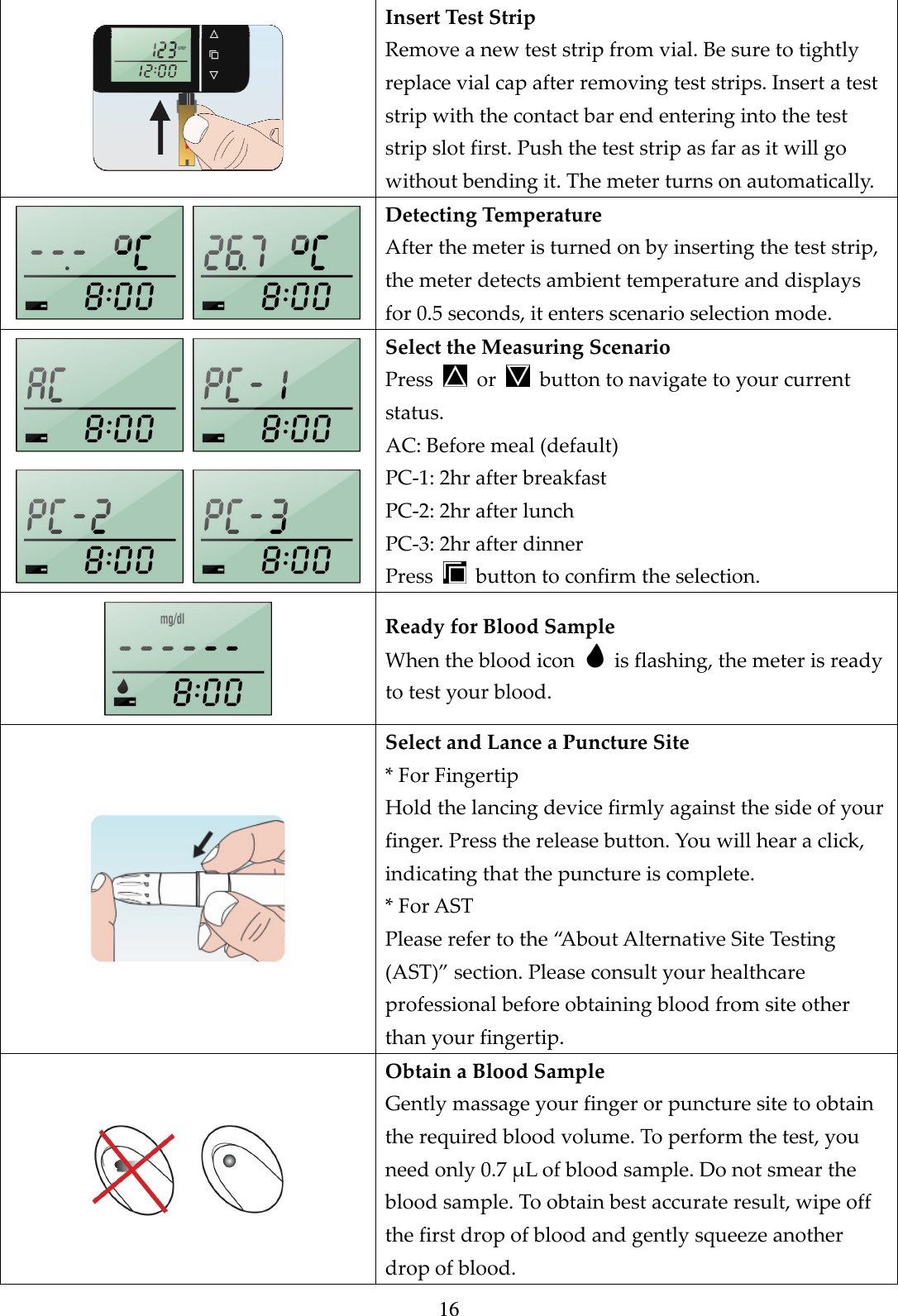
16  Insert Test Strip Remove a new test strip from vial. Be sure to tightly replace vial cap after removing test strips. Insert a test strip with the contact bar end entering into the test strip slot first. Push the test strip as far as it will go without bending it. The meter turns on automatically.   Detecting Temperature After the meter is turned on by inserting the test strip, the meter detects ambient temperature and displays for 0.5 seconds, it enters scenario selection mode.     Select the Measuring Scenario Press    or    button to navigate to your current status. AC: Before meal (default) PC-1: 2hr after breakfast PC-2: 2hr after lunch PC-3: 2hr after dinner   Press    button to confirm the selection.  Ready for Blood Sample When the blood icon    is flashing, the meter is ready to test your blood.  Select and Lance a Puncture Site * For Fingertip Hold the lancing device firmly against the side of your finger. Press the release button. You will hear a click, indicating that the puncture is complete. * For AST Please refer to the “About Alternative Site Testing (AST)” section. Please consult your healthcare professional before obtaining blood from site other than your fingertip.  Obtain a Blood Sample Gently massage your finger or puncture site to obtain the required blood volume. To perform the test, you need only 0.7 μL of blood sample. Do not smear the blood sample. To obtain best accurate result, wipe off the first drop of blood and gently squeeze another drop of blood.
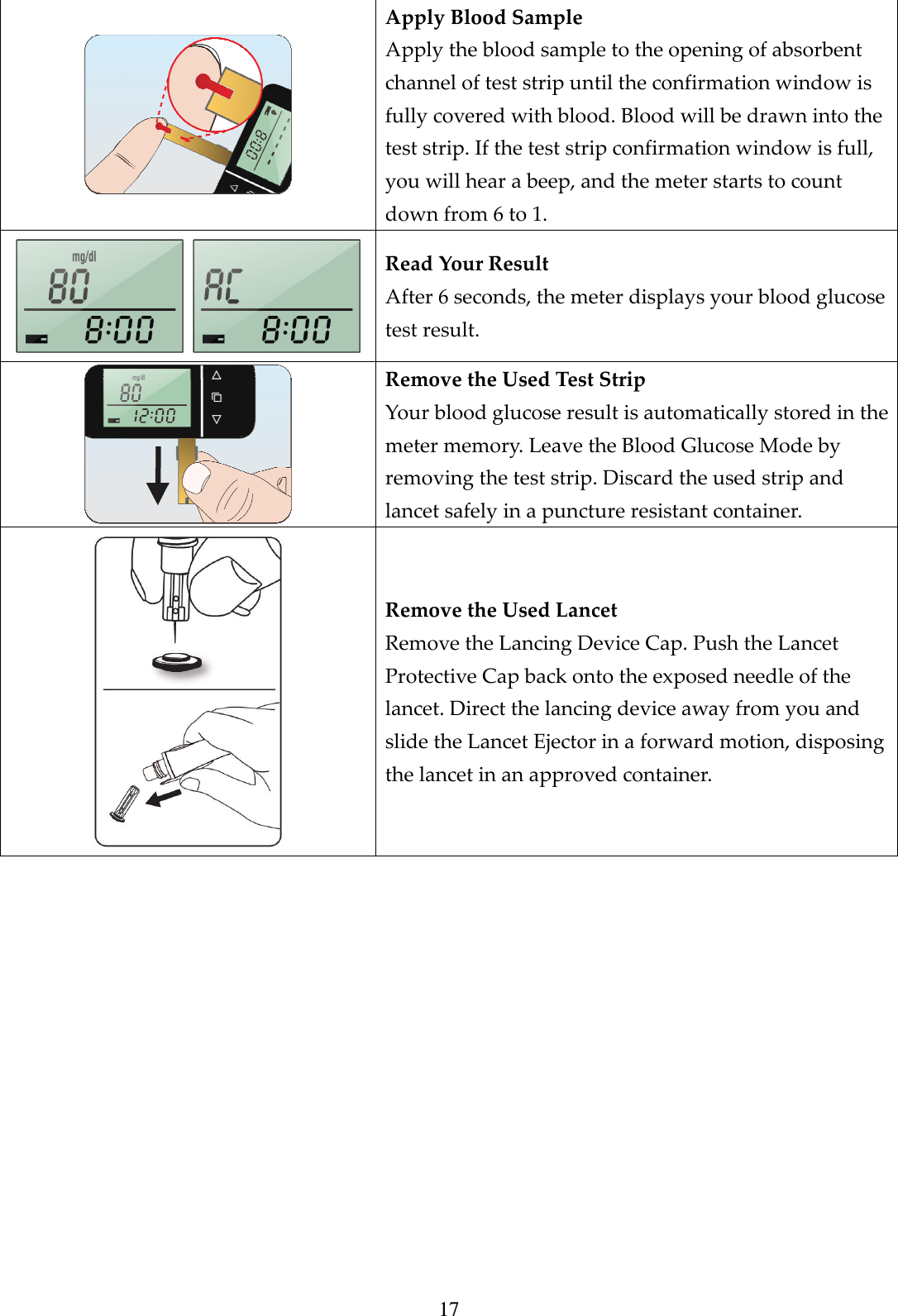
17  Apply Blood Sample Apply the blood sample to the opening of absorbent channel of test strip until the confirmation window is fully covered with blood. Blood will be drawn into the test strip. If the test strip confirmation window is full, you will hear a beep, and the meter starts to count down from 6 to 1.     Read Your Result After 6 seconds, the meter displays your blood glucose test result.  Remove the Used Test Strip Your blood glucose result is automatically stored in the meter memory. Leave the Blood Glucose Mode by removing the test strip. Discard the used strip and lancet safely in a puncture resistant container.  Remove the Used Lancet Remove the Lancing Device Cap. Push the Lancet Protective Cap back onto the exposed needle of the lancet. Direct the lancing device away from you and slide the Lancet Ejector in a forward motion, disposing the lancet in an approved container.
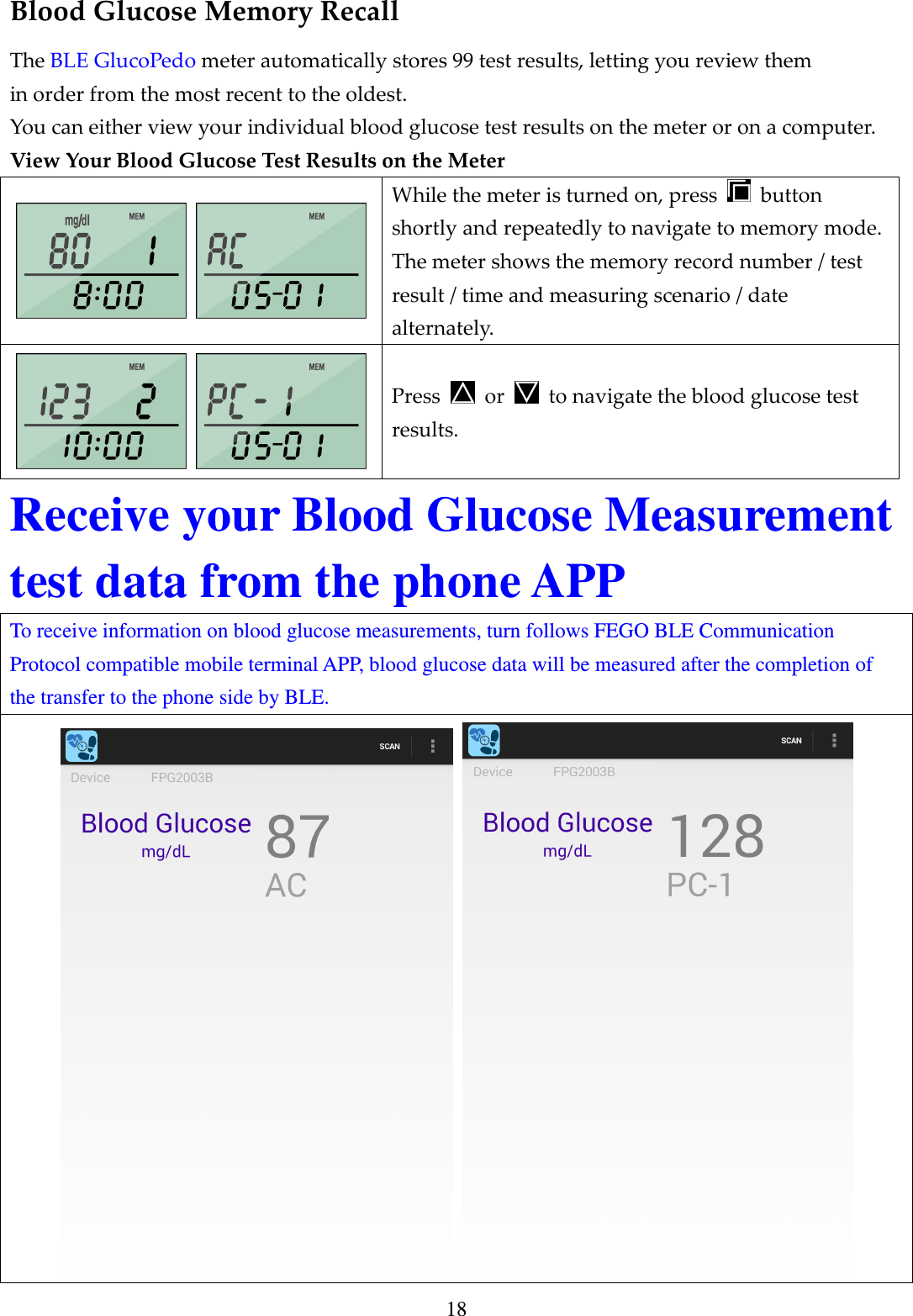
18 Blood Glucose Memory Recall The BLE GlucoPedo meter automatically stores 99 test results, letting you review them in order from the most recent to the oldest.   You can either view your individual blood glucose test results on the meter or on a computer. View Your Blood Glucose Test Results on the Meter   While the meter is turned on, press    button shortly and repeatedly to navigate to memory mode. The meter shows the memory record number / test result / time and measuring scenario / date alternately.   Press    or    to navigate the blood glucose test results. Receive your Blood Glucose Measurement test data from the phone APP To receive information on blood glucose measurements, turn follows FEGO BLE Communication Protocol compatible mobile terminal APP, blood glucose data will be measured after the completion of the transfer to the phone side by BLE.
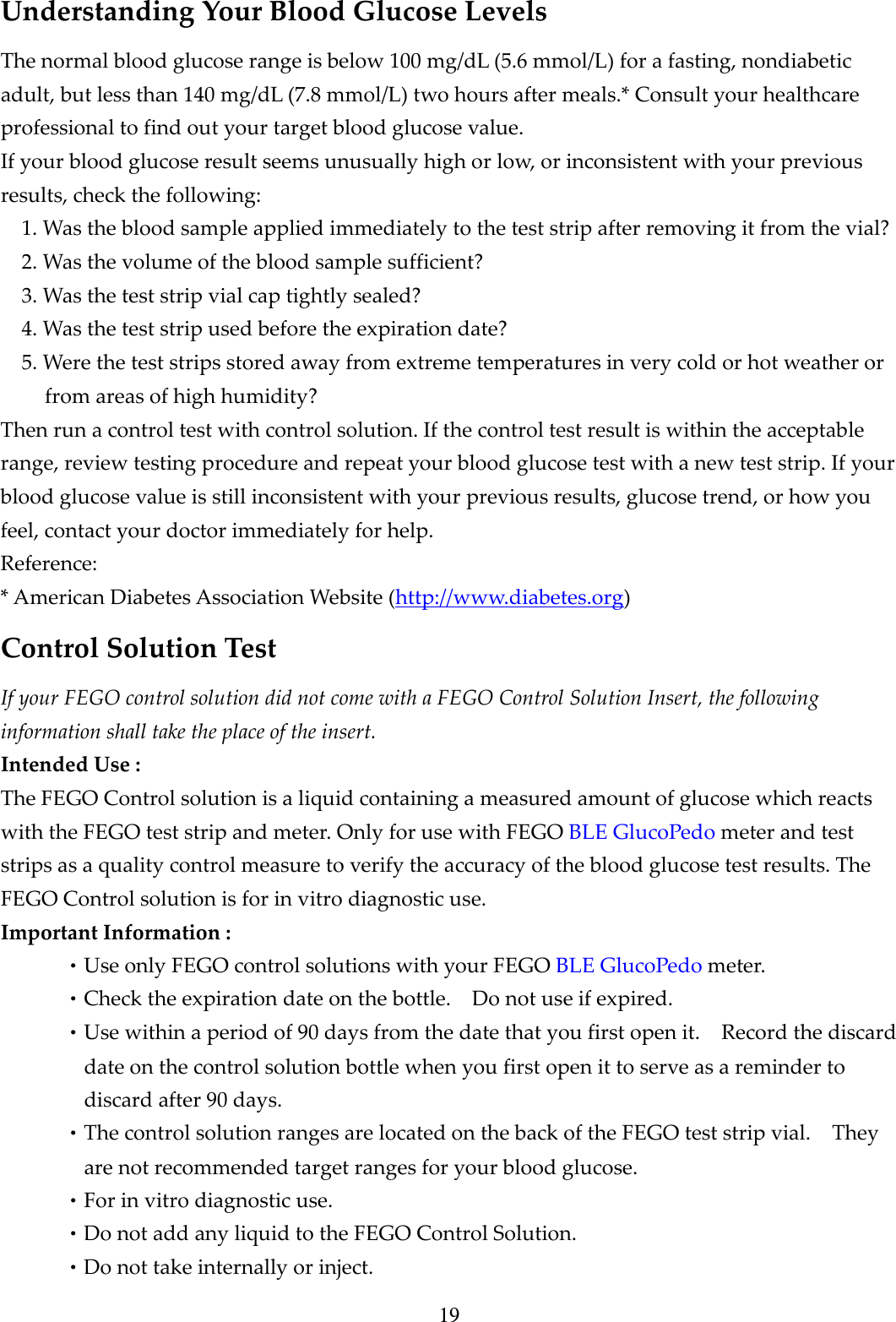
19 Understanding Your Blood Glucose Levels The normal blood glucose range is below 100 mg/dL (5.6 mmol/L) for a fasting, nondiabetic adult, but less than 140 mg/dL (7.8 mmol/L) two hours after meals.* Consult your healthcare professional to find out your target blood glucose value. If your blood glucose result seems unusually high or low, or inconsistent with your previous results, check the following: 1. Was the blood sample applied immediately to the test strip after removing it from the vial? 2. Was the volume of the blood sample sufficient? 3. Was the test strip vial cap tightly sealed? 4. Was the test strip used before the expiration date? 5. Were the test strips stored away from extreme temperatures in very cold or hot weather or from areas of high humidity? Then run a control test with control solution. If the control test result is within the acceptable range, review testing procedure and repeat your blood glucose test with a new test strip. If your blood glucose value is still inconsistent with your previous results, glucose trend, or how you feel, contact your doctor immediately for help. Reference: * American Diabetes Association Website (http://www.diabetes.org) Control Solution Test If your FEGO control solution did not come with a FEGO Control Solution Insert, the following information shall take the place of the insert. Intended Use : The FEGO Control solution is a liquid containing a measured amount of glucose which reacts with the FEGO test strip and meter. Only for use with FEGO BLE GlucoPedo meter and test strips as a quality control measure to verify the accuracy of the blood glucose test results. The FEGO Control solution is for in vitro diagnostic use. Important Information : •Use only FEGO control solutions with your FEGO BLE GlucoPedo meter. •Check the expiration date on the bottle.    Do not use if expired. •Use within a period of 90 days from the date that you first open it.    Record the discard date on the control solution bottle when you first open it to serve as a reminder to discard after 90 days. •The control solution ranges are located on the back of the FEGO test strip vial.    They are not recommended target ranges for your blood glucose. •For in vitro diagnostic use. •Do not add any liquid to the FEGO Control Solution. •Do not take internally or inject.
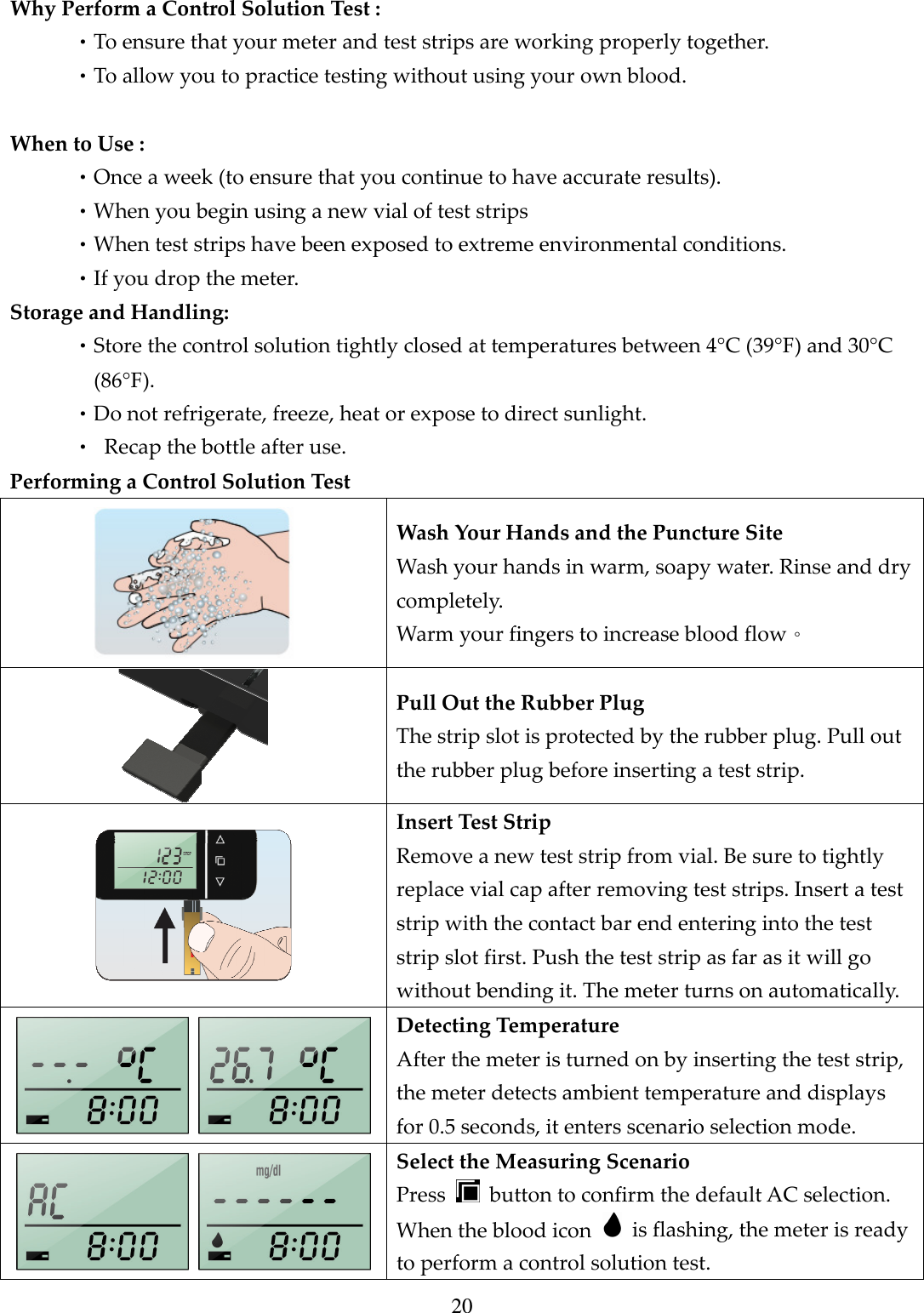
20  Why Perform a Control Solution Test : •To ensure that your meter and test strips are working properly together. •To allow you to practice testing without using your own blood.  When to Use : •Once a week (to ensure that you continue to have accurate results). •When you begin using a new vial of test strips •When test strips have been exposed to extreme environmental conditions. •If you drop the meter. Storage and Handling: •Store the control solution tightly closed at temperatures between 4°C (39°F) and 30°C (86°F).     •Do not refrigerate, freeze, heat or expose to direct sunlight. •  Recap the bottle after use. Performing a Control Solution Test  Wash Your Hands and the Puncture Site Wash your hands in warm, soapy water. Rinse and dry completely. Warm your fingers to increase blood flow。  Pull Out the Rubber Plug The strip slot is protected by the rubber plug. Pull out the rubber plug before inserting a test strip.  Insert Test Strip Remove a new test strip from vial. Be sure to tightly replace vial cap after removing test strips. Insert a test strip with the contact bar end entering into the test strip slot first. Push the test strip as far as it will go without bending it. The meter turns on automatically.   Detecting Temperature After the meter is turned on by inserting the test strip, the meter detects ambient temperature and displays for 0.5 seconds, it enters scenario selection mode.   Select the Measuring Scenario Press    button to confirm the default AC selection. When the blood icon    is flashing, the meter is ready to perform a control solution test.
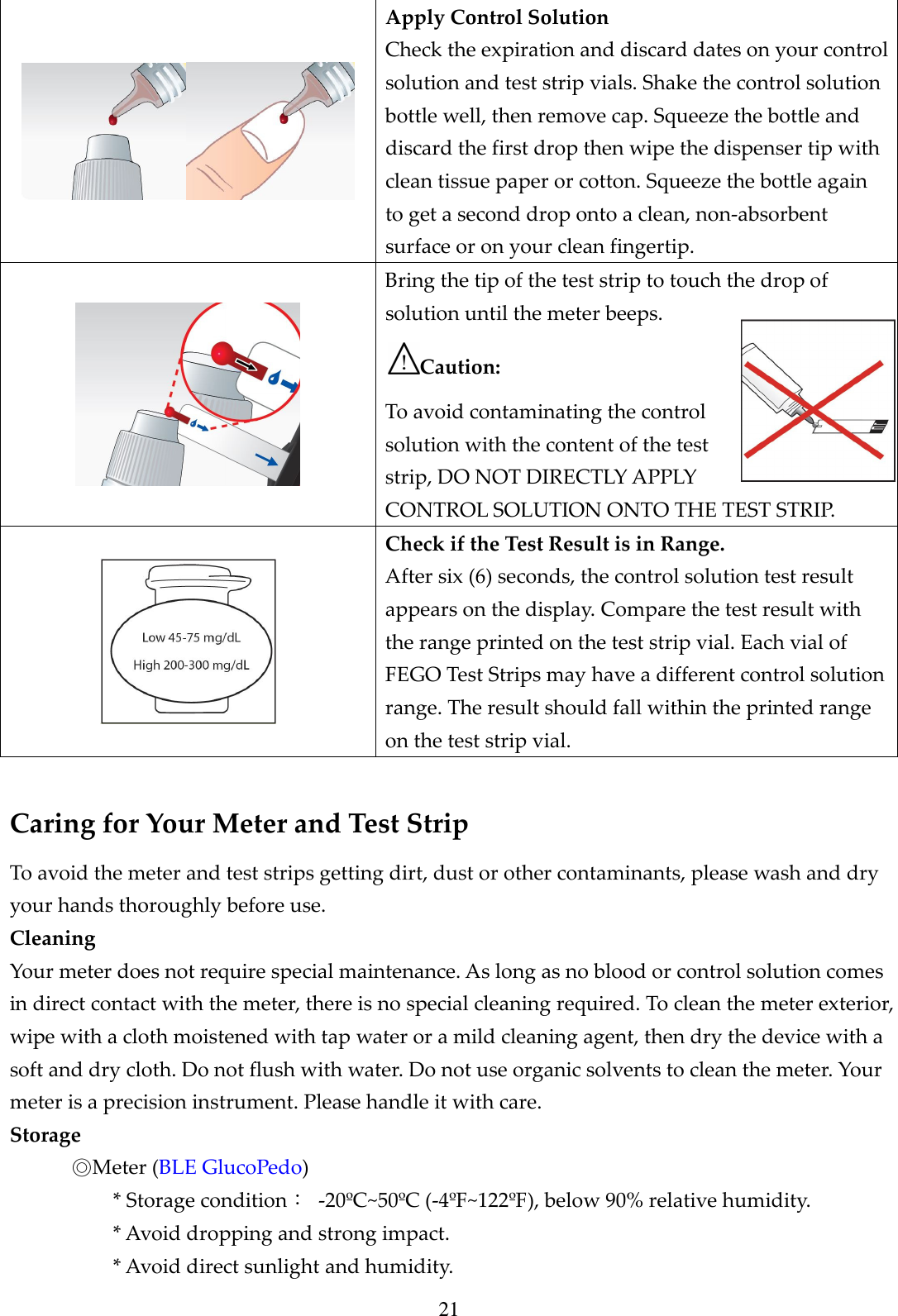
21  Apply Control Solution Check the expiration and discard dates on your control solution and test strip vials. Shake the control solution bottle well, then remove cap. Squeeze the bottle and discard the first drop then wipe the dispenser tip with clean tissue paper or cotton. Squeeze the bottle again to get a second drop onto a clean, non-absorbent surface or on your clean fingertip.  Bring the tip of the test strip to touch the drop of solution until the meter beeps. Caution:   To avoid contaminating the control solution with the content of the test strip, DO NOT DIRECTLY APPLY CONTROL SOLUTION ONTO THE TEST STRIP.  Check if the Test Result is in Range. After six (6) seconds, the control solution test result appears on the display. Compare the test result with the range printed on the test strip vial. Each vial of FEGO Test Strips may have a different control solution range. The result should fall within the printed range on the test strip vial.  Caring for Your Meter and Test Strip To avoid the meter and test strips getting dirt, dust or other contaminants, please wash and dry your hands thoroughly before use. Cleaning Your meter does not require special maintenance. As long as no blood or control solution comes in direct contact with the meter, there is no special cleaning required. To clean the meter exterior, wipe with a cloth moistened with tap water or a mild cleaning agent, then dry the device with a soft and dry cloth. Do not flush with water. Do not use organic solvents to clean the meter. Your meter is a precision instrument. Please handle it with care. Storage ◎Meter (BLE GlucoPedo)   * Storage condition:  -20ºC~50ºC (-4ºF~122ºF), below 90% relative humidity. * Avoid dropping and strong impact. * Avoid direct sunlight and humidity.
22     ◎Test Strip * Storage condition:  4ºC~40ºC (39ºF~104ºF), and 10~85% relative humidity. Do not refrigerate. * Store your test strips in their original vial only. Do not transfer to other container. * Store test strip packages in a cool and dry place. Keep away from direct sunlight and heat. * After removing a test strip from the vial, immediately replace the vial cap and close it tightly. * You may touch the test strip anywhere with clean, dry hands when removing it from the vial or inserting it into the meter. * Use each test strip immediately after removing it from the vial. * Do not bend, cut, or alter a test strip in any way. * Keep the strip vial away from children since the cap and the test strip can be a potential choking hazard. If swallowed, please seek medical assistance immediately.     ◎Control solution * Storage condition:  Store the control solution tightly closed at temperatures 4ºC(39ºF )~30ºC (86ºF). * Do not refrigerate. Bluetooth 4.0 BLE function 1.Power OFF state under BLE disabled. Under 2.Power ON state, BLE enabled. 3. APP may end through FEGO BLE Communication Protocol compatible phone or tablet, receive information pedometer and blood glucose measurement data. 4. Through FEGO BLE Communication Protocol compatible phone or tablet terminal APP, set the timer on and time off BLE function.  BLE function turned off, the  pattern is not displayed.  BLE  feature  enabled,  the  display    represents  the  connection  with  your phone or tablet, the pattern   blinking feature turned wait connection.  When  the  function  is  activated  and  BLE  connection,  display,  said information being transferred to the phone or tablet.
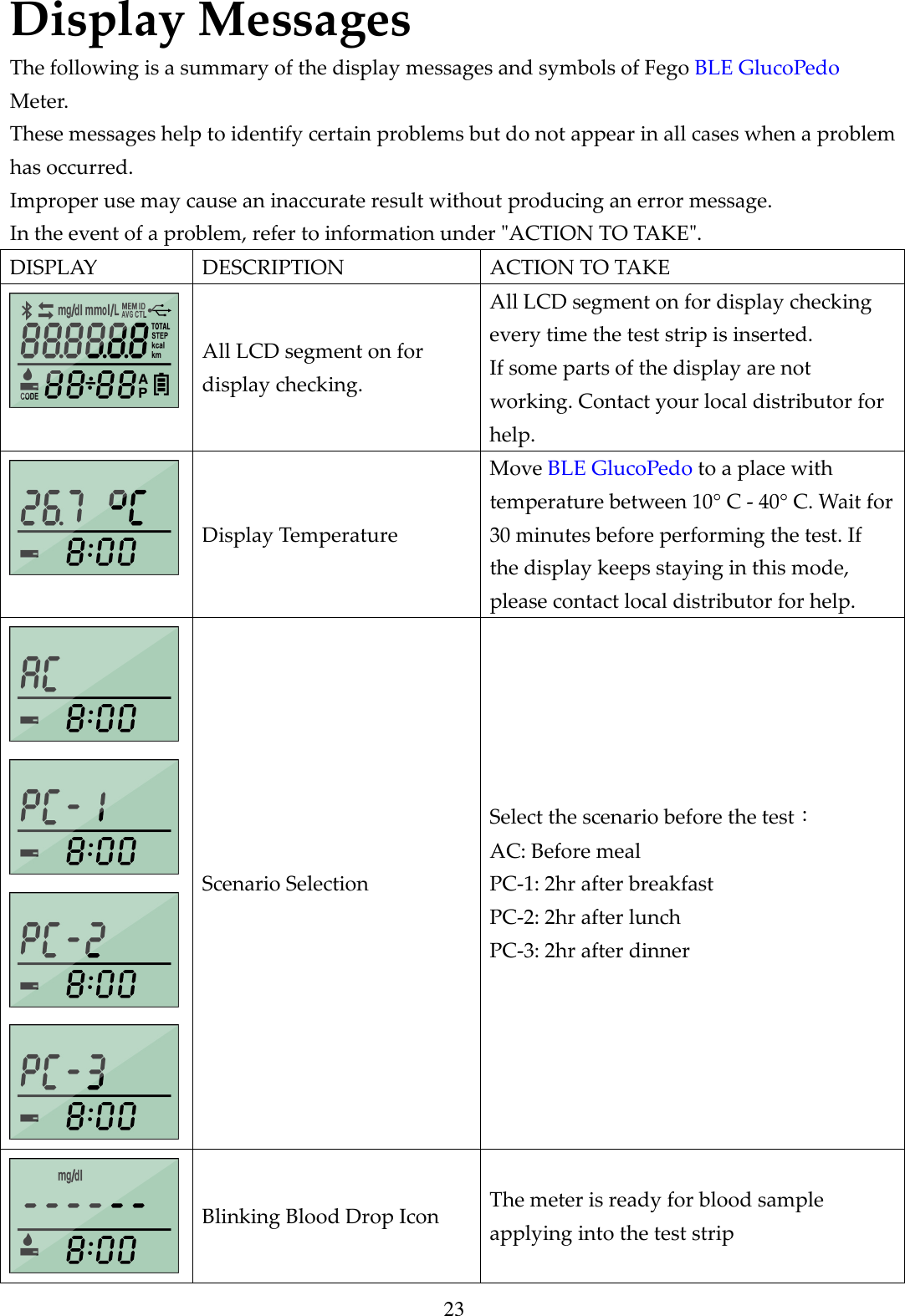
23 Display Messages The following is a summary of the display messages and symbols of Fego BLE GlucoPedo Meter. These messages help to identify certain problems but do not appear in all cases when a problem has occurred. Improper use may cause an inaccurate result without producing an error message. In the event of a problem, refer to information under "ACTION TO TAKE". DISPLAY  DESCRIPTION  ACTION TO TAKE  All LCD segment on for display checking. All LCD segment on for display checking every time the test strip is inserted. If some parts of the display are not working. Contact your local distributor for help.  Display Temperature Move BLE GlucoPedo to a place with temperature between 10° C - 40° C. Wait for 30 minutes before performing the test. If the display keeps staying in this mode, please contact local distributor for help.     Scenario Selection Select the scenario before the test: AC: Before meal PC-1: 2hr after breakfast PC-2: 2hr after lunch PC-3: 2hr after dinner  Blinking Blood Drop Icon  The meter is ready for blood sample applying into the test strip
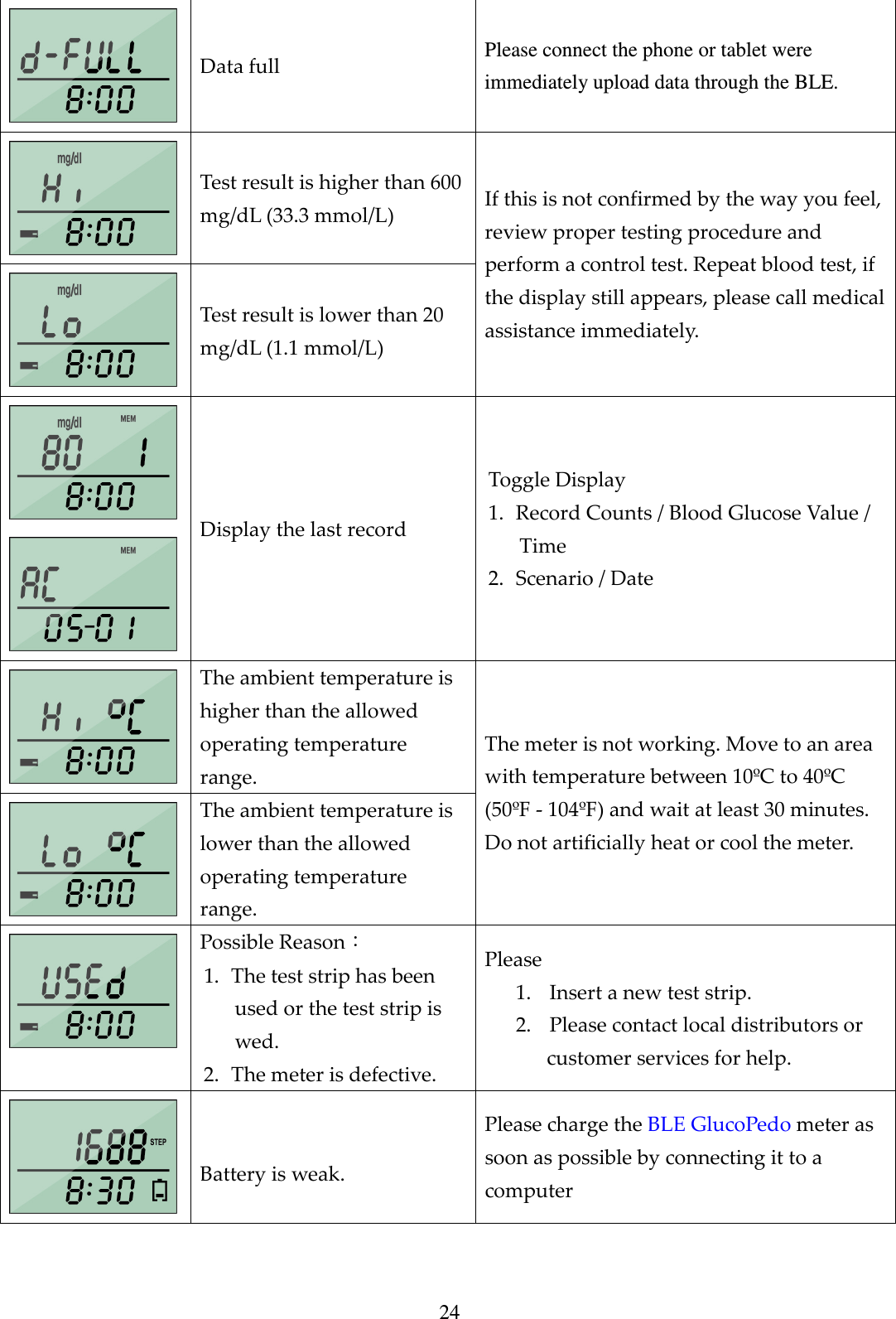
24  Data full  Please connect the phone or tablet were immediately upload data through the BLE.  Test result is higher than 600 mg/dL (33.3 mmol/L)  Test result is lower than 20 mg/dL (1.1 mmol/L) If this is not confirmed by the way you feel, review proper testing procedure and perform a control test. Repeat blood test, if the display still appears, please call medical assistance immediately.   Display the last record Toggle Display 1. Record Counts / Blood Glucose Value / Time 2. Scenario / Date  The ambient temperature is higher than the allowed operating temperature range.  The ambient temperature is lower than the allowed operating temperature range. The meter is not working. Move to an area with temperature between 10ºC to 40ºC (50ºF - 104ºF) and wait at least 30 minutes. Do not artificially heat or cool the meter.  Possible Reason: 1. The test strip has been used or the test strip is wed. 2. The meter is defective. Please 1. Insert a new test strip. 2. Please contact local distributors or customer services for help.   Battery is weak. Please charge the BLE GlucoPedo meter as soon as possible by connecting it to a computer
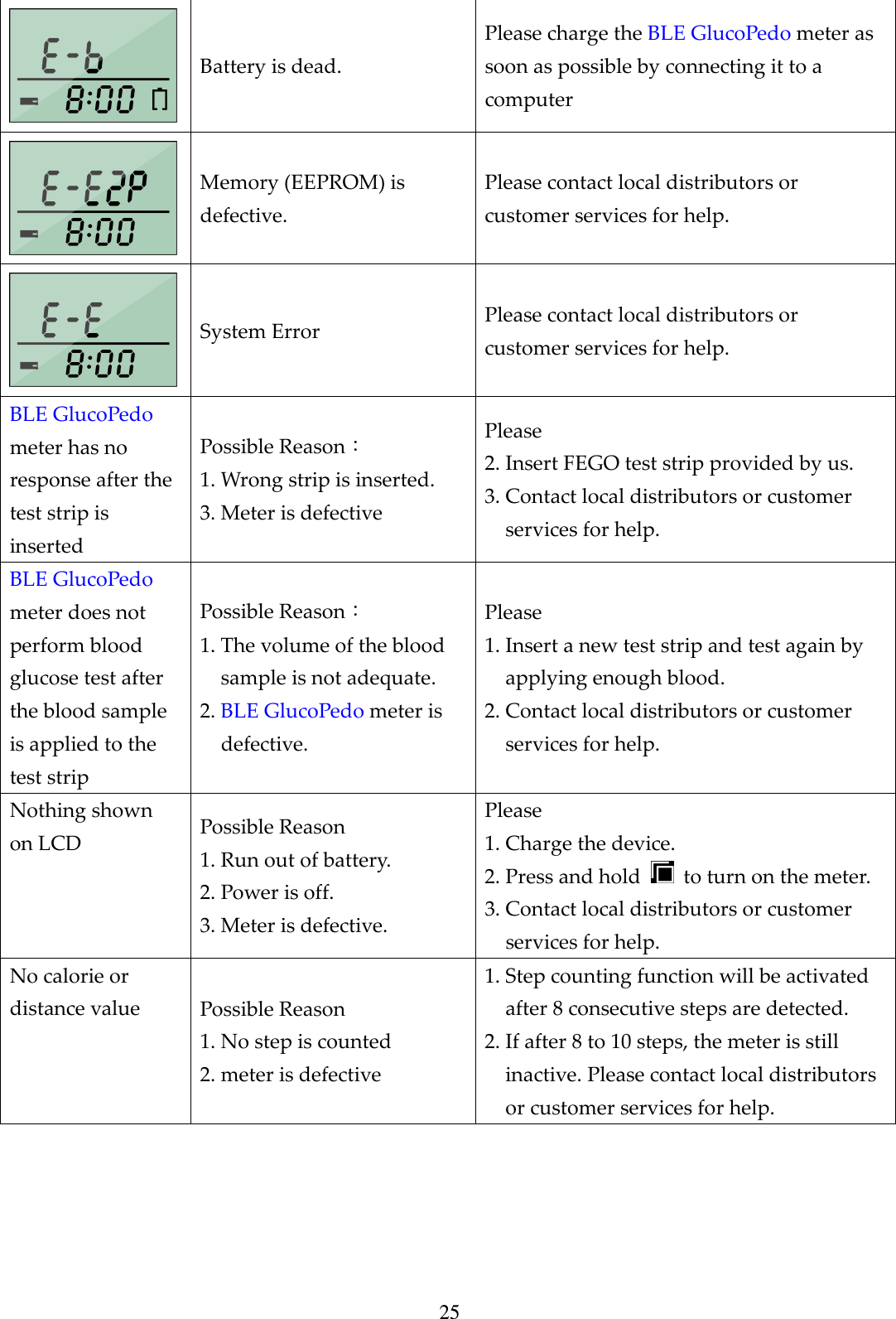
25  Battery is dead. Please charge the BLE GlucoPedo meter as soon as possible by connecting it to a computer  Memory (EEPROM) is defective. Please contact local distributors or customer services for help.  System Error  Please contact local distributors or customer services for help. BLE GlucoPedo meter has no response after the test strip is inserted Possible Reason: 1. Wrong strip is inserted. 3. Meter is defective Please 2. Insert FEGO test strip provided by us. 3. Contact local distributors or customer services for help. BLE GlucoPedo meter does not perform blood glucose test after the blood sample is applied to the test strip Possible Reason: 1. The volume of the blood sample is not adequate. 2. BLE GlucoPedo meter is defective. Please 1. Insert a new test strip and test again by applying enough blood. 2. Contact local distributors or customer services for help. Nothing shown on LCD  Possible Reason 1. Run out of battery. 2. Power is off. 3. Meter is defective. Please 1. Charge the device. 2. Press and hold    to turn on the meter. 3. Contact local distributors or customer services for help. No calorie or distance value  Possible Reason 1. No step is counted 2. meter is defective 1. Step counting function will be activated after 8 consecutive steps are detected. 2. If after 8 to 10 steps, the meter is still inactive. Please contact local distributors or customer services for help.
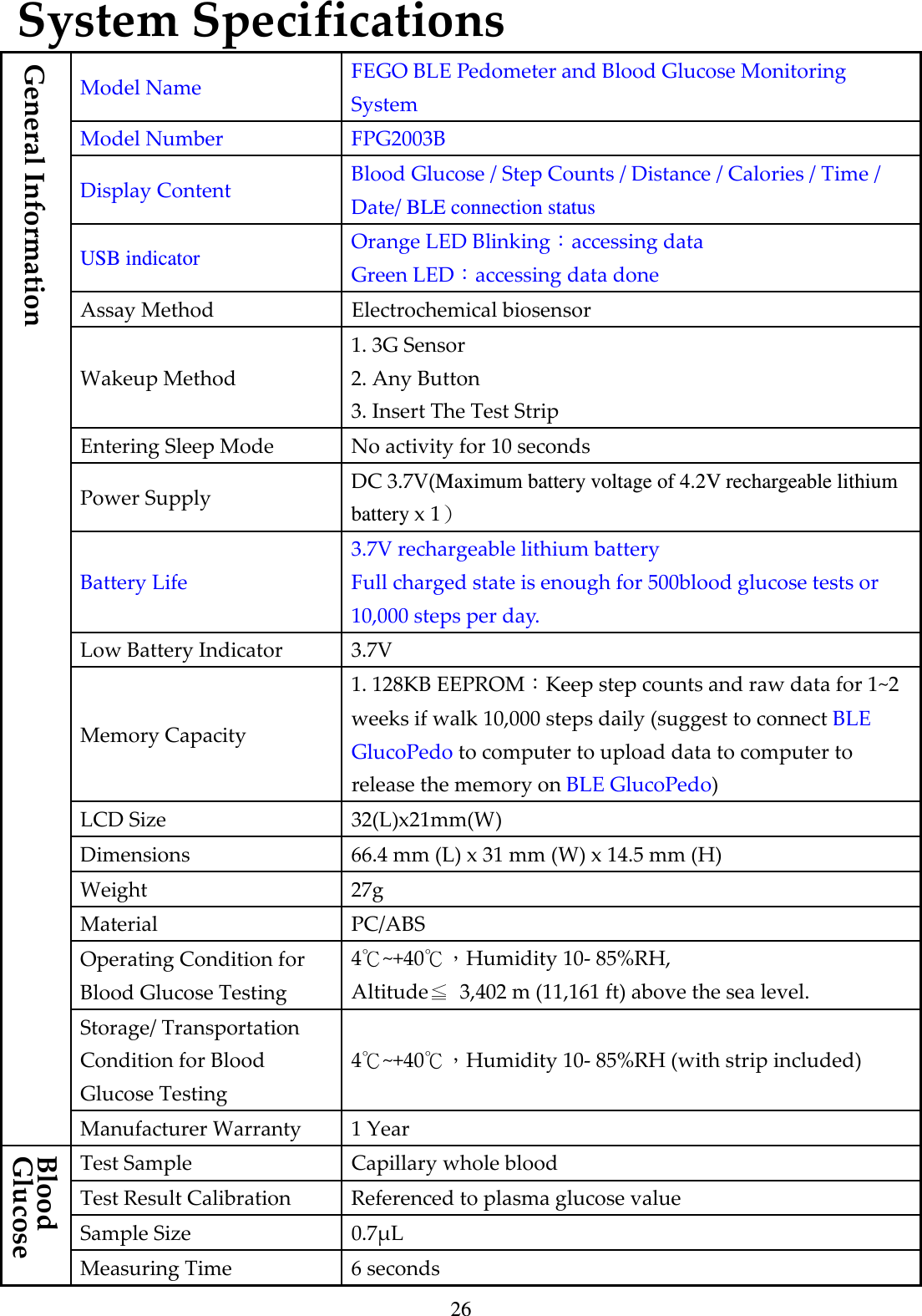
26 System Specifications Model Name  FEGO BLE Pedometer and Blood Glucose Monitoring System Model Number  FPG2003B Display Content  Blood Glucose / Step Counts / Distance / Calories / Time / Date/ BLE connection status USB indicator Orange LED Blinking:accessing data Green LED:accessing data done Assay Method  Electrochemical biosensor Wakeup Method 1. 3G Sensor 2. Any Button 3. Insert The Test Strip Entering Sleep Mode  No activity for 10 seconds Power Supply  DC 3.7V(Maximum battery voltage of 4.2V rechargeable lithium battery x 1) Battery Life 3.7V rechargeable lithium battery Full charged state is enough for 500blood glucose tests or 10,000 steps per day.   Low Battery Indicator  3.7V Memory Capacity 1. 128KB EEPROM:Keep step counts and raw data for 1~2 weeks if walk 10,000 steps daily (suggest to connect BLE GlucoPedo to computer to upload data to computer to release the memory on BLE GlucoPedo) LCD Size  32(L)x21mm(W) Dimensions  66.4 mm (L) x 31 mm (W) x 14.5 mm (H) Weight  27g Material  PC/ABS Operating Condition for Blood Glucose Testing 4℃~+40℃,Humidity 10- 85%RH, Altitude≦  3,402 m (11,161 ft) above the sea level. Storage/ Transportation   Condition for Blood Glucose Testing 4℃~+40℃,Humidity 10- 85%RH (with strip included) General Information Manufacturer Warranty  1 Year Test Sample  Capillary whole blood Test Result Calibration  Referenced to plasma glucose value Sample Size  0.7μL Blood Glucose Measuring Time  6 seconds
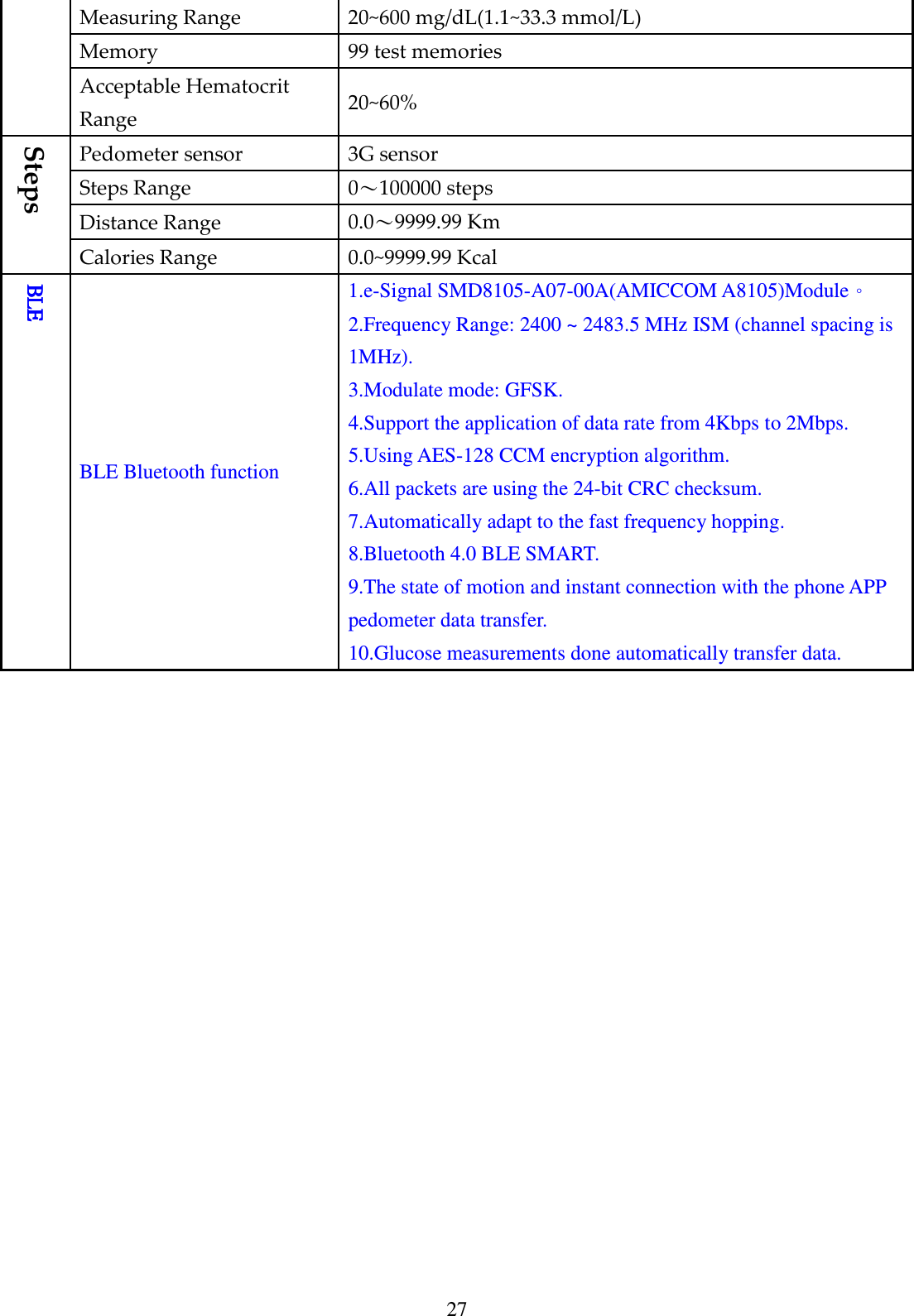
27 Measuring Range  20~600 mg/dL(1.1~33.3 mmol/L) Memory  99 test memories Acceptable Hematocrit Range  20~60% Pedometer sensor  3G sensor Steps Range  0~100000 steps Distance Range  0.0~9999.99 Km Steps Calories Range  0.0~9999.99 Kcal BLEBLEBLEBLE BLE Bluetooth function 1.e-Signal SMD8105-A07-00A(AMICCOM A8105)Module。 2.Frequency Range: 2400 ~ 2483.5 MHz ISM (channel spacing is 1MHz).   3.Modulate mode: GFSK.   4.Support the application of data rate from 4Kbps to 2Mbps.   5.Using AES-128 CCM encryption algorithm.   6.All packets are using the 24-bit CRC checksum.   7.Automatically adapt to the fast frequency hopping.   8.Bluetooth 4.0 BLE SMART. 9.The state of motion and instant connection with the phone APP pedometer data transfer. 10.Glucose measurements done automatically transfer data.
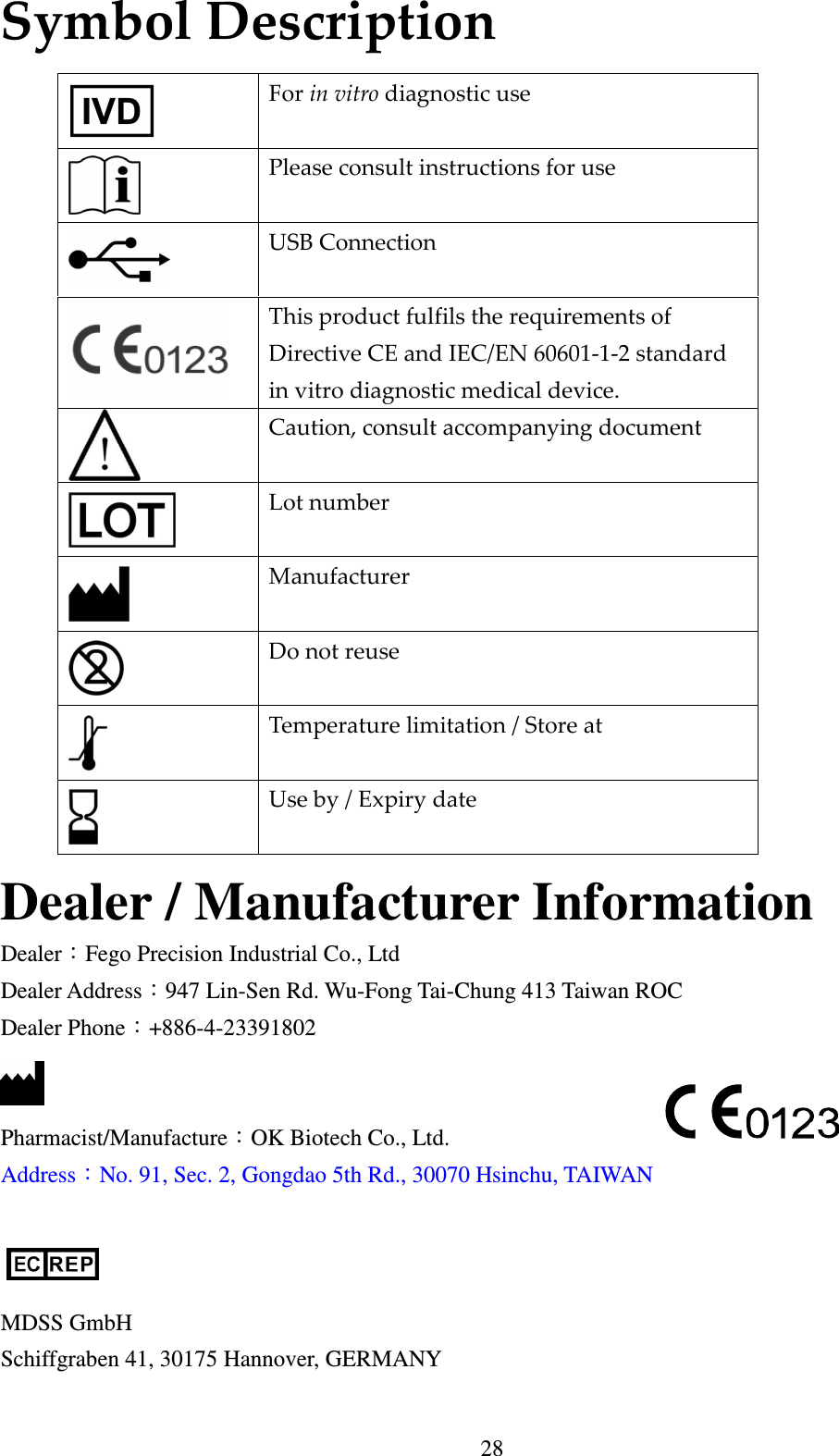
28 Symbol Description                       Dealer / Manufacturer Information Dealer:Fego Precision Industrial Co., Ltd Dealer Address:947 Lin-Sen Rd. Wu-Fong Tai-Chung 413 Taiwan ROC Dealer Phone:+886-4-23391802    Pharmacist/Manufacture:OK Biotech Co., Ltd. Address:No. 91, Sec. 2, Gongdao 5th Rd., 30070 Hsinchu, TAIWAN       MDSS GmbH Schiffgraben 41, 30175 Hannover, GERMANY  For in vitro diagnostic use  Please consult instructions for use  USB Connection  This product fulfils the requirements of Directive CE and IEC/EN 60601-1-2 standard in vitro diagnostic medical device.  Caution, consult accompanying document  Lot number  Manufacturer  Do not reuse  Temperature limitation / Store at  Use by / Expiry date

Navigation menu