Fego Precision Co RF136 Oscillating Fan Remote Control User Manual

Fego Precision Industrial Co Ltd Oscillating Fan Remote Control Users Manual

Users Manual

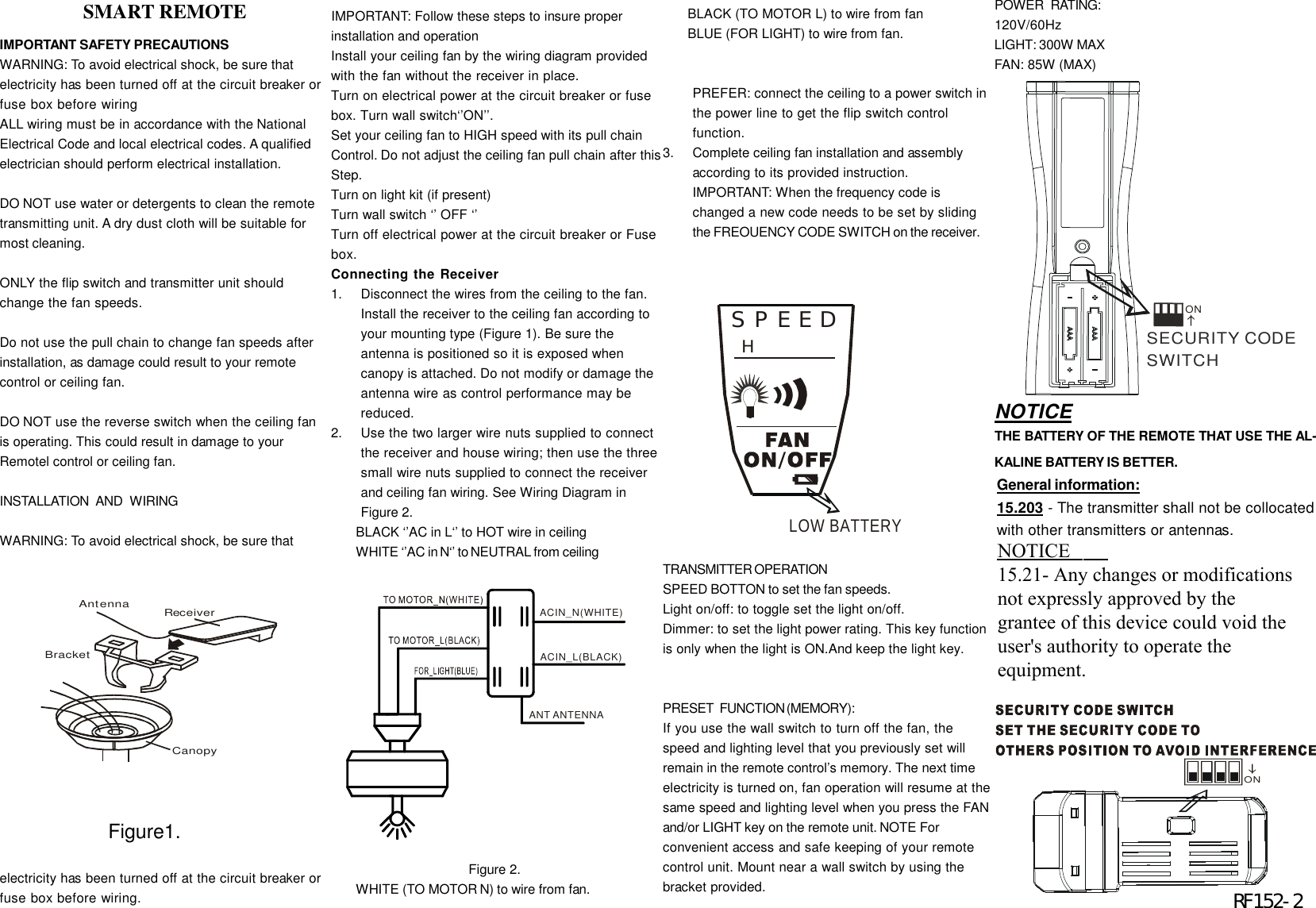
IMPORTANT SAFETY PRECAUTIONSWARNING: To avoid electrical shock, be sure thatelectricity has been turned off at the circuit breaker orfuse box before wiringALL wiring must be in accordance with the NationalElectrical Code and local electrical codes. A qualifiedelectrician should perform electrical installation.DO NOT use water or detergents to clean the remotetransmitting unit. A dry dust cloth will be suitable formost cleaning.ONLY the flip switch and transmitter unit shouldchange the fan speeds.Do not use the pull chain to change fan speeds afterinstallation, as damage could result to your remotecontrol or ceiling fan.DO NOT use the reverse switch when the ceiling fanis operating. This could result in damage to yourRemotel control or ceiling fan.INSTALLATION   AND   WIRINGWARNING: To avoid electrical shock, be sure thatelectricity has been turned off at the circuit breaker orfuse box before wiring.IMPORTANT: Follow these steps to insure properinstallation and operationInstall your ceiling fan by the wiring diagram providedwith the fan without the receiver in place.Turn on electrical power at the circuit breaker or fusebox. Turn wall switch‘’ON’’.Set your ceiling fan to HIGH speed with its pull chainControl. Do not adjust the ceiling fan pull chain after thisStep.Turn on light kit (if present)Turn wall switch ‘’ OFF ‘’Turn off electrical power at the circuit breaker or Fusebox.Connecting the Receiver1.Disconnect the wires from the ceiling to the fan.Install the receiver to the ceiling fan according toyour mounting type (Figure 1). Be sure theantenna is positioned so it is exposed whencanopy is attached. Do not modify or damage theantenna wire as control performance may bereduced.2.Use the two larger wire nuts supplied to connectthe receiver and house wiring; then use the threesmall wire nuts supplied to connect the receiverand ceiling fan wiring. See Wiring Diagram inFigure 2.BLACK ‘’AC in L‘’ to HOT wire in ceilingWHITE ‘’AC in N‘’ to NEUTRAL from ceiling                                     Figure 2.WHITE (TO MOTOR N) to wire from fan.BLACK (TO MOTOR L) to wire from fanBLUE (FOR LIGHT) to wire from fan.PREFER: connect the ceiling to a power switch inthe power line to get the flip switch controlfunction.3.Complete ceiling fan installation and assemblyaccording to its provided instruction.IMPORTANT: When the frequency code ischanged a new code needs to be set by slidingthe FREOUENCY CODE SWITCH on the receiver.TRANSMITTER  OPERATIONSPEED BOTTON to set the fan speeds.Light on/off: to toggle set the light on/off.Dimmer: to set the light power rating. This key functionis only when the light is ON.And keep the light key.PRESET   FUNCTION (MEMORY):If you use the wall switch to turn off the fan, thespeed and lighting level that you previously set willremain in the remote control’s memory. The next timeelectricity is turned on, fan operation will resume at thesame speed and lighting level when you press the FANand/or LIGHT key on the remote unit. NOTE Forconvenient access and safe keeping of your remotecontrol unit. Mount near a wall switch by using thebracket provided.CanopyReceiverAntennaBracket                 SMART REMOTEACIN_N(WHITE)ACIN_L(BLACK)ANT ANTENNAPOWER   RATING:120V/60HzLIGHT: 300W MAXFAN: 85W (MAX)ON           Figure1.SECURITY CODE SWITCHON                        RF152-2SPEEDHLOW BATTERYNOTICETHE BATTERY OF THE REMOTE THAT USE THE AL-KALINE BATTERY IS BETTER.General information:15.203 - The transmitter shall not be collocatedwith other transmitters or antennas.2.1091 & 2.1093 - To comply with FCC RFexposure compliance requirements, a separa-tion distance of at least 20 cm must be main-tained between the antenna of this device andall persons.  This Transmitter must not becollocated or operating in conjunction with anyother antenna or transmitter.NOTICE15.21- Any changes or modificationsnot expressly approved by thegrantee of this device could void theuser's authority to operate theequipment.

Navigation menu