Formosa Teletek BTGPS02 Bluetooth GPS Receiver User Manual
Formosa Teletek Corporation Bluetooth GPS Receiver
User Manual
Quick User’s Guide
Introduction
The Bluetooth GPS receiver uses Bluetooth wireless transfer technology and the built-in active
antenna to provide a high-sensitivity signal tracking function. This device allows users to transfer data
via satellite to PDA’s, smart phones and notebook PCs equipped with a Bluetooth transfer interface.
The scope of application covers vehicle navigation, security systems, GIS and other related fields.
Package
Check the contents in the package before use.
1. Bluetooth GPS receiver
2. Car charger
3. User’s manual
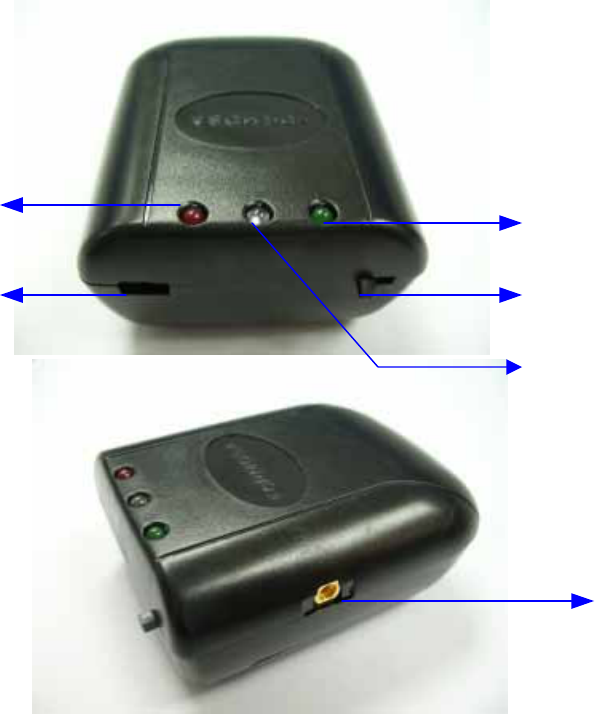
Overview
External Antenna In
Power Switch
DC In
Bluetooth Status Indicator
GPS Status Indicator
Battery Status Indicator

LED Indication
Indicator Status Change Status
Flashing Battery low
Always on Bluetooth connected
Blue LED Bluetooth Connection
Off Bluetooth disconnected
Flashing (once per second) GPS Position Fix
Green LED GPS Connection Flashing (once every 4 seconds) GPS Position Fixing
Flashing Charging started; determining
battery condition
Always on Charge in progress
Red LED
Power
Off Charge inactive
Using an external antenna
This device is equipped with a built-in antenna and does not need additional an antennal for running
the GPS. You will need an external antenna to help you search and receive signals only when the
device is blocked from receiving satellite signals.
Getting started
Step 1: Charging your battery
1. You must charge the battery before using the device for the first time. Please charge the battery
with the car charger that comes with the device. After connecting the charger to the device, the red
LED indicator on the device will flash because while it determines the type of battery installed on
the device. After determining the battery, the charging process will start, and the red LED indicator
will be illuminated at all times until the battery is fully charged.
2. When the battery is fully charged, the red LED indicator will go out.
Caution!
1. The blue LED will flash at all times if the battery is low.
2. Do not charge non-chargeable batteries, as this will damage the product.
Step 2: Bluetooth connection
1. Switch on your Bluetooth GPS receiver. The battery indicator (red LED) will go out.
2. Enable the Bluetooth device on your PDA or notebook PC according to the instructions. Then
connect it to the Bluetooth GPS receiver.
3. The Bluetooth indicator (blue LED) is always ON if it is successfully connected to your PDA or
notebook PC. You can confirm the connection with the Bluetooth software on your PDA or
notebook PC. The Bluetooth indicator (blue LED) will go out if there is not connection.
Caution!
Some Bluetooth devices require an authorization code. This code is “0000”.
Step 3: GPS
1. The GPS indicator (green) will keep flashing during positioning and after positioning is completed.
Confirm positioning from your navigation software before use.
2. The GPS indicator will be illuminated at all times when the GPS is inactive.
FCC Statement
The changes or modifications not expressly approved by the party responsible for
compliance could void the user’s authority to operate the equipment.
User Information
This device complies with part 15 of FCC Rules. Operation is subject to the
following two conditions:
(1)This device may not cause harmful interference, and
(2)This device must accept any interference received, including interference
that may cause undesired operation.
To comply with FCC RF exposure requirement, this device and its antenna must be
not co-located or operating in the conjunction with any other antenna or
transmitter.
The Bluetooth word mark and logos are owned by the Bluetooth SIG,
Inc.. Other trademarks and trade names are those of their respective
owners.