Fujitsu Of The Factsheet FTP 639USL103/104/113/114/ 201/202 639usl100 200
User Manual: Fujitsu FTP-639USL103/104/113/114/ 201/202 Datasheet - Fujitsu United States
Open the PDF directly: View PDF  .
.
Page Count: 10
Data Sheet FUJITSU Component Thermal Printer FTP-639USL100 / 200
FUJITSU Component Thermal Printer
FTP-639USL100/200 series
Fujitsu 3” 24V Driving Flexible Module Printer (FMP)
Page 1 of 10 http://us.fujitsu.com/thermal-printers
Overview
The FTP-639USL Series is 24V driven receipt printer unit with cutter for 3 inch wide
paper. The unit has our high-speed FTP-639MCL mechanism, cutter and control board,
with an integrated paper feed and built-in paper guide section.
The receipt printer unit is most suitable for applications such as Kiosk, ATM, receipt,
label, and ticket issuing printers for various other equipment.
Features
■External presenter option
■Ultra high-speed (200mm/sec.)
■Medium duty united (mounting is easy)
■Auto cutter included
■Paper near-end detection function
■Up to 10-inch paper roll diameter
■Rear paper auto loading
■Paper jam detection
■Prints 2-D barcodes
Item Part Number Comment
Printer module interface
USB (ver. 2.0) FTP-639USL103 without presenter and with paper arm
Serial (RS-232C) / USB (ver. 2.0) FTP-639USL104
USB (ver. 2.0) FTP-639USL113 without presenter and without paper arm
Serial (RS-232C) / USB (ver. 2.0) FTP-639USL114
USB (ver. 2.0) FTP-639USL201 with presenter and with paper arm
Serial (RS-232C) / USB (ver. 2.0) FTP-639USL202
Interface cable
USB interface FTP-629Y301
RS-232C Interface FTP-629Y302
Power for logic, head, motor FTP-629Y603
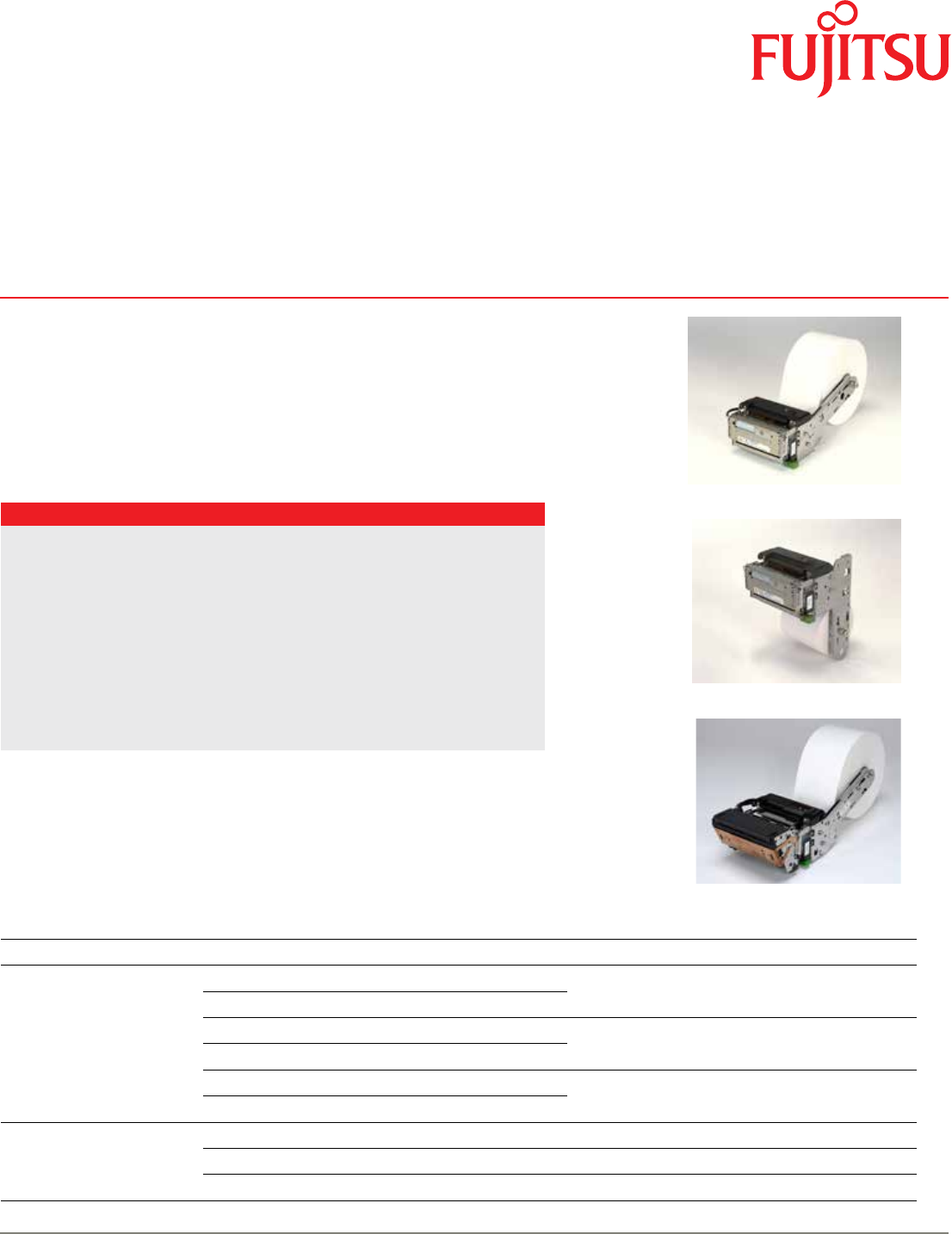
■ Designation
FTP-639USL100 series
horizontal, without presenter
FTP-639USL100 series
vertical, without presenter
FTP-639USL200 series
with presenter

Data Sheet FUJITSU Component Thermal Printer FTP-639USL100 / 200
Page 2 of 10 http://us.fujitsu.com/thermal-printers
Item Specications
Part number FTP-639USL103/104 FTP-639USL113/114 FTP-639USL201/202
Printing method Thermal-sensitive line dot method
Dot structure 576 dots/line
Dot pitch (horizontal) 0.125 mm (dot density:8 dots/mm)
Effective printing area 72 mm
Paper Width 80 mm (standard setting) 82.5 mm paper is available with optional paper guide)
Thickness 60 to 100 µm (depending on paper specications)
Diameter Φ150 mm (standard setting, inner diameter Φ 25.4 mm) *1
Cutting type Full or partial Full or partial Full
Power supply 24VDC ±10% approx. 5.7A*224VDC ±10% approx. 7A*2
Printing speed Max. 200 mm/s (1600 dotlines/s) (High speed batch image printing, at 25°C)
Printing digit number Max. 72 (at 8 x 16 one byte characters)
Printing
specications
Printing mode Line mode
Character Types Alphanumeric KANA: 159, Registered: 94, International: 195, OCR I: 103, OCR II: 23, OCR IV:
103, JIS KANJI: approximately 6800, Extended: 11
Barcode
types
1 dimension UPC-A, UPC-E, JAN(EAN)13, JAN(EAN)8, CODE39, ITF, CODABAR, CODE128
2 dimension QR, PDF417
Character composition, dimensions (H x W),
Number of characters
24 x 12 dots (3.0 x 1.5 mm), 48 columns
24 x 24 dots (3.0 x 3.0 mm), 24 columns
16 x 8 dots (2.0 x 1.0 mm), 72 columns
16 x 16 dots (2.0 x 2.0 mm), 36 columns
OCR I: 24 x 40, 24 columns
OCR III: 24 x 45, 24 columns
OCR IV: 36 x 60, 16 columns
Extended: 24 x 48, 24 columns
Interface Serial (RS232C), USB
Power supply
For head 24VDC ±5%, voltage
Current: average*4 ( ): Peak 12.5% printing ratio
1.0 (2.0) A (at 200 mm/s printing speed,1 division image)
0.8 (1.1) A (at 125 mm/s printing speed, 2 divisions)
0.6 (1.0) A (at 80 mm/s printing speed, 2 divisions)
0.6 (2.0) A (at 80 mm/s printing speed, automatic divison)
For printer motor 24VDC ±5%, 1.3 A maximum, 1.0 A average
For presenter 24VDC ±5%, 1.3 A maximum, 1.0 A average
For cutter 24VDC ±5%, 1.4 A maximum
For logic 5VDC ±5%, 0.2 A maximum (converted from 24V)
Dimensions
(WxDxH)
Arm vertical 112.6 x 96.4 x 75.1 mm 112.6 x 94.5 x 75.1 123.0 x 145.2 x 75.1 mm
Arm horizontal 112.6 x 215.7 x 99.6 mm*3123 x 264.5 x 99.6 mm)*3
Presenter (receipt length) n/a n/a 65 to 254 mm
Weight (approximately, excluding paper) 990 g (with arm) 760 g (without arm) 1200 g (with arm & presenter)
*1: Φ 83 mm paper can be used by changing paper feed shaft. Max. Φ 254 mm (10-inch) paper can be used by using a bigger diameter paper holder.
*2: Super high speed mode, batch printing, at printing rate 25%
*3: Excludes protrusions (screws, dumper, etc.) and cables
*4 : There may be exceptions
■ Specications

Data Sheet FUJITSU Component Thermal Printer FTP-639USL100 / 200
Page 3 of 10 http://us.fujitsu.com/thermal-printers
Item Specications
Part number FTP-639USL103/104 FTP-639USL113/114 FTP-639USL201/202
Expected life
Head Pulse resistance 100 milion pulse/dot (using Fujitsu’s standard driving method)
Wear resistance 100 km (at max. 12.5% printing ratio, with PD150R (Oji) paper
Cutter 1, 000, 000 cuts with PD150R (Oji) paper, cutting frequency min. 3s/cut, at 20°C ± 5°C
Environmental
conditions
Operating temperature -20°C to +60°C*5-20°C to +60°C*50°C to +50°C*5
Operating humidity 10 to 85% RH (no condensation)
Storage temperature -25°C to +65°C -25°C to +65°C -20°C to +60°C
Storage humidity 5 to 90% RH (no condensation)
Detection Head temperature By thermistor (applied energy control, abnormal temperature detection)
Paper out/Mark detect By photointerrupter
Platen open By photointerrupter
Near end paper By mechanical switch
Recommended
thermal sensitive
paper
Standard paper TF-60KS-E (Nippon paper), FTP-020P0104 (58mm),
PD150R (Oji paper), FTP-020P0701 (58mm)
Medium term paper TF-60KS-F1 (Nippon paper), FTP-020P0102 (58mm)
PD170R (Oji paper)
P220VBB-1 (Mitsubishi paper)
Long term paper PD160R-N (Oji paper)
Paper diameter Max. 150 mm
*5 : Color density is guaranteed: +5°Cto +40°C with standard paper
Data Sheet FUJITSU Component Thermal Printer FTP-639USL100 / 200
Page 4 of 10 http://us.fujitsu.com/thermal-printers
■ Dimensions
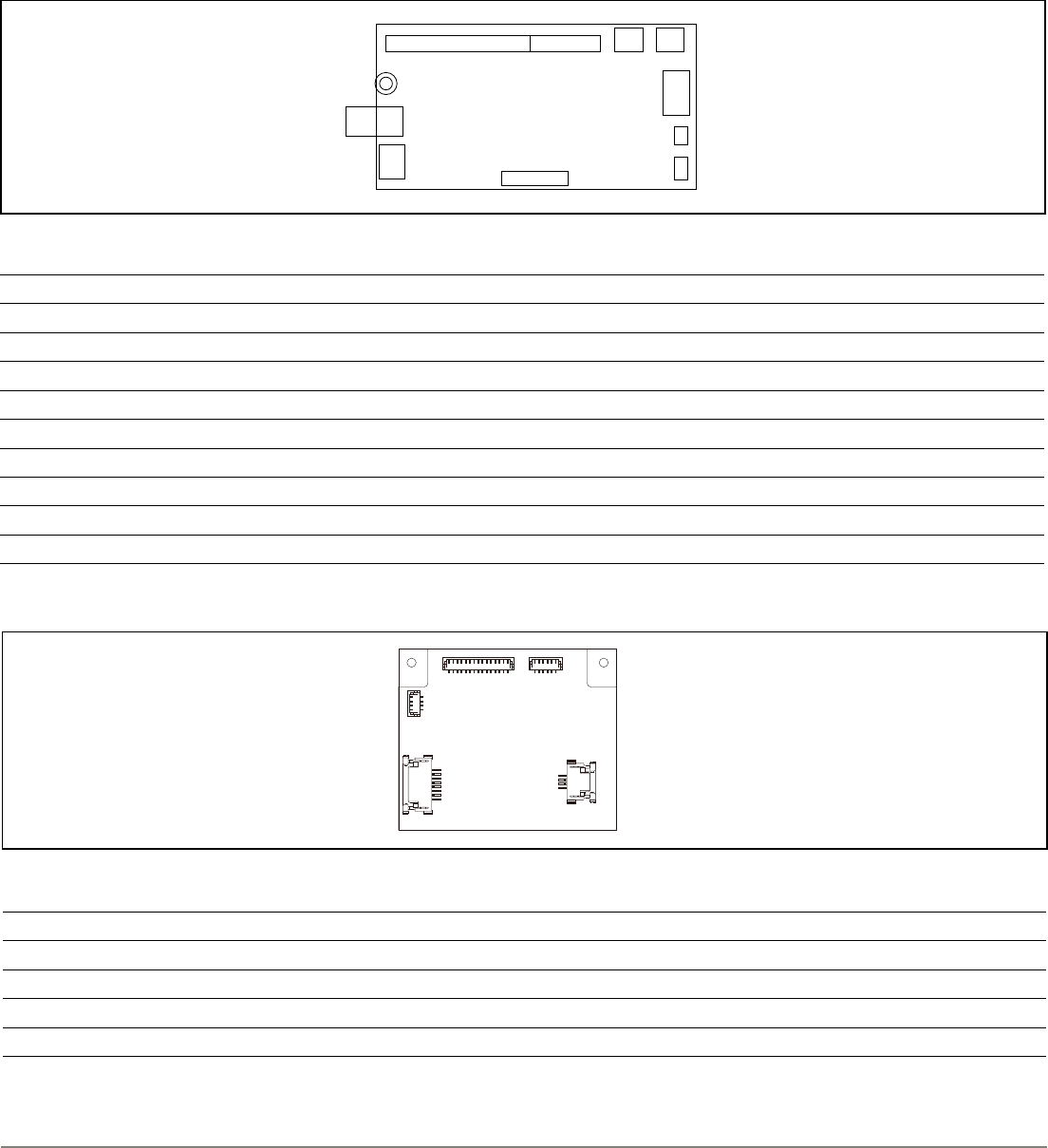
• External dimension chart of the control board
• Connector types of control board for printer and cutter
No. Name Function Remarks
CN1 Power connector Connect +24V power supply -
CN2 RS-232 connector Connect RS-232 interface depends on model
CN4 USB interface connector Connect USB interface depends on model
CN5 Thermal head connector Connect thermal head -
CN6 Paper feed motor Connect paper feed motor -
CN7 Cutter motor connector Connect cutter motor -
CN8 Near end sensor connector Connect near end switch or sensor -
CN9 External sensor connector Connect external sensor optional
CN10 Presenter connector Connect control board depends on model
• Connector types of control board for presentor
No. Name Function Remarks
CN1 Control board connector Connect control to board -
CN3 Paper sensor connector Connect to paper feed sensor -
CN5 Paper feed motor connector Connect to paper feed motor -
CN6 Motor and sensor connector Connect to motor and sensor -
CN1
CN5
CN3
CN4
CN5
CN6
CN6
CN10
SW1 SW2
CN7
CN8CN9
CN1CN4
Drawing-1
Drawing-2
Drawing-3
CN1
CN2
CN1
CN5
CN3
CN4
CN5
CN6
CN6
CN10
SW1 SW2
CN7
CN8CN9
CN1CN4
Drawing-1
Drawing-2
Drawing-3
CN1
CN2
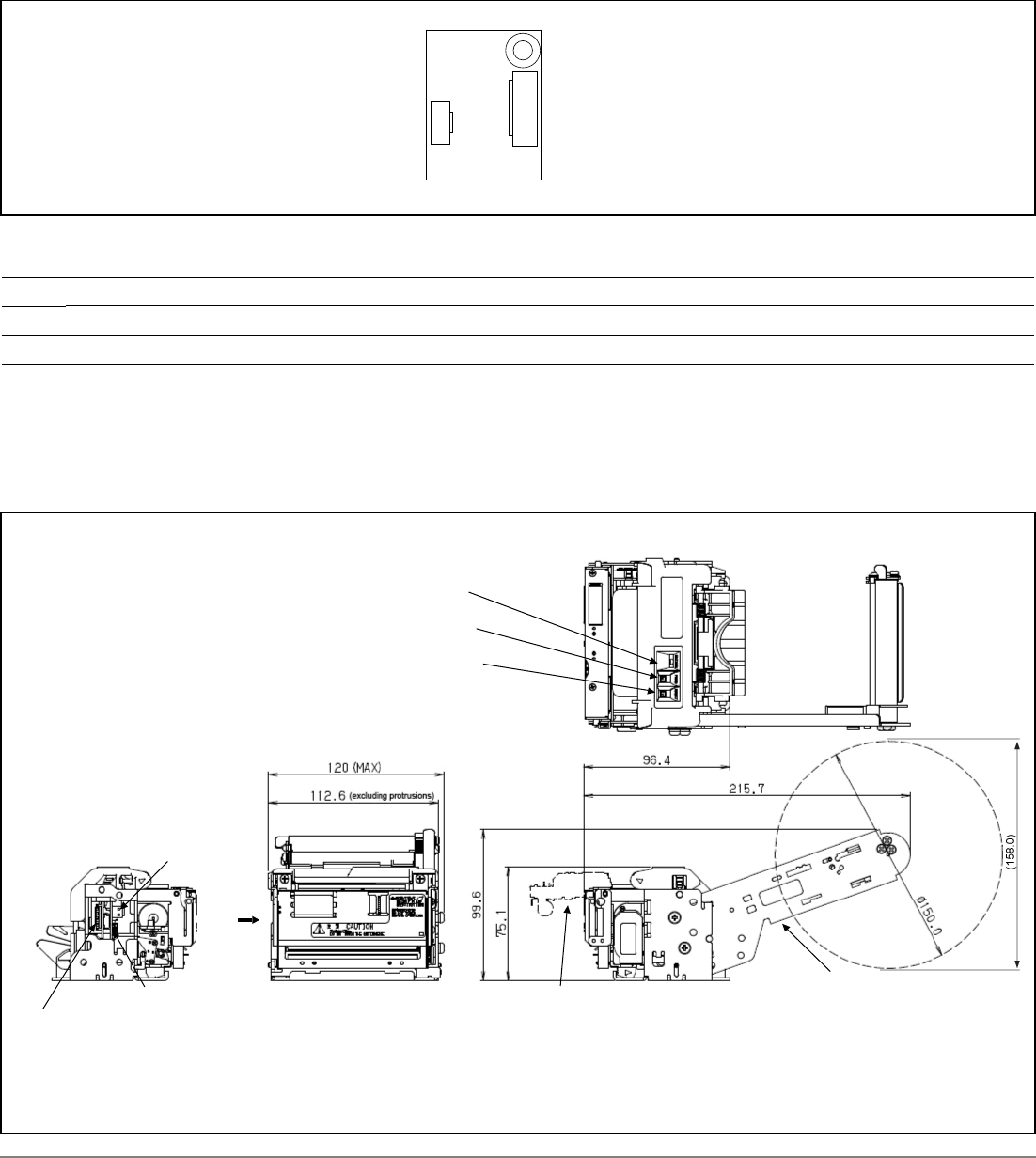
• Presenter control board dimension
Data Sheet FUJITSU Component Thermal Printer FTP-639USL100 / 200
Page 5 of 10 http://us.fujitsu.com/thermal-printers
Side view - A
CN4 (FTP-639USL104)
CN1
CN2
A
Status LED
Feed switch
Reset switch
Paper feed arm
At cutter option
Unit: mm
Excluding lever and protrusions. ( ) is reference value.
■ Dimensions
• Printer without presenter and standard arm - FTP-639USL103/104
• RS-232C interface connector types
No. Name Function Remarks
CN1 Internal connection connector Connector for internal connection -
CN2 RS-232C interface connector Connector for connecting RS-232C interface -
• External view of the RS-232C interface circuit board
CN1
CN5
CN3
CN4
CN5
CN6
CN6
CN10
SW1 SW2
CN7
CN8CN9
CN1CN4
Drawing-1
Drawing-2
Drawing-3
CN1
CN2
Data Sheet FUJITSU Component Thermal Printer FTP-639USL100 / 200
Page 6 of 10 http://us.fujitsu.com/thermal-printers
DO NOT TOUCH
DURING OPERATION
可動刃動作ノブ
MOVABLE BLADE
OPERATION KNOB
動作中に触らないで下さい
CAUTION
注 意
刃に触らないで下さい。
DO NOT TOUCH THE CUTTINGEDGE
DO NOT TOUCH
DURING OPERATION
可動刃動作ノブ
MOVABLE BLADE
OPERATION KNOB
動作中に触らないで下さい
CAUTION
注 意
刃に触らないで下さい。
DO NOT TOUCH THE CUTTINGEDGE
112.6 (excl. protrusion)
96.4
75.1
■ Dimensions
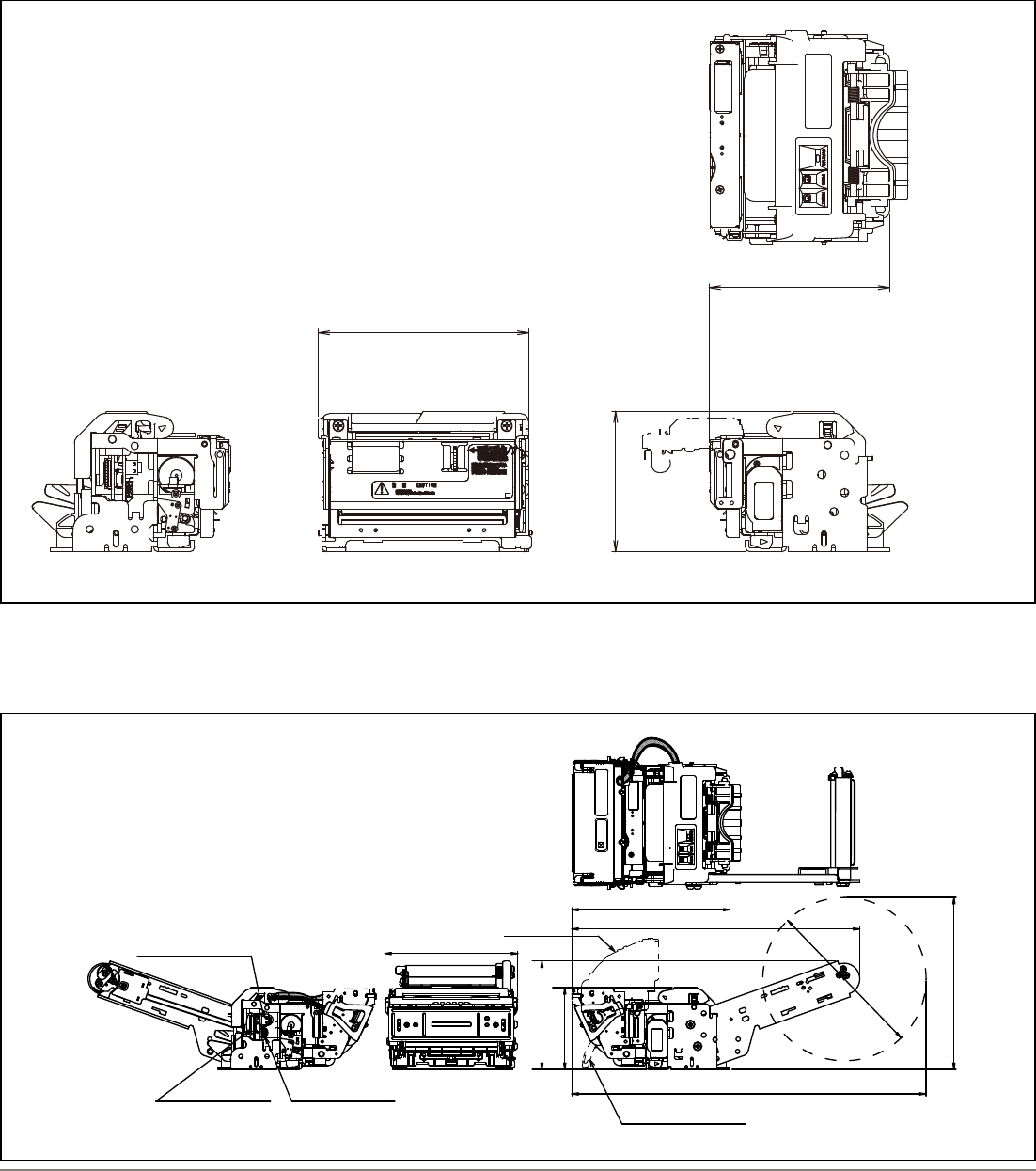
• Modular printer without presenter and standard paper roll - FTP-639USL113/114
■ Dimensions
• Modular printer with presenter - FTP-639USL201/202
φ150.0
(158.0)
(325.5)
(264.5)
145.2
75.1
(99.6)
123.0
FUJITSU CONPONENT
F.T JAPANF.T JAPAN
FUJITSU CONPONENT
Power connector
RS-232C connector
(202 only)
USB connector
Cutter open
Paper loop guide open
Excluding lever and protrusions. ( ) is reference value.

Data Sheet FUJITSU Component Thermal Printer FTP-639USL100 / 200
Page 7 of 10 http://us.fujitsu.com/thermal-printers
■ Connector specications
No. Name
CN1 Power connector
CN2 USB interface connector
CN4 RS-232C interface connector
Pin no. Signal I/O Description Pin no. Signal I/O Description
124V I Power supply 2 GND -Power ground
Pin no. Signal I/O Description Pin no. Signal I/O Description
1VBUS I Bus power supply 2 D- I/O Differential data input/output D-
3D+ I/O Differential data input/output D+ 4NC - Not connected
5GND -Signal ground
■ Connector pin assignment
• CN1: Power connector
Connector used in the printer: B2PS-VH(LF)(SN) (JST)
Recommended mating connector: VHR-2 (JST)
■ Connector pin assignment
• CN2: USB interface connector
Connector used in the printer: 51387-0530 (Molex)
Recommended mating connector: UX40-MB-5P (Hirose)
Pin no. Signal I/O Description Pin no. Signal I/O Description
1FG -Frame ground 2RXD IIncoming data
3TXD OOutgoing data 4DTR ORequest to send data (data terminal ready)
5GND -Signal ground 6DSR I Consent to send data (data set ready)
7/STCLIN I Detection setting signal 8 /INPRM IInitialization requirement signal
9/ATF IPaper feed signal
■ Connector pin assignment
• CN4: RS-232C interface connector
Connector used in the printer: S9B-ZR-SM4A-TF (LF) (JST)
Recommended mating connector: ZHR-9 (JST)
· Please note that connectors used in this printer are subject to change without prior notice.
· Please conrm compatability when using equivalent mating connector(s).
■ Host interface specications
Type Specification
USB V2.0 Data transmission speed: Full speed mode 12Mbps
Data input/output format: Differential input/output
RS-232C Data transmission speed: 19,200 (460,800; 230,400; 155,200; 38,400; 9,600) bps. Setting can be changed with command
Synchronization/transmission method: asynchronous method, full-duplex transmission
Flow control: RTS(DTR)/CTS(DSR) signal or XON/XOFF. Can be changed with command
Input/output level: RS-232C level

Data Sheet FUJITSU Component Thermal Printer FTP-639USL100 / 200
Page 8 of 10 http://us.fujitsu.com/thermal-printers
No Signal Content
1HT Moves print position to the next tab
2LE Line fee
3FF Feeds forms (new page)
4ESC EM+n Setting the amount of the feeding at automatic paper feed
5 ESC RS Sets reverse printing
6 ESC US Resets reverse printing
7ESC SP+n Character spacing setting
8 ESC ! +n Sets print mode
9 ESC % +n External registration character specication/cancellation
10 ESC & +y+c1+c2+x+d1to dn External registration character denition
11 ESC *+m+n1+n2+d1 to dk Sets bit map image
12 ESC - +n Underline setting
13 ESC 2 Sets 1/6 inch line feed length
14 ESC 3+n Sets the ne line feed length
15 ESC ?+n External registration character deletion
16 ESC @ Printer initialization
17 ESC A+n Sets the space between the line
18 E S C C+n Set the page length by character line
19 ESC D+n1 to nk+NUL Sets the tab position
20 ESC J+n Feed paper in forward direction and prints
21 ESC K+n Reverse paper feed
22 ESC R+n Selects international character
23 ESC V+n Right rotation 90° specication / cancellation
24 ESC X+m+n Setting the turning time of the motor excitation
25 ESC c+1+n Sets internal processing
26 ESC c+5+n Panel switch enable/disable setting
27 ESC d+n Printing and n-line feeding
28 ESC e+n Prints and reverse feed n-lines
29 ESC s+n Sets printing speed
30 ESC t+n Character code table selection
31 ESC {+n Sets/resets upside down printing
32 ESC DEL+n Platen switch release
33 FS !+n Kanji printing mode specication
34 FS & Kanji printing mode collective specication
35 FS - + n Kanji underline specication /cancellation
36 FS *+ m+n1+n2+d1 to dk High speed collective image printing specied
37 FS . Kanji printing mode cancellation
38 FS 2+c1+c2+d1 to dn External character denition
39 FS 9+n Sets the detection functions
40 F S C+n Kanji code system selection
■ Connector pin assignments of printer mechanism (FPC)

Data Sheet FUJITSU Component Thermal Printer FTP-639USL100 / 200
Page 9 of 10 http://us.fujitsu.com/thermal-printers
No Signal Content
41 FS E+n Correction of impressed energy
42 FS S+n1+n2 Kanji spacing setting
43 FS W+n Kanji double height and width printing specication/cancellation
44 FS r+n*1Parameter transmission
45 GS !+n Character size specication
46 GS & +m + x + y1 + y2 + d1 to dn Registered bit image deniton
47 GS '+m+n Registered bit image printing
48 GS (+E+L1+L2+fn+d1 to d9) RS-232C communication setting*1
49 GS < Line feeds to the next mark
50 GS A+m+n Sets the line feed length after mark detection
51 GS E+n Sets the print quality
52 GS L+n1+n2 Left margin position setting
53 GS V+m+n Sets 1/6 inch line feed length
54 GS W+n1+n2 Printing area width setting
55 GS a+n Automatic status transmission setting*1
56 GS e+m+n Sets bar code width
57 GS h+n Sets bar code height
58 GS k+m+n+d1 to dn Bar code printing
60 GS k+m+k1+k2+k3+k4+p+d1 to dn+NUL Print 2-barcode (QR)
61 GS k+m+k1+k2+k3+k4+n1+nh+d1 to dn Print 2D barcode (PDF417)
62 GS s Paper check*2
63 GS t+n Paper exit*2
64 GS w+n Sets bar code length
65 GS x+n Paper retract*2
66 GS y Preparation for paper exit*2
67 GS z Retracting paper*2
*1: These commands are valid with FTP-629DSL350 series serial interface
*2: FTP-639USL201/202 only
■ Options
• Cables
Type Part Number Connector Length
Interface cable USB FTP-629Y301 USB A - USB miniB Approx. 1m (39.4 inches)
RS-232C FTP-629Y302 ZHR-9 (JST) Connector is assembled at one side (printer side) Approx. 0.5m (19.4 inches)
Power supply cable FTP-629Y603 VHR-2 (JST) Connector is assembled at one side (printer side) Approx. 0.5m (19.4 inches)

Data Sheet FUJITSU Component Thermal Printer FTP-639USL100 / 200
Page 10 of 10 http://us.fujitsu.com/thermal-printers
Contact
Copyright
All trademarks or registered
trademarks are the property of
their respective owners.
Fujitsu Components America or
its afliates do not warrant
that the content of datasheet
is error free. In a continuing
effort to improve our products
Fujitsu Components America,
Inc. or its afliates reserve the
right to change specications/
datasheets without prior
notice. Copyright ©2016
Fujitsu Components America,
Inc.
All rights reserved.
Revised May 12, 2016
Japan
FUJITSU COMPONENT LIMITED
Shinagawa Seaside Park Tower
12-4, Higashi-shinagawa 4-chome,
Tokyo 140 0002, Japan
Tel: (81-3) 3450-1682
Fax: (81-3) 3474-2385
Email: fcl-contact@cs.jp.fujitsu.com
Web: www.fcl.fujitsu.com
North and South America
FUJITSU COMPONENTS AMERICA, INC.
2290 North First Street, Suite 212
San Jose, CA 95131 U.S.A.
Tel: (1-408) 745-4900
Fax: (1-408) 745-4970
Email: components@us.fujitsu.com
Web: http://us.fujitsu.com/components/
Europe
FUJITSU COMPONENTS EUROPE B.V.
Diamantlaan 25
2132 WV Hoofddorp
Netherlands
Tel: (31-23) 5560910
Fax: (31-23) 5560950
Email: info@fceu.fujitsu.com
Web: emea.fujitsu.com/components/
Asia Pacic
FUJITSU COMPONENTS ASIA, Ltd.
102E Pasir Panjang Road
#01-01 Citilink Warehouse Complex,
Singapore 118529
Tel: (65) 6375-8560 / Fax: (65) 6273-3021
Email: fcal@fcal.fujitsu.com
www.fujitsu.com/sg/services/micro/components
China
FUJITSU ELECTRONIC COMPONENTS
(SHANGHAI) CO., LTD.
Unit 4306, InterContinental Center
100 Yu Tong Road, Shanghai 200070, China
Tel: (86 21) 3253 0998
Fax: (86 21) 3253 0997
Email: fcal@fcal.fujitsu.com
www.fujitsu.com/sg/services/micro/components
Hong Kong
FUJITSU COMPONENTS HONG KONG Co., Ltd.
Room 06, 28/F, Greeneld Tower, Concordia
Plaza, No.1 Science Museum Road,
Tsim Sha Tsui East, Kowloon, Hong Kong
Tel: (852) 2881 8495 Fax: (852) 2894 9512
Email: fcal@fcal.fujitsu.com
www.fujitsu.com/sg/services/micro/components
