G Tech Technology A21G 2.4GHz Wireless Mouse User Manual A21

G.Tech Technology Ltd. 2.4GHz Wireless Mouse A21

Users Manaual

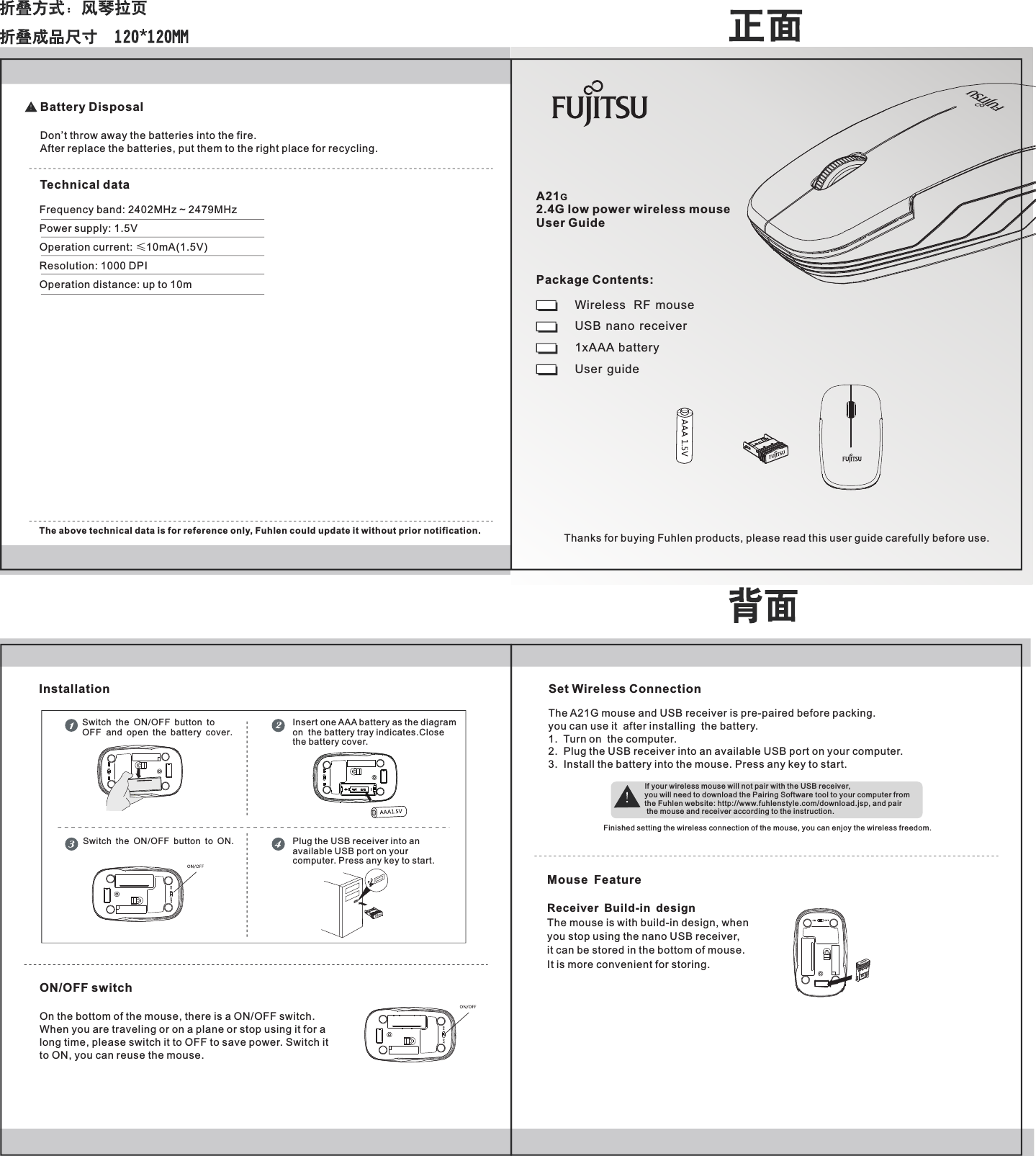
A21G2.4G low power wireless mouse User GuideWireless   RF  mouseUSB  nano  receiver1xAAA  battery User  guideThanks for buying Fuhlen products, please read this user guide carefully before use.Package Contents:Frequency band: 2402MHz ~ 2479MHzPower supply: 1.5VOperation current: ≤10mA(1.5V)Resolution: 1000 DPIOperation distance: up to 10mThe above technical data is for reference only, Fuhlen could update it without prior notification.ON/OFF switchOn the bottom of the mouse, there is a ON/OFF switch.When you are traveling or on a plane or stop using it for along time, please switch it to OFF to save power. Switch it to ON, you can reuse the mouse.Battery DisposalDon’t throw away the batteries into the fire.After replace the batteries, put them to the right place for recycling.Technical dataInsert one AA  battery as the diagramon  the battery tray indicates.Closethe battery cover.ASwitch the ON OFF button to ON./Set Wireless ConnectionThe A21G mouse and USB receiver is pre-paired before packing. you can use it  after installing  the battery.1.  Turn on  the computer.2.  Plug the USB receiver into an available USB port on your computer. 3.  Install the battery into the mouse. Press any key to start.If your wireless mouse will not pair with the USB receiver, you will need to download the Pairing Software tool to your computer from the Fuhlen website: http://www.fuhlenstyle.com/download.jsp, and pair the mouse and receiver according to the instruction.Finished setting the wireless connection of the mouse, you can enjoy the wireless freedom.Switch the ON/OFF button to OFF  and open the battery cover.InstallationMouse FeatureReceiver Build-in design The mouse is with build-in design, when you stop using the nano USB receiver, it can be stored in the bottom of mouse. It is more convenient for storing.Plug the USB receiver into anavailable USB port on yourcomputer. Press any key to start.
Federal Communications Commission (FCC) Notice: Changes or modifications not expressly approved by the party   responsible for compliance could void the user's authority to operate the equipment   NOTE: THE MANUFACTURER IS NOT RESPONSIBLE FOR ANY RADIO OR TV INTERFERENCE CAUSED BY UNAUTHORIZED MODIFICATIONS TO THIS EQUIPMENT. SUCH MODIFICATIONS COULD VOID THE USER’S AUTHORITY TO OPERATE THE EQUIPMENT. NOTE: This equipment has been tested and found to comply with the limits for a Class B digital device, pursuant to Part 15 of the FCC Rules. These limits are designed to provide reasonable protection against harmful interference in a residential installation. This equipment generates, uses and can radiate radio frequency energy and, if not installed and used in accordance with the  instructions, may cause harmful interference to radio communications. However, there is no guarantee that interference will not occur in a particular installation. If this equipment does cause harmful interference to radio or television reception, which can be determined by turning the equipment off and on, the user is encouraged to try to correct the interference by one or more of the following measures:   -- Reorient or relocate the receiving antenna.   -- Increase the separation between the equipment and receiver.         -- Connect the equipment into an outlet on a circuit different   from that to which the receiver is connected.   -- Consult the dealer or an experienced radio/TV technician for help.   This device complies with Part 15 of the FCC Rules. Operation     is subject to the following two conditions: (1) this device may not cause    harmful interference, and (2) this device must accept any interference received, including interference that may cause undesired operation.   FCC Notice                              English - 13F ujitsu Technology Solut ions 31

Navigation menu