G Tech Technology MA201W WT300 Wireless Optical Mouse User Manual
G.Tech Technology Ltd. WT300 Wireless Optical Mouse Users Manual
UserManual.wiki
>
G Tech Technology
>
MA201W User Manual
Users Manual
Navigation menu
Upload a User Manual
Namespaces
Wiki Guide
HTML
PDF
Info
Views
User Manual
Discussion / Help
Navigation
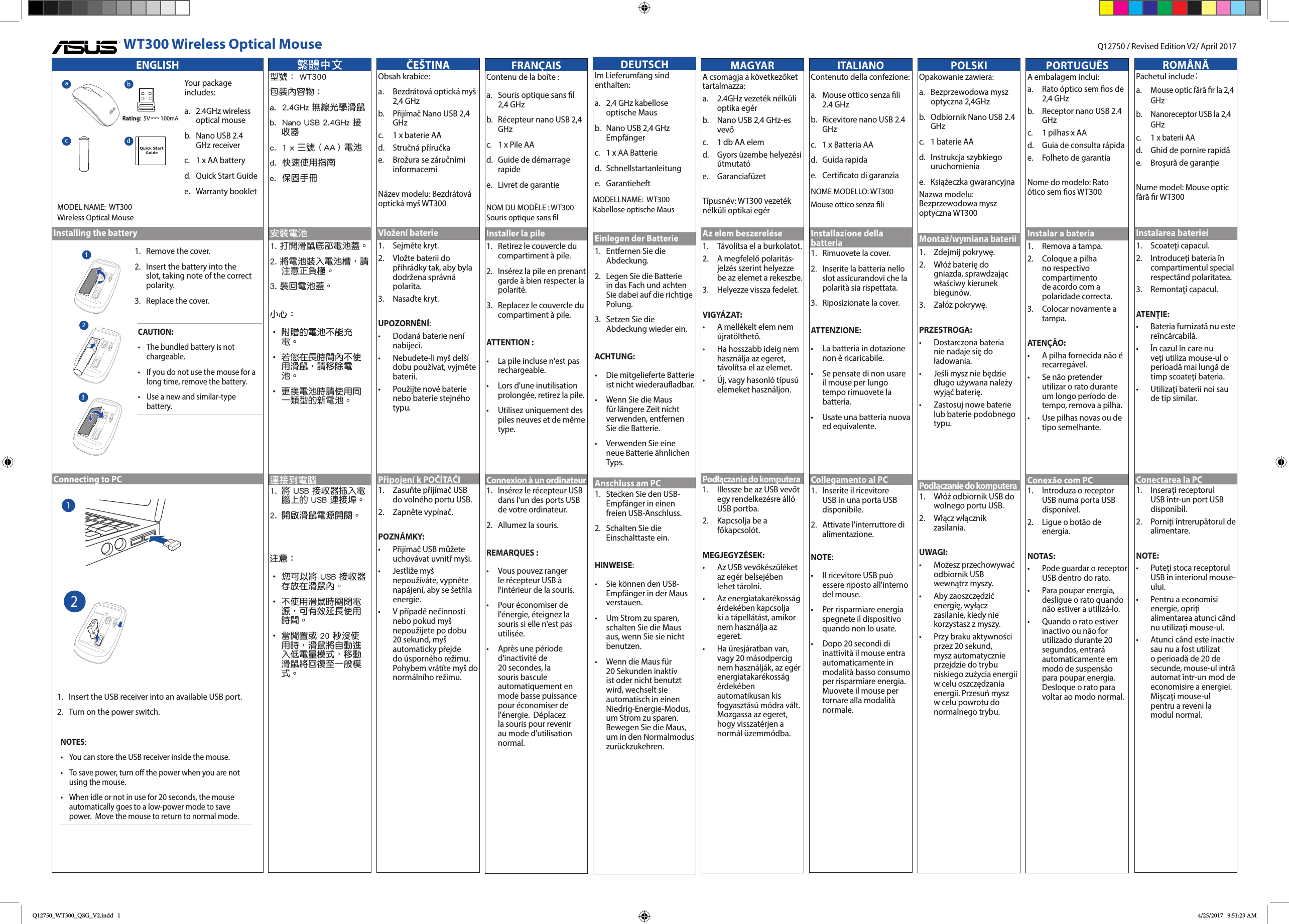
![Federal Communications Commission StatementThis equipment has been tested and found to comply with the limits for a Class B digital device, pursuant to Part 15 of the FCC Rules. These limits are designed to provide reasonable protection against harmful interference in a residential installation.This equipment generates, uses and can radiate radio frequency energy and, if not installed and used in accordance with the instructions, may cause harmful interference to radio communications.However, there is no guarantee that interference will not occur in a particular installation.If this equipment does not cause harmful interference to radio or television reception, which can be determined by turning the equipment o and on, the user is encouraged to try to correct the interference by one or more of the following measures:• Reorient or relocate the receiving antenna.• Increase the separation between the equipment and receiver.• Connect the equipment into an outlet on a circuit dierent from that to which the receiver is connected.• Consult the dealer or an experienced radio/TV technician for help.This device complies with part 15 of the FCC Rules. Operation is subject to the following conditions:(1) This device may not cause harmful interference and(2) This device must accept any interference received, including interference that may cause undesired operation.CAUTION! Any changes or modications not expressly approved by the grantee of this device could void the user's authority to operate. CE Mark WarningThis is a Class B product, in a domestic environment, this product may cause radio interference, in which case the user may be required to take adequate measures.Declaration of Conformity (RT&TTE directive 1999/5/EC) The following items were completed and are considered relevant and sucient:• Essential requirements as in [Article 3]• Protection requirements for health and safety as in [Article 3.1a].• Testing for electric safety according to [EN60950].• Protection requirements for electromagnetic compatibility in [Article 3.1b].• Testing for electromagnetic compatibility according to [EN301489-1] & [EN301489-3]• Eective use of the ratio spectrum as in [Article 3.2].• Radio test suites according to [EN 300 440].NCC警語 低功率電波輻射性電機管理辦法第十二條: 經型式認證合格之低功率射頻電機,非經許可,公司、商號或使用者均不得擅自變更頻率、加大功率或變更原設計之特性及功能。 第十四條: 低功率射頻電機之使用不得影響飛航安全及干擾合法通信;經發現現象時,應立即停用,並改善至無干擾時方得繼續使用。 前項合法通信,指依電信法規定作業之無線電信。低功率射頻電機需忍受合法通信或工業、科學及醫療用電波輻射性電機設備之干擾。Canada, Industry Canada (IC) Notices This device complies with Canada licence-exempt RSS standard(s). Operation is subject to the following two conditions: (1) this device may not cause interference, and (2) this device must accept any interference, including interference that may cause undesired operation of the device.Canada, avis d’Industry Canada (IC) Cet appareil est conforme avec Industrie Canada exemptes de licence RSS standard(s). WT300 Wireless Optical MouseCAUTION! DO NOT throw the product in municipal waste. This product has been designed to enable proper reuse of parts and recycling. This symbol of the crossed out wheeled bin indicates that the product (electrical and electronic equipment) should not be placed in municipal waste. Check local regulations for disposal of electronic products.Korea Communications Commission Statement이 기기는 가정용 (B 급 ) 전자파적합기기로서 주로 가정에서 사용하는 것을 목적으로 하며 , 모든 지역에서 사용할 수 있습니다 . * 당해 무선설비는 전파혼신 가능성이 있으므로 인명안전과 관련된 서비스는 할수 없습니다 .電波障害自主規制についてこの装置は、情報処理装置等電波障害自主規制協議会(VCCI)の基準に基づく クラス B 情報技術装置です。この装置は、家庭環境で使用することを目的として いますが、この装置がラジオやテレビジョン受信機に近接して使用されると、 受信障害を引き起こすことがあります。 取り扱い説明書に従って正しい取り扱いをしてください。Son fonctionnement est soumis aux deux conditions suivantes : (1) cet appareil ne doit pas causer d’interférence et (2) cet appareil doit accepter toute interférence, notamment les interférences qui peuvent aecter son fonctionnement.ASUS Recycling/Takeback Services ASUS recycling and takeback programs come from our commitment to the highest standards for protecting our environment. We believe in providing solutions for you to be able to responsibly recycle our products, batteries, other components, as well as the packaging materials. Please go to http://csr.asus.com/english/Takeback.htm for the detailed recycling information in dierent regions.單元限用物質及其化學符號鉛 (Pb)汞 (Hg)鎘 (Cd)六價鉻 (Cr+6)多溴聯苯 (PBB)多溴二苯醚 (PBDE)印刷電路板 及電子組件 — ○ ○ ○ ○ ○外殼 ○ ○ ○ ○ ○ ○滾輪裝置 — ○ ○ ○ ○ ○其他及其配件 — ○ ○ ○ ○ ○備考1. "O" 係指該項限用物質之百分比含量未超出百分比含量基準值。備考2. "-" 係指該項限用物質為排除項目。「產品之限用物質含有情況」之相關資訊,請參考下表:MANUFACTURERASUSTeK Computer Inc. Address: 4F, No. 150, LI-TE RD., PEITOU, TAIPEI 112, TAIWAN Tel: +886-2-2894-3447AUTHORISED REPRESENTATIVE IN EUROPEASUS Computer GmbH Address: HARKORT STR. 21-23, 40880 RATINGEN, GERMANYAuthorized Distributor in Turkey : PENTA TEKNOLOJI URUNLERI DAGITIM TICARET A.S. Address, City: DUDULLU ORGANIZE SANAYI BOLGESI NATO YOLU 4.CAD. NO:1 DUDULLU UMRANIYE 34775 ISTANBUL TURKEY Distributor Tel: 0216 645 82 00 Country: TURKEY Bilkom Bilişim Hizmetleri A.Ş. Address: Mahir İz Cad. No:26 K:2 Altunizade Üsküdar İstanbul - Turkiye Distributor Tel: +90 216 554 9000 Country: TURKEY C5 Elektronik Sanayi Ve Ticaret A.Ş. Address: Sahrayıcedit Mah. Omca Sok. Golden Plaza No:33 E Blok Kat: 2 Kadıköy/İSTANBUL Distributor Tel: +90 (216) 411 44 00 Country: TURKEY AEEE Yönetmeliğine Uygundur. China RoHS EFUP Labelling CE MarkR31018RoHSFCC ComplianceESPAÑOLSu paquete incluye:a. Ratón óptico inalámbrico de 2,4GHzb. Receptor Nano USB de 2,4 GHzc. 1 x pila AAd. Guía de inicio rápidoe. Folleto de garantíaNombre de modelo: Ratón óptico inalámbrico WT300Instalación de las baterías1. Retire la tapa.2. Inserte las pilas en la ranura teniendo en cuenta la polaridad correcta.3. Vuelva a colocar la tapa.PRECAUCIÓN:• La pila incluida no es recargable.• Si no va a utilizar el ratón durante un largo periodo de tiempo, retire la pila.• Utilice pilas nuevas o de tipo similar.Conexión a un PC1. Inserte el receptor USB en un puerto USB disponible.2. Active el interruptor de encendido.NOTAS: • Puede almacenar el receptor USB dentro del ratón. • Para ahorrar energía, desactive la alimentación mientras no esté utilizando el ratón.• Si el dispositivo está en activo o no se utiliza durante 20 segundos, el ratón pasa automáticamente al modo de bajo consumo para ahorrar energía. Mueva el ratón para regresar al modo normal.УКРАЇНСЬКАДо комплекту входять:a. Бездротова оптична миша 2,4 ГГцb. Приймач нано-USB 2,4 ГГцc. Батареї АА х 1d. Керівництво для швидкого початку експлуатаціїe. Гарантійний буклетНазва моделі: Бездротова оптична миша WT300Інсталяція батарей1. Зніміть кришку.2. Вставте в отвір батарейку, дотримуючись полярності.3. Поверніть кришку на місце.ОБЕРЕЖНО:• Батарею з комплекту неможна перезаряджати.• Якщо Ви не будете користуватися мишею протягом тривалого часу, вийміть батарею.• Користуйтеся новими батареями або батареями цього ж типу.Підключення до ПК1. Вставте приймач USB до вільного порту USB.2. Увімкніть перемикач живленняПРИМІТКИ: • Приймач USB можна зберігати в миші.• Щоб заощаджувати енергію, вимикайте живлення, коли не користуєтеся мишею.• Після 20 секунд бездіяльності миша автоматично переходить у режим низького енергоспоживання, щоб заощадити живлення. Поворушіть мишею, щоб повернутися в звичайний режим. TÜRKÇEPaketinizin içeriği:a. 2,4 GHz kablosuz optik fareb. Nano USB 2,4 GHz alıcıc. 1 tane AA pild. Hızlı Başlangıç Kılavuzue. Garanti kitapçığıModel Adı: WT300 Kablosuz Optik FarePili takma1. Kapağı çıkarın.2. Kutupların doğru olduğuna dikkat ederek pili yuvaya yerleştirin.3. Kapağı geri takın.DİKKAT:• Sağlanan pil şarj edilemez.• Fareyi uzun bir süre kullanmayacaksanız pili çıkarın.• Yeni ve aynı türde bir pil kullanın.Bilgisayara bağlama1. USB alıcıyı kullanılabilir bir USB bağlantı noktasına takın.2. Güç düğmesini açın.NOTLAR: • USB alıcıyı farenin içinde depolayabilirsiniz.• Güç tasarrufu yapmak için, fareyi kullanmadığınızda gücü kapatın.• Fare, 20 saniye boyunca boşta kaldığında veya kullanılmadığında, güç tasarrufu yapmak için otomatik olarak düşük güç moduna girer. Normal moda dönmek için fareyi hareket ettirin.English Simplied EU Declaration of ConformityASUSTek Computer Inc. hereby declares that this device is in compliance with the essential requirements and other relevant provisions of Directive 2014/53/EU. Full text of EU declaration of conformity is available at https://www.asus.com/support/.Français Déclaration simpliée de conformité de l’UEASUSTek Computer Inc. déclare par la présente que cet appareil est conforme aux critères essentiels et autres clauses pertinentes de la directive 2014/53/EU. La déclaration de conformité de l’UE peut être téléchargée à partir du site internet suivant : https://www.asus.com/support/.Deutsch Vereinfachte EU-KonformitätserklärungASUSTeK Computer INC hereby declares that this device is in compliance with the essential requirements and other relevant provisions of Directive 2014/53/EU Der gesamte Text der EU-Konformitätserklärung ist verfügbar unter: https://www.asus.com/support/.Italiano Dichiarazione di conformità UE semplicataASUSTek Computer Inc. con la presente dichiara che questo dispositivo è conforme ai requisiti essenziali e alle altre disposizioni pertinenti con la direttiva 2014/53/EU. Il testo completo della dichiarazione di conformità UE è disponibile all’indirizzo: https://www.asus.com/support/.Čeština Zjednodušené prohlášení o shodě EUSpolečnost ASUSTek Computer Inc. tímto prohlašuje, že toto zařízení splňuje základní požadavky a další příslušná ustanovení směrnice 2014/53/ EU. Plné znění prohlášení o shodě EU je k dispozici na adrese https://www.asus.com/support/.Magyar Egyszerűsített EU megfelelőségi nyilatkozatAz ASUSTek Computer Inc. ezennel kijelenti, hogy ez az eszköz megfelel az 2014/53/EU sz. irányelv alapvető követelményeinek és egyéb vonatkozó rendelkezéseinek. Az EU megfelelőségi nyilatkozat teljes szövegét a következő weboldalon tekintheti meg: https://www.asus.com/support/.Polski Uproszczona deklaracja zgodności UEFirma ASUSTek Computer Inc. niniejszym oświadcza, że urządzenie to jest zgodne z zasadniczymi wymogami i innymi właściwymi postanowieniami dyrektywy 2014/53/EU. Pełny tekst deklaracji zgodności UE jest dostępny pod adresem https://www.asus.com/support/.Português Declaração de Conformidade Simplicada da UEA ASUSTek Computer Inc. declara que este dispositivo está em conformidade com os requisitos essenciais e outras disposições relevantes da Diretiva 2014/53/UE. O texto integral da declaração de conformidade da UE está disponível em https://www.asus.com/support/.Romană Declarație de conformitate UE, versiune simplicatPrin prezenta, ASUSTek Computer Inc. declară că acest dispozitiv este în conformitate cu reglementările esențiale și cu celelalte prevederi relevante ale Directivei 2014/53/UE. Textul complet al declarației de conformitate UE este disponibil la adresa https://www.asus.com/support/.Русский Упрощенное заявление о соответствии европейской директивеASUSTek Computer Inc. заявляет, что устройство соответствует основным требованиям и другим соответствующим условиям директивы 2014/53/EU. Полный текст декларации соответствия ЕС доступен на https://www.asus.com/support/.Espanol Declaración de conformidad simplicada para la UEPor la presente, ASUSTek Computer Inc. declara que este dispositivo cumple los requisitos básicos y otras disposiciones pertinentes de la directiva 2014/53/EU. En https://www.asus.com/support/ está disponible el texto completo de la declaración de conformidad para la UE.Українська Спрощена декларація про відповідність нормам ЄСASUSTek Computer Inc. заявляє, що цей пристрій відповідає основним вимогам та іншим відповідним вимогам Директиви 2014 / 53 / EU. Повний текст декларації відповідності нормам ЄС доступний на https://www.asus.com/support/.Türkçe Basitleştirilmiş AB Uyumluluk BildirimiASUSTek Computer Inc., bu aygıtın 2014/53/EU Yönergesinin temel gereksinimlerine ve diğer ilgili hükümlerine uygun olduğunu bildirir. AB uygunluk bildiriminin tam metni şu adreste bulunabilir: https://www.asus.com/support/.РУССКИЙВ комплект входят:a. 2.4 ГГц беспроводная оптическая мышьb. USB приемник 2,4 ГГцc. 1 элемент питания типа ААd. Краткое руководствоe. Гарантийный талонМОДЕЛЬ: WT300Беспроводная оптическая мышьУстановка аккумулятора1. Снимите крышку.2. Вставьте батарейки, соблюдая полярность.3. Закройте крышку.ВНИМАНИЕ:• В комплекте поставляются обычные элементы питания.• Извлеките батарейки, если Вы не пользуетесь мышью длительное время.• Используйте однотипные элементы питания.Подключение к ПК1. Подключите USB-приемник к свободному порту USB.2. Включите тумблер питания.ПРИМЕЧАНИЯ: • Вы можете хранить USB-приемник внутри мыши. • Для экономии энергии, выключите питание, когда не используете мышь.• В ждущем режиме или при неиспользовании мыши в течение 20 минут, мышь автоматически переключается в спящий режим. Переместите мышь для возврата в нормальный режим. 日本語パッケージ 内 容 :a. マウス本体b. USBレシーバー(2.4GHz)c. 単三形乾電池×1d. クイックスタートガ イドe. 製品保証書電池を取り付ける1. カバーを取り外します。2. プラス(+)とマイナス(-)の向きを確認し、電池の向きに注意して乾電池を取り付 けます。3. カバーを取り付けます。注意:• 付属の乾電池は充電式ではありません。• 本製品を長期間ご使用にならない場合は、乾電池を取り外してください。• 電池交換の際は、同様のタイプの未使用の電池を使用してください。コンピューターに接続する1. コンピューターの任意のUSBポートに付属のUSBレシーバーを接続します。2. 電源スイッチをオンにします。ご注意:• 付属のUSBレシーバーは、マウス本体に収納することができます。• マウスの電力消費を抑えるため、使用しないときはマウスの電源をオフにしてください。• 20秒以上マウスを使用しない状態が続くと、自動的に低電力モードに移行します。なお、再びマウスの操作を行なうと通常の動作モードに戻り ま す 。Q12750_WT300_QSG_V2.indd 2 4/25/2017 9:51:24 AM](https://usermanual.wiki/G-Tech-Technology/MA201W/User-Guide-3509628-Page-2.png)