GENERAL TOOLS and INSTRUMENTS GTITS04 ToolSmart BT Enabled Digital Multimeter User Manual Layout 1
GENERAL TOOLS & INSTRUMENTS COMPANY LLC ToolSmart BT Enabled Digital Multimeter Layout 1
user manual
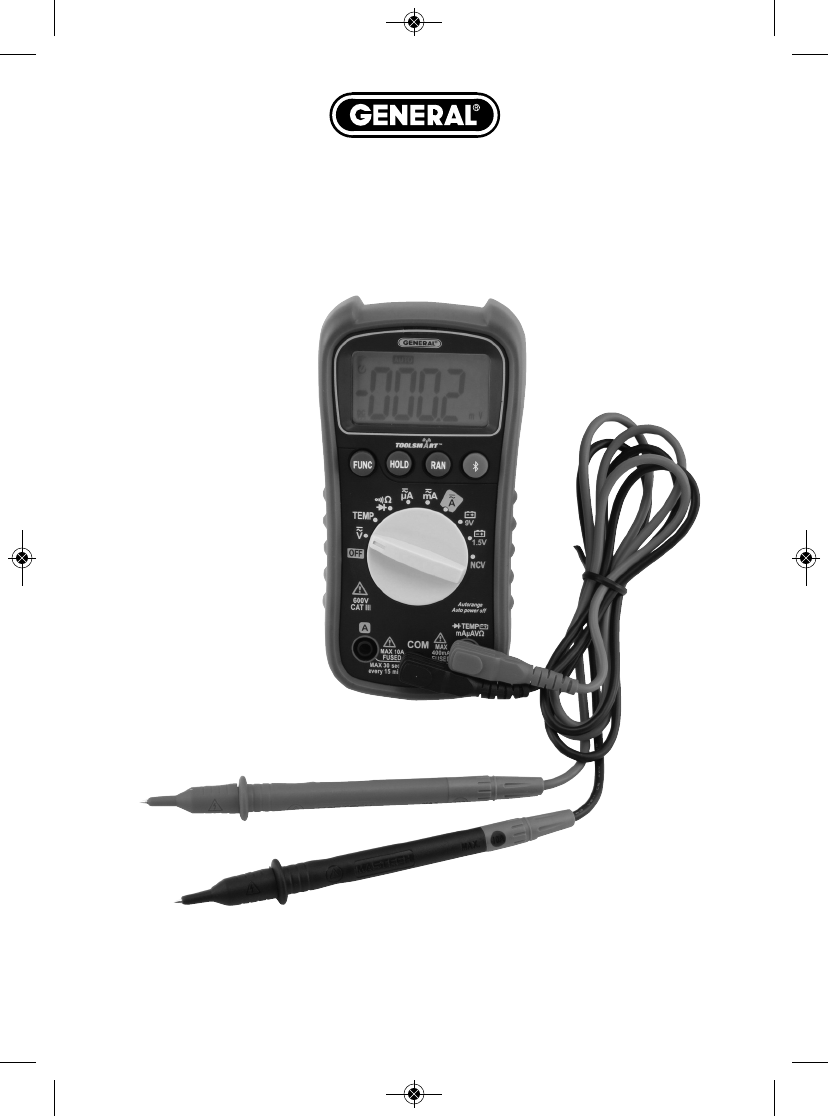
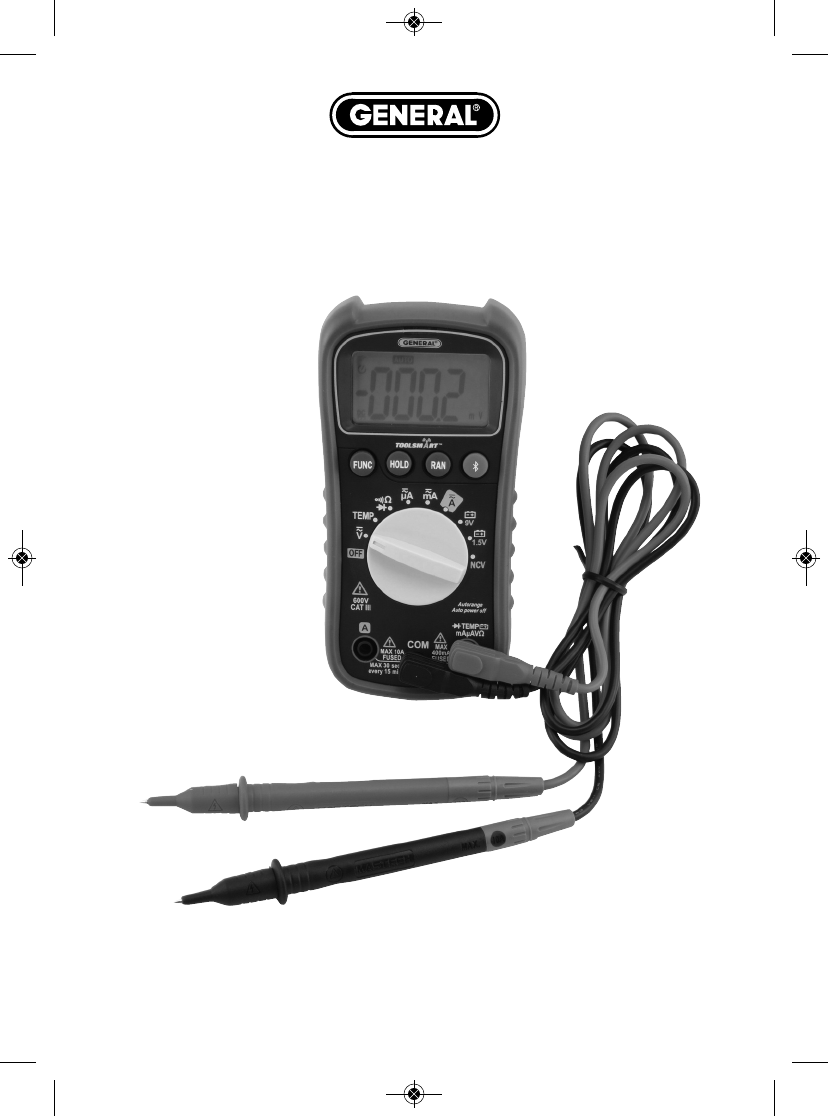
ToolSmart™
DIGITAL MULTIMETER
USER’S MANUAL
TS04
Please read this manual carefully and thoroughly before using this product.
TS04 Manual_ES-fin-011216.qxp_Layout 1 1/12/16 10:22 AM Page 1
TABLE OF CONTENTS
Introduction . . . . . . . . . . . . . . . . . . . . . . . . . . . . . . . . . . . . . . 3
Key Features . . . . . . . . . . . . . . . . . . . . . . . . . . . . . . . . . . . . . . 3
What’s in the Package . . . . . . . . . . . . . . . . . . . . . . . . . . . . . . 3
Product Overview . . . . . . . . . . . . . . . . . . . . . . . . . . . . . . . 4 –6
Safety Instructions . . . . . . . . . . . . . . . . . . . . . . . . . . . . . . 5 –7
Setup Instructions . . . . . . . . . . . . . . . . . . . . . . . . . . . . . . . . . 7
Install Battery . . . . . . . . . . . . . . . . . . . . . . . . . . . . . . . . 7
Operating Instructions . . . . . . . . . . . . . . . . . . . . . . . . . . 8 – 13
General Instructions . . . . . . . . . . . . . . . . . . . . . . . . . . . 8
Holding Readings . . . . . . . . . . . . . . . . . . . . . . . . . . . . . 8
Choosing a Measurement Range . . . . . . . . . . . . . . . . . . 9
Disabling Auto Power Off . . . . . . . . . . . . . . . . . . . . . . . . 9
Measuring AC or DC Voltage . . . . . . . . . . . . . . . . . . . . . 9
Measuring AC or DC Current . . . . . . . . . . . . . . . . . 9 – 10
Measuring Resistance . . . . . . . . . . . . . . . . . . . . . . . . . 11
Measuring Temperature . . . . . . . . . . . . . . . . . . . . . . . 11
Checking for Continuity . . . . . . . . . . . . . . . . . . . . . . . . 12
Checking the Integrity of a Diode . . . . . . . . . . . . . . . . 12
Checking Battery Voltage . . . . . . . . . . . . . . . . . . . . . . 13
Using the NCV Detector . . . . . . . . . . . . . . . . . . . . . . . . 13
Using the Digital Multimeter with the ToolSmart™App
and an Apple iOS or Android Smartphone . . . . . . . . . . 13
Specifications . . . . . . . . . . . . . . . . . . . . . . . . . . . . . . . . 14 – 15
Operating & Maintenance Tips . . . . . . . . . . . . . . . . . . . . . . . 16
Warranty Information . . . . . . . . . . . . . . . . . . . . . . . . . . . . . . 17
Return for Repair Policy . . . . . . . . . . . . . . . . . . . . . . . . . . . . 17
FCC Statement . . . . . . . . . . . . . . . . . . . . . . . . . . . . . . . . . . . 18
Manual del Usuario (en Español) . . . . . . . . . . . . . . . . . 21 – 40
2
TS04 Manual_ES-fin-011216.qxp_Layout 1 1/12/16 10:22 AM Page 2

INTRODUCTION
Thank you for purchasing General Tools & Instruments’ (General’s) TS04
ToolSmart™Digital Multimeter (DMM). Please read this user’s manual carefully
and thoroughly before using the instrument.
The DMM can be used as a standalone multimeter, or with General’s free
ToolSmart™app running on your mobile phone. When used in concert with an
iPhone®or Android™smartphone, the DMM can stream—via Bluetooth®— to
the phone all measurements it makes. The phone initiates the data transfer
using the ToolSmart™app, which can be downloaded from the iTunes®App
Store or Google Play Store. The measurements can then be used to tag photos
taken by the phone’s camera. For example, the app can apply current readings
to icons of different AC outlets in a rendering of a room as a way to compare
their efficiency.
KEY FEATURES
• 10 functions, 26 ranges
• Measures AC/DC voltage, AC/DC current, resistance and surface
temperature
• Also checks continuity, diode integrity and battery voltage
• Non-contact voltage (NCV) detector
• ETL certified safe for CAT III 600V use
• True RMS measurements
• 2 in. (51mm) diagonal, 3-3/4 digit (4000 count) LCD with 3/4 in. (19mm)
high digits
• Powered by “9V” battery (included)
• Low battery indication
WHAT’S IN THE PACKAGE
The meter is supplied in a display box along with a pair of double-insulated test
lleads, a bead thermocouple probe and plug adapter, and a “9V” battery.
3
iPhone®and iTunes®are trademarks of Apple Inc., registered in the U.S. and other countries.
Android™is a trademark of Google Inc.
The Bluetooth®word mark and logos are registered trademarks owned by Bluetooth SIG, Inc. and
any use of such marks by General Tools & Instruments is under license.
TS04 Manual_ES-fin-011216.qxp_Layout 1 1/12/16 10:22 AM Page 3
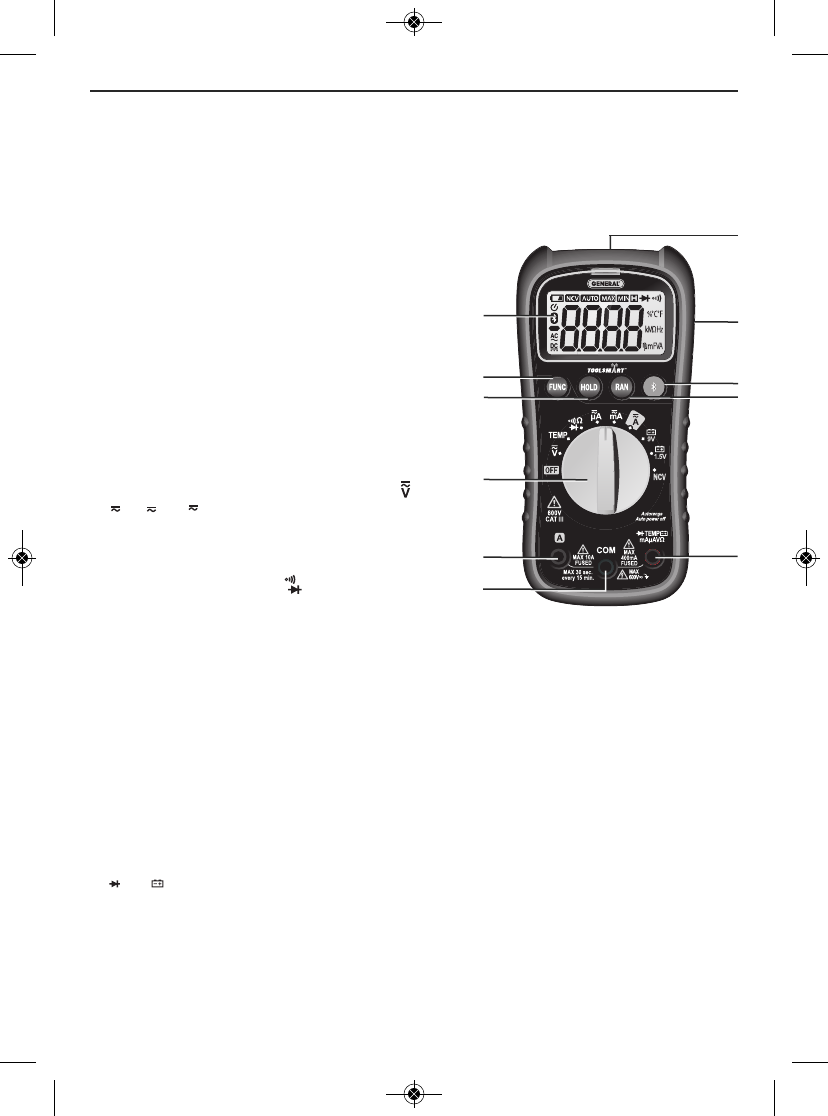
PRODUCT OVERVIEW
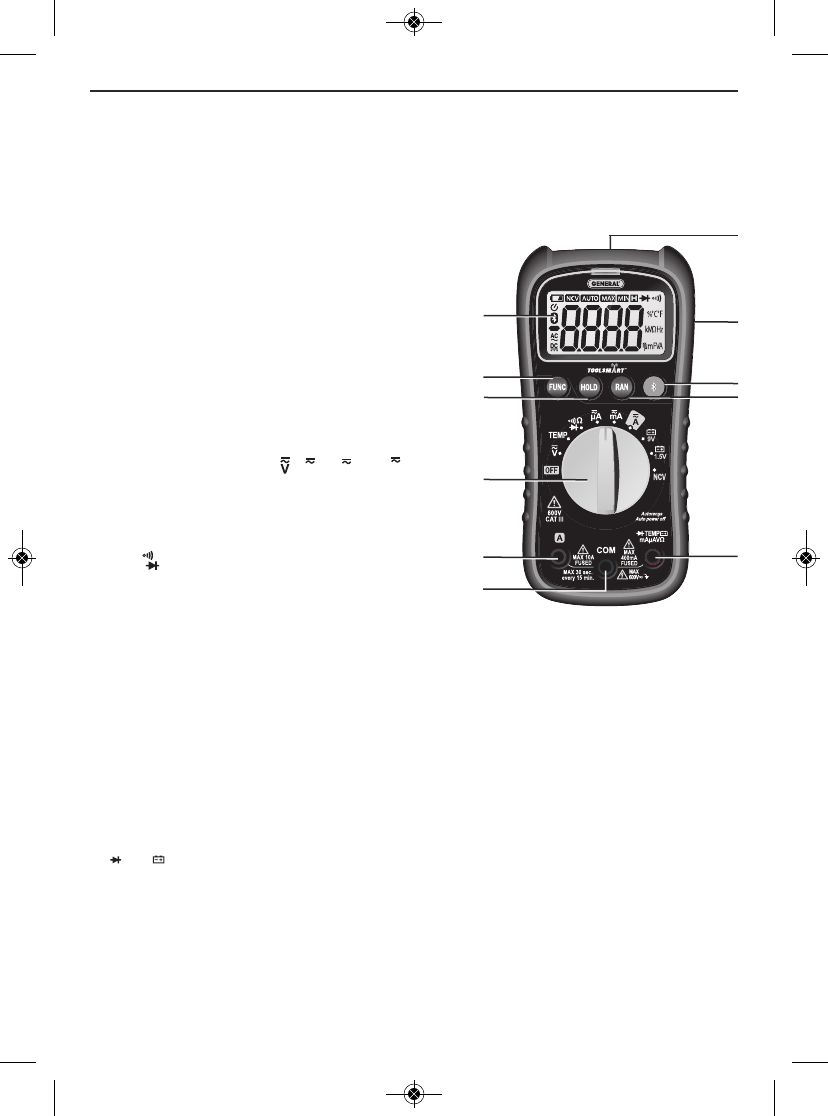
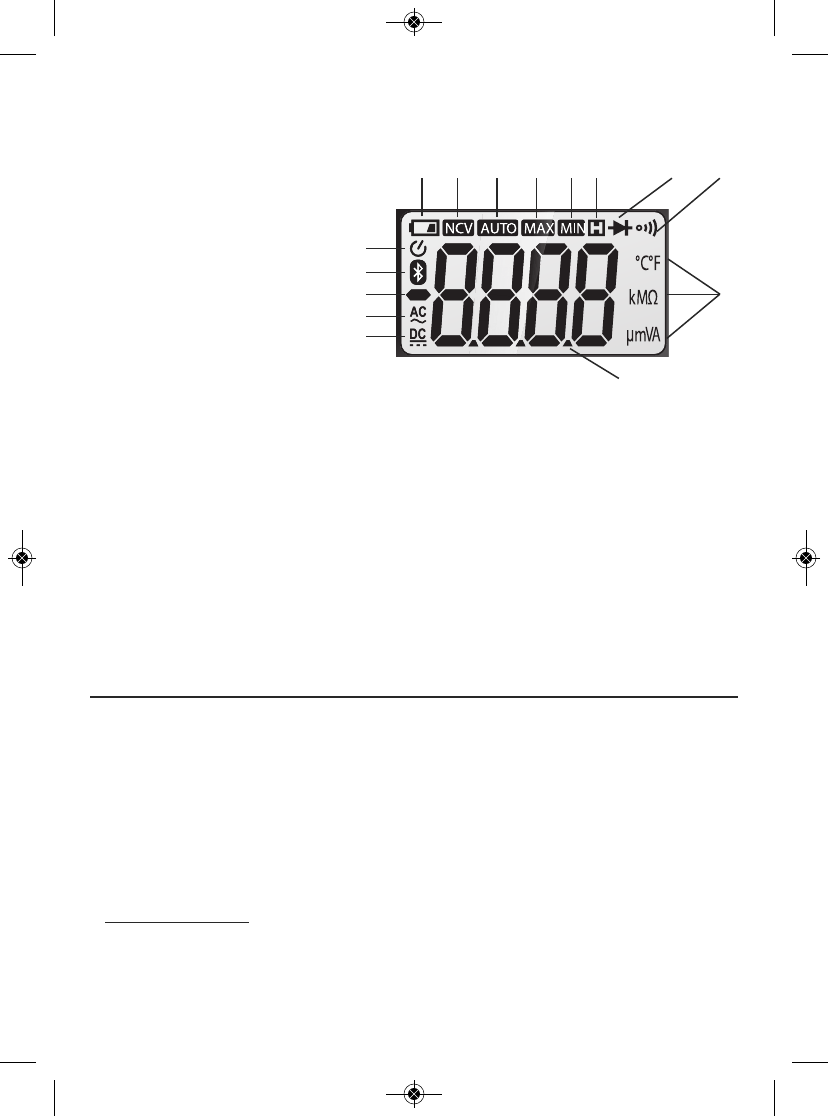
Fig. 1 shows the labels and positions of the controls, LCD and physical
structures of the meter. Fig. 2 shows all possible indications on the LCD.
Familiarize yourself with the functions and meanings of all controls, indications
and connectors before moving on to the safety, setup and operating instructions.
1. LCD
2. Activates Bluetooth transmission
3. Range selector. Selects Autoranging or
Manual Ranging mode and specific
manual range, if manual ranging is
selected (see page 8)
4. Four-function FUNC button. 1) Toggles
between AC and DC measurement with
the rotary dial in the , , or
position. 2) Selects resistance
measurement, continuity checking or
diode checking with the rotary dial in
the position. 3) Toggles between ºC
and ºF units with the rotary switch in the
TEMP position. 4) Disables the meter’s
Auto Power Off function when pressed
and held while moving the rotary
function switch out of the OFF position.
5. Data hold button. “Freezes” the display when pressed. Cancels the hold
function when pressed again.
6. Rotary switch. Selects the meter’s primary function.
7. Ainput jack
8. COM input jack
9. main input jack (for all functions except measuring current >400mA)
10. NCV sensor and visual indicator (red LED)
11. Battery compartment cover/flip-up stand (on back)
TEMP
mAµAVΩ
µA
A
mA
Ω
4
햲
햵
햶
햳
햽
햻
햴
햺
햷
햸
햹
Fig. 1. The DMM's controls,
indicators and
physical features
TS04 Manual_ES-fin-011216.qxp_Layout 1 1/12/16 10:22 AM Page 4
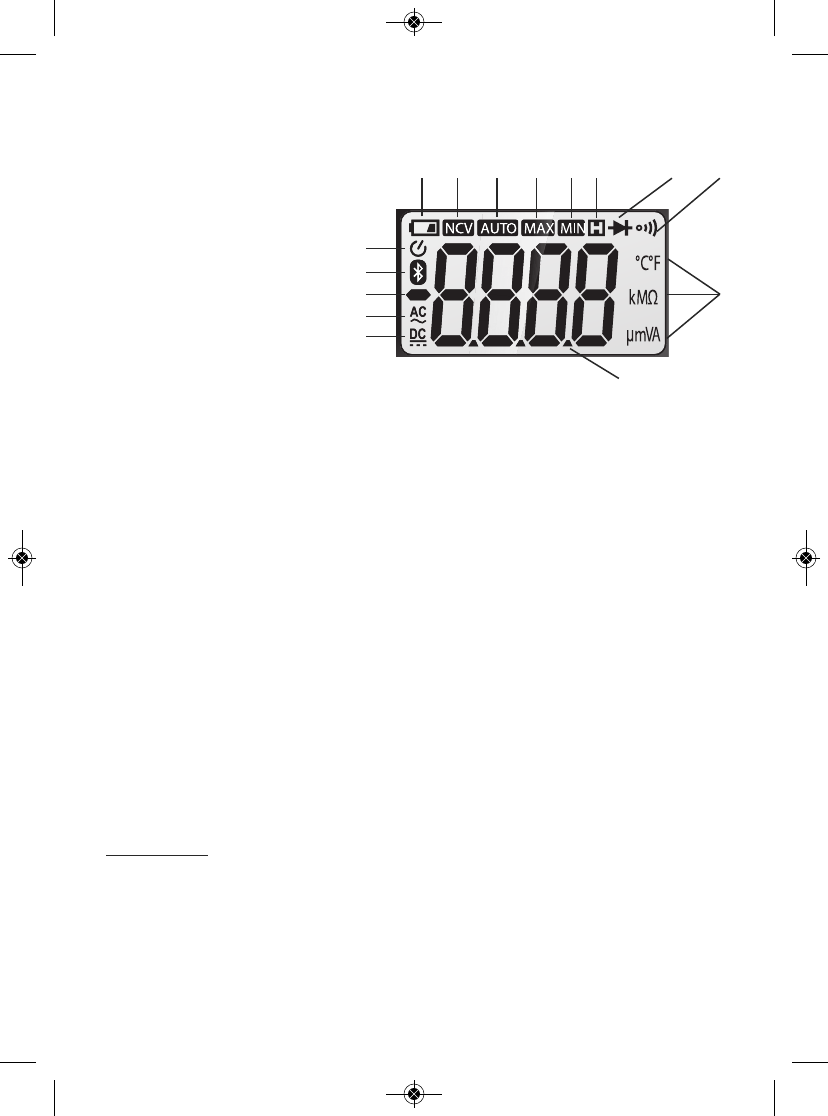
1. Indicates DC voltage or current measurement
2. Indicates AC voltage or current measurement
3. Negative polarity indicator
4. Bluetooth enabled indicator
5. Indicates Auto power off
function is enabled
6. Low battery indicator
7. Indicates detection of non-
contact voltage
8. Autoranging mode indicator
9. Indicates LCD is showing maximum session value
10. Indicates LCD is showing minimum session value
11. Indicates data is being held
12. Diode check mode indicator
13. Continuity check mode indicator
14. Measurement units
15. Measured value
SAFETY INSTRUCTIONS
Warning
To avoid possible electric shock or personal injury, and to avoid damaging the
meter or the equipment under test:
• Before using the meter, inspect the case. Do not use the meter if it is
damaged. Look for cracks or missing plastic. Pay particular attention to the
insulation around the connectors.
•
WARNING
Inspect the test leads for damaged insulation or exposed metal.
Check the test leads for continuity. Replace damaged test leads before using
the meter.
• Verify the meter’s operation by measuring a known voltage. Do not use the
meter if it operates abnormally. Protection may be impaired. When in doubt,
have the meter serviced.
5
Fig. 2. All possible
display indications
헀
헁
햿
햾
햽
햻
햺
햹햸햷
햶
햵
햴
햳
햲
TS04 Manual_ES-fin-011216.qxp_Layout 1 1/12/16 10:22 AM Page 5
•
WARNING
Do not apply more than the rated voltage, as marked on the
meter, between the and
COM
jacks or between any jack and ground.
Also do not input more than the rated current, as marked on the meter,
through the
A
jack.
•
WARNING
Do not measure voltages above 600V in Category III
installations.
•
WARNING
Do not attempt to measure voltage with the rotary function
switch in any position other than . Never attempt to measure current with
the rotary function switch in any position other than , or .
• Use caution when working with voltages above 42VACRMS, or 60VDC. These
voltages pose a shock hazard.
•
WARNING
Do not operate the meter around explosive gas, vapor, or dust.
•
WARNING
When using the probes, keep your fingers behind the finger
guards. Do not touch the metal probes of the test leads when making a
measurement.
• When making connections, connect the black (–) test lead before connecting
the red (+) test lead; when disconnecting, disconnect the red (+) test lead
before disconnecting the black (–) test lead.
• Disconnect circuit power and discharge all high-voltage capacitors before
measuring/testing resistance, continuity or diodes.
• For all DC functions in both auto and manual ranging mode, to avoid the risk
of shock due to possible improper reading verify the presence of any AC
voltages by first using the AC function. Then select a DC voltage range as
wide or wider than the AC range.
• Before measuring current, turn off power to the circuit before connecting the
meter.
• Do not operate the meter with the case (or part of the case) removed.
• Replace the battery as soon as the low battery indicator appears.
Operated with a weak battery, the meter might produce false readings that
could lead to electric shock and personal injury.
• Remove the test leads from the meter before opening the meter case or
battery compartment.
TEMP
mAµAVΩ
µA
mA
A
6
TS04 Manual_ES-fin-011216.qxp_Layout 1 1/12/16 10:22 AM Page 6
SETUP INSTRUCTIONS
INSTALL BATTERY
Turn the meter over to gain access to the battery compartment.
To open the compartment:
1)
Use a small Phillips-head screwdriver to remove the single screw in the middle
of the one-piece battery compartment cover/flip-up stand.
2) Remove the cover/stand and set it aside.
3) Plug the "9V" battery included in the package into the wired socket inside
the compartment. The terminals of the battery and the socket mate in only
one way, with the smaller male terminal plugging into the larger female
terminal.
4) Secure the battery compartment by replacing the cover/stand and
reinstalling and tightening the Phillips-head screw.
7
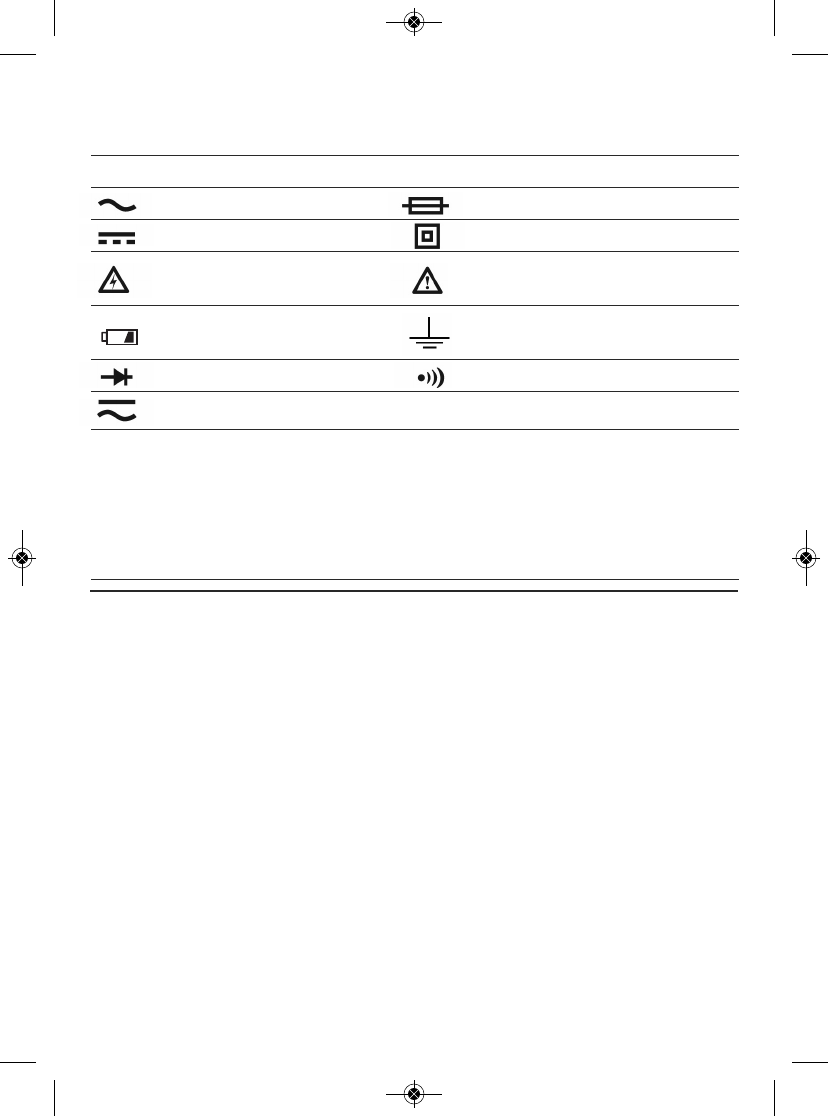
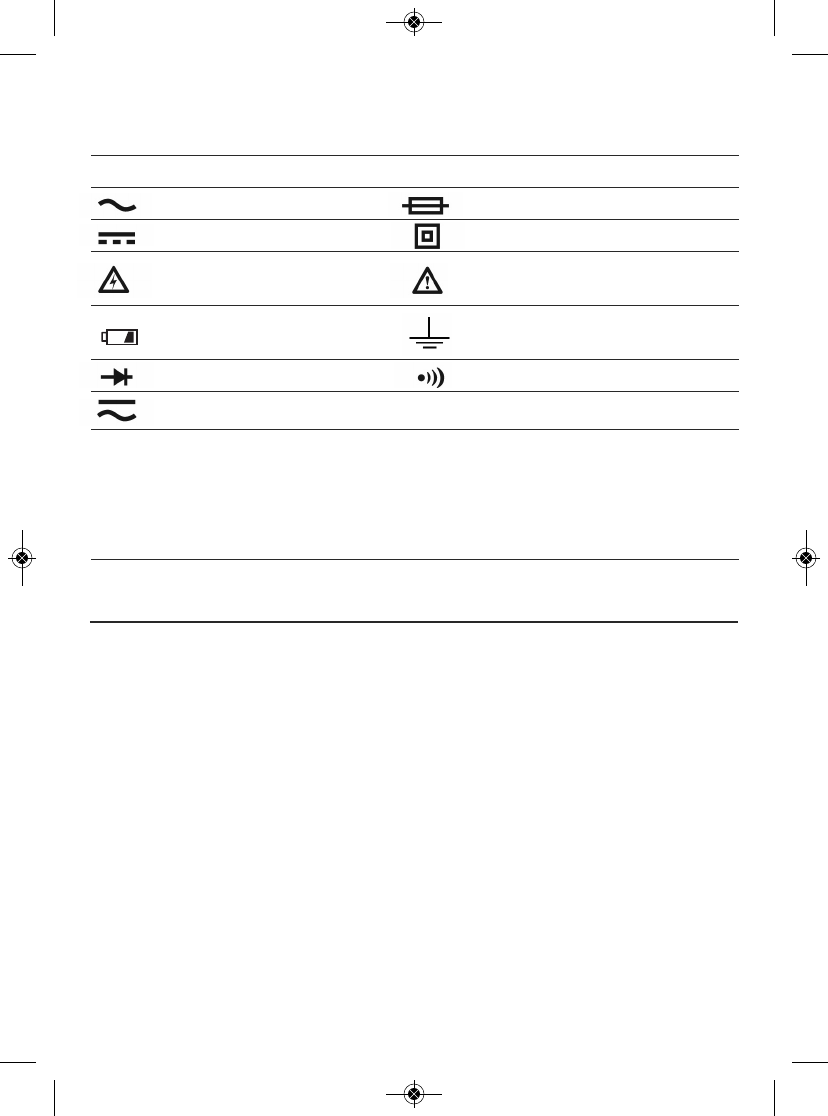
Electrical Symbols Used On the Meter and
In This Manual
Symbol Description Symbol Description
AC (Alternating Current) Fuse
DC (Direct Current) Double-insulated
Caution, risk of electric Risk of danger. Important
shock. Hazardous voltage. information. Refer to the manual.
Low battery indication Earth ground
Diode Continuity beeper
AC or DC ΩResistance
CAT III For measurements
made on building
equipment such as
distribution panels, feeders
and short branch circuits,
and on lighting systems
in large buildings.
TS04 Manual_ES-fin-011216.qxp_Layout 1 1/12/16 10:22 AM Page 7
OPERATING INSTRUCTIONS
GENERAL INSTRUCTIONS
All parameters are measured through the included test leads. Unless you are
measuring currents larger than 400 mA, plug the red test lead into the
jack and the black test lead into the C
OM
jack. To measure currents larger than
400 mA, plug the red lead into the Ajack (Fig. 1, Callout 7) and the black lead
into the COM jack.
HOLDING READINGS
Pressing the HOLD button “freezes” any measurement on the LCD and causes
the symbol to appear on the top line. Pressing the button again releases the
hold, removes the symbol and resumes real-time measurements.
CHOOSING A MEASUREMENT RANGE
By default, the DMM automatically enters Auto Ranging mode when powered
on. In this mode, it chooses the measurement range that maximizes the
resolution of its current, voltage and resistance measurements. The term AUTO
on the top line of the LCD indicates operation in Auto Ranging mode.
To switch to Manual Ranging mode for any parameter, briefly press the
RAN
button. This will make the AUTO term disappear and cause the meter to enter
the widest full-scale range available for that parameter (see the Specifications
section beginning on p. 14 for a list of the measurement ranges available for
voltage, current and resistance).
Once the meter is in manual ranging mode, each subsequent brief press of the
RAN button typically narrows the full-scale range by an order of magnitude (a
factor of 10). For example, briefly pressing the RAN button with the meter
operating in the 0 to 40V full-scale manual range reduces the full-scale range
to 0 to 4V (and improves measurement resolution). The next press of the button
reduces the range to 0 to 400mV. When the narrowest full-scale range has
been reached, the next press of the RAN button switches the meter back to the
largest full-scale manual range for the selected parameter.
To exit Manual Ranging mode and return to Auto Ranging mode, press and
hold the RAN button.
TEMP
mAµAVΩ
8
TS04 Manual_ES-fin-011216.qxp_Layout 1 1/12/16 10:22 AM Page 8
DISABLING AUTO POWER OFF
By default, the DMM will automatically power itself off following any period of
15 minutes of front-panel inactivity. The icon at the upper left of the LCD
indicates that the Auto Power Off function is enabled. To disable the APO
function, press and hold the FUNC button while powering on the meter by
moving the rotary function switch to any position other than OFF. This will
cause the icon to disappear.
MEASURING AC OR DC VOLTAGE
Warning
Do not measure any AC or DC voltage higher than 600V. Doing so may damage
the meter’s internal circuitry.
(1) Turn the rotary switch to the position. By default, doing so will prepare the
DMM to measure DC rather than AC voltage, indicated by the presence of
the icon at the lower left of the LCD. If you are certain that the voltage
you want to measure is DC voltage, proceed to Step (2).
If you know that the voltage you want to measure is AC voltage, press the
FUNC button once; this will cause the icon to replace the icon on the
left side of the LCD. If you are unsure whether the voltage to be tested is AC
or DC, configure the DMM to measure AC voltage for safety reasons.
(2) Plug the black test lead into the front-panel COM jack and the red test lead
into the jack.
(3) Touch the black test lead to the lower-potential point of the circuit under
test, and the red test lead to the higher-potential point.
(4) Read the measured voltage on the display. If you are working in Manual
Ranging mode and the readout is .OL, the voltage level is beyond the
currently selected range. If that is the case, use the FUNC button to select
the next-widest position. When measuring DC voltage, if the test leads are
reversed a minus sign will appear at the left of the readout.
MEASURING AC or DC CURRENT
Warning
Do not attempt to measure: 1) currents larger than 400mA through the
jack; 2) currents larger than 10A through the Ajack; or 3) currents larger than
2A through the Ajack for more than 2 minutes continuously; pause 10 minutes
after each measurement of such a large current.
DC
AC
DC
TEMP
mAµAVΩ
TEMP
mAµAVΩ
9
TS04 Manual_ES-fin-011216.qxp_Layout 1 1/12/16 10:22 AM Page 9
(1) Remove power from the circuit to be tested and discharge all high-voltage
capacitors.
(2) Turn the rotary switch to the , or position,, depending on the
amplitude of the current you expect to encounter. If you are unsure of the
amplitude, select the 10A position first and then switch to the or
position if all of your measurements are less than 400mA.
(3) By default, the DMM is initially configured to measure DC rather than AC
current, indicated by the presence of the icon at the lower left of the
LCD. If you are certain that the current you want to measure is DC current,
proceed to Step (4).
If you know that the current you want to measure is AC current, press the
FUNC button once; this will cause the icon to replace the icon on the
left side of the LCD. If you are unsure whether the voltage to be tested is AC
or DC, configure the DMM to measure AC voltage for safety reasons.
(4) Plug the black test lead into the black COM jack at the bottom left of the
front panel.
(5) Plug the red test lead into the Aor jack. Choose the Ajack if you
have set the rotary switch to the position, and the jack if you have
set it to the or position.
(6) Break the circuit and touch the red lead to the higher-voltage side of the
break and the black lead to the lower-voltage side.
(7) Re-apply power to the circuit and observe the display. If you are working in
Manual Ranging mode and the display shows O.L, the current amplitude is
beyond the selected current range. If that is the case, use the FUNC button
to select the next-widest position. If the readout is a negative value, the
leads are reversed but the absolute value represents a valid measurement
of current amplitude.
(8) Remove power from the circuit and discharge all high-voltage capacitors.
(9) Remove the test leads and restore the circuit to its original condition by
eliminating the break you made in Step 6.
A
mA
µA
mA
µA
AC
DC
DC
TEMP
mAµAVΩ
TEMP
mAµAVΩ
mA
µA
A
10
TS04 Manual_ES-fin-011216.qxp_Layout 1 1/12/16 10:22 AM Page 10
MEASURING RESISTANCE
Warning
To avoid electrical shock or damage to the meter when measuring resistance,
turn off all power to the circuit and discharge all high-voltage capacitors.
(1) Turn the rotary switch to the position and press the FUNC button until
Ω, kΩor MΩappears on the right side of the LCD.
(2) Plug the black test lead into the front-panel COM jack and the red test lead
into the jack.
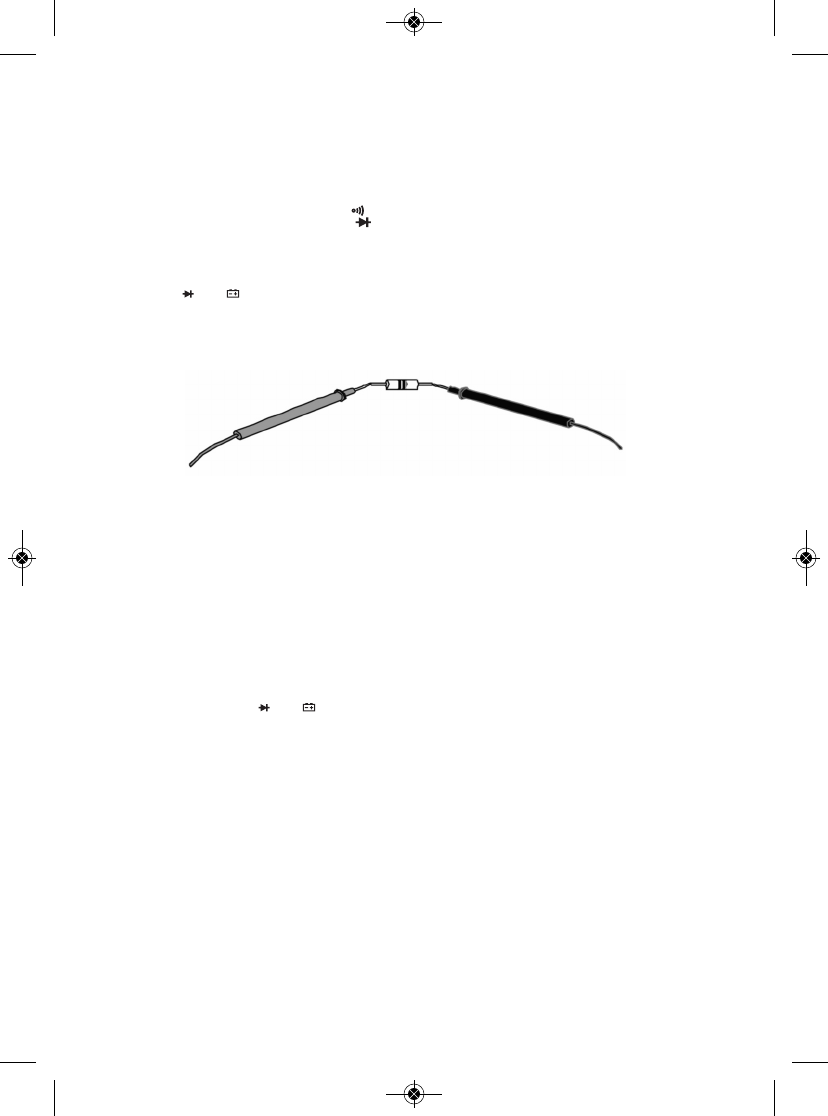
(3) Measure the resistance by touching the test leads to the desired test points
of the circuit or to the terminals of a component, as shown below.
(4) Read the measured resistance on the display. If you are working in Manual
Ranging mode and the readout is .OL, the resistance value is beyond the
currently selected range. If that is the case, use the FUNC button to select
the next-widest position.
MEASURING TEMPERATURE
The DMM includes a “K” type bead thermocouple probe for measuring surface
temperatures. To use it,
(1) Insert the +V plug of the plug adapter to which the thermocouple is
attached into the jack.
(2) Insert the COM plug of the plug adapter into the COM jack of the DMM.
(3) Turn the rotary switch to the TEMP position.
(4) Press the FUNC button until your preferred temperature measurement
unit—ºF or ºC—appears on the right side of the LCD.
(5) Attach the bead probe to the surface whose temperature you wish to
measure. The reading will be shown on the LCD.
Ω
TEMP
mAµAVΩ
TEMP
mAµAVΩ
11
RED TEST LEAD BLACK TEST LEAD
TS04 Manual_ES-fin-011216.qxp_Layout 1 1/12/16 10:22 AM Page 11
CHECKING FOR CONTINUITY
Warning
To avoid possible damage to the meter or other equipment, turn off the power
source and discharge all high-voltage capacitors.
(1) Turn the rotary switch to the position and press the FUNC button until
the icon appears in the upper right corner of the LCD.
(2) Plug the black test lead into the COM jack and the red test lead into the
jack.
(3) Touch the test leads to any two points of the circuit. The resistance between
those two points will be displayed. If the resistance is <50Ω, the beeper will
sound continuously. If there is no continuity (an open circuit or a resistance
>50Ω) between the two points, OL. will appear on the readout.
CHECKING THE INTEGRITY OF A DIODE
Warning
To avoid possible damage to the meter or other equipment, turn off the power
source and discharge all high-voltage capacitors.
(1) Turn the function switch to the position and press the FUNC button until
the icon appears in the upper right corner of the LCD.
(2) Plug the black test lead into the front-panel COM jack and the red test lead
into the jack.
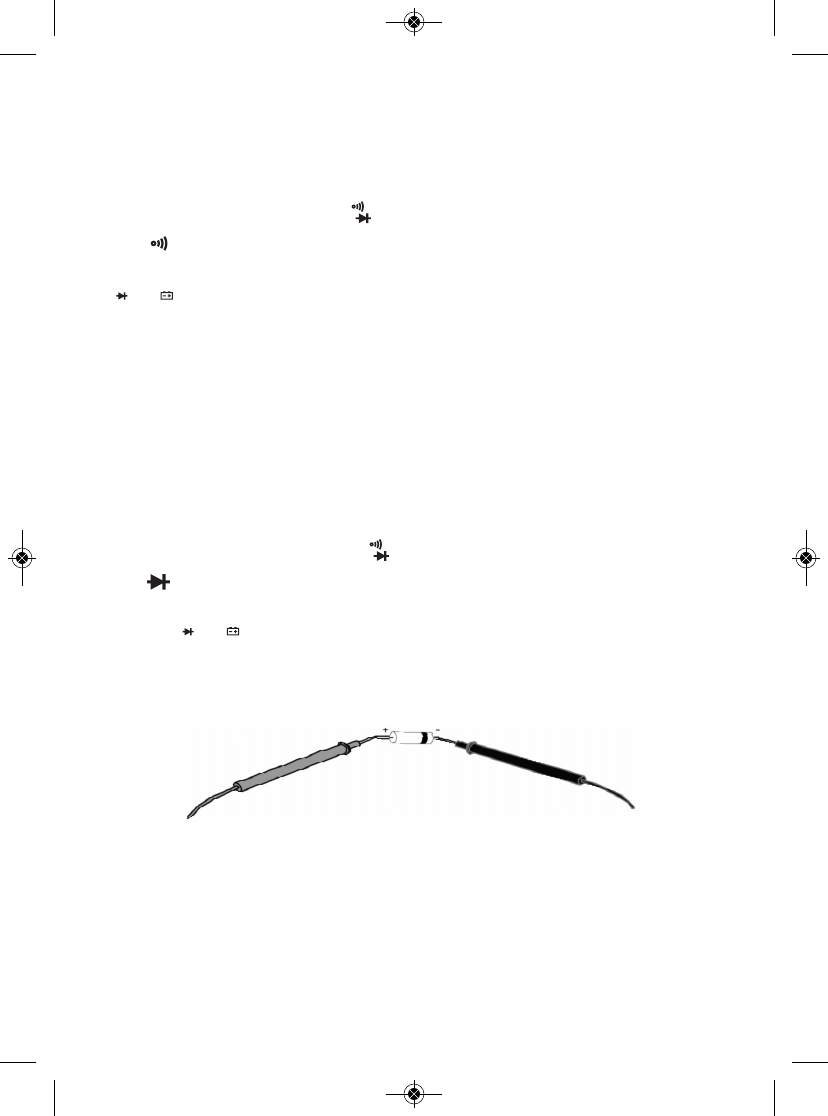
(3) Touch the red test lead to the anode (positive terminal) of the diode to be
tested and the black test lead to its cathode (negative terminal), as shown
below.
(4) Read the diode’s forward bias voltage drop on the display. A silicon diode
typically has a forward voltage drop of 0.7V. A germanium diode typically
has a forward voltage drop of 0.3V. A 0V reading in both directions indicates
a shorted diode. A readout of .OL means either of two things: the leads are
reversed, or the diode is defective. Reverse the leads. If this still produces a
readout of .OL, the diode is defective and should be replaced.
TEMP
mAµAVΩ
Ω
TEMP
mAµAVΩ
Ω
12
RED TEST LEAD BLACK TEST LEAD
TS04 Manual_ES-fin-011216.qxp_Layout 1 1/12/16 10:22 AM Page 12
CHECKING BATTERY VOLTAGE
Warning
To avoid possible electrical shock or damage to the meter, do not apply a
voltage greater than 600V between the meter’s and
COM jacks.
(1) Turn the rotary switch to the 9V or 1.5V position, corresponding to the
nominal voltage of the battery to be tested.
(2) Plug the black test lead into the COM jack and the red test lead into the
jack.
(3) Touch the red test lead to the battery’s anode (+ terminal) and the black test
lead to its cathode (– terminal). The battery’s voltage will appear on the
display.
USING THE NCV DETECTOR
To check whether a line, cable or AC outlet is “hot”
(energized), touch it with
the top of the meter or bring the top within 1/4 inch of it after moving the rotary
function switch to the NCV position. If the beeper sounds repeatedly and the
red LED at the top of the meter (Fig. 1, Callout 10) flashes rapidly, the line or
outlet is carrying at least 110VAC
RMS
.
USING THE DMM WTH THE ToolSmart™APP AND
AN APPLE iOS OR ANDROID SMARTPHONE
To stream measurements and calculations made by the DMM to an Apple iOS
or Android smartphone, begin by downloading the ToolSmart™app from the
iTunes Store or Google Play Store to your mobile device.
Once you have downloaded the app, install it. Then, pair the DMM and your
phone by activating Bluetooth on your phone and pressing the button on the
DMM.
A tutorial on the app explains how to save DMM measurements to your phone
and overlay them on photos of your project taken by the phone’s camera.
TEMP
mAµAVΩ
TEMP
mAµAVΩ
13
TS04 Manual_ES-fin-011216.qxp_Layout 1 1/12/16 10:22 AM Page 13

SPECIFICATIONS
Parameter or
Feature/Function
Attribute Specification
AC voltage Measurement ranges 0 to 4V/40V/400V/600V
Measurement accuracy ±(1% of reading + 10 digits)
Maximum resolution 1mV
DC voltage Measurement ranges 0 to 400mV/4V/40V/400V/600V
Measurement accuracy ±(0.8% of reading + 5 digits)
in 600V range;
±(0.5% of reading + 2 digits)
in other ranges
Maximum resolution 0.1mV
AC or DC Measurement ranges 0 to 400uA/4mA/40mA/400mA/10A
current Measurement accuracy ±(2% of reading + 3 digits) in
10A range; ±(1.2% of reading
+ 6 digits) or better in other ranges
Maximum resolution 0.1A
Resistance Measurement ranges 0 to 400Ω/4kΩ/40kΩ/
400Ω/4MΩ/40MΩ
Measurement accuracy ±(0.8% of reading + 3 digits), typical)
Maximum resolution 0.1Ω
Temperature DMM measurement range -4º to 1832ºF (-20º to 1000ºC)
DMM measurement accuracy ±(2.0% of reading + 2 digits)
Measurement range of -4° to 500°F (-20° to 260°C)
included thermocouple
Measurement accuracy of ±(2% + 2 digits)
Included thermocouple
Continuity Open circuit voltage 1V
Threshold <50Ω
Diode integrity Range 0 to 2.7V
Resolution 1mV
14
TS04 Manual_ES-fin-011216.qxp_Layout 1 1/12/16 10:22 AM Page 14
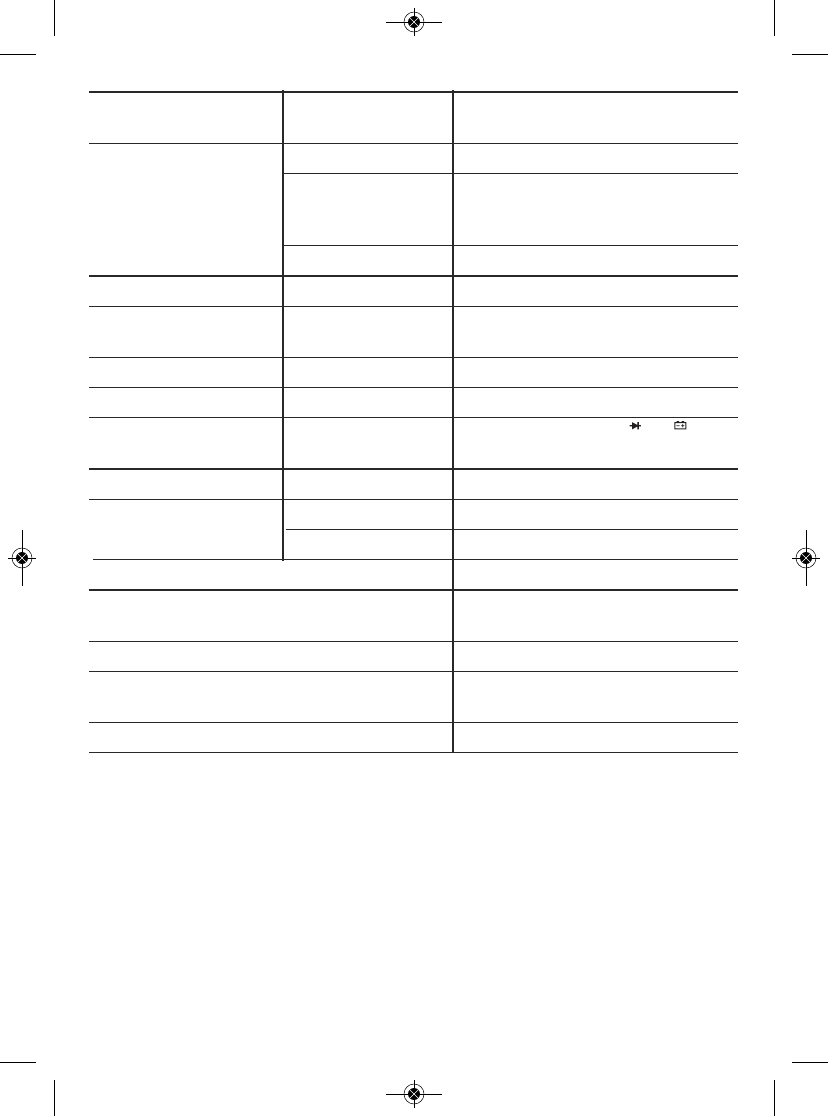
Parameter or
Feature/Function
Attribute Specification
Battery voltage Measurement ranges 0 to 9V, 0 to 1.5V
Measurement ±(0.8% of reading + 7 digits)
accuracy in
9V
position; ±(3% of
reading + 5 digits) in
1.5V
position
Max resolution 1mV
Safety rating CAT III 600V
NCV detection >110VAC
RMS
voltage & distance @ <1/4 in. (6mm)
Bluetooth range 33 ft. (10m)
Maximum input voltage 600VDC/ACRMS
Fuse protection 400mV/600V fuse for jack;
10A/600V fuse for
A
jack
Sampling time 3X/sec
Display No. of digits 3-3/4
Maximum count 4000
Low battery indication threshold <6.7VDC
Operating temperature 32° to 104°F (0° to 40°C)
@<80%RH
Power source (1) “9V” battery (included)
Dimensions 5.8 x 2.9 x 2.0 in.
(148 x 74 x 50mm)
Weight (including battery) 8.2 oz. (232g)
Note: Accuracy values are stated for an operating temperature between
64° and 82°F (18° and 28°C) with RH<80%. Accuracies are lower outside
this range, in proportion to the actual operating temperature's distance
from the “sweet spot.”
TEMP
mAµAVΩ
15
TS04 Manual_ES-fin-011216.qxp_Layout 1 1/12/16 10:22 AM Page 15
OPERATING & MAINTENANCE TIPS
When the icon appears in the upper left corner of the LCD, immediately
replace the meter’s “9V” battery by following the instructions on page 7.
To replace a blown fuse:
1. Power off the meter.
2. Unplug the test leads.
3. Turn the meter over and loosen the small Phillips-head screw in the middle
of the back that secures the meter’s battery compartment cover. Remove the
cover, taking care not to lose the screw.
4. Remove the meter’s gray rubber holster by carefully pulling its front lip over
the housing, starting at the top and working your way around the perimeter
to the bottom.
5. Remove the four larger Phillips-head screws that secure the two halves of
the housing and pull the two halves apart.
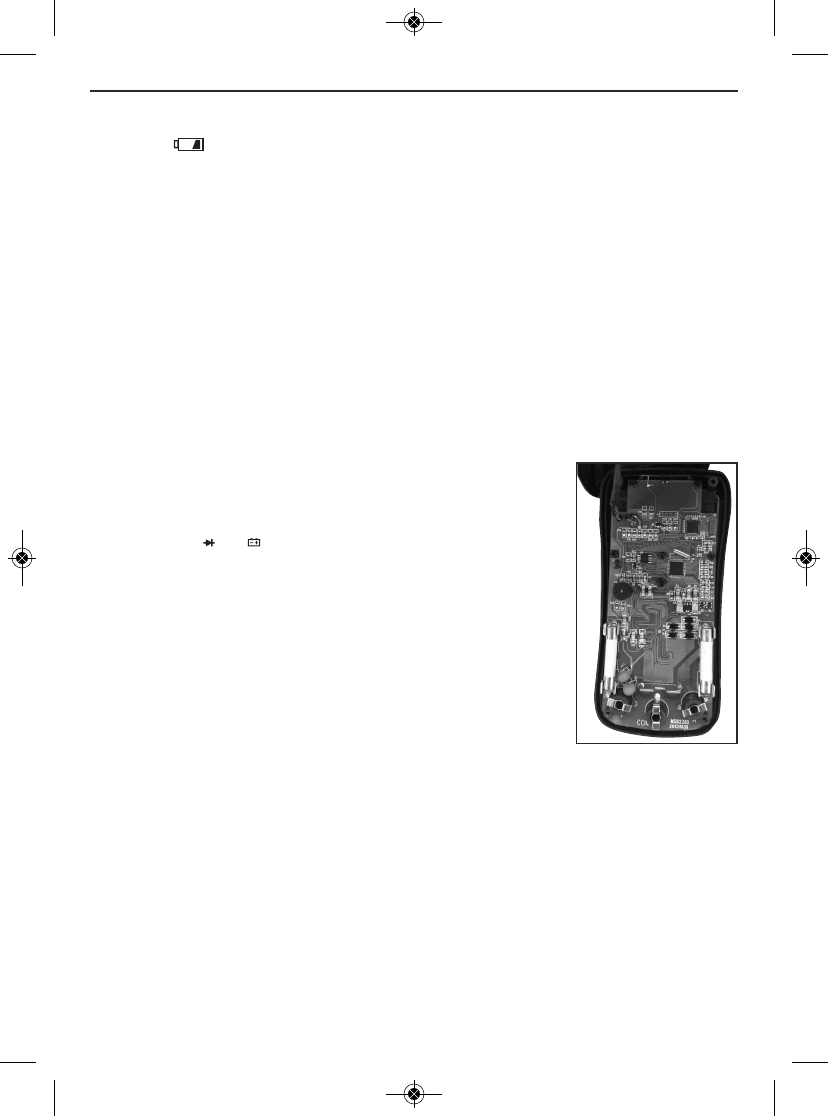
6. Locate the blown fuse on the circuit board (see photo at
right). The DMM uses two different white cylindrical
fuses. The jack is protected by an F400mA/600V
fuse. The Ajack is protected by an F10A/600V fuse.
Each fuse is located directly behind the jack it protects.
7. Using another multimeter or a continuity checker, verify
that the suspected blown fuse produces a resistance
reading consistent with an open circuit.
8. Replace the blown fuse by a fuse with the same current
and voltage ratings.
9. Rejoin both halves of the housing by replacing and
tightening its four screws.
10. Replace the battery compartment cover and tighten its screw.
11. Replace the gray rubber holster.
After subjecting the meter to a large change in ambient temperature, wait at
least 30 minutes before making measurements to guarantee the accuracy of
readings.
Remove the battery when storing the meter or when you do not expect to use it
for an extended period of time (months rather than weeks).
Do not disassemble the meter or immerse it in water.
TEMP
mAµAVΩ
16
Where to find the DMM’s
cylindrical white ceramic
fuses
TS04 Manual_ES-fin-011216.qxp_Layout 1 1/12/16 10:22 AM Page 16
WARRANTY INFORMATION
General warrants its instruments and accessories, and digital tools products against
defects in material or workmanship for one year from the date of purchase unless
otherwise stated on the packaging, manual, and/or marketing materials. General
also warrants its non-digital tools products against defects in material or
workmanship on a limited lifetime term.
General will replace or repair the defective unit, at its option, subject to verification
of the defect.
This warranty does not apply to defects resulting from abuse, neglect, accident,
unauthorized repair, alteration, or unreasonable use of the product. It also does not
cover products purchased from unauthorized distributors. A proof of purchase must
accompany each warranty claim.
Any implied warranties arising from the sale of a General product, including but not
limited to implied warranties of merchantability and fitness for a particular purpose,
are limited to the above. General shall not be liable for loss of use of the product or
other incidental or consequential damages, expenses, or economic loss, or for any
claim of such damage, expenses, or economic loss.
State laws vary. The above limitations or exclusions may not apply to you.
For more details or to file a warranty claim, contact General Tools & Instruments
Technical Support at techsupport@generatools.com.
RETURN FOR REPAIR POLICY
Every effort has been made to provide you with a reliable product of superior
quality. However, in the event your instrument requires repair, please contact
our Customer Service to obtain an RGA (Return Goods Authorization) number
before forwarding the unit via prepaid freight to the attention of our Service
Center at this address:
General Tools & Instruments
75 Seaview Drive
Secaucus, NJ 07094
212-431-6100
Remember to include a copy of your proof of purchase, your return address,
and your phone number and/or e-mail address.
17
TS04 Manual_ES-fin-011216.qxp_Layout 1 1/12/16 10:22 AM Page 17
FCC STATEMENT
This device complies with part 15 of the FCC Rules. Operation is subject to the
following two conditions: (1) This device may not cause harmful interference,
and (2) This device must accept any interference received, including
interference that may cause undesired operation.
This equipment has been tested and found to comply with the limits for a Class
B digital device, pursuant to part 15 of the FCC Rules. These limits are designed
to provide reasonable protection against harmful interference in a residential
installation. This equipment generates, uses and can radiate radio frequency
energy and, if not installed and used in accordance with the instructions, may
cause harmful interference to radio communications.
However, there is no guarantee that interference will not occur in a particular
installation. If this equipment does cause harmful interference to radio or
television reception, which can be determined by turning the equipment off and
on, the user is encouraged to try to correct the interference by one or more of
the following measures:
• Reorient or relocate the receiving antenna.
• Increase the separation between the equipment and receiver.
• Connect the equipment to a different circuit than the one the receiver is
connected to.
• Consult your supplier or an experienced radio/TV technician for help.
Caution: Any changes or modifications not expressly approved by the party
responsible for compliance could void the user's authority to operate the
equipment.
18
TS04 Manual_ES-fin-011216.qxp_Layout 1 1/12/16 10:22 AM Page 18

NOTES
__________________________________________________________
__________________________________________________________
__________________________________________________________
__________________________________________________________
__________________________________________________________
__________________________________________________________
__________________________________________________________
__________________________________________________________
__________________________________________________________
__________________________________________________________
__________________________________________________________
__________________________________________________________
__________________________________________________________
__________________________________________________________
__________________________________________________________
__________________________________________________________
__________________________________________________________
19
TS04 Manual_ES-fin-011216.qxp_Layout 1 1/12/16 10:22 AM Page 19

GENERAL TOOLS & INSTRUMENTS
75 Seaview Drive
Secaucus, NJ 07094
PHONE (212) 431-6100
FAX (212) 431-6499
TOLL FREE (800) 697-8665
e-mail: sales@generaltools.com
www.generaltools.com
TS04 User’s Manual
Specifications subject to change without notice
©2016 GENERAL TOOLS & INSTRUMENTS
NOTICE - WE ARE NOT RESPONSIBLE FOR TYPOGRAPHICAL ERRORS.
MAN# TS04
01/12/16
General Tools & Instruments
GeneralToolsNYC
TS04 Manual_ES-fin-011216.qxp_Layout 1 1/12/16 10:22 AM Page 20
ToolSmart™
MULTÍMETRO DIGITAL
MANUAL DEL USUARIO
TS04
Lea cuidadosamente todo este manual antes de usar este producto.
TS04 Manual_S_fin_011216.qxp_Layout 1 1/12/16 10:29 AM Page 21
ÍNDICE
Introducción . . . . . . . . . . . . . . . . . . . . . . . . . . . . . . . . . . . . . 23
Características principales . . . . . . . . . . . . . . . . . . . . . . . . . 23
Contenido de la caja . . . . . . . . . . . . . . . . . . . . . . . . . . . . . . 23
Descripción general del producto . . . . . . . . . . . . . . . . 24 – 26
Instrucciones de seguridad . . . . . . . . . . . . . . . . . . . . . 25 – 27
Instrucciones de preparación . . . . . . . . . . . . . . . . . . . . . . . 27
Instalación de la batería . . . . . . . . . . . . . . . . . . . . . . . 27
Instrucciones de operación . . . . . . . . . . . . . . . . . . . . . 28 – 33
Instrucciones generales . . . . . . . . . . . . . . . . . . . . . . . 28
Manteniendo las lecturas . . . . . . . . . . . . . . . . . . . . . . 28
Escogiendo un rango de medición . . . . . . . . . . . . . . . 29
Desactivación del apagado automático . . . . . . . . . . . 29
Medición de voltaje de CA o CC . . . . . . . . . . . . . . . . . 29
Medición de corriente de CA o CC . . . . . . . . . . . 29 – 30
Medición de resistencia . . . . . . . . . . . . . . . . . . . . . . . 31
Medición de temperatura . . . . . . . . . . . . . . . . . . . . . . 31
Verificación de continuidad . . . . . . . . . . . . . . . . . . . . 32
Verificación de diodos . . . . . . . . . . . . . . . . . . . . . . . . 32
Verificación de voltaje de baterías . . . . . . . . . . . . . . . 33
Uso del detector NCV . . . . . . . . . . . . . . . . . . . . . . . . . 33
Usando el multímetro digital con la aplicación
ToolSmart™en un teléfono inteligente Apple iOS
o Android . . . . . . . . . . . . . . . . . . . . . . . . . . . . . . . . . . . 33
Especificaciones . . . . . . . . . . . . . . . . . . . . . . . . . . . . . . 34 – 35
Consejos de operación y mantenimiento . . . . . . . . . . 36 – 37
Información de garantía . . . . . . . . . . . . . . . . . . . . . . . . . . . 37
Política de devolución para reparaciones . . . . . . . . . . . . . . 38
Declaración de la FCC . . . . . . . . . . . . . . . . . . . . . . . . . . . . . . 39
22
TS04 Manual_S_fin_011216.qxp_Layout 1 1/12/16 10:29 AM Page 22

INTRODUCCIÓN
Gracias por haber comprado el multímetro digital (DMM) TS04 ToolSmart™ de
General Tools & Instruments (General). Lea cuidadosamente todo este manual del
usuario antes de usar el instrumento.
El DMM se puede usar como un multímetro independiente, o con la aplicación
gratuita ToolSmart™instalada en su teléfono. Cuando se utiliza junto con un
teléfono inteligente iPhone®o Android™, el DMM puede enviar (por Bluetooth®)
todas las mediciones que hace al teléfono. El teléfono inicia la transferencia de
datos mediante una aplicación ToolSmart™descargada del iTunes®App Store o del
Google Play Store. Las mediciones se pueden usar para colocarlas en fotos
tomadas con la cámara del teléfono. Por ejemplo, la aplicación puede colocar las
mediciones actuales a íconos de distintos tomacorrientes de CA en el dibujo de un
cuarto como una forma de comparar la eficiencia de los mismos.
CARACTERÍSTICAS PRINCIPALES
• 10 funciones, 26 rangos
• Mide voltaje de CA/CC, corriente de CA/CC, resistencia y temperatura
superficial
• También verifica continuidad, diodos y el voltaje de las baterías
• Detector de voltaje sin contacto (NCV)
• Certificación ETL, apto para usar en CAT III 600 V
• Mediciones de valor eficaz (RMS)
• Pantalla LCD de 3-3/4 dígitos (4000 cuentas), de 51 mm en diagonal,
con dígitos de 19 mm de alto
• Alimentado por una batería de 9 voltios (incluida)
• Indicador de batería baja
CONTENIDO DE LA CAJA
El multímetro viene en una caja exhibidora junto con un par de puntas de prueba
con doble aislación, una sonda de termocupla con su enchufe adaptador y una
batería de 9 voltios.
23
iPhone®y iTunes®son marcas registradas de Apple Inc., registradas en Estados Unidos y en otros
países. Android™es una marca registrada de Google Inc.
La palabra y los logotipos Bluetooth®le pertenecen a Bluetooth SIG, Inc.y cualquier uso de ellos por
parte de General Tools & Instruments se hace bajo su autorización.
TS04 Manual_S_fin_011216.qxp_Layout 1 1/12/16 10:29 AM Page 23
DESCRIPCIÓN GENERAL DEL PRODUCTO
La Fig. 1 muestra los nombres y ubicación de la pantalla, controles y la estructura
física del multímetro. La Fig. 2 muestra todas las indicaciones posibles de la pantalla
LCD. Aprenda las funciones y el significado de todos los controles, indicadores y
conectores antes de avanzar a las Instrucciones de seguridad, preparación y de
operación.
1. Pantalla
2. Activa la transmisión Bluetooth
3. Selector de rango. Selecciona el modo de
rango automático o manual y especifica el
rango manual si se selecciona el modo
manual (ver la página 28)
4. Botón FUNC de cuatro funciones. 1)
Cambia entre mediciones de CA y CC con
el selector rotativo en las posiciones ,
, o . 2) Selecciona medición
de resistencia, verificación de continuidad
o verificación de diodos con el selector
rotativo en la posición . 3) Cambia entre
unidades de °C y °F con el selector
rotativo en la posición TEMP. 4) Desactiva
la función de apagado automático del
multímetro cuando se mantiene
presionada al girar el selector rotativo fuera de la posición OFF.
5. Botón para mantener los datos. “Congela” la pantalla al presionarlo. Cancela la
función de mantenimiento al volver a presionarlo.
6. Selector rotativo. Selecciona la función principal del multímetro.
7. Terminal de entrada A
8. Terminal de entrada COM
9. terminal principal de entrada (para todas las funciones excepto la
medición de corriente >400 mA)
10. Sensor NCV e indicador visual (LED rojo)
11. Cubierta del compartimiento de las baterías/Pie de apoyo plegable (en la
parte de atrás)
µA
mA
A
Ω
TEMP
mAµAVΩ
24
햲
햵
햶
햳
햽
햻
햴
햺
햷
햸
햹
Fig. 1. Controles, indicadores y
características físicas
del DMM
TS04 Manual_S_fin_011216.qxp_Layout 1 1/12/16 10:29 AM Page 24
1. Indica la medición de voltaje o corriente de CC
2. Indica la medición de voltaje o corriente de CA
3. Indicador de polaridad
negativa
4. Indicador de Bluetooth
activado
5. Indica que la función de
apagado automático está
activada
6. Indicador de batería baja
7. Indica la detección de voltaje
sin contacto
8. Indicador del modo de rango automático
9. Indica que la pantalla está mostrando el valor máximo de la sesión
10. Indica que la pantalla está mostrando el valor mínimo de la sesión
11. Indica que se están manteniendo los datos
12. Indicador de modo de verificación de diodos
13. Indicador de modo de verificación de continuidad
14. Unidades de medición
15. Valor de la medición
INSTRUCCIONES DE SEGURIDAD
Advertencia
Para evitar posibles descargas eléctricas o lesiones personales, y para evitar
daños al medidor o al equipo bajo prueba:
• Antes de usar el medidor, inspeccione la cubierta. No use el medidor si está
dañado. Verifique que no tenga rajaduras ni partes plásticas faltantes. Preste
especial atención al aislamiento alrededor de los conectores.
•
ADVERTENCIA: Inspeccione las puntas de prueba para detectar daños de
aislamiento o partes metálicas expuestas. Verifique la continuidad de las puntas
de prueba. Reemplace las puntas de prueba dañadas antes de usar el medidor.
25
Fig. 2. Todas las indicaciones
posibles de la pantalla
헀
헁
햿
햾
햽
햻
햺
햹햸햷
햶
햵
햴
햳
햲
TS04 Manual_S_fin_011216.qxp_Layout 1 1/12/16 10:29 AM Page 25

• Verifique el funcionamiento del medidor midiendo un voltaje conocido. No use el
medidor si está funcionando anormalmente. Su protección puede verse afectada.
Cuando tenga alguna duda, haga reparar su medidor.
•
ADVERTENCIA: No le aplique un voltaje mayor al especificado, que está
indicado en el medidor, entre los terminales y COM o entre cualquier
terminal y tierra. Tampoco le aplique una corriente mayor a la especificada, que
está indicada en el medidor, a través del terminal A.
•
ADVERTENCIA: No mida voltajes de más de 600 V en instalaciones categoría III.
•
ADVERTENCIA: No intente medir voltaje con el selector rotativo en cualquier
otra posición que no sea . Nunca intente medir corriente con el selector rotativo
en cualquier posición que no sea , o .
• Tenga cuidado al trabajar con voltajes superiores a 42 VCARMS o 60 VCC. Estos
voltajes pueden producir una descarga eléctrica.
•
ADVERTENCIA: No use el medidor cerca de gases, vapores o polvos explosivos.
•
ADVERTENCIA: Al usar las puntas de prueba, mantenga sus dedos detrás de
las cubiertas para dedos. No toque la parte metálica de las puntas de prueba
mientras realiza una medición.
• Al realizar las conexiones, conecte la punta de prueba negra (-) antes de conectar
la punta de prueba roja (+). Al desconectarlas, desconecte primero la punta de
prueba roja (+) y luego la punta de prueba negra (-).
• Desconecte la alimentación del circuito y descargue todos los condensadores de
alto voltaje antes de medir/probar la resistencia, continuidad o diodos.
• Para todas las funciones de CC en el modo de rango automático y manual, para
evitar el riesgo de una descarga eléctrica debido a un posible error de lectura,
verifique la presencia de voltaje de CA usando primero la función de CA. Luego
seleccione un rango de voltaje de CC de igual o mayor rango que el de CA.
• Antes de medir corriente, apague la alimentación del circuito antes de conectar el
medidor.
• No use el medidor con la cubierta (o partes de la cubierta) removidas.
• Reemplace la batería tan pronto como aparezca el indicador de batería baja .
Con batería baja, el instrumento podría dar lecturas falsas y que podrían conducir
a descargas eléctricas y lesiones personales.
• Remueva las puntas de prueba del medidor antes de abrir su cubierta o el
compartimiento de las baterías.
TEMP
mAµAVΩ
µA
mA
A
26
TS04 Manual_S_fin_011216.qxp_Layout 1 1/12/16 10:29 AM Page 26
INSTRUCCIONES DE PREPARACIÓN
INSTALACIÓN DE LA BATERÍA
Voltee el medidor para obtener acceso al compartimiento de la batería.
Para abrir el compartimiento:
1) Use un pequeño destornillador Phillips para remover el único tornillo del centro
de la tapa del compartimiento de la batería/pie de apoyo plegable.
2) Saque la tapa/pie de apoyo y déjelo a un lado.
3) Conecte la batería de 9 voltios incluida al enchufe cableado del interior del
compartimiento. Los terminales de la batería se adaptan a los del enchufe de
una sola forma, con el pequeño terminal macho dentro del terminal hembra más
grande.
4) Asegure la tapa del compartimiento de la batería reinstalando la tapa/pie de
apoyo y el tornillo, y ajustándolo con el destornillador Phillips.
27
Símbolos eléctricos utilizados en el medidor y en
este manual
Símbolo Descripción Símbolo Descripción
CA (corriente alterna) Fusible
CC (corriente continua) Doble aislamiento
Cuidado, riesgo de descarga Riesgo de peligro. Información
eléctrica. Voltaje peligroso. importante. Consulte el manual.
Indicador de batería baja Tierra
Diodo Zumbador de continuidad
CA o CC ΩResistencia
CAT III Para mediciones en equipos de
edificios como paneles de
distribución, alimentadores y
circuitos de derivación corta,
y en sistemas de iluminación
en edificios grandes.
TS04 Manual_S_fin_011216.qxp_Layout 1 1/12/16 10:29 AM Page 27
INSTRUCCIONES DE OPERACIÓN
INSTRUCCIONES GENERALES
Todos los parámetros se miden con las puntas de prueba incluidas. A menos que
esté midiendo corrientes de más de 400 mA, conecte la punta de prueba roja en el
enchufe y la punta de prueba negra en el enchufe COM. Para medir
corrientes de más de 400 mA, conecte la punta de prueba roja en el enchufe A
(Fig. 1 detalle 7) y la punta de prueba negra en el enchufe COM.
MANTENIENDO LAS LECTURAS
Presionando el botón HOLD se “congela” cualquier medición en la pantalla y hace
que aparezca el símbolo en la línea superior. Presionando el botón nuevamente
libera la lectura, remueve el símbolo y continua con las mediciones en tiempo real.
ESCOGIENDO UN RANGO DE MEDICIÓN
Por defecto, el DMM entra automáticamente en el modo de rango automático al
encenderlo. En este modo, elije automáticamente el rango de medición que
maximiza la resolución de las mediciones de corriente, voltaje y resistencia. El
término AUTO en la línea superior de la pantalla indica que está funcionando en el
modo de rango automático.
Para cambiar al modo de rango manual para cualquier parámetro, presione
levemente el botón RAN. Esto hará que desaparezca el término AUTO y que el
medidor entre en el rángo más grande disponible para ese parámetro (consulte la
sección de Especificaciones que comienza en la página 34 por una lista completa
de los rangos disponibles para voltaje, corriente y resistencia).
Una vez que el medidor esté en el modo de rango manual, cada presión leve del
botón RAN típicamente reduce el rango de medición en un orden de magnitud (un
factor de 10). Por ejemplo, presionando levente el botón RAN con el medidor
funcionando en el rango manual de 0 a 40 V reduce el rango a 0 a 4 V (y mejora la
resolución de la medición). La próxima vez que presione el botón reducirá el rango
a 0 a 400 mV. Una vez que se llegue al rango más bajo de medición, la próxima vez
que se presiona el botón RAN hace que el medidor vuelva al rango más alto de
medición para el parámetro seleccionado.
Para salir del modo de rango manual y volver al modo de rango automático,
mantenga presionado el botón RAN.
TEMP
mAµAVΩ
28
TS04 Manual_S_fin_011216.qxp_Layout 1 1/12/16 10:29 AM Page 28
DESACTIVACIÓN DEL APAGADO AUTOMÁTICO
Por defecto, el DMM se apagará automáticamente luego de 15 minutos de
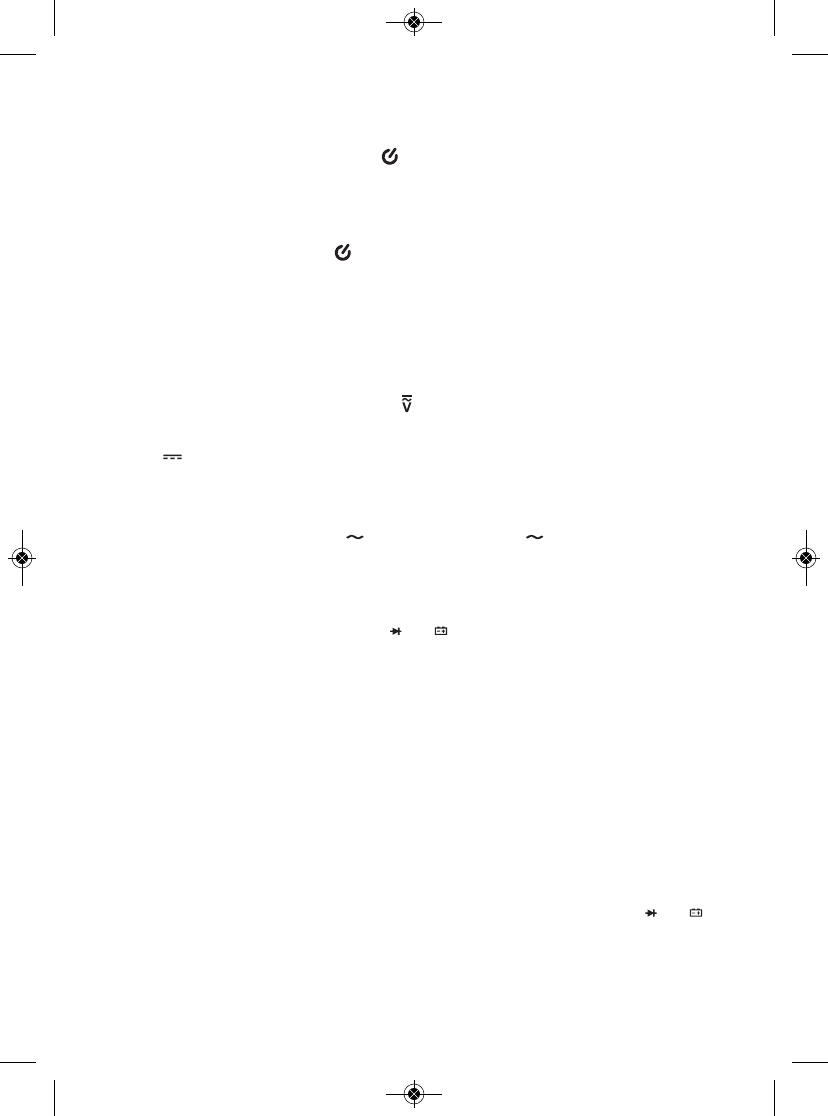
inactividad del panel frontal. El ícono en el extremo superior izquierdo de la
pantalla indica que la función de apagado automático está activada. Para
desactivar la función APO, mantenga presionado el botón FUNC al encender el
medidor, moviendo el selector rotativo a cualquier posición distinta que OFF. Esto
hará que desaparezca el ícono .
MEDICIÓN DE VOLTAJE DE CA O CC
Advertencia
No mida ningún voltaje de CA o de CC mayor a 600 V. Podría dañar el circuito
interno del medidor.
(1) Gire el selector rotativo a la posición . Por defecto, al hacerlo preparará el
DMM para medir voltaje de CC en lugar de CA, indicado por la presencia del
ícono en la parte inferior izquierda de la pantalla. Si está seguro de que el
voltaje que quiere medir es de CC, siga con el paso (2).
Si sabe que el voltaje que quiere medir es de CA, presione una vez el botón
FUNC. Esto hará que el ícono reemplace al ícono en la parte izquierda de
la pantalla. Si no está seguro si el voltaje a medir es de CA o de CC, configure el
DMM para medir voltaje de CA por motivos de seguridad.
(2) Conecte la punta de prueba negra en el enchufe COM del panel frontal y la
punta de prueba roja en el enchufe .
(3) Coque el punto de menor potencial del circuito con la punta de prueba negra, y
el punto de mayor potencial con la punta de prueba roja.
(4) Lea el voltaje medido en la pantalla. Si está trabajando en el modo de rango
manual y la lectura es .OL, el nivel de voltaje está por encima del rango
actualmente seleccionado. Si pasa esto, use el botón FUNC para seleccionar un
rango más alto de medición. Al medir voltaje de CC, si las puntas de prueba
están invertidas aparecerá un signo menos a la izquierda de la lectura.
MEDICIÓN DE CORRIENTE DE CA O CC
Advertencia
No intente medir: 1) Corrientes de más de 400 mA a través del enchufe ;
2) Corrientes de más de 10 A a través del enchufe A; o 3) Corrientes de más de 2 A
a través del enchufe Apor más de 2 minutos seguidos; espere 10 minutos luego de
cada medición de una corriente tan alta.
DC
AC
AC
TEMP
mAµAVΩ
TEMP
mAµAVΩ
29
TS04 Manual_S_fin_011216.qxp_Layout 1 1/12/16 10:29 AM Page 29
(1) Desconecte la alimentación del circuito a probar y descargue todos los
condensadores de alto voltaje.
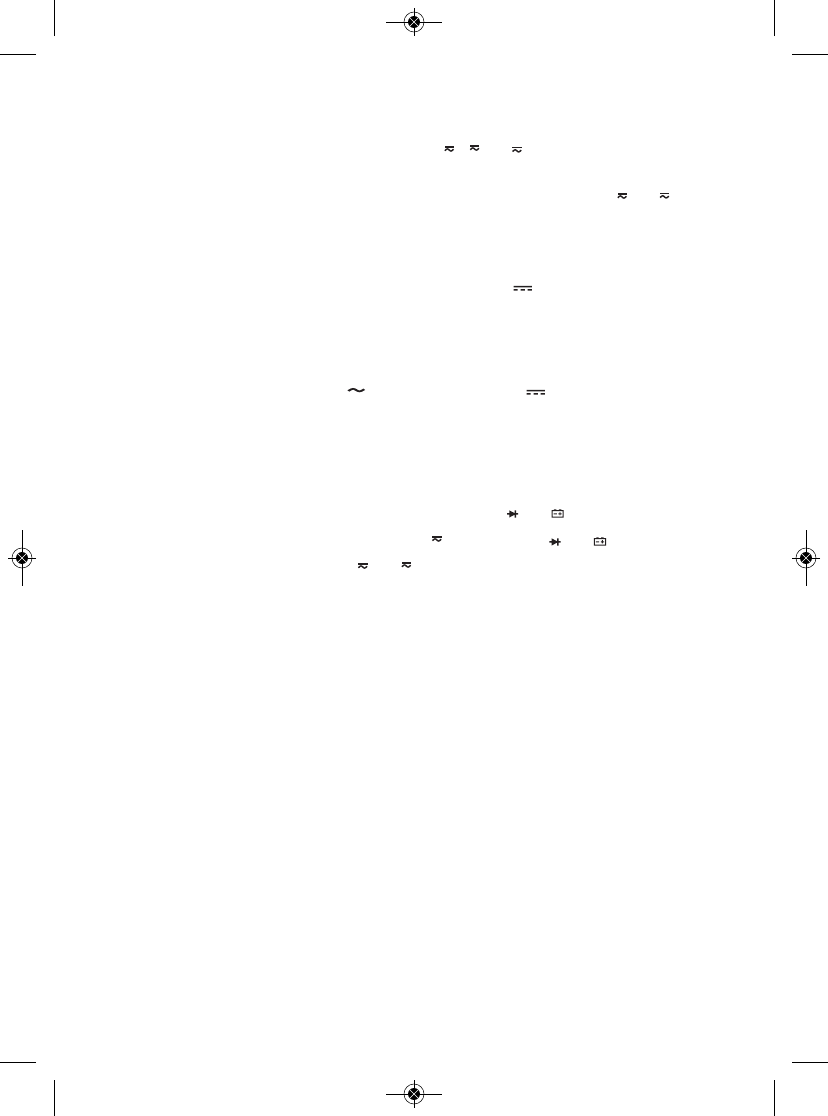
(2) Coloque el selector rotativo en la posición , o , dependiendo de la
amplitud de la corriente que espera encontrar. Si no está seguro de la amplitud,
seleccione primero la posición 10A y luego cambie a la posición o si
todas sus mediciones son de menos de 400 mA.
(3) Por defecto, el DMM está configurado inicialmente para medir corriente de CC
en lugar de CA, indicado por la presencia del ícono en la parte inferior
izquierda de la pantalla. Si está seguro de que la corriente que quiere medir es
de CC, siga con el paso (4).
Si sabe que la corriente que quiere medir es de CA, presione una vez el botón
FUNC. Esto hará que el ícono reemplace al ícono en la parte izquierda de
la pantalla. Si no está seguro si el voltaje a medir es de CA o de CC, configure el
DMM para medir voltaje de CA por motivos de seguridad.
(4) Conecte la punta de prueba negra en el enchufe COM en el extremo inferior
izquierdo del panel frontal.
(5) Conecte la punta de prueba roja en el enchufe Ao . Elija el enchufe Asi
colocó el selector rotativo en la posición y el enchufe si colocó el
selector rotativo en la posición o.
(6) Abra el circuito y toque el lado del circuito de alto voltaje con la punta de prueba
roja y el lado de bajo voltaje con la punta de prueba negra.
(7) Vuelva a conectar la alimentación del circuito y observe la pantalla. Si está
trabajando en el modo de rango manual y la lectura es O.L, el nivel de corriente
está por encima del rango actualmente seleccionado. Si pasa esto, use el botón
FUNC para seleccionar un rango más alto de medición. Si la lectura tiene un
valor negativo, las puntas de prueba están invertidas pero el valor absoluto
representa el valor correcto de la corriente.
(8) Desconecte la alimentación del circuito y descargue todos los condensadores de
alto voltaje.
(9) Desconecte las puntas de prueba y vuelva a dejar el circuito en su condición
original cerrando la abertura que hizo en el paso 6.
A
mA
µA
mA
µA
DC
AC
DC
TEMP
mAµAVΩ
TEMP
mAµAVΩ
A
mA
µA
30
TS04 Manual_S_fin_011216.qxp_Layout 1 1/12/16 10:29 AM Page 30
MEDICIÓN DE RESISTENCIA
Advertencia
Para evitar descargas eléctricas o daños al medidor al medir resistencia,
desconecte toda alimentación al circuito y descargue todos los condensadores de
alto voltaje.
(1) Gire el selector rotativo a la posición y presione el botón FUNC hasta
aparezca Ω, kΩo MΩen la parte derecha de la pantalla.
(2) Conecte la punta de prueba negra al enchufe COM del panel frontal y la punta
de prueba roja al enchufe .
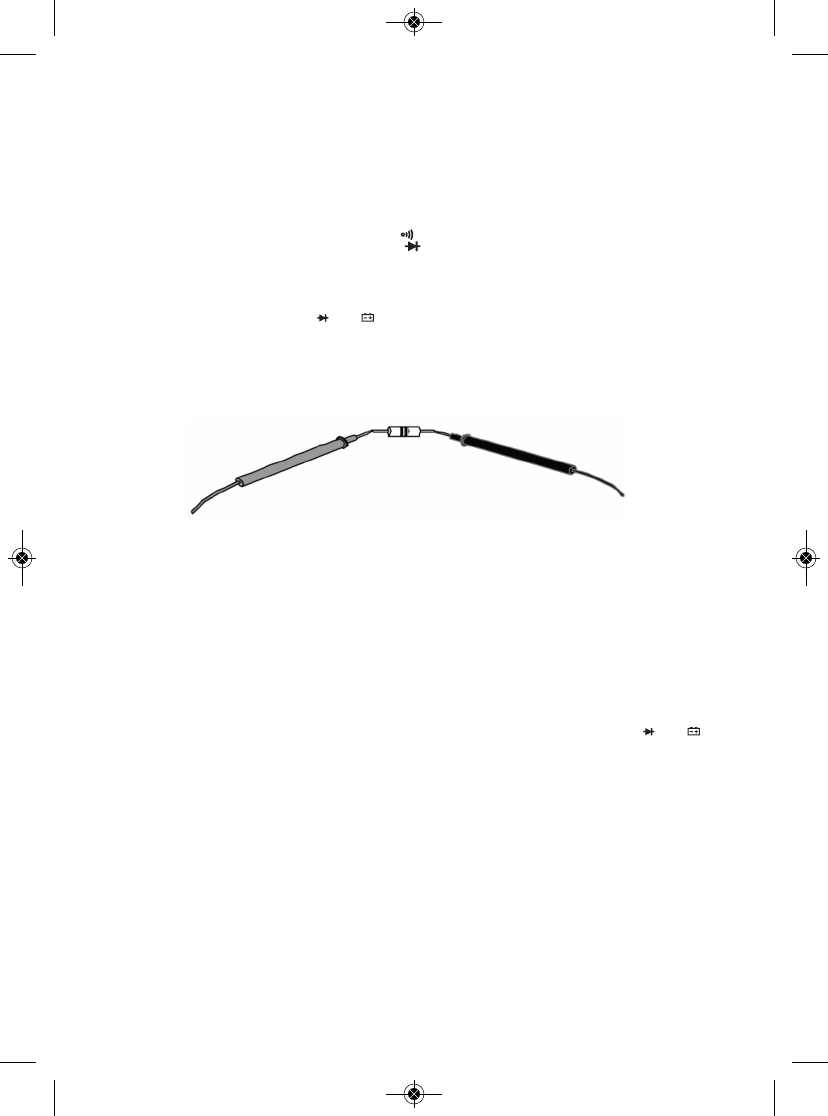
(3) Mida la resistencia tocando los puntos deseados del circuito con las puntas de
prueba, o tocando los terminales de un componente como se muestra a
continuación.
(4) Lea la resistencia medida en la pantalla. Si está trabajando en el modo de rango
manual y la lectura es .OL, el valor de la resistencia está por encima del rango
actualmente seleccionado. Si pasa esto, use el botón FUNC para seleccionar un
rango más alto de medición.
MEDICIÓN DE TEMPERATURA
El DMM incluye una termocupla tipo “K” para medir temperaturas superficiales.
Para usarla,
(1) Inserte el terminal +V del adaptador de la termocupla en el enchufe .
(2) Inserte el terminal COM del adaptador en el enchufe COM del DMM.
(3) Gire el selector rotativo a la posición TEMP.
(4) Presione el botón FUNC hasta que la unidad de medición de temperatura que
desee (°F o °C) aparezca en el lado derecho de la pantalla.
(5) Toque la superficie en la que quiere medir la temperatura con la sonda. La
temperatura aparecerá en la pantalla.
Ω
TEMP
mAµAVΩ
TEMP
mAµAVΩ
31
PUNTA DE PRUEBA ROJA PUNTA DE PRUEBA NEGRA
TS04 Manual_S_fin_011216.qxp_Layout 1 1/12/16 10:29 AM Page 31
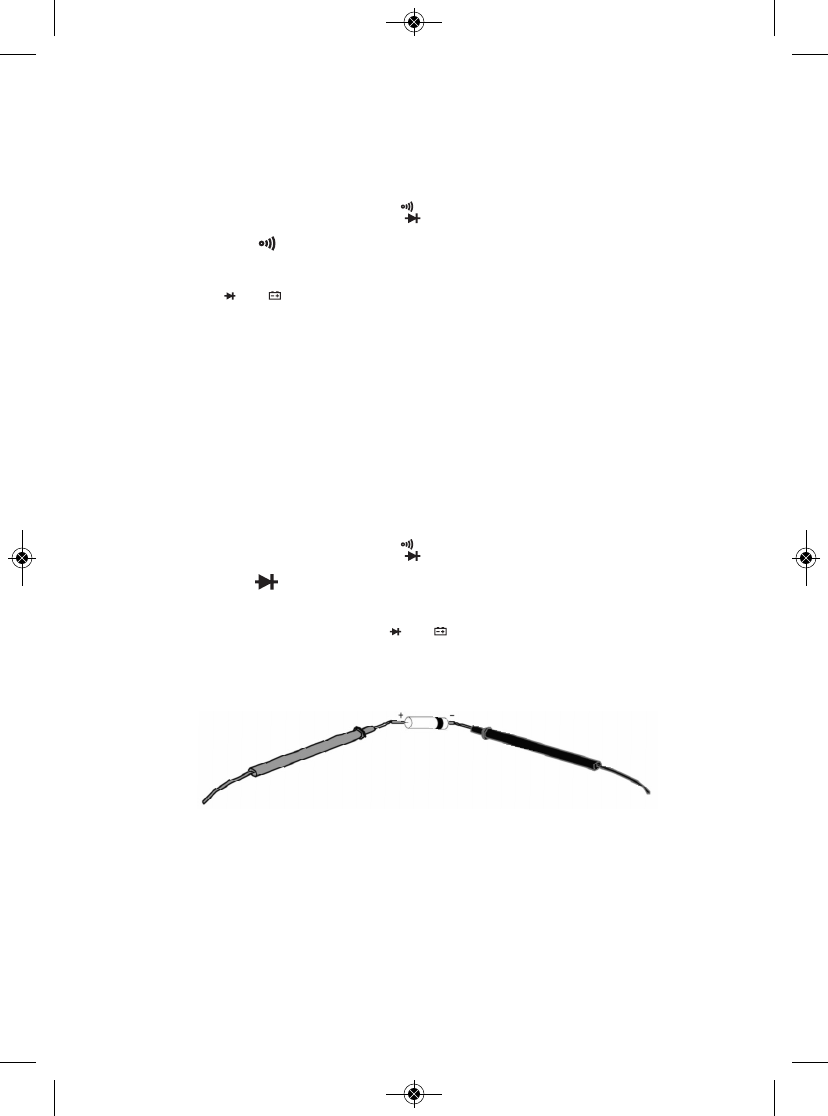
PUNTA DE PRUEBA ROJA PUNTA DE PRUEBA NEGRA
VERIFICACIÓN DE CONTINUIDAD
Advertencia
Para evitar posibles daños al medidor o a otros equipos, desconecte la alimentación
al circuito y descargue todos los condensadores de alto voltaje.
(1) Gire el selector rotativo a la posición y presione el botón FUNC hasta
aparezca el ícono en la esquina superior derecha de la pantalla.
(2) Conecte la punta de prueba negra en el enchufe COM y la punta de prueba roja
en el enchufe .
(3) Toque dos puntos del circuito con las puntas de prueba. Aparecerá el valor de la
resistencia entre esos dos puntos. Si la resistencia es < 50 Ω, el zumbador
sonará constantemente. Si no existe continuidad (un circuito abierto o una
resistencia de más de 50 Ω) entre ambos puntos, aparecerá OL. en la pantalla.
VERIFICACIÓN DE DIODOS
Advertencia
Para evitar posibles daños al medidor o a otros equipos, desconecte la alimentación
al circuito y descargue todos los condensadores de alto voltaje.
(1) Gire el selector rotativo a la posición y presione el botón FUNC hasta
aparezca el ícono en la esquina superior derecha de la pantalla.
(2) Conecte la punta de prueba negra en el enchufe COM del panel frontal y la
punta de prueba roja en el enchufe .
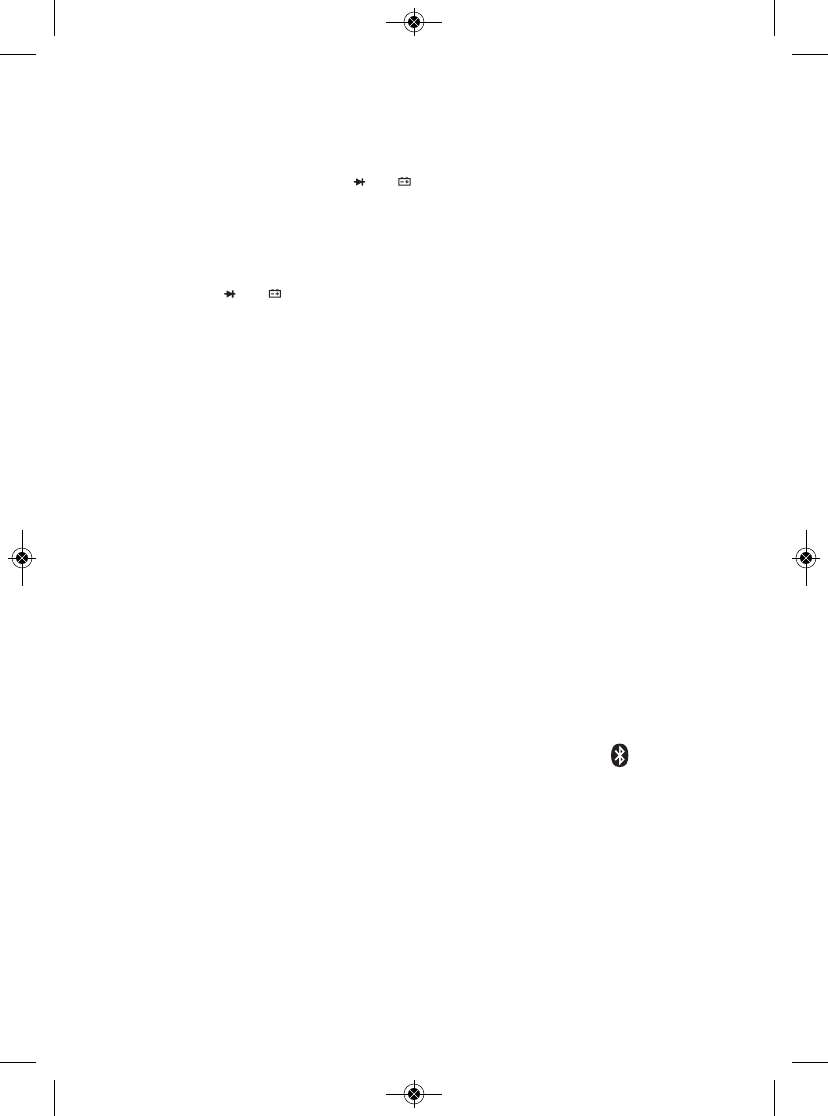
(3) Toque el ánodo del diodo (terminal positivo) con la punta de prueba roja y el
cátodo (terminal negativo) con la punta de prueba negra, como se muestra a
continuación.
(4) Lea la caída de tensión de polarización directa del diodo en la pantalla. Un
diodo de silicio tiene típicamente una caída de tensión directa de 0,7 V. Un diodo
de germanio tiene típicamente una caída de tensión directa de 0,3 V. Una lectura
de 0 V en ambas direcciones indica un diodo en cortocircuito. Una lectura de
.OL significa una de estas dos cosas: las puntas de prueba están invertidas, o el
diodo está abierto. Invierta las puntas de prueba. Si sigue obteniendo una
lectura de .OL el diodo está defectuoso y deberá reemplazarlo.
Ω
TEMP
mAµAVΩ
Ω
TEMP
mAµAVΩ
32
TS04 Manual_S_fin_011216.qxp_Layout 1 1/12/16 10:29 AM Page 32
VERIFICACIÓN DE VOLTAJE DE BATERÍAS
Advertencia
Para evitar una posible descarga eléctrica o daños al medidor, no aplique un voltaje
mayor a 600 V entre los enchufes y COM del medidor.
(1) Gire el selector rotativo a la posición 9V o 1.5V, de acuerdo con el voltaje
nominal de la batería a probar.
(2) Conecte la punta de prueba negra en el enchufe COM y la punta de prueba roja
en el enchufe .
(3) Toque el ánodo de la batería (terminal +) con la punta de prueba roja y el cátodo
(terminal -) con la punta de prueba negra. El voltaje de la batería aparecerá en la
pantalla.
USO DEL DETECTOR NCV
Para detectar si una línea, un cable o un tomacorriente de CA está “vivo”
(energizado), tóquelo con la parte superior del medidor o acerque la parte superior
del medidor a 6 mm del mismo luego de colocar el selector rotativo de funciones
en la posición NCV. Si el zumbador suena varias veces y el LED rojo de la parte de
arriba del medidor (Fig. 1 detalle 10) parpadea rápidamente, la línea o el
tomacorriente tiene por lo menos 110 V CA RMS.
USANDO EL DMM CON LA APLICACIÓN ToolSmart™
EN UN TELÉFONO INTELIGENTE APPLE iOS O ANDROID
Para enviar mediciones y cálculos del DMM a un teléfono inteligente Apple iOS o
Android, comience por descargar la aplicación ToolSmart™del iTunes Store o
Google Play Store en su dispositivo móvil.
Una vez que haya descargado la aplicación, instálela. Luego, acople el DMM y su
teléfono activando Bluetooth en su teléfono y presionando el botón en el DMM.
Una demostración en la aplicación explica cómo almacenar mediciones del DMM
en su teléfono y colocarlas sobre fotos de su proyecto tomadas con la cámara de
su teléfono.
TEMP
mAµAVΩ
TEMP
mAµAVΩ
33
TS04 Manual_S_fin_011216.qxp_Layout 1 1/12/16 10:29 AM Page 33

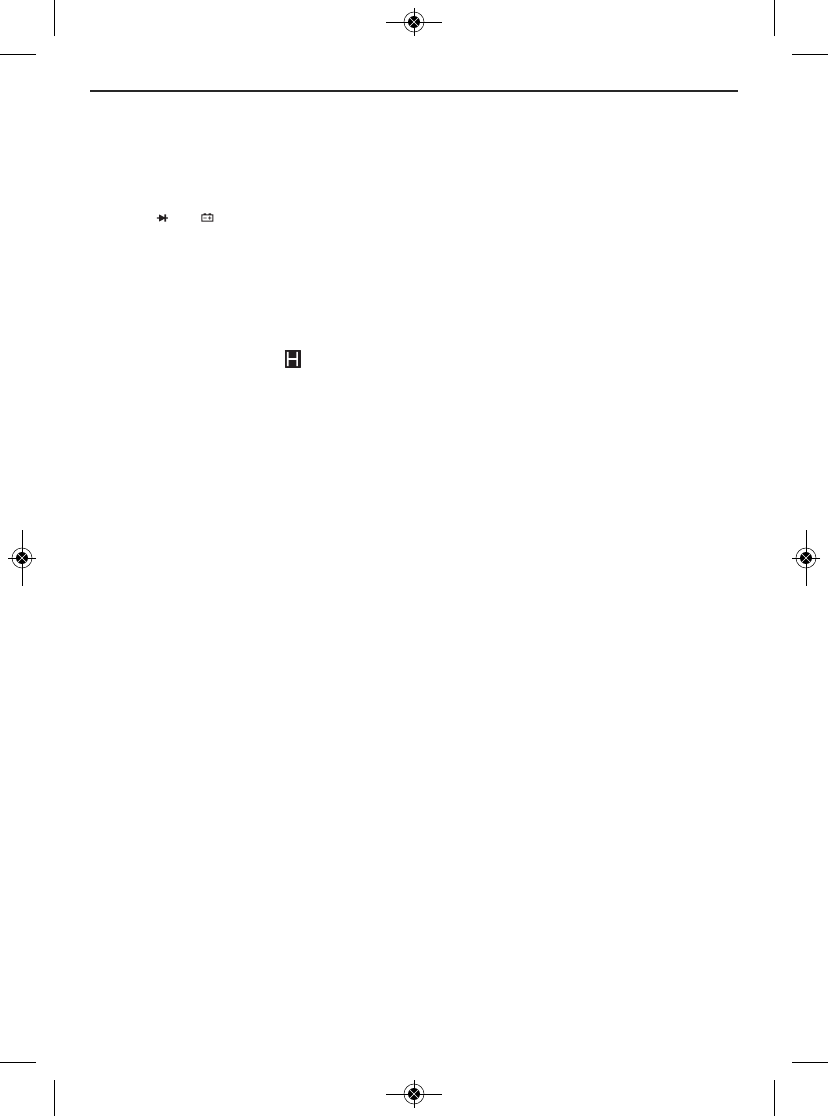
ESPECIFICACIONES
Parámetro o
característica/
función Atributo Especificación
Voltaje de CA Rangos de medición 0 to 4V/40V/400V/600V
Precisión de la medición ±(1% de la lectura + 10 dígitos)
Maximum resolution 1mV
Voltaje de CC Rangos de medición 0 to 400mV/4V/40V/400V/600V
Precisión de la medición ±(0,8% de la lectura + 5 dígitos)
en el rango de 600 V;
±(0,5% de la lectura + 2 dígitos)
en todos los otros rangos
Resolución máxima 0,1mV
Corriente de Rangos de medición 0 to 400uA/4mA/40mA/400mA/10A
CA o CC Precisión de la medición ±(2% de la lectura + 3 dígitos) en el
rango de 10 A; ±(1,2% de la lectura
+ 6 dígitos) o mejor en todos
los otros rangos
Resolución máxima 0.1A
Resistencia Rangos de medición 0 to 400Ω/4kΩ/40kΩ/
400Ω/4MΩ/40MΩ
Precisión de la medición ±(0,8% de la lectura + 3 dígitos), típica
Resolución máxima 0,1Ω
Temperatura Rango de medición del DMM -20 a 1000 °C
Precisión de medición del DMM ±(2,0% de la lectura + 2 dígitos)
Rango de medición de la -20 a 260 °C
termocupla incluida
Precisión de la medición de la ± (2% de la lectura + 2 dígitos)
termocupla incluida
Continuidad Voltaje de circuito abierto 1V
Umbral <50Ω
Integridad Rango 0 a 2.7V
de diodos Resolución 1mV
34
TS04 Manual_S_fin_011216.qxp_Layout 1 1/12/16 10:29 AM Page 34
Parámetro o
característica/
función Atributo Especificación
Voltaje de baterías Rangos de medición 0 to 9V, 0 a 1.5V
Precisión ±(0,8% de la lectura + 7 dígitos)
de la medición en la posición de 9V;
±(3% de la lectura + 5 dígitos)
en la posición de 1.5V
Resolución máxima 1mV
Especificación de CAT III 600V
seguridad
Voltaje y distancia de >110VAC
RMS
detección NCV @ <6mm
Rango del Bluetooth 10m
Voltaje máximo 600VDC/AC RMS
de entrada
Fusible de protección Fusible de 400 mV/600 V para el
enchufe ; Fusible de
10 A/600 V para el enchufe A
Frecuencia de muestreo 3X/segundo
Pantalla Cantidad de dígitos 3-3/4
Cuenta máxima 4000
Umbral del indicador de batería baja <6,7 VDC
Temperatura de funcionamiento 0 a 40 °C @ <80% HR
Fuente de alimentación (1) batería de 9 voltios (incluida)
Dimensiones 148 x 74 x 50mm
Peso (incluyendo batería) 232g
Nota: Los valores de precisión indicados son para una temperatura de
funcionamiento entre 18 y 28 °C con una HR <80%. Las precisiones son
menores fuera de este rango, proporcionalmente a la diferencia de
temperatura de funcionamiento con respecto a este “punto ideal”.
TEMP
mAµAVΩ
35
TS04 Manual_S_fin_011216.qxp_Layout 1 1/12/16 10:29 AM Page 35
CONSEJOS DE OPERACIÓN Y
MANTENIMIENTO
Cuando aparezca el ícono en la parte superior izquierda de la pantalla,
reemplace inmediatamente la batería de 9 V del medidor siguiendo las
instrucciones de la página 27.
Para reemplazar un fusible quemado:
1. Apague el medidor.
2. Desenchufe las puntas de prueba.
3. Voltee el medidor y afloje el pequeño tornillo Phillips que está en el medio de la
parte de atrás, asegurando la tapa del compartimiento de la batería. Saque la
tapa, teniendo cuidado de no perder el tornillo.
4. Remueva la cubierta de goma gris del medidor tirando cuidadosamente de su
borde por encima del gabinete, comenzando por la parte de arriba y trabajando
por el borde hasta llegar a la parte de abajo.
5. Remueva los cuatro tornillos Phillips grandes que aseguran
las dos mitades de la carcasa y sepárelas.
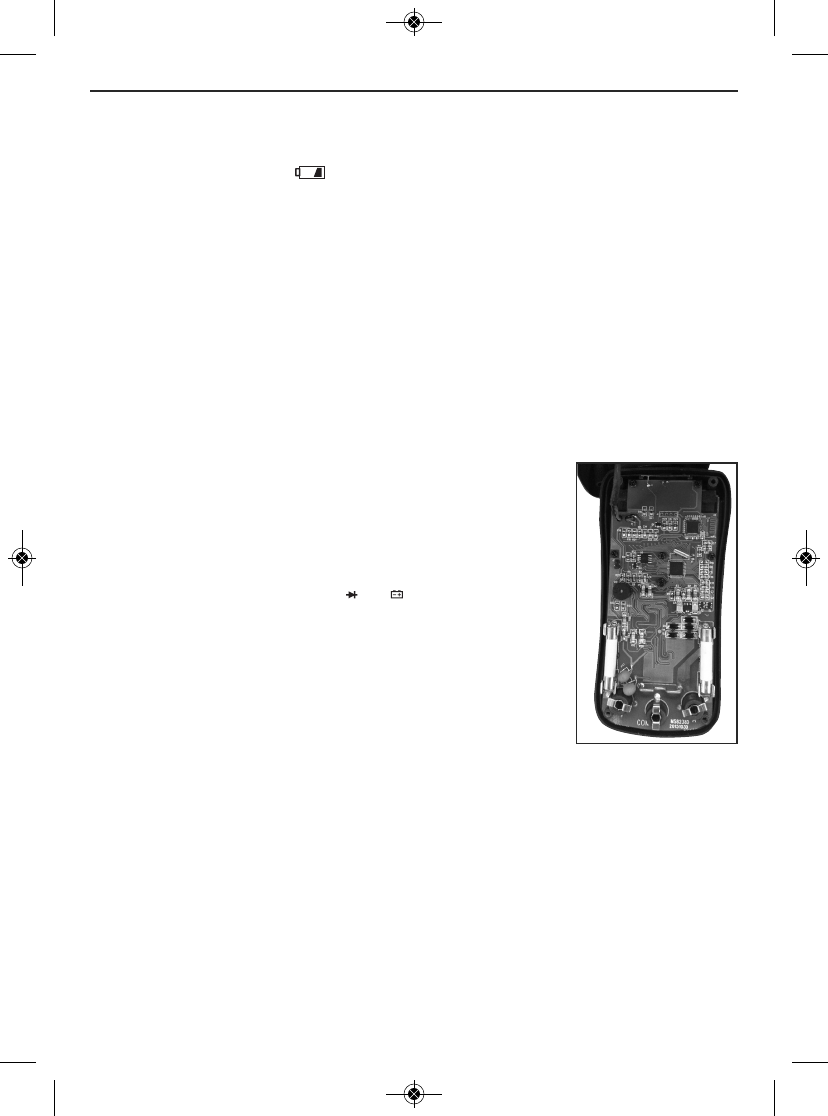
6. Localice el fusible quemado en la placa del circuito (ver la
foto a la derecha). El DMM usa dos fusibles cilíndricos
blancos diferentes. El enchufe está protegido por
un fusible F400mA/600V. El enchufe Aestá protegido por
un fusible F10A/600V. Cada uno de los fusibles está
ubicado directamente detrás del enchufe que protege.
7. Usando otro multímetro o un detector de continuidad,
verifique que el fusible que piensa que está quemado tenga
la resistencia de un circuito abierto.
8. Reemplace el fusible quemado por otro de las mismas
especificaciones de corriente y voltaje.
9. Vuelva a unir las dos mitades de la carcasa y ajústelas con los cuatro tornillos.
10. Vuelva a colocar la tapa del compartimiento de la batería y ajuste el tornillo.
11. Vuelva a colocar la cubierta de goma gris.
Luego de someter el medidor a un cambio muy grande de temperatura ambiente,
espere por lo menos 30 minutos antes de volver a hacer mediciones para
garantizar la precisión de las lecturas.
TEMP
mAµAVΩ
36
Ubicación de los fusibles
cilíndricos blancos del
medidor
TS04 Manual_S_fin_011216.qxp_Layout 1 1/12/16 10:29 AM Page 36
Remueva la batería al guardar el medidor o cuando no piensa usarlo durante
mucho tiempo (meses en lugar de semanas).
No desarme el medidor ni lo sumerja en el agua.
INFORMACIÓN DE LA GARANTÍA
General garantiza sus instrumentos, accesorios y herramientas digitales contra
defectos de materiales y de fabricación durante un año a partir de la fecha de
compra, a menos que se especifique lo contrario en la caja, manual y/o material
publicitario del producto. General también garantiza sus herramientas no digitales
contra defectos de materiales y de fabricación de forma limitada, de por vida.
General reemplazará o reparará la unidad defectuosa, a su criterio, luego de
verificar el defecto.
Esta garantía no cubre defectos causados por abuso, negligencia, accidente,
reparaciones no autorizadas, alteraciones o uso inadecuado del producto. Tampoco
cubre a los productos que se hayan comprado en distribuidores no autorizados.
Cada reclamo de garantía deberá estar acompañado por un comprobante de
compra.
Cualquier garantía implícita originada por la venta de un producto General,
incluyendo sin limitación las garantías implícitas de comerciabilidad e idoneidad
para un fin determinado, quedan limitadas a lo anterior. General no se hace
responsable por no poder utilizar el producto o por cualquier otro daño incidental o
indirecto, gastos o pérdida económica, o por cualquier reclamo por dichos daños,
gastos o pérdida económica.
Las leyes varían de estado en estado. Las limitaciones o exclusiones anteriores
pueden no tener validez en su caso.
Por mayor información o para realizar un reclamo de garantía, comuníquese con el
Soporte técnico de General Tools & Instruments en techsupport@generatools.com.
37
TS04 Manual_S_fin_011216.qxp_Layout 1 1/12/16 10:29 AM Page 37
POLÍTICA DE DEVOLUCIÓN PARA
REPARACIÓN
Se han hecho todos los esfuerzos para proporcionarle un producto confiable de
excelente calidad. Sin embargo, si necesitara reparar su equipo, por favor, póngase
en contacto con nuestro Servicio de atención al cliente para obtener un número de
RGA (Autorización de devolución de mercancía) antes de enviar la unidad utilizando
un servicio de transporte prepagado a nuestro Centro de Servicios a la siguiente
dirección:
General Tools & Instruments
75 Seaview Drive
Secaucus, NJ 07094
212-431-6100
Recuerde incluir una copia de su comprobante de compra, su dirección de
devolución, y su número telefónico y/o dirección de correo electrónico.
38
TS04 Manual_S_fin_011216.qxp_Layout 1 1/12/16 10:29 AM Page 38
DECLARACIÓN DE LA FCC
Este dispositivo cumple con la parte 15 del reglamento FCC. Funcionamiento está
sujeto a las siguientes dos condiciones: (1) Este dispositivo no debe causar
interferencias perjudiciales y (2) Este dispositivo debe aceptar cualquier
interferencia recibida, incluyendo interferencia que pueda causar un
funcionamiento no deseado.
Este equipo ha sido probado y cumple con los límites para un dispositivo digital de
clase B, conforme a la parte 15 del reglamento FCC. Estos límites están diseñados
para proporcionar protección razonable contra interferencia dañina en una
instalación residencial. Este equipo genera, utiliza y puede irradiar energía de
radiofrecuencia y, si no se instala y utiliza de acuerdo con las instrucciones, puede
causar interferencia perjudicial a comunicaciones de radio.
Sin embargo, no hay ninguna garantía de que no habrá interferencias en una
instalación en particular. Si este equipo causa interferencia dañina a la radio o la
recepción de televisión, que puede determinarse apagando y encendiendo el
equipo, se recomienda al usuario para intentar corregir la interferencia mediante
una o más de las siguientes medidas:
• Reoriente o reubique la antena receptora.
• Aumentar la separación entre el equipo y el receptor.
• Conecte el equipo a un circuito diferente al que está conectado el receptor
• Consulte a su proveedor o a un técnico experimentado en radio/TV para ayuda.
PRECAUCIÓN: Cualquier cambio o modificación no aprobados expresamente por la
parte responsable del cumplimiento podría anular la autoridad del usuario para
operar el equipo.
39
TS04 Manual_S_fin_011216.qxp_Layout 1 1/12/16 10:29 AM Page 39

GENERAL TOOLS & INSTRUMENTS
75 Seaview Drive
Secaucus, NJ 07094
TELÉFONO (212) 431-6100
FAX (212) 431-6499
SIN CARGO (800) 697-8665
e-mail: sales@generaltools.com
www.generaltools.com
Manual del usuario TS04
Especificaciones sujetas a modificaciones sin previo aviso.
©2016 GENERAL TOOLS & INSTRUMENTS
NOTA: NO NOS RESPONSABILIZAMOS POR ERRORES TIPOGRÁFICOS.
MAN# TS04
12/01/16
General Tools & Instruments
GeneralToolsNYC
TS04 Manual_S_fin_011216.qxp_Layout 1 1/12/16 10:29 AM Page 40