Gammex GLDRC Laser Remote Control User Manual Manual Green CoverBody

Gammex, Inc Laser Remote Control Manual Green CoverBody

Contents

Manual Green CoverBody

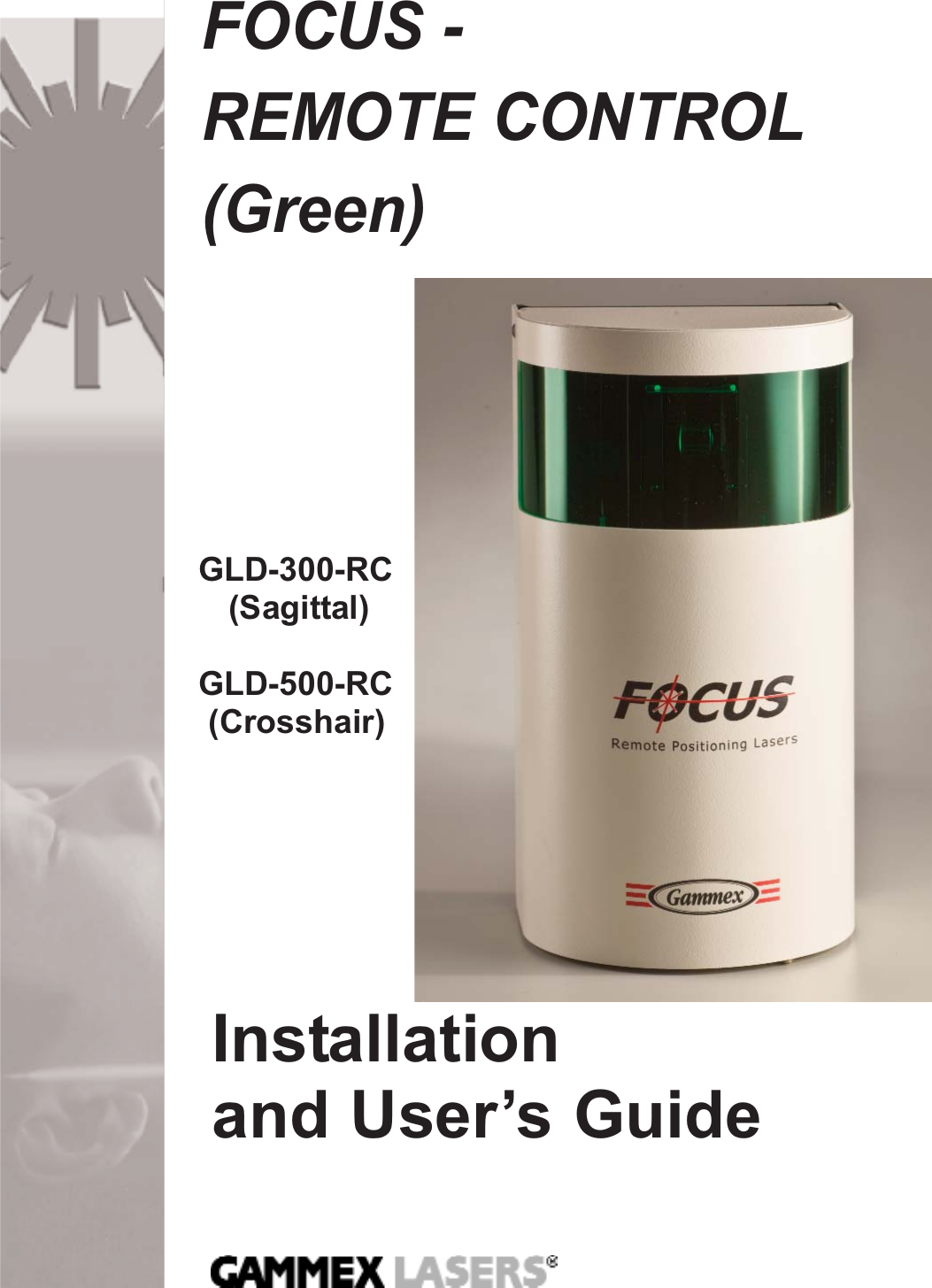
FOCUS - REMOTE CONTROL(Green)Installationand User’s GuideGLD-300-RC(Sagittal)GLD-500-RC(Crosshair)
Table of ContentsIntroduction and Intended Use .................................................... 1Definitions.................................................................................................... 2Safety Information ................................................................................... 2-3Storage and Transportation ........................................................................ 3Environmental Limits .................................................................................. 3Location of Labels ...................................................................................... 4Operator Controls ....................................................................................... 5Pre-Installation ............................................................................6-9Typical Room Layout ...................................................................................6Installation Requirements ........................................................................... 7Room Preparation  .......................................................................................9Side Laser Installation ........................................................... 10-13Remote Control ................................................................................14-19Laser Positioning Adjustments ............................................ 20-31Laser Coarse Adjustments....................................................................20-22Remote Control Laser adjustment .............................................................23Laser Coarse Rotational Adjustments  ..................................................... 24Curvature Adjustments ............................................................................. 25Laser Fine Horizontal and Vertical Adjustments ...................................... 26Laser Focus Adjustments ......................................................................... 27Single Line Adjustments ........................................................................... 28Angular Line Adjustments  ........................................................................ 29Centering Optics over Laser  .................................................................... 30Additional Installations  ......................................................... 32-39Second Side Laser Installation ........................................................... 33-34Installation on Angled Walls  ..................................................................... 35Ceiling Laser Installation ..................................................................... 36-37Sagittal Laser Installation .................................................................... 38-39Laser Calibration and Adjustments ..................................... 40-41Troubleshooting ...........................................................................42Maintenance & Cleaning.................................................................42Repair and Parts Information ............................................... 43-46Replacing the Laser Diode  ................................................................. 43-44Dismantling and Disposal .......................................................... 45Parts List ...................................................................................... 46Specifications .........................................................................47- 51Technical Support  ....................................................................... 52Product Warranty ........................................................................ 52Mounting Templates ............................................................. 54, 56
Dear Valued CustomerCongratulations on your recent purchase of a Gammex Laser Alignment System! This diode laser product is theresult of over 25 years of continuous quality improvementof laser technologies. If, after carefully reading this manual,you have any questions, please contact our Sales andService Department at 1-800-Gammex 1.IntroductionThis Installation and User’s Guide includes the informationyou will need to safely and efficiently install, operate and maintain your medical alignment laser. This guide is only intended for use with Gammex FOCUS - REMOTE CONTROL (Green) Diode Laser models GLD–500-RC (Crosshair) and GLD–300-RC (Sagittal).Intended UseThese lasers are intended to be used for aligning patients tomedical diagnostic imaging and radiation therapy equipmentwhich utilizes ionizing radiation. They are intended to beused in medical clinic or hospital settings by trained medicalstaff. The lasers are not designed to be used aroundflammable anesthetics, which present a risk of explosion orfire. The lasers are not intended to be used in a sterile orcorrosive environment. No other uses intended or implied.Installation and User Guide1Introduction
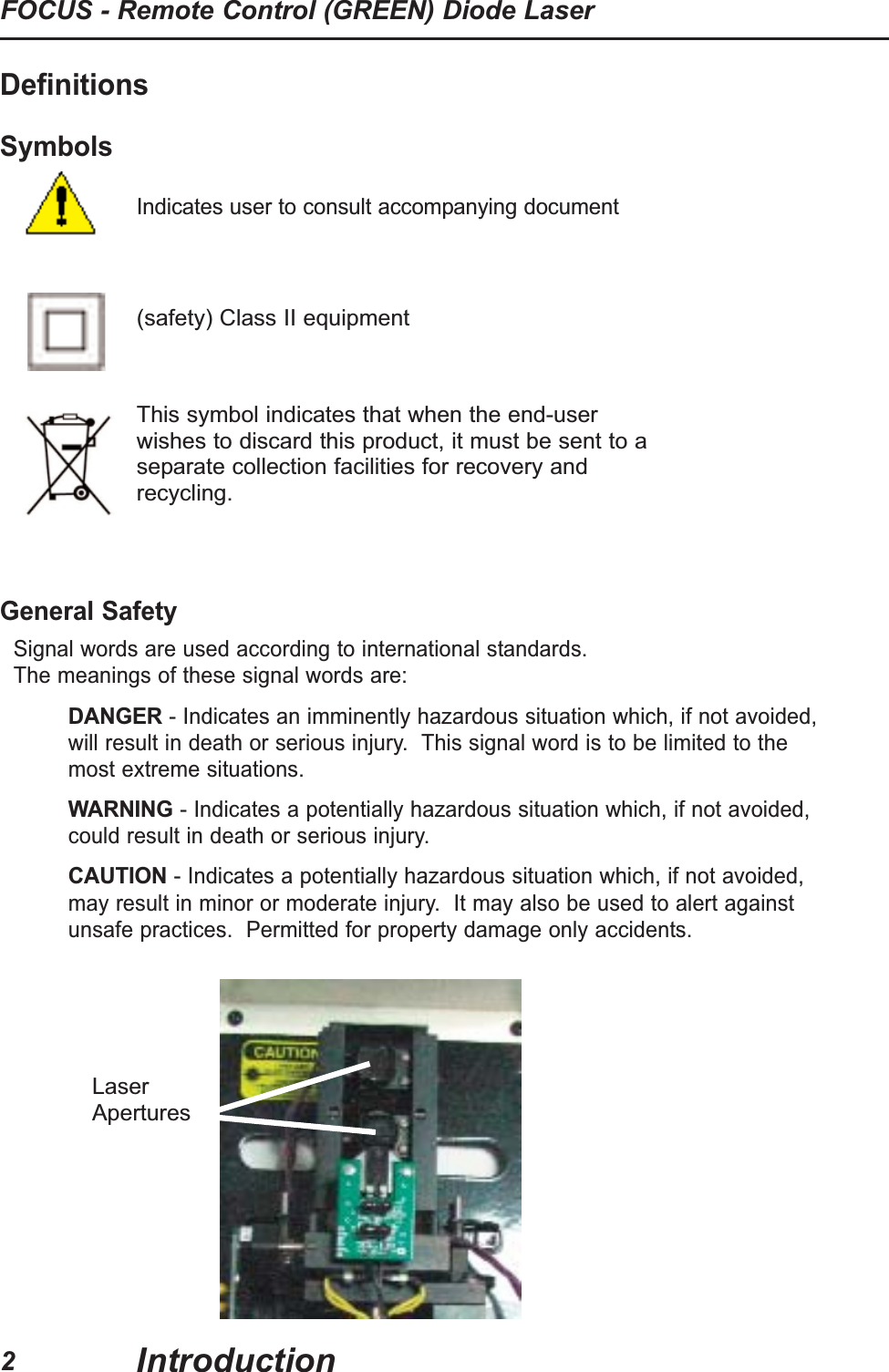
Definitions SymbolsIndicates user to consult accompanying documentGeneral SafetySignal words are used according to international standards.  The meanings of these signal words are:DANGER- Indicates an imminently hazardous situation which, if not avoided,will result in death or serious injury.  This signal word is to be limited to themost extreme situations.  WARNING- Indicates a potentially hazardous situation which, if not avoided,could result in death or serious injury.  CAUTION- Indicates a potentially hazardous situation which, if not avoided,may result in minor or moderate injury.  It may also be used to alert againstunsafe practices.  Permitted for property damage only accidents.2FOCUS - Remote Control (GREEN) Diode LaserIntroduction(safety) Class II equipmentThis symbol indicates that when the end-userwishes to discard this product, it must be sent to aseparate collection facilities for recovery andrecycling.LaserApertures
3Installation and User GuideIntroductionLASER SAFETYWARNING- Risk of incorrect diagnosis or treatment.  Isocenter of alignment lasersmust coincide with isocenter of diagnostic or treatment equipment.  Test alignment oflasers before use daily for first month of operation and weekly after first month.  Newlyinstalled equipment will shift as building walls and floor settle and as buildingmaterials dry out.  Realign lasers to isocenter before use, if they have moved.CAUTION- Laser Light, risk of eye damage.  • To prevent eye damage, do not stare into beam and do not allow patients to stareinto beam.  The normal blink reflex will prevent eye damage.  If a patient is unableto blink normally the laser operator must prevent laser from shining in patient's eye.Laser is a class II laser.  • Replace laser diode only with assembly provided by Gammex to ensure that laserpower levels do not exceed class II limits.  • Do not adjust sealed potentiometers as power levels could exceed class II limits anddamage the laser diode.GENERAL•Sagittal laser- Single vertical line projecting laser•Crosshair laser- Crossed line projected from laser•Iso-center- Center point where the X, Y, and Z planes coincide.Storage and Transportation• Do not drop• Non-corrosive environment• Storage Temperature:  -20 - +75° C (-4 -167° F)• Storage Humidity:  0 - 85% Relative Humidity (no dew condensation)Environmental Limits:• Temperature: 0-60° C (32 -140° F)• Humidity: 0 - 85 % relative humidity (no dew or condensation)• No flammable anesthetics• No corrosives
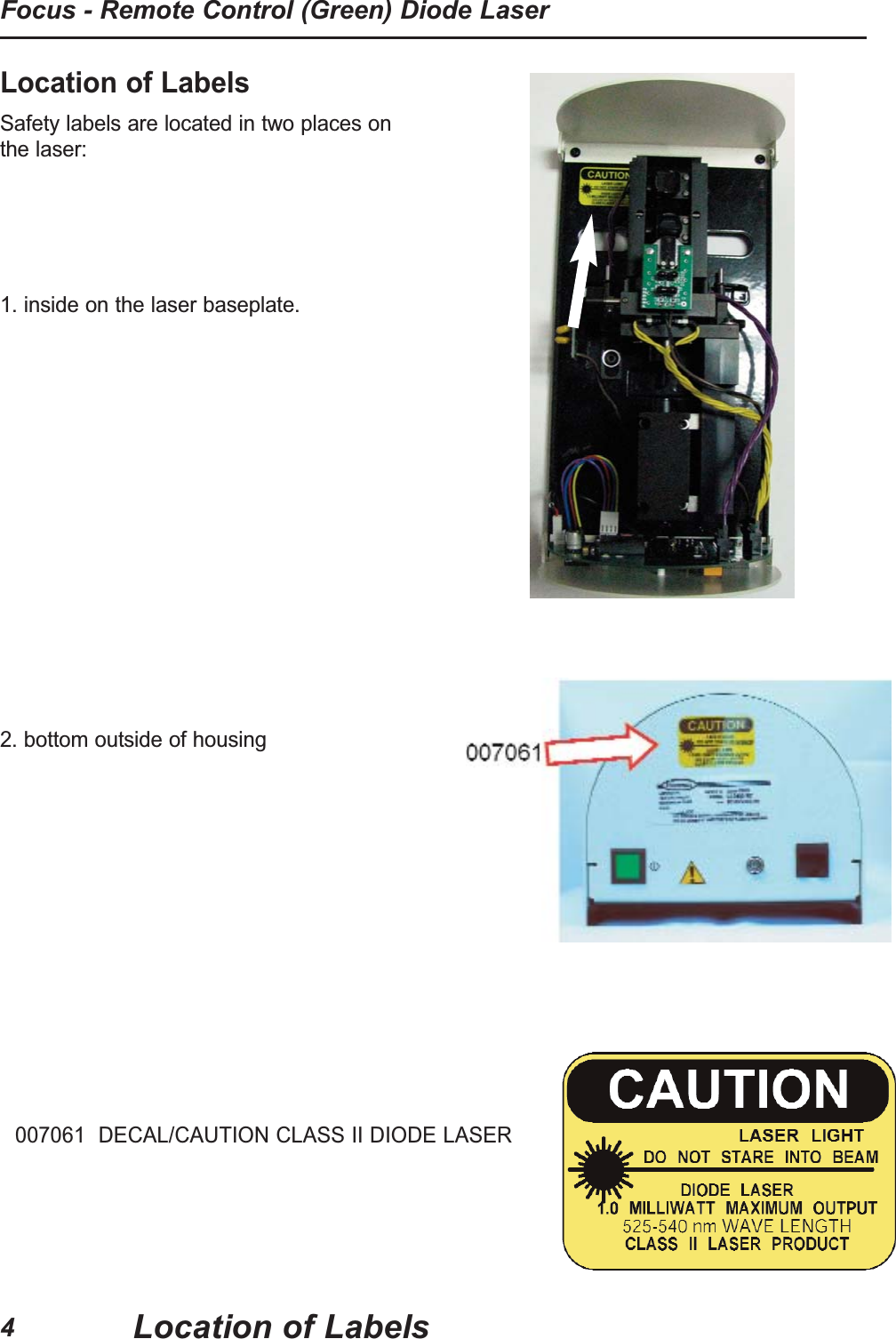
Location of LabelsSafety labels are located in two places onthe laser:  1. inside on the laser baseplate.2. bottom outside of housing 007061  DECAL/CAUTION CLASS II DIODE LASERFocus - Remote Control (Green) Diode LaserLocation of Labels4
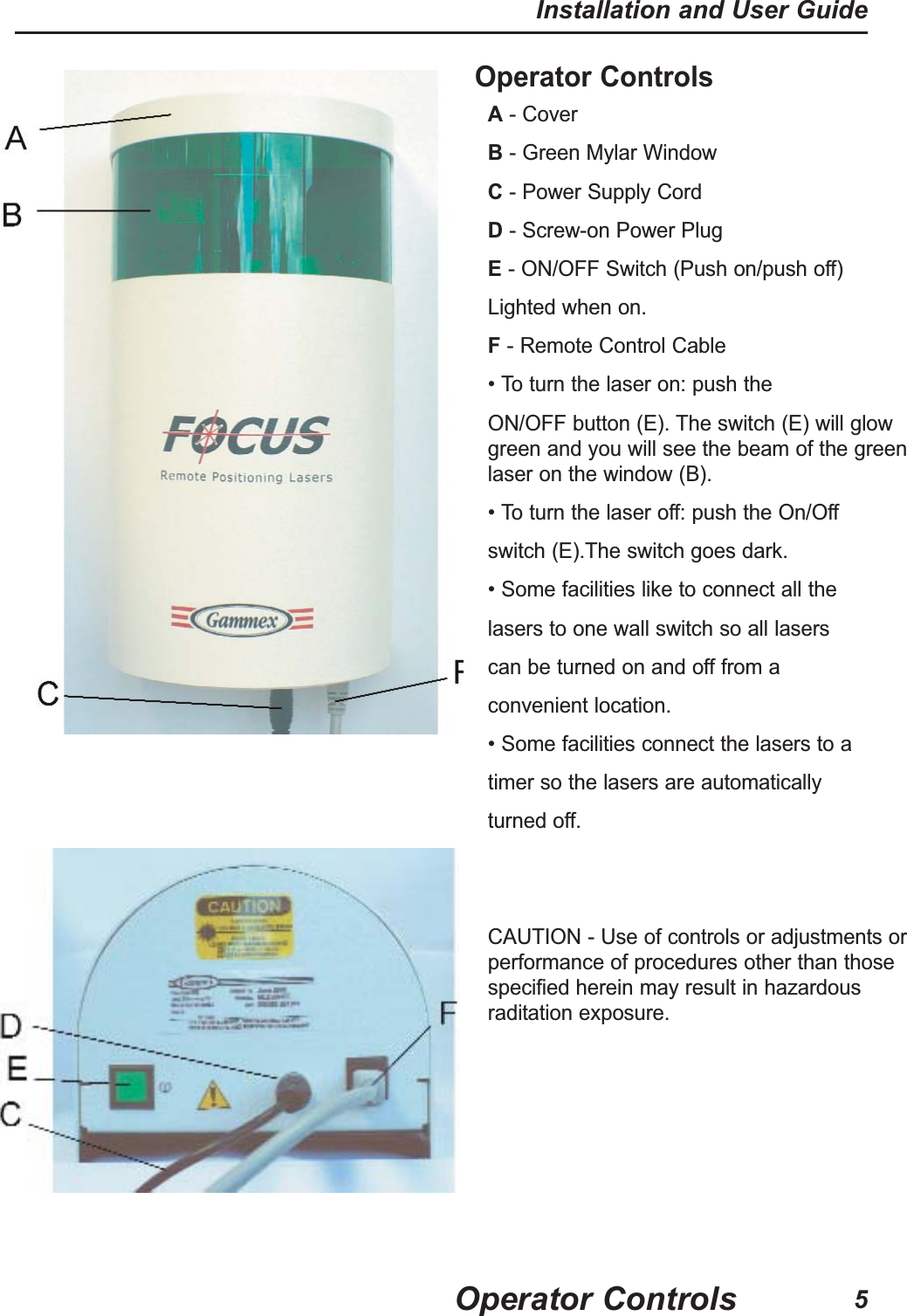
Operator ControlsA- Cover                                                         B- Green Mylar WindowC- Power Supply Cord                            D- Screw-on Power PlugE- ON/OFF Switch (Push on/push off)Lighted when on.                      F- Remote Control Cable• To turn the laser on: push theON/OFF button (E). The switch (E) will glowgreen and you will see the beam of the greenlaser on the window (B).• To turn the laser off: push the On/Offswitch (E).The switch goes dark.• Some facilities like to connect all thelasers to one wall switch so all laserscan be turned on and off from aconvenient location.• Some facilities connect the lasers to a   timer so the lasers are automaticallyturned off. CAUTION - Use of controls or adjustments orperformance of procedures other than thosespecified herein may result in hazardousraditation exposure.Operator ControlsInstallation and User Guide5
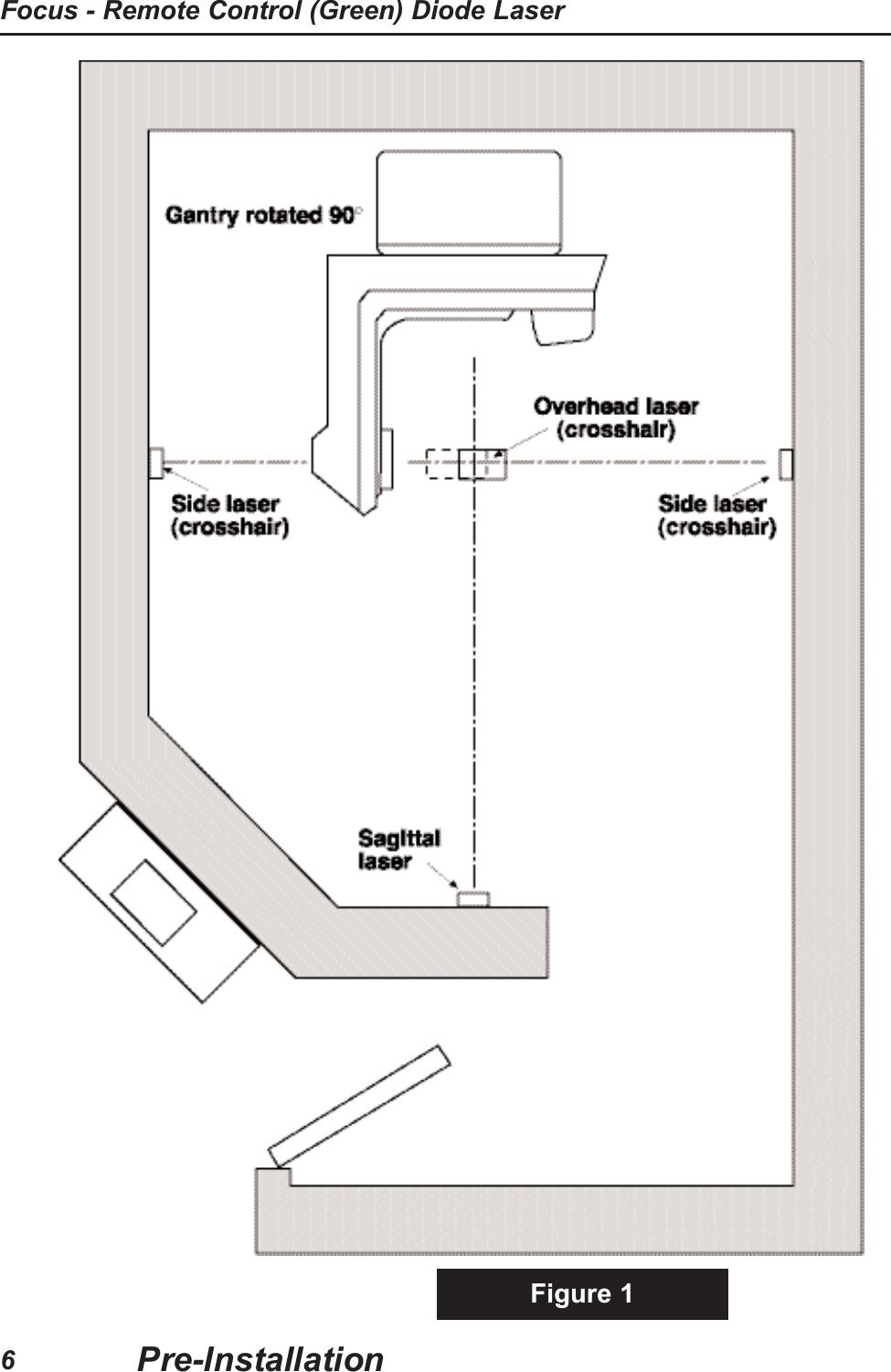
Figure 1Pre-InstallationFocus - Remote Control (Green) Diode Laser6
IntroductionGENERALAll Gammex FOCUS - REMOTE CONTROL (GREEN) Laser AlignmentSystems provide an optical aid for rapid and accurate patient positioningand repositioning for therapy and simulator machines.TECHNICAL DESCRIPTIONVarious combinations of the GLD-500-RC crosshair FOCUS - REMOTECONTROL (GREEN) and the GLD-300-RC sagittal (straight line)FOCUS - REMOTE CONTROL (GREEN) are used with differentsystems. The GLD-500-RC lasers, mounted on each side, beamcrosshairs along the X-axis. The crosshair GLD-500-RC laser, mountedon the ceiling, beams a crosshair vertically along the Z-axis. The SagittalGLD-300-RC laser beams a straight line in the Z-Y plane.Installation RequirementsELECTRICALEach laser is provided with a universal power supply (transformer) withan input of 100 to 240 volts at 50 to 60 Hz. The universal power supplyplugs into a wall outlet with 4 interchangeable “snap-in” plugs to fit mostoutlets. A 1.2 meter (4 foot) power cord supplies 12 volt dc power to thelaser with a screw-on power plugTOOLS NEEDEDIn addition to some basic tools, such as screwdrivers, hammer andladder; you will need an electric hammer drill, plumb bob, level, waterlevel, masking tape and 15M (50 feet) of string. (The mountinghardware, a 1/4-20 tap and tap drill, and 4 hex (Allen) wrenches (.050”,1/8”, 3/32”, & 5/64”) are included with the lasers.)CAUTION: The location of the lasers is determined in relation to thetherapy machine’s crosshair and isocenter. Before installing lasers, askthe physicist to verify that the field light aligns with the machine’sisocenter. Figure 1.Pre-InstallationInstallation and User Guide7
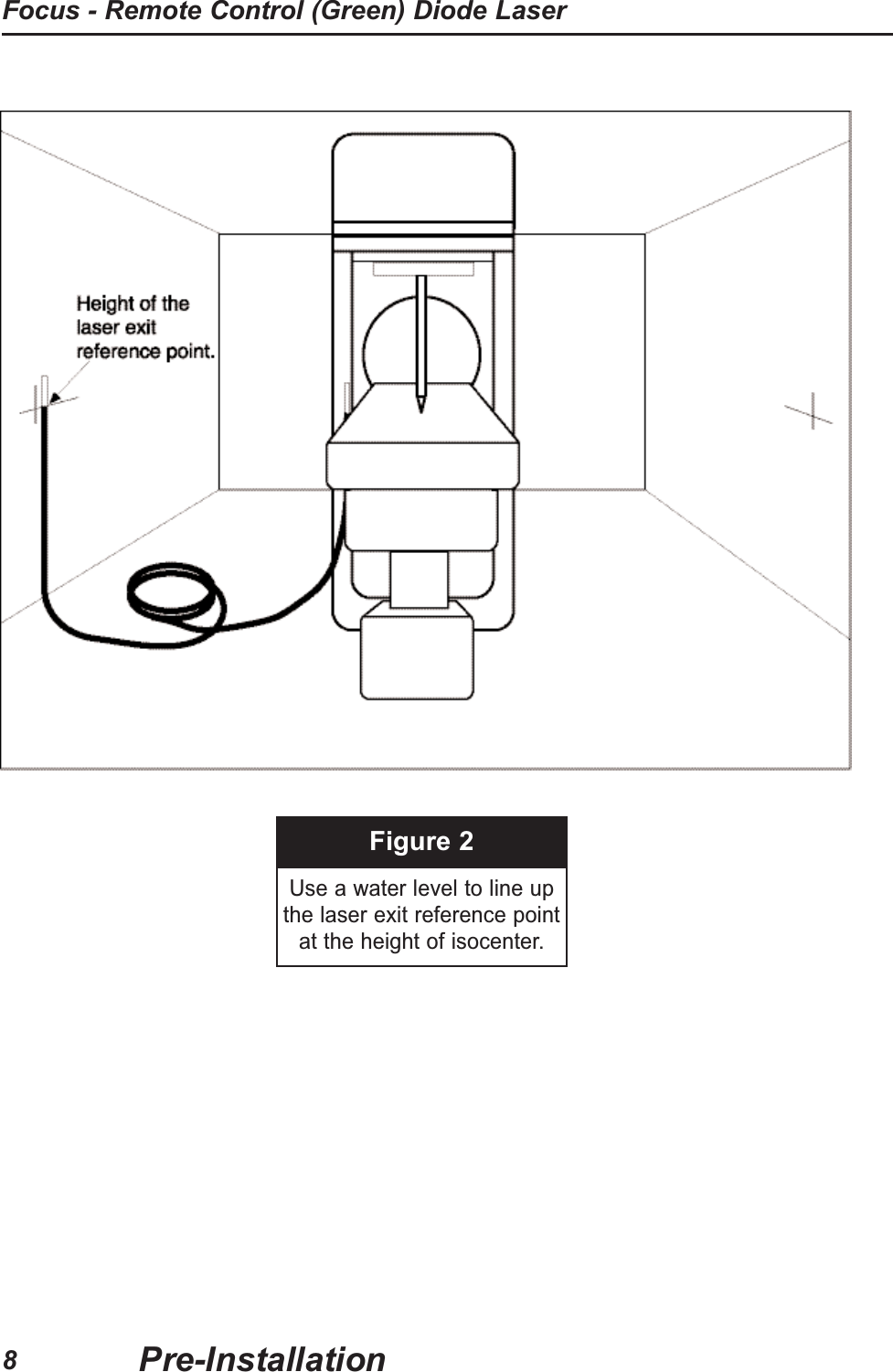
Figure 2Use a water level to line upthe laser exit reference pointat the height of isocenter.Pre-InstallationFocus - Remote Control (Green) Diode Laser8
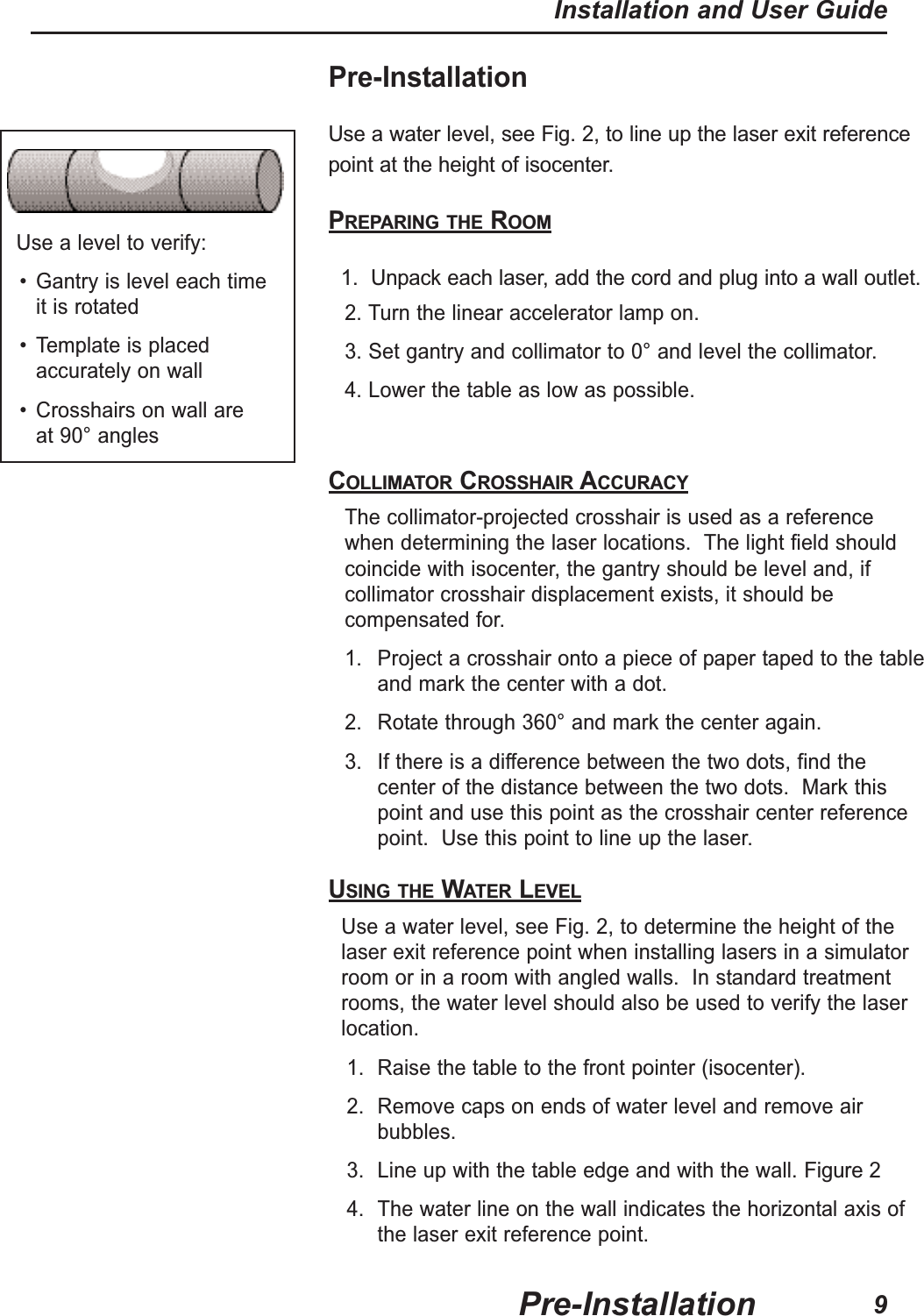
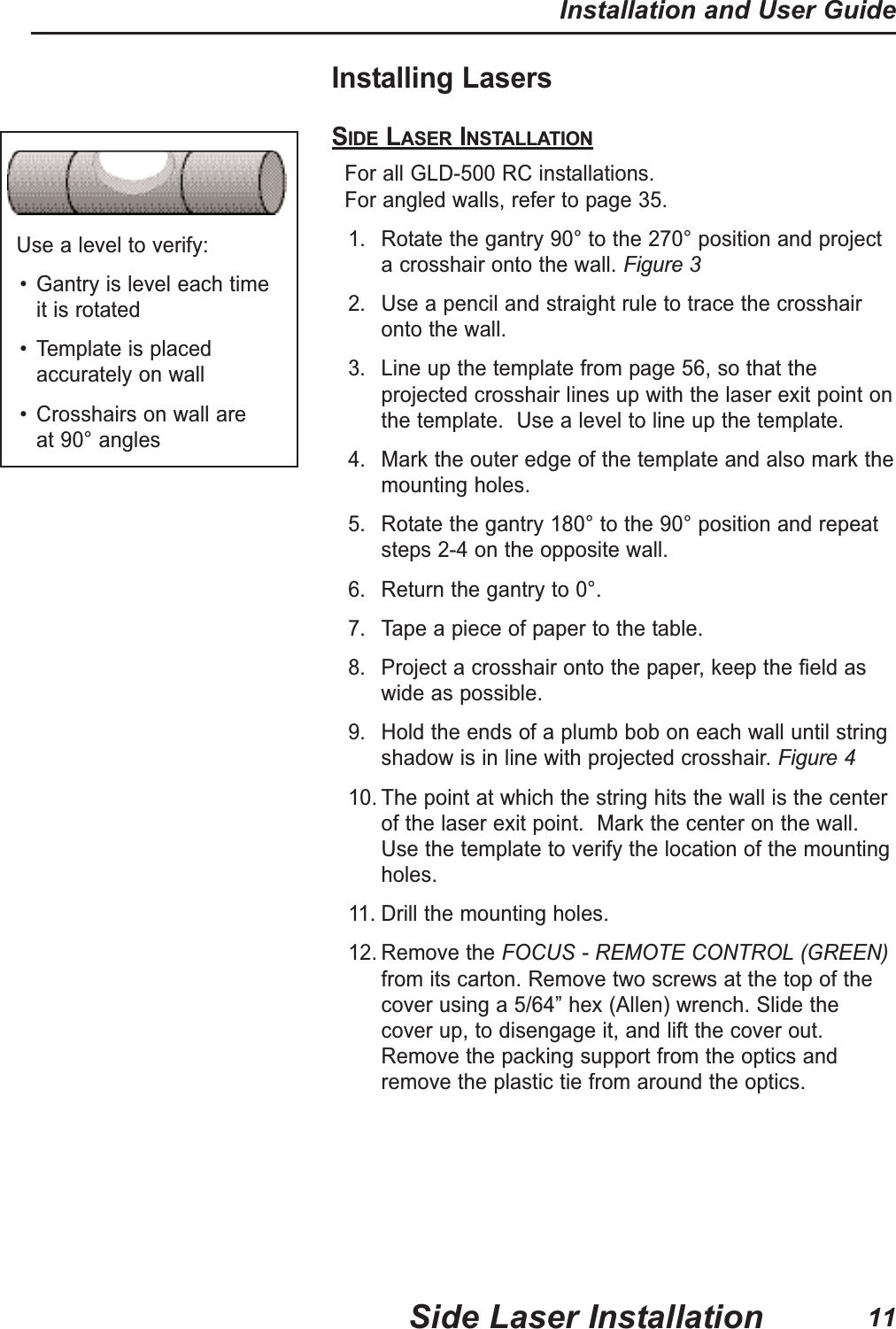
Pre-InstallationUse a water level, see Fig. 2, to line up the laser exit referencepoint at the height of isocenter.PREPARING THE ROOM1.  Unpack each laser, add the cord and plug into a wall outlet.2. Turn the linear accelerator lamp on.3. Set gantry and collimator to 0° and level the collimator.4. Lower the table as low as possible.COLLIMATOR CROSSHAIR ACCURACYThe collimator-projected crosshair is used as a referencewhen determining the laser locations.  The light field shouldcoincide with isocenter, the gantry should be level and, ifcollimator crosshair displacement exists, it should becompensated for.1. Project a crosshair onto a piece of paper taped to the tableand mark the center with a dot.2. Rotate through 360° and mark the center again.3. If there is a difference between the two dots, find thecenter of the distance between the two dots.  Mark thispoint and use this point as the crosshair center referencepoint.  Use this point to line up the laser.USING THE WATER LEVELUse a water level, see Fig. 2, to determine the height of thelaser exit reference point when installing lasers in a simulatorroom or in a room with angled walls.  In standard treatmentrooms, the water level should also be used to verify the laserlocation.1. Raise the table to the front pointer (isocenter).2. Remove caps on ends of water level and remove airbubbles.3. Line up with the table edge and with the wall. Figure 24. The water line on the wall indicates the horizontal axis ofthe laser exit reference point.Use a level to verify:• Gantry is level each time it is rotated• Template is placedaccurately on wall• Crosshairs on wall are at 90° anglesPre-InstallationInstallation and User Guide9
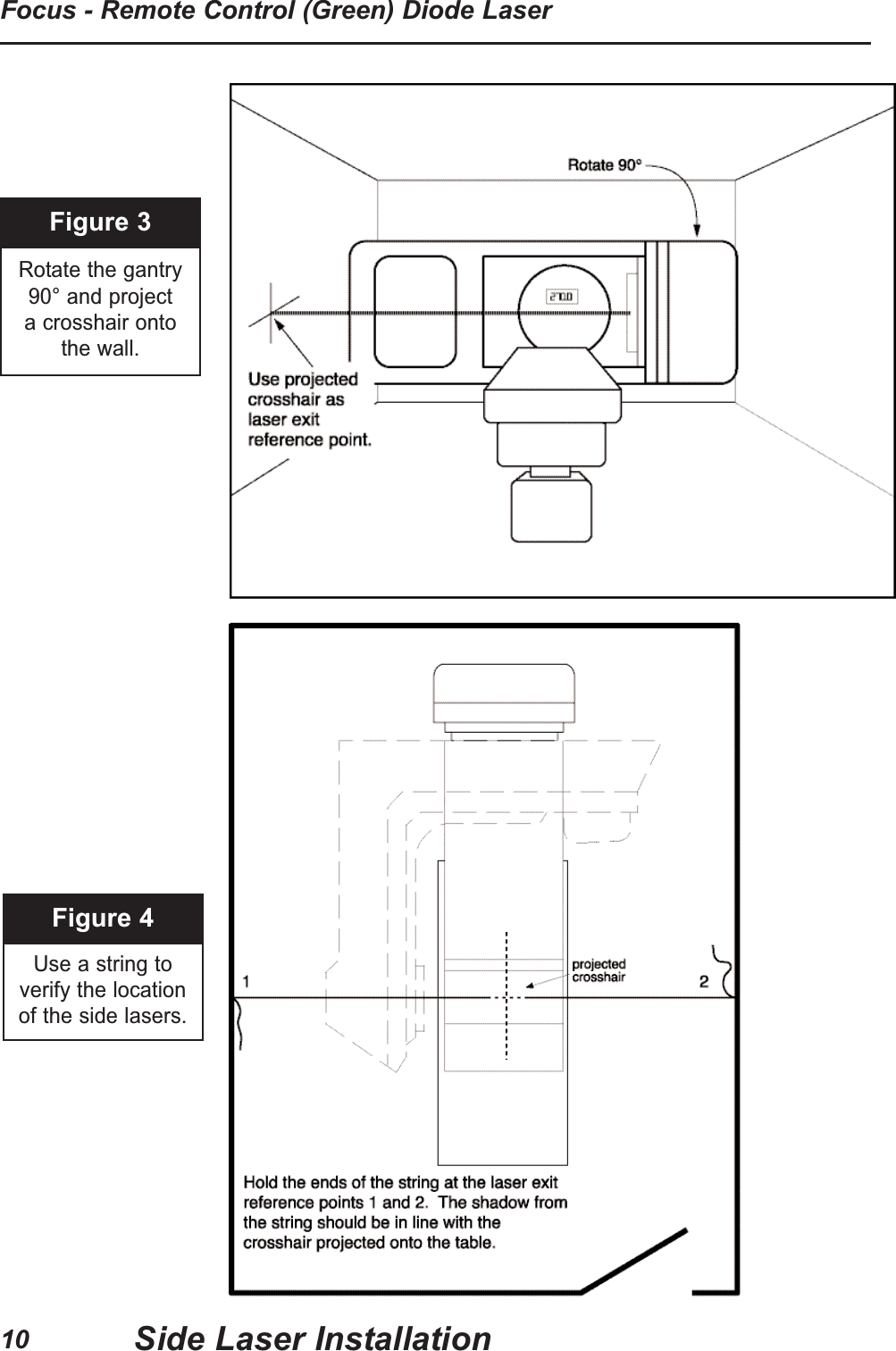
Figure 3Rotate the gantry 90° and project a crosshair onto the wall.Figure 4Use a string to verify the location of the side lasers.Side Laser InstallationFocus - Remote Control (Green) Diode Laser10
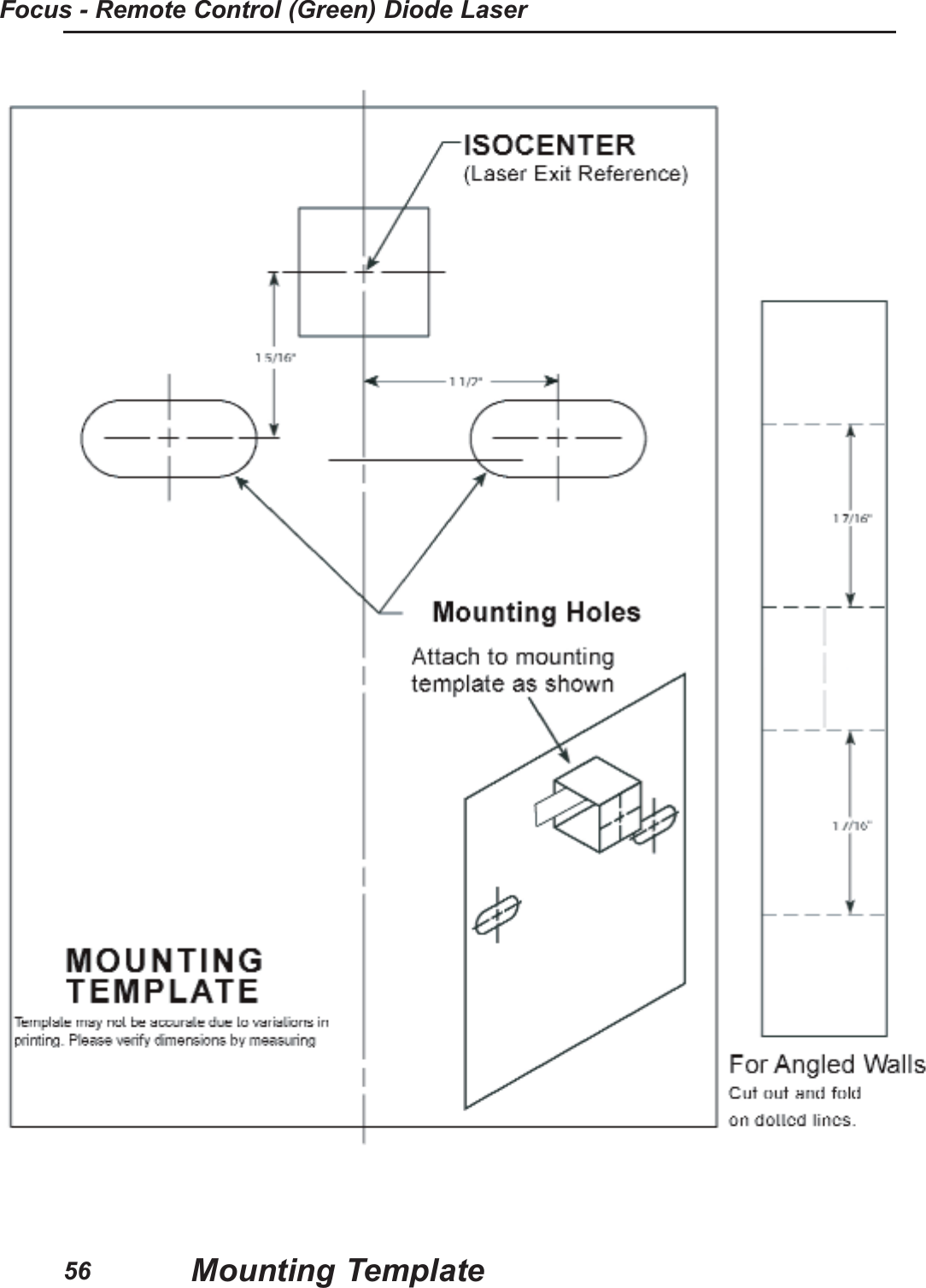
Installing LasersSIDE LASER INSTALLATIONFor all GLD-500 RC installations.  For angled walls, refer to page 35.1. Rotate the gantry 90° to the 270° position and projecta crosshair onto the wall. Figure 32. Use a pencil and straight rule to trace the crosshaironto the wall.3. Line up the template from page 56, so that theprojected crosshair lines up with the laser exit point onthe template.  Use a level to line up the template.4. Mark the outer edge of the template and also mark themounting holes.5. Rotate the gantry 180° to the 90° position and repeatsteps 2-4 on the opposite wall.6. Return the gantry to 0°.7. Tape a piece of paper to the table.8. Project a crosshair onto the paper, keep the field aswide as possible.9. Hold the ends of a plumb bob on each wall until stringshadow is in line with projected crosshair.Figure 410. The point at which the string hits the wall is the centerof the laser exit point.  Mark the center on the wall.Use the template to verify the location of the mountingholes.11. Drill the mounting holes.12. Remove the FOCUS - REMOTE CONTROL (GREEN)from its carton. Remove two screws at the top of thecover using a 5/64” hex (Allen) wrench. Slide thecover up, to disengage it, and lift the cover out.Remove the packing support from the optics andremove the plastic tie from around the optics.Use a level to verify:• Gantry is level each time it is rotated• Template is placedaccurately on wall• Crosshairs on wall are at 90° anglesSide Laser InstallationInstallation and User Guide11
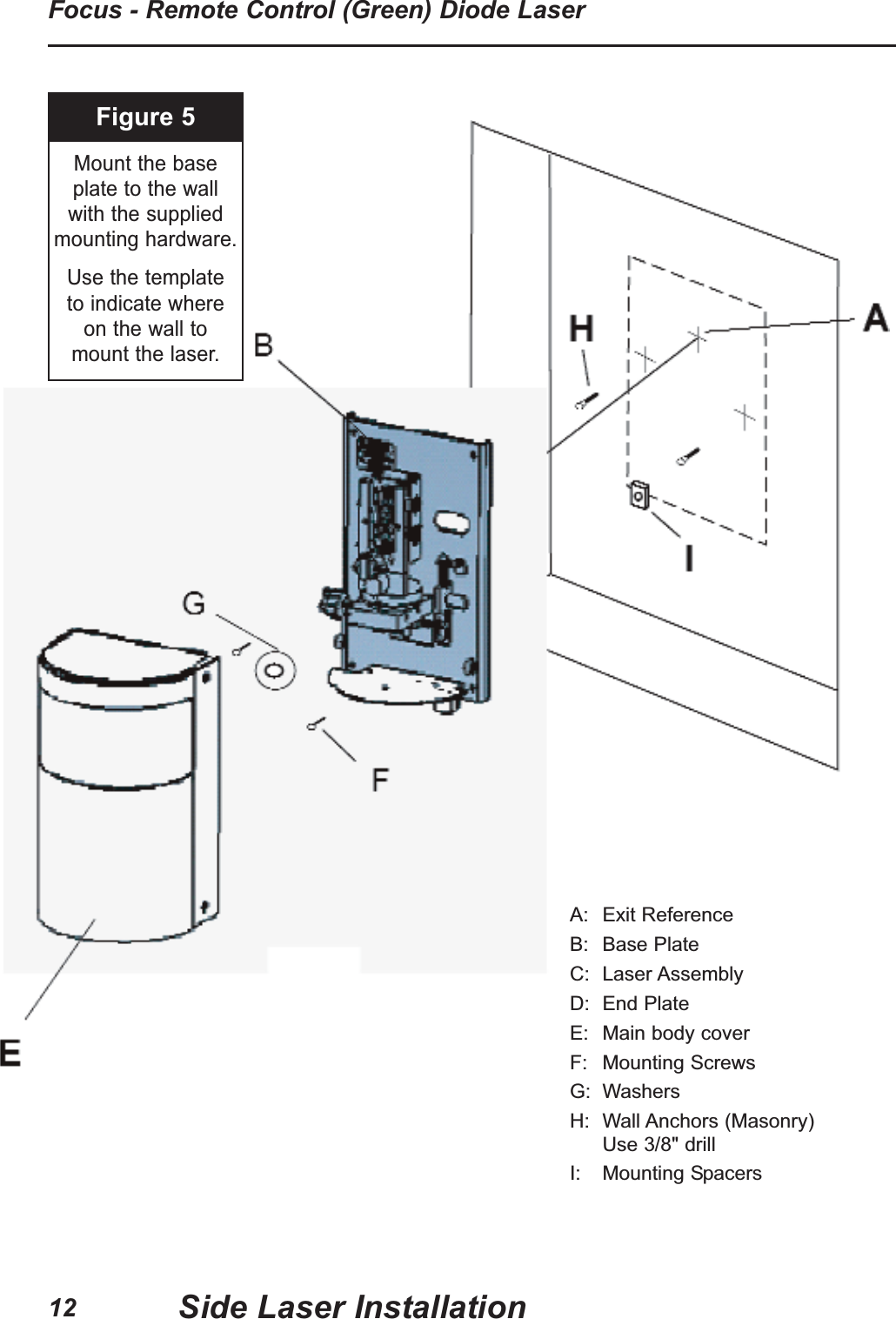
Figure 5Mount the base plate to the wall with the suppliedmounting hardware.Use the template to indicate where on the wall to mount the laser.A: Exit ReferenceB: Base PlateC: Laser AssemblyD: End PlateE: Main body coverF: Mounting ScrewsG: WashersH: Wall Anchors (Masonry)Use 3/8" drillI: Mounting SpacersSide Laser InstallationFocus - Remote Control (Green) Diode Laser12
Installing LasersSIDE LASER INSTALLATION (continued)13. Attach washers and screws with mounting spacers asshown in Figure 5.  Mount the laser to the wall Figure 5.Laser must be firmly mounted. Oversized holes provideflexibility to line up the exit reference, Use suitableanchors.  Wall anchors for masonry are provided in themounting kit.Use a 3/8” diameter drill for the provided anchors.14. Do not replace the cover at this time.15. Plug in the universal power supply. Attach the threadedpower plug to the bottom of the laser. Turn on the laser.The push switch will toggle on and off. The switch shouldlight and the laser lines project.16. Plug in the remote control receiver.17. Rotate the gantry 90° (so that the crosshair is projectedonto the laser) and tape a piece of paper to the gantryhead, covering the projected light field.18. Adjust the laser so that the laser crosshair lines up withthe collimator cross hair.  Refer to the following pages forthe methods for making laser adjustments.19. Place a piece of paper directly in front of the laser.20. Verify that the center of the projected collimator crosshairis centered on the top laser lens.21. Adjust for straight lines if necessary.  Refer to the following pages.22. Turn off the laser.23.  Place the cover on the laser. Slide it downward toengage the pins, then replace the screws at the top ofthe cover. Take care not to jolt or bang the laser. 24.  Check the alignment of the laser several times. Use theremote control for minor adjustments.25. Return the gantry to 0°.Side Laser InstallationInstallation and User Guide13
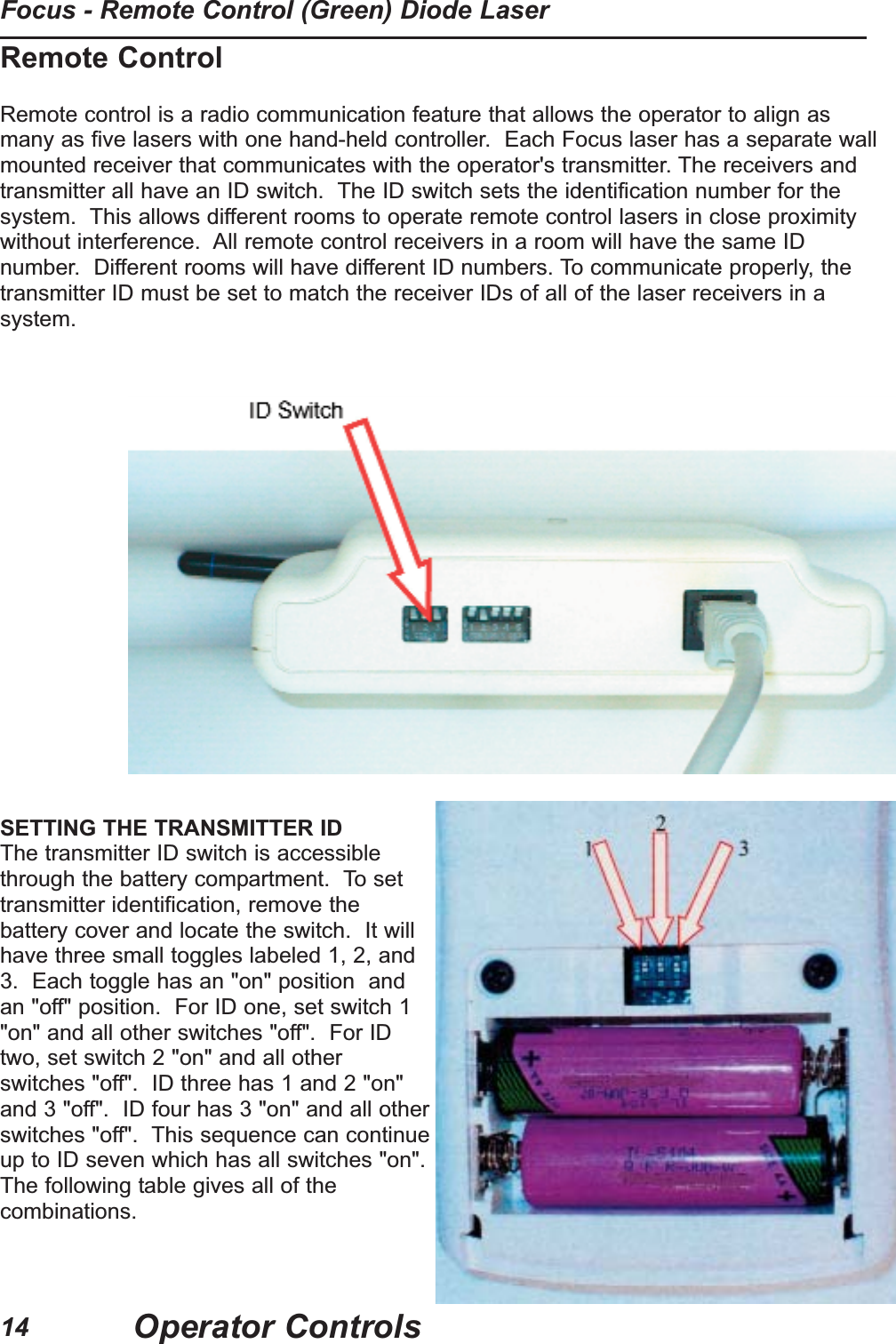
Remote ControlRemote control is a radio communication feature that allows the operator to align asmany as five lasers with one hand-held controller.  Each Focus laser has a separate wallmounted receiver that communicates with the operator's transmitter. The receivers andtransmitter all have an ID switch.  The ID switch sets the identification number for thesystem.  This allows different rooms to operate remote control lasers in close proximitywithout interference.  All remote control receivers in a room will have the same IDnumber.  Different rooms will have different ID numbers. To communicate properly, thetransmitter ID must be set to match the receiver IDs of all of the laser receivers in asystem.SETTING THE TRANSMITTER IDThe transmitter ID switch is accessiblethrough the battery compartment.  To settransmitter identification, remove thebattery cover and locate the switch.  It willhave three small toggles labeled 1, 2, and3.  Each toggle has an "on" position  andan "off" position.  For ID one, set switch 1"on" and all other switches "off".  For IDtwo, set switch 2 "on" and all otherswitches "off".  ID three has 1 and 2 "on"and 3 "off".  ID four has 3 "on" and all otherswitches "off".  This sequence can continueup to ID seven which has all switches "on".The following table gives all of thecombinations.Operator ControlsFocus - Remote Control (Green) Diode Laser14
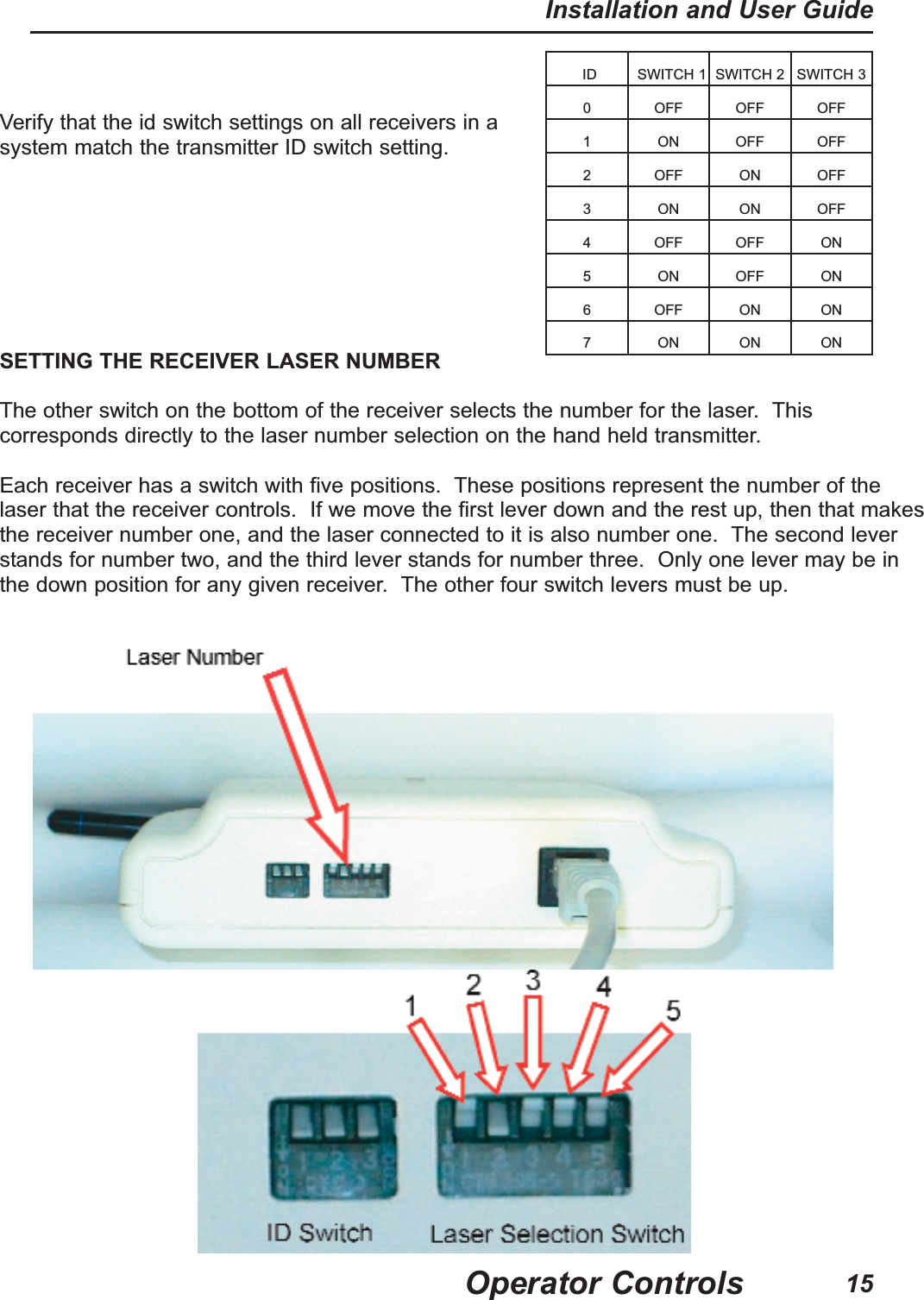
ID SWITCH 1 SWITCH 2 SWITCH 30 OFF OFF OFF1 ON OFF OFF2 OFF ON OFF3 ON ON OFF4 OFF OFF ON5 ON OFF ON6 OFF ON ON7 ON ON ONOperator ControlsInstallation and User Guide15SETTING THE RECEIVER LASER NUMBERThe other switch on the bottom of the receiver selects the number for the laser.  Thiscorresponds directly to the laser number selection on the hand held transmitter.Each receiver has a switch with five positions.  These positions represent the number of thelaser that the receiver controls.  If we move the first lever down and the rest up, then that makesthe receiver number one, and the laser connected to it is also number one.  The second leverstands for number two, and the third lever stands for number three.  Only one lever may be inthe down position for any given receiver.  The other four switch levers must be up. Verify that the id switch settings on all receivers in asystem match the transmitter ID switch setting.
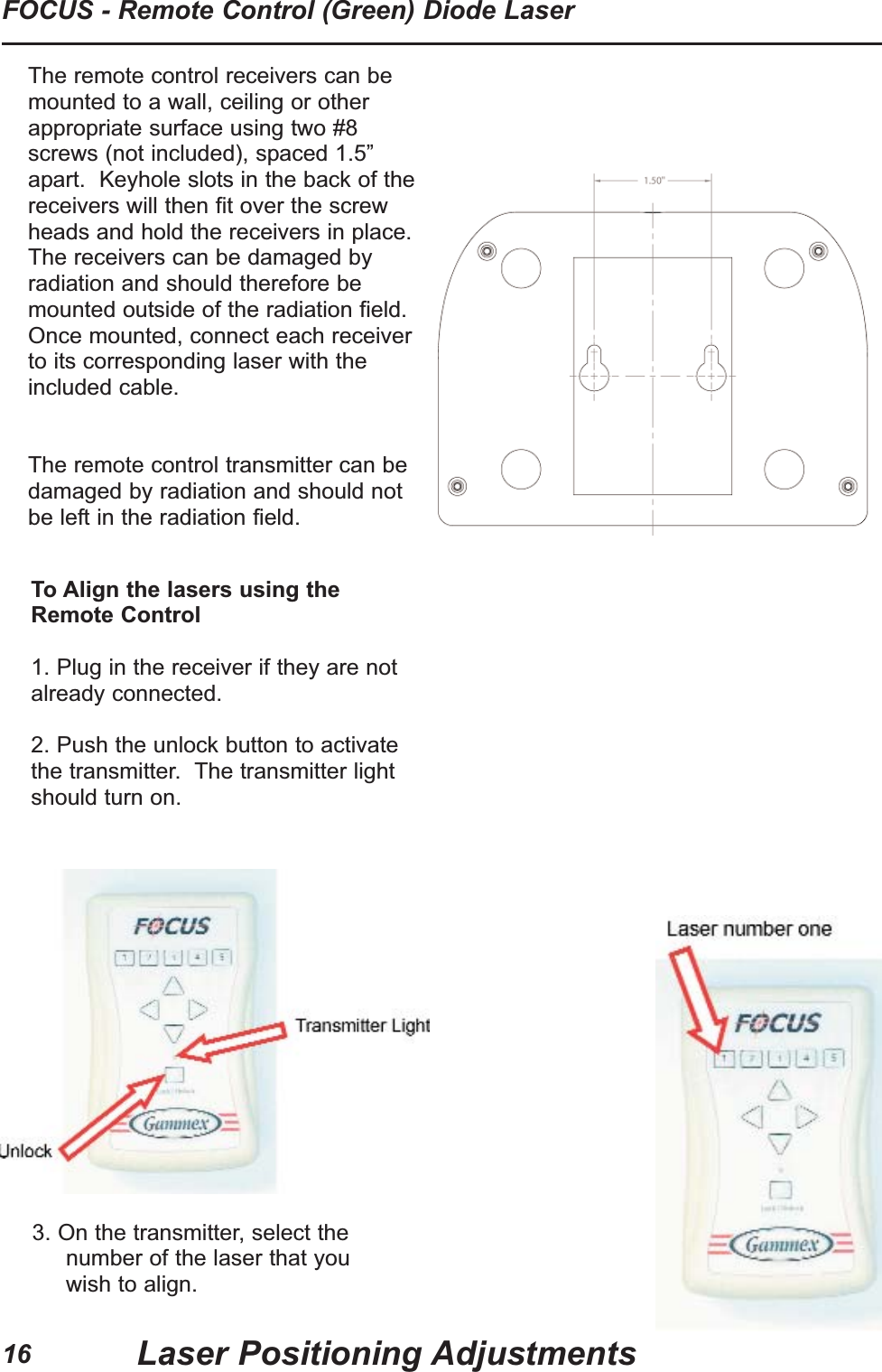
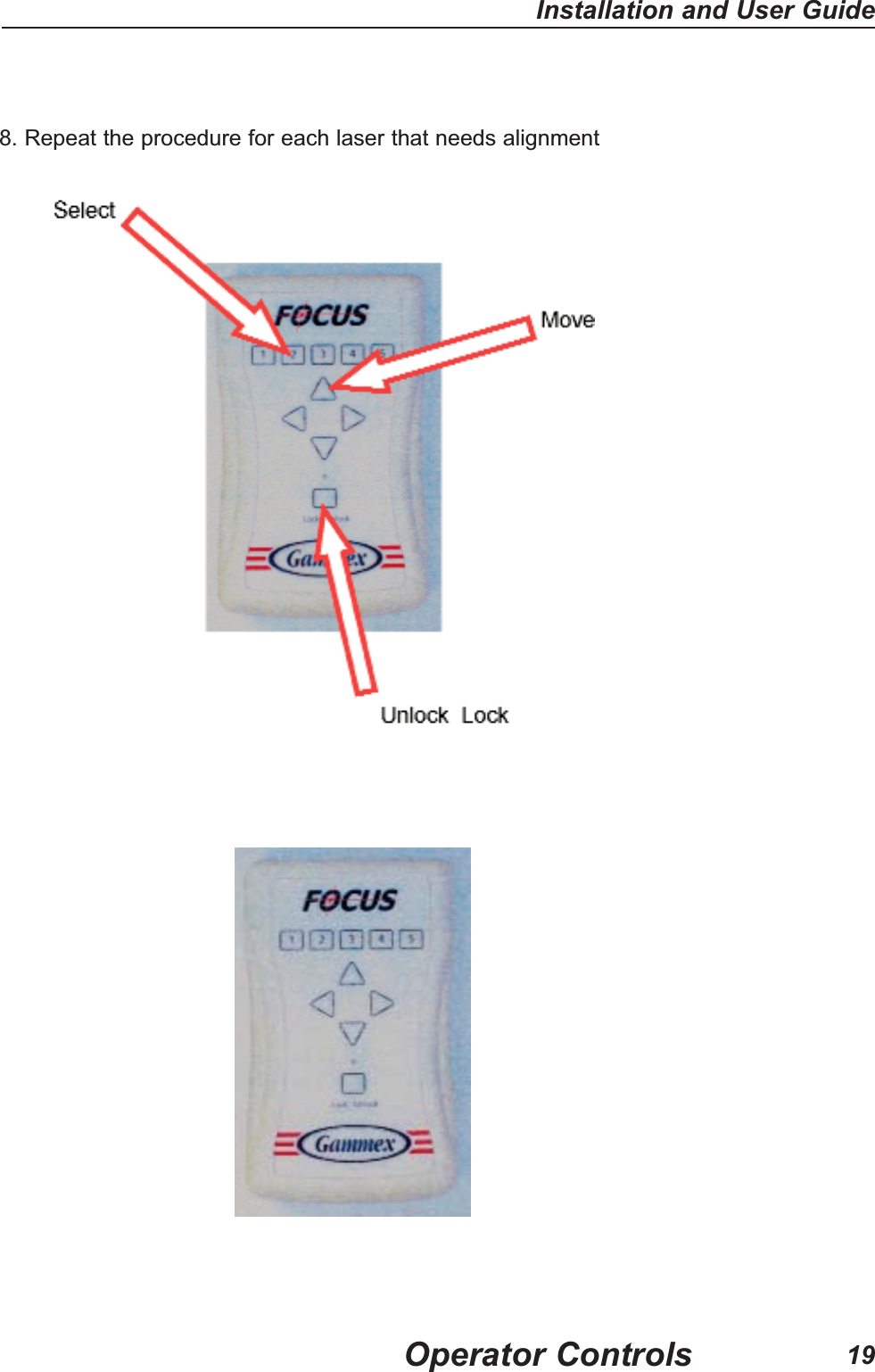
16FOCUS - Remote Control (Green) Diode LaserLaser Positioning AdjustmentsTo Align the lasers using theRemote Control1. Plug in the receiver if they are notalready connected.2. Push the unlock button to activatethe transmitter.  The transmitter lightshould turn on.3. On the transmitter, select thenumber of the laser that youwish to align.The remote control receivers can bemounted to a wall, ceiling or otherappropriate surface using two #8screws (not included), spaced 1.5”apart.  Keyhole slots in the back of thereceivers will then fit over the screwheads and hold the receivers in place.The receivers can be damaged byradiation and should therefore bemounted outside of the radiation field.Once mounted, connect each receiverto its corresponding laser with theincluded cable.  The remote control transmitter can bedamaged by radiation and should notbe left in the radiation field.
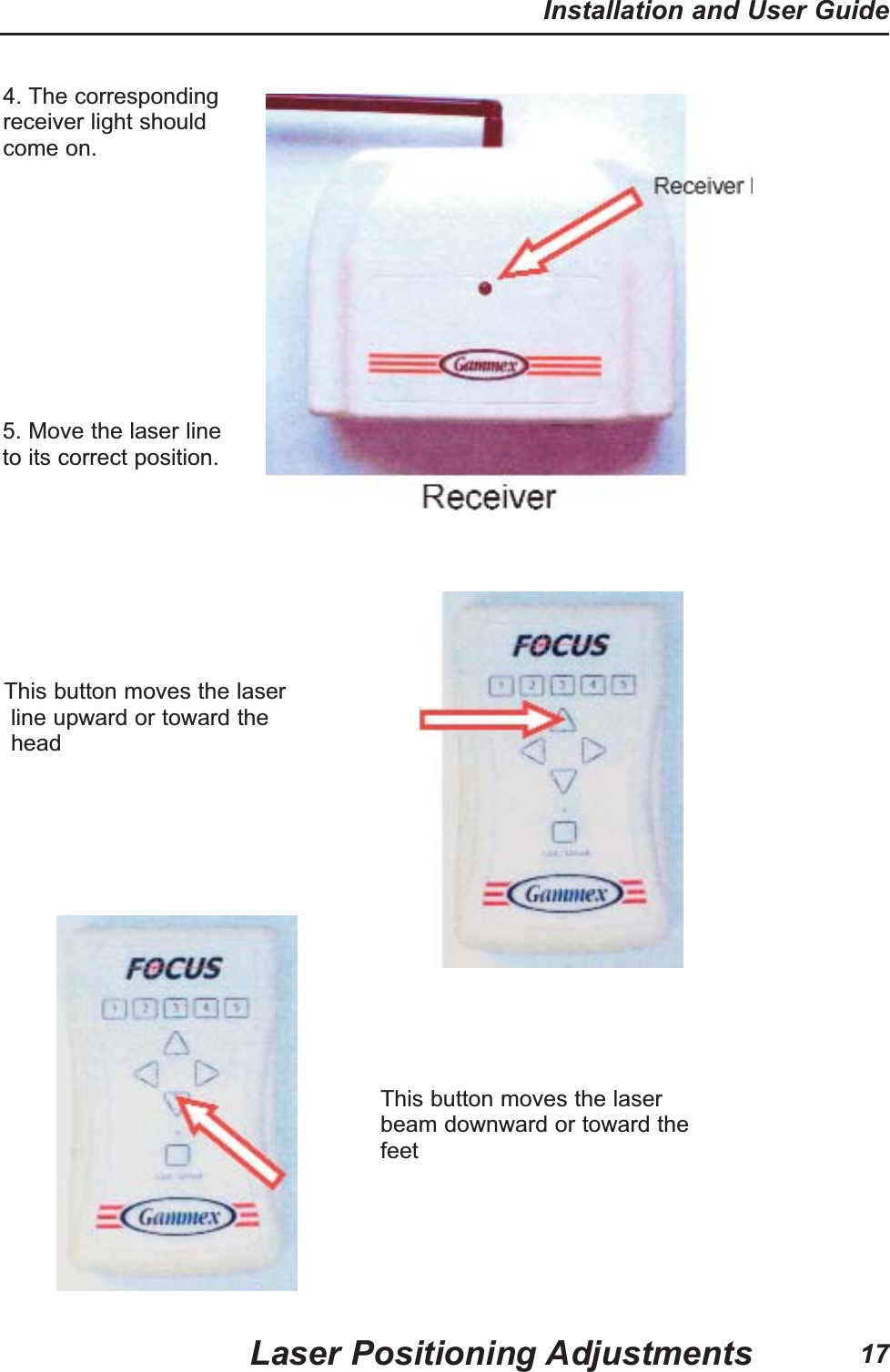
17Installation and User GuideLaser Positioning Adjustments 5. Move the laser lineto its correct position.This button moves the laser line upward or toward theheadThis button moves the laserbeam downward or toward thefeet4. The correspondingreceiver light shouldcome on.
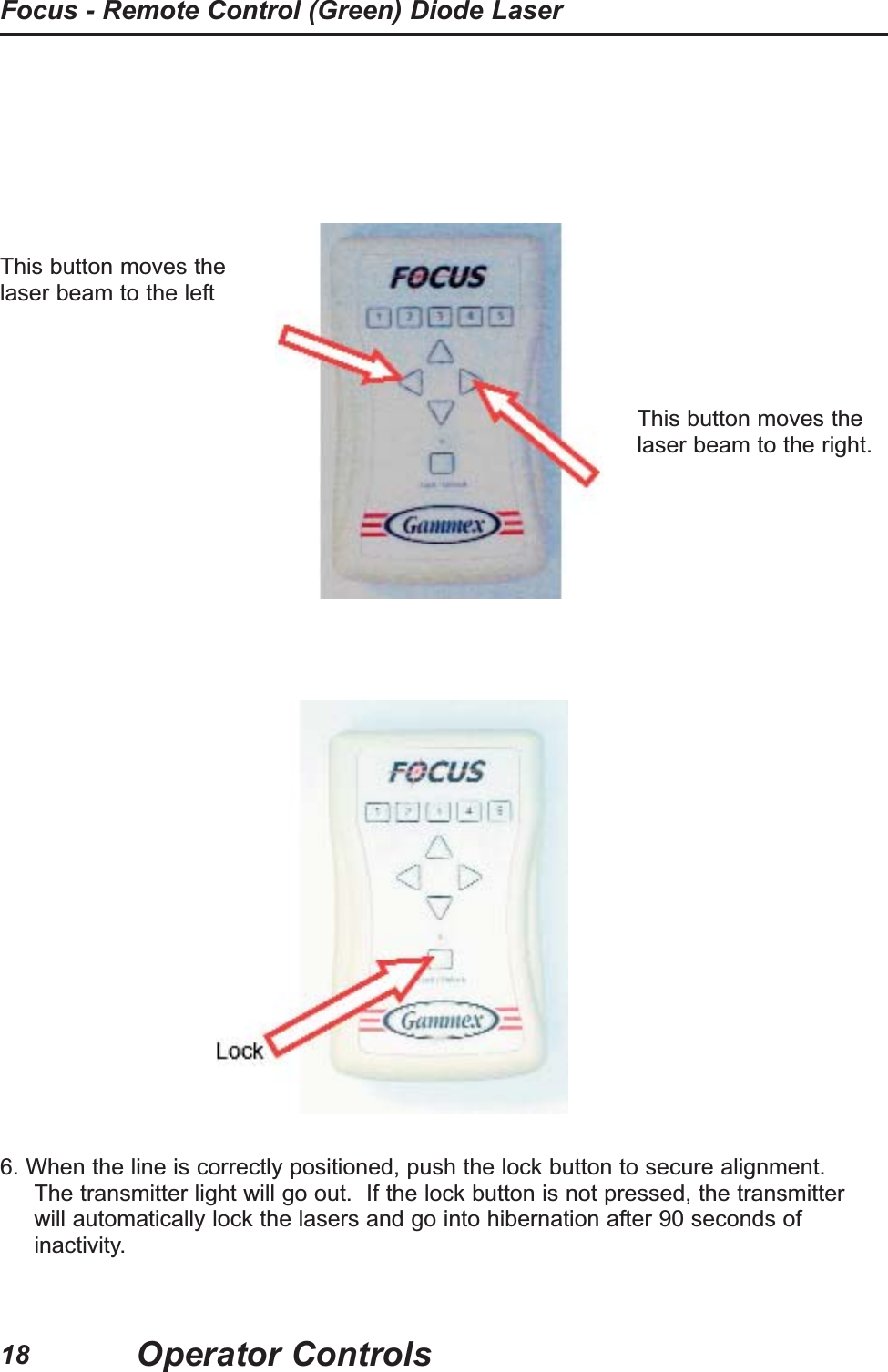
This button moves thelaser beam to the leftThis button moves thelaser beam to the right.6. When the line is correctly positioned, push the lock button to secure alignment.The transmitter light will go out.  If the lock button is not pressed, the transmitterwill automatically lock the lasers and go into hibernation after 90 seconds ofinactivity.Operator ControlsFocus - Remote Control (Green) Diode Laser18
8. Repeat the procedure for each laser that needs alignmentOperator ControlsInstallation and User Guide19
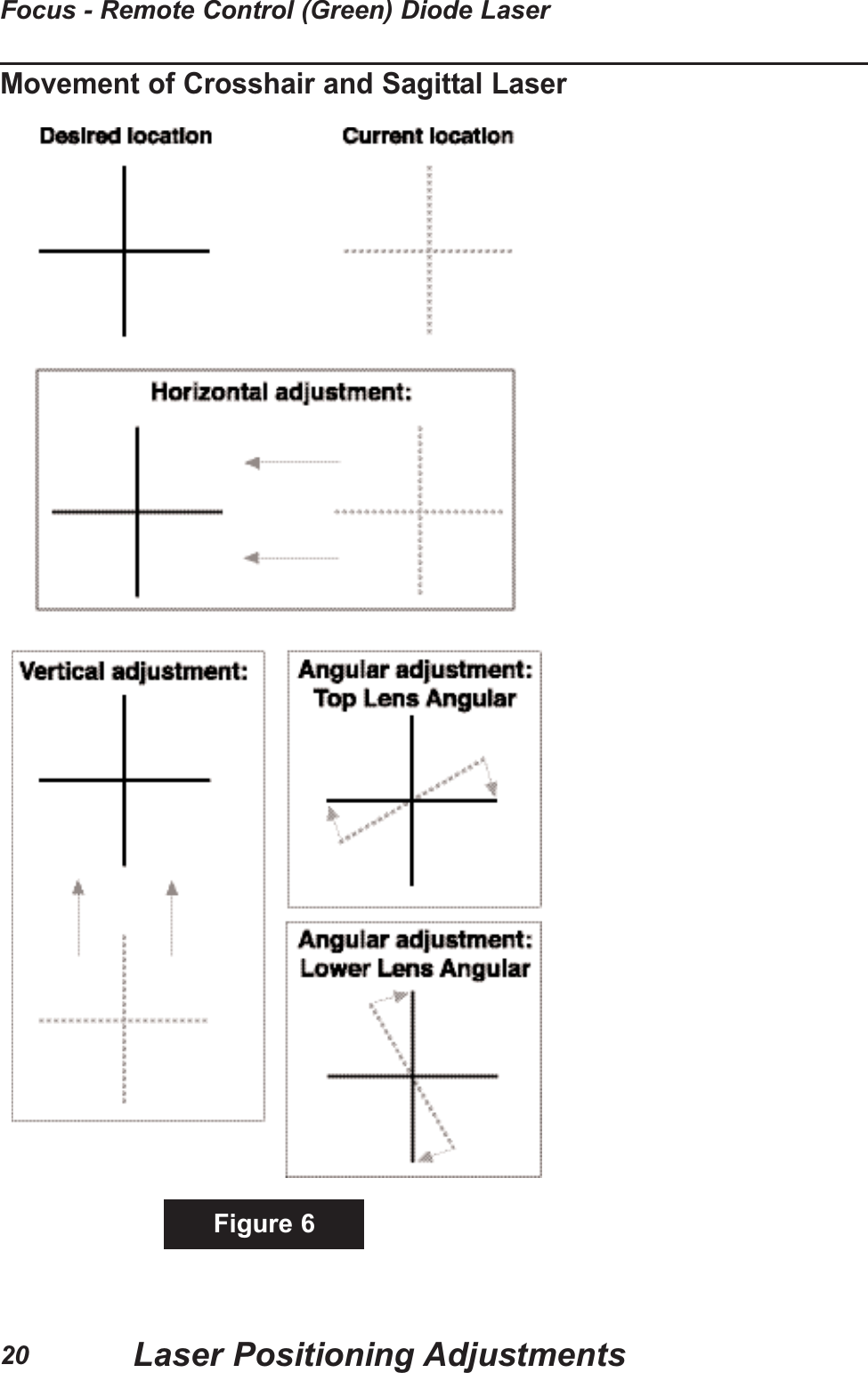
Movement of Crosshair and Sagittal LaserFigure 6Laser Positioning AdjustmentsFocus - Remote Control (Green) Diode Laser20
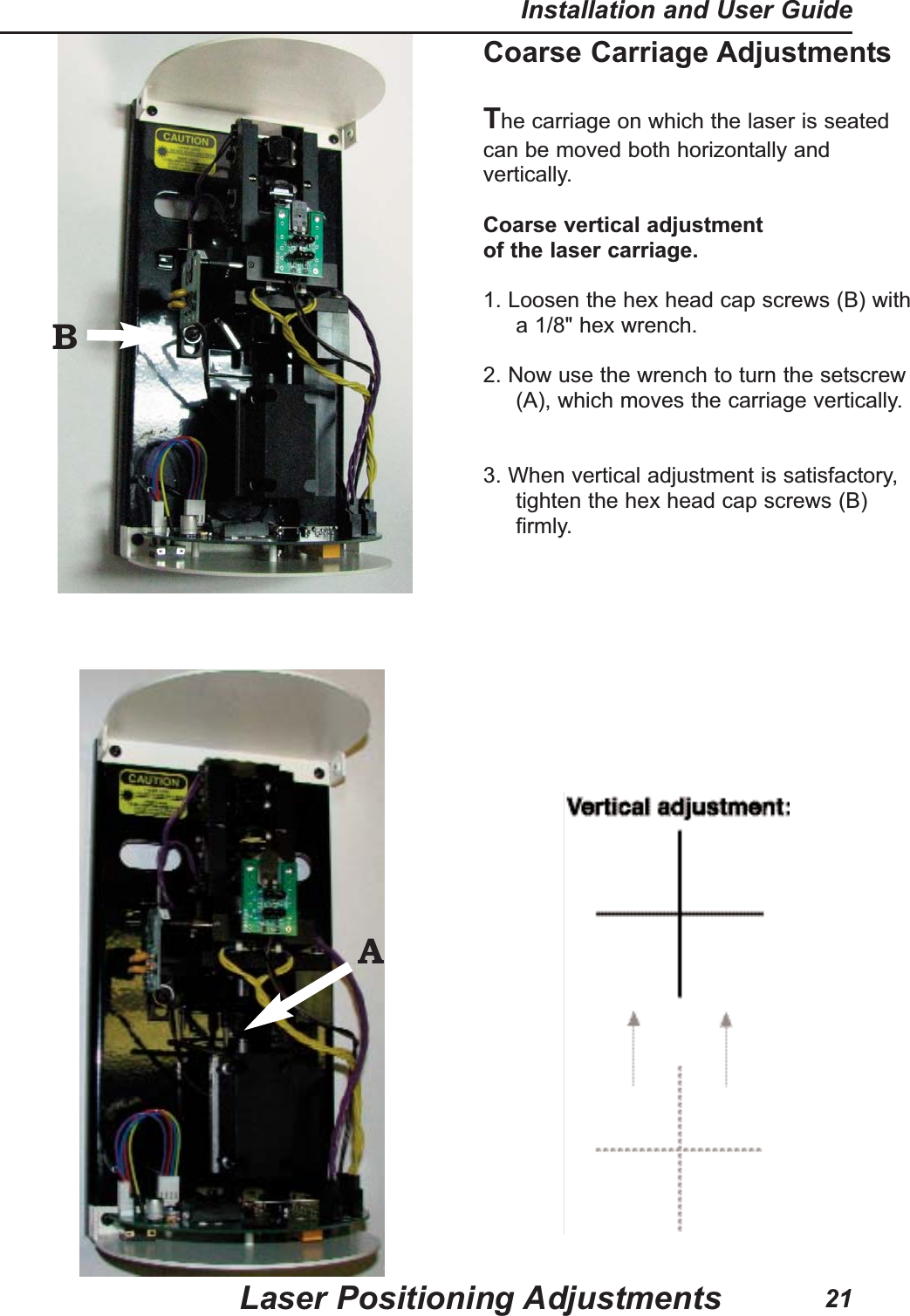
Coarse Carriage AdjustmentsThe carriage on which the laser is seatedcan be moved both horizontally andvertically.Coarse vertical adjustmentof the laser carriage.1. Loosen the hex head cap screws (B) witha 1/8" hex wrench.2. Now use the wrench to turn the setscrew(A), which moves the carriage vertically. 3. When vertical adjustment is satisfactory,tighten the hex head cap screws (B)firmly.Laser Positioning AdjustmentsInstallation and User Guide21BA
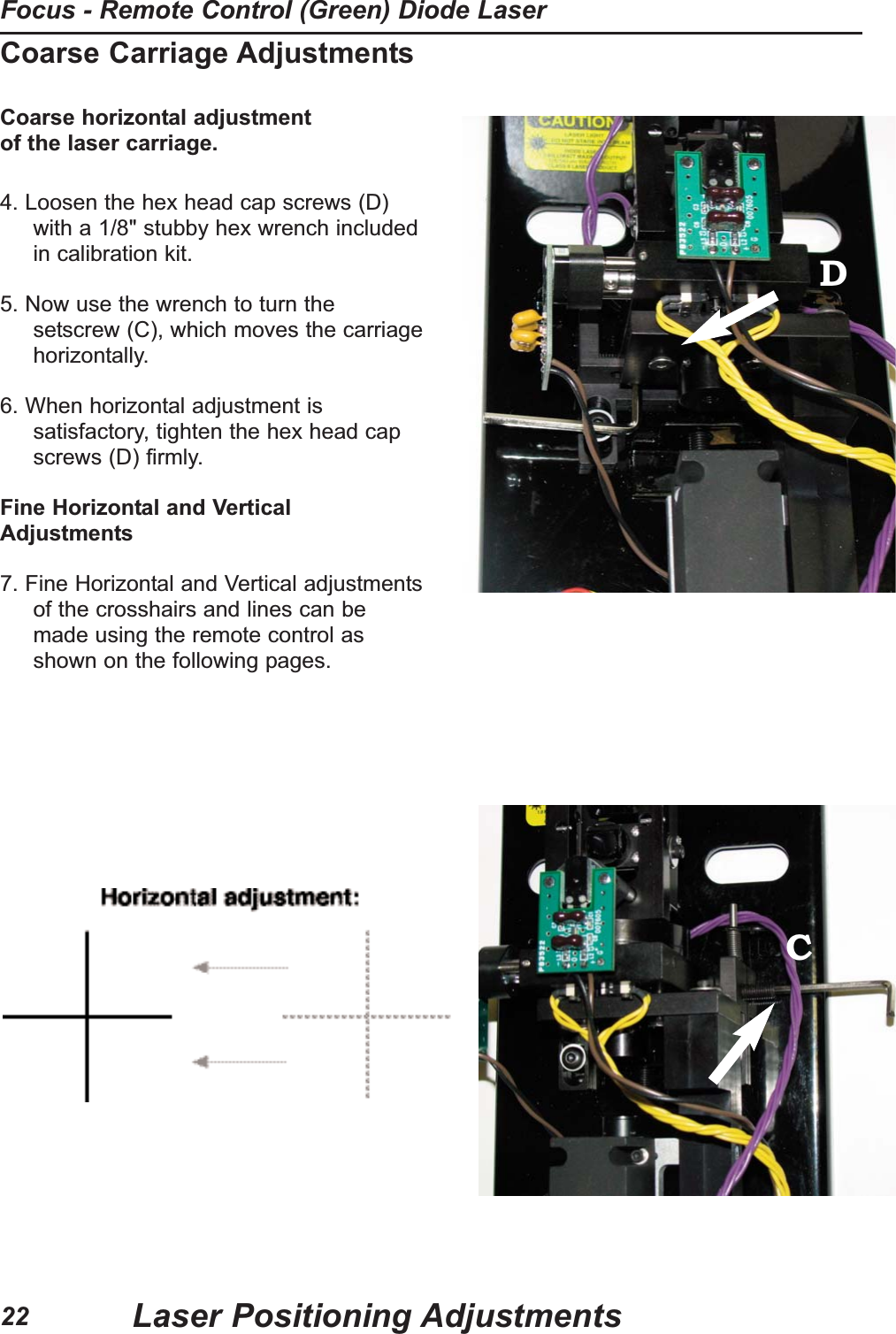
Coarse Carriage AdjustmentsCoarse horizontal adjustment of the laser carriage.4. Loosen the hex head cap screws (D)with a 1/8" stubby hex wrench includedin calibration kit.                                                                                                             5. Now use the wrench to turn thesetscrew (C), which moves the carriagehorizontally.6. When horizontal adjustment issatisfactory, tighten the hex head capscrews (D) firmly.Fine Horizontal and VerticalAdjustments7. Fine Horizontal and Vertical adjustmentsof the crosshairs and lines can bemade using the remote control asshown on the following pages.DCLaser Positioning AdjustmentsFocus - Remote Control (Green) Diode Laser22
Focus - Remote Control (Green) Laser Positioning AdjustmentsFigure 6 shows schematically the positioning adjustments available on the FOCUS -REMOTE CONTROL (GREEN).Figure 7 shows the different adjustments available on theFOCUS - REMOTE CONTROL (GREEN).  The FOCUS - REMOTE CONTROL (GREEN)has both coarse and fine horizontal position adjustments.  The remote control fineadjustment has limited range and is factory set in the middle of the range. If the limit of therange is reached, run the remote control a short distance in the opposite direction. Then usethe coarse adjustment to move close to the desired position. Finally use the remote control fine adjustment to accurately position the crosshair.Focus, angularity, and line curvature are factory set and should notrequire adjustments at installation. Adjustments are available, ifrequired, and are explained on the following pages.Laser Positioning AdjustmentsInstallation and User Guide23
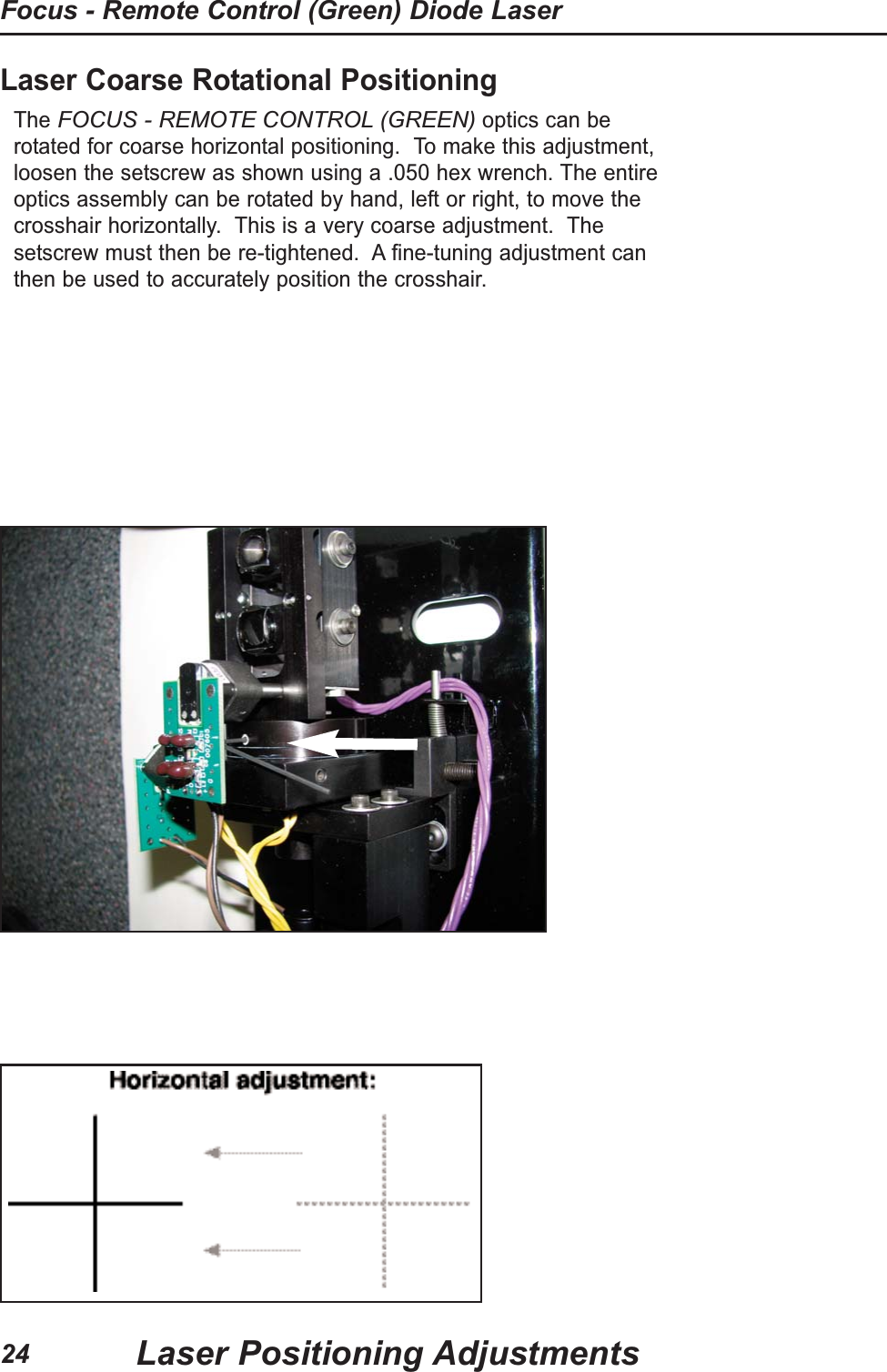
Laser Coarse Rotational PositioningThe FOCUS - REMOTE CONTROL (GREEN)optics can berotated for coarse horizontal positioning.  To make this adjustment,loosen the setscrew as shown using a .050 hex wrench. The entireoptics assembly can be rotated by hand, left or right, to move thecrosshair horizontally.  This is a very coarse adjustment.  Thesetscrew must then be re-tightened.  A fine-tuning adjustment canthen be used to accurately position the crosshair.Laser Positioning AdjustmentsFocus - Remote Control (Green) Diode Laser24
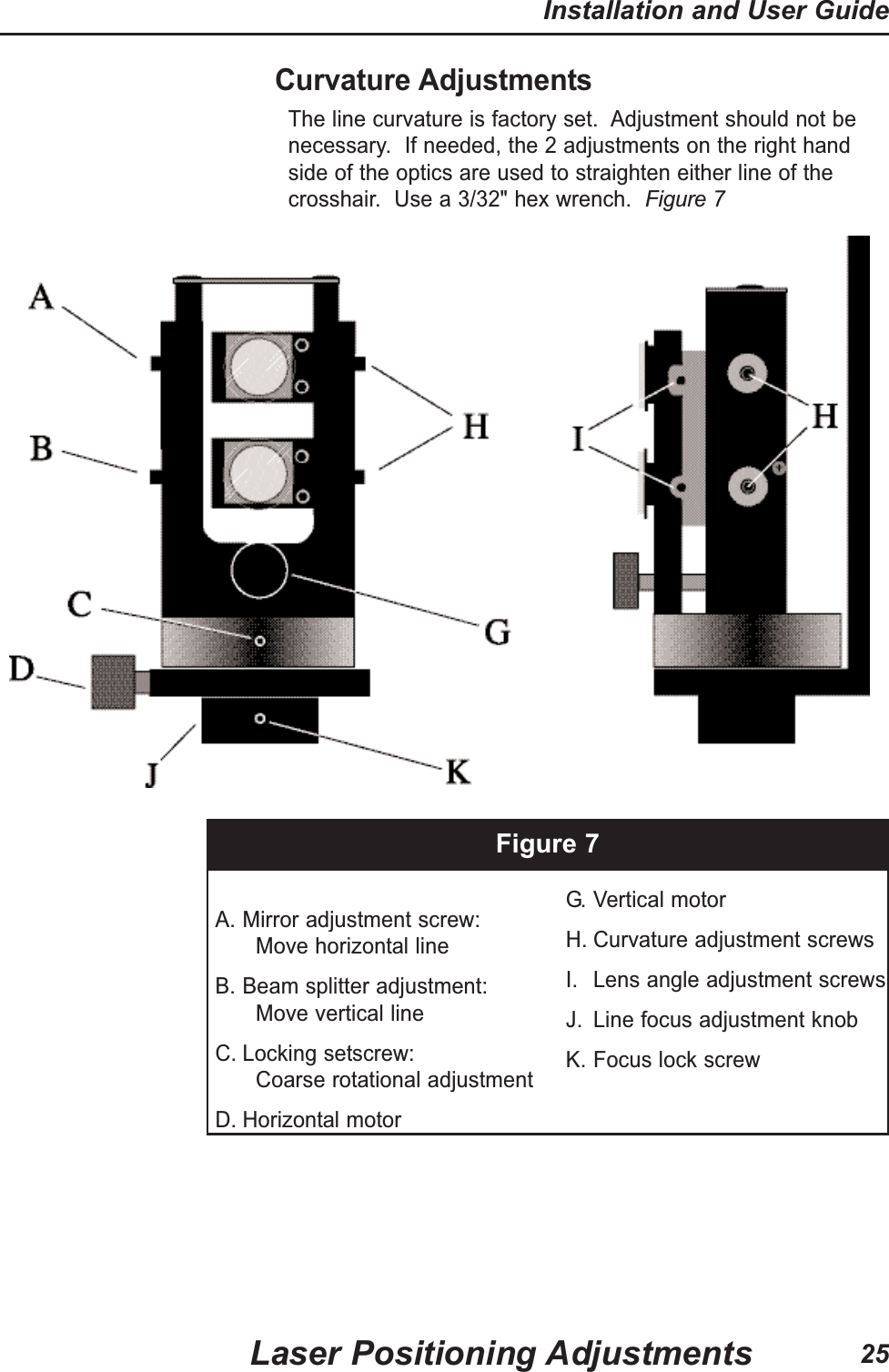
Curvature AdjustmentsThe line curvature is factory set.  Adjustment should not benecessary.  If needed, the 2 adjustments on the right handside of the optics are used to straighten either line of thecrosshair.  Use a 3/32" hex wrench.  Figure 7Figure 7A. Mirror adjustment screw:Move horizontal lineB. Beam splitter adjustment:Move vertical lineC. Locking setscrew:Coarse rotational adjustmentD. Horizontal motorG. Vertical motor  H. Curvature adjustment screws I. Lens angle adjustment screwsJ. Line focus adjustment knobK. Focus lock screwLaser Positioning AdjustmentsInstallation and User Guide25
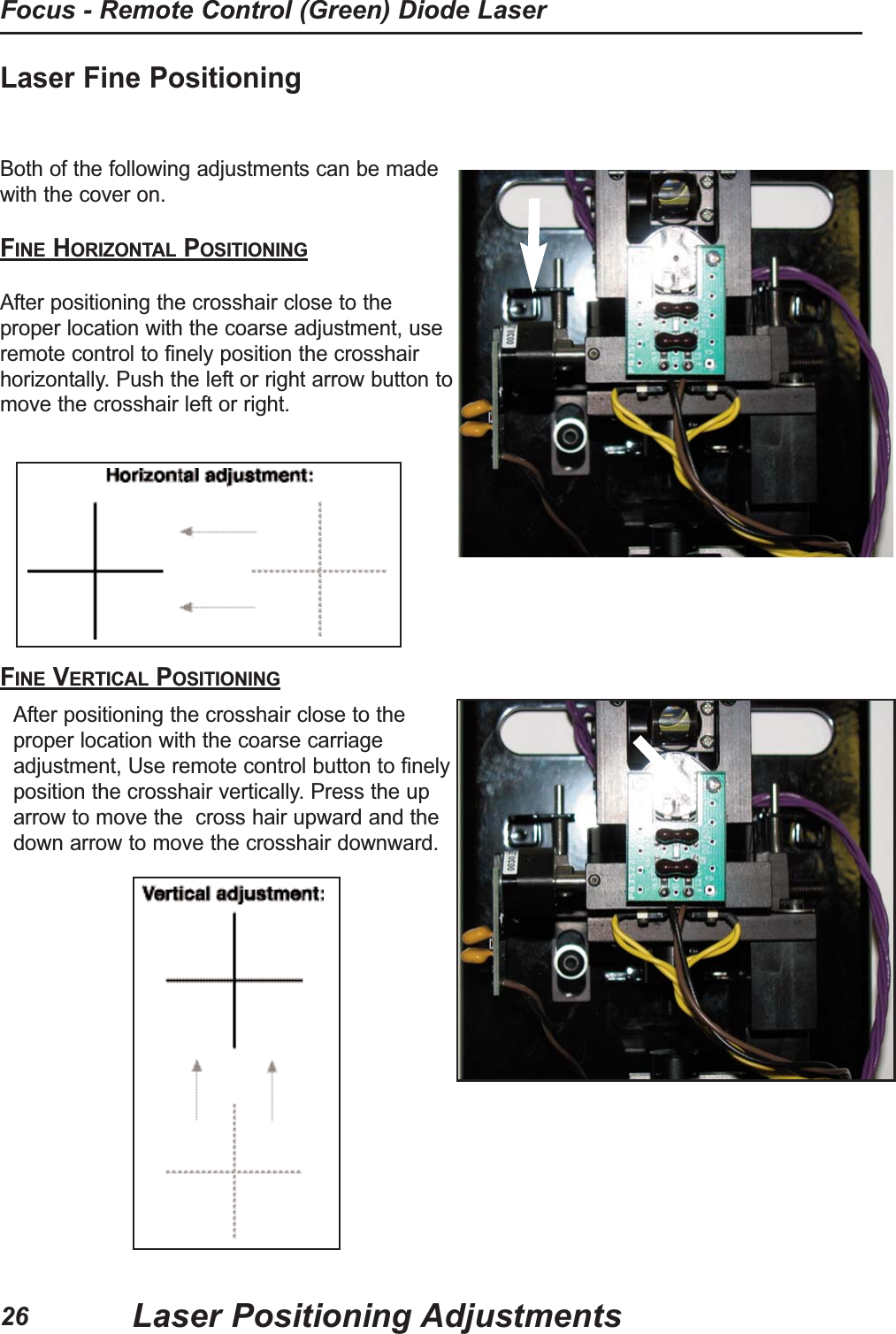
Laser Fine Positioning Both of the following adjustments can be madewith the cover on.FINE HORIZONTAL POSITIONINGAfter positioning the crosshair close to theproper location with the coarse adjustment, useremote control to finely position the crosshairhorizontally. Push the left or right arrow button tomove the crosshair left or right.FINE VERTICAL POSITIONINGAfter positioning the crosshair close to theproper location with the coarse carriageadjustment, Use remote control button to finelyposition the crosshair vertically. Press the uparrow to move the  cross hair upward and thedown arrow to move the crosshair downward.Laser Positioning AdjustmentsFocus - Remote Control (Green) Diode Laser26
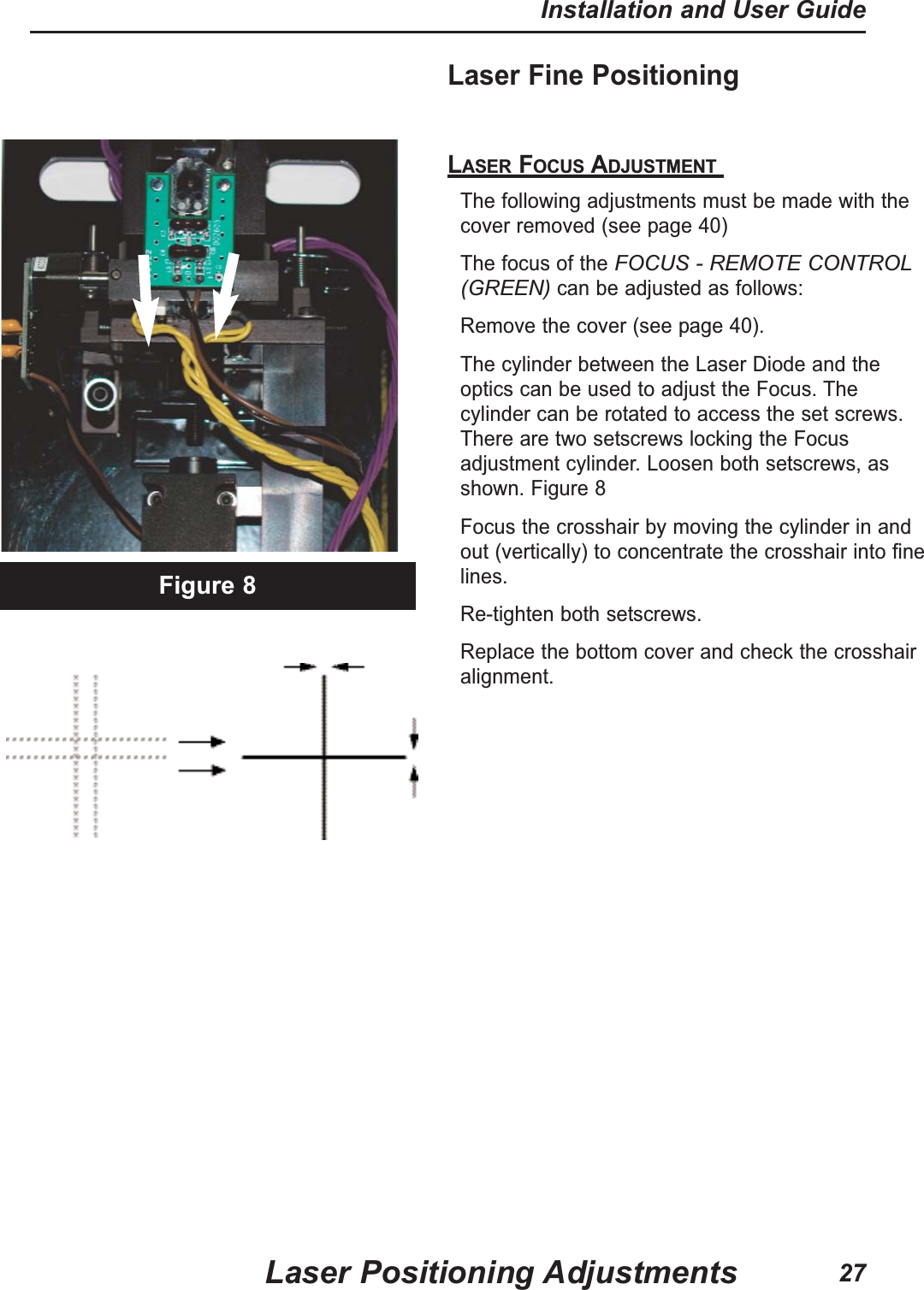
Laser Fine Positioning LASER FOCUS ADJUSTMENT The following adjustments must be made with thecover removed (see page 40)The focus of the FOCUS - REMOTE CONTROL(GREEN)can be adjusted as follows:Remove the cover (see page 40).The cylinder between the Laser Diode and theoptics can be used to adjust the Focus. Thecylinder can be rotated to access the set screws.There are two setscrews locking the Focusadjustment cylinder. Loosen both setscrews, asshown. Figure 8 Focus the crosshair by moving the cylinder in andout (vertically) to concentrate the crosshair into finelines.Re-tighten both setscrews.Replace the bottom cover and check the crosshairalignment.Figure 8Laser Positioning AdjustmentsInstallation and User Guide27
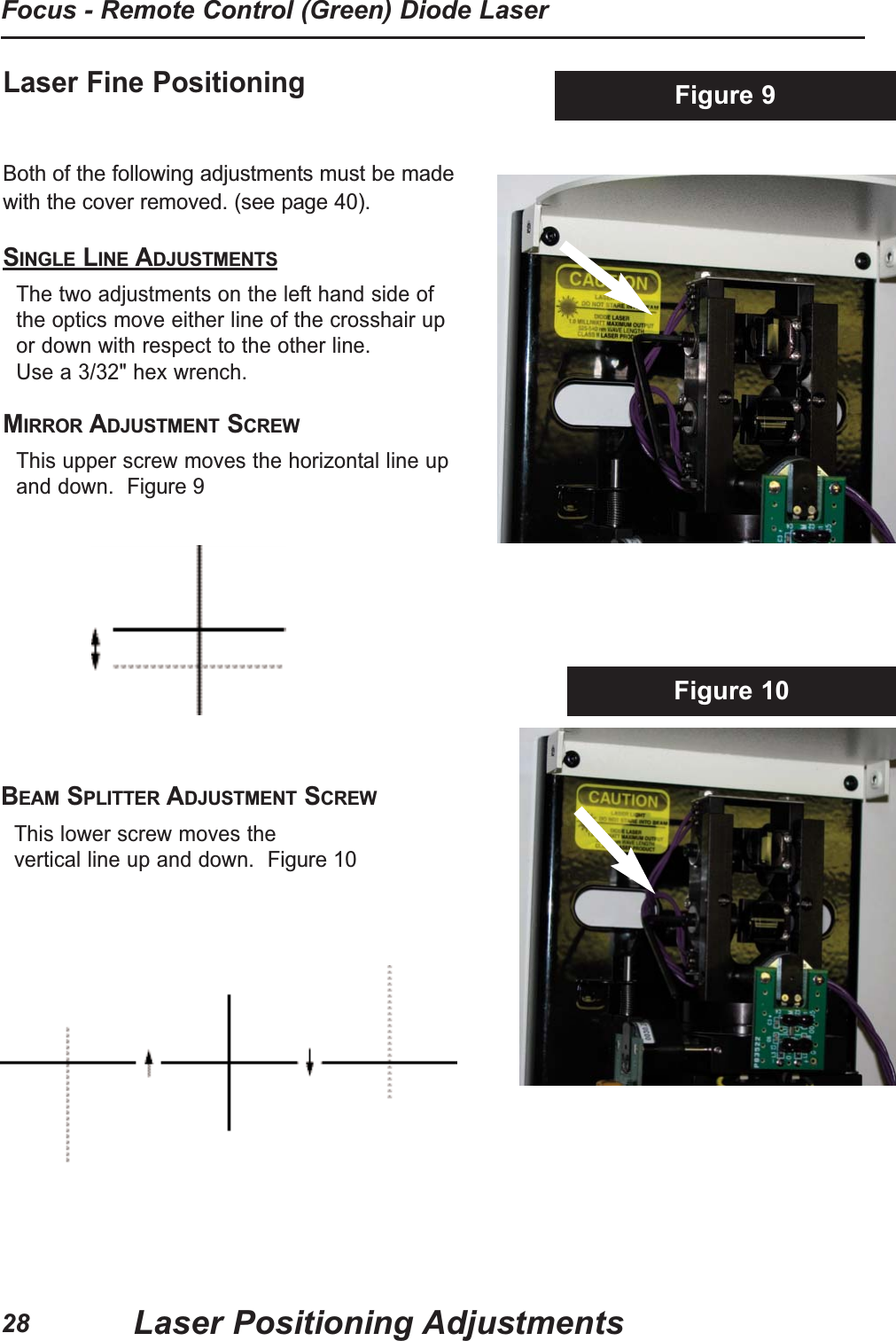
Laser Fine Positioning Both of the following adjustments must be madewith the cover removed. (see page 40).SINGLE LINE ADJUSTMENTSThe two adjustments on the left hand side ofthe optics move either line of the crosshair upor down with respect to the other line. Use a 3/32" hex wrench.MIRROR ADJUSTMENT SCREWThis upper screw moves the horizontal line upand down.  Figure 9Figure 10Figure 9BEAM SPLITTER ADJUSTMENT SCREWThis lower screw moves the vertical line up and down.  Figure 10Laser Positioning AdjustmentsFocus - Remote Control (Green) Diode Laser28
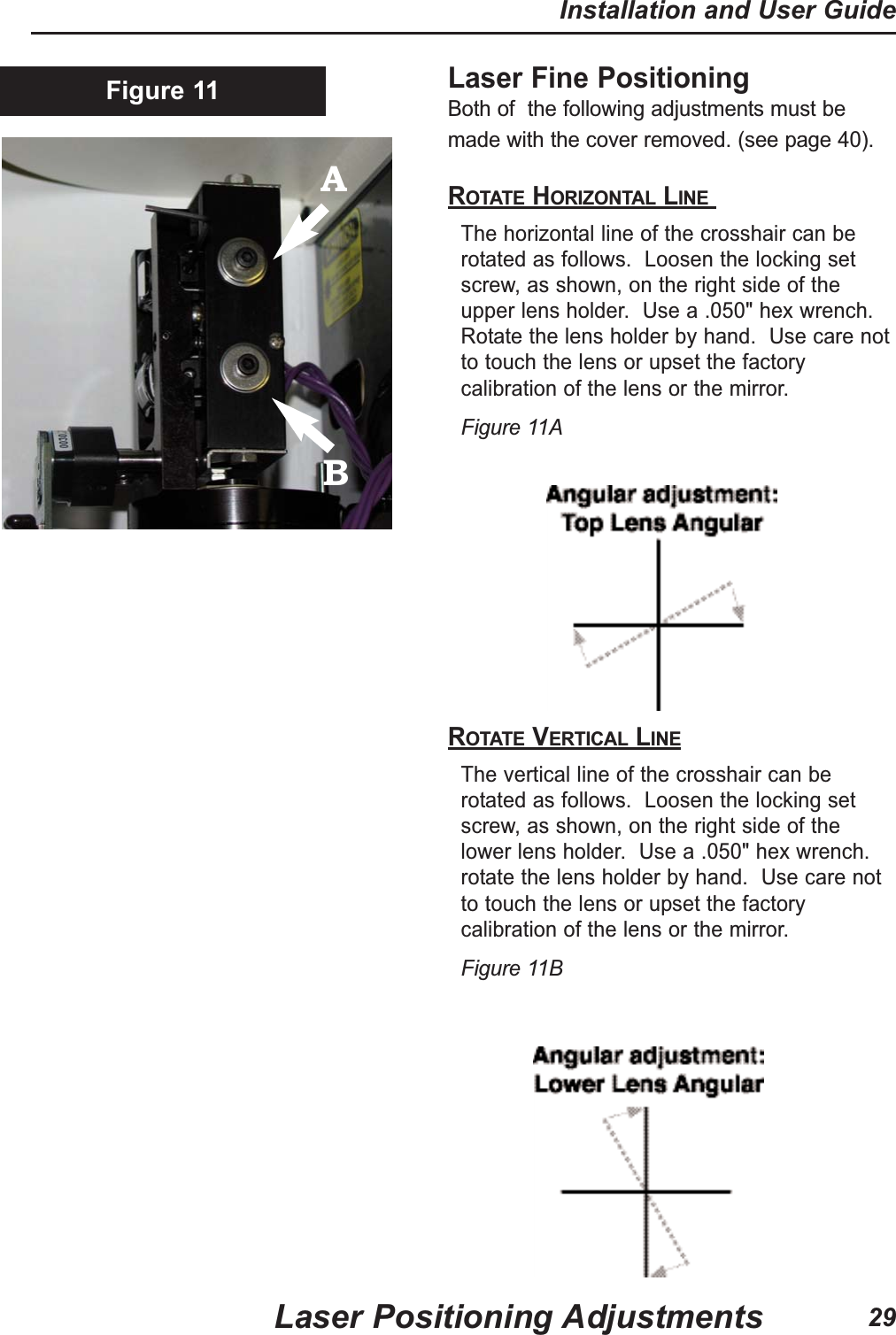
Laser Fine Positioning Both of  the following adjustments must bemade with the cover removed. (see page 40).ROTATE HORIZONTAL LINE The horizontal line of the crosshair can berotated as follows.  Loosen the locking setscrew, as shown, on the right side of theupper lens holder.  Use a .050" hex wrench.Rotate the lens holder by hand.  Use care notto touch the lens or upset the factorycalibration of the lens or the mirror.  Figure 11AROTATE VERTICAL LINEThe vertical line of the crosshair can berotated as follows.  Loosen the locking setscrew, as shown, on the right side of thelower lens holder.  Use a .050" hex wrench.rotate the lens holder by hand.  Use care notto touch the lens or upset the factorycalibration of the lens or the mirror. Figure 11BFigure 11Laser Positioning AdjustmentsInstallation and User Guide29AB
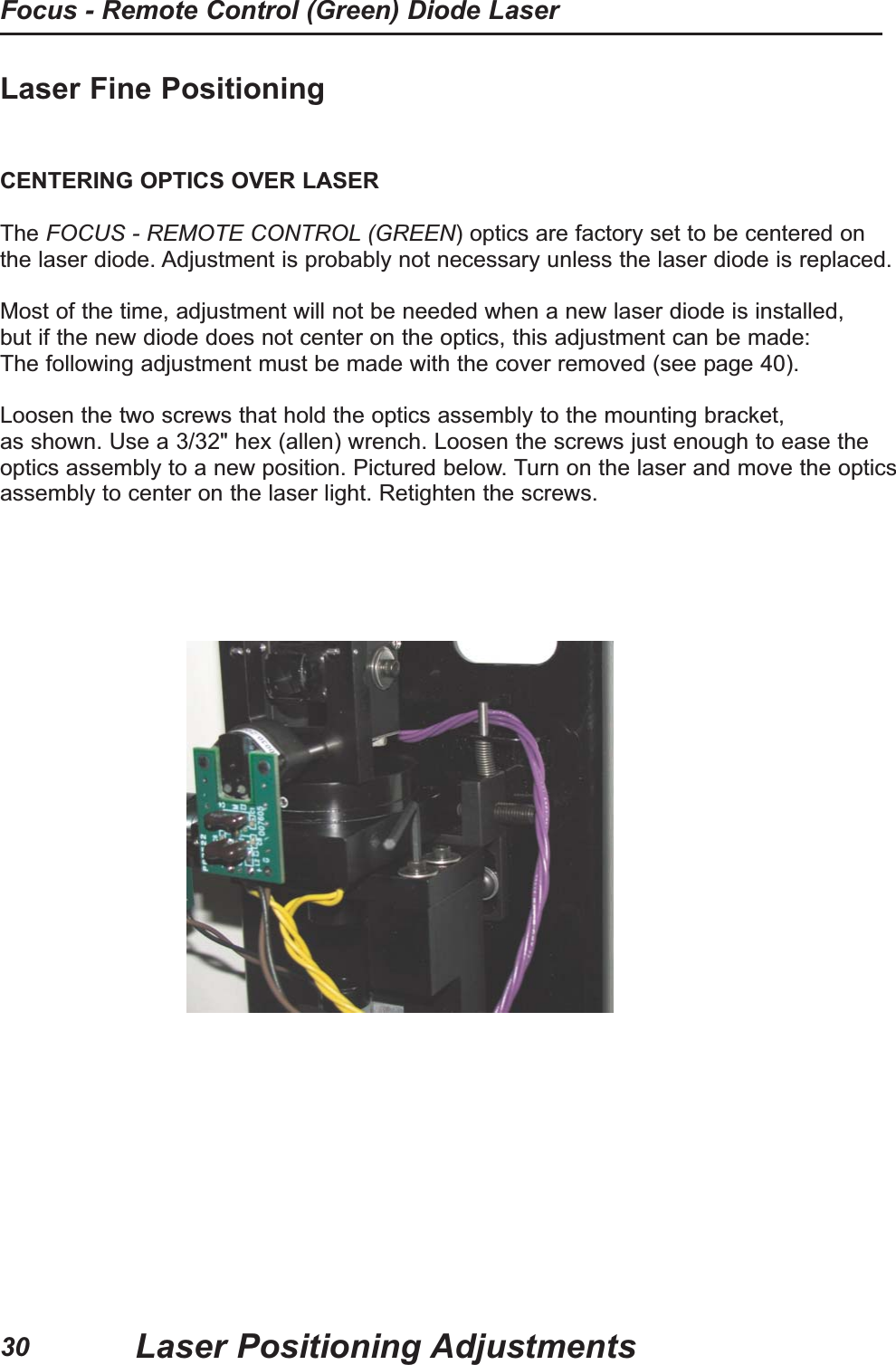
Laser Fine PositioningCENTERING OPTICS OVER LASERThe FOCUS - REMOTE CONTROL (GREEN) optics are factory set to be centered onthe laser diode. Adjustment is probably not necessary unless the laser diode is replaced.Most of the time, adjustment will not be needed when a new laser diode is installed,but if the new diode does not center on the optics, this adjustment can be made:The following adjustment must be made with the cover removed (see page 40).Loosen the two screws that hold the optics assembly to the mounting bracket,as shown. Use a 3/32" hex (allen) wrench. Loosen the screws just enough to ease theoptics assembly to a new position. Pictured below. Turn on the laser and move the opticsassembly to center on the laser light. Retighten the screws.Laser Positioning AdjustmentsFocus - Remote Control (Green) Diode Laser30
NotesLaser Positioning AdjustmentsInstallation and User Guide31
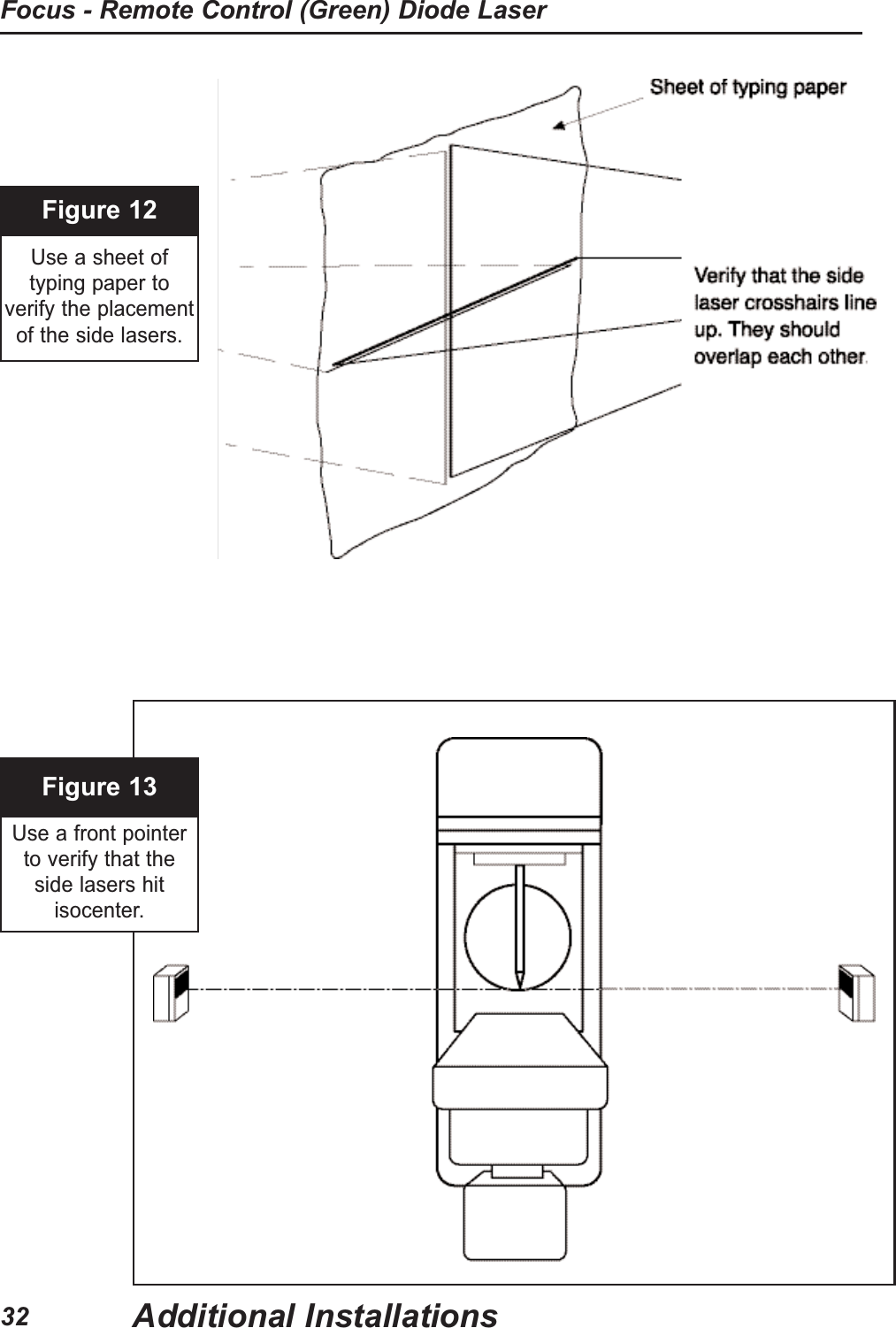
Figure 12Use a sheet of typing paper toverify the placementof the side lasers.Figure 13Use a front pointerto verify that theside lasers hitisocenter.Additional InstallationsFocus - Remote Control (Green) Diode Laser32
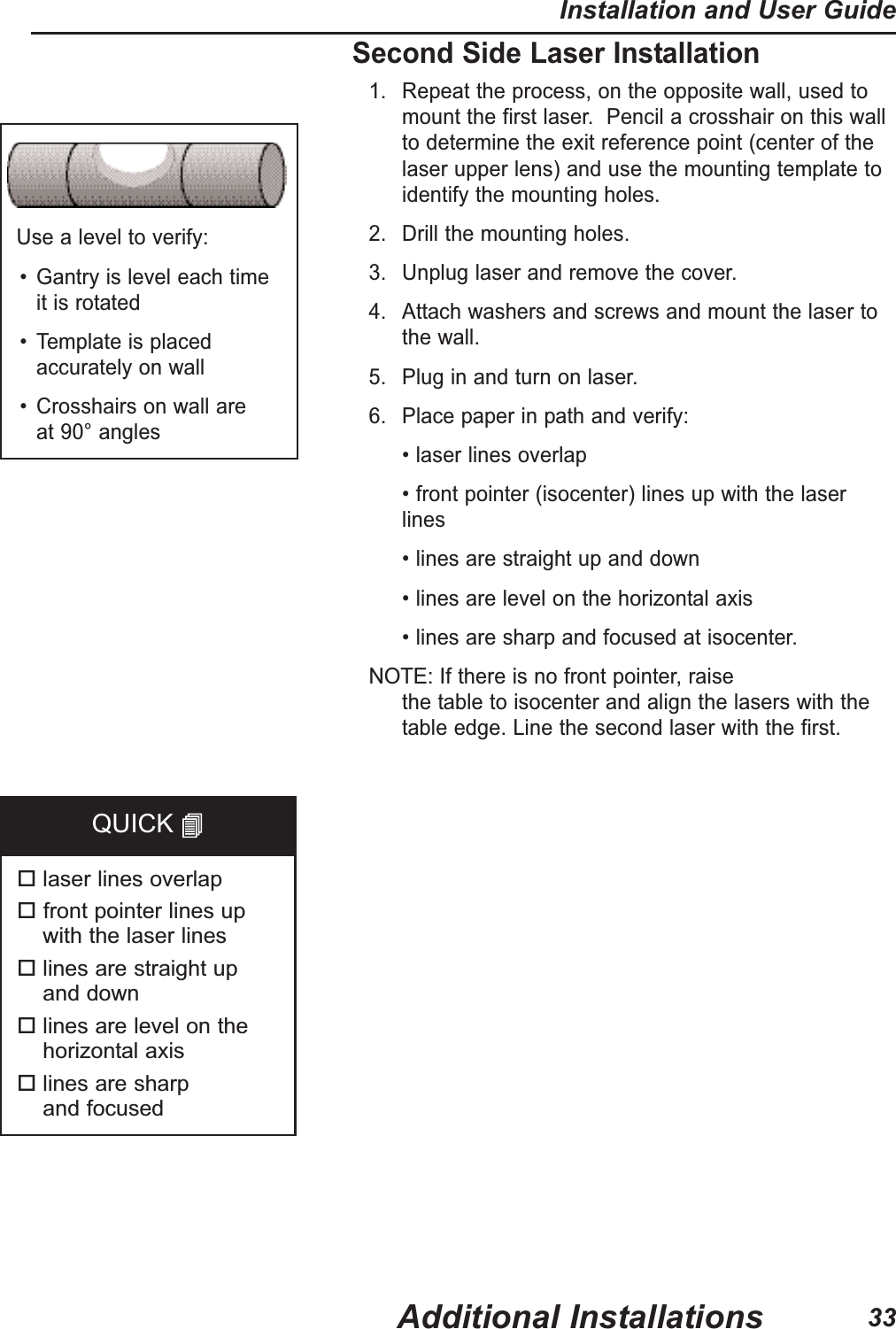
Second Side Laser Installation1. Repeat the process, on the opposite wall, used tomount the first laser.  Pencil a crosshair on this wallto determine the exit reference point (center of thelaser upper lens) and use the mounting template toidentify the mounting holes.2. Drill the mounting holes.3. Unplug laser and remove the cover.4. Attach washers and screws and mount the laser tothe wall.5. Plug in and turn on laser.6. Place paper in path and verify:• laser lines overlap• front pointer (isocenter) lines up with the laserlines• lines are straight up and down• lines are level on the horizontal axis• lines are sharp and focused at isocenter.  NOTE:If there is no front pointer, raise the table to isocenter and align the lasers with thetable edge. Line the second laser with the first.  Use a level to verify:• Gantry is level each time it is rotated• Template is placedaccurately on wall• Crosshairs on wall are at 90° angleslaser lines overlapfront pointer lines up with the laser lineslines are straight up and downlines are level on thehorizontal axislines are sharp and focusedQUICK Additional InstallationsInstallation and User Guide33
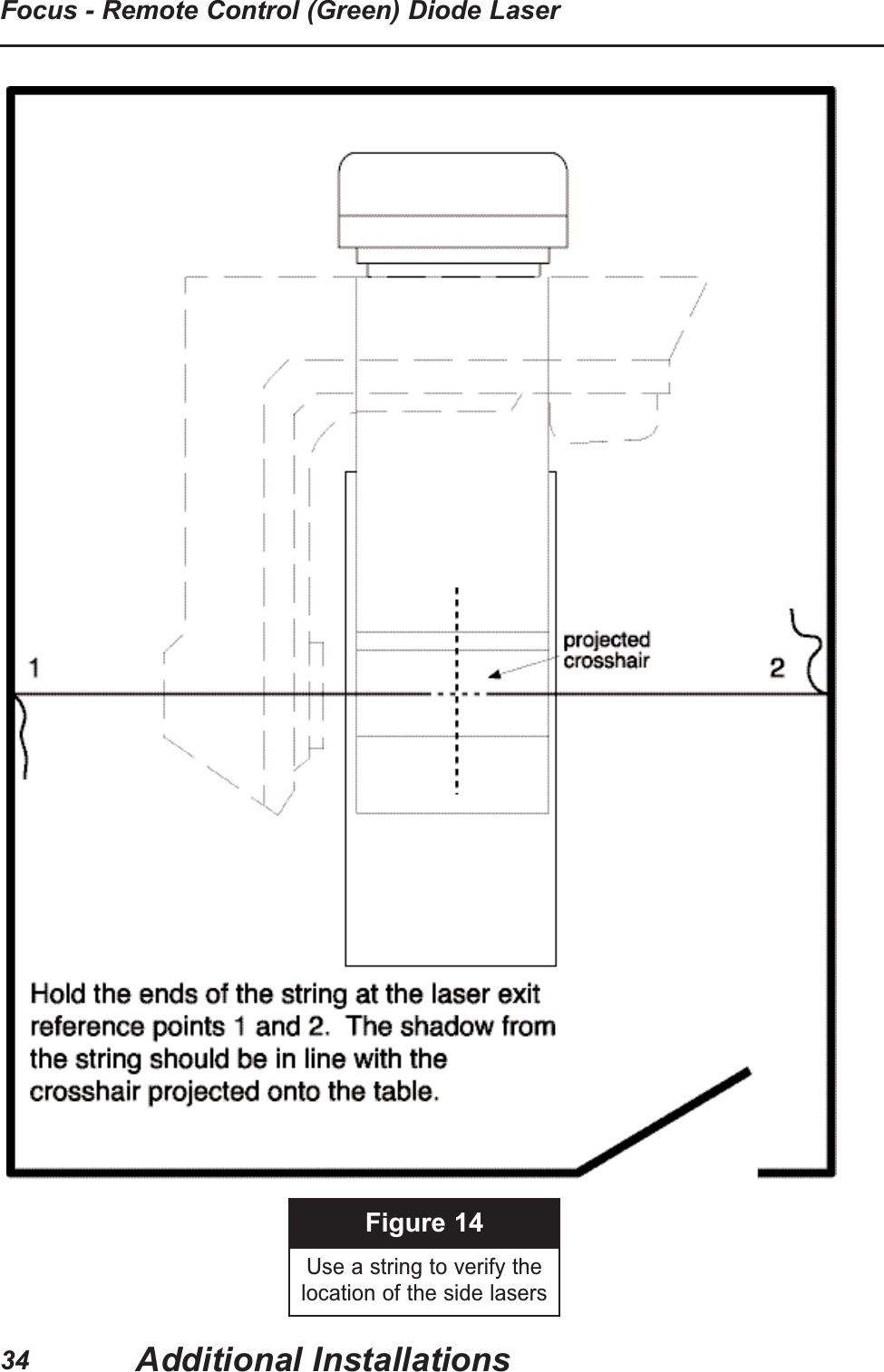
Figure 14Use a string to verify thelocation of the side lasersAdditional InstallationsFocus - Remote Control (Green) Diode Laser34
Installation on Angled Walls1. When mounting on Angled Walls, Cut out, fold andtape to the mounting template the strip of paperprovided with the template.  This strip approximatesthe distance to the center of rotation of the top lens ofthe laser optics.2. Use a water level to determine the height of the laserexit reference point. (Refer to Pages 9 & 10).3. Set gantry at 0°, tape a piece of paper to the table.4. Project a crosshair onto the paper, keeping the fieldas wide as possible.5. Hold the ends of a string on each wall until the stringshadow is in line with the projected crosshair.  Severalpeople may be needed. See Figure 14.6. On each wall use the template with its extension.Move the template until the string touches the Xonthe extension.  That is the center of the laser exitreference point.  Level the template and mark themounting holes.7. Drill the mounting holes. 8. Mount the laser.  Adjust the turret of the laser byloosening the setscrew as shown on page 24 androtating the optics until the laser crosshair lines upwith the gantry pointer.  Tighten the setscrew.  Usethe fine adjustments to make any additionalcorrections horizontally.9. Repeat the process on the other side laser.10. Laser should form a continuous plane.11. Place a piece of paper in the path (Figure 13)andverify and correct as needed:NOTE:If there is no front pointer, raise the table toisocenter and align the lasers with the table edge.Use a level to verify:• Gantry is level each time it is rotated• Template is placedaccurately on wall• Crosshairs on wall are at 90° angleslaser lines overlapfront pointer lines up with the laser lineslines are straight up and downlines are level on thehorizontal axislines are sharp and focused at theisocenterQUICK Additional InstallationsInstallation and User Guide35
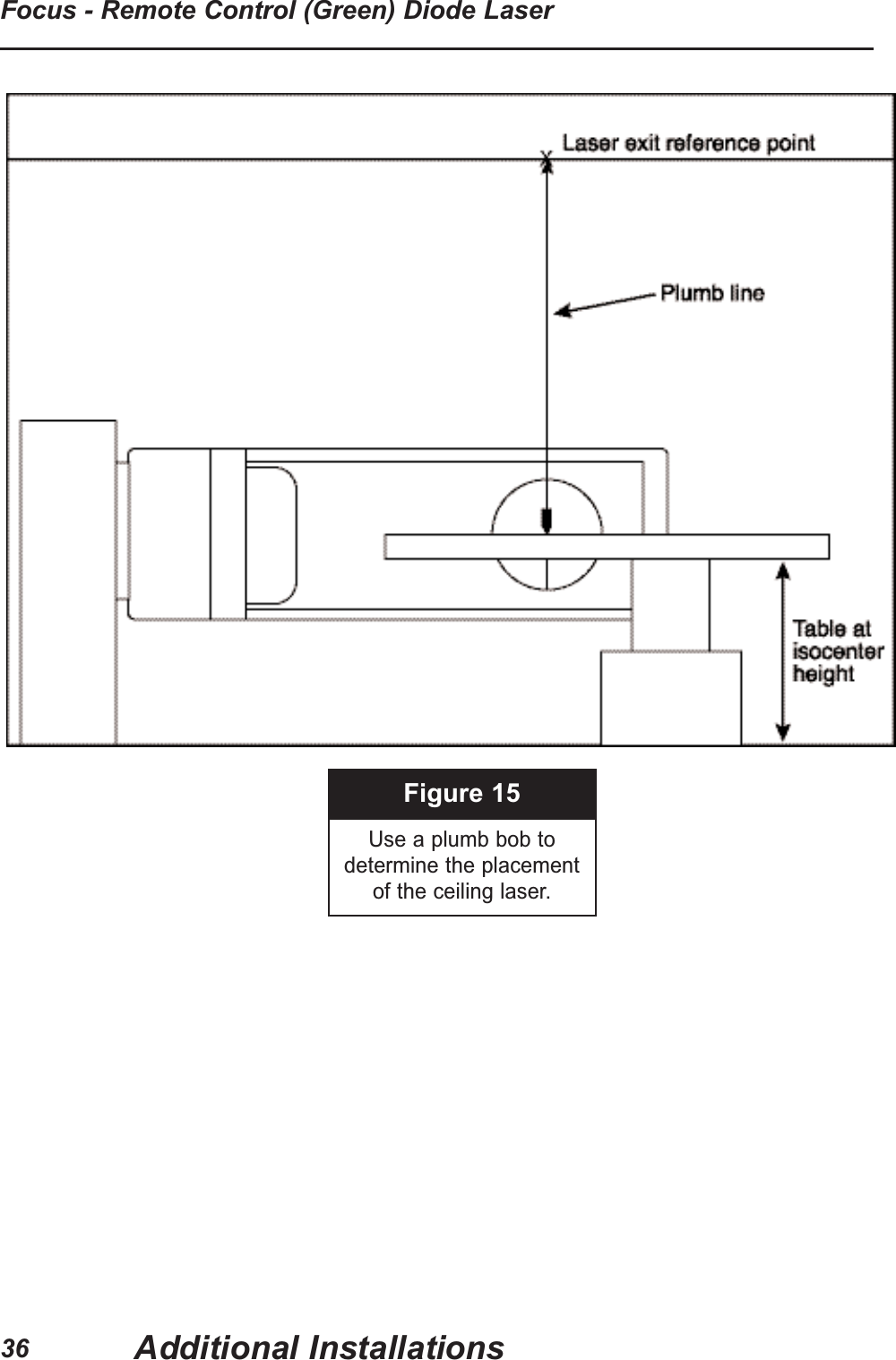
Figure 15Use a plumb bob todetermine the placement of the ceiling laser.Additional InstallationsFocus - Remote Control (Green) Diode Laser36
Use a level to verify:• Gantry is level each time it is rotated• Template is placedaccurately on wall• Crosshairs on wall are at 90° anglesCeiling Laser Installation1. Level gantry at 0° and place the table at isocenterheight.2. Tape a piece of paper to the table.3. Project a crosshair and mark the center point with a pencil.4. Move collimator out of the way.5. Hold a plumb bob from the ceiling so that the bottomweight hits the dot on the table. The point at whichthe string hits the ceiling indicates the laser exitreference point. Mark this with a pencil. Figure 156. Use the template to mark the location of the mounting holes.7. Drill the mounting holes.8. Unplug the laser and remove the cover.9. Attach washers and screws and mount the laser to the ceiling.10. Plug in and turn on laser.11. The center of the laser crosshair should correspondwith the dot on the table.12. Raise and lower the table. The crosshair should alignfor the entire course. Refer to Laser PositioningAdjustments on pages 20 through 30.NOTE:If mounted in a recess, cut a hole in the ceilingtile large enough to allow the entire cross to beprojected.Additional InstallationsInstallation and User Guide37
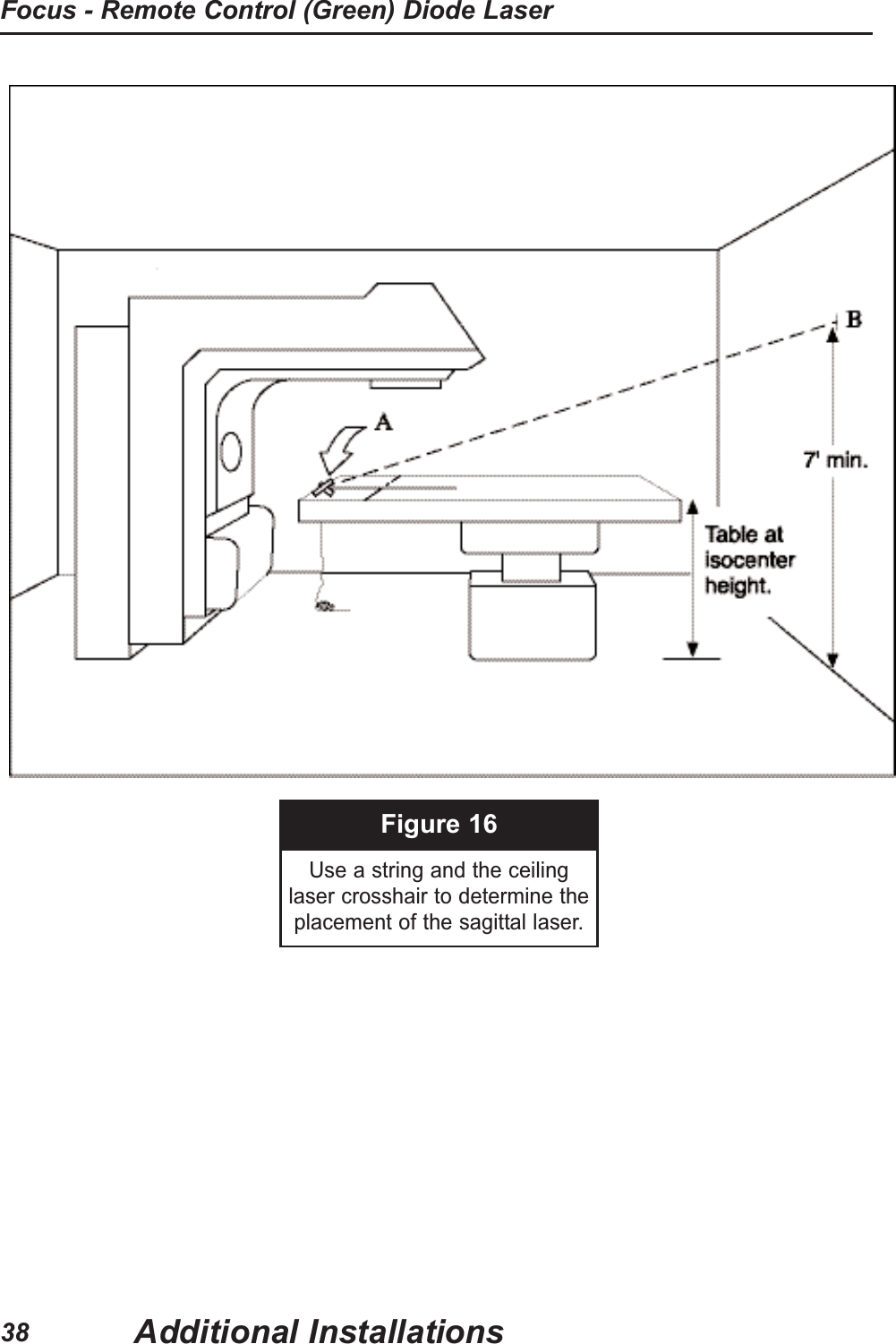
Figure 16Use a string and the ceiling laser crosshair to determine theplacement of the sagittal laser.Additional InstallationsFocus - Remote Control (Green) Diode Laser38
Use a level to verify:• Gantry is level each time it is rotated• Template is placedaccurately on wall• Crosshairs on wall are at 90° anglesSagittal Laser InstallationThe Sagittal Laser is mounted high on the wall (roomlayout). Minimum height: 7', the higher the better.1. Set the table to isocenter height.2. Use the crosshair from the ceiling laser as a referenceand tape a plumb bob string to the center of the table so that the string shadow aligns with the crosshair. (Point A in Figure 16) If your system does not contain a ceiling laser, use thecollimator-projected crosshair. Be sure to check forcollimator accuracy. (Refer to page 9). 3. Move the table up and down to verify tracking of thestring shadow.4. The point at which the string hits the wall indicates thecenter of the vertical laser exit reference point. (PointB in Figure 16) 5. Use the template to determine the location of themounting holes.6. Drill the mounting holes.7. Unplug the laser and remove the cover.8. Attach washers and screws and mount the laser to the wall. 9. Plug in and turn on laser.10. Verify that the laser line tracks the crosshair projectedonto the table.laser lines overlapfront pointer lines up with the laser lineslines are straight up and downlines are sharp and focusedQUICK Additional InstallationsInstallation and User Guide39
Calibration and Adjustments – FOCUS - REMOTECONTROL (GREEN)Warning - Risk of incorrect diagnosis of treatment. • Isocenter of alignment lasers must coincide with isocenter of diagnostic oftreatment equipment. Test alignment of laser daily, before use, for firstmonth of operation and weekly after first month. Newly installedequipment will shift as building walls and floor settle and as buildingmaterials dry out. Re-align lasers to isocenter before use, if they havemoved.• The laser must be aligned with the diagnostic or therapy equipment to besafely useful. Only a GAMMEX service technician, Medical Physicist,Biotech Engineer or Service Technician should perform alignment.Caution - Laser Light Risk of eye damage.  Do not stare into beam.  • Alignment procedures need to be performed with laser on.• Look only at laser light reflected from a diffuse surface (like paper or awall).See Simplified Room Layout for general concept of laser alignment.Removing the CoverFOCUS - REMOTE CONTROL (GREEN) routine adjustments can be madewith the remote control. Some adjustments and repairs require the removal ofthe cover. Remove this cover, as follows: First, turn off the laser. Unplug thepower cord from the main socket. Remove two screws at the top of the bottomcover using the 5/64” Allen wrench. Slide the cover up, to disengage it, and liftthe cover out.Plug in the power cord and on laser for adjustments. To replace the cover after making adjustments, reverse the process. Turn offthe laser. Unplug the power cord. Tilt the top of the cover slightly away from thewall. Slide the two bottom fasteners into slots in the bottom end plate. Tilt thetop of the cover toward the wall so that two holes in the top corners align withholes in the top end plate. Secure the cover with two side screws at the topcorners.Take care not to jar the laser. Plug in the power cord. Laser Calibration and AdjustmentsFocus - Remote Control (Green) Diode Laser40
Calibration and Adjustments – FOCUS - REMOTE CONTROL(GREEN)GENERALTest the alignment of the lasers daily, before use, for the first month after installation.After the first month test the system at least weekly.  Isocenter of the alignment lasersmust coincide with the isocenter of the diagnostic or treatment equipment.CEILING AND SAGITTAL LASERSTape a piece of typing paper to the table under the gantry (Leveled and Set at 0°).Project a crosshair on the paper from the gantry.  Mark the center point.  Move thegantry out of the way.  Project the Ceiling laser crosshair on the paper. Raise and lowerthe table.  The center of the crosshair should align with the dot on the paper.  In thesame way the Sagittal line should pass through the dot on the paper.  SIDE LASERSTurn on both side lasers. Use a piece of typing paper held perpendicular to the laserlight. The two-projected laser crosshairs should line up on the paper (Figure 13).With the gantry at 0° (Leveled and Set at 0°) use a front pointer (Figure 14) to verify thatboth side lasers hit isocenter. If there is not a front pointer, raise the table to isocenterand project a crosshair on the table to verify that the side lasers hit isocenter.ADJUSTMENTSIn a new installation some building movements can be expected.  In most cases the fineadjustments made by pushing the remote control buttons as shown on pages 16 to 19should be sufficient to make any adjustments.The remote control adjustments have limited range.  If the remote control adjustment isat the end of the range, run it a short distance in the opposite direction. Use a coarseadjustment to come close to the desired position and use the remote control adjustmentto zero in.Pages 20 through 30 outline various adjustments available on the FOCUS - REMOTECONTROL (GREEN). In most cases only the remote control horizontal and verticaladjustments will be needed.Laser Calibration and AdjustmentsInstallation and User Guide41
RepairWarning - Use only repair parts specified by Gammex.  Some parts may be similar, but mayresult in unit drifting out of alignment, early failure or being out of compliance with laserregulations.See pages 43 through 48 for FOCUS - REMOTE CONTROL (GREEN) repair instructions.TroubleshootingPROBLEM POSSIBLE CAUSE POSSIBLE REMEDYNO LASER LIGHT Wall switch not on. Check switch by turning laseroff and on.Wall switch not in full onposition.Verify switch lever is in the fullon position.Plug/connector not plugged in.Plug partially plugged in.Verify plug is in the fullyplugged in position.Power supply not functioning. Use voltmeter to measure thevoltage output of the powersupply wall plug. If voltage lessthan 11 or greater than 13 VDC,the power supply will need tobe replaced. Call GammexSales and Service forassistance.INTERMITTENT LASER Use voltmeter and check powersupply. See above.TroubleshootingFocus - Remote Control (Green) Diode Laser42Maintenance & CleaningOnce installed, Gammex Lasers require no maintenance other than cleaning of mirrors,beam splitters, and lenses according to standard optical practices.  Occasional outsidedusting of the green plastic window in the cover may be necessary. The window is verydelicate.  Use only a camera lens brush or other soft brush for this purpose.  Clean otheroutside surfaces of the laser, receiver and transmitter with a soft cloth slightly moistenedwith water or a mild detergent solution, then wipe the surface with a dry cloth.  Do not useany type of abrasive pad, scouring powder or chemical solvent such as thinner, benzene,alcohol or disposable wipes as these may damage the finish.  Should a laser fail tofunction properly, contact Gammex Sales and Service.
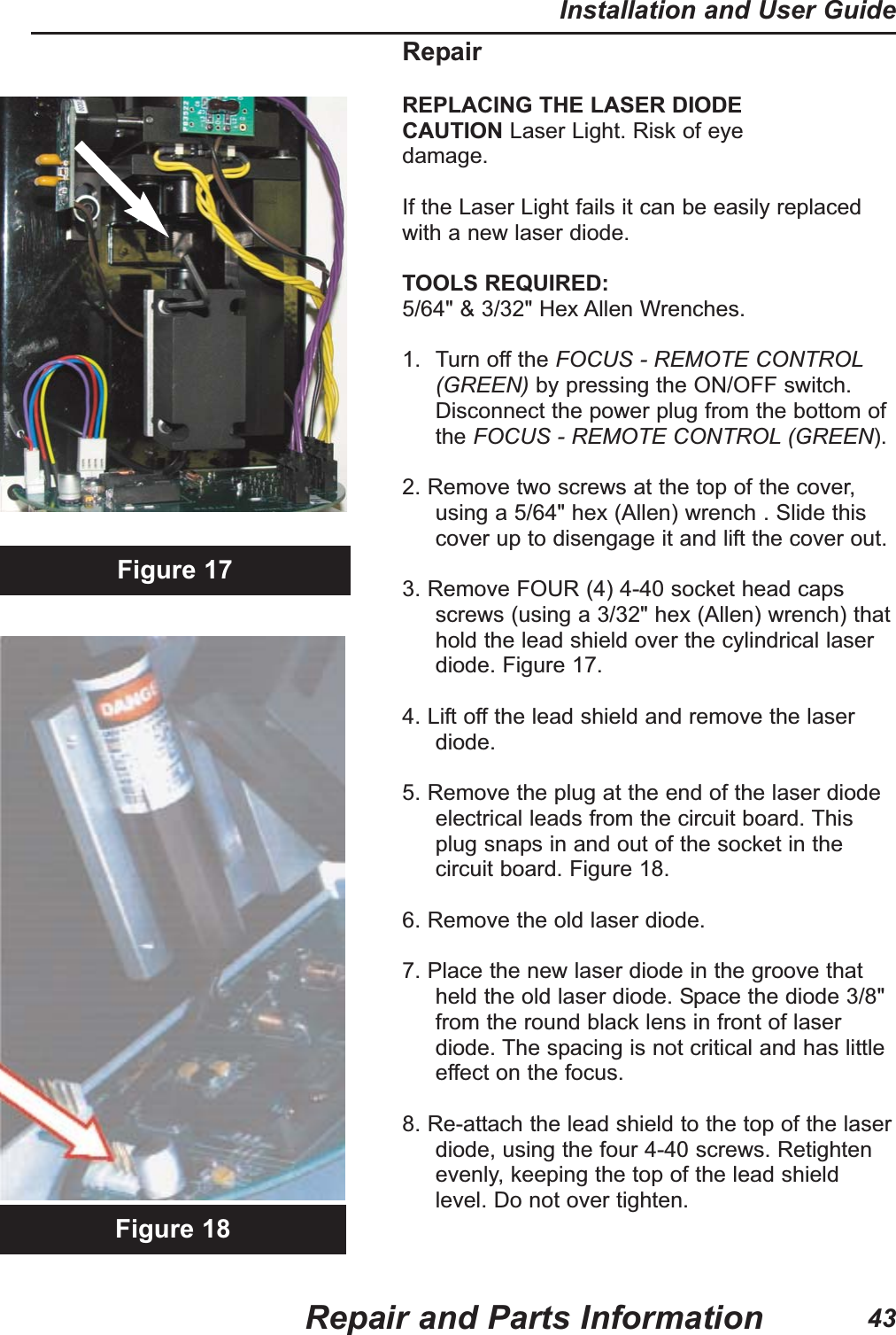
RepairREPLACING THE LASER DIODECAUTION Laser Light. Risk of eyedamage.If the Laser Light fails it can be easily replacedwith a new laser diode.TOOLS REQUIRED:5/64" & 3/32" Hex Allen Wrenches.1. Turn off the FOCUS - REMOTE CONTROL(GREEN) by pressing the ON/OFF switch.Disconnect the power plug from the bottom ofthe FOCUS - REMOTE CONTROL (GREEN).2. Remove two screws at the top of the cover,using a 5/64" hex (Allen) wrench . Slide thiscover up to disengage it and lift the cover out.3. Remove FOUR (4) 4-40 socket head capsscrews (using a 3/32" hex (Allen) wrench) thathold the lead shield over the cylindrical laserdiode. Figure 17.                                                      4. Lift off the lead shield and remove the laserdiode.5. Remove the plug at the end of the laser diodeelectrical leads from the circuit board. Thisplug snaps in and out of the socket in thecircuit board. Figure 18.6. Remove the old laser diode.7. Place the new laser diode in the groove thatheld the old laser diode. Space the diode 3/8"from the round black lens in front of laserdiode. The spacing is not critical and has littleeffect on the focus.8. Re-attach the lead shield to the top of the laserdiode, using the four 4-40 screws. Retightenevenly, keeping the top of the lead shieldlevel. Do not over tighten.Figure 17Figure 18Repair and Parts InformationInstallation and User Guide43
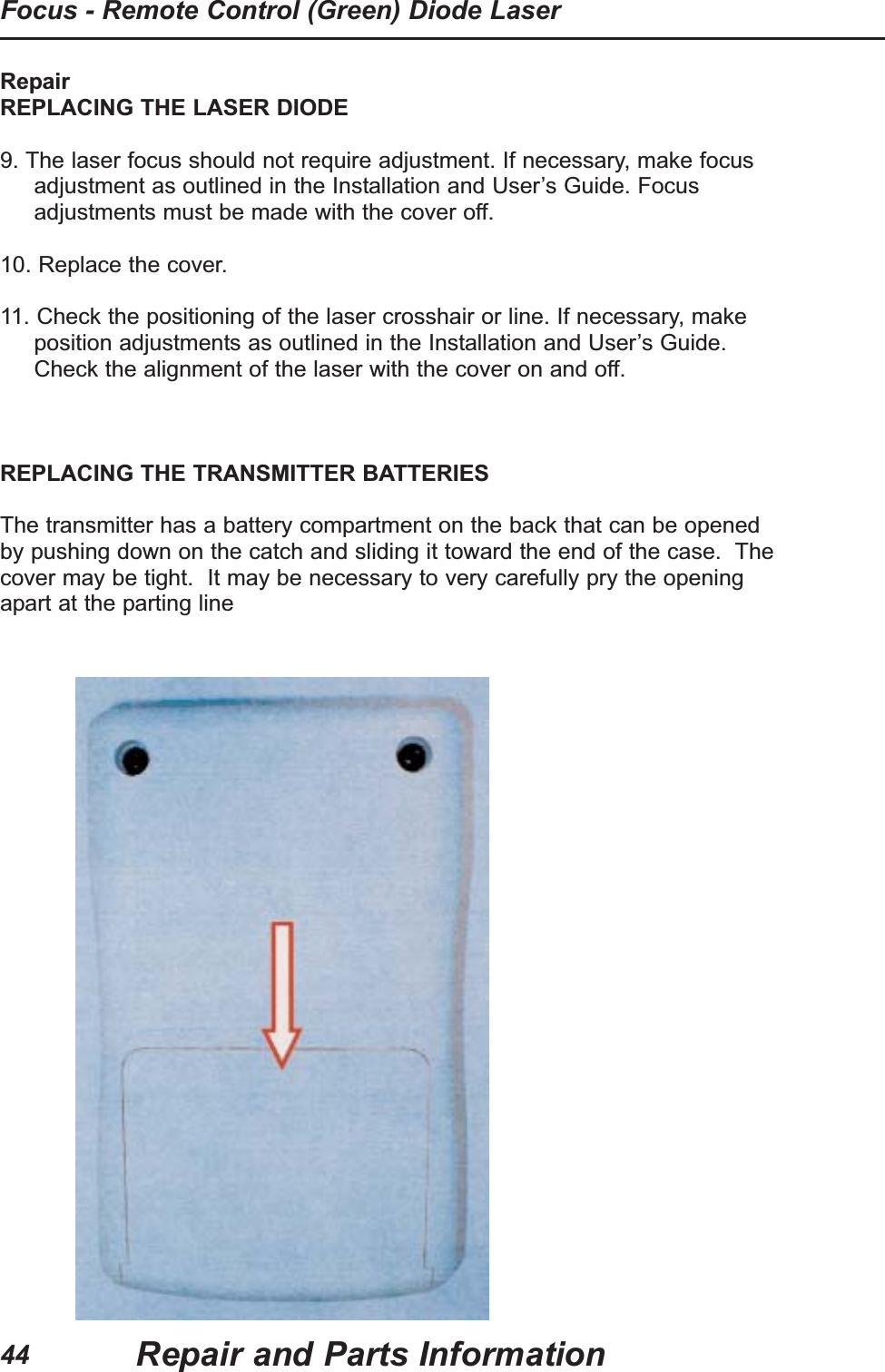
RepairREPLACING THE LASER DIODE9. The laser focus should not require adjustment. If necessary, make focusadjustment as outlined in the Installation and User’s Guide. Focusadjustments must be made with the cover off. 10. Replace the cover.11. Check the positioning of the laser crosshair or line. If necessary, makeposition adjustments as outlined in the Installation and User’s Guide.Check the alignment of the laser with the cover on and off.REPLACING THE TRANSMITTER BATTERIESThe transmitter has a battery compartment on the back that can be openedby pushing down on the catch and sliding it toward the end of the case.  Thecover may be tight.  It may be necessary to very carefully pry the openingapart at the parting lineRepair and Parts InformationFocus - Remote Control (Green) Diode Laser44
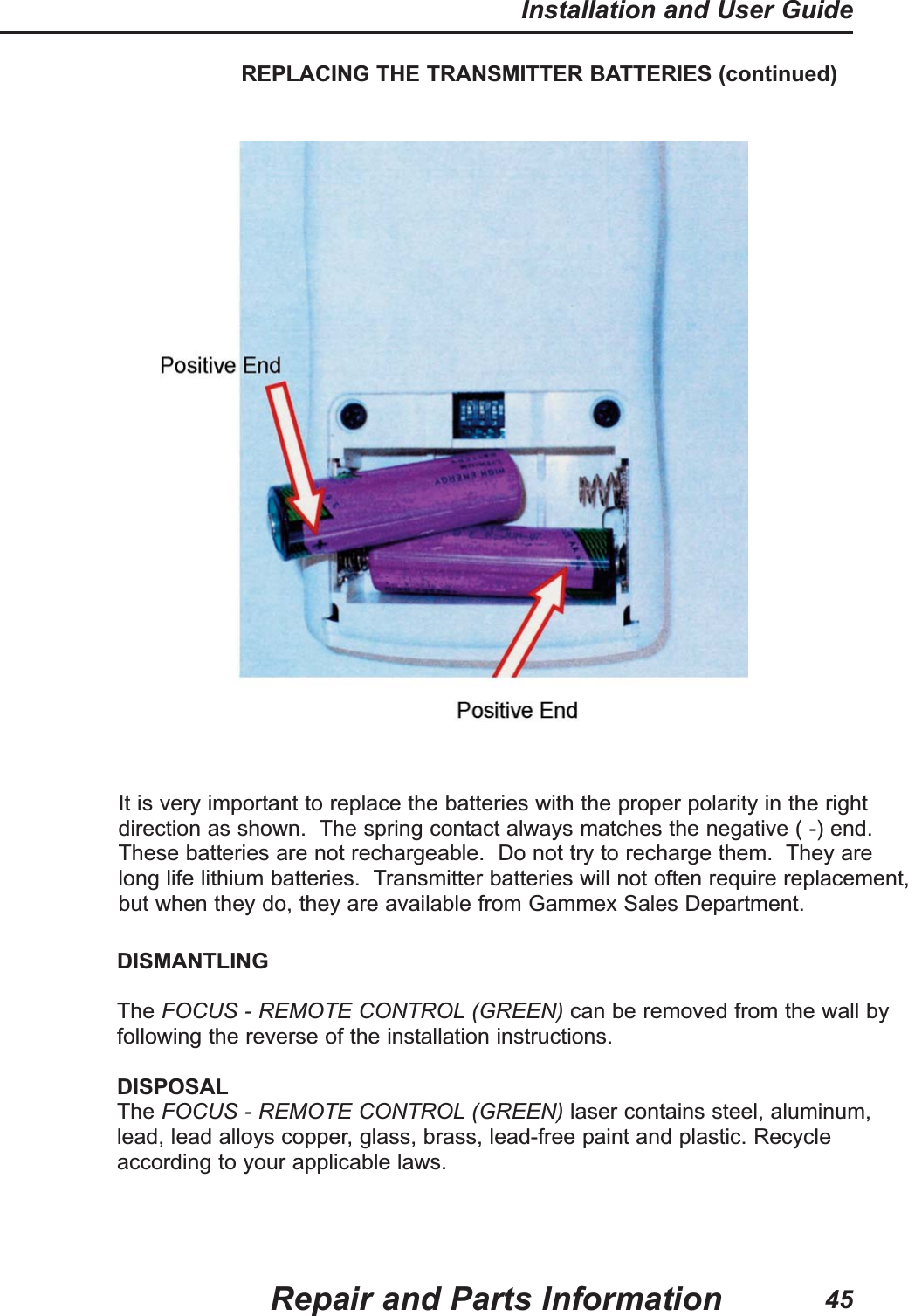
REPLACING THE TRANSMITTER BATTERIES (continued)It is very important to replace the batteries with the proper polarity in the rightdirection as shown.  The spring contact always matches the negative ( -) end.These batteries are not rechargeable.  Do not try to recharge them.  They arelong life lithium batteries.  Transmitter batteries will not often require replacement,but when they do, they are available from Gammex Sales Department.Repair and Parts InformationInstallation and User Guide45DISMANTLINGThe FOCUS - REMOTE CONTROL (GREEN) can be removed from the wall byfollowing the reverse of the installation instructions.DISPOSALThe FOCUS - REMOTE CONTROL (GREEN) laser contains steel, aluminum,lead, lead alloys copper, glass, brass, lead-free paint and plastic. Recycleaccording to your applicable laws.
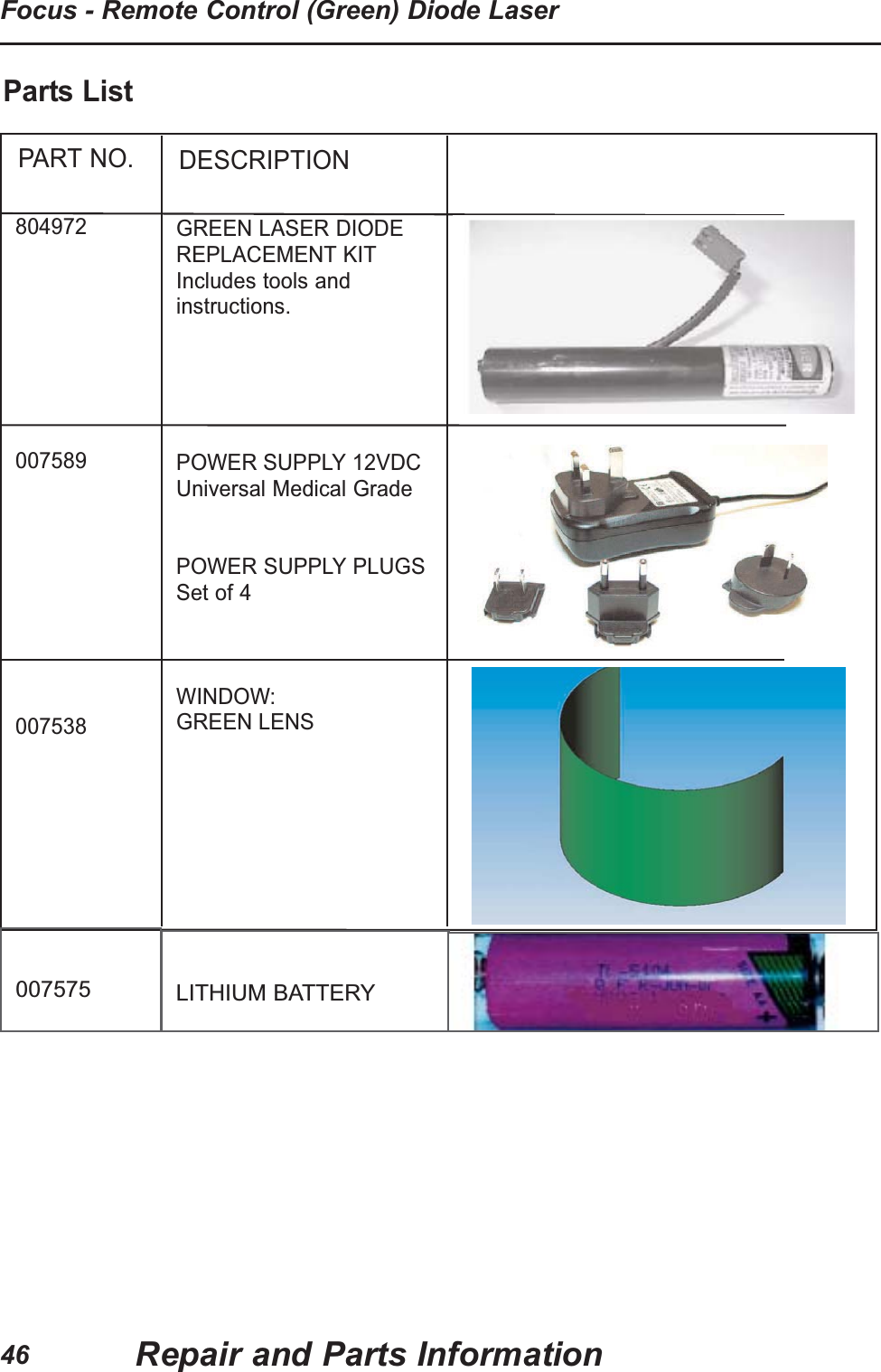
46Focus - Remote Control (Green) Diode LaserRepair and Parts InformationPART NO.804972007589007538DESCRIPTIONGREEN LASER DIODEREPLACEMENT KITIncludes tools andinstructions.POWER SUPPLY 12VDCUniversal Medical GradePOWER SUPPLY PLUGSSet of 4WINDOW:GREEN LENSParts List007575 LITHIUM BATTERY
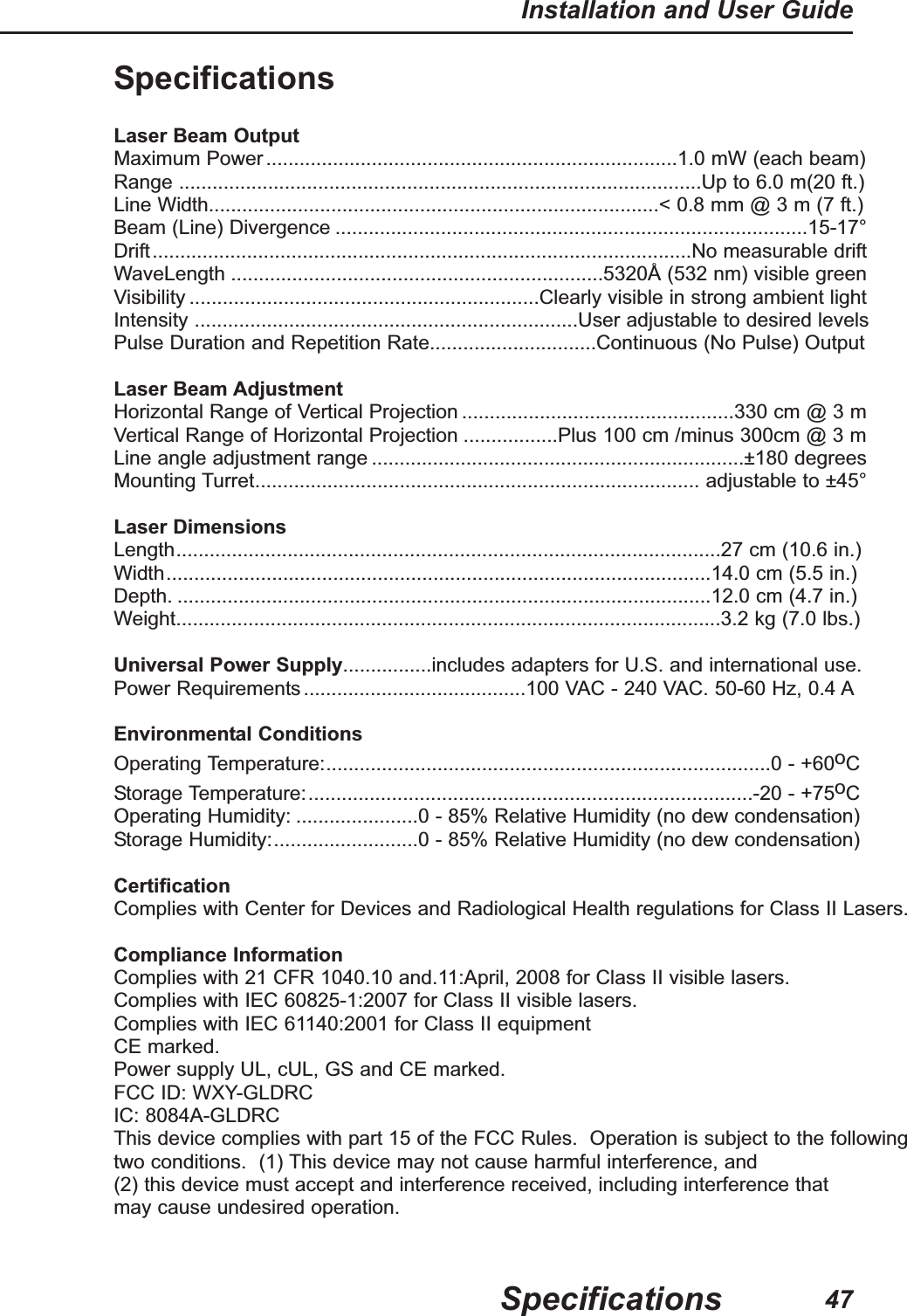
47Installation and User GuideSpecificationsSpecificationsLaser Beam OutputMaximum Power..........................................................................1.0 mW (each beam)Range ..............................................................................................Up to 6.0 m(20 ft.)Line Width.................................................................................< 0.8 mm @ 3 m (7 ft.)Beam (Line) Divergence .....................................................................................15-17°Drift.................................................................................................No measurable driftWaveLength ...................................................................5320Å (532 nm) visible greenVisibility ...............................................................Clearly visible in strong ambient lightIntensity .....................................................................User adjustable to desired levelsPulse Duration and Repetition Rate..............................Continuous (No Pulse) OutputLaser Beam AdjustmentHorizontal Range of Vertical Projection .................................................330 cm @ 3 mVertical Range of Horizontal Projection .................Plus 100 cm /minus 300cm @ 3 mLine angle adjustment range ...................................................................±180 degreesMounting Turret................................................................................ adjustable to ±45°Laser DimensionsLength..................................................................................................27 cm (10.6 in.)Width..................................................................................................14.0 cm (5.5 in.)Depth. ................................................................................................12.0 cm (4.7 in.)Weight..................................................................................................3.2 kg (7.0 lbs.)Universal Power Supply................includes adapters for U.S. and international use.Power Requirements........................................100 VAC - 240 VAC. 50-60 Hz, 0.4 AEnvironmental ConditionsOperating Temperature:................................................................................0 - +60oCStorage Temperature:................................................................................-20 - +75oCOperating Humidity: ......................0 - 85% Relative Humidity (no dew condensation)Storage Humidity:..........................0 - 85% Relative Humidity (no dew condensation)CertificationComplies with Center for Devices and Radiological Health regulations for Class II Lasers.Compliance InformationComplies with 21 CFR 1040.10 and.11:April, 2008 for Class II visible lasers.Complies with IEC 60825-1:2007 for Class II visible lasers.Complies with IEC 61140:2001 for Class II equipmentCE marked.Power supply UL, cUL, GS and CE marked.FCC ID: WXY-GLDRCIC: 8084A-GLDRCThis device complies with part 15 of the FCC Rules.  Operation is subject to the followingtwo conditions.  (1) This device may not cause harmful interference, and (2) this device must accept and interference received, including interference that may cause undesired operation.
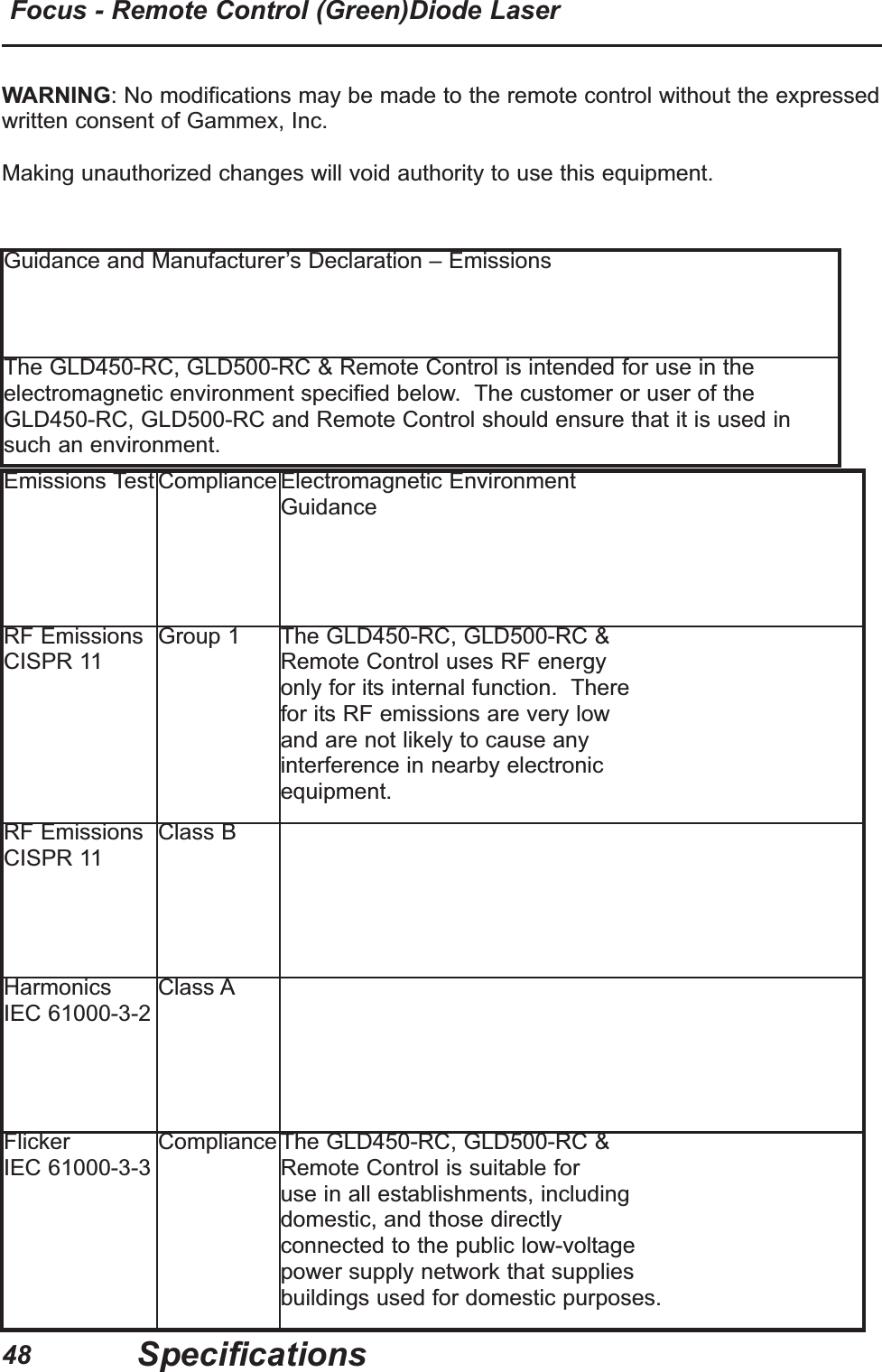
48Focus - Remote Control (Green)Diode LaserSpecificationsGuidance and Manufacturer’s Declaration – EmissionsThe GLD450-RC, GLD500-RC & Remote Control is intended for use in theelectromagnetic environment specified below.  The customer or user of theGLD450-RC, GLD500-RC and Remote Control should ensure that it is used insuch an environment.Emissions Test Compliance Electromagnetic Environment GuidanceRF EmissionsCISPR 11Group 1 The GLD450-RC, GLD500-RC & Remote Control uses RF energy only for its internal function.  There for its RF emissions are very low and are not likely to cause any interference in nearby electronic equipment.RF EmissionsCISPR 11Class BHarmonicsIEC 61000-3-2Class AFlickerIEC 61000-3-3Compliance The GLD450-RC, GLD500-RC & Remote Control is suitable for use in all establishments, including domestic, and those directly connected to the public low-voltage power supply network that supplies buildings used for domestic purposes.WARNING: No modifications may be made to the remote control without the expressedwritten consent of Gammex, Inc.  Making unauthorized changes will void authority to use this equipment.
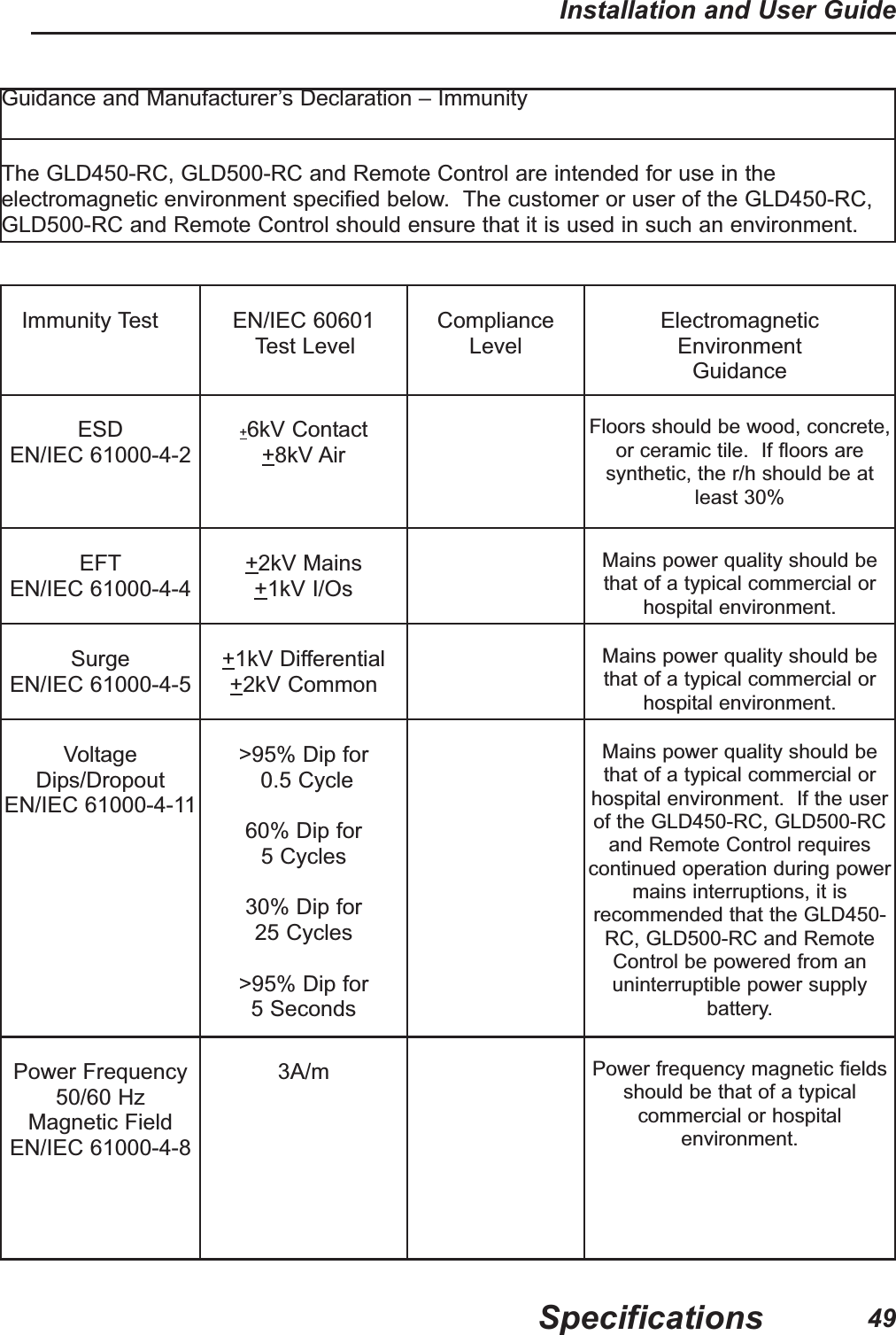
49Installation and User GuideSpecificationsGuidance and Manufacturer’s Declaration – ImmunityThe GLD450-RC, GLD500-RC and Remote Control are intended for use in theelectromagnetic environment specified below.  The customer or user of the GLD450-RC,GLD500-RC and Remote Control should ensure that it is used in such an environment.Immunity Test EN/IEC 60601Test LevelComplianceLevelElectromagneticEnvironment GuidanceESDEN/IEC 61000-4-2+6kV Contact+8kV AirFloors should be wood, concrete,or ceramic tile.  If floors aresynthetic, the r/h should be atleast 30%EFTEN/IEC 61000-4-4+2kV Mains+1kV I/OsMains power quality should bethat of a typical commercial orhospital environment.SurgeEN/IEC 61000-4-5+1kV Differential+2kV CommonMains power quality should bethat of a typical commercial orhospital environment.VoltageDips/DropoutEN/IEC 61000-4-11>95% Dip for0.5 Cycle60% Dip for5 Cycles30% Dip for 25 Cycles>95% Dip for 5 SecondsMains power quality should bethat of a typical commercial orhospital environment.  If the userof the GLD450-RC, GLD500-RCand Remote Control requirescontinued operation during powermains interruptions, it isrecommended that the GLD450-RC, GLD500-RC and RemoteControl be powered from anuninterruptible power supplybattery.Power Frequency50/60 HzMagnetic FieldEN/IEC 61000-4-83A/m Power frequency magnetic fieldsshould be that of a typicalcommercial or hospitalenvironment.
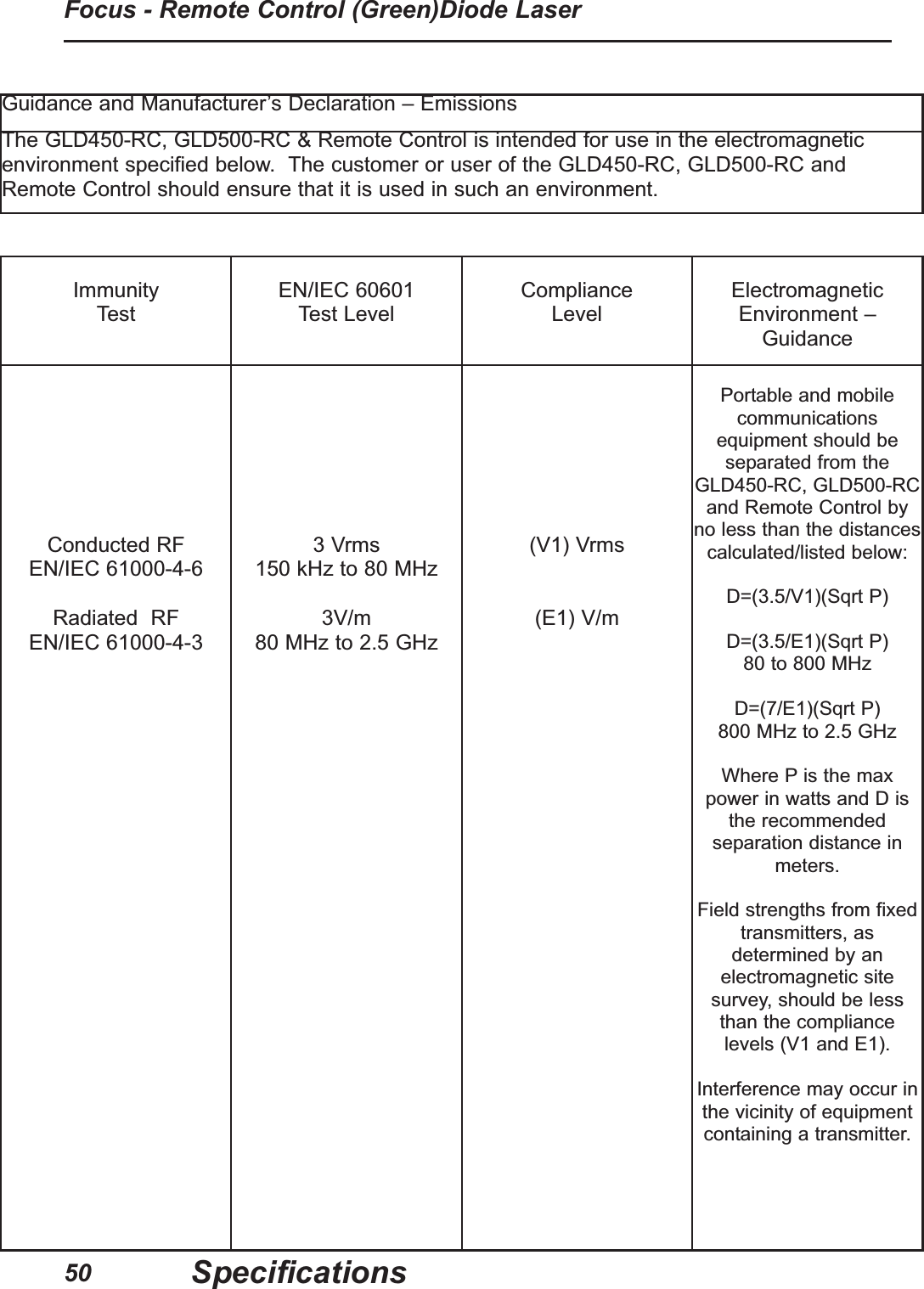
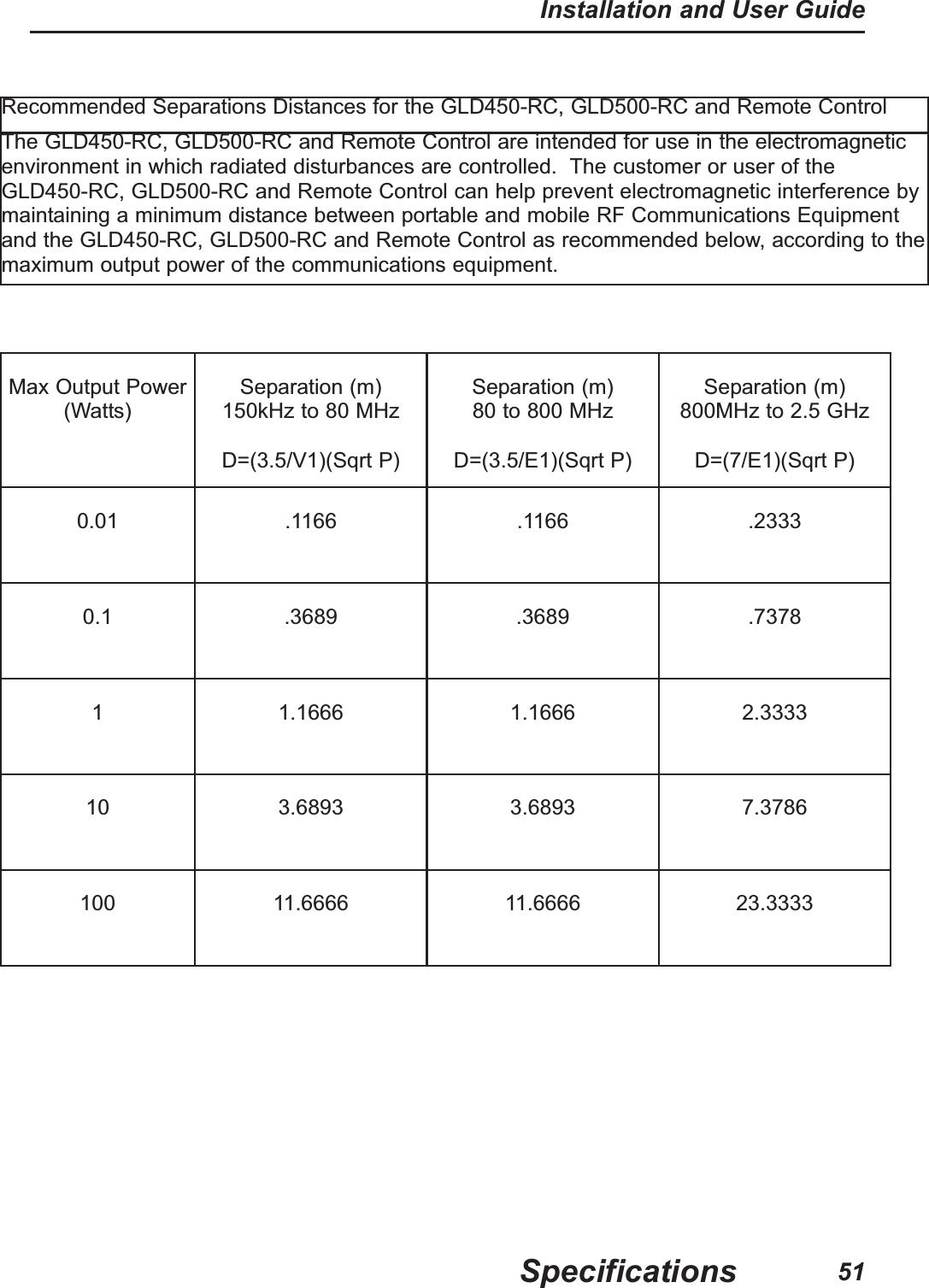
50Focus - Remote Control (Green)Diode LaserSpecificationsGuidance and Manufacturer’s Declaration – EmissionsThe GLD450-RC, GLD500-RC & Remote Control is intended for use in the electromagneticenvironment specified below.  The customer or user of the GLD450-RC, GLD500-RC andRemote Control should ensure that it is used in such an environment.Immunity TestEN/IEC 60601Test LevelComplianceLevelElectromagneticEnvironment –GuidanceConducted RFEN/IEC 61000-4-6Radiated  RF EN/IEC 61000-4-33 Vrms150 kHz to 80 MHz3V/m80 MHz to 2.5 GHz(V1) Vrms(E1) V/mPortable and mobilecommunicationsequipment should beseparated from theGLD450-RC, GLD500-RCand Remote Control byno less than the distancescalculated/listed below:D=(3.5/V1)(Sqrt P)D=(3.5/E1)(Sqrt P)80 to 800 MHzD=(7/E1)(Sqrt P)800 MHz to 2.5 GHzWhere P is the maxpower in watts and D isthe recommendedseparation distance inmeters.Field strengths from fixedtransmitters, asdetermined by anelectromagnetic sitesurvey, should be lessthan the compliancelevels (V1 and E1).Interference may occur inthe vicinity of equipmentcontaining a transmitter.
51Installation and User GuideSpecificationsRecommended Separations Distances for the GLD450-RC, GLD500-RC and Remote Control The GLD450-RC, GLD500-RC and Remote Control are intended for use in the electromagneticenvironment in which radiated disturbances are controlled.  The customer or user of theGLD450-RC, GLD500-RC and Remote Control can help prevent electromagnetic interference bymaintaining a minimum distance between portable and mobile RF Communications Equipmentand the GLD450-RC, GLD500-RC and Remote Control as recommended below, according to themaximum output power of the communications equipment.Max Output Power(Watts)Separation (m) 150kHz to 80 MHzD=(3.5/V1)(Sqrt P)Separation (m)80 to 800 MHzD=(3.5/E1)(Sqrt P)Separation (m)800MHz to 2.5 GHzD=(7/E1)(Sqrt P)0.01 .1166 .1166 .23330.1 .3689 .3689 .73781 1.1666 1.1666 2.333310 3.6893 3.6893 7.3786100 11.6666 11.6666 23.3333
52Focus - Remote Control (Green) Diode LaserProduct WarrantyTechnical SupportTechnical support is available from Gammex Service Representatives whoare available to work with facility planners, architects and hospital personnelthroughout the planning and installation process.  Contact the Gammex Service department at 1-800-232-9699.Product WarrantyGammex Inc. warrants its patient positioning equipment to be free fromdefects in materials and workmanship under normal use and service for 1year from the date of shipment.  The sole obligation of Gammex Inc. underthis warranty is to repair or replace without charge or to refund thepurchase price, at the option of Gammex Inc., of any parts which itsexamination shall have disclosed to be defective, provided that Buyer shallhave given to Gammex Inc., a written notice of the claimed defect no laterthan 7 days after the end of the warranty period (one (1) year of the date ofshipment of such equipment to Buyer).  At the request of Gammex Inc.,Buyer, at its expense, shall return the claimed defective part to GammexInc.THIS CLASS II LASER PRODUCT COMPLIES WITH DHHS REQUIREMENTS PURSUANT TO 21 CFR, SUB-CHAPTER J.DISCLAIMER OF OTHER WARRANTIESThe aforesaid warranty rights are buyer's exclusive remedies and are in lieuof any other remedies, obligations, or rights, including, without limitation,any other warranties, expressed or implied (e.g., implied warranties ofmerchantability or fitness for a particular purpose).  Under no circumstancesshall Gammex Inc.  be liable for any incidental, indirect, special orconsequential damages or for any other loss, damage, penalty or expenseof any kind, including, without limitation, loss of profits or overhead,reimbursement, personal injury or property damage.  The aforesaidwarranty obligation of Gammex Inc.  constitutes its sole liability, and underno circumstances, shall the maximum liability of Gammex Inc., under anylegal theory(e.g., contract, warranty, negligence, promissory estoppel, strictliability, misrepresentation, tort) and for any reason whatsoever(e.g., defect,delay or otherwise) exceed the purchase price of the defective partregardless whether the claim is asserted by buyer or any other person orentity.  The liabilities of Gammex Inc.  as above set forth, shall not beextended because of advice given by it in connection with the design,installation or use of the equipment or parts therefore.
53Installation and User GuideMounting TemplateThis page intentionally left blank.
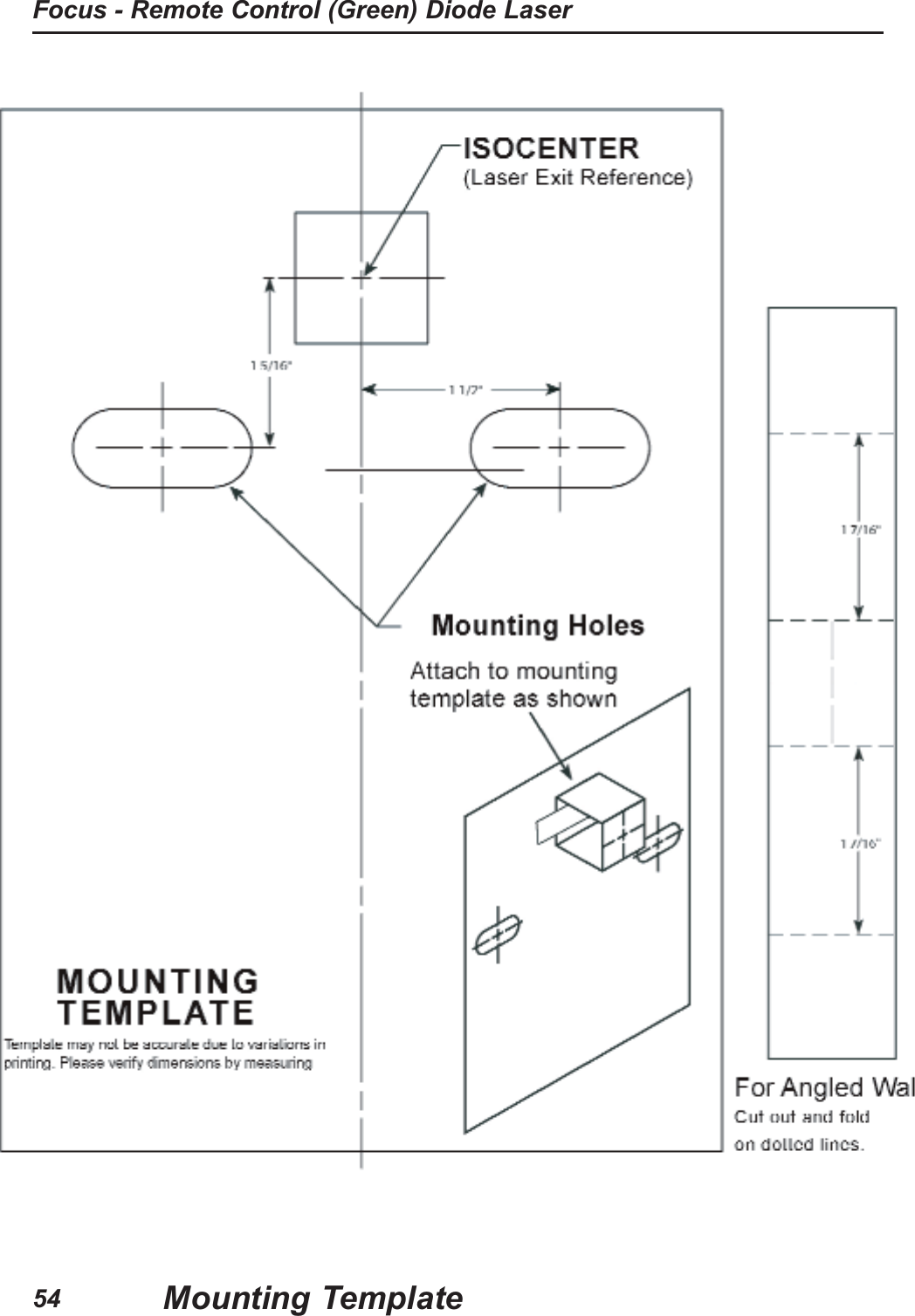
Focus - Remote Control (Green) Diode LaserMounting Template54
This page intentionally left blank.Mounting TemplateInstallation and User Guide55
Focus - Remote Control (Green) Diode LaserMounting Template56
Product Ordering Informationand Customer ServiceGammex is committed to satisfying our customers’ needs.  If you have anyquestions, comments or suggestions regarding our products and service, pleasecall or fax us.  Please contact a GAMMEX dealer or representative for aquotation or for a detailed description of our ordering policies, warranties,delivery policy, conditions of sale, damaged goods policy, and returned goodspolicy.In the United States, Sales Department hours are:7:30 a.m. through 5:00 p.m. (Central Time).SALES/CUSTOMER SERVICE: 608-828-7000TOLL FREE (U.S. and Canada only): 800-426-6391FAX: 608-828-7500Sales e-mail: sales@gammex.comIn the United States, Service Department hours are:7:30 a.m. through 5:00 p.m. (Central Time).SERVICE DEPARTMENT: 608-828-7000TOLL FREE (U.S. and Canada only): 800-232-9699FAX: 608-828-7500Service e-mail: support@gammex.comGAMMEX, Inc.7600 Discovery Dr.P.O. Box 620327Middleton, WI  53562-0327    USAOn the internet at: www.gammex.comVISA, MasterCard and American Express accepted.© 2004 GAMMEX. All rights reserved. Printed in U.S.A.   007590-00-02All products and specifications are subject to change without notice.
GAMMEX 7600 Discovery Dr.P.O. Box 620327Middleton, WI 53562-0327 USA1 800 GAMMEX 1 (426-6391)1 608 828 7000Fax: 1 608 828 7500www.gammex.come-mail: sales@gammex.comGAMMEX-RMI LTDBroadway Business Centre32A Stoney StreetNottingham NG1 1LLUnited Kingdom+44 0115 92474188Fax: +44 0115 9247189e-mail: uksales@gammex.comGAMMEX-RMI GmbhBergstrasse 235398 Giessen - AllendorfGermany+49 641 250 9176Fax:  +49  641 966 2642e-mail: desales@gammex.com

Navigation menu