Goldwood Sound AA5230 5.1 CH MULTIMEDIA SPEAKER SYSTEM User Manual B265BU PO AA5230 F38 12650 018
Goldwood Sound, Inc. 5.1 CH MULTIMEDIA SPEAKER SYSTEM B265BU PO AA5230 F38 12650 018
User Manual
NO.1
NO.2 NO.3
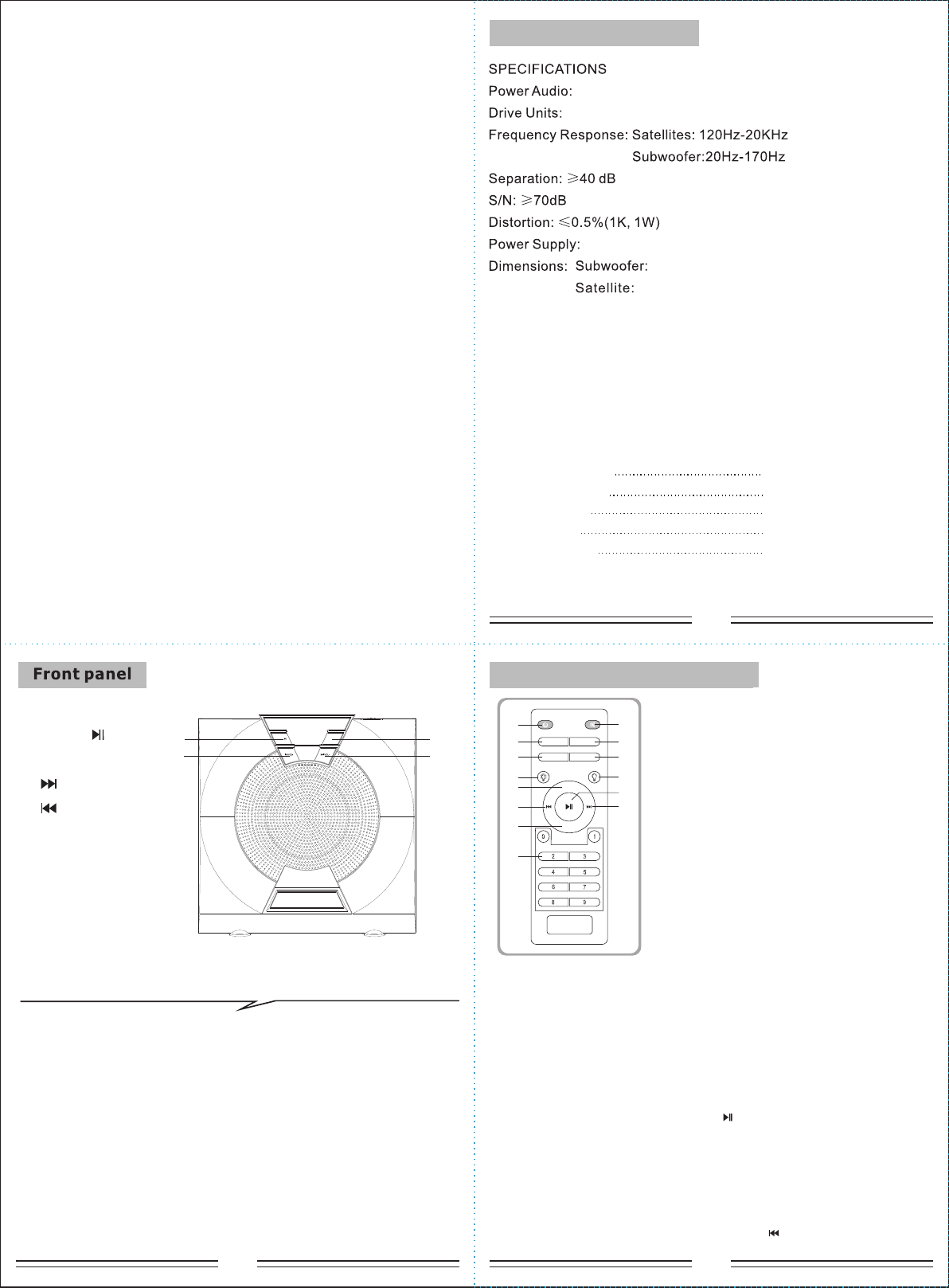
1.
2.
4. /VOL-
3. /VOL+
SOURCE
ST-BY/
PLAY/PAUSE on the USB/SD/BT mode.
SOURCE-----Change the input mode.
VOLUME-/+ -----Volume down/up.
ST-BY/PLAY/PAUSE-----Press to turn on speaker, long press into stand-by.
(1)
(4)
(2)
(3)
SOURCE
ST-BY/
Features:
Quality 5.1 speaker system with built-in amplifier
Full audio spectrum performances, ideal for your favourite entertainment
from Mp3, Mp4, CD/DVD movies and digital playbacks
Specially designed woofer cabinet for bass and resolution
Comes with remote control and 3.5 stereo connection
Package contents:
subwoofer cabinet 1 pc
satellite speakers 5 pcs
User manual 1 pc
Operation explanation:
Audio input cord 1 pc
remote control 1 pc
~120V 60Hz
3" x 5 + 5" subwoofer
RMS 30W(15W+3Wx5)
W210xH190xD225(mm)
W90xH130xD104(mm)
How to use the remote control
How to use the remote control
VOL+
2.1/5.1
VOL-
SOURCE
(1)
(2)
(5)
(3)
(4)
(6)
(8)
(7)
(9)
(10)
(11)
(12)
(14)
(13)
1. ST-BY
2. SOURCE
3. SELECT
4. LED ON
5. VOL+
6. PREVIOUS
7. VOL-
8. 0~9
9. MUTE
10. 2.1/5.1
11. RESET
12. LED OFF
13. PLAY/PAUSE
14. NEXT
1. ST-BY: Turn on/Stand-by the speaker.
2. SOURCE:
convert to Bluetooth input mode , LED display right bottom start to flashing
(2 seconds) to search the Bluetooth device. Turn on your mobile Bluetooth
device and search the device name “BT SPEAKER”, paired them well.
When you have successfully paired your mobie to the speaker system, the LED
right bottom stop flash. When start to play your mobile music, The functions as
“PREVIOUS/NEXT”, “PLAY/PAUSE”, can operate via the front panel. On BT
mode, when connect with mobile, press “ ” for 3 seconds, bluetooth function
can beforce-disconnected.
Change the input mode. Press “SOURCE” buttons on the remote to
3.
independently.
SELECT: To select the audio chennel you want to adjust the output level
4. LED: Press “LED” each time to change LED effects (LED1-LED6).
5. VOL+: Volume up.
6. PREVIOUS: Play the previous song by pressing “ ”at USB/SD/BT input mode.
SELECT RESET
5.1 CH MULTIMEDIA SPEAKER SYSTEM
AA5230
User Manual
NO.7
In use please pay attention to the following items:
NO.4
*if the remote control cannot function, it is because the battery of
remote control has been used up. thank you.
NO.6
NO.5
7. VOL-: Volume down.
8. 0~9: Numeric keys, with the help of these keys you select song or track in USB,
and in FM, you can key in station frequency, i.e. for 927 key in 92.7.
9. MUTE: Press “MUTE” to activate or deactivate mute.
11. RESET: To reset the system. All settings change to default levels after resetting.
10. 2.1/5.1: Enable or disable the function of the 2.1/5.1.
12. LED OFF: LED ON/OFF.
13. PLAY/PAUSE: Plays/pauses songs alternately. In BT mode, press “ ” for 3
14. NEXT: Play the next song by pressing “ ”at USB/SD/BT input mode.
seconds to force disconnect the BT.
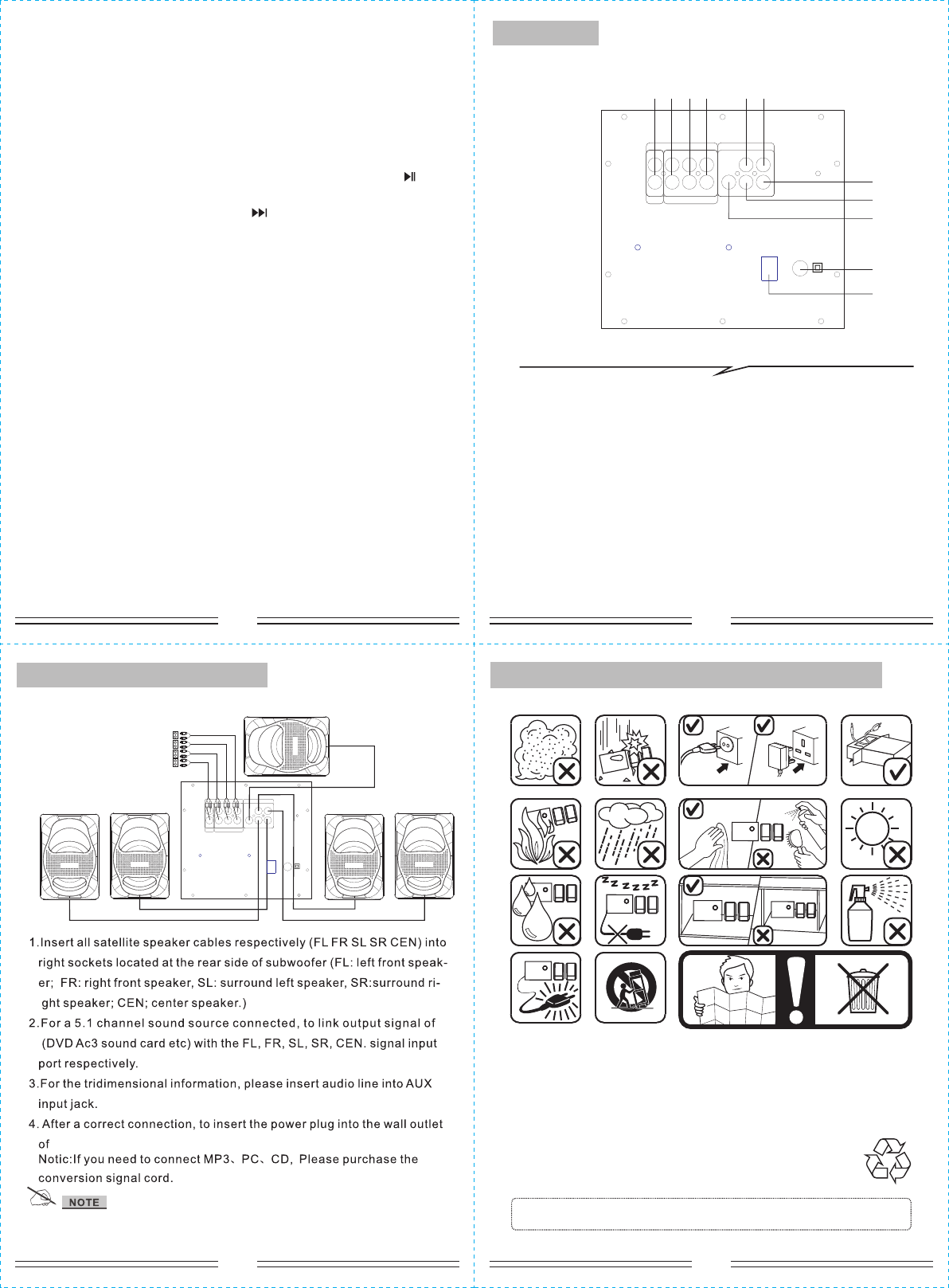
Rear panel
1. AUX input
2. FL/FR input
3. C/SW input
4. SL/SR input
5. FR output
6. FL output
7. SR output
8. SL output
9. C output
10.AC power supply cord
11. Power ON-OFF
* Do not leave objects generating magnetism near the speakers.
~120V 60Hz
System connection diagram
(1) (2) (3) (4) (5) (6)
(7)
(8)
(9)
(10)
(11)
POWER
ON
OFF AC IN
OUTPUT
C FL SL
FR SR
DVD
AUX
CFL SL
FR SRSW
INPUT
L
R
POWER
ON
OFF AC IN
OUT PUT
C FL SL
FR SR
DVD
AUX
CFL SL
FR SRSW
INP UT
L
R
CD/TV
FL/ FR
C/S W
SL /SR
This device complies with part 15 of the FCC Rules. Operation is subject to the
following two conditions: (1) This device may not cause harmful interference, and
(2) this device must accept any interference received, including interference that
may cause undesired operation.
Note: The Grantee is not responsible for any changes or modifications not
expressly approved by the party responsible for compliance. such modifications
could void the user's authority to operate the equipment.
Note: This equipment has been tested and found to comply with the limits for a
Class B digital device, pursuant to part 15 of the FCC Rules. These limits are
designed to provide reasonable protection against harmful interference in a
residential installation. This equipment generates, uses and can radiate radio
frequency energy and, if not installed and used in accordance with the
instructions, may cause harmful interference to radio communications.
However, there is no guarantee that interference will not occur in a particular
installation. If this equipment does cause harmful interference to radio or
television reception, which can be determined by turning the equipment off and
on, the user is encouraged to try to correct the interference by one or more of the
following measures:
—Reorient or relocate the receiving antenna.
—Increase the separation between the equipment and receiver.
—Connect the equipment into an outlet on a circuit different from that to which
the receiver is connected.
—Consult the dealer or an experienced radio/TV technician for help.
The device has been evaluated to meet general RF exposure requirement.
To maintain compliance with FCC's RF exposure guidelines, this equipment
should be installed and operated with a minimum distance of 20cm between the
radiator and your body.