HACH LANGE LOC100 The LOC 100 RFID Tag read/write device can be used to write the operator ID and location ID to a RFID label on a sampling bottle together with the time and date. This information (sample ID) can then be read by an RFID-compatible photometer User Manual Doc012 97 98 90327 QRG

HACH LANGE GmbH The LOC 100 RFID Tag read/write device can be used to write the operator ID and location ID to a RFID label on a sampling bottle together with the time and date. This information (sample ID) can then be read by an RFID-compatible photometer Doc012 97 98 90327 QRG

UserMan
DOC012.978.90327LOC 10006/2011, Edition 2APъководство за потребителя bg  Uživatelská příručka cs Brugervejledning da Bedienungsanleitung deΕγχειρίδιο Χρήστη el User Manual enBasic User Manual  enManual del usuario esManual básico del usuario esManuel d'utilisation frManuel d'utilisation de base frKorisnički priručnik hrFelhasználói kézikönyv huManuale utente itInstrukcja obsługi plManual do utilizador ptManual do utilizador básico ptManual al utilizatorului roPуководство пользова ruNávod na použitie skinternal use only
Uporabniški priročnik slBruksanvisning svKullanım Kılavuzu trinternal use only
Deutsch  ........................................................................................................................................................... 3English ........................................................................................................................................................... 15internal use only
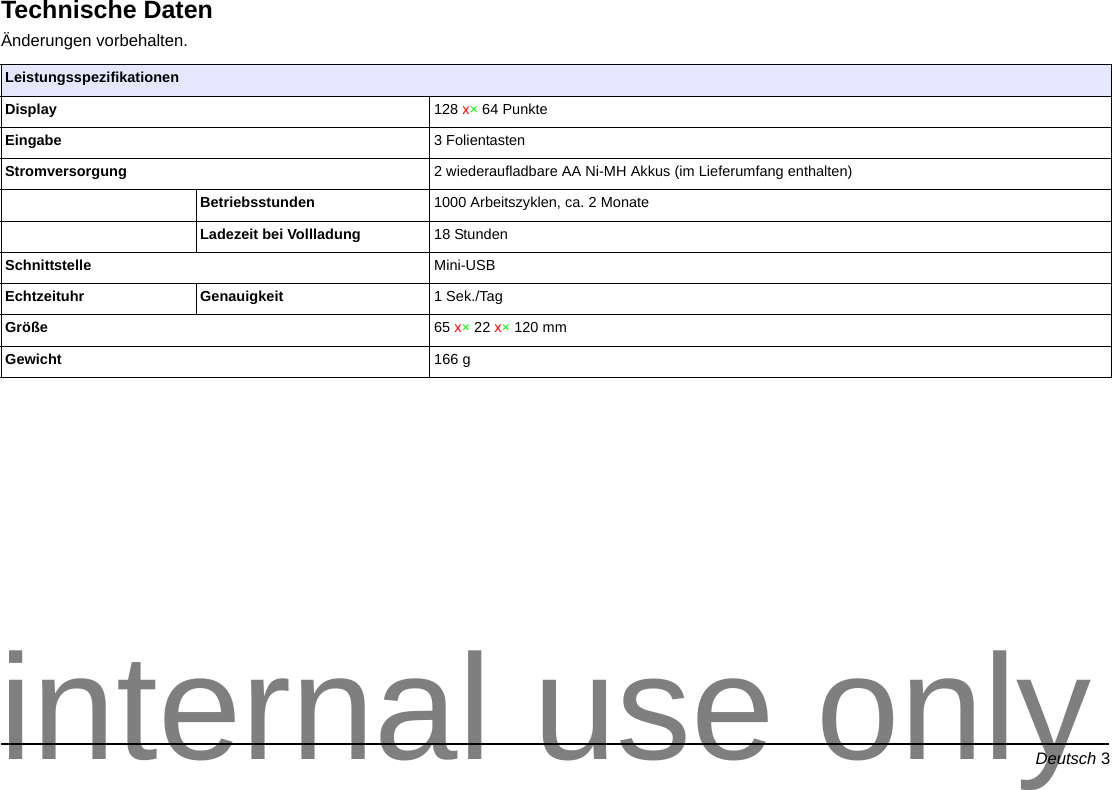
Deutsch 3DeutschTechnische DatenÄnderungen vorbehalten. LeistungsspezifikationenDisplay 128 x×64 PunkteEingabe 3 FolientastenStromversorgung 2 wiederaufladbare AA Ni-MH Akkus (im Lieferumfang enthalten)Betriebsstunden 1000 Arbeitszyklen, ca. 2 MonateLadezeit bei Vollladung 18 StundenSchnittstelle Mini-USBEchtzeituhr Genauigkeit 1 Sek./TagGröße 65 x×22 x×120 mmGewicht 166 ginternal use only
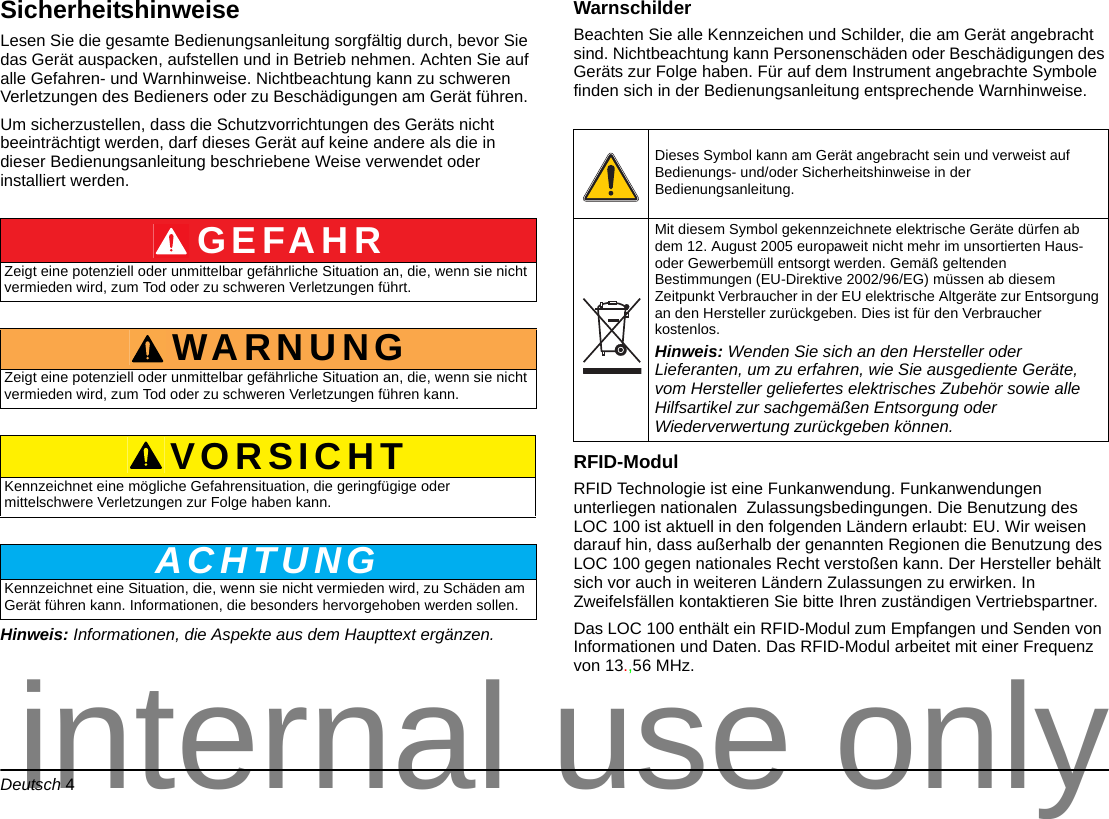
Deutsch 4SicherheitshinweiseLesen Sie die gesamte Bedienungsanleitung sorgfältig durch, bevor Sie das Gerät auspacken, aufstellen und in Betrieb nehmen. Achten Sie auf alle Gefahren- und Warnhinweise. Nichtbeachtung kann zu schweren Verletzungen des Bedieners oder zu Beschädigungen am Gerät führen. Um sicherzustellen, dass die Schutzvorrichtungen des Geräts nicht beeinträchtigt werden, darf dieses Gerät auf keine andere als die in dieser Bedienungsanleitung beschriebene Weise verwendet oder installiert werden.Hinweis: Informationen, die Aspekte aus dem Haupttext ergänzen.WarnschilderBeachten Sie alle Kennzeichen und Schilder, die am Gerät angebracht sind. Nichtbeachtung kann Personenschäden oder Beschädigungen des Geräts zur Folge haben. Für auf dem Instrument angebrachte Symbole finden sich in der Bedienungsanleitung entsprechende Warnhinweise. RFID-Modul RFID Technologie ist eine Funkanwendung. Funkanwendungen unterliegen nationalen  Zulassungsbedingungen. Die Benutzung des LOC 100 ist aktuell in den folgenden Ländern erlaubt: EU. Wir weisen darauf hin, dass außerhalb der genannten Regionen die Benutzung des LOC 100 gegen nationales Recht verstoßen kann. Der Hersteller behält sich vor auch in weiteren Ländern Zulassungen zu erwirken. In Zweifelsfällen kontaktieren Sie bitte Ihren zuständigen Vertriebspartner.Das LOC 100 enthält ein RFID-Modul zum Empfangen und Senden von Informationen und Daten. Das RFID-Modul arbeitet mit einer Frequenz von 13.,56 MHz.GEFAHRZeigt eine potenziell oder unmittelbar gefährliche Situation an, die, wenn sie nicht vermieden wird, zum Tod oder zu schweren Verletzungen führt.WARNUNGZeigt eine potenziell oder unmittelbar gefährliche Situation an, die, wenn sie nicht vermieden wird, zum Tod oder zu schweren Verletzungen führen kann.VORSICHTKennzeichnet eine mögliche Gefahrensituation, die geringfügige oder mittelschwere Verletzungen zur Folge haben kann.ACHTUNGKennzeichnet eine Situation, die, wenn sie nicht vermieden wird, zu Schäden am Gerät führen kann. Informationen, die besonders hervorgehoben werden sollen. Dieses Symbol kann am Gerät angebracht sein und verweist auf Bedienungs- und/oder Sicherheitshinweise in der Bedienungsanleitung.Mit diesem Symbol gekennzeichnete elektrische Geräte dürfen ab dem 12. August 2005 europaweit nicht mehr im unsortierten Haus- oder Gewerbemüll entsorgt werden. Gemäß geltenden Bestimmungen (EU-Direktive 2002/96/EG) müssen ab diesem Zeitpunkt Verbraucher in der EU elektrische Altgeräte zur Entsorgung an den Hersteller zurückgeben. Dies ist für den Verbraucher kostenlos. Hinweis: Wenden Sie sich an den Hersteller oder Lieferanten, um zu erfahren, wie Sie ausgediente Geräte, vom Hersteller geliefertes elektrisches Zubehör sowie alle Hilfsartikel zur sachgemäßen Entsorgung oder Wiederverwertung zurückgeben können.internal use only
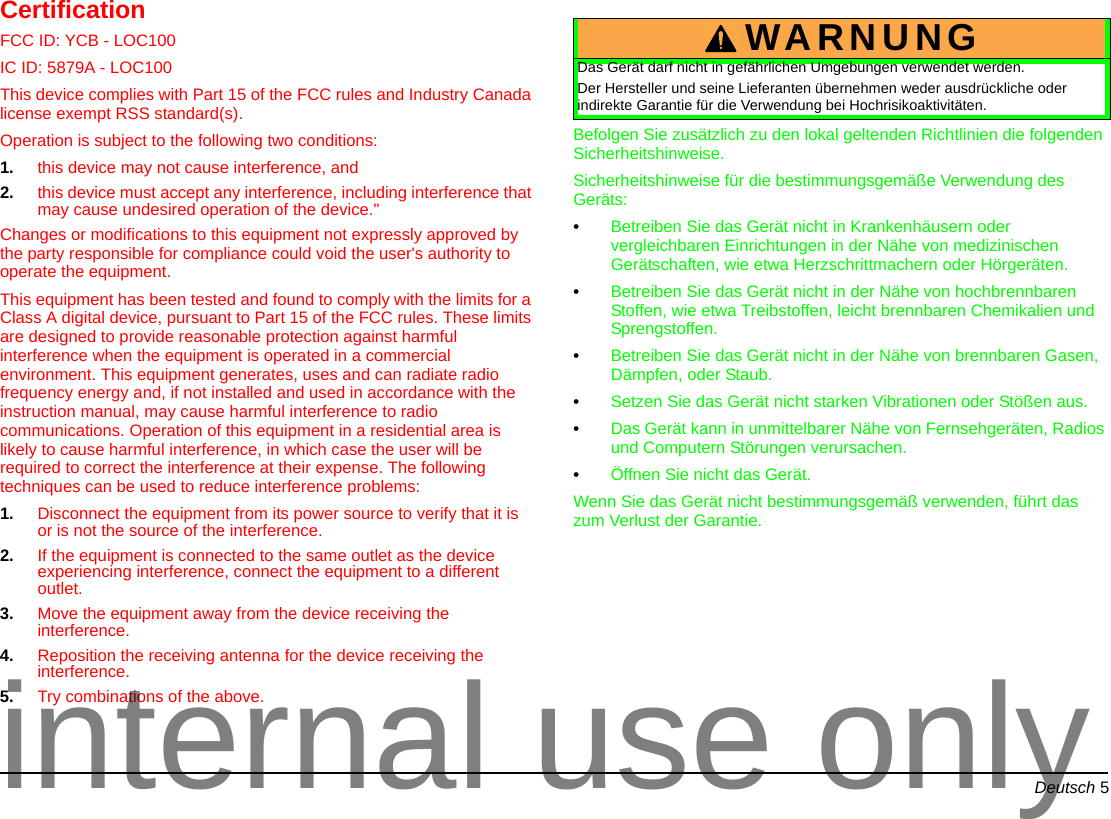
Deutsch 5CertificationFCC ID: YCB - LOC100IC ID: 5879A - LOC100  This device complies with Part 15 of the FCC rules and Industry Canada license exempt RSS standard(s). Operation is subject to the following two conditions: 1. this device may not cause interference, and 2. this device must accept any interference, including interference that may cause undesired operation of the device."Changes or modifications to this equipment not expressly approved by the party responsible for compliance could void the user's authority to operate the equipment.This equipment has been tested and found to comply with the limits for a Class A digital device, pursuant to Part 15 of the FCC rules. These limits are designed to provide reasonable protection against harmful interference when the equipment is operated in a commercial environment. This equipment generates, uses and can radiate radio frequency energy and, if not installed and used in accordance with the instruction manual, may cause harmful interference to radio communications. Operation of this equipment in a residential area is likely to cause harmful interference, in which case the user will be required to correct the interference at their expense. The following techniques can be used to reduce interference problems:1. Disconnect the equipment from its power source to verify that it is or is not the source of the interference. 2. If the equipment is connected to the same outlet as the device experiencing interference, connect the equipment to a different outlet. 3. Move the equipment away from the device receiving the interference. 4. Reposition the receiving antenna for the device receiving the interference. 5. Try combinations of the above.Befolgen Sie zusätzlich zu den lokal geltenden Richtlinien die folgenden Sicherheitshinweise.Sicherheitshinweise für die bestimmungsgemäße Verwendung des Geräts:•Betreiben Sie das Gerät nicht in Krankenhäusern oder vergleichbaren Einrichtungen in der Nähe von medizinischen Gerätschaften, wie etwa Herzschrittmachern oder Hörgeräten.•Betreiben Sie das Gerät nicht in der Nähe von hochbrennbaren Stoffen, wie etwa Treibstoffen, leicht brennbaren Chemikalien und Sprengstoffen.•Betreiben Sie das Gerät nicht in der Nähe von brennbaren Gasen, Dämpfen, oder Staub.•Setzen Sie das Gerät nicht starken Vibrationen oder Stößen aus.•Das Gerät kann in unmittelbarer Nähe von Fernsehgeräten, Radios und Computern Störungen verursachen.•Öffnen Sie nicht das Gerät.Wenn Sie das Gerät nicht bestimmungsgemäß verwenden, führt das zum Verlust der Garantie. WARNUNGDas Gerät darf nicht in gefährlichen Umgebungen verwendet werden.Der Hersteller und seine Lieferanten übernehmen weder ausdrückliche oder indirekte Garantie für die Verwendung bei Hochrisikoaktivitäten.internal use only
Deutsch 6AkkusLieferumfangZum Lieferumfang des LOC 100 gehören folgende Komponenten:•RFID Lese-/Schreibeinheit LOC 100•USB-Kabel•zwei AA Ni-MH Akkus •Bedienungsanleitung LOC 100Hinweis: Sollte eines der aufgelisteten Teile fehlen oder defekt sein, wenden Sie sich bitte sofort an den Hersteller oder die zuständige Vertretung.ProduktbeschreibungMit dem RFID-Lese/Schreibgerät LOC 100 können Sie die Informationen Anwender-ID und Probenort-ID zusammen mit Uhrzeit und Datum auf ein Probenflaschen-Etikett schreiben. Jeder Probenflasche sind dann eindeutig folgende Informationen zugewiesen:•Probenort: wo ist die Probe genommen worden?•Zeit: Wann ist die Probe genommen worden?•Anwender: Wer hat die Probe genommen?Diese Informationen (Proben-ID) können anschließend von einem RFID-fähigen Photometer eingelesen werden, um zusammen mit den Messergebnissen gespeichert zu werden. So ist eine lückenlosen Dokumentation von Probenort, Probennahmezeit und Anwender gegeben.Das RFID-Starter-Set zur Probenidentifikation besteht aus:•dem RFID-Lese/Schreibgerät LOC 100•zwei Anwender RFID-Tags•fünf Probenort RFID-Tags•fünf Sets Probenflaschen-Etiketten mit Proben RFID-Tags, in Rot (3x×), Blau (3x×), Gelb (3x×), Grün (3x×) und Schwarz (3x×),.Alle RFID-Tags können durch das LOC 100 bzw. dem RFID-Modul im Photometer beliebig oft neu beschrieben und ausgelesen werden.Im folgenden wird der Schreib- und Lesevorgang der einzelnen Komponenten genau beschrieben.GEFAHRFeuer und Explosionsgefahr. Verwenden Sie für das Messgerät nur die mitgelieferten NiMH-Akkus und stellen Sie sicher, dass die Akkus richtig in das Akkufach eingesetzt sind. Ein falsches Einsetzen der Akkus kann Schäden am Gerät, Feuer oder Explosionen zur Folge haben.Verwenden Sie auf keinen Fall Batterien. Der Einsatz von Batterien kann Schäden am Gerät, Feuer oder Explosionen zur Folge haben.internal use only
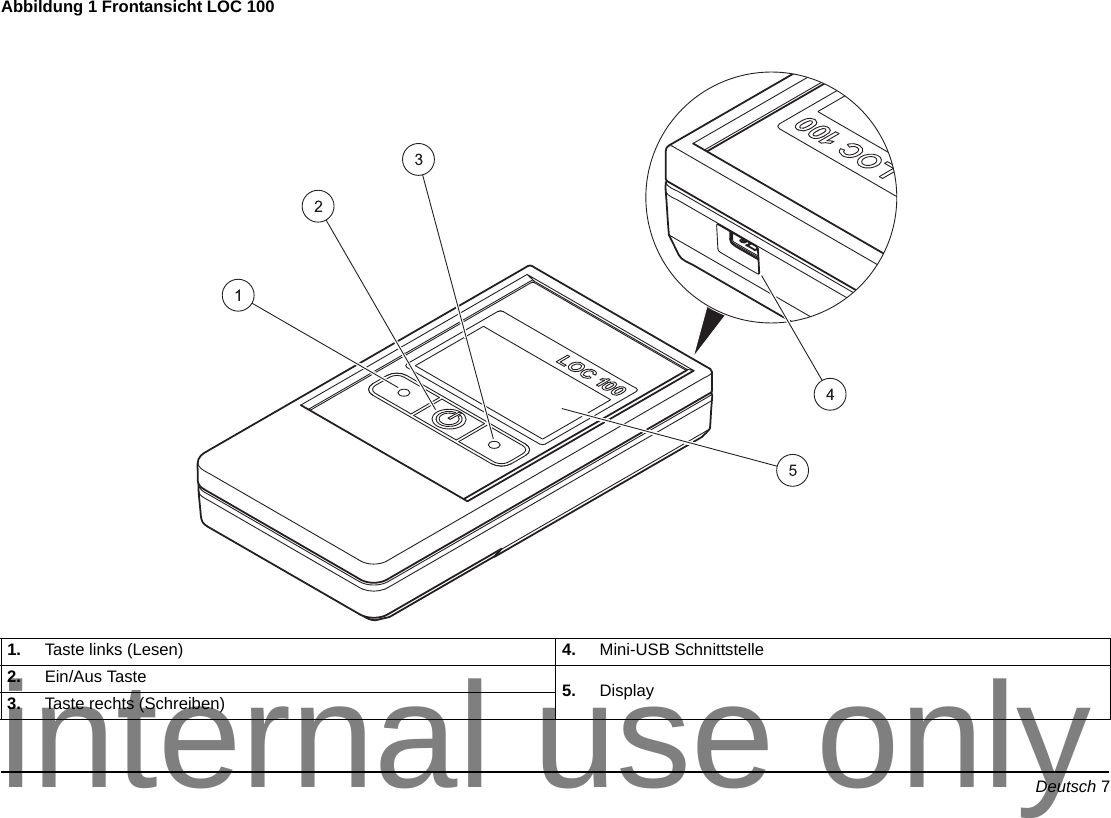
Deutsch 7Abbildung 1 Frontansicht LOC 100  1. Taste links (Lesen) 4. Mini-USB Schnittstelle2. Ein/Aus Taste  5. Display3. Taste rechts (Schreiben)internal use only
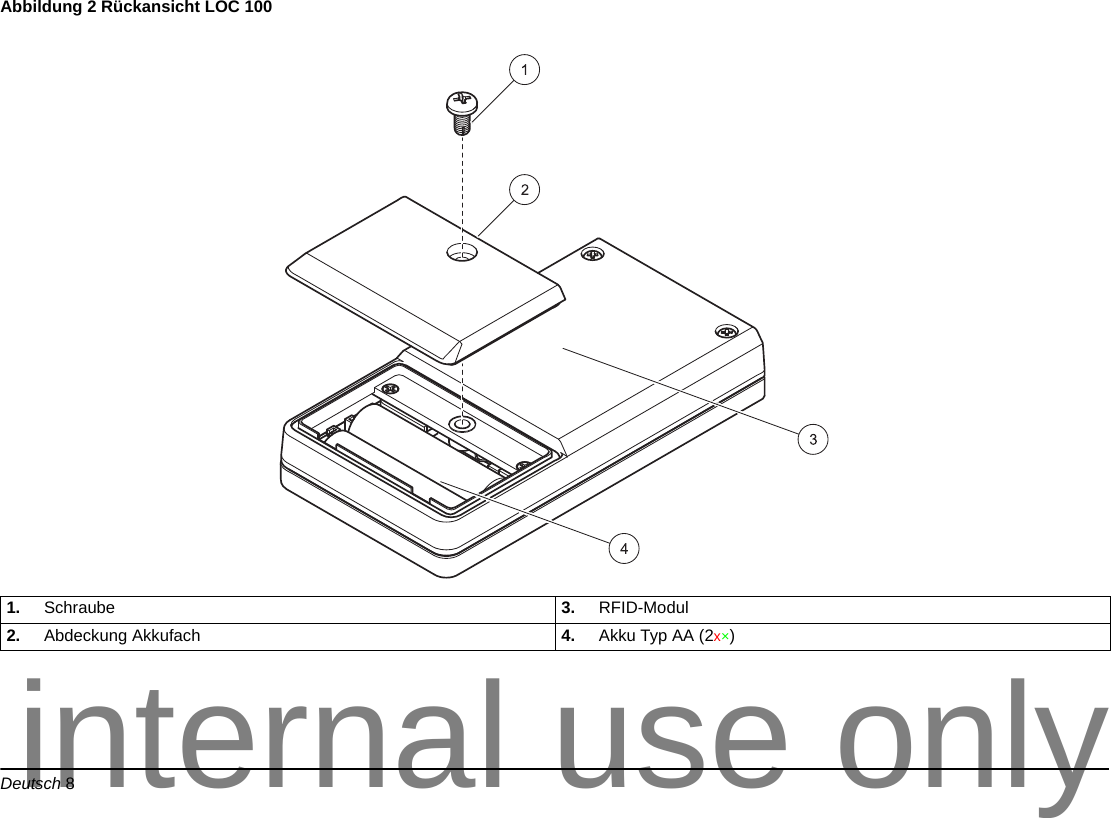
Deutsch 8Abbildung 2 Rückansicht LOC 100 1. Schraube 3. RFID-Modul2. Abdeckung Akkufach 4. Akku Typ AA (2x×)internal use only
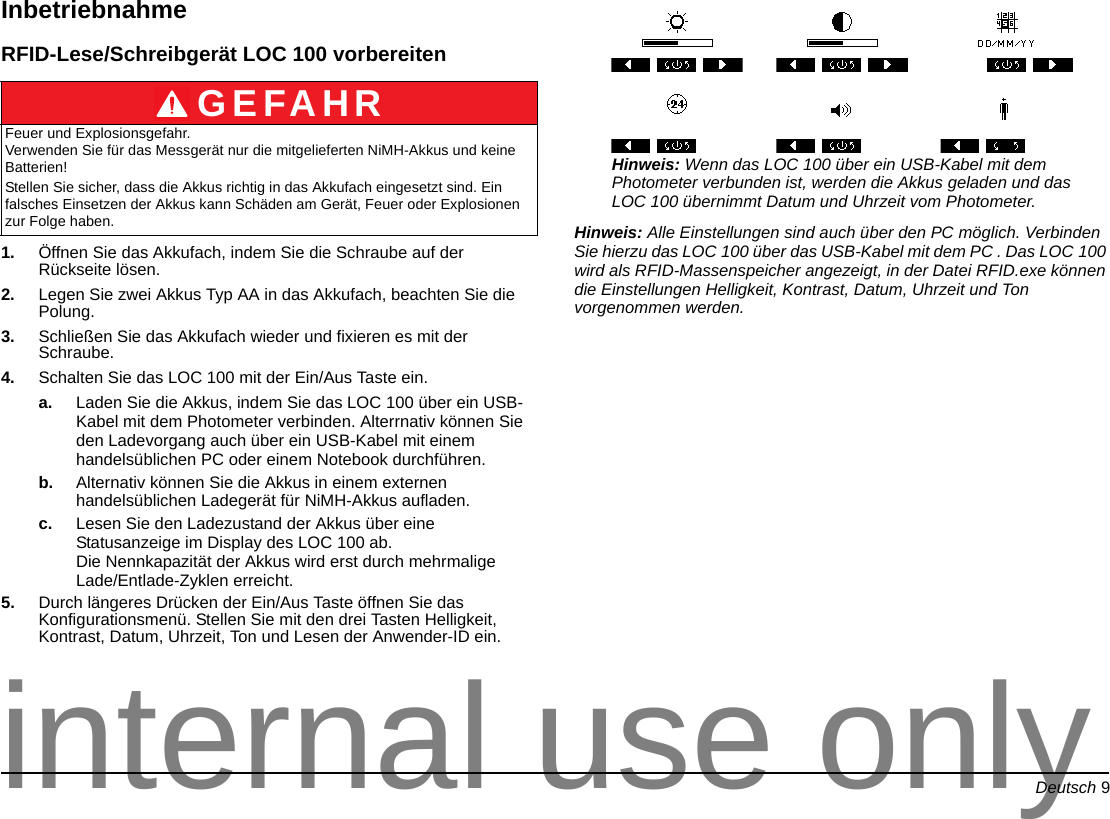
Deutsch 9InbetriebnahmeRFID-Lese/Schreibgerät LOC 100 vorbereiten1. Öffnen Sie das Akkufach, indem Sie die Schraube auf der Rückseite lösen.2. Legen Sie zwei Akkus Typ AA in das Akkufach, beachten Sie die Polung.3. Schließen Sie das Akkufach wieder und fixieren es mit der Schraube.4. Schalten Sie das LOC 100 mit der Ein/Aus Taste ein.a. Laden Sie die Akkus, indem Sie das LOC 100 über ein USB-Kabel mit dem Photometer verbinden. Alterrnativ können Sie den Ladevorgang auch über ein USB-Kabel mit einem handelsüblichen PC oder einem Notebook durchführen.b. Alternativ können Sie die Akkus in einem externen handelsüblichen Ladegerät für NiMH-Akkus aufladen.c. Lesen Sie den Ladezustand der Akkus über eine Statusanzeige im Display des LOC 100 ab. Die Nennkapazität der Akkus wird erst durch mehrmalige Lade/Entlade-Zyklen erreicht.5. Durch längeres Drücken der Ein/Aus Taste öffnen Sie das Konfigurationsmenü. Stellen Sie mit den drei Tasten Helligkeit, Kontrast, Datum, Uhrzeit, Ton und Lesen der Anwender-ID ein.Hinweis: Wenn das LOC 100 über ein USB-Kabel mit dem Photometer verbunden ist, werden die Akkus geladen und das LOC 100 übernimmt Datum und Uhrzeit vom Photometer. Hinweis: Alle Einstellungen sind auch über den PC möglich. Verbinden Sie hierzu das LOC 100 über das USB-Kabel mit dem PC . Das LOC 100 wird als RFID-Massenspeicher angezeigt, in der Datei RFID.exe können die Einstellungen Helligkeit, Kontrast, Datum, Uhrzeit und Ton vorgenommen werden.GEFAHRFeuer und Explosionsgefahr. Verwenden Sie für das Messgerät nur die mitgelieferten NiMH-Akkus und keine Batterien!Stellen Sie sicher, dass die Akkus richtig in das Akkufach eingesetzt sind. Ein falsches Einsetzen der Akkus kann Schäden am Gerät, Feuer oder Explosionen zur Folge haben.internal use only
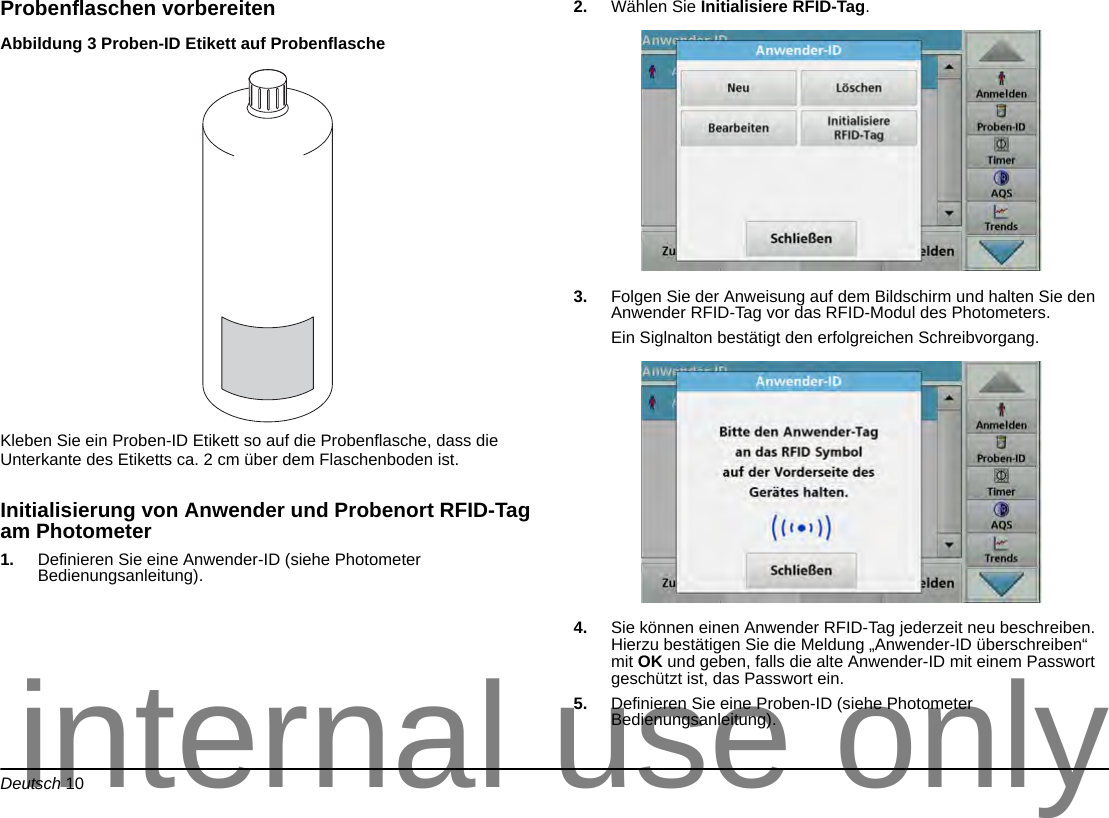
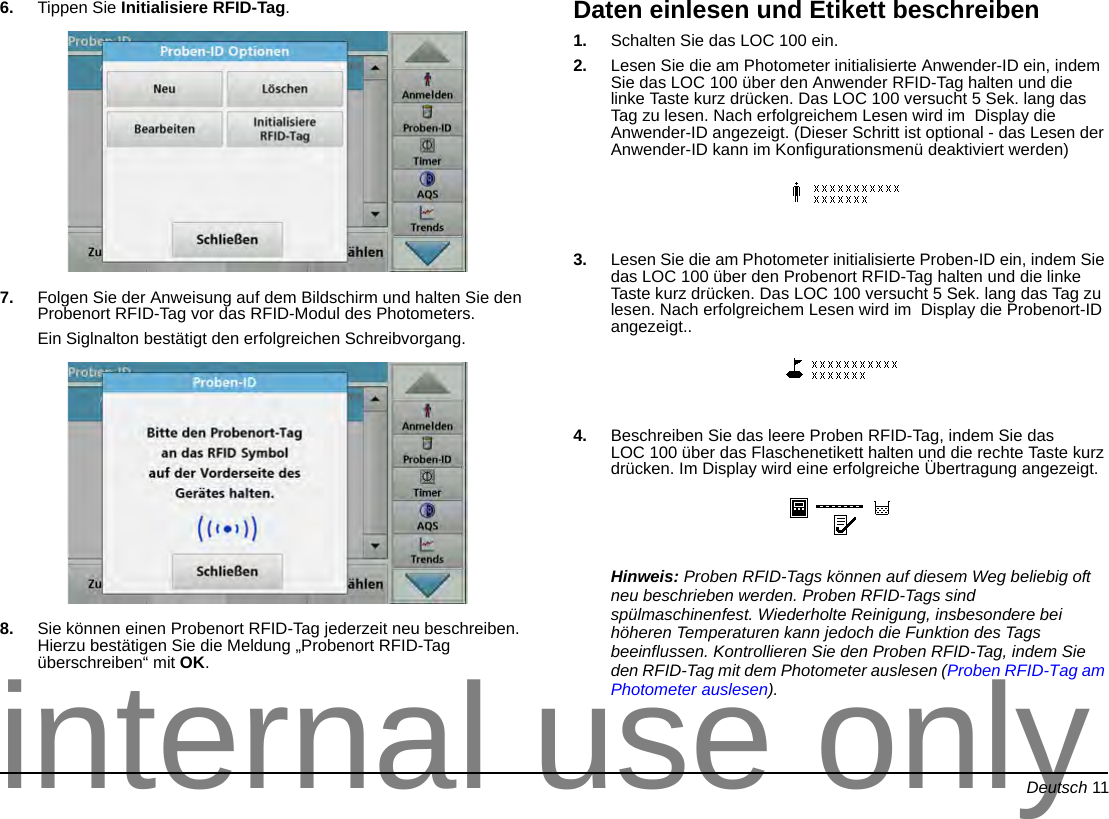
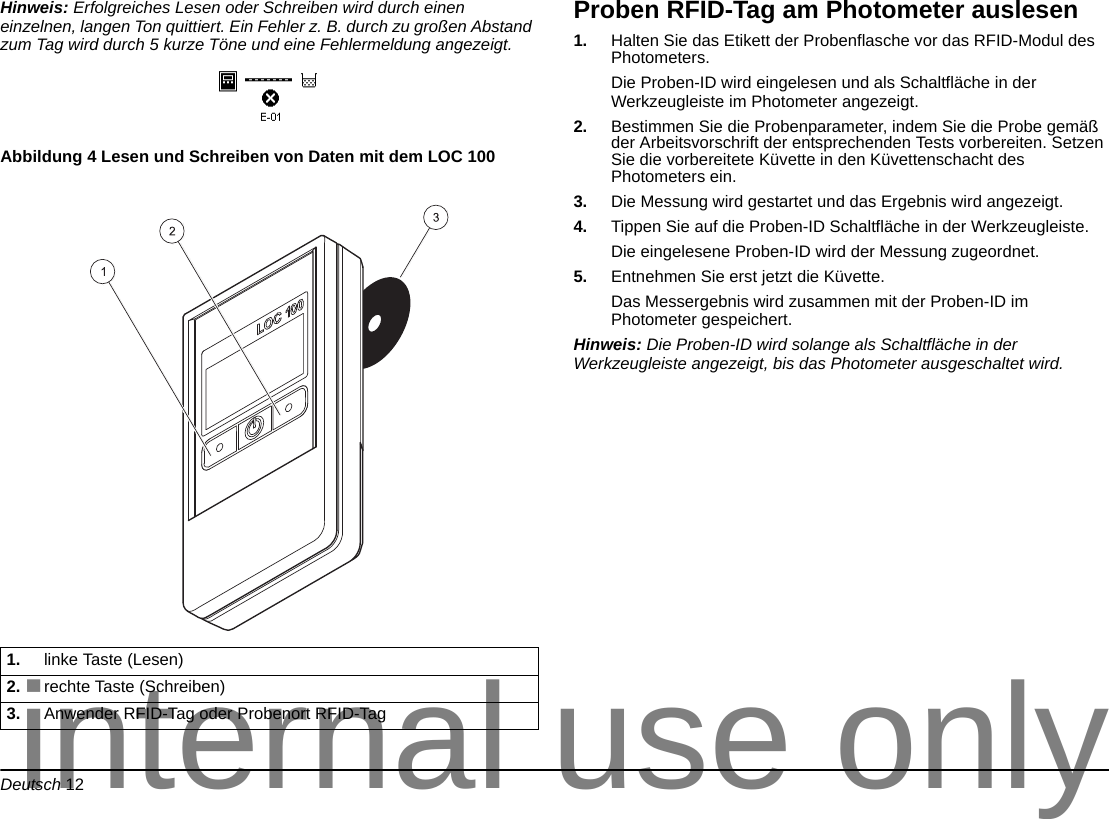
Deutsch 10Probenflaschen vorbereitenAbbildung 3 Proben-ID Etikett auf Probenflasche Kleben Sie ein Proben-ID Etikett so auf die Probenflasche, dass die Unterkante des Etiketts ca. 2 cm über dem Flaschenboden ist. Initialisierung von Anwender und Probenort RFID-Tag am Photometer1. Definieren Sie eine Anwender-ID (siehe Photometer Bedienungsanleitung).2. Wählen Sie Initialisiere RFID-Tag.3. Folgen Sie der Anweisung auf dem Bildschirm und halten Sie den Anwender RFID-Tag vor das RFID-Modul des Photometers.Ein Siglnalton bestätigt den erfolgreichen Schreibvorgang.4. Sie können einen Anwender RFID-Tag jederzeit neu beschreiben. Hierzu bestätigen Sie die Meldung „Anwender-ID überschreiben“ mit OK und geben, falls die alte Anwender-ID mit einem Passwort geschützt ist, das Passwort ein.5. Definieren Sie eine Proben-ID (siehe Photometer Bedienungsanleitung).internal use only
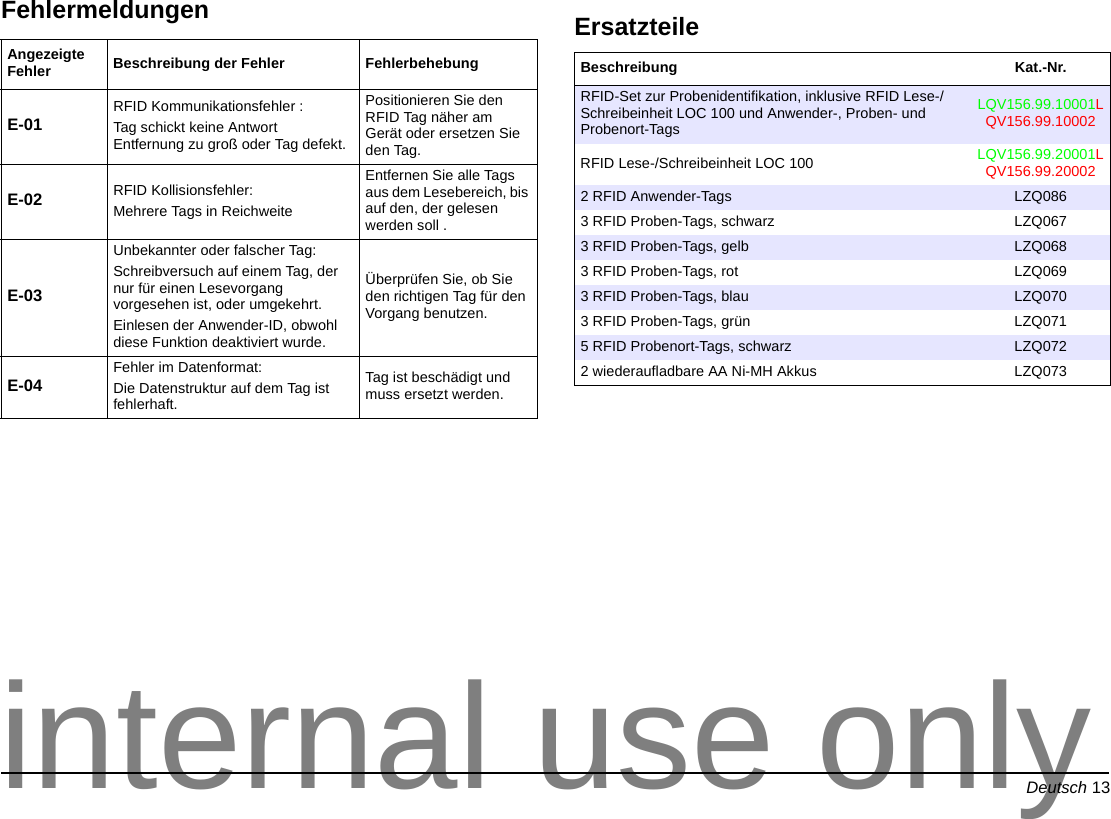
Deutsch 116. Tippen Sie Initialisiere RFID-Tag.7. Folgen Sie der Anweisung auf dem Bildschirm und halten Sie den Probenort RFID-Tag vor das RFID-Modul des Photometers.Ein Siglnalton bestätigt den erfolgreichen Schreibvorgang.8. Sie können einen Probenort RFID-Tag jederzeit neu beschreiben. Hierzu bestätigen Sie die Meldung „Probenort RFID-Tag überschreiben“ mit OK.Daten einlesen und Etikett beschreiben1. Schalten Sie das LOC 100 ein.2. Lesen Sie die am Photometer initialisierte Anwender-ID ein, indem Sie das LOC 100 über den Anwender RFID-Tag halten und die linke Taste kurz drücken. Das LOC 100 versucht 5 Sek. lang das Tag zu lesen. Nach erfolgreichem Lesen wird im  Display die Anwender-ID angezeigt. (Dieser Schritt ist optional - das Lesen der Anwender-ID kann im Konfigurationsmenü deaktiviert werden)3. Lesen Sie die am Photometer initialisierte Proben-ID ein, indem Sie das LOC 100 über den Probenort RFID-Tag halten und die linke Taste kurz drücken. Das LOC 100 versucht 5 Sek. lang das Tag zu lesen. Nach erfolgreichem Lesen wird im  Display die Probenort-ID angezeigt..4. Beschreiben Sie das leere Proben RFID-Tag, indem Sie das LOC 100 über das Flaschenetikett halten und die rechte Taste kurz drücken. Im Display wird eine erfolgreiche Übertragung angezeigt.Hinweis: Proben RFID-Tags können auf diesem Weg beliebig oft neu beschrieben werden. Proben RFID-Tags sind spülmaschinenfest. Wiederholte Reinigung, insbesondere bei höheren Temperaturen kann jedoch die Funktion des Tags beeinflussen. Kontrollieren Sie den Proben RFID-Tag, indem Sie den RFID-Tag mit dem Photometer auslesen (Proben RFID-Tag am Photometer auslesen).internal use only
Deutsch 12Hinweis: Erfolgreiches Lesen oder Schreiben wird durch einen einzelnen, langen Ton quittiert. Ein Fehler z. B. durch zu großen Abstand zum Tag wird durch 5 kurze Töne und eine Fehlermeldung angezeigt.Abbildung 4 Lesen und Schreiben von Daten mit dem LOC 100 Proben RFID-Tag am Photometer auslesen1. Halten Sie das Etikett der Probenflasche vor das RFID-Modul des Photometers. Die Proben-ID wird eingelesen und als Schaltfläche in der Werkzeugleiste im Photometer angezeigt.2. Bestimmen Sie die Probenparameter, indem Sie die Probe gemäß der Arbeitsvorschrift der entsprechenden Tests vorbereiten. Setzen Sie die vorbereitete Küvette in den Küvettenschacht des Photometers ein.3. Die Messung wird gestartet und das Ergebnis wird angezeigt.4. Tippen Sie auf die Proben-ID Schaltfläche in der Werkzeugleiste.Die eingelesene Proben-ID wird der Messung zugeordnet.5. Entnehmen Sie erst jetzt die Küvette. Das Messergebnis wird zusammen mit der Proben-ID im Photometer gespeichert.Hinweis: Die Proben-ID wird solange als Schaltfläche in der Werkzeugleiste angezeigt, bis das Photometer ausgeschaltet wird.1. linke Taste (Lesen)2. rechte Taste (Schreiben)3. Anwender RFID-Tag oder Probenort RFID-Taginternal use only
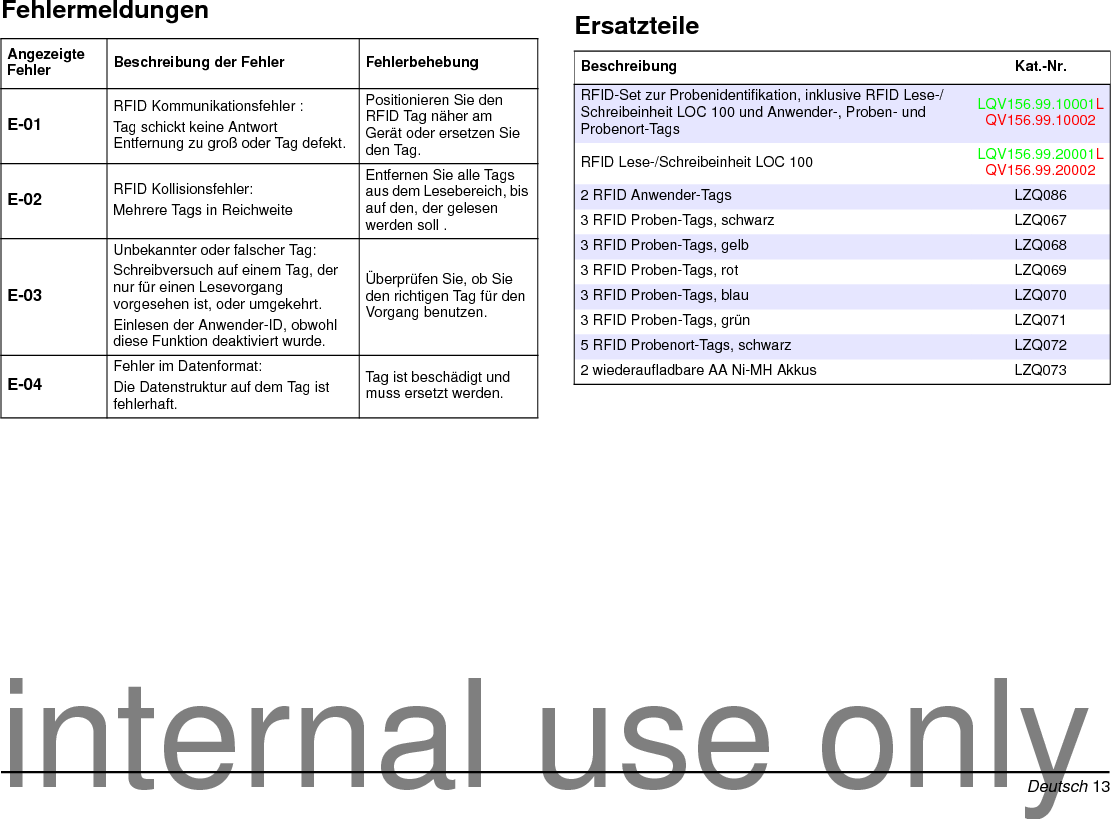
Deutsch 13FehlermeldungenAngezeigte Fehler Beschreibung der Fehler FehlerbehebungE-01 RFID Kommunikationsfehler :Tag schickt keine Antwort Entfernung zu groß oder Tag defekt.Positionieren Sie den RFID Tag näher am Gerät oder ersetzen Sie den Tag.E-02 RFID Kollisionsfehler:Mehrere Tags in ReichweiteEntfernen Sie alle Tags aus dem Lesebereich, bis auf den, der gelesen werden soll .E-03Unbekannter oder falscher Tag:Schreibversuch auf einem Tag, der nur für einen Lesevorgang vorgesehen ist, oder umgekehrt. Einlesen der Anwender-ID, obwohl diese Funktion deaktiviert wurde.Überprüfen Sie, ob Sie den richtigen Tag für den Vorgang benutzen.E-04 Fehler im Datenformat:Die Datenstruktur auf dem Tag ist fehlerhaft.Tag ist beschädigt und muss ersetzt werden.ErsatzteileBeschreibung Kat.-Nr.RFID-Set zur Probenidentifikation, inklusive RFID Lese-/Schreibeinheit LOC 100 und Anwender-, Proben- und Probenort-TagsLQV156.99.10001LQV156.99.10002RFID Lese-/Schreibeinheit LOC 100 LQV156.99.20001LQV156.99.200022 RFID Anwender-Tags LZQ0863 RFID Proben-Tags, schwarz  LZQ0673 RFID Proben-Tags, gelb LZQ0683 RFID Proben-Tags, rot LZQ0693 RFID Proben-Tags, blau LZQ0703 RFID Proben-Tags, grün LZQ0715 RFID Probenort-Tags, schwarz LZQ0722 wiederaufladbare AA Ni-MH Akkus LZQ073internal use only
Deutsch 14internal use only
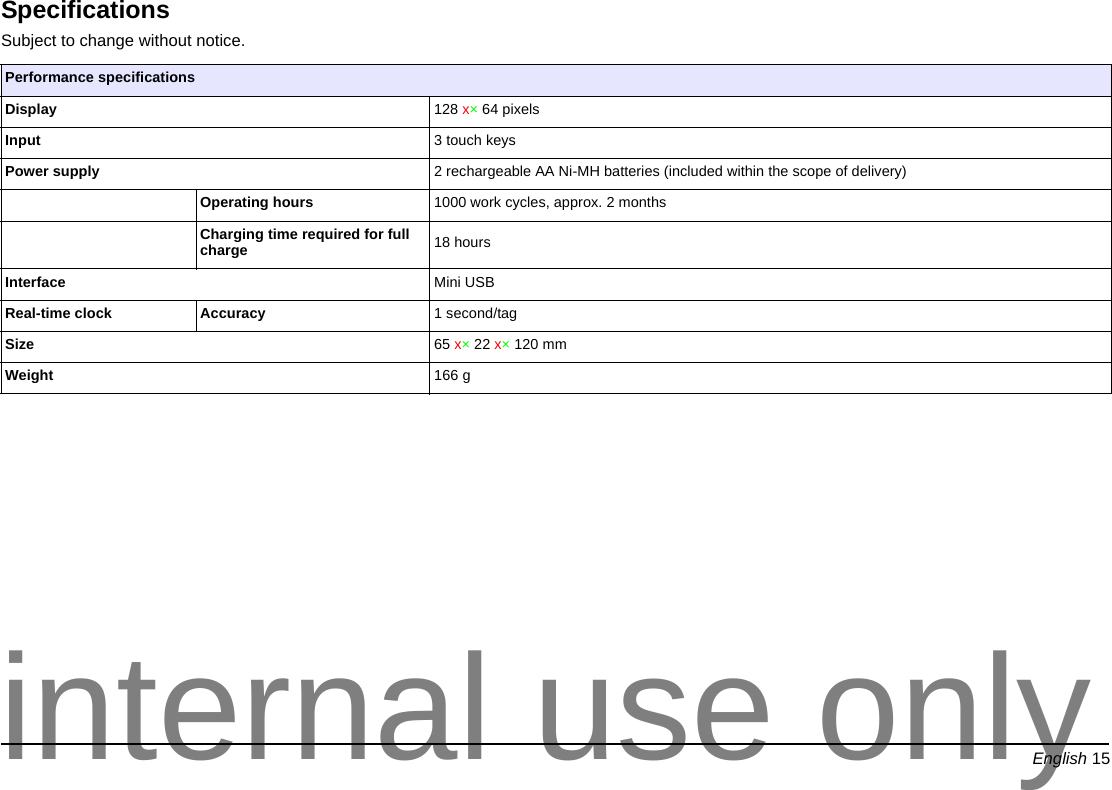
English 15EnglishSpecificationsSubject to change without notice. Performance specificationsDisplay 128 x×64 pixelsInput 3 touch keysPower supply 2 rechargeable AA Ni-MH batteries (included within the scope of delivery)Operating hours 1000 work cycles, approx. 2 monthsCharging time required for full charge 18 hoursInterface Mini USBReal-time clock Accuracy 1 second/tagSize 65 x×22 x×120 mmWeight 166 ginternal use only
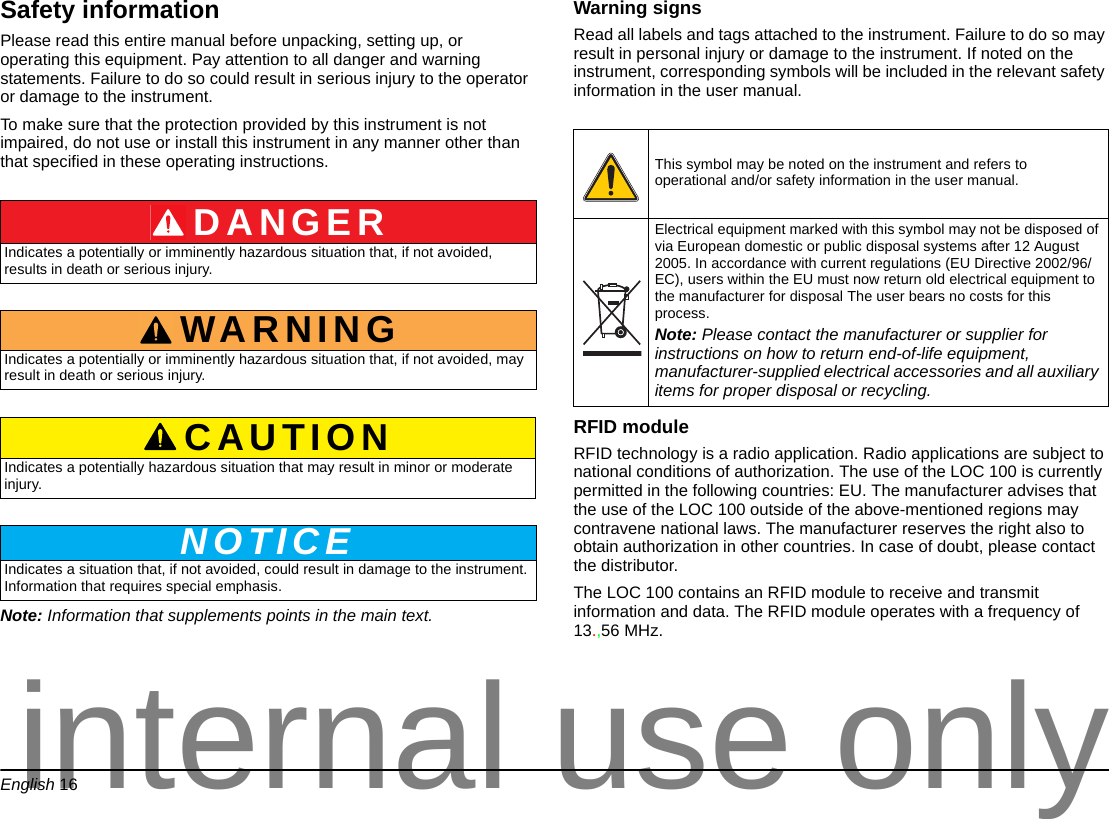
English 16Safety informationPlease read this entire manual before unpacking, setting up, or operating this equipment. Pay attention to all danger and warning statements. Failure to do so could result in serious injury to the operator or damage to the instrument. To make sure that the protection provided by this instrument is not impaired, do not use or install this instrument in any manner other than that specified in these operating instructions.Note: Information that supplements points in the main text.Warning signsRead all labels and tags attached to the instrument. Failure to do so may result in personal injury or damage to the instrument. If noted on the instrument, corresponding symbols will be included in the relevant safety information in the user manual. RFID module RFID technology is a radio application. Radio applications are subject to national conditions of authorization. The use of the LOC 100 is currently permitted in the following countries: EU. The manufacturer advises that the use of the LOC 100 outside of the above-mentioned regions may contravene national laws. The manufacturer reserves the right also to obtain authorization in other countries. In case of doubt, please contact the distributor.The LOC 100 contains an RFID module to receive and transmit information and data. The RFID module operates with a frequency of 13.,56 MHz.DANGERIndicates a potentially or imminently hazardous situation that, if not avoided, results in death or serious injury.WARNINGIndicates a potentially or imminently hazardous situation that, if not avoided, may result in death or serious injury.CAUTIONIndicates a potentially hazardous situation that may result in minor or moderate injury.NOTICEIndicates a situation that, if not avoided, could result in damage to the instrument. Information that requires special emphasis. This symbol may be noted on the instrument and refers to operational and/or safety information in the user manual.Electrical equipment marked with this symbol may not be disposed of via European domestic or public disposal systems after 12 August 2005. In accordance with current regulations (EU Directive 2002/96/EC), users within the EU must now return old electrical equipment to the manufacturer for disposal The user bears no costs for this process. Note: Please contact the manufacturer or supplier for instructions on how to return end-of-life equipment, manufacturer-supplied electrical accessories and all auxiliary items for proper disposal or recycling.internal use only
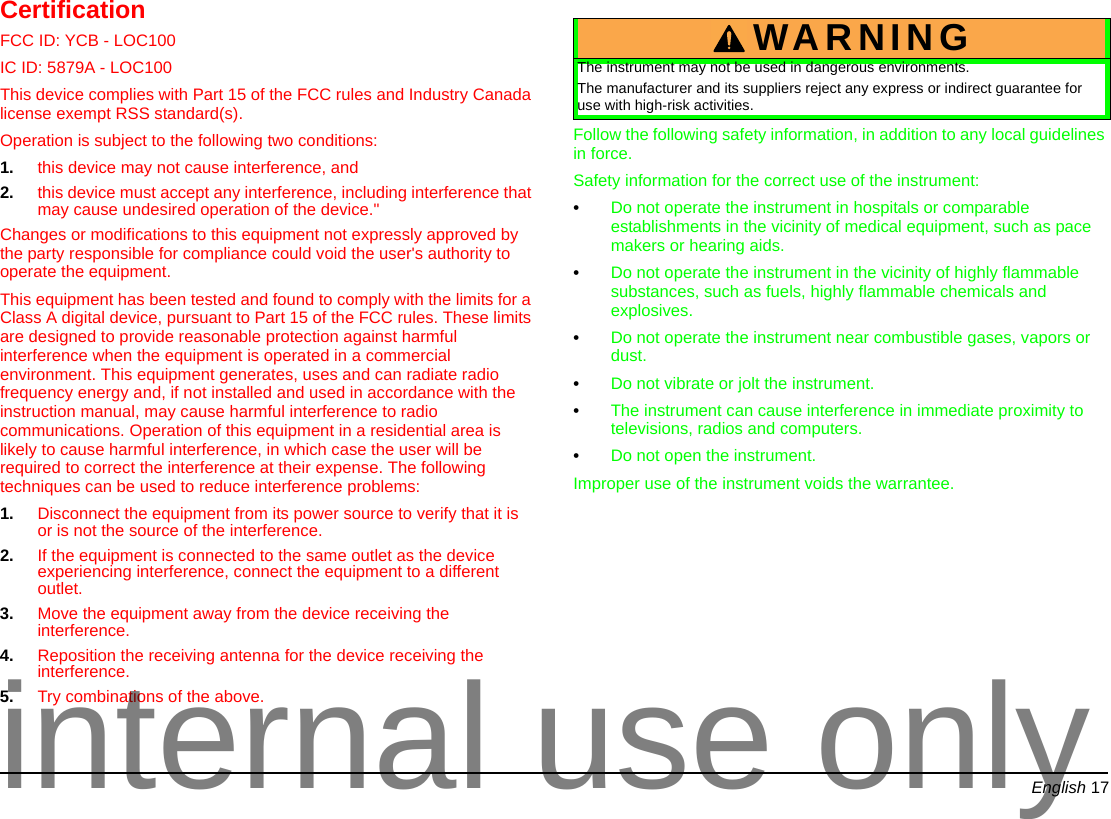
English 17CertificationFCC ID: YCB - LOC100IC ID: 5879A - LOC100  This device complies with Part 15 of the FCC rules and Industry Canada license exempt RSS standard(s). Operation is subject to the following two conditions: 1. this device may not cause interference, and 2. this device must accept any interference, including interference that may cause undesired operation of the device."Changes or modifications to this equipment not expressly approved by the party responsible for compliance could void the user's authority to operate the equipment.This equipment has been tested and found to comply with the limits for a Class A digital device, pursuant to Part 15 of the FCC rules. These limits are designed to provide reasonable protection against harmful interference when the equipment is operated in a commercial environment. This equipment generates, uses and can radiate radio frequency energy and, if not installed and used in accordance with the instruction manual, may cause harmful interference to radio communications. Operation of this equipment in a residential area is likely to cause harmful interference, in which case the user will be required to correct the interference at their expense. The following techniques can be used to reduce interference problems:1. Disconnect the equipment from its power source to verify that it is or is not the source of the interference. 2. If the equipment is connected to the same outlet as the device experiencing interference, connect the equipment to a different outlet. 3. Move the equipment away from the device receiving the interference. 4. Reposition the receiving antenna for the device receiving the interference. 5. Try combinations of the above.Follow the following safety information, in addition to any local guidelines in force.Safety information for the correct use of the instrument:•Do not operate the instrument in hospitals or comparable establishments in the vicinity of medical equipment, such as pace makers or hearing aids.•Do not operate the instrument in the vicinity of highly flammable substances, such as fuels, highly flammable chemicals and explosives.•Do not operate the instrument near combustible gases, vapors or dust.•Do not vibrate or jolt the instrument.•The instrument can cause interference in immediate proximity to televisions, radios and computers.•Do not open the instrument.Improper use of the instrument voids the warrantee.WARNINGThe instrument may not be used in dangerous environments.The manufacturer and its suppliers reject any express or indirect guarantee for use with high-risk activities.internal use only
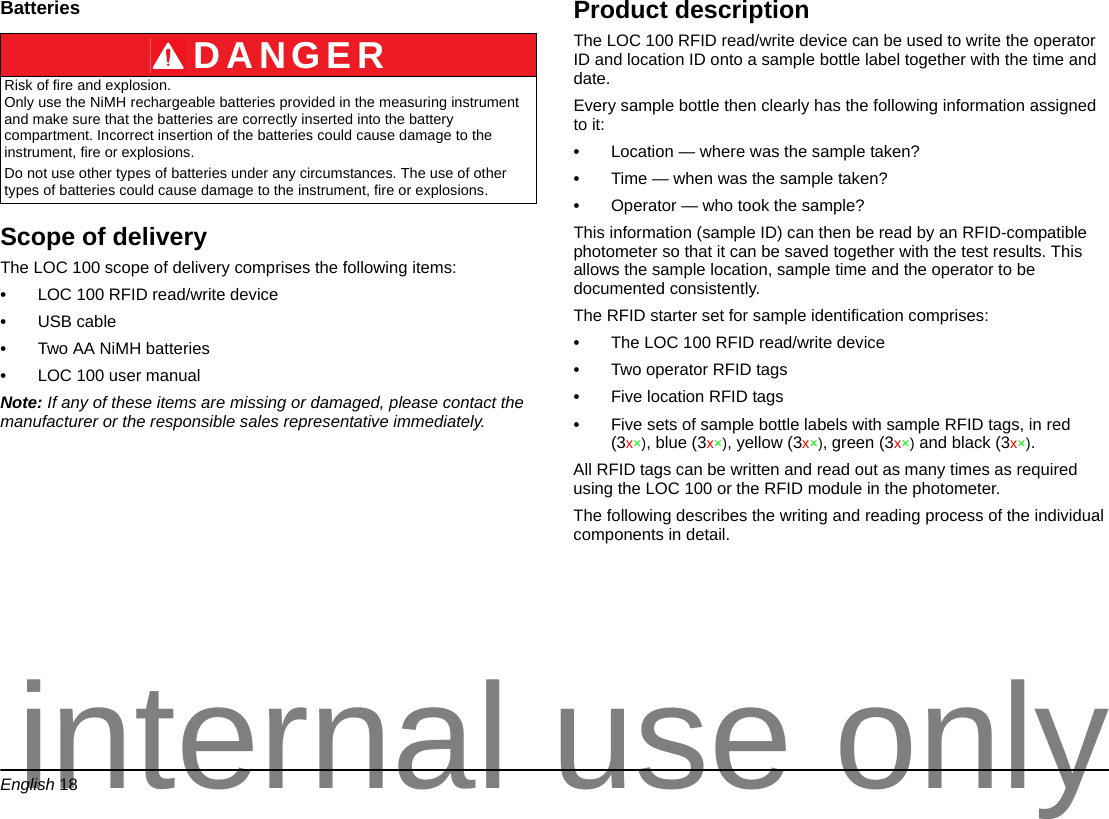
English 18BatteriesScope of deliveryThe LOC 100 scope of delivery comprises the following items:•LOC 100 RFID read/write device•USB cable•Two AA NiMH batteries •LOC 100 user manualNote: If any of these items are missing or damaged, please contact the manufacturer or the responsible sales representative immediately.Product descriptionThe LOC 100 RFID read/write device can be used to write the operator ID and location ID onto a sample bottle label together with the time and date. Every sample bottle then clearly has the following information assigned to it:•Location — where was the sample taken?•Time — when was the sample taken?•Operator — who took the sample?This information (sample ID) can then be read by an RFID-compatible photometer so that it can be saved together with the test results. This allows the sample location, sample time and the operator to be documented consistently.The RFID starter set for sample identification comprises:•The LOC 100 RFID read/write device•Two operator RFID tags•Five location RFID tags•Five sets of sample bottle labels with sample RFID tags, in red (3x×), blue (3x×), yellow (3x×), green (3x×) and black (3x×).All RFID tags can be written and read out as many times as required using the LOC 100 or the RFID module in the photometer.The following describes the writing and reading process of the individual components in detail.DANGERRisk of fire and explosion. Only use the NiMH rechargeable batteries provided in the measuring instrument and make sure that the batteries are correctly inserted into the battery compartment. Incorrect insertion of the batteries could cause damage to the instrument, fire or explosions.Do not use other types of batteries under any circumstances. The use of other types of batteries could cause damage to the instrument, fire or explosions.internal use only
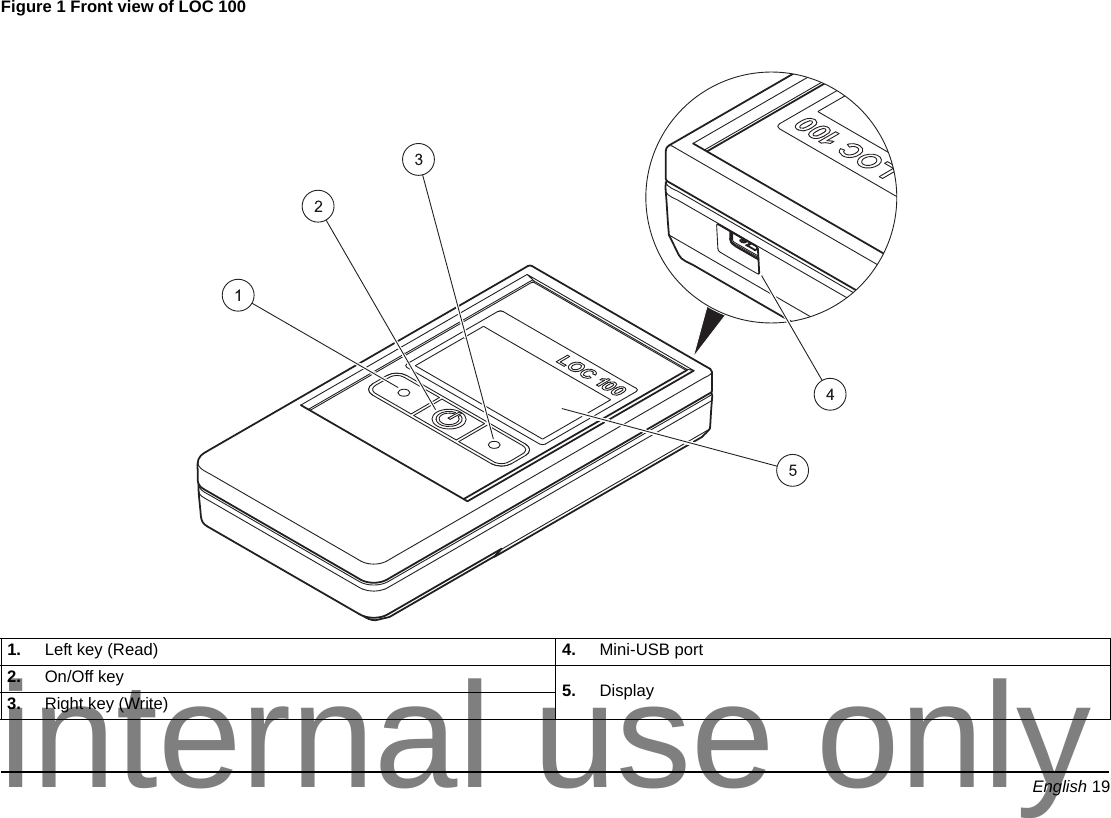
English 19Figure 1 Front view of LOC 100  1. Left key (Read) 4. Mini-USB port2. On/Off key  5. Display3. Right key (Write)internal use only
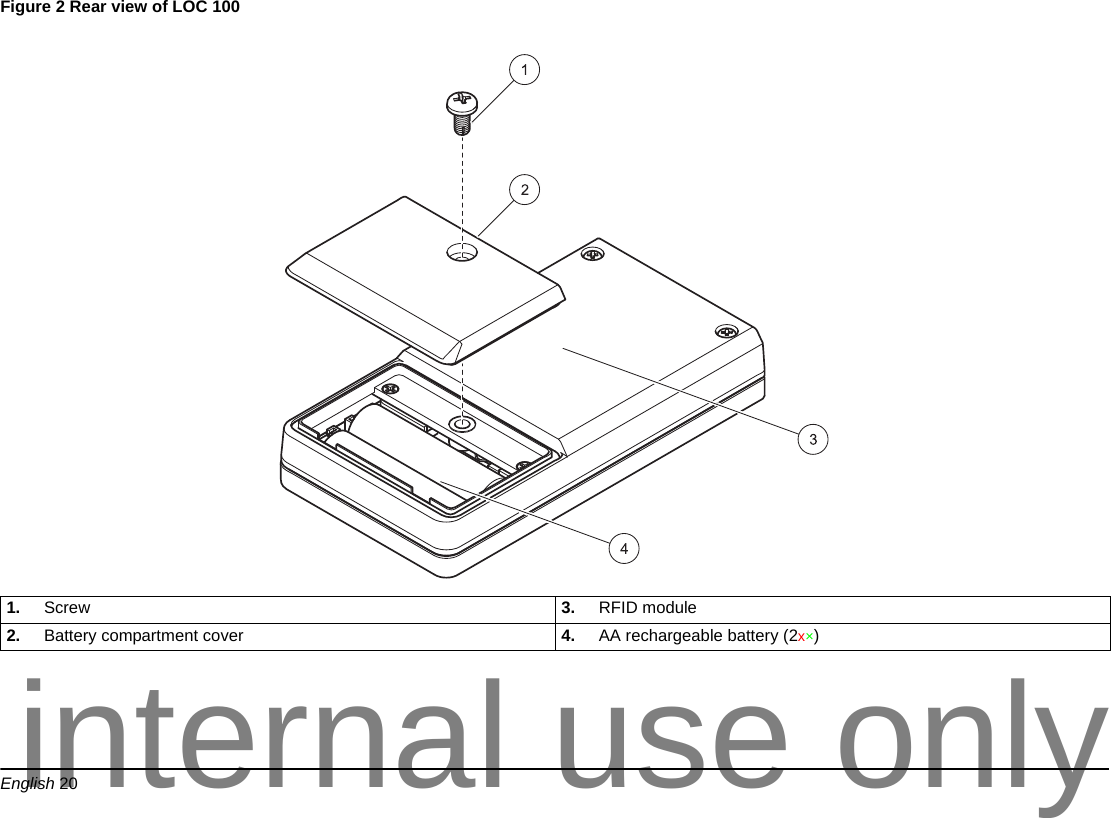
English 20Figure 2 Rear view of LOC 100 1. Screw 3. RFID module2. Battery compartment cover 4. AA rechargeable battery (2x×)internal use only
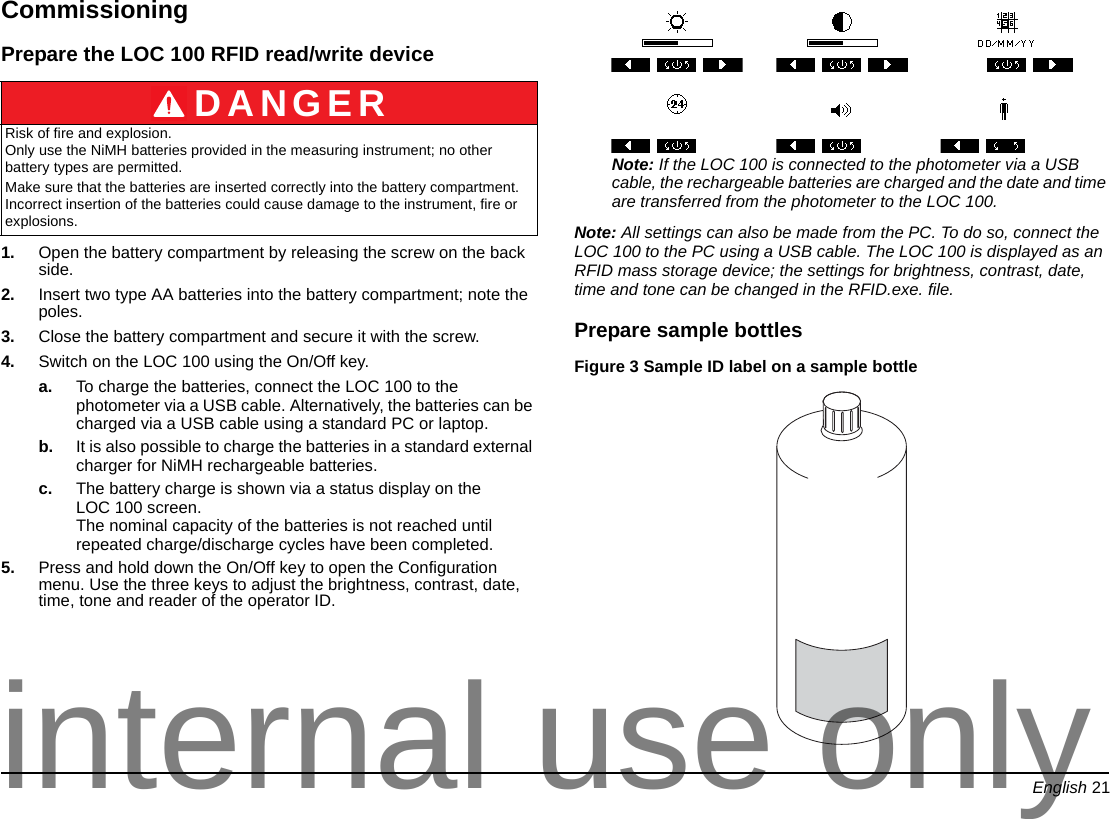
English 21CommissioningPrepare the LOC 100 RFID read/write device1. Open the battery compartment by releasing the screw on the back side.2. Insert two type AA batteries into the battery compartment; note the poles.3. Close the battery compartment and secure it with the screw.4. Switch on the LOC 100 using the On/Off key.a. To charge the batteries, connect the LOC 100 to the photometer via a USB cable. Alternatively, the batteries can be charged via a USB cable using a standard PC or laptop.b. It is also possible to charge the batteries in a standard external charger for NiMH rechargeable batteries.c. The battery charge is shown via a status display on the LOC 100 screen. The nominal capacity of the batteries is not reached until repeated charge/discharge cycles have been completed. 5. Press and hold down the On/Off key to open the Configuration menu. Use the three keys to adjust the brightness, contrast, date, time, tone and reader of the operator ID.Note: If the LOC 100 is connected to the photometer via a USB cable, the rechargeable batteries are charged and the date and time are transferred from the photometer to the LOC 100. Note: All settings can also be made from the PC. To do so, connect the LOC 100 to the PC using a USB cable. The LOC 100 is displayed as an RFID mass storage device; the settings for brightness, contrast, date, time and tone can be changed in the RFID.exe. file.Prepare sample bottlesFigure 3 Sample ID label on a sample bottle DANGERRisk of fire and explosion. Only use the NiMH batteries provided in the measuring instrument; no other battery types are permitted.Make sure that the batteries are inserted correctly into the battery compartment. Incorrect insertion of the batteries could cause damage to the instrument, fire or explosions.internal use only
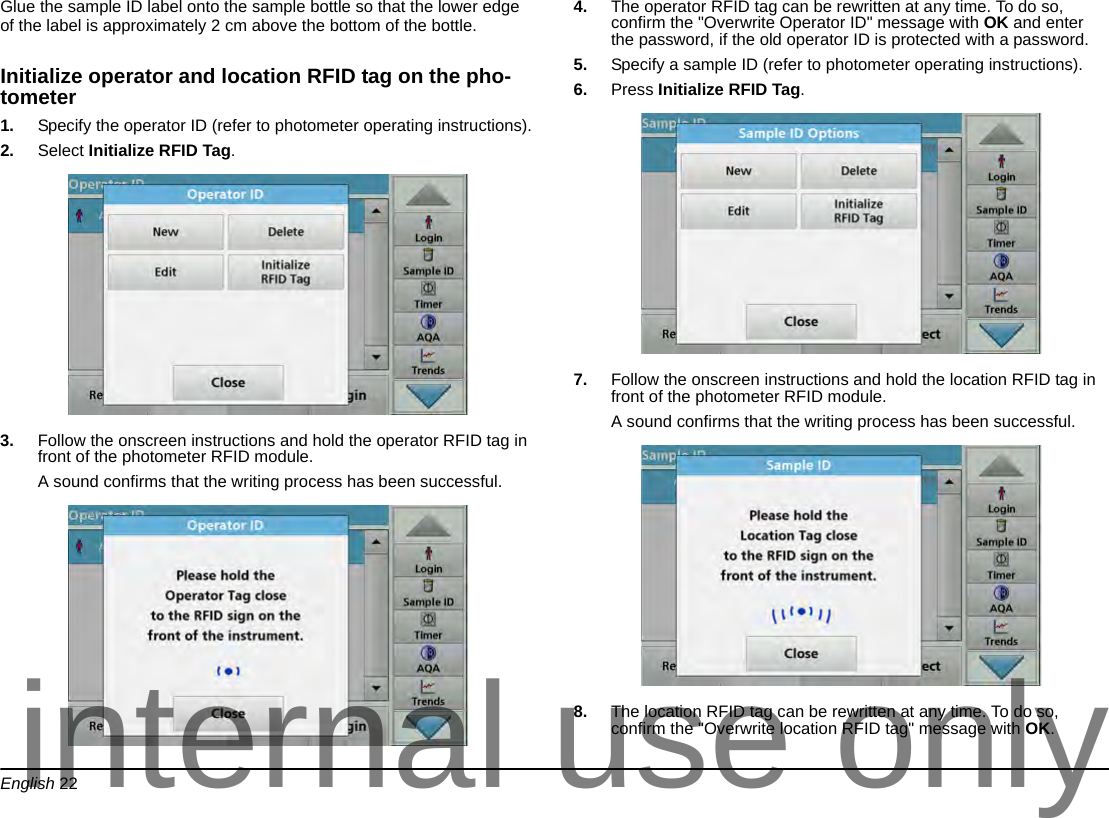
English 22Glue the sample ID label onto the sample bottle so that the lower edge of the label is approximately 2 cm above the bottom of the bottle. Initialize operator and location RFID tag on the pho-tometer1. Specify the operator ID (refer to photometer operating instructions).2. Select Initialize RFID Tag.3. Follow the onscreen instructions and hold the operator RFID tag in front of the photometer RFID module.A sound confirms that the writing process has been successful.4. The operator RFID tag can be rewritten at any time. To do so, confirm the "Overwrite Operator ID" message with OK and enter the password, if the old operator ID is protected with a password.5. Specify a sample ID (refer to photometer operating instructions).6. Press Initialize RFID Tag.7. Follow the onscreen instructions and hold the location RFID tag in front of the photometer RFID module.A sound confirms that the writing process has been successful.8. The location RFID tag can be rewritten at any time. To do so, confirm the "Overwrite location RFID tag" message with OK.internal use only
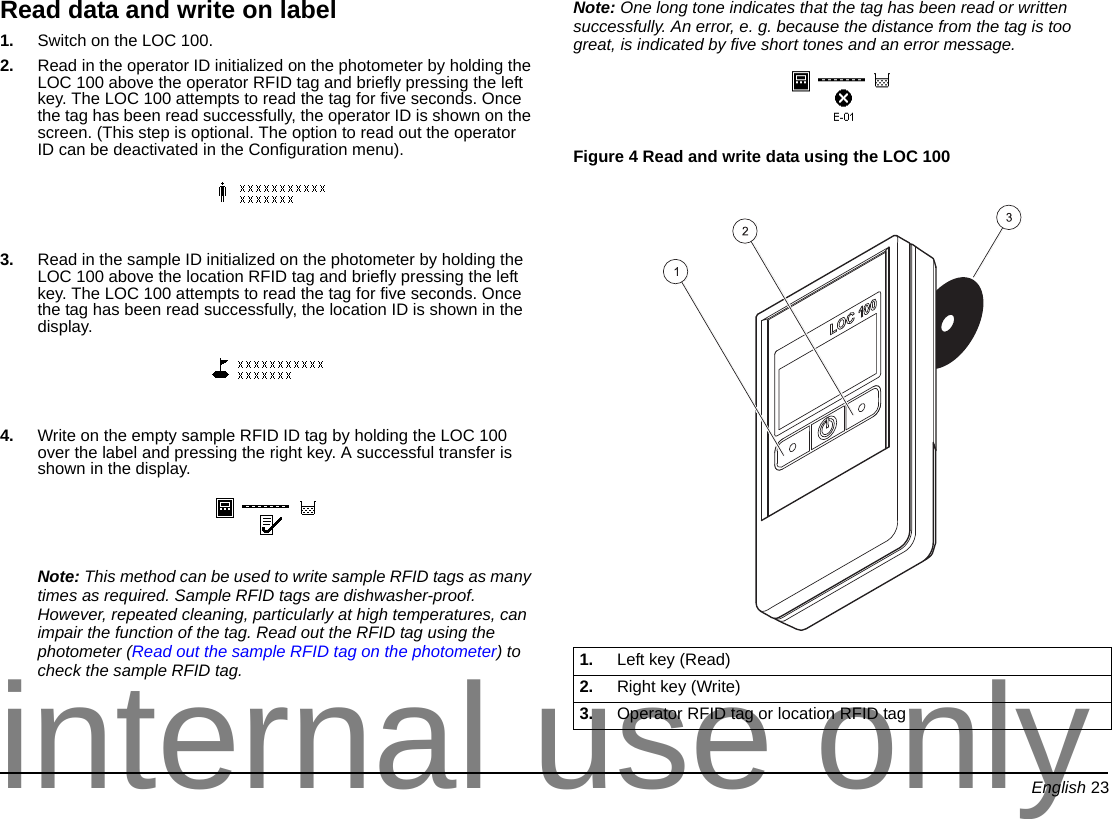
English 23Read data and write on label1. Switch on the LOC 100.2. Read in the operator ID initialized on the photometer by holding the LOC 100 above the operator RFID tag and briefly pressing the left key. The LOC 100 attempts to read the tag for five seconds. Once the tag has been read successfully, the operator ID is shown on the screen. (This step is optional. The option to read out the operator ID can be deactivated in the Configuration menu).3. Read in the sample ID initialized on the photometer by holding the LOC 100 above the location RFID tag and briefly pressing the left key. The LOC 100 attempts to read the tag for five seconds. Once the tag has been read successfully, the location ID is shown in the display.4. Write on the empty sample RFID ID tag by holding the LOC 100 over the label and pressing the right key. A successful transfer is shown in the display.Note: This method can be used to write sample RFID tags as many times as required. Sample RFID tags are dishwasher-proof. However, repeated cleaning, particularly at high temperatures, can impair the function of the tag. Read out the RFID tag using the photometer (Read out the sample RFID tag on the photometer) to check the sample RFID tag.Note: One long tone indicates that the tag has been read or written successfully. An error, e. g. because the distance from the tag is too great, is indicated by five short tones and an error message.Figure 4 Read and write data using the LOC 100 1. Left key (Read)2. Right key (Write)3. Operator RFID tag or location RFID taginternal use only
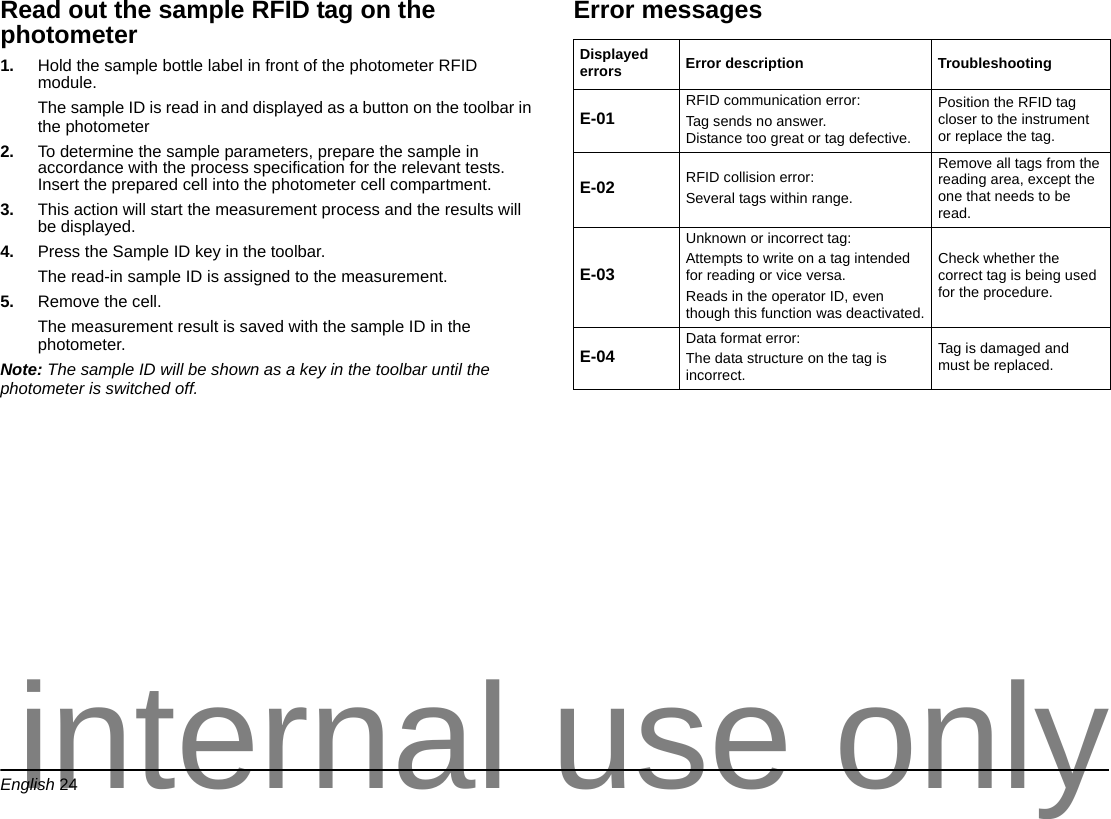
English 24Read out the sample RFID tag on the photometer1. Hold the sample bottle label in front of the photometer RFID module. The sample ID is read in and displayed as a button on the toolbar in the photometer2. To determine the sample parameters, prepare the sample in accordance with the process specification for the relevant tests. Insert the prepared cell into the photometer cell compartment.3. This action will start the measurement process and the results will be displayed.4. Press the Sample ID key in the toolbar.The read-in sample ID is assigned to the measurement.5. Remove the cell. The measurement result is saved with the sample ID in the photometer.Note: The sample ID will be shown as a key in the toolbar until the photometer is switched off.Error messagesDisplayed errors Error description TroubleshootingE-01 RFID communication error:Tag sends no answer. Distance too great or tag defective.Position the RFID tag closer to the instrument or replace the tag.E-02 RFID collision error:Several tags within range.Remove all tags from the reading area, except the one that needs to be read.E-03Unknown or incorrect tag:Attempts to write on a tag intended for reading or vice versa. Reads in the operator ID, even though this function was deactivated.Check whether the correct tag is being used for the procedure.E-04 Data format error:The data structure on the tag is incorrect.Tag is damaged and must be replaced.internal use only
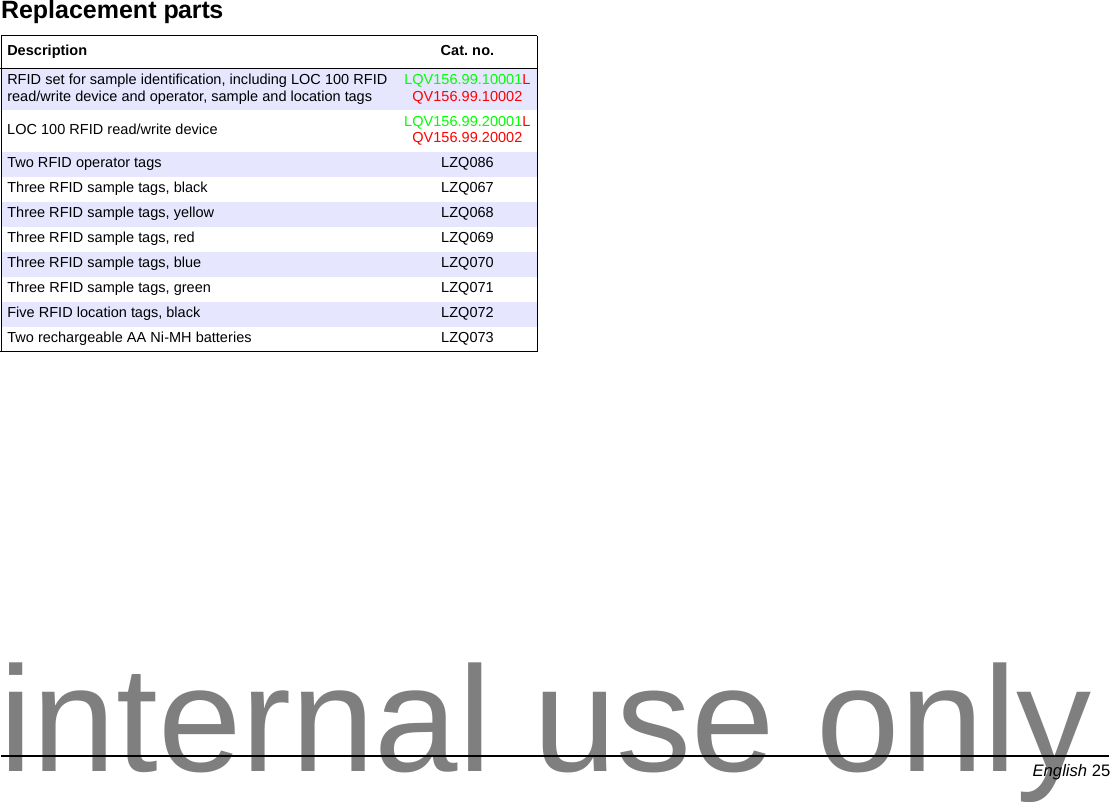
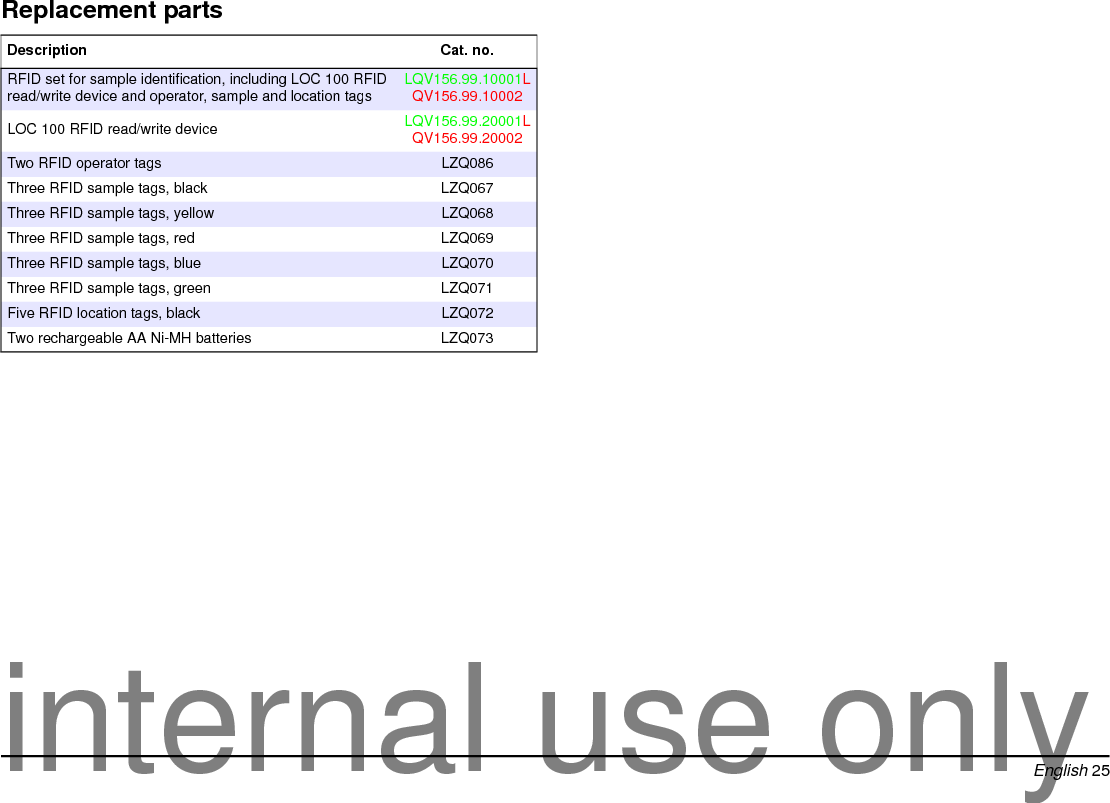
English 25Replacement partsDescription Cat. no.RFID set for sample identification, including LOC 100 RFID read/write device and operator, sample and location tags LQV156.99.10001LQV156.99.10002LOC 100 RFID read/write device LQV156.99.20001LQV156.99.20002Two RFID operator tags LZQ086Three RFID sample tags, black  LZQ067Three RFID sample tags, yellow LZQ068Three RFID sample tags, red LZQ069Three RFID sample tags, blue LZQ070Three RFID sample tags, green LZQ071Five RFID location tags, black LZQ072Two rechargeable AA Ni-MH batteries LZQ073internal use only
English 26internal use only
www.hach.com www.hach-lange.com© HACH Company-LANGE GmbH, 2011. All rights reserved. Printed in Germanyinternal use only

Navigation menu