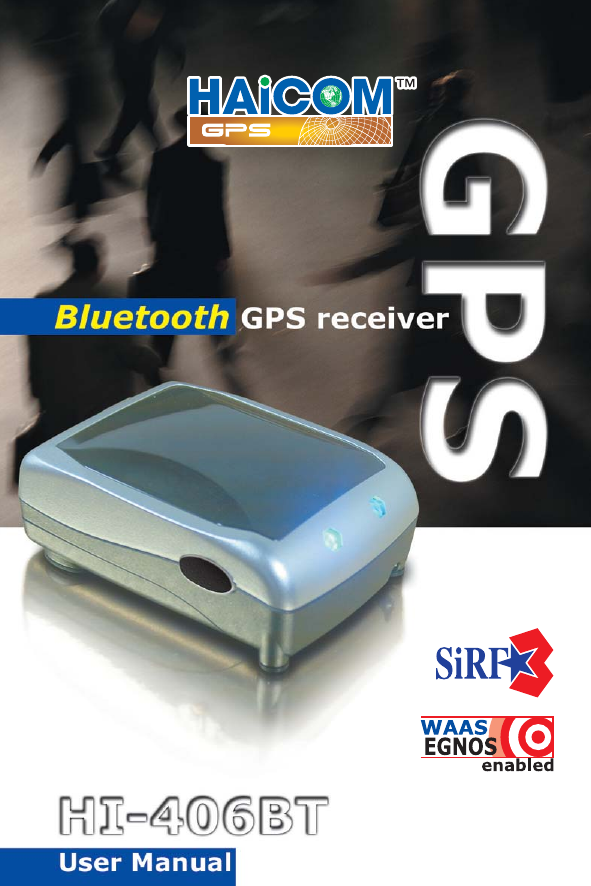
HAICOM Electronics HI406B Bluetooth GPS receiver User Manual Exhibit E User Manual Part 1 pd

HAICOM Electronics Corp. Bluetooth GPS receiver Exhibit E User Manual Part 1 pd

User manual

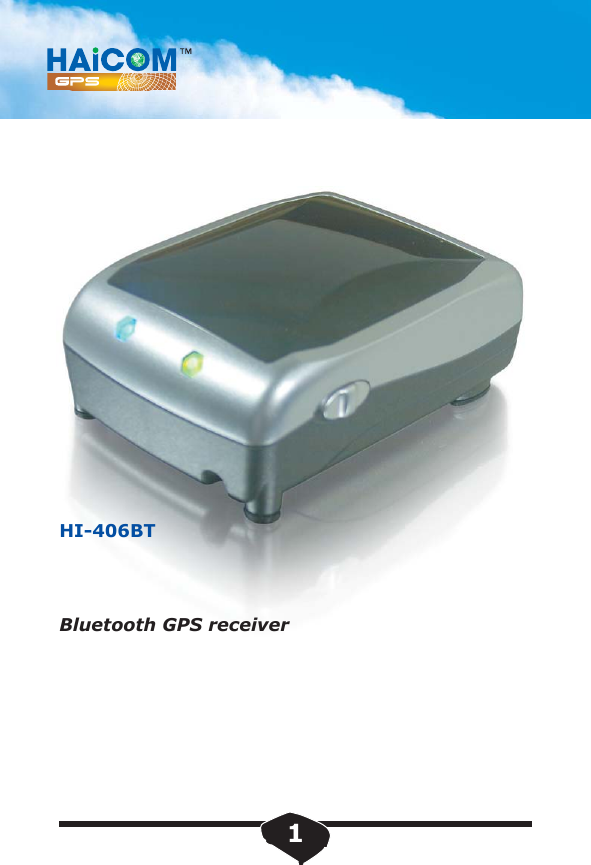
HI-406BTBluetooth GPS receiver 1
Table of Contents1.1 Overview1.2 Main Features2.1 Setting up: Bluetooth GPS receiver3. Dimensions4. Packaging4.1 Standard Packaging4.2 Optional Packaging5. System Specifications6. Get Connected; Installation Guide6.1 Laptop PC Installations 6.2 PDA Installations...........................................    3.....................................    4........    5..........................................  11.............................. 12............................... 15............................. 19........................  22.................................  252
1.1 OverviewIntroduction     HI-406BT is a GPS (Global Positioning System)receiver in wireless Bluetooth interface with build-in active antenna and extra digital compass functions. With HI-406BT, your mobile devices, such as, Smartphone, PocketPC, laptopPC, tabletPC, etc. can receive GPS data wirelessly and perform the GPS applications, such as, car navigation, personal navigation, route planning, tracking, etc.     Equipped with the most powerful and ultra high sensitive SiRF StarIII chip set, HI-406BT can get the 3D fix in very short time and under poor reception environment, such as in the middle of the car, next to the tall building, in your backpack, or pocket.3
1.2 Main Features:•  20 Channels "All-In-View" Tracking•  Position accuracy of 10 meters 2D RMS •  Cold/Warm/Hot Start Time: 42/38/1 Seconds (Signal Strength > 30 dB-HZ)•  Reacquisition Time: 0.1 seconds •  Support Standard NMEA-0183 at 19200 bps baud rate (Defined by customer 4800 up to 57600) •  Support Power Saving Mode •  Compatible with Bluetooth devices with Serial Port Profile (SPP)•  Superior Sensitivity for Urban Canyon and FoliageEnvironment•  Ultra small, sleek, and lightweight design easily fits in your hand •  Li-polymer battery lasts for more than 8 hours of use in connection4
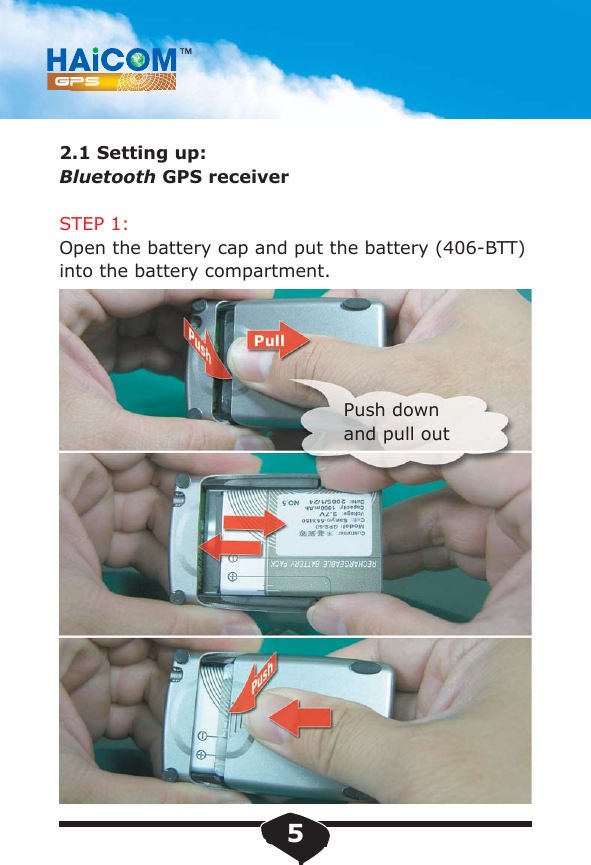
2.1 Setting up:Bluetooth GPS receiverSTEP 1:Open the battery cap and put the battery (406-BTT)into the battery compartment. Push down and pull out5
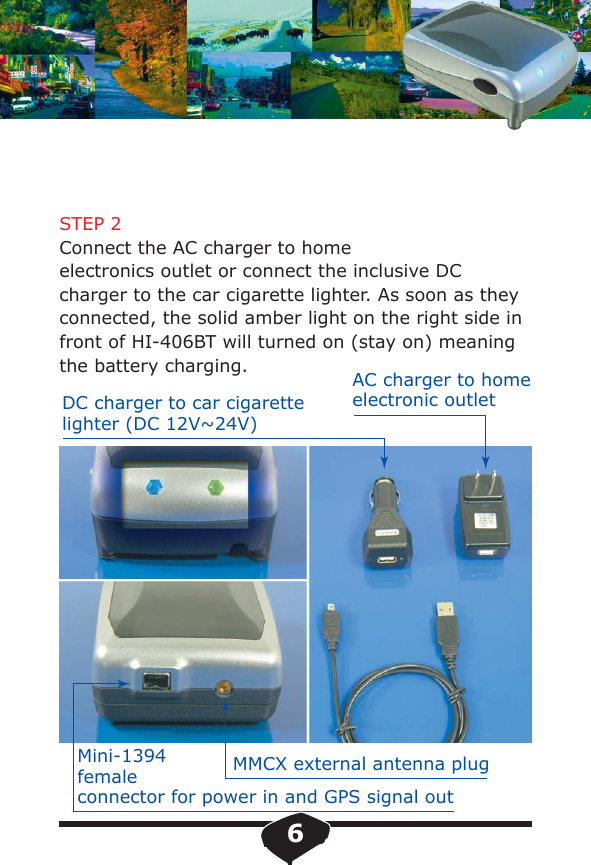
STEP 2Connect the AC charger to home electronics outlet or connect the inclusive DC charger to the car cigarette lighter. As soon as they connected, the solid amber light on the right side in front of HI-406BT will turned on (stay on) meaning the battery charging.DC charger to car cigarette lighter (DC 12V~24V)MMCX external antenna plugMini-1394femaleconnector for power in and GPS signal outAC charger to home electronic outlet6
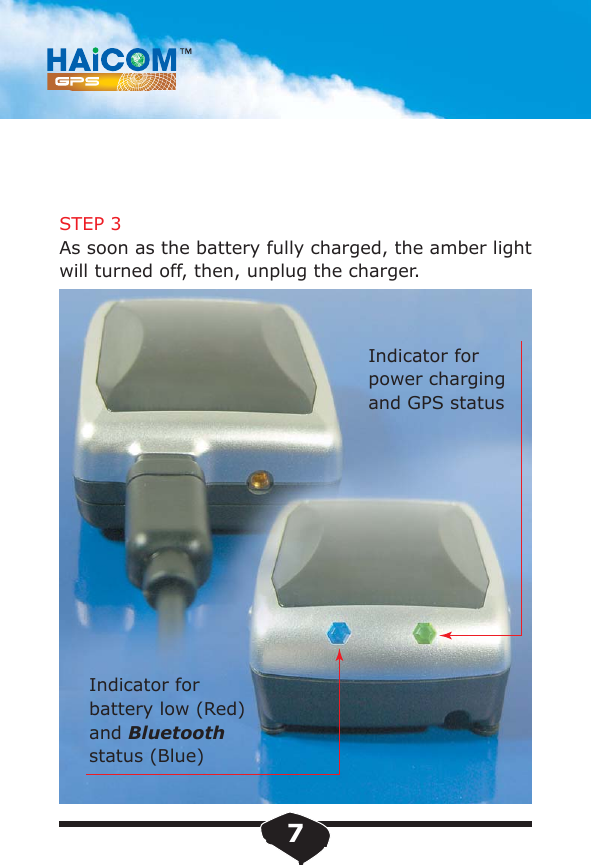
STEP 3As soon as the battery fully charged, the amber light will turned off, then, unplug the charger.Indicator for battery low (Red)and Bluetoothstatus (Blue)Indicator for power charging and GPS status7
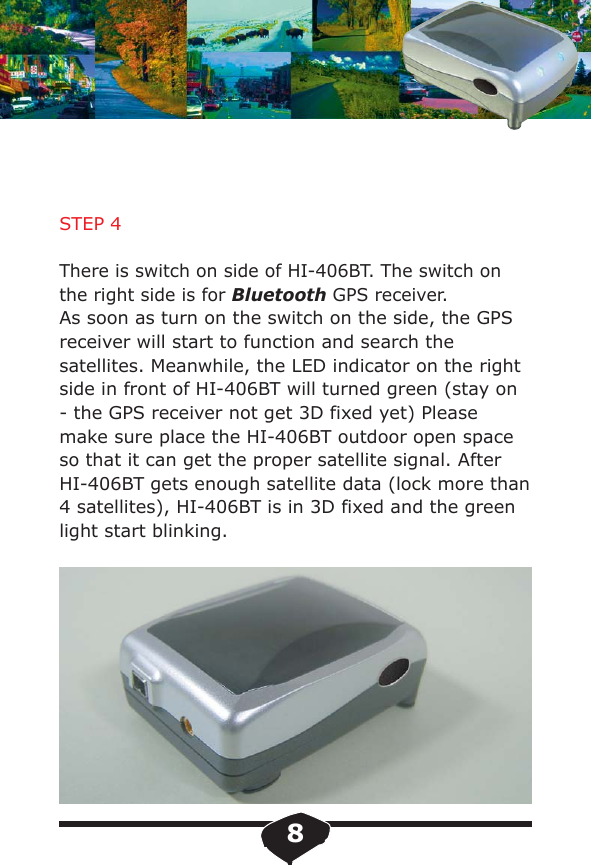
STEP 4There is switch on side of HI-406BT. The switch on the right side is for Bluetooth GPS receiver.As soon as turn on the switch on the side, the GPS receiver will start to function and search the satellites. Meanwhile, the LED indicator on the right side in front of HI-406BT will turned green (stay on - the GPS receiver not get 3D fixed yet) Please make sure place the HI-406BT outdoor open space so that it can get the proper satellite signal. After HI-406BT gets enough satellite data (lock more than 4 satellites), HI-406BT is in 3D fixed and the green light start blinking.8
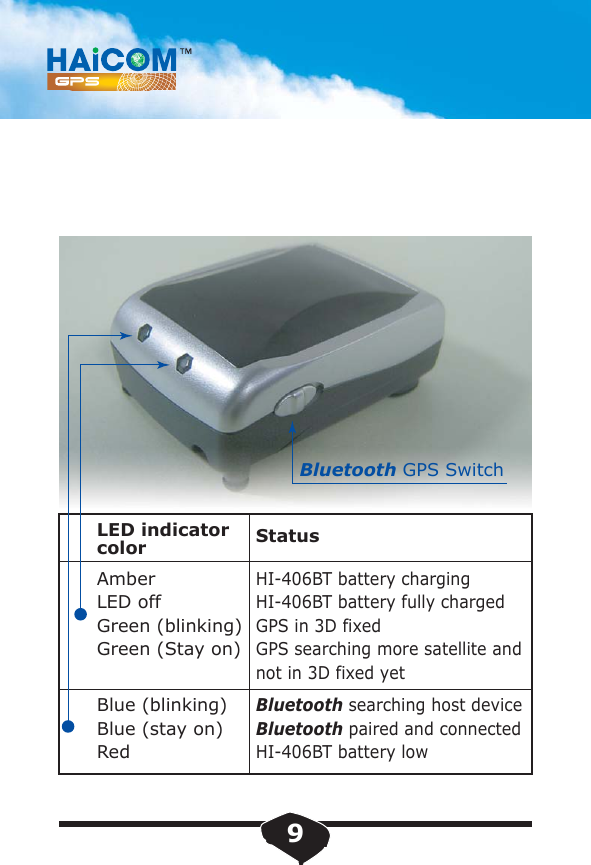
LED indicator color StatusAmberLED offGreen (blinking)Green (Stay on)HI-406BT battery chargingHI-406BT battery fully chargedGPS in 3D fixedGPS searching more satellite and not in 3D fixed yetBlue (blinking)Blue (stay on)RedBluetooth searching host deviceBluetooth paired and connectedHI-406BT battery lowBluetooth GPS Switch9
STEP 5:As soon as turn on the switch on the right side, the Bluetooth will also start to function and searching. The blue light on the left side in front of HI-406BTwill turned on (Blinking) meaning the Bluetooth issearching the host device and not get paired yet.Please consult the Bluetooth step by step connection guide from this manual on section. The pin code is " 0000 " when asked the pin code. After the Bluetooth paired and connected, the blue light will stay on. STEP 6:Open the mapping software from your mobile device, select the corresponding COM port and start GPS.STEP 7:Enjoy the state of the art wireless GPS navigation.10
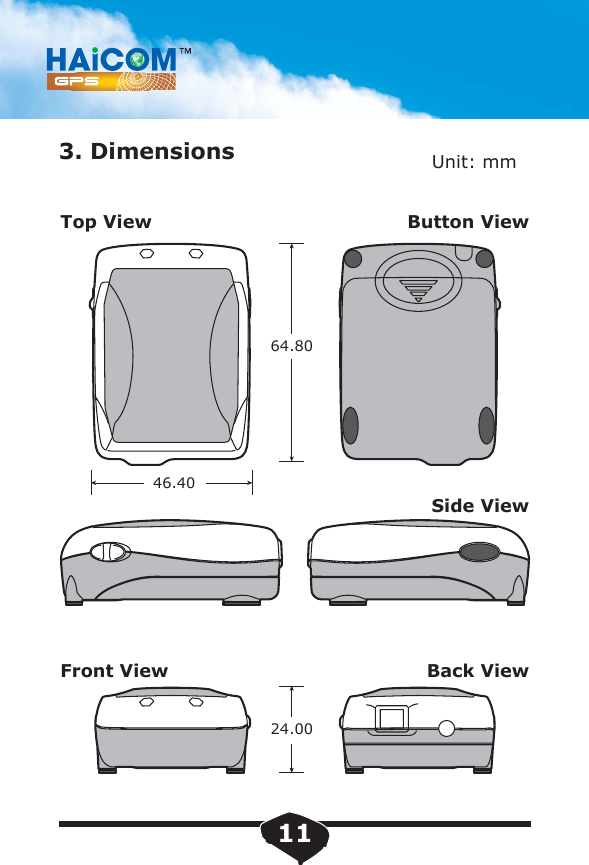
3. Dimensions Unit: mm46.4064.8024.00Top ViewFront ViewButton ViewSide ViewBack View11
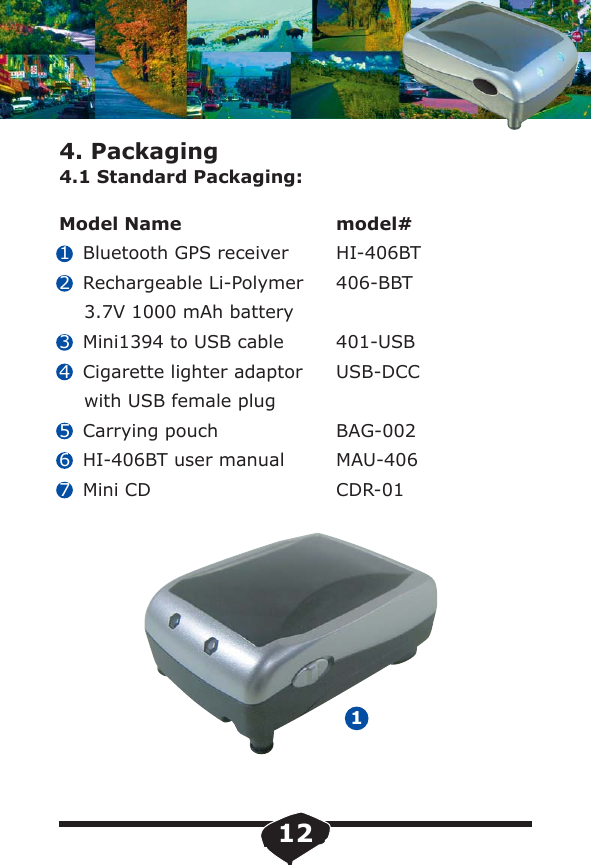
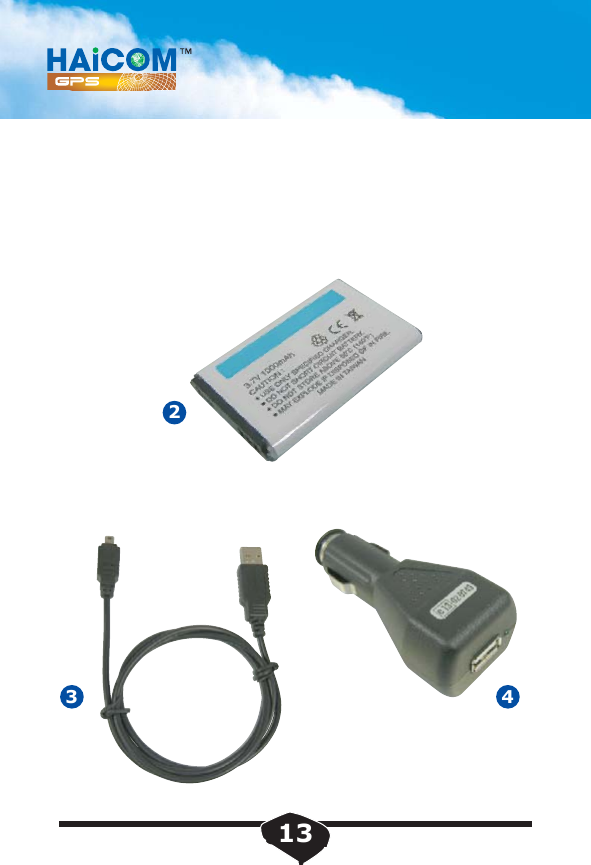
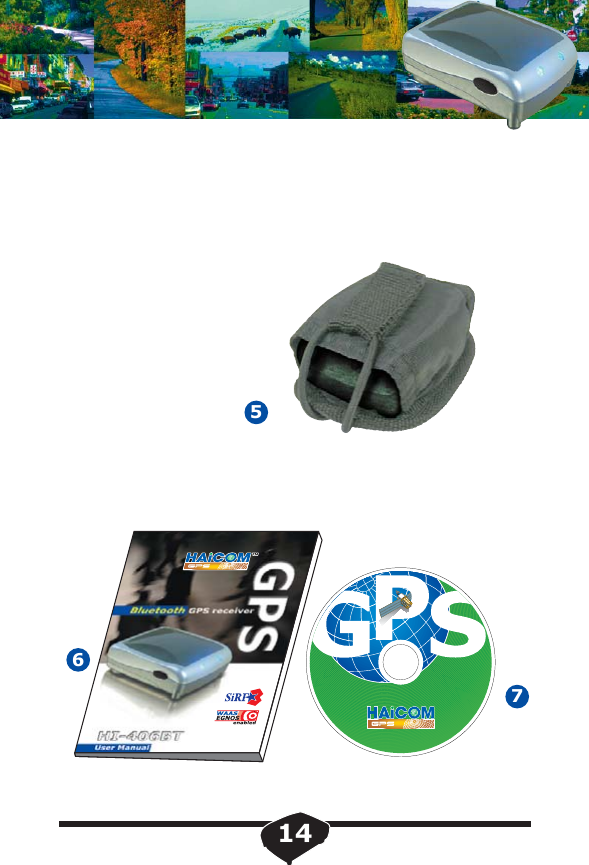
4. Packaging4.1 Standard Packaging:Model Name1Bluetooth GPS receiver2Rechargeable Li-Polymer    3.7V 1000 mAh battery3Mini1394 to USB cable4Cigarette lighter adaptor     with USB female plug5Carrying pouch6HI-406BT user manual7Mini CD1model#HI-406BT406-BBT401-USBUSB-DCCBAG-002MAU-406CDR-0112
23413
57614
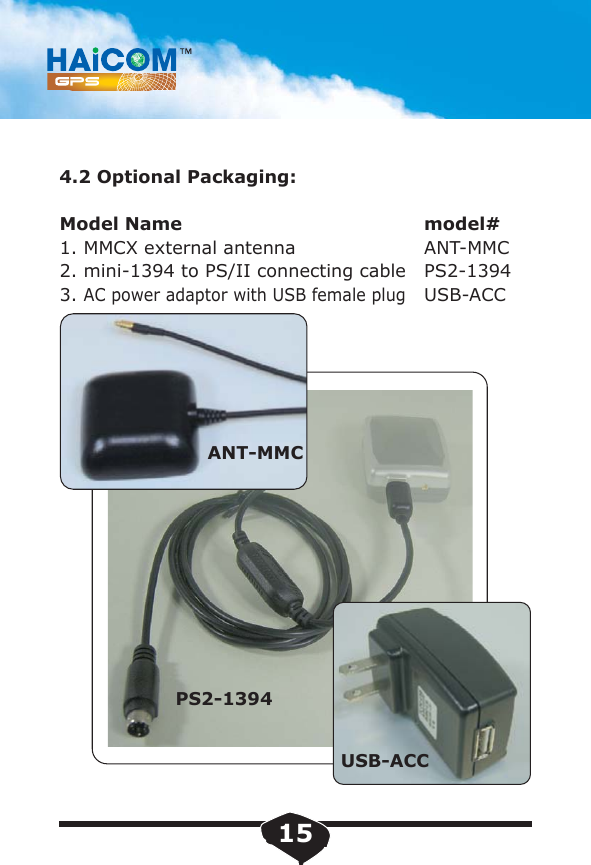
4.2 Optional Packaging:Model Name1. MMCX external antenna2. mini-1394 to PS/II connecting cable3.AC power adaptor with USB female plugmodel#ANT-MMCPS2-1394USB-ACCPS2-1394ANT-MMCUSB-ACC15
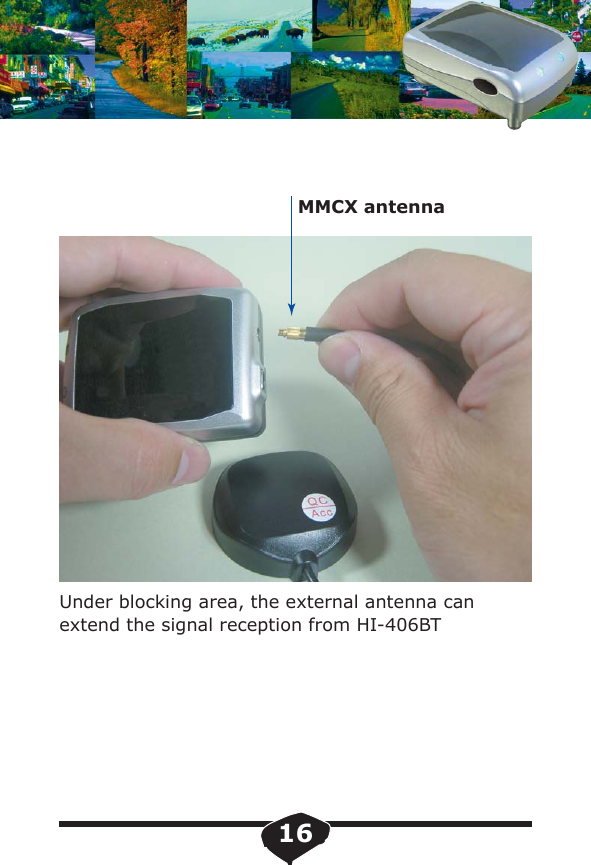
Under blocking area, the external antenna can extend the signal reception from HI-406BTMMCX antenna16
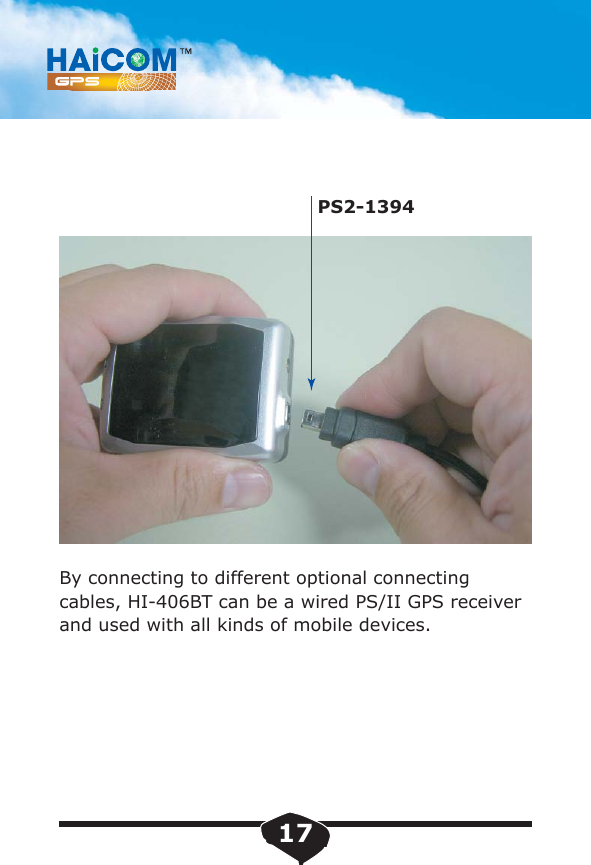
By connecting to different optional connecting cables, HI-406BT can be a wired PS/II GPS receiverand used with all kinds of mobile devices.PS2-139417
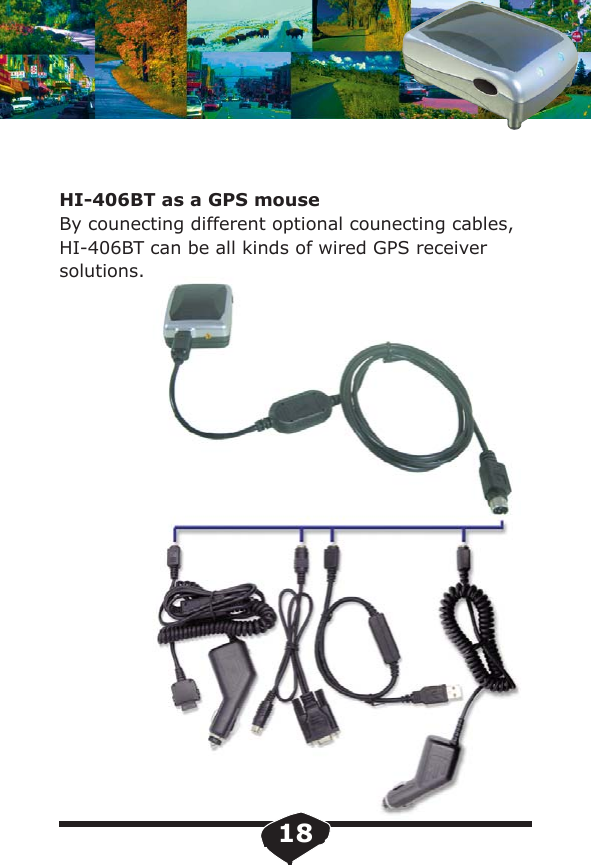
HI-406BT as a GPS mouseBy counecting different optional counecting cables, HI-406BT can be all kinds of wired GPS receiversolutions.18
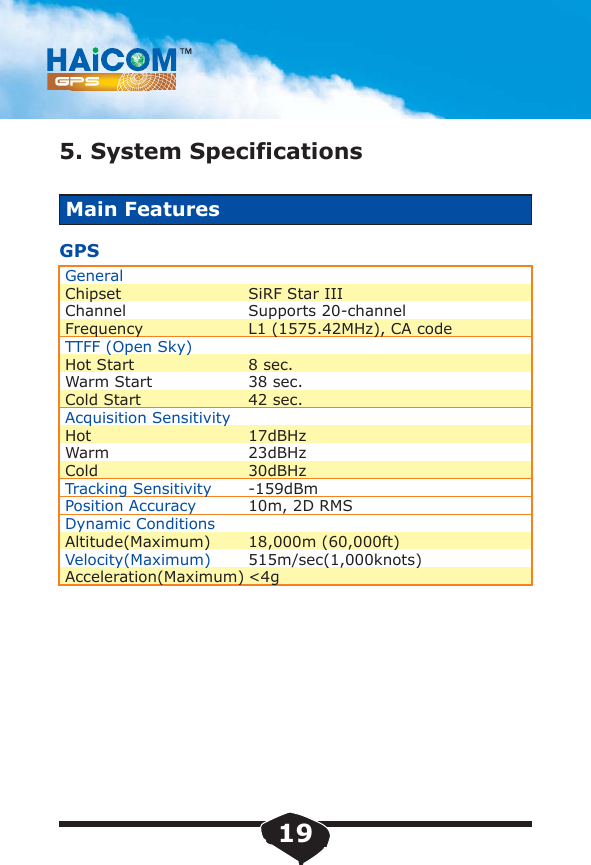
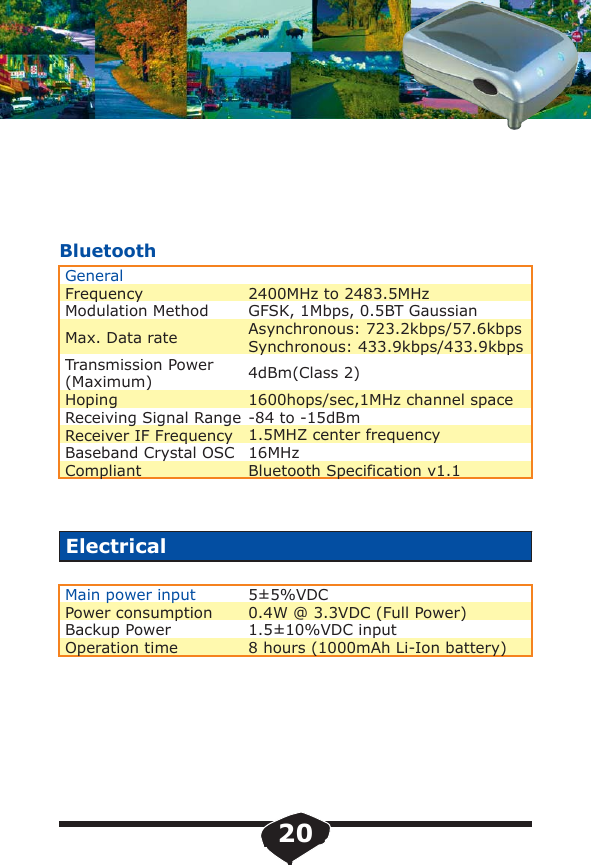
5. System SpecificationsMain FeaturesGPSGeneralChipsetChannelFrequencyTTFF (Open Sky)Hot StartWarm StartCold StartAcquisition SensitivityHotWarmColdTracking SensitivityPosition AccuracyDynamic ConditionsAltitude(Maximum)Velocity(Maximum)Acceleration(Maximum)SiRF Star IIISupports 20-channelL1 (1575.42MHz), CA code8 sec.38 sec.42 sec.17dBHz23dBHz30dBHz-159dBm10m, 2D RMS18,000m (60,000ft)515m/sec(1,000knots)<4g19
BluetoothGeneralFrequencyModulation MethodMax. Data rateTransmission Power(Maximum)HopingReceiving Signal RangeReceiver IF FrequencyBaseband Crystal OSCCompliant2400MHz to 2483.5MHzGFSK, 1Mbps, 0.5BT GaussianAsynchronous: 723.2kbps/57.6kbpsSynchronous: 433.9kbps/433.9kbps4dBm(Class 2)1600hops/sec,1MHz channel space-84 to -15dBm1.5MHZ center frequency16MHzBluetooth Specification v1.1ElectricalMain power inputPower consumptionBackup PowerOperation time5±5%VDC0.4W @ 3.3VDC (Full Power)1.5±10%VDC input8 hours (1000mAh Li-Ion battery)20
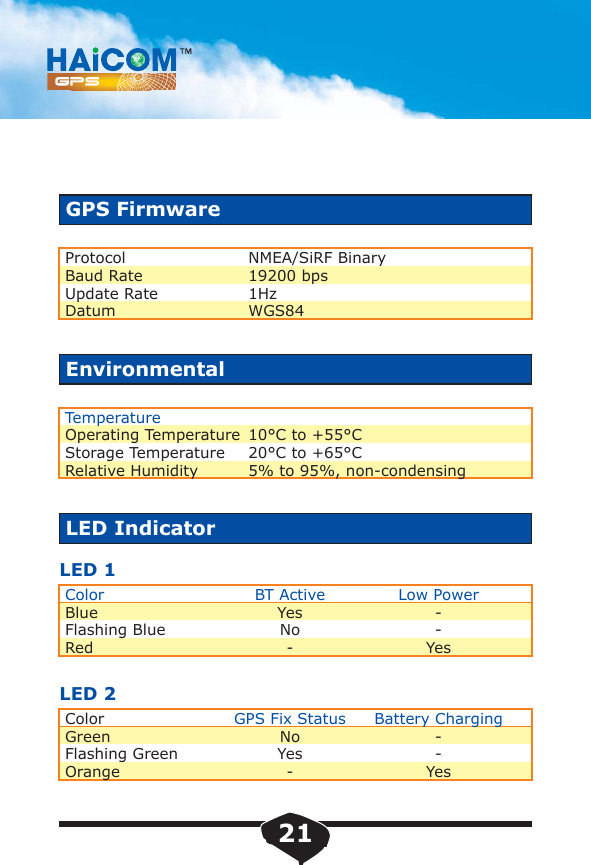
LED 1LED 2EnvironmentalLED IndicatorTemperatureOperating TemperatureStorage TemperatureRelative HumidityColorBlueFlashing BlueRedColorGreenFlashing GreenOrange10°C to +55°C20°C to +65°C5% to 95%, non-condensingBT ActiveYesNo-GPS Fix StatusNoYes-Low Power--YesBattery Charging--YesGPS FirmwareProtocolBaud RateUpdate RateDatumNMEA/SiRF Binary19200 bps1HzWGS8421
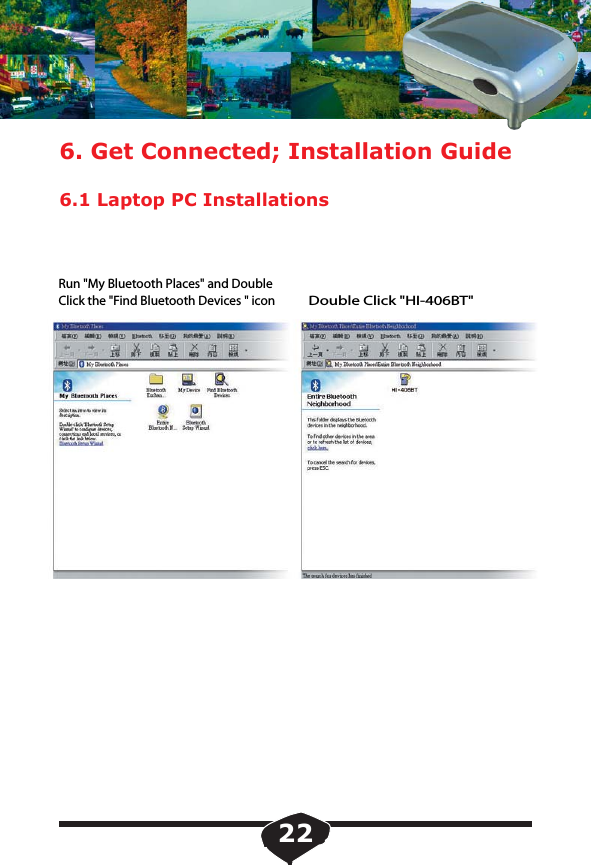
6. Get Connected; Installation Guide6.1 Laptop PC InstallationsRun "My Bluetooth Places" and DoubleClick the "Find Bluetooth Devices " iconDouble Click "HI-406BT"22
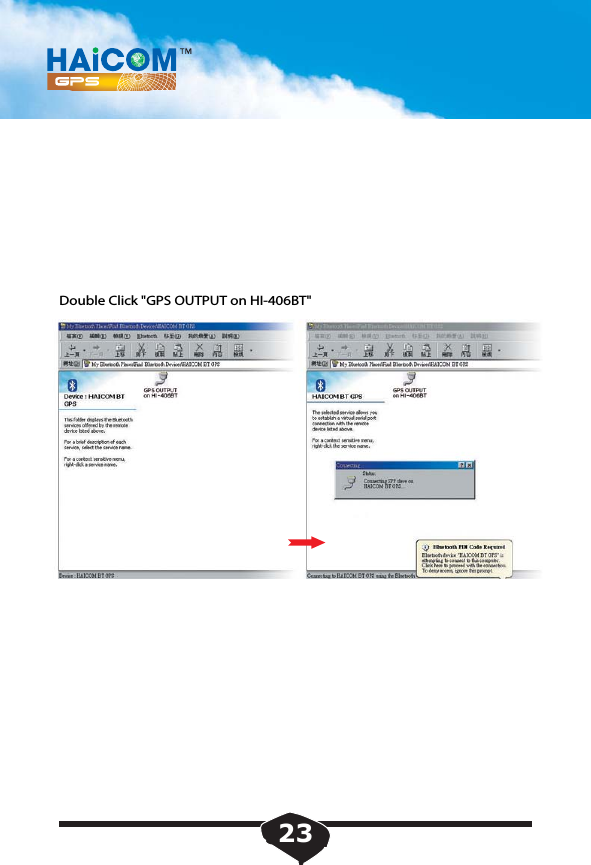
Double Click "GPS OUTPUT on HI-406BT"23
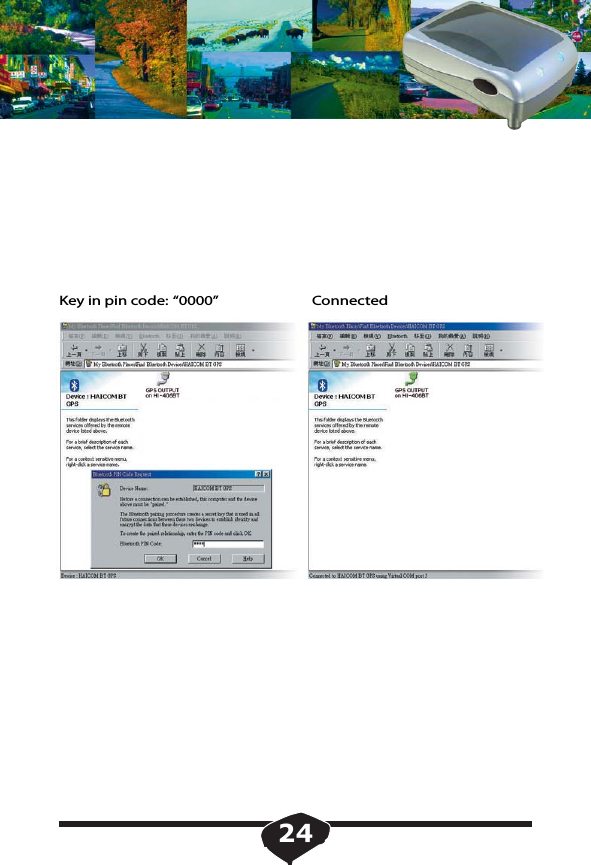
Key in pin code: “0000” Connected24
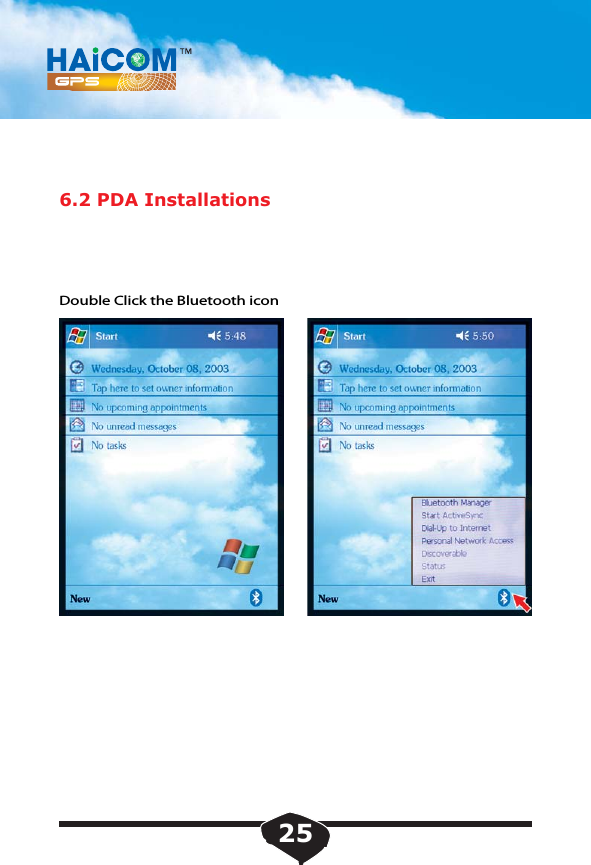
6.2 PDA InstallationsDouble Click the Bluetooth icon25
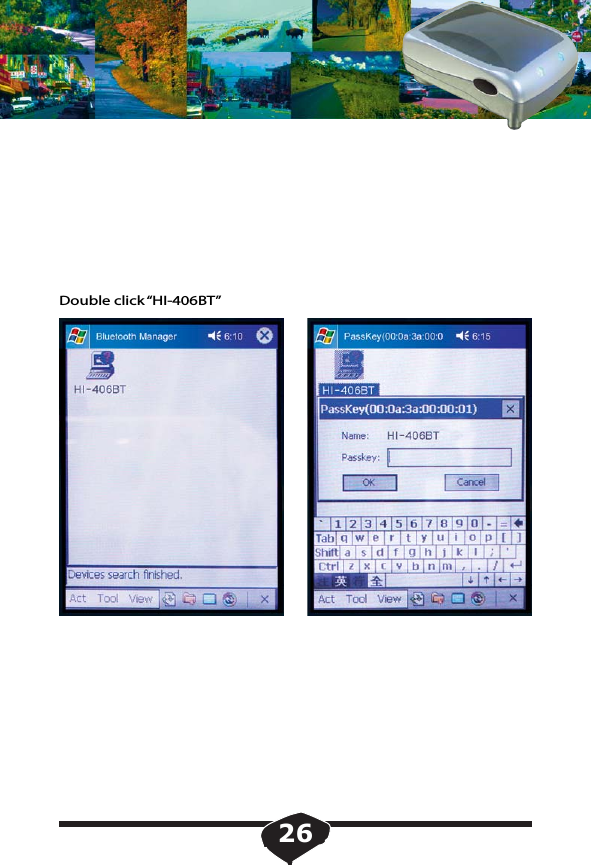
Double click “HI-406BT”26
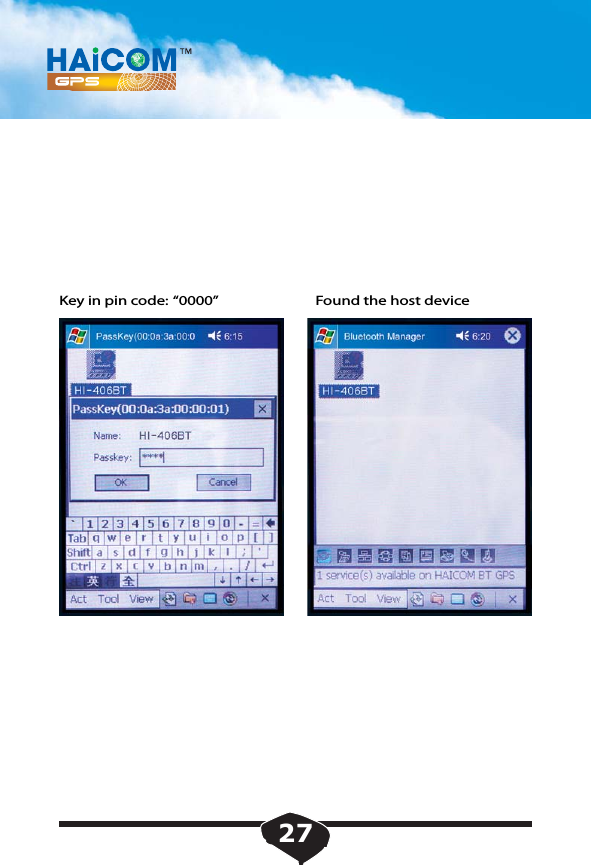
Key in pin code: “0000”  Found the host device27
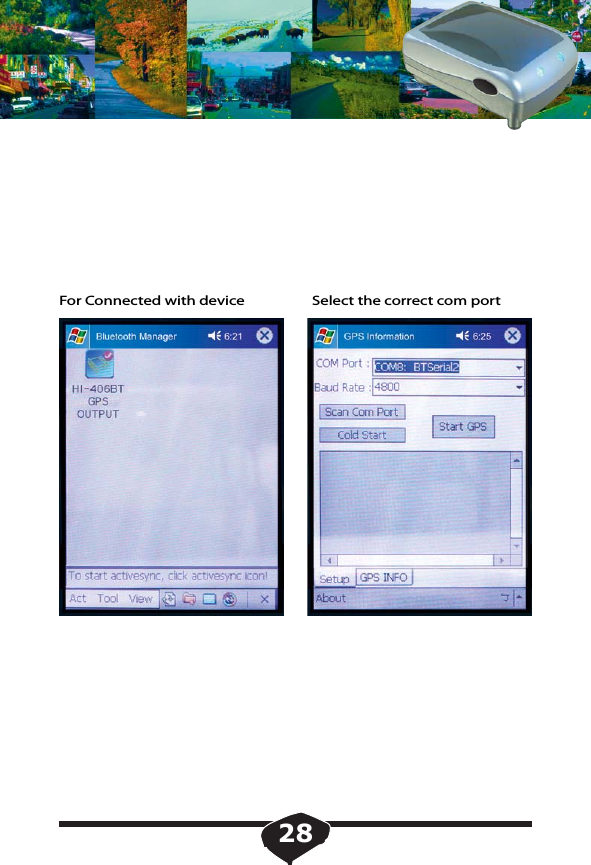
For Connected with device Select the correct com port28
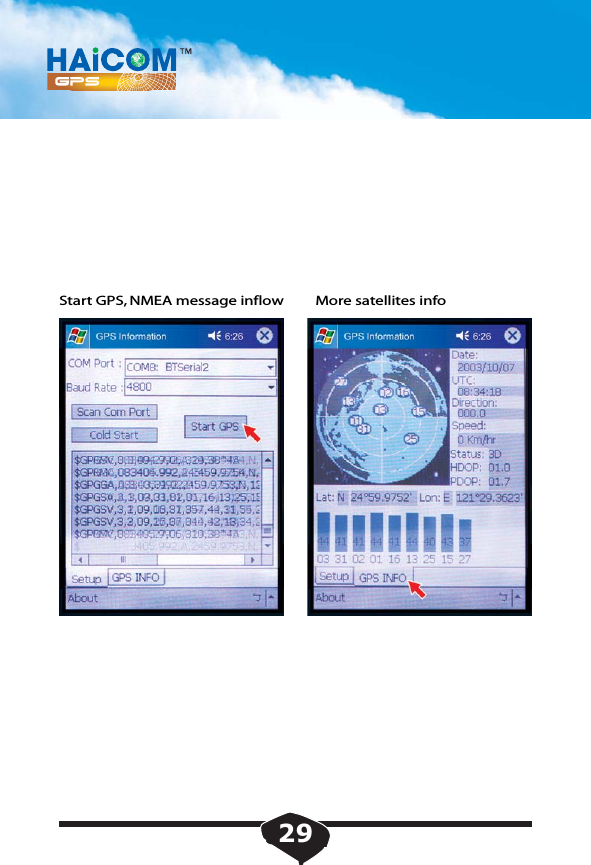
Start GPS, NMEA message inflow  More satellites info29
30Notice : The changes or modifications not expressly approved by the party responsible for compliance could void the user’s authority to operate the equipment.IMPORTANT NOTE: To comply with the FCC RF exposure compliance requirements, no change to the antenna or the device is permitted. Any change to the antenna or the device could result in the device exceeding the RF exposure requirements and void user’s authority to operate the device.The antenna(s) used for this transmitter must not be co-located or operating in conjunction with any other antenna or transmitter.
                                   FCC INFORMATIONThe Federal Communication Commission Radio Frequency InterferenceStatement includes the following paragraph:The equipment has been tested and found to comply with the limits for a Class B Digital Device, pursuant to part 15 of the FCC Rules.  These limits are designed to provide reasonable protection against harmful interference in a residential installation. This equipment generates, uses and can radiate radio frequency energy and, if not installed and used in accordance with the instruction, may cause harmful interference to radio communication.  However, there is no grantee that interference will not occur in a particular installation.  If this equipment dose cause harmful interference to radio or television reception, which can be determined by  turning the equipment off and on , the user is encouraged to try to correct the interference by one or more of the following measures:--Reorient or relocate the receiving antenna.--Increase the separation between the equipment and receiver.--Connect the equipment into an outlet on a circuit different from that to which the   receiver is connected.--Consult the dealer or an experienced radio/TV technician for help.The user should not modify or change this equipment without written approval form HAICOM ELECTRONICS CORP. Modification could void authority to use this equipment.

Navigation menu