HAITIAN ELECTRONIC TECHNOLOGY HT-860 Wireless Microphone User Manual

HAITIAN ELECTRONIC TECHNOLOGY CO., LTD. Wireless Microphone Users Manual

Users Manual

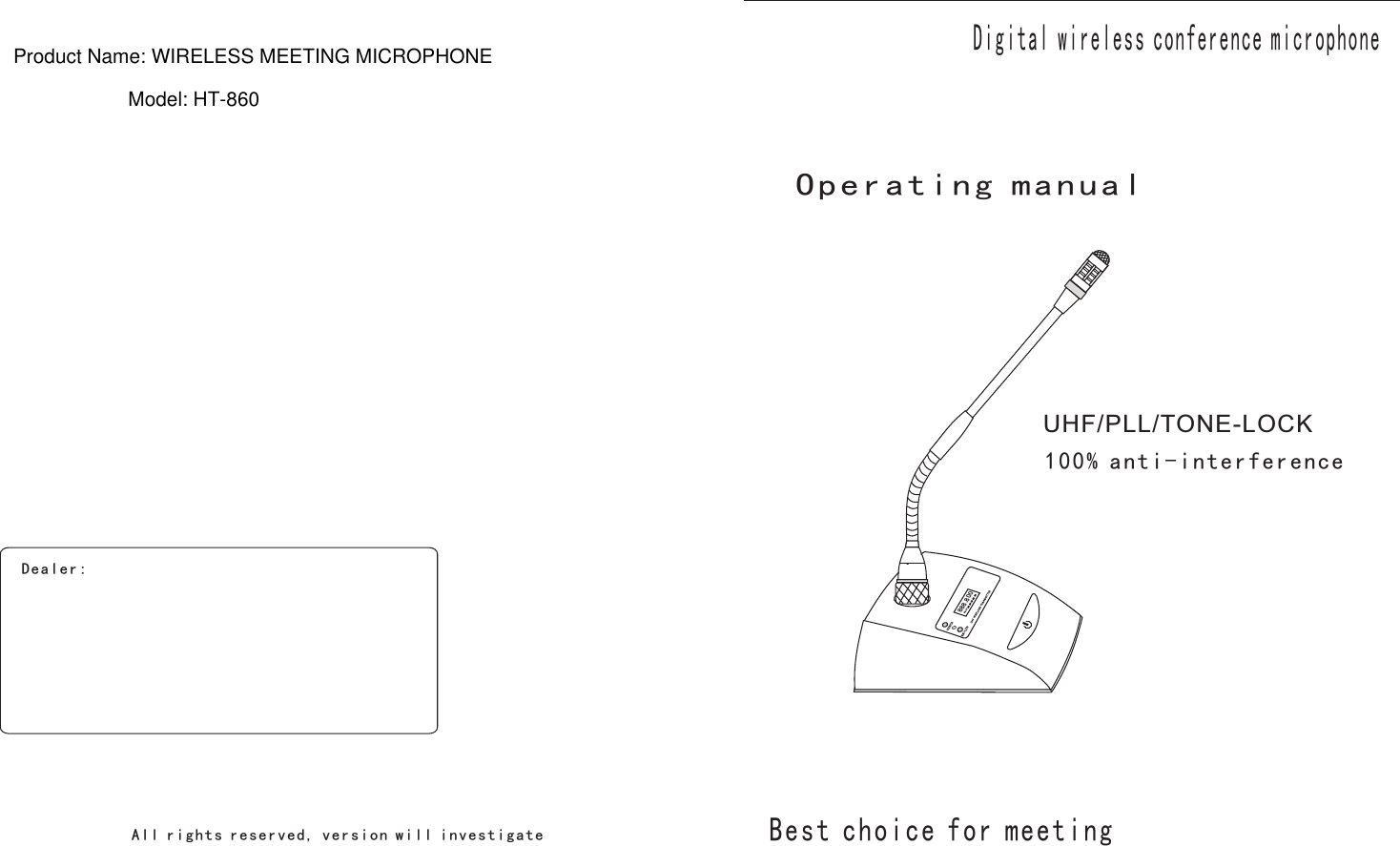
UHF/PLL/TONE-LOCK  Digital wireless conference microphone100% anti-interferenceOperating manualBe s t ch oi c e fo r me e ti ngDe a ler :Al l r igh t s rese r ved , v er s i o n w i ll i n v e st ig a t e 888.800BATTProduct Name: WIRELESS MEETING MICROPHONEModel: HT-860
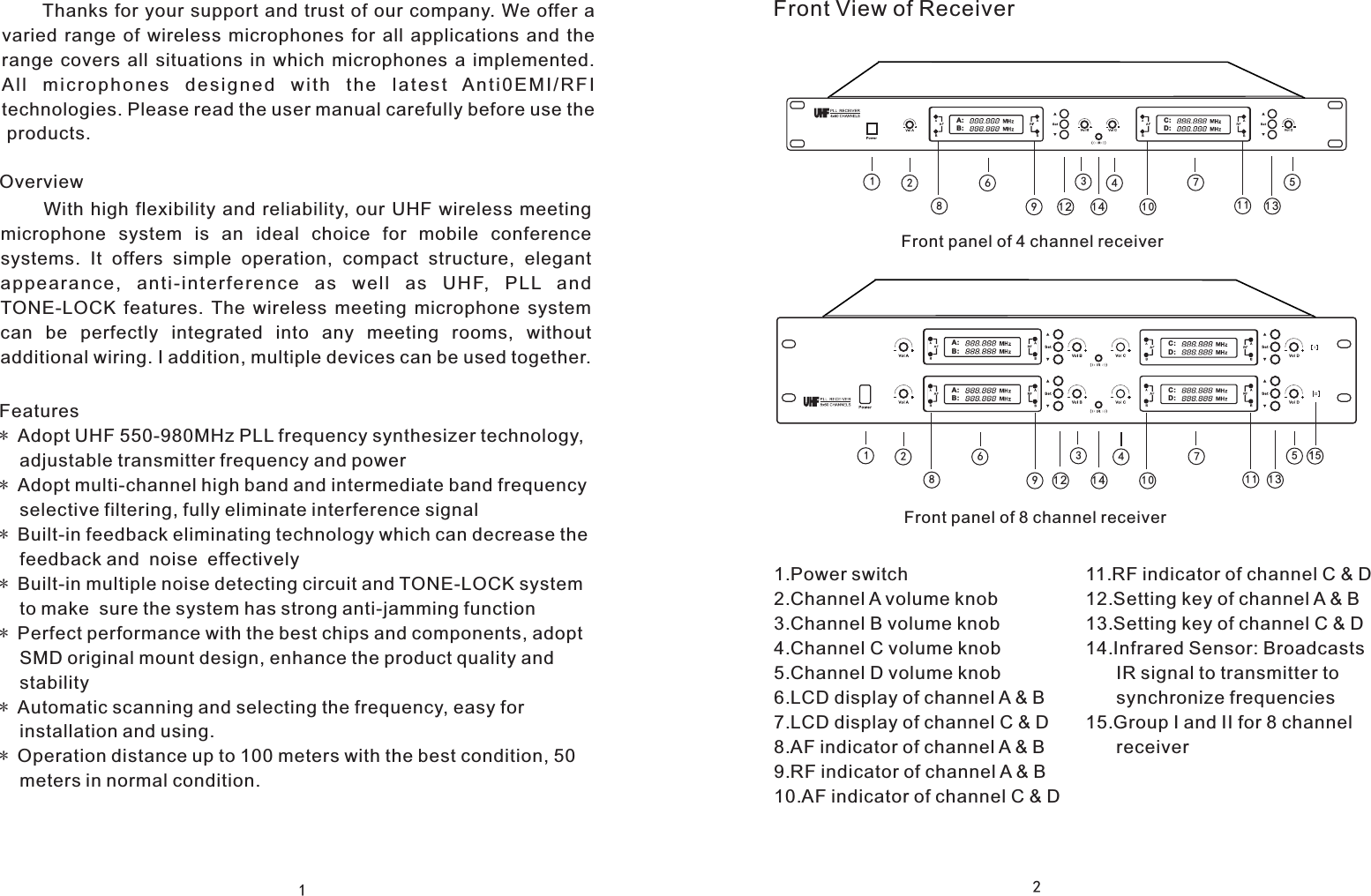
Front View of Receiver2C:D:A:B:A:B:C:D:10128911 131234567141510128911 131234567A:B:C:D:14Front panel of 4 channel receiverFront panel of 8 channel receiver1.Power switch2.Channel A volume knob3.Channel B volume knob4.Channel C volume knob5.Channel D volume knob6.LCD display of channel A & B7.LCD display of channel C & D8.AF indicator of channel A & B9.RF indicator of channel A & B10.AF indicator of channel C & D11.RF indicator of channel C & D12.Setting key of channel A & B13.Setting key of channel C & D14.Infrared Sensor: Broadcasts       IR signal to transmitter to       synchronize frequencies15.Group I and II for 8 channel       receiver1             Features* Adopt UHF 550-980MHz PLL frequency synthesizer technology,     adjustable transmitter frequency and power* Adopt multi-channel high band and intermediate band frequency     selective filtering, fully eliminate interference signal* Built-in feedback eliminating technology which can decrease the    feedback and  noise  effectively* Built-in multiple noise detecting circuit and TONE-LOCK system     to make  sure the system has strong anti-jamming function* Perfect performance with the best chips and components, adopt     SMD original mount design, enhance the product quality and     stability* Automatic scanning and selecting the frequency, easy for     installation and using.* Operation distance up to 100 meters with the best condition, 50     meters in normal condition.      Thanks for your support and trust of our company. We offer a varied  range  of  wireless  microphones  for  all  applications  and  the range  covers  all  situations  in  which  microphones  a  implemented. Al l  mi c ro p ho n es  d es i gn e d  w i t h  t h e  l a t e s t  An t i0 E MI / RF Itechnologies. Please read the user manual carefully before use the products.           With  high  flexibility  and reliability, our  UHF wireless  meeting microphone  system  is  an  ideal  choice  for  mobile  conference systems.  It  offers  simple  operation,  compact  structure,  elegant appearance ,  anti-interf e r ence  as  we l l  as  UHF,  PLL  and TONE-LOCK  features.  The  wireless  meeting  microphone  system can  be  perfectly  integrated  into  any  meeting  rooms,  withoutadditional wiring. I addition, multiple devices can be used together.Overview
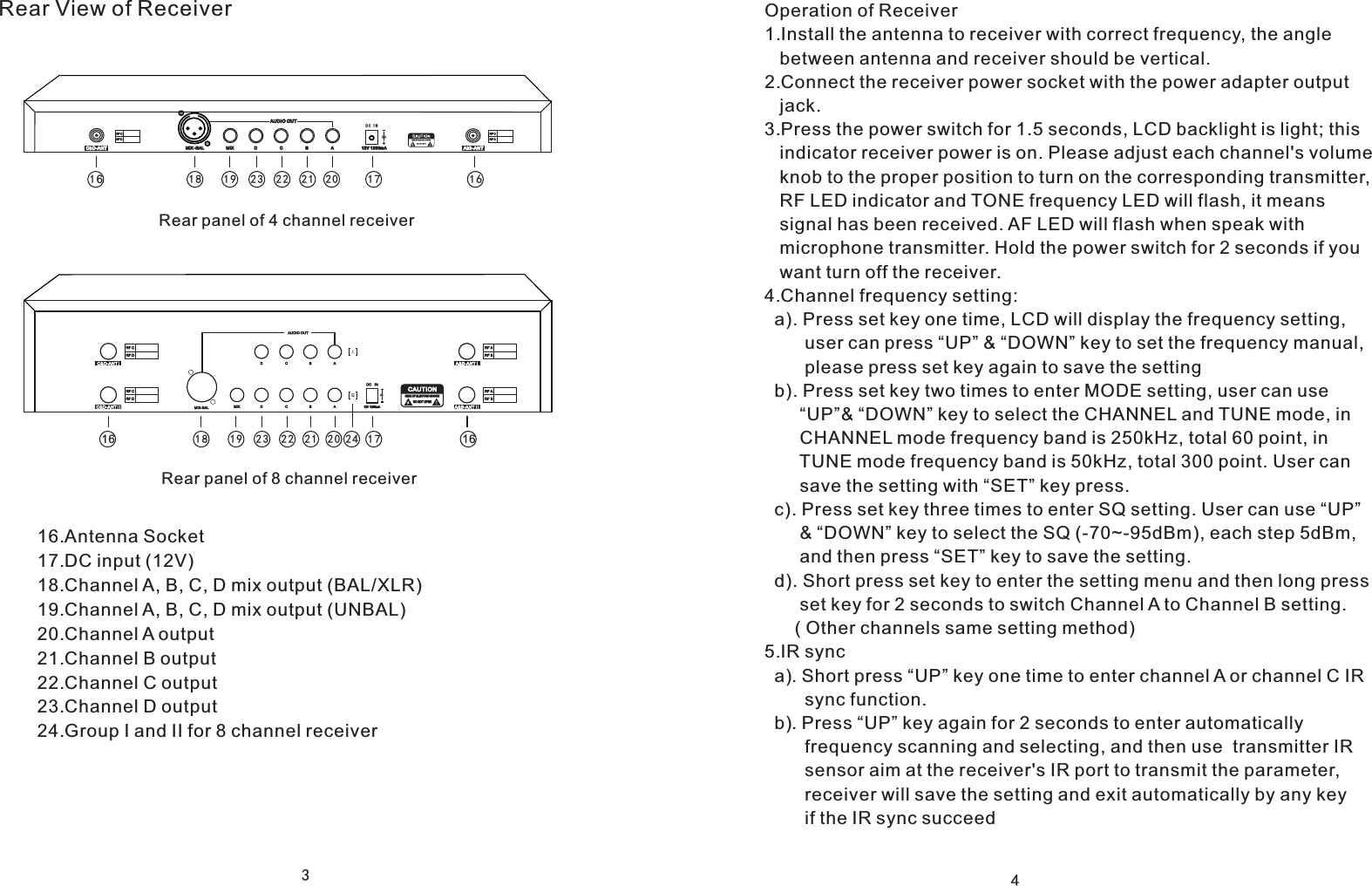
312V 1 200mA A&B-ANTC&D-AN T MIX  D  C  B  AAUDIO O UTMIX - BALDC I N16161718 1 9 2021222 316 161718 1 9 20212223 24Rear View of ReceiverRear panel of 4 channel receiverRear panel of 8 channel receiver16.Antenna Socket17.DC input (12V)18.Channel A, B, C, D mix output (BAL/XLR)19.Channel A, B, C, D mix output (UNBAL)20.Channel A output21.Channel B output22.Channel C output23.Channel D output24.Group I and II for 8 channel receiver4Operation of Receiver1.Install the antenna to receiver with correct frequency, the angle    between antenna and receiver should be vertical.2.Connect the receiver power socket with the power adapter output    jack.3.Press the power switch for 1.5 seconds, LCD backlight is light; this    indicator receiver power is on. Please adjust each channel's volume    knob to the proper position to turn on the corresponding transmitter,    RF LED indicator and TONE frequency LED will flash, it means    signal has been received. AF LED will flash when speak with    microphone transmitter. Hold the power switch for 2 seconds if you   want turn off the receiver.4.Channel frequency setting:  a). Press set key one time, LCD will display the frequency setting,         user can press “UP” & “DOWN” key to set the frequency manual,         please press set key again to save the setting  b). Press set key two times to enter MODE setting, user can use        “UP”& “DOWN” key to select the CHANNEL and TUNE mode, in        CHANNEL mode frequency band is 250kHz, total 60 point, in        TUNE mode frequency band is 50kHz, total 300 point. User can        save the setting with “SET” key press.  c). Press set key three times to enter SQ setting. User can use “UP”       & “DOWN” key to select the SQ (-70~-95dBm), each step 5dBm,        and then press “SET” key to save the setting.  d). Short press set key to enter the setting menu and then long press       set key for 2 seconds to switch Channel A to Channel B setting.       ( Other channels same setting method)5.IR sync   a). Short press “UP” key one time to enter channel A or channel C IR        sync function.  b). Press “UP” key again for 2 seconds to enter automatically         frequency scanning and selecting, and then use  transmitter IR        sensor aim at the receiver's IR port to transmit the parameter,         receiver will save the setting and exit automatically by any key         if the IR sync succeed
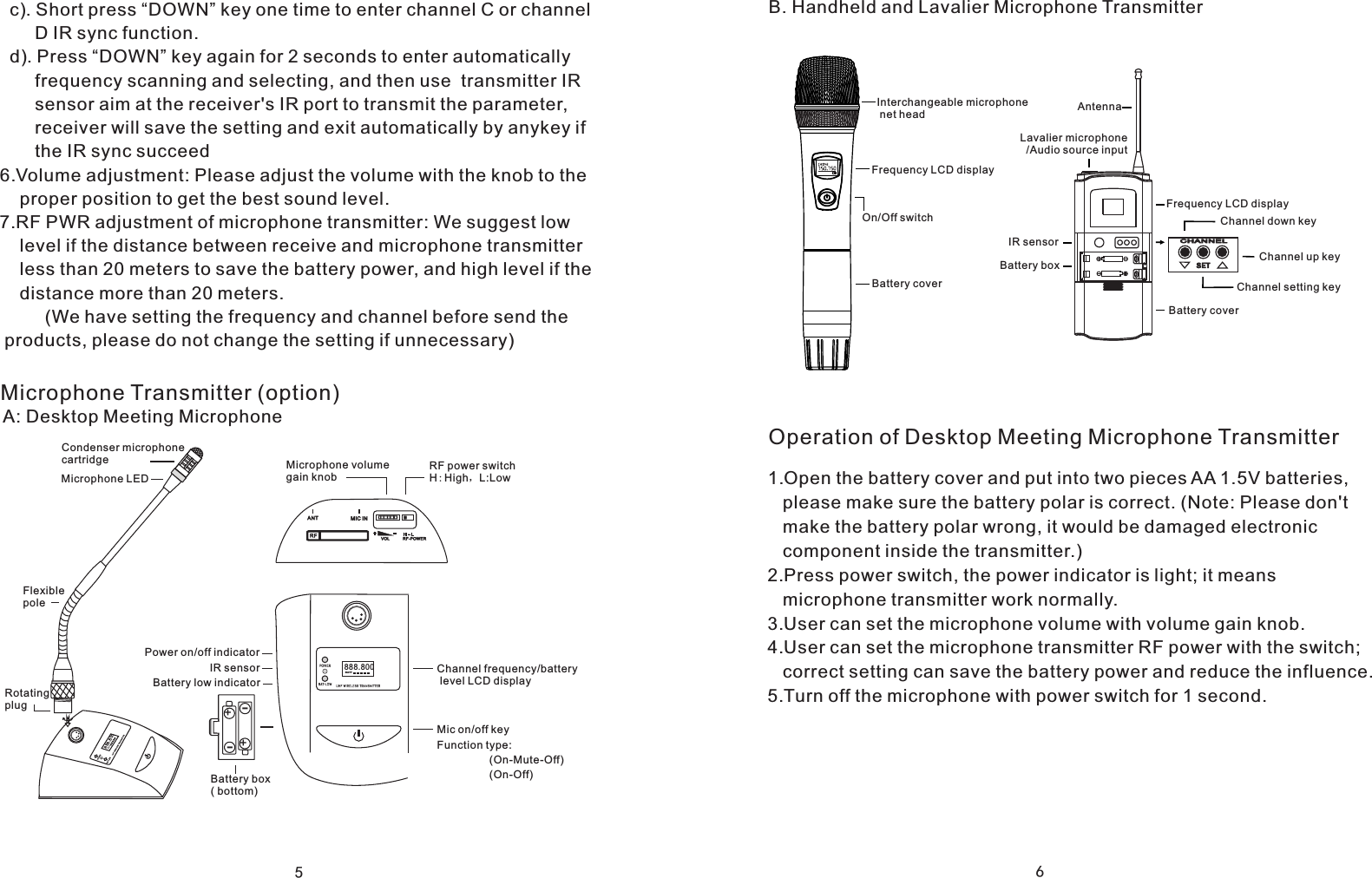
5Microphone Transmitter (option)A: Desktop Meeting Microphone++--Microphone volume gain knobRF power switchH:High,L:LowChannel frequency/battery level LCD display888.800BATTIR sensorBattery low indicatorBattery box ( bottom)888.800BATTRotating plugCondenser microphone cartridgeMicrophone LEDFlexible polePower on/off indicatorMic on/off keyFunction type:(On-Mute-Off)(On-Off)  c). Short press “DOWN” key one time to enter channel C or channel       D IR sync function.  d). Press “DOWN” key again for 2 seconds to enter automatically        frequency scanning and selecting, and then use  transmitter IR        sensor aim at the receiver's IR port to transmit the parameter,        receiver will save the setting and exit automatically by anykey if        the IR sync succeed6.Volume adjustment: Please adjust the volume with the knob to the     proper position to get the best sound level.7.RF PWR adjustment of microphone transmitter: We suggest low     level if the distance between receive and microphone transmitter     less than 20 meters to save the battery power, and high level if the     distance more than 20 meters.         (We have setting the frequency and channel before send the products, please do not change the setting if unnecessary)6Operation of Desktop Meeting Microphone TransmitterB. Handheld and Lavalier Microphone TransmitterInterchangeable microphone net headOn/Off switchFrequency LCD displayBattery coverLavalier microphone  /Audio source inputAntennaBattery coverFrequency LCD displayChannel setting keyChannel down keyChannel up keyCHANN ELSE TIR sensorBattery box1.Open the battery cover and put into two pieces AA 1.5V batteries,    please make sure the battery polar is correct. (Note: Please don't    make the battery polar wrong, it would be damaged electronic    component inside the transmitter.)2.Press power switch, the power indicator is light; it means    microphone transmitter work normally.3.User can set the microphone volume with volume gain knob.4.User can set the microphone transmitter RF power with the switch;    correct setting can save the battery power and reduce the influence.5.Turn off the microphone with power switch for 1 second.
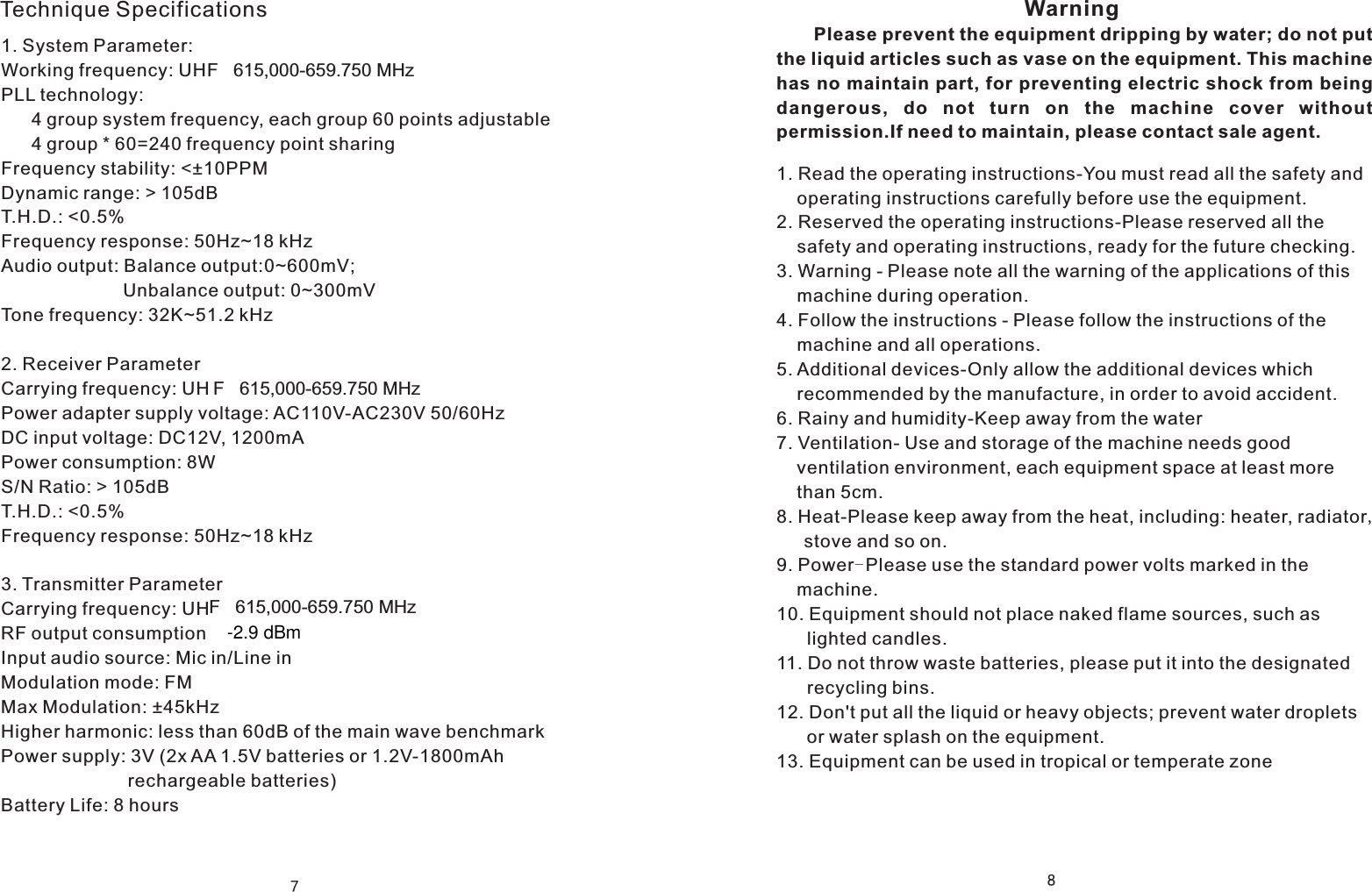
7Technique Specifications1. System Parameter:  Working frequency: UHF   615,000-659.750 MHzPLL technology:       4 group system frequency, each group 60 points adjustable      4 group * 60=240 frequency point sharingFrequency stability: <±10PPMDynamic range: > 105dBT.H.D.: <0.5%Frequency response: 50Hz~18 kHzAudio output: Balance output:0~600mV;                         Unbalance output: 0~300mVTone frequency: 32K~51.2 kHz            2. Receiver ParameterCarrying frequency: UHPower adapter supply voltage: AC110V-AC230V 50/60HzDC input voltage: DC12V, 1200mAPower consumption: 8WS/N Ratio: > 105dBT.H.D.: <0.5%Frequency response: 50Hz~18 kHz3. Transmitter ParameterCarrying frequency: UHRF output consumptionInput audio source: Mic in/Line inModulation mode: FMMax Modulation: ±45kHzHigher harmonic: less than 60dB of the main wave benchmarkPower supply: 3V (2x AA 1.5V batteries or 1.2V-1800mAh                          rechargeable batteries)Battery Life: 8 hours8                                                         Please prevent the equipment dripping by water; do not put the liquid articles such as vase on the equipment. This machinehas no maintain part, for preventing electric shock from being dangerous,  do  not  turn  on  the  machine  cover  without permission.If need to maintain, please contact sale agent.Warning1. Read the operating instructions-You must read all the safety and     operating instructions carefully before use the equipment.2. Reserved the operating instructions-Please reserved all the     safety and operating instructions, ready for the future checking.3. Warning - Please note all the warning of the applications of this     machine during operation. 4. Follow the instructions - Please follow the instructions of the     machine and all operations.5. Additional devices-Only allow the additional devices which     recommended by the manufacture, in order to avoid accident.6. Rainy and humidity-Keep away from the water7. Ventilation- Use and storage of the machine needs good     ventilation environment, each equipment space at least more     than 5cm.8. Heat-Please keep away from the heat, including: heater, radiator,   stove and so on.9. Power-Please use the standard power volts marked in the     machine.10. Equipment should not place naked flame sources, such as       lighted candles.11. Do not throw waste batteries, please put it into the designated       recycling bins.12. Don't put all the liquid or heavy objects; prevent water droplets       or water splash on the equipment.13. Equipment can be used in tropical or temperate zoneF   615,000-659.750 MHzF   615,000-659.750 MHz-2.9 dBm
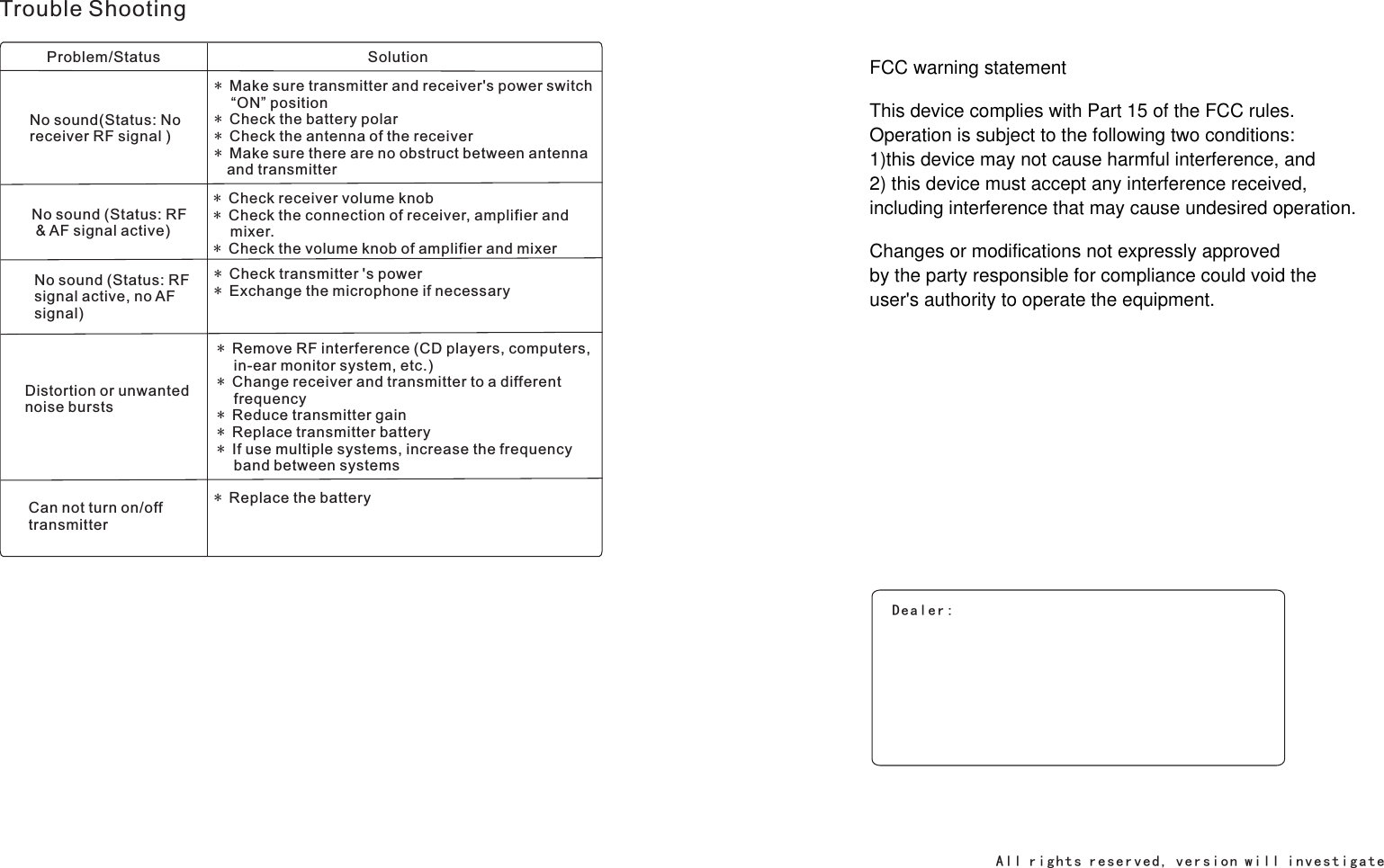
Trouble ShootingProblem/Status SolutionNo sound(Status: No receiver RF signal )* Make sure transmitter and receiver's power switch    “ON” position* Check the battery polar* Check the antenna of the receiver* Make sure there are no obstruct between antenna   and transmitterNo sound (Status: RF & AF signal active)* * Check the connection of receiver, amplifier and     mixer.* Check the volume knob of amplifier and mixerCheck receiver volume knob No sound (Status: RF signal active, no AF signal)* * Exchange the microphone if necessaryCheck transmitter 's powerDistortion or unwanted noise bursts*     in-ear monitor system, etc.)* Change receiver and transmitter to a different    frequency* Reduce transmitter gain* Replace transmitter battery* If use multiple systems, increase the frequency    band between systemsRemove RF interference (CD players, computers, Can not turn on/off transmitter* Replace the batteryDealer:Al l r i g h t s re s e r ve d, v e r s io n w i l l i n ve s t i ga te FCC warning statementThis device complies with Part 15 of the FCC rules. Operation is subject to the following two conditions: 1)this device may not cause harmful interference, and 2) this device must accept any interference received,including interference that may cause undesired operation.Changes or modifications not expressly approved by the party responsible for compliance could void theuser's authority to operate the equipment.

Navigation menu