HOSEOTELNET ATM200 Reflex Module User Manual ATM200 REV01
Hoseo Telnet Co., Ltd. Reflex Module ATM200 REV01
User Manual

Hoseo Telnet ReFLEX Module
[ User manual ]
Tel 02 ) 2659 - 7345
Fax 02 ) 3662 - 0973
http://www.hstelnet.com/
ReFLEX Module
1/13
User Manual
The ReFLEX Module
(ATM 200)

Hoseo Telnet ReFLEX Module
[ User manual ]
Tel 02 ) 2659 - 7345
Fax 02 ) 3662 - 0973
http://www.hstelnet.com/
ReFLEX Module
2/13
Content
1. Description
2. Outline and Function
2.1 Outline
2.2 Description of 14 pin Connector
2.3 Sub Board & Data Link Cable
2.4 Package
3. Configure the ReFLEX Module – PPS -
3.1 logon
3.2 List
3.3 Control
4. Message receiving and sending
4.1 ATM200
4.1.1 Message sending
4.1.2 Message receiving
HOW TO SET “REFLEX” TWO WAY RADIO MODULE.
Hoseo Telnet ReFLEX Module
[ User manual ]
Tel 02 ) 2659 - 7345
Fax 02 ) 3662 - 0973
http://www.hstelnet.com/
ReFLEX Module
3/13
1. Description
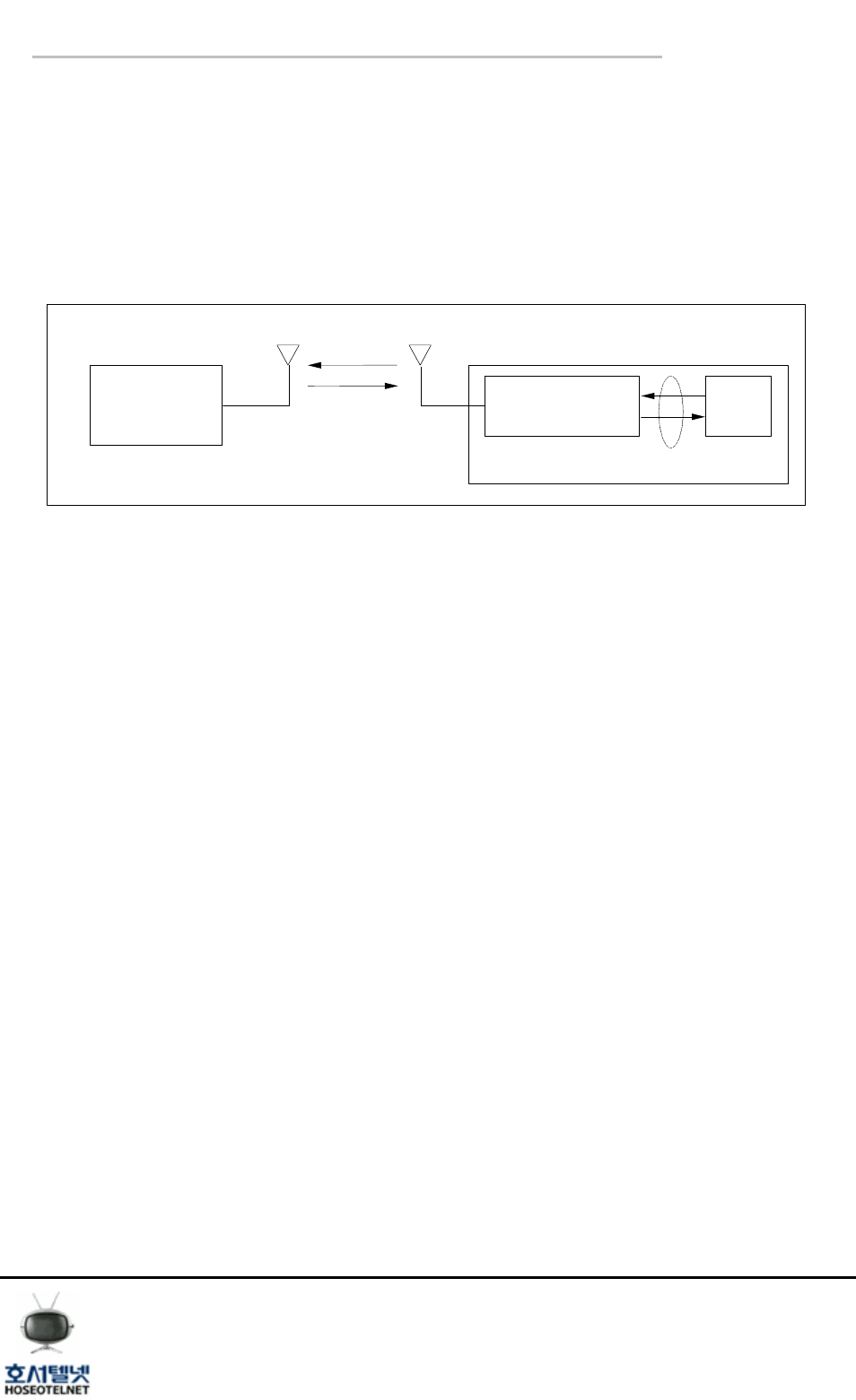
● System Block Diagram
System ReFLEX
Device
Host
Device
Carrier's System
ReFLEX
CLP Serial
Interface
< Drawing 1. ReFLEX system Block Diagram >
- ReFLEX : The communication protocol between Carrier’s system and ReFLEX device or module
through ReFLEX network.
- CLP Serial Interface : It is communication Linking Protocol (CLP), it enable the wire
communication between ReFLEx device or module and Host device through the
Serial Interface.
● Message receiving and sending
The Message receiving and sending is possible by pc program ( HSM8800 v1.3) which
support the CLP serial interface even thought there is no Host device.
Refer to CLP reference manual for more information for serial interface of
Communication Linking Protocol (CLP).
● Configure the ReFLEX Module
The configuration of ReFLEX Module will be done by PC based program ( PPS).
Hoseo Telnet ReFLEX Module
[ User manual ]
Tel 02 ) 2659 - 7345
Fax 02 ) 3662 - 0973
http://www.hstelnet.com/
ReFLEX Module
4/13
2. Outline and Function
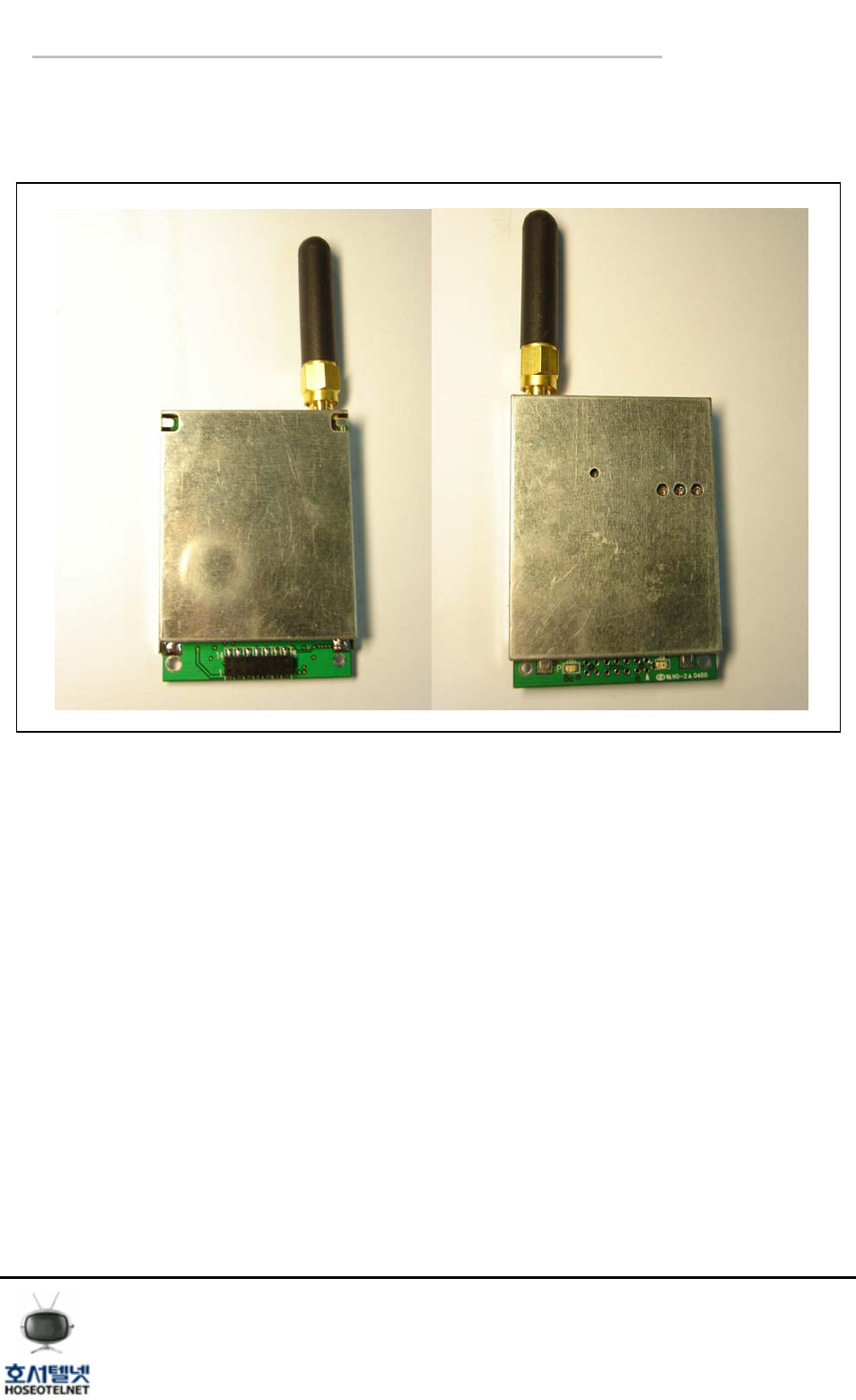
2.1 ReFLEX Module Outline
< Drawing 2. ReFLEX Module >
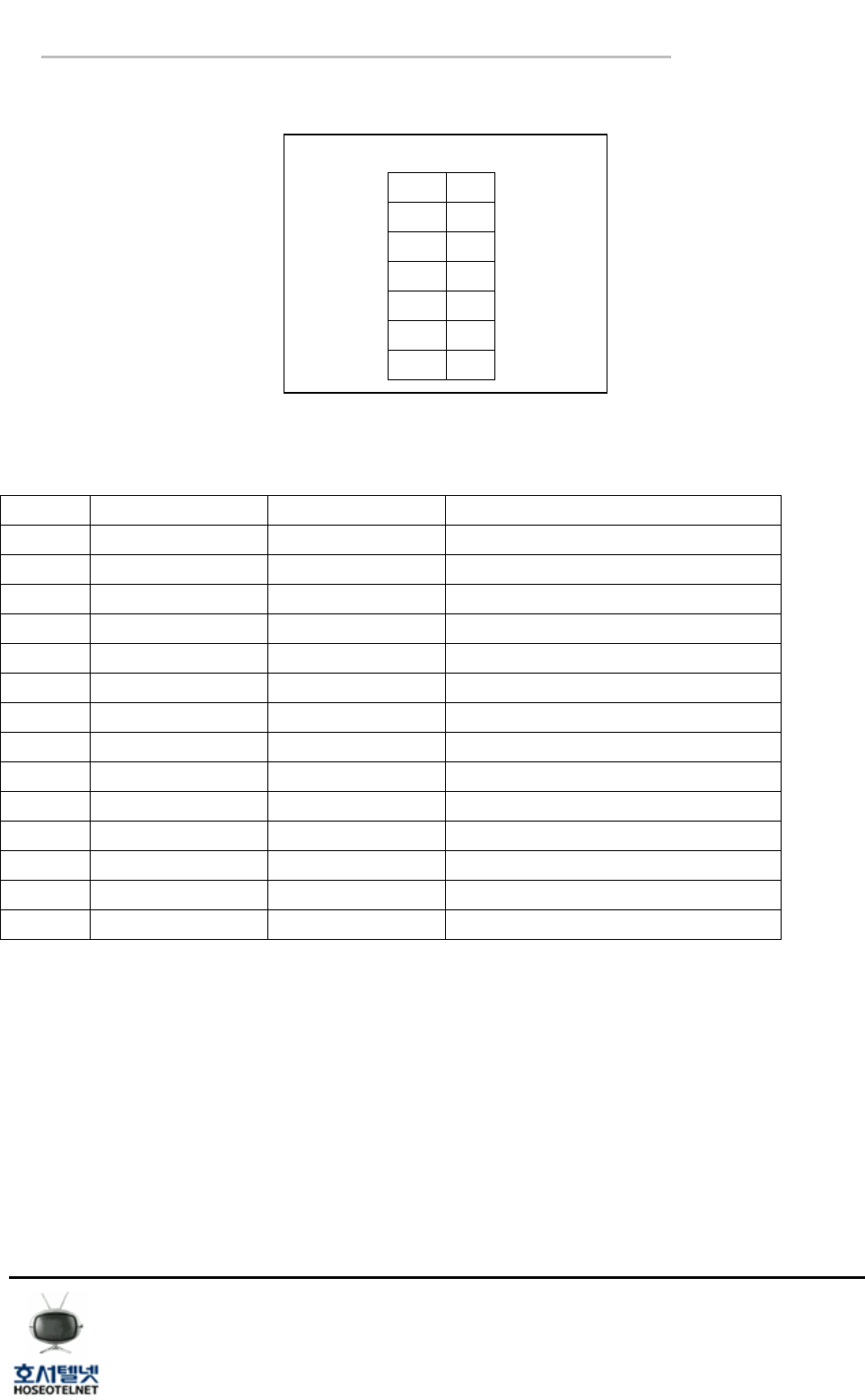
The interface between ReFLEX Module and Host Device will be done by 14 pin connector.
Hoseo Telnet ReFLEX Module
[ User manual ]
Tel 02 ) 2659 - 7345
Fax 02 ) 3662 - 0973
http://www.hstelnet.com/
ReFLEX Module
5/13
2.2 Description of 14 pin connector
1 8
2 9
3 10
4 11
5 12
6 13
7 14
< Drawing 3 14 pin connector >
Pin Configuration
PIN Name Type Description
1 VCC_Tx 4V~10V, 3A, PA Voltage
2 VCC_Main 4V~10V,200mA, Controller Voltage
3 GPIO0 CMOS, General Purpose I/O
4 GPIO1 CMOS, General Purpose I/O
5 SI0 Reserved, NC
6 SO0 Reserved, NC
7 SCK0 Reserved, NC
8 VCC Reserved, NC
9 GND Signal Ground
10 Tx_Data UART Output
11 Rx_Data UART Input
12 Enable Module Enable
13 VPP Reserved, NC
14 GND Signal Ground
*Note :CMOS Level 3V
< Table 1 pin description >
Hoseo Telnet ReFLEX Module
[ User manual ]
Tel 02 ) 2659 - 7345
Fax 02 ) 3662 - 0973
http://www.hstelnet.com/
ReFLEX Module
6/13
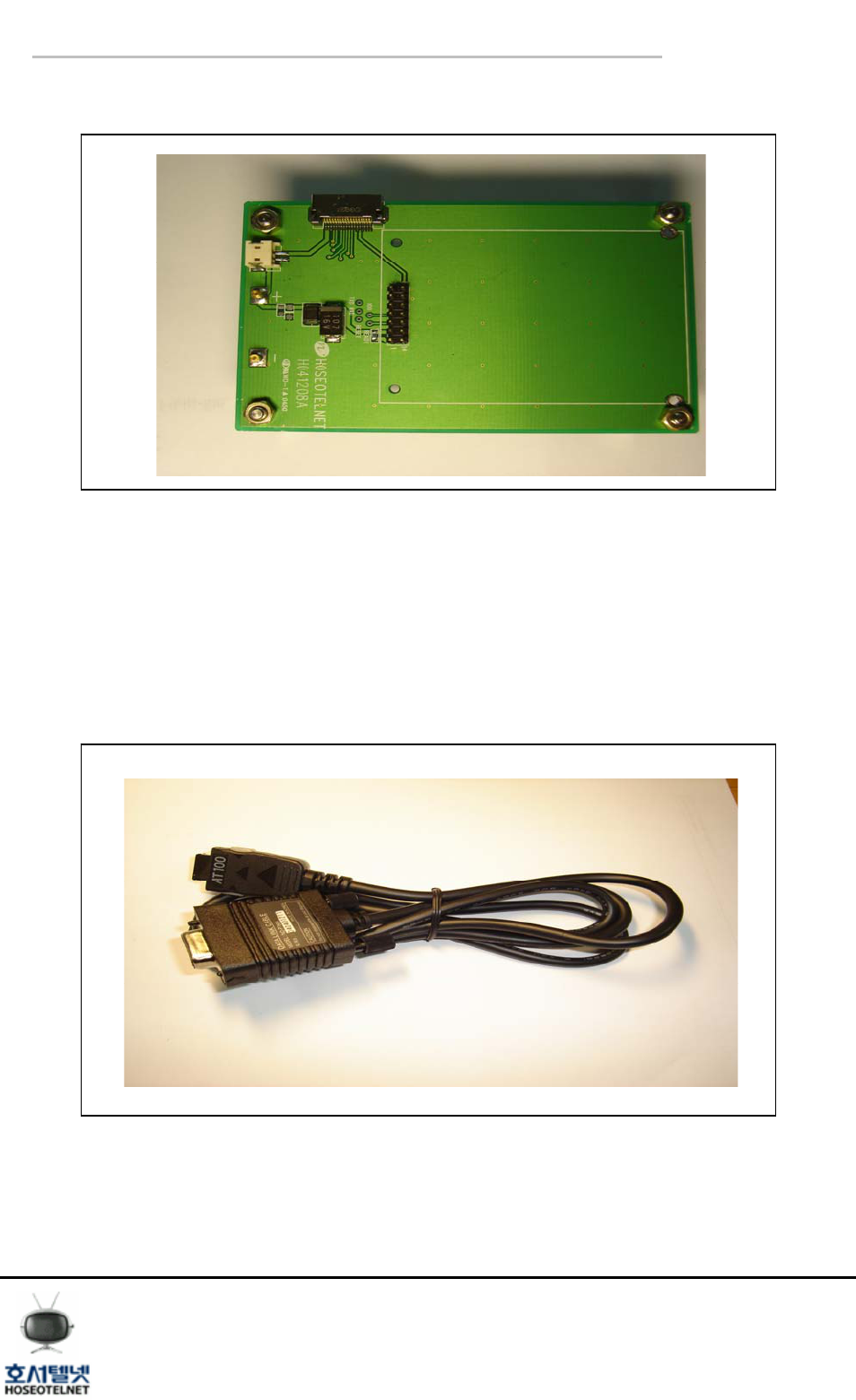
2.3 Sub Board & Data Link Cable
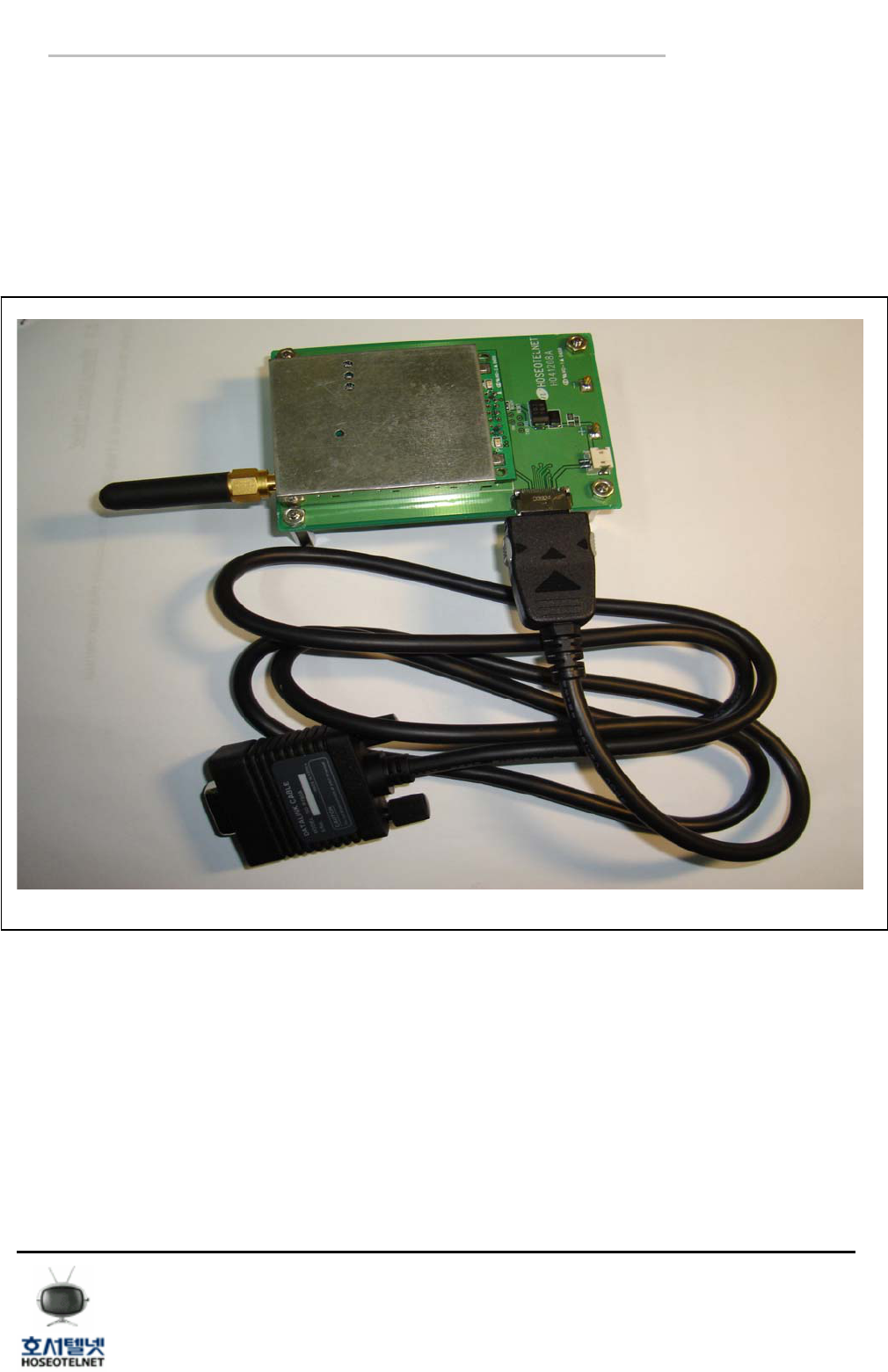
< Drawing 4 Sub Board >
1) Sub Board :
The sub board will supply the power to module and it will be used for parameter setting (PPS)
and data receiving and sending by PC. If you apply the DC 4-10V to power terminal, then
module will be activated.
The communication with PC will be able to by specific data link cable which supplied by module
supplier.
< Drawing5. Data Link Cable >
Hoseo Telnet ReFLEX Module
[ User manual ]
Tel 02 ) 2659 - 7345
Fax 02 ) 3662 - 0973
http://www.hstelnet.com/
ReFLEX Module
7/13
2) Data Link Cable :
It will be used for communication between ReFLEX Module and PC through Sub Board. The
data link cable, which is being supplied by ATM200 supplier, incorporated the RS232C
converter, then you can communicate with PC without additional peripherals.
2.4 Package
< Dwaring6. Package >
Hoseo Telnet ReFLEX Module
[ User manual ]
Tel 02 ) 2659 - 7345
Fax 02 ) 3662 - 0973
http://www.hstelnet.com/
ReFLEX Module
8/13
● Pre caution for Module(ATM 200) interface
The serial communication default speed is being set as 9600BPS, if you can change it CLP
command.
- Module (ATM 200) has a power save mode function, then you must wake up the module
whenever you are to use it. The wake up time is 20ms, and if you are to wake up the
module, send the CLP command 0x19.
- After the reset, the module will not goes to power save mode for 60 seconds, then you can
do the parameter setting during that time by PPS program.
● Module Operation Description
- If you apply the power, the LED will be On and Off.
- ‘P’ LED will be “ON” when the Module synchronized to network.
- ‘T’ LED will be “ON” when Module is transmitting a data..
- LED can be disabled by command.
3. Configure the ReFLEX Module – PPS -
Please refer to PPS manual for more details.
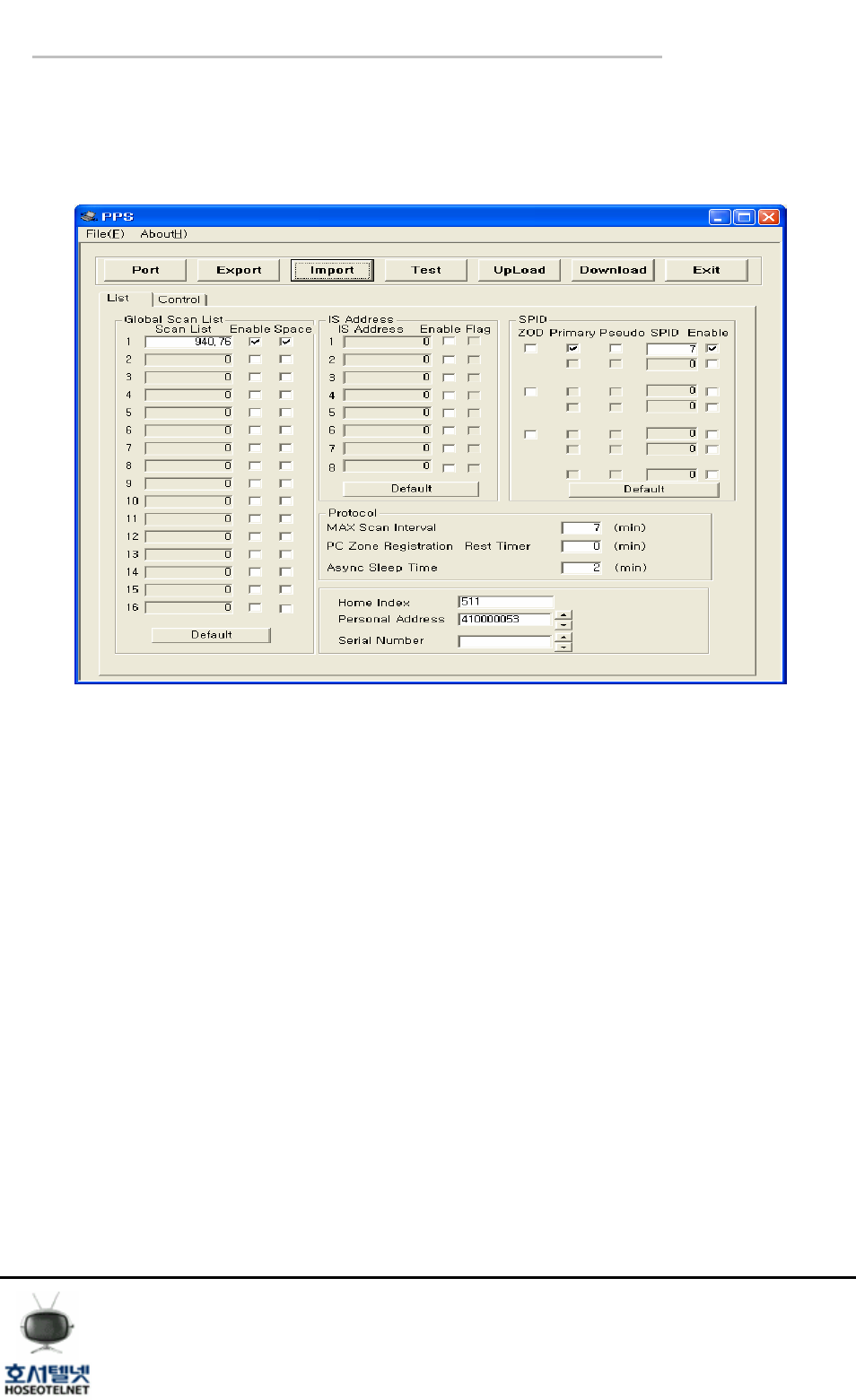
3.1 Logon
< Drawing7 Log on >
Key in the default pass word ‘HSTMAST’.
Hoseo Telnet ReFLEX Module
[ User manual ]
Tel 02 ) 2659 - 7345
Fax 02 ) 3662 - 0973
http://www.hstelnet.com/
ReFLEX Module
9/13
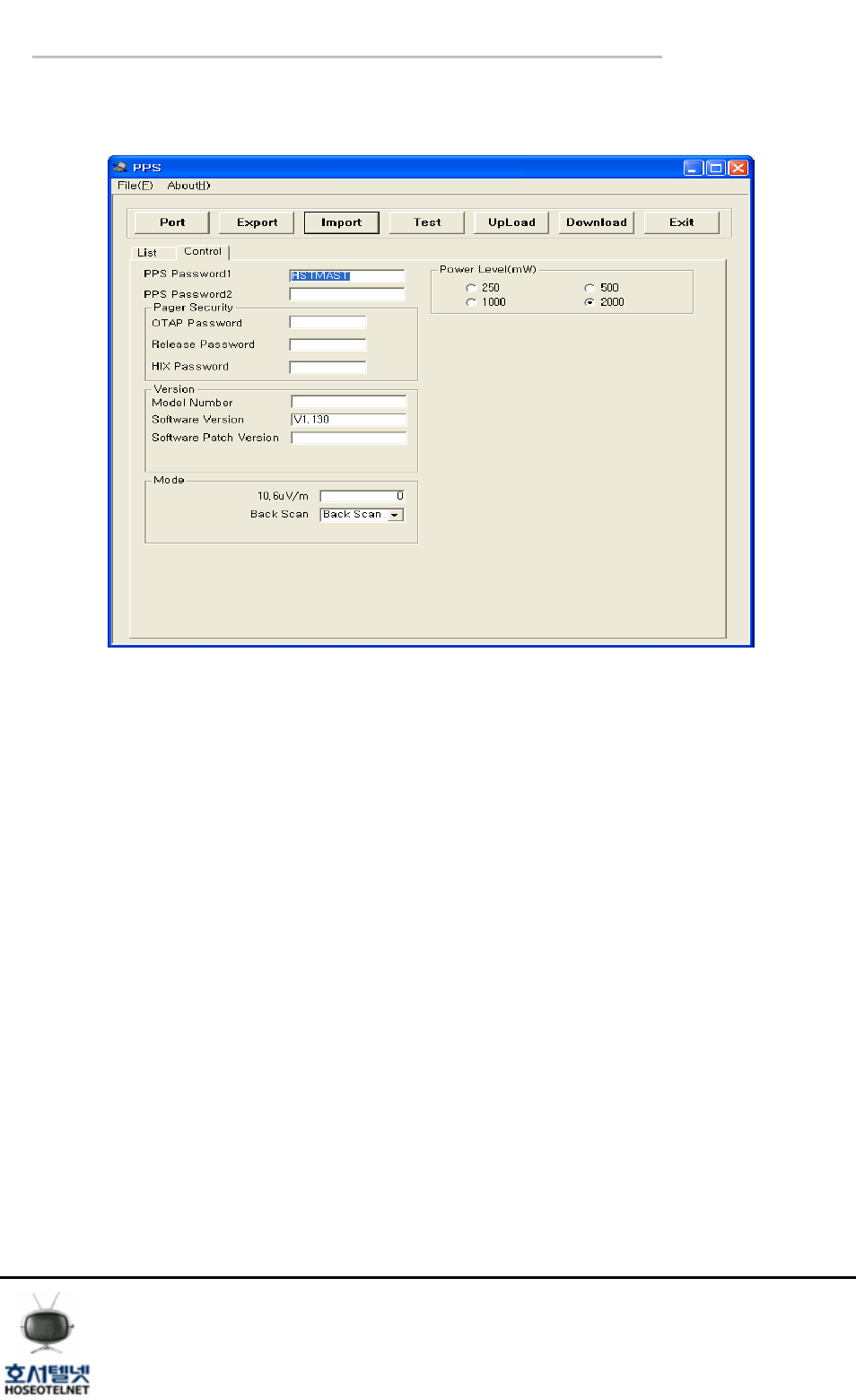
3.2 List
< Drawing8 List >
- Global Scan List : Rx frequency setting(if Space is set Spacing is 10KHz)
- IS Address : Information Service address
- SPID : Service Provide ID
- Personal Address : Cap code
- Else : refer to PPS user’s guide
- Menu Description
① Export : Store the PPS Parameter file.
② Import : Reading the PPS Parameter file.
③ Download : Download the data to REFLEX Module.
④ Personal Address : Put in the ReFLEX Module MSN.
Hoseo Telnet ReFLEX Module
[ User manual ]
Tel 02 ) 2659 - 7345
Fax 02 ) 3662 - 0973
http://www.hstelnet.com/
ReFLEX Module
10/13
3.3 Control
< Drawing9 Control >
- Power Level(mW) : RF Power Output
- PPS password : PPS login password
Hoseo Telnet ReFLEX Module
[ User manual ]
Tel 02 ) 2659 - 7345
Fax 02 ) 3662 - 0973
http://www.hstelnet.com/
ReFLEX Module
11/13
4. Message Sending and Receiving
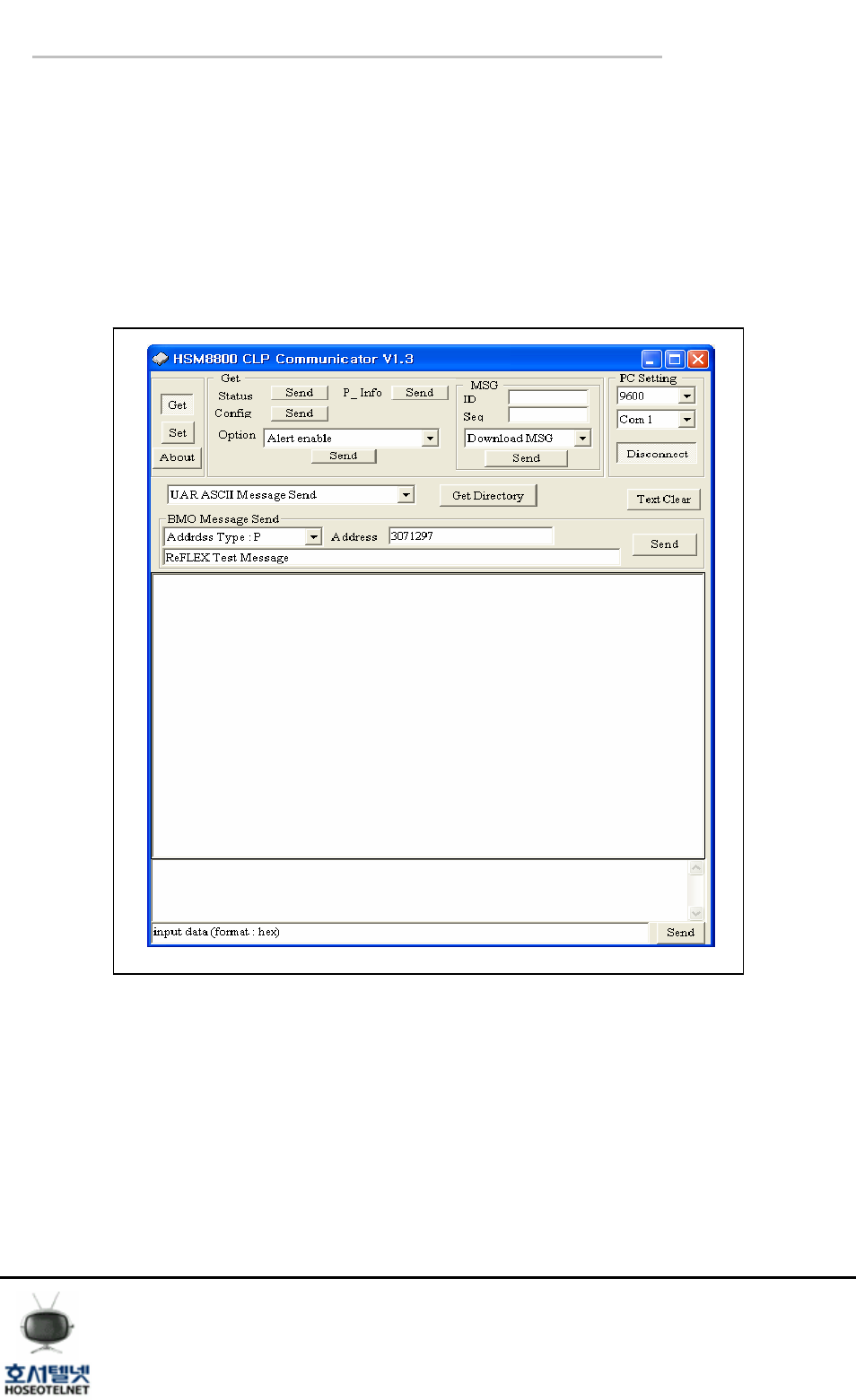
If there is no Host device, you can send and receive the message through PC.
The firmware , HSM8800 make you to sending and receiving the message , and you can also
check the functionality of AT 200.
4.1 HSM8800
< Drawing10. HSM8800 CLP Communicator v1.3 >
Hoseo Telnet ReFLEX Module
[ User manual ]
Tel 02 ) 2659 - 7345
Fax 02 ) 3662 - 0973
http://www.hstelnet.com/
ReFLEX Module
12/13
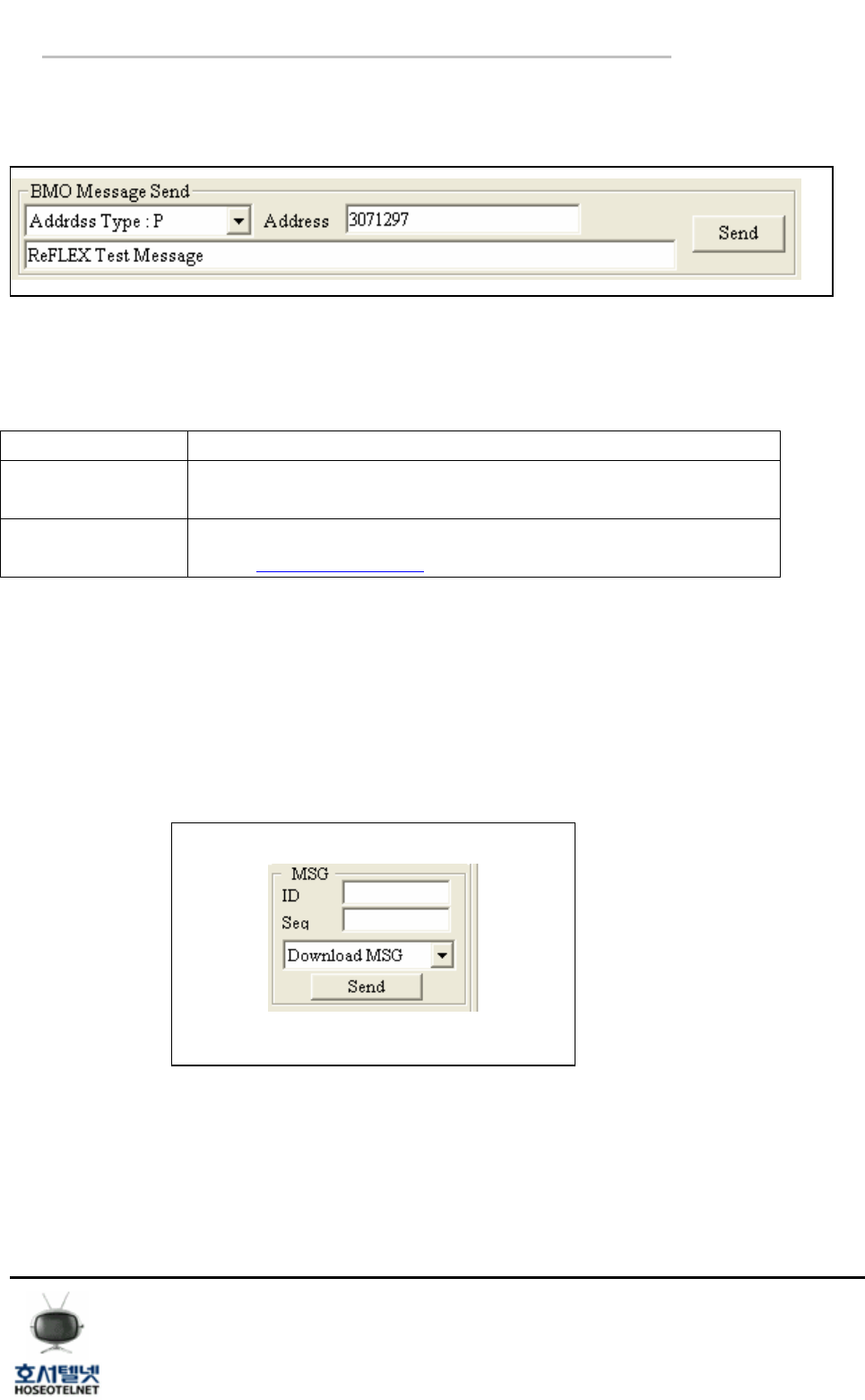
4.1.1 Message Sending
Sending the message to destination..
< Drawing11. BMO Message Send >
① Address Type : There are two(2) address type “P” and “E”
Address Type Description
P Send the message using PIN number of ReFLEX Module.
(Ex. : 3071297 )
E Sending the message using email address.
( Ex. : hjino5@hoseo.or.kr )
< Table2. Address Type >
② Address : key in the address of receiving part.
③ ReFLEX Test Message: key in the sending message.
④ Send : Click the “Send” button to send the message..
4.1.2 Message receiving
Download the received message on ReFLEX Module.
< Drawing12. Download MSG >
① Click the “Send” button to download the received message.

Hoseo Telnet ReFLEX Module
[ User manual ]
Tel 02 ) 2659 - 7345
Fax 02 ) 3662 - 0973
http://www.hstelnet.com/
ReFLEX Module
13/13
HOW TO SET ReEFLEX” TWO WAY RADIO MODULE.
- Check the power source , 4~10V and 3A
- Soldering the Shield Case to Ground
- Connect the 50 ohm antenna to SMA connector of module
*Do not operate the module without Antenna
- Apply the power and Interface
*Remark
- Do not change the trimmer set on case
- Do not open the shield case, In this case a warranty conditions will be invalid.
NOTE: THE MANUFACTURER IS NOT RESPONSIBLE FOR ANY RADIO OR TV INTERFERENCE
CAUSED BY UNAUTHORIZED MODIFICATIONS TO THIS EQUIPMENT. SUCH MODIFICATIONS
COULD VOID THE USER’S AUTHORITY TO OPERATE THE EQUIPMENT.
“CAUTION: Exposure to Radio Frequency Radiation.
Antenna shall be mounted in such a manner to minimize the potential for human contact during normal
operation. The antenna should not be contacted during operation to avoid the possibility of exceeding the FCC
radio frequency exposure limit. The minimum separation distance of 20cm from the antenna to the body of user
required.”