HP Mallory Qc Vectra Vl420, Quick Start Card (multi Languages) Lpv06570
User Manual: HP hp vectra vl420, quick start card (multi languages)
Open the PDF directly: View PDF  .
.
Page Count: 2
www.hp.com/go/vectrasupport
www.hp.com/go/instantsupport
4
a
b
c
This HP Software product is
copyrighted and licensed by HP.
Carefully read the software licence
agreement in your installation
guide or user's guide before
using this software product.
© Copyright 2001 Hewlett-Packard Company
Software CD-ROM for:
Microsoft® Windows® 98
Second Edition, Windows®
NT 4.0 (Service pack 4, 5, 6 or 6a),
Windows® 2000 and Windows® XP.
hp p/n : 5970-46XX
DVD Playback
Software
commercial computer software
WinDVDTM 2000
©2001 Intervideo Inc.
All right reserved.
WinDVD is a trademark of
InterVideo Inc.
Use this CD-ROM
to install the DVD
playback
software.
This HP Software product is
copyrighted and licensed by HP.
Carefully read the software licence
agreement in your installation
guide or user's guide before
using this software product.
© Copyright 2001 Hewlett-Packard Company
Software CD-ROM for:
Microsoft® Windows® 98
Second Edition, Windows®
NT 4.0 (Service pack 4, 5, 6 or 6a),
Windows® 2000 and Windows® XP.
hp p/n : 5970-46XX
DVD Playback
Software
commercial computer software
All right reserved.
Use this CD-ROM
to install the DVD
playback
software.
This cd-rom contains system recovery
software for backup purposes only.
The performance of this software is
the sole responsibility of HP. Carefully
read the software license agreement
in the documentation before using
the software. For regional support
information, refer to the paper
documentation.
Portions
©
1985-2000 Microsoft Corporation.
All rights reserved.
©
Copyright 2001 Hewlett-Packard
Company
hp pc
image engineer -
W2K - DT and NT4 - DT SP6 - English
hp p/n : 5970-0510-EN
image creation and
recovery cd-rom
operating system
backup cd-rom 1/2
Boot on this cd-rom to
start the recovery process.
Store this cd-rom in a safe place.
For distribution only with a new HP PC.
commercial computer software
http://www.hp.com/go/support
This cd-rom contains system recovery
software for backup purposes only.
The performance of this software is
the sole responsibility of HP. Carefully
read the software license agreement
in the documentation before using
the software. For regional support
information, refer to the paper
documentation.
Portions
©
1985-2000 Microsoft Corporation.
All rights reserved.
©
Copyright 2001 Hewlett-Packard
Company
hp pc
image engineer -
W2K - DT and NT4 - DT SP6 - English
hp p/n : 5970-0510-EN
image creation and
recovery cd-rom
operating system
backup cd-rom 1/2
Boot on this cd-rom to
start the recovery process.
Store this cd-rom in a safe place.
For distribution only with a new HP PC.
commercial computer software
http://www.hp.com/go/support
hp pc
image engineer -
W2K - DT and NT4 - DT SP6 - English
hp p/n : 5970-0510-EN
image creation and
recovery cd-rom
operating system
backup cd-rom 1/2
Boot on this cd-rom to
start the recovery process.
3
c
ab
This cd-rom contains system recovery
software for backup purposes only.
The performance of this software is
the sole responsibility of HP. Carefully
read the software license agreement
in the documentation before using
the software. For regional support
information, refer to the paper
documentation.
Portions © 1985-2000 Microsoft Corporation.
All rights reserved.
© Copyright 2001 Hewlett-Packard
Company
hp pc
image engineer -
W2K - DT and NT4 - DT SP6 - English
hp p/n : 5970-0510-EN
image creation and
recovery cd-rom
operating system
backup cd-rom 1/2
Boot on this cd-rom to
start the recovery process.
Store this cd-rom in a safe place.
For distribution only with a new HP PC.
commercial computer software
http://www.hp.com/go/support
This cd-rom contains system recovery
software for backup purposes only.
The performance of this software is
the sole responsibility of HP. Carefully
read the software license agreement
in the documentation before using
the software. For regional support
information, refer to the paper
documentation.
Portions © 1985-2000 Microsoft Corporation.
All rights reserved.
© Copyright 2001 Hewlett-Packard
Company
hp pc
image engineer -
W2K - DT and NT4 - DT SP6 - English
hp p/n : 5970-0510-EN
image creation and
recovery cd-rom
operating system
backup cd-rom 1/2
Boot on this cd-rom to
start the recovery process.
Store this cd-rom in a safe place.
For distribution only with a new HP PC.
commercial computer software
http://www.hp.com/go/support
hp pc
image engineer -
W2K - DT and NT4 - DT SP6 - English
hp p/n : 5970-0510-EN
image creation and
recovery cd-rom
operating system
backup cd-rom 1/2
Boot on this cd-rom to
start the recovery process.
This HP Software product is
copyrighted and licensed by HP.
Carefully read the software licence
agreement in your installation
guide or user's guide before
using this software product.
© Copyright 2001 Hewlett-Packard Company
Software CD-ROM for:
Microsoft® Windows® 98
Second Edition, Windows®
NT 4.0 (Service pack 4, 5, 6 or 6a),
Windows® 2000 and Windows® XP.
hp p/n : 5970-46XX
DVD Playback
Software
commercial computer software
WinDVDTM 2000
©2001 Intervideo Inc.
All right reserved.
WinDVD is a trademark of
InterVideo Inc.
Use this CD-ROM
to install the DVD
playback
software.
This HP Software product is
copyrighted and licensed by HP.
Carefully read the software licence
agreement in your installation
guide or user's guide before
using this software product.
© Copyright 2001 Hewlett-Packard Company
Software CD-ROM for:
Microsoft® Windows® 98
Second Edition, Windows®
NT 4.0 (Service pack 4, 5, 6 or 6a),
Windows® 2000 and Windows® XP.
hp p/n : 5970-46XX
DVD Playback
Software
commercial computer software
All right reserved.
Use this CD-ROM
to install the DVD
playback
software.
e
d
1
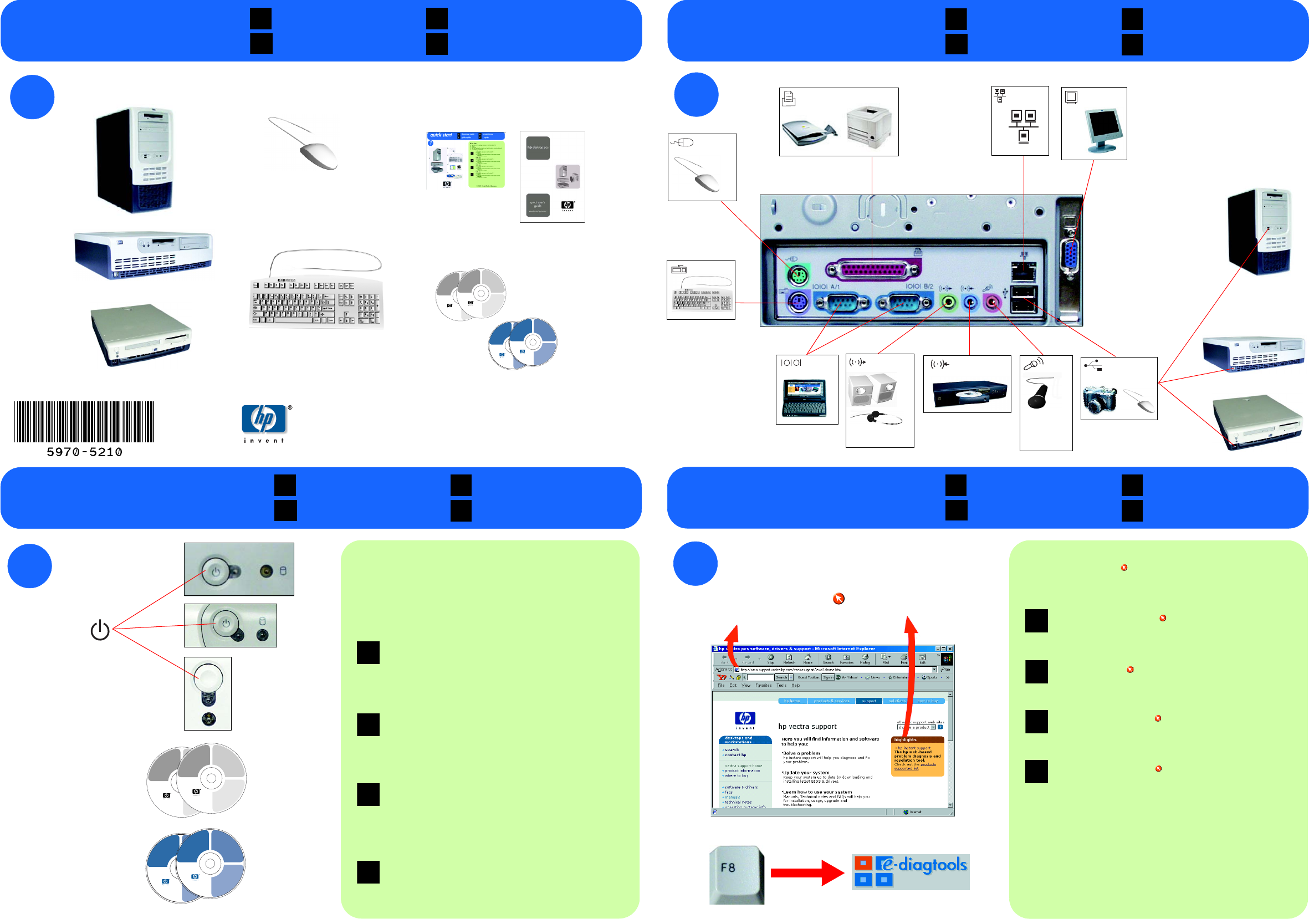
in the box connecting devices
USB x 4
32Ω
2
PS/2
LAN*
600Ω
electret
serial line in
monitor
line out mic
PS/2
parallel
* If you have an add-on LAN card, connect the
network cable to the card
* Wurde eine weitere LAN-Karte installiert,
schließen Sie das Netzwerkkabel dort an
* Si tiene una tarjeta de LAN añadida, conecte el
cable de red a la tarjeta
* Si votre PC est équipé d’une carte réseau,
connectez le câble réseau à cette carte.
* Per le schede LAN add-on, collegare il cavo di
rete alla scheda
contenu Lieferumfang
nella scatola en la caja
F D
I E
a Plug the power cord into the wall outlet and turn on your PC.
Follow the onscreen instructions to install your operating system and drivers.
b For your PC to work correctly, you may have to install applications and
utilities for devices such as CD-RW and DVD drives from the CDs provided.
c If you want to downgrade or recover your OS, you must use the blue Image
Creation & Recovery CD and Image Library & Diagnostics CD provided with
your PC.
a Branchez le cordon d’alimentation sur une prise secteur et allumez le PC.
Installez système d’exploitation et pilotes selon les instructions à l’écran.
b Pour que votre PC fonctionne correctement, vous devrez peut-être installer
des applications et des utilitaires pour les périphériques tels que les
lecteurs de CD-RW et de DVD-ROM, à partir des CD fournis.
c Pour “rétrograder” ou récupérer le système d’exploitation, utilisez le
CD de création d’image et de récupération et le CD Image Library &
Diagnostics fournis avec votre PC.
a Netzkabel an Netzsteckdose anschließen und PC einschalten.
Anweisungen zum Installieren von Betriebssystem und Treibern befolgen.
b Damit der PC korrekt funktioniert, müssen ggf. Anwendungen und Dienst-
programme für Geräte (wie CD-RW- und DVD-Laufwerke) von den mitge-
lieferten CDs installiert werden.
c Auf der mitgelieferten blauen Abbilderstellungs- und Wiederherstellungs-
CD-ROM und Image Library & Diagnostics CD finden Sie die benötigte
Betriebssystemversion für Downgrades und Wiederherstellungen.
a Inserire il cavo di alimentazione nella presa a muro e accendere il PC.
Seguire le istruzioni a video per installare il sistema operativo e i driver.
b Affinché il PC funzioni correttamente, usare i CD in dotazione per
installare le applicazioni e le utilità delle periferiche, come le unità
CD-RW e DVD.
c Per passare a una versione precedente o recuperare il sistema operativo
usare il CD-ROM di recupero e creazione immagine blu e l’Image Library
& Diagnostics CD in dotazione al PC.
a Conecte el cable de alimentación a la toma de corriente de la pared y
encienda el PC.
Siga las instrucciones que aparecen en la pantalla para instalar el
sistema operativo y los controladores.
b Para que el PC funcione correctamente, puede que tenga que instalar
aplicaciones y utilidades para dispositivos tales como unidades de
CD-RW y DVD, que se incluyen en los CDs suministrados.
c Para recuperar su sistema operativo o instalar una versión inferior del
mismo, utilice el CD-ROM de creación y recuperación de imágenes azul
y el CD-ROM Image Library & Diagnostics suministrados con el PC.
F
D
I
E
connexions Geräte anschließen
collegamenti conexión de dispositivos
F D
I E
more information
autres informations weitere Informationen
altre informazioni más información
F D
I E
final steps
étapes finales letzte Schritte
fasi finali últimos pasos
F D
I E
PN:
Printed
11/2001
©2001 Hewlett-Packard Company
Go to www.hp.com/go/vectrasupport: for the latest manuals, downloads
and information.
Go to hp instant support : for web troubleshooting, diagnostics and solutions.
Run e-DiagTools to solve problems: reboot the PC, press F8 and select
e-DiagTools from the Boot Center menu.
Visitez le site www.hp.com/go/vectrasupport : pour les manuels, les
informations et les fichiers à télécharger les plus récents.
Allez sur hp instant support : pour un dépannage en ligne du PC,
des diagnostics et des solutions.
Exécutez e-DiagTools pour résoudre les problèmes : réamorcez le PC,
appuyez sur F8 et sélectionnez eDiagTools dans le menu Boot Center.
Infos unter www.hp.com/go/vectrasupport zu: aktuellen Handbüchern,
Downloads und weiteren Themen.
hp instant support : bietet automatische Diagnose, Fehlerbehebung und
Softwarelösungen
e-DiagTools zur Fehlerbehebung starten: PC neu starten und nach
Aufforderung F8 drücken. Danach “e-DiagTools” im Menü “Boot Center” auswählen.
Visitare il sito to www.hp.com/go/vectrasupport: per i manuali, i
download e le informazioni aggiornati.
Visitare hp instant support : per l’individuazione dei problemi via Web, la
diagnostica e le soluzioni.
Eseguire e-DiagTools per risolvere i problemi: riavviare il PC, premere F8 e
selezionare e-DiagTools nel menu Boot Center.
Vaya a www.hp.com/go/vectrasupport: para obtener los últimos manuales,
descargas e información.
Vaya a hp instant support : para obtener resolución de problemas en la
web, soluciones y diagnósticos.
Ejecute e-DiagTools para resolver los problemas: reinicie el PC, oprima F8
y seleccione e-DiagTools desde el menú Boot Center.
F
D
I
E
f
bc
d
a
e
e
f
c
a
b
a
b
c
d
f
bc
d
a
e
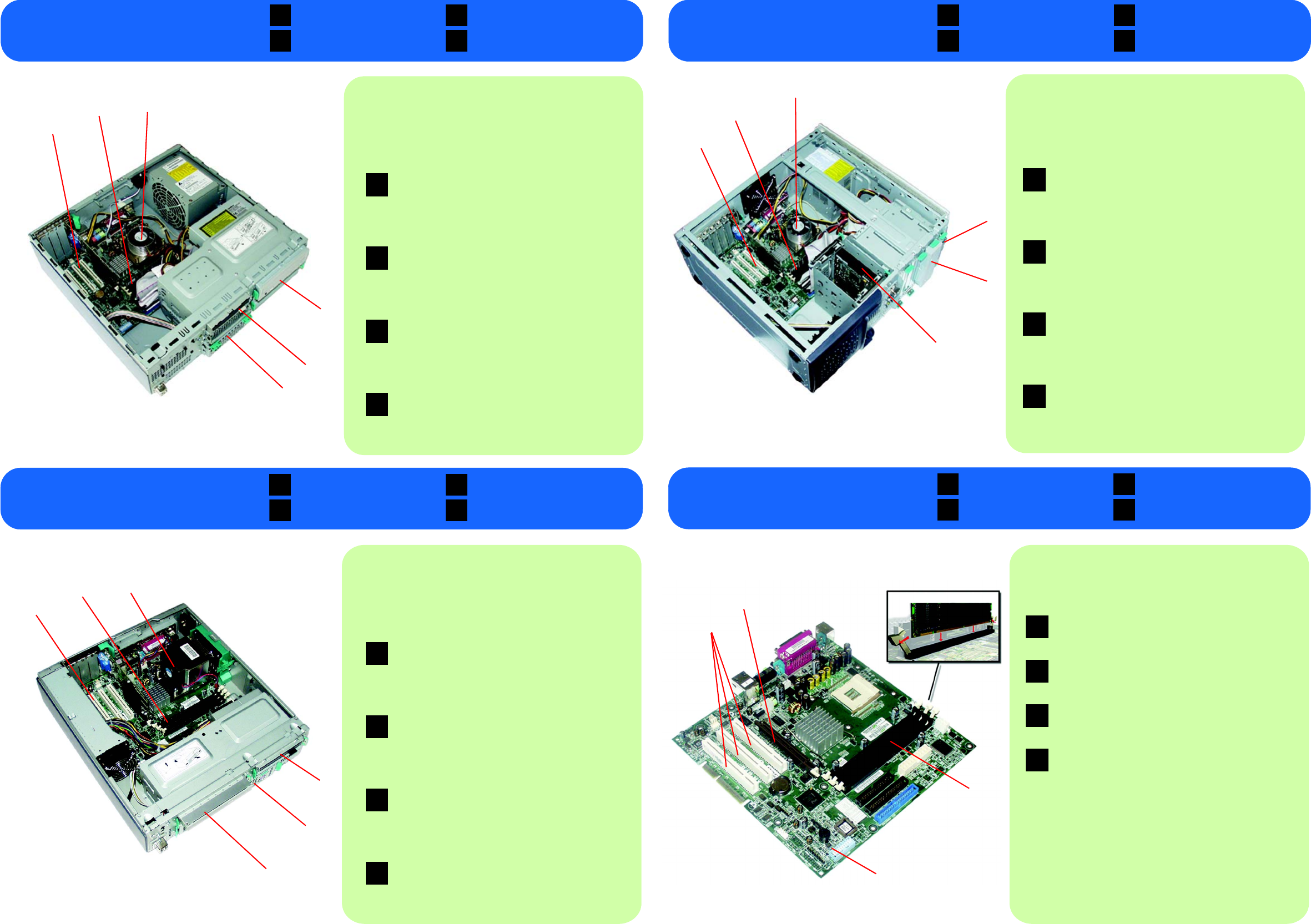
Connectors on your system board
a PCI slots for accessory cards
b AGP (video) slot
cmemory modules
d configuration switches
Connecteurs de la carte mère
a logements PCI pour cartes d’extension
b logement AGP (vidéo)
c modules de mémoire
d interrupteurs de configuration
Anschlüsse auf der Systemplatine
a PCI-Steckplätze für Zubehörkarten
b AGP-Steckplatz (Grafikkarte)
cSpeichermodule
d Konfigurationsschalter
Connettori della scheda di sistema
a slot PCI per le schede accessorie
bslot AGP (video)
cmoduli di memoria
d interruttori di configurazione
Conectores de la placa del sistema
a ranuras PCI para tarjetas accesorias
b ranura AGP (vídeo)
c módulos de memoria
d conmutadores de conmutación
F
D
I
E
Install or replace:
a add-on cards
bmemory modules
cprocessor
IMPORTANT: Refer to the safety information contained in the Quick User’s
Guide before installing or replacing a component.
Installation/remplacement des éléments suivants :
a cartes d’extension
b modules de mémoire
c processeur
d lecteur 5,25 pouces (CD-ROM, DVD-ROM, lecteur Zip)
e lecteur de disquette
f disque dur.
IMPORTANT : avant d’installer/de remplacer un composant, consultez les
informations liées à la sécurité dans le Guide d’utilisation rapide.
Installieren oder Austauschen:
aZubehörkarten
bSpeichermodule
c Prozessor
d 5¼-Zoll-Laufwerk (CD-ROM-, DVD-ROM-, Zip-Laufwerk)
eDiskettenlaufwerk
f Festplatte.
WICHTIG: Lesen Sie vor dem Installieren oder Austauschen einer
Komponente die Sicherheitshinweise in der Kurzreferenz.
Installare o sostituire:
a schede add-on
b moduli di memoria
c processore
d unità da 5¼” (CD-ROM, DVD-ROM, unità Zip)
e unità disco floppy
f disco fisso.
IMPORTANTE: Prima di installare o sostituire un componente, consultare le
informazioni sulla sicurezza contenute nella Guida rapida.
Instale o sustituya:
a tarjetas adicionales
b módulos de memoria
c procesador
d unidad de 5,25 pulgadas (unidad de CD-ROM, DVD-ROM, Zip)
e unidad de disquetes
f unidad de disco duro.
IMPORTANTE: consulte la información de seguridad que se incluye en la
Guía rápida del usuario antes de instalar o sustituir un componente.
F
D
I
E
Install or replace:
a add-on cards
bmemory modules
c processor
IMPORTANT: Refer to the safety information in the Quick User’s Guide before
installing or replacing a component.
Installation/remplacement des éléments suivants :
a cartes d’extension
b modules de mémoire
cprocesseur
d lecteur de disquette
e lecteur 5,25 pouces (CD, CD-RW, DVD)
f disque dur.
IMPORTANT : avant d’installer/de remplacer un composant, consultez les
informations liées à la sécurité dans le Guide d’utilisation rapide.
Installieren oder Austauschen:
a Zubehörkarten
bSpeichermodule
c Prozessor
dDiskettenlaufwerk
e 5¼-Zoll-Laufwerk (CD-Laufwerk, CD-RW-Laufwerk, DVD-Laufwerk)
f Festplatte.
WICHTIG: Lesen Sie vor dem Installieren oder Austauschen einer
Komponente die Sicherheitshinweise in der Kurzreferenz.
Installare o sostituire:
a schede add-on
b moduli di memoria
cprocessore
dunità disco floppy
e unità da 5¼” (CD, CD-RW, DVD)
fdisco rigido.
IMPORTANTE: Prima di installare o sostituire un componente, consultare le
informazioni sulla sicurezza contenute nella Guida rapida.
Instale o sustituya:
a tarjetas adicionales
b módulos de memoria
c procesador
d unidad de disquetes
e unidad de 5,25 pulgadas (CD, CD-RW, DVD)
f unidad de disco duro.
IMPORTANTE: consulte la información de seguridad que se incluye en la
Guía rápida del usuario antes de instalar o sustituir un componente.
F
D
I
E
d floppy drive
e 5¼ inch drive (CD, CD-RW, DVD)
fhard drive.
desktop Desktop-PC
desktop sobremesa
F D
I E
instant servicing
desktop
minitour Minitower
minitower minitorre
F D
I E
instant servicing
minitower
carte mère Systemplatine
scheda di sistema placa del sistema
F D
I E
instant servicing
system board
PC petit format kleiner Formfaktor
small form factor tamaño reducido
F D
I E
instant servicing
small form factor
d
d 5¼ inch drive (CD, CD-RW, DVD)
e floppy drive
f hard drive.
Install or replace:
a add-on cards
bmemory modules
c processor
IMPORTANT: Refer to the safety information contained in the Quick User’s
Guide before installing or replacing a component.
Installation/remplacement des éléments suivants :
acartes d’extension
b modules de mémoire
cprocesseur
d lecteur de disquette
e disque dur
f lecteur de cd/dvd-rom extra-plat.
IMPORTANT : avant d’installer/de remplacer un composant, consultez les
informations liées à la sécurité dans le Guide d’utilisation rapide.
Installieren oder Austauschen:
aZubehörkarten
bSpeichermodule
c Prozessor
dDiskettenlaufwerk
eFestplatte
f Slim CD/DVD-ROM-Laufwerk.
WICHTIG: Lesen Sie vor dem Installieren oder Austauschen einer
Komponente die Sicherheitshinweise in der Kurzreferenz.
Installare o sostituire:
a schede add-on
b moduli di memoria
cprocessore
d unità disco floppy
edisco fisso
f unità cd/dvd-rom slim.
IMPORTANTE: Prima di installare o sostituire un componente, consultare le
informazioni sulla sicurezza contenute nella Guida rapida.
Instale o sustituya:
a tarjetas adicionales
b módulos de memoria
c procesador
d unidad de disquetes
e unidad de disco duro
f unidad de cd/dvd-rom delgada.
IMPORTANTE: consulte la información de seguridad que se incluye en la
Guía rápida del usuario antes de instalar o sustituir un componente.
F
D
I
E
d floppy drive
e hard drive
fslim cd/dvd-rom drive.
