HUBSAN INTELLIGENT 111DRX Hubsan Nano FPV Q4 User Manual H111D

SHENZHEN HUBSAN INTELLIGENT COMPANY LIMITED Hubsan Nano FPV Q4 H111D

User Manual

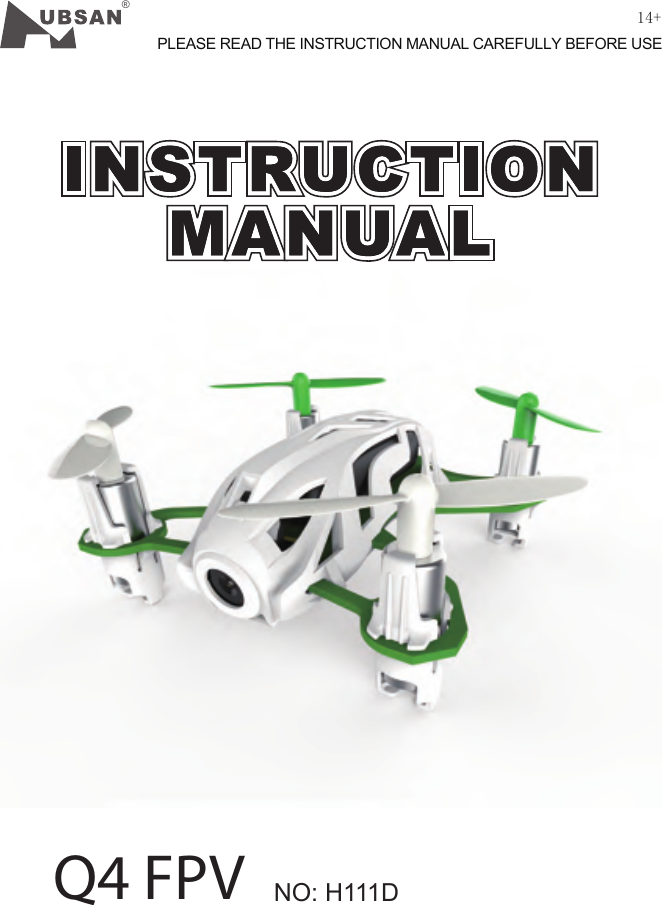
®NO: H111DQ4 FPVPLEASE READ THE INSTRUCTION MANUAL CAREFULLY BEFORE USE14+
03 ©2015  Hubsan哈博森科技 版权所有 INDEXIMPORTANT SAFETY NOTESINDEXINTRODUCTION1 ITEMS INCLUDED IN THE BOX2 QUAD COPTER3 MOTOR LED INDICATOR4. QUAD COPTER BATTERY             4.1 Introduction        4.2 Charging5. PROPELLERS6. START TO FLY            6.1 Flight environment         6.2 Binding        6.3 Basic flight        6.4 Video7. START TO FLY        7.1Normal mode / Expert Mode        7.2 Headless mode        7.3  Aerial Flip 8. TRANSMITTER        8.1 input key function        8.2  Install the TX Battery        8.3  Video REPLAY setup         8.4  TIME setup         8.5  FORMAT SD Card SETUP         8.6  Reversing channel setup        8.7 Sensitivity setup        8.8 Frequency selectable 5.8Ghz 9.CALIBRATIONEXPLODED VIEWH111D SPARE PART CHARTFCC INFORMATION04SYMBOL EXPLANATION 02020304050506060606070706070809101010111113141515161617171818192021USAGE ADVICELIPO BATTERY SAFETY NOTES
Please read the instruction manual carefully!IMPORTANT SAFETY NOTESOPERATION: Flight:Take responsiblity for the safety of yourself and others when flying the X4!Do not fly the X4 in crowded places. Do not fly in bad weather.Never try to catch the X4 while it is in flight.This model is intended for experienced pilots age 14+.Power off the X4 after flight, to prevent the propellers from causing injuries.Always remove the battery after you stop flying to avoid injuries from accidentally powering on the motors.Always take great caution to protect yourself when near the propellers. The flight system will start after powering on regardless of the transmitter signal.The high speed propellers are very dangerous.Power off the X4 after every flight or the propellers may still rotate and cause injury.    Be extremely careful and responsible when using the drone. Small electronic components can be damaged by crashing or by dropping the X4 into water. To avoid further damages, please replace broken parts immediately.04 ©2015  Hubsan哈博森科技 版权所有
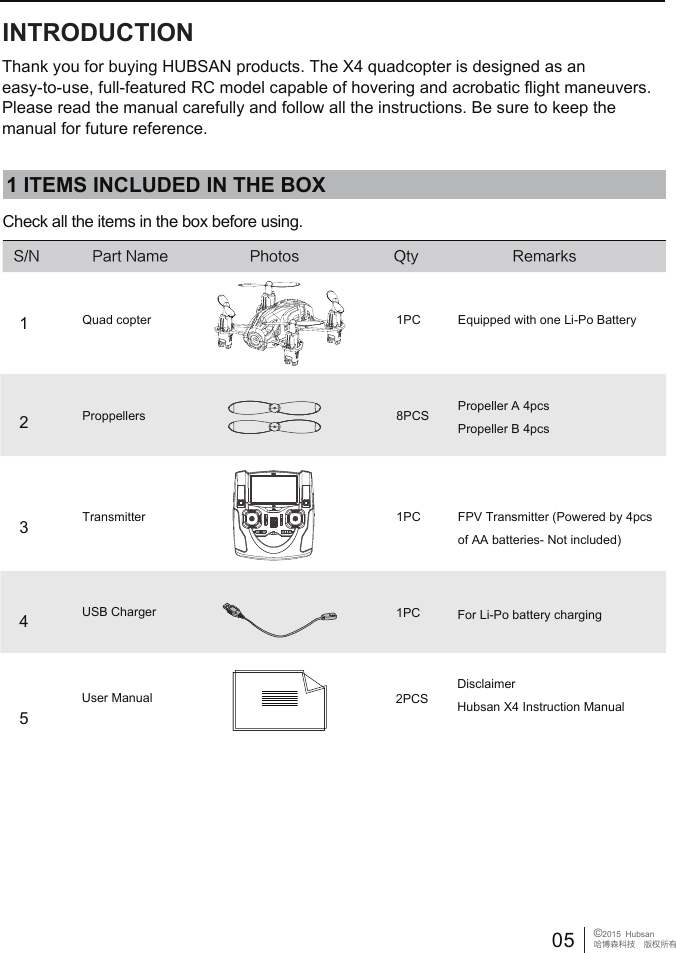
1PC8PCS1PC1 ITEMS INCLUDED IN THE BOXCheck all the items in the box before using.S/N Part Name Photos Qty RemarksQuad copterProppellersTransmitterEquipped with one Li-Po BatteryPropeller A 4pcsPropeller B 4pcsFPV Transmitter (Powered by 4pcs of AA batteries- Not included)1PCUSB Charger For Li-Po battery charging2PCSUser ManualDisclaimerHubsan X4 Instruction Manual12345Thank you for buying HUBSAN products. The X4 quadcopter is designed as an easy-to-use, full-featured RC model capable of hovering and acrobatic flight maneuvers. Please read the manual carefully and follow all the instructions. Be sure to keep the manual for future reference.INTRODUCTION05 ©2015  Hubsan哈博森科技 版权所有
 [1] Propellers          [2] Charging Plug           [3] Motor          [4] Camera2  QUADCOPTERIndicator Status:Front LED: is blue; Back LED: is redPower on:   1) Before binding, 2 front LED indicators blink alternately  2) After binding, 4 LED indicators remain lightedHeadless Flight: 2 front LED blink slowly, 2 back LED remain lightedVideo: 2 front LED remain lighted, 2 back LED blink alternatelyLow Power: 2 front LED remain lighted, 2 back LED blink quickly3. MOTOR LED INDICATOR[1][3][4][2]4 QUAD COPTER BATTERY4.1 INTRODUCTIONThe quad copter battery is a rechargeable Li-Po battery with 180mAh capacity and 3.7V voltage. The battery should only be charged with the HUBSAN charger to avoid overcharge.Please make sure the battery is fully charged before first time use.06 ©2015  Hubsan哈博森科技 版权所有
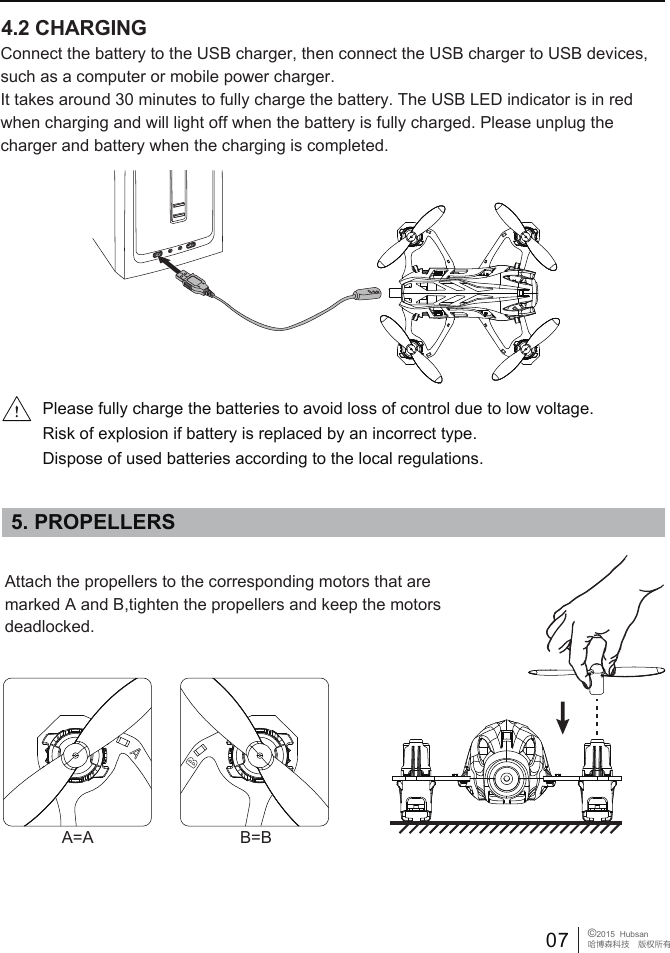
4.2 CHARGINGConnect the battery to the USB charger, then connect the USB charger to USB devices, such as a computer or mobile power charger. It takes around 30 minutes to fully charge the battery. The USB LED indicator is in red when charging and will light off when the battery is fully charged. Please unplug the charger and battery when the charging is completed.5. PROPELLERSPlease fully charge the batteries to avoid loss of control due to low voltage.Risk of explosion if battery is replaced by an incorrect type. Dispose of used batteries according to the local regulations.Attach the propellers to the corresponding motors that are marked A and B,tighten the propellers and keep the motors deadlocked.A=A B=B07 ©2015  Hubsan哈博森科技 版权所有
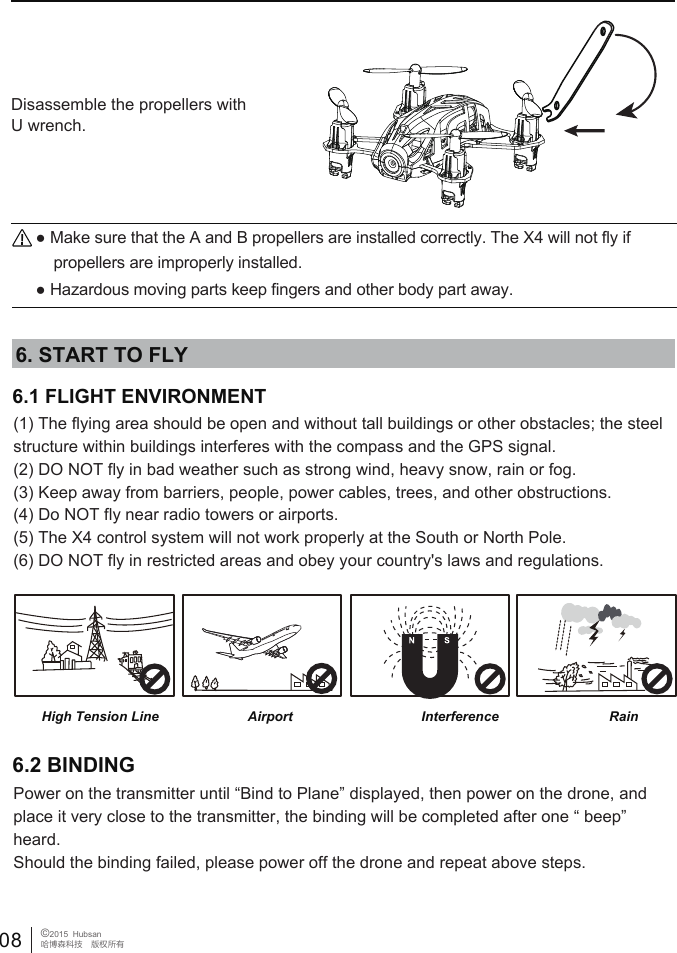
● Hazardous moving parts keep fingers and other body part away.● Make sure that the A and B propellers are installed correctly. The X4 will not fly if     propellers are improperly installed. Disassemble the propellers with U wrench.6.1 FLIGHT ENVIRONMENT (1) The flying area should be open and without tall buildings or other obstacles; the steel structure within buildings interferes with the compass and the GPS signal.(2) DO NOT fly in bad weather such as strong wind, heavy snow, rain or fog.(3) Keep away from barriers, people, power cables, trees, and other obstructions. (4) Do NOT fly near radio towers or airports.(5) The X4 control system will not work properly at the South or North Pole.(6) DO NOT fly in restricted areas and obey your country's laws and regulations.6. START TO FLYHigh Tension Line RainInterferenceAirportPower on the transmitter until “Bind to Plane” displayed, then power on the drone, and place it very close to the transmitter, the binding will be completed after one “ beep” heard. Should the binding failed, please power off the drone and repeat above steps.6.2 BINDING08 ©2015  Hubsan哈博森科技 版权所有
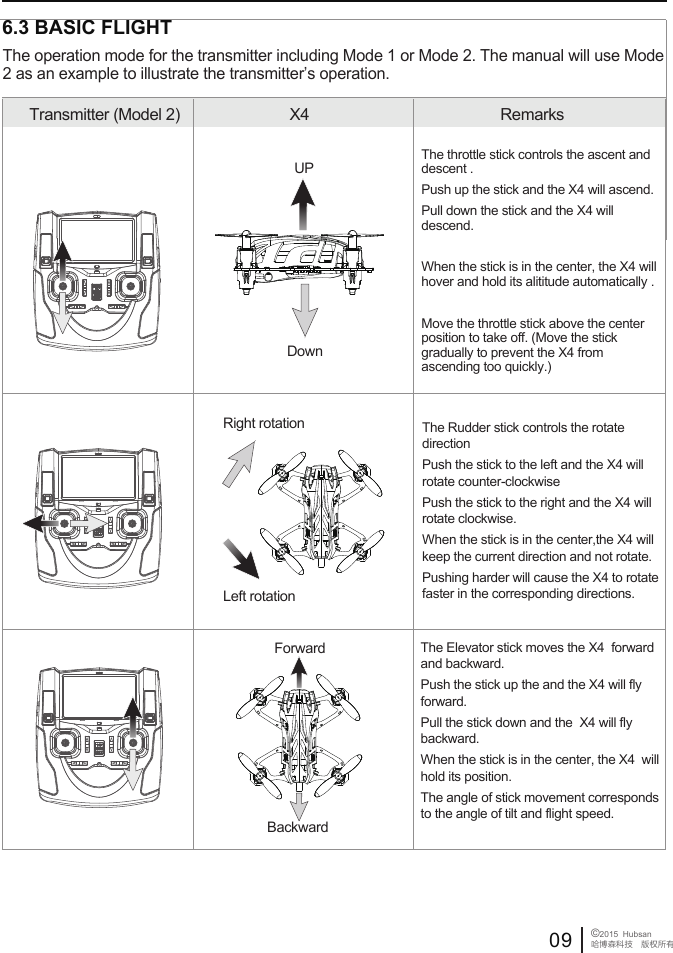
 6.3 BASIC FLIGHTTransmitter (Model 2) X4  RemarksThe throttle stick controls the ascent and descent . Push up the stick and the X4 will ascend.Pull down the stick and the X4 will descend.When the stick is in the center, the X4 will hover and hold its alititude automatically .Move the throttle stick above the center position to take off. (Move the stick gradually to prevent the X4 from ascending too quickly.)UPDownForwardBackwardThe Elevator stick moves the X4  forward and backward. Push the stick up the and the X4 will fly forward.Pull the stick down and the  X4 will fly backward. When the stick is in the center, the X4  will hold its position. The angle of stick movement corresponds to the angle of tilt and flight speed. The Rudder stick controls the rotate direction Push the stick to the left and the X4 will rotate counter-clockwisePush the stick to the right and the X4 will rotate clockwise.When the stick is in the center,the X4 will keep the current direction and not rotate.Pushing harder will cause the X4 to rotate faster in the corresponding directions.     Right rotationLeft rotationThe operation mode for the transmitter including Mode 1 or Mode 2. The manual will use Mode 2 as an example to illustrate the transmitter’s operation.09 ©2015  Hubsan哈博森科技 版权所有
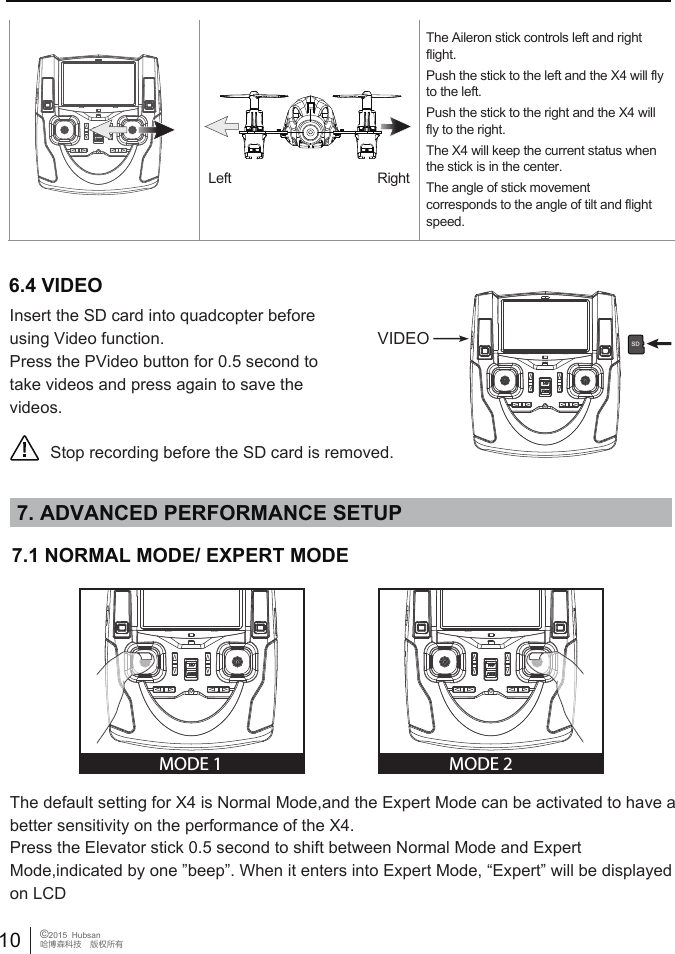
Right  Left The Aileron stick controls left and right flight. Push the stick to the left and the X4 will fly to the left. Push the stick to the right and the X4 will fly to the right. The X4 will keep the current status when the stick is in the center.The angle of stick movement corresponds to the angle of tilt and flight speed. 6.4 VIDEOStop recording before the SD card is removed.SDVIDEO7. ADVANCED PERFORMANCE SETUP10 ©2015  Hubsan哈博森科技 版权所有7.1 NORMAL MODE/ EXPERT MODE MODE 2MODE 1Insert the SD card into quadcopter before using Video function.Press the PVideo button for 0.5 second to take videos and press again to save the videos.The default setting for X4 is Normal Mode,and the Expert Mode can be activated to have a better sensitivity on the performance of the X4.Press the Elevator stick 0.5 second to shift between Normal Mode and Expert Mode,indicated by one ”beep”. When it enters into Expert Mode, “Expert” will be displayed on LCD
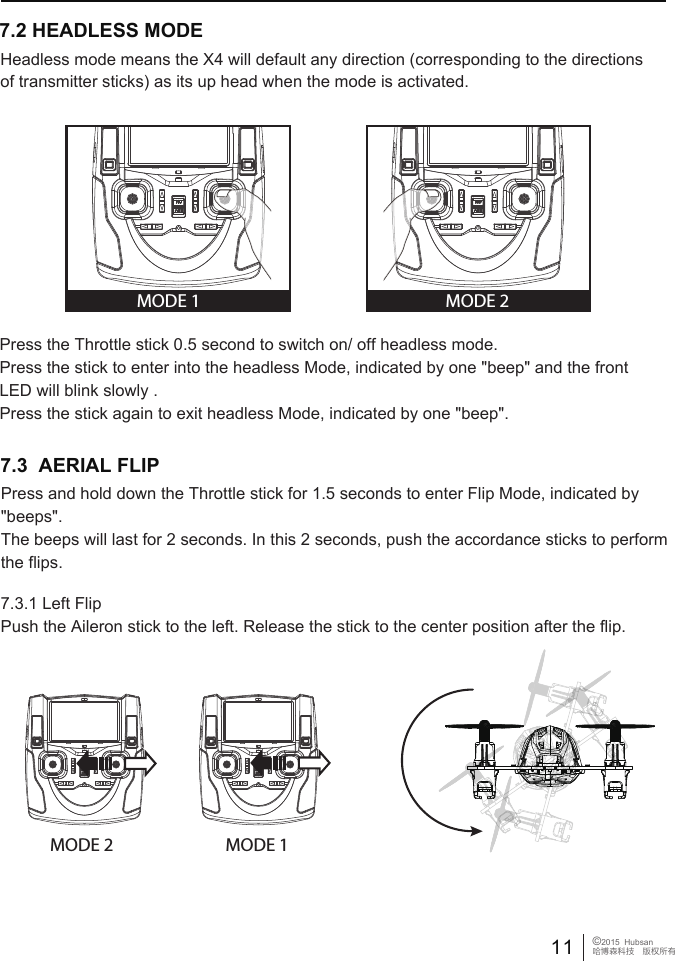
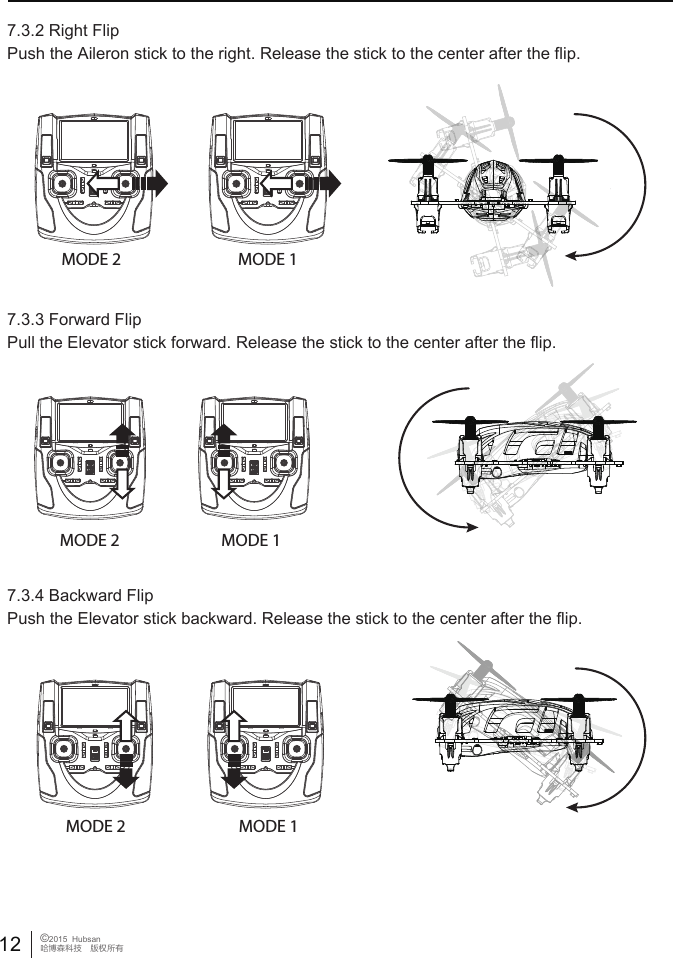
MODE 1 MODE 2Press the Throttle stick 0.5 second to switch on/ off headless mode.Press the stick to enter into the headless Mode, indicated by one "beep" and the front LED will blink slowly .Press the stick again to exit headless Mode, indicated by one "beep".Headless mode means the X4 will default any direction (corresponding to the directions of transmitter sticks) as its up head when the mode is activated.7.2 HEADLESS MODE11 ©2015  Hubsan哈博森科技 版权所有7.3  AERIAL FLIP MODE 2 MODE 17.3.1 Left FlipPush the Aileron stick to the left. Release the stick to the center position after the flip.Press and hold down the Throttle stick for 1.5 seconds to enter Flip Mode, indicated by "beeps". The beeps will last for 2 seconds. In this 2 seconds, push the accordance sticks to perform the flips.
12 ©2015  Hubsan哈博森科技 版权所有7.3.3 Forward FlipPull the Elevator stick forward. Release the stick to the center after the flip.7.3.4 Backward FlipPush the Elevator stick backward. Release the stick to the center after the flip.7.3.2 Right FlipPush the Aileron stick to the right. Release the stick to the center after the flip.MODE 2 MODE 1MODE 2 MODE 1MODE 2 MODE 1
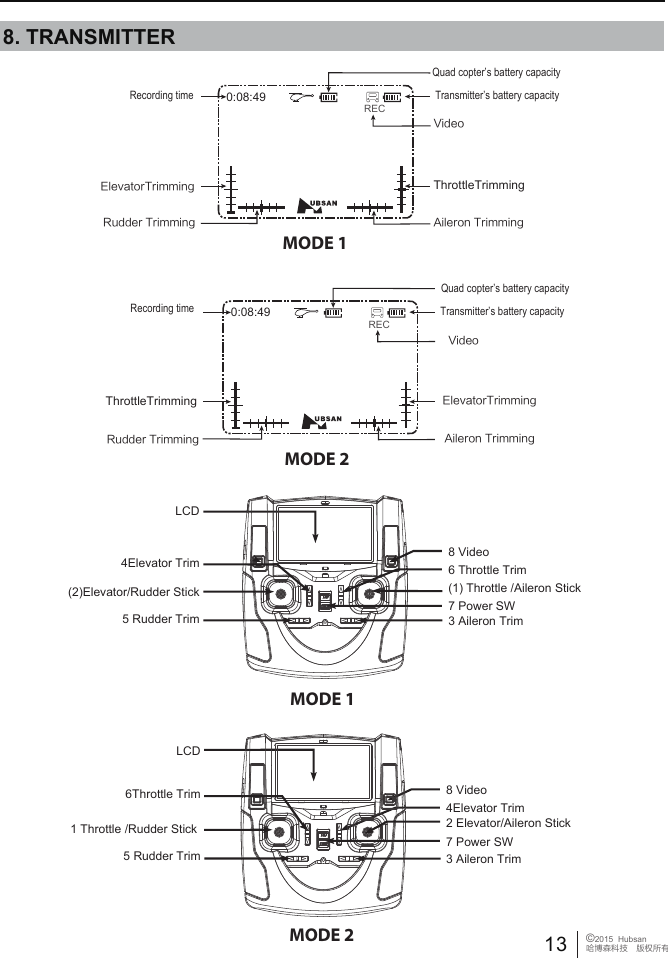
8. TRANSMITTER MODE 1MODE 2MODE 10:08:49REC0:08:49Quad copter’s battery capacityRudder TrimmingElevatorTrimming ThrottleTrimmingAileron TrimmingRECVideoRecording time8 Video2 Elevator/Aileron Stick5 Rudder Trim1 Throttle /Rudder Stick7 Power SW3 Aileron Trim6Throttle Trim(2)Elevator/Rudder Stick5 Rudder TrimLCD6 Throttle Trim8 Video(1) Throttle /Aileron Stick4Elevator TrimTransmitter’s battery capacityQuad copter’s battery capacityVideoTransmitter’s battery capacityRecording timeElevatorTrimmingAileron TrimmingThrottleTrimmingRudder Trimming7 Power SW3 Aileron TrimLCD4Elevator TrimMODE 2 13 ©2015  Hubsan哈博森科技 版权所有
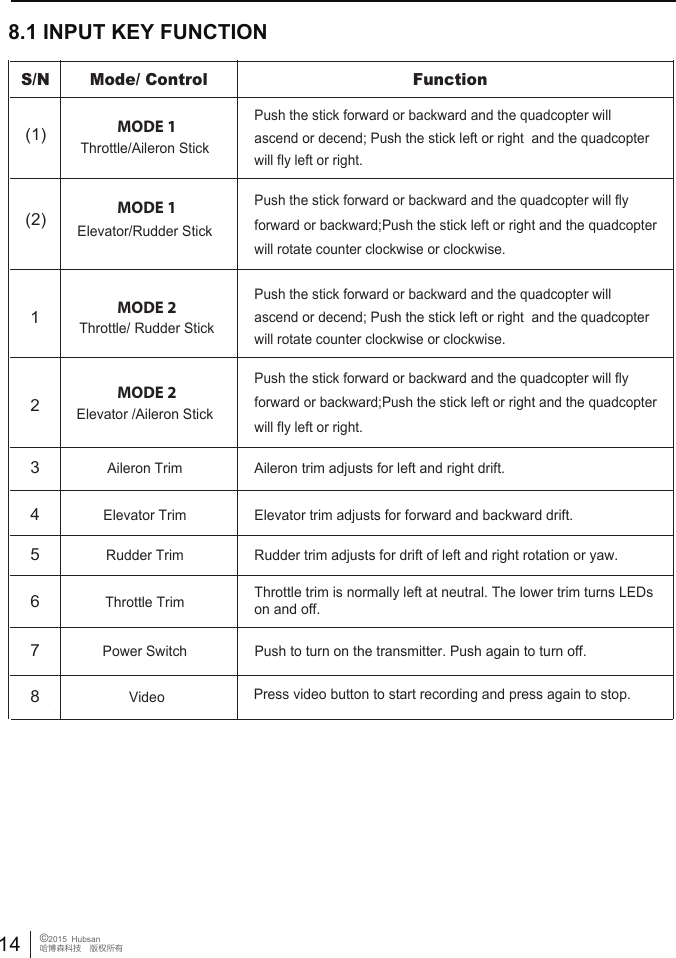
8.1 INPUT KEY FUNCTIONMODE 2S/N  Mode/ Control Function MODE 1(1) Throttle/Aileron Stick Push the stick forward or backward and the quadcopter willascend or decend; Push the stick left or right  and the quadcopter will fly left or right.Push the stick forward or backward and the quadcopter willascend or decend; Push the stick left or right  and the quadcopter will rotate counter clockwise or clockwise.MODE 1(2) Elevator/Rudder Stick Push the stick forward or backward and the quadcopter will fly forward or backward;Push the stick left or right and the quadcopter will rotate counter clockwise or clockwise.Push the stick forward or backward and the quadcopter will fly forward or backward;Push the stick left or right and the quadcopter will fly left or right.3 Aileron Trim  Aileron trim adjusts for left and right drift.4 Elevator Trim  Elevator trim adjusts for forward and backward drift.5 Rudder Trim  Rudder trim adjusts for drift of left and right rotation or yaw.6 Throttle Trim  Throttle trim is normally left at neutral. The lower trim turns LEDs on and off.7 Power Switch  Push to turn on the transmitter. Push again to turn off.MODE 22 Elevator /Aileron Stick 1 Throttle/ Rudder Stick8 Video Press video button to start recording and press again to stop. 14 ©2015  Hubsan哈博森科技 版权所有
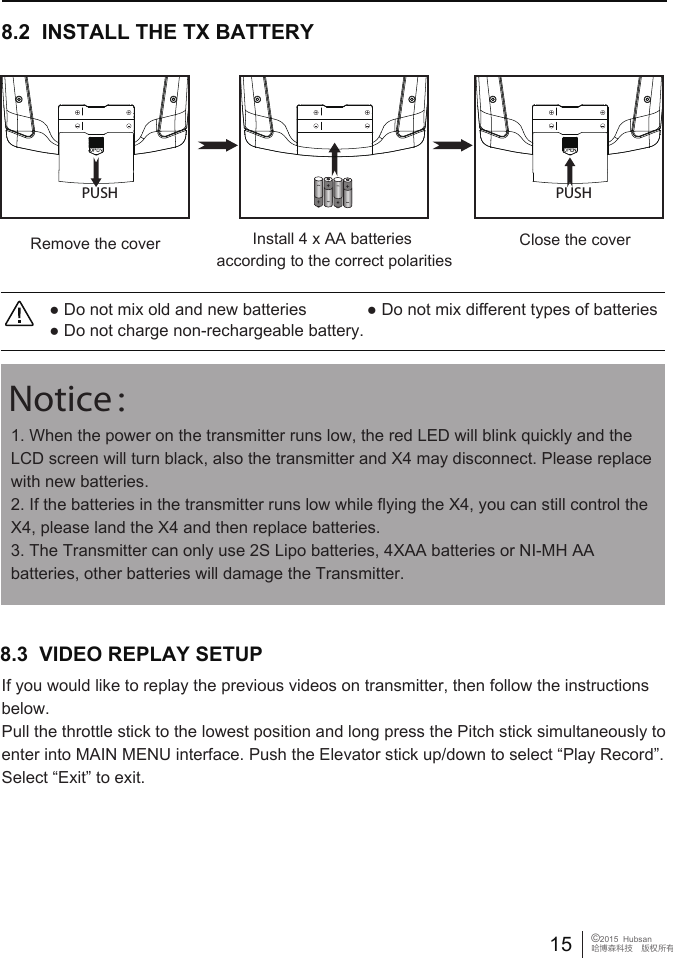
● Do not mix old and new batteries             ● Do not mix different types of batteries● Do not charge non-rechargeable battery.8.2  INSTALL THE TX BATTERYClose the coverRemove the cover Install 4 x AA batteries according to the correct polaritiesPUSH PUSH1. When the power on the transmitter runs low, the red LED will blink quickly and the LCD screen will turn black, also the transmitter and X4 may disconnect. Please replace with new batteries. 2. If the batteries in the transmitter runs low while flying the X4, you can still control the X4, please land the X4 and then replace batteries. 3. The Transmitter can only use 2S Lipo batteries, 4XAA batteries or NI-MH AA batteries, other batteries will damage the Transmitter. Notice:15 ©2015  Hubsan哈博森科技 版权所有8.3  VIDEO REPLAY SETUP If you would like to replay the previous videos on transmitter, then follow the instructions below. Pull the throttle stick to the lowest position and long press the Pitch stick simultaneously to enter into MAIN MENU interface. Push the Elevator stick up/down to select “Play Record”. Select “Exit” to exit.
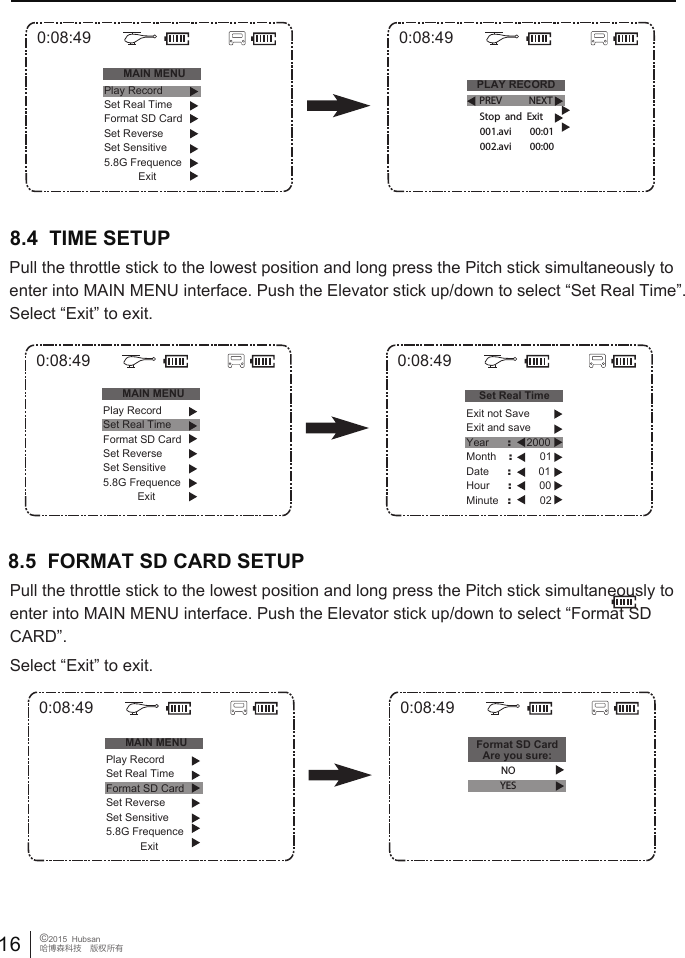
16 ©2015  Hubsan哈博森科技 版权所有0:08:49MAIN MENUPLAY RECORDPlay RecordSet Real TimeFormat SD CardSet ReverseSet Sensitive5.8G FrequenceExit0:08:49PREV NEXT001.avi        00:01Stop  and  Exit002.avi        00:000:08:49MAIN MENUPlay RecordSet Real TimeFormat SD CardSet ReverseSet Sensitive5.8G FrequenceExit0:08:49Set Real TimeExit not SaveExit and saveYear      :     2000Month    :         01Date      :         01Hour      :         00Minute   :        028.4  TIME SETUP Pull the throttle stick to the lowest position and long press the Pitch stick simultaneously to enter into MAIN MENU interface. Push the Elevator stick up/down to select “Set Real Time”. Select “Exit” to exit.0:08:49MAIN MENUPlay RecordSet Real TimeFormat SD CardSet ReverseSet Sensitive5.8G FrequenceExit0:08:49Format SD CardAre you sure:NOYES8.5  FORMAT SD CARD SETUP Pull the throttle stick to the lowest position and long press the Pitch stick simultaneously to enter into MAIN MENU interface. Push the Elevator stick up/down to select “Format SD CARD”. Select “Exit” to exit.
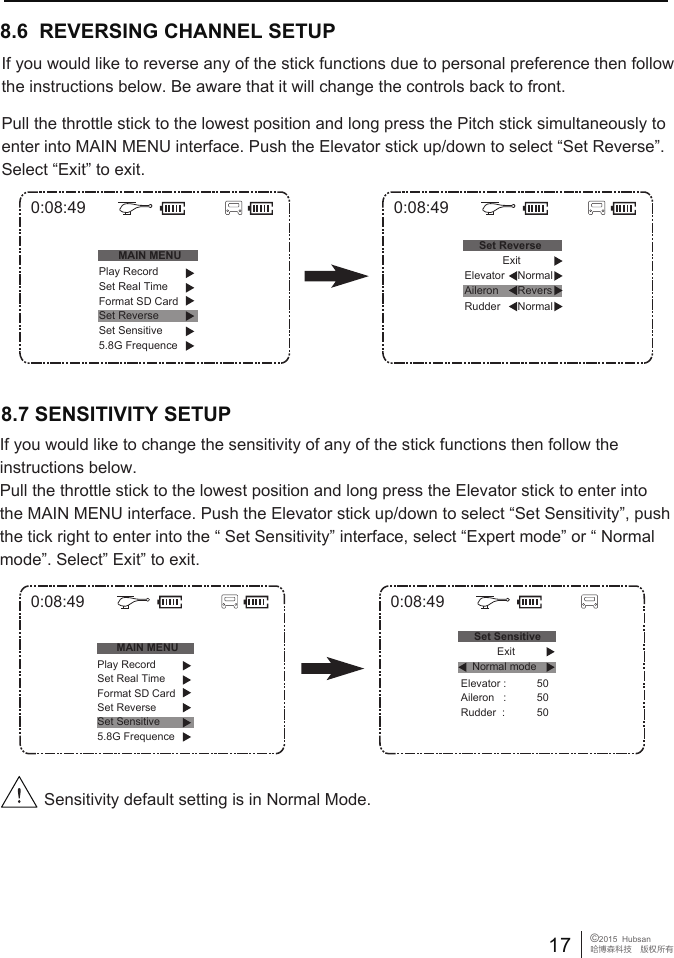
8.6  REVERSING CHANNEL SETUP If you would like to reverse any of the stick functions due to personal preference then follow the instructions below. Be aware that it will change the controls back to front.Pull the throttle stick to the lowest position and long press the Pitch stick simultaneously to enter into MAIN MENU interface. Push the Elevator stick up/down to select “Set Reverse”. Select “Exit” to exit.8.7 SENSITIVITY SETUPSensitivity default setting is in Normal Mode.17 ©2015  Hubsan哈博森科技 版权所有0:08:49MAIN MENU0:08:49Set ReversePlay RecordSet Real TimeFormat SD CardSet ReverseSet Sensitive5.8G FrequenceNormalExitNormalElevatorRudder Aileron Revers0:08:49MAIN MENU0:08:49Set SensitiveElevator :Aileron   :Rudder  :505050Play RecordSet Real TimeFormat SD CardSet ReverseSet Sensitive5.8G FrequenceNormal modeExitIf you would like to change the sensitivity of any of the stick functions then follow the instructions below. Pull the throttle stick to the lowest position and long press the Elevator stick to enter into the MAIN MENU interface. Push the Elevator stick up/down to select “Set Sensitivity”, push the tick right to enter into the “ Set Sensitivity” interface, select “Expert mode” or “ Normal mode”. Select” Exit” to exit.
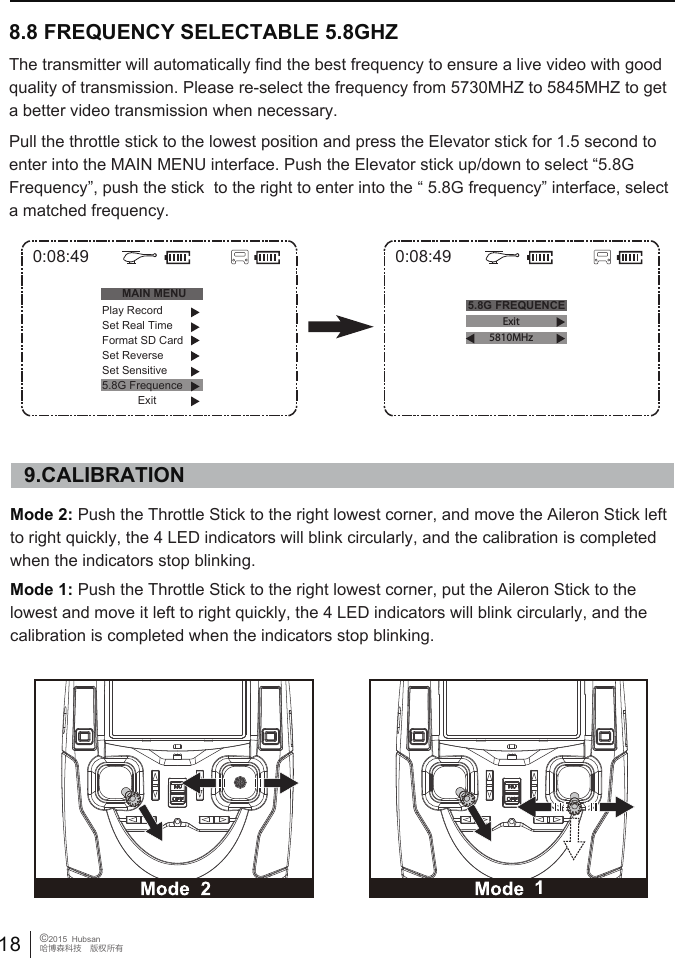
The transmitter will automatically find the best frequency to ensure a live video with good quality of transmission. Please re-select the frequency from 5730MHZ to 5845MHZ to get a better video transmission when necessary.Pull the throttle stick to the lowest position and press the Elevator stick for 1.5 second to enter into the MAIN MENU interface. Push the Elevator stick up/down to select “5.8G Frequency”, push the stick  to the right to enter into the “ 5.8G frequency” interface, select a matched frequency.Mode 2: Push the Throttle Stick to the right lowest corner, and move the Aileron Stick left to right quickly, the 4 LED indicators will blink circularly, and the calibration is completed when the indicators stop blinking. Mode 1: Push the Throttle Stick to the right lowest corner, put the Aileron Stick to the lowest and move it left to right quickly, the 4 LED indicators will blink circularly, and the calibration is completed when the indicators stop blinking. 9.CALIBRATION8.8 FREQUENCY SELECTABLE 5.8GHZ 18 ©2015  Hubsan哈博森科技 版权所有0:08:49MAIN MENU5.8G FREQUENCEPlay RecordSet Real TimeFormat SD CardSet ReverseSet Sensitive5.8G FrequenceExit0:08:49Exit5810MHz
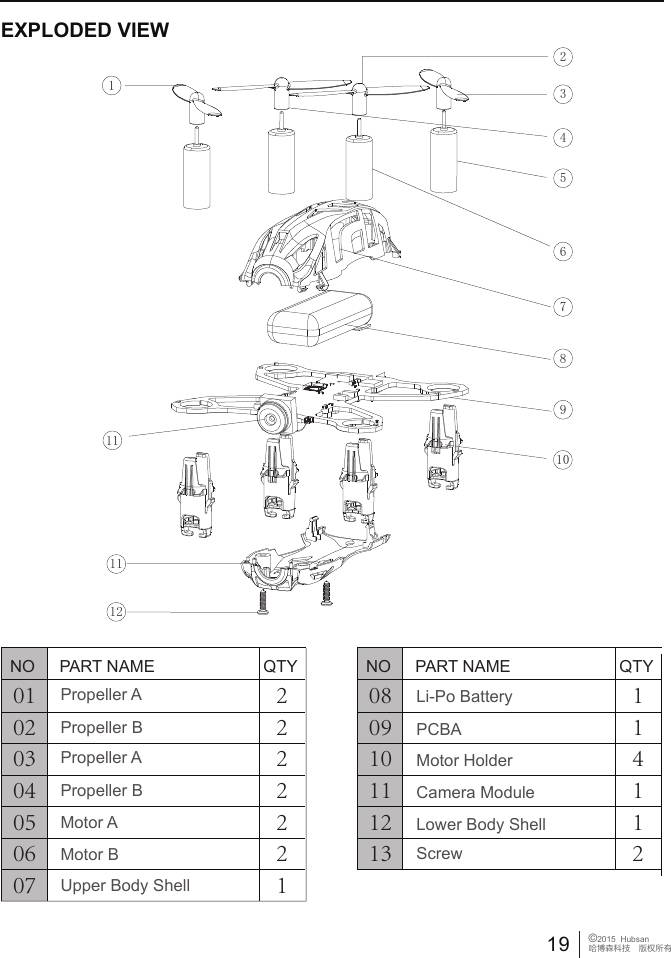
19 ©2015  Hubsan哈博森科技 版权所有010203040506072222221NO PART NAME QTYPropeller APropeller BPropeller APropeller BMotor AMotor BUpper Body Shell080910111213114112NO PART NAME QTYLi-Po BatteryPCBAMotor HolderCamera ModuleLower Body ShellScrewEXPLODED VIEW12345678910111112
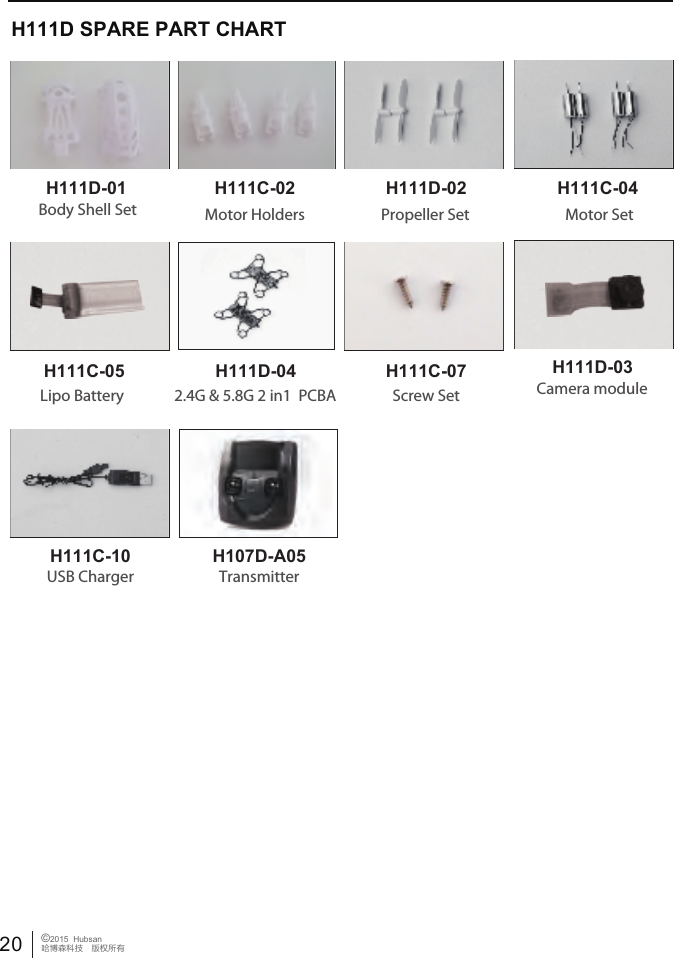
20 ©2015  Hubsan哈博森科技 版权所有H111D SPARE PART CHARTH111D-01 H111C-02 H111D-02 H111C-04H111D-03H111C-07H111C-05H111C-10Body Shell Set Propeller SetMotor Holders Motor SetLipo Battery H111D-042.4G & 5.8G 2 in1  PCBA Camera moduleUSB ChargerScrew SetTransmitterH107D-A05
21 ©2015  Hubsan哈博森科技 版权所有FCC INFORMATIONThis equipment has been tested and found to comply with the limits for a Class B digital device, pursuant to Part 15 of the FCC Rules. These limits are designed to provide reasonable protection against harmful interference in a residential installation. This equipment generates, uses, and can radiate radio frequency energy and, if not installed and used in accordance with the instructions, may cause harmful interference to radio communications. However, there is no guarantee that interference will not occur in a particular installation. If this equipment does cause harmful interference to radio or television reception, which can be determined by turning the equipment off and on, the user is encouraged to try to correct the interference by one or more of the following measures:• Reorient or relocate the receiving antenna.• Increase the separation between the equipment and receiver. • Connect the equipment into an outlet on a circuit different from that to which the receiver is connected. • Consult the local dealer or an experienced radio/TV technician for help.Changes or modifications not expressly approved by the party responsible for compliance could void the user’s authority to operate the equipment.This device complies with Part 15 of the FCC Rules. Operation is subject to the following two conditions: (1) this device may not cause harmful interference, and (2) this device must accept any interference received, including interference that may cause undesired operation.CAUTIONRISK OF EXPLOSION IF BATTERY IS REPLACED BY AN INCORRECT TYPE.DISPOSE OF USED BATTERIES ACCORDING TO THE INSTRUCTIONST

Navigation menu