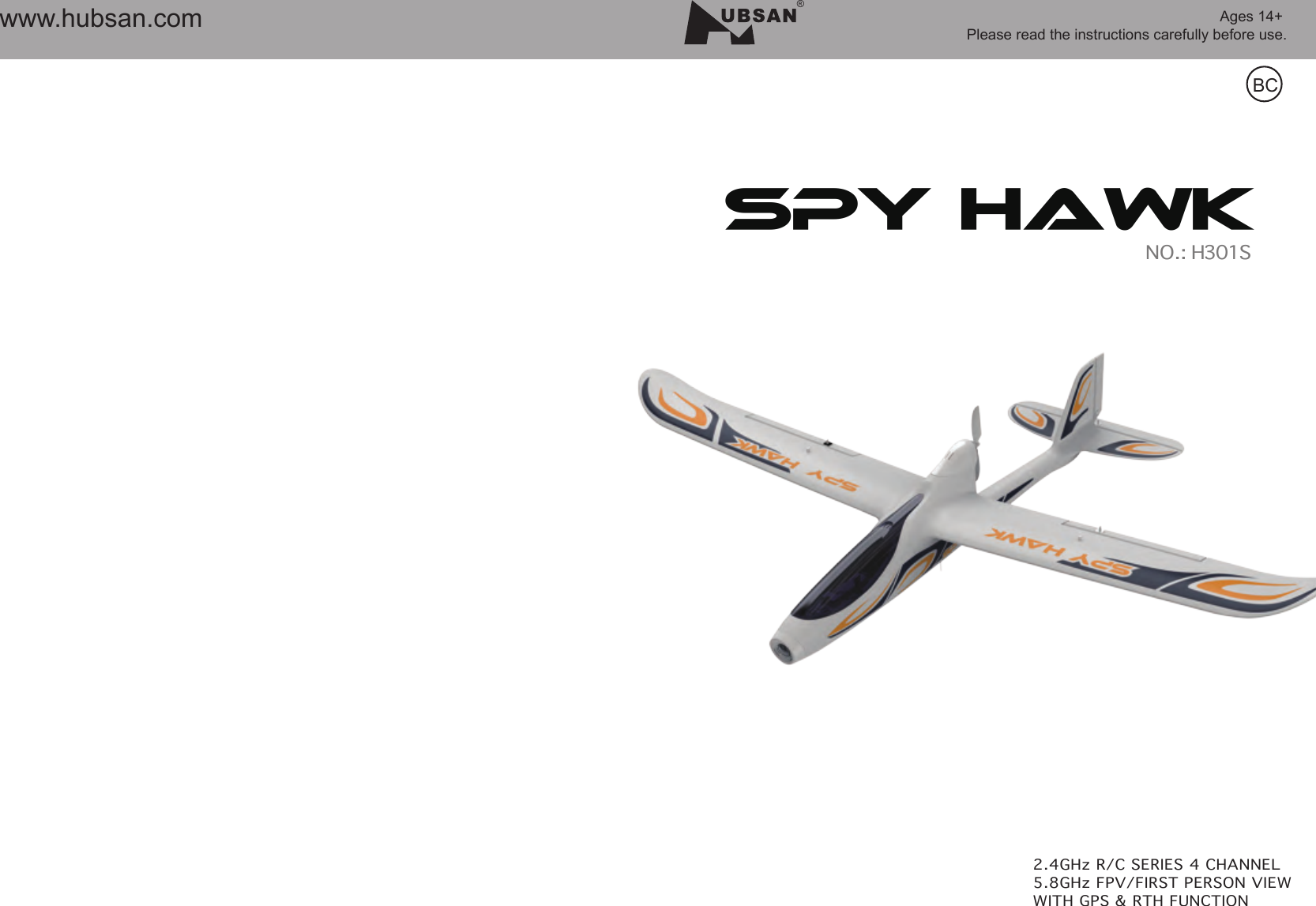
HUBSAN INTELLIGENT 301SRX Spy Hawk with GPS User Manual

SHENZHEN HUBSAN INTELLIGENT COMPANY LIMITED Spy Hawk with GPS

User Manual

Ages 14+ Please read the instructions carefully before use.BC®www.hubsan.comSPY HAWK 
2.4GHz & 5.8GHz TRANSMITTERCHARGING THE LI-PO BATTERYHOW TO LAUNCH22SPY HAWKH301S01SPY HAWKH301Swww.hubsan.comwww.hubsan.com5.8GHZ TECHNICAL TIPSCATALOGSAFETY NOTESASSEMBLY INSTRUCTIONS02EXPLODING VIEW02INCLUDED ACCESSORIES0204060610111415VIDEO RECORDINGADVANCE PERFORMANCE SET UPH301S TROUBLESHOOTING  17H301S SPARE PARTS CHART 20
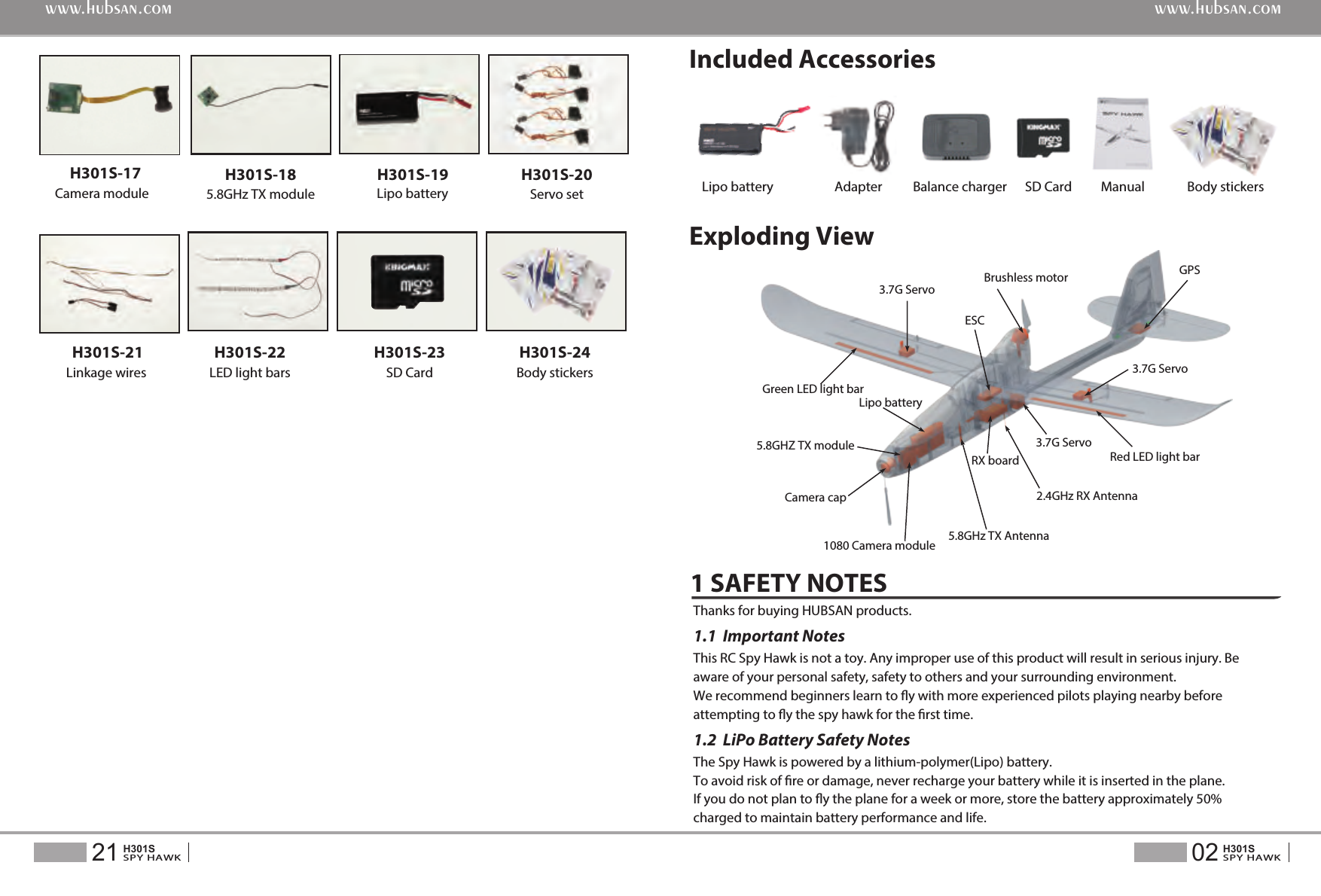
02SPY HAWKH301S21SPY HAWKH301Swww.hubsan.comwww.hubsan.comH301S-20Servo setH301S-19Lipo battery Lipo batteryH301S-23SD CardSD Card ManualH301S-185.8GHz TX moduleH301S-22LED light barsH301S-24Body stickersBody stickersH301S-21Linkage wires  Adapter Balance chargerCamera module H301S-173.7G Servo Brushless motorESCGPS3.7G ServoRed LED light bar3.7G Servo2.4GHz RX Antenna5.8GHz TX Antenna1080 Camera module5.8GHZ TX moduleLipo batteryGreen LED light barCamera capRX boardExploding ViewIncluded Accessories1 SAFETY NOTES If you do not plan to y the plane for a week or more, store the battery approximately 50% charged to maintain battery performance and life. To avoid risk of re or damage, never recharge your battery while it is inserted in the plane. The Spy Hawk is powered by a lithium-polymer(Lipo) battery.This RC Spy Hawk is not a toy. Any improper use of this product will result in serious injury. Be aware of your personal safety, safety to others and your surrounding environment. We recommend beginners learn to y with more experienced pilots playing nearby before attempting to y the spy hawk for the rst time.Thanks for buying HUBSAN products. 1.2  LiPo Battery Safety Notes1.1  Important Notes
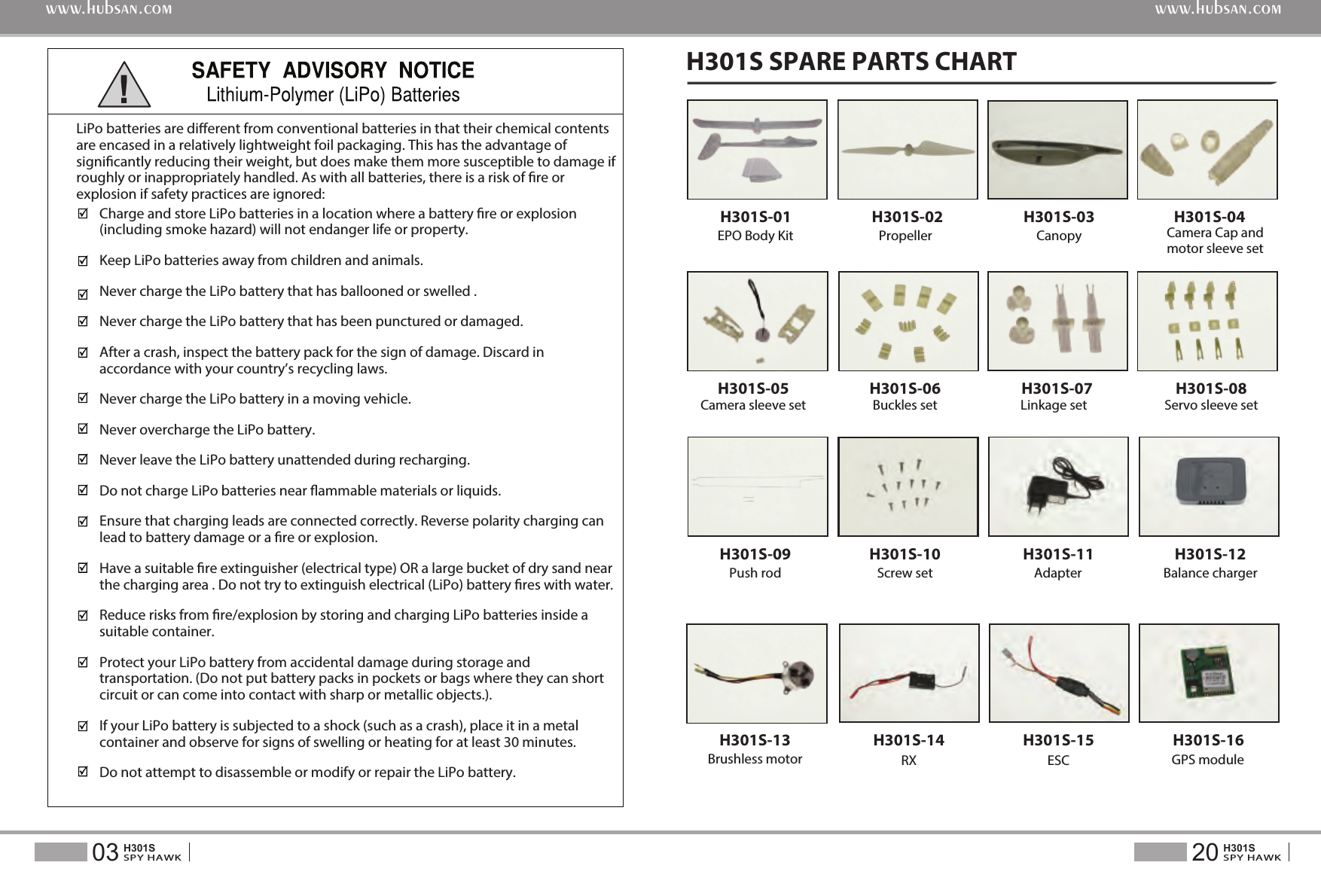
H301S SPARE PARTS CHART20SPY HAWKH301S03SPY HAWKH301Swww.hubsan.comwww.hubsan.comH301S-13Brushless motorH301S-11 H301S-12 Adapter Balance chargerH301S-09Push rodH301S-05H301S-03H301S-02PropellerH301S-08Servo sleeve setH301S-04H301S-07H301S-10Screw setH301S-06H301S-16GPS moduleH301S-01EPO Body Kit CanopyCamera sleeve setH301S-14RXH301S-15ESCBuckles set Linkage setCamera Cap and motor sleeve setCharge and store LiPo batteries in a location where a battery re or explosion (including smoke hazard) will not endanger life or property.Keep LiPo batteries away from children and animals.Never charge the LiPo battery that has ballooned or swelled .Never charge the LiPo battery that has been punctured or damaged. After a crash, inspect the battery pack for the sign of damage. Discard in accordance with your country’s recycling laws.Never charge the LiPo battery in a moving vehicle.Never overcharge the LiPo battery.Never leave the LiPo battery unattended during recharging.Do not charge LiPo batteries near ammable materials or liquids.Ensure that charging leads are connected correctly. Reverse polarity charging can lead to battery damage or a re or explosion. Have a suitable re extinguisher (electrical type) OR a large bucket of dry sand near the charging area . Do not try to extinguish electrical (LiPo) battery res with water.Reduce risks from re/explosion by storing and charging LiPo batteries inside a suitable container.Protect your LiPo battery from accidental damage during storage and transportation. (Do not put battery packs in pockets or bags where they can short circuit or can come into contact with sharp or metallic objects.).If your LiPo battery is subjected to a shock (such as a crash), place it in a metal container and observe for signs of swelling or heating for at least 30 minutes.Do not attempt to disassemble or modify or repair the LiPo battery.LiPo batteries are dierent from conventional batteries in that their chemical contents are encased in a relatively lightweight foil packaging. This has the advantage of signicantly reducing their weight, but does make them more susceptible to damage if roughly or inappropriately handled. As with all batteries, there is a risk of re or explosion if safety practices are ignored:!
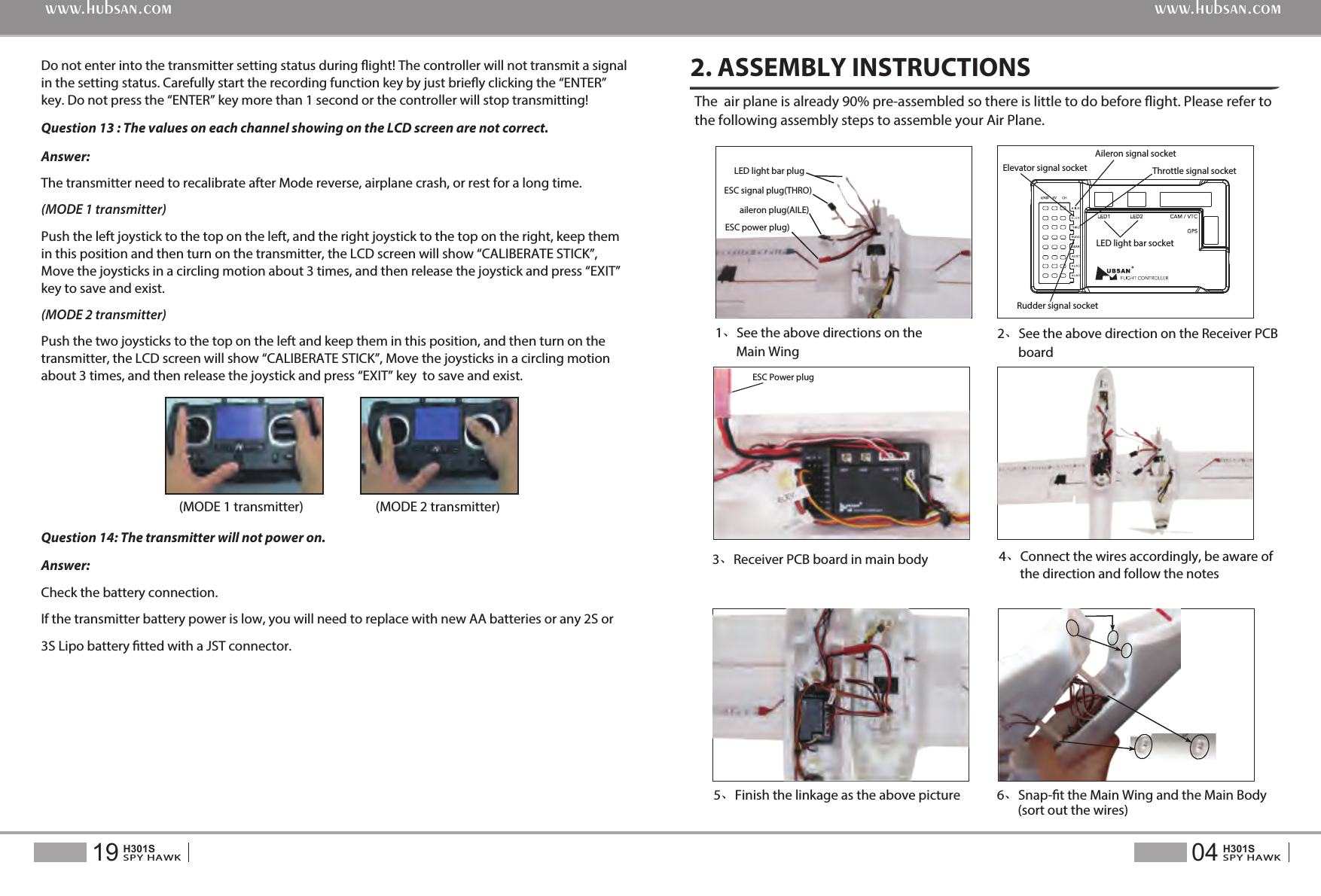
6、Snap-t the Main Wing and the Main Body       (sort out the wires)5、Finish the linkage as the above pictureDo not enter into the transmitter setting status during ight! The controller will not transmit a signal in the setting status. Carefully start the recording function key by just briey clicking the “ENTER” key. Do not press the “ENTER” key more than 1 second or the controller will stop transmitting!Question 13 : The values on each channel showing on the LCD screen are not correct.Answer: The transmitter need to recalibrate after Mode reverse, airplane crash, or rest for a long time.(MODE 1 transmitter)Push the left joystick to the top on the left, and the right joystick to the top on the right, keep them in this position and then turn on the transmitter, the LCD screen will show “CALIBERATE STICK”, Move the joysticks in a circling motion about 3 times, and then release the joystick and press “EXIT” key to save and exist.(MODE 2 transmitter)Push the two joysticks to the top on the left and keep them in this position, and then turn on the transmitter, the LCD screen will show “CALIBERATE STICK”, Move the joysticks in a circling motion  about 3 times, and then release the joystick and press “EXIT” key  to save and exist.Question 14: The transmitter will not power on.Answer:Check the battery connection.If the transmitter battery power is low, you will need to replace with new AA batteries or any 2S or 3S Lipo battery tted with a JST connector.(MODE 1 transmitter) (MODE 2 transmitter)The  air plane is already 90% pre-assembled so there is little to do before ight. Please refer to the following assembly steps to assemble your Air Plane.2. ASSEMBLY INSTRUCTIONS3、Receiver PCB board in main body2、See the above direction on the Receiver PCB       board4、Connect the wires accordingly, be aware of       the direction and follow the notesESC Power plug04SPY HAWKH301S19SPY HAWKH301Swww.hubsan.comwww.hubsan.com1、See the above directions on the        Main WingESC signal plug(THRO)LED light bar plugESC power plug)aileron plug(AILE) LED light bar socketElevator signal socketAileron signal socket Rudder signal socketThrottle signal socket
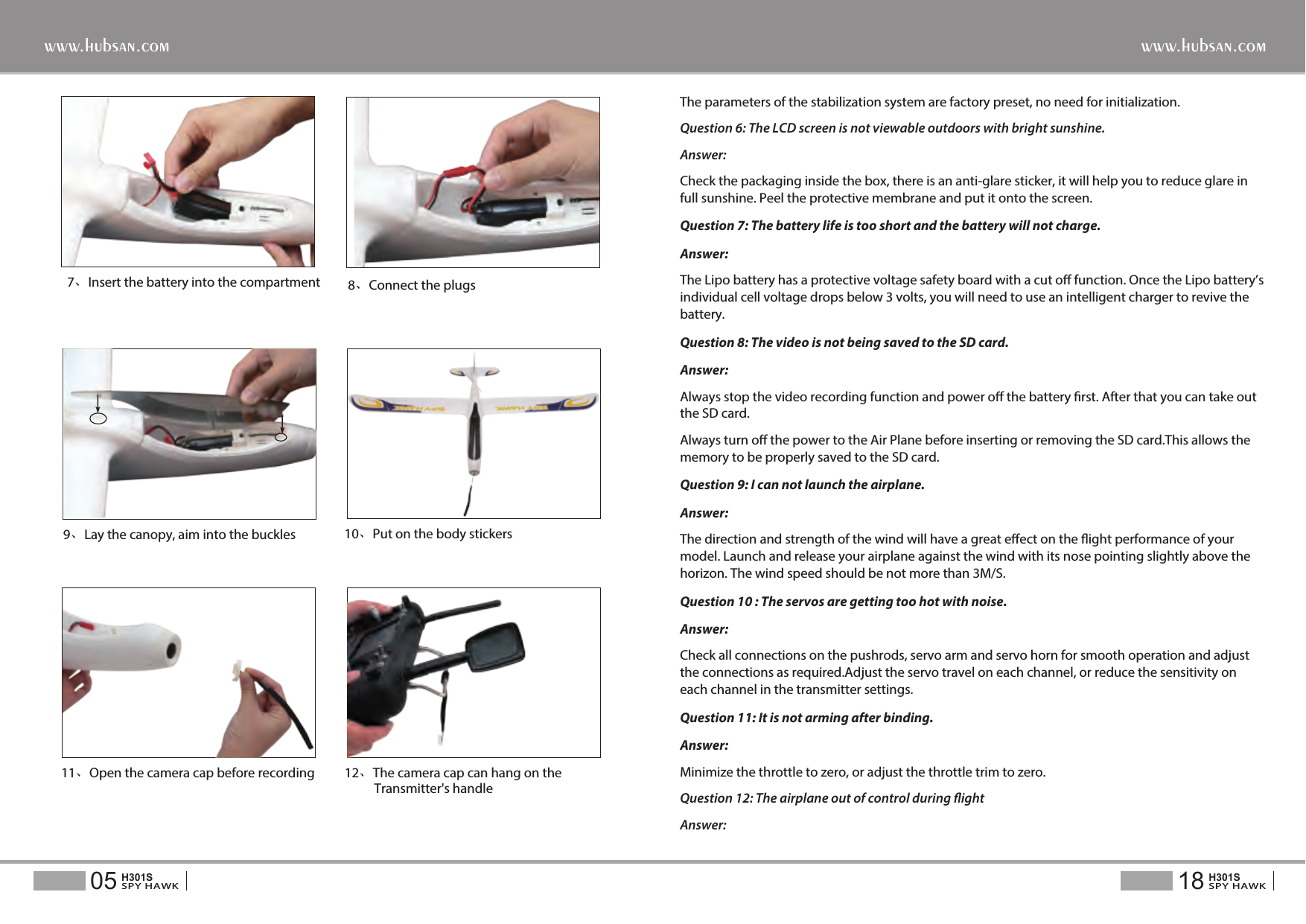
7、Insert the battery into the compartment  8、Connect the plugs9、Lay the canopy, aim into the buckles 10、Put on the body stickersThe parameters of the stabilization system are factory preset, no need for initialization.Question 6: The LCD screen is not viewable outdoors with bright sunshine.Answer: Check the packaging inside the box, there is an anti-glare sticker, it will help you to reduce glare in full sunshine. Peel the protective membrane and put it onto the screen.Question 7: The battery life is too short and the battery will not charge.Answer: The Lipo battery has a protective voltage safety board with a cut o function. Once the Lipo battery’s individual cell voltage drops below 3 volts, you will need to use an intelligent charger to revive the battery.Question 8: The video is not being saved to the SD card.Answer:Always stop the video recording function and power o the battery rst. After that you can take out the SD card.Always turn o the power to the Air Plane before inserting or removing the SD card.This allows the memory to be properly saved to the SD card.Question 9: I can not launch the airplane.Answer:The direction and strength of the wind will have a great eect on the ight performance of your model. Launch and release your airplane against the wind with its nose pointing slightly above the horizon. The wind speed should be not more than 3M/S.Question 10 : The servos are getting too hot with noise.Answer: Check all connections on the pushrods, servo arm and servo horn for smooth operation and adjust the connections as required.Adjust the servo travel on each channel, or reduce the sensitivity on each channel in the transmitter settings.Question 11: It is not arming after binding.Answer:Minimize the throttle to zero, or adjust the throttle trim to zero.Question 12: The airplane out of control during ightAnswer: 11、Open the camera cap before recording 12、The camera cap can hang on the           Transmitter's handle18SPY HAWKH301S05SPY HAWKH301Swww.hubsan.comwww.hubsan.com
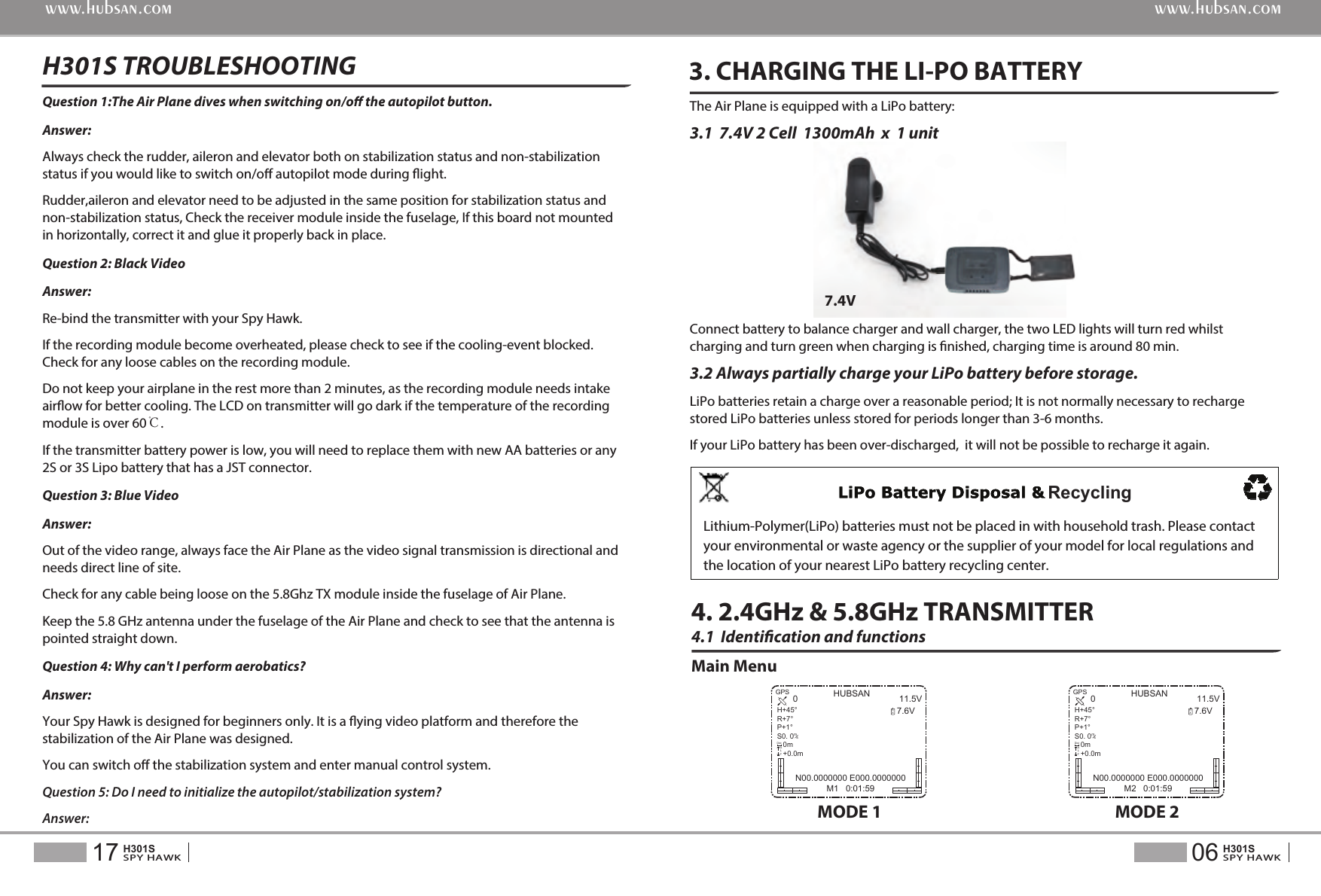
4.1  Identication and functionsMain Menu4. 2.4GHz & 5.8GHz TRANSMITTER3. CHARGING THE LI-PO BATTERYThe Air Plane is equipped with a LiPo battery:3.1  7.4V 2 Cell  1300mAh  x  1 unit Connect battery to balance charger and wall charger, the two LED lights will turn red whilst charging and turn green when charging is nished, charging time is around 80 min.3.2 Always partially charge your LiPo battery before storage. LiPo batteries retain a charge over a reasonable period; It is not normally necessary to recharge stored LiPo batteries unless stored for periods longer than 3-6 months.If your LiPo battery has been over-discharged,  it will not be possible to recharge it again.7.4VQuestion 1:The Air Plane dives when switching on/o the autopilot button.Answer:  Always check the rudder, aileron and elevator both on stabilization status and non-stabilization status if you would like to switch on/o autopilot mode during ight.Rudder,aileron and elevator need to be adjusted in the same position for stabilization status and non-stabilization status, Check the receiver module inside the fuselage, If this board not mounted in horizontally, correct it and glue it properly back in place.Question 2: Black VideoAnswer: Re-bind the transmitter with your Spy Hawk. If the recording module become overheated, please check to see if the cooling-event blocked. Check for any loose cables on the recording module.Do not keep your airplane in the rest more than 2 minutes, as the recording module needs intake airow for better cooling. The LCD on transmitter will go dark if the temperature of the recording module is over 60℃.If the transmitter battery power is low, you will need to replace them with new AA batteries or any 2S or 3S Lipo battery that has a JST connector.Question 3: Blue Video Answer: Out of the video range, always face the Air Plane as the video signal transmission is directional and needs direct line of site.Check for any cable being loose on the 5.8Ghz TX module inside the fuselage of Air Plane.Keep the 5.8 GHz antenna under the fuselage of the Air Plane and check to see that the antenna is pointed straight down.Question 4: Why can't I perform aerobatics?Answer: Your Spy Hawk is designed for beginners only. It is a ying video platform and therefore the stabilization of the Air Plane was designed.You can switch o the stabilization system and enter manual control system.Question 5: Do I need to initialize the autopilot/stabilization system?Answer: H301S TROUBLESHOOTING 06SPY HAWKH301S17SPY HAWKH301Swww.hubsan.comwww.hubsan.comMODE 1HUBSAN 11.5V7.6V0N00.0000000 E000.0000000M1   0:01:59RXGPSH+45°R+7°P+1°S0. 0   0m   +0.0m/msDistALTMODE 2HUBSAN 11.5V7.6V0N00.0000000 E000.0000000M2   0:01:59RXGPSH+45°R+7°P+1°S0. 0   0m   +0.0m/msDistALTRecyclingLithium-Polymer(LiPo) batteries must not be placed in with household trash. Please contact your environmental or waste agency or the supplier of your model for local regulations and the location of your nearest LiPo battery recycling center.
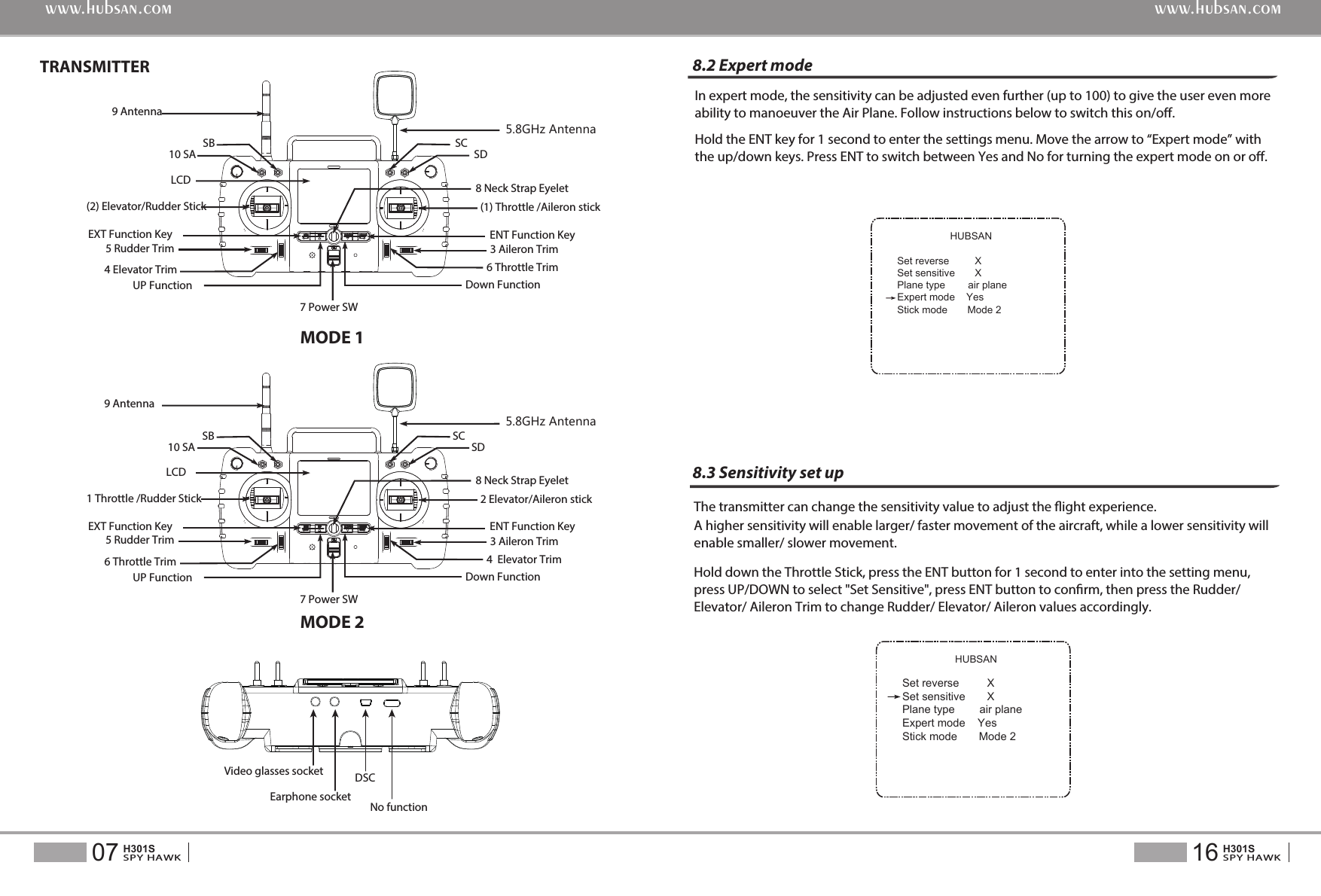
MODE 1MODE 2TRANSMITTERHUBSANSet reverse         XSet sensitive       XPlane type        air planeExpert mode    YesStick mode       Mode 2HUBSANSet reverse         XSet sensitive       XPlane type        air planeExpert mode    YesStick mode       Mode 2In expert mode, the sensitivity can be adjusted even further (up to 100) to give the user even more ability to manoeuver the Air Plane. Follow instructions below to switch this on/o.Hold the ENT key for 1 second to enter the settings menu. Move the arrow to “Expert mode” with the up/down keys. Press ENT to switch between Yes and No for turning the expert mode on or o.The transmitter can change the sensitivity value to adjust the ight experience. Hold down the Throttle Stick, press the ENT button for 1 second to enter into the setting menu, press UP/DOWN to select "Set Sensitive", press ENT button to conrm, then press the Rudder/ Elevator/ Aileron Trim to change Rudder/ Elevator/ Aileron values accordingly.A higher sensitivity will enable larger/ faster movement of the aircraft, while a lower sensitivity will enable smaller/ slower movement.8.2 Expert mode8.3 Sensitivity set up16SPY HAWKH301S07SPY HAWKH301Swww.hubsan.comwww.hubsan.com7 Power SW4 Elevator Trim(2) Elevator/Rudder Stick5 Rudder TrimUP FunctionEXT Function KeyLCD10 SASB  SC5.8GHz Antenna SD9 Antenna8 Neck Strap Eyelet6 Throttle Trim(1) Throttle /Aileron stick3 Aileron TrimENT Function KeyDown Function5.8GHz Antenna10 SASB SCSD7 Power SW6 Throttle Trim1 Throttle /Rudder Stick5 Rudder TrimUP FunctionEXT Function KeyLCD 9 Antenna8 Neck Strap Eyelet4  Elevator Trim2 Elevator/Aileron stick3 Aileron TrimENT Function KeyDown FunctionNo functionVideo glasses socket DSCEarphone socket
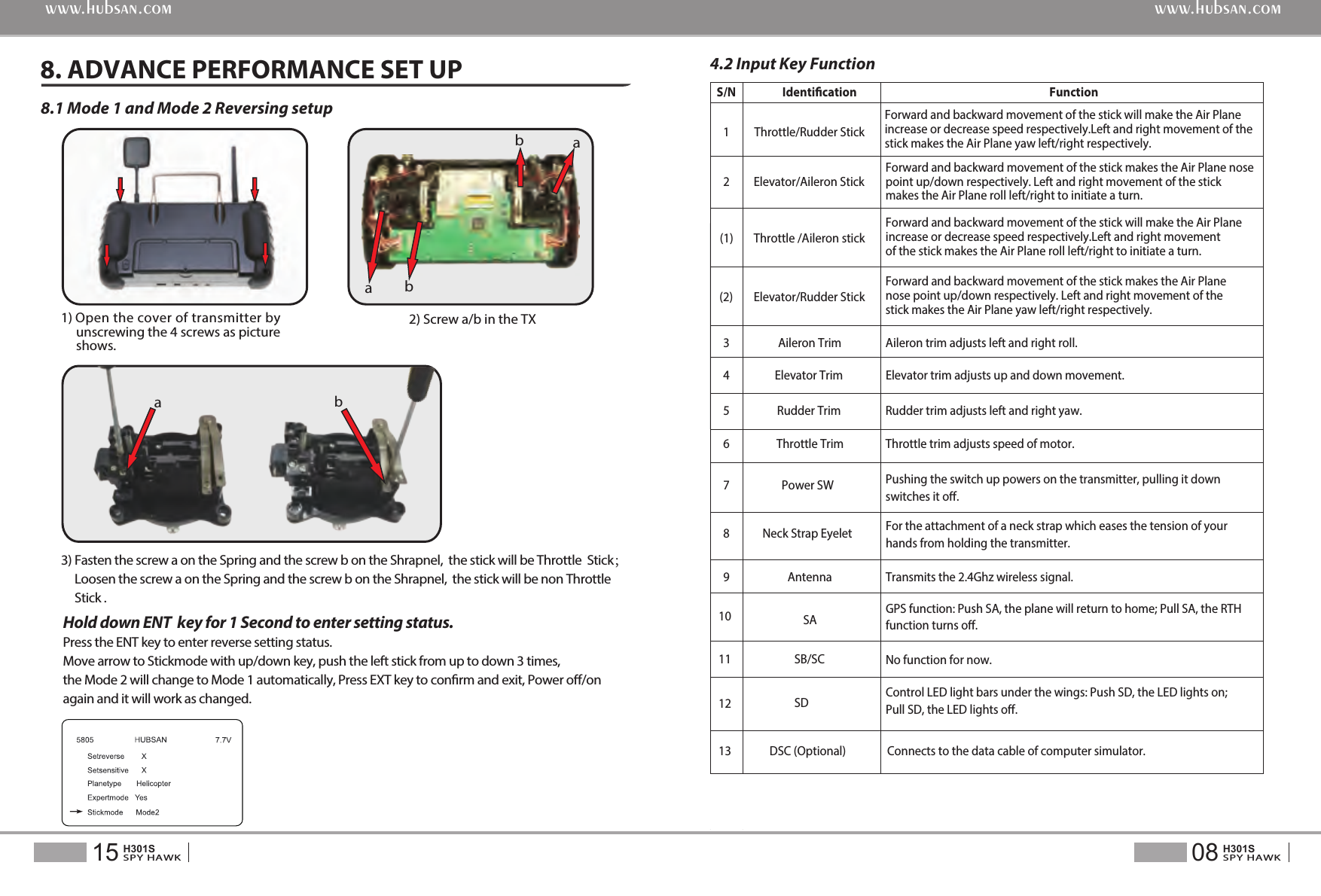
4.2 Input Key FunctionS/N  Identication  Function 1  Throttle/Rudder Stick 2  Elevator/Aileron Stick Forward and backward movement of the stick makes the Air Plane nosepoint up/down respectively. Left and right movement of the stick makes the Air Plane roll left/right to initiate a turn.(1)  Throttle /Aileron stick Forward and backward movement of the stick will make the Air Plane increase or decrease speed respectively.Left and right movement of the stick makes the Air Plane roll left/right to initiate a turn.(2)  Elevator/Rudder Stick Forward and backward movement of the stick makes the Air Plane nose point up/down respectively. Left and right movement of the stick makes the Air Plane yaw left/right respectively.3  Aileron Trim  Aileron trim adjusts left and right roll.4  Elevator Trim  Elevator trim adjusts up and down movement.5  Rudder Trim  Rudder trim adjusts left and right yaw.6  Throttle Trim  Throttle trim adjusts speed of motor.7  Power SW  Pushing the switch up powers on the transmitter, pulling it down switches it o.8  Neck Strap Eyelet  For the attachment of a neck strap which eases the tension of your hands from holding the transmitter.9 10Antenna SATransmits the 2.4Ghz wireless signal.GPS function: Push SA, the plane will return to home; Pull SA, the RTHfunction turns o.1112SB/SCSDNo function for now.Control LED light bars under the wings: Push SD, the LED lights on; Pull SD, the LED lights o.13 DSC (Optional)  Connects to the data cable of computer simulator.Forward and backward movement of the stick will make the Air Plane increase or decrease speed respectively.Left and right movement of the stick makes the Air Plane yaw left/right respectively.Hold down ENT  key for 1 Second to enter setting status. Press the ENT key to enter reverse setting status.Move arrow to Stickmode with up/down key, push the left stick from up to down 3 times, the Mode 2 will change to Mode 1 automatically, Press EXT key to conrm and exit, Power o/on again and it will work as changed.08SPY HAWKH301S15SPY HAWKH301Swww.hubsan.comwww.hubsan.com8.1 Mode 1 and Mode 2 Reversing setup8. ADVANCE PERFORMANCE SET UPaaabb1) Open the cover of transmitter by      unscrewing the 4 screws as picture      shows. 2) Screw a/b in the TXb3) Fasten the screw a on the Spring and the screw b on the Shrapnel,  the stick will be Throttle  Stick;     Loosen the screw a on the Spring and the screw b on the Shrapnel,  the stick will be non Throttle      Stick .
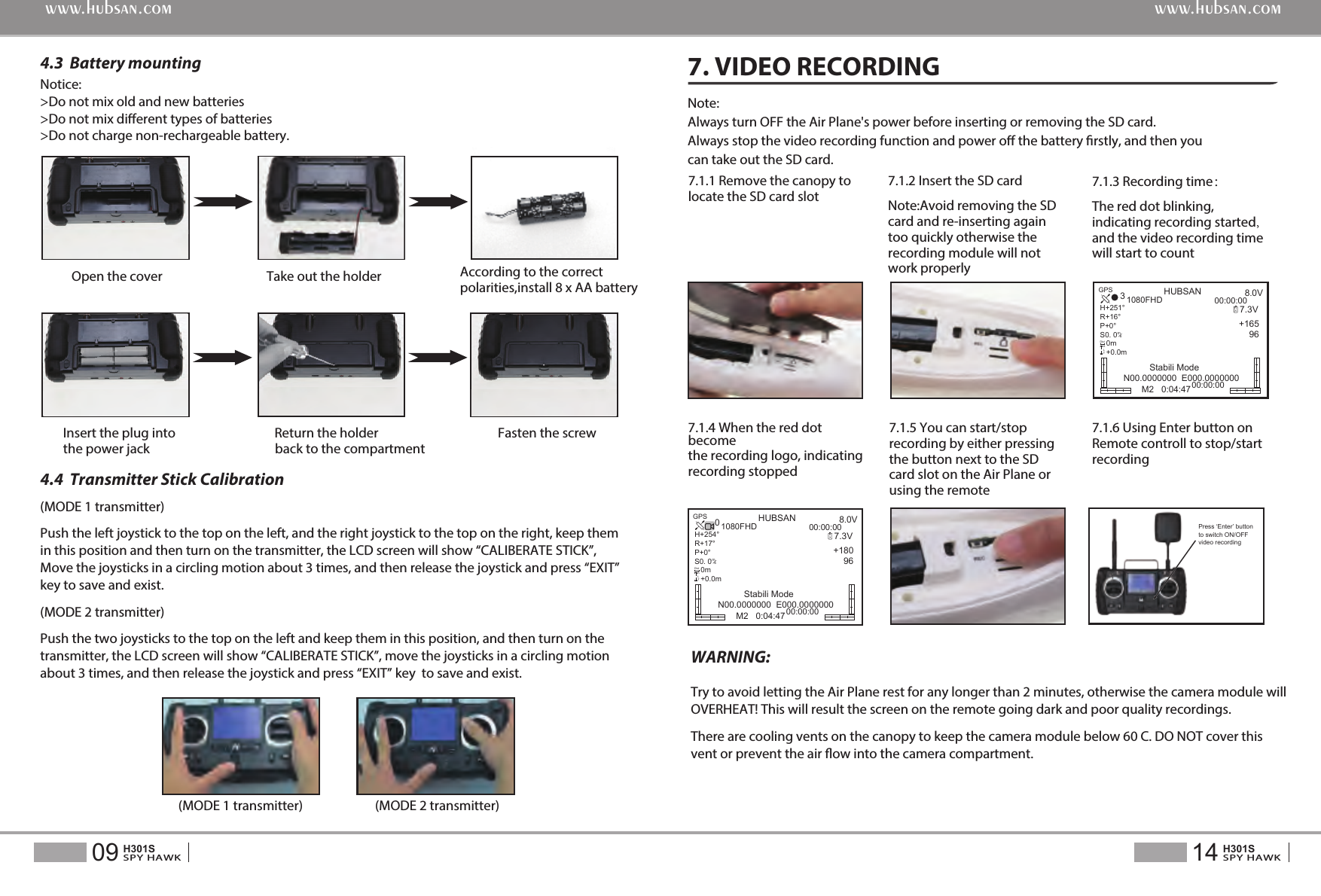
(MODE 1 transmitter)Push the left joystick to the top on the left, and the right joystick to the top on the right, keep them in this position and then turn on the transmitter, the LCD screen will show “CALIBERATE STICK”, Move the joysticks in a circling motion about 3 times, and then release the joystick and press “EXIT” key to save and exist.(MODE 2 transmitter)Push the two joysticks to the top on the left and keep them in this position, and then turn on the transmitter, the LCD screen will show “CALIBERATE STICK”, move the joysticks in a circling motion about 3 times, and then release the joystick and press “EXIT” key  to save and exist.(MODE 1 transmitter) (MODE 2 transmitter)Notice: >Do not mix old and new batteries>Do not mix dierent types of batteries>Do not charge non-rechargeable battery.Open the cover Take out the holder  According to the correct polarities,install 8 x AA battery Insert the plug into                 Return the holder                                   Fasten the screw the power jack                                   back to the compartment4.3  Battery mounting4.4  Transmitter Stick Calibration7.1.1 Remove the canopy to locate the SD card slotNote:Always turn OFF the Air Plane's power before inserting or removing the SD card.Always stop the video recording function and power o the battery rstly, and then you can take out the SD card.Try to avoid letting the Air Plane rest for any longer than 2 minutes, otherwise the camera module will OVERHEAT! This will result the screen on the remote going dark and poor quality recordings.There are cooling vents on the canopy to keep the camera module below 60 C. DO NOT cover this vent or prevent the air ow into the camera compartment.WARNING:7. VIDEO RECORDING14SPY HAWKH301S09SPY HAWKH301Swww.hubsan.comwww.hubsan.com7.1.2 Insert the SD cardNote:Avoid removing the SD card and re-inserting again too quickly otherwise the recording module will not work properly7.1.4 When the red dot become the recording logo, indicating recording stopped7.1.5 You can start/stop recording by either pressing the button next to the SD card slot on the Air Plane or using the remote7.1.6 Using Enter button on Remote controll to stop/start recording7.1.3 Recording time:The red dot blinking, indicating recording started, and the video recording time will start to countPress ‘Enter’ button to switch ON/OFF video recording  HUBSAN 8.0V7.3V+165    963Stabili ModeN00.0000000  E000.000000000:00:001080FHD00:00:00RXGPSH+251°R+16°P+0°S0. 0   0m   +0.0m/msDistALTM2   0:04:47HUBSAN 8.0V7.3V+180    960Stabili ModeN00.0000000  E000.000000000:00:001080FHD00:00:00RXGPSH+254°R+17°P+0°S0. 0   0m   +0.0m/msDistALTM2   0:04:47
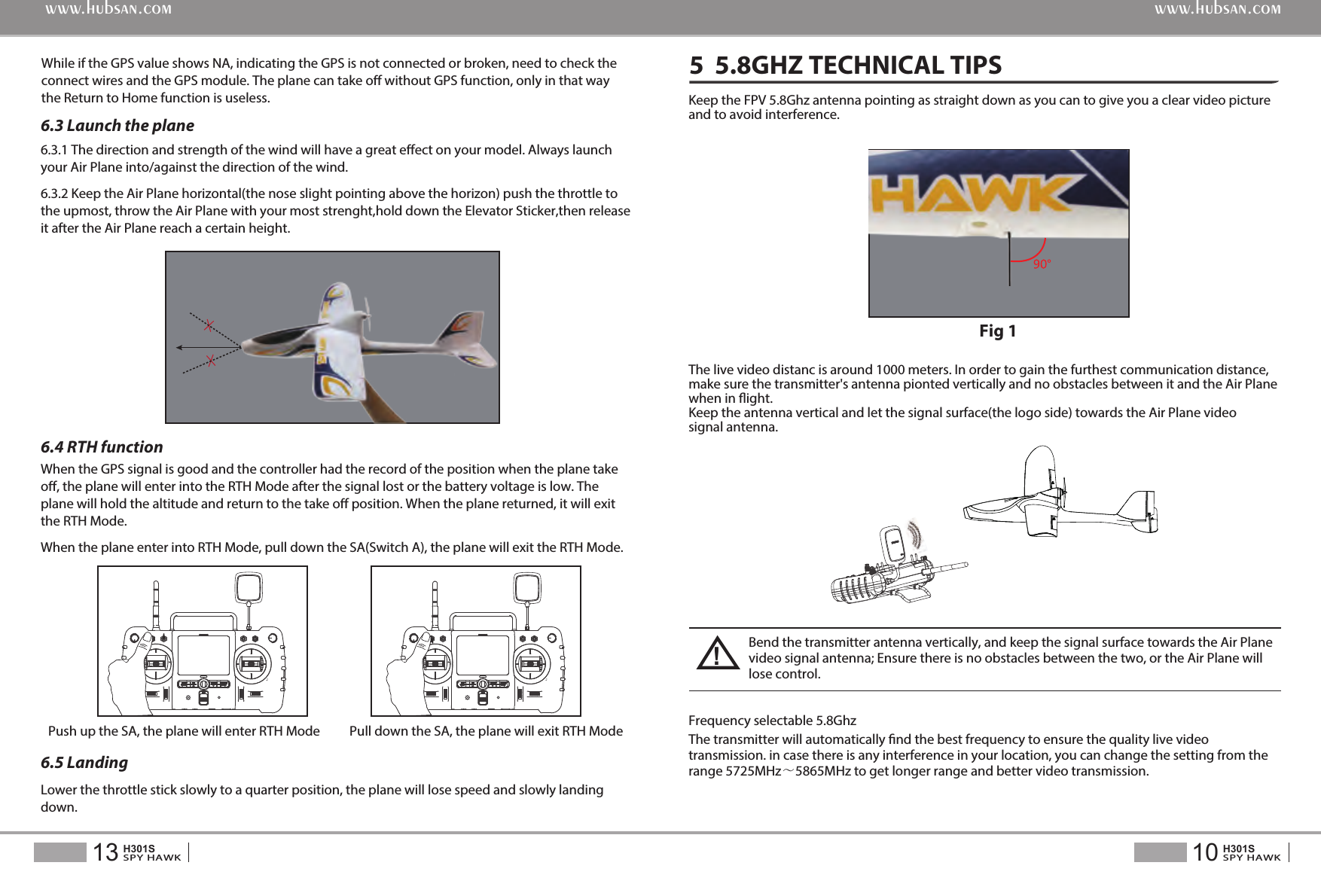
Keep the FPV 5.8Ghz antenna pointing as straight down as you can to give you a clear video picture and to avoid interference. The transmitter will automatically nd the best frequency to ensure the quality live video transmission. in case there is any interference in your location, you can change the setting from the range 5725MHz~5865MHz to get longer range and better video transmission.Fig 15  5.8GHZ TECHNICAL TIPS10SPY HAWKH301S13SPY HAWKH301Swww.hubsan.comwww.hubsan.comWhile if the GPS value shows NA, indicating the GPS is not connected or broken, need to check the connect wires and the GPS module. The plane can take o without GPS function, only in that way the Return to Home function is useless.6.3 Launch the plane6.4 RTH function6.3.1 The direction and strength of the wind will have a great eect on your model. Always launch your Air Plane into/against the direction of the wind.6.3.2 Keep the Air Plane horizontal(the nose slight pointing above the horizon) push the throttle to the upmost, throw the Air Plane with your most strenght,hold down the Elevator Sticker,then release it after the Air Plane reach a certain height.When the GPS signal is good and the controller had the record of the position when the plane take o, the plane will enter into the RTH Mode after the signal lost or the battery voltage is low. The plane will hold the altitude and return to the take o position. When the plane returned, it will exit the RTH Mode.When the plane enter into RTH Mode, pull down the SA(Switch A), the plane will exit the RTH Mode.6.5 Landing Lower the throttle stick slowly to a quarter position, the plane will lose speed and slowly landing down.Push up the SA, the plane will enter RTH Mode Pull down the SA, the plane will exit RTH Mode Frequency selectable 5.8Ghz The live video distanc is around 1000 meters. In order to gain the furthest communication distance, make sure the transmitter's antenna pionted vertically and no obstacles between it and the Air Plane when in ight.Keep the antenna vertical and let the signal surface(the logo side) towards the Air Plane video signal antenna.Bend the transmitter antenna vertically, and keep the signal surface towards the Air Plane video signal antenna; Ensure there is no obstacles between the two, or the Air Plane will lose control.!
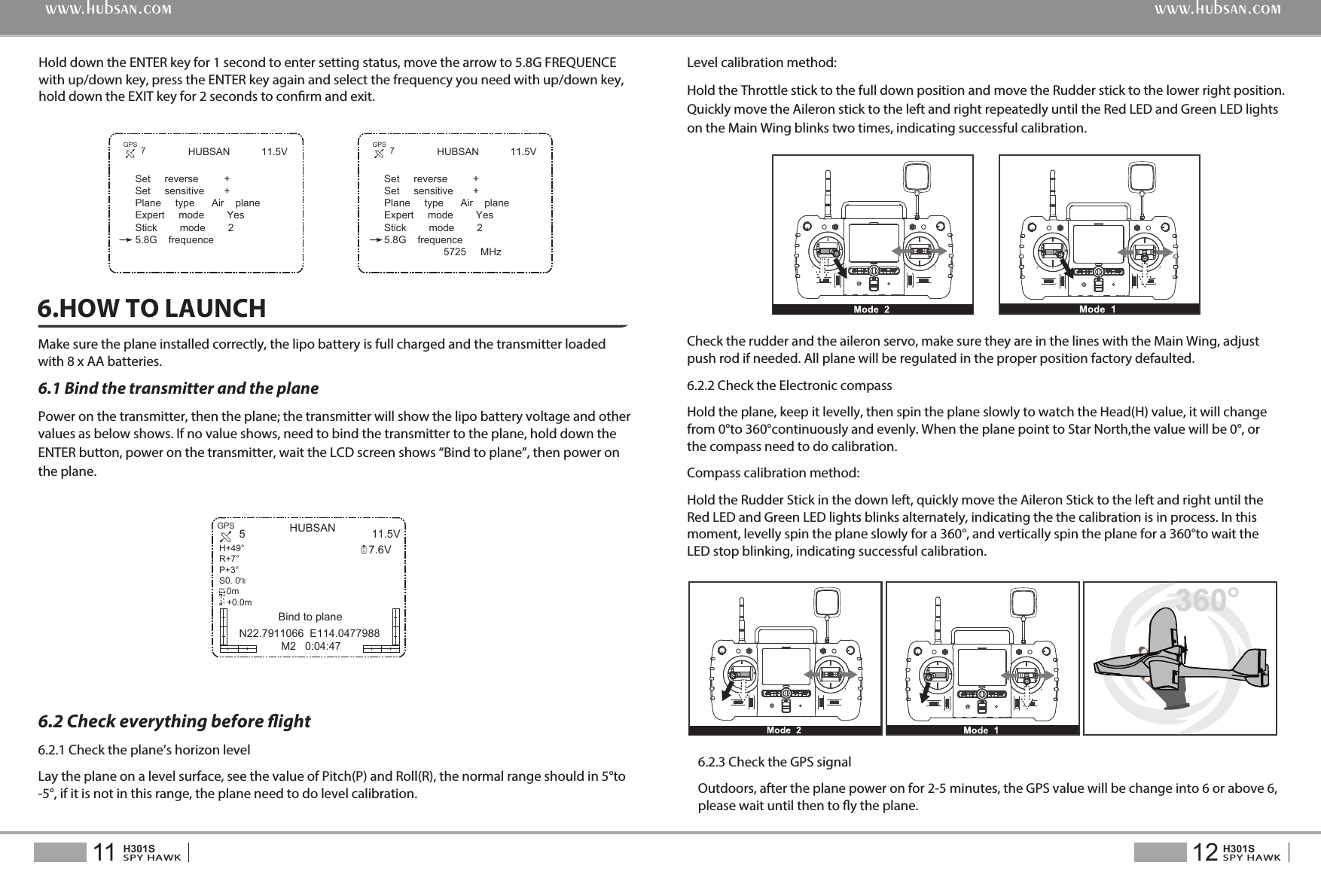
HUBSAN 11.5VSet     reverse         +Set     sensitive       +Plane     type      Air    planeExpert     mode        YesStick        mode        25.8G    frequenceHold down the ENTER key for 1 second to enter setting status, move the arrow to 5.8G FREQUENCE with up/down key, press the ENTER key again and select the frequency you need with up/down key, hold down the EXIT key for 2 seconds to conrm and exit.12SPY HAWKH301S11SPY HAWKH301Swww.hubsan.comwww.hubsan.comHUBSAN 11.5V7.6V5N22.7911066  E114.0477988 M2   0:04:47RXGPSH+49°R+7°P+3°S0. 0   0m   +0.0m/msDistALT7GPS HUBSAN 11.5VSet     reverse         +Set     sensitive       +Plane     type      Air    planeExpert     mode        YesStick        mode        25.8G    frequence                     5725     MHz7GPSMake sure the plane installed correctly, the lipo battery is full charged and the transmitter loaded with 8 x AA batteries.6.1 Bind the transmitter and the planePower on the transmitter, then the plane; the transmitter will show the lipo battery voltage and other values as below shows. If no value shows, need to bind the transmitter to the plane, hold down theENTER button, power on the transmitter, wait the LCD screen shows “Bind to plane”, then power onthe plane.6.HOW TO LAUNCHLevel calibration method:Hold the Throttle stick to the full down position and move the Rudder stick to the lower right position. Quickly move the Aileron stick to the left and right repeatedly until the Red LED and Green LED lights on the Main Wing blinks two times, indicating successful calibration.   6.2 Check everything before ight6.2.1 Check the plane’s horizon levelLay the plane on a level surface, see the value of Pitch(P) and Roll(R), the normal range should in 5°to -5°, if it is not in this range, the plane need to do level calibration.Check the rudder and the aileron servo, make sure they are in the lines with the Main Wing, adjust push rod if needed. All plane will be regulated in the proper position factory defaulted.6.2.2 Check the Electronic compassHold the plane, keep it levelly, then spin the plane slowly to watch the Head(H) value, it will change from 0°to 360°continuouslyandevenly. When the plane point to Star North,the value will be 0°, or the compass need to do calibration.Compass calibration method: Hold the Rudder Stick in the down left, quickly move the Aileron Stick to the left and right until the Red LED and Green LED lights blinks alternately, indicating the the calibration is in process. In this moment, levelly spin the plane slowly for a 360°, and vertically spin the plane for a 360°to wait the LED stop blinking, indicating successful calibration.6.2.3 Check the GPS signalOutdoors, after the plane power on for 2-5 minutes, the GPS value will be change into 6 or above 6, please wait until then to y the plane. Bind to plane

Navigation menu