HUBSAN INTELLIGENT 501ARX HUBSAN X4 CAM BRUSHLESS WITH APP User Manual pt 1

SHENZHEN HUBSAN INTELLIGENT COMPANY LIMITED HUBSAN X4 CAM BRUSHLESS WITH APP pt 1

Contents

User Manual pt 1

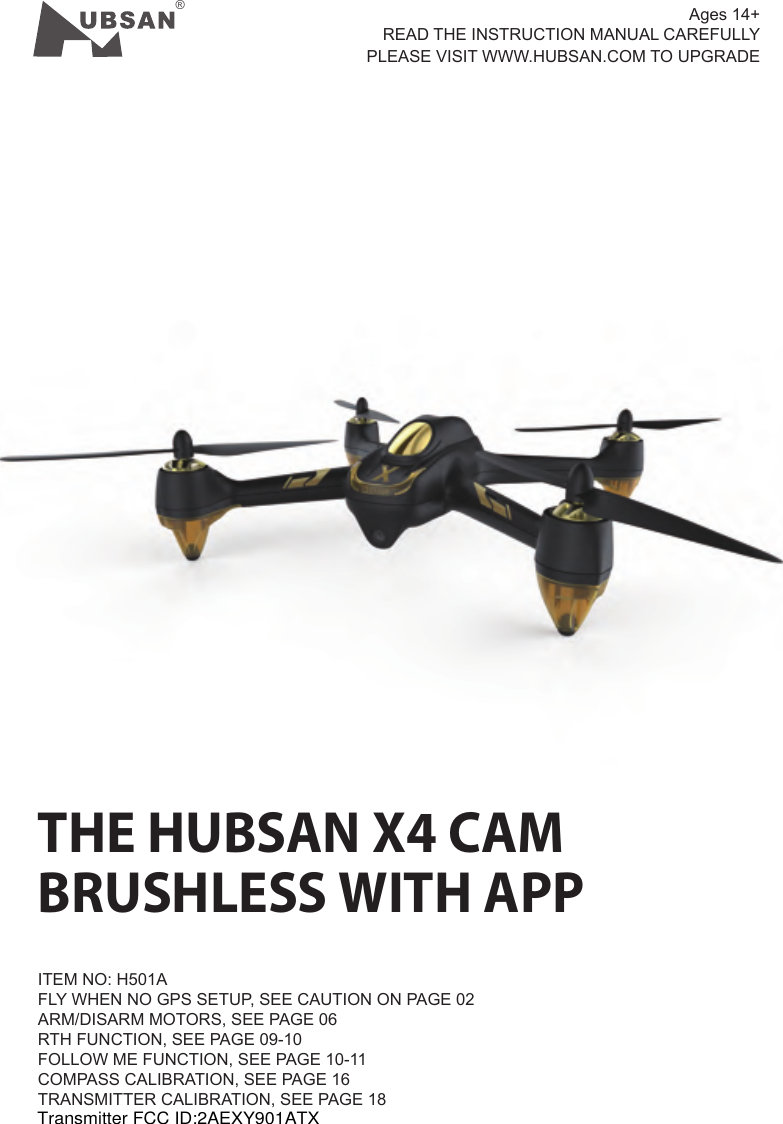
®THE HUBSAN X4 CAMBRUSHLESS WITH APPITEM NO: H501AFLY WHEN NO GPS SETUP, SEE CAUTION ON PAGE 02ARM/DISARM MOTORS, SEE PAGE 06RTH FUNCTION, SEE PAGE 09-10FOLLOW ME FUNCTION, SEE PAGE 10-11COMPASS CALIBRATION, SEE PAGE 16TRANSMITTER CALIBRATION, SEE PAGE 18 Ages 14+READ THE INSTRUCTION MANUAL CAREFULLY  PLEASE VISIT WWW.HUBSAN.COM TO UPGRADETransmitter FCC ID:2AEXY901ATX
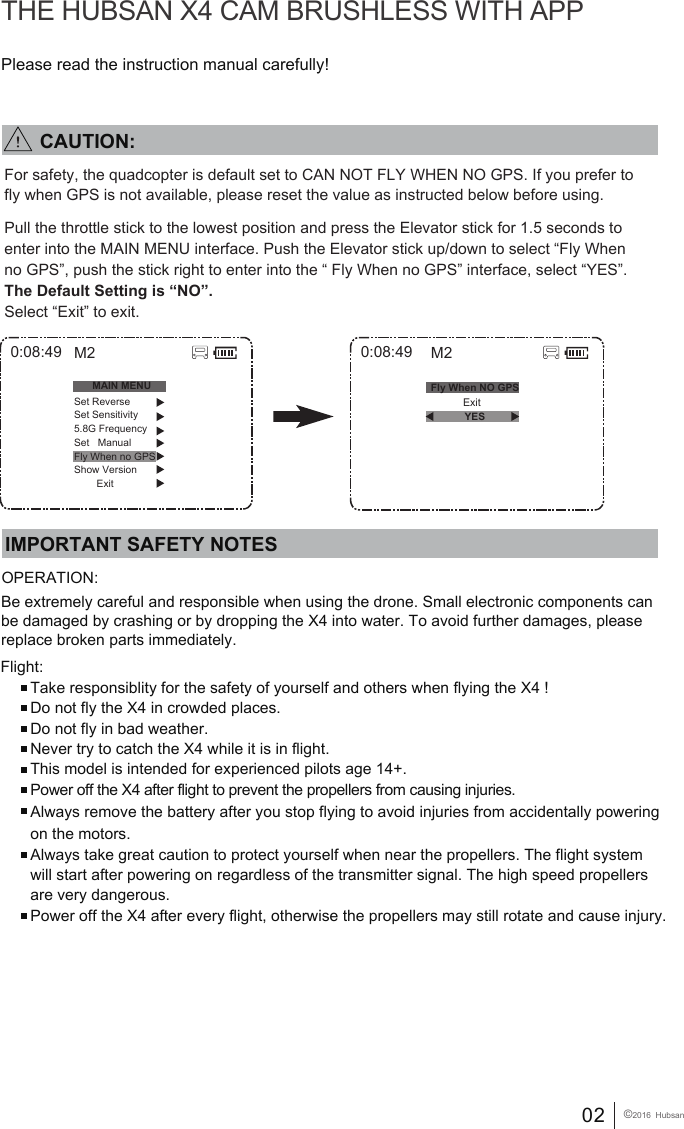
02 ©2016  HubsanPlease read the instruction manual carefully!THE HUBSAN X4 CAM BRUSHLESS WITH APPIMPORTANT SAFETY NOTESOPERATION: Flight:Take responsiblity for the safety of yourself and others when flying the X4 !Do not fly the X4 in crowded places. Do not fly in bad weather.Never try to catch the X4 while it is in flight.This model is intended for experienced pilots age 14+.Power off the X4 after flight to prevent the propellers from causing injuries.Always remove the battery after you stop flying to avoid injuries from accidentally powering on the motors.Always take great caution to protect yourself when near the propellers. The flight system will start after powering on regardless of the transmitter signal. The high speed propellers are very dangerous.Power off the X4 after every flight, otherwise the propellers may still rotate and cause injury.   Be extremely careful and responsible when using the drone. Small electronic components can be damaged by crashing or by dropping the X4 into water. To avoid further damages, please replace broken parts immediately. 0:08:49 M2            Exit0:08:49MAIN MENUSet ReverseSet Sensitivity5.8G FrequencySet   ManualFly When no GPSShow Version        ExitM2Fly When NO GPSYESFor safety, the quadcopter is default set to CAN NOT FLY WHEN NO GPS. If you prefer to fly when GPS is not available, please reset the value as instructed below before using.Pull the throttle stick to the lowest position and press the Elevator stick for 1.5 seconds to enter into the MAIN MENU interface. Push the Elevator stick up/down to select “Fly When no GPS”, push the stick right to enter into the “ Fly When no GPS” interface, select “YES”. The Default Setting is “NO”.Select “Exit” to exit.        CAUTION:
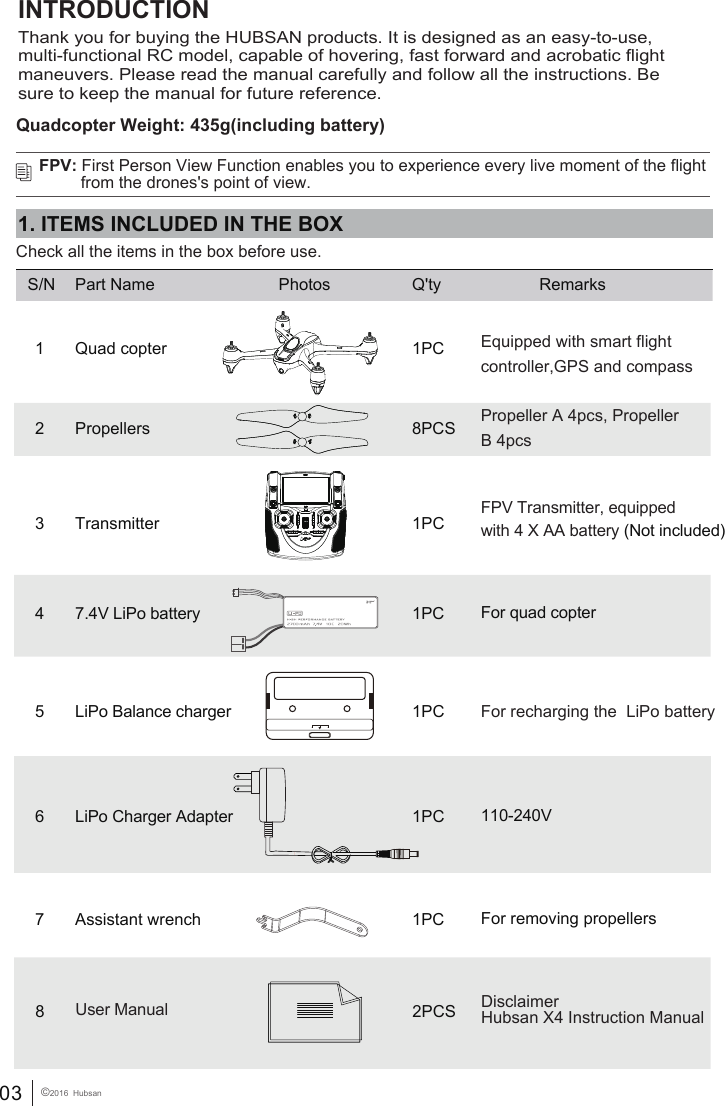
03 ©2016  Hubsan5LiPo Balance charger 1PC  For recharging the  LiPo batteryINTRODUCTION 1. ITEMS INCLUDED IN THE BOXCheck all the items in the box before use.S/N Part Name Photos Q'ty Remarks1 Quad copter 1PC Equipped with smart flightcontroller,GPS and compassPropeller A 4pcs, Propeller B 4pcs2 Propellers 8PCS7 Assistant wrench 1PC For removing propellers47.4V LiPo battery  1PC For quad copter6LiPo Charger Adapter 1PC 110-240VFPV: First Person View Function enables you to experience every live moment of the flight          from the drones's point of view.FPV Transmitter, equipped with 4 X AA battery (Not included)3 Transmitter 1PCThank you for buying the HUBSAN products. It is designed as an easy-to-use, multi-functional RC model, capable of hovering, fast forward and acrobatic flight maneuvers. Please read the manual carefully and follow all the instructions. Be sure to keep the manual for future reference. 8 2PCS DisclaimerHubsan X4 Instruction Manual          User ManualQuadcopter Weight: 435g(including battery)
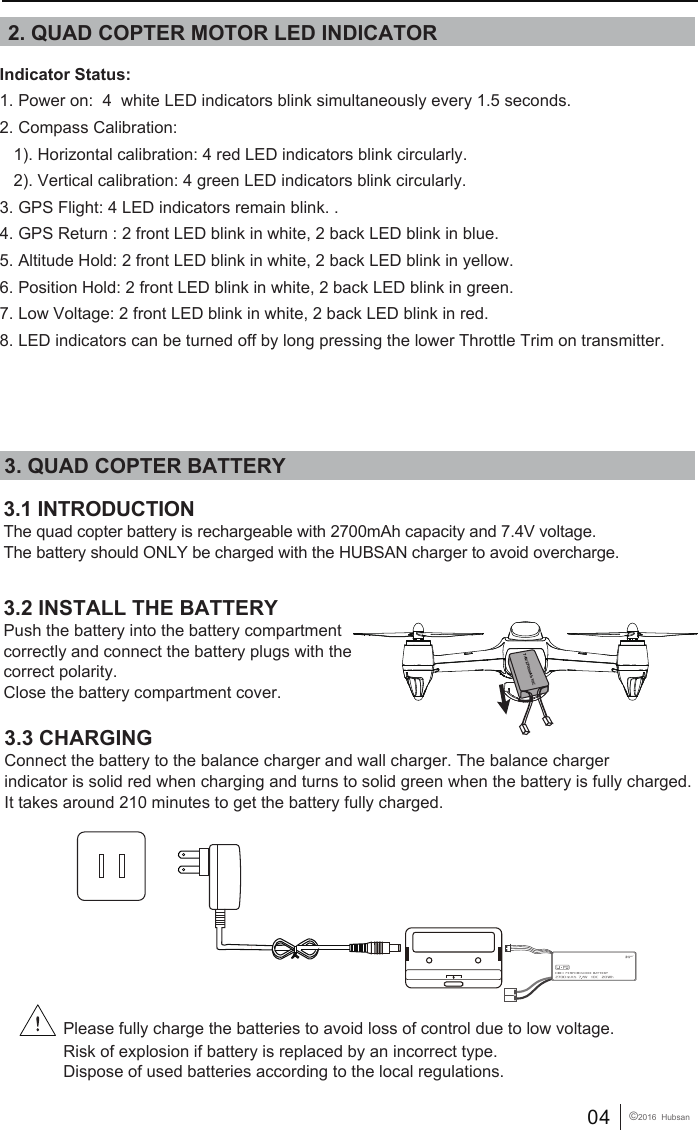
04 ©2016  Hubsan3. QUAD COPTER BATTERY3.1 INTRODUCTIONThe quad copter battery is rechargeable with 2700mAh capacity and 7.4V voltage. The battery should ONLY be charged with the HUBSAN charger to avoid overcharge.3.3 CHARGINGConnect the battery to the balance charger and wall charger. The balance charger indicator is solid red when charging and turns to solid green when the battery is fully charged. It takes around 210 minutes to get the battery fully charged.3.2 INSTALL THE BATTERYPush the battery into the battery compartment correctly and connect the battery plugs with the correct polarity. Close the battery compartment cover. 7.4V 2700mAh 10C2. QUAD COPTER MOTOR LED INDICATORPlease fully charge the batteries to avoid loss of control due to low voltage.Risk of explosion if battery is replaced by an incorrect type. Dispose of used batteries according to the local regulations.Indicator Status:1. Power on:  4  white LED indicators blink simultaneously every 1.5 seconds.2. Compass Calibration:    1). Horizontal calibration: 4 red LED indicators blink circularly.   2). Vertical calibration: 4 green LED indicators blink circularly.3. GPS Flight: 4 LED indicators remain blink. .4. GPS Return : 2 front LED blink in white, 2 back LED blink in blue.5. Altitude Hold: 2 front LED blink in white, 2 back LED blink in yellow.6. Position Hold: 2 front LED blink in white, 2 back LED blink in green.7. Low Voltage: 2 front LED blink in white, 2 back LED blink in red.8. LED indicators can be turned off by long pressing the lower Throttle Trim on transmitter.
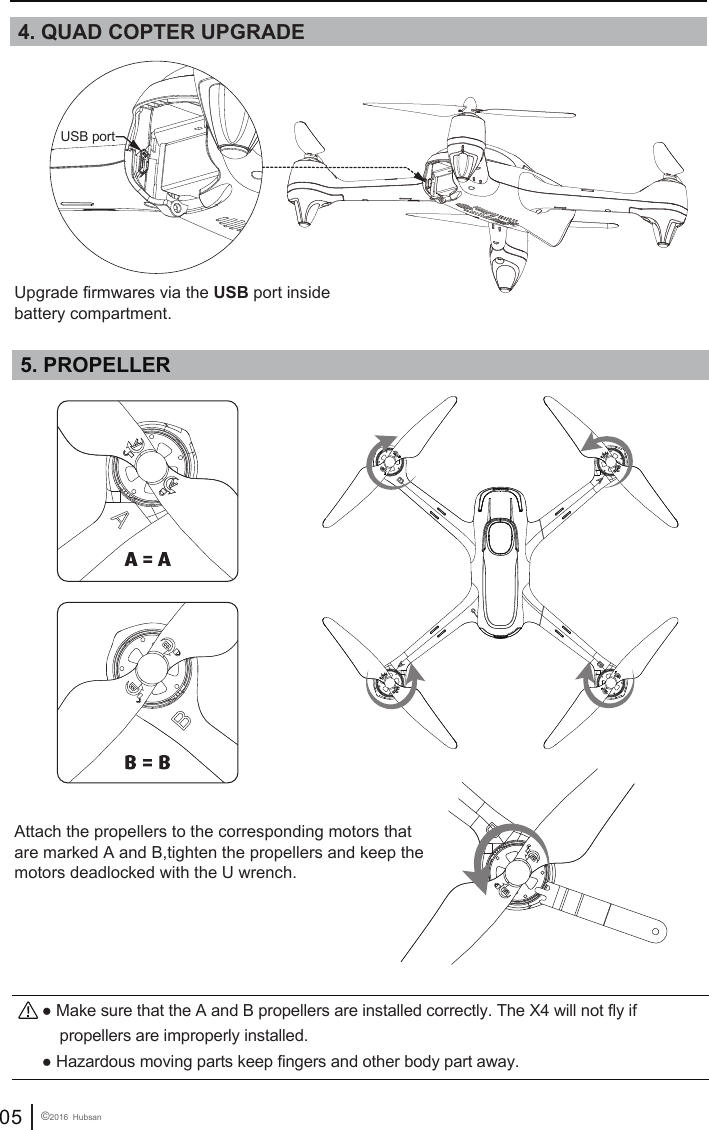
05 ©2016  Hubsan● Hazardous moving parts keep fingers and other body part away.● Make sure that the A and B propellers are installed correctly. The X4 will not fly if     propellers are improperly installed.  5. PROPELLER Attach the propellers to the corresponding motors that are marked A and B,tighten the propellers and keep the motors deadlocked with the U wrench.4. QUAD COPTER UPGRADE Upgrade firmwares via the USB port insidebattery compartment.USB port
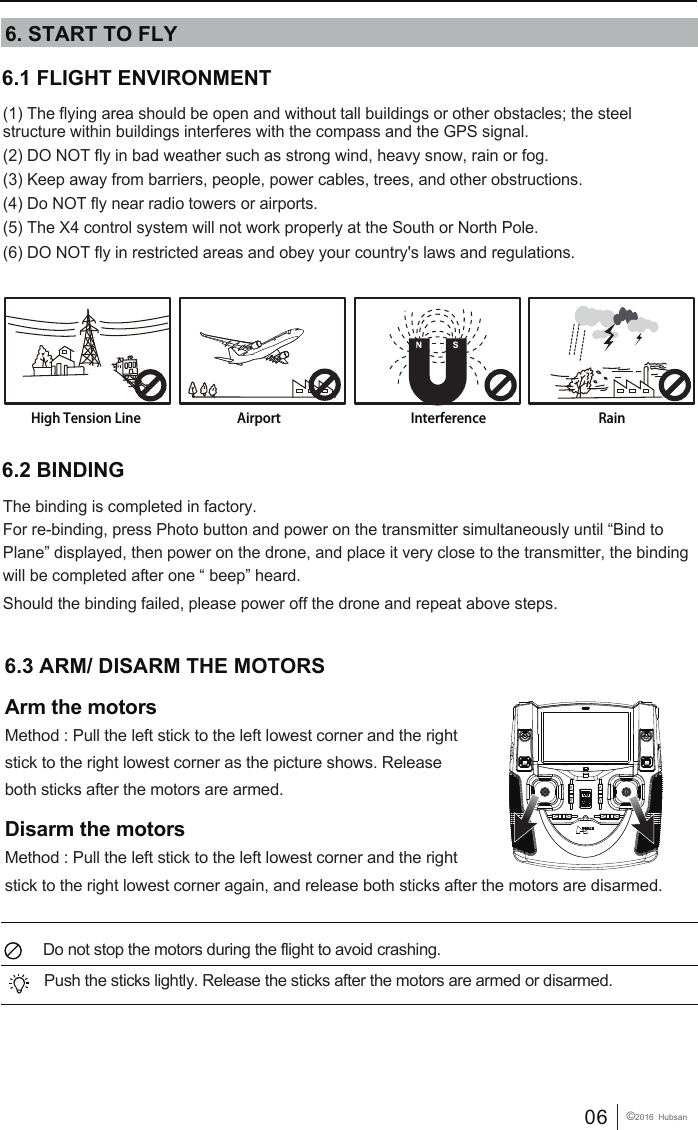
06 ©2016  Hubsan6.1 FLIGHT ENVIRONMENT (1) The flying area should be open and without tall buildings or other obstacles; the steel structure within buildings interferes with the compass and the GPS signal.(2) DO NOT fly in bad weather such as strong wind, heavy snow, rain or fog.(3) Keep away from barriers, people, power cables, trees, and other obstructions. (4) Do NOT fly near radio towers or airports.(5) The X4 control system will not work properly at the South or North Pole.(6) DO NOT fly in restricted areas and obey your country's laws and regulations.6. START TO FLYHigh Tension Line RainInterferenceAirport6.3 ARM/ DISARM THE MOTORS Arm the motorsMethod : Pull the left stick to the left lowest corner and the right stick to the right lowest corner as the picture shows. Release both sticks after the motors are armed.Disarm the motorsMethod : Pull the left stick to the left lowest corner and the right stick to the right lowest corner again, and release both sticks after the motors are disarmed.  Do not stop the motors during the flight to avoid crashing. Push the sticks lightly. Release the sticks after the motors are armed or disarmed.The binding is completed in factory. For re-binding, press Photo button and power on the transmitter simultaneously until “Bind to Plane” displayed, then power on the drone, and place it very close to the transmitter, the binding will be completed after one “ beep” heard. Should the binding failed, please power off the drone and repeat above steps.6.2 BINDING
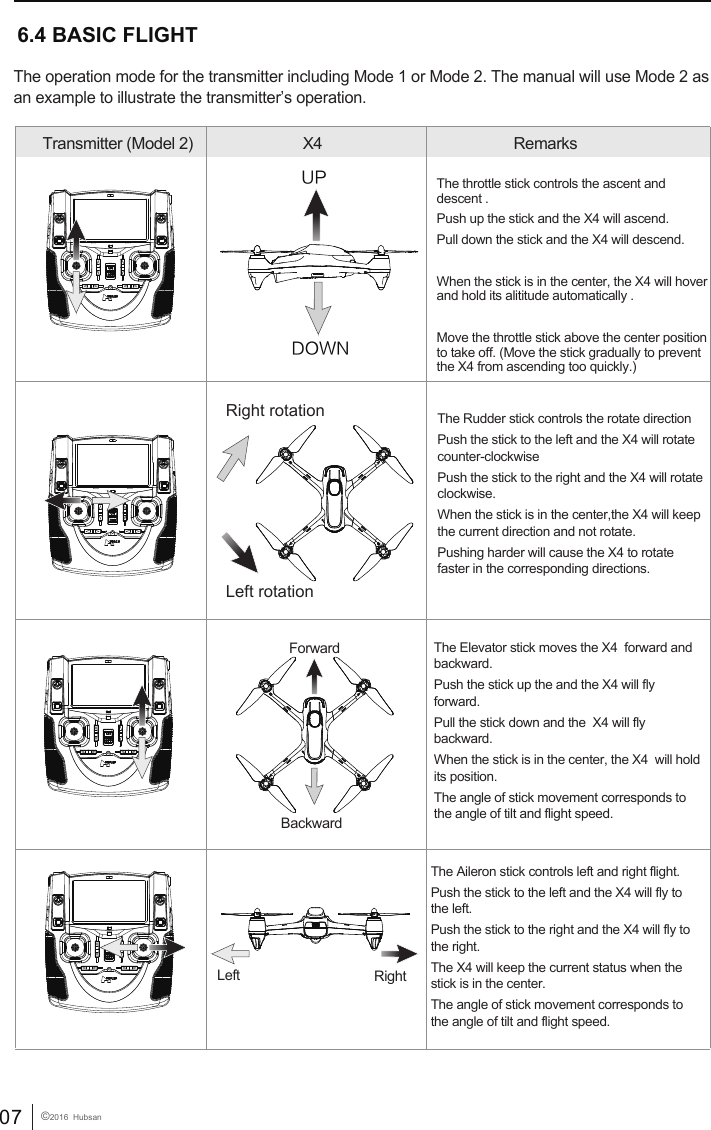
07 ©2016  Hubsan 6.4 BASIC FLIGHTTransmitter (Model 2) X4  RemarksThe operation mode for the transmitter including Mode 1 or Mode 2. The manual will use Mode 2 as an example to illustrate the transmitter’s operation.The throttle stick controls the ascent and descent . Push up the stick and the X4 will ascend.Pull down the stick and the X4 will descend.When the stick is in the center, the X4 will hover and hold its alititude automatically .Move the throttle stick above the center position to take off. (Move the stick gradually to prevent the X4 from ascending too quickly.)UPDOWNForwardBackwardRight  Left The Elevator stick moves the X4  forward and backward. Push the stick up the and the X4 will fly forward.Pull the stick down and the  X4 will fly backward. When the stick is in the center, the X4  will hold its position. The angle of stick movement corresponds to the angle of tilt and flight speed. The Aileron stick controls left and right flight. Push the stick to the left and the X4 will fly to the left. Push the stick to the right and the X4 will fly to the right. The X4 will keep the current status when the stick is in the center.The angle of stick movement corresponds to the angle of tilt and flight speed. The Rudder stick controls the rotate direction Push the stick to the left and the X4 will rotate counter-clockwisePush the stick to the right and the X4 will rotate clockwise.When the stick is in the center,the X4 will keep the current direction and not rotate.Pushing harder will cause the X4 to rotate faster in the corresponding directions.     Right rotationLeft rotation
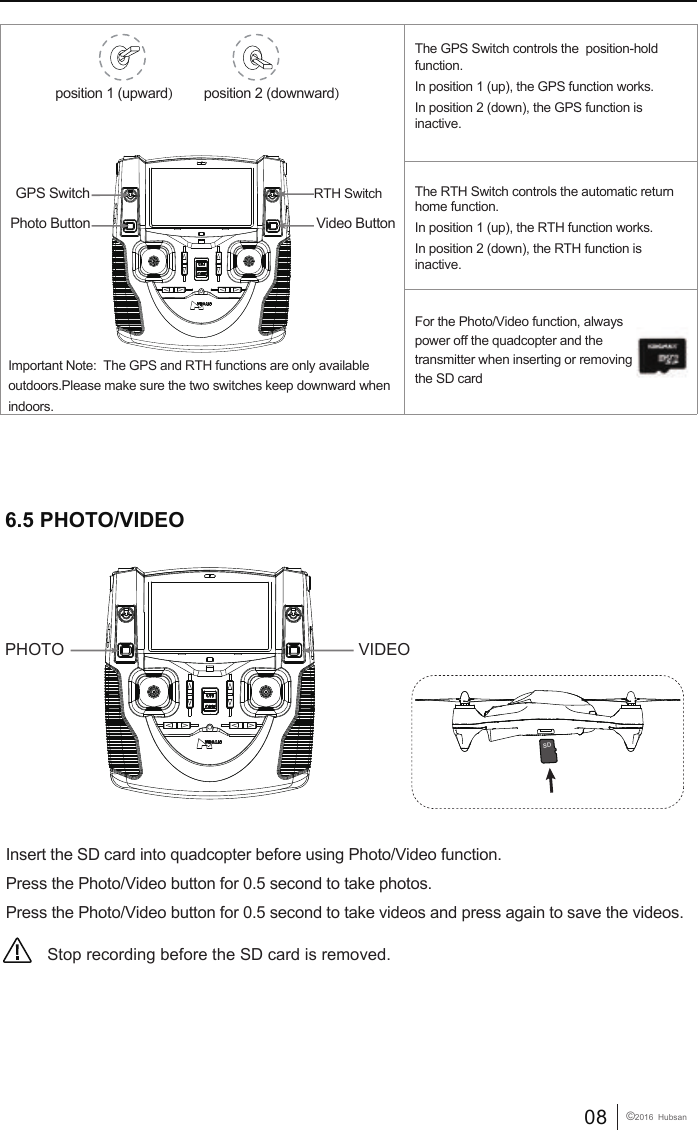
08 ©2016  HubsanInsert the SD card into quadcopter before using Photo/Video function.Press the Photo/Video button for 0.5 second to take photos.Press the Photo/Video button for 0.5 second to take videos and press again to save the videos.6.5 PHOTO/VIDEOStop recording before the SD card is removed.                                                                PHOTO VIDEOposition 1 (upward)position 2 (downward)GPS SwitchPhoto Button Video ButtonRTH SwitchImportant Note:  The GPS and RTH functions are only available outdoors.Please make sure the two switches keep downward when indoors.The GPS Switch controls the  position-hold function.In position 1 (up), the GPS function works. In position 2 (down), the GPS function is inactive.For the Photo/Video function, always power off the quadcopter and the transmitter when inserting or removing the SD card The RTH Switch controls the automatic return home function.In position 1 (up), the RTH function works. In position 2 (down), the RTH function is inactive.SD
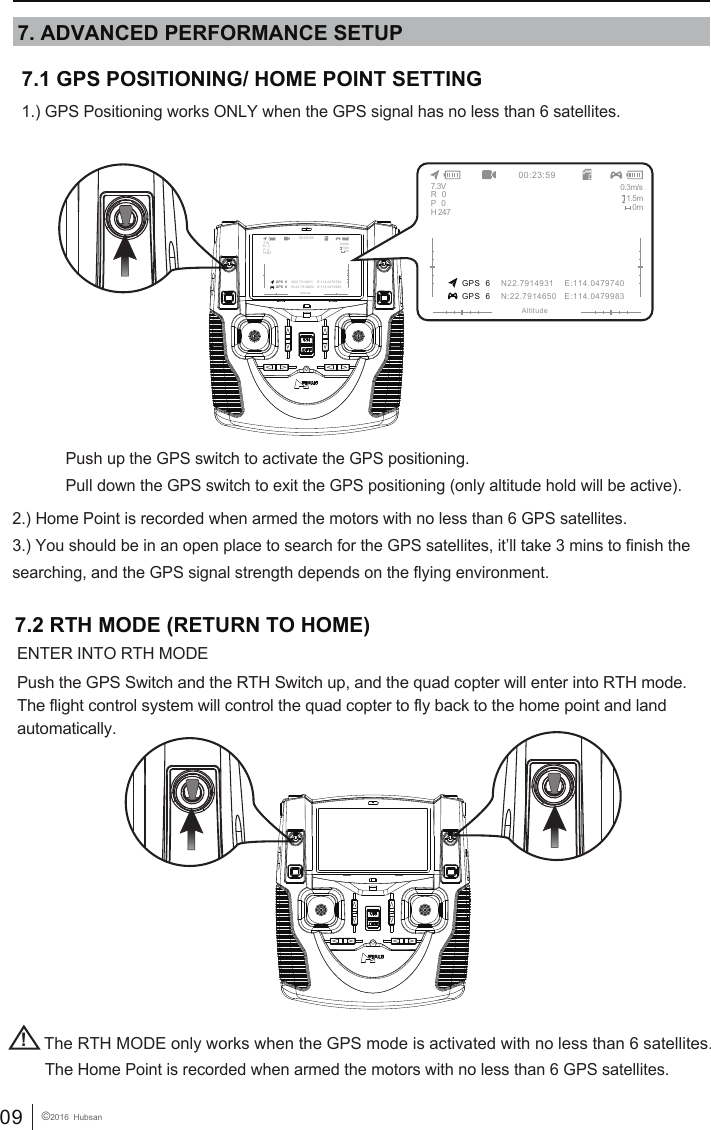
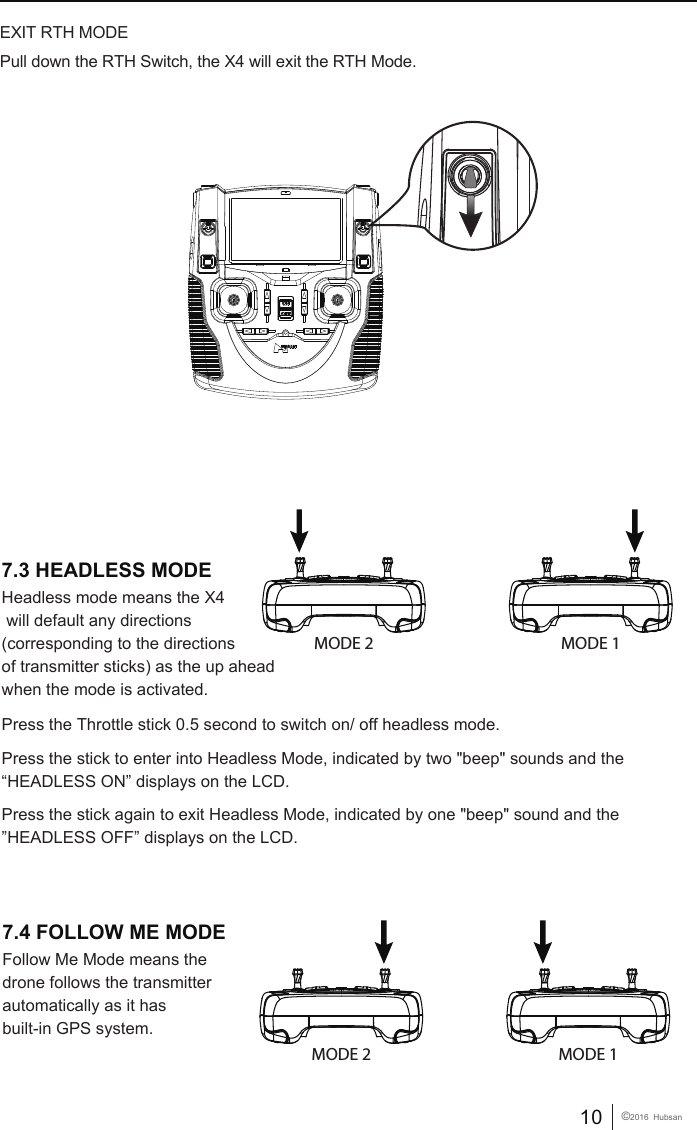
09 ©2016  HubsanThe Home Point is recorded when armed the motors with no less than 6 GPS satellites.!The RTH MODE only works when the GPS mode is activated with no less than 6 satellites.7.2 RTH MODE (RETURN TO HOME)ENTER INTO RTH MODEPush the GPS Switch and the RTH Switch up, and the quad copter will enter into RTH mode. The flight control system will control the quad copter to fly back to the home point and land automatically.           7.1 GPS POSITIONING/ HOME POINT SETTING1.) GPS Positioning works ONLY when the GPS signal has no less than 6 satellites.2.) Home Point is recorded when armed the motors with no less than 6 GPS satellites.3.) You should be in an open place to search for the GPS satellites, it’ll take 3 mins to finish the searching, and the GPS signal strength depends on the flying environment. Push up the GPS switch to activate the GPS positioning.Pull down the GPS switch to exit the GPS positioning (only altitude hold will be active).7. ADVANCED PERFORMANCE SETUP GPS  6 GPS  600:23:59AltitudeN22.7914931    E:114.0479740N:22.7914650   E:114.04799837.3V 0.3m/s1.5m0mR   0P   0H 247 GPS  6 GPS  600:23:59AltitudeN22.7914931    E:114.0479740N:22.7914650   E:114.04799837.3V 0.3m/s1.5m0mR   0P   0H 247
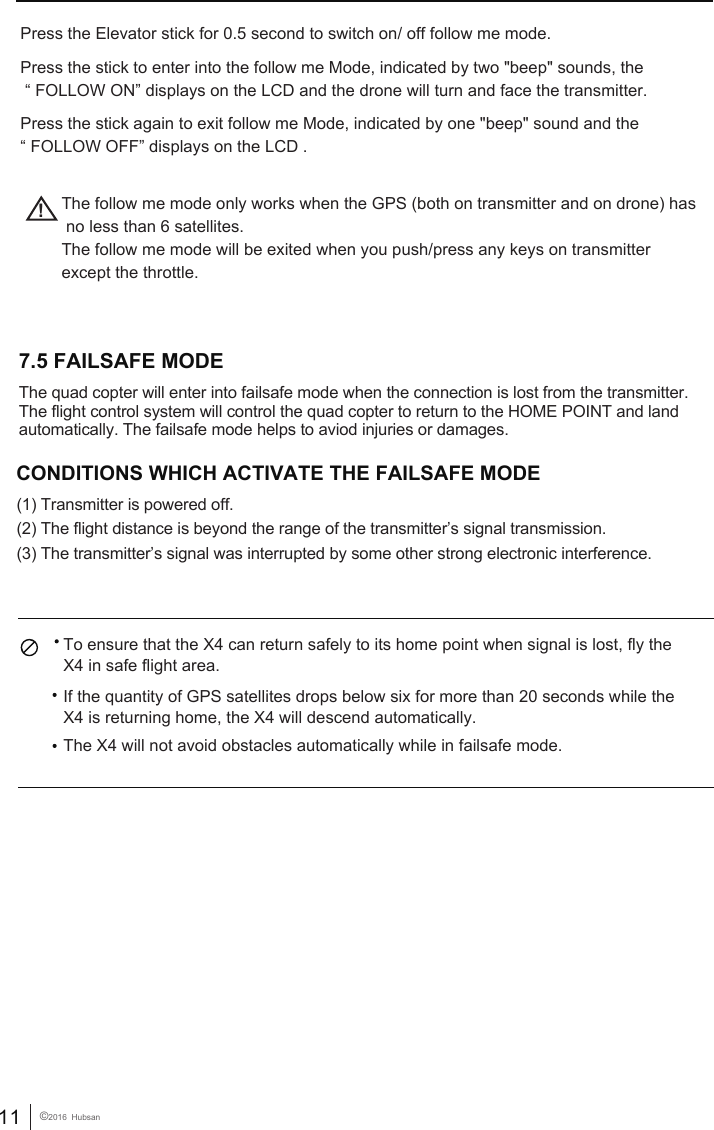
10 ©2016  HubsanPull down the RTH Switch, the X4 will exit the RTH Mode.EXIT RTH MODEHeadless mode means the X4 will default any directions (corresponding to the directions of transmitter sticks) as the up aheadwhen the mode is activated.Follow Me Mode means the drone follows the transmitter automatically as it has built-in GPS system. Press the Throttle stick 0.5 second to switch on/ off headless mode.Press the stick to enter into Headless Mode, indicated by two "beep" sounds and the“HEADLESS ON” displays on the LCD. Press the stick again to exit Headless Mode, indicated by one "beep" sound and the ”HEADLESS OFF” displays on the LCD.  MODE 2 MODE 1MODE 2 MODE 17.3 HEADLESS MODE7.4 FOLLOW ME MODE
11 ©2016  HubsanPress the Elevator stick for 0.5 second to switch on/ off follow me mode.Press the stick to enter into the follow me Mode, indicated by two "beep" sounds, the “ FOLLOW ON” displays on the LCD and the drone will turn and face the transmitter.Press the stick again to exit follow me Mode, indicated by one "beep" sound and the “ FOLLOW OFF” displays on the LCD . !The follow me mode only works when the GPS (both on transmitter and on drone) has no less than 6 satellites.The follow me mode will be exited when you push/press any keys on transmitter except the throttle.  CONDITIONS WHICH ACTIVATE THE FAILSAFE MODE             (1) Transmitter is powered off. (2) The flight distance is beyond the range of the transmitter’s signal transmission.(3) The transmitter’s signal was interrupted by some other strong electronic interference.   To ensure that the X4 can return safely to its home point when signal is lost, fly the X4 in safe flight area.If the quantity of GPS satellites drops below six for more than 20 seconds while the X4 is returning home, the X4 will descend automatically. The X4 will not avoid obstacles automatically while in failsafe mode. 7.5 FAILSAFE MODE  The quad copter will enter into failsafe mode when the connection is lost from the transmitter. The flight control system will control the quad copter to return to the HOME POINT and land automatically. The failsafe mode helps to aviod injuries or damages.
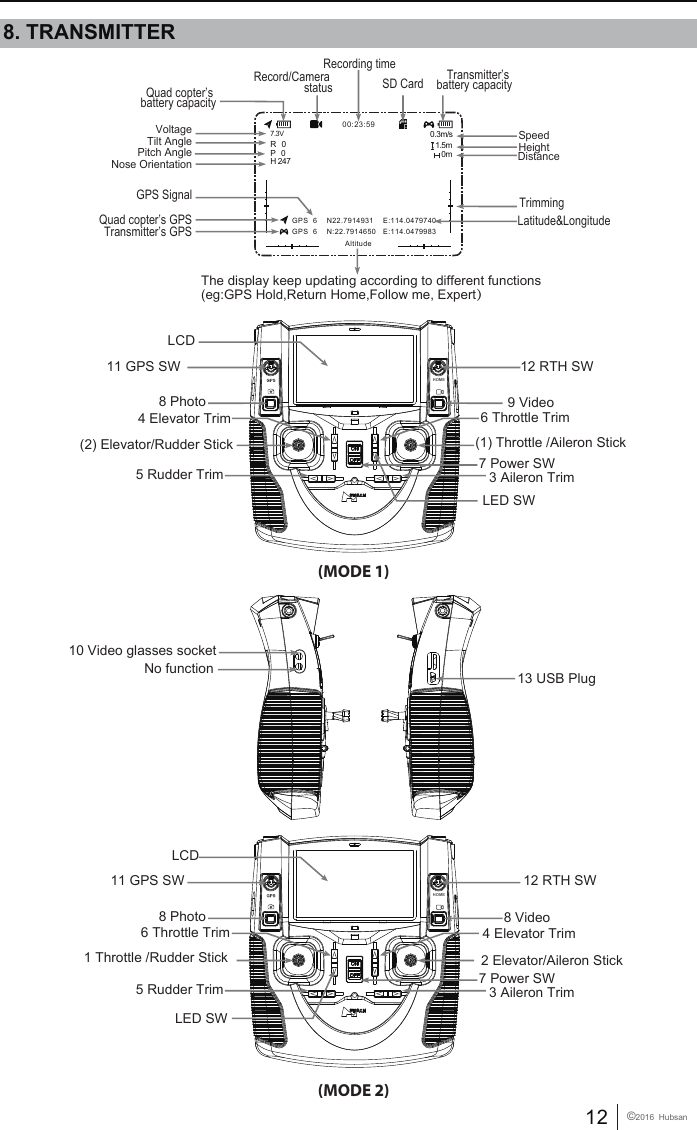
12 ©2016  Hubsan     LCD8 Photo(MODE 1)4 Elevator Trim(2) Elevator/Rudder Stick5 Rudder Trim6 Throttle Trim 9 Video(1) Throttle /Aileron Stick7 Power SW12 RTH SW11 GPS SW12 RTH SW11 GPS SW3 Aileron TrimLCD8 Photo(MODE 2)4 Elevator Trim2 Elevator/Aileron Stick5 Rudder Trim6 Throttle Trim8 Video1 Throttle /Rudder Stick7 Power SW3 Aileron Trim10 Video glasses socketNo function 13 USB PlugHOMEHOME8. TRANSMITTERThe display keep updating according to different functions(eg:GPS Hold,Return Home,Follow me, Expert)VoltageQuad copter’s battery capacityRecording timeSD Card Transmitter’s battery capacity    TrimmingLatitude&LongitudeRecord/Camera statusTilt AnglePitch AngleNose OrientationGPS SignalQuad copter’s GPSTransmitter’s GPS00:23:59Altitude GPS  6    N22.7914931    E:114.0479740 GPS  6    N:22.7914650   E:114.04799837.3VR   0P   0H 2470.3m/s1.5m0mSpeedHeightDistanceLED SWLED SW
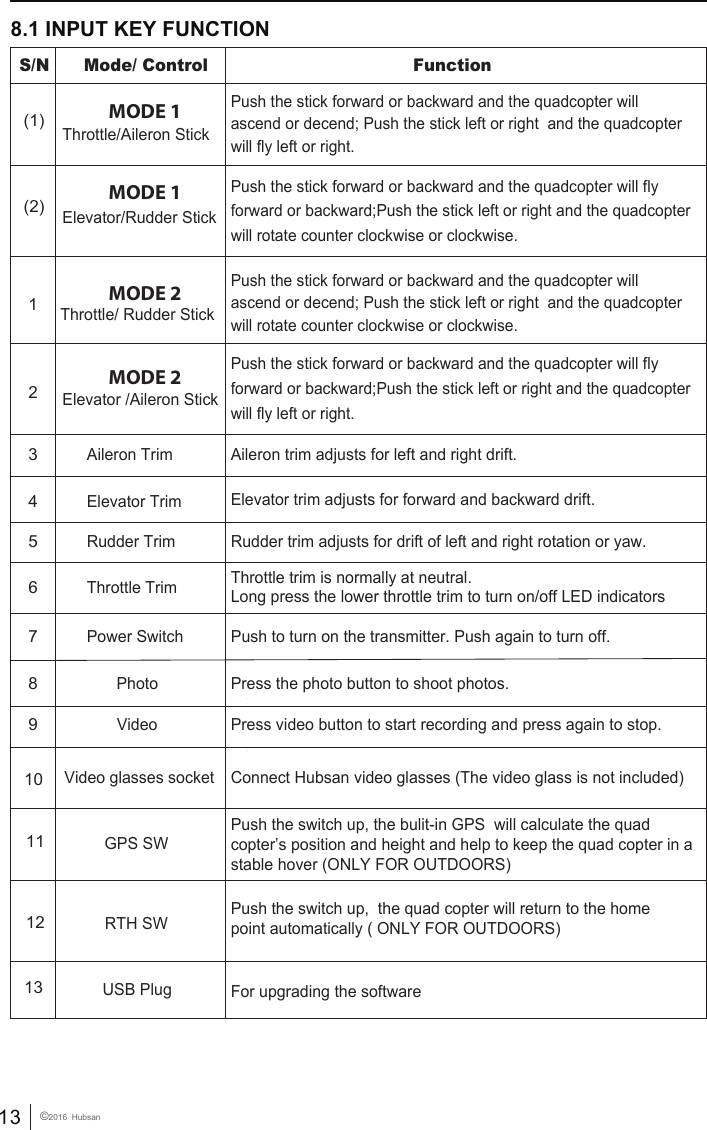
13 ©2016  Hubsan8.1 INPUT KEY FUNCTIONMODE 2S/N  Mode/ Control Function MODE 1(1) Throttle/Aileron Stick Push the stick forward or backward and the quadcopter willascend or decend; Push the stick left or right  and the quadcopter will fly left or right.Push the stick forward or backward and the quadcopter willascend or decend; Push the stick left or right  and the quadcopter will rotate counter clockwise or clockwise.MODE 1(2) Elevator/Rudder Stick Push the stick forward or backward and the quadcopter will fly forward or backward;Push the stick left or right and the quadcopter will rotate counter clockwise or clockwise.Push the stick forward or backward and the quadcopter will fly forward or backward;Push the stick left or right and the quadcopter will fly left or right.3 Aileron Trim  Aileron trim adjusts for left and right drift.4 Elevator Trim  Elevator trim adjusts for forward and backward drift.5 Rudder Trim  Rudder trim adjusts for drift of left and right rotation or yaw.6 Throttle Trim  Throttle trim is normally at neutral. Long press the lower throttle trim to turn on/off LED indicators7 Power Switch  Push to turn on the transmitter. Push again to turn off.MODE 22 Elevator /Aileron Stick 1 Throttle/ Rudder Stick8 13 10  Photo9 VideoUSB PlugVideo glasses socketPress the photo button to shoot photos. Press video button to start recording and press again to stop. For upgrading the softwareConnect Hubsan video glasses (The video glass is not included)11GPS SWPush the switch up, the bulit-in GPS  will calculate the quad copter’s position and height and help to keep the quad copter in a stable hover (ONLY FOR OUTDOORS)12RTH SW Push the switch up,  the quad copter will return to the homepoint automatically ( ONLY FOR OUTDOORS)
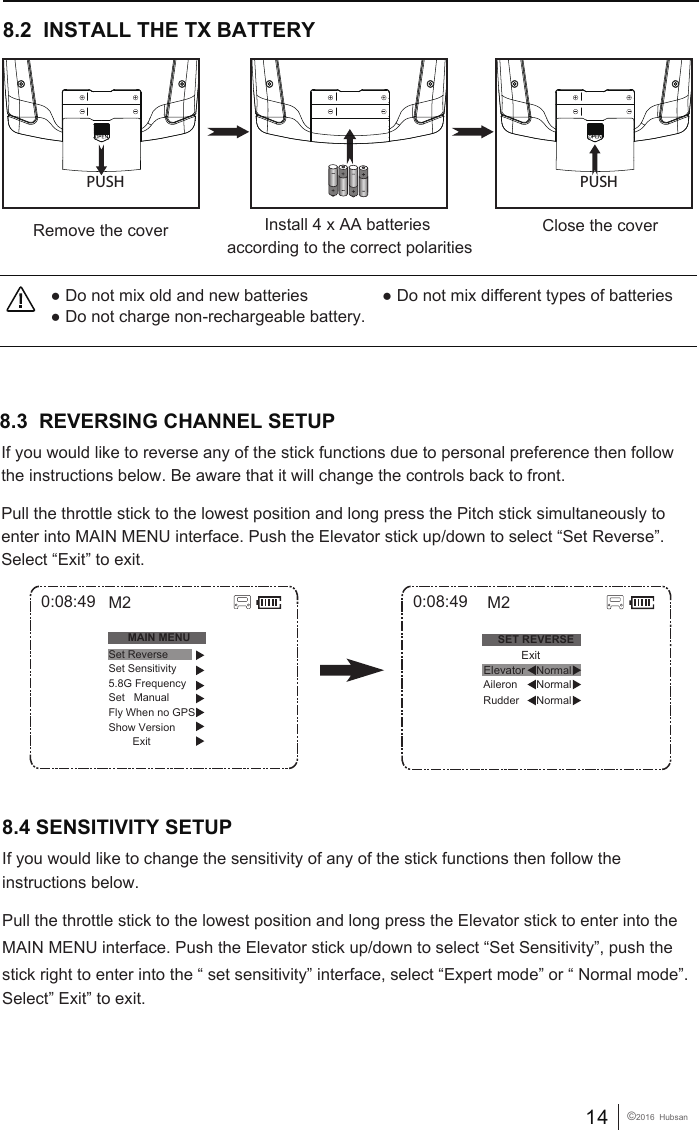
14 ©2016  Hubsan● Do not mix old and new batteries                ● Do not mix different types of batteries● Do not charge non-rechargeable battery.8.2  INSTALL THE TX BATTERYClose the coverRemove the cover Install 4 x AA batteries according to the correct polaritiesPUSH PUSH8.3  REVERSING CHANNEL SETUP If you would like to reverse any of the stick functions due to personal preference then follow the instructions below. Be aware that it will change the controls back to front.Pull the throttle stick to the lowest position and long press the Pitch stick simultaneously to enter into MAIN MENU interface. Push the Elevator stick up/down to select “Set Reverse”. Select “Exit” to exit.8.4 SENSITIVITY SETUP0:08:49SET REVERSENormalRudder Aileron NormalNormalM2            ExitElevator0:08:49MAIN MENUSet ReverseSet Sensitivity5.8G FrequencySet   ManualFly When no GPSShow Version        ExitM2If you would like to change the sensitivity of any of the stick functions then follow the instructions below. Pull the throttle stick to the lowest position and long press the Elevator stick to enter into the MAIN MENU interface. Push the Elevator stick up/down to select “Set Sensitivity”, push the stick right to enter into the “ set sensitivity” interface, select “Expert mode” or “ Normal mode”.Select” Exit” to exit.
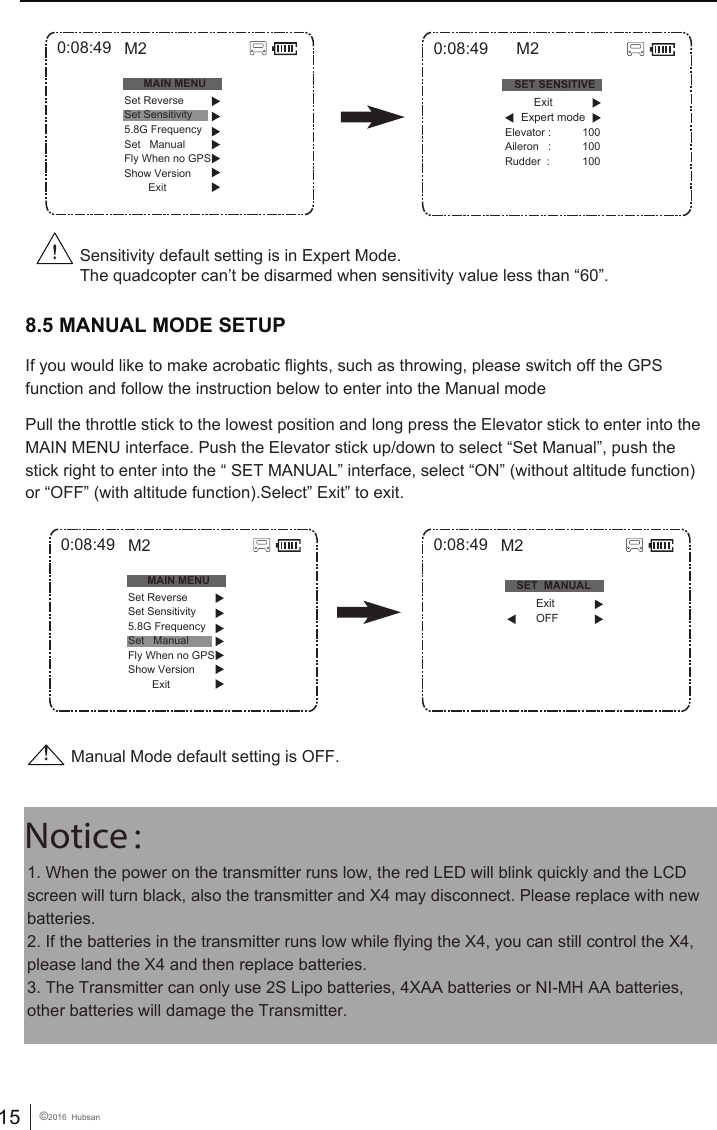
15 ©2016  Hubsan1. When the power on the transmitter runs low, the red LED will blink quickly and the LCD screen will turn black, also the transmitter and X4 may disconnect. Please replace with new batteries. 2. If the batteries in the transmitter runs low while flying the X4, you can still control the X4, please land the X4 and then replace batteries. 3. The Transmitter can only use 2S Lipo batteries, 4XAA batteries or NI-MH AA batteries, other batteries will damage the Transmitter. Notice: 8.5 MANUAL MODE SETUPIf you would like to make acrobatic flights, such as throwing, please switch off the GPS function and follow the instruction below to enter into the Manual modePull the throttle stick to the lowest position and long press the Elevator stick to enter into the MAIN MENU interface. Push the Elevator stick up/down to select “Set Manual”, push the stick right to enter into the “ SET MANUAL” interface, select “ON” (without altitude function) or “OFF” (with altitude function).Select” Exit” to exit.Sensitivity default setting is in Expert Mode.The quadcopter can’t be disarmed when sensitivity value less than “60”.0:08:49MAIN MENUSet ReverseSet Sensitivity5.8G FrequencySet   ManualFly When no GPSShow Version        ExitM20:08:49MAIN MENUSet ReverseSet Sensitivity5.8G FrequencySet   ManualFly When no GPSShow Version        ExitM20:08:49SET SENSITIVEElevator :Aileron   :Rudder  :100100100M2          Exit      Expert modeManual Mode default setting is OFF.0:08:49 M2SET  MANUAL          Exit          OFF

Navigation menu