HUBSAN INTELLIGENT 507DRX X4 STAR FPV User Manual 1 of 2

SHENZHEN HUBSAN INTELLIGENT COMPANY LIMITED X4 STAR FPV 1 of 2

Contents

User Manual (1 of 2)

01®H507D USER MANUALARM/DISARM MOTORS, SEE PAGE 12RTH FUNCTION, SEE PAGE 15FOLLOW ME FUNCTION, SEE PAGE 16TRANSMITTER CALIBRATION, SEE PAGE 22 READ THE INSTRUCTION MANUAL CAREFULLY BEFORE USE14+X4 STAR FPV©2016  Hubsan哈博森科技 版权所有
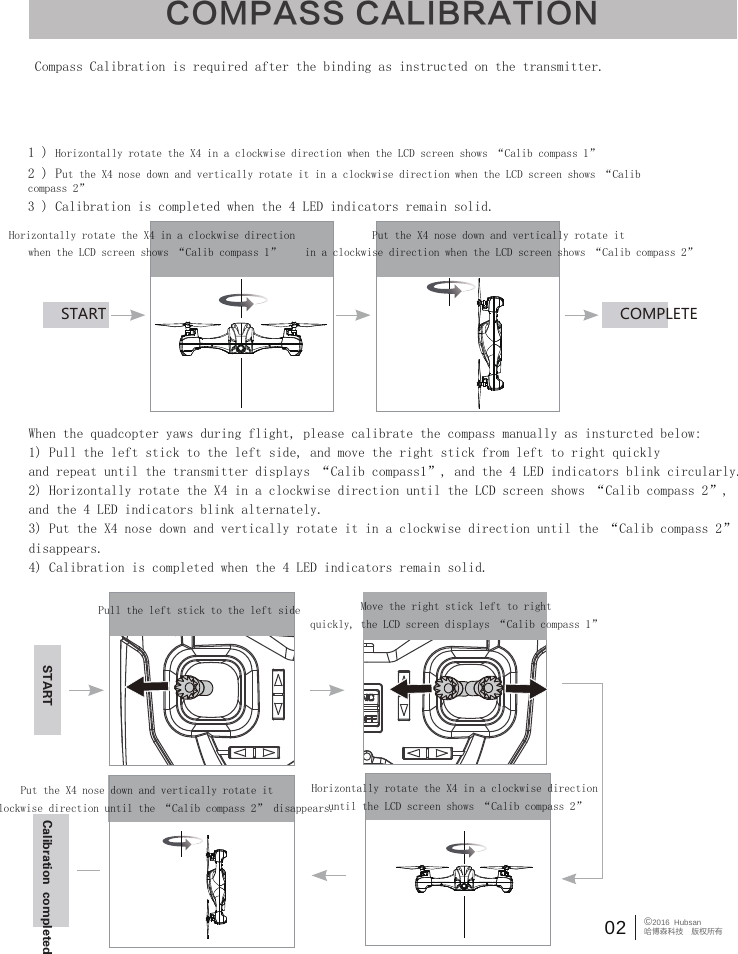
Compass Calibration is required after the binding as instructed on the transmitter.1 ) Horizontally rotate the X4 in a clockwise direction when the LCD screen shows “Calib compass 1”2 ) Put the X4 nose down and vertically rotate it in a clockwise direction when the LCD screen shows “Calib compass 2”3 ) Calibration is completed when the 4 LED indicators remain solid.START COMPLETEHorizontally rotate the X4 in a clockwise direction when the LCD screen shows “Calib compass 1”Put the X4 nose down and vertically rotate it in a clockwise direction when the LCD screen shows “Calib compass 2”Pull the left stick to the left side Move the right stick left to rightquickly, the LCD screen displays “Calib compass 1”Horizontally rotate the X4 in a clockwise direction until the LCD screen shows “Calib compass 2”Put the X4 nose down and vertically rotate it in a clockwise direction until the “Calib compass 2” disappears.START Calibration  completedWhen the quadcopter yaws during flight, please calibrate the compass manually as insturcted below:1) Pull the left stick to the left side, and move the right stick from left to right quickly and repeat until the transmitter displays “Calib compass1”, and the 4 LED indicators blink circularly.2) Horizontally rotate the X4 in a clockwise direction until the LCD screen shows “Calib compass 2”, and the 4 LED indicators blink alternately.3) Put the X4 nose down and vertically rotate it in a clockwise direction until the “Calib compass 2” disappears.4) Calibration is completed when the 4 LED indicators remain solid.COMPASS CALIBRATION02 ©2016  Hubsan哈博森科技 版权所有
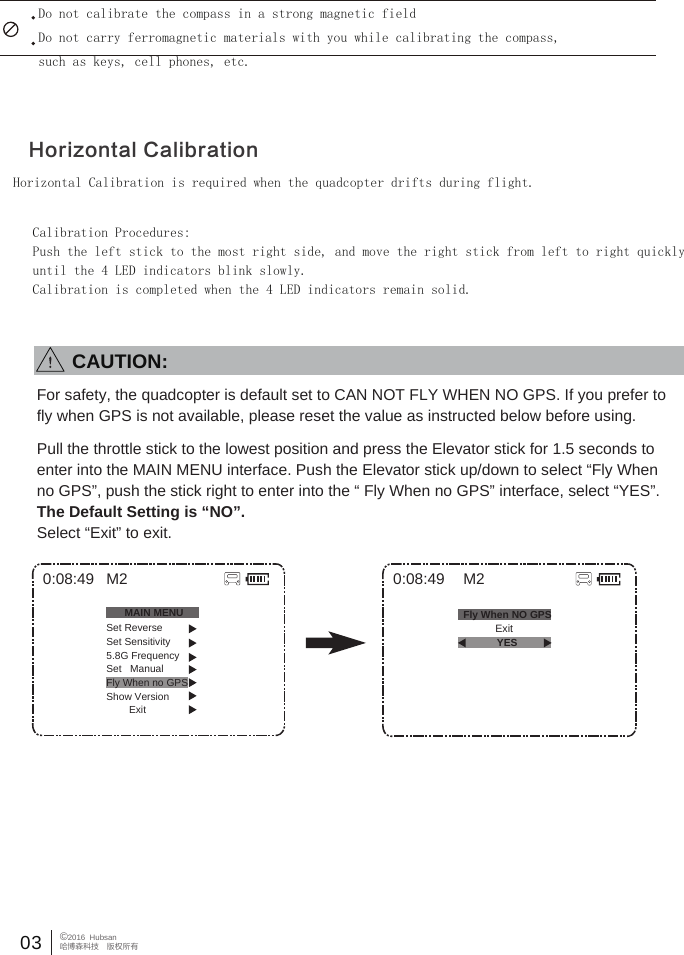
Do not calibrate the compass in a strong magnetic fieldDo not carry ferromagnetic materials with you while calibrating the compass,such as keys, cell phones, etc.Horizontal Calibration is required when the quadcopter drifts during flight.Calibration Procedures:Push the left stick to the most right side, and move the right stick from left to right quicklyuntil the 4 LED indicators blink slowly.Calibration is completed when the 4 LED indicators remain solid.Horizontal Calibration03 ©2016  Hubsan哈博森科技 版权所有0:08:49 M2            Exit0:08:49MAIN MENUSet ReverseSet Sensitivity5.8G FrequencySet   ManualFly When no GPSShow Version        ExitM2Fly When NO GPSYESFor safety, the quadcopter is default set to CAN NOT FLY WHEN NO GPS. If you prefer to fly when GPS is not available, please reset the value as instructed below before using.Pull the throttle stick to the lowest position and press the Elevator stick for 1.5 seconds to enter into the MAIN MENU interface. Push the Elevator stick up/down to select “Fly When no GPS”, push the stick right to enter into the “ Fly When no GPS” interface, select “YES”. The Default Setting is “NO”.Select “Exit” to exit.        CAUTION:
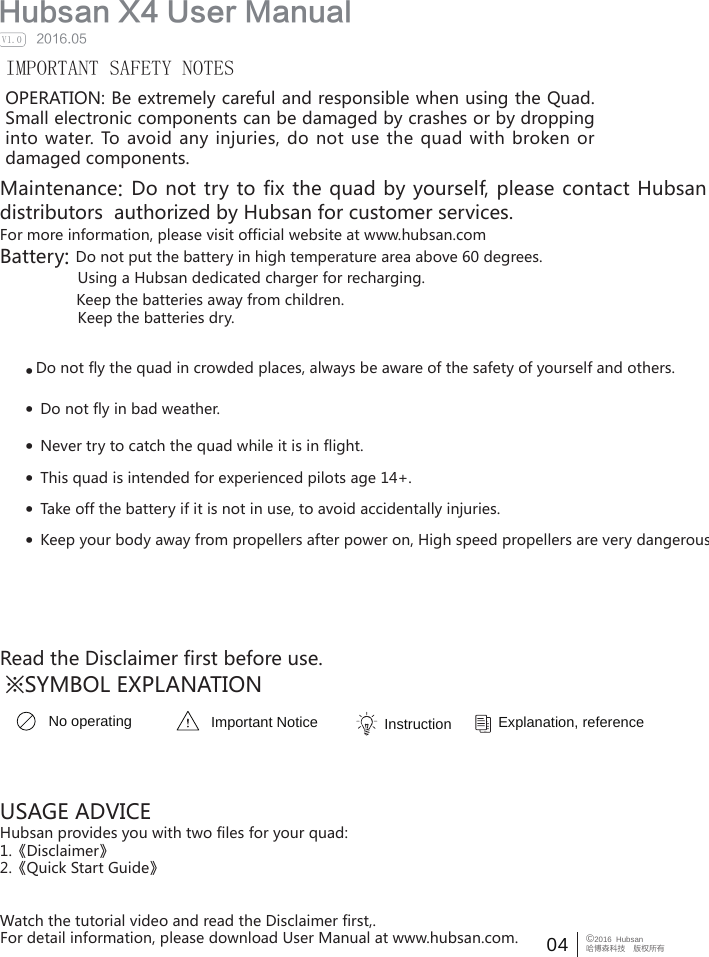
04 ©2016  Hubsan哈博森科技 版权所有  Hubsan X4 User Manual     2016.05V1.0IMPORTANT SAFETY NOTESOPERATION: Be extremely careful and responsible when using the Quad. Small electronic components can be damaged by crashes or by dropping into water.  To  avoid  any injuries, do  not  use  the  quad with  broken  or damaged components.Maintenance: Do not try to fix the quad by yourself, please contact Hubsan directly or distributors  authorized by Hubsan for customer services.   For more information, please visit official website at www.hubsan.comBattery: Do not put the battery in high temperature area above 60 degrees.                  Using a Hubsan dedicated charger for recharging.                  Keep the batteries away from children.                  Keep the batteries dry.Do not fly the quad in crowded places, always be aware of the safety of yourself and others.··Do not fly in bad weather.·Never try to catch the quad while it is in flight.·This quad is intended for experienced pilots age 14+.USAGE ADVICEHubsan provides you with two files for your quad:1.《Disclaimer》2.《Quick Start Guide》Watch the tutorial video and read the Disclaimer first,.For detail information, please download User Manual at www.hubsan.com.·Take off the battery if it is not in use, to avoid accidentally injuries.·Keep your body away from propellers after power on, High speed propellers are very dangerous.   Read the Disclaimer first before use.※SYMBOL EXPLANATIONNo operating Important Notice Instruction  Explanation, reference
05 ©2016  Hubsan哈博森科技 版权所有Do not try to fix the quad by yourself, please contact Hubsan directly or  Safety Advisory Notice for Lithium-Polymer (LIPO) BatteriesLiPo batteries are different from conventional batteries in that their chemical contentsare encased in a relatively lightweight foil packaging. This has the advantage ofsignificantly reducing their weight but it does make them more susceptible to damageif roughly or inappropriately handled. As with all batteries, there is a risk of fire orexplosion if safety practices are ignored:● If you do not plan to fly the quad for a long time, store the battery approximately 50% charged to maintain battery performance and battery life.● Please use Hubsan chargers for battery charging.● Discharging the battery within 5C current , do not over-discharging.● Do not charge on carpet to avoid fire.● Batteried need to be recharged if not in use for over 3 months.1.Charge and store LiPo batteries in a location where a battery fire or explosion(including smoke hazard) will not endanger life or property.2.Keep LiPo batteries away from children and animals.3.Never charge the LiPo battery that has ballooned or swelled.4.Never charge the LiPo battery that has been punctured or damaged.5.After a crash, inspect the battery pack for signs of damage. Discard in accordancewith your country’s recycling laws.6.Never charge the LiPo battery in a moving vehicle.7.Never overcharge the LiPo battery.8.Never leave the LiPo battery unattended during recharging9.Do not charge LiPo batteries near flammable materials or liquids.10.Ensure that charging leads are connected correctly. Reverse polarity charging canlead to battery damage or a fire or explosion.11.Have a suitable fire extinguisher (electrical type) OR a large bucket of dry sand nearthe charging area . Do not try to extinguish electrical (LiPo) battery fires with water.12.Reduce risks from fire/explosion by storing and charging LiPo batteries inside asuitable container.13.Protect your LiPo battery from accidental damage during storage andtransportation. (Do not put battery packs in pockets or bags where they can shortcircuit or can come into contact with sharp or metallic objects.).14.If your LiPo battery is subjected to a shock (such as a crash), place it in a metalcontainer and observe for signs of swelling or heating for at least 30 minutes.15.Do not attempt to disassemble or modify or repair the LiPo battery.
06 ©2016  Hubsan哈博森科技 版权所有ContentsCompass CalibrationSafety NotesInformation  SYMBOL EXPLANATION  USAGE ADVICEContentsIntroduction1 Item List2 LED Indicator Status3 Quadcopter Battery  3.1 Introduction  3.2 Install the Battery  3.3 Charging4  Propeller  5  Start to Fly           5.1 Flight Environment    5.2 Safety check before flight    5.3 Binding    5.4 Arm/Disarm motors    5.5 Basic Flight    5.6 Photo/Video0 20 40 40 40 60 70 80 90 90 91 11 11 11 21 21 46 Advanced Performance Setup    6.1GPS POSITIONING/ hOME POINT SETTING    6.2 RTH Mode    6.3 Headless Mode    6.4 Follow Me Mode    6.5 Failsafe Mode    7  Transmitter          7.1 Key Function    7.2 Install TX Battery    7.3 Reversing channel setup     7.4 SENSITIVITY SETUP    7.5 manual MODE SETUP8 Transmitter Calibration9 Frequency selectable 5.8Ghz Exploded ViewH507D Spare Part ListTroubleshooting1 41 51 61 61 61 81 91 91 92 02 12 22 22 32 52 6
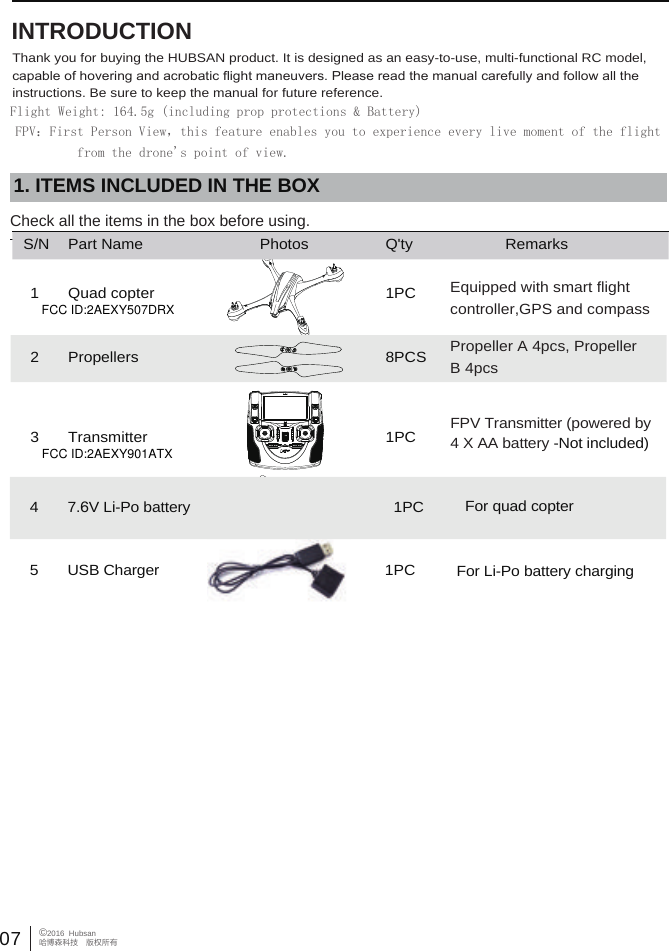
 07©2016  Hubsan哈博森科技 版权所有 INTRODUCTIONThank you for buying the HUBSAN product. It is designed as an easy-to-use, multi-functional RC model, capable of hovering and acrobatic flight maneuvers. Please read the manual carefully and follow all the instructions. Be sure to keep the manual for future reference.   1. ITEMS INCLUDED IN THE BOXCheck all the items in the box before using.Flight Weight: 164.5g (including prop protections & Battery)FPV:First Person View,this feature enables you to experience every live moment of the flight          from the drone's point of view.S/N Part Name Photos Q'ty Remarks1 Quad copter 1PC Equipped with smart flightcontroller,GPS and compassPropeller A 4pcs, Propeller B 4pcs2 Propellers 8PCSFPV Transmitter (powered by 4 X AA battery -Not included)3 Transmitter 1PC47.6V Li-Po battery  1PC For quad copter5 1PCUSB Charger For Li-Po battery chargingFCC ID:2AEXY901ATXFCC ID:2AEXY507DRX
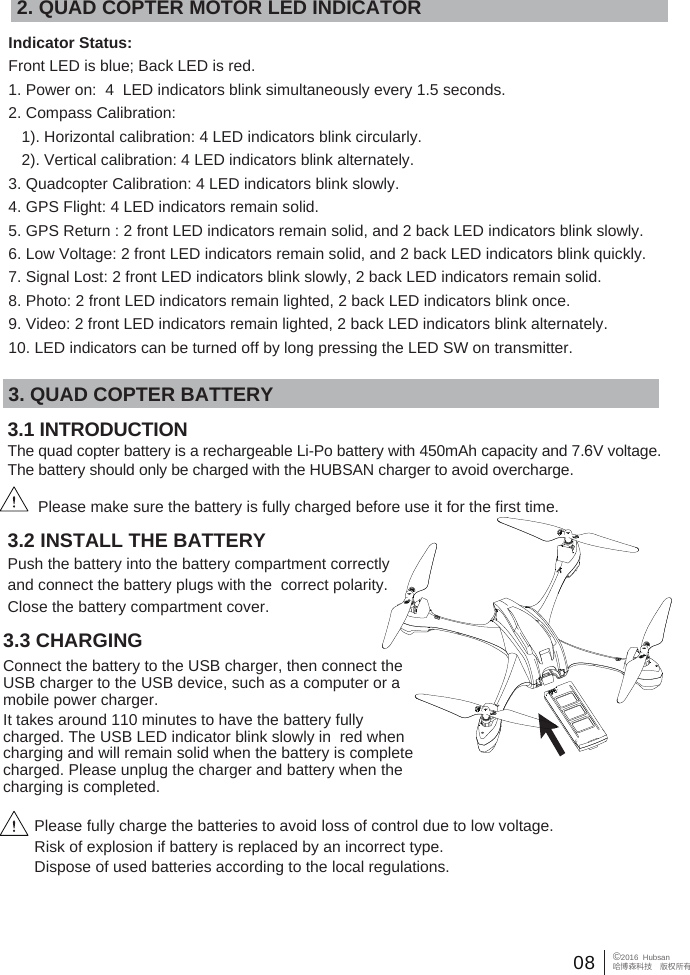
08 ©2016  Hubsan哈博森科技 版权所有2. QUAD COPTER MOTOR LED INDICATORIndicator Status:Front LED is blue; Back LED is red.1. Power on:  4  LED indicators blink simultaneously every 1.5 seconds.2. Compass Calibration:    1). Horizontal calibration: 4 LED indicators blink circularly.   2). Vertical calibration: 4 LED indicators blink alternately.3. Quadcopter Calibration: 4 LED indicators blink slowly.4. GPS Flight: 4 LED indicators remain solid.5. GPS Return : 2 front LED indicators remain solid, and 2 back LED indicators blink slowly.6. Low Voltage: 2 front LED indicators remain solid, and 2 back LED indicators blink quickly.7. Signal Lost: 2 front LED indicators blink slowly, 2 back LED indicators remain solid.8. Photo: 2 front LED indicators remain lighted, 2 back LED indicators blink once.9. Video: 2 front LED indicators remain lighted, 2 back LED indicators blink alternately.10. LED indicators can be turned off by long pressing the LED SW on transmitter.3. QUAD COPTER BATTERY3.1 INTRODUCTIONThe quad copter battery is a rechargeable Li-Po battery with 450mAh capacity and 7.6V voltage. The battery should only be charged with the HUBSAN charger to avoid overcharge.3.2 INSTALL THE BATTERYPush the battery into the battery compartment correctly and connect the battery plugs with the  correct polarity. Close the battery compartment cover. 3.3 CHARGINGConnect the battery to the USB charger, then connect the USB charger to the USB device, such as a computer or a mobile power charger. It takes around 110 minutes to have the battery fully charged. The USB LED indicator blink slowly in  red when charging and will remain solid when the battery is complete charged. Please unplug the charger and battery when the charging is completed.Please make sure the battery is fully charged before use it for the first time.Please fully charge the batteries to avoid loss of control due to low voltage.Risk of explosion if battery is replaced by an incorrect type. Dispose of used batteries according to the local regulations.
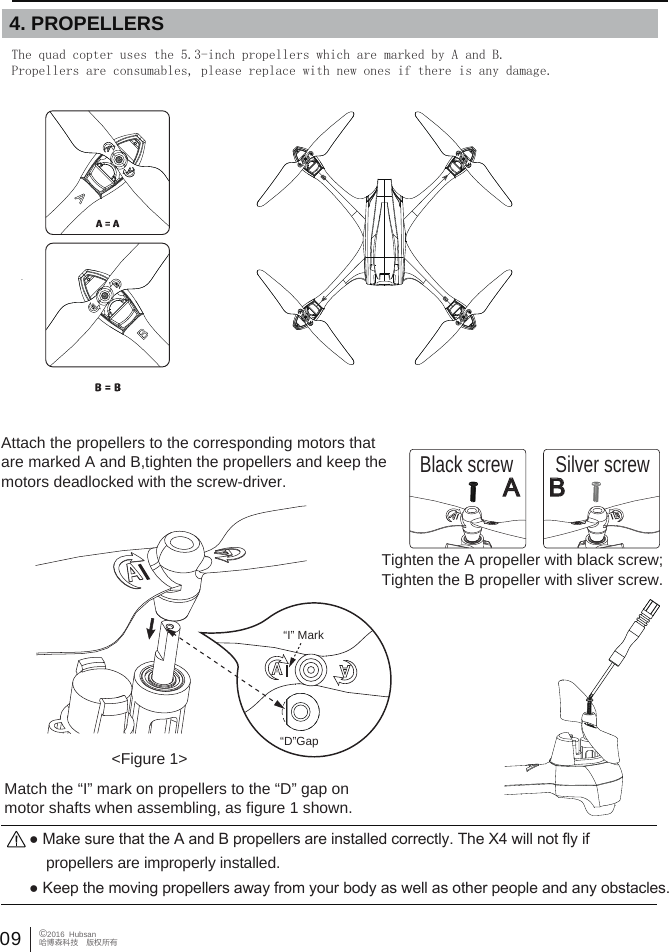
The quad copter uses the 5.3-inch propellers which are marked by A and B.Propellers are consumables, please replace with new ones if there is any damage.  09©2016  Hubsan哈博森科技 版权所有  4. PROPELLERS Attach the propellers to the corresponding motors that are marked A and B,tighten the propellers and keep the motors deadlocked with the screw-driver. ● Keep the moving propellers away from your body as well as other people and any obstacles.● Make sure that the A and B propellers are installed correctly. The X4 will not fly if     propellers are improperly installed. Match the “I” mark on propellers to the “D” gap on motor shafts when assembling, as figure 1 shown.“I” Mark“D”Gap<Figure 1>Black screw Silver screwTighten the A propeller with black screw; Tighten the B propeller with sliver screw.A B
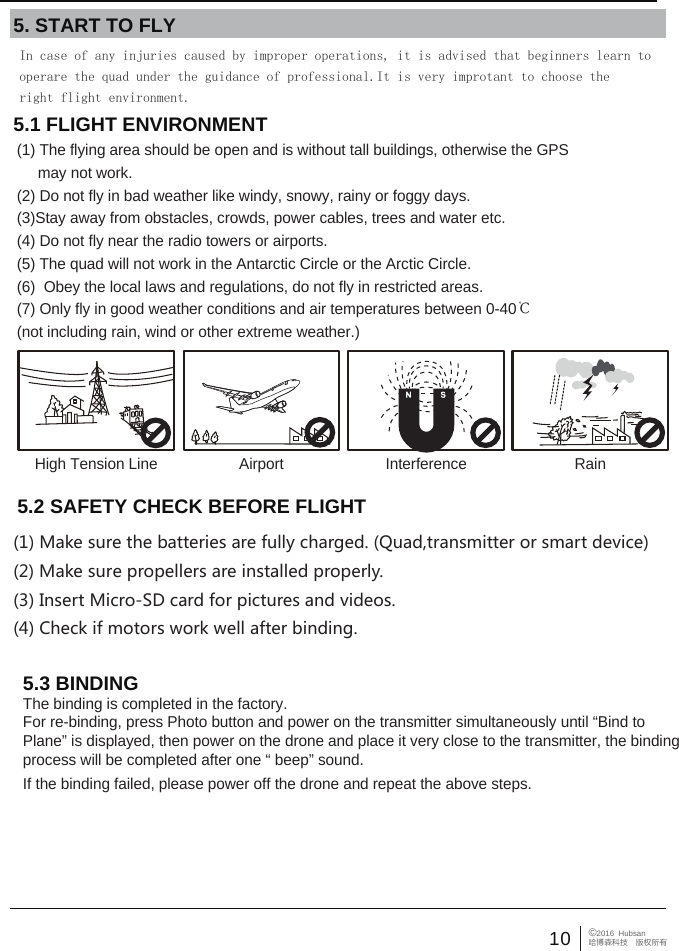
10 ©2016  Hubsan哈博森科技 版权所有5.1 FLIGHT ENVIRONMENT (1) The flying area should be open and is without tall buildings, otherwise the GPS      may not work. (2) Do not fly in bad weather like windy, snowy, rainy or foggy days.(3)Stay away from obstacles, crowds, power cables, trees and water etc.(4) Do not fly near the radio towers or airports.(5) The quad will not work in the Antarctic Circle or the Arctic Circle.(6)  Obey the local laws and regulations, do not fly in restricted areas.(7) Only fly in good weather conditions and air temperatures between 0-40℃ (not including rain, wind or other extreme weather.)5. START TO FLYHigh Tension Line RainInterferenceAirport5.3 BINDINGThe binding is completed in the factory. For re-binding, press Photo button and power on the transmitter simultaneously until “Bind to Plane” is displayed, then power on the drone and place it very close to the transmitter, the binding process will be completed after one “ beep” sound. If the binding failed, please power off the drone and repeat the above steps.In case of any injuries caused by improper operations, it is advised that beginners learn to operare the quad under the guidance of professional.It is very improtant to choose the right flight environment. 5.2 SAFETY CHECK BEFORE FLIGHT(1) Make sure the batteries are fully charged. (Quad,transmitter or smart device)(2) Make sure propellers are installed properly.(3) Insert Micro-SD card for pictures and videos.(4) Check if motors work well after binding.
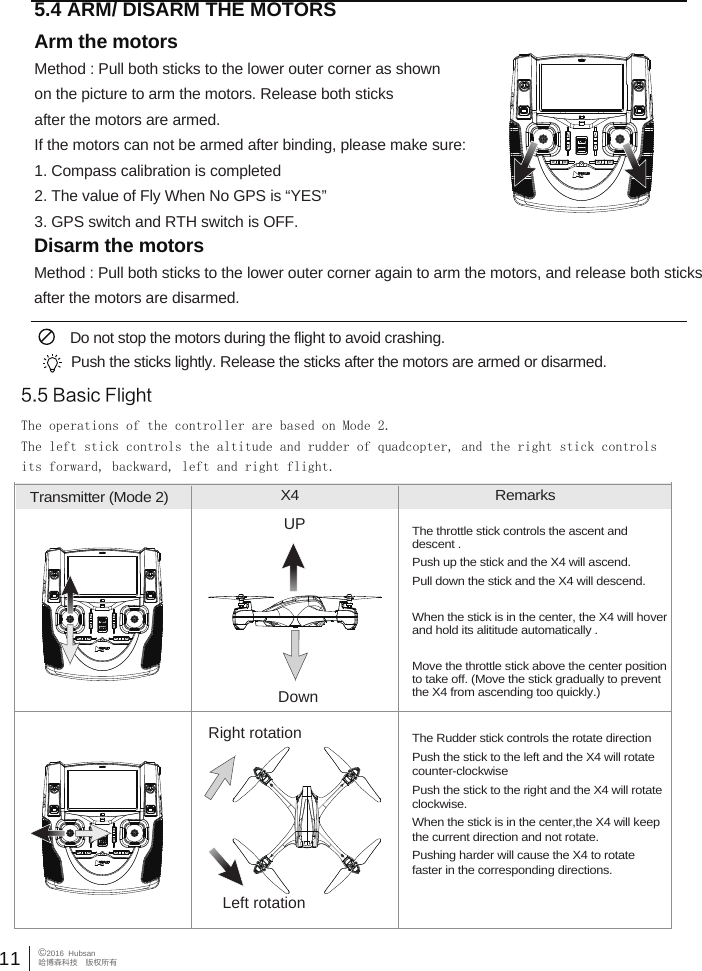
11©2016  Hubsan哈博森科技 版权所有 5.5 Basic FlightThe operations of the controller are based on Mode 2.The left stick controls the altitude and rudder of quadcopter, and the right stick controlsits forward, backward, left and right flight.Transmitter (Mode 2) X4  RemarksThe throttle stick controls the ascent and descent . Push up the stick and the X4 will ascend.Pull down the stick and the X4 will descend.When the stick is in the center, the X4 will hover and hold its alititude automatically .Move the throttle stick above the center position to take off. (Move the stick gradually to prevent the X4 from ascending too quickly.)UPDownThe Rudder stick controls the rotate direction Push the stick to the left and the X4 will rotate counter-clockwisePush the stick to the right and the X4 will rotate clockwise.When the stick is in the center,the X4 will keep the current direction and not rotate.Pushing harder will cause the X4 to rotate faster in the corresponding directions.     Right rotationLeft rotation5.4 ARM/ DISARM THE MOTORS Arm the motorsMethod : Pull both sticks to the lower outer corner as shownon the picture to arm the motors. Release both sticks after the motors are armed.If the motors can not be armed after binding, please make sure:1. Compass calibration is completed2. The value of Fly When No GPS is “YES”3. GPS switch and RTH switch is OFF.Disarm the motorsMethod : Pull both sticks to the lower outer corner again to arm the motors, and release both sticks after the motors are disarmed.  Do not stop the motors during the flight to avoid crashing. Push the sticks lightly. Release the sticks after the motors are armed or disarmed.
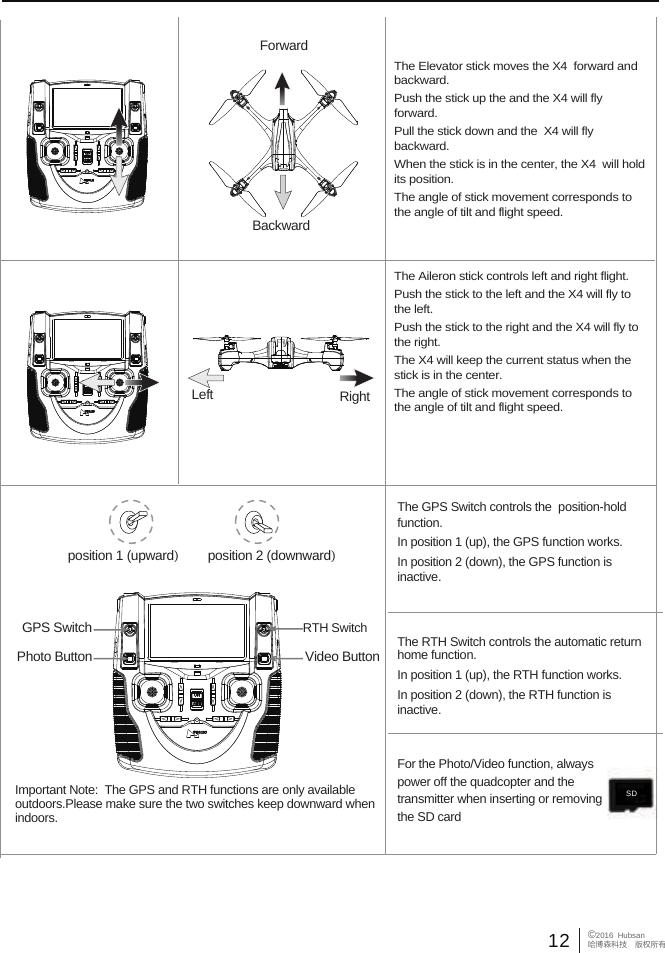
The Elevator stick moves the X4  forward and backward. Push the stick up the and the X4 will fly forward.Pull the stick down and the  X4 will fly backward. When the stick is in the center, the X4  will hold its position. The angle of stick movement corresponds to the angle of tilt and flight speed. The Aileron stick controls left and right flight. Push the stick to the left and the X4 will fly to the left. Push the stick to the right and the X4 will fly to the right. The X4 will keep the current status when the stick is in the center.The angle of stick movement corresponds to the angle of tilt and flight speed. ForwardBackwardRight  Left 12 ©2016  Hubsan哈博森科技 版权所有position 1 (upward)position 2 (downward)Important Note:  The GPS and RTH functions are only available outdoors.Please make sure the two switches keep downward when indoors.The GPS Switch controls the  position-hold function.In position 1 (up), the GPS function works. In position 2 (down), the GPS function is inactive.For the Photo/Video function, always power off the quadcopter and the transmitter when inserting or removing the SD card The RTH Switch controls the automatic return home function.In position 1 (up), the RTH function works. In position 2 (down), the RTH function is inactive.GPS SwitchPhoto Button Video ButtonRTH SwitchSD
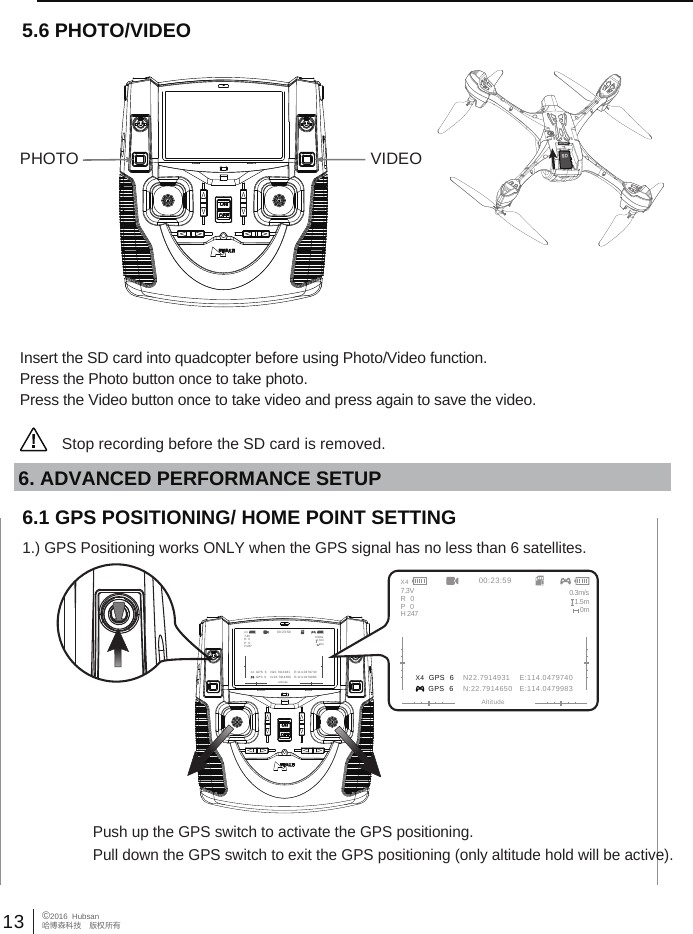
13 ©2016  Hubsan哈博森科技 版权所有Insert the SD card into quadcopter before using Photo/Video function.Press the Photo button once to take photo.Press the Video button once to take video and press again to save the video.5.6 PHOTO/VIDEOStop recording before the SD card is removed.                                                                PHOTO VIDEO6.1 GPS POSITIONING/ HOME POINT SETTING1.) GPS Positioning works ONLY when the GPS signal has no less than 6 satellites.Push up the GPS switch to activate the GPS positioning.Pull down the GPS switch to exit the GPS positioning (only altitude hold will be active).6. ADVANCED PERFORMANCE SETUP X4  GPS  6 GPS  600:23:59AltitudeN22.7914931    E:114.0479740N:22.7914650   E:114.04799837.3V 0.3m/s1.5m0mR   0P   0H 247X4 X4  GPS  6 GPS  600:23:59AltitudeN22.7914931    E:114.0479740N:22.7914650   E:114.04799837.3V 0.3m/s1.5m0mR   0P   0H 247X4
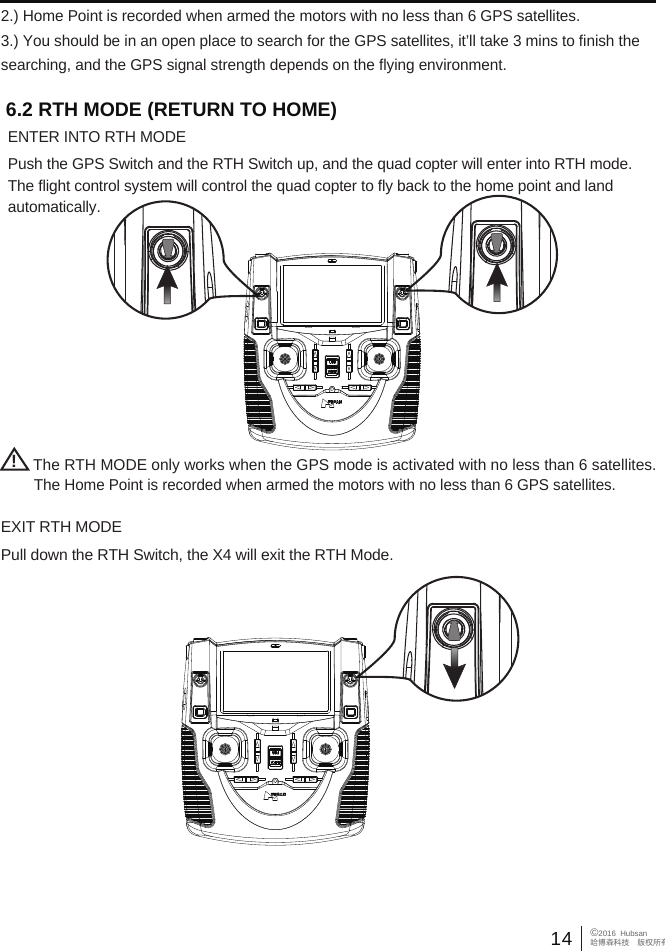
14©2016  Hubsan哈博森科技 版权所有The Home Point is recorded when armed the motors with no less than 6 GPS satellites.!The RTH MODE only works when the GPS mode is activated with no less than 6 satellites.6.2 RTH MODE (RETURN TO HOME)ENTER INTO RTH MODEPush the GPS Switch and the RTH Switch up, and the quad copter will enter into RTH mode. The flight control system will control the quad copter to fly back to the home point and land automatically.           Pull down the RTH Switch, the X4 will exit the RTH Mode.EXIT RTH MODE2.) Home Point is recorded when armed the motors with no less than 6 GPS satellites.3.) You should be in an open place to search for the GPS satellites, it’ll take 3 mins to finish the searching, and the GPS signal strength depends on the flying environment.
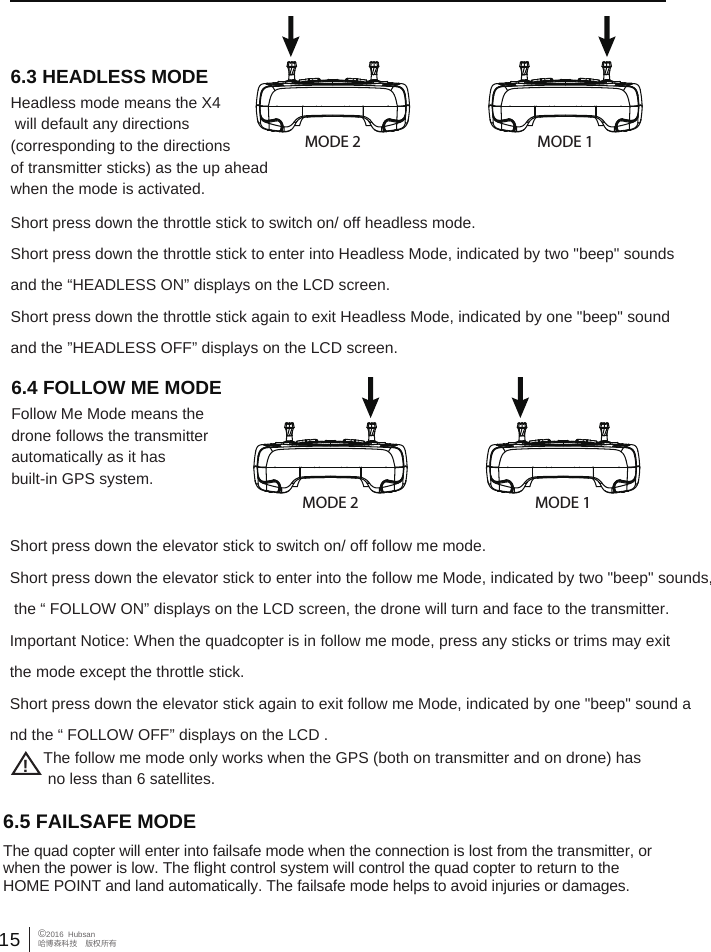
15©2016  Hubsan哈博森科技 版权所有Headless mode means the X4 will default any directions (corresponding to the directions of transmitter sticks) as the up aheadwhen the mode is activated.Follow Me Mode means the drone follows the transmitter automatically as it has built-in GPS system. Short press down the throttle stick to switch on/ off headless mode.Short press down the throttle stick to enter into Headless Mode, indicated by two "beep" sounds and the “HEADLESS ON” displays on the LCD screen. Short press down the throttle stick again to exit Headless Mode, indicated by one "beep" sound and the ”HEADLESS OFF” displays on the LCD screen.  MODE 2 MODE 1MODE 2 MODE 16.3 HEADLESS MODE6.4 FOLLOW ME MODEShort press down the elevator stick to switch on/ off follow me mode.Short press down the elevator stick to enter into the follow me Mode, indicated by two "beep" sounds, the “ FOLLOW ON” displays on the LCD screen, the drone will turn and face to the transmitter.Important Notice: When the quadcopter is in follow me mode, press any sticks or trims may exit the mode except the throttle stick.Short press down the elevator stick again to exit follow me Mode, indicated by one "beep" sound and the “ FOLLOW OFF” displays on the LCD . !The follow me mode only works when the GPS (both on transmitter and on drone) has no less than 6 satellites.6.5 FAILSAFE MODE The quad copter will enter into failsafe mode when the connection is lost from the transmitter, or when the power is low. The flight control system will control the quad copter to return to the HOME POINT and land automatically. The failsafe mode helps to avoid injuries or damages.

Navigation menu