HUIZHOU FORYOU GENERAL ELECTRONICS TPMAI1DIC1-R TYRE PRESSURE MONITORING SYSTEM User Manual foryou manual sunxu

HUIZHOU FORYOU GENERAL ELECTRONICS CO.,LTD. TYRE PRESSURE MONITORING SYSTEM foryou manual sunxu

Users Manual

TPMS USER MANUALTPMS USER MANUAL
Caution:NOTE:Changes or modifications not expressly approved by the partyresponsible for compliance could void the user's authority tooperate the equipment.This device complies with part 15 of the FCC Rules. Operation issubject to the following two conditions: (1) this device may notcause harmful interference, and (2) this device must accept anyinterference received, including interference that may causeundesired operation
Thank you for choosing products. Please carefully readthe manual, you will learn to use all the functions of the new tire pressuremonitoring system*TPMAI1DIC1USER MANUALThis product is applicable to passenger cars*
ContentsPrecautionsContentsProduct descriptionInstallationTroubleshootingOperationEquipment connection123Transmitter installation steps4Receiver installation steps5System introduction6System settingsBacklight settings 714161817DisclaimerCommon alerting mode
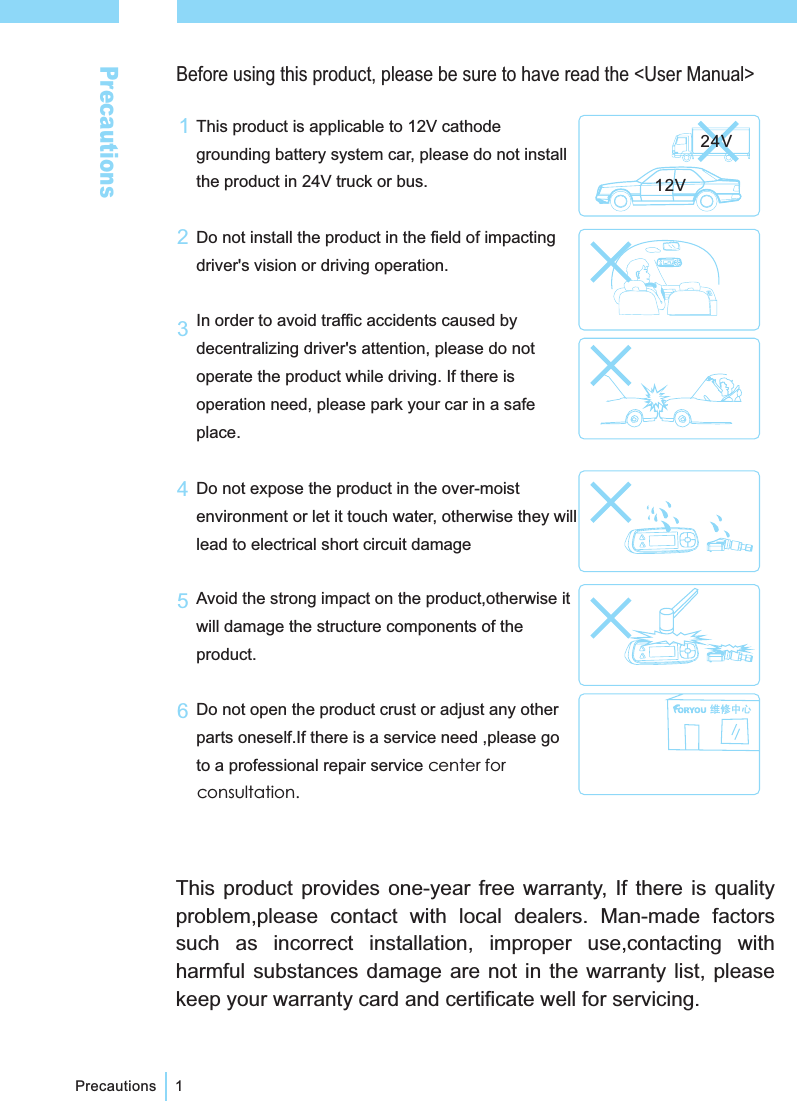
PrecautionsBefore using this product, please be sure to have read the <User Manual>PrecautionsThis product is applicable to 12V cathodegrounding battery system car, please do not installthe product in 24V truck or bus.Do not install the product in the field of impactingdriver's vision or driving operation.In order to avoid traffic accidents caused bydecentralizing driver's attention, please do notoperate the product while driving. If there isoperation need, please park your car in a safeplace.Do not expose the product in the over-moistenvironment or let it touch water, otherwise they willlead to electrical short circuit damageAvoid the strong impact on the product,otherwise itwill damage the structure components of theproduct.Do not open the product crust or adjust any otherparts oneself.If there is a service need ,please goto a professional repair service center forconsultation.11345612V24V2This product provides one-year free warranty, If there is qualityproblem,please contact with local dealers. Man-made factorssuch as incorrect installation, improper use,contacting withharmful substances damage are not in the warranty list, pleasekeep your warranty card and certificate well for servicing.
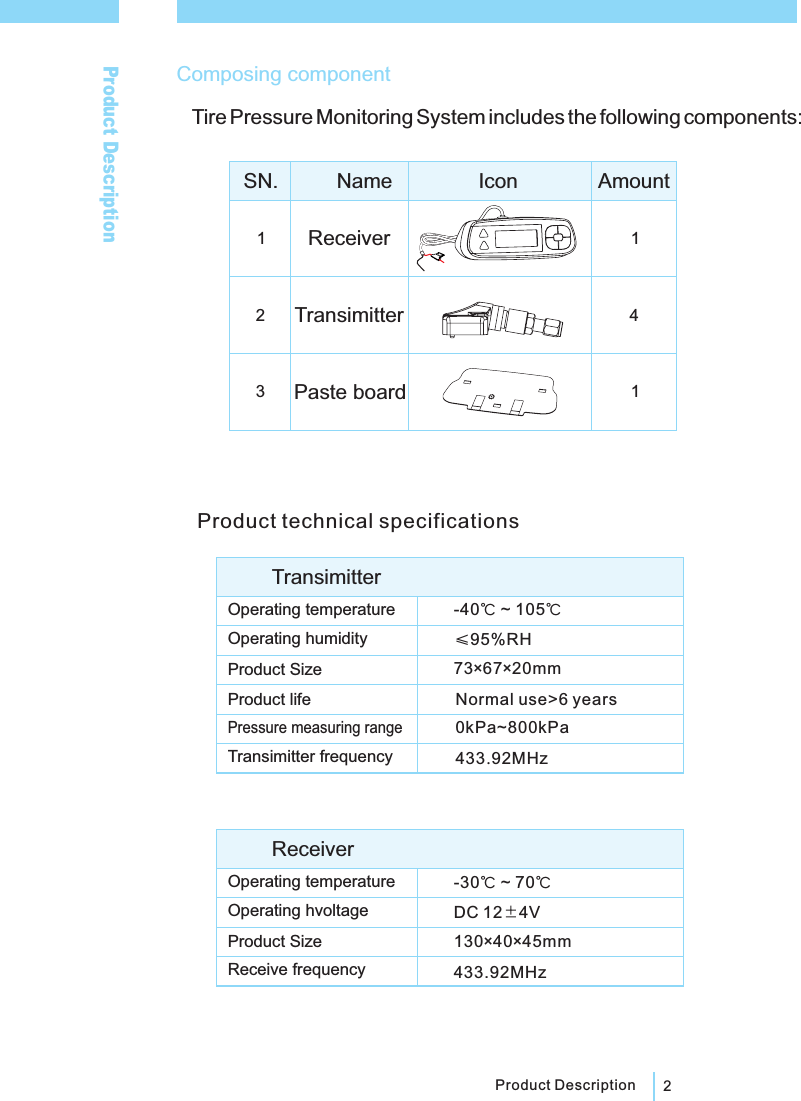
2Product Description123141-40 ~ 105℃℃≤95%RH73×67×20mmNormal use>6 years0kPa~800kPa-30 ~ 70℃℃433.92MHz130×40×45mmDC 12 4V433 92MHz.Product DescriptionComposing componentTire Pressure Monitoring System includes the following components:SN. Name Icon AmountReceiverTransimitterPaste boardProduct technical specificationsOperating humidityProduct SizeProduct lifePressure measuring rangeReceive frequencyTransimitter frequencyOperating temperatureReceiverOperating temperatureOperating hvoltageProduct SizeTransimitter
Installation3Installatio1234jacket nutsensorprotective capflat washerrubber washer56Transmitter installation steps:remove tires from the car, remove the rubber tire after the tireswere deflatedclean the rimScrew the protective cap, jacket nut, flat washer from thetransmitter to be installed.Insert sensor into the corresponding location of the tire valve,and then be fixed by jacket nut.Pay attention to avoid the location of transmitters when installrubber tire. After inflation of the tires according to the tireinflation pressure value , screw protective cap to complete theinstallation.In accordance with the above steps to install other transmitters.[ ] Transmitter should be installed by professionals. The steps must be inaccordance with Stickers shown on the transmitter to ensure that theinstallation is correct and reliable.:Note ①②As the transmitters install on the valve mouth, extrusion on the rubbervalve should be avoid to prevent leakage or damage.③After transmitter installation, you must do the tire dynamic balance test,otherwise normal driving will be affected.The product only applies tovacuum tire installation.
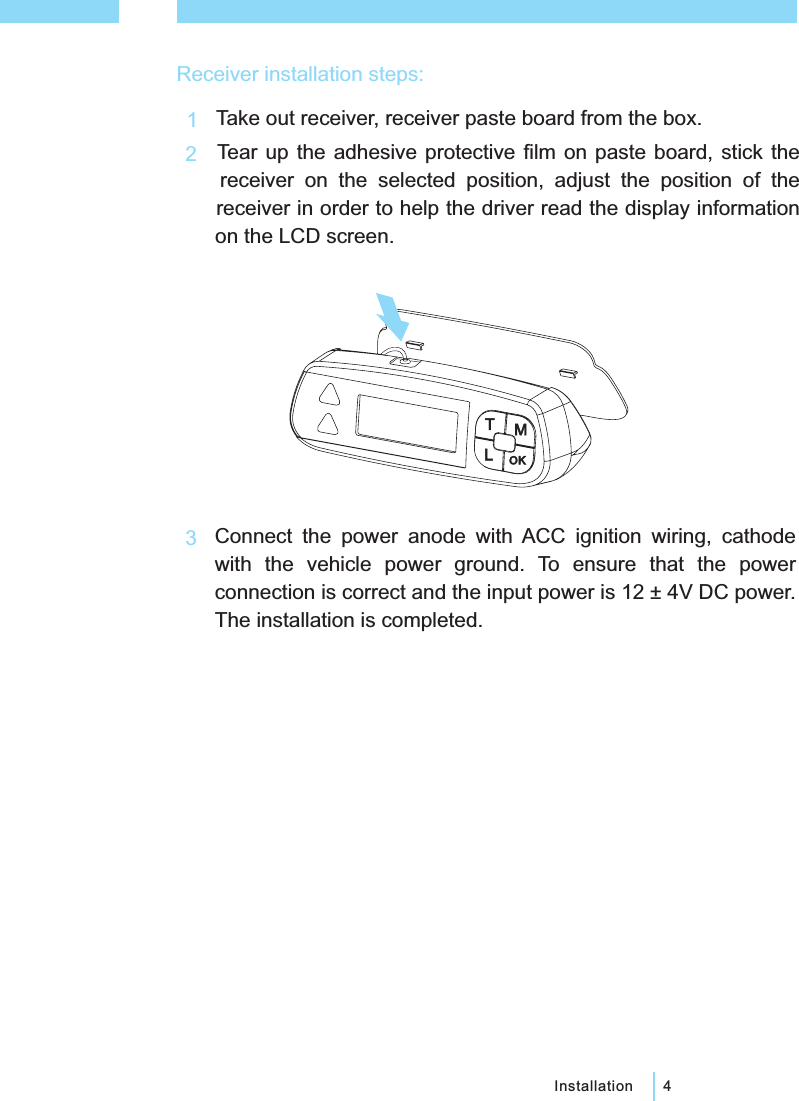
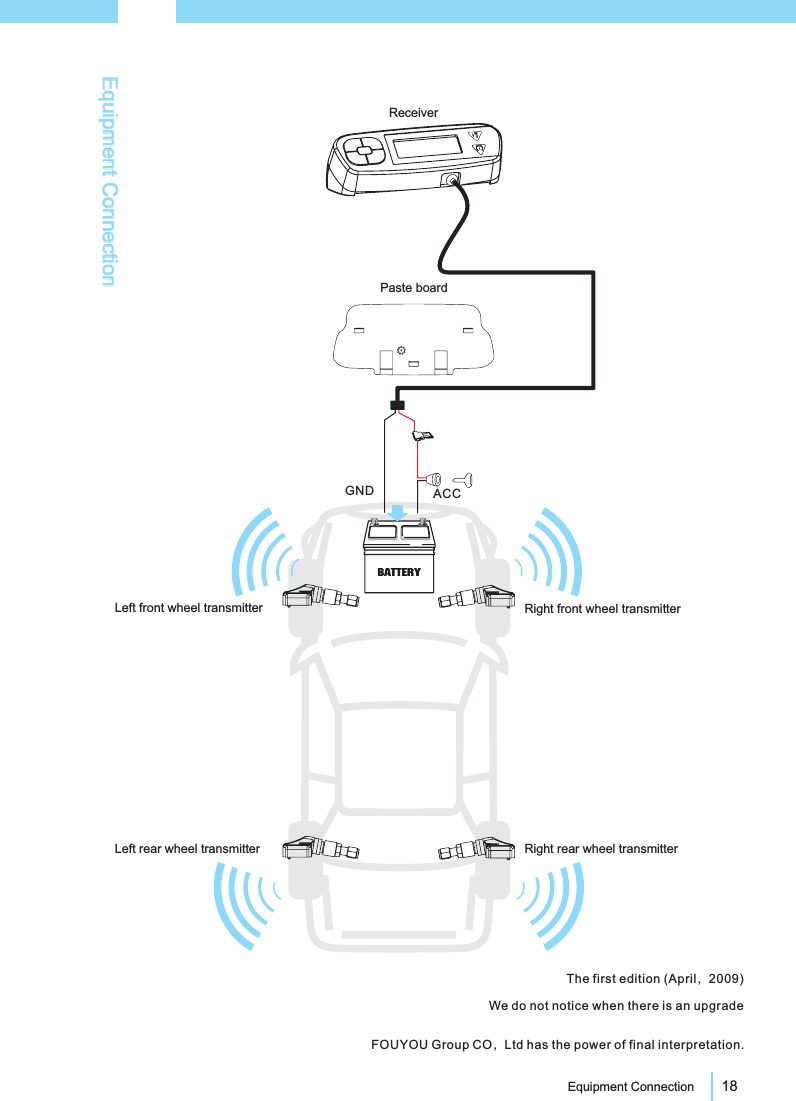
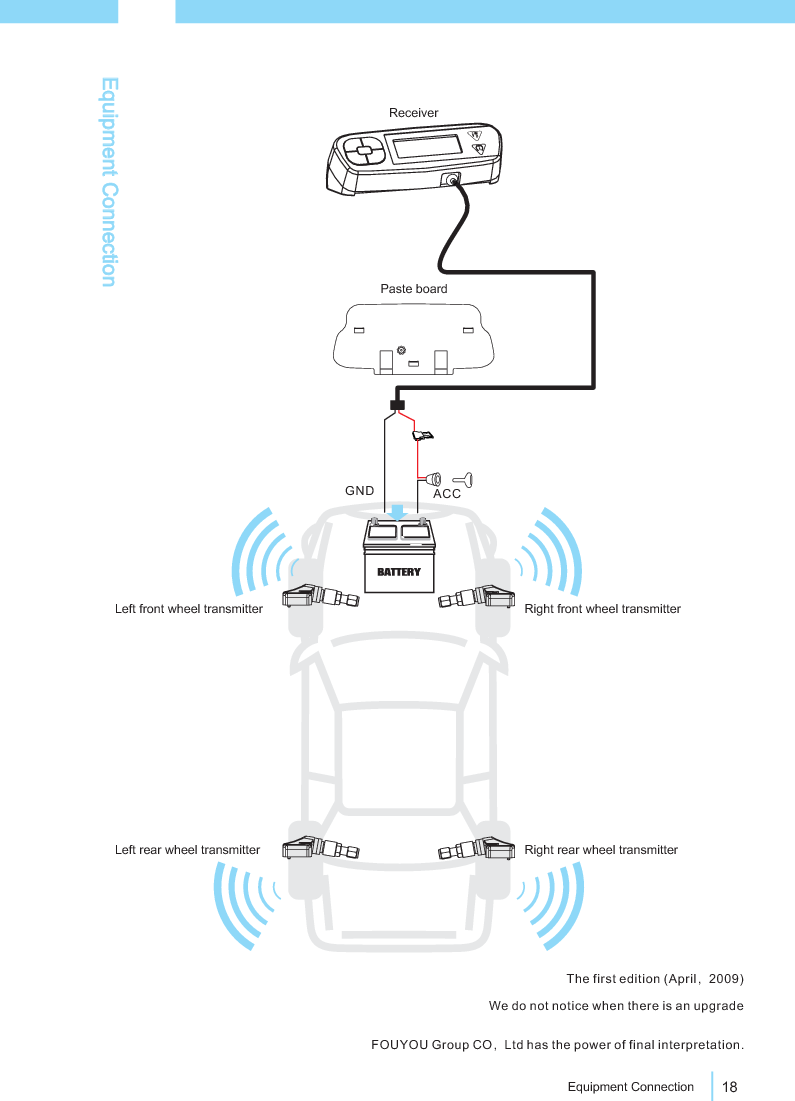
4InstallationReceiver installation steps:123TMOKLTake out receiver, receiver paste board from the box.Tear up the adhesive protective film on paste board, stick thereceiver on the selected position, adjust the position of thereceiver in order to help the driver read the display informationon the LCD screen.Connect the power anode with ACC ignition wiring, cathodewith the vehicle power ground. To ensure that the powerconnection is correct and the input power is 12 ± 4V DC power.The installation is completed.
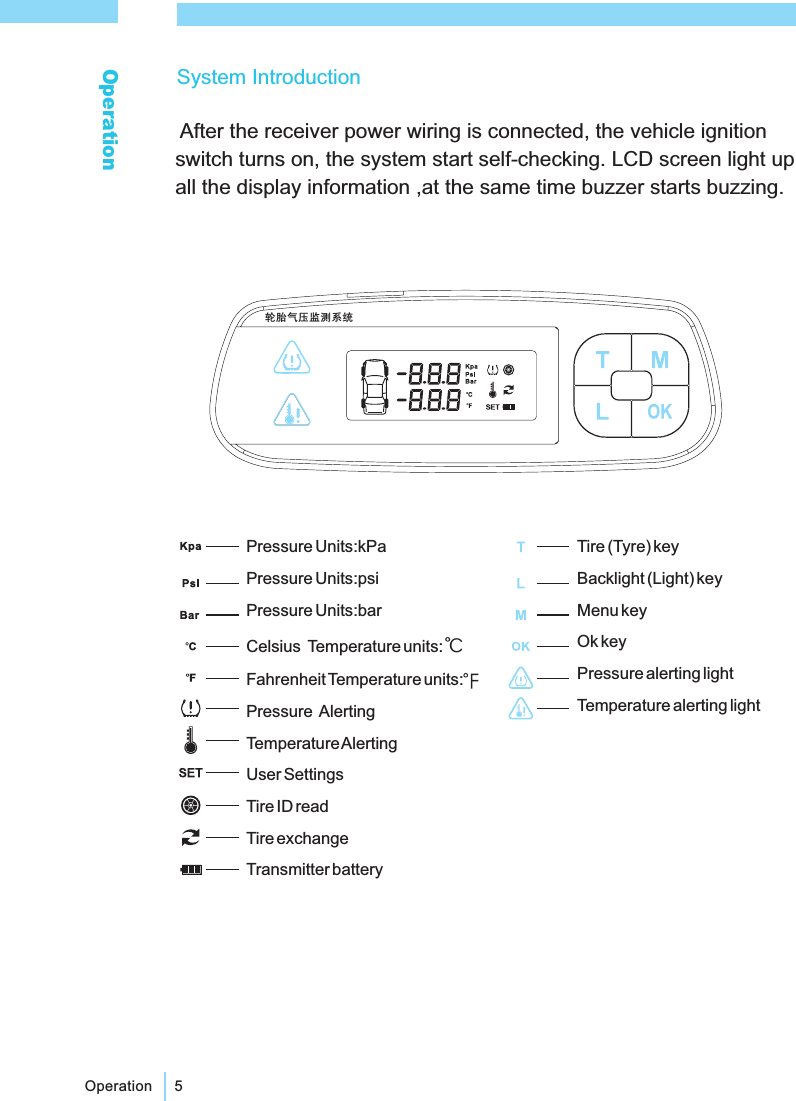
5OperationOperationPressure Units:kPaPressure Units:psiPressure Units:barCelsius Temperature units:Fahrenheit Temperature units:Pressure AlertingTemperatureAlertingUser SettingsTire ID readTire exchangeTransmitter battery℃Tire (Tyre) keyBacklight (Light) keyMenu keyOk keyPressure alerting lightTemperature alerting lightSystem IntroductionAfter the receiver power wiring is connected, the vehicle ignitionswitch turns on, the system start self-checking. LCD screen light upall the display information ,at the same time buzzer starts buzzing.
6Operation[]:The system will displays the data it stored last time when turningon the ignition switch after the automobile being parked a period of time,and will refresh in one minute when the speed of the vehicle arrive 20 km/h.NoteAfter self-checking passed, the system enter into tire checkingstatus display, (below) normal work interface, if the self-checkingdoes not pass, buzzer start buzzing and LED light lights up.
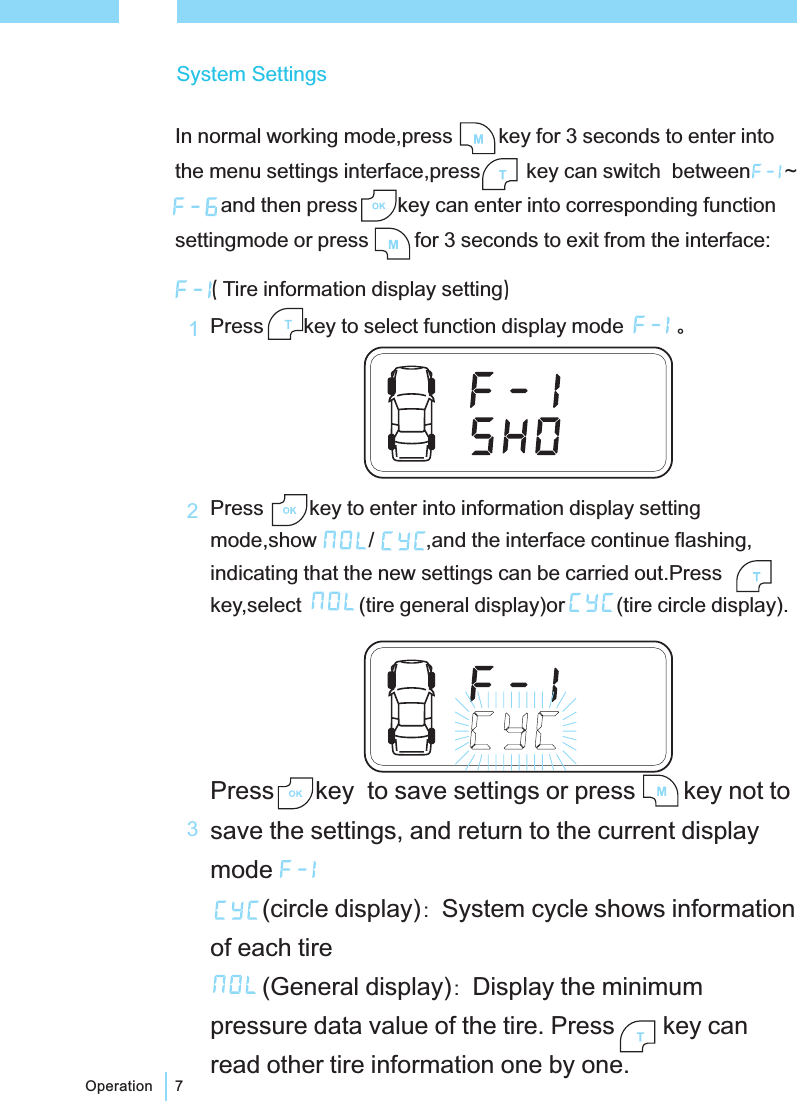
7Operation()Tire information display settingPress key to select function display modePress key to enter into information display settingmode,show / ,and the interface continue flashing,indicating that the new settings can be carried out.Presskey,select (tire general display)or (tire circle display).。::Press key to save settings or press key not tosave the settings, and return to the current displaymode(circle display) System cycle shows informationof each tire(General display) Display the minimumpressure data value of the tire. Press key canread other tire information one by one.132System SettingsIn normal working mode,press key for 3 seconds to enter intothe menu settings interface,press key can switch between ~and then press key can enter into corresponding functionsettingmode or press for 3 seconds to exit from the interface:
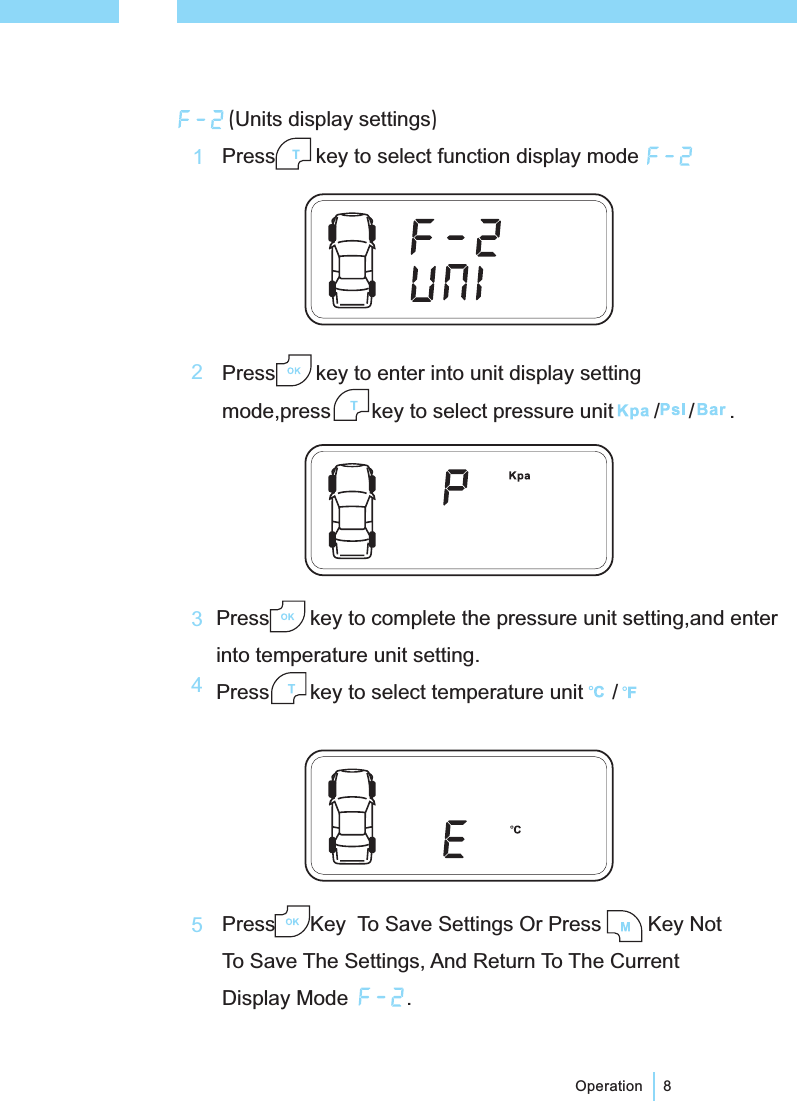
()Units display settingsPress key to enter into unit display settingmode,press key to select pressure unit / / .Press key to select function display mode8OperationPress key to complete the pressure unit setting,and enterinto temperature unit setting.Press key to select temperature unit /Press Key To Save Settings Or Press Key NotTo Save The Settings, And Return To The CurrentDisplay Mode .12345
9OperationAfter selected ,press key to display factory defaulthigh-pressure limit, and then press key to display thefactory default low-pressure limit, press key again todisplay the factory default high temperature limit, and finallypress key to save settings or press key not to savethe settings, and return to the current display mode .(Pressure and temperature limits setting)Press key to select function display mode .Press key to enter into pressure, temperature alertinglimit setting mode, press key to select / (thefactory default settings / user-settings).123
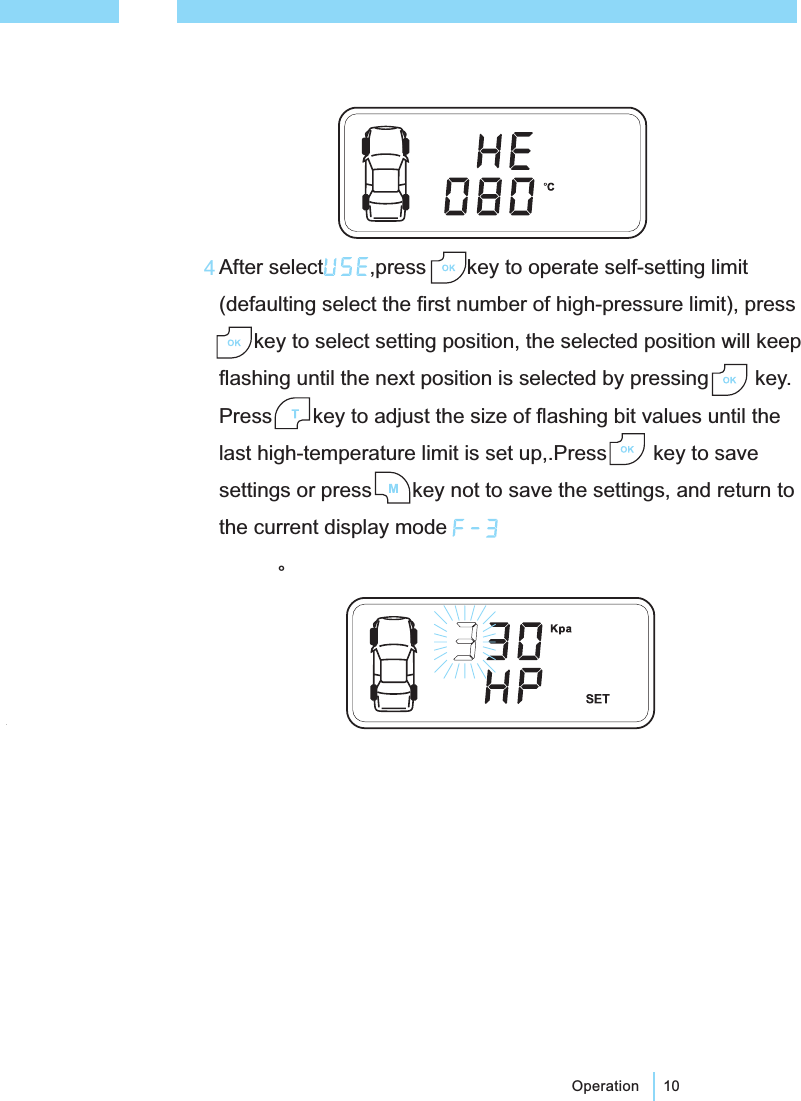
After select ,press key to operate self-setting limit(defaulting select the first number of high-pressure limit), presskey to select setting position, the selected position will keepflashing until the next position is selected by pressing key.Press key to adjust the size of flashing bit values until thelast high-temperature limit is set up,.Press key to savesettings or press key not to save the settings, and return tothe current display mode。10Operation4
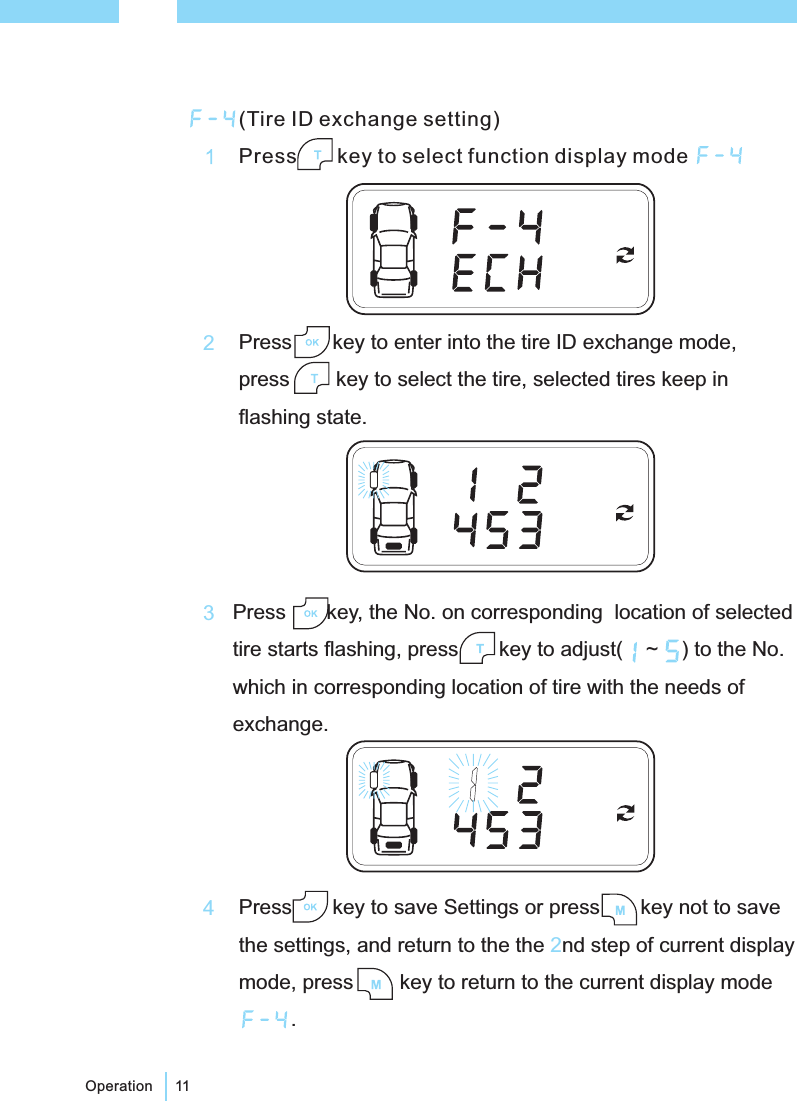
11Operation(Tire ID exchange setting)Press key to select function display modePress key to enter into the tire ID exchange mode,press key to select the tire, selected tires keep inflashing state.23Press key, the No. on corresponding location of selectedtire starts flashing, press key to adjust( ~ ) to the No.which in corresponding location of tire with the needs ofexchange.4Press key to save Settings or press key not to savethe settings, and return to the the nd step of current displaymode, press key to return to the current display mode.2
12OperationPress key to enter into the tire ID No. read mode, presskey to select the tire, selected tires keep in flashing state.(Tire ID No. read setting)Before system work properly, the tires ID No. need to be read,then the transmitter can send data to the receiver real-time.Press key to select function display modePress key to save Settings or press key not to savethe settings, and return to the the nd step of current displaymode, press key to return to the current display mode2124Press key, the No. on corresponding location of selectedtire start flashing, waiting to receive the ID signal. At this timedeflate the selected tire( reference the following [ ])Afterreceived the ID signal, the buzzer start buzzing and thedigital flashing frequency speed up.Note3
13Operation(Spare tire activation settings)Press keys to choose function display mode .Press key to enter into spare tire setup mode ,display/ , and continue to winkle, indicating that the new settingscan be carried out. Press key to select or12Press key to save Settings or press key not to savethe settings, and return to the current display mode3Receiver in working status,press key to turn on the backlight,press key again, turn off the backlightBacklight settings[ ] ID No. studying has been completed before leave factory, please follow the transmitterstickers to install. Tire ID No. studying, relative atmospheric pressure is / = to 60kPa, thedeflation is 30kPa in 1 minute.>NoteFinish learning of other tires according above steps
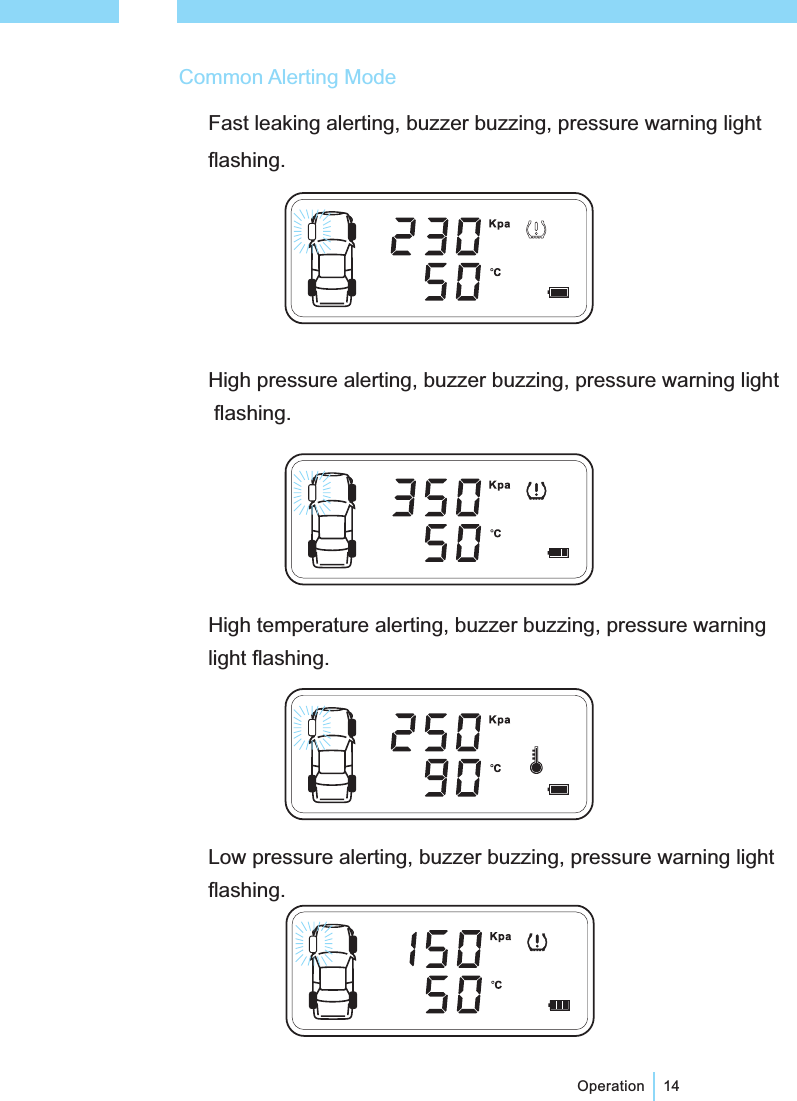
14OperationCommon Alerting ModeFast leaking alerting, buzzer buzzing, pressure warning lightflashing.High temperature alerting, buzzer buzzing, pressure warninglight flashing.High pressure alerting, buzzer buzzing, pressure warning lightflashing.Low pressure alerting, buzzer buzzing, pressure warning lightflashing.
Alerting default limitsHigh temperature alerting ≥℃80Low pressure alerting ≤190kPaHigh pressure alerting ≥330kPa15Transmitter failure alerting, buzzer buzzingLow voltage alerting, buzzer buzzingNo signal alerting, buzzer buzzingOperation*[Notice] If the alerting state displays, please solve the problem in time, which could save transmitterpower consumption.In alerting state, press any button to stop alerting sound.①②
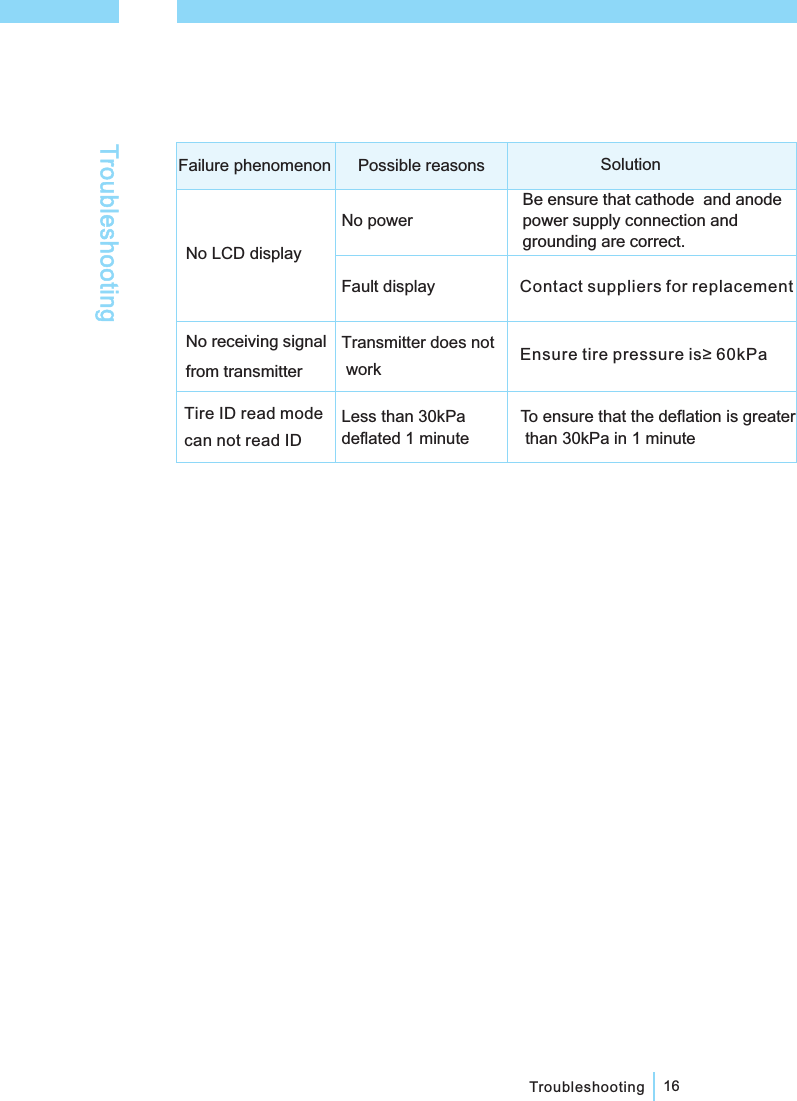
16TroubleshootingTroubleshootingFailure phenomenonNo powerNo LCD displayPossible reasons SolutionNo receiving signalfrom transmitterTransmitter does notwork Ensure tire pressure is≥ 60kPaTire ID read modecan not read IDLess than 30kPadeflated 1 minuteTo ensure that the deflation is greaterthan 30kPa in 1 minuteFault displayBe ensure that cathode and anodepower supply connection andgrounding are correct.Contact suppliers for replacement
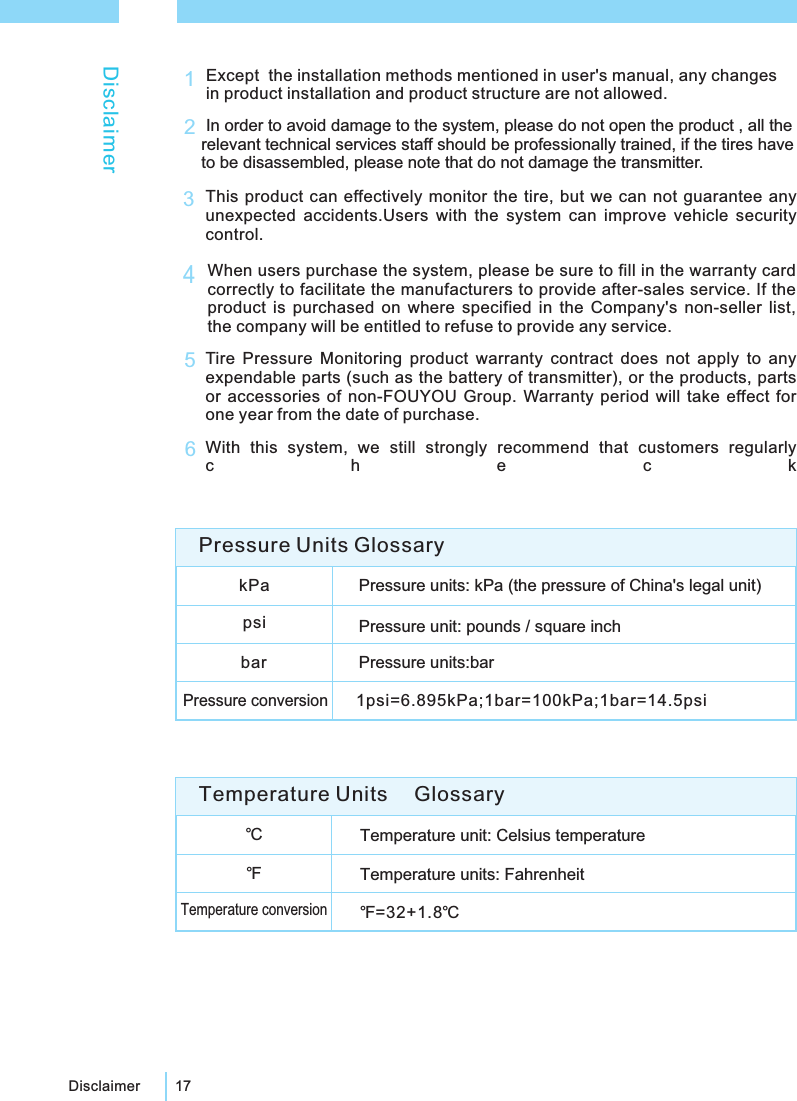
17DisclaimerDisclaimerExcept the installation methods mentioned in user's manual, any changesin product installation and product structure are not allowed.1In order to avoid damage to the system, please do not open the product , all therelevant technical services staff should be professionally trained, if the tires haveto be disassembled, please note that do not damage the transmitter.2This product can effectively monitor the tire, but we can not guarantee anyunexpected accidents.Users with the system can improve vehicle securitycontrol.3Tire Pressure Monitoring product warranty contract does not apply to anyexpendable parts (such as the battery of transmitter), or the products, partsor accessories of non-FOUYOU Group. Warranty period will take effect forone year from the date of purchase.5When users purchase the system, please be sure to fill in the warranty cardcorrectly to facilitate the manufacturers to provide after-sales service. If theproduct is purchased on where specified in the Company's non-seller list,the company will be entitled to refuse to provide any service.4With this system, we still strongly recommend that customers regularlycheck6℃Temperature unit: Celsius temperatureTemperature units: FahrenheitTemperature conversion℉=32+1.8℃℉Temperature Units GlossarykPa Pressure units: kPa (the pressure of China's legal unit)psi Pressure unit: pounds / square inchbar Pressure units:barPressure conversion1psi=6.895kPa;1bar=100kPa;1bar=14.5psiPressure Units Glossary
Equipment ConnectionEquipment ConnectionThe first edition (April 2009),We do not notice when there is an upgradeFOUYOU Group CO Ltd has the power of final interpretation.,Left front wheel transmitter Right front wheel transmitterRight rear wheel transmitterLeft rear wheel transmitterPaste boardReceiver18Equipment ConnectionGND ACC
24rd floor, Foryou Tower, Yanda yi road, Huizhou, Guangdong Province,Chinahttp: www.foryougroup.comE-mail: AEsales@foryougroup.comEL 0752-2556569 Fax 0752-2556567//T: :

Navigation menu