HYPERSYNES NANO Wireless BBQ Thermometer User Manual nano L

SHENZHEN HYPERSYNES CO.,LTD Wireless BBQ Thermometer nano L

Users Manual

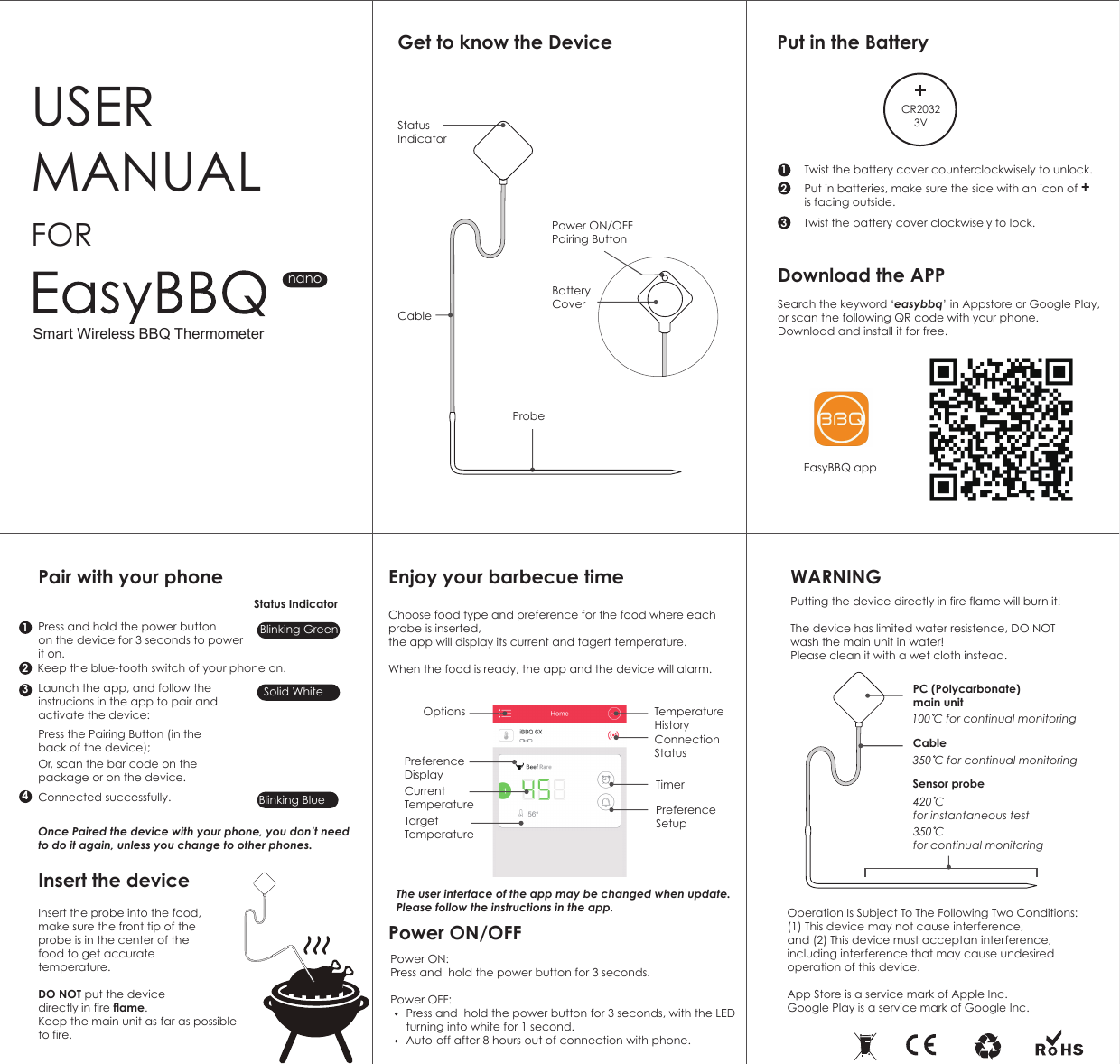
Get to know the Device Put in the BatteryDownload the APPEnjoy your barbecue timePower ON/OFF WARNINGPair with your phoneInsert the deviceUSER MANUALPower ON/OFFPairing ButtonBattery CoverFORnanoProbeInsert the probe into the food, make sure the front tip of the probe is in the center of the food to get accurate temperature.DO NOT put the device directly in fire flame. Keep the main unit as far as possible to fire.The user interface of the app may be changed when update. Please follow the instructions in the app. Twist the battery cover counterclockwisely to unlock. Put in batteries, make sure the side with an icon of + is facing outside.12Twist the battery cover clockwisely to lock.31432Search the keyword ‘easybbq’ in Appstore or Google Play,or scan the following QR code with your phone.Download and install it for free.Choose food type and preference for the food where each probe is inserted, the app will display its current and tagert temperature. When the food is ready, the app and the device will alarm.  Power ON: Press and  hold the power button for 3 seconds. Power OFF:           Press and  hold the power button for 3 seconds, with the LED      turning into white for 1 second.     Auto-off after 8 hours out of connection with phone.Putting the device directly in fire flame will burn it!The device has limited water resistence, DO NOT wash the main unit in water!Please clean it with a wet cloth instead.Operation Is Subject To The Following Two Conditions:(1) This device may not cause interference, and (2) This device must acceptan interference, including interference that may cause undesired operation of this device.App Store is a service mark of Apple Inc.Google Play is a service mark of Google Inc.Sensor probePress and hold the power button on the device for 3 seconds to powerit on.  Keep the blue-tooth switch of your phone on.Status IndicatorBlinking GreenSolid WhiteBlinking BlueLaunch the app, and follow the instrucions in the app to pair and activate the device:Once Paired the device with your phone, you don’t need to do it again, unless you change to other phones.Press the Pairing Button (in the back of the device);Or, scan the bar code on the package or on the device.Connected successfully.EasyBBQ app420 C for instantaneous test350 C for continual monitoringPC (Polycarbonate)main unit100 C for continual monitoringCable 350 C for continual monitoringSmart Wireless BBQ ThermometerStatus IndicatorCableCR20323VCurrent TemperatureTargetTemperatureOptionsPreference DisplayTemperatureHistoryConnection StatusTimerPreference Setup
§ 15.19 Labelling requirements. This device complies with part 15 of the FCC Rules. Operation is subject to the following two conditions: (1) This device may not cause harmful interference, and (2) this device must accept any interference received, including interference that may cause undesired operation.  § 15.21 Information to user. Any Changes or modifications not expressly approved by the party responsible for compliance could void the user's authority to operate the equipment.  § 15.105 Information to the user. Note: This equipment has been tested and found to comply with the limits for a Class B digital device, pursuant to part 15 of the FCC Rules. These limits are designed to provide reasonable protection against harmful interference in a residential installation. This equipment generates uses and can radiate radio frequency energy and, if not installed and used in accordance with the instructions, may cause harmful interference to radio communications. However, there is no guarantee that interference will not occur in a particular installation. If this equipment does cause harmful interference to radio or television reception, which can be determined by turning the equipment off and on, the user is encouraged to try to correct the interference by one or more of the following measures: -Reorient or relocate the receiving antenna. -Increase the separation between the equipment and receiver. -Connect the equipment into an outlet on a circuit different from that to which the receiver is connected. -Consult the dealer or an experienced radio/TV technician for help.   * RF warning for Portable device: The device has been evaluated to meet general RF exposure requirement. The device can be used in portable exposure condition without restriction.

Navigation menu