Hangzhou Ezviz Network A1 Home Sense Alarm Hub User Manual

Hangzhou Ezviz Network Co., Ltd Home Sense Alarm Hub

User Manual

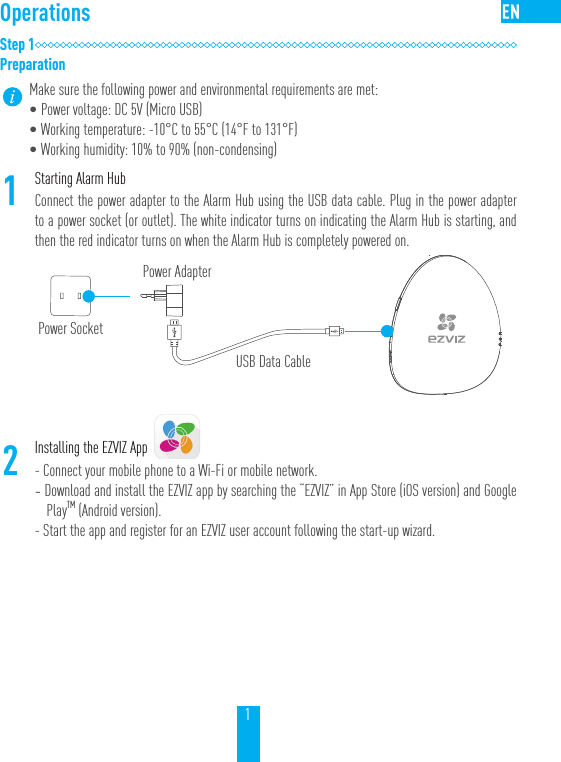
1OperationsStep 1PreparationMake sure the following power and environmental requirements are met:•Power voltage: DC 5V (Micro USB)•Working temperature: -10°C to 55°C (14°F to 131°F)•Working humidity: 10% to 90% (non-condensing)1Starting Alarm HubConnect the power adapter to the Alarm Hub using the USB data cable. Plug in the power adapter to a power socket (or outlet). The white indicator turns on indicating the Alarm Hub is starting, and then the red indicator turns on when the Alarm Hub is completely powered on.2Installing the EZVIZ App- Connect your mobile phone to a Wi-Fi or mobile network. - Download and install the EZVIZ app by searching the “EZVIZ” in App Store (iOS version) and Google PlayTM (Android version).  - Start the app and register for an EZVIZ user account following the start-up wizard.Power SocketPower AdapterUSB Data Cable
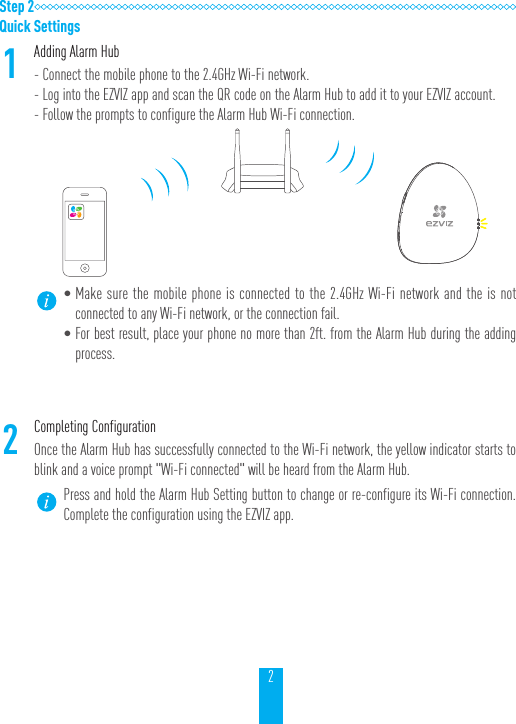
2Step 2Quick Settings1Adding Alarm Hub- Connect the mobile phone to the 2.4GHz Wi-Fi network.- Log into the EZVIZ app and scan the QR code on the Alarm Hub to add it to your EZVIZ account.- Follow the prompts to configure the Alarm Hub Wi-Fi connection. •Make sure the mobile phone is connected to the 2.4GHz Wi-Fi network and the is not connected to any Wi-Fi network, or the connection fail.•For best result, place your phone no more than 2ft. from the Alarm Hub during the adding process.2Completing ConfigurationOnce the Alarm Hub has successfully connected to the Wi-Fi network, the yellow indicator starts to blink and a voice prompt "Wi-Fi connected" will be heard from the Alarm Hub.Press and hold the Alarm Hub Setting button to change or re-configure its Wi-Fi connection. Complete the configuration using the EZVIZ app.
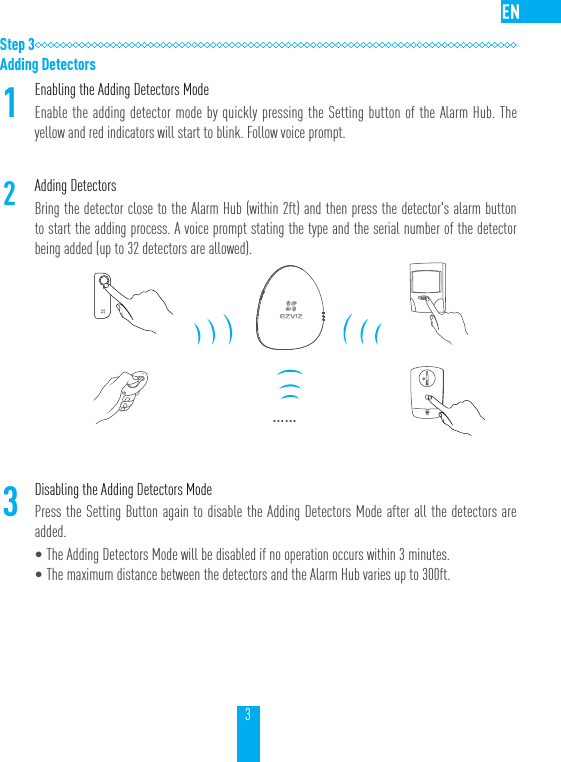
3Step 3Adding Detectors1Enabling the Adding Detectors ModeEnable the adding detector mode by quickly pressing the Setting button of the Alarm Hub. The yellow and red indicators will start to blink. Follow voice prompt.2Adding Detectors Bring the detector close to the Alarm Hub (within 2ft) and then press the detector's alarm button to start the adding process. A voice prompt stating the type and the serial number of the detector being added (up to 32 detectors are allowed).……3Disabling the Adding Detectors ModePress the Setting Button again to disable the Adding Detectors Mode after all the detectors are added.•The Adding Detectors Mode will be disabled if no operation occurs within 3 minutes.•The maximum distance between the detectors and the Alarm Hub varies up to 300ft.
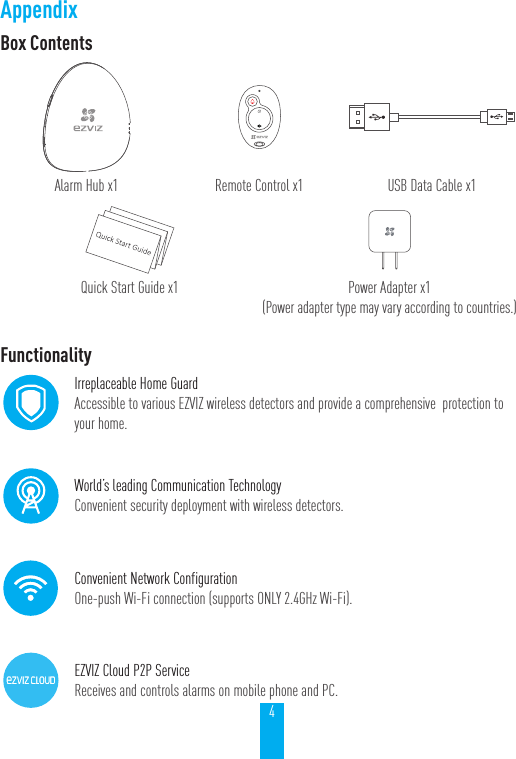
4AppendixBox ContentsAlarm Hub x1 Remote Control x1 USB Data Cable x1Quick Start Guide x1 Power Adapter x1 (Power adapter type may vary according to countries.)FunctionalityIrreplaceable Home GuardAccessible to various EZVIZ wireless detectors and provide a comprehensive  protection to your home.World’s leading Communication TechnologyConvenient security deployment with wireless detectors. Convenient Network ConfigurationOne-push Wi-Fi connection (supports ONLY 2.4GHz Wi-Fi).EZVIZ Cloud P2P ServiceReceives and controls alarms on mobile phone and PC.
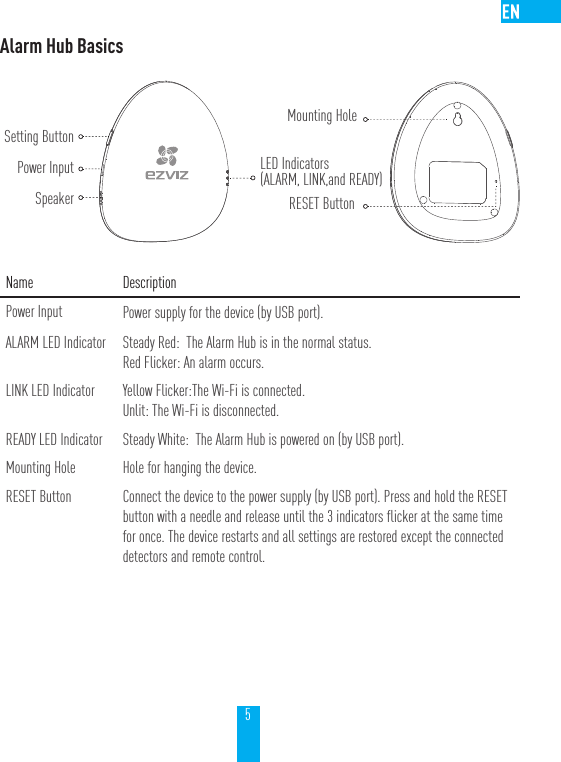
5Alarm Hub BasicsName DescriptionPower Input Power supply for the device (by USB port).ALARM LED Indicator Steady Red:  The Alarm Hub is in the normal status.Red Flicker: An alarm occurs.LINK LED Indicator Yellow Flicker:The Wi-Fi is connected. Unlit: The Wi-Fi is disconnected.READY LED Indicator Steady White:  The Alarm Hub is powered on (by USB port). Mounting Hole Hole for hanging the device.RESET Button Connect the device to the power supply (by USB port). Press and hold the RESET button with a needle and release until the 3 indicators flicker at the same time for once. The device restarts and all settings are restored except the connected detectors and remote control.Setting ButtonPower InputSpeakerMounting HoleRESET ButtonLED Indicators(ALARM, LINK,and READY)
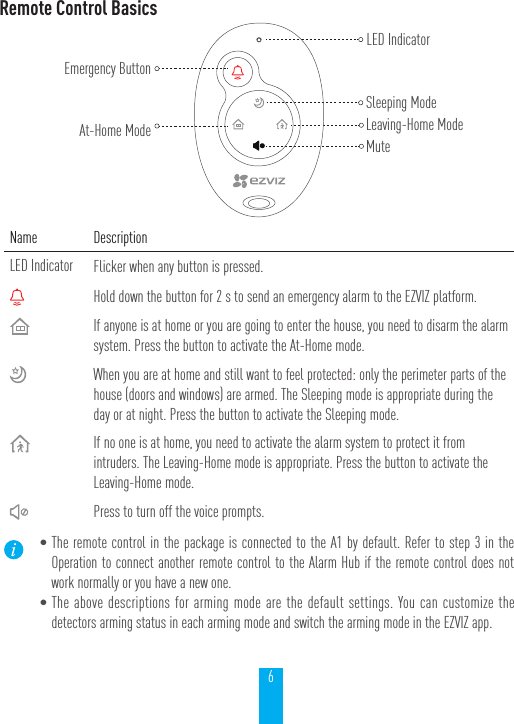
6Remote Control BasicsName DescriptionLED Indicator Flicker when any button is pressed.Hold down the button for 2 s to send an emergency alarm to the EZVIZ platform.If anyone is at home or you are going to enter the house, you need to disarm the alarm system. Press the button to activate the At-Home mode.When you are at home and still want to feel protected: only the perimeter parts of the house (doors and windows) are armed. The Sleeping mode is appropriate during the day or at night. Press the button to activate the Sleeping mode.If no one is at home, you need to activate the alarm system to protect it from intruders. The Leaving-Home mode is appropriate. Press the button to activate the Leaving-Home mode.Press to turn off the voice prompts.•The remote control in the package is connected to the A1 by default. Refer to step 3 in the Operation to connect another remote control to the Alarm Hub if the remote control does not work normally or you have a new one.•The above descriptions for arming mode are the default settings. You can customize the detectors arming status in each arming mode and switch the arming mode in the EZVIZ app.Emergency ButtonAt-Home ModeLED IndicatorMuteLeaving-Home ModeSleeping Mode
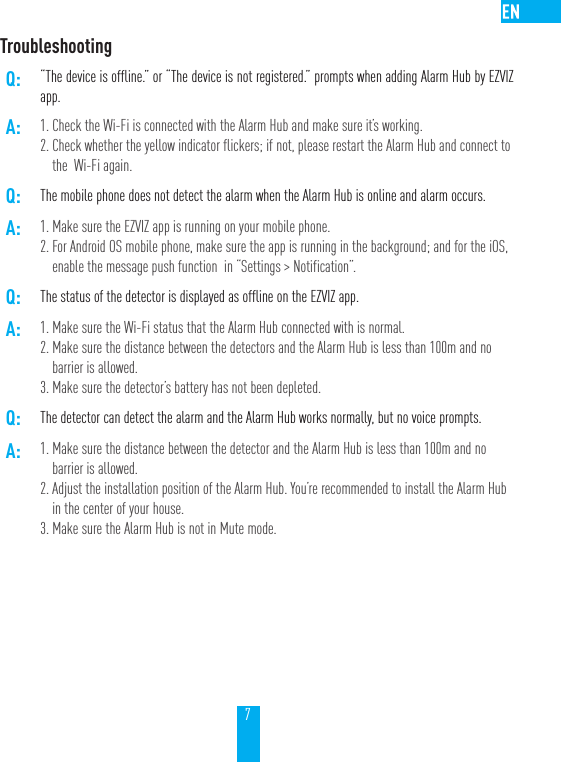
7TroubleshootingQ: “The device is offline.” or “The device is not registered.” prompts when adding Alarm Hub by EZVIZ app.A: 1. Check the Wi-Fi is connected with the Alarm Hub and make sure it’s working.2. Check whether the yellow indicator flickers; if not, please restart the Alarm Hub and connect to the  Wi-Fi again. Q: The mobile phone does not detect the alarm when the Alarm Hub is online and alarm occurs.A: 1. Make sure the EZVIZ app is running on your mobile phone.2. For Android OS mobile phone, make sure the app is running in the background; and for the iOS,  enable the message push function  in “Settings > Notification”. Q: The status of the detector is displayed as offline on the EZVIZ app.A: 1. Make sure the Wi-Fi status that the Alarm Hub connected with is normal.2. Make sure the distance between the detectors and the Alarm Hub is less than 100m and no barrier is allowed.3. Make sure the detector’s battery has not been depleted.Q: The detector can detect the alarm and the Alarm Hub works normally, but no voice prompts.A: 1. Make sure the distance between the detector and the Alarm Hub is less than 100m and no barrier is allowed.2. Adjust the installation position of the Alarm Hub. You’re recommended to install the Alarm Hub in the center of your house.3. Make sure the Alarm Hub is not in Mute mode.
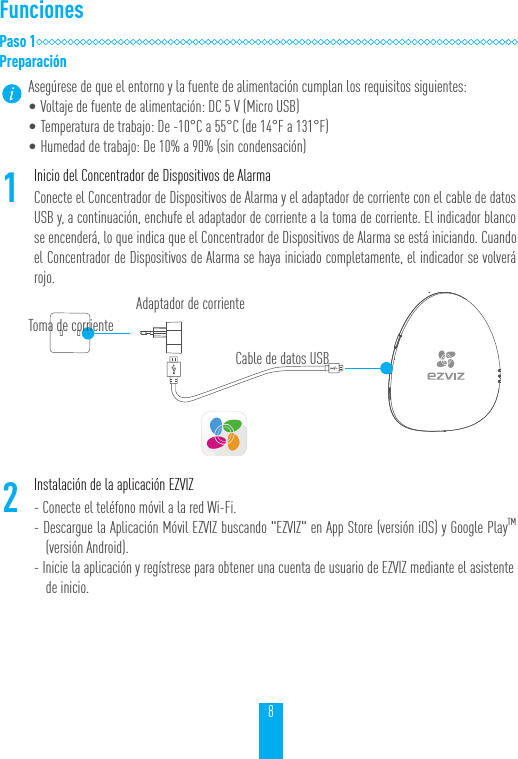
8FuncionesPaso 1PreparaciónAsegúrese de que el entorno y la fuente de alimentación cumplan los requisitos siguientes:   •Voltaje de fuente de alimentación: DC 5 V (Micro USB)•Temperatura de trabajo: De -10°C a 55°C (de 14°F a 131°F)•Humedad de trabajo: De 10% a 90% (sin condensación)1Inicio del Concentrador de Dispositivos de AlarmaConecte el Concentrador de Dispositivos de Alarma y el adaptador de corriente con el cable de datos USB y, a continuación, enchufe el adaptador de corriente a la toma de corriente. El indicador blanco se encenderá, lo que indica que el Concentrador de Dispositivos de Alarma se está iniciando. Cuando el Concentrador de Dispositivos de Alarma se haya iniciado completamente, el indicador se volverá rojo.2Instalación de la aplicación EZVIZ- Conecte el teléfono móvil a la red Wi-Fi.- Descargue la Aplicación Móvil EZVIZ buscando "EZVIZ" en App Store (versión iOS) y Google PlayTM (versión Android).- Inicie la aplicación y regístrese para obtener una cuenta de usuario de EZVIZ mediante el asistente de inicio.Toma de corrienteAdaptador de corrienteCable de datos USB
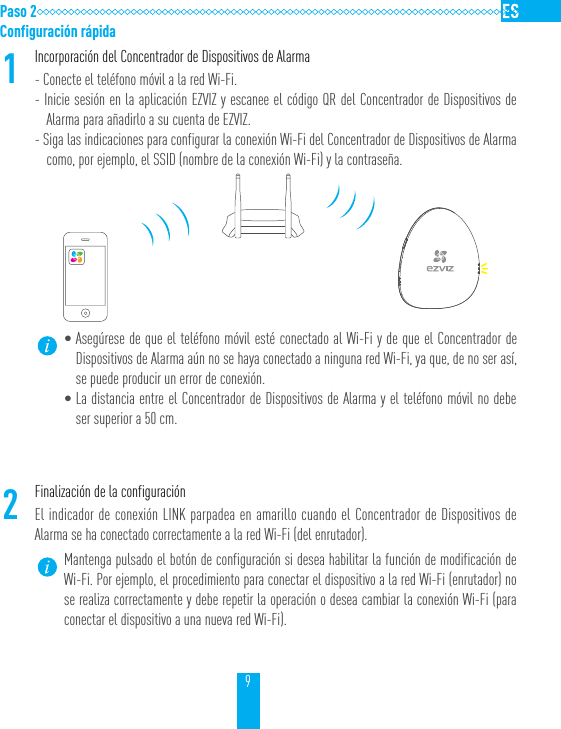
9Paso 2Configuración rápida1Incorporación del Concentrador de Dispositivos de Alarma- Conecte el teléfono móvil a la red Wi-Fi.- Inicie sesión en la aplicación EZVIZ y escanee el código QR del Concentrador de Dispositivos de Alarma para añadirlo a su cuenta de EZVIZ.- Siga las indicaciones para configurar la conexión Wi-Fi del Concentrador de Dispositivos de Alarma como, por ejemplo, el SSID (nombre de la conexión Wi-Fi) y la contraseña.•Asegúrese de que el teléfono móvil esté conectado al Wi-Fi y de que el Concentrador de Dispositivos de Alarma aún no se haya conectado a ninguna red Wi-Fi, ya que, de no ser así, se puede producir un error de conexión.•La distancia entre el Concentrador de Dispositivos de Alarma y el teléfono móvil no debe ser superior a 50 cm.2Finalización de la configuraciónEl indicador de conexión LINK parpadea en amarillo cuando el Concentrador de Dispositivos de Alarma se ha conectado correctamente a la red Wi-Fi (del enrutador).Mantenga pulsado el botón de configuración si desea habilitar la función de modificación de Wi-Fi. Por ejemplo, el procedimiento para conectar el dispositivo a la red Wi-Fi (enrutador) no se realiza correctamente y debe repetir la operación o desea cambiar la conexión Wi-Fi (para conectar el dispositivo a una nueva red Wi-Fi).
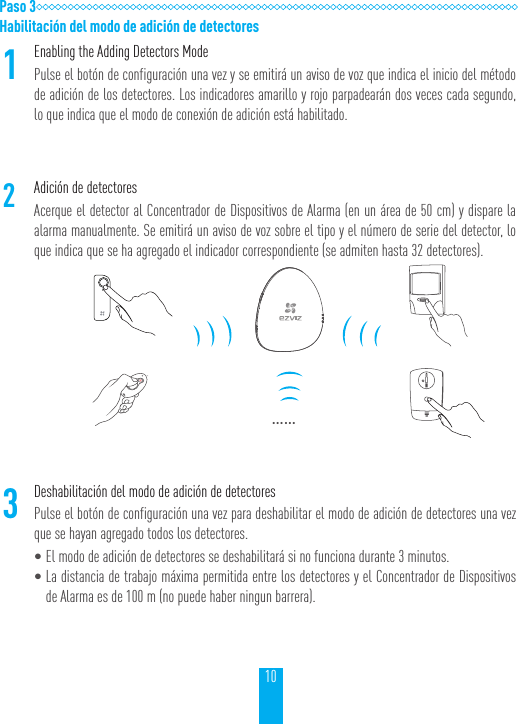
10Paso 3Habilitación del modo de adición de detectores1Enabling the Adding Detectors ModePulse el botón de configuración una vez y se emitirá un aviso de voz que indica el inicio del método de adición de los detectores. Los indicadores amarillo y rojo parpadearán dos veces cada segundo, lo que indica que el modo de conexión de adición está habilitado.2Adición de detectoresAcerque el detector al Concentrador de Dispositivos de Alarma (en un área de 50 cm) y dispare la alarma manualmente. Se emitirá un aviso de voz sobre el tipo y el número de serie del detector, lo que indica que se ha agregado el indicador correspondiente (se admiten hasta 32 detectores).……3Deshabilitación del modo de adición de detectoresPulse el botón de configuración una vez para deshabilitar el modo de adición de detectores una vez que se hayan agregado todos los detectores.•El modo de adición de detectores se deshabilitará si no funciona durante 3 minutos.•La distancia de trabajo máxima permitida entre los detectores y el Concentrador de Dispositivos de Alarma es de 100 m (no puede haber ningun barrera).
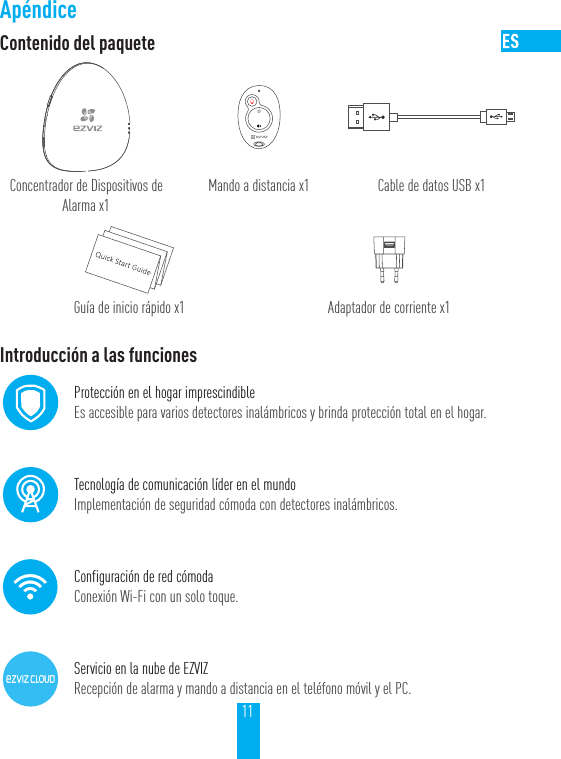
11ApéndiceContenido del paqueteConcentrador de Dispositivos de Alarma x1Mando a distancia x1 Cable de datos USB x1Guía de inicio rápido x1 Adaptador de corriente x1Introducción a las funcionesProtección en el hogar imprescindibleEs accesible para varios detectores inalámbricos y brinda protección total en el hogar.Tecnología de comunicación líder en el mundoImplementación de seguridad cómoda con detectores inalámbricos.Configuración de red cómodaConexión Wi-Fi con un solo toque.Servicio en la nube de EZVIZRecepción de alarma y mando a distancia en el teléfono móvil y el PC.
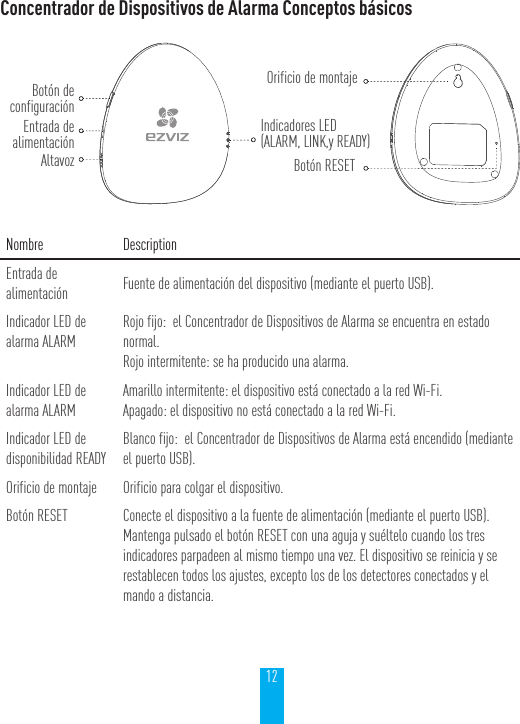
12Concentrador de Dispositivos de Alarma Conceptos básicosNombre DescriptionEntrada de alimentación Fuente de alimentación del dispositivo (mediante el puerto USB).Indicador LED de alarma ALARMRojo fijo:  el Concentrador de Dispositivos de Alarma se encuentra en estado normal.Rojo intermitente: se ha producido una alarma.Indicador LED de alarma ALARMAmarillo intermitente: el dispositivo está conectado a la red Wi-Fi.Apagado: el dispositivo no está conectado a la red Wi-Fi.Indicador LED de disponibilidad READYBlanco fijo:  el Concentrador de Dispositivos de Alarma está encendido (mediante el puerto USB).Orificio de montaje Orificio para colgar el dispositivo.Botón RESET Conecte el dispositivo a la fuente de alimentación (mediante el puerto USB). Mantenga pulsado el botón RESET con una aguja y suéltelo cuando los tres indicadores parpadeen al mismo tiempo una vez. El dispositivo se reinicia y se restablecen todos los ajustes, excepto los de los detectores conectados y el mando a distancia.Botón de configuraciónEntrada de alimentaciónAltavozOrificio de montajeBotón RESETIndicadores LED(ALARM, LINK,y READY)
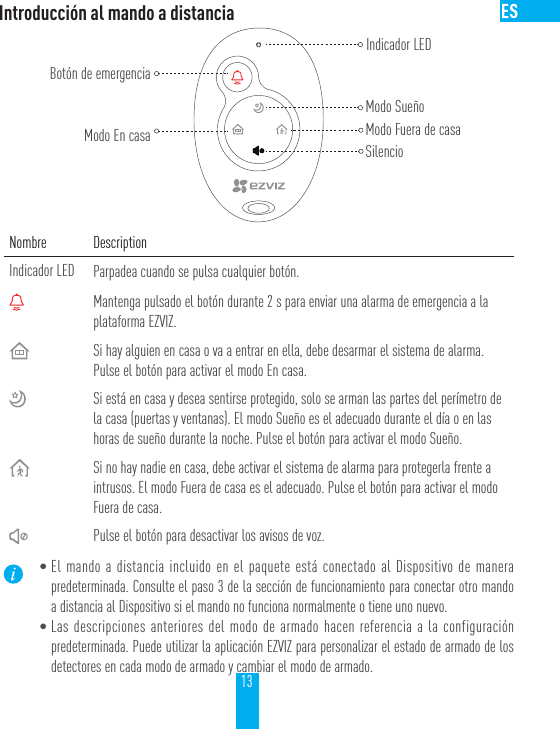
13Introducción al mando a distanciaNombre DescriptionIndicador LED Parpadea cuando se pulsa cualquier botón.Mantenga pulsado el botón durante 2 s para enviar una alarma de emergencia a la plataforma EZVIZ.Si hay alguien en casa o va a entrar en ella, debe desarmar el sistema de alarma. Pulse el botón para activar el modo En casa.Si está en casa y desea sentirse protegido, solo se arman las partes del perímetro de la casa (puertas y ventanas). El modo Sueño es el adecuado durante el día o en las horas de sueño durante la noche. Pulse el botón para activar el modo Sueño.Si no hay nadie en casa, debe activar el sistema de alarma para protegerla frente a intrusos. El modo Fuera de casa es el adecuado. Pulse el botón para activar el modo Fuera de casa.Pulse el botón para desactivar los avisos de voz.•El mando a distancia incluido en el paquete está conectado al Dispositivo de manera predeterminada. Consulte el paso 3 de la sección de funcionamiento para conectar otro mando a distancia al Dispositivo si el mando no funciona normalmente o tiene uno nuevo.•Las descripciones anteriores del modo de armado hacen referencia a la configuración predeterminada. Puede utilizar la aplicación EZVIZ para personalizar el estado de armado de los detectores en cada modo de armado y cambiar el modo de armado.Botón de emergenciaModo En casaIndicador LEDSilencioModo Fuera de casaModo Sueño
14Preguntas frecuentesP: Los avisos "El dispositivo está desconectado" o "El dispositivo no está registrado" pueden aparecer cuando se agrega el Concentrador de Dispositivos de Alarma a la aplicación EZVIZ.R: 1. Compruebe que la red Wi-Fi esté conectada con el Concentrador de Dispositivos de Alarma y asegúrese de que funciona.2. Compruebe si el indicador amarillo parpadea; si no parpadea, reinicie el Concentrador de Dispositivos de Alarma y vuelva a conectar la red Wi-Fi.P: El teléfono móvil no recibe la señal de alarma cuando el Concentrador de Dispositivos de Alarma está en línea y se dispara una alarma.R: 1. Asegúrese de que la Aplicación Móvil EZVIZ se está ejecutando en el teléfono móvil.2. Si su teléfono móvil tiene el sistema operativo Android, asegúrese de que la aplicación se está ejecutando en segundo plano; en el caso del sistema iOS, habilite la función de inserción de mensaje en "Settings (Ajustes) > Notification (Notificación)".P: El estado del detector se muestra como desconectado en la aplicación EZVIZ.R: 1. Asegúrese de que el estado de la red Wi-Fi conectada al Concentrador de Dispositivos de Alarma es normal.2. Asegúrese de que la distancia entre los detectores y el Concentrador de Dispositivos de Alarma es inferior a 100 m y de que no hay ninguna barrera.3. Asegúrese de que no se ha acabado la batería del detector.P: El detector detecta la alarma y el Concentrador de Dispositivos de Alarma funciona con normalidad pero no se emiten avisos de voz.R: 1. Asegúrese de que la distancia entre el detector y el Concentrador de Dispositivos de Alarma es inferior a 100 m y de que no hay ninguna barrera.2. Ajuste la posición de instalación del Concentrador de Dispositivos de Alarma. Se recomienda que instale el Concentrador de Dispositivos de Alarma en el área central de su hogar.3. Asegúrese de que el Concentrador de Dispositivos de Alarma no esté en modo de silencio.
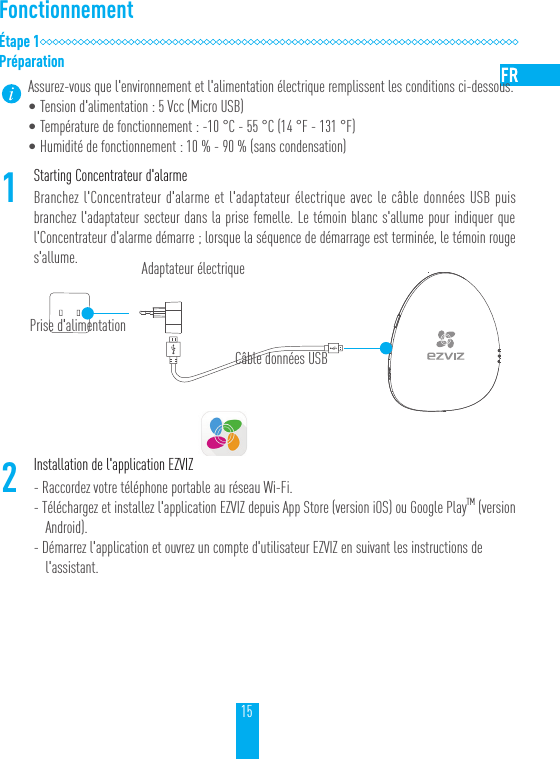
15FonctionnementÉtape1PréparationAssurez-vous que l'environnement et l'alimentation électrique remplissent les conditions ci-dessous.•Tension d'alimentation: 5Vcc (Micro USB)•Température de fonctionnement: -10 °C - 55 °C (14 °F - 131 °F)•Humidité de fonctionnement: 10% - 90% (sans condensation) 1Starting Concentrateur d'alarmeBranchez l'Concentrateur d'alarme et l'adaptateur électrique avec le câble données USB puis branchez l'adaptateur secteur dans la prise femelle. Le témoin blanc s'allume pour indiquer que l'Concentrateur d'alarme démarre; lorsque la séquence de démarrage est terminée, le témoin rouge s'allume.2Installation de l'application EZVIZ- Raccordez votre téléphone portable au réseau Wi-Fi.- Téléchargez et installez l'application EZVIZ depuis App Store (version iOS) ou Google PlayTM (version Android).- Démarrez l'application et ouvrez un compte d'utilisateur EZVIZ en suivant les instructions de l'assistant.Prise d'alimentationAdaptateur électriqueCâble données USB
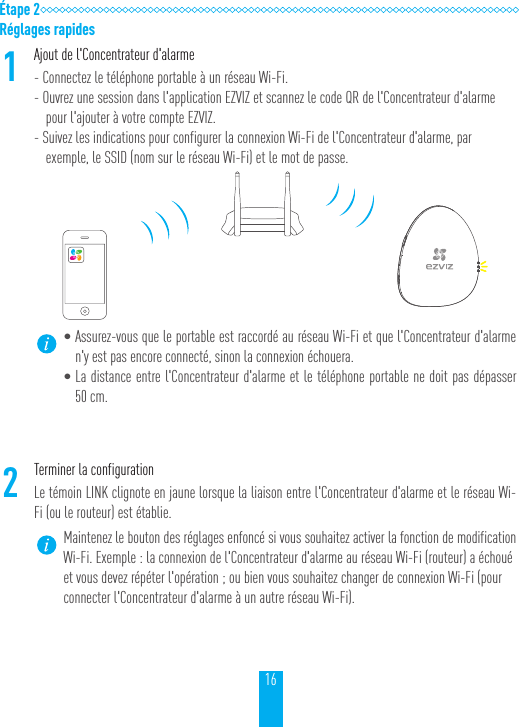
16Étape 2Réglages rapides1Ajout de l'Concentrateur d'alarme- Connectez le téléphone portable à un réseau Wi-Fi.- Ouvrez une session dans l'application EZVIZ et scannez le code QR de l'Concentrateur d'alarme pour l'ajouter à votre compte EZVIZ.- Suivez les indications pour configurer la connexion Wi-Fi de l'Concentrateur d'alarme, par exemple, le SSID (nom sur le réseau Wi-Fi) et le mot de passe.•Assurez-vous que le portable est raccordé au réseau Wi-Fi et que l'Concentrateur d'alarme n'y est pas encore connecté, sinon la connexion échouera.•La distance entre l'Concentrateur d'alarme et le téléphone portable ne doit pas dépasser 50cm.2Terminer la configurationLe témoin LINK clignote en jaune lorsque la liaison entre l'Concentrateur d'alarme et le réseau Wi-Fi (ou le routeur) est établie.Maintenez le bouton des réglages enfoncé si vous souhaitez activer la fonction de modification Wi-Fi. Exemple: la connexion de l'Concentrateur d'alarme au réseau Wi-Fi (routeur) a échoué et vous devez répéter l'opération; ou bien vous souhaitez changer de connexion Wi-Fi (pour connecter l'Concentrateur d'alarme à un autre réseau Wi-Fi).
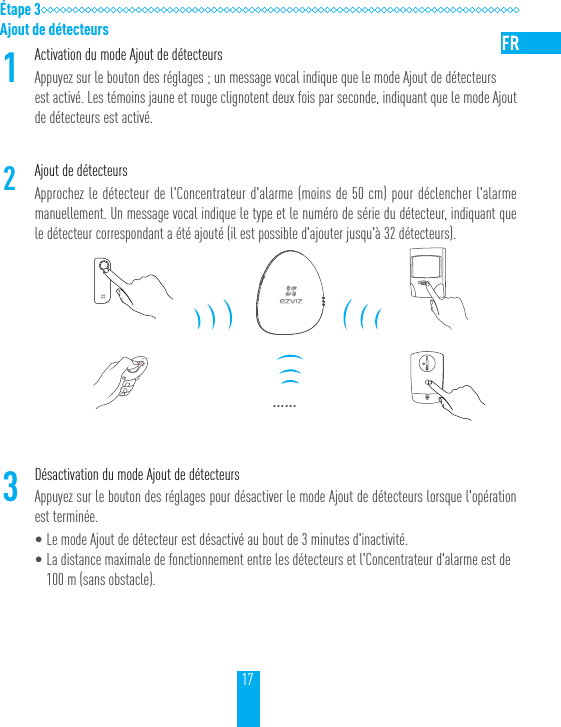
17Étape 3Ajout de détecteurs1Activation du mode Ajout de détecteursAppuyez sur le bouton des réglages; un message vocal indique que le mode Ajout de détecteurs est activé. Les témoins jaune et rouge clignotent deux fois par seconde, indiquant que le mode Ajout de détecteurs est activé.2Ajout de détecteursApprochez le détecteur de l'Concentrateur d'alarme (moins de 50cm) pour déclencher l'alarme manuellement. Un message vocal indique le type et le numéro de série du détecteur, indiquant que le détecteur correspondant a été ajouté (il est possible d'ajouter jusqu'à 32détecteurs).……3Désactivation du mode Ajout de détecteursAppuyez sur le bouton des réglages pour désactiver le mode Ajout de détecteurs lorsque l'opération est terminée.•Le mode Ajout de détecteur est désactivé au bout de 3minutes d'inactivité.•La distance maximale de fonctionnement entre les détecteurs et l'Concentrateur d'alarme est de 100m (sans obstacle).
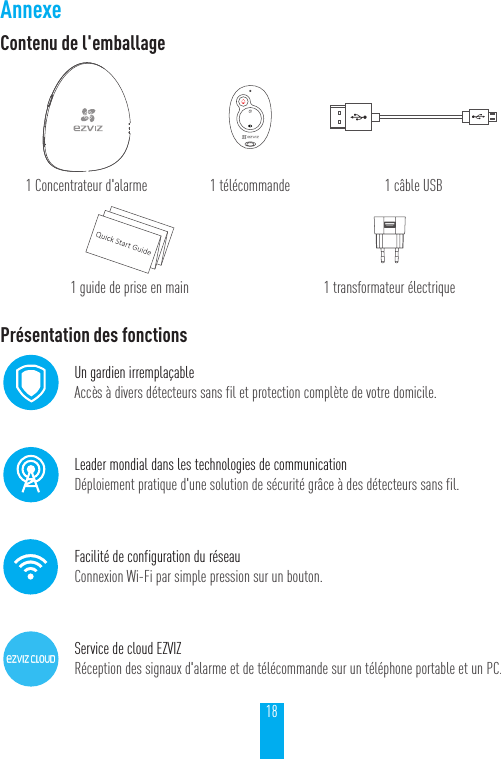
18AnnexeContenu de l'emballage1 Concentrateur d'alarme 1 télécommande 1 câble USB1 guide de prise en main 1 transformateur électriquePrésentation des fonctionsUn gardien irremplaçableAccès à divers détecteurs sans fil et protection complète de votre domicile.Leader mondial dans les technologies de communicationDéploiement pratique d'une solution de sécurité grâce à des détecteurs sans fil.Facilité de configuration du réseauConnexion Wi-Fi par simple pression sur un bouton.Service de cloud EZVIZRéception des signaux d'alarme et de télécommande sur un téléphone portable et un PC.
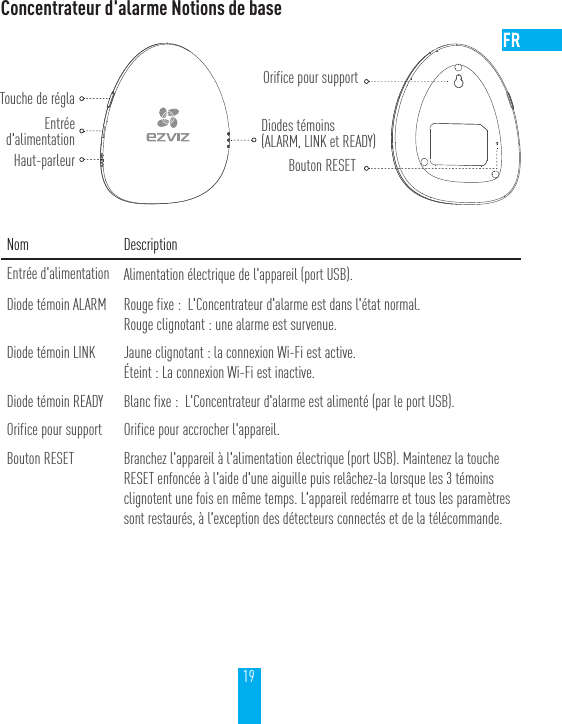
19Concentrateur d'alarme Notions de baseNom DescriptionEntrée d'alimentation Alimentation électrique de l'appareil (port USB).Diode témoin ALARM Rouge fixe:  L'Concentrateur d'alarme est dans l'état normal.Rouge clignotant: une alarme est survenue.Diode témoin LINK Jaune clignotant: la connexion Wi-Fi est active.Éteint: La connexion Wi-Fi est inactive.Diode témoin READY Blanc fixe:  L'Concentrateur d'alarme est alimenté (par le port USB).Orifice pour support Orifice pour accrocher l'appareil.Bouton RESET Branchez l'appareil à l'alimentation électrique (port USB). Maintenez la touche RESET enfoncée à l'aide d'une aiguille puis relâchez-la lorsque les 3témoins clignotent une fois en même temps. L'appareil redémarre et tous les paramètres sont restaurés, à l'exception des détecteurs connectés et de la télécommande.Touche de réglaEntréed'alimentationHaut-parleurOrifice pour supportBouton RESETDiodes témoins(ALARM, LINK et READY)
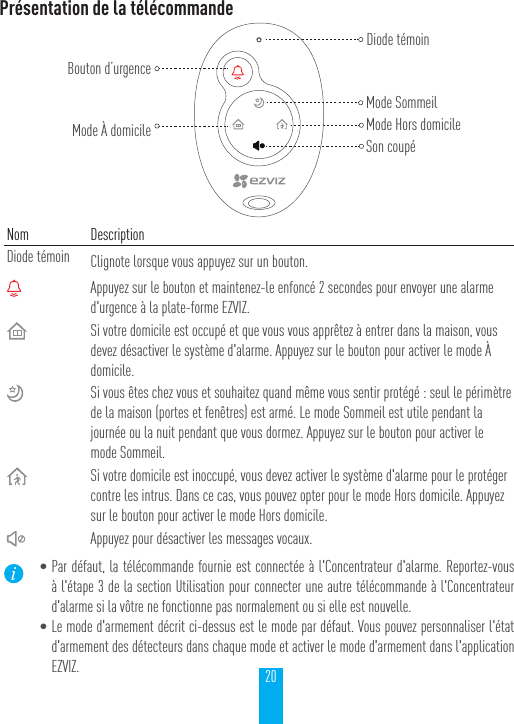
20Présentation de la télécommandeNom DescriptionDiode témoin Clignote lorsque vous appuyez sur un bouton.Appuyez sur le bouton et maintenez-le enfoncé 2 secondes pour envoyer une alarme d'urgence à la plate-forme EZVIZ.Si votre domicile est occupé et que vous vous apprêtez à entrer dans la maison, vous devez désactiver le système d'alarme. Appuyez sur le bouton pour activer le mode À domicile.Si vous êtes chez vous et souhaitez quand même vous sentir protégé: seul le périmètre de la maison (portes et fenêtres) est armé. Le mode Sommeil est utile pendant la journée ou la nuit pendant que vous dormez. Appuyez sur le bouton pour activer le mode Sommeil.Si votre domicile est inoccupé, vous devez activer le système d'alarme pour le protéger contre les intrus. Dans ce cas, vous pouvez opter pour le mode Hors domicile. Appuyez sur le bouton pour activer le mode Hors domicile.Appuyez pour désactiver les messages vocaux.•Par défaut, la télécommande fournie est connectée à l'Concentrateur d'alarme. Reportez-vous à l'étape3 de la section Utilisation pour connecter une autre télécommande à l'Concentrateur d'alarme si la vôtre ne fonctionne pas normalement ou si elle est nouvelle.•Le mode d'armement décrit ci-dessus est le mode par défaut. Vous pouvez personnaliser l'état d'armement des détecteurs dans chaque mode et activer le mode d'armement dans l'application EZVIZ.Bouton d’urgenceMode À domicileDiode témoinSon coupéMode Hors domicileMode Sommeil
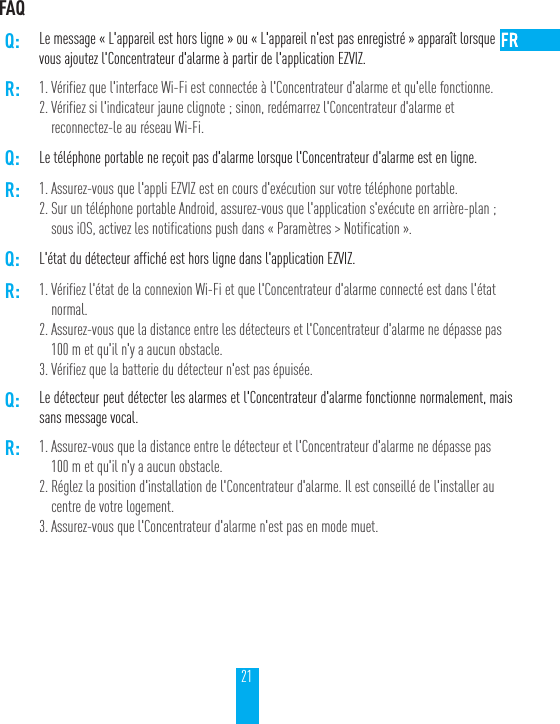
21FAQQ: Le message «L'appareil est hors ligne» ou «L'appareil n'est pas enregistré» apparaît lorsquevous ajoutez l'Concentrateur d'alarme à partir de l'application EZVIZ.R: 1. Vérifiez que l'interface Wi-Fi est connectée à l'Concentrateur d'alarme et qu'elle fonctionne.2. Vérifiez si l'indicateur jaune clignote; sinon, redémarrez l'Concentrateur d'alarme et reconnectez-le au réseau Wi-Fi.Q: Le téléphone portable ne reçoit pas d'alarme lorsque l'Concentrateur d'alarme est en ligne.R: 1. Assurez-vous que l'appli EZVIZ est en cours d'exécution sur votre téléphone portable.2. Sur un téléphone portable Android, assurez-vous que l'application s'exécute en arrière-plan; sous iOS, activez les notifications push dans «Paramètres > Notification».Q: L'état du détecteur affiché est hors ligne dans l'application EZVIZ.R: 1. Vérifiez l'état de la connexion Wi-Fi et que l'Concentrateur d'alarme connecté est dans l'état normal.2. Assurez-vous que la distance entre les détecteurs et l'Concentrateur d'alarme ne dépasse pas 100m et qu'il n'y a aucun obstacle.3. Vérifiez que la batterie du détecteur n'est pas épuisée.Q: Le détecteur peut détecter les alarmes et l'Concentrateur d'alarme fonctionne normalement, mais sans message vocal.R: 1. Assurez-vous que la distance entre le détecteur et l'Concentrateur d'alarme ne dépasse pas 100m et qu'il n'y a aucun obstacle.2. Réglez la position d'installation de l'Concentrateur d'alarme. Il est conseillé de l'installer au centre de votre logement.3. Assurez-vous que l'Concentrateur d'alarme n'est pas en mode muet.
UD05460B
LIMITED WARRANTYThank you for purchasing EZVIZ products. This limited warranty gives you, the original purchaser of the EZVIZ product, specific legal rights. You may also have other legal rights that vary by state, province or jurisdiction. The disclaimers, exclusions, and limitations of liability under this limited warranty will not apply to the extent prohibited by applicable law. No distributor, reseller, agent, or employee is authorized to make any medication, extension, or addition to this limited warranty.Your EZVIZ product is warranted for a period of one (1) year from the date of purchase against defects in materials and workmanship, or such longer period as may be required by law in the country or state where this product is sold, when used normally in accordance with EZVIZ’s user manual.You can request warranty service emailing us at service@ezvizlife.com.  For any defective EZVIZ products under warranty, EZVIZ, Inc. will, at its option, (i) repair or replace your product free of charge; (ii) exchange your product with a functional equivalent product; (iii) or refund the original purchase price, provided you provide the original purchase receipt or copy, brief explanation of the defect, and return the product in its original packaging. At EZVIZ’s sole discretion, repair or replacement may be made with a new or refurbished product or components. This warranty does not cover the postal cost, insurance and any other incidental charges incurred by you in returning the product.Except where prohibited by applicable law, this is your sole and exclusive remedy for breach of this limited warranty. Any product that has either been repaired or replaced under this limited warranty will be covered by the terms of this limited warranty for the longer of ninety (90) days from the date of delivery or the remaining original warranty period.This warranty does not apply and is void:• If the warranty claim is made outside the warranty period or if the proof of purchase is not provided.• For any malfunction, defect or failure caused by or resulting from the evidence of impact, mishandling, tampering, use contrary to the applicable instruction manual, incorrect power line voltage, accident, loss, theft, fire, flood or other Acts of God, shipping damage or damage resulting from repairs performed by unauthorized personnel.• For any consumable parts, such as batteries, where the malfunction is due to the normal aging of the product.• Cosmetic damage, including but not limited to scratches, dents and broken plastic on ports.• Any software, even if packaged or sold with EZVIZ hardware.• For any other damages free from defects in material or workmanship.• Routine cleaning, normal cosmetic and mechanical wear and tear.DISCLAIMER OF WARRANTIESEXCEPT AS STATED ABOVE IN THIS LIMITED WARRANTY, AND TO THE MAXIMUM EXTENT PERMITTED BY APPLICABLE LAW, EZVIZ DISCLAIMS ALL EXPRESS, IMPLIED, AND STATUTORY WARRANTIES AND CONDITIONS WITH RESPECT TO THE PRODUCT, INCLUDING THE IMPLIED WARRANTIES OF MERCHANTABILITY AND FITNESS FOR A PARTICULAR PURPOSE, THE DURATION OF ANY APPLICABLE IMPLIED WARRANTIES OR CONDITIONS TO THE DURATION OF THIS LIMITED WARRANTY, THE SECURITY OF THE PRODUCT, OR AVAILABILITY AND RELIABILITY OF PRODUCT INFORMATION OR DATA.LIMITATION OF DAMAGES
IN NO EVENT WILL EZVIZ BE LIABLE FOR ANY CONSEQUENTIAL, INCIDENTAL, EXEMPLARY, OR SPECIAL DAMAGES, INCLUDING ANY DAMAGES FOR LOST DATA OR LOST PROFITS, ARISING FROM OR RELATING TO THIS LIMITED WARRANTY OR THE PRODUCT, AND EZVIZ’S TOTAL CUMULATIVE LIABILITY ARISING FROM OR RELATED TO THIS LIMITED WARRANTY OR THE PRODUCT WILL NOT EXCEED THE AMOUNT ACTUALLY PAID FOR THE PRODUCT BY THE ORIGINAL PURCHASER. SOME STATES DO NOT ALLOW THE EXCLUSION OR LIMITATION OF INCIDENTAL OR CONSEQUENTIAL DAMAGES, SO THE ABOVE LIMITATION OR EXCLUSION MAY NOT APPLY TO YOU.LIMITATION OF LIABILITYALL PRODUCT INFORMATION AND DATA IS PROVIDED FOR YOUR CONVENIENCE, “AS IS”, AND “AS AVAILABLE”. EZVIZ DOES NOT REPRESENT, WARRANT, OR GUARANTEE THAT PRODUCT INFORMATION AND DATA WILL BE AVAILABLE, ACCURATE, OR RELIABLE OR THAT PRODUCT INFORMATION AND DATA OR USE OF THE PRODUCT WILL PROVIDE SAFETY IN YOUR HOME. YOU USE ALL PRODUCT INFORMATION, DATA, AND THE PRODUCT AT YOUR OWN DISCRETION AND RISK. YOU WILL BE SOLELY RESPONSIBLE FOR (AND EZVIZ DISCLAIMS) ANY AND ALL LOSS, LIABILITY, OR DAMAGES, INCLUDING TO YOUR WIRING, FIXTURES, ELECTRICITY, HOME, PRODUCT, PRODUCT PERIPHERALS, COMPUTER, MOBILE DEVICE, AND ALL OTHER ITEMS AND PETS, RESULTING FROM YOUR USE OF THE PRODUCT INFORMATION, DATA, OR PRODUCT. PRODUCT INFORMATION AND DATA PROVIDED BY EZVIZ IS NOT INTENDED AS A SUBSTITUTE FOR DIRECT MEANS OF OBTAINING THE INFORMATION. FOR EXAMPLE, A NOTIFICATION PROVIDED THROUGH THE PRODUCT IS NOT INTENDED AS A SUBSTITUTE FOR AUDIBLE AND VISIBLE INDICATIONS IN THE HOME AND ON THE PRODUCT, NOR FOR A THIRD PARTY MONITORING SERVICE.Please do not hesitate to contact your seller, or send e-mails to us service@ezvizlife.com, with any questions.COPYRIGHT ©2017 EZVIZ Inc. ALL RIGHTS RESERVED.About the DocumentsThe documents include instructions for using and managing the product. Pictures, charts, images and all other information hereinafter are for description and explanation only. The information contained in the documents is subject to change, without notice, due to firmware updates or other reasons. Please find the latest version in the website (http://www.ezvizlife.com).Any and all information, including, among others, wordings, pictures, graphs are the properties of EZVIZ Inc. or its subsidiaries (hereinafter referred to be “EZVIZ”). The documents cannot be reproduced, changed, translated, or distributed, partially or wholly, by any means, without the prior written permission of EZVIZ. Unless otherwise stipulated, EZVIZ does not make any warranties, guarantees or representations, express or implied, regarding to the documents.Trademarks Acknowledgement™,  ™, and other EZVIZ’s trademarks and logos are the properties of EZVIZ in various jurisdictions. Other trademarks and logos mentioned in the documents are the properties of their respective owners.Legal Disclaimer
IN NO EVENT WILL EZVIZ BE LIABLE FOR ANY CONSEQUENTIAL, INCIDENTAL, EXEMPLARY, OR SPECIAL DAMAGES, INCLUDING ANY DAMAGES FOR LOST DATA OR LOST PROFITS, ARISING FROM OR RELATING TO THIS LIMITED WARRANTY OR THE PRODUCT, AND EZVIZ’S TOTAL CUMULATIVE LIABILITY ARISING FROM OR RELATED TO THIS LIMITED WARRANTY OR THE PRODUCT WILL NOT EXCEED THE AMOUNT ACTUALLY PAID FOR THE PRODUCT BY THE ORIGINAL PURCHASER. SOME STATES DO NOT ALLOW THE EXCLUSION OR LIMITATION OF INCIDENTAL OR CONSEQUENTIAL DAMAGES, SO THE ABOVE LIMITATION OR EXCLUSION MAY NOT APPLY TO YOU.LIMITATION OF LIABILITYALL PRODUCT INFORMATION AND DATA IS PROVIDED FOR YOUR CONVENIENCE, “AS IS”, AND “AS AVAILABLE”. EZVIZ DOES NOT REPRESENT, WARRANT, OR GUARANTEE THAT PRODUCT INFORMATION AND DATA WILL BE AVAILABLE, ACCURATE, OR RELIABLE OR THAT PRODUCT INFORMATION AND DATA OR USE OF THE PRODUCT WILL PROVIDE SAFETY IN YOUR HOME. YOU USE ALL PRODUCT INFORMATION, DATA, AND THE PRODUCT AT YOUR OWN DISCRETION AND RISK. YOU WILL BE SOLELY RESPONSIBLE FOR (AND EZVIZ DISCLAIMS) ANY AND ALL LOSS, LIABILITY, OR DAMAGES, INCLUDING TO YOUR WIRING, FIXTURES, ELECTRICITY, HOME, PRODUCT, PRODUCT PERIPHERALS, COMPUTER, MOBILE DEVICE, AND ALL OTHER ITEMS AND PETS, RESULTING FROM YOUR USE OF THE PRODUCT INFORMATION, DATA, OR PRODUCT. PRODUCT INFORMATION AND DATA PROVIDED BY EZVIZ IS NOT INTENDED AS A SUBSTITUTE FOR DIRECT MEANS OF OBTAINING THE INFORMATION. FOR EXAMPLE, A NOTIFICATION PROVIDED THROUGH THE PRODUCT IS NOT INTENDED AS A SUBSTITUTE FOR AUDIBLE AND VISIBLE INDICATIONS IN THE HOME AND ON THE PRODUCT, NOR FOR A THIRD PARTY MONITORING SERVICE.Please do not hesitate to contact your seller, or send e-mails to us service@ezvizlife.com, with any questions.COPYRIGHT ©2017 EZVIZ Inc. ALL RIGHTS RESERVED.About the DocumentsThe documents include instructions for using and managing the product. Pictures, charts, images and all other information hereinafter are for description and explanation only. The information contained in the documents is subject to change, without notice, due to firmware updates or other reasons. Please find the latest version in the website (http://www.ezvizlife.com).Any and all information, including, among others, wordings, pictures, graphs are the properties of EZVIZ Inc. or its subsidiaries (hereinafter referred to be “EZVIZ”). The documents cannot be reproduced, changed, translated, or distributed, partially or wholly, by any means, without the prior written permission of EZVIZ. Unless otherwise stipulated, EZVIZ does not make any warranties, guarantees or representations, express or implied, regarding to the documents.Trademarks Acknowledgement™,  ™, and other EZVIZ’s trademarks and logos are the properties of EZVIZ in various jurisdictions. Other trademarks and logos mentioned in the documents are the properties of their respective owners.Legal DisclaimerTO THE MAXIMUM EXTENT PERMITTED BY APPLICABLE LAW, THE PRODUCT DESCRIBED, WITH ITS HARDWARE, SOFTWARE AND FIRMWARE, IS PROVIDED “AS IS”, WITH ALL FAULTS AND ERRORS, AND EZVIZ MAKES NO WARRANTIES, EXPRESS OR IMPLIED, INCLUDING WITHOUT LIMITATION, MERCHANTABILITY, SATISFACTORY QUALITY, FITNESS FOR A PARTICULAR PURPOSE, AND NON-INFRINGEMENT OF THIRD PARTY. IN NO EVENT WILL EZVIZ, ITS DIRECTORS, OFFICERS, EMPLOYEES, OR AGENTS BE LIABLE TO YOU FOR ANY SPECIAL, CONSEQUENTIAL, INCIDENTAL, OR INDIRECT DAMAGES, INCLUDING, AMONG OTHERS, DAMAGES FOR LOSS OF BUSINESS PROFITS, BUSINESS INTERRUPTION, OR LOSS OF DATA OR DOCUMENTATION, IN CONNECTION WITH THE USE OF THIS PRODUCT, EVEN IF EZVIZ HAS BEEN ADVISED OF THE POSSIBILITY OF SUCH DAMAGES.TO THE MAXIMUM EXTENT PERMITTED BY APPLICABLE LAW, IN NO EVENT SHALL EZVIZ’S TOTAL LIABILITY FOR ALL DAMAGES EXCEED THE PURCHASE PRICE THE PRODUCT.EZVIZ does not undertake any liability for personal injury or property damage, as the result of product interruption or service termination cause by: a) improper installation or usage other than as requested; b) the protection of national or public interests; c) Force Majeure; d) yourself or the third party, including not limitation, using any third party’s products, software, applications, and among others.REGARDING TO THE PRODUCT WITH INTERNET ACCESS, THE USE OF PRODUCT SHALL BE WHOLLY AT YOUR OWN RISKS. EZVIZ SHALL NOT TAKE ANY RESPONSIBILITES FOR ABNORMAL OPERATION, PRIVACY LEAKAGE OR OTHER DAMAGES RESULTING FROM CYBER ATTACK, HACKER ATTACK, VIRUS INSPECTION, OR OTHER INTERNET SECURITY RISKS; HOWEVER, EZVIZ WILL PROVIDE TIMELY TECHNICAL SUPPORT IF REQUIRED.The purpose of the Products is to provide an adequate warning in the event of illegal encroachment in certain area; however, the proper installation of the Products will not eliminate, but only reduce, that accidents will not occur or that there will be no personal injury or property loss as a result. You are highly recommended to raise your vigilance and strengthen the safety awareness in the daily life.SURVEILLANCE LAWS VARY BY JURISDICTION. PLEASE CHECK ALL RELEVANT LAWS IN YOUR JURISDICTION BEFORE USING THIS PRODUCT IN ORDER TO ENSURE THAT YOUR USE CONFORMS TO THE APPLICABLE LAW. YOU FUTHER AGREE THAT THIS PRODUCT IS ONLY FOR CIVIL USE, AND EZVIZ SHALL NOT BE LIABLE IN THE EVENT THAT THIS PRODUCT IS USED WITH ILLEGITIMATE PURPOSES, SUCH AS THIRD PARTY RIGHTS INFRINGEMENT, MEDICAL TREATMENT, SAFETY EQUIPMENT OR OTHER SITUATIONS WHERE THE PRODUCT FAILURE COULD LEAD TO DEATH OR PERSONAL INJURY, OR WEAPON OF MASS DESTRUCTION, CHEMINCAL AND BIOLOGICAL WEAPON, NUCLEAR EXPLOSION, AND ANY UNSAFE NUCLEAR ENERGY USES OR ANTI-HUMANITY USAGES. YOU SHOULD UNDERTAKE ALL RESPONSIBILITIES FOR LOSSES OR DAMAGES RESULTING FROM THE ABOVE USAGES WHATSOEVER. IN THE EVENT OF ANY CONFLICTS BETWEEN THE ABOVE AND THE APPLICABLELAW, THE LATER PREVAILS.Regulatory InformationFCC InformationThis device complies with Part 15 of the FCC Rules. Operation is subject to the following two conditions: (1) This device may not cause harmful interference, and (2) This device must accept any interference received, including interference that may cause undesired operation.
Note: This product has been tested and found to comply with the limits for a Class B digital device, pursuant to Part 15 of the FCC Rules. These limits are designed to provide reasonable protection against harmful interference in a residential installation. This product generates, uses, and can radiate radio frequency energy and, if not installed and used in accordance with the instructions, may cause harmful interference to radio communications. However, there is no guarantee that interference will not occur in a particular installation. If this product does cause harmful interference to radio or television reception, which can be determined by turning the equipment off and on, the user is encouraged to try to correct the interference by one or more of the following measures: —Reorient or relocate the receiving antenna. —Increase the separation between the equipment and receiver. —Connect the equipment into an outlet on a circuit different from that to which the receiver is connected. —Consult the dealer or an experienced radio/TV technician for help.Please take attention that changes or modification not expressly  approved  by the party responsible for compliance could void the user’s authority to operate the equipment.This equipment should be installed and operated with a minimum distance 20cm between the radiator and your body CAN ICES-3 (B)/NMB-3(B)This device complies with Industry Canada licence-exempt RSS standard(s). Operation is subject to the following two conditions: (1) this device may not cause interference, and(2) this device must accept any interference, including interference that may cause undesired operation of the device.Le présent appareil est  conforme aux CNR d'Industrie Canada applicables aux appareils radioexempts de licence. L'exploitation est autorisée aux deux conditions suivantes :(1) l'appareil ne doit pas produire de brouillage, et(2) l'utilisateur de l'appareil doit accepter tout brouillage radioélectrique subi, même si le brouillage est susceptible d'en compromettre le fonctionnement.Under Industry Canada regulations, this radio transmitter may only operate using an antenna of a type and maximum (or lesser) gain approved for the transmitter by Industry Canada. To reduce potential radio interference to other users, the antenna type and its gain should be so chosen that the equivalent isotropically radiated power (e.i.r.p.) is not more than that necessary for successful communication.Conformément à la réglementation d'Industrie Canada, le présent émetteur radio peutfonctionner avec une antenne d'un type et d'un gain maximal (ou inférieur) approuvé pour l'émetteur par Industrie Canada. Dans le but de réduire les risques de brouillage radioélectrique à l'intention des autres utilisateurs, il faut choisir le type d'antenne et son gain de sorte que la puissance isotrope rayonnée équivalente (p.i.r.e.) ne dépasse pas l'intensité nécessaire à l'établissement d'une communication satisfaisante.Cet équipement doit être installé et utilisé à une distance minimale de 20 cm entre le radiateur et votre corps

Navigation menu