Hangzhou Ezviz Network T2 Home Sense Magnetic Contact User Manual

Hangzhou Ezviz Network Co., Ltd Home Sense Magnetic Contact

User Manual

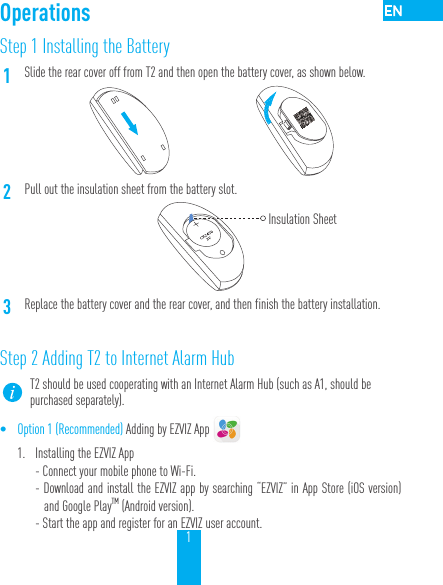
1Step 1 Installing the Battery1Slide the rear cover off from T2 and then open the battery cover, as shown below.2Pull out the insulation sheet from the battery slot.3Replace the battery cover and the rear cover, and then finish the battery installation.Step 2 Adding T2 to Internet Alarm HubT2 should be used cooperating with an Internet Alarm Hub (such as A1, should be purchased separately).• Option 1 (Recommended) Adding by EZVIZ App 1.  Installing the EZVIZ App- Connect your mobile phone to Wi-Fi. - Download and install the EZVIZ app by searching “EZVIZ” in App Store (iOS version) and Google PlayTM (Android version).  - Start the app and register for an EZVIZ user account.OperationsInsulation Sheet
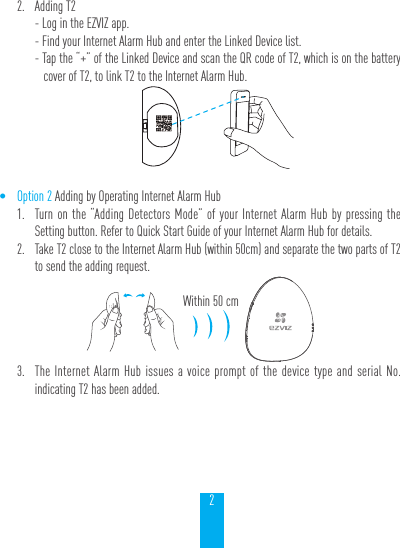
22.  Adding T2- Log in the EZVIZ app.- Find your Internet Alarm Hub and enter the Linked Device list.- Tap the “+” of the Linked Device and scan the QR code of T2, which is on the battery cover of T2, to link T2 to the Internet Alarm Hub.• Option 2 Adding by Operating Internet Alarm Hub1.  Turn on the “Adding Detectors Mode” of your Internet Alarm Hub by pressing the Setting button. Refer to Quick Start Guide of your Internet Alarm Hub for details.2.  Take T2 close to the Internet Alarm Hub (within 50cm) and separate the two parts of T2 to send the adding request.3.  The Internet Alarm Hub issues a voice prompt of the device type and serial No. indicating T2 has been added.Within 50 cm
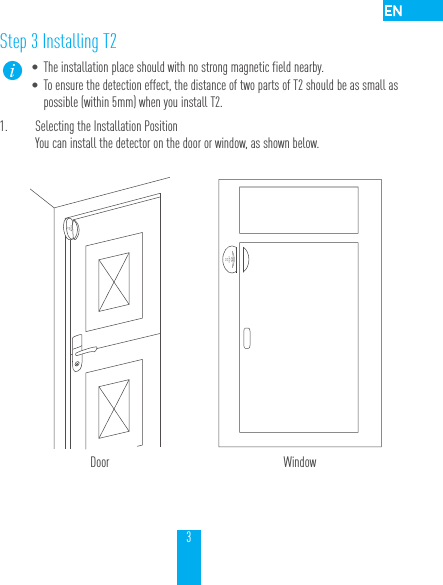
3Step 3 Installing T2• The installation place should with no strong magnetic field nearby. • To ensure the detection effect, the distance of two parts of T2 should be as small as possible (within 5mm) when you install T2.1.  Selecting the Installation PositionYou can install the detector on the door or window, as shown below.Door Window
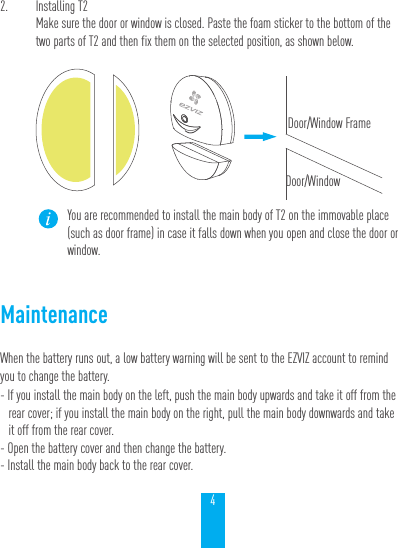
42.  Installing T2Make sure the door or window is closed. Paste the foam sticker to the bottom of the two parts of T2 and then fix them on the selected position, as shown below.You are recommended to install the main body of T2 on the immovable place (such as door frame) in case it falls down when you open and close the door or window.MaintenanceWhen the battery runs out, a low battery warning will be sent to the EZVIZ account to remind you to change the battery.- If you install the main body on the left, push the main body upwards and take it off from the rear cover; if you install the main body on the right, pull the main body downwards and take it off from the rear cover.- Open the battery cover and then change the battery.- Install the main body back to the rear cover.Door/Window FrameDoor/Window
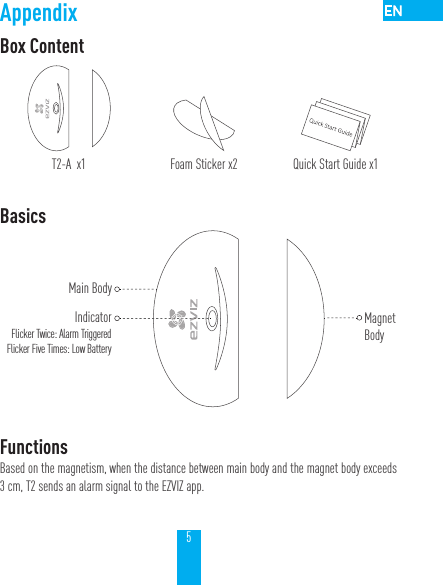
5AppendixBox ContentT2-A  x1 Foam Sticker x2 Quick Start Guide x1Basics FunctionsBased on the magnetism, when the distance between main body and the magnet body exceeds 3 cm, T2 sends an alarm signal to the EZVIZ app.Main BodyIndicatorFlicker Twice: Alarm TriggeredFlicker Five Times: Low Battery MagnetBody
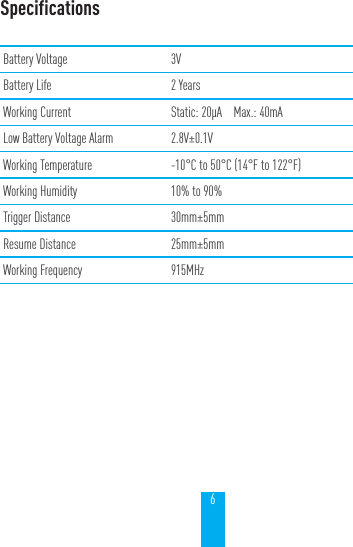
6SpecificationsBattery Voltage 3VBattery Life 2 YearsWorking Current Static: 20μA    Max.: 40mALow Battery Voltage Alarm 2.8V±0.1VWorking Temperature -10°C to 50°C (14°F to 122°F)Working Humidity 10% to 90%Trigger Distance 30mm±5mmResume Distance 25mm±5mmWorking Frequency 915MHz
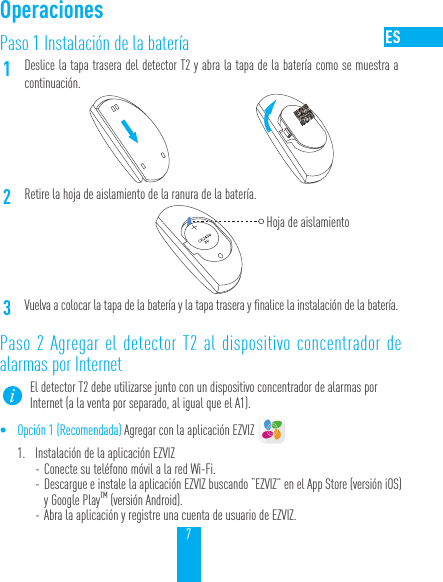
7Paso 1 Instalación de la batería1Deslice la tapa trasera del detector T2 y abra la tapa de la batería como se muestra a continuación.2Retire la hoja de aislamiento de la ranura de la batería.Hoja de aislamiento3Vuelva a colocar la tapa de la batería y la tapa trasera y finalice la instalación de la batería.Paso 2 Agregar el detector T2 al dispositivo concentrador de alarmas por InternetEl detector T2 debe utilizarse junto con un dispositivo concentrador de alarmas por Internet (a la venta por separado, al igual que el A1).• Opción 1 (Recomendada) Agregar con la aplicación EZVIZ 1.  Instalación de la aplicación EZVIZ - Conecte su teléfono móvil a la red Wi-Fi.  - Descargue e instale la aplicación EZVIZ buscando “EZVIZ” en el App Store (versióniOS) y Google PlayTM (versión Android). - Abra la aplicación y registre una cuenta de usuario de EZVIZ.Operaciones
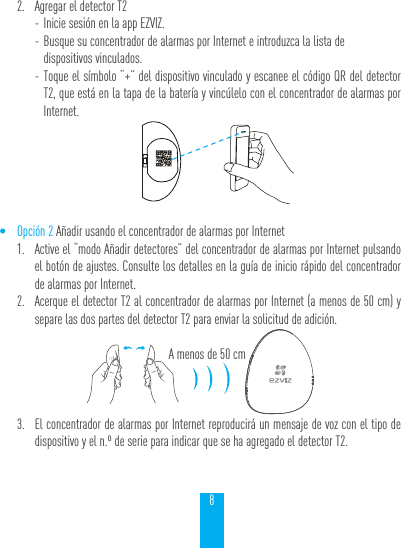
82.  Agregar el detector T2 - Inicie sesión en la app EZVIZ. - Busque su concentrador de alarmas por Internet e introduzca la lista de  dispositivos vinculados. - Toque el símbolo “+” del dispositivo vinculado y escanee el código QR del detector T2, que está en la tapa de la batería y vincúlelo con el concentrador de alarmas por Internet.• Opción 2 Añadir usando el concentrador de alarmas por Internet1.  Active el “modo Añadir detectores” del concentrador de alarmas por Internet pulsando el botón de ajustes. Consulte los detalles en la guía de inicio rápido del concentrador de alarmas por Internet.2.  Acerque el detector T2 al concentrador de alarmas por Internet (a menos de 50 cm) y separe las dos partes del detector T2 para enviar la solicitud de adición.A menos de 50 cm3.  El concentrador de alarmas por Internet reproducirá un mensaje de voz con el tipo de dispositivo y el n.º de serie para indicar que se ha agregado el detector T2.
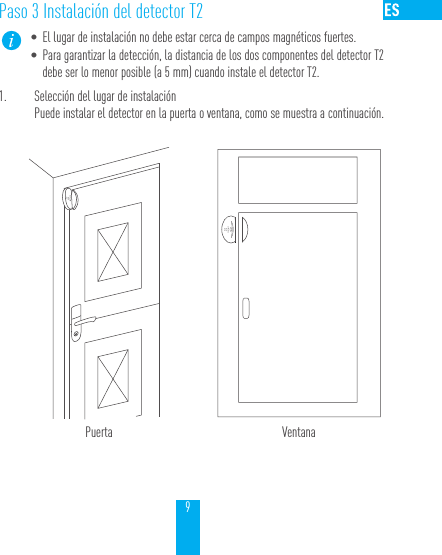
9Paso 3 Instalación del detector T2• El lugar de instalación no debe estar cerca de campos magnéticos fuertes.• Para garantizar la detección, la distancia de los dos componentes del detector T2 debe ser lo menor posible (a 5 mm) cuando instale el detector T2.1.  Selección del lugar de instalaciónPuede instalar el detector en la puerta o ventana, como se muestra a continuación.Puerta Ventana
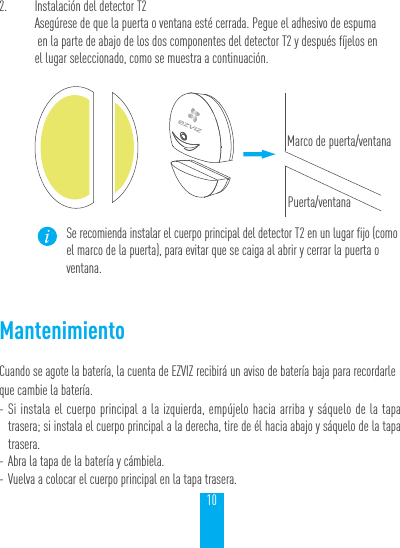
102.  Instalación del detector T2Asegúrese de que la puerta o ventana esté cerrada. Pegue el adhesivo de espuma  en la parte de abajo de los dos componentes del detector T2 y después fíjelos en  el lugar seleccionado, como se muestra a continuación.Marco de puerta/ventanaPuerta/ventanaSe recomienda instalar el cuerpo principal del detector T2 en un lugar fijo (como el marco de la puerta), para evitar que se caiga al abrir y cerrar la puerta o ventana.MantenimientoCuando se agote la batería, la cuenta de EZVIZ recibirá un aviso de batería baja para recordarle que cambie la batería. - Si instala el cuerpo principal a la izquierda, empújelo hacia arriba y sáquelo de la tapa trasera; si instala el cuerpo principal a la derecha, tire de él hacia abajo y sáquelo de la tapa trasera. - Abra la tapa de la batería y cámbiela. - Vuelva a colocar el cuerpo principal en la tapa trasera.
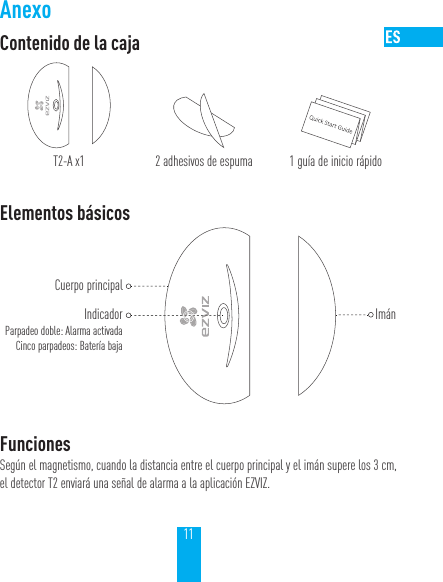
11AnexoContenido de la cajaT2-A x1 2 adhesivos de espuma 1 guía de inicio rápidoElementos básicosCuerpo principalIndicadorParpadeo doble: Alarma activadaCinco parpadeos: Batería baja ImánFuncionesSegún el magnetismo, cuando la distancia entre el cuerpo principal y el imán supere los 3 cm, el detector T2 enviará una señal de alarma a la aplicación EZVIZ.
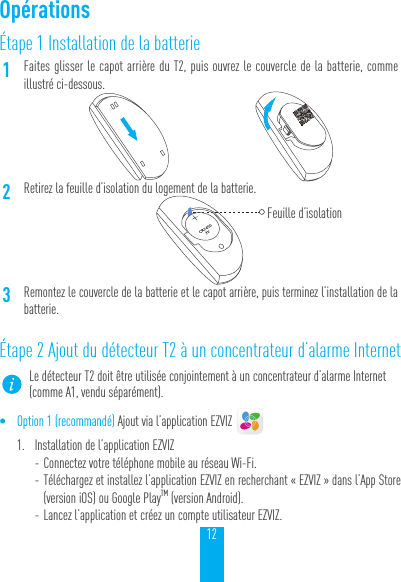
12Étape 1 Installation de la batterie1Faites glisser le capot arrière du T2, puis ouvrez le couvercle de la batterie, comme illustré ci-dessous.2Retirez la feuille d’isolation du logement de la batterie.Feuille d’isolation3Remontez le couvercle de la batterie et le capot arrière, puis terminez l’installation de la batterie.Étape 2 Ajout du détecteur T2 à un concentrateur d’alarme InternetLe détecteur T2 doit être utilisée conjointement à un concentrateur d’alarme Internet (comme A1, vendu séparément).• Option 1 (recommandé) Ajout via l’application EZVIZ 1.  Installation de l’application EZVIZ - Connectez votre téléphone mobile au réseau Wi-Fi.  - Téléchargez et installez l’application EZVIZ en recherchant «EZVIZ» dans l’App Store (version iOS) ou Google PlayTM (version Android). - Lancez l’application et créez un compte utilisateur EZVIZ.Opérations
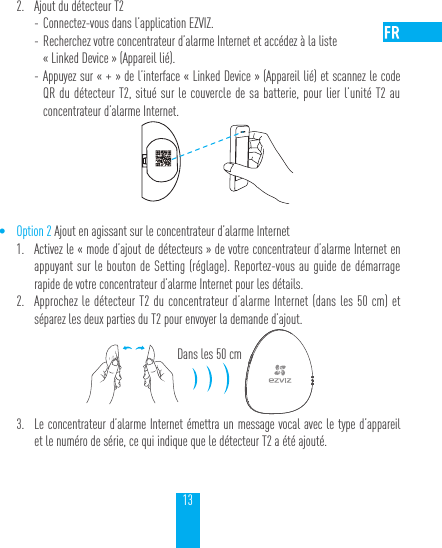
132.  Ajout du détecteur T2 - Connectez-vous dans l’application EZVIZ. - Recherchez votre concentrateur d’alarme Internet et accédez à la liste  «Linked Device» (Appareil lié). - Appuyez sur «+» de l’interface «Linked Device» (Appareil lié) et scannez le code QR du détecteur T2, situé sur le couvercle de sa batterie, pour lier l’unité T2 au concentrateur d’alarme Internet.• Option 2 Ajout en agissant sur le concentrateur d’alarme Internet1.  Activez le «mode d’ajout de détecteurs» de votre concentrateur d’alarme Internet en appuyant sur le bouton de Setting (réglage). Reportez-vous au guide de démarrage rapide de votre concentrateur d’alarme Internet pour les détails.2.  Approchez le détecteur T2 du concentrateur d’alarme Internet (dans les 50cm) et séparez les deux parties du T2 pour envoyer la demande d’ajout.Dans les 50cm3.  Le concentrateur d’alarme Internet émettra un message vocal avec le type d’appareil et le numéro de série, ce qui indique que le détecteur T2 a été ajouté.
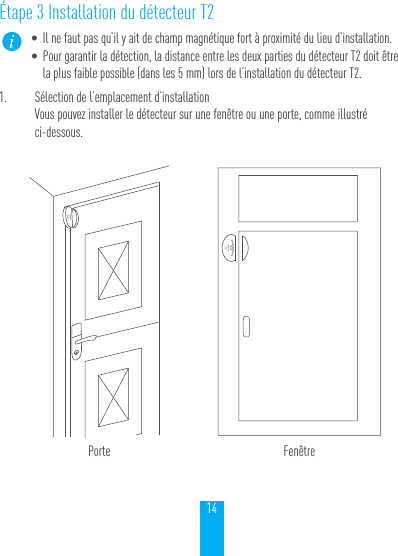
14Étape 3 Installation du détecteur T2• Il ne faut pas qu’il y ait de champ magnétique fort à proximité du lieu d’installation.• Pour garantir la détection, la distance entre les deux parties du détecteur T2 doit être la plus faible possible (dans les 5mm) lors de l’installation du détecteur T2.1.  Sélection de l’emplacement d’installationVous pouvez installer le détecteur sur une fenêtre ou une porte, comme illustré  ci-dessous.Porte Fenêtre
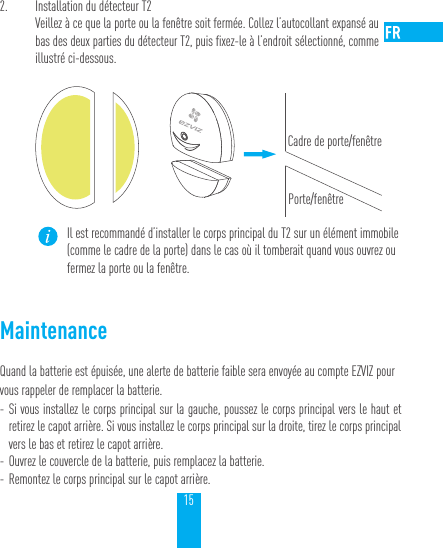
152.  Installation du détecteur T2Veillez à ce que la porte ou la fenêtre soit fermée. Collez l’autocollant expansé au  bas des deux parties du détecteur T2, puis fixez-le à l’endroit sélectionné, comme illustré ci-dessous.Cadre de porte/fenêtrePorte/fenêtreIl est recommandé d’installer le corps principal du T2 sur un élément immobile (comme le cadre de la porte) dans le cas où il tomberait quand vous ouvrez ou fermez la porte ou la fenêtre.MaintenanceQuand la batterie est épuisée, une alerte de batterie faible sera envoyée au compte EZVIZ pour vous rappeler de remplacer la batterie. - Si vous installez le corps principal sur la gauche, poussez le corps principal vers le haut et retirez le capot arrière. Si vous installez le corps principal sur la droite, tirez le corps principal vers le bas et retirez le capot arrière. - Ouvrez le couvercle de la batterie, puis remplacez la batterie. - Remontez le corps principal sur le capot arrière.
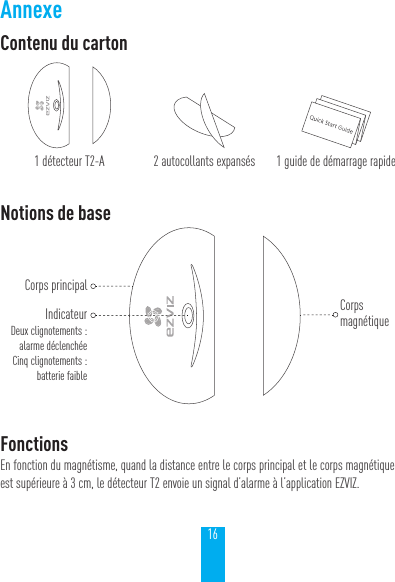
16AnnexeContenu du carton1détecteur T2-A 2autocollants expansés 1guide de démarrage rapideNotions de baseCorps principalIndicateurDeux clignotements:  alarme déclenchéeCinq clignotements:  batterie faible Corps magnétiqueFonctionsEn fonction du magnétisme, quand la distance entre le corps principal et le corps magnétique est supérieure à 3cm, le détecteur T2 envoie un signal d’alarme à l’application EZVIZ.
LIMITED WARRANTYThank you for purchasing EZVIZ products. This limited warranty gives you, the original purchaser of the EZVIZ product, specific legal rights. You may also have other legal rights that vary by state, province or jurisdiction. The disclaimers, exclusions, and limitations of liability under this limited warranty will not apply to the extent prohibited by applicable law. No distributor, reseller, agent, or employee is authorized to make any medication, extension, or addition to this limited warranty.Your EZVIZ product is warranted for a period of one (1) year from the date of purchase against defects in materials and workmanship, or such longer period as may be required by law in the country or state where this product is sold, when used normally in accordance with EZVIZ’s user manual.You can request warranty service emailing us at service@ezvizlife.com.  For any defective EZVIZ products under warranty, EZVIZ, Inc. will, at its option, (i) repair or replace your product free of charge; (ii) exchange your product with a functional equivalent product; (iii) or refund the original purchase price, provided you provide the original purchase receipt or copy, brief explanation of the defect, and return the product in its original packaging. At EZVIZ’s sole discretion, repair or replacement may be made with a new or refurbished product or components. This warranty does not cover the postal cost, insurance and any other incidental charges incurred by you in returning the product.Except where prohibited by applicable law, this is your sole and exclusive remedy for breach of this limited warranty. Any product that has either been repaired or replaced under this limited warranty will be covered by the terms of this limited warranty for the longer of ninety (90) days from the date of delivery or the remaining original warranty period.This warranty does not apply and is void:• If the warranty claim is made outside the warranty period or if the proof of purchase is not provided.• For any malfunction, defect or failure caused by or resulting from the evidence of impact, mishandling, tampering, use contrary to the applicable instruction manual, incorrect power line voltage, accident, loss, theft, fire, flood or other Acts of God, shipping damage or damage resulting from repairs performed by unauthorized personnel.• For any consumable parts, such as batteries, where the malfunction is due to the normal aging of the product.• Cosmetic damage, including but not limited to scratches, dents and broken plastic on ports.• Any software, even if packaged or sold with EZVIZ hardware.• For any other damages free from defects in material or workmanship.• Routine cleaning, normal cosmetic and mechanical wear and tear.DISCLAIMER OF WARRANTIESEXCEPT AS STATED ABOVE IN THIS LIMITED WARRANTY, AND TO THE MAXIMUM EXTENT PERMITTED BY APPLICABLE LAW, EZVIZ DISCLAIMS ALL EXPRESS, IMPLIED, AND STATUTORY WARRANTIES AND CONDITIONS WITH RESPECT TO THE PRODUCT, INCLUDING THE IMPLIED WARRANTIES OF MERCHANTABILITY AND FITNESS FOR A PARTICULAR PURPOSE, THE DURATION OF ANY APPLICABLE IMPLIED WARRANTIES OR CONDITIONS TO THE DURATION OF THIS LIMITED WARRANTY, THE SECURITY OF THE PRODUCT, OR AVAILABILITY AND RELIABILITY OF PRODUCT INFORMATION OR DATA.LIMITATION OF DAMAGESIN NO EVENT WILL EZVIZ BE LIABLE FOR ANY CONSEQUENTIAL, INCIDENTAL, EXEMPLARY, OR SPECIAL DAMAGES, INCLUDING ANY DAMAGES FOR LOST DATA OR LOST PROFITS, ARISING FROM OR RELATING TO THIS LIMITED WARRANTY OR THE PRODUCT, AND EZVIZ’S TOTAL CUMULATIVE LIABILITY ARISING FROM OR RELATED TO THIS LIMITED WARRANTY OR THE PRODUCT WILL NOT EXCEED THE AMOUNT ACTUALLY PAID FOR THE PRODUCT BY THE ORIGINAL PURCHASER. SOME STATES DO NOT ALLOW THE EXCLUSION OR LIMITATION OF INCIDENTAL OR CONSEQUENTIAL DAMAGES, SO THE ABOVE LIMITATION OR EXCLUSION MAY NOT APPLY TO YOU.LIMITATION OF LIABILITYALL PRODUCT INFORMATION AND DATA IS PROVIDED FOR YOUR CONVENIENCE, “AS IS”, AND “AS AVAILABLE”. EZVIZ DOES NOT REPRESENT, WARRANT, OR GUARANTEE THAT PRODUCT INFORMATION AND DATA WILL BE AVAILABLE, ACCURATE, OR RELIABLE OR THAT PRODUCT INFORMATION AND DATA OR USE OF THE PRODUCT WILL PROVIDE SAFETY IN YOUR HOME. YOU USE ALL PRODUCT INFORMATION, DATA, AND THE PRODUCT AT YOUR OWN DISCRETION AND RISK. YOU WILL BE SOLELY RESPONSIBLE FOR (AND EZVIZ DISCLAIMS) ANY AND ALL LOSS, LIABILITY, OR DAMAGES, INCLUDING TO YOUR WIRING, FIXTURES, ELECTRICITY, HOME, PRODUCT, PRODUCT PERIPHERALS, COMPUTER, MOBILE DEVICE, AND ALL OTHER ITEMS AND PETS, RESULTING FROM YOUR USE OF THE PRODUCT INFORMATION, DATA, OR PRODUCT. PRODUCT INFORMATION AND DATA PROVIDED BY EZVIZ IS NOT INTENDED AS A SUBSTITUTE FOR DIRECT MEANS OF OBTAINING THE INFORMATION. FOR EXAMPLE, A NOTIFICATION PROVIDED THROUGH THE PRODUCT IS NOT INTENDED AS A SUBSTITUTE FOR AUDIBLE AND VISIBLE INDICATIONS IN THE HOME AND ON THE PRODUCT, NOR FOR A THIRD PARTY MONITORING SERVICE.Please do not hesitate to contact your seller, or send e-mails to us service@ezvizlife.com, with any questions.COPYRIGHT ©2017 EZVIZ Inc. ALL RIGHTS RESERVED.About the DocumentsThe documents include instructions for using and managing the product. Pictures, charts, images and all other information hereinafter are for description and explanation only. The information contained in the documents is subject to change, without notice, due to firmware updates or other reasons. Please find the latest version in the website (http://www.ezvizlife.com).Any and all information, including, among others, wordings, pictures, graphs are the properties of EZVIZ Inc. or its subsidiaries (hereinafter referred to be “EZVIZ”). The documents cannot be reproduced, changed, translated, or distributed, partially or wholly, by any means, without the prior written permission of EZVIZ. Unless otherwise stipulated, EZVIZ does not make any warranties, guarantees or representations, express or implied, regarding to the documents.Trademarks Acknowledgement™,  ™, and other EZVIZ’s trademarks and logos are the properties of EZVIZ in various jurisdictions. Other trademarks and logos mentioned in the documents are the properties of their respective owners.Legal DisclaimerTO THE MAXIMUM EXTENT PERMITTED BY APPLICABLE LAW, THE PRODUCT DESCRIBED, WITH ITS HARDWARE, SOFTWARE AND FIRMWARE, IS PROVIDED “AS IS”, WITH ALL FAULTS AND ERRORS, AND EZVIZ MAKES NO WARRANTIES, EXPRESS OR IMPLIED, INCLUDING WITHOUT LIMITATION, MERCHANTABILITY, SATISFACTORY QUALITY, FITNESS FOR A PARTICULAR PURPOSE, AND NON-INFRINGEMENT OF THIRD PARTY. IN NO EVENT WILL EZVIZ, ITS DIRECTORS, OFFICERS, EMPLOYEES, OR AGENTS BE LIABLE TO YOU FOR ANY SPECIAL, CONSEQUENTIAL, INCIDENTAL, OR INDIRECT DAMAGES, INCLUDING, AMONG OTHERS, DAMAGES FOR LOSS OF BUSINESS PROFITS, BUSINESS INTERRUPTION, OR LOSS OF DATA OR DOCUMENTATION, IN CONNECTION WITH THE USE OF THIS PRODUCT, EVEN IF EZVIZ HAS BEEN ADVISED OF THE POSSIBILITY OF SUCH DAMAGES.TO THE MAXIMUM EXTENT PERMITTED BY APPLICABLE LAW, IN NO EVENT SHALL EZVIZ’S TOTAL LIABILITY FOR ALL DAMAGES EXCEED THE PURCHASE PRICE THE PRODUCT.EZVIZ does not undertake any liability for personal injury or property damage, as the result of product interruption or service termination cause by: a) improper installation or usage other than as requested; b) the protection of national or public interests; c) Force Majeure; d) yourself or the third party, including not limitation, using any third party’s products, software, applications, and among others.REGARDING TO THE PRODUCT WITH INTERNET ACCESS, THE USE OF PRODUCT SHALL BE WHOLLY AT YOUR OWN RISKS. EZVIZ SHALL NOT TAKE ANY RESPONSIBILITES FOR ABNORMAL OPERATION, PRIVACY LEAKAGE OR OTHER DAMAGES RESULTING FROM CYBER ATTACK, HACKER ATTACK, VIRUS INSPECTION, OR OTHER INTERNET SECURITY RISKS; HOWEVER, EZVIZ WILL PROVIDE TIMELY TECHNICAL SUPPORT IF REQUIRED.The purpose of the Products is to provide an adequate warning in the event of illegal encroachment in certain area; however, the proper installation of the Products will not eliminate, but only reduce, that accidents will not occur or that there will be no personal injury or property loss as a result. You are highly recommended to raise your vigilance and strengthen the safety awareness in the daily life.SURVEILLANCE LAWS VARY BY JURISDICTION. PLEASE CHECK ALL RELEVANT LAWS IN YOUR JURISDICTION BEFORE USING THIS PRODUCT IN ORDER TO ENSURE THAT YOUR USE CONFORMS TO THE APPLICABLE LAW. YOU FUTHER AGREE THAT THIS PRODUCT IS ONLY FOR CIVIL USE, AND EZVIZ SHALL NOT BE LIABLE IN THE EVENT THAT THIS PRODUCT IS USED WITH ILLEGITIMATE PURPOSES, SUCH AS THIRD PARTY RIGHTS INFRINGEMENT, MEDICAL TREATMENT, SAFETY EQUIPMENT OR OTHER SITUATIONS WHERE THE PRODUCT FAILURE COULD LEAD
TO DEATH OR PERSONAL INJURY, OR WEAPON OF MASS DESTRUCTION, CHEMINCAL AND BIOLOGICAL WEAPON, NUCLEAR EXPLOSION, AND ANY UNSAFE NUCLEAR ENERGY USES OR ANTI-HUMANITY USAGES. YOU SHOULD UNDERTAKE ALL RESPONSIBILITIES FOR LOSSES OR DAMAGES RESULTING FROM THE ABOVE USAGES WHATSOEVER. IN THE EVENT OF ANY CONFLICTS BETWEEN THE ABOVE AND THE APPLICABLELAW, THE LATER PREVAILS.Regulatory InformationFCC InformationThis device complies with Part 15 of the FCC Rules. Operation is subject to the following two conditions: Note: This product has been tested and found to comply with the limits for a Class B digital device, pursuant to Part 15 of the FCC Rules. These limits are designed to provide reasonable protection against harmful interference in a residential installation. This product generates, uses, and can radiate radio frequency energy and, if not installed and used in accordance with the instructions, may cause harmful interference to radio communications. However, there is no guarantee that interference will not occur in a particular installation. If this product does cause harmful interference to radio or television reception, which can be determined by turning the equipment off and on, the user is encouraged to try to correct the interference by one or more of the following measures: —Reorient or relocate the receiving antenna. —Increase the separation between the equipment and receiver. —Connect the equipment into an outlet on a circuit different from that to which the receiver is connected. —Consult the dealer or an experienced radio/TV technician for help.Please take attention that changes or modification not expressly approved by the party responsible for compliance could void the user’s authority to operate the equipment.This equipment should be installed and operated with a minimum distance 20cm between the radiator and your body. Cet équipement doit être installé et utilisé à une distance minimale de 20 cm entre le radiateur et votre corps.CAN ICES-3 (B)/NMB-3(B)This device complies with Industry Canada licence-exempt RSS standard(s). Operation is subject to the following two conditions: (1) this device may not cause interference, and(2) this device must accept any interference, including interference that may cause undesired operation of the device.Le présent appareil est conforme aux CNR d'Industrie Canada applicables aux appareils radioexempts de licence. L'exploitation est autorisée aux deux conditions suivantes :(1) l'appareil ne doit pas produire de brouillage, et(2) l'utilisateur de l'appareil doit accepter tout brouillage radioélectrique subi, même si le brouillage est susceptible d'en compromettre le fonctionnement.Under Industry Canada regulations, this radio transmitter may only operate using an antenna of a type and maximum (or lesser) gain approved for the transmitter by Industry Canada. To reduce potential radio interference to other users, the antenna type and its gain should be so chosen that the equivalent isotropically radiated power (e.i.r.p.) is not more than that necessary for successful communication.Conformément à la réglementation d'Industrie Canada, le présent émetteur radio peutfonctionner avec une antenne d'un type et d'un gain maximal (ou inférieur) approuvé pour l'émetteur par Industrie Canada. Dans le but de réduire les risques de brouillage radioélectrique à l'intention des autres utilisateurs, il faut choisir le type d'antenne et son gain de sorte que la puissance isotrope rayonnée équivalente (p.i.r.e.) ne dépasse pas l'intensité nécessaire à l'établissement d'une communication satisfaisante.La operación de este equipo está sujeta a las siguientes dos condiciones: (1) es posible que este equipo o dispositivo no cause interferencia perjudicial y (2) este equipo o dispositivo debe aceptar cualquier interferencia, incluyendo la que pueda causar su operación no deseada.EU Conformity StatementThis product and - if applicable - the supplied accessories too are marked with "CE" and comply therefore with the applicable harmonized European standards listed under the Radio Equipment Directive 2014/53/EU, the EMC Directive 2014/30/EU, the RoHS Directive 2011/65/EU.2012/19/EU (WEEE directive): Products marked with this symbol cannot be disposed of as unsorted municipal waste in the European Union. For proper recycling, return this product to your local supplier upon the purchase of equivalent new equipment, or dispose of it at designated collection points. For more information see: www.recyclethis.info.2006/66/EC and its amendment 2013/56/EU (battery directive): This product contains a battery that cannot be disposed of as unsorted municipal waste in the European Union. See the product documentation for specific battery information. The battery is marked with this symbol, which may include lettering to indicate cadmium (Cd), lead (Pb), or mercury (Hg). For proper recycling,  return  the  battery to your supplier or to a designated collection point. For more information see: www.recyclethis.info.Safety InstructionCAUTION: THE PRODUCT IS BUILT IN A REPLACEABLE BATTERY. RISK OF EXPLOSION IF BATTERY IS REPLACED BY AN INCORRECT TYPE. DISPOSE OF USED BATTERIES ACCORDING TO THE INSTRUCTIONS.Due to the product shape and dimension, the name and address of the importer/manufacturer are printed on the package.EC DECLARATION OF CONFORMITYHereby, Hangzhou Hikvision Digital Technology Co., Ltd. declares that the radio equipment type is in compliance with Directive 2014/53/EU.The full text of the EC DECLARATION OF CONFORMITY is available at the following web link:http://www.ezvizlife.com/declaration-of-conformity.For more information, please visit www.ezvizlife.com     Need help?  Contact us: Phone:  USA/CAN: +1-855-693-9849 MX: +52-55-8526-1060                               Email: USA/CAN/MX: service@ezvizlife.com Other countries: support@ezvizlife.com(1) This device may not cause harmful interference, and (2) This device must accept any interference received, including interference that may cause undesired operation.
UD06476B

Navigation menu