Heat Factory USA PAKL01 Heat Packs User Manual
The Schawbel Corporation Heat Packs
User Manual
USING THE
BLUETOOTH
FEATURE
Before you begin:
1. Download the ThermaCELL Heated Products application at the Apple App Store
for your iOS device or the Google Play App Store for your Android device.
2. On the cover of these instructions for your Pocket Warmer with
Bluetooth
is
a sticker with a product ID number. Keep these instructions with this number
in a safe place. You will need the last four digits of this number to identify your
product during the
Bluetooth
pairing process. Schawbel Technologies does not
keep a record of this number.
3. Fully charge the Pocket Warmer with
Bluetooth
.
PAIRING YOUR PRODUCT WITH THE
BLUETOOTH
APPLICATION
1. Open the ThermaCELL Heated Products app on your device.
2. Register your device or click Skip.
3. Click the + symbol in the upper right hand corner of the screen to begin pairing
your Pocket Warmer with
Bluetooth
with the application.
a. When in the Add Device screen, the mobile device will scan for nearby devices
for about 20 seconds. Identify your Pocket Warmer with
Bluetooth
in the list by
the last four digits of your Product ID number. If your Product ID number does
not appear, make sure your Pocket Warmer with
Bluetooth
is fully charged and
refresh the app by using your finger to pull down on the Main screen and return
to the Add Device screen. When you find your Product ID number, click on the
+ sign to add your device.
b. The LED will briefly flash red when you have selected the correct product.
4. Enter a 4 digit code you will remember (this does not have to be your Product ID
number). Keep a record of the code you choose. This code prevents another user
from making changes to your product and allows you to add the Pocket Warmer to
other smart devices. Schawbel Technologies has no record of this code.
For safekeeping, write your 4 digit code here: ___ ___ ___ ___
5. Enter a name for your Pocket Warmer with
Bluetooth
.
6. Click “Submit”.
7. Click the arrow in the upper left corner of the screen to see your Pocket
Warmer with
Bluetooth
in the application.
SETTING THE HEAT/TURNING POCKET WARMER WITH
BLUETOOTH
ON USING
BLUETOOTH
1. On the main screen click “Inactive ” next to your product listing.
a. If a “Firmware” update appears, please select “yes”. Note: A firmware update
may take several minutes.
only the enclosed ThermaCELL charger. When the battery is drained during operation,
your Pocket Warmer with
Bluetooth
will stop generating heat. The Pocket Warmer with
Bluetooth
does not need to be completely drained before placing it back on the charger.
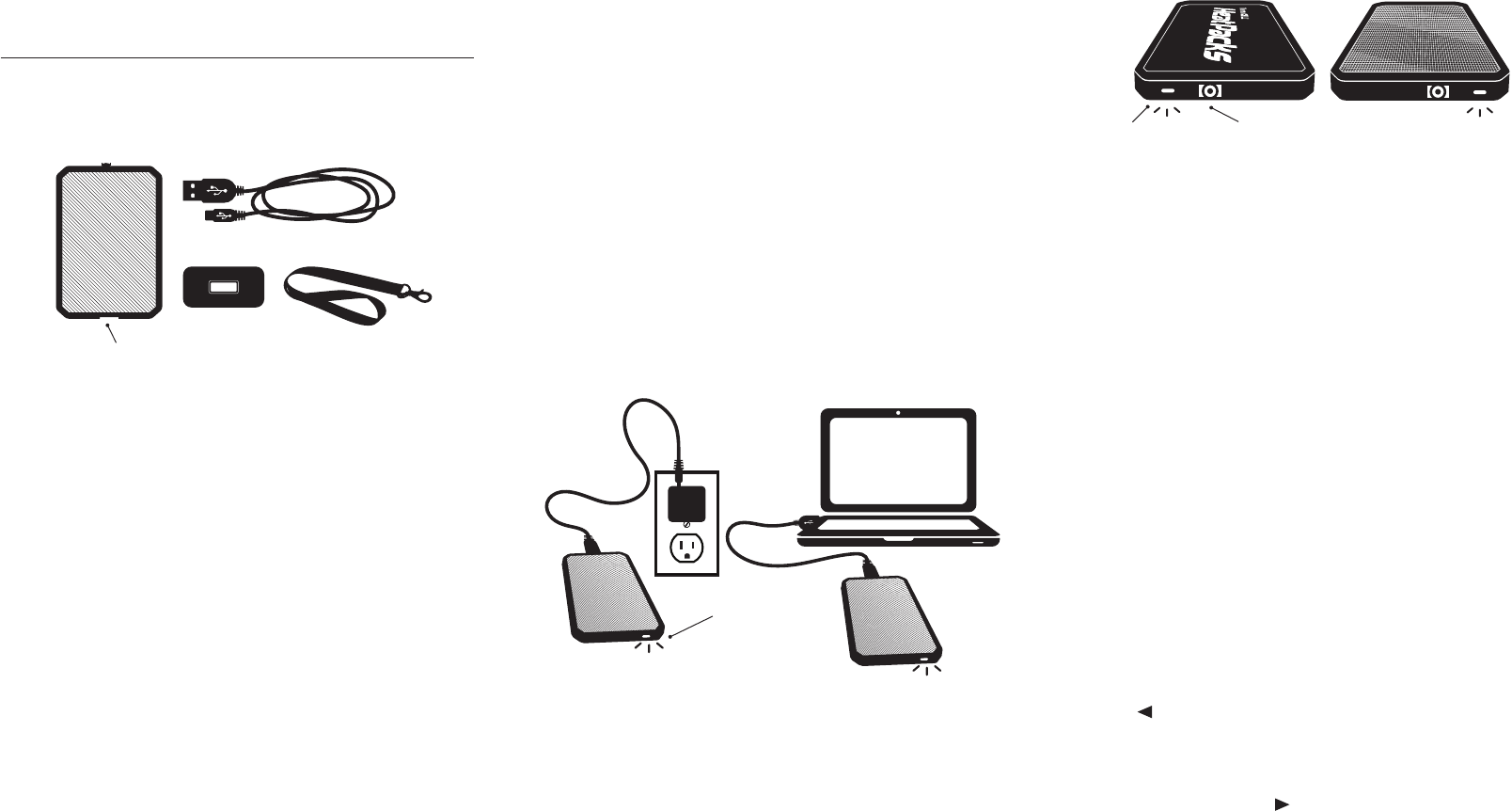
1. Open the Port Cover on the end of the Pocket Warmer with
Bluetooth.
2. Plug the USB cable into the Pocket Warmer with
Bluetooth
by inserting the micro
USB connector (smaller end). Then, plug the USB connector (larger end) into the wall
charger and plug the wall charger into an electrical outlet..
a. Alternatively, you can plug the USB connector into a powered USB port rather
than the wall charger. Charging via alternate USB port may extend the time
required to fully charge the Pocket Warmer with
Bluetooth
. (Figure 3)
3. The LED on the Pocket Warmer with
Bluetooth
will glow red to indicate the unit is
charging (Figure 2 and 3).
4. When the battery is fully charged, the LED will turn green.
5. Disconnect the wall charger from the outlet or remove USB connector from the
alternative USB port and then disconnect the USB connector from the Pocket
Warmer with
Bluetooth
. This process may be done in any order without causing
damage to the Pocket Warmer with
Bluetooth
.
6. Once Pocket Warmer with
Bluetooth
is fully charged, it will provide up to four (4) hours
of constant heat on HIGH, up to five (5) hours of constant heat on MEDIUM, and up
to six (6) hours of constant heat on LOW. The outside temperature and insulation of
gloves/clothing will affect runtime.
7. After charging, close the Port Cover on the end of the Pocket Warmer with
Bluetooth
.
SETTING THE HEAT LEVEL MANUALLY
(NOT USING
BLUETOOTH
)
Select a heat setting by pressing the power/settings button on the Heat Packs Pocket
Warmer with
Bluetooth
(Figure 4).
• Low (106°F). Press the power button 1 time. LED flashes 1 time to indicate Low heat.
• Medium (110°F). Press the power button 2 times. LED flashes 2 times to indicate
Medium heat.
• High (116°F): Press the power button 3 times. LED flashes 3 times to indicate
High heat.
NOTE: The red side of the Heat Pack is the heated side.
PACKAGE CONTENTS
The ThermaCELL Heat Packs Pocket Warmer with
Bluetooth
package contains one Large
Pocket Warmer Heat Pack equipped with an integrated rechargeable Lithium-Ion Polymer
battery, one USB wall charger, one USB cord, an adjustable length lanyard (Figure 1), and
this Instruction Booklet.
THINGS TO KNOW BEFORE USING YOUR HEAT PACKS POCKET
WARMER WITH
BLUETOOTH
• COMPATIBLE DEVICES: The app is compatible with these Apple® devices running
iOS 9 or newer: iPhone® 5, iPod touch® 5th Gen., or newer versions of these
devices. It is also compatible with leading Android™ devices. Full list: http://heat.
thermacell.com/devices
• To operate your ThermaCELL Heat Pack Pocket Warmer with
Bluetooth
®, you will
need to use the ThermaCELL Heated Products app. You can download this from the
Apple App Store or the Google Play App Store.
• You will need internet access to download the application for the
Bluetooth
feature,
but you will not need an internet connection to use the feature once installed.
Bluetooth
functionality works in most locations in the United States and Canada.
• The application uses your phone’s battery just as any other application you may have
on your phone. Charging your phone does not charge the Heat Pack Pocket Warmer
with
Bluetooth
.
• Do not use the product if it is wet.
• Do not use the product in wet clothing or shoes.
• For best results, turn the product on at the first sign of your hands or body getting cold.
• To attach the adjustable lanyard, insert the thin cord on the lanyard into the slot on
the corner of the Heat Pack case and push it through the hole until it comes out
the other side of the slot. You may use a blunt object, such as a paperclip, to push
the thin cord through the slot. Open the thin cord loop and pull the lanyard through
the loop.
CHARGING & RECHARGING HEAT PACKS POCKET WARMER
WITH
BLUETOOTH
The ThermaCELL Heat Packs Pocket Warmer with
Bluetooth
must be fully charged
before first use. Charge the Pocket Warmer with
Bluetooth
at room temperature using
THERMACELL® HEAT PACKS POCKET WARMER
WITH BLUETOOTH® INSTRUCTIONS
234
Figure 1
Charging Port
Figure 4
Figure 3
Figure 2
LED Light
Power/Settings
Button
LED Light
Welcome to ThermaCELL® Technology
Dear ThermaCELL Heat Packs Pocket Warmer with Bluetooth®
Wireless Technology Purchaser,
Thank you for your purchase of the ThermaCELL Heat Packs
Pocket Warmer with Bluetooth which provides adjustable heat
with the convenience of Bluetooth operation. These operating
instructions provide directions on how to properly use and care
for your Heat Packs Pocket Warmer with Bluetooth.
ThermaCELL products, including ThermaCELL Heat Packs,
ThermaCELL Heated Insoles, and ThermaCELL Heated Insoles
ProFLEX, enable outdoor enthusiasts to enjoy their favorite
activities in comfort. We thank you again for your purchase
of ThermaCELL Heated Products and are confident your cold
weather activities will be more comfortable and enjoyable than
ever before.
Enjoy your purchase,
The ThermaCELL Heated Products Group
2. Select Low, Medium, or High to activate the heat settings.
a. The green LED light on the Pocket Warmer with
Bluetooth
will flash intermittently
indicating the heat setting: 1 flash = Low Heat, 2 flashes = Medium Heat, 3 flashes
= High Heat.
b. No Heat is a “stand by” or “sleep” setting and the Pocket Warmer with
Bluetooth
will not generate heat in this setting. When the No Heat setting is selected, the
product will flash red and green briefly and the status of your product will become
inactive.
TURNING THE POCKET WARMER WITH
BLUETOOTH
“OFF”
When you are not using your Pocket Warmer with
Bluetooth
, use the No Heat setting
to turn the heat off. When heat is needed, select the desired heat level from the settings
screen in the application to reactivate heat. After several hours of non-use, the unit
will go into “Deep Sleep” mode which saves battery life over a prolonged period of time.
To “Wake” the device, press the button on the product once, then operate with the
application or manually.
CARE INSTRUCTIONS
• Store the Pocket Warmer with
Bluetooth
product in a clean and dry place.
• Charge Pocket Warmer with
Bluetooth
fully before long-term storage. Recharge every
few months to maintain peak performance.
• Only use ThermaCELL Heat Packs’ chargers to charge this product.
• Clean with a damp cloth only. Do not submerge in water or use chemicals or cleaning
agents.
• Do not place ThermaCELL Heat Packs on radiators or any other hot surface.
• Removal of outer cover can and will permanently damage the product. This will cause
the product warranty to be null and void.
• ThermaCELL Heat Packs are intended for dry use only.
ONE-YEAR WARRANTY
This product is guaranteed against defects under normal use for one year from the date of
purchase. If your product fails to perform satisfactorily because of defects in materials or
workmanship, it will be replaced or repaired free of charge. To register your product, please
visit http://heat.thermacell.com
THERMACELL CUSTOMER SERVICE
If you have further questions regarding ThermaCELL Heat Packs Pocket Warmer with
Bluetooth
:
• Call Customer Service at 1-866-651-7579.
• Refer to http://heat.thermacell.com/ for instructions, tips, and how-to videos.
ABOUT LITHIUM-ION POLYMER BATTERIES
• The high quality Lithium-Ion Polymer batteries in ThermaCELL Heat Packs can be fully
recharged hundreds of times for many years of reliable use.
• Only use a ThermaCELL Heat Packs charger to charge your Heat Packs Pocket Warmer
with
Bluetooth
.
• The batteries are embedded in the Heat Pack and cannot and should not be accessed.
• Battery Disposal: Batteries must be disposed of in accord with local laws and regulations.
• CAUTION - Risk of fire and burns. Do not open, crush, heat above 185°F, or incinerate.
Follow manufacturer’s instructions.
• CAUTION - Never put batteries in mouth. If swallowed, contact your physician or local
poison control center.
• Battery Specifications:
Pocket Warmer with
Bluetooth
Heat Pack: 3300mAh 3.8V 12.3Wh
CAUTIONS - Be Aware of Burn Possibilities
• Properly use ThermaCELL Heat Packs according to instructions.
• Users of ThermaCELL Heat Packs need to be aware of early sensations of a burn, including
when an area of the hand or body becomes too hot.
• If you feel the early warning signs of a hand or body burn, immediately discontinue use of
the Heat Pack and make certain your hand or body is not at risk of being burned. See a
physician immediately if you think you have a burn.
• ThermaCELL Heat Packs and the contents of this package are not meant for use by
children unless under the supervision of an adult.
• Persons with reduced physical sensory capabilities should exercise caution when using
ThermaCELL Heat Packs.
TROUBLESHOOTING
RADIO AND TELEVISION INTERFERENCE
This equipment has been tested and found to comply with the limits for a Class B digital device, pursuant
to part 15 of the FCC Rules. These limits are designed to provide reasonable protection against harmful
interference in a residential installation. This equipment generates, uses and can radiate radio frequency
energy and, if not installed and used in accordance with the instructions, may cause harmful interference
to radio communications. However, there is no guarantee that interference will not occur in a particular
installation. If this equipment does cause harmful interference to radio or television reception, which can be
determined by turning the equipment off and on, the user is encouraged to try to correct the interference
by increasing separation between the equipment and the radio or television. Changes and Modifications
not expressly approved by Schawbel Technologies LLC can void your authority to operate this equipment
under Federal Communications Commission’s rules. This device complies with Industry Canada license-
exempt RSS standard[s). Operation is subject to the following two conditions: [1) this device may not cause
interference, and [2) this device must accept any interference, including interference that may cause
undesired operation of the device.
Schawbel Technologies LLC
2400 District Avenue, Suite 150
Burlington, MA 01803
http://heat.thermacell.com
5 6
Customer Service: Email customerservice@schawbeltech.com or call 1-866-651-7579
Patents Pending
Made in Taiwan
TROUBLESHOOTING
Trouble
Try
PocketWarmerwithBluetoothisnotpairingwiththe
application.
MakesurePocketWarmerwithBluetoothiscompletely
chargedbypluggingtheunitintothechargerandverifying
thattheLEDglowsgreen.
PreviouslypairedPocketWarmerwithBluetoothno
longerappearsonthelistintheapplication.
Followtheinstructionsin“PairingYourProductwiththe
BluetoothApplication”.
IforgotmyfourdigitcodeorwanttorenamemyHeat
Packs.
Keepenteringanincorrect4digitcodeuntiltheapplication
asksifyouwanttoperformafactoryreset.ChooseOKand
followtheonscreenprompts.
IhaveaneworseconddeviceIwanttopairwithmy
PocketWarmerwithBluetooth.
Downloadtheapplicationtoyournewdeviceandfollowthe
instructionsinorderunder“BluetoothPairingInstructions”.
Applicationisnotresponding(“frozen”).
Turntheapplicationoffandbackonagain.Iftheapplication
stilldoesnotrespond,turnyourdeviceoffandthenon
again.Iftheapplicationcontinuestobeunresponsive,please
uninstallandreinstalltheapplication.
IlostmyinstructionbookletandInolongerhavethe
ProductIDsticker.
Toregisteraproductwhenyouhaveforgottenorlostyour
ProductIDsimplybringyourproductwithyouandmovetoa
locationwheretherearenootherThermaCELLBluetooth
enabledproductsinrange.Theapplicationwillthensee
onlyyourdevice.
LEDsarenotblinkingwhenIchangetheheatsettingin
theapplication.
Verifythattheunitischarged.Verifythattheapplicationis
notfrozenbytappingotherbuttonstomovearoundinthe
application.
• ApplicationNotFrozen-Iftheunitischargedandthe
applicationisnotfrozencontactCustomerService
forassistance
• ApplicationFrozen-seeabove
RememberyoucanchangethetemperatureonyourPocket
WarmerwithBluetoothmanuallyifyouarehavingissues
withBluetooth.
PocketWarmerwithBluetoothisnotgettinghot.
Verifytheunitischarged.Usethebuttonontheunitto
changethetemperaturetoHigh(3flashes).Iftheunitisstill
notheatingcontactCustomerService.
The
Bluetooth
® word mark and logos are registered trademarks owned by Bluetooth
SIG, Inc. and any use of such marks by Schawbel Technologies LLC is under license.
Other trademarks and trade names are those of their respective owners.