HiTeC Digital Audio HDA-DXM7120 7.1 CHANNEL DIGITAL SOUNDCARD User Manual FCC060103 hwp

HiTeC Digital Audio, Inc. 7.1 CHANNEL DIGITAL SOUNDCARD FCC060103 hwp

users manual

HDA XPLOSION 7.1 DTS CONNECT7.1 Channel Theater Sound EffectWorld's First DTS CONNECTCertificated PCI SoundcardEnhanced by Dolby® Digital LiveDTS CONNECTOWNER'S MANUALHiTeC DIGITAL AUDIO, Inc.
CopyrightCopyright 2005-2006 HITEC DIGITAL AUDIO, Inc. All rights reserved. No part ofthis publication may be reproduced, transmitted, transcribed, stored in a retrievalsystem, or translated into any language or computer language, in any form or by anymeans, electronic, mechanical, magnetic, optical, chemical, manual or otherwise, withoutthepriorwrittenpermissionfromHiTeCDIGITALAUDIO,Inc.In no event will HiTeC DIGITAL AUDIO, Inc. be liable for direct, indirect, special,exemplary, incidental, or consequential damages resulting from any defect or omissionin this manual, even if advised of the possibility of such damages. In the interest ofcontinued product development, HiTeC DIGITAL AUDIO, Inc. reserves the right to makeimprovements to this manual and the products it describes at any time, without noticesor obligation.DisclaimerWe makes no representations or warranties, either expressed or implied, with respectto the contents hereof and specifically disclaims any warranties, merchantability orfitness for any particular purpose. Any software described in this manual is sold orlicensed "as is". Should the programs prove defective following their purchase, thebuyer (and not this company, its distributor, or its dealer) assumes the entire cost of allnecessary servicing, repair, and any incidental or consequential damages resulting fromany defect in the software. HiTeC DIGITAL AUDIO, Inc. reserves the right to makeimprovements to this manual and the products it describes at any time, without noticesor obligation.TrademarksHDA,HDAlogoaretrademarksofHiTeCDIGITALAUDIO,Inc.C-Media,C-Medialogoand Xear 3D are trademarks of C-Media Electronics Inc. Dolby and Dolby Digital, DolbyDigital Live are trademarks of Dolby Laboratories. DTS CONNECT , DTSINTERACTIVE and DTS NEO:PC are trademarks of DTS, Inc. DTS is a registeredtrademark of DTS, Inc. EAX and A3D are trademarks of Creative Technology Ltd.Microsoft, DirectSound3D, Windows are trademarks of Microsoft Corporation. All brandsor product names mentioned in this manual are trademarks or registered trademarks oftheir respective companies.LicenseDolby Digital Live driver is manufactured under license from Dolby Laboratories.Manufactured under license from DTS, Inc. U.S. Pat. No's. 5,451,942; 5,956,674;5,974,380; 5,978,762; 6,487,535 and other U.S. and world-wide patents issued and
pending. DTS CONNECT, DTS INTERACTIVE and DTS NEO:PC are trademarksof DTS, Inc. DTS is a registered trademark of DTS, Inc. Copyright 1996, 2002-2005Digital Theater Systems, Inc. All Rights Reserved.FCC and CE Radiation NormINFORMATION TO USER:FCC : This equipment has been tested and found to comply with the limits for aClass Bdigital device, pursuant to Part 15 of Federal Communication Commission (FCC) rules.CE : This equipment has been tested and found to comply with the limits of theEuropean Council Directive on the approximation of the law of the member states relatingto electromagnetic compatibility (89/336/EEC) according to EN 55022 class B.These limits are designed to provide reasonable protection against harmful interference ina residential installation. This equipment generates, uses, and can radiate radio frequencyenergy and, if not installed and used in accordance with the instructions, may causeharmful interference to radio communications. However, there is no guarantee thatinterference will not occur in a particular installation. If this equipment does cause harmfulinterference to radio or television reception, which can be determined by turning theequipment off and on, the user is encouraged to try to correct the interference by one ormore of the following measures: (1.) Reorient or relocate the receiving antenna. (2.)Increase the separation between the equipment and receiver. (3.) Connect the equipmentinto an outlet on a circuit different from that to which the receiver is connected. (4.)Consult the dealer or an experienced radio TV technician for help.FCC DECLARATION OF CONFORMITYPRODUCT NAME : 7.1 Channel Digital SoundcardMODEL NUMBER : HDA-DXM7120FCC RULES : TESTED TO COMPLY WITH FCC PART 15, CLASS BOPERATING ENVIRONMENT : FOR HOME OR OFFICE USEFCC COMPLIANCE STATEMENT:This device complies with part 15 of the FCC rules. Operation is subject to the followingconditions. (1) This device may not cause harmful interference and (2)This device mustaccept any interference received including interference that may cause undesiredoperation.CAUTION Changes or modifications to this unit not expressly approved by the partyresponsible for compliance could void the users authority to operate the equipment.
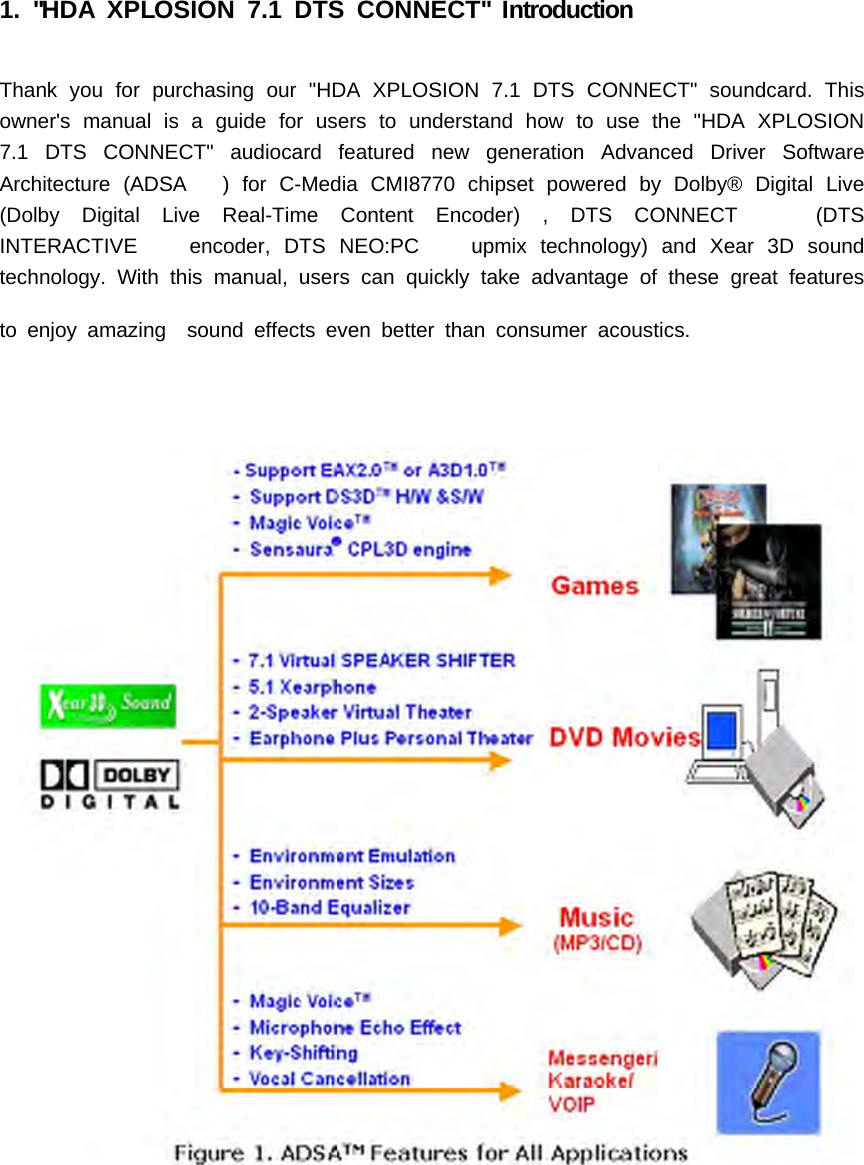
1. "HDA XPLOSION 7.1 DTS CONNECT" IntroductionThank you for purchasing our "HDA XPLOSION 7.1 DTS CONNECT" soundcard. Thisowner's manual is a guide for users to understand how to use the "HDA XPLOSION7.1 DTS CONNECT" audiocard featured new generation Advanced Driver SoftwareArchitecture (ADSA ) for C-Media CMI8770 chipset powered by Dolby® Digital Live(Dolby Digital Live Real-Time Content Encoder) , DTS CONNECT (DTSINTERACTIVE encoder, DTS NEO:PC upmix technology) and Xear 3D soundtechnology. With this manual, users can quickly take advantage of these great featuresto enjoy amazing sound effects even better than consumer acoustics.
(1) Package ContentsThe following items are included with the "HDA XPLOSION 7.1 DTS CONNECT"package:- "HDA XPLOSION 7.1 DTS CONNECT" audio card- 2Pin-2Pin CD S/PDIF audio cable- English Owner's Manual- TOSLINK fiber optic digital cable- Drivers/Applications installation CD(2) Product Specifications1) Sound ProcessorC-Media CMI8770/PCI-8ch PCI Chipset (8CH audio single chip with Dolby DigitalLive Real-Time Content Encoder and the wolrd's first DTS CONNECT technologyenabled PCI audio chipset)8CH codec embedded PCI audio single chipFull-duplex 8CH 24bit/96kHz DAC / 2CH 16bit/48kHz ADCIntegrated S/PDIF Input/Output supports 44.1kHz/48kHz/96kHz samplerate and16/24bits resolution2) System InterfacePCI Rev. 2.2 compliant with 32bit PCI bus mastering modesTwo S/PDIF Input for CD_SPDIF Input (S/PDIF-IN #1) , Digital I/O(SPDIF_EXT)Input (S/PDIF-IN #2)Built-in earphone buffer at Front Output (32 Ohm Loading)External EEPROM Interface for Sub-Vendor/Sub-Device ID using custom driver16Pin MIDI_IO Header for supporting MPU-401 MIDI UART PortSwappable four high perfomance OPAMP for Output channel, two high perfomanceOPAMP for MIC Input - increase gain level and improve SNROnboard TOSLINK transmitter for up to 24bit/96kHz Optical Digital Output, GoldPlated RCA connetor for Coaxial Digital Output
12Pin SPDIF_EXT Header for using "HDA DIM-X10" Digital Input Module (Optional) -COAXIAL, OPTICAL S/PDIF Input for recording, monitoring, bypassing digital audio fromexternal sources 16bit/44.1kHz, 16bit/48kHz, 24bit/96kHz sampling rate.C-Media Xear 3D 7.1 Virtual Speaker SHIFTER technologySensaura CRL3D HRTF 3D positional sound enhancement with MultiDrive ,EnvironmentFX , ZoomFX , MacroFX , etc.DirectSound 3D HW accelerationA3D 1.0 , EAX 1.0, 2.0 (powered by Sensaura), HRTF-based 3D Positional Audio(C3DX ), DirectSound 3D SWUnique Karaoke functionality : Mic Echo, Key-shifting, Vocal CancellationSpecial feature for Winamp broadcasting , VOIP, Online-games, Online messengerapplication : Magic Voice , Support Stereo-MIX recording mode for WinampBroadcasting10-band Equalizer with 12 preset modes; 27 global environment effectsSupport 7.1Ch playback for Windows XP, Windows 2000, Windows Server 2003,Windows ME, Windows 98 SE (Microsoft DirectX 9.0 or higher is required)All specifications are subject to change without prior notice.󰏗
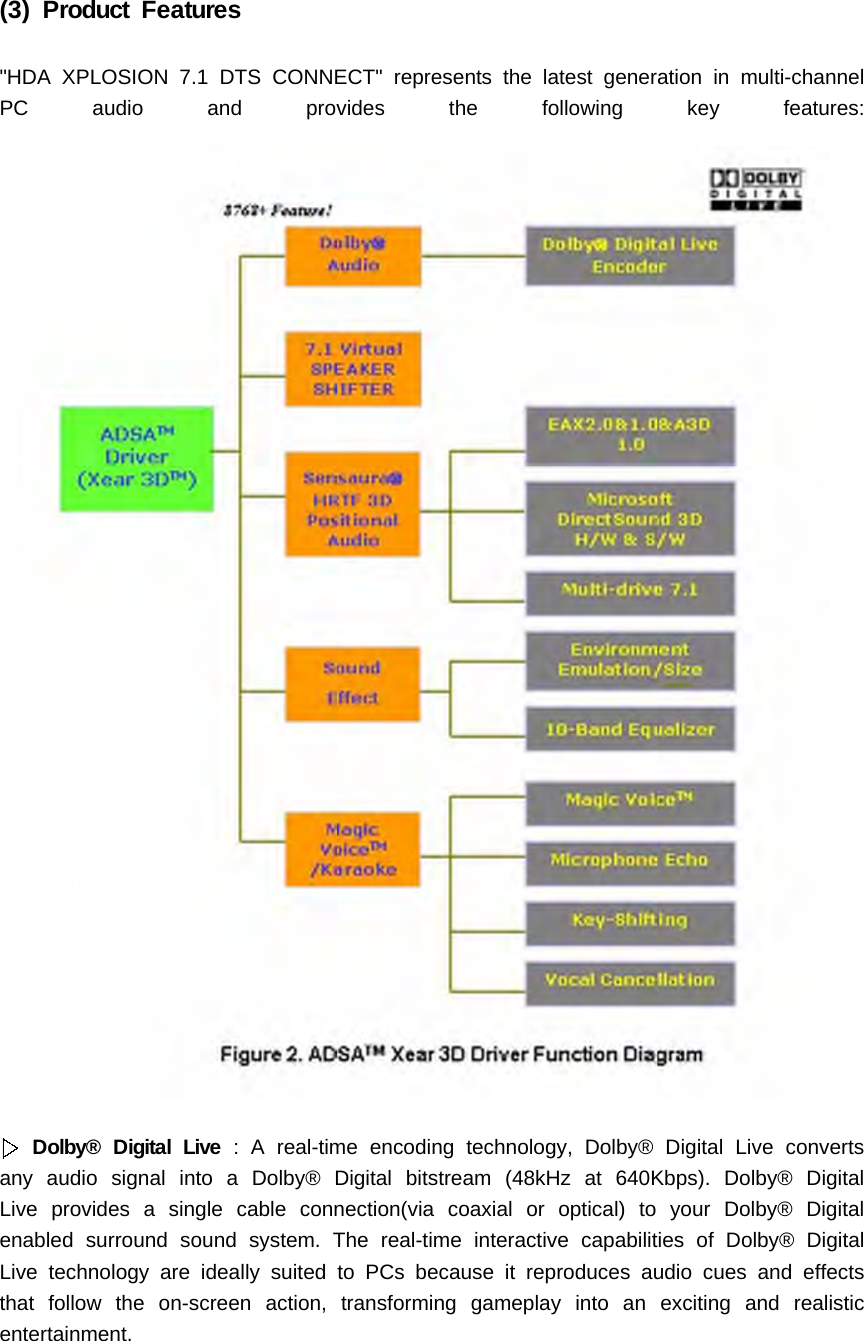
(3) Product Features"HDA XPLOSION 7.1 DTS CONNECT" represents the latest generation in multi-channelPC audio and provides the following key features:Dolby® Digital Live : A real-time encoding technology, Dolby® Digital Live convertsany audio signal into a Dolby® Digital bitstream (48kHz at 640Kbps). Dolby® DigitalLive provides a single cable connection(via coaxial or optical) to your Dolby® Digitalenabled surround sound system. The real-time interactive capabilities of Dolby® DigitalLive technology are ideally suited to PCs because it reproduces audio cues and effectsthat follow the on-screen action, transforming gameplay into an exciting and realisticentertainment.
DTS INTERACTIVE : A real-time encoder that takes any LPCM (2 channel ormore) and encodes it into DTS® bitstream(48kHz at 1.5 Mbps). DTS INTERACTIVEprovides a single cable connection(via coaxial or optical) to your DTS enabled surroundsound system. Your stereo or multi-channel (up to 5.1) audio sources are re-encodedinto a DTS audio signal and sent out from the "HDA XPLOSION 7.1 DTS CONNECT"to any DTS enabled system such as, powered PC speakers, an A/V receiver or anyother DTS- compatible surround decoder sound system. The installation process issimple and eliminates the clutter, tangles, and cost of multiple analog cables.DTS NEO:PC : : An up-mix matrix technology that turns any 2 channel audio into7.1 surround sound. You can turn your stereo audio (WMA, MP3, CD, and more!) intoa convincing multichannel audio experience. Borrowing from DTS® NEO:6 technologythat provides you with surround sound from stereo sources in high-end home theatreproducts, NEO:PC is optimized for your personal computer and is the perfectcompaniontoDTSINTERACTIVE .DVD Playback with full 5.1 speaker and 7.1 speaker surround sound usingPowerDVD, WinDVD software decoding application. (with DD 5.1, DTS 5.1, DD-EX6.1/7.1, DTS-ES 6.1/7.1 decoding )MP3 playback with Directsound hardware acceleration function on multichannelspeakers (4, 5.1, 7.1 speakers)Supports Game Surround Sound API such as Sensaura CRL3D HRTF 3D positionalsound enhancement with multi-drive 7.1, EnvironmentFX, ZoomFX, MacroFX. A3D 1.0, EAX 1.0, 2.0 (powered by Sensaura),Direct Sound 3D SWCoaxial, Optical S/PDIF output for playback of pure PCM digital audio at resolutionsof 16bit/44.1kHz, 16bit.48kHz, 24bit/96kHz sampling rates.Onboard COAXIAL RCA connector, OPTICAL Toslink trasmitter for high qualityDigital OutputSPDIF output allows pass-through of Non-PCM Dolby® Digital and DTS® stream toexternal DD/DTS decoder and A/V receivers in Windows®98SE/ME/2000/XP/Server2003.Supports 44.1kHz / 48kHz / 96kHz S/PDIF Input with HDA X-10 Digital Inputextension board [Digital I/O (SPDIF-IN #2)]Supports CD S/PDIF Input (SPDIF-IN #1) via CD_SPDIF 2pin connectorAdopt large capacity positeive./negative regulators and 6pcs of DUAL DIP TYPEOPAMP, Special two OPAMP controlled preamp circuits on board provides increasedMIC input gain and improvement of SNR quality.Anti-Pop control Circuit using high perfomance audio muting transistor
7.1 Virtual Speaker ShifterSupport Stereo MIX recording option and Mic Echo which makes the bestenvironment for Winmap broadcastingSupport Karaoke features such as Echo, Magic Voice, Vocal Cancel, and KeyControl(4) System Requirements (Minimum)Genuine Intel® Pentium® III 800 MHz, or equivalent AMD® processor or fasterMotherboard with above level Intel, AMD CPU supportAt least 256 MB RAM for Windows OSMicrosoft® Windows® 98 SE, Windows Me, Windows 2000 Service Pack 3 (SP3),Windows Server 2003, Windows XP Service Pack 1 (SP1)Available PCI 2.1 or higher compliant slot for the audio card.Available adjacent slots for the optional MIDI port bracket(available separately) oroptional HDA DIM-X10 digital input module(available separately)Headphones or 2channel amplified speakers (available separately)500 MB of free hard disk supporting UDMA 66/100 and 5400rpmCD-ROM, DVD-ROM drive required for software installation(5) Technical SupportPlease visit http://www.hidiaudio.com for the latest HDA brand products informations.The site also includes information on making purchases for international users, technicalsupport, and the latest driver updates.
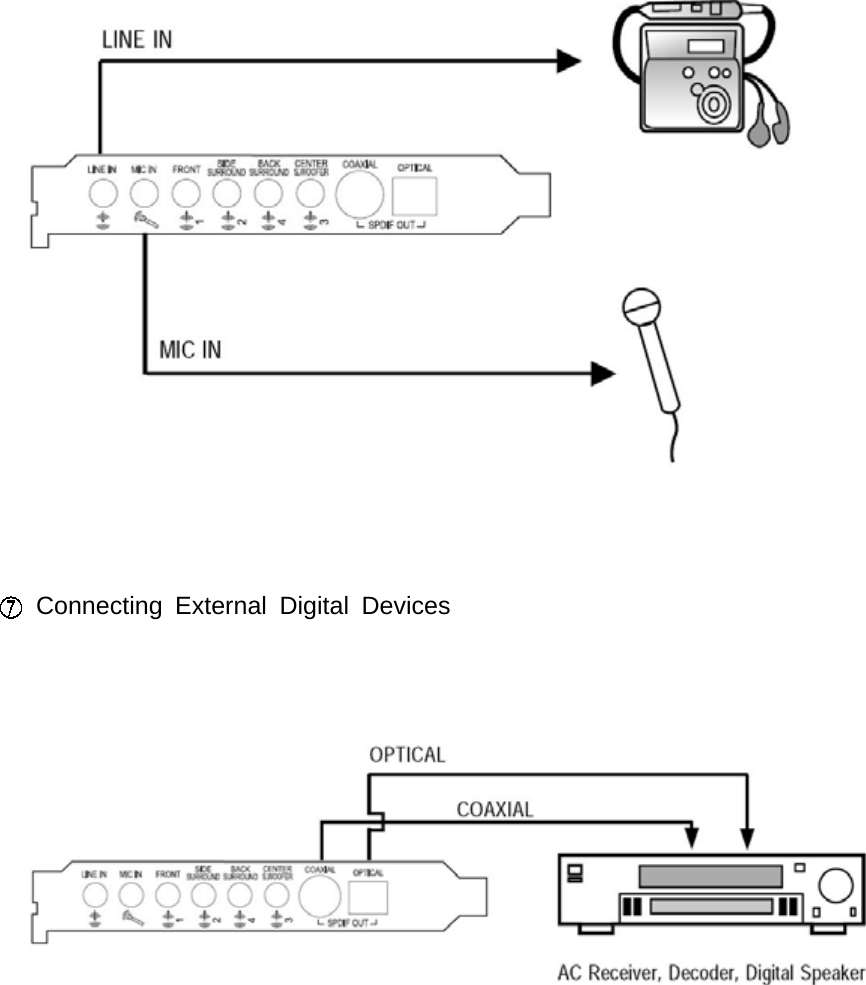
2. "HDA XPLOSION 7.1 DTS CONNECT" hardware(1) JacksLINE IN (3.5mm Stereo minijack) : Connects to external analog line-level sources,such as CD players, MP3 players, MD players, cassette players, TV card's internal lineoutput, any analog stereo output devices.MIC IN (3.5mm Stereo minijack) : Connects to external condenser or dynamicmicrophone for voice input. Special two OPAMP controlled preamp circuits on boardprovides increased MIC input gain and improvement of SNR quality.FRONT (3.5mm Stereo minijack) : Connects to Front Left/Right inputs on poweredanalog speakers, an external amplifier or headphones.SIDE SURROUND (REAR / 3.5mm Stereo minijack) : Connects to Rear Left/Rightinputs on powered multichannel analog speakers, an external mutichannel amplifier in 4,5.1 and 7.1 channel analog playback modes.BACK SOURROUND (REAR CENTER / 3.5mm Stereo minijack) : Connects RearCenter 1 / 2 inputs on powered multichannel analog speakers, an external mutichannelamplifier in 7.1 channel analog playback modes.CENTER/S.WOOFER (3.5mm Stereo minijack) : Connects to Front Center and
Sub-Woofer inputs on powered multichannel analog speakers, an external mutichannelamplifier in 5.1 or 7.1 channel analog playback modes.COAXIALOUTPUT(S/PDIFCOAXIALDigitalOutput,GoldPlatedRCAJack):Connects to external digital devices like AV receivers, decoders or digital speakersystems. Coaxial(75 Ohms) S/PDIF output transmitts pure PCM digital audio atresolutions of 16bit/44.1kHz, 16bit/48kHz, 24bit/96kHz sampling rates. Also allowspass-through of Non-PCM Dolby® Digital and DTS® stream to external DD/DTSdecoders and A/V receivers.OPTICAL OUTPUT (S/PDIF OPTICAL Digital Output,TOSLINK connector) :Connects to external digital devices like AV receivers, decoders or digital speakersystems. High quality TOSLINK Optical S/PDIF output transmitts pure PCM digital audioat resolutions of 16bit/44.1kHz, 16bit/48kHz, 24bit/96kHz sampling rates. Also allowspass-through of Non-PCM Dolby® Digital and DTS® stream to external DD/DTSdecoder and A/V receivers.(2) Headers/Connectors
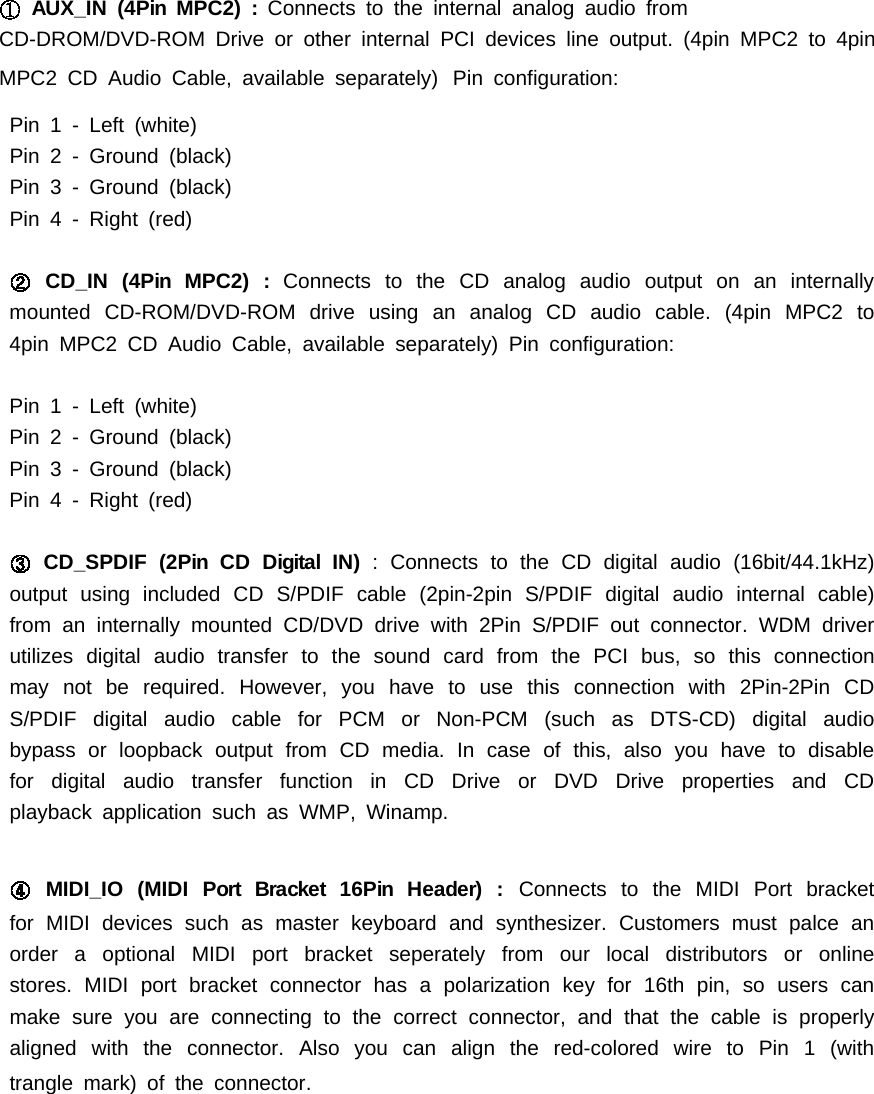
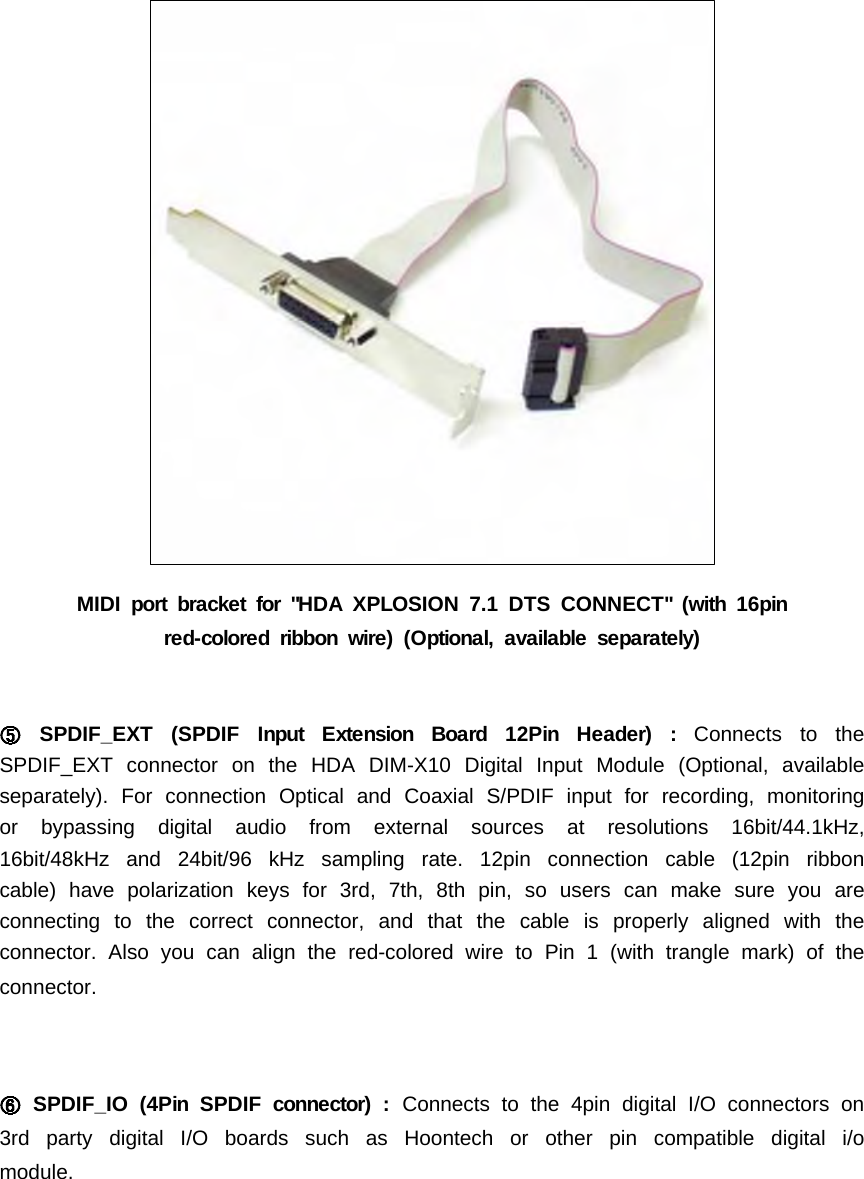
AUX_IN (4Pin MPC2) : Connects to the internal analog audio fromCD-DROM/DVD-ROM Drive or other internal PCI devices line output. (4pin MPC2 to 4pinMPC2 CD Audio Cable, available separately) Pin configuration:Pin 1 - Left (white)Pin2-Ground(black)Pin3-Ground(black)Pin 4 - Right (red)CD_IN (4Pin MPC2) : Connects to the CD analog audio output on an internallymounted CD-ROM/DVD-ROM drive using an analog CD audio cable. (4pin MPC2 to4pin MPC2 CD Audio Cable, available separately) Pin configuration:Pin 1 - Left (white)Pin2-Ground(black)Pin3-Ground(black)Pin 4 - Right (red)CD_SPDIF (2Pin CD Digital IN) : Connects to the CD digital audio (16bit/44.1kHz)output using included CD S/PDIF cable (2pin-2pin S/PDIF digital audio internal cable)from an internally mounted CD/DVD drive with 2Pin S/PDIF out connector. WDM driverutilizes digital audio transfer to the sound card from the PCI bus, so this connectionmay not be required. However, you have to use this connection with 2Pin-2Pin CDS/PDIF digital audio cable for PCM or Non-PCM (such as DTS-CD) digital audiobypass or loopback output from CD media. Incaseofthis,alsoyouhavetodisablefor digital audio transfer function in CD Drive or DVD Drive properties and CDplayback application such as WMP, Winamp.MIDI_IO (MIDI Port Bracket 16Pin Header) : Connects to the MIDI Port bracketfor MIDI devices such as master keyboard and synthesizer. Customers must palce anorder a optional MIDI port bracket seperately from our local distributors or onlinestores. MIDI port bracket connector has a polarization key for 16th pin, so users canmake sure you are connecting to the correct connector, and that the cable is properlyalignedwiththeconnector.Alsoyoucanalignthered-coloredwiretoPin1(withtrangle mark) of the connector.
MIDI port bracket for "HDA XPLOSION 7.1 DTS CONNECT" (with 16pinred-colored ribbon wire) (Optional, available separately)SPDIF_EXT (SPDIF Input Extension Board 12Pin Header) : Connects to theSPDIF_EXT connector on the HDA DIM-X10 Digital Input Module (Optional, availableseparately). For connection Optical and Coaxial S/PDIF input for recording, monitoringor bypassing digital audio from external sources at resolutions 16bit/44.1kHz,16bit/48kHz and 24bit/96 kHz sampling rate. 12pin connection cable (12pin ribboncable) have polarization keys for 3rd, 7th, 8th pin, so users can make sure you areconnecting to the correct connector, and that the cable is properly aligned with theconnector. Also you can align the red-colored wire to Pin 1 (with trangle mark) of theconnector.SPDIF_IO (4Pin SPDIF connector) : Connects to the 4pin digital I/O connectors on3rd party digital I/O boards such as Hoontech or other pin compatible digital i/omodule.
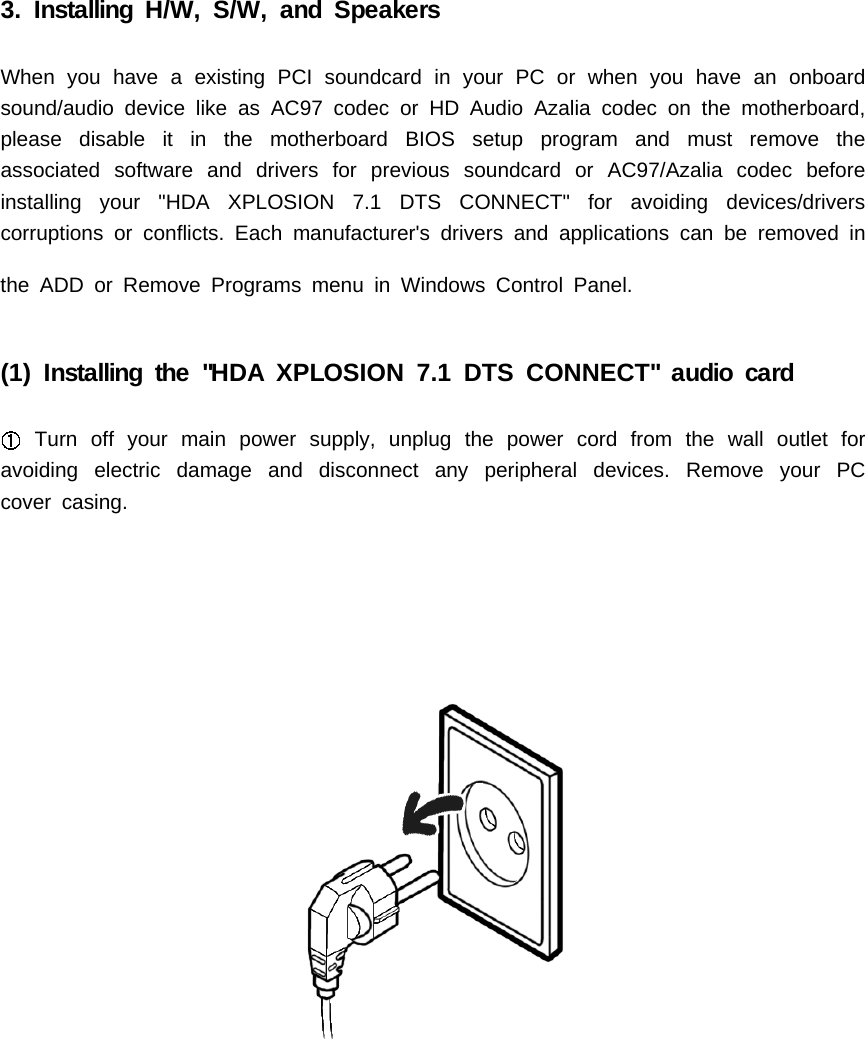
3. Installing H/W, S/W, and SpeakersWhen you have a existing PCI soundcard in your PC or when you have an onboardsound/audio device like as AC97 codec or HD Audio Azalia codec on the motherboard,please disable it in the motherboard BIOS setup program and must remove theassociated software and drivers for previous soundcard or AC97/Azalia codec beforeinstalling your "HDA XPLOSION 7.1 DTS CONNECT" for avoiding devices/driverscorruptions or conflicts. Each manufacturer's drivers and applications can be removed inthe ADD or Remove Programs menu in Windows Control Panel.(1) Installing the "HDA XPLOSION 7.1 DTS CONNECT" audio cardTurn off your main power supply, unplug the power cord from the wall outlet foravoiding electric damage and disconnect any peripheral devices. Remove your PCcover casing.
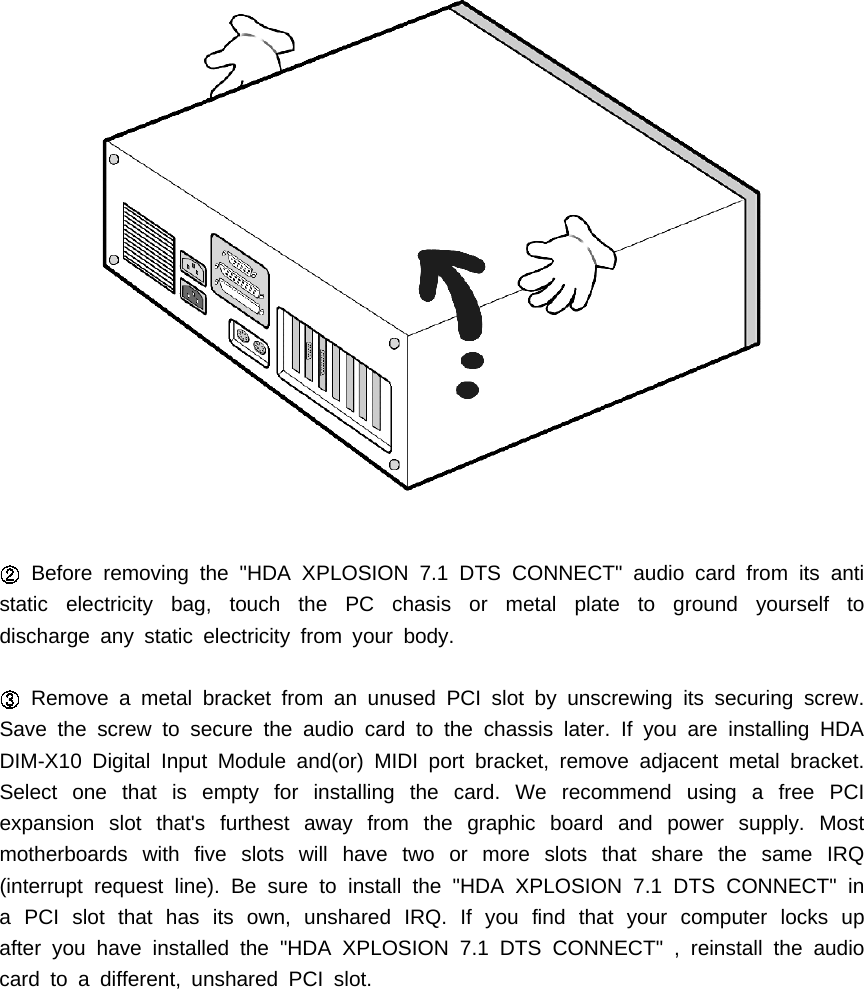
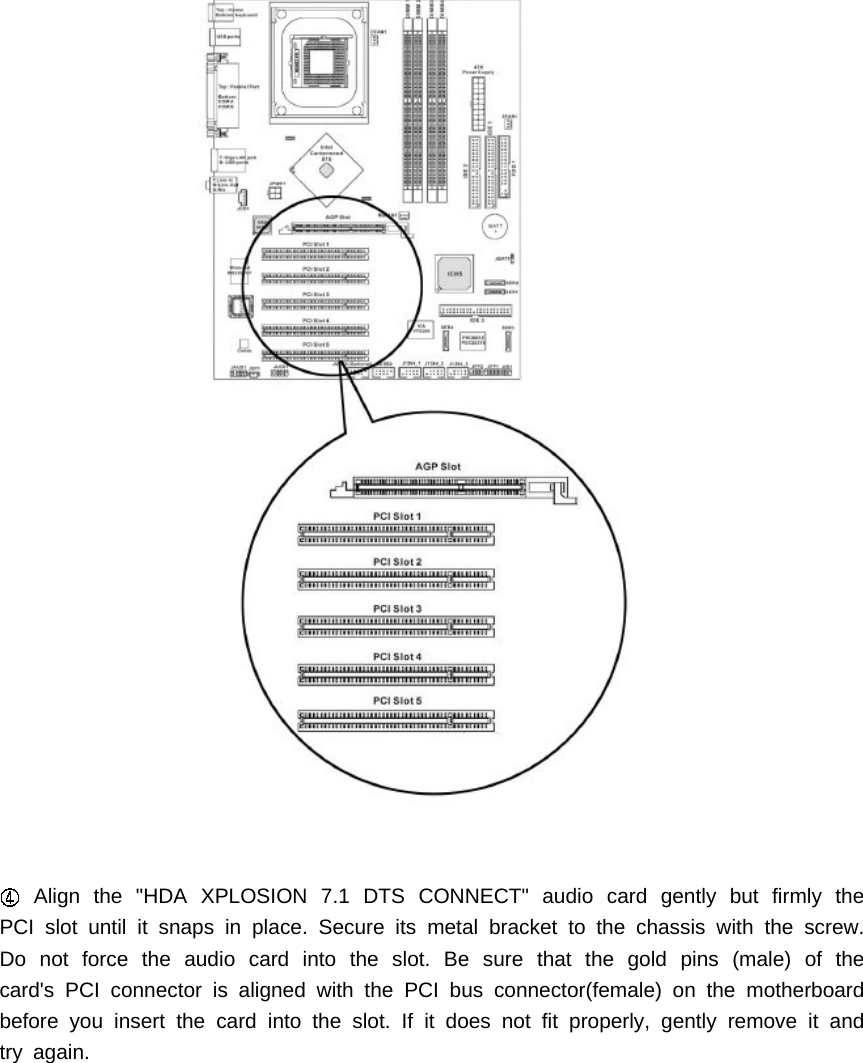
Before removing the "HDA XPLOSION 7.1 DTS CONNECT" audio card from its antistatic electricity bag, touch the PC chasis or metal plate to ground yourself todischarge any static electricity from your body.Remove a metal bracket from an unused PCI slot by unscrewing its securing screw.Save the screw to secure the audio card to the chassis later. If you are installing HDADIM-X10 Digital Input Module and(or) MIDI port bracket, remove adjacent metal bracket.Select one that is empty for installing the card. We recommend using a free PCIexpansion slot that's furthest away from the graphic board and power supply. Mostmotherboards with five slots will have two or more slots that share the same IRQ(interrupt request line). Be sure to install the "HDA XPLOSION 7.1 DTS CONNECT" ina PCI slot that has its own, unshared IRQ. If you find that your computer locks upafter you have installed the "HDA XPLOSION 7.1 DTS CONNECT" , reinstall the audiocard to a different, unshared PCI slot.
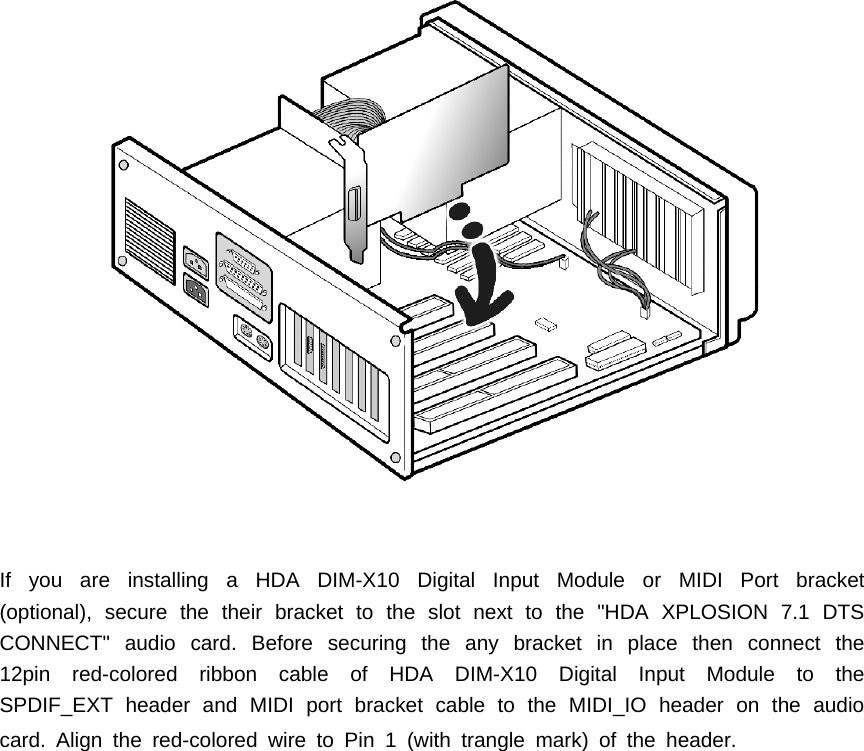
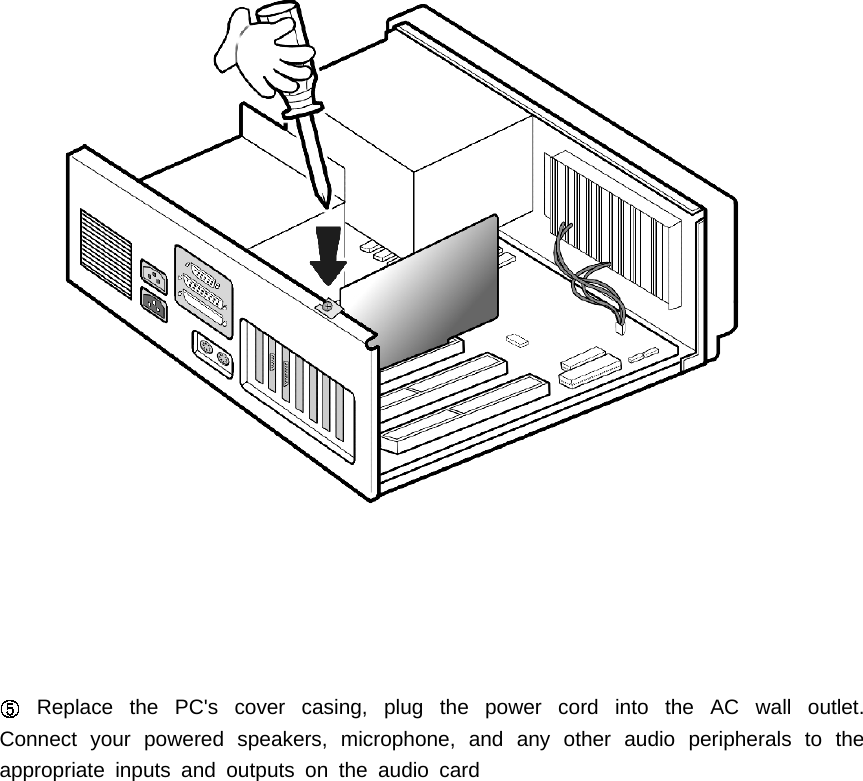
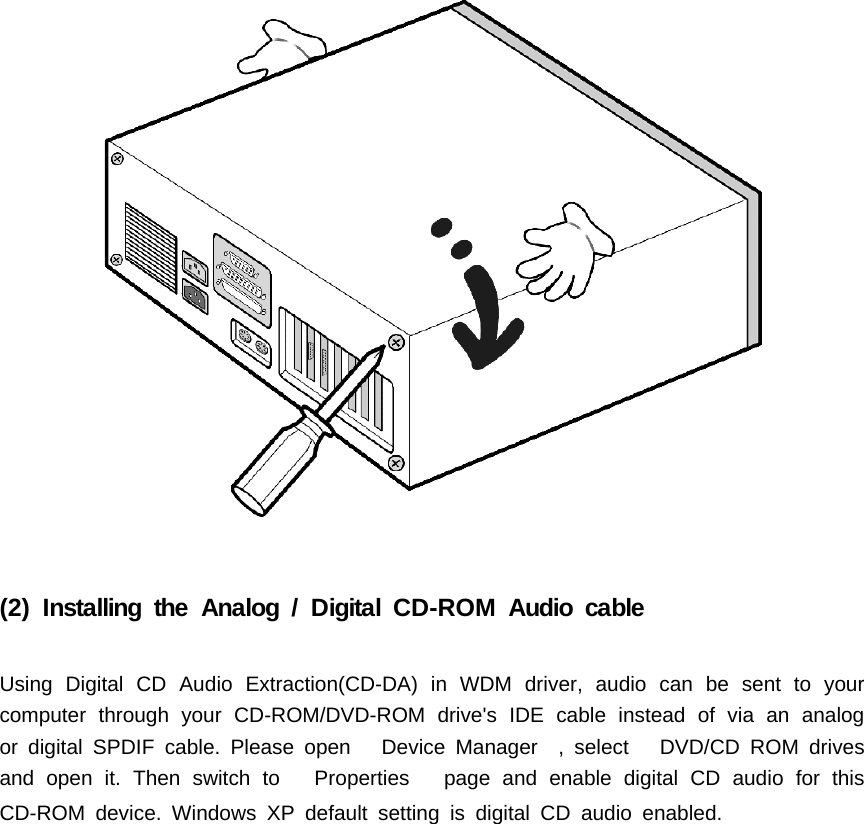
Align the "HDA XPLOSION 7.1 DTS CONNECT" audio card gently but firmly thePCI slot until it snaps in place. Secure its metal bracket to the chassis with the screw.Do not force the audio card into the slot. Be sure that the gold pins (male) of thecard's PCI connector is aligned with the PCI bus connector(female) on the motherboardbefore you insert the card into the slot. If it does not fit properly, gently remove it andtry again.
If you are installing a HDA DIM-X10 Digital Input Module or MIDI Port bracket(optional), secure the their bracket to the slot next to the "HDA XPLOSION 7.1 DTSCONNECT" audio card. Before securing the any bracket in place then connect the12pin red-colored ribbon cable of HDA DIM-X10 Digital Input Module to theSPDIF_EXT header and MIDI port bracket cable to the MIDI_IO header on the audiocard.Alignthered-coloredwiretoPin1(withtranglemark)oftheheader.
Replace the PC's cover casing, plug the power cord into the AC wall outlet.Connect your powered speakers, microphone, and any other audio peripherals to theappropriate inputs and outputs on the audio card
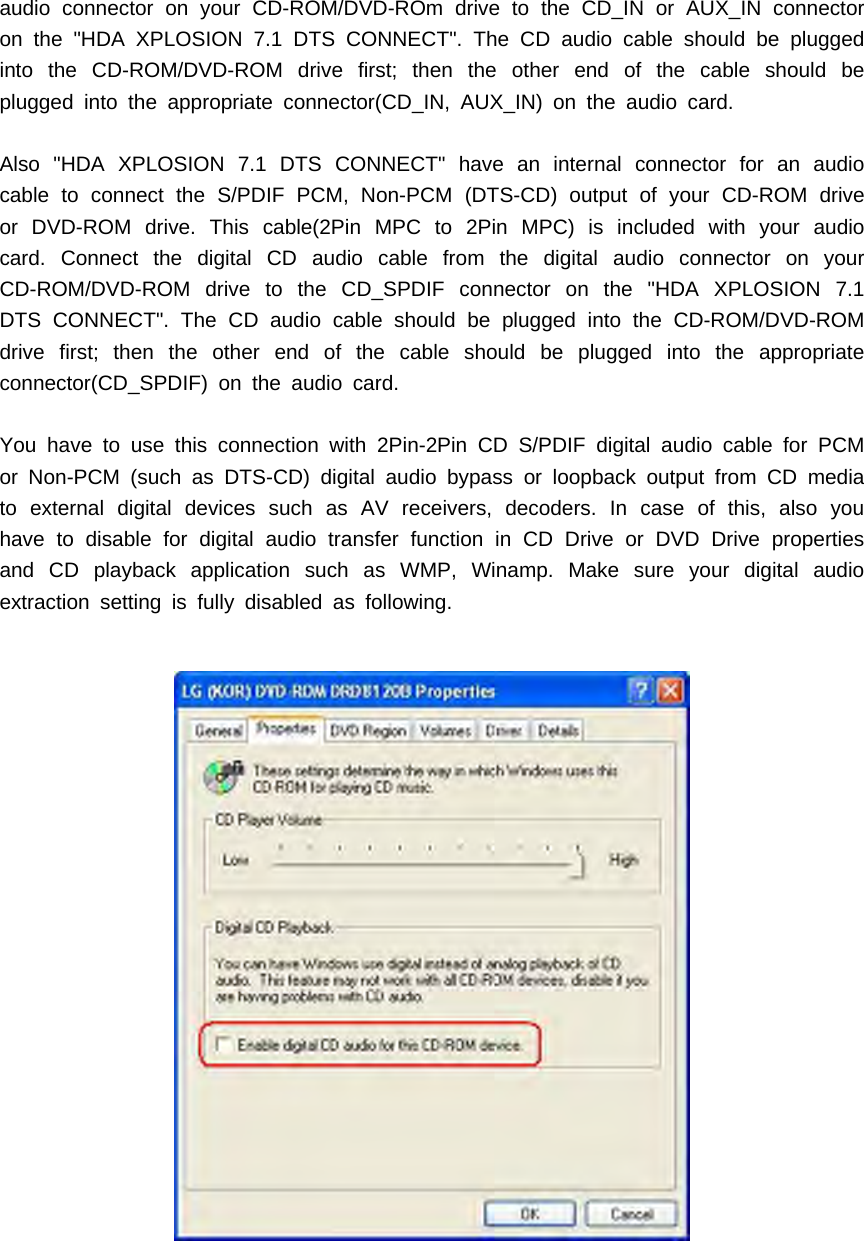
(2) Installing the Analog / Digital CD-ROM Audio cableUsing Digital CD Audio Extraction(CD-DA) in WDM driver, audio can be sent to yourcomputer through your CD-ROM/DVD-ROM drive's IDE cable instead of via an analogor digital SPDIF cable. Please open Device Manager , select DVD/CD ROM drivesand open it. Then switch to Properties page and enable digital CD audio for thisCD-ROM device. Windows XP default setting is digital CD audio enabled.
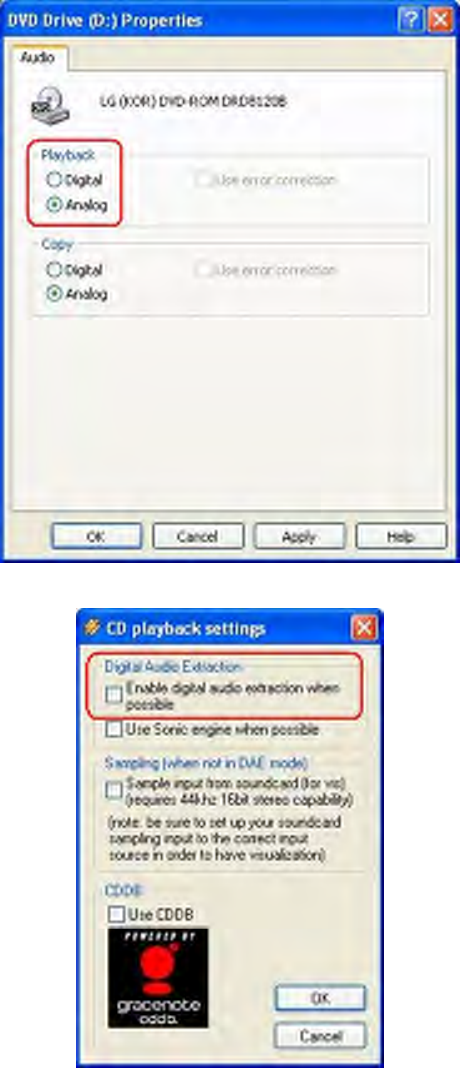
You need to also check Windows Media Player setting is in digital playback mode. Goto [Tools=>Options=>Devices=>DVD Drive or CD Drive=>Playback-Digital]. You will seethe following window.
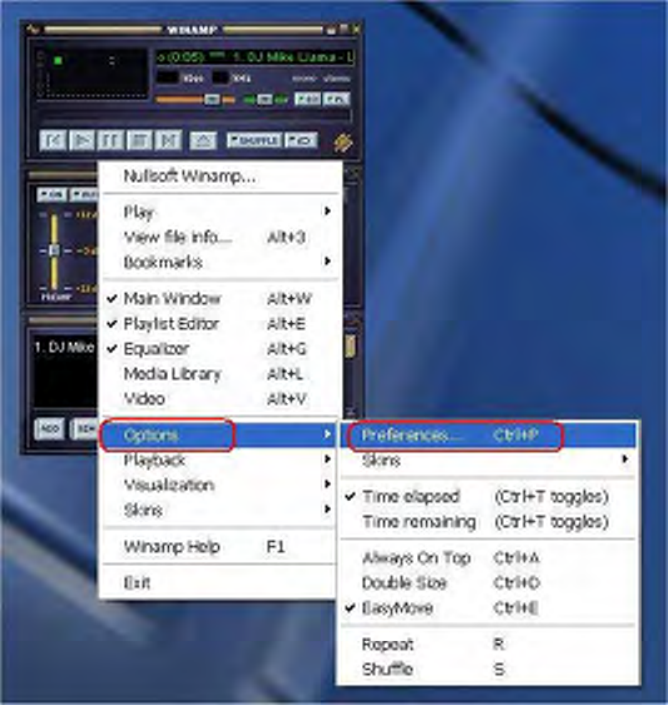
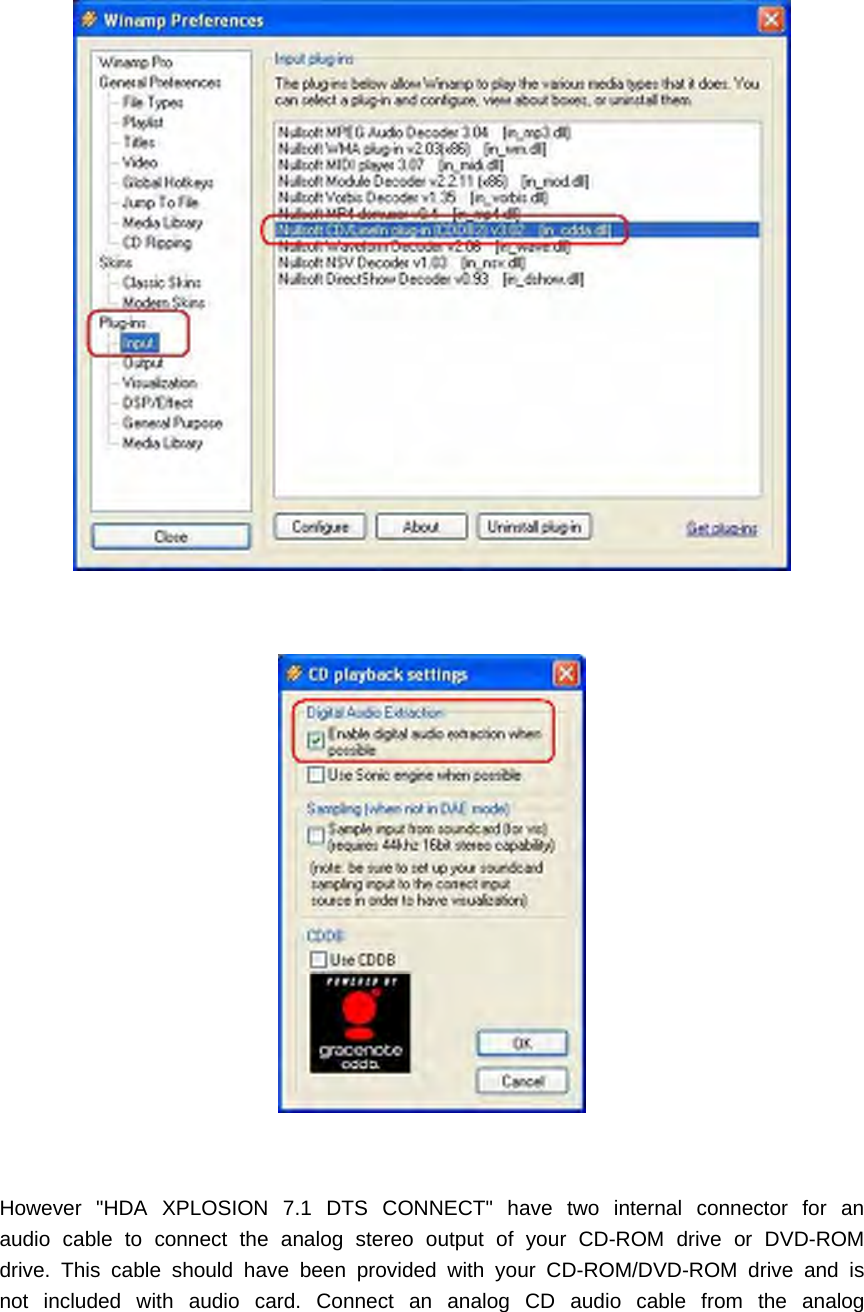
Also you need to also check Winamp Player setting is in digital playback mode. Go to[Options=>Preferences=>Plug-ins=>Input=>Nullsoft CD/LineIn plug-in(CDDB2)=> SelectEnable digital audio extraction when possible]. You will see the following window.
However "HDA XPLOSION 7.1 DTS CONNECT" have two internal connector for anaudio cable to connect the analog stereo output of your CD-ROM drive or DVD-ROMdrive. This cable should have been provided with your CD-ROM/DVD-ROM drive and isnot included with audio card. Connect an analog CD audio cable from the analog
audio connector on your CD-ROM/DVD-ROm drive to the CD_IN or AUX_IN connectoron the "HDA XPLOSION 7.1 DTS CONNECT". The CD audio cable should be pluggedinto the CD-ROM/DVD-ROM drive first; then the other end of the cable should beplugged into the appropriate connector(CD_IN, AUX_IN) on the audio card.Also "HDA XPLOSION 7.1 DTS CONNECT" have an internal connector for an audiocable to connect the S/PDIF PCM, Non-PCM (DTS-CD) output of your CD-ROM driveor DVD-ROM drive. This cable(2Pin MPC to 2Pin MPC) is included with your audiocard. Connect the digital CD audio cable from the digital audio connector on yourCD-ROM/DVD-ROM drive to the CD_SPDIF connector on the "HDA XPLOSION 7.1DTS CONNECT". The CD audio cable should be plugged into the CD-ROM/DVD-ROMdrive first; then the other end of the cable should be plugged into the appropriateconnector(CD_SPDIF) on the audio card.You have to use this connection with 2Pin-2Pin CD S/PDIF digital audio cable for PCMor Non-PCM (such as DTS-CD) digital audio bypass or loopback output from CD mediato external digital devices such as AV receivers, decoders. In case of this, also youhave to disable for digital audio transfer function in CD Drive or DVD Drive propertiesand CD playback application such as WMP, Winamp. Make sure your digital audioextraction setting is fully disabled as following.
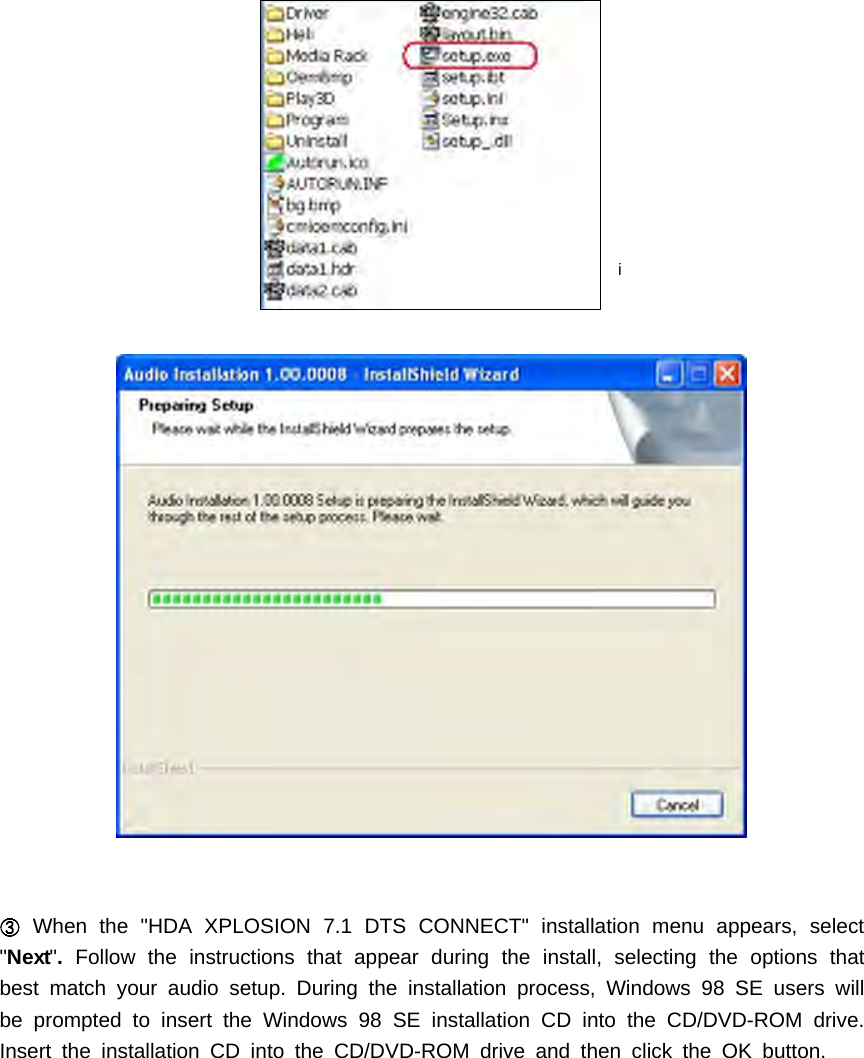
(3) Installing the drivers and softwareTurn on the PC. After Windows has booted then Windows automatically detects newhardware-Multimedia Audio Controller and Found New Hardware Wizard isdisplayed, click on the Cancel button to end this process.Insert installation CD into the CD-ROM/DVD-ROM drive. Installation CD will launchautomatically only if the Auto-Insert Notification option is enabled for yourCD-ROM/DVD-ROM drive. If the installation menu does not appear after inserting theinstallation CD into your CD ROM/DVD-ROM drive, browse to the drive letter thatcontains the CD, double-click on the CD-ROM /DVD-ROM drive icon to open it, andsearch and run "SETUP.EXE" then return to the installation instructions
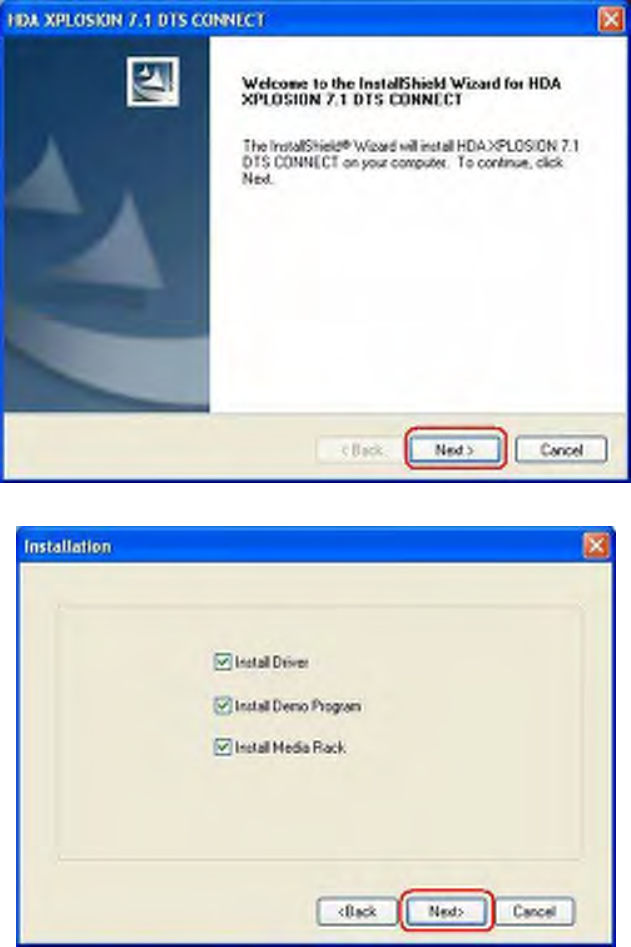
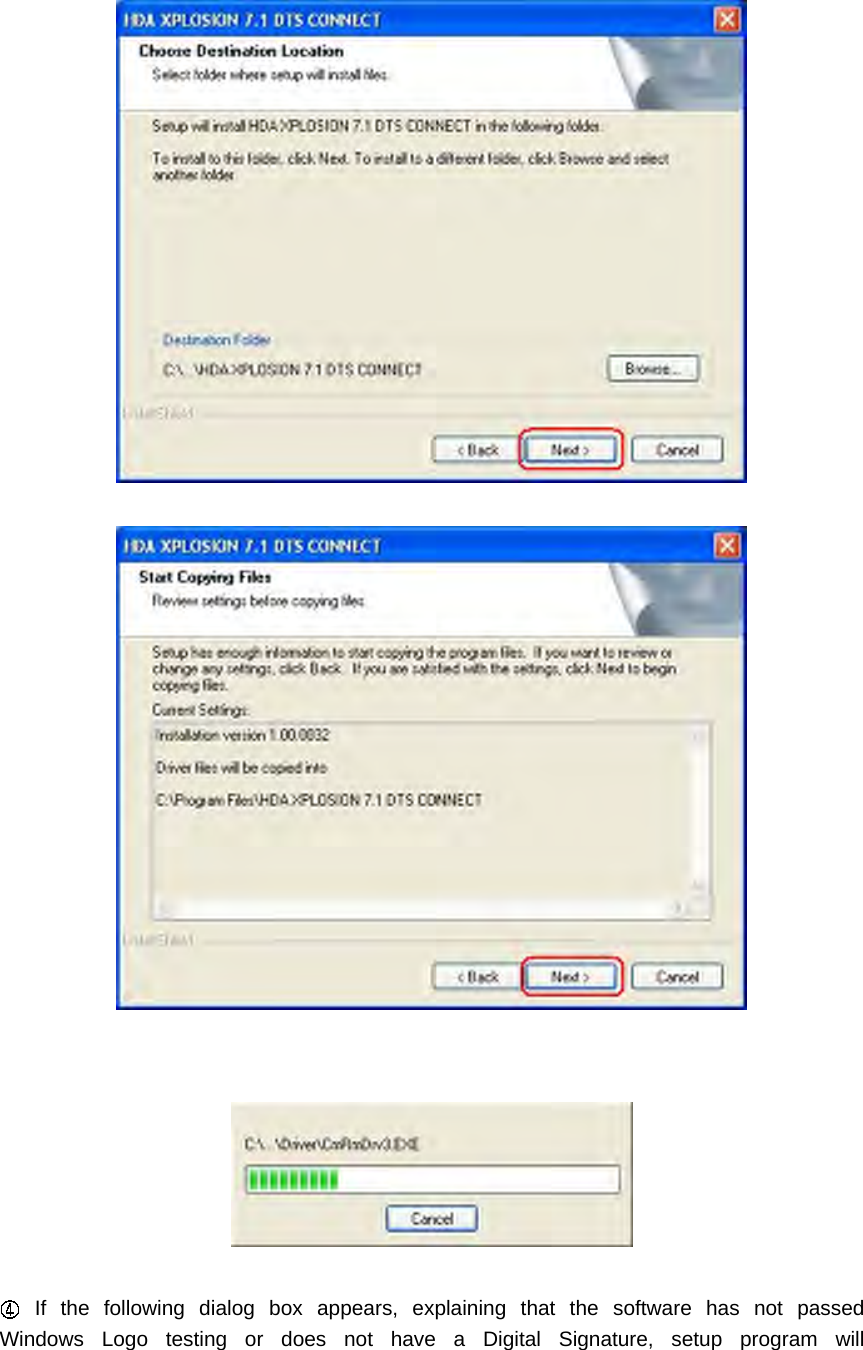
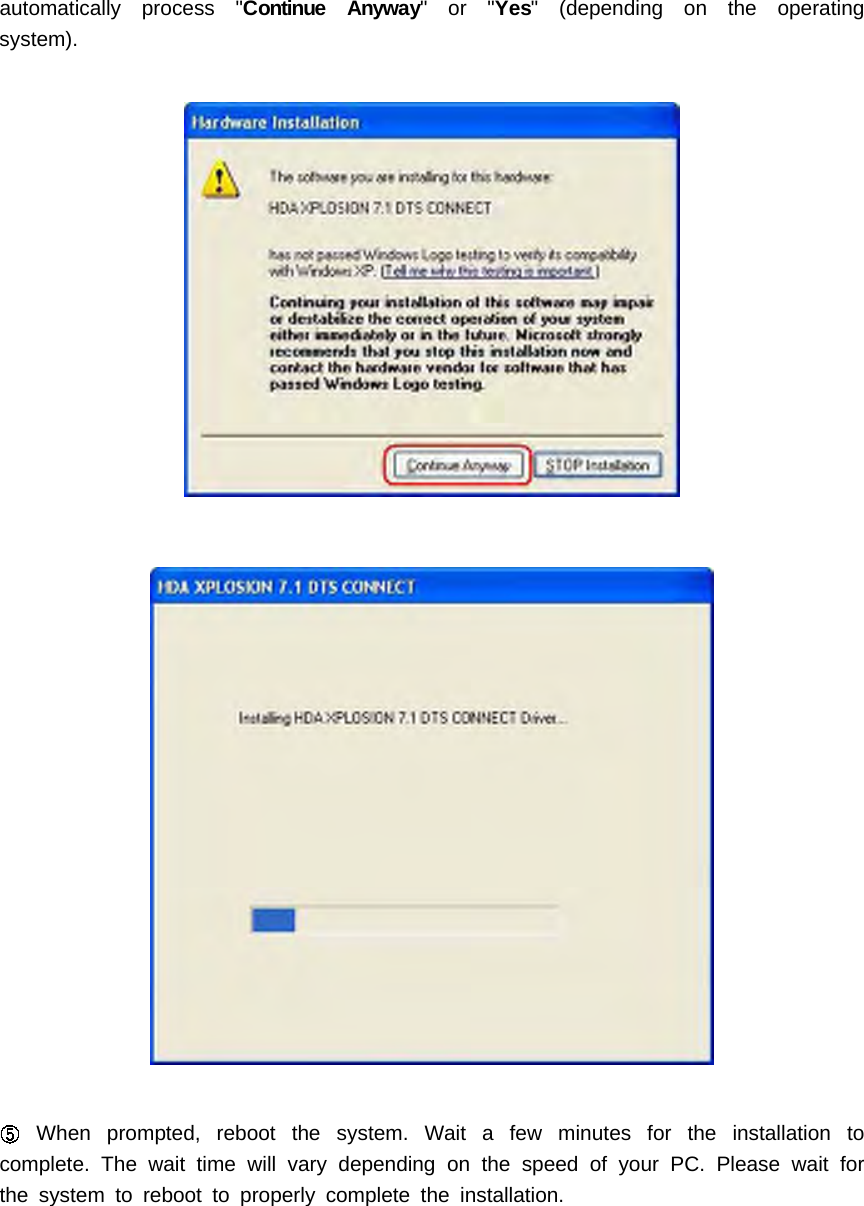
iWhen the "HDA XPLOSION 7.1 DTS CONNECT" installation menu appears, select"Next".Follow the instructions that appear during the install, selecting the options thatbest match your audio setup. During the installation process, Windows 98 SE users willbe prompted to insert the Windows 98 SE installation CD into the CD/DVD-ROM drive.Insert the installation CD into the CD/DVD-ROM drive and then click the OK button.
If the following dialog box appears, explaining that the software has not passedWindows Logo testing or does not have a Digital Signature, setup program will
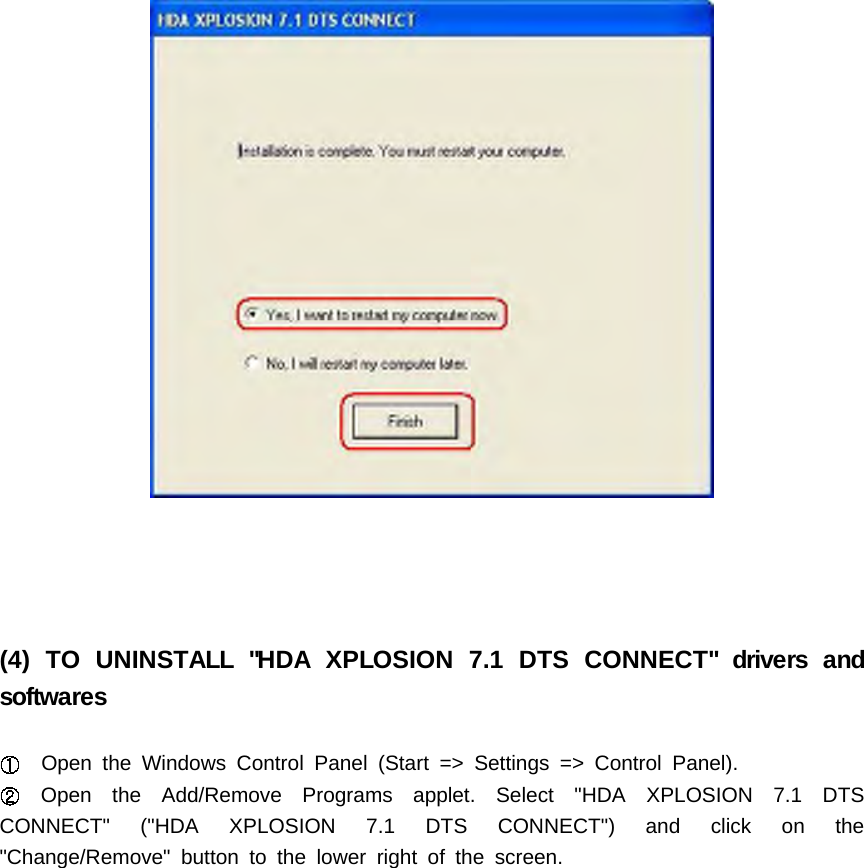
automatically process "Continue Anyway"or"Yes" (depending on the operatingsystem).When prompted, reboot the system. Wait a few minutes for the installation tocomplete. The wait time will vary depending on the speed of your PC. Please wait forthe system to reboot to properly complete the installation.
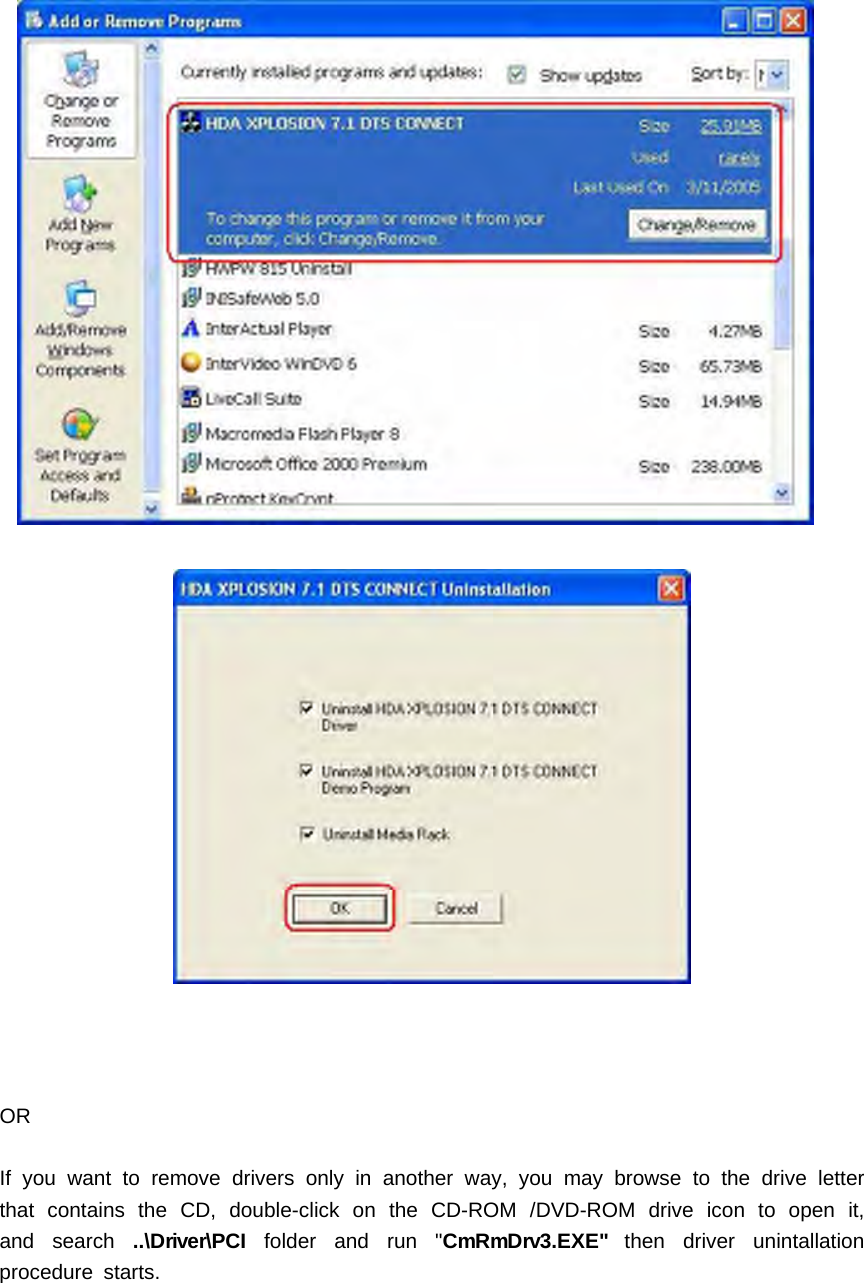
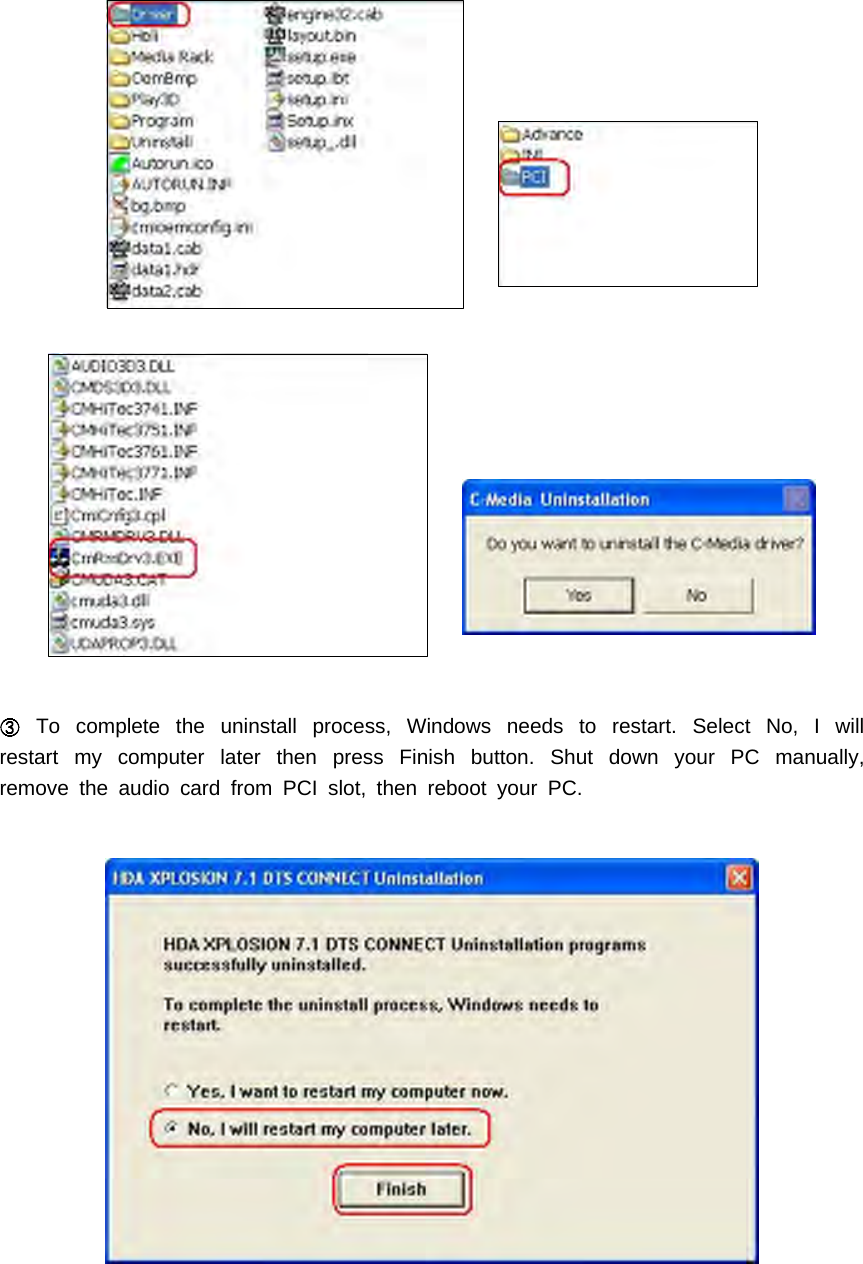
(4) TO UNINSTALL "HDA XPLOSION 7.1 DTS CONNECT" drivers andsoftwaresOpen the Windows Control Panel (Start => Settings => Control Panel).Open the Add/Remove Programs applet. Select "HDA XPLOSION 7.1 DTSCONNECT" ("HDA XPLOSION 7.1 DTS CONNECT") and click on the"Change/Remove" button to the lower right of the screen.
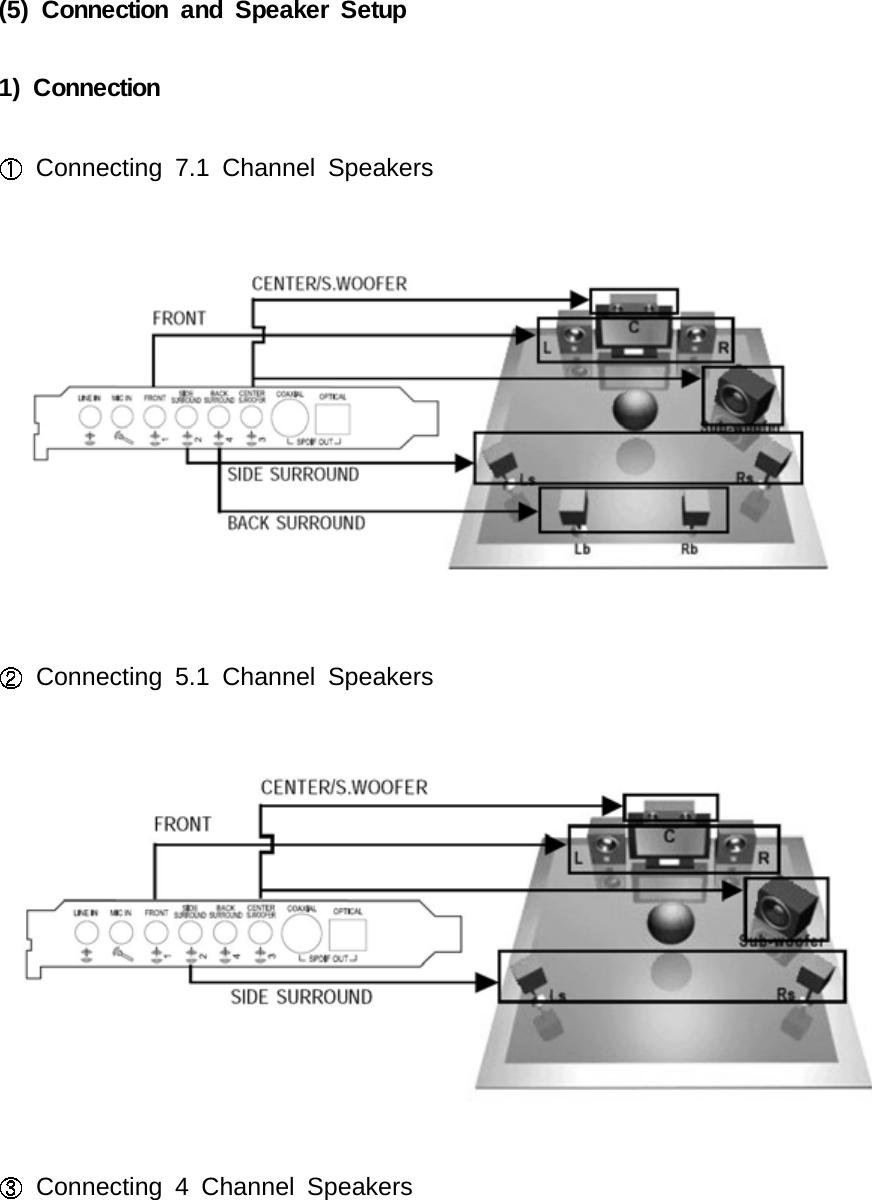
ORIf you want to remove drivers only in another way, you may browse to the drive letterthat contains the CD, double-click on the CD-ROM /DVD-ROM drive icon to open it,and search ..\Driver\PCI folder and run "CmRmDrv3.EXE" then driver unintallationprocedure starts.
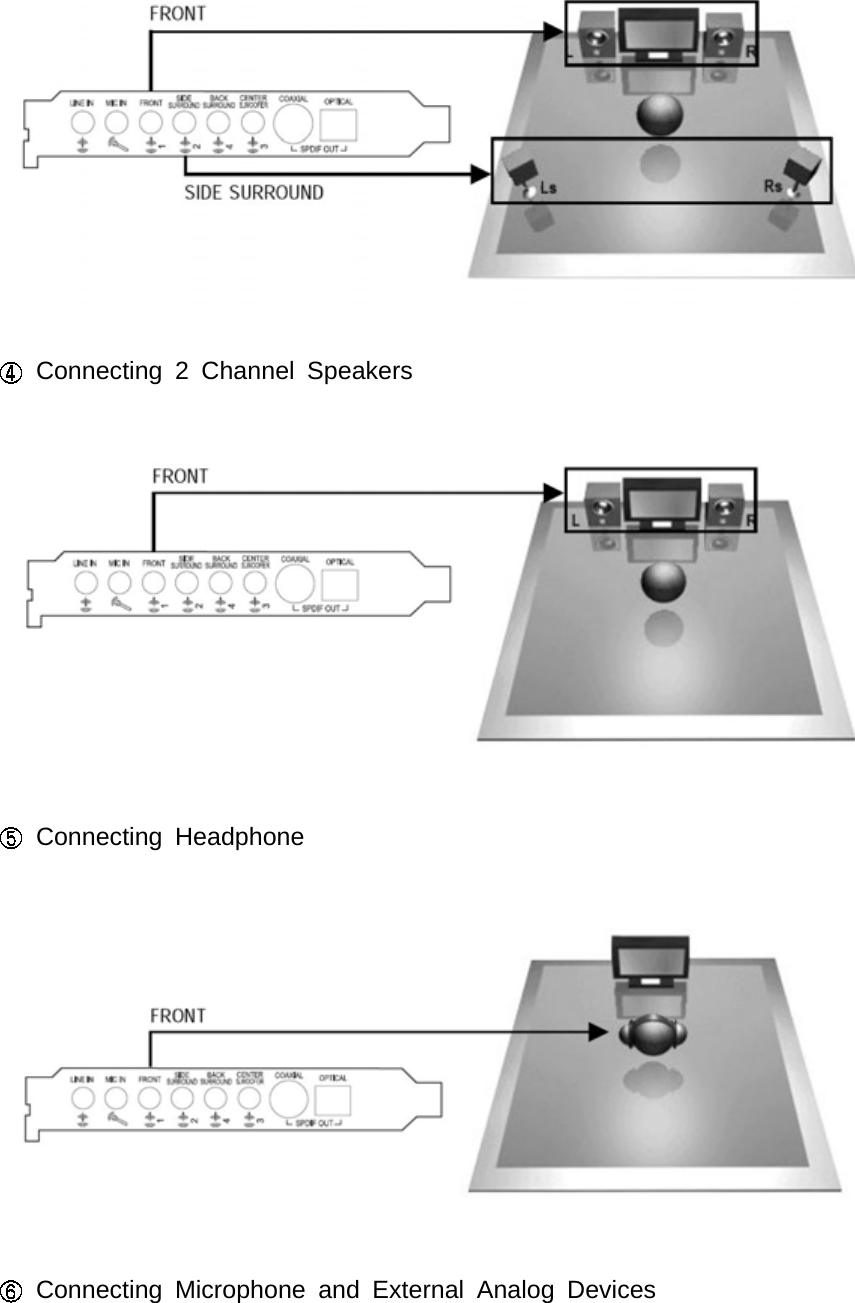
To complete the uninstall process, Windows needs to restart. Select No, I willrestart my computer later then press Finish button. Shut down your PC manually,remove the audio card from PCI slot, then reboot your PC.
(5) Connection and Speaker Setup1) ConnectionConnecting 7.1 Channel SpeakersConnecting 5.1 Channel SpeakersConnecting 4 Channel Speakers
Connecting 2 Channel SpeakersConnecting HeadphoneConnecting Microphone and External Analog Devices
Connecting External Digital Devices
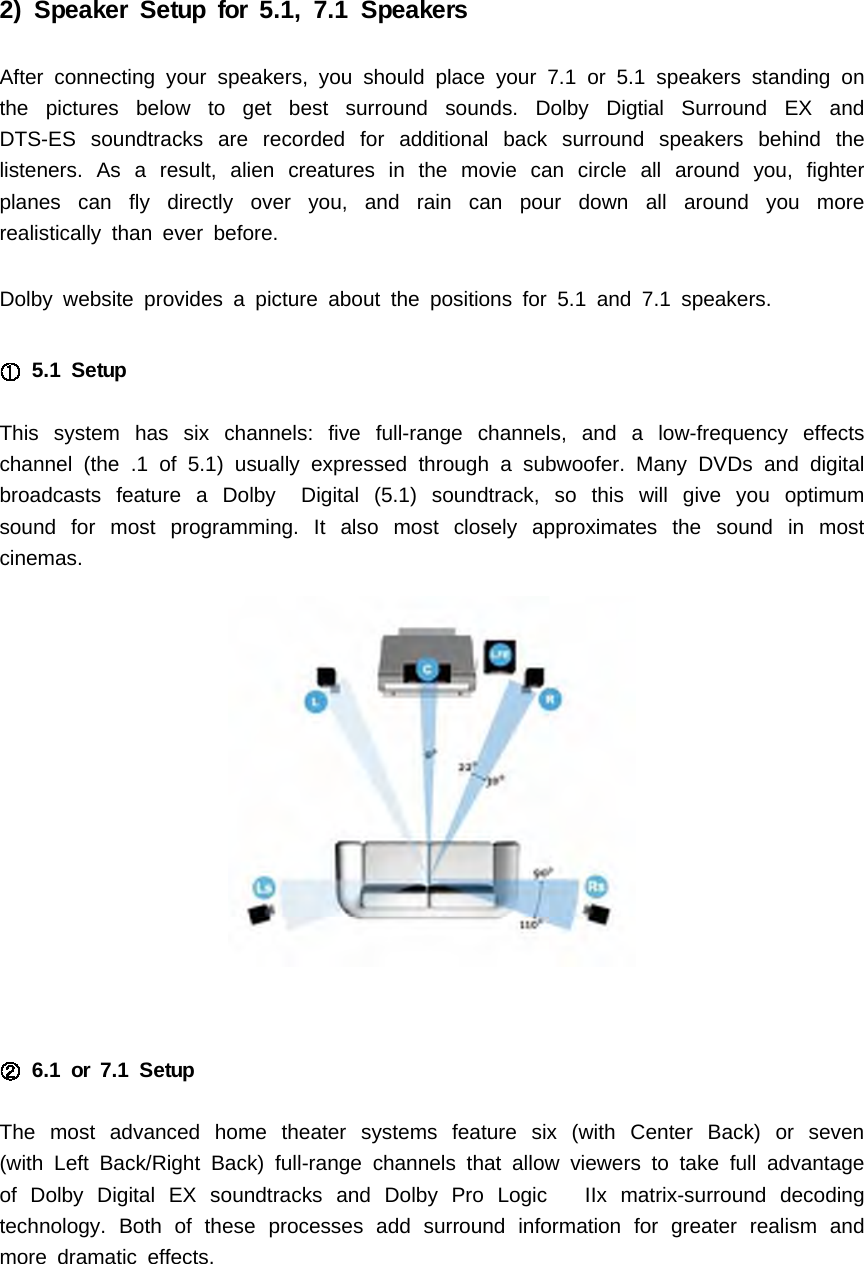
2) Speaker Setup for 5.1, 7.1 SpeakersAfter connecting your speakers, you should place your 7.1 or 5.1 speakers standing onthe pictures below to get best surround sounds. Dolby Digtial Surround EX andDTS-ES soundtracks are recorded for additional back surround speakers behind thelisteners. As a result, alien creatures in the movie can circle all around you, fighterplanes can fly directly over you, and rain can pour down all around you morerealistically than ever before.Dolby website provides a picture about the positions for 5.1 and 7.1 speakers.5.1 SetupThis system has six channels: five full-range channels, and a low-frequency effectschannel (the .1 of 5.1) usually expressed through a subwoofer. Many DVDs and digitalbroadcasts feature a Dolby Digital (5.1) soundtrack, so this will give you optimumsound for most programming. It also most closely approximates the sound in mostcinemas.6.1 or 7.1 SetupThe most advanced home theater systems feature six (with Center Back) or seven(with Left Back/Right Back) full-range channels that allow viewers to take full advantageof Dolby Digital EX soundtracks and Dolby Pro Logic IIx matrix-surround decodingtechnology. Both of these processes add surround information for greater realism andmore dramatic effects.
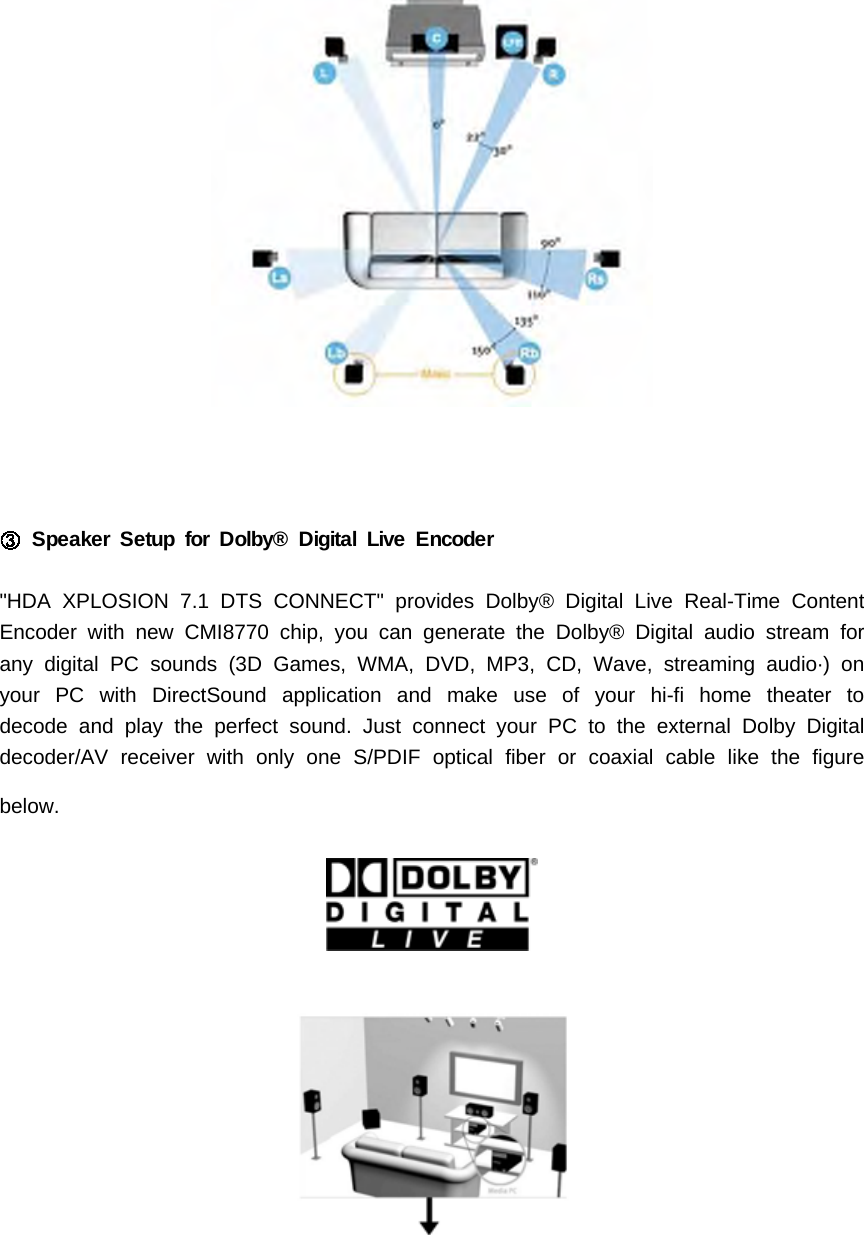
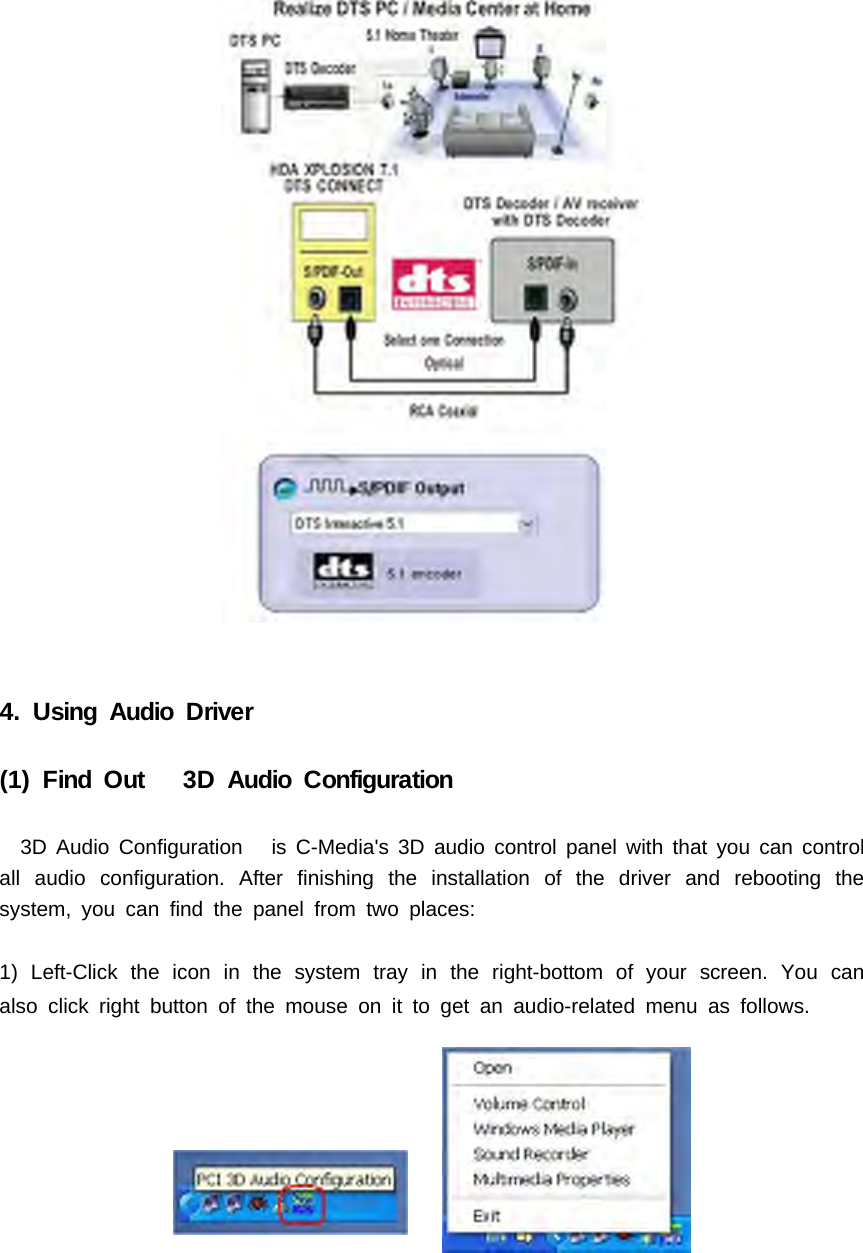
Speaker Setup for Dolby® Digital Live Encoder"HDA XPLOSION 7.1 DTS CONNECT" provides Dolby® Digital Live Real-Time ContentEncoder with new CMI8770 chip, you can generate the Dolby® Digital audio stream forany digital PC sounds (3D Games, WMA, DVD, MP3, CD, Wave, streaming audio·) onyour PC with DirectSound application and make use of your hi-fi home theater todecode and play the perfect sound. Just connect your PC to the external Dolby Digitaldecoder/AV receiver with only one S/PDIF optical fiber or coaxial cable like the figurebelow.
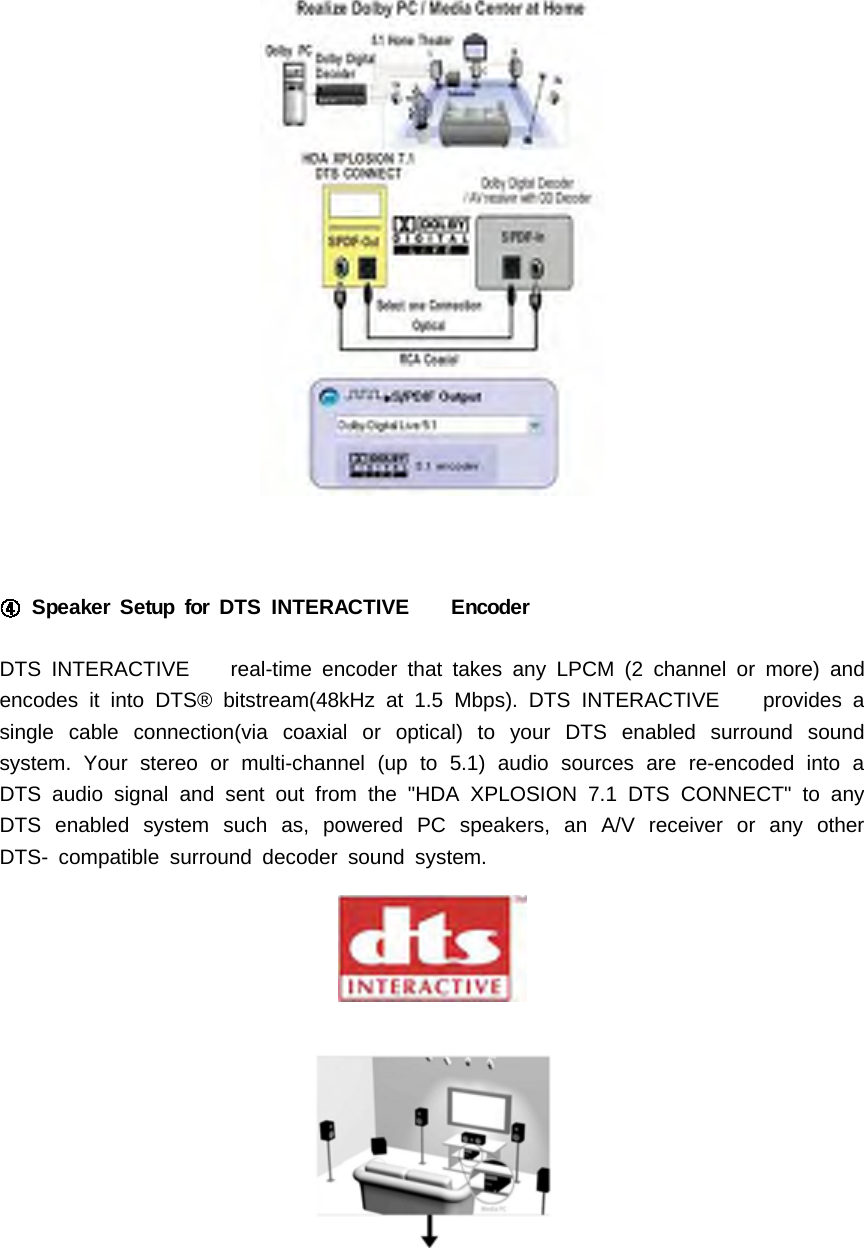
Speaker Setup for DTS INTERACTIVE EncoderDTS INTERACTIVE real-time encoder that takes any LPCM (2 channel or more) andencodes it into DTS® bitstream(48kHz at 1.5 Mbps). DTS INTERACTIVE provides asingle cable connection(via coaxial or optical) to your DTS enabled surround soundsystem. Your stereo or multi-channel (up to 5.1) audio sources are re-encoded into aDTS audio signal and sent out from the "HDA XPLOSION 7.1 DTS CONNECT" to anyDTS enabled system such as, powered PC speakers, an A/V receiver or any otherDTS- compatible surround decoder sound system.
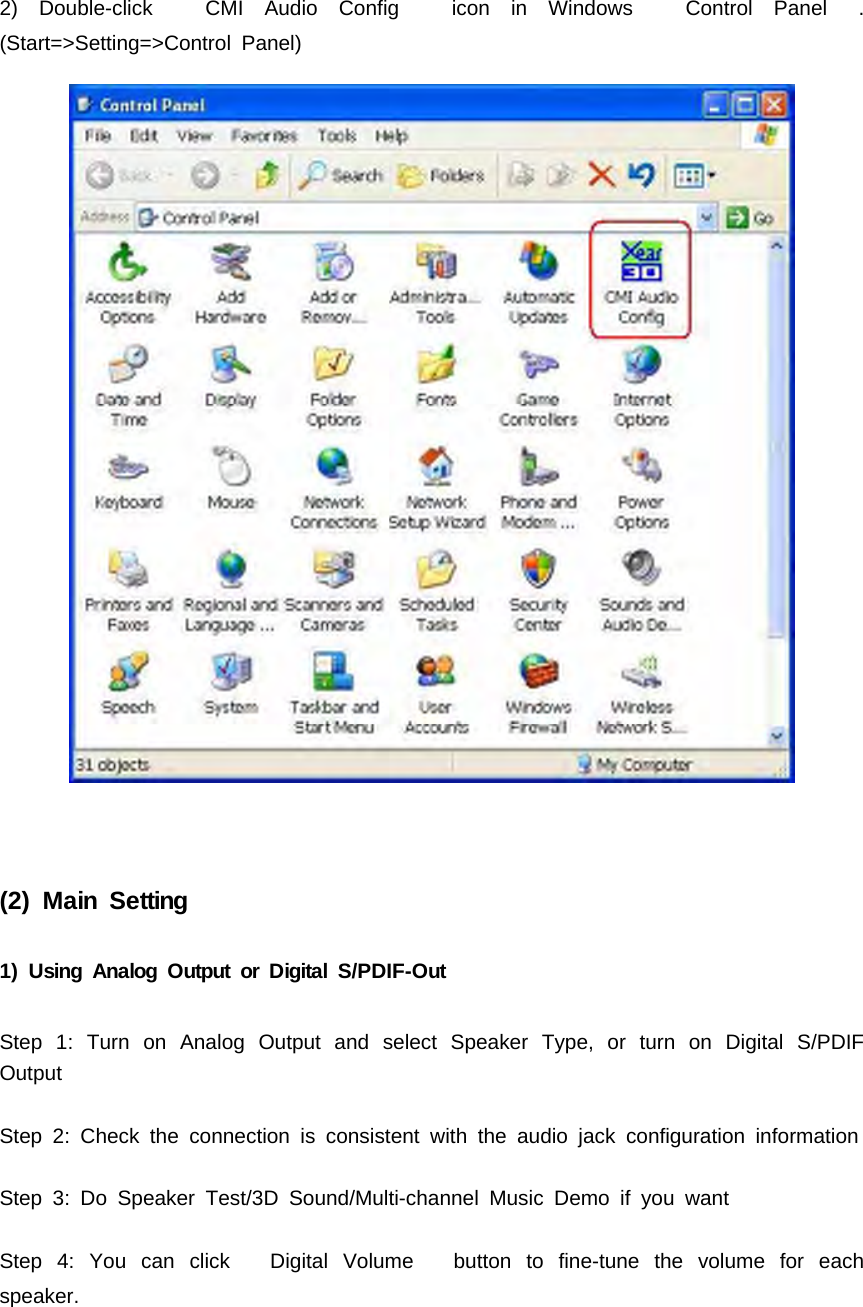
4. Using Audio Driver(1) Find Out 3D Audio Configuration3D Audio Configuration is C-Media's 3D audio control panel with that you can controlall audio configuration. After finishing the installation of the driver and rebooting thesystem, you can find the panel from two places:1) Left-Click the icon in the system tray in the right-bottom of your screen. You canalso click right button of the mouse on it to get an audio-related menu as follows.
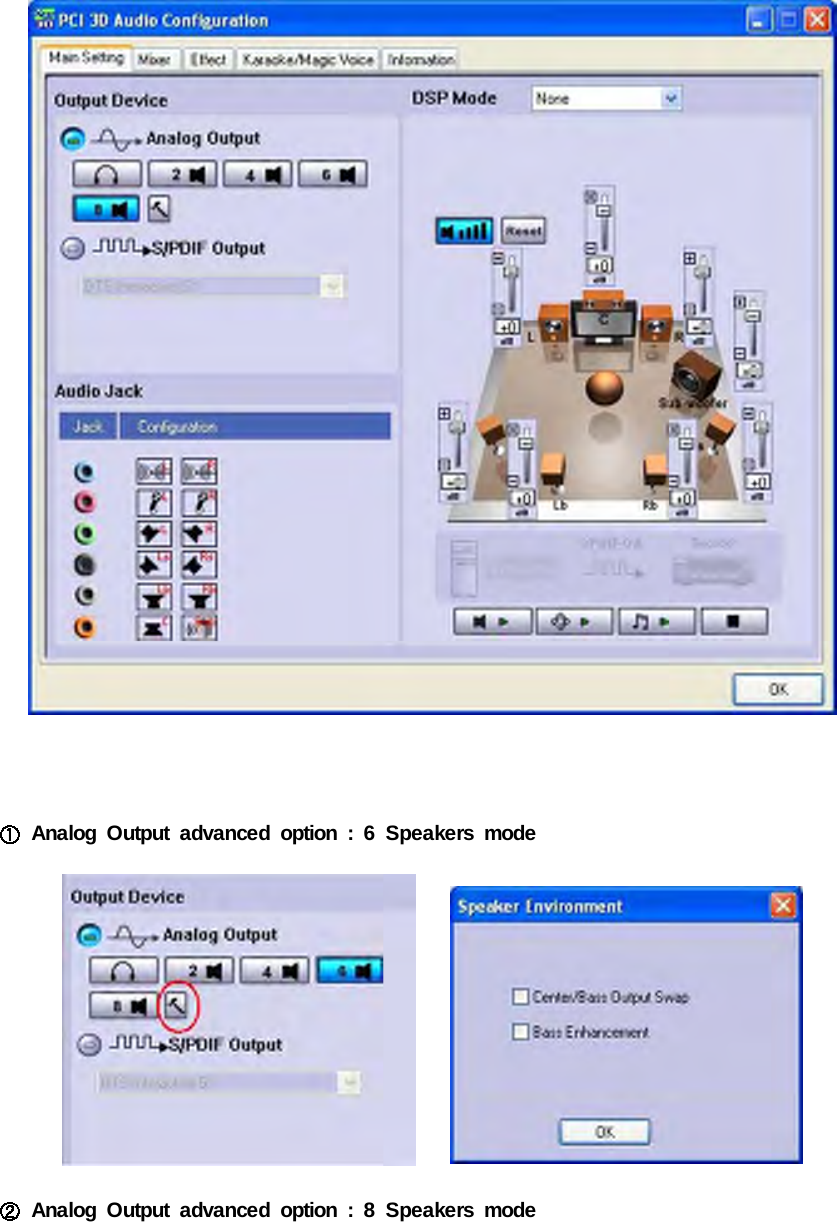
2) Double-click CMI Audio Config icon in Windows Control Panel .(Start=>Setting=>Control Panel)(2) Main Setting1) Using Analog Output or Digital S/PDIF-OutStep 1: Turn on Analog Output and select Speaker Type, or turn on Digital S/PDIFOutputStep 2: Check the connection is consistent with the audio jack configuration informationStep 3: Do Speaker Test/3D Sound/Multi-channel Music Demo if you wantStep 4: You can click Digital Volume button to fine-tune the volume for eachspeaker.
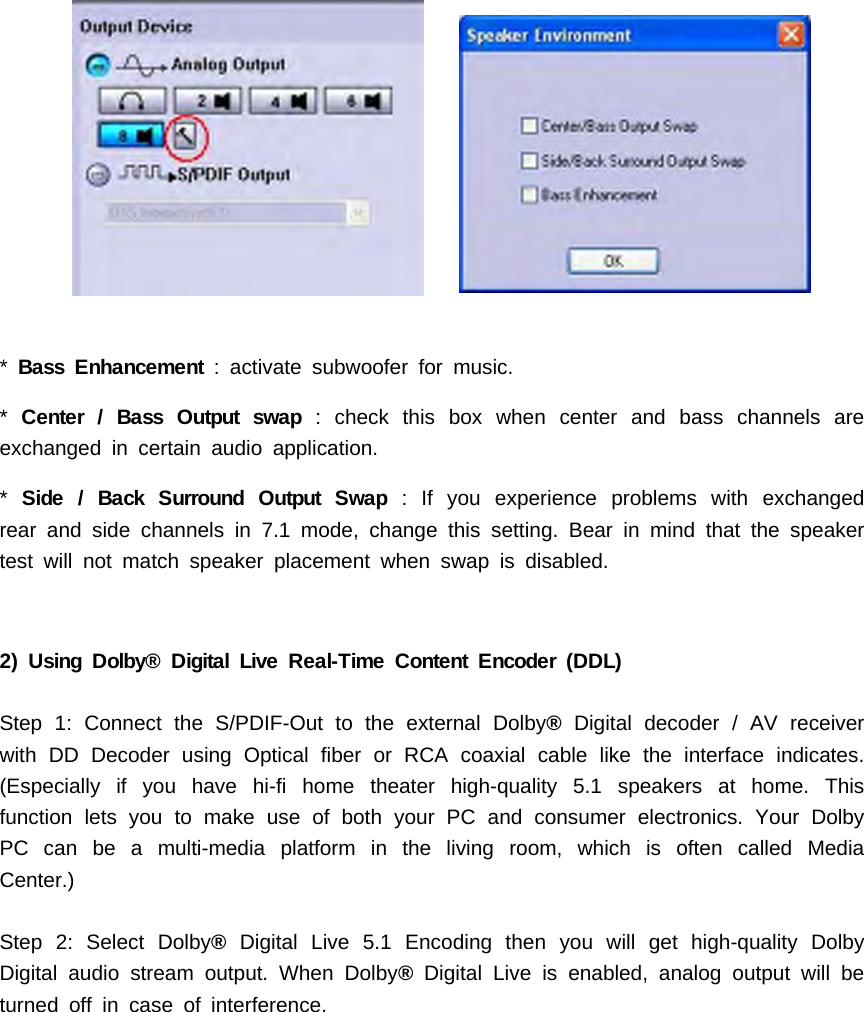
Analog Output advanced option : 6 Speakers modeAnalog Output advanced option : 8 Speakers mode
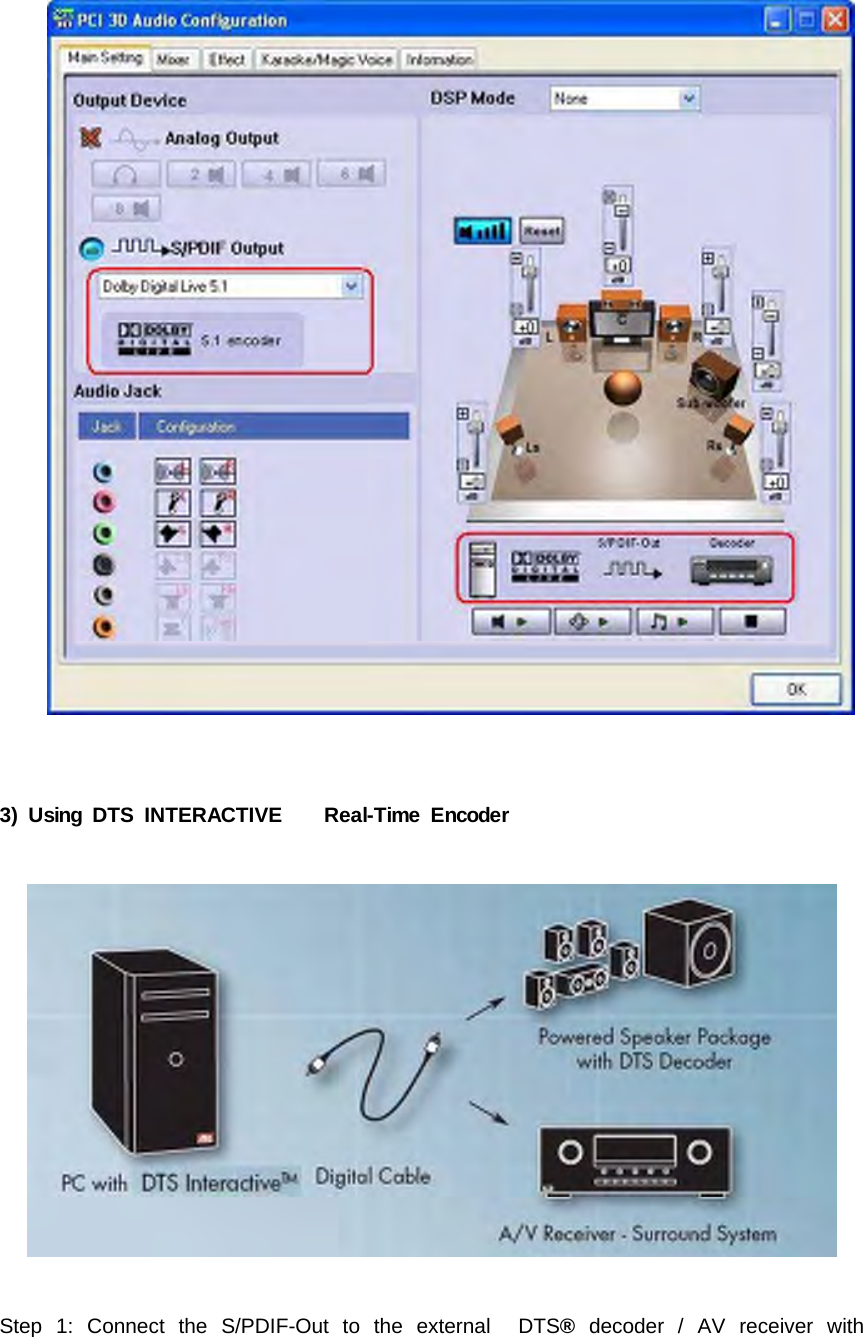
*Bass Enhancement : activate subwoofer for music.*Center / Bass Output swap : check this box when center and bass channels areexchanged in certain audio application.*Side / Back Surround Output Swap : If you experience problems with exchangedrear and side channels in 7.1 mode, change this setting. Bear in mind that the speakertest will not match speaker placement when swap is disabled.2) Using Dolby® Digital Live Real-Time Content Encoder (DDL)Step 1: Connect the S/PDIF-Out to the external Dolby®Digital decoder / AV receiverwith DD Decoder using Optical fiber or RCA coaxial cable like the interface indicates.(Especially if you have hi-fi home theater high-quality 5.1 speakers at home. Thisfunction lets you to make use of both your PC and consumer electronics. Your DolbyPCcanbeamulti-mediaplatforminthelivingroom,whichisoftencalledMediaCenter.)Step 2: Select Dolby®Digital Live 5.1 Encoding then you will get high-quality DolbyDigital audio stream output. When Dolby®Digital Live is enabled, analog output will beturned off in case of interference.
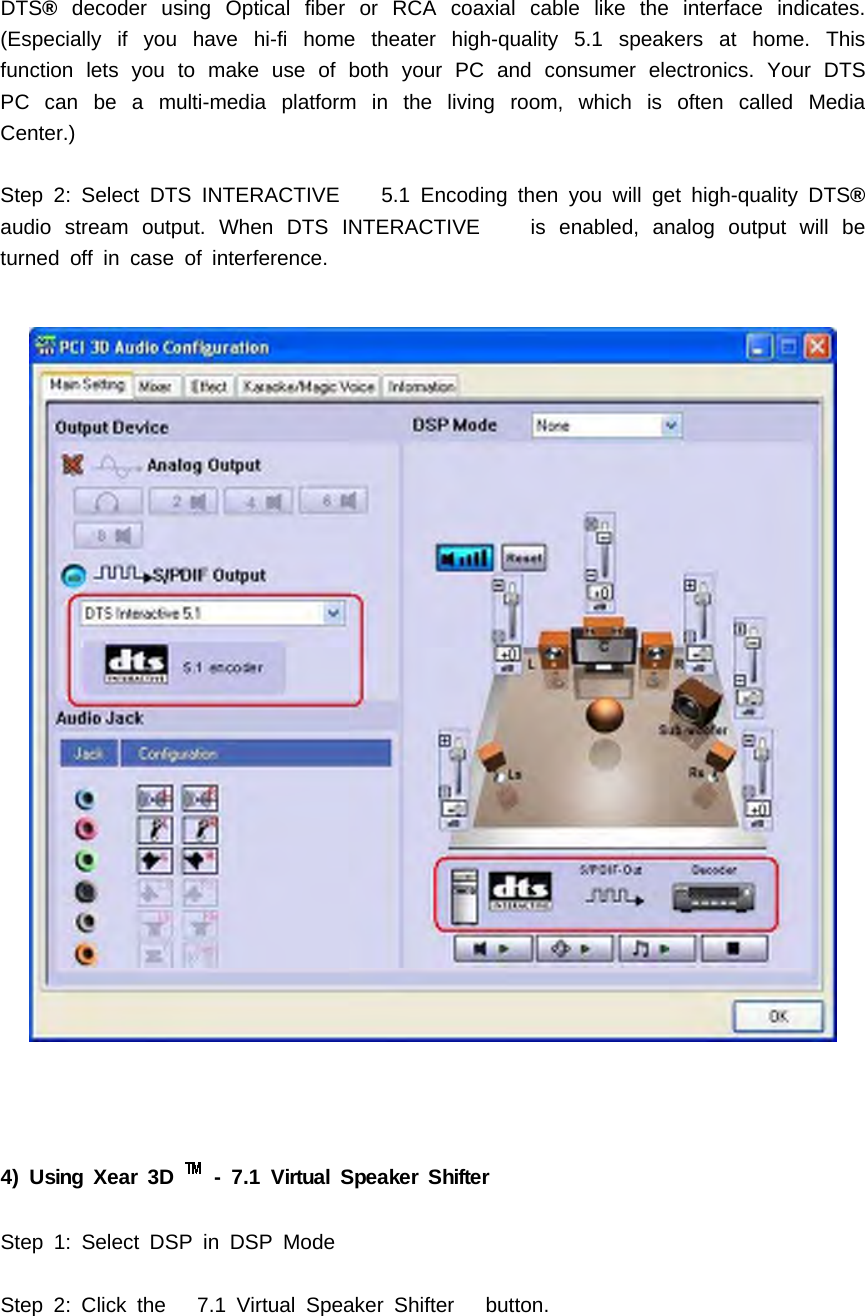
3) Using DTS INTERACTIVE Real-Time EncoderStep 1: Connect the S/PDIF-Out to the external DTS®decoder / AV receiver with
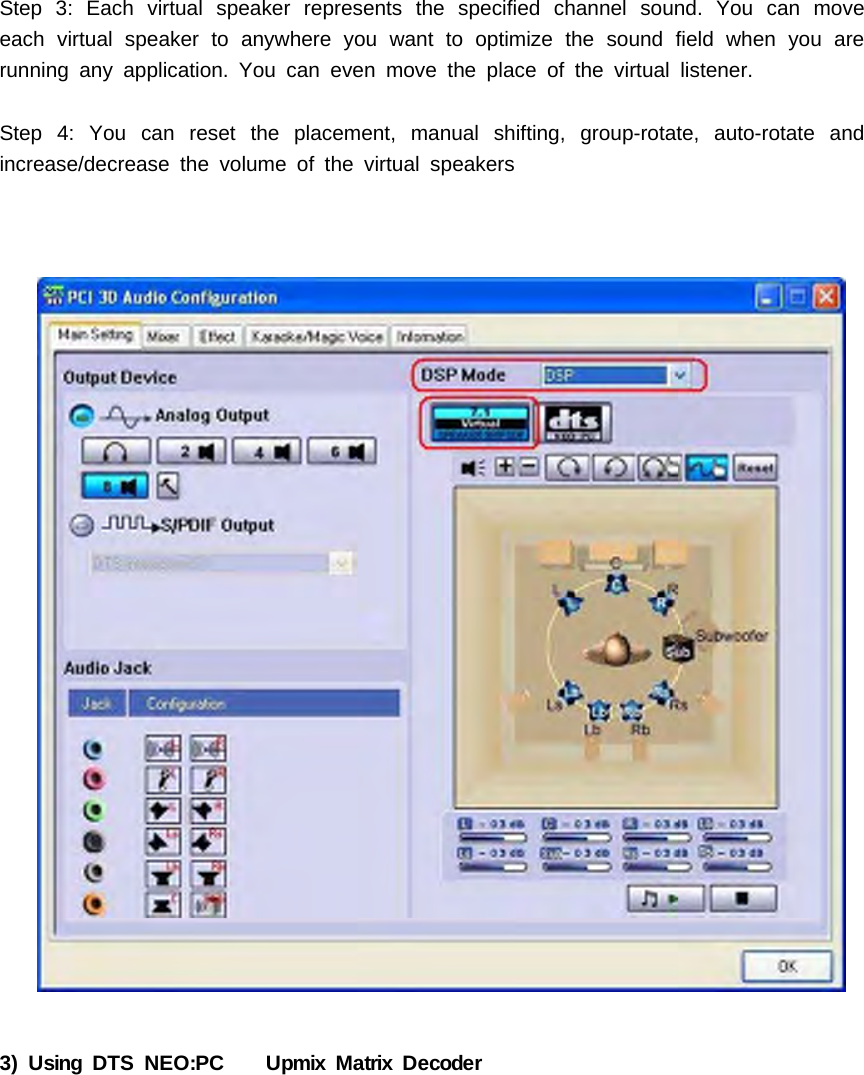
DTS®decoder using Optical fiber or RCA coaxial cable like the interface indicates.(Especially if you have hi-fi home theater high-quality 5.1 speakers at home. Thisfunction lets you to make use of both your PC and consumer electronics. Your DTSPCcanbeamulti-mediaplatforminthelivingroom,whichisoftencalledMediaCenter.)Step 2: Select DTS INTERACTIVE 5.1 Encoding then you will get high-quality DTS®audio stream output. When DTS INTERACTIVE is enabled, analog output will beturned off in case of interference.4) Using Xear 3D - 7.1 Virtual Speaker ShifterStep 1: Select DSP in DSP ModeStep 2: Click the 7.1 Virtual Speaker Shifter button.
Step 3: Each virtual speaker represents the specified channel sound. You can moveeach virtual speaker to anywhere you want tooptimizethesoundfieldwhenyouarerunning any application. You can even move the place of the virtual listener.Step 4: You can reset the placement, manual shifting, group-rotate, auto-rotate andincrease/decrease the volume of the virtual speakers3) Using DTS NEO:PC Upmix Matrix Decoder
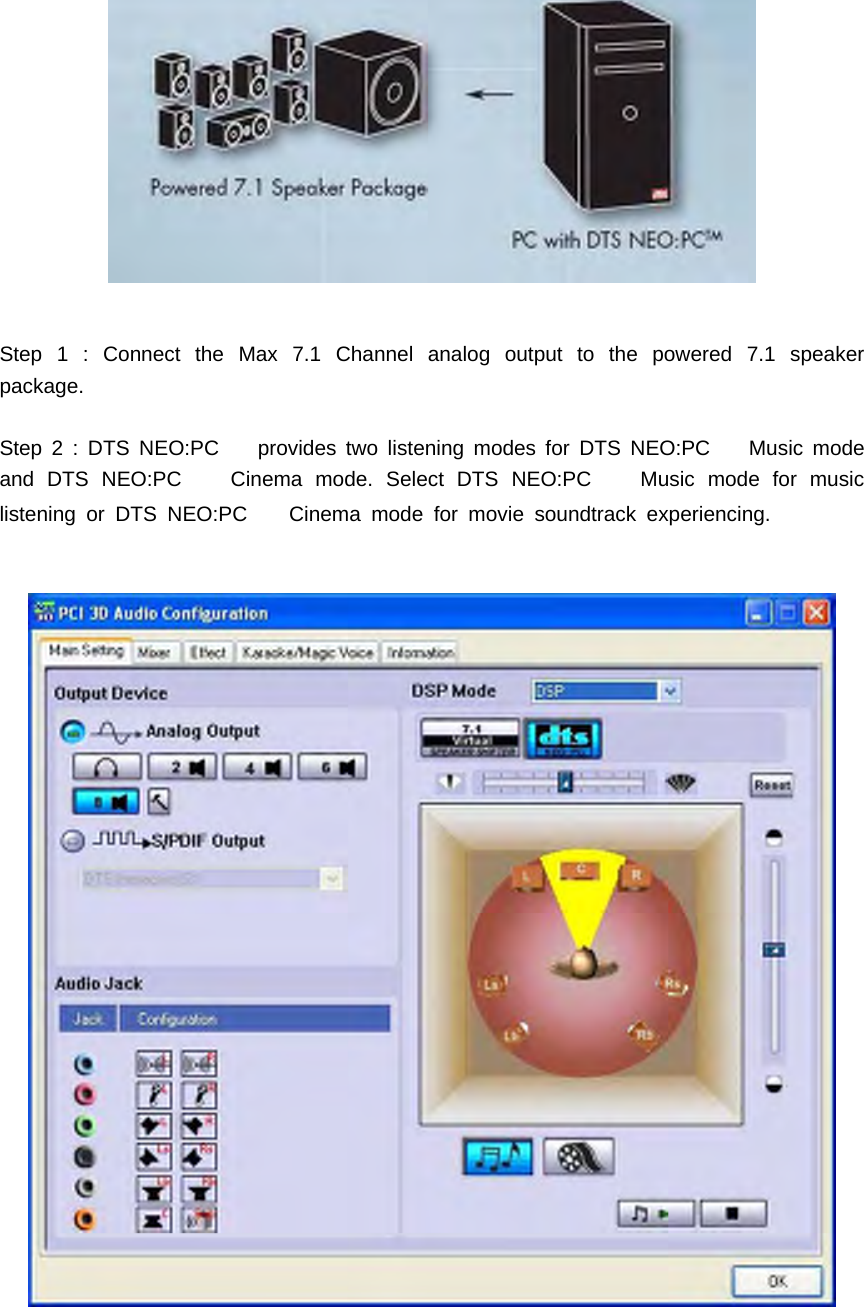
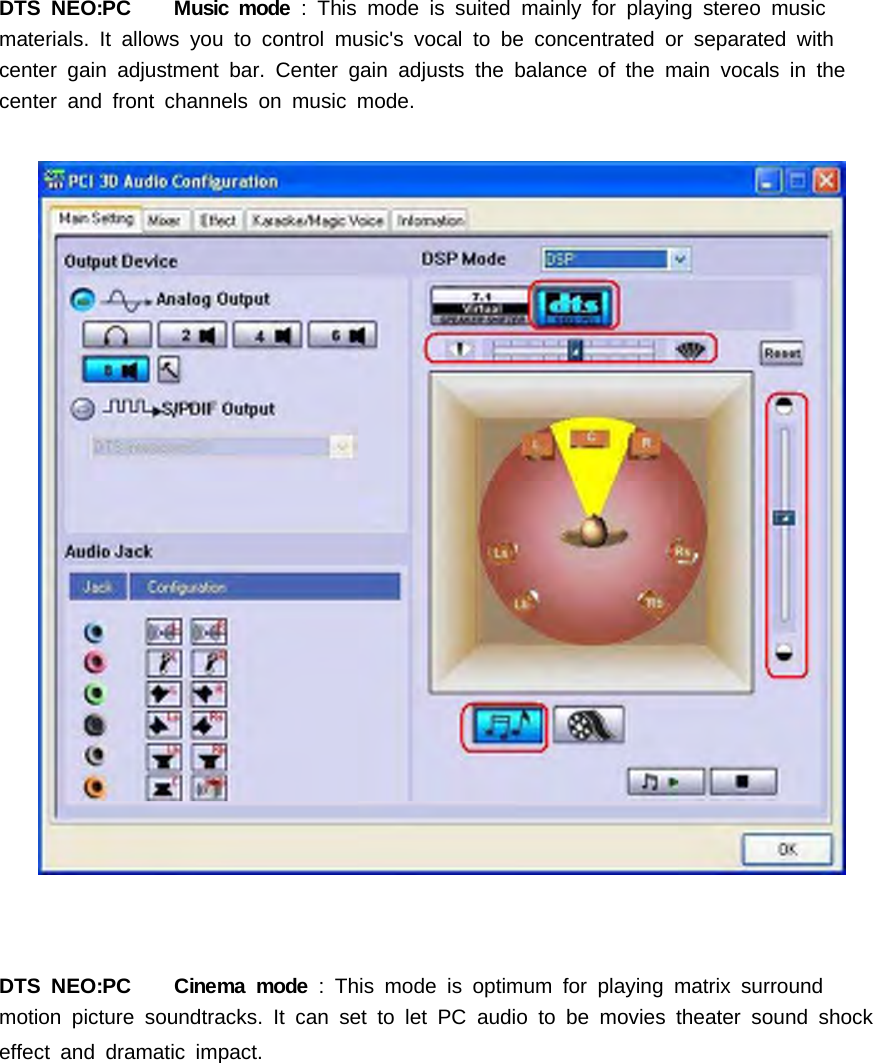
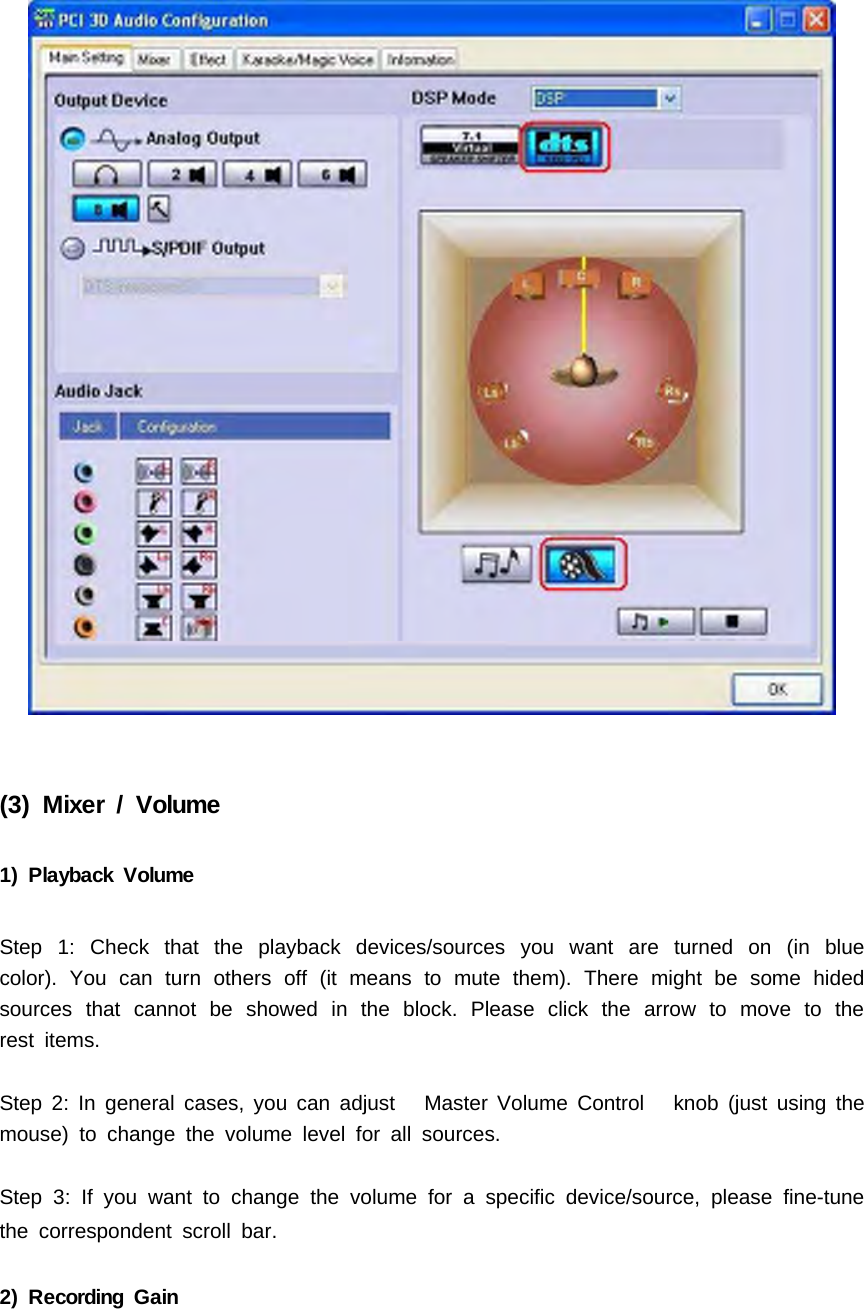
Step 1 : Connect the Max 7.1 Channel analog output to the powered 7.1 speakerpackage.Step 2 : DTS NEO:PC provides two listening modes for DTS NEO:PC Music modeand DTS NEO:PC Cinema mode. Select DTS NEO:PC Music mode for musiclistening or DTS NEO:PC Cinema mode for movie soundtrack experiencing.
DTS NEO:PC Music mode : This mode is suited mainly for playing stereo musicmaterials.Itallowsyoutocontrolmusic'svocaltobeconcentratedorseparatedwithcenter gain adjustment bar. Center gain adjusts the balance of the main vocals in thecenter and front channels on music mode.DTS NEO:PC Cinema mode : This mode is optimum for playing matrix surroundmotion picture soundtracks. It can set to let PC audio to be movies theater sound shockeffect and dramatic impact.
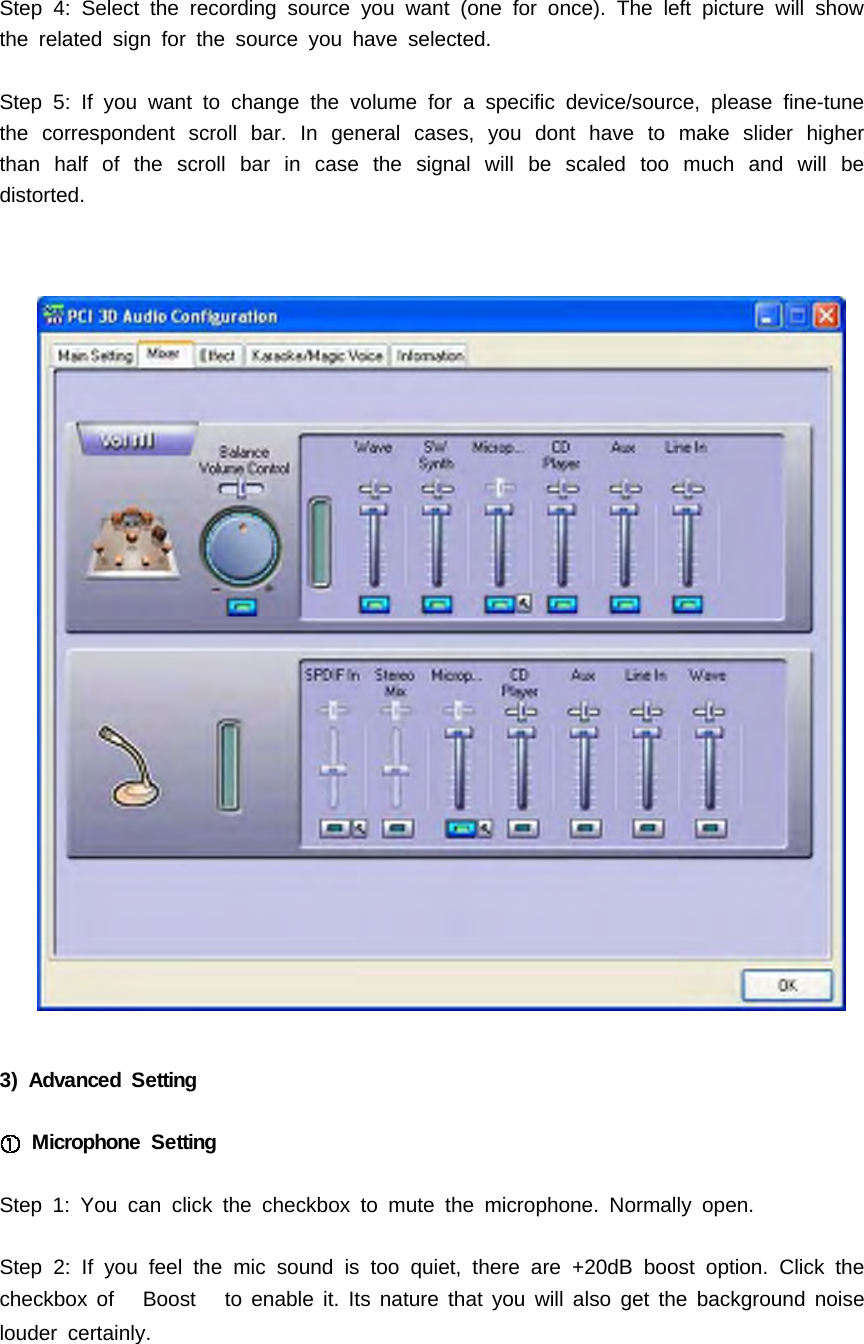
(3) Mixer / Volume1) Playback VolumeStep 1: Check that the playback devices/sources you want are turned on (in bluecolor). You can turn others off (it means to mute them). There might be some hidedsources that cannot be showed in the block. Please click the arrow to move to therest items.Step 2: In general cases, you can adjust Master Volume Control knob (just using themouse) to change the volume level for all sources.Step 3: If you want to change the volume for a specific device/source, please fine-tunethe correspondent scroll bar.2) Recording Gain
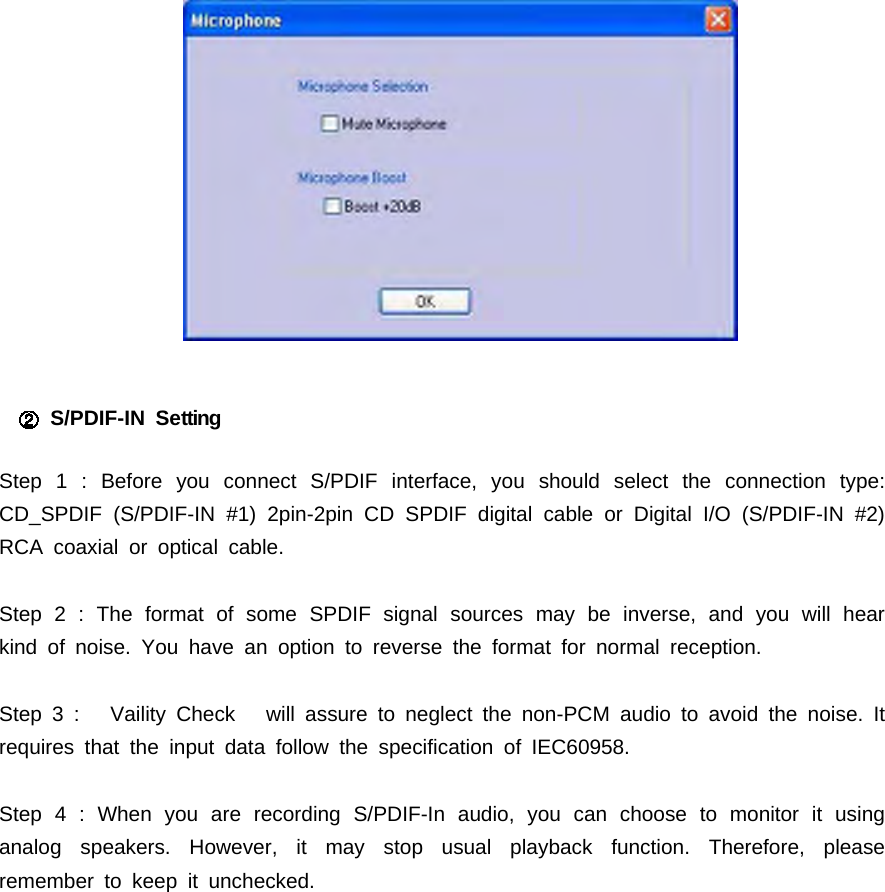
Step 4: Select the recording source you want (one for once). The left picture will showthe related sign for the source you have selected.Step 5: If you want to change the volume for a specific device/source, please fine-tunethe correspondent scroll bar. In general cases, you dont have to make slider higherthan half of the scroll bar in case the signal will be scaled too much and will bedistorted.3) Advanced SettingMicrophone SettingStep 1: You can click the checkbox to mute the microphone. Normally open.Step 2: If you feel the mic sound is too quiet, there are +20dB boost option. Click thecheckbox of Boost to enable it. Its nature that you will also get the background noiselouder certainly.
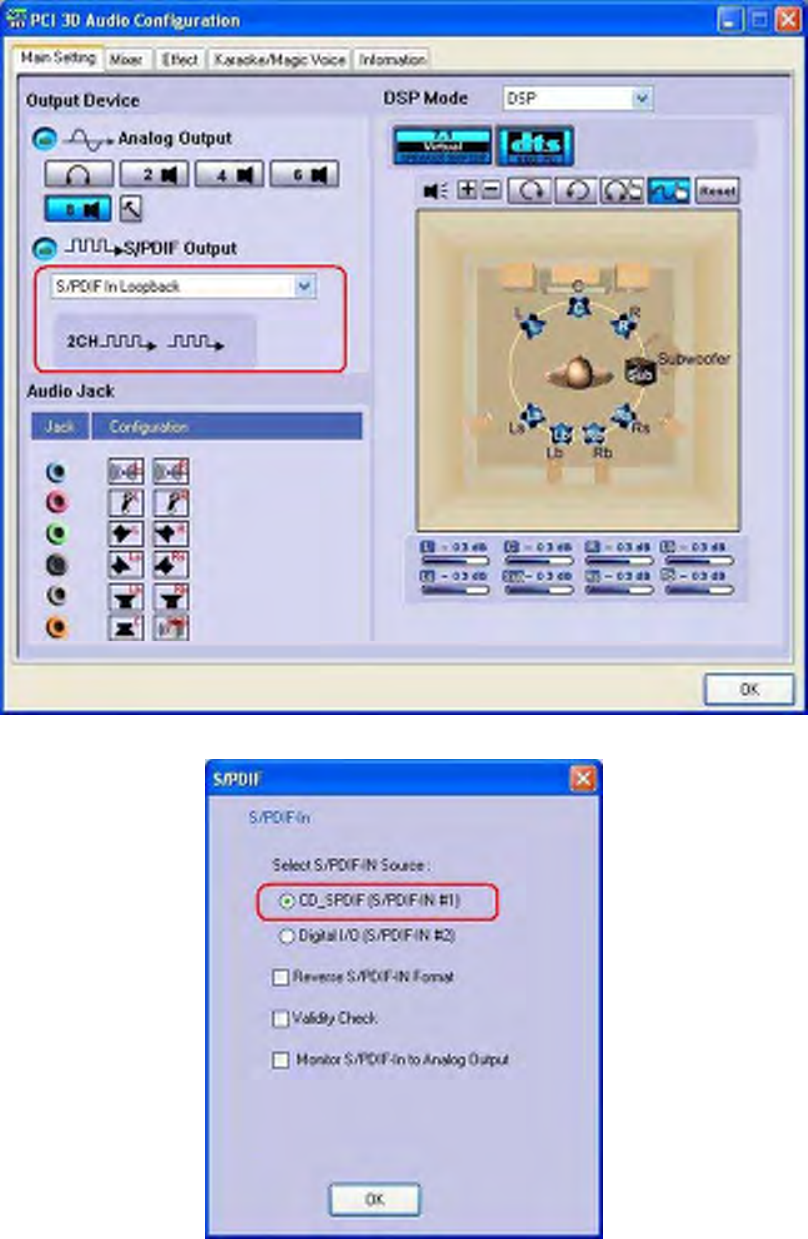
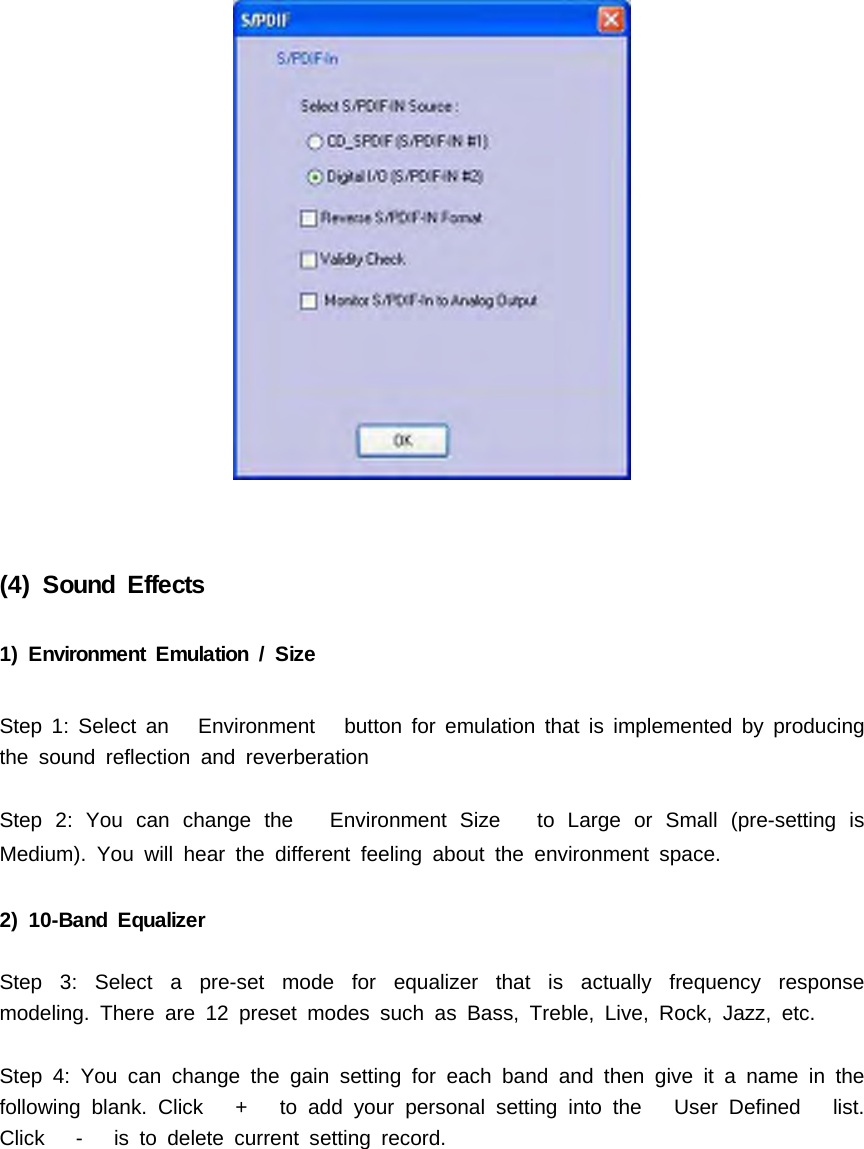
S/PDIF-IN SettingStep 1 : Before you connect S/PDIF interface, you should select the connection type:CD_SPDIF (S/PDIF-IN #1) 2pin-2pin CD SPDIF digital cable or Digital I/O (S/PDIF-IN #2)RCA coaxial or optical cable.Step 2 : The format of some SPDIF signal sources may be inverse, and you will hearkind of noise. You have an option to reverse the format for normal reception.Step 3 : Vaility Check will assure to neglect the non-PCM audio to avoid the noise. Itrequires that the input data follow the specification of IEC60958.Step 4 : When you are recording S/PDIF-In audio, you can choose to monitor it usinganalog speakers. However, it may stop usual playback function. Therefore, pleaseremember to keep it unchecked.
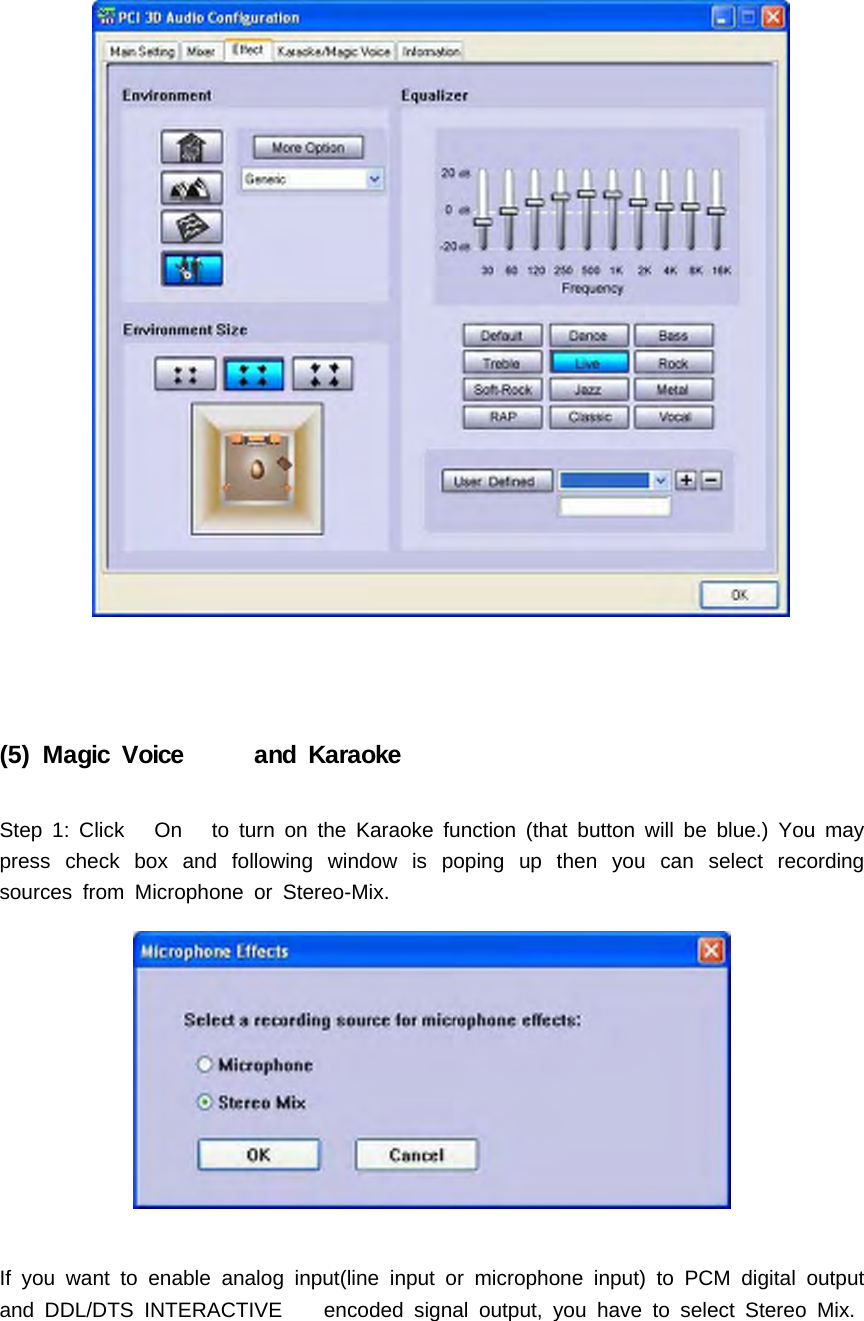
(4) Sound Effects1) Environment Emulation / SizeStep 1: Select an Environment button for emulation that is implemented by producingthe sound reflection and reverberationStep 2: You can change the Environment Size to Large or Small (pre-setting isMedium). You will hear the different feeling about the environment space.2) 10-Band EqualizerStep 3: Select a pre-set mode for equalizer that is actually frequency responsemodeling. There are 12 preset modes such as Bass, Treble, Live, Rock, Jazz, etc.Step 4: You can change the gain setting for each band and then give it a name in thefollowing blank. Click + to add your personal setting into the User Defined list.Click - is to delete current setting record.
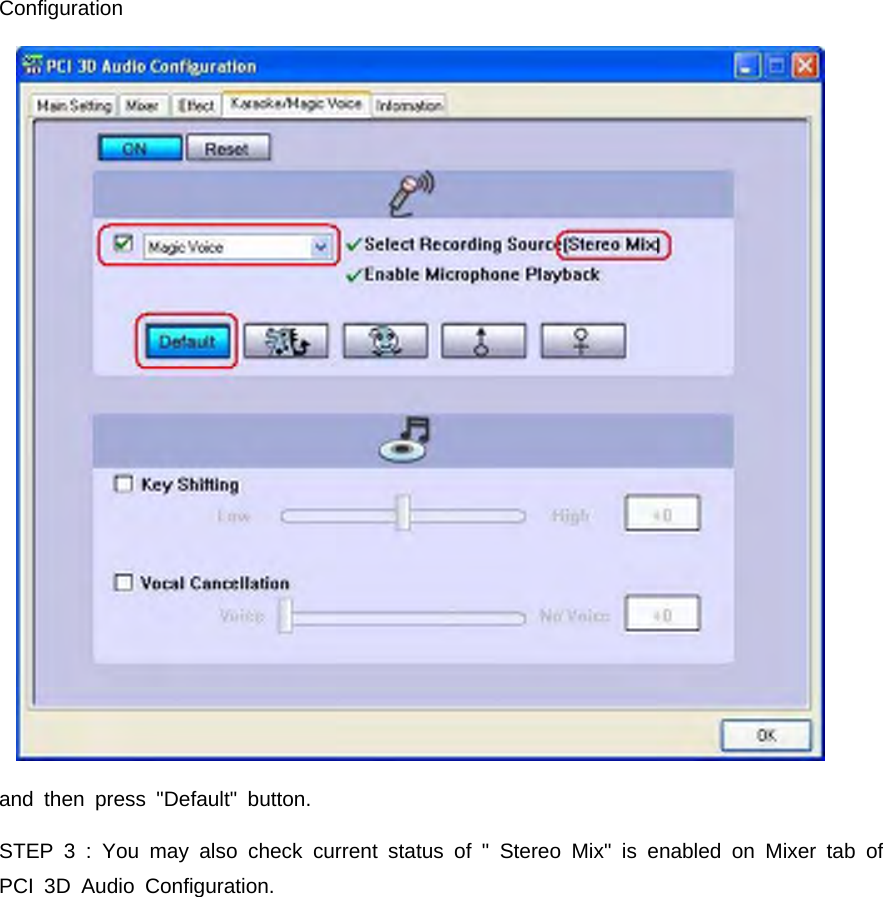
(5) Magic Voice and KaraokeStep 1: Click On to turn on the Karaoke function (that button will be blue.) You maypress check box and following window is poping up then you can select recordingsources from Microphone or Stereo-Mix.If you want to enable analog input(line input or microphone input) to PCM digital outputand DDL/DTS INTERACTIVE encoded signal output, you have to select Stereo Mix.
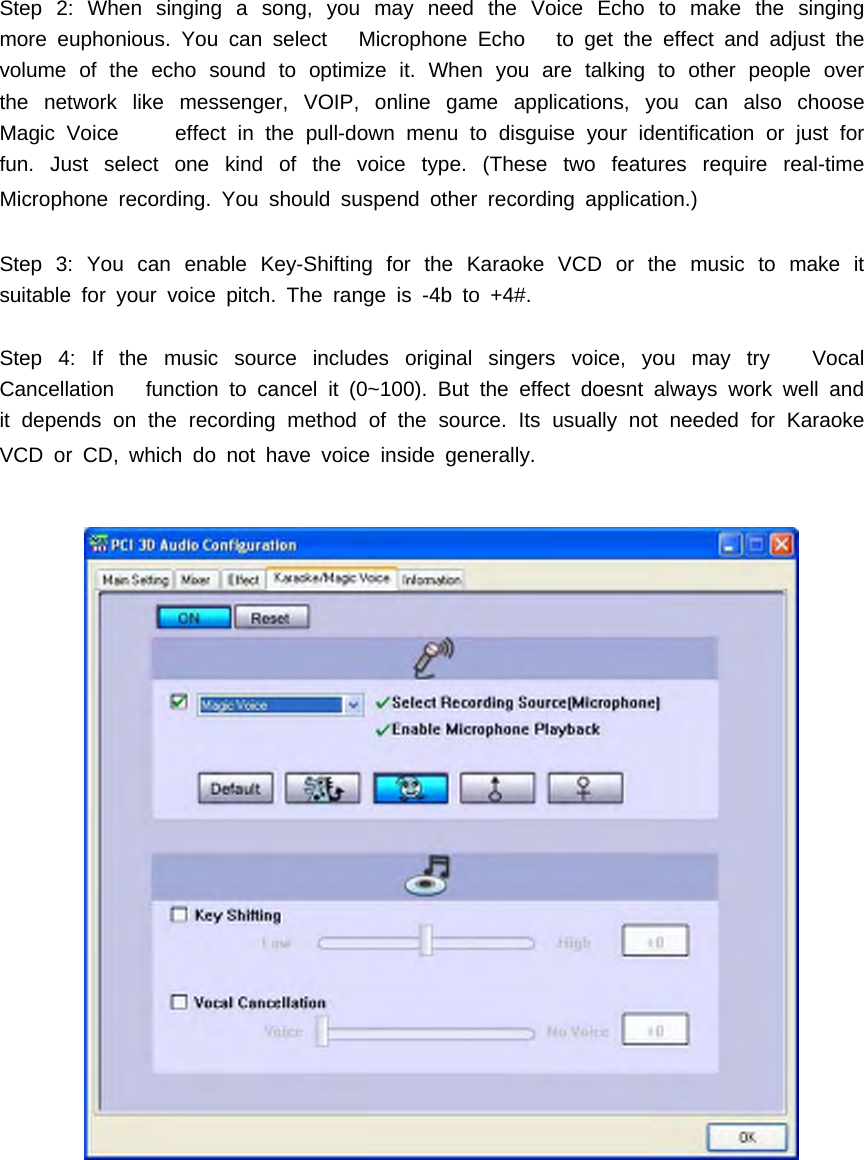
Step 2: When singing a song, you may need the Voice Echo to make the singingmore euphonious. You can select Microphone Echo to get the effect and adjust thevolume of the echo sound to optimize it. When you are talking to other people overthe network like messenger, VOIP, online game applications, you can also chooseMagic Voice effect in the pull-down menu to disguise your identification or just forfun. Just select one kind of the voice type. (These two features require real-timeMicrophone recording. You should suspend other recording application.)Step 3: You can enable Key-Shifting for the Karaoke VCD or the music to make itsuitable for your voice pitch. The range is -4b to +4#.Step 4: If the music source includes original singers voice, you may try VocalCancellation function to cancel it (0~100). But the effect doesnt always work well andit depends on the recording method of the source. Its usually not needed for KaraokeVCDorCD,whichdonothavevoiceinsidegenerally.
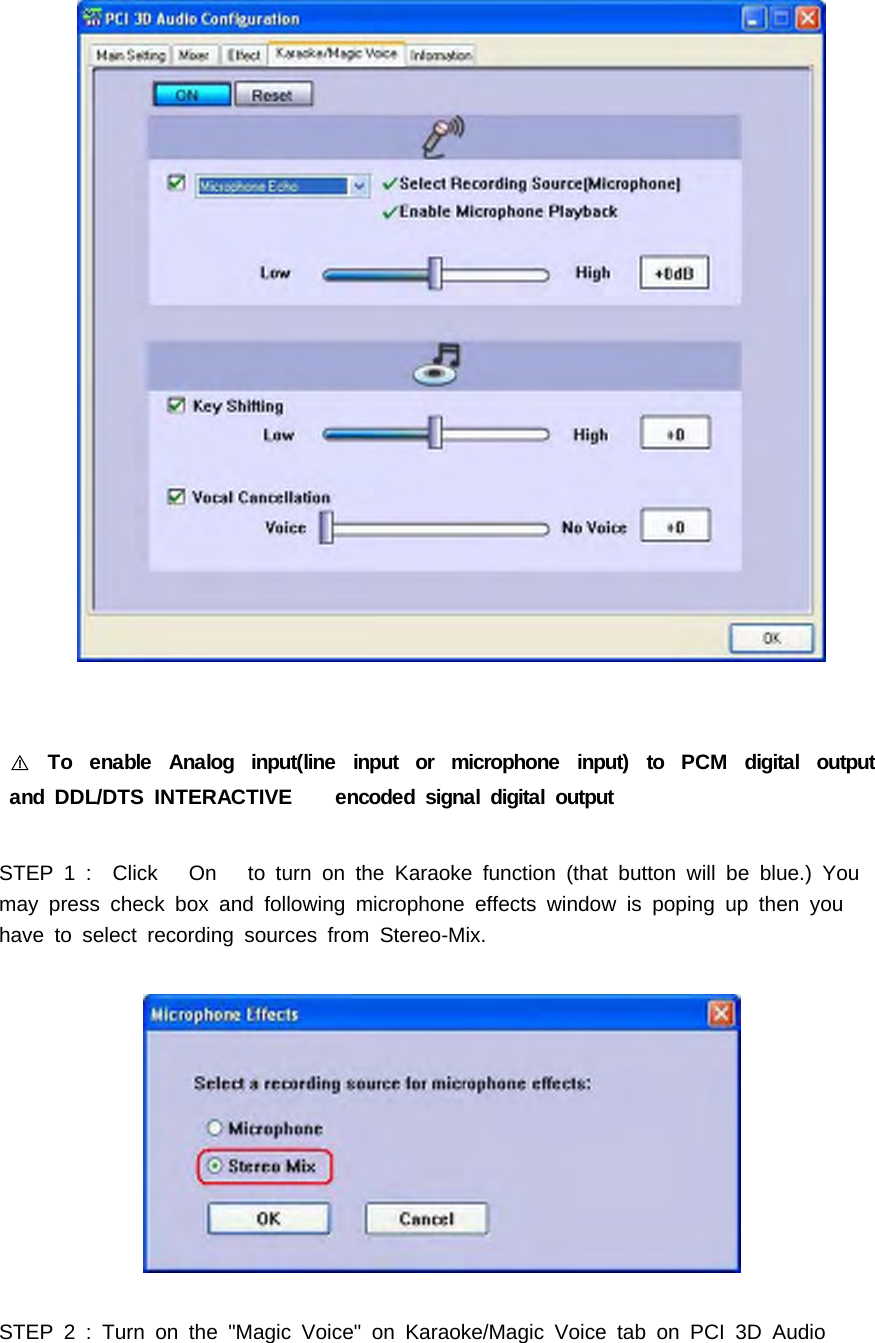
To enable Analog input(line input or microphone input) to PCM digital output󰏗and DDL/DTS INTERACTIVE encoded signal digital outputSTEP 1 : Click On to turn on the Karaoke function (that button will be blue.) Youmay press check box and following microphone effects window is poping up then youhave to select recording sources from Stereo-Mix.STEP2:Turnonthe"MagicVoice"onKaraoke/MagicVoicetabonPCI3DAudio
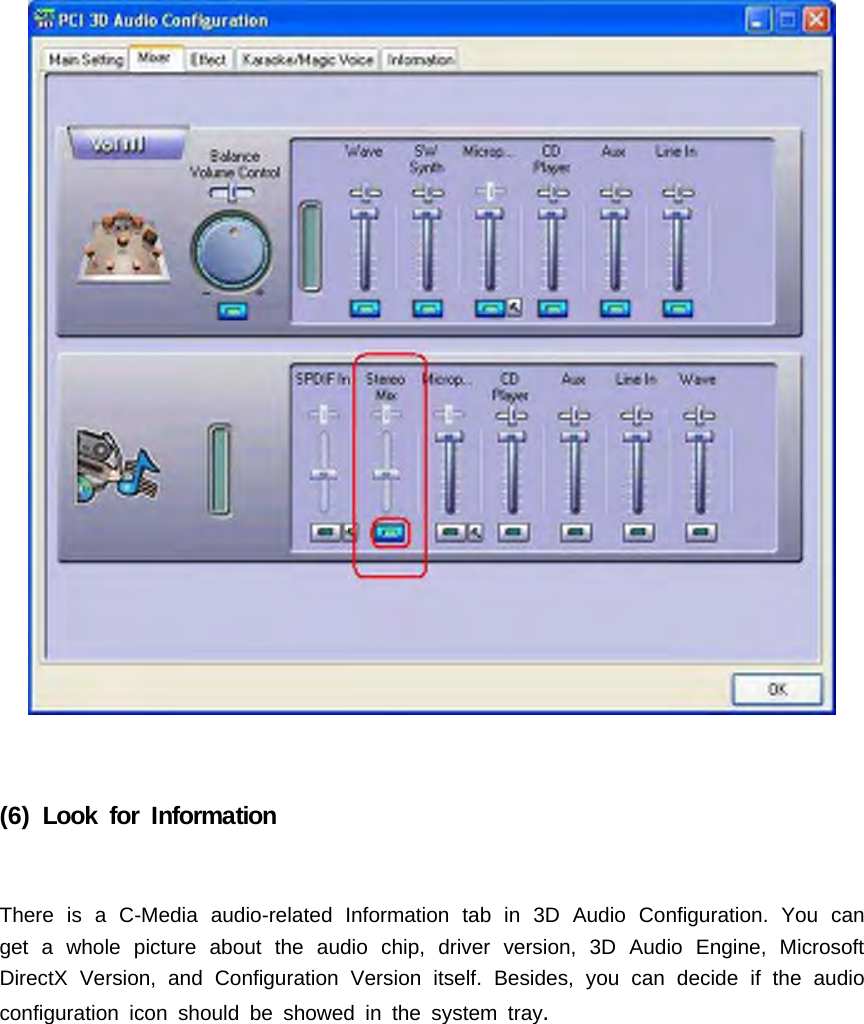
Configurationand then press "Default" button.STEP 3 : You may also check current status of " Stereo Mix" is enabled on Mixer tab ofPCI 3D Audio Configuration.
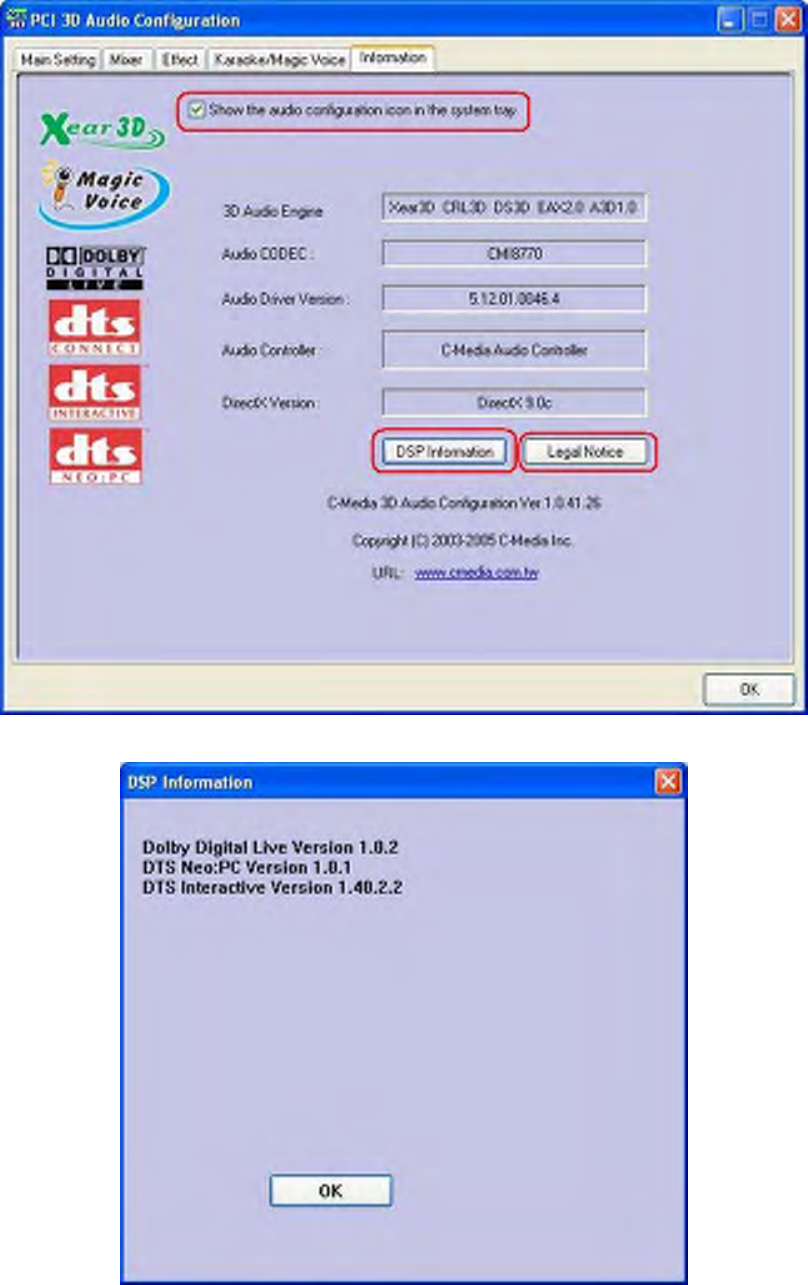
(6) Look for InformationThere is a C-Media audio-related Information tab in 3D Audio Configuration. You canget a whole picture about the audio chip, driver version, 3D Audio Engine, MicrosoftDirectX Version, and Configuration Version itself. Besides, you can decide if the audioconfiguration icon should be showed in the system tray.
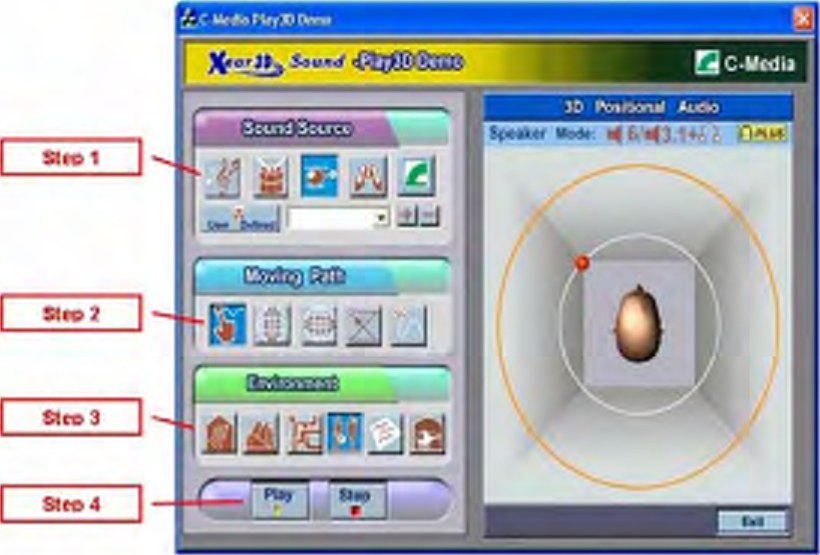
5. Using Play3D DemoC-Media also provides an interesting Play3D demo program as below. After installingthe setup program, you will find the demo program from the path:Start->Programs->C-Media 3D Audio->Play3D Demo .Step 1: Select a Sound Source you want to play. There are five saved soundsources and you can to add your own .wav audio into the list (Click + to add, and- to delete.)Step 2: Select a Moving Path for the 3D soundStep 3: Select a Environment emulation if you want.Step 4: Click Play or Stop button.

Navigation menu