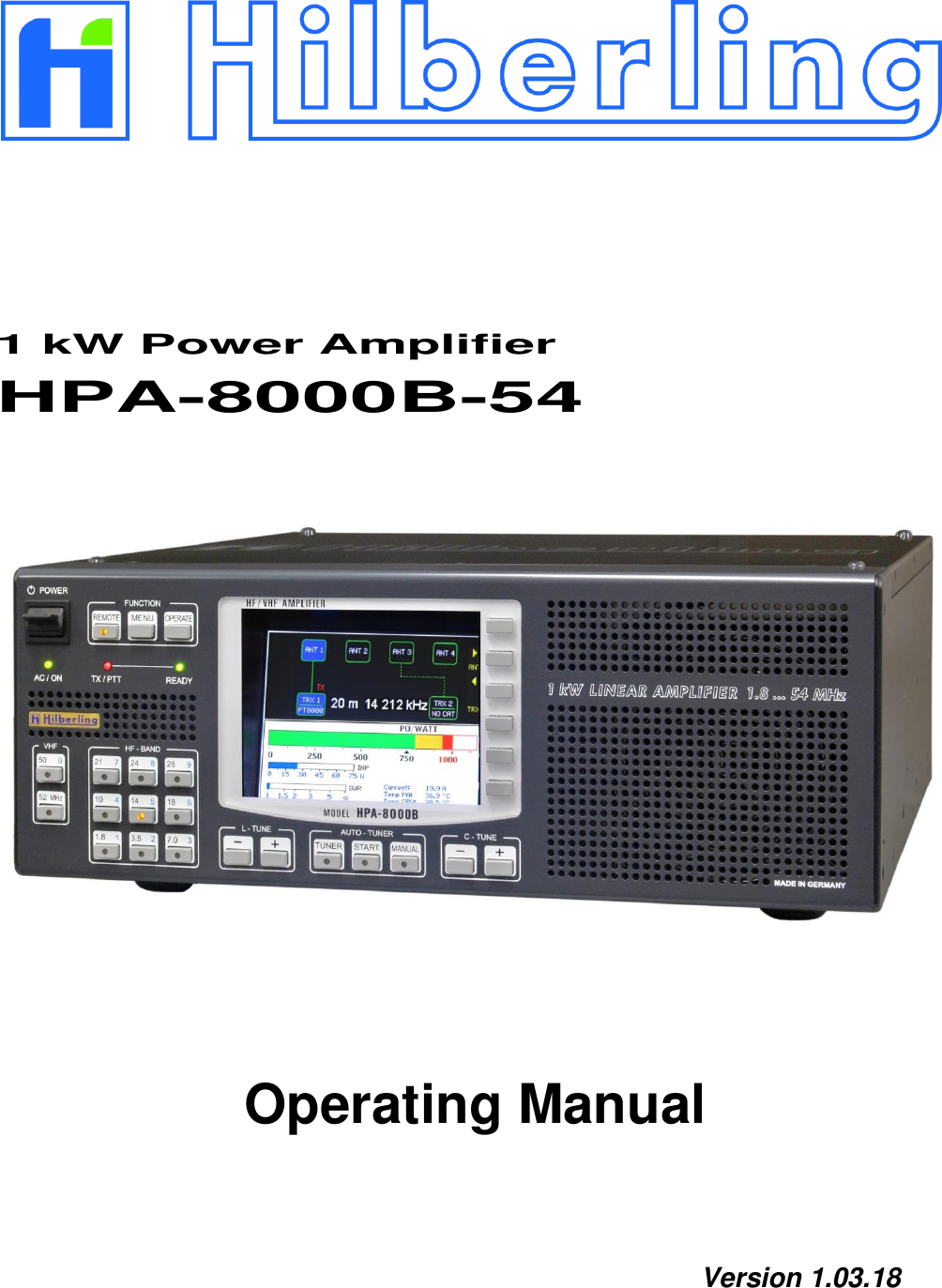
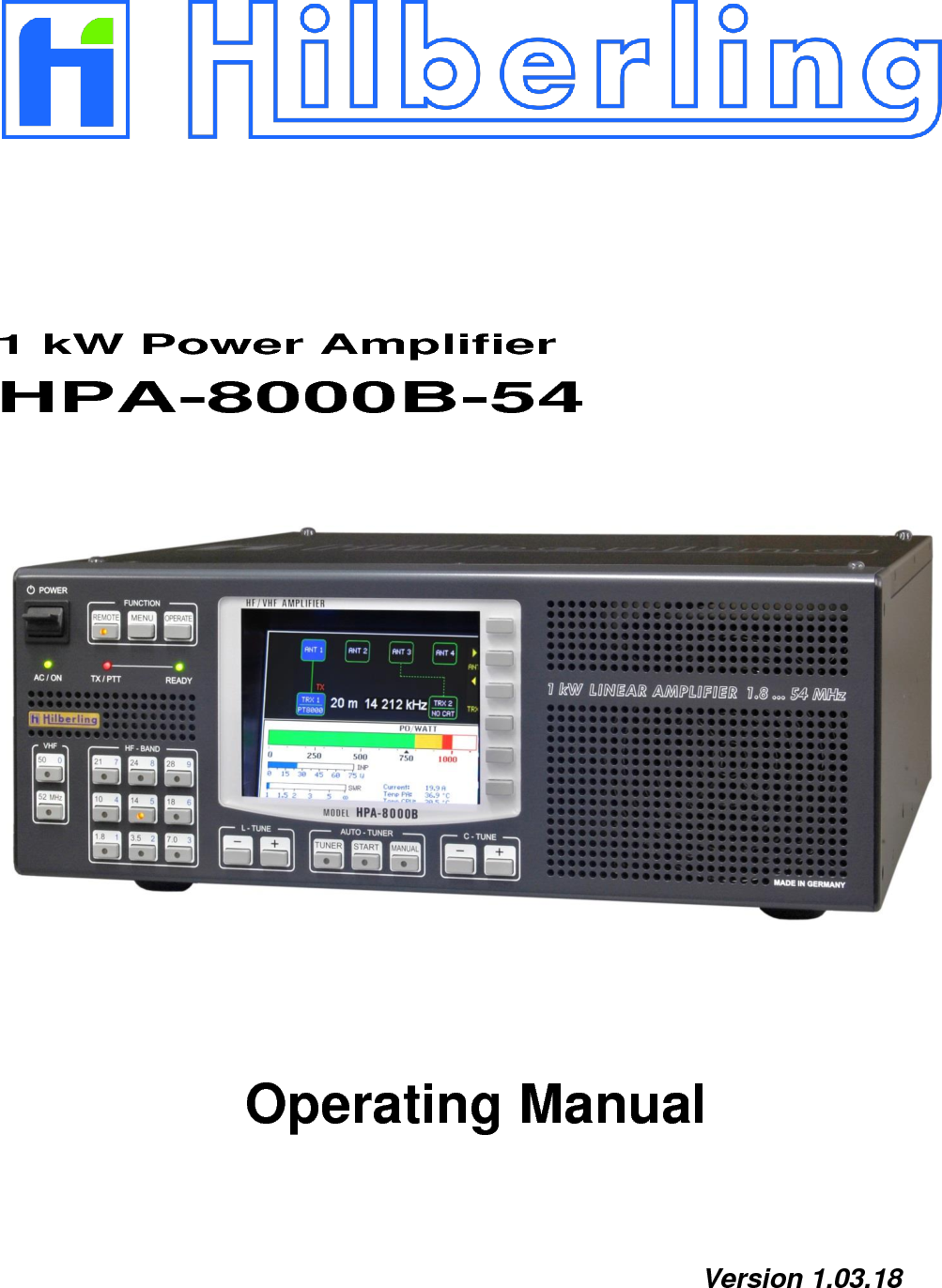
Hilberling RF Laboratories HPA8000B-54 Amateur Radio Power Amplifier 1 kW / 1.8 - 54 MHz User Manual HF VHF Transceiver

Hilberling GmbH RF Laboratories Amateur Radio Power Amplifier 1 kW / 1.8 - 54 MHz HF VHF Transceiver

User Manual

          1 kW Power Amplifier HPA-8000B-54                      Operating Manual    Version 1.03.18
                                          Copyright-notice to the ring binder title All picture rights reserved by:   Bundeswehr  /  PIZ  Marine, DGzRS and Hilberling GmbH
HPA-8000B-54   Operating Manual   v1.03.18      3   1 kW Power Amplifier  Hilberling   HPA-8000B-54       Operating Manual    HPA-8000B-54 developed and manufactured in the EU  by  Hilberling GmbH  Heinrich-Hertz-Strasse 2 24790 Schacht-Audorf Germany            Logo and name of Hilberling GmbH are registered trademarks Distribution of the complete document is desired However, each partial copy or distribution is prohibited Errors and changes excepted
4       TABLE OF CONTENT List of Figures ............................................................................................................................................. 6 List of Tables .............................................................................................................................................. 7 Federal Communications Commission (FCC) Statement .......................................................................... 8 1 About this Manual ...................................................................................................................................... 8 2 Important Notes ........................................................................................................................................ 9 2.1 General Precautions .......................................................................................................................... 9 2.2 Notes on Placing.............................................................................................................................. 10 3 Scope of Delivery ..................................................................................................................................... 11 3.1 Data Cables .................................................................................................................................... 11 3.2 Operating Manual and Software/Documentation CD-ROM .................................................................... 11 4 Connectors on Rear Panel ........................................................................................................................ 12 4.1 Connectors and Controls .................................................................................................................. 12 4.2 Pin Assignment J1 to J4 (D-Sub) ....................................................................................................... 13 5 Operating and Display Elements ............................................................................................................. 14 5.1 Overview ........................................................................................................................................ 14 5.2 TFT Display ..................................................................................................................................... 15 5.3 Softkeys on Default Screen ............................................................................................................... 15 5.4 Softkey Menu .................................................................................................................................. 16 5.4.1 Display of Device Status   SYSTEM INFORMATION ............................................................................. 17 5.4.1.1 Update Operating Software .............................................................................................................. 18 5.4.2 Device Configuration   TRX SETUP .................................................................................................... 19 5.4.3 Brightness of Display   DIM .............................................................................................................. 20 6 Installation / Initial Operation ................................................................................................................ 21 6.1 Cable Connections ........................................................................................................................... 21 6.2 Power-on ........................................................................................................................................ 21 7 Transceiver Set up ................................................................................................................................... 22 7.1 Select Transceiver Connector ............................................................................................................ 22 7.2 Allocate Transceiver Model ............................................................................................................... 22 7.3 Input Power .................................................................................................................................... 24 8 Antenna Setup .......................................................................................................................................... 25 8.1 Antenna Allocation to Bands ............................................................................................................. 25 8.2 Antenna and Antenna Tuner – basic Considerations ............................................................................ 27 8.3 Antenna Tuner ................................................................................................................................ 27 8.4 Automatic Antenna Tuning ............................................................................................................... 29 8.4.1 Error Messages when Tuning Process was aborted ............................................................................. 31 8.5 Manual Antenna Tuning ................................................................................................................... 32 8.5.1 Manual L Tuning .............................................................................................................................. 34 8.5.2 Manual C Tuning ............................................................................................................................. 34 8.5.3 Manual CC Tuning ........................................................................................................................... 34 9 Internal Final PA   OPERATE .................................................................................................................... 35 9.1 Error Messages when Final PA was deactivated. ................................................................................. 35 9.2 ALC Connection ............................................................................................................................... 36 Appendix A1 Technical Documents ............................................................................................................................... 38 A1.1 Technical Data ................................................................................................................................ 38 A1.2 Amateur Radio Bands ...................................................................................................................... 39 A1.3 Subbands Antenna Tuning ................................................................................................................ 40 A1.4 Switchable L and C Elements Antenna Tuning .................................................................................... 45 A1.5 Switch-off Criteria for INPUT OVERLOAD ........................................................................................... 45
HPA-8000B-54   Operating Manual   v1.03.18      5   A1.6 Connecting Options ......................................................................................................................... 46 A2 Customer Information ............................................................................................................................. 47 A2.1 User Information ............................................................................................................................. 47 A2.1.1 Declaration of Conformity (shortened version) ................................................................................... 47 A2.1.2 Note Amateur Radio Operation ......................................................................................................... 47 A2.2 Warranty Terms .............................................................................................................................. 47 A2.3 Disposal Rules ................................................................................................................................. 48
6       LIST OF FIGURES Fig. 2–1:  Unfolding bails (front equipment feet) ...................................................................................... 10 Fig. 3–1:  Cable D-Sub 9-pin .................................................................................................................. 11 Fig. 3–2:  Cable D-Sub 25-pin ................................................................................................................ 11 Fig. 3–3:  Manual HPA-8000B-54 ............................................................................................................ 11 Fig. 3–4:  CD-ROM ................................................................................................................................ 11 Fig. 4–1:  Connectors and Controls on Rear Panel .................................................................................... 12 Fig. 5–1:  Operating and Display Elements .............................................................................................. 14 Fig. 5–2:  TFT Display showing Default Screen ........................................................................................ 15 Fig. 5–3:  Softkey Menu ........................................................................................................................ 16 Fig. 5–4:  Softkey Menu MENU ............................................................................................................... 16 Fig. 5–5:  Softkey Menu SYSTEM INFORMATION ..................................................................................... 17 Fig. 5–6:  Screen SYSTEM INFORMATION ............................................................................................... 17 Fig. 5–7:  Softkey Menu SOFTWARE UPDATE .......................................................................................... 18 Fig. 5–8:  Screen SOFTWARE UPDATE .................................................................................................... 18 Fig. 5–9:  Softkey Menu TRX SETUP ....................................................................................................... 19 Fig. 5–10:  Screen TRX SETUP ............................................................................................................... 19 Fig. 5–11:  Softkey Menu DIM ................................................................................................................ 20 Fig. 7–1:  Transceiver Connector TRX 1 active / inactive........................................................................... 22 Fig. 7–2:  Transceiver Connector TRX 1 active / inactive, PT-8000A allocated ............................................. 22 Fig. 7–3:  Setup Transceiver Connector TRX1 .......................................................................................... 23 Fig. 7–4:  Setup Transceiver Connector TRX2 .......................................................................................... 23 Fig. 7–8:  Input Power Meter ................................................................................................................. 24 Fig. 8–1:  Antenna Allocation – Toggle the active Transceiver ................................................................... 25 Fig. 8–2:  Antenna Allocation – Change of Antenna Connector .................................................................. 26 Fig. 8–3:  Antenna Allocation – Factory Setting ........................................................................................ 26 Fig. 8–4:  Antenna Allocation – Variation Example.................................................................................... 26 Fig. 8–5:  Antenna Tuner activated – Showing Frequency Information ....................................................... 28 Fig. 8–6:  Antenna Tuner activated – no Frequency Information ............................................................... 28 Fig. 8–7:  Auto-Tuning activated „Set PTT On“ ........................................................................................ 29 Fig. 8–8:  Auto Tuning – Input Power too low „Tuning Signal low“ ............................................................ 30 Fig. 8–9:  Auto Tuning – Input Power too high „Tuning Signal high“ .......................................................... 30 Fig. 8–10:  Auto Tuning – Input Power ok „Tuning“ ................................................................................. 30 Fig. 8–11:  Auto Tuning finished „Tuning done“ ....................................................................................... 30 Fig. 8–12:  Auto-Tuning aborted „Tuning abort“ ...................................................................................... 31 Fig. 8–13:  Auto Tuning – Input Power unstable „Input unstable“ ............................................................. 31 Fig. 8–14:  Auto Tuning – Output Power too high „Output Overload“ ......................................................... 31 Fig. 8–15:  Manual Tuning activated „Set PTT On“ ................................................................................... 32 Fig. 8–16:  Manual Tuning – Input Power too low „Tuning Signal low“ ....................................................... 33 Fig. 8–17:  Manual Tuning – Input Power too high „Tuning Signal high“ .................................................... 33 Fig. 8–18:  Manual Tuning – Input Power ok „Please Tune“ ...................................................................... 33 Fig. 8–19:  Manual Tuning – Center Capacitance CC ................................................................................ 34 Fig. 9–2:  Input Overload ...................................................................................................................... 35 Fig. 9–1:  Input Overload 1 .................................................................................................................... 35 Fig. 9–3:  Output Overload .................................................................................................................... 36 Fig. 9–4:  Ouput Overload Mid ............................................................................................................... 36 Fig. 9–5:  Ouput Overload High .............................................................................................................. 36 Fig. 9–6:  Current Overload ................................................................................................................... 36
HPA-8000B-54   Operating Manual   v1.03.18      7   LIST OF TABLES Tab. 3–1:  Scope of Delivery .................................................................................................................. 11 Tab. 4–1:  Connectors on Rear Panel...................................................................................................... 12 Tab. 4–1:  Connectors on Rear Panel (continued) .................................................................................... 13 Tab. 4–2:  Pin Assignment D-Sub ........................................................................................................... 13 Tab. 5–1:  Operating and Display Elements ............................................................................................. 14 Tab. A1-1:  Technical Data .................................................................................................................... 38 Tab. A1–2:  Frequency Bands HF ........................................................................................................... 39 Tab. A1–3:  Frequency Band VHF ........................................................................................................... 39 Tab. A1–4:  Subbands 160m .................................................................................................................. 40 Tab. A1–5:  Subbands 80m ................................................................................................................... 41 Tab. A1–6:  Subbands 40m ................................................................................................................... 42 Tab. A1–7:  Subbands 30m ................................................................................................................... 42 Tab. A1–8:  Subbands 20m ................................................................................................................... 43 Tab. A1–9:  Subbands 17m ................................................................................................................... 43 Tab. A1–10:  Subbands 15m .................................................................................................................. 44 Tab. A1–11:  Subbands 12m .................................................................................................................. 44 Tab. A1–12:  Subbands 10m .................................................................................................................. 45 Tab. A1–13:  Switchable Inductances und Capacitances Harmonic Filter .................................................... 45 Tab. A1–14:  Switch-off Criteria for Input Overload .................................................................................. 45 Tab. A1–15:  Connecting Options TRX Setup ........................................................................................... 46
8       FEDERAL COMMUNICATIONS COMMISSION (FCC) STATEMENT  Note: This equipment has been tested and found to comply with the limits for a Class B digital device, pursuant to part 15 of the FCC Rules. These limits are designed to provide reasonable protection against harmful interference in a residential installation. This equipment generates, uses and can radiate radio frequency energy and, if not installed and used in accordance with the instructions, may cause harmful interference to radio communications. However, there is no guarantee that interference will not occur in a particular installation. If this equipment does cause harmful interference to radio or television reception, which can be determined by turning the equipment off and on, the user is encouraged to try to correct the interference by one or more of the following measures: —Reorient or relocate the receiving antenna. —Increase the separation between the equipment and receiver. —Connect the equipment into an outlet on a circuit different from that to which the receiver is connected. —Consult the dealer or an experienced radio/TV technician for help.   FCC ID: V84HPA8000B-54 This device complies with Part 15 of the FCC rules. Operation is subject to the following two conditions: (1) this device may not cause harmful interference, and (2) this device must accept any interference received, including interference that may cause       undesired operation.       1  ABOUT THIS MANUAL  In this manual the following signs and symbols are used:  The STOP sign indicates a warning that must be obeyed for safety reasons.  This sign indicates an important explanation or a specific advice which should be obeyed.  An additional information or explanation is indicated this way.     Copyright © 2017 by Hilberling GmbH
HPA-8000B-54   Operating Manual   v1.03.18      9   2  IMPORTANT NOTES Read and save this Operating Manual carefully before attempting to operate the device. This manual contains important safety and operating instructions to prevent damages caused by faulty operation.  2.1  General Precautions  WARNING HIGH VOLTAGE ! Do not touch antenna, antenna cable or antenna plugs and sockets during transmission. This may result in an electrical shock or burn of your skin by high-frequency.   WARNING ! The plug of the 230V power cord represents the designated separation device of the amplifier from the mains according to standard. The socket must be placed near the amplifier and easily accessible. The power cord must be able easily disconnected from mains.   CAUTION ! Make sure that no objects may penetrate into device or will touch connectors on rear panel of the power amplifier. This could cause electrical shock and severe injury.   PROTECT the amplifier from precipitation like rain or any liquid. Do not operate the power amplifier in excessively dusty or very humid environment.   PROTECT the amplifier from operation by any unauthorized person notably children.   AVOID placing and using the power amplifier in areas with temperatures below -15°C or above +50°C. If the environment temperature drops so low that the dew point is undercut, avoid operating before the devices are dried completely.   AVOID placing the power amplifier against a wall. This may inhibit proper air circulation and could cause overheat. Do not cover any air inlets and outlets at front, bottom and rear panel of the device.
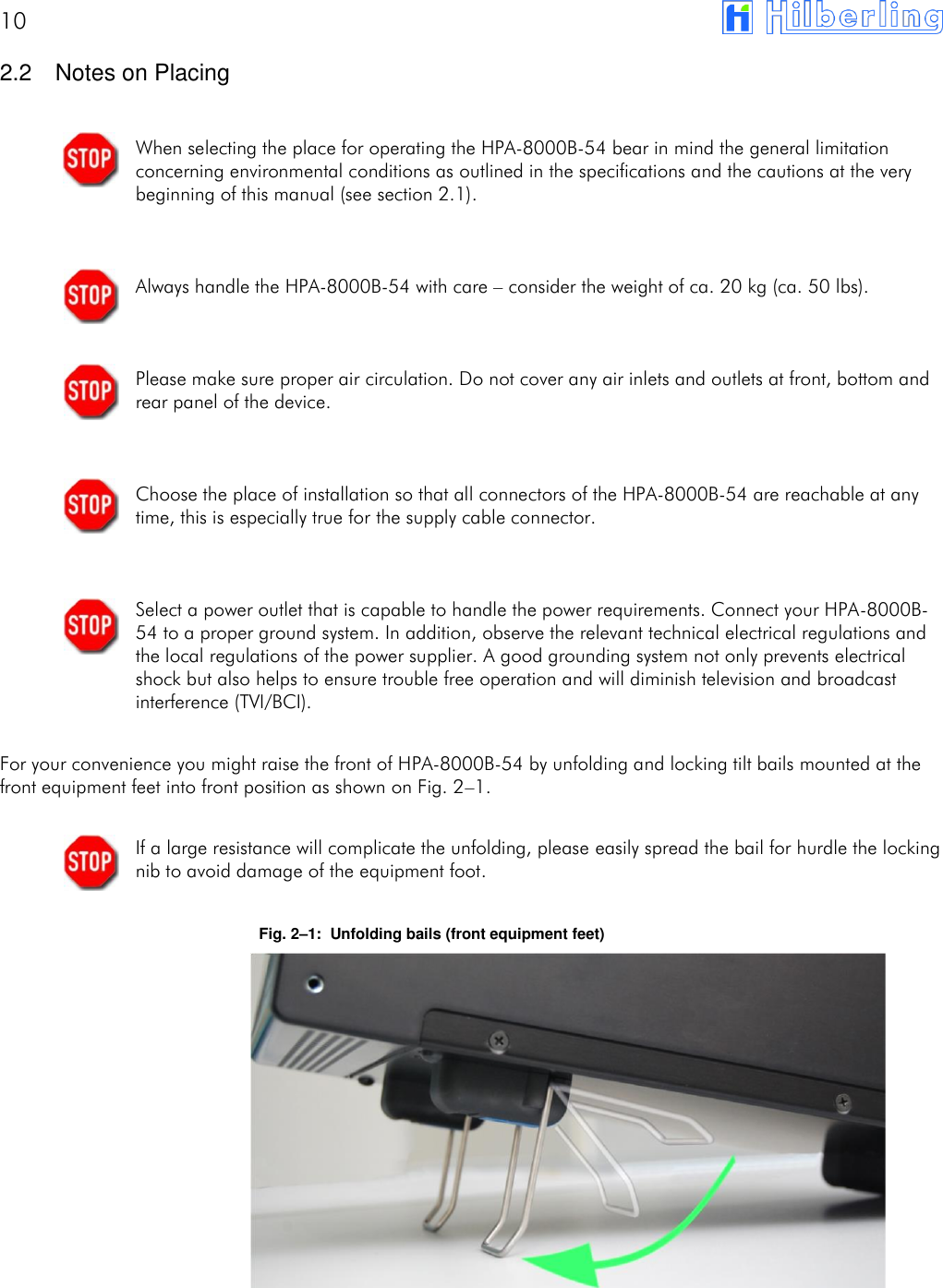
10       2.2  Notes on Placing  When selecting the place for operating the HPA-8000B-54 bear in mind the general limitation concerning environmental conditions as outlined in the specifications and the cautions at the very beginning of this manual (see section 2.1).   Always handle the HPA-8000B-54 with care – consider the weight of ca. 20 kg (ca. 50 lbs).   Please make sure proper air circulation. Do not cover any air inlets and outlets at front, bottom and rear panel of the device.   Choose the place of installation so that all connectors of the HPA-8000B-54 are reachable at any time, this is especially true for the supply cable connector.   Select a power outlet that is capable to handle the power requirements. Connect your HPA-8000B-54 to a proper ground system. In addition, observe the relevant technical electrical regulations and the local regulations of the power supplier. A good grounding system not only prevents electrical shock but also helps to ensure trouble free operation and will diminish television and broadcast interference (TVI/BCI).  For your convenience you might raise the front of HPA-8000B-54 by unfolding and locking tilt bails mounted at the front equipment feet into front position as shown on Fig. 2–1.  If a large resistance will complicate the unfolding, please easily spread the bail for hurdle the locking nib to avoid damage of the equipment foot.  Fig. 2–1:  Unfolding bails (front equipment feet)
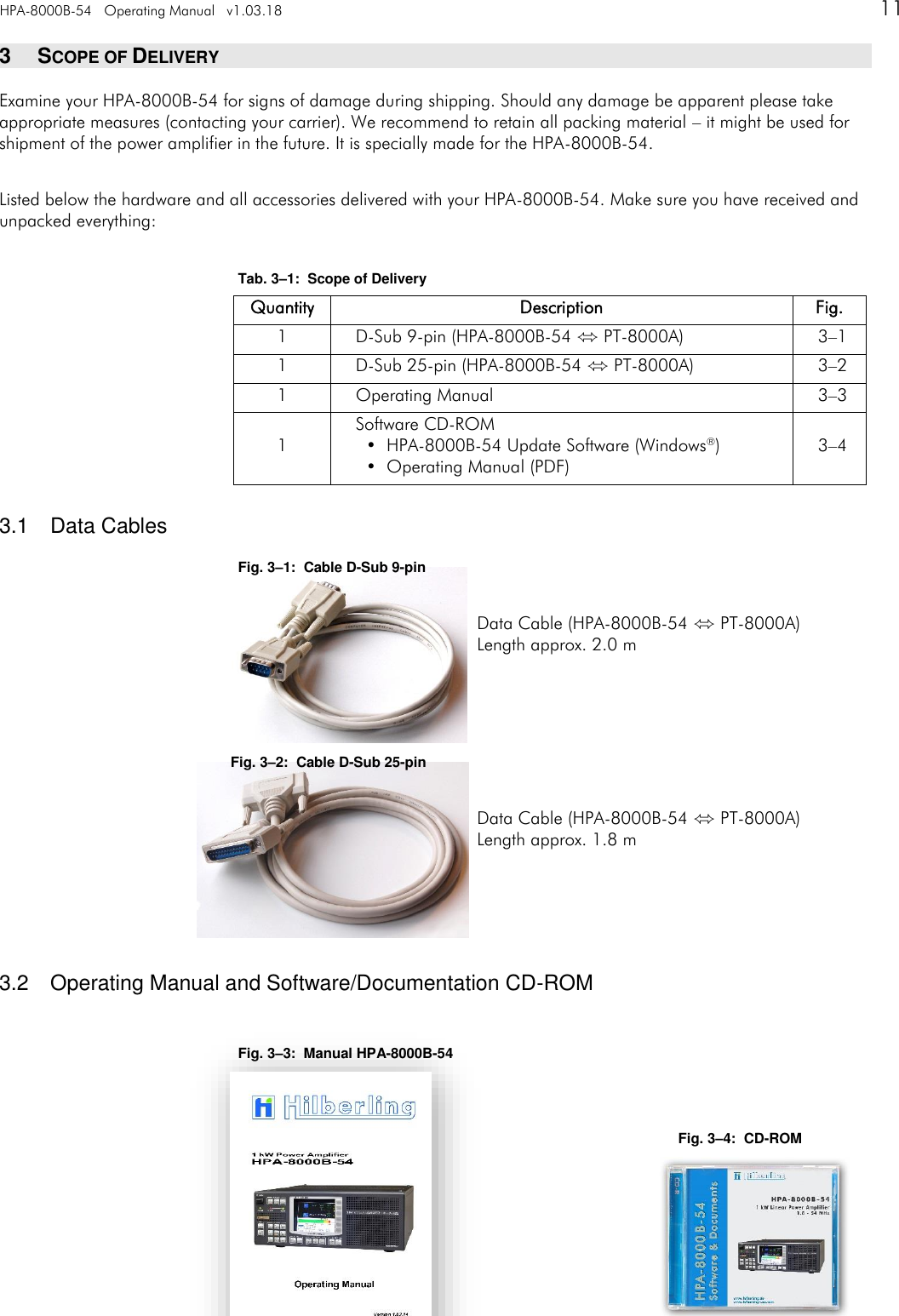
HPA-8000B-54   Operating Manual   v1.03.18      11   3  SCOPE OF DELIVERY Examine your HPA-8000B-54 for signs of damage during shipping. Should any damage be apparent please take appropriate measures (contacting your carrier). We recommend to retain all packing material – it might be used for shipment of the power amplifier in the future. It is specially made for the HPA-8000B-54.  Listed below the hardware and all accessories delivered with your HPA-8000B-54. Make sure you have received and unpacked everything:  Tab. 3–1:  Scope of Delivery Quantity Description Fig. 1 D-Sub 9-pin (HPA-8000B-54 ⬄ PT-8000A) 3–1 1 D-Sub 25-pin (HPA-8000B-54 ⬄ PT-8000A) 3–2 1 Operating Manual 3–3 1 Software CD-ROM   •  HPA-8000B-54 Update Software (Windows®)   •  Operating Manual (PDF) 3–4  3.1  Data Cables Fig. 3–1:  Cable D-Sub 9-pin  Data Cable (HPA-8000B-54 ⬄ PT-8000A) Length approx. 2.0 m    Fig. 3–2:  Cable D-Sub 25-pin  Data Cable (HPA-8000B-54 ⬄ PT-8000A) Length approx. 1.8 m     3.2  Operating Manual and Software/Documentation CD-ROM  Fig. 3–3:  Manual HPA-8000B-54   Fig. 3–4:  CD-ROM
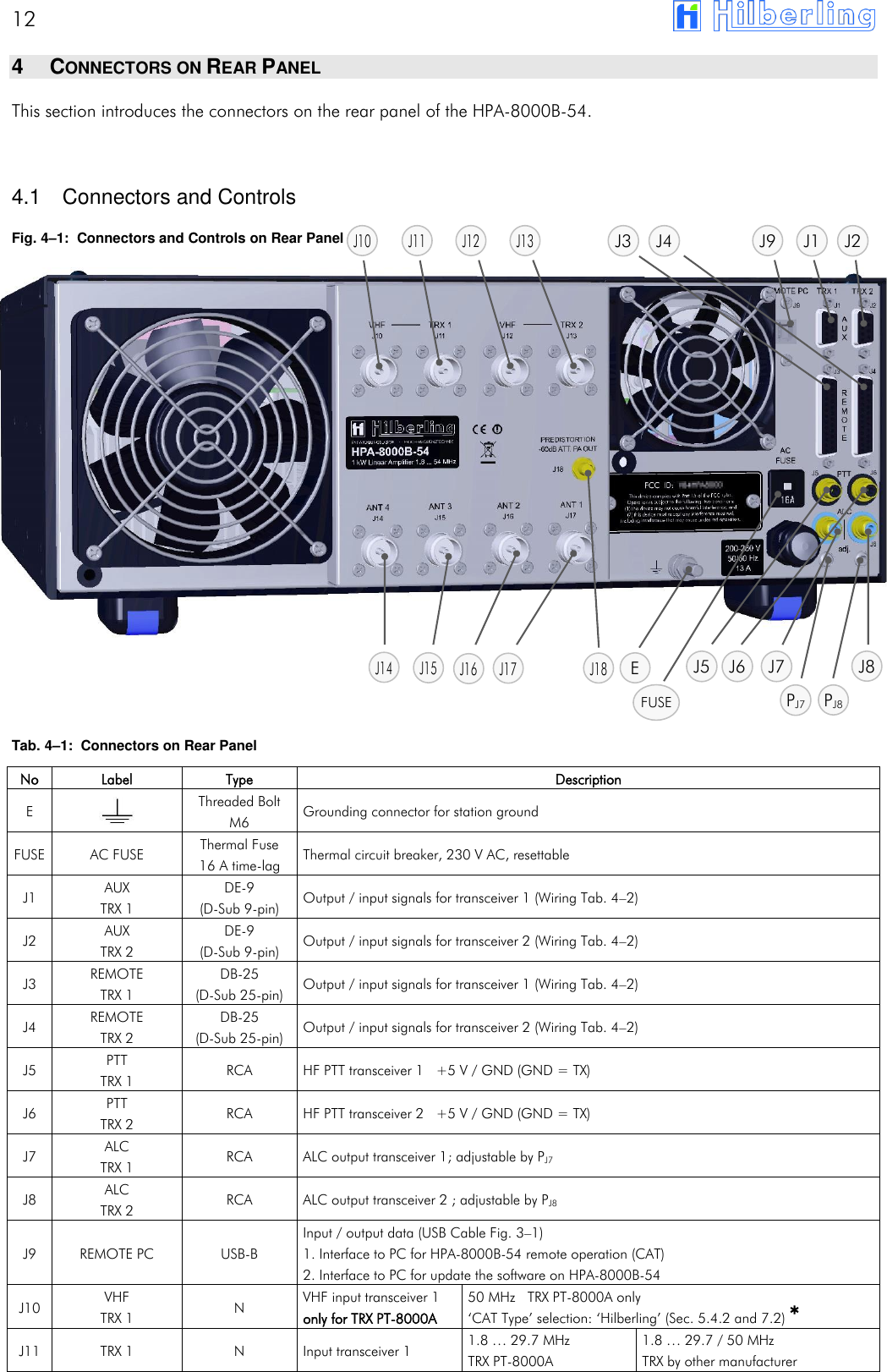
12       4  CONNECTORS ON REAR PANEL This section introduces the connectors on the rear panel of the HPA-8000B-54.   4.1  Connectors and Controls Fig. 4–1:  Connectors and Controls on Rear Panel                  Tab. 4–1:  Connectors on Rear Panel  No Label Type Description E   Threaded Bolt M6 Grounding connector for station ground FUSE AC FUSE Thermal Fuse 16 A time-lag Thermal circuit breaker, 230 V AC, resettable J1 AUX TRX 1 DE-9 (D-Sub 9-pin) Output / input signals for transceiver 1 (Wiring Tab. 4–2) J2 AUX TRX 2 DE-9 (D-Sub 9-pin) Output / input signals for transceiver 2 (Wiring Tab. 4–2) J3 REMOTE TRX 1 DB-25 (D-Sub 25-pin) Output / input signals for transceiver 1 (Wiring Tab. 4–2) J4 REMOTE TRX 2 DB-25 (D-Sub 25-pin) Output / input signals for transceiver 2 (Wiring Tab. 4–2) J5 PTT TRX 1 RCA HF PTT transceiver 1   +5 V / GND (GND = TX) J6 PTT TRX 2 RCA HF PTT transceiver 2   +5 V / GND (GND = TX) J7 ALC TRX 1 RCA ALC output transceiver 1; adjustable by PJ7 J8 ALC TRX 2 RCA ALC output transceiver 2 ; adjustable by PJ8 J9 REMOTE PC USB-B Input / output data (USB Cable Fig. 3–1) 1. Interface to PC for HPA-8000B-54 remote operation (CAT) 2. Interface to PC for update the software on HPA-8000B-54 J10 VHF TRX 1 N VHF input transceiver 1 only for TRX PT-8000A 50 MHz   TRX PT-8000A only ‘CAT Type’ selection: ‘Hilberling’ (Sec. 5.4.2 and 7.2) * J11 TRX 1 N Input transceiver 1 1.8 … 29.7 MHz TRX PT-8000A 1.8 … 29.7 / 50 MHz TRX by other manufacturer J5 J8 J6 J7 J14 J15 J18 J16 J17 E  J1 J2 J3 J4 J10 J11 J9 J12 J13 FUSE PJ8  PJ7
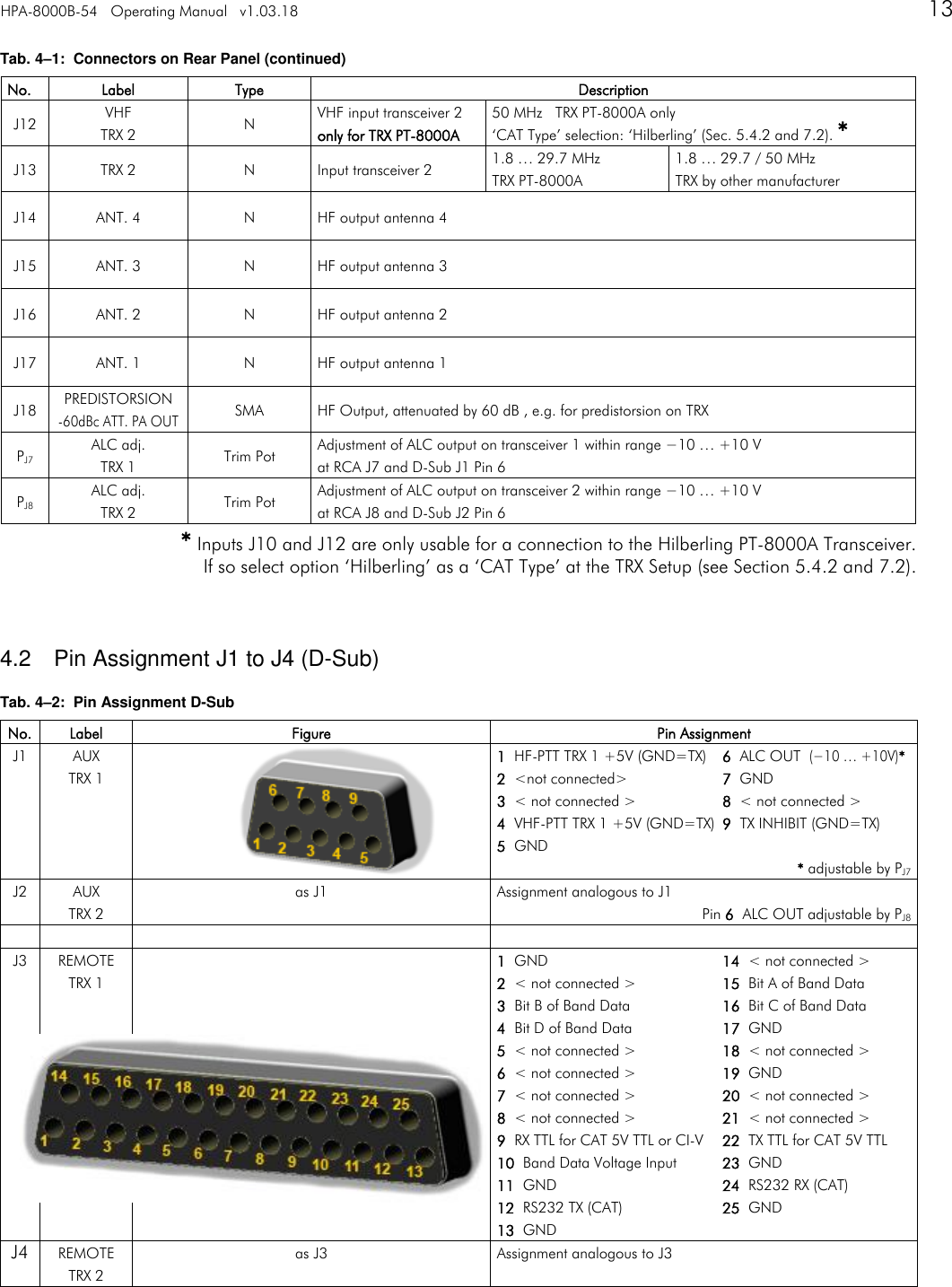
HPA-8000B-54   Operating Manual   v1.03.18      13   Tab. 4–1:  Connectors on Rear Panel (continued) No. Label Type Description J12 VHF TRX 2 N VHF input transceiver 2 only for TRX PT-8000A 50 MHz   TRX PT-8000A only ‘CAT Type’ selection: ‘Hilberling’ (Sec. 5.4.2 and 7.2). * J13 TRX 2 N Input transceiver 2 1.8 … 29.7 MHz TRX PT-8000A 1.8 … 29.7 / 50 MHz TRX by other manufacturer J14 ANT. 4 N HF output antenna 4 J15 ANT. 3 N HF output antenna 3 J16 ANT. 2 N HF output antenna 2 J17 ANT. 1 N HF output antenna 1 J18 PREDISTORSION -60dBc ATT. PA OUT SMA HF Output, attenuated by 60 dB , e.g. for predistorsion on TRX PJ7 ALC adj. TRX 1 Trim Pot Adjustment of ALC output on transceiver 1 within range −10 … +10 V  at RCA J7 and D-Sub J1 Pin 6 PJ8 ALC adj. TRX 2 Trim Pot Adjustment of ALC output on transceiver 2 within range −10 … +10 V  at RCA J8 and D-Sub J2 Pin 6  * Inputs J10 and J12 are only usable for a connection to the Hilberling PT-8000A Transceiver. If so select option ‘Hilberling’ as a ‘CAT Type’ at the TRX Setup (see Section 5.4.2 and 7.2).   4.2  Pin Assignment J1 to J4 (D-Sub) Tab. 4–2:  Pin Assignment D-Sub No. Label Figure Pin Assignment J1 AUX TRX 1  1  HF-PTT TRX 1 +5V (GND=TX)  6  ALC OUT  (−10 … +10V)* 2  <not connected>  7  GND 3  < not connected >  8  < not connected > 4  VHF-PTT TRX 1 +5V (GND=TX)  9  TX INHIBIT (GND=TX) 5  GND * adjustable by PJ7 J2 AUX TRX 2 as J1 Assignment analogous to J1 Pin 6  ALC OUT adjustable by PJ8     J3 REMOTE TRX 1  1  GND  14  < not connected > 2  < not connected >  15  Bit A of Band Data 3  Bit B of Band Data  16  Bit C of Band Data 4  Bit D of Band Data  17  GND 5  < not connected >  18  < not connected > 6  < not connected >  19  GND 7  < not connected >  20  < not connected > 8  < not connected >  21  < not connected > 9  RX TTL for CAT 5V TTL or CI-V  22  TX TTL for CAT 5V TTL 10  Band Data Voltage Input  23  GND 11  GND  24  RS232 RX (CAT) 12  RS232 TX (CAT)  25  GND 13  GND J4 REMOTE TRX 2 as J3 Assignment analogous to J3
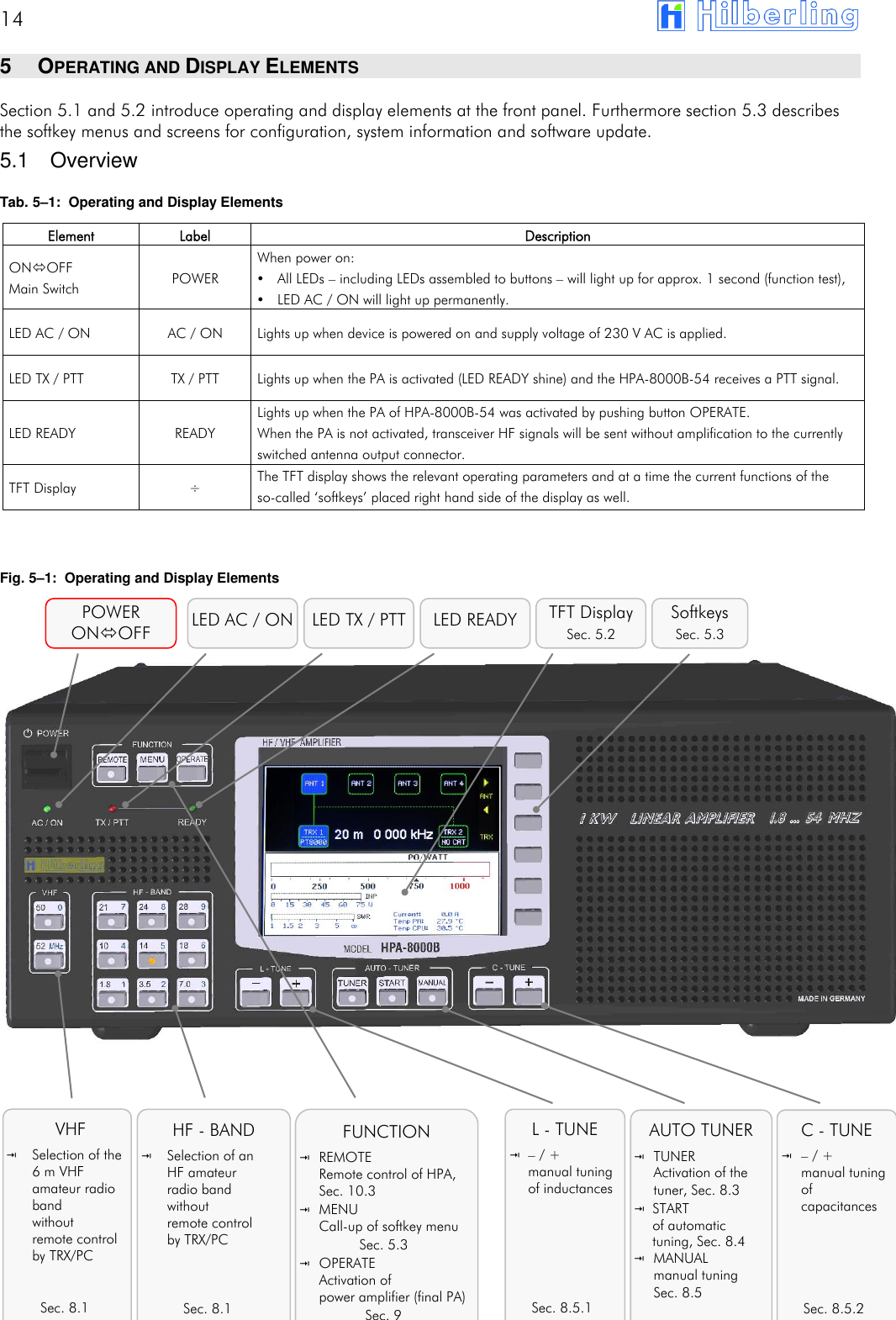
14       5  OPERATING AND DISPLAY ELEMENTS Section 5.1 and 5.2 introduce operating and display elements at the front panel. Furthermore section 5.3 describes the softkey menus and screens for configuration, system information and software update. 5.1  Overview Tab. 5–1:  Operating and Display Elements   Fig. 5–1:  Operating and Display Elements                                Element Label Description ONOFF Main Switch POWER When power on:   All LEDs – including LEDs assembled to buttons – will light up for approx. 1 second (function test),   LED AC / ON will light up permanently. LED AC / ON AC / ON Lights up when device is powered on and supply voltage of 230 V AC is applied. LED TX / PTT TX / PTT Lights up when the PA is activated (LED READY shine) and the HPA-8000B-54 receives a PTT signal. LED READY READY Lights up when the PA of HPA-8000B-54 was activated by pushing button OPERATE. When the PA is not activated, transceiver HF signals will be sent without amplification to the currently switched antenna output connector. TFT Display ÷ The TFT display shows the relevant operating parameters and at a time the current functions of the so-called ‘softkeys’ placed right hand side of the display as well. POWER ONOFF TFT Display Sec. 5.2 Softkeys Sec. 5.3 LED AC / ON LED TX / PTT VHF  Selection of the 6 m VHF amateur radio band without  remote control by TRX/PC   Sec. 8.1    HF - BAND  Selection of an HF amateur  radio band without  remote control  by TRX/PC    Sec. 8.1      FUNCTION  REMOTE Remote control of HPA, Sec. 10.3  MENU Call-up of softkey menu Sec. 5.3  OPERATE Activation of  power amplifier (final PA) Sec. 9 L - TUNE – / + manual tuning of inductances       Sec. 8.5.1 AUTO TUNER  TUNER Activation of the tuner, Sec. 8.3  START of automatic tuning, Sec. 8.4  MANUAL manual tuning Sec. 8.5 C - TUNE  – / + manual tuning of capacitances      Sec. 8.5.2 LED READY
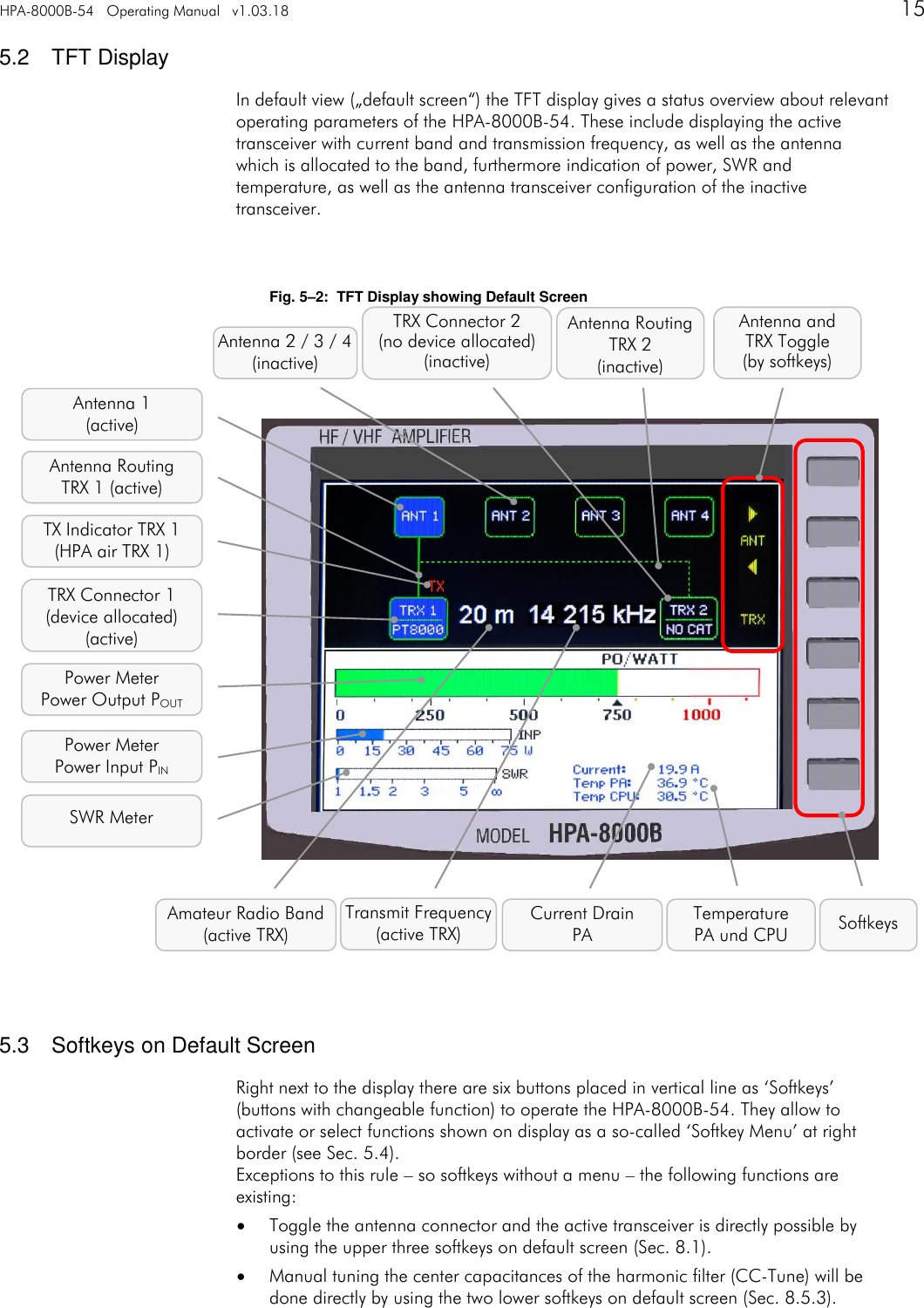
HPA-8000B-54   Operating Manual   v1.03.18      15   5.2  TFT Display In default view („default screen“) the TFT display gives a status overview about relevant operating parameters of the HPA-8000B-54. These include displaying the active transceiver with current band and transmission frequency, as well as the antenna which is allocated to the band, furthermore indication of power, SWR and temperature, as well as the antenna transceiver configuration of the inactive transceiver.   Fig. 5–2:  TFT Display showing Default Screen                          5.3  Softkeys on Default Screen Right next to the display there are six buttons placed in vertical line as ‘Softkeys’ (buttons with changeable function) to operate the HPA-8000B-54. They allow to activate or select functions shown on display as a so-called ‘Softkey Menu’ at right border (see Sec. 5.4). Exceptions to this rule – so softkeys without a menu – the following functions are existing:  Toggle the antenna connector and the active transceiver is directly possible by using the upper three softkeys on default screen (Sec. 8.1).  Manual tuning the center capacitances of the harmonic filter (CC-Tune) will be done directly by using the two lower softkeys on default screen (Sec. 8.5.3).    Softkeys Temperature PA und CPU Power Meter Power Output POUT SWR Meter Power Meter Power Input PIN TRX Connector 1 (device allocated) (active) TX Indicator TRX 1 (HPA air TRX 1) Antenna 2 / 3 / 4 (inactive) Transmit Frequency (active TRX) Antenna Routing TRX 2  (inactive) Amateur Radio Band (active TRX) TRX Connector 2 (no device allocated) (inactive) Antenna and TRX Toggle  (by softkeys) Current Drain PA Antenna Routing TRX 1 (active) Antenna 1 (active)
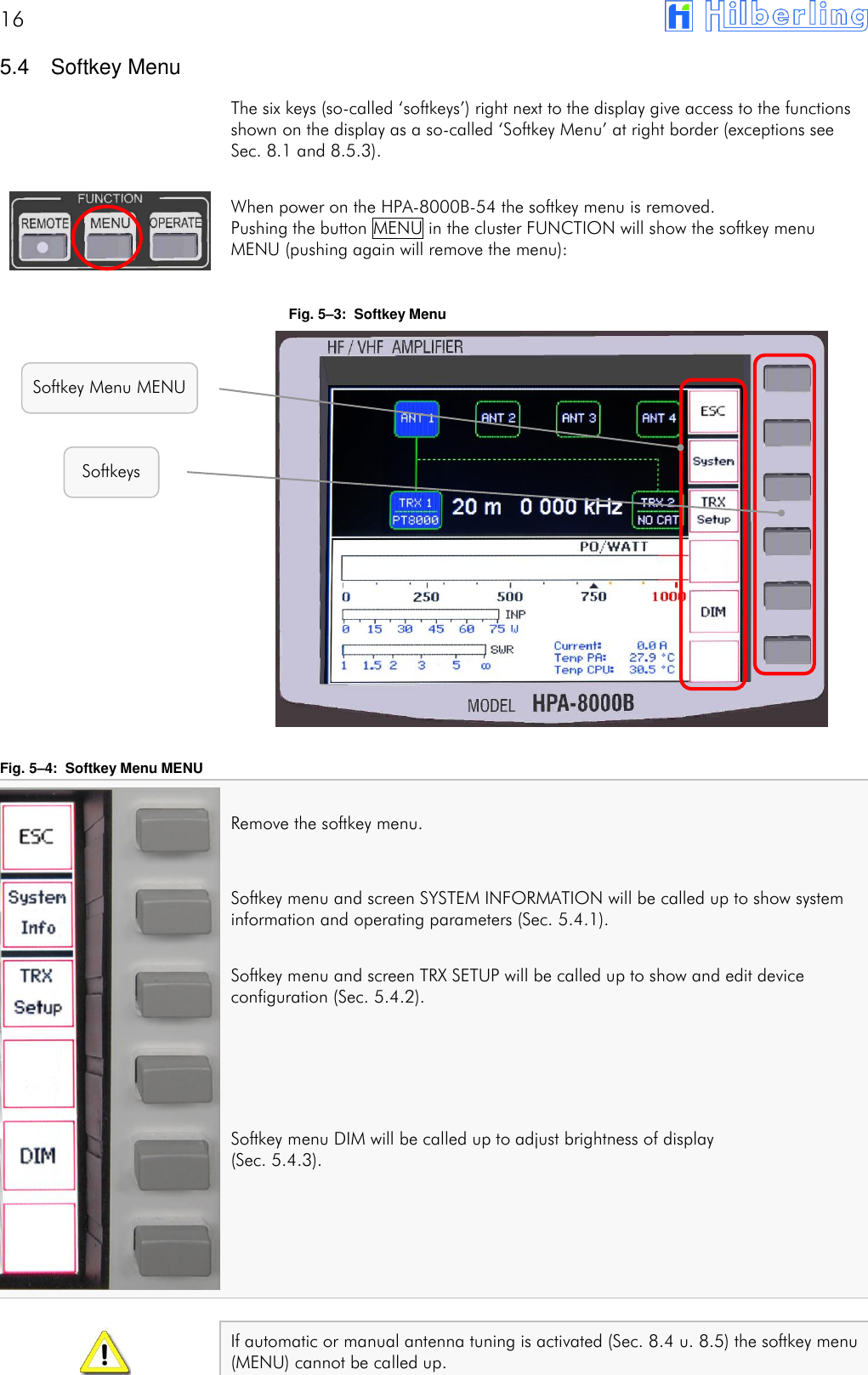
16        5.4  Softkey Menu The six keys (so-called ‘softkeys’) right next to the display give access to the functions shown on the display as a so-called ‘Softkey Menu’ at right border (exceptions see Sec. 8.1 and 8.5.3).  When power on the HPA-8000B-54 the softkey menu is removed. Pushing the button MENU in the cluster FUNCTION will show the softkey menu MENU (pushing again will remove the menu):  Fig. 5–3:  Softkey Menu                 Fig. 5–4:  Softkey Menu MENU  Remove the softkey menu.  Softkey menu and screen SYSTEM INFORMATION will be called up to show system information and operating parameters (Sec. 5.4.1).  Softkey menu and screen TRX SETUP will be called up to show and edit device configuration (Sec. 5.4.2).    Softkey menu DIM will be called up to adjust brightness of display  (Sec. 5.4.3).      If automatic or manual antenna tuning is activated (Sec. 8.4 u. 8.5) the softkey menu (MENU) cannot be called up.   Softkeys Softkey Menu MENU
HPA-8000B-54   Operating Manual   v1.03.18      17    5.4.1  Display of Device Status   SYSTEM INFORMATION Pushing softkey SYSTEM Info from softkey menu MENU (Fig. 5–4) will call up softkey menu and screen SYSTEM INFORMATION:   Fig. 5–5:  Softkey Menu SYSTEM INFORMATION  Return to softkey menu MENU (Sec. 5.4) and default screen.  Softkey menu and screen SOFTWARE UPDATE will be called up to update the operation software (Sec. 5.4.1.1).                System information will be shown on display:  Fig. 5–6:  Screen SYSTEM INFORMATION                     Temperature PA Amateur Radio Band Hardware Revision Software Version Serial Number Input Power Band Info digital Current Drain PA Forward Power Temperature CPU Band Info analog Standing Wave Ratio IARU Region
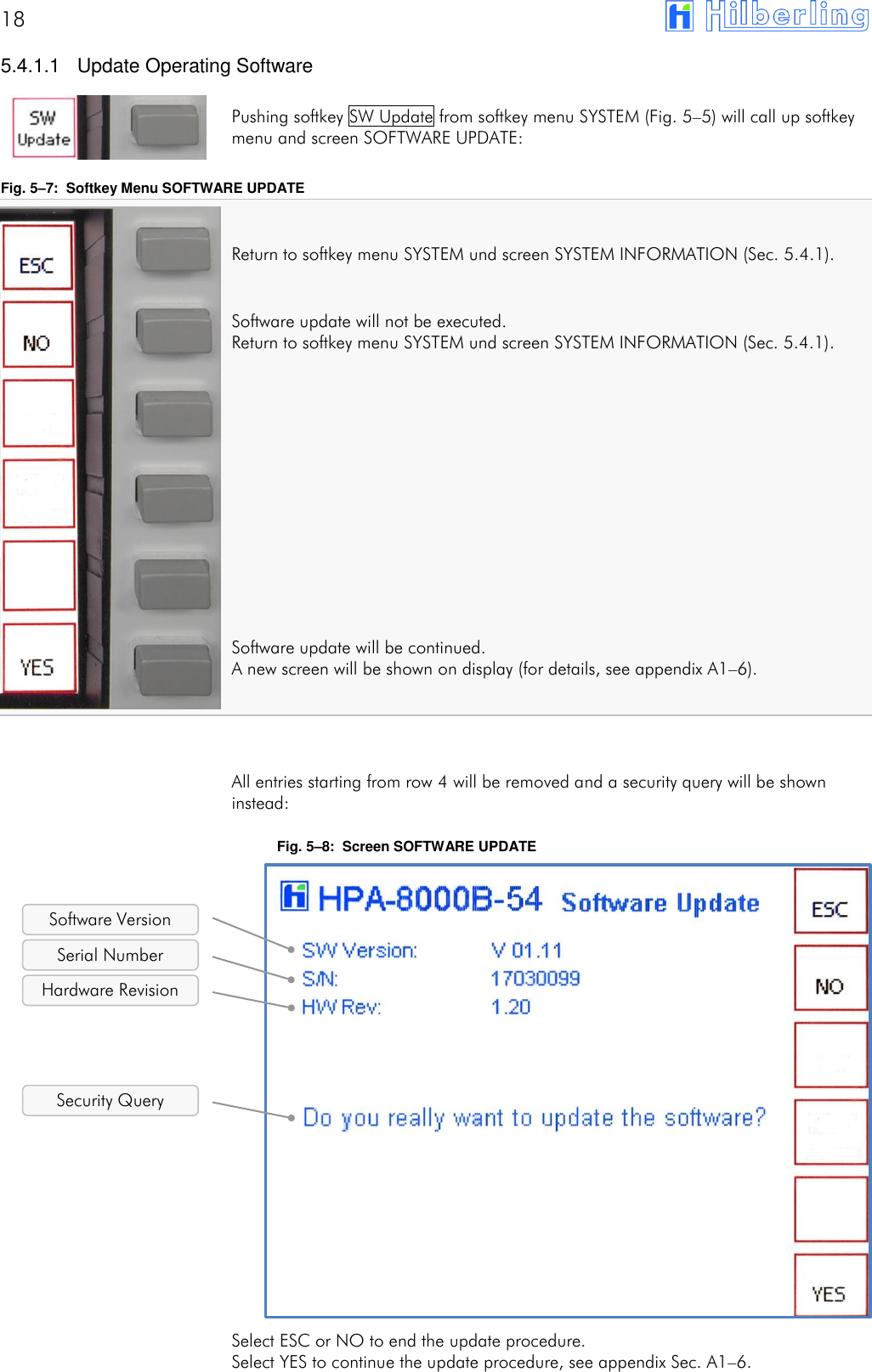
18        5.4.1.1  Update Operating Software  Pushing softkey SW Update from softkey menu SYSTEM (Fig. 5–5) will call up softkey menu and screen SOFTWARE UPDATE:  Fig. 5–7:  Softkey Menu SOFTWARE UPDATE  Return to softkey menu SYSTEM und screen SYSTEM INFORMATION (Sec. 5.4.1).  Software update will not be executed. Return to softkey menu SYSTEM und screen SYSTEM INFORMATION (Sec. 5.4.1).           Software update will be continued. A new screen will be shown on display (for details, see appendix A1–6).    All entries starting from row 4 will be removed and a security query will be shown instead:  Fig. 5–8:  Screen SOFTWARE UPDATE                 Select ESC or NO to end the update procedure. Select YES to continue the update procedure, see appendix Sec. A1–6.   Hardware Revision Software Version Serial Number Security Query
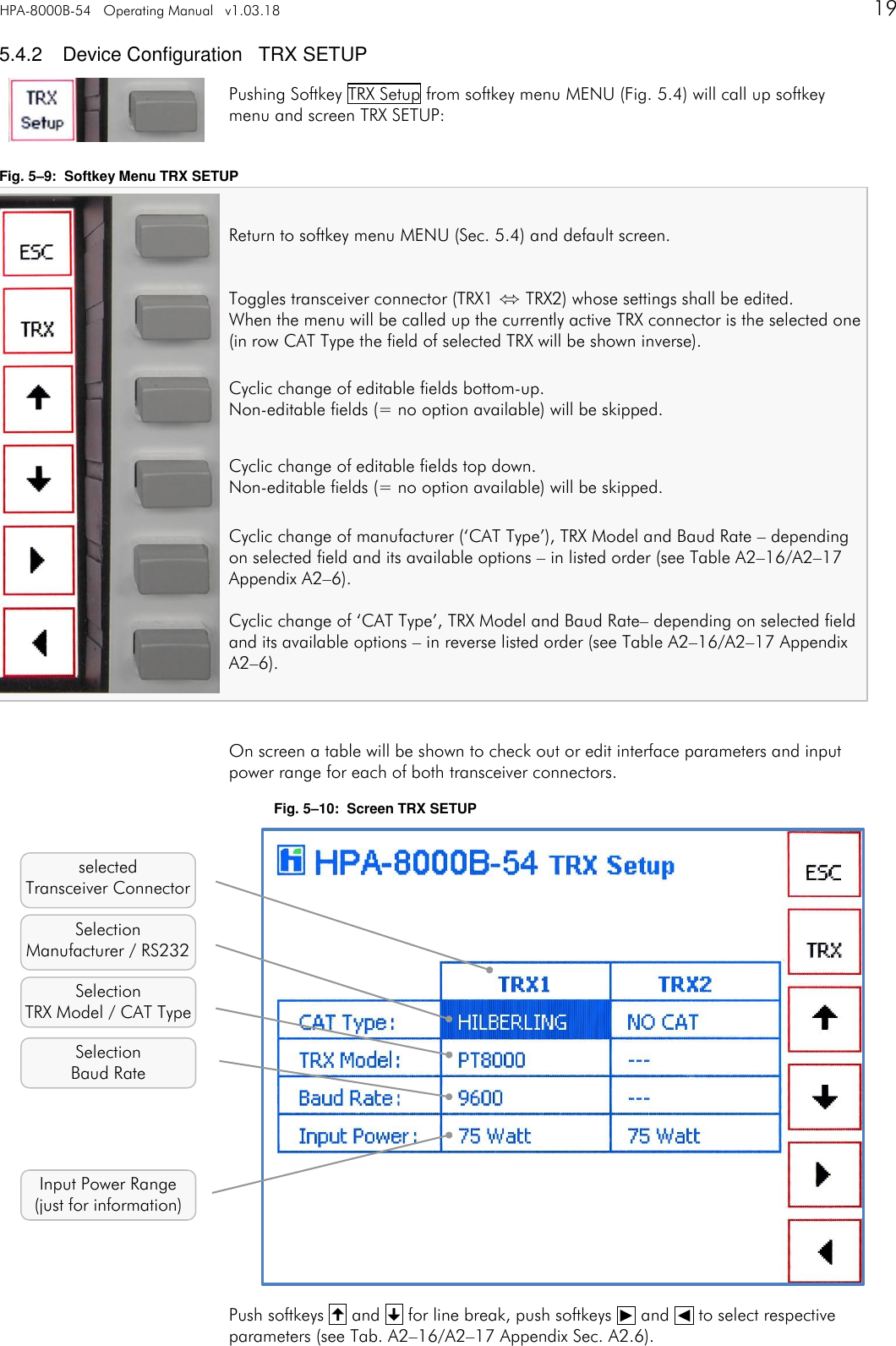
HPA-8000B-54   Operating Manual   v1.03.18      19    5.4.2  Device Configuration   TRX SETUP Pushing Softkey TRX Setup from softkey menu MENU (Fig. 5.4) will call up softkey menu and screen TRX SETUP:  Fig. 5–9:  Softkey Menu TRX SETUP  Return to softkey menu MENU (Sec. 5.4) and default screen.  Toggles transceiver connector (TRX1 ⬄ TRX2) whose settings shall be edited. When the menu will be called up the currently active TRX connector is the selected one (in row CAT Type the field of selected TRX will be shown inverse). Cyclic change of editable fields bottom-up. Non-editable fields (= no option available) will be skipped. Cyclic change of editable fields top down. Non-editable fields (= no option available) will be skipped. Cyclic change of manufacturer (‘CAT Type’), TRX Model and Baud Rate – depending on selected field and its available options – in listed order (see Table A2–16/A2–17 Appendix A2–6). Cyclic change of ‘CAT Type’, TRX Model and Baud Rate– depending on selected field and its available options – in reverse listed order (see Table A2–16/A2–17 Appendix A2–6).   On screen a table will be shown to check out or edit interface parameters and input power range for each of both transceiver connectors. Fig. 5–10:  Screen TRX SETUP                  Push softkeys  and  for line break, push softkeys ␐ and ␑ to select respective parameters (see Tab. A2–16/A2–17 Appendix Sec. A2.6).   selected Transceiver Connector Selection  Manufacturer / RS232 Selection TRX Model / CAT Type Input Power Range (just for information) Selection Baud Rate
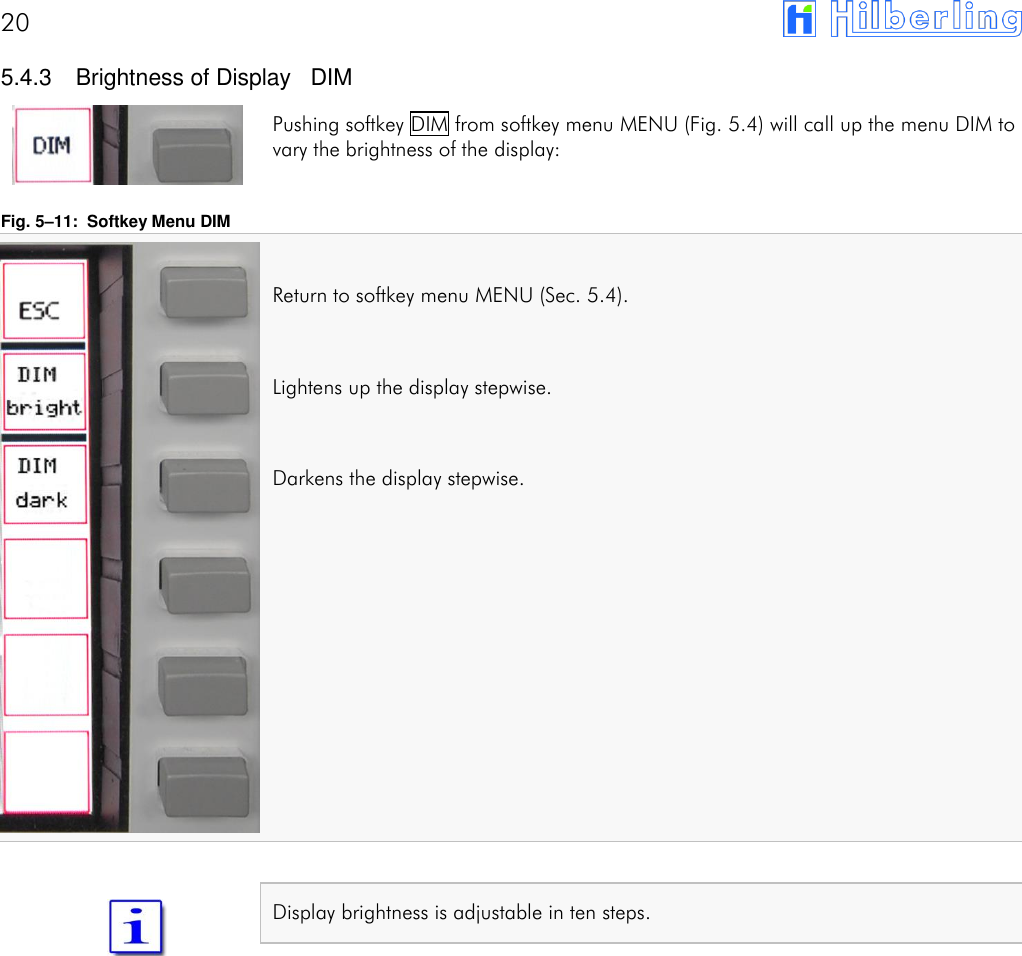
20        5.4.3  Brightness of Display   DIM Pushing softkey DIM from softkey menu MENU (Fig. 5.4) will call up the menu DIM to vary the brightness of the display:  Fig. 5–11:  Softkey Menu DIM  Return to softkey menu MENU (Sec. 5.4).  Lightens up the display stepwise.  Darkens the display stepwise.             Display brightness is adjustable in ten steps.
HPA-8000B-54   Operating Manual   v1.03.18      21   6  INSTALLATION / INITIAL OPERATION  Prior to any operation please read this manual carefully.  The HPA-8000B-54 is unlocked by software according to the band plans of that IARU region the device is delivered (Tab A2–2 and A2–3). The IARU region can be changed by software update.  Prior applying main power to the HPA-8000B-54 and power-on please verify the remarks in the following section 6.1.  6.1  Cable Connections Please check at rear panel of HPA-8000B-54 (Fig. 4–1):  Grounding stud (E) is connected to station ground,  HF cables from HPA-8000B-54 (J11 TRX1 / J13 TRX 2) to transceiver(s)  (PT-8000A: J2 HF-ANT1 / J3 HF-ANT 2) are installed properly,  Only in case a PT-8000A is being connected: VHF cable from HPA-8000B-54 (J10 VHF TRX 1 / J12 VHF TRX 2) to  PT-8000A (J1 VHF-ANT) is installed properly,  Antenna(s) (J14 ANT 4 … J17 ANT 1) is/are connected properly,  Data cable from HPA-8000B-54 (J1 AUX TRX 1 / J2 AUX TRX  2; alternatively: J5 PTT TRX 1 / J6 PTT TRX 2 und J7 ALC TRX 1 /J8 ALC TRX 2) to transceiver/s (PT-8000A: J17 AUX-TX) is/are installed,  Data cable from HPA-8000B-54 (J3 REMOTE TRX 1 / J4 REMOTE TRX 2) to transceiver/s (PT-8000A: J21 TRANSVERTER) is/are installed.  6.2  Power-on When all of the connections have been made and checked (6.1) put the HPA-8000B-54 into operation as follows:  Ensure that the main switch (POWER) of the HPA-8000B-54 is switched off  (pushed down),  Connect the supply cable to main power socket, (200 … 260 V AC / 50 … 60 Hz);  Switch on POWER at HPA-8000B-54 main switch.  All LEDs will light up for approximately one second (function test). LED AC/ON will light up permanently.  On the display the default screen will be shown (Fig. 5–2).
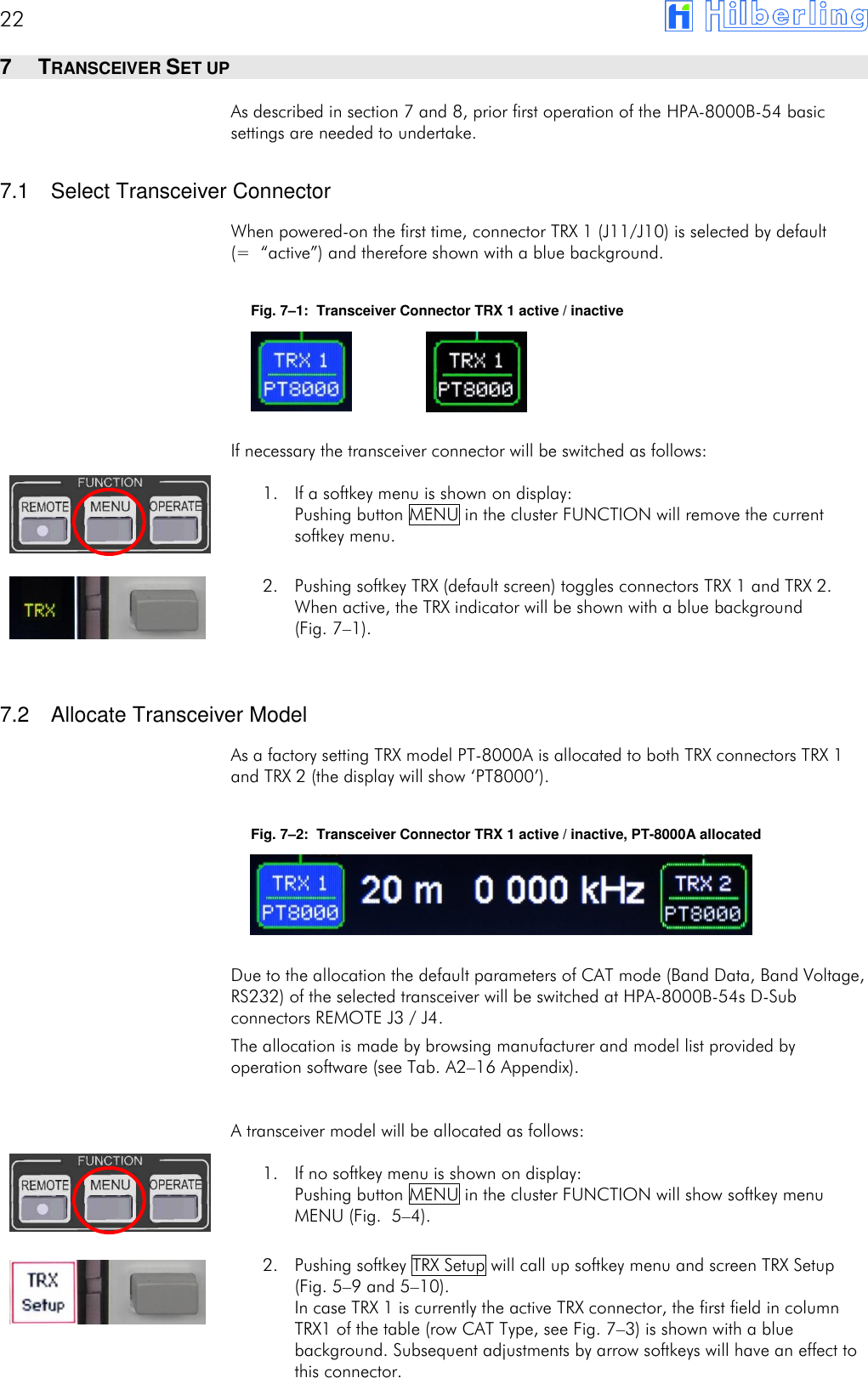
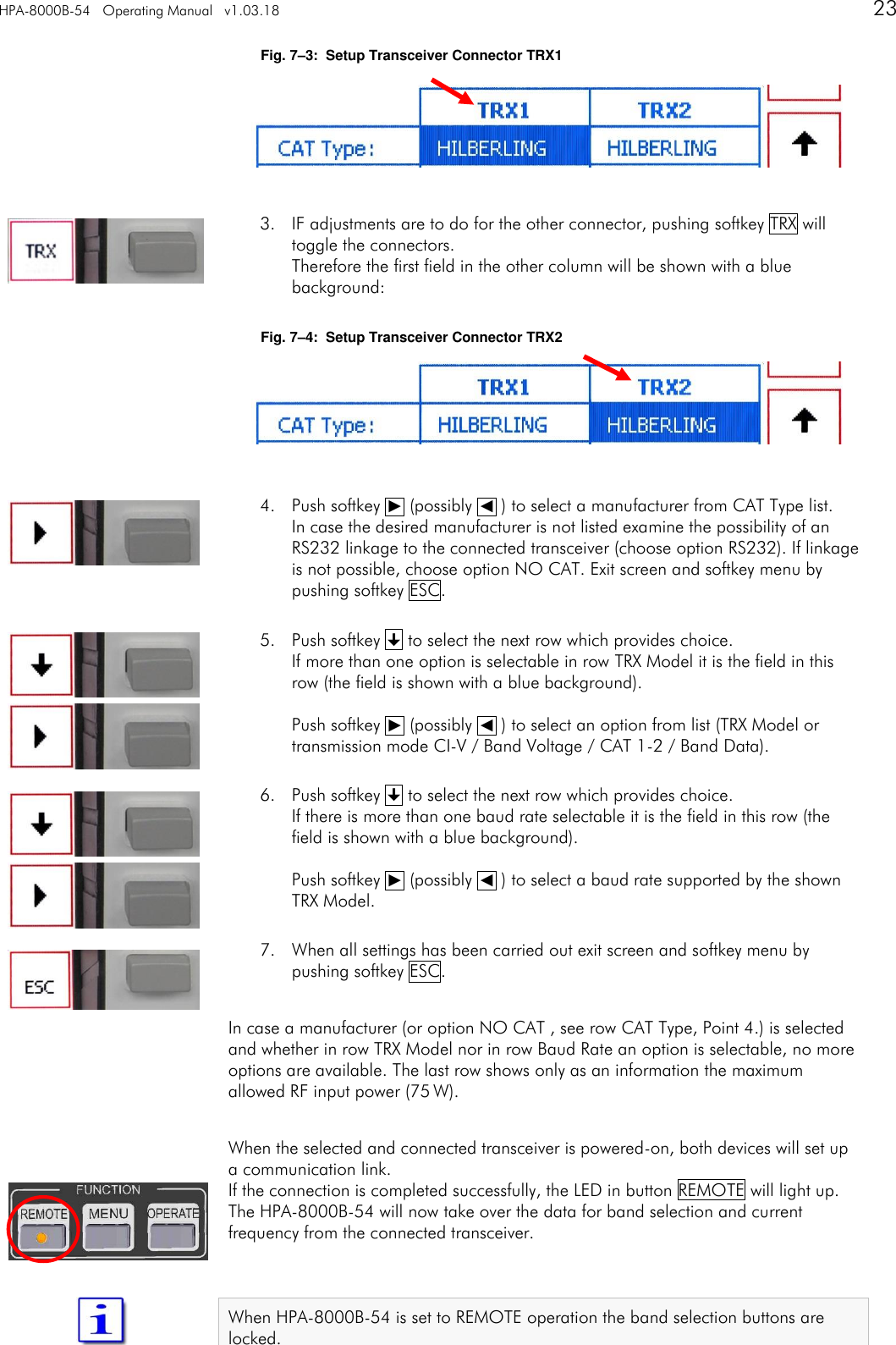
22       7  TRANSCEIVER SET UP As described in section 7 and 8, prior first operation of the HPA-8000B-54 basic settings are needed to undertake.  7.1  Select Transceiver Connector When powered-on the first time, connector TRX 1 (J11/J10) is selected by default (= “active”) and therefore shown with a blue background.  Fig. 7–1:  Transceiver Connector TRX 1 active / inactive     If necessary the transceiver connector will be switched as follows: 1. If a softkey menu is shown on display: Pushing button MENU in the cluster FUNCTION will remove the current softkey menu.  2. Pushing softkey TRX (default screen) toggles connectors TRX 1 and TRX 2. When active, the TRX indicator will be shown with a blue background  (Fig. 7–1).   7.2  Allocate Transceiver Model As a factory setting TRX model PT-8000A is allocated to both TRX connectors TRX 1 and TRX 2 (the display will show ‘PT8000’).  Fig. 7–2:  Transceiver Connector TRX 1 active / inactive, PT-8000A allocated     Due to the allocation the default parameters of CAT mode (Band Data, Band Voltage, RS232) of the selected transceiver will be switched at HPA-8000B-54s D-Sub connectors REMOTE J3 / J4. The allocation is made by browsing manufacturer and model list provided by operation software (see Tab. A2–16 Appendix). A transceiver model will be allocated as follows: 1. If no softkey menu is shown on display: Pushing button MENU in the cluster FUNCTION will show softkey menu MENU (Fig.  5–4).  2. Pushing softkey TRX Setup will call up softkey menu and screen TRX Setup (Fig. 5–9 and 5–10). In case TRX 1 is currently the active TRX connector, the first field in column TRX1 of the table (row CAT Type, see Fig. 7–3) is shown with a blue background. Subsequent adjustments by arrow softkeys will have an effect to this connector.
HPA-8000B-54   Operating Manual   v1.03.18      23   Fig. 7–3:  Setup Transceiver Connector TRX1      3. IF adjustments are to do for the other connector, pushing softkey TRX will toggle the connectors. Therefore the first field in the other column will be shown with a blue background:  Fig. 7–4:  Setup Transceiver Connector TRX2      4. Push softkey ␐ (possibly ␑ ) to select a manufacturer from CAT Type list. In case the desired manufacturer is not listed examine the possibility of an RS232 linkage to the connected transceiver (choose option RS232). If linkage is not possible, choose option NO CAT. Exit screen and softkey menu by pushing softkey ESC.  5. Push softkey  to select the next row which provides choice. If more than one option is selectable in row TRX Model it is the field in this row (the field is shown with a blue background).  Push softkey ␐ (possibly ␑ ) to select an option from list (TRX Model or transmission mode CI-V / Band Voltage / CAT 1-2 / Band Data).  6. Push softkey  to select the next row which provides choice. If there is more than one baud rate selectable it is the field in this row (the field is shown with a blue background).  Push softkey ␐ (possibly ␑ ) to select a baud rate supported by the shown TRX Model.  7. When all settings has been carried out exit screen and softkey menu by pushing softkey ESC.  In case a manufacturer (or option NO CAT , see row CAT Type, Point 4.) is selected and whether in row TRX Model nor in row Baud Rate an option is selectable, no more options are available. The last row shows only as an information the maximum allowed RF input power (75 W).   When the selected and connected transceiver is powered-on, both devices will set up a communication link. If the connection is completed successfully, the LED in button REMOTE will light up. The HPA-8000B-54 will now take over the data for band selection and current frequency from the connected transceiver.   When HPA-8000B-54 is set to REMOTE operation the band selection buttons are locked.
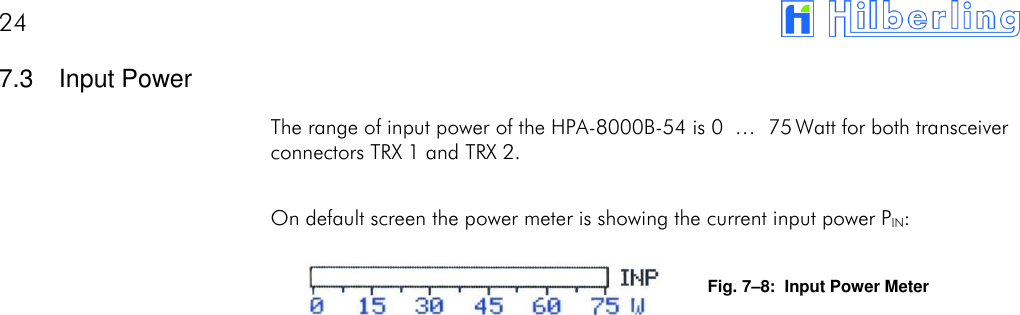
24       7.3  Input Power The range of input power of the HPA-8000B-54 is 0  … 75 Watt for both transceiver connectors TRX 1 and TRX 2.  On default screen the power meter is showing the current input power PIN:  Fig. 7–8:  Input Power Meter
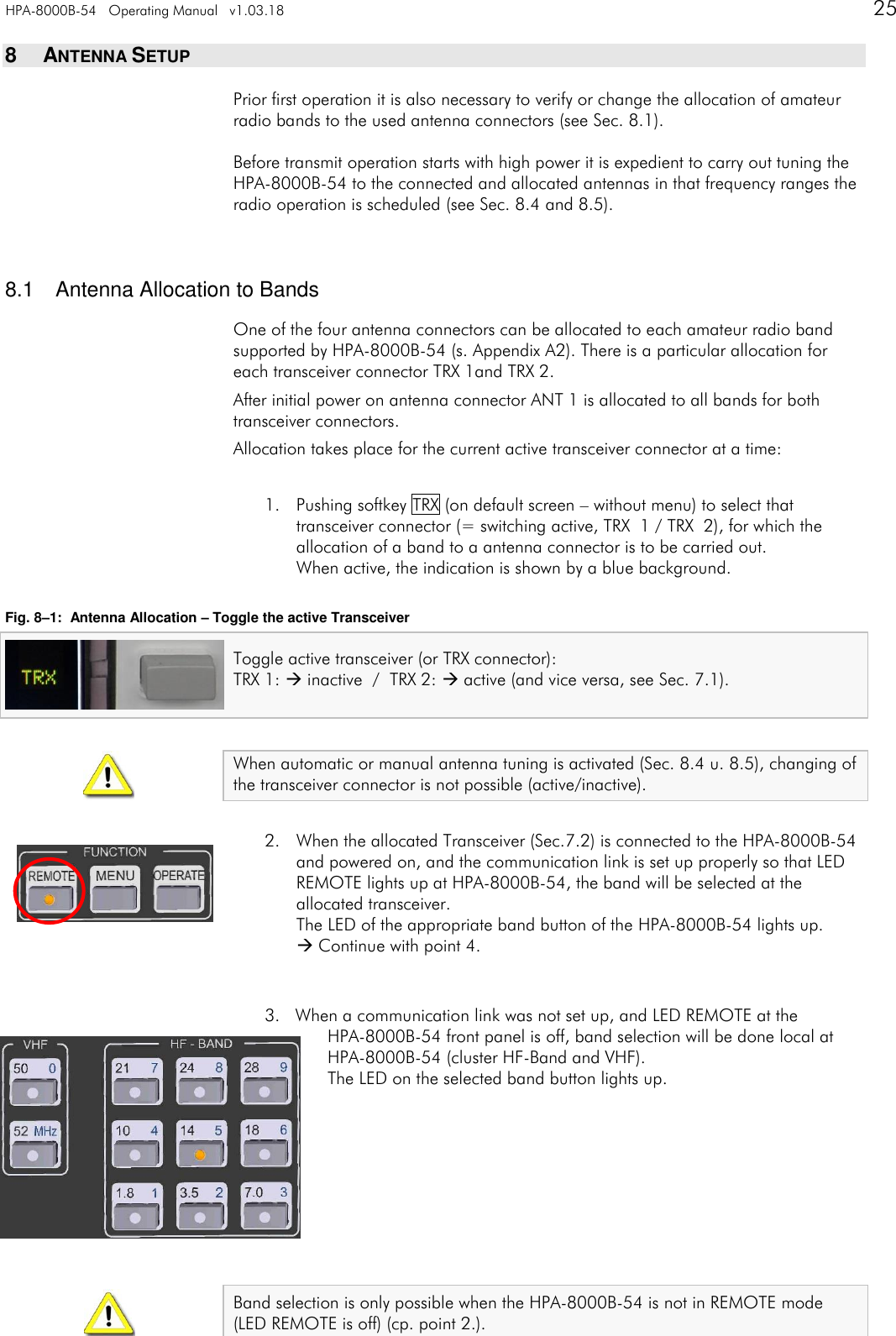
HPA-8000B-54   Operating Manual   v1.03.18      25    8  ANTENNA SETUP Prior first operation it is also necessary to verify or change the allocation of amateur radio bands to the used antenna connectors (see Sec. 8.1).  Before transmit operation starts with high power it is expedient to carry out tuning the HPA-8000B-54 to the connected and allocated antennas in that frequency ranges the radio operation is scheduled (see Sec. 8.4 and 8.5).   8.1  Antenna Allocation to Bands One of the four antenna connectors can be allocated to each amateur radio band supported by HPA-8000B-54 (s. Appendix A2). There is a particular allocation for each transceiver connector TRX 1and TRX 2. After initial power on antenna connector ANT 1 is allocated to all bands for both transceiver connectors. Allocation takes place for the current active transceiver connector at a time:  1. Pushing softkey TRX (on default screen – without menu) to select that transceiver connector (= switching active, TRX  1 / TRX  2), for which the allocation of a band to a antenna connector is to be carried out. When active, the indication is shown by a blue background.  Fig. 8–1:  Antenna Allocation – Toggle the active Transceiver Toggle active transceiver (or TRX connector):  TRX 1:  inactive  /  TRX 2:  active (and vice versa, see Sec. 7.1).   When automatic or manual antenna tuning is activated (Sec. 8.4 u. 8.5), changing of the transceiver connector is not possible (active/inactive).  2. When the allocated Transceiver (Sec.7.2) is connected to the HPA-8000B-54 and powered on, and the communication link is set up properly so that LED REMOTE lights up at HPA-8000B-54, the band will be selected at the allocated transceiver. The LED of the appropriate band button of the HPA-8000B-54 lights up.  Continue with point 4.   3. When a communication link was not set up, and LED REMOTE at the  HPA-8000B-54 front panel is off, band selection will be done local at HPA-8000B-54 (cluster HF-Band and VHF). The LED on the selected band button lights up.          Band selection is only possible when the HPA-8000B-54 is not in REMOTE mode  (LED REMOTE is off) (cp. point 2.).
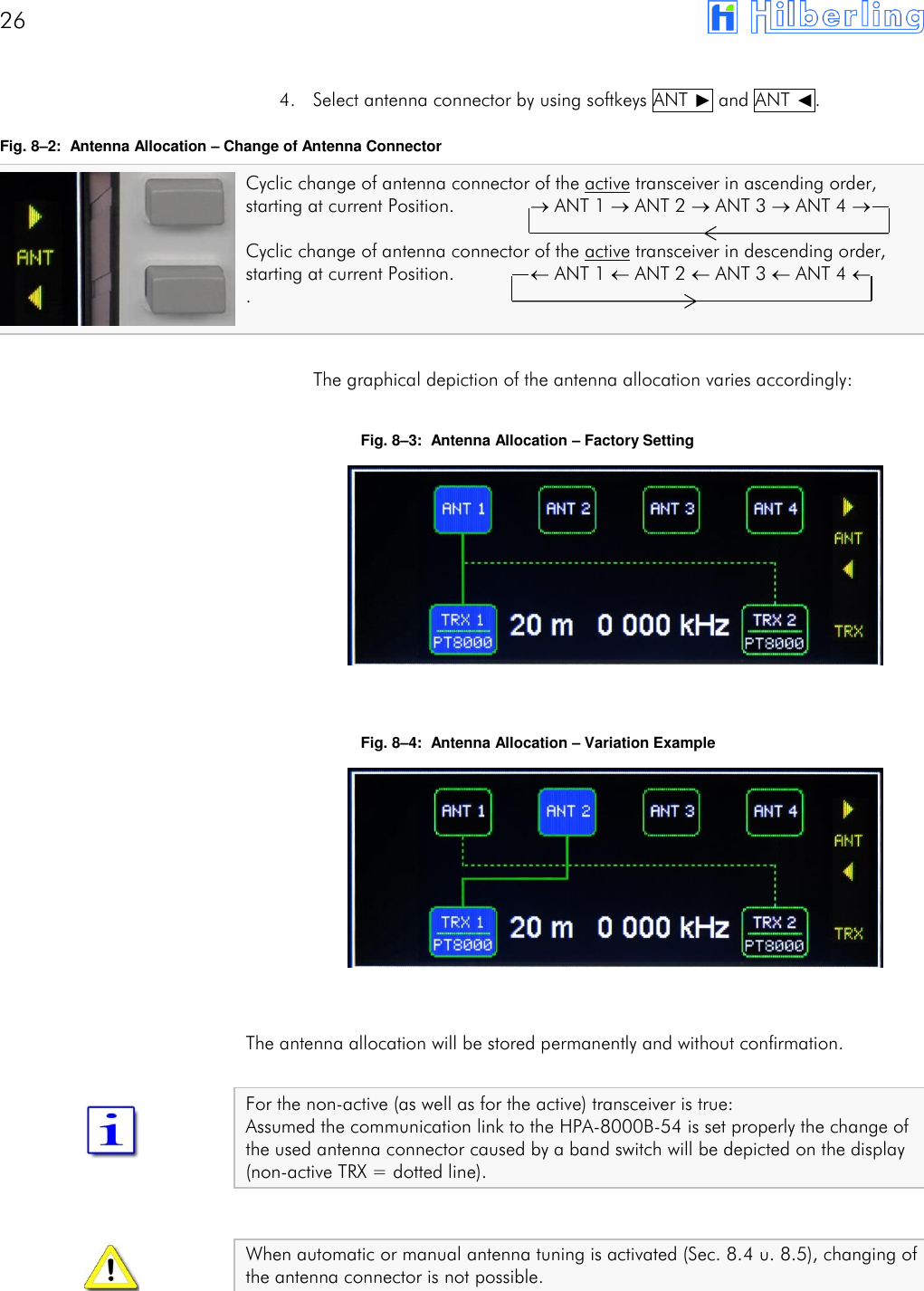
26         4. Select antenna connector by using softkeys ANT ␐ and ANT ␑. Fig. 8–2:  Antenna Allocation – Change of Antenna Connector Cyclic change of antenna connector of the active transceiver in ascending order, starting at current Position.               ANT 1  ANT 2  ANT 3  ANT 4       Cyclic change of antenna connector of the active transceiver in descending order, starting at current Position.               ANT 1  ANT 2  ANT 3  ANT 4   .   The graphical depiction of the antenna allocation varies accordingly:  Fig. 8–3:  Antenna Allocation – Factory Setting          Fig. 8–4:  Antenna Allocation – Variation Example          The antenna allocation will be stored permanently and without confirmation.  For the non-active (as well as for the active) transceiver is true: Assumed the communication link to the HPA-8000B-54 is set properly the change of the used antenna connector caused by a band switch will be depicted on the display (non-active TRX = dotted line).   When automatic or manual antenna tuning is activated (Sec. 8.4 u. 8.5), changing of the antenna connector is not possible.
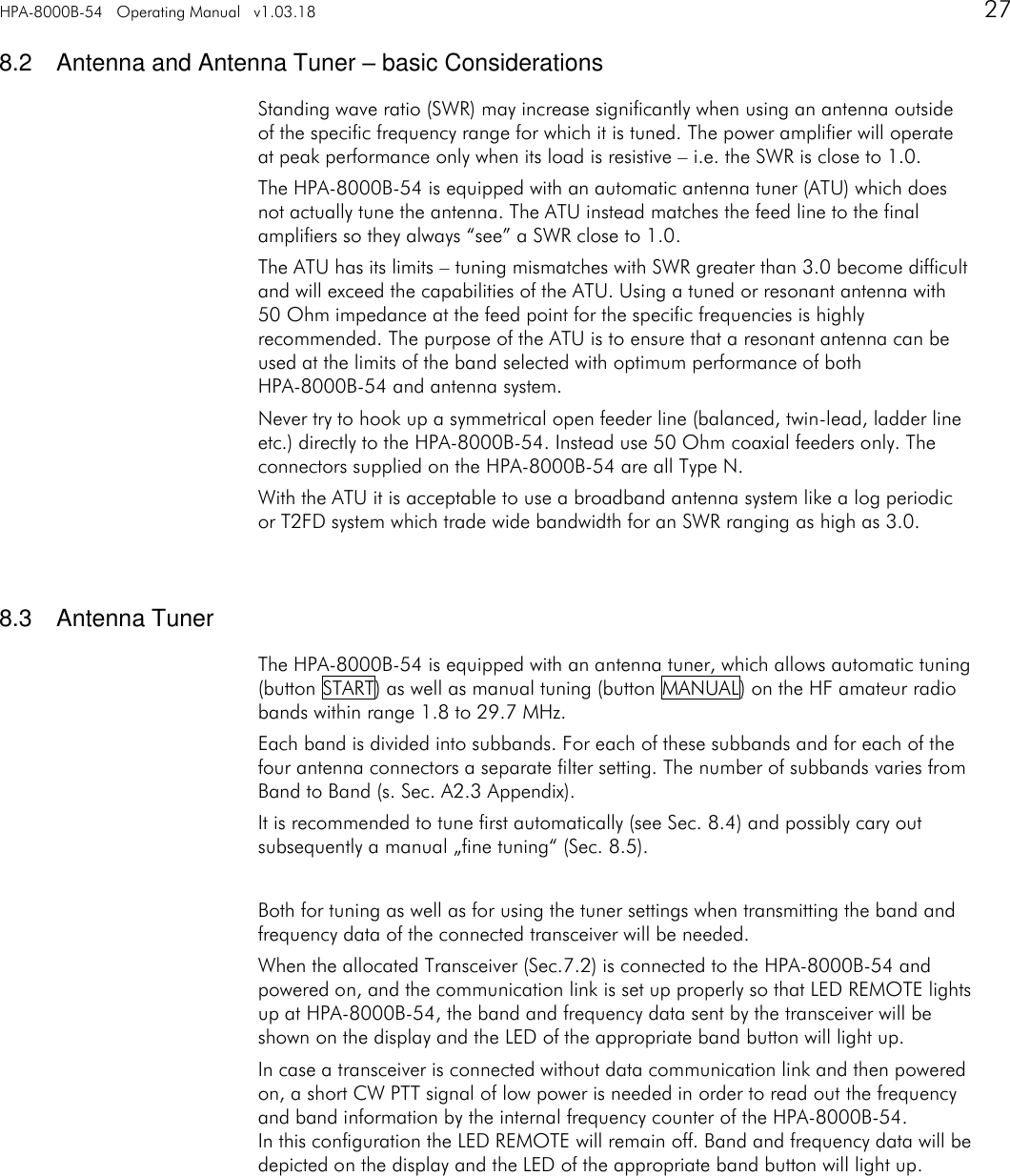
HPA-8000B-54   Operating Manual   v1.03.18      27   8.2  Antenna and Antenna Tuner – basic Considerations Standing wave ratio (SWR) may increase significantly when using an antenna outside of the specific frequency range for which it is tuned. The power amplifier will operate at peak performance only when its load is resistive – i.e. the SWR is close to 1.0. The HPA-8000B-54 is equipped with an automatic antenna tuner (ATU) which does not actually tune the antenna. The ATU instead matches the feed line to the final amplifiers so they always “see” a SWR close to 1.0. The ATU has its limits – tuning mismatches with SWR greater than 3.0 become difficult and will exceed the capabilities of the ATU. Using a tuned or resonant antenna with 50 Ohm impedance at the feed point for the specific frequencies is highly recommended. The purpose of the ATU is to ensure that a resonant antenna can be used at the limits of the band selected with optimum performance of both HPA-8000B-54 and antenna system. Never try to hook up a symmetrical open feeder line (balanced, twin-lead, ladder line etc.) directly to the HPA-8000B-54. Instead use 50 Ohm coaxial feeders only. The connectors supplied on the HPA-8000B-54 are all Type N. With the ATU it is acceptable to use a broadband antenna system like a log periodic or T2FD system which trade wide bandwidth for an SWR ranging as high as 3.0.   8.3  Antenna Tuner The HPA-8000B-54 is equipped with an antenna tuner, which allows automatic tuning (button START) as well as manual tuning (button MANUAL) on the HF amateur radio bands within range 1.8 to 29.7 MHz. Each band is divided into subbands. For each of these subbands and for each of the four antenna connectors a separate filter setting. The number of subbands varies from Band to Band (s. Sec. A2.3 Appendix). It is recommended to tune first automatically (see Sec. 8.4) and possibly cary out subsequently a manual „fine tuning“ (Sec. 8.5).  Both for tuning as well as for using the tuner settings when transmitting the band and frequency data of the connected transceiver will be needed. When the allocated Transceiver (Sec.7.2) is connected to the HPA-8000B-54 and powered on, and the communication link is set up properly so that LED REMOTE lights up at HPA-8000B-54, the band and frequency data sent by the transceiver will be shown on the display and the LED of the appropriate band button will light up. In case a transceiver is connected without data communication link and then powered on, a short CW PTT signal of low power is needed in order to read out the frequency and band information by the internal frequency counter of the HPA-8000B-54. In this configuration the LED REMOTE will remain off. Band and frequency data will be depicted on the display and the LED of the appropriate band button will light up.
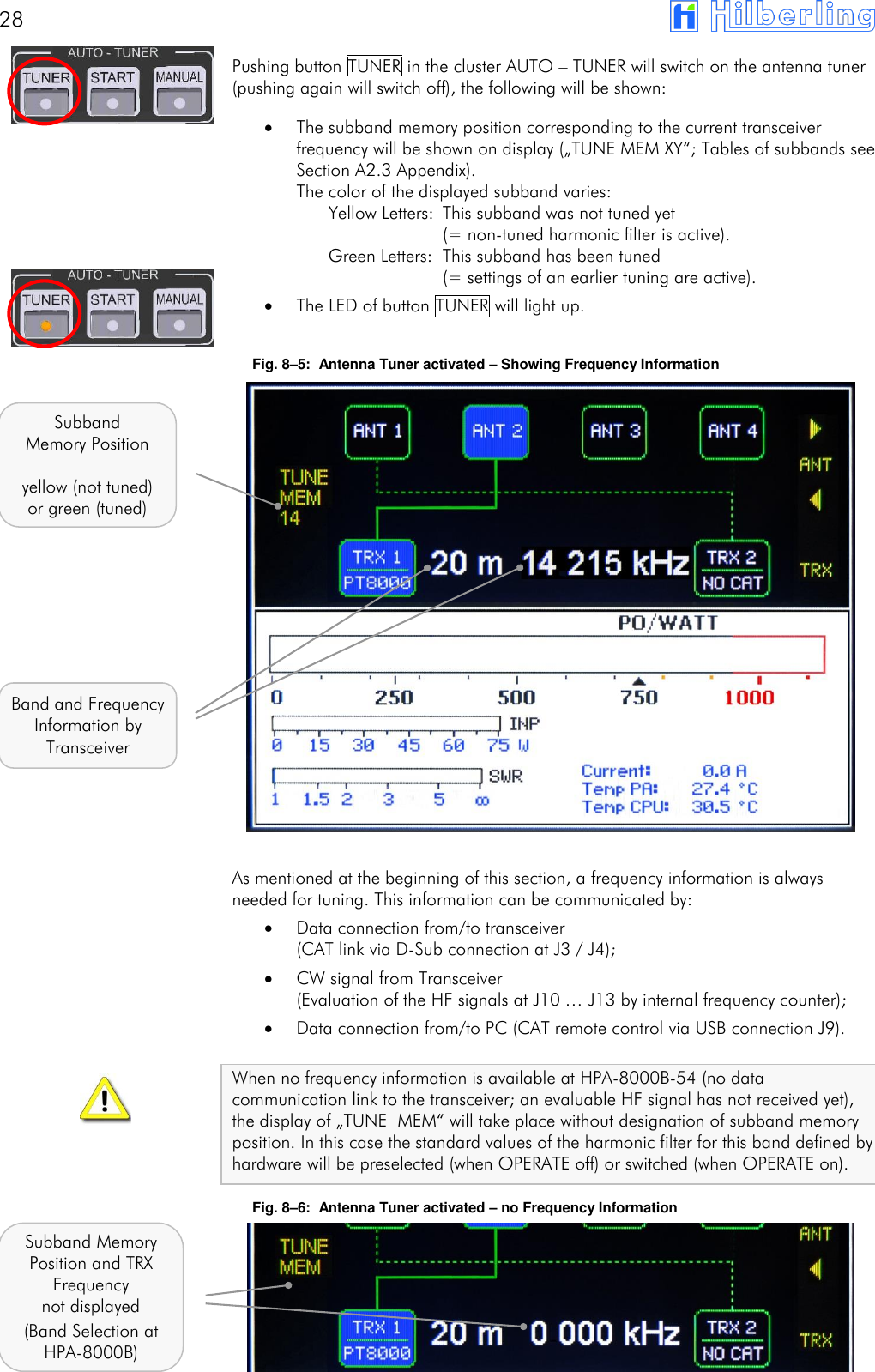
28       Pushing button TUNER in the cluster AUTO – TUNER will switch on the antenna tuner (pushing again will switch off), the following will be shown:  The subband memory position corresponding to the current transceiver frequency will be shown on display („TUNE MEM XY“; Tables of subbands see Section A2.3 Appendix). The color of the displayed subband varies:    Yellow Letters:  This subband was not tuned yet      (= non-tuned harmonic filter is active).    Green Letters:  This subband has been tuned      (= settings of an earlier tuning are active).  The LED of button TUNER will light up.  Fig. 8–5:  Antenna Tuner activated – Showing Frequency Information                  As mentioned at the beginning of this section, a frequency information is always needed for tuning. This information can be communicated by:  Data connection from/to transceiver  (CAT link via D-Sub connection at J3 / J4);  CW signal from Transceiver  (Evaluation of the HF signals at J10 … J13 by internal frequency counter);  Data connection from/to PC (CAT remote control via USB connection J9).  When no frequency information is available at HPA-8000B-54 (no data communication link to the transceiver; an evaluable HF signal has not received yet), the display of „TUNE MEM“ will take place without designation of subband memory position. In this case the standard values of the harmonic filter for this band defined by hardware will be preselected (when OPERATE off) or switched (when OPERATE on). Fig. 8–6:  Antenna Tuner activated – no Frequency Information       Subband Memory Position  yellow (not tuned) or green (tuned) Band and Frequency Information by Transceiver Subband Memory Position and TRX Frequency not displayed (Band Selection at HPA-8000B)
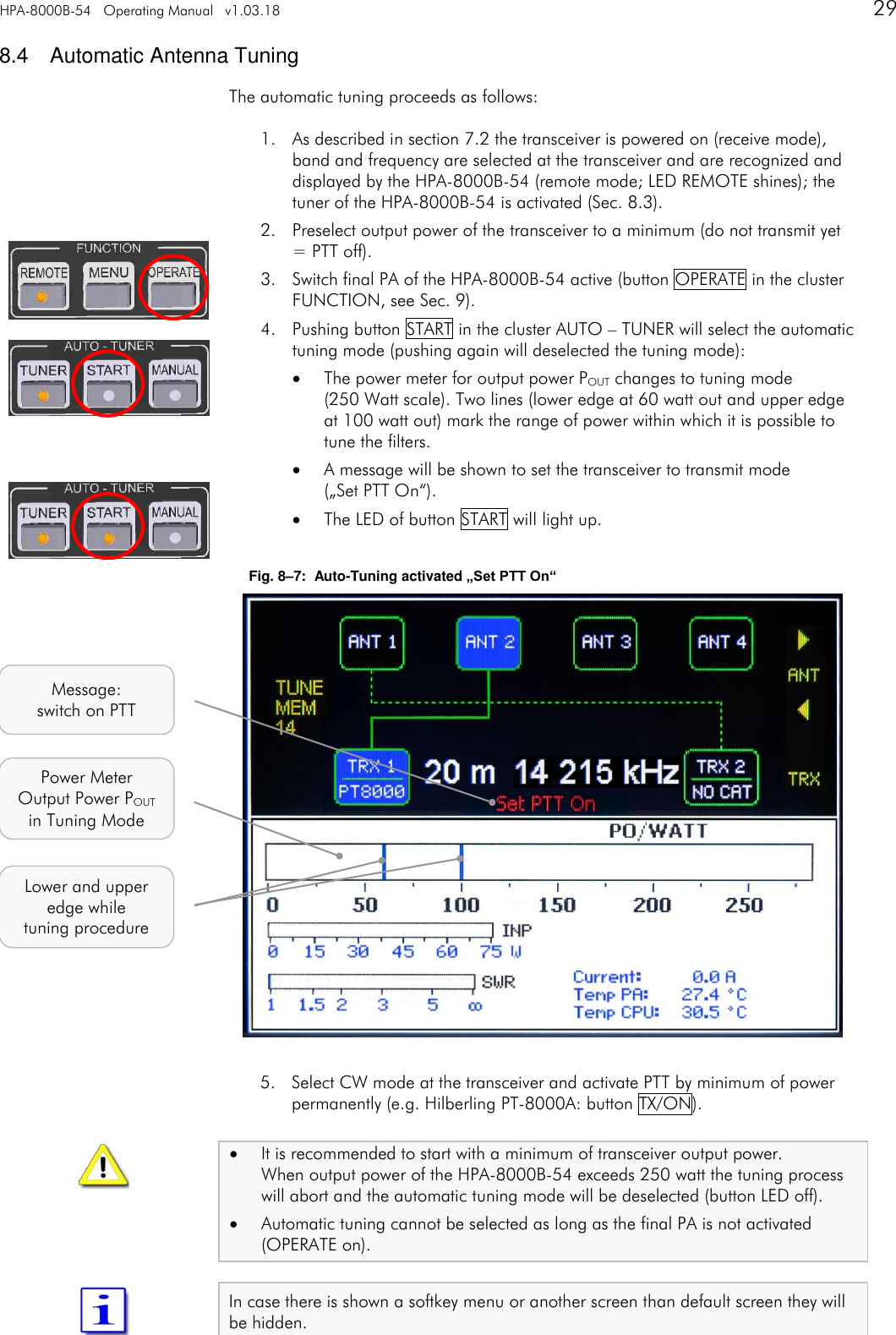
HPA-8000B-54   Operating Manual   v1.03.18      29   8.4  Automatic Antenna Tuning The automatic tuning proceeds as follows: 1. As described in section 7.2 the transceiver is powered on (receive mode), band and frequency are selected at the transceiver and are recognized and displayed by the HPA-8000B-54 (remote mode; LED REMOTE shines); the tuner of the HPA-8000B-54 is activated (Sec. 8.3). 2. Preselect output power of the transceiver to a minimum (do not transmit yet = PTT off). 3. Switch final PA of the HPA-8000B-54 active (button OPERATE in the cluster FUNCTION, see Sec. 9). 4. Pushing button START in the cluster AUTO – TUNER will select the automatic tuning mode (pushing again will deselected the tuning mode):  The power meter for output power POUT changes to tuning mode  (250 Watt scale). Two lines (lower edge at 60 watt out and upper edge at 100 watt out) mark the range of power within which it is possible to tune the filters.  A message will be shown to set the transceiver to transmit mode  („Set PTT On“).  The LED of button START will light up.  Fig. 8–7:  Auto-Tuning activated „Set PTT On“                  5. Select CW mode at the transceiver and activate PTT by minimum of power permanently (e.g. Hilberling PT-8000A: button TX/ON).  It is recommended to start with a minimum of transceiver output power. When output power of the HPA-8000B-54 exceeds 250 watt the tuning process will abort and the automatic tuning mode will be deselected (button LED off).  Automatic tuning cannot be selected as long as the final PA is not activated (OPERATE on).  In case there is shown a softkey menu or another screen than default screen they will be hidden.   Message: switch on PTT Lower and upper edge while tuning procedure Power Meter Output Power POUT in Tuning Mode
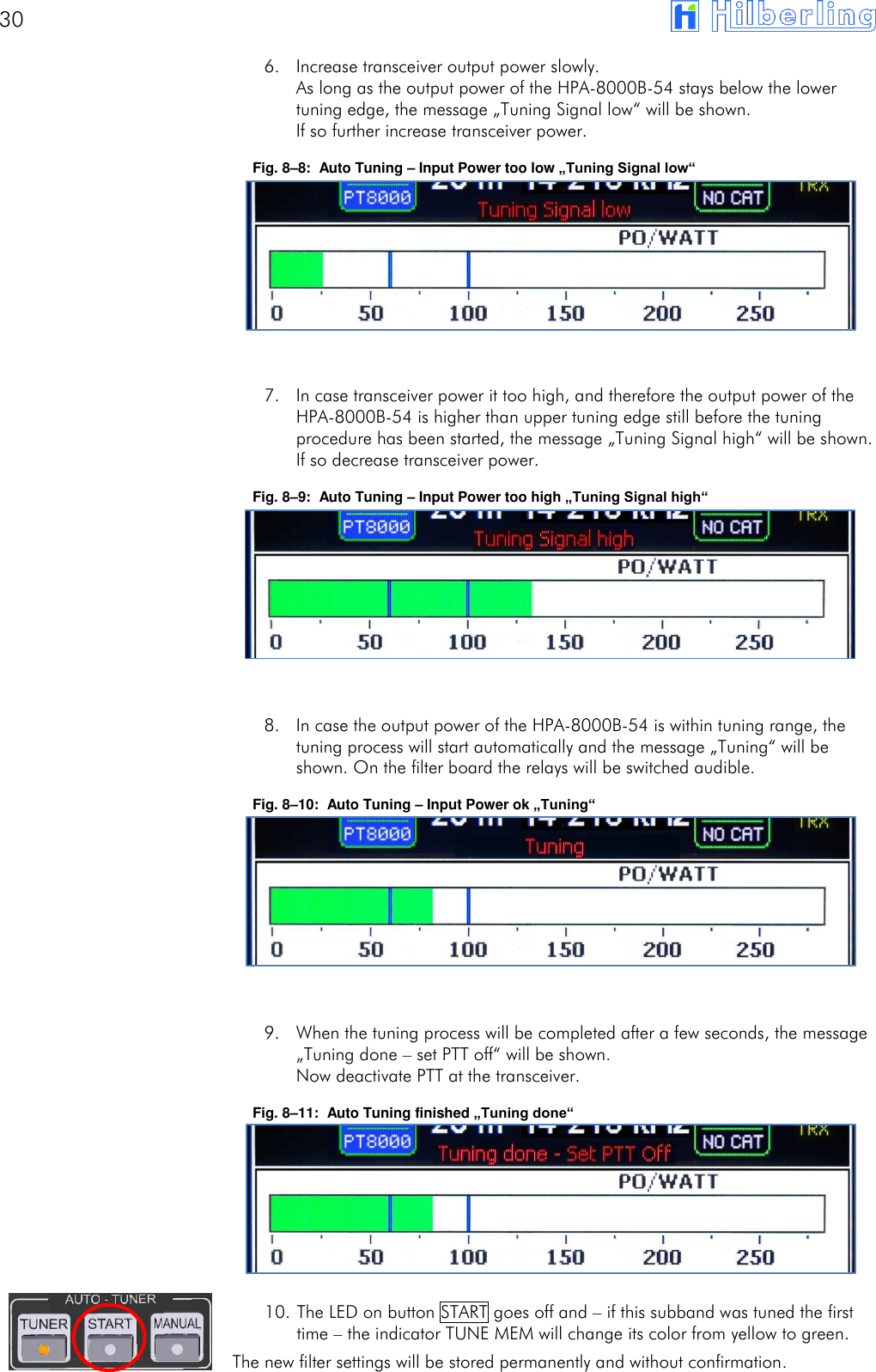
30       6. Increase transceiver output power slowly. As long as the output power of the HPA-8000B-54 stays below the lower tuning edge, the message „Tuning Signal low“ will be shown. If so further increase transceiver power. Fig. 8–8:  Auto Tuning – Input Power too low „Tuning Signal low“        7. In case transceiver power it too high, and therefore the output power of the HPA-8000B-54 is higher than upper tuning edge still before the tuning procedure has been started, the message „Tuning Signal high“ will be shown. If so decrease transceiver power. Fig. 8–9:  Auto Tuning – Input Power too high „Tuning Signal high“        8. In case the output power of the HPA-8000B-54 is within tuning range, the tuning process will start automatically and the message „Tuning“ will be shown. On the filter board the relays will be switched audible. Fig. 8–10:  Auto Tuning – Input Power ok „Tuning“        9. When the tuning process will be completed after a few seconds, the message „Tuning done – set PTT off“ will be shown. Now deactivate PTT at the transceiver. Fig. 8–11:  Auto Tuning finished „Tuning done“       10. The LED on button START goes off and – if this subband was tuned the first time – the indicator TUNE MEM will change its color from yellow to green. The new filter settings will be stored permanently and without confirmation.
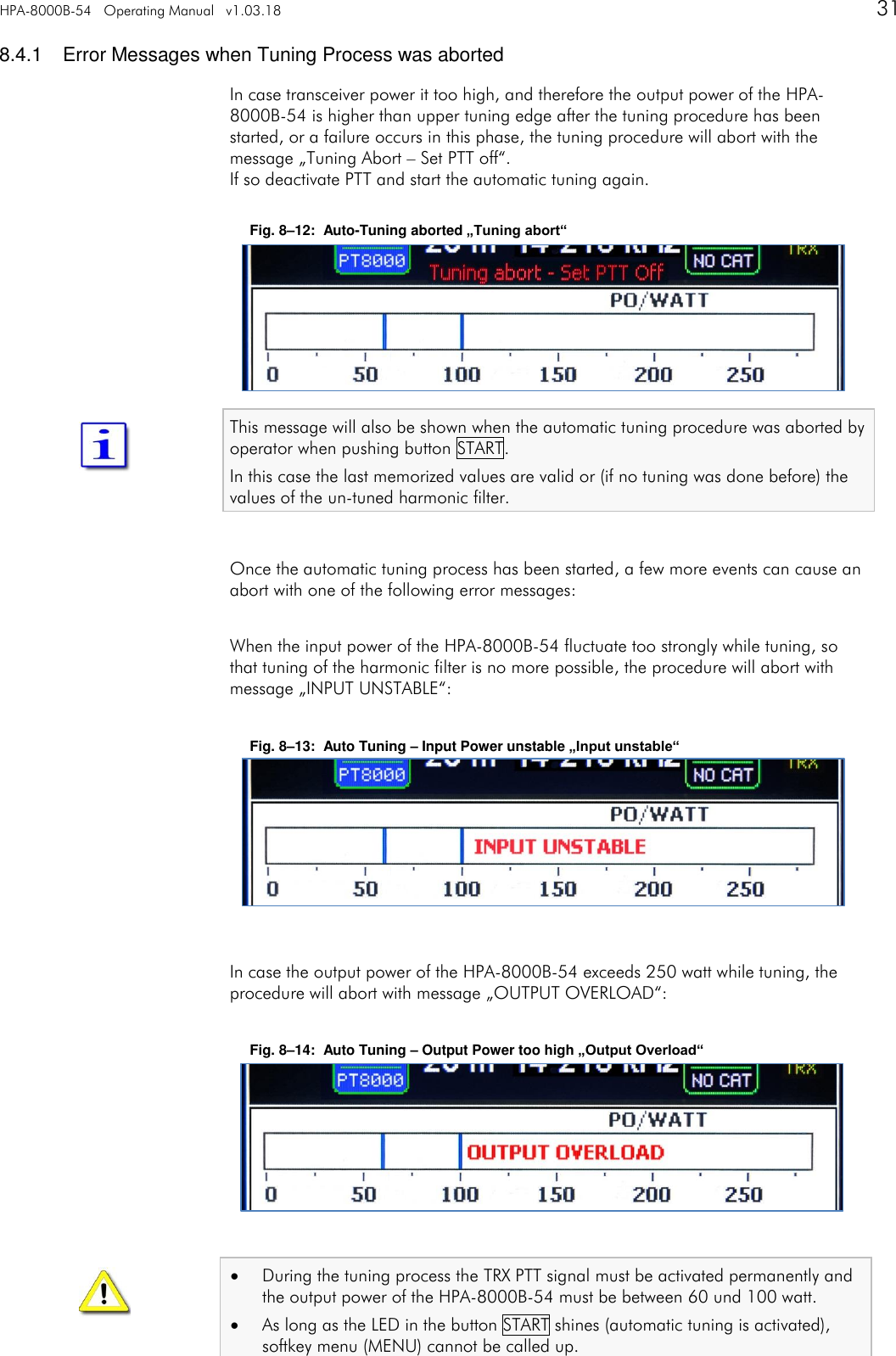
HPA-8000B-54   Operating Manual   v1.03.18      31   8.4.1  Error Messages when Tuning Process was aborted In case transceiver power it too high, and therefore the output power of the HPA-8000B-54 is higher than upper tuning edge after the tuning procedure has been started, or a failure occurs in this phase, the tuning procedure will abort with the message „Tuning Abort – Set PTT off“. If so deactivate PTT and start the automatic tuning again.  Fig. 8–12:  Auto-Tuning aborted „Tuning abort“       This message will also be shown when the automatic tuning procedure was aborted by operator when pushing button START. In this case the last memorized values are valid or (if no tuning was done before) the values of the un-tuned harmonic filter.  Once the automatic tuning process has been started, a few more events can cause an abort with one of the following error messages:  When the input power of the HPA-8000B-54 fluctuate too strongly while tuning, so that tuning of the harmonic filter is no more possible, the procedure will abort with message „INPUT UNSTABLE“:  Fig. 8–13:  Auto Tuning – Input Power unstable „Input unstable“        In case the output power of the HPA-8000B-54 exceeds 250 watt while tuning, the procedure will abort with message „OUTPUT OVERLOAD“:  Fig. 8–14:  Auto Tuning – Output Power too high „Output Overload“         During the tuning process the TRX PTT signal must be activated permanently and the output power of the HPA-8000B-54 must be between 60 und 100 watt.  As long as the LED in the button START shines (automatic tuning is activated), softkey menu (MENU) cannot be called up.
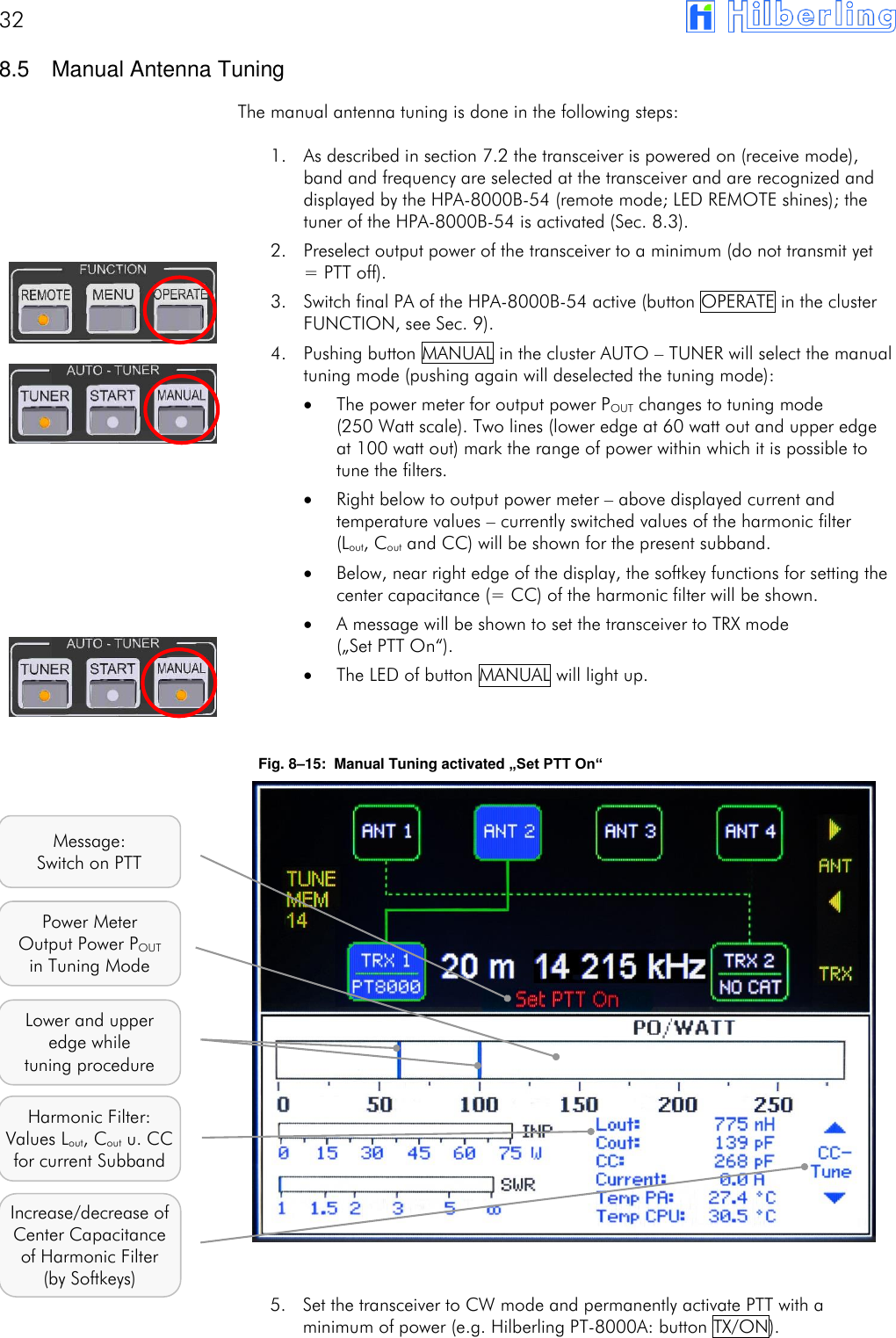
32       8.5  Manual Antenna Tuning The manual antenna tuning is done in the following steps: 1. As described in section 7.2 the transceiver is powered on (receive mode), band and frequency are selected at the transceiver and are recognized and displayed by the HPA-8000B-54 (remote mode; LED REMOTE shines); the tuner of the HPA-8000B-54 is activated (Sec. 8.3). 2. Preselect output power of the transceiver to a minimum (do not transmit yet = PTT off). 3. Switch final PA of the HPA-8000B-54 active (button OPERATE in the cluster FUNCTION, see Sec. 9). 4. Pushing button MANUAL in the cluster AUTO – TUNER will select the manual tuning mode (pushing again will deselected the tuning mode):  The power meter for output power POUT changes to tuning mode  (250 Watt scale). Two lines (lower edge at 60 watt out and upper edge at 100 watt out) mark the range of power within which it is possible to tune the filters.  Right below to output power meter – above displayed current and temperature values – currently switched values of the harmonic filter  (Lout, Cout and CC) will be shown for the present subband.  Below, near right edge of the display, the softkey functions for setting the center capacitance (= CC) of the harmonic filter will be shown.  A message will be shown to set the transceiver to TRX mode  („Set PTT On“).  The LED of button MANUAL will light up.   Fig. 8–15:  Manual Tuning activated „Set PTT On“                  5. Set the transceiver to CW mode and permanently activate PTT with a minimum of power (e.g. Hilberling PT-8000A: button TX/ON).   Message: Switch on PTT Lower and upper edge while tuning procedure Power Meter Output Power POUT in Tuning Mode Harmonic Filter: Values Lout, Cout u. CC for current Subband Increase/decrease of Center Capacitance of Harmonic Filter (by Softkeys)
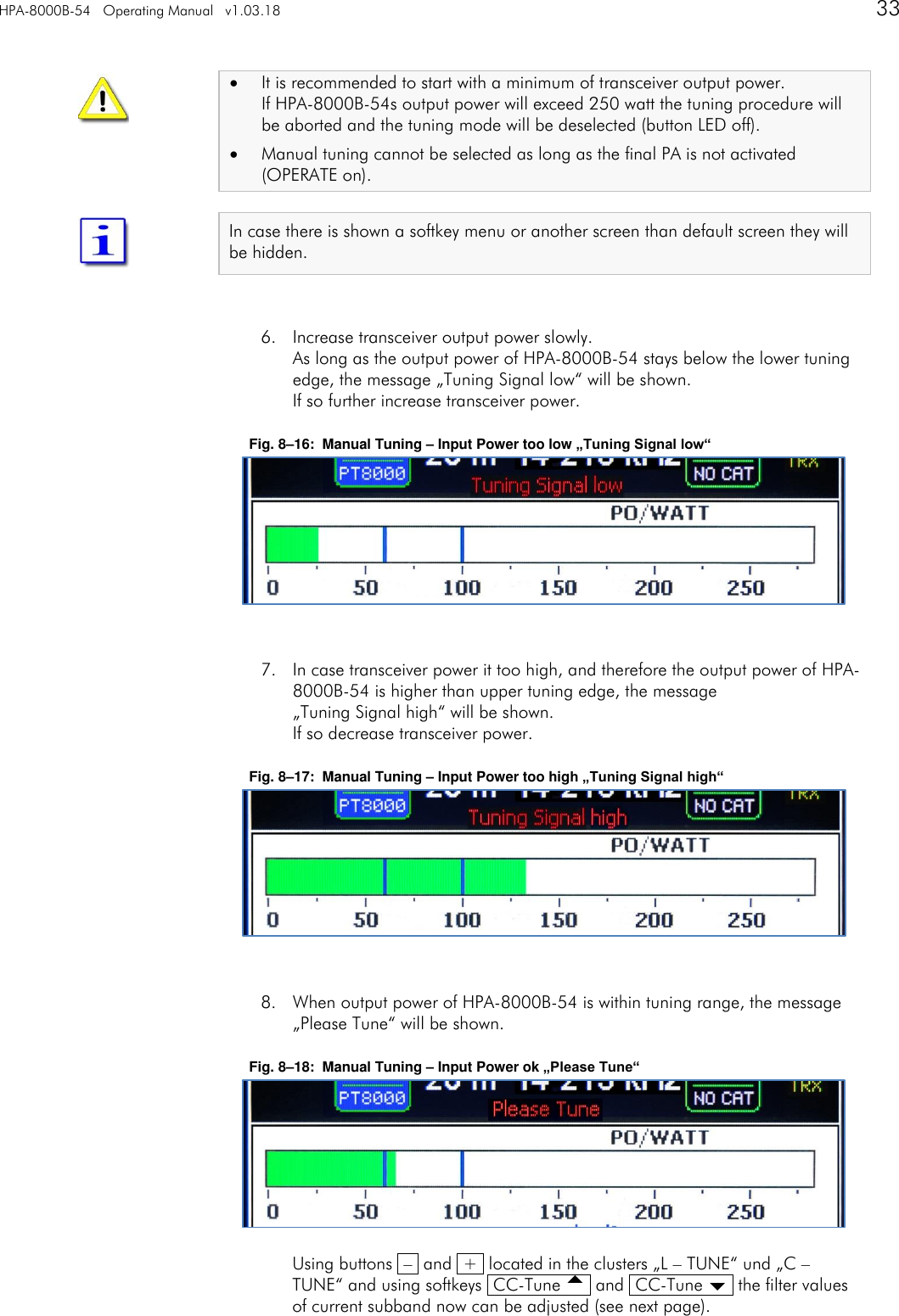
HPA-8000B-54   Operating Manual   v1.03.18      33     It is recommended to start with a minimum of transceiver output power. If HPA-8000B-54s output power will exceed 250 watt the tuning procedure will be aborted and the tuning mode will be deselected (button LED off).  Manual tuning cannot be selected as long as the final PA is not activated (OPERATE on).  In case there is shown a softkey menu or another screen than default screen they will be hidden.   6. Increase transceiver output power slowly. As long as the output power of HPA-8000B-54 stays below the lower tuning edge, the message „Tuning Signal low“ will be shown. If so further increase transceiver power.  Fig. 8–16:  Manual Tuning – Input Power too low „Tuning Signal low“        7. In case transceiver power it too high, and therefore the output power of HPA-8000B-54 is higher than upper tuning edge, the message  „Tuning Signal high“ will be shown. If so decrease transceiver power.  Fig. 8–17:  Manual Tuning – Input Power too high „Tuning Signal high“        8. When output power of HPA-8000B-54 is within tuning range, the message „Please Tune“ will be shown.  Fig. 8–18:  Manual Tuning – Input Power ok „Please Tune“         Using buttons  –  and  +  located in the clusters „L – TUNE“ und „C – TUNE“ and using softkeys  CC-Tune   and  CC-Tune   the filter values of current subband now can be adjusted (see next page).
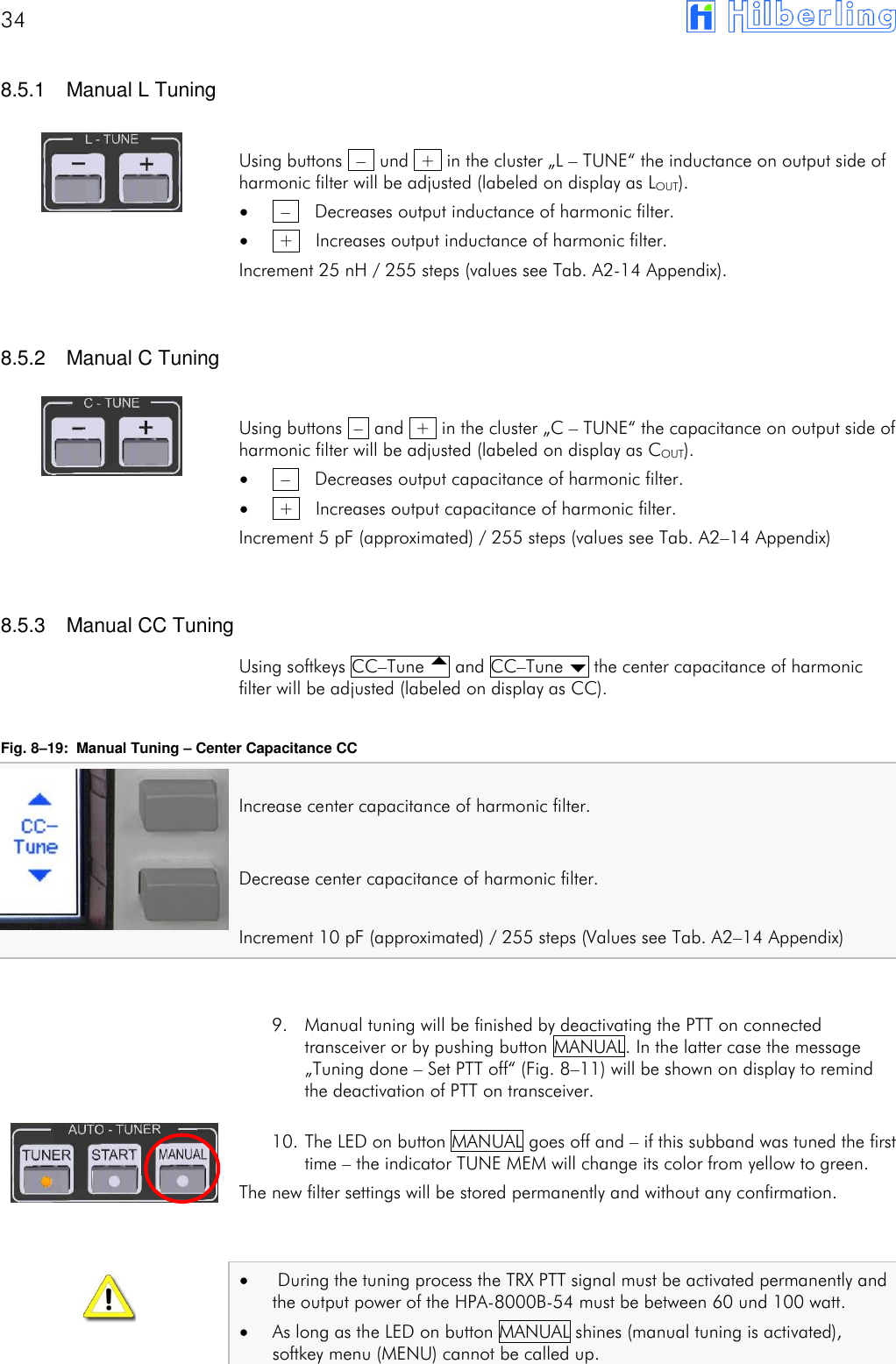
34         8.5.1  Manual L Tuning  Using buttons  –  und  +  in the cluster „L – TUNE“ the inductance on output side of harmonic filter will be adjusted (labeled on display as LOUT).   –    Decreases output inductance of harmonic filter.   +    Increases output inductance of harmonic filter. Increment 25 nH / 255 steps (values see Tab. A2-14 Appendix).   8.5.2  Manual C Tuning  Using buttons  –  and  +  in the cluster „C – TUNE“ the capacitance on output side of harmonic filter will be adjusted (labeled on display as COUT).   –    Decreases output capacitance of harmonic filter.   +    Increases output capacitance of harmonic filter. Increment 5 pF (approximated) / 255 steps (values see Tab. A2–14 Appendix)   8.5.3  Manual CC Tuning Using softkeys CC–Tune  and CC–Tune  the center capacitance of harmonic filter will be adjusted (labeled on display as CC).  Fig. 8–19:  Manual Tuning – Center Capacitance CC  Increase center capacitance of harmonic filter.  Decrease center capacitance of harmonic filter.  Increment 10 pF (approximated) / 255 steps (Values see Tab. A2–14 Appendix)   9. Manual tuning will be finished by deactivating the PTT on connected transceiver or by pushing button MANUAL. In the latter case the message „Tuning done – Set PTT off“ (Fig. 8–11) will be shown on display to remind the deactivation of PTT on transceiver.  10. The LED on button MANUAL goes off and – if this subband was tuned the first time – the indicator TUNE MEM will change its color from yellow to green. The new filter settings will be stored permanently and without any confirmation.     During the tuning process the TRX PTT signal must be activated permanently and the output power of the HPA-8000B-54 must be between 60 und 100 watt.  As long as the LED on button MANUAL shines (manual tuning is activated), softkey menu (MENU) cannot be called up.
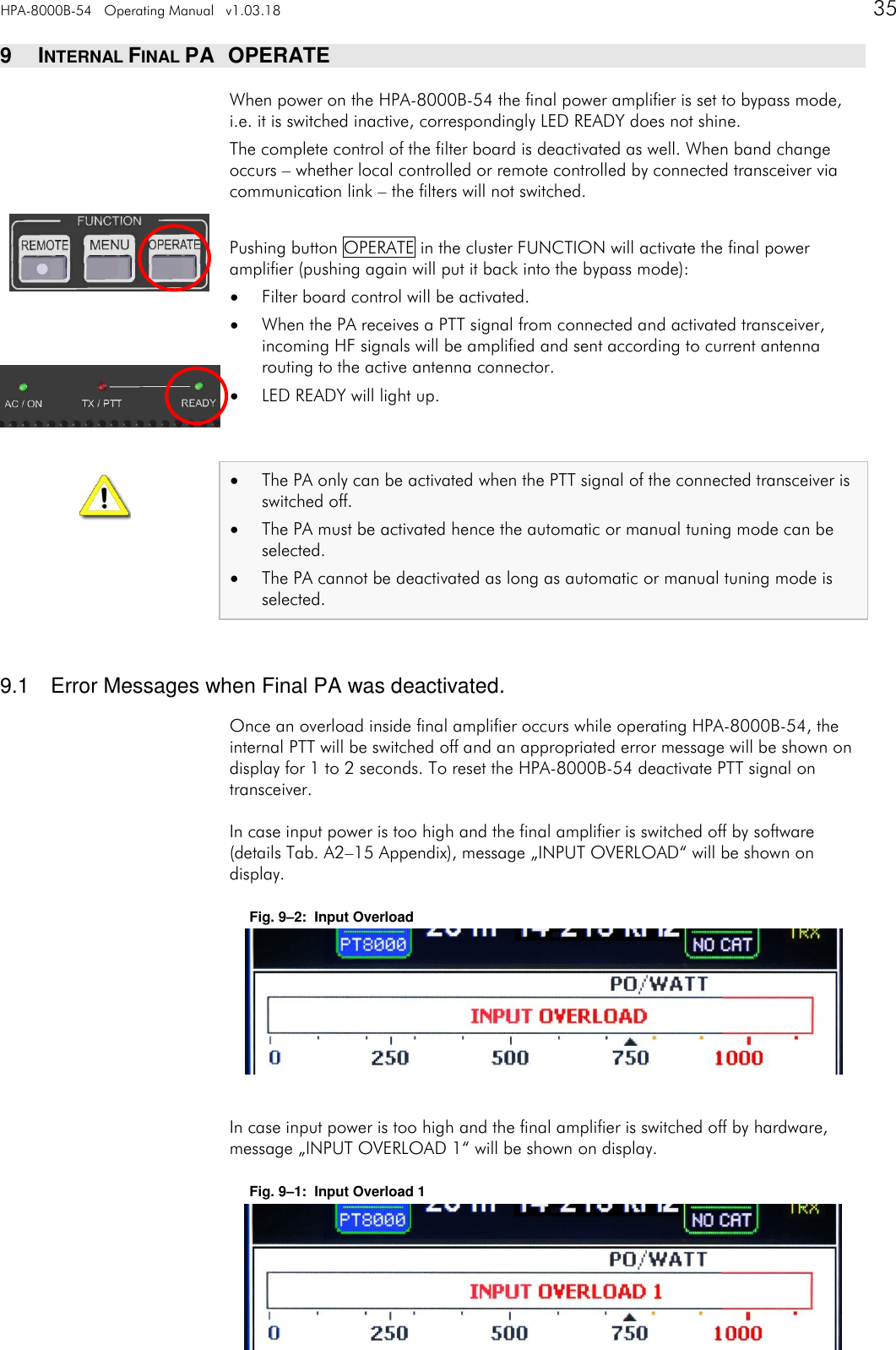
HPA-8000B-54   Operating Manual   v1.03.18      35   9  INTERNAL FINAL PA   OPERATE When power on the HPA-8000B-54 the final power amplifier is set to bypass mode, i.e. it is switched inactive, correspondingly LED READY does not shine. The complete control of the filter board is deactivated as well. When band change occurs – whether local controlled or remote controlled by connected transceiver via communication link – the filters will not switched.  Pushing button OPERATE in the cluster FUNCTION will activate the final power amplifier (pushing again will put it back into the bypass mode):  Filter board control will be activated.  When the PA receives a PTT signal from connected and activated transceiver, incoming HF signals will be amplified and sent according to current antenna routing to the active antenna connector.  LED READY will light up.    The PA only can be activated when the PTT signal of the connected transceiver is switched off.  The PA must be activated hence the automatic or manual tuning mode can be selected.  The PA cannot be deactivated as long as automatic or manual tuning mode is selected.   9.1  Error Messages when Final PA was deactivated. Once an overload inside final amplifier occurs while operating HPA-8000B-54, the internal PTT will be switched off and an appropriated error message will be shown on display for 1 to 2 seconds. To reset the HPA-8000B-54 deactivate PTT signal on transceiver. In case input power is too high and the final amplifier is switched off by software (details Tab. A2–15 Appendix), message „INPUT OVERLOAD“ will be shown on display. Fig. 9–2:  Input Overload       In case input power is too high and the final amplifier is switched off by hardware, message „INPUT OVERLOAD 1“ will be shown on display. Fig. 9–1:  Input Overload 1
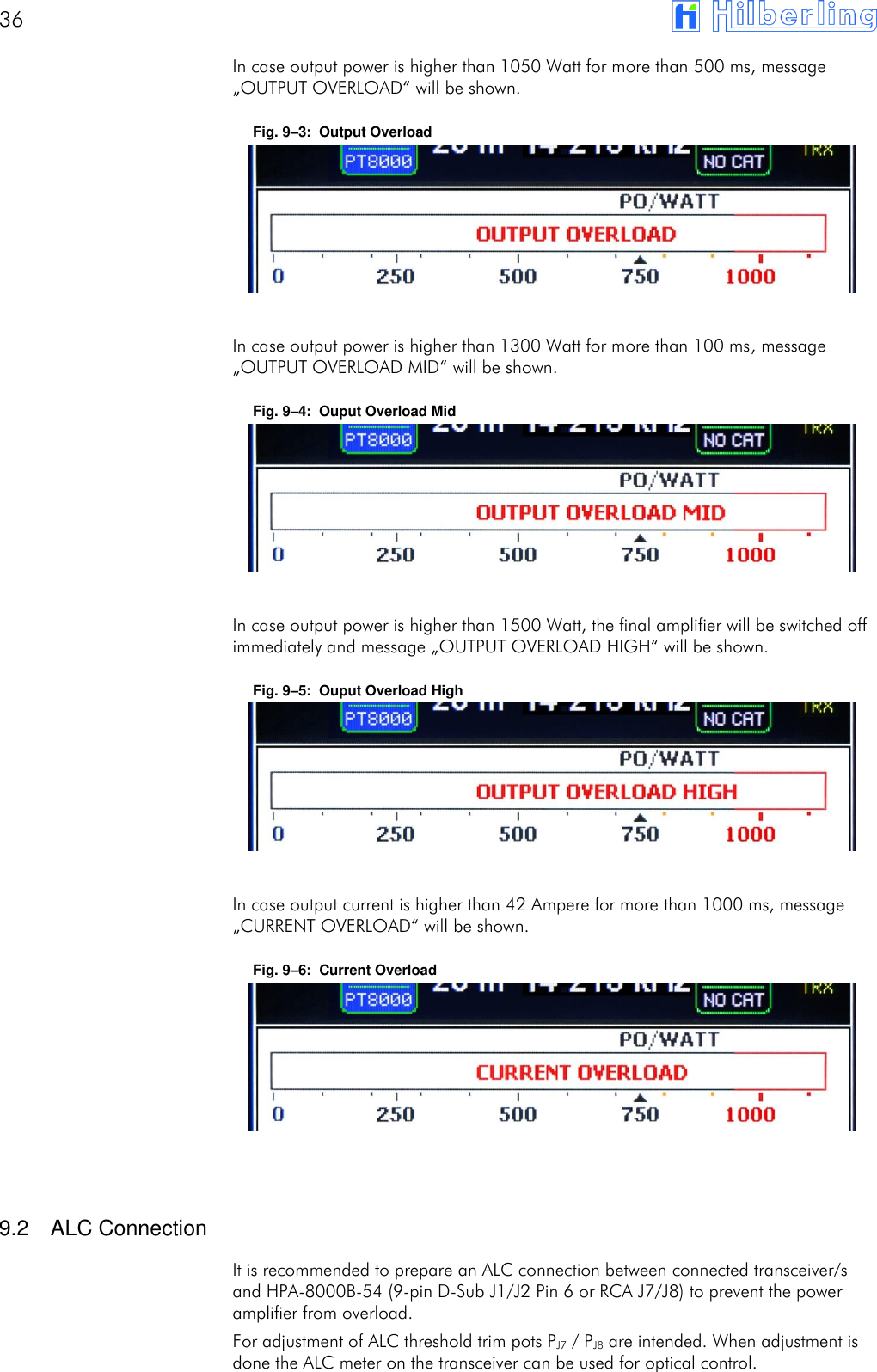
36       In case output power is higher than 1050 Watt for more than 500 ms, message „OUTPUT OVERLOAD“ will be shown. Fig. 9–3:  Output Overload       In case output power is higher than 1300 Watt for more than 100 ms, message „OUTPUT OVERLOAD MID“ will be shown. Fig. 9–4:  Ouput Overload Mid       In case output power is higher than 1500 Watt, the final amplifier will be switched off immediately and message „OUTPUT OVERLOAD HIGH“ will be shown. Fig. 9–5:  Ouput Overload High       In case output current is higher than 42 Ampere for more than 1000 ms, message „CURRENT OVERLOAD“ will be shown. Fig. 9–6:  Current Overload         9.2  ALC Connection It is recommended to prepare an ALC connection between connected transceiver/s and HPA-8000B-54 (9-pin D-Sub J1/J2 Pin 6 or RCA J7/J8) to prevent the power amplifier from overload. For adjustment of ALC threshold trim pots PJ7 / PJ8 are intended. When adjustment is done the ALC meter on the transceiver can be used for optical control.
HPA-8000B-54   Appendix   v1.03.18      37   APPENDIX  A1  Technical Documents A2  Customer Information
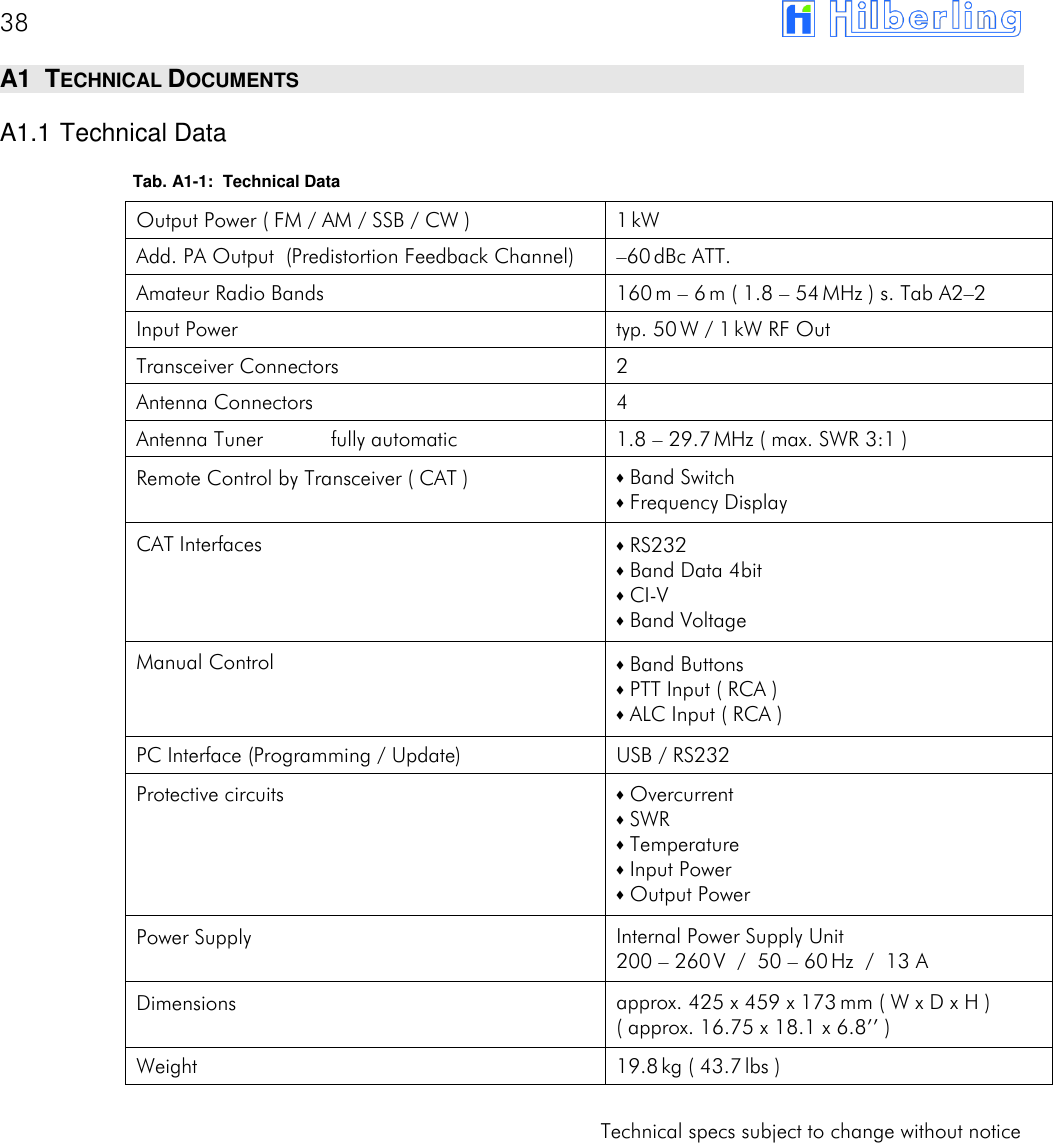
38       A1  TECHNICAL DOCUMENTS A1.1 Technical Data Tab. A1-1:  Technical Data Output Power ( FM / AM / SSB / CW ) 1 kW Add. PA Output  (Predistortion Feedback Channel) –60 dBc ATT. Amateur Radio Bands 160 m – 6 m ( 1.8 – 54 MHz ) s. Tab A2–2 Input Power typ. 50 W / 1 kW RF Out Transceiver Connectors 2 Antenna Connectors 4 Antenna Tuner  fully automatic 1.8 – 29.7 MHz ( max. SWR 3:1 ) Remote Control by Transceiver ( CAT ) ⬧ Band Switch ⬧ Frequency Display CAT Interfaces ⬧ RS232 ⬧ Band Data 4bit ⬧ CI-V ⬧ Band Voltage Manual Control ⬧ Band Buttons ⬧ PTT Input ( RCA ) ⬧ ALC Input ( RCA ) PC Interface (Programming / Update) USB / RS232 Protective circuits ⬧ Overcurrent ⬧ SWR ⬧ Temperature ⬧ Input Power ⬧ Output Power Power Supply Internal Power Supply Unit 200 – 260 V  /  50 – 60 Hz  /  13 A Dimensions approx. 425 x 459 x 173 mm ( W x D x H ) ( approx. 16.75 x 18.1 x 6.8’’ ) Weight 19.8 kg ( 43.7 lbs )  Technical specs subject to change without notice
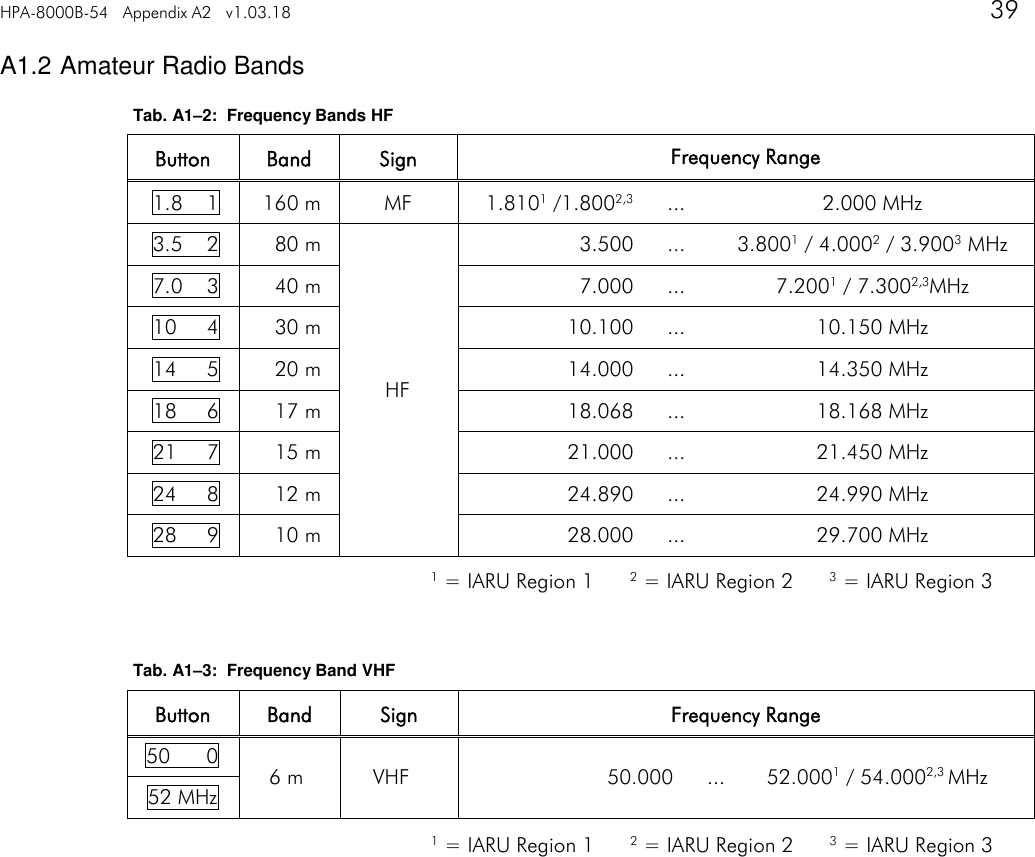
HPA-8000B-54   Appendix A2   v1.03.18     39   A1.2 Amateur Radio Bands Tab. A1–2:  Frequency Bands HF Button Band Sign Frequency Range 1.8    1 160 m MF 1.8101 /1.8002,3 ... 2.000 MHz 3.5    2 80 m HF 3.500 ... 3.8001 / 4.0002 / 3.9003 MHz 7.0    3 40 m 7.000 ... 7.2001 / 7.3002,3MHz 10     4 30 m 10.100 ... 10.150 MHz 14     5 20 m 14.000 ... 14.350 MHz 18     6 17 m 18.068 ... 18.168 MHz 21     7 15 m 21.000 ... 21.450 MHz 24     8 12 m 24.890 ... 24.990 MHz 28     9 10 m 28.000 ... 29.700 MHz    Tab. A1–3:  Frequency Band VHF Button Band Sign Frequency Range 50      0 6 m VHF 50.000 ... 52.0001 / 54.0002,3 MHz 52 MHz    1 = IARU Region 1      2 = IARU Region 2      3 = IARU Region 3 1 = IARU Region 1      2 = IARU Region 2      3 = IARU Region 3
40       A1.3 Subbands Antenna Tuning Tab. A1–4:  Subbands 160m    Frequency [kHz]          TUNE MEM    [1] [2] [3] [4] [5] [6] [7] [8] [9] Lower    1780 1784 1788 1792 1796 1800 1804 1808 1812 Middle    1782 1786 1790 1794 1798 1802 1806 1810 1814 Upper    1784 1788 1792 1796 1800 1804 1808 1812 1816 TUNE MEM [10] [11] [12] [13] [14] [15] [16] [17] [18] [19] Lower 1816 1820 1824 1828 1832 1836 1840 1844 1848 1852 Middle 1818 1822 1826 1830 1834 1838 1842 1846 1850 1854 Upper 1820 1824 1828 1832 1836 1840 1844 1848 1852 1856 TUNE MEM [20] [21] [22] [23] [24] [25] [26] [27] [28] [29] Lower 1856 1860 1864 1868 1872 1876 1880 1884 1888 1892 Middle 1858 1862 1866 1870 1874 1878 1882 1886 1890 1894 Upper 1860 1864 1868 1872 1876 1880 1884 1888 1892 1896 TUNE MEM [30] [31] [32] [33] [34] [35] [36] [37] [38] [39] Lower 1896 1900 1904 1908 1912 1916 1920 1924 1928 1932 Middle 1898 1902 1906 1910 1914 1918 1922 1926 1930 1934 Upper 1900 1904 1908 1912 1916 1920 1924 1928 1932 1936 TUNE MEM [40] [41] [42] [43] [44] [45] [46] [47] [48] [49] Lower 1936 1940 1944 1948 1952 1956 1960 1964 1968 1972 Middle 1938 1942 1946 1950 1954 1958 1962 1966 1970 1974 Upper 1940 1944 1948 1952 1956 1960 1964 1968 1972 1976 TUNE MEM [50] [51] [52] [53] [54] [55] [56] [57] [58] [59] Lower 1976 1980 1984 1988 1992 1996 2000 2004 2008 2012 Middle 1978 1982 1986 1990 1994 1998 2002 2006 2010 2014 Upper 1980 1984 1988 1992 1996 2000 2004 2008 2012 2016 TUNE MEM [60]                            Lower 2016                            Middle 2018                            Upper 2020                             Number of Subbands:60 Increment:  4 kHz
HPA-8000B-54   Appendix A2   v1.03.18     41   Tab. A1–5:  Subbands 80m    Frequency [kHz]          TUNE MEM    [1] [2] [3] [4] [5] [6] [7] [8] [9] Lower    3460 3470 3480 3490 3500 3510 3520 3530 3540 Middle    3465 3475 3485 3495 3505 3515 3525 3535 3545 Upper    3470 3480 3490 3500 3510 3520 3530 3540 3550 TUNE MEM [10] [11] [12] [13] [14] [15] [16] [17] [18] [19] Lower 3550 3560 3570 3580 3590 3600 3610 3620 3630 3640 Middle 3555 3565 3575 3585 3595 3605 3615 3625 3635 3645 Upper 3560 3570 3580 3590 3600 3610 3620 3630 3640 3650 TUNE MEM [20] [21] [22] [23] [24] [25] [26] [27] [28] [29] Lower 3650 3660 3670 3680 3690 3700 3710 3720 3730 3740 Middle 3655 3665 3675 3685 3695 3705 3715 3725 3735 3745 Upper 3660 3670 3680 3690 3700 3710 3720 3730 3740 3750 TUNE MEM [30] [31] [32] [33] [34] [35] [36] [37] [38] [39] Lower 3750 3760 3770 3780 3790 3800 3810 3820 3830 3840 Middle 3755 3765 3775 3785 3795 3805 3815 3825 3835 3845 Upper 3760 3770 3780 3790 3800 3810 3820 3830 3840 3850 TUNE MEM [40] [41] [42] [43] [44] [45] [46] [47] [48] [49] Lower 3850 3860 3870 3880 3890 3900 3910 3920 3930 3940 Middle 3855 3865 3875 3885 3895 3905 3915 3925 3935 3945 Upper 3860 3870 3880 3890 3900 3910 3920 3930 3940 3950 TUNE MEM [50] [51] [52] [53] [54] [55] [56] [57] [58]    Lower 3950 3960 3970 3980 3990 4000 4010 4020 4030    Middle 3955 3965 3975 3985 3995 4005 4015 4025 4035    Upper 3960 3970 3980 3990 4000 4010 4020 4030 4040     Number of Subbands:58 Increment:  10 kHz
42       Tab. A1–6:  Subbands 40m    Frequency [kHz]          TUNE MEM    [1] [2] [3] [4] [5] [6] [7] [8] [9] Lower    6950 6960 6970 6980 6990 7000 7010 7020 7030 Middle    6955 6965 6975 6985 6995 7005 7015 7025 7035 Upper    6960 6970 6980 6990 7000 7010 7020 7030 7040 TUNE MEM [10] [11] [12] [13] [14] [15] [16] [17] [18] [19] Lower 7040 7050 7060 7070 7080 7090 7100 7110 7120 7130 Middle 7045 7055 7065 7075 7085 7095 7105 7115 7125 7135 Upper 7050 7060 7070 7080 7090 7100 7110 7120 7130 7140 TUNE MEM [20] [21] [22] [23] [24] [25] [26] [27] [28] [29] Lower 7140 7150 7160 7170 7180 7190 7200 7210 7220 7230 Middle 7145 7155 7165 7175 7185 7195 7205 7215 7225 7235 Upper 7150 7160 7170 7180 7190 7200 7210 7220 7230 7240 TUNE MEM [30] [31] [32] [33] [34] [35] [36] [37] [38] [39] Lower 7240 7250 7260 7270 7280 7290 7300 7310 7320 7330 Middle 7245 7255 7265 7275 7285 7295 7305 7315 7325 7335 Upper 7250 7260 7270 7280 7290 7300 7310 7320 7330 7340 TUNE MEM [40]                            Lower 7340                            Middle 7345                            Upper 7350                             Number of Subbands:40 Increment:  10 kHz   Tab. A1–7:  Subbands 30m    Frequency [kHz]          TUNE MEM    [1] [2] [3] [4] [5] [6] [7] [8] [9] Lower    10050 10070 10090 10110 10130 10150 10170 10190 10210 Middle    10060 10080 10100 10120 10140 10160 10180 10200 10220 Upper    10070 10090 10110 10130 10150 10170 10190 10210 10230 TUNE MEM [10]                            Lower 10230                            Middle 10240                            Upper 10250                             Number of Subbands:10 Increment:  20 kHz
HPA-8000B-54   Appendix A2   v1.03.18     43   Tab. A1–8:  Subbands 20m    Frequency [kHz]          TUNE MEM    [1] [2] [3] [4] [5] [6] [7] [8] [9] Lower    13950 13970 13990 14010 14030 14050 14070 14090 14110 Middle    13960 13980 14000 14020 14040 14060 14080 14100 14120 Upper    13970 13990 14010 14030 14050 14070 14090 14110 14130 TUNE MEM [10] [11] [12] [13] [14] [15] [16] [17] [18] [19] Lower 14130 14150 14170 14190 14210 14230 14250 14270 14290 14310 Middle 14140 14160 14180 14200 14220 14240 14260 14280 14300 14320 Upper 14150 14170 14190 14210 14230 14250 14270 14290 14310 14330 TUNE MEM [20] [21] [22] [23] [24] [25]             Lower 14330 14350 14370 14390 14410 14430             Middle 14340 14360 14380 14400 14420 14440             Upper 14350 14370 14390 14410 14430 14450              Number of Subbands:25 Increment:  20 kHz   Tab. A1–9:  Subbands 17m    Frequency [kHz]          TUNE MEM    [1] [2] [3] [4] [5] [6] [7]       Lower    18050 18070 18090 18110 18130 18150 18170       Middle    18060 18080 18100 18120 18140 18160 18180       Upper    18070 18090 18110 18130 18150 18170 18190        Number of Subbands:  7 Increment:  20 kHz
44       Tab. A1–10:  Subbands 15m    Frequency [kHz]          TUNE MEM    [1] [2] [3] [4] [5] [6] [7] [8] [9] Lower    20950 20970 20990 21010 21030 21050 21070 21090 21110 Middle    20960 20980 21000 21020 21040 21060 21080 21100 21120 Upper    20970 20990 21010 21030 21050 21070 21090 21110 21130 TUNE MEM [10] [11] [12] [13] [14] [15] [16] [17] [18] [19] Lower 21130 21150 21170 21190 21210 21230 21250 21270 21290 21310 Middle 21140 21160 21180 21200 21220 21240 21260 21280 21300 21320 Upper 21150 21170 21190 21210 21230 21250 21270 21290 21310 21330 TUNE MEM [20] [21] [22] [23] [24] [25] [26] [27] [28] [29] Lower 21330 21350 21370 21390 21410 21430 21450 21470 21490 21510 Middle 21340 21360 21380 21400 21420 21440 21460 21480 21500 21520 Upper 21350 21370 21390 21410 21430 21450 21470 21490 21510 21530 TUNE MEM [30]                            Lower 21530                            Middle 21540                            Upper 21550                             Number of Subbands:30 Increment:  20 kHz   Tab. A1–11:  Subbands 12m    Frequency [kHz]          TUNE MEM    [1] [2] [3] [4] [5] [6] [7] [8] [9] Lower    24855 24875 24895 24915 24935 24955 24975 24995 25015 Middle    24865 24885 24905 24925 24945 24965 24985 25005 25025 Upper    24875 24895 24915 24935 24955 24975 24995 25015 25035 TUNE MEM [10] [11]                         Lower 25035 25055                         Middle 25045 25065                         Upper 25055 25075                          Number of Subbands:11 Increment:  20 kHz
HPA-8000B-54   Appendix A2   v1.03.18     45   Tab. A1–12:  Subbands 10m    Frequency [kHz]          TUNE MEM    [1] [2] [3] [4] [5] [6] [7] [8] [9] Lower    28000 28040 28080 28120 28160 28200 28240 28280 28320 Middle    28020 28060 28100 28140 28180 28220 28260 28300 28340 Upper    28040 28080 28120 28160 28200 28240 28280 28320 28360 TUNE MEM [10] [11] [12] [13] [14] [15] [16] [17] [18] [19] Lower 28360 28400 28440 28480 28520 28560 28600 28640 28680 28720 Middle 28380 28420 28460 28500 28540 28580 28620 28660 28700 28740 Upper 28400 28440 28480 28520 28560 28600 28640 28680 28720 28760 TUNE MEM [20] [21] [22] [23] [24] [25] [26] [27] [28] [29] Lower 28760 28800 28840 28880 28920 28960 29000 29040 29080 29120 Middle 28780 28820 28860 28900 28940 28980 29020 29060 29100 29140 Upper 28800 28840 28880 28920 28960 29000 29040 29080 29120 29160 TUNE MEM [30] [31] [32] [33] [34] [35] [36] [37] [38] [39] Lower 29160 29200 29240 29280 29320 29360 29400 29440 29480 29520 Middle 29180 29220 29260 29300 29340 29380 29420 29460 29500 29540 Upper 29200 29240 29280 29320 29360 29400 29440 29480 29520 29560 TUNE MEM [40] [41] [42] [43] [44] [45]             Lower 29560 29600 29640 29680 29720 29760             Middle 29580 29620 29660 29700 29740 29780             Upper 29600 29640 29680 29720 29760 29800              Number of Subbands:45 Increment:  40 kHz   A1.4 Switchable L and C Elements Antenna Tuning Tab. A1–13:  Switchable Inductances und Capacitances Harmonic Filter                   ID    [1] [2] [3] [4] [5] [6] [7] [8] LOUT   [nH] 25 50 100 200 400 800 1600 3200 COUT   [pF] 5 10 22 47 82 180 560 1200 CC   [pF] 10 20 40 94 164 300 940 2000   A1.5 Switch-off Criteria for INPUT OVERLOAD Tab. A1–14:  Switch-off Criteria for Input Overload Error Message typ. Input Power Band PIN,max Input Overload  50 W all   TBD
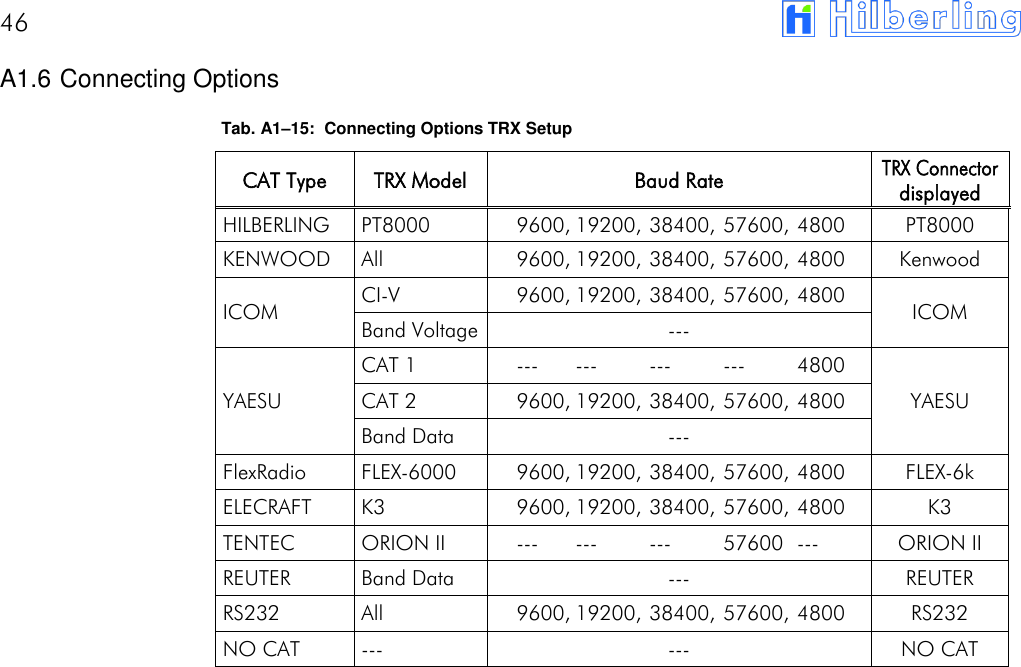
46       A1.6 Connecting Options Tab. A1–15:  Connecting Options TRX Setup CAT Type TRX Model Baud Rate TRX Connector displayed HILBERLING PT8000 9600, 19200, 38400, 57600, 4800 PT8000 KENWOOD All 9600, 19200, 38400, 57600, 4800 Kenwood ICOM CI-V 9600, 19200, 38400, 57600, 4800 ICOM Band Voltage --- YAESU CAT 1 --- --- --- --- 4800 YAESU CAT 2 9600, 19200, 38400, 57600, 4800 Band Data --- FlexRadio FLEX-6000 9600, 19200, 38400, 57600, 4800 FLEX-6k ELECRAFT K3 9600, 19200, 38400, 57600, 4800 K3 TENTEC ORION II --- --- --- 57600 --- ORION II REUTER Band Data --- REUTER RS232 All 9600, 19200, 38400, 57600, 4800 RS232 NO CAT --- --- NO CAT
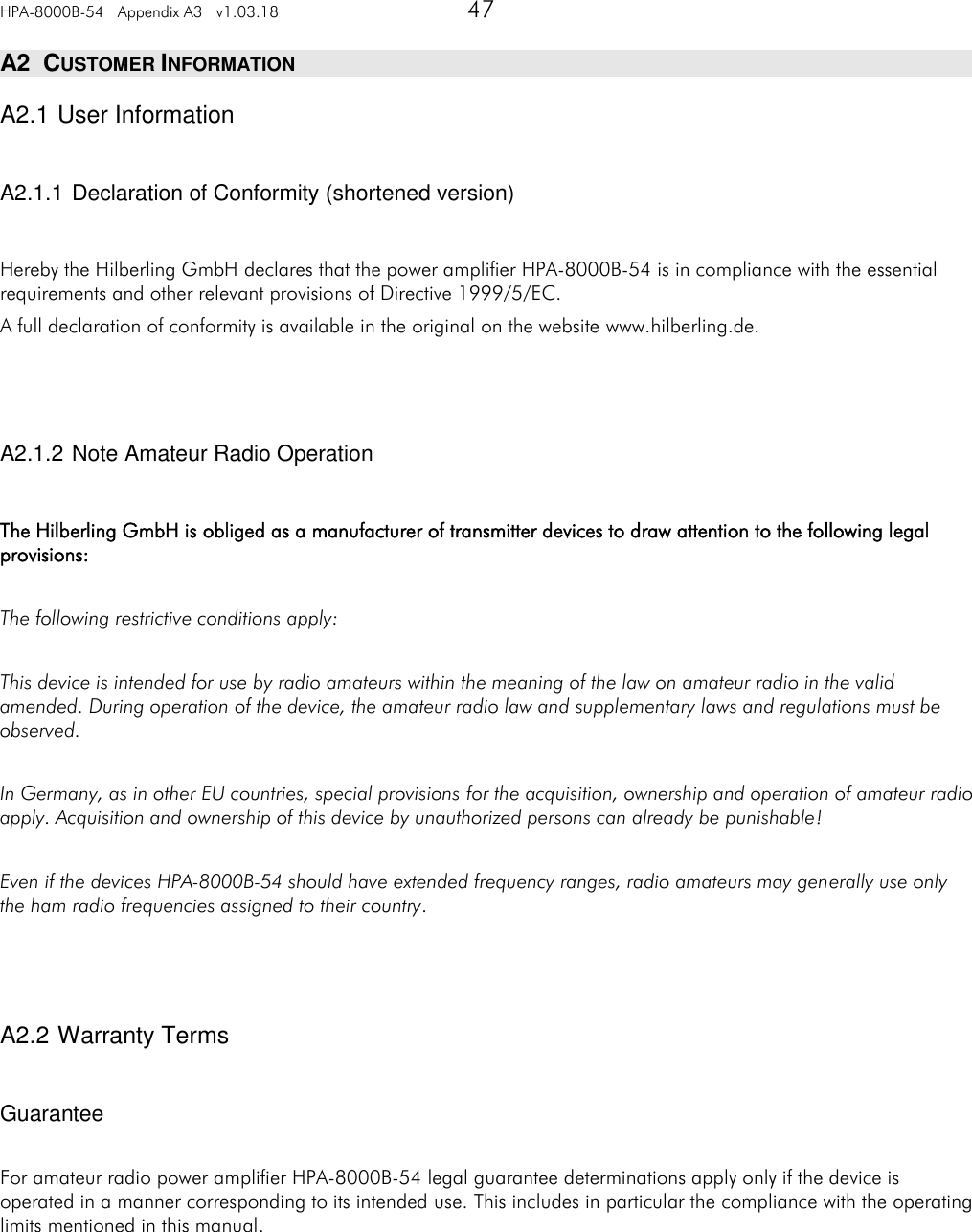
HPA-8000B-54   Appendix A3   v1.03.18   47   A2  CUSTOMER INFORMATION A2.1 User Information  A2.1.1 Declaration of Conformity (shortened version)  Hereby the Hilberling GmbH declares that the power amplifier HPA-8000B-54 is in compliance with the essential requirements and other relevant provisions of Directive 1999/5/EC. A full declaration of conformity is available in the original on the website www.hilberling.de.    A2.1.2 Note Amateur Radio Operation  The Hilberling GmbH is obliged as a manufacturer of transmitter devices to draw attention to the following legal provisions:  The following restrictive conditions apply:  This device is intended for use by radio amateurs within the meaning of the law on amateur radio in the valid amended. During operation of the device, the amateur radio law and supplementary laws and regulations must be observed.  In Germany, as in other EU countries, special provisions for the acquisition, ownership and operation of amateur radio apply. Acquisition and ownership of this device by unauthorized persons can already be punishable!  Even if the devices HPA-8000B-54 should have extended frequency ranges, radio amateurs may generally use only the ham radio frequencies assigned to their country.    A2.2 Warranty Terms  Guarantee  For amateur radio power amplifier HPA-8000B-54 legal guarantee determinations apply only if the device is operated in a manner corresponding to its intended use. This includes in particular the compliance with the operating limits mentioned in this manual.
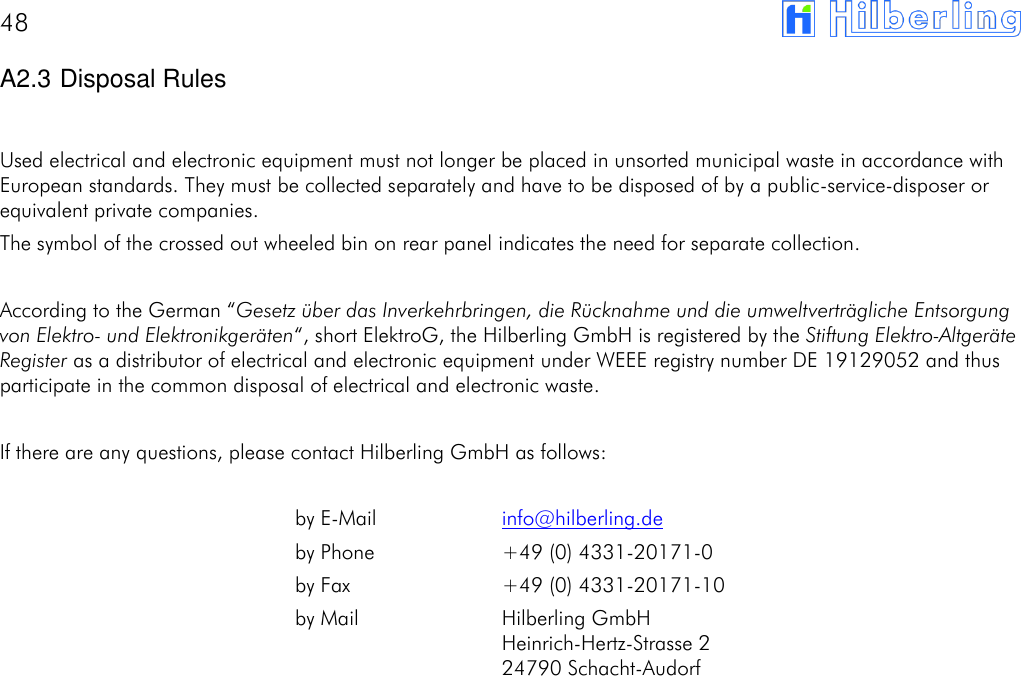
48       A2.3 Disposal Rules  Used electrical and electronic equipment must not longer be placed in unsorted municipal waste in accordance with European standards. They must be collected separately and have to be disposed of by a public-service-disposer or equivalent private companies. The symbol of the crossed out wheeled bin on rear panel indicates the need for separate collection.  According to the German “Gesetz über das Inverkehrbringen, die Rücknahme und die umweltverträgliche Entsorgung von Elektro- und Elektronikgeräten“, short ElektroG, the Hilberling GmbH is registered by the Stiftung Elektro-Altgeräte Register as a distributor of electrical and electronic equipment under WEEE registry number DE 19129052 and thus participate in the common disposal of electrical and electronic waste.  If there are any questions, please contact Hilberling GmbH as follows:    by E-Mail  info@hilberling.de by Phone  +49 (0) 4331-20171-0 by Fax  +49 (0) 4331-20171-10 by Mail  Hilberling GmbH Heinrich-Hertz-Strasse 2 24790 Schacht-Audorf

Navigation menu