Hilscher Gesellschaft fuer Systemautomation mbH 0001 Hilscher RPi3 Automation Platform User Manual netPI NIOT E NPI3 51 EN RE UM 01 EN Draft 3

Hilscher Gesellschaft fuer Systemautomation mbH Hilscher RPi3 Automation Platform netPI NIOT E NPI3 51 EN RE UM 01 EN Draft 3

User Manual
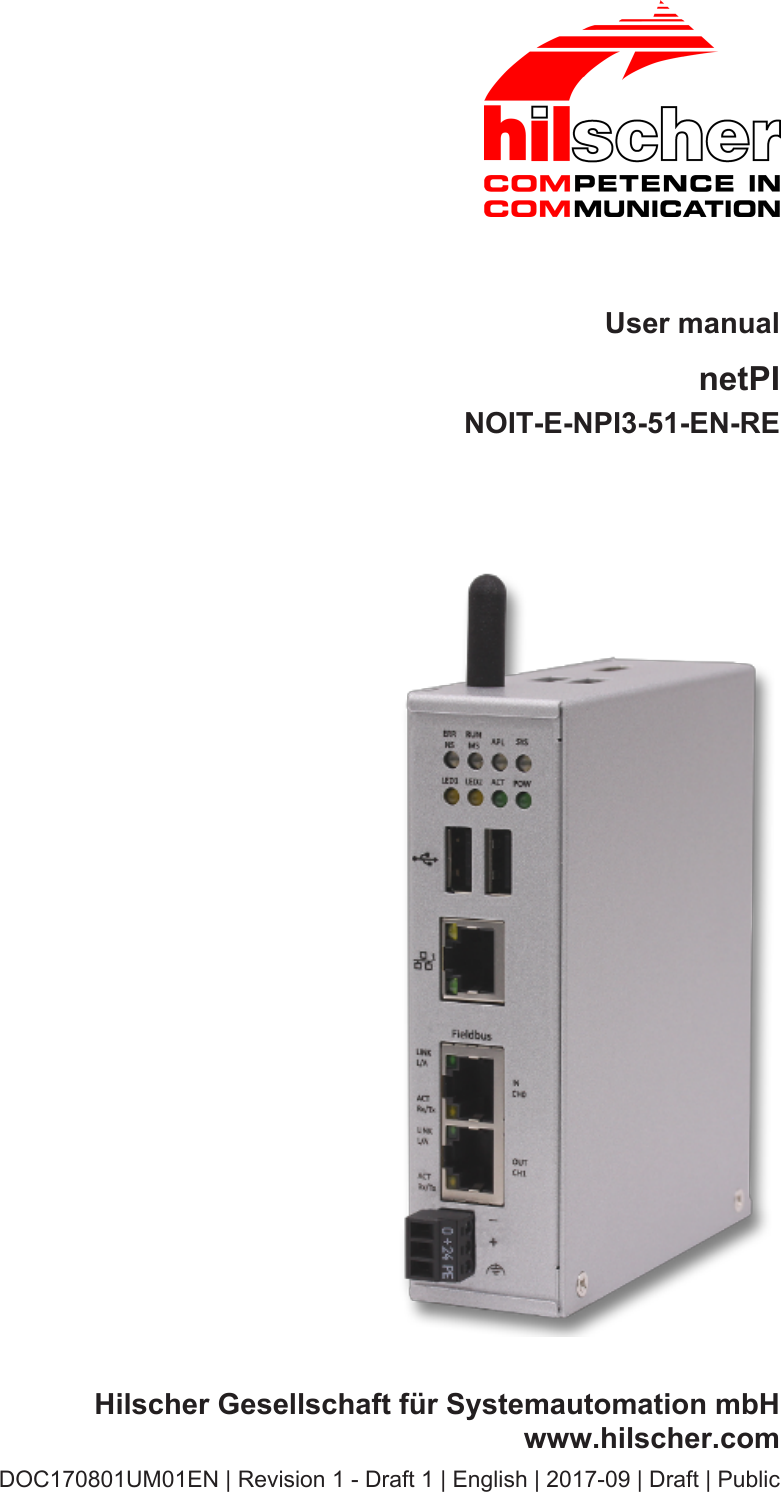
User manualnetPINOIT-E-NPI3-51-EN-REHilscher Gesellschaft für Systemautomation mbHwww.hilscher.comDOC170801UM01EN | Revision 1 - Draft 1 | English | 2017-09 | Draft | Public
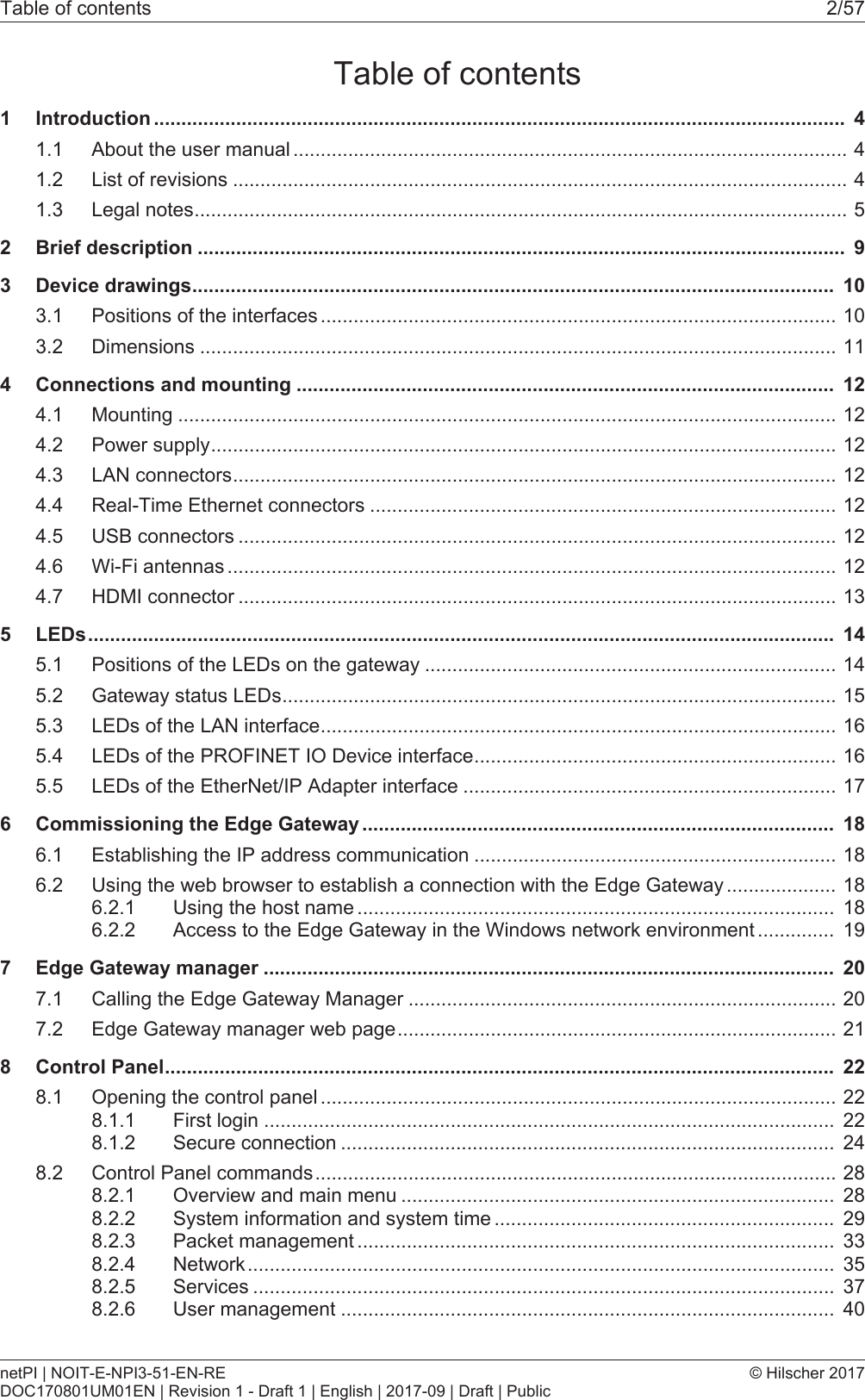
Table of contents 2/57Table of contents1 Introduction .............................................................................................................................. 41.1 About the user manual .....................................................................................................41.2 List of revisions ................................................................................................................41.3 Legal notes.......................................................................................................................52 Brief description ...................................................................................................................... 93 Device drawings..................................................................................................................... 103.1 Positions of the interfaces ..............................................................................................103.2 Dimensions ....................................................................................................................114 Connections and mounting .................................................................................................. 124.1 Mounting ........................................................................................................................124.2 Power supply..................................................................................................................124.3 LAN connectors..............................................................................................................124.4 Real-Time Ethernet connectors .....................................................................................124.5 USB connectors .............................................................................................................124.6 Wi-Fi antennas ...............................................................................................................124.7 HDMI connector .............................................................................................................135 LEDs........................................................................................................................................ 145.1 Positions of the LEDs on the gateway ...........................................................................145.2 Gateway status LEDs.....................................................................................................155.3 LEDs of the LAN interface..............................................................................................165.4 LEDs of the PROFINET IO Device interface..................................................................165.5 LEDs of the EtherNet/IP Adapter interface ....................................................................176 Commissioning the Edge Gateway ...................................................................................... 186.1 Establishing the IP address communication ..................................................................186.2 Using the web browser to establish a connection with the Edge Gateway ....................186.2.1 Using the host name ....................................................................................... 186.2.2 Access to the Edge Gateway in the Windows network environment .............. 197 Edge Gateway manager ........................................................................................................ 207.1 Calling the Edge Gateway Manager ..............................................................................207.2 Edge Gateway manager web page................................................................................218 Control Panel.......................................................................................................................... 228.1 Opening the control panel ..............................................................................................228.1.1 First login ........................................................................................................ 228.1.2 Secure connection .......................................................................................... 248.2 Control Panel commands...............................................................................................288.2.1 Overview and main menu ............................................................................... 288.2.2 System information and system time .............................................................. 298.2.3 Packet management ....................................................................................... 338.2.4 Network........................................................................................................... 358.2.5 Services .......................................................................................................... 378.2.6 User management .......................................................................................... 40netPI | NOIT-E-NPI3-51-EN-REDOC170801UM01EN | Revision 1 - Draft 1 | English | 2017-09 | Draft | Public© Hilscher 2017
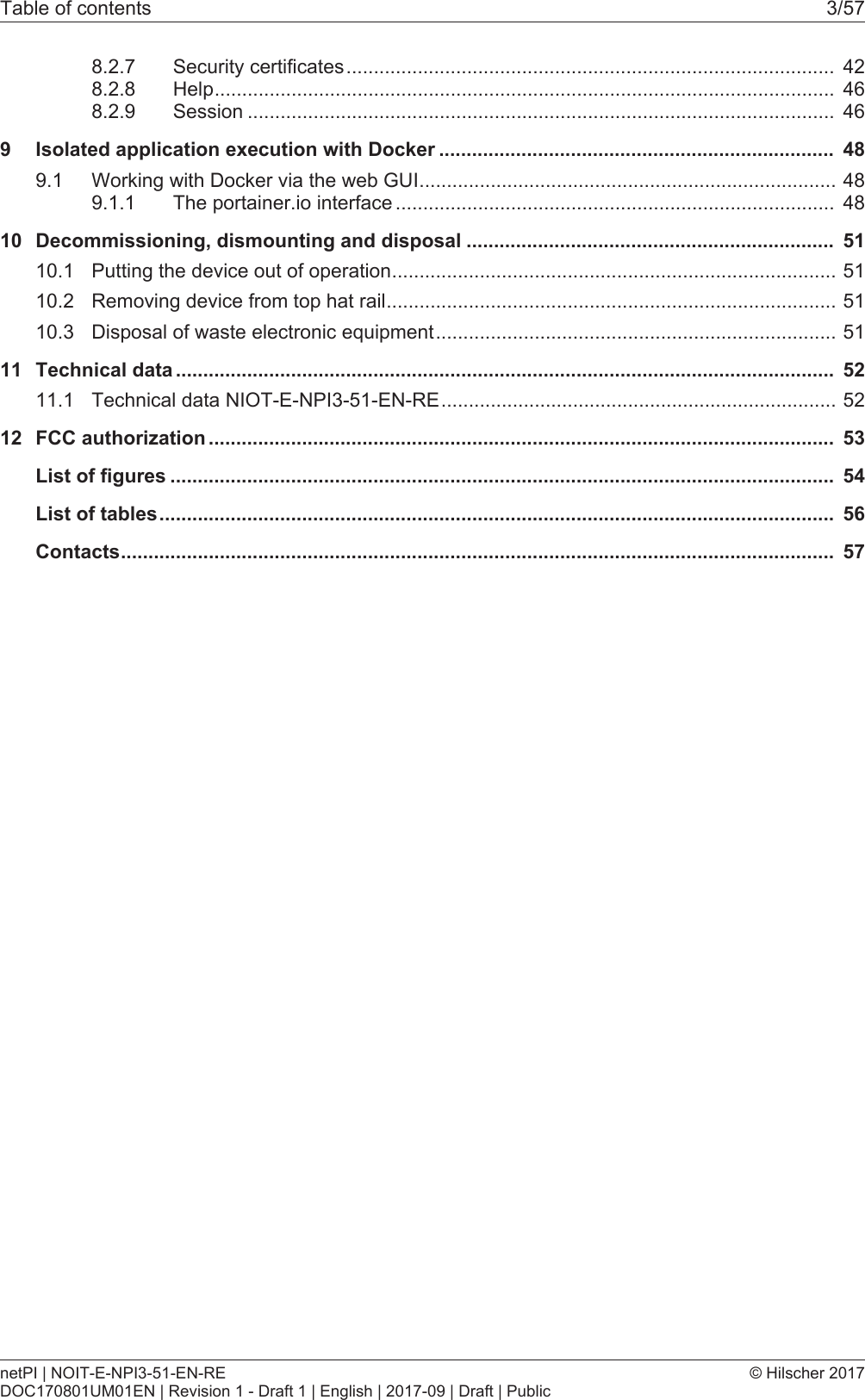
Table of contents 3/578.2.7 Security certificates......................................................................................... 428.2.8 Help................................................................................................................. 468.2.9 Session ........................................................................................................... 469 Isolated application execution with Docker ........................................................................ 489.1 Working with Docker via the web GUI............................................................................489.1.1 The portainer.io interface ................................................................................ 4810 Decommissioning, dismounting and disposal ................................................................... 5110.1 Putting the device out of operation.................................................................................5110.2 Removing device from top hat rail..................................................................................5110.3 Disposal of waste electronic equipment.........................................................................5111 Technical data ........................................................................................................................ 5211.1 Technical data NIOT-E-NPI3-51-EN-RE........................................................................5212 FCC authorization .................................................................................................................. 53List of figures ......................................................................................................................... 54List of tables........................................................................................................................... 56Contacts.................................................................................................................................. 57netPI | NOIT-E-NPI3-51-EN-REDOC170801UM01EN | Revision 1 - Draft 1 | English | 2017-09 | Draft | Public© Hilscher 2017
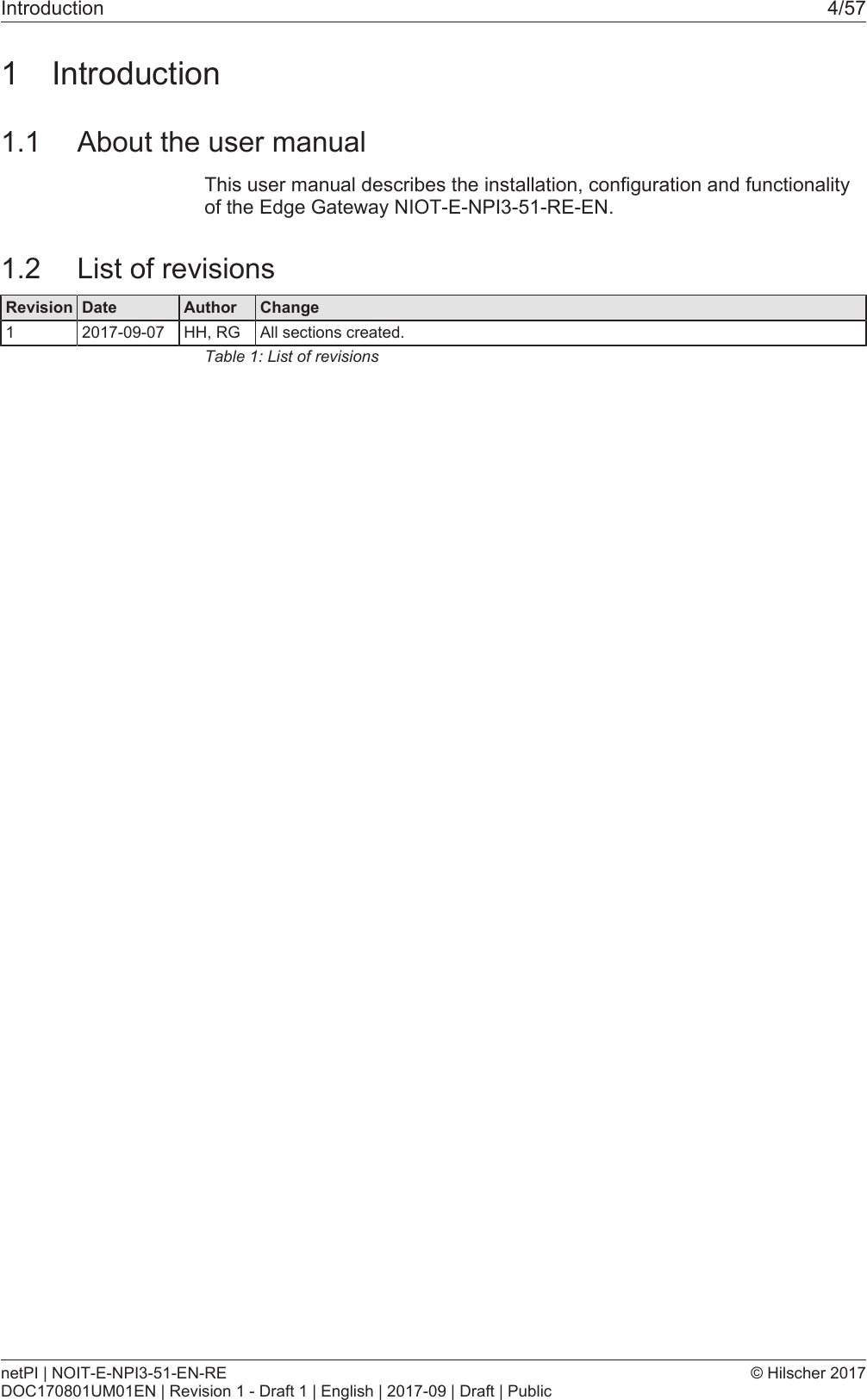
Introduction 4/571 Introduction1.1 About the user manualThis user manual describes the installation, configuration and functionalityof the Edge Gateway NIOT-E-NPI3-51-RE-EN.1.2 List of revisionsRevision Date Author Change1 2017-09-07 HH, RG All sections created.Table1: List of revisionsnetPI | NOIT-E-NPI3-51-EN-REDOC170801UM01EN | Revision 1 - Draft 1 | English | 2017-09 | Draft | Public© Hilscher 2017
Introduction 5/571.3 Legal notesCopyright© Hilscher Gesellschaft für Systemautomation mbHAll rights reserved.The images, photographs and texts in the accompanying materials (in theform of a user's manual, operator's manual, Statement of Work documentand all other document types, support texts, documentation, etc.) areprotected by German and international copyright and by international tradeand protective provisions. Without the prior written consent, you do nothave permission to duplicate them either in full or in part using technical ormechanical methods (print, photocopy or any other method), to edit themusing electronic systems or to transfer them. You are not permitted to makechanges to copyright notices, markings, trademarks or ownershipdeclarations. Illustrations are provided without taking the patent situationinto account. Any company names and product designations provided inthis document may be brands or trademarks by the corresponding ownerand may be protected under trademark, brand or patent law. Any form offurther use shall require the express consent from the relevant owner of therights.Important notesUtmost care was/is given in the preparation of the documentation at handconsisting of a user's manual, operating manual and any other documenttype and accompanying texts. However, errors cannot be ruled out.Therefore, we cannot assume any guarantee or legal responsibility forerroneous information or liability of any kind. You are hereby made awarethat descriptions found in the user's manual, the accompanying texts andthe documentation neither represent a guarantee nor any indication onproper use as stipulated in the agreement or a promised attribute. It cannotbe ruled out that the user's manual, the accompanying texts and thedocumentation do not completely match the described attributes, standardsor any other data for the delivered product. A warranty or guarantee withrespect to the correctness or accuracy of the information is not assumed.We reserve the right to modify our products and the specifications for suchas well as the corresponding documentation in the form of a user's manual,operating manual and/or any other document types and accompanyingtexts at any time and without notice without being required to notify of saidmodification. Changes shall be taken into account in future manuals and donot represent an obligation of any kind, in particular there shall be no rightto have delivered documents revised. The manual delivered with theproduct shall apply.Under no circumstances shall Hilscher Gesellschaft für SystemautomationmbH be liable for direct, indirect, ancillary or subsequent damage, or forany loss of income, which may arise after use of the information containedherein.netPI | NOIT-E-NPI3-51-EN-REDOC170801UM01EN | Revision 1 - Draft 1 | English | 2017-09 | Draft | Public© Hilscher 2017
Introduction 6/57Liability disclaimerThe hardware and/or software was created and tested by HilscherGesellschaft für Systemautomation mbH with utmost care and is madeavailable as is. No warranty can be assumed for the performance orflawlessness of the hardware and/or software under all applicationconditions and scenarios and the work results achieved by the user whenusing the hardware and/or software. Liability for any damage that may haveoccurred as a result of using the hardware and/or software or thecorresponding documents shall be limited to an event involving willful intentor a grossly negligent violation of a fundamental contractual obligation.However, the right to assert damages due to a violation of a fundamentalcontractual obligation shall be limited to contract-typical foreseeabledamage.It is hereby expressly agreed upon in particular that any use or utilization ofthe hardware and/or software in connection with·Flight control systems in aviation and aerospace;·Nuclear fusion processes in nuclear power plants;·Medical devices used for life support and·Vehicle control systems used in passenger transportshall be excluded. Use of the hardware and/or software in any of thefollowing areas is strictly prohibited:·For military purposes or in weaponry;·For designing, engineering, maintaining or operating nuclear systems;·In flight safety systems, aviation and flight telecommunications systems;·In life-support systems;·In systems in which any malfunction in the hardware and/or softwaremay result in physical injuries or fatalities.You are hereby made aware that the hardware and/or software was notcreated for use in hazardous environments, which require fail-safe controlmechanisms. Use of the hardware and/or software in this kind ofenvironment shall be at your own risk; any liability for damage or loss dueto impermissible use shall be excluded.WarrantyHilscher Gesellschaft für Systemautomation mbH hereby guarantees thatthe software shall run without errors in accordance with the requirementslisted in the specifications and that there were no defects on the date ofacceptance. The warranty period shall be 12 months commencing as of thedate of acceptance or purchase (with express declaration or implied, bycustomer's conclusive behavior, e.g. putting into operation permanently).The warranty obligation for equipment (hardware) we produce is 36months, calculated as of the date of delivery ex works. The aforementionedprovisions shall not apply if longer warranty periods are mandatory by lawpursuant to Section 438 (1.2) BGB, Section 479 (1) BGB and Section 634a(1) BGB [Bürgerliches Gesetzbuch; German Civil Code] If, despite of alldue care taken, the delivered product should have a defect, which alreadynetPI | NOIT-E-NPI3-51-EN-REDOC170801UM01EN | Revision 1 - Draft 1 | English | 2017-09 | Draft | Public© Hilscher 2017
Introduction 7/57existed at the time of the transfer of risk, it shall be at our discretion toeither repair the product or to deliver a replacement product, subject totimely notification of defect.The warranty obligation shall not apply if the notification of defect is notasserted promptly, if the purchaser or third party has tampered with theproducts, if the defect is the result of natural wear, was caused byunfavorable operating conditions or is due to violations against ouroperating regulations or against rules of good electrical engineeringpractice, or if our request to return the defective object is not promptlycomplied with.Costs of support, maintenance, customization and product carePlease be advised that any subsequent improvement shall only be free ofcharge if a defect is found. Any form of technical support, maintenance andcustomization is not a warranty service, but instead shall be charged extra.Additional guaranteesAlthough the hardware and software was developed and tested in-depthwith greatest care, Hilscher Gesellschaft für Systemautomation mbH shallnot assume any guarantee for the suitability thereof for any purpose thatwas not confirmed in writing. No guarantee can be granted whereby thehardware and software satisfies your requirements, or the use of thehardware and/or software is uninterruptable or the hardware and/orsoftware is fault-free.It cannot be guaranteed that patents and/or ownership privileges have notbeen infringed upon or violated or that the products are free from third-partyinfluence. No additional guarantees or promises shall be made as towhether the product is market current, free from deficiency in title, or can beintegrated or is usable for specific purposes, unless such guarantees orpromises are required under existing law and cannot be restricted.ConfidentialityThe customer hereby expressly acknowledges that this document containstrade secrets, information protected by copyright and other patent andownership privileges as well as any related rights of Hilscher Gesellschaftfür Systemautomation mbH. The customer agrees to treat as confidential allof the information made available to customer by Hilscher Gesellschaft fürSystemautomation mbH and rights, which were disclosed by HilscherGesellschaft für Systemautomation mbH and that were made accessible aswell as the terms and conditions of this agreement itself.The parties hereby agree to one another that the information that eachparty receives from the other party respectively is and shall remain theintellectual property of said other party, unless provided for otherwise in acontractual agreement.The customer must not allow any third party to become knowledgeable ofthis expertise and shall only provide knowledge thereof to authorized usersas appropriate and necessary. Companies associated with the customershall not be deemed third parties. The customer must obligate authorizednetPI | NOIT-E-NPI3-51-EN-REDOC170801UM01EN | Revision 1 - Draft 1 | English | 2017-09 | Draft | Public© Hilscher 2017
Introduction 8/57users to confidentiality. The customer should only use the confidentialinformation in connection with the performances specified in thisagreement.The customer must not use this confidential information to his ownadvantage or for his own purposes or rather to the advantage or for thepurpose of a third party, nor must it be used for commercial purposes andthis confidential information must only be used to the extent provided for inthis agreement or otherwise to the extent as expressly authorized by thedisclosing party in written form. The customer has the right, subject to theobligation to confidentiality, to disclose the terms and conditions of thisagreement directly to his legal and financial consultants as would berequired for the customer's normal business operation.Export provisionsThe delivered product (including technical data) is subject to the legalexport and/or import laws as well as any associated regulations of variouscountries, especially such laws applicable in Germany and in the UnitedStates. The products / hardware / software must not be exported into suchcountries for which export is prohibited under US American export controllaws and its supplementary provisions. You hereby agree to strictly followthe regulations and to yourself be responsible for observing them. You arehereby made aware that you may be required to obtain governmentalapproval to export, reexport or import the product.Terms and conditionsPlease read the notes about additional legal aspects on our netIOT website under http://www.netiot.com/netiot/netiot-edge/terms-and-conditions/.netPI | NOIT-E-NPI3-51-EN-REDOC170801UM01EN | Revision 1 - Draft 1 | English | 2017-09 | Draft | Public© Hilscher 2017
Brief description 9/572 Brief descriptionnetPI is a Raspberry Pi 3 architecture based platform for implementingCloud, Internet of Things and Industry 4.0 customized Edge Automationprojects safely over containerized software utilizing Docker.The open source software „Docker“ by Docker, Inc. allows the user toexecute own applications on the secured Linux operating system of theEdge Gateways while all protection mechanisms are fully preserved. Theapplications are executed in protected, isolated runtime environments. Toaccomplish this, Docker uses special techniques from virtualization ofoperating systems.netPI | NOIT-E-NPI3-51-EN-REDOC170801UM01EN | Revision 1 - Draft 1 | English | 2017-09 | Draft | Public© Hilscher 2017
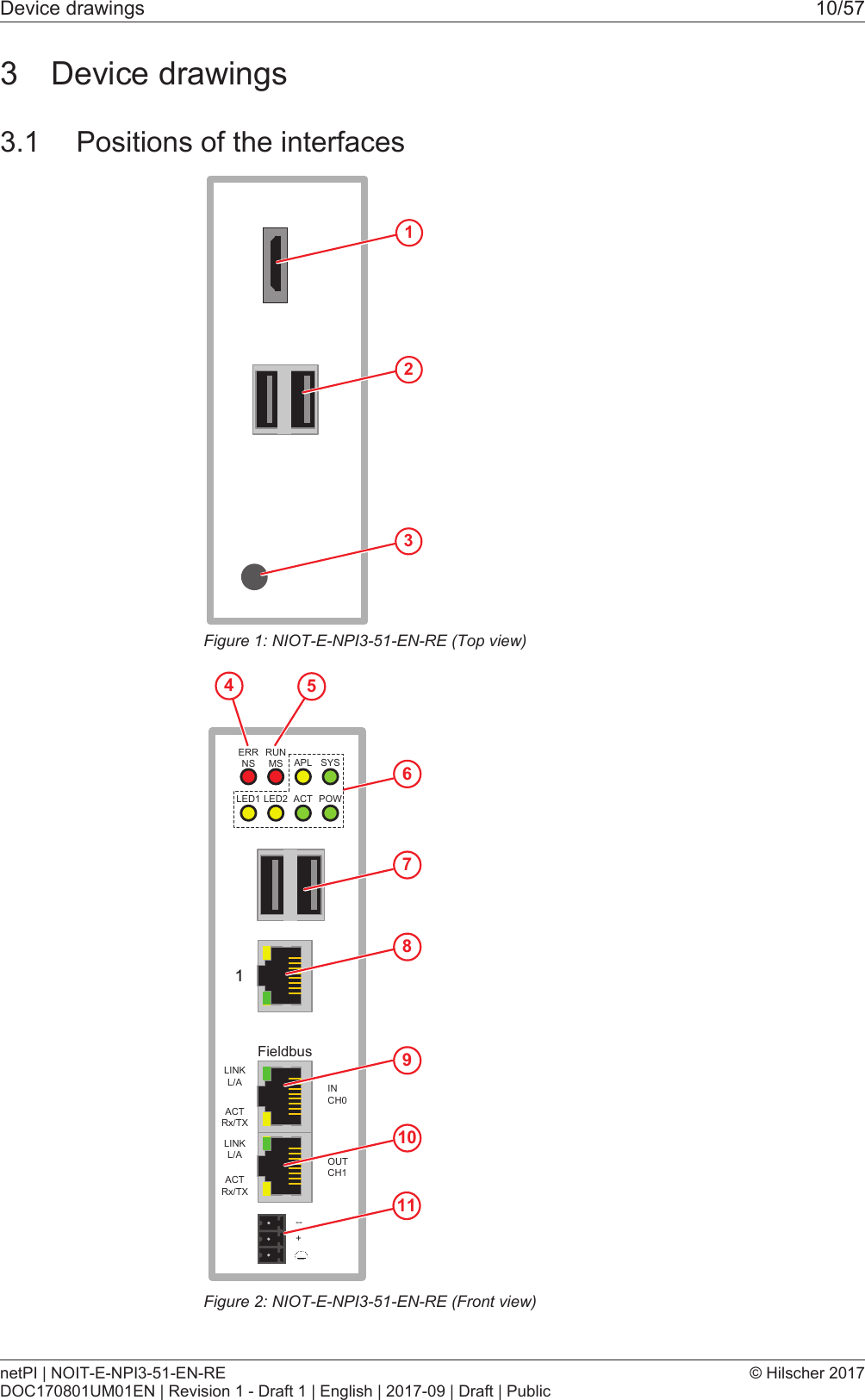
Device drawings 10/573 Device drawings3.1 Positions of the interfaces123Figure1: NIOT-E-NPI3-51-EN-RE (Top view)FieldbusERRNS 6RUNMS APL SYSLED1 LED2 ACT POWLINKL/ALINKL/AACTRx/TXACTRx/TXINCH0OUTCH1--+789101154Figure2: NIOT-E-NPI3-51-EN-RE (Front view)netPI | NOIT-E-NPI3-51-EN-REDOC170801UM01EN | Revision 1 - Draft 1 | English | 2017-09 | Draft | Public© Hilscher 2017
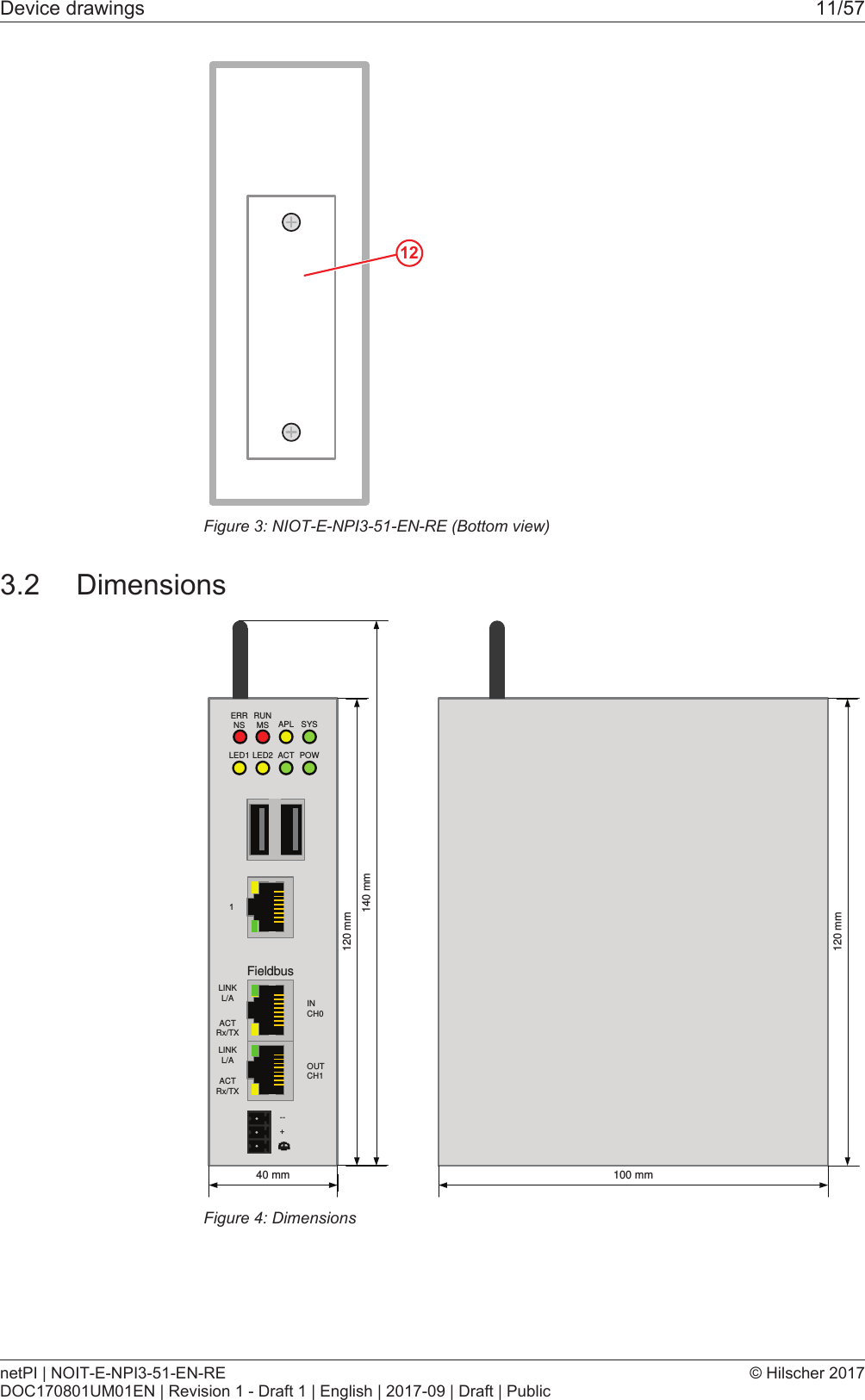
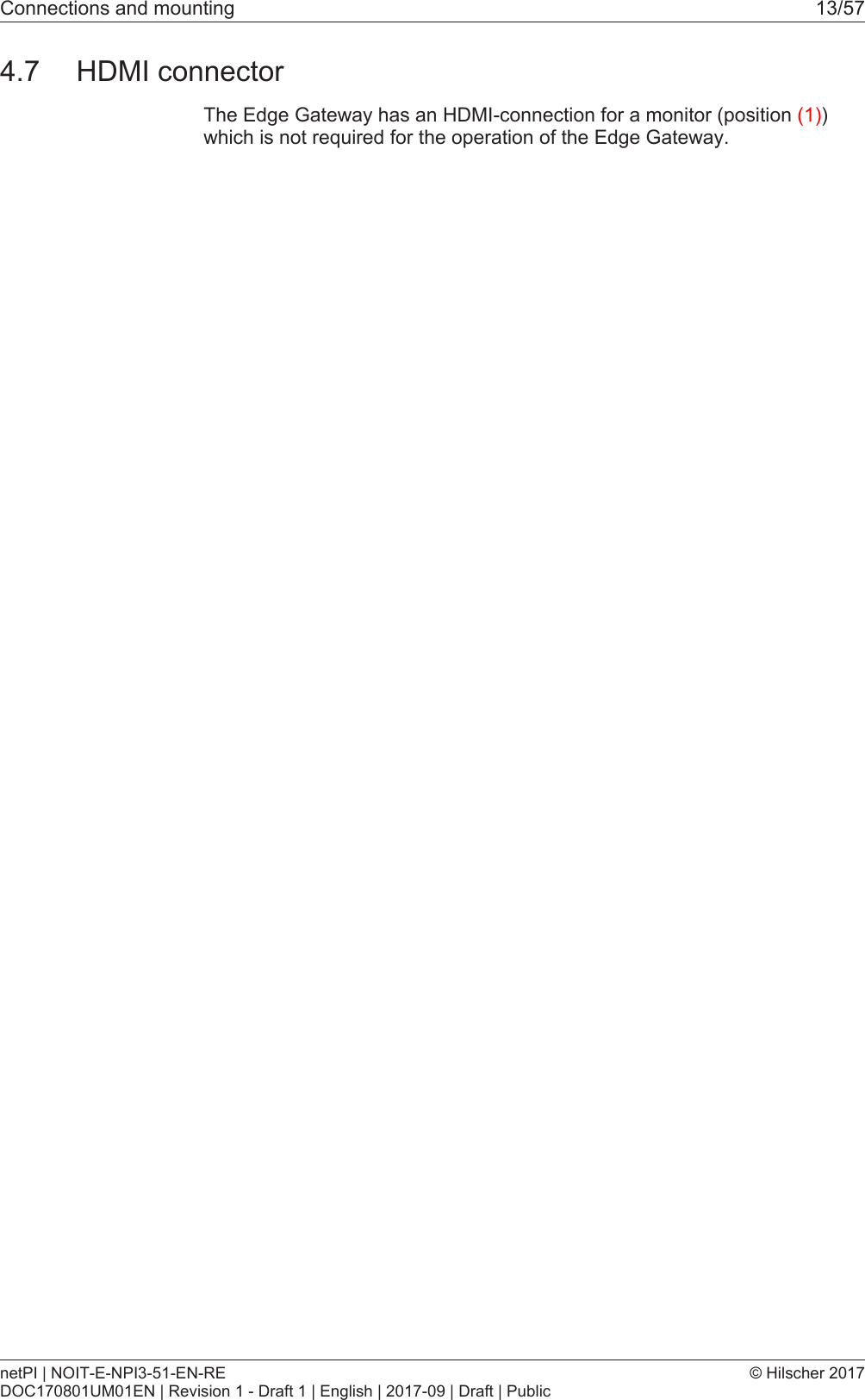
Device drawings 11/5712Figure3: NIOT-E-NPI3-51-EN-RE (Bottom view)3.2 DimensionsFieldbusERRNSRUNMS APL SYSLED1 LED2 ACT POWLINKL/ALINKL/AACTRx/TXACTRx/TXINCH0OUTCH1--+120 mm140 mm40 mm120 mm100 mmFigure4: DimensionsnetPI | NOIT-E-NPI3-51-EN-REDOC170801UM01EN | Revision 1 - Draft 1 | English | 2017-09 | Draft | Public© Hilscher 2017
Connections and mounting 12/574 Connections and mounting4.1 MountingMount the Edge Gateway on a DIN rail onto the wall of the cabinet.4.2 Power supplyDC 24V Pin Signal Description- GND Ground (Reference potential)+ +24 V DC +24 V DCFE Functional earthTable2: Power supply connector NIOT-E-TPI51-EN-RE4.3 LAN connectorsThe Edge Gateway has one LAN connector for connecting it to the cloudnetwork, positions (8) and (see section Positions of theinterfaces [}page10]).The MAC addresses of the LAN interfaces are printed on the device label.Section Configuring Ethernet communication (LAN) [}page35] describes,how you can set the IP address parameters of the LAN interfaces.4.4 Real-Time Ethernet connectorsThe Edge Gateway has 2 RJ45-connectors to connect the fieldbus to aReal-Time Ethernet network, positions (9) and (10) (see section Positionsof the interfaces [}page10]).4.5 USB connectorsThe Edge Gateway has 4 USB connectors (4 x USB 2.0), positions (2) and(7) (see section Positions of the interfaces [}page10]). You do not needthe USB connectors for operation of the Edge Gateway. You need the USBconnector if you connect a keyboard in order to change settings in theBIOS or if you do a firmware recovery with a USB stick.4.6 Wi-Fi antennasYou can use the Edge Gateway for wireless network communication. TheEdge Gateway supports 2 Wi-Fi operating modes: Access Point andClient. Operating mode Access Point allows the Edge Gateway to connectto a mobile device in order to configure the Edge Gateway from a mobiledevice.Section WiFi describes how you activate the antennas and how to set theWi-Fi operating mode.netPI | NOIT-E-NPI3-51-EN-REDOC170801UM01EN | Revision 1 - Draft 1 | English | 2017-09 | Draft | Public© Hilscher 2017
Connections and mounting 13/574.7 HDMI connectorThe Edge Gateway has an HDMI-connection for a monitor (position (1))which is not required for the operation of the Edge Gateway.netPI | NOIT-E-NPI3-51-EN-REDOC170801UM01EN | Revision 1 - Draft 1 | English | 2017-09 | Draft | Public© Hilscher 2017
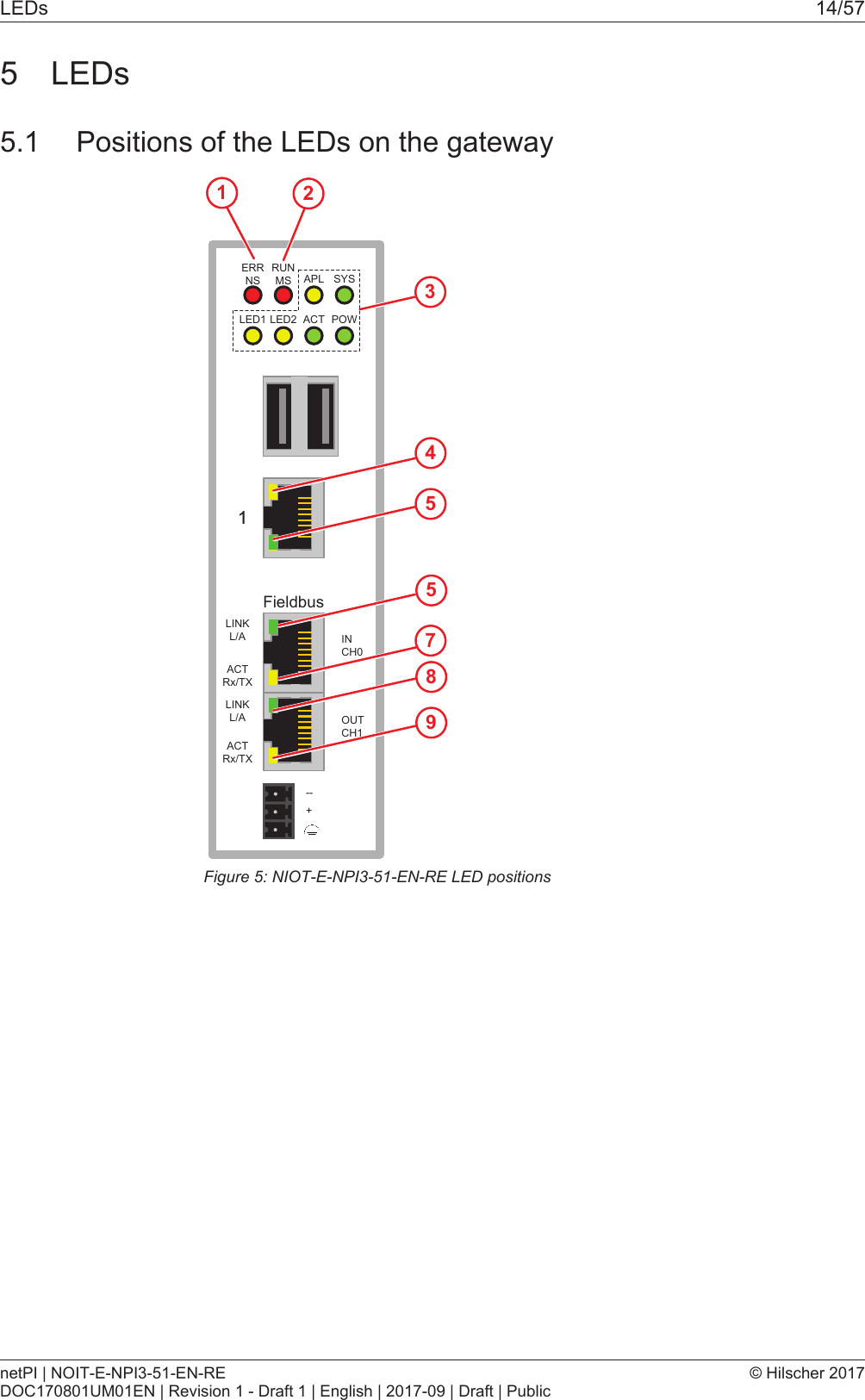
LEDs 14/575 LEDs5.1 Positions of the LEDs on the gatewayFieldbusERRNS 3RUNMS APL SYSLED1 LED2 ACT POWLINKL/ALINKL/AACTRx/TXACTRx/TXINCH0OUTCH1--+45589712Figure5: NIOT-E-NPI3-51-EN-RE LED positionsnetPI | NOIT-E-NPI3-51-EN-REDOC170801UM01EN | Revision 1 - Draft 1 | English | 2017-09 | Draft | Public© Hilscher 2017
LEDs 15/575.2 Gateway status LEDsLEDs indicating communication status, system status, application statusand voltage supply. The position of the LEDs is indicated by position (3) insection Positions of the LEDs on the gateway [}page14].ERRNSRUNMSAPL SYSLED1 LED2 ACT POWFigure6: Gateway state LEDsLED Color MeaningERRNS (red)/ (green)LED communication status Real-Time-Ethernet.Name and function depends on used RTE protocol:PROFINET IO Device = ERR (Bus failure) EtherNet/IP Adapter = NS(Network status) See sectionSee section LEDs of the PROFINET IO Device interface [}page16] and section LEDs of theEtherNet/IP Adapter interface [}page17].RUNMS (red)/ (green)LED communication status Real-Time-Ethernet.Name and function depends on used RTE protocol:PROFINET IO Device = RUN (System failure)EtherNet/IP Adapter = MS (Module status)See section LEDs of the PROFINET IO Device interface [}page16] and section LEDs of theEtherNet/IP Adapter interface [}page17].APL( yellow)Application statusSYS(yellow)/ (green)System statusLED1( yellow)GPIO12: can be programmed, currently not used.LED2(yellow)GPIO13: can be programmed, currently not used.ACT (green) ActivityPOW (green) Voltage supply is OKTable3: Description of gateway status LEDsnetPI | NOIT-E-NPI3-51-EN-REDOC170801UM01EN | Revision 1 - Draft 1 | English | 2017-09 | Draft | Public© Hilscher 2017
LEDs 16/575.3 LEDs of the LAN interfaceLEDs indicating state of the LAN communication. For the positions of theLAN LEDs, see positions (2) and (3) in section Positions of the LEDs on thegateway [}page14].LED Color State MeaningLINKSee position (3)LED green (green) On 100 MBit MBit network connection (off) off 10 MBit or no network connectionRX/TXSee position (2)LED yellow (yellow) Flickering(loaddependent)The device sends/receives frames (off) off The device does not send/receive frames.Table4: LEDs LAN interface NIOT-E-TPI51-EN-RE5.4 LEDs of the PROFINET IO Device interfaceLED Color State MeaningSF (System Failure)Position in the devicedrawing: (2)Duo LED red/green(off) (Off) No error(red) Flashing (1 Hz, 3 s)DCP signal service is initiated via the bus.(red) On Watchdog timeout; channel, generic or extended diagnosispresent; system errorBF (Bus Failure)Position in the devicedrawing: (1)Duo LED red/green(off) Off No error(red) Flashing (2 Hz)No data exchange(red) On No configuration; or low speed physical link; or no physical linkLINKCH0 (6) , CH1 (7)LED green(green) On The device is linked to the Ethernet.(off) Off The device has no link to the Ethernet.RX/TXCH0 (8) , CH1 (9)LED yellow(yellow) Flickering (loaddependent)The device sends/receives Ethernet frames.(off) Off The device does not send/receive Ethernet frames.Table5: LED states for the PROFINET IO-Device protocolLED state DefinitionFlashing (1 Hz, 3 s)The indicator turns on and off for 3 seconds with a frequency of 1 Hz: “on” for 500 ms, followed by “off” for 500 ms.Flashing (2 Hz)The indicator turns on and off with a frequency of 2 Hz: “on” for 250 ms, followed by “off” for 250 ms.Flickering (loaddependent)The indicator turns on and off with a frequency of approximately 10 Hz to indicate high Ethernetactivity: "on" for approximately 50 ms, followed by "off" for 50 ms. The indicator turns on and off inirregular intervals to indicate low Ethernet activity.Table6: LED state definitions for the PROFINET IO-Device protocolnetPI | NOIT-E-NPI3-51-EN-REDOC170801UM01EN | Revision 1 - Draft 1 | English | 2017-09 | Draft | Public© Hilscher 2017
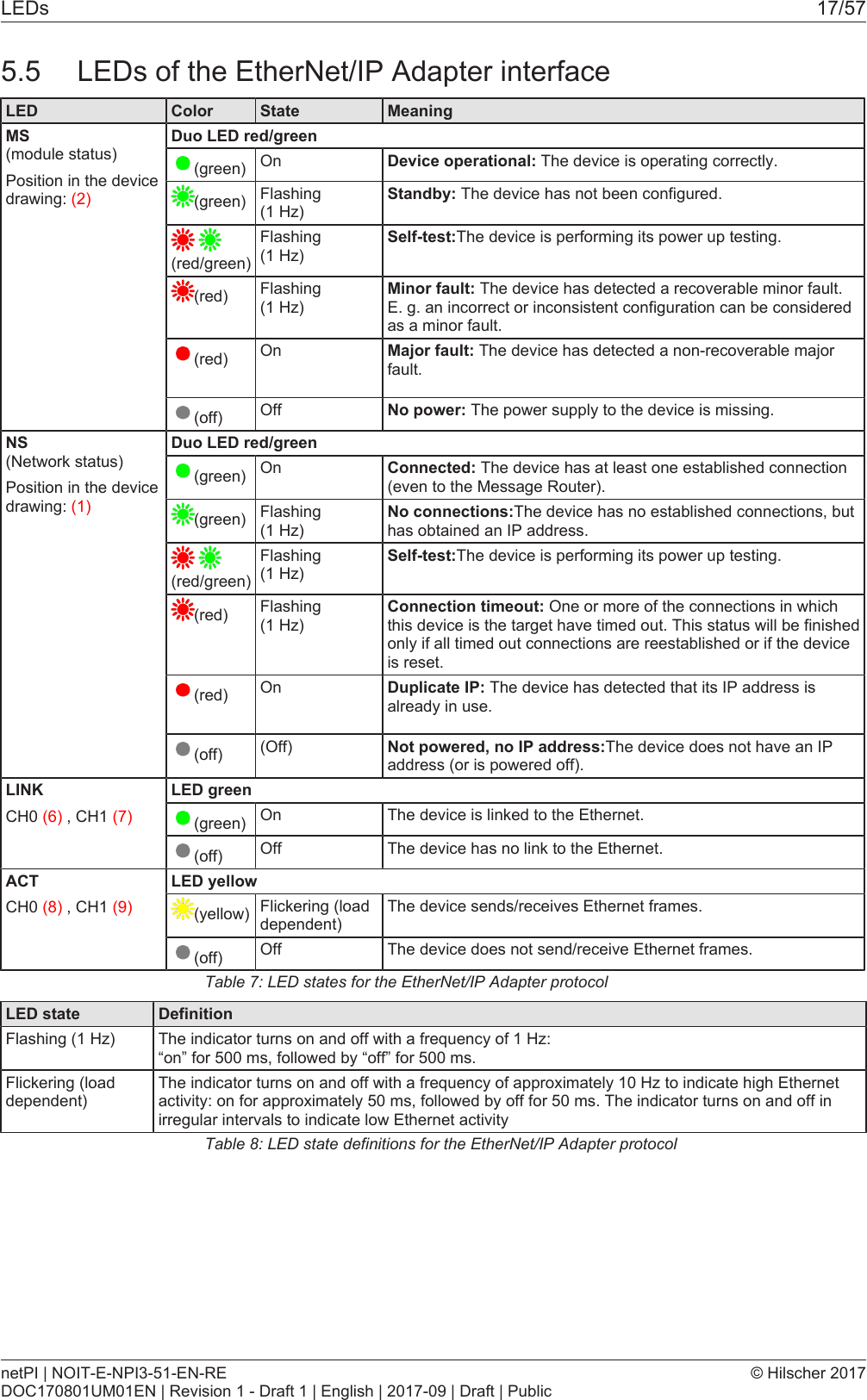
LEDs 17/575.5 LEDs of the EtherNet/IP Adapter interfaceLED Color State MeaningMS (module status)Position in the devicedrawing: (2)Duo LED red/green(green) On Device operational: The device is operating correctly.(green) Flashing (1 Hz)Standby: The device has not been configured. (red/green)Flashing (1 Hz)Self-test:The device is performing its power up testing.(red) Flashing (1 Hz)Minor fault: The device has detected a recoverable minor fault.E. g. an incorrect or inconsistent configuration can be consideredas a minor fault.(red) On Major fault: The device has detected a non-recoverable majorfault.(off) Off No power: The power supply to the device is missing.NS (Network status)Position in the devicedrawing: (1)Duo LED red/green(green) On Connected: The device has at least one established connection(even to the Message Router).(green) Flashing (1 Hz)No connections:The device has no established connections, buthas obtained an IP address. (red/green)Flashing (1 Hz)Self-test:The device is performing its power up testing.(red) Flashing (1 Hz)Connection timeout: One or more of the connections in whichthis device is the target have timed out. This status will be finishedonly if all timed out connections are reestablished or if the deviceis reset.(red) On Duplicate IP: The device has detected that its IP address isalready in use.(off) (Off) Not powered, no IP address:The device does not have an IPaddress (or is powered off).LINKCH0 (6) , CH1 (7)LED green(green) On The device is linked to the Ethernet.(off) Off The device has no link to the Ethernet.ACTCH0 (8) , CH1 (9)LED yellow(yellow) Flickering (loaddependent)The device sends/receives Ethernet frames.(off) Off The device does not send/receive Ethernet frames.Table7: LED states for the EtherNet/IP Adapter protocolLED state DefinitionFlashing (1 Hz) The indicator turns on and off with a frequency of 1 Hz: “on” for 500 ms, followed by “off” for 500 ms.Flickering (loaddependent)The indicator turns on and off with a frequency of approximately 10 Hz to indicate high Ethernetactivity: on for approximately 50 ms, followed by off for 50 ms. The indicator turns on and off inirregular intervals to indicate low Ethernet activityTable8: LED state definitions for the EtherNet/IP Adapter protocolnetPI | NOIT-E-NPI3-51-EN-REDOC170801UM01EN | Revision 1 - Draft 1 | English | 2017-09 | Draft | Public© Hilscher 2017
Commissioning the Edge Gateway 18/576 Commissioning the Edge Gateway6.1 Establishing the IP address communicationAn IP address is required to address the Edge Gateway in the LANnetwork.The following figure shows the factory setting of the LAN interfaces and theassignment of the connections.6.2 Using the web browser to establish a connection with theEdge GatewayYou have three possibilities to access the Edge Gateway:1. by means of the host name (see section Using the hostname [}page18])2. by access via the Windows network (see section Access to the EdgeGateway in the Windows network environment [}page19]),3. by using the IP address (see section Using the IP address).6.2.1 Using the host nameThe Edge Gateway has a host name you can use to access the device.Where do you find the host name on the device?The device is delivered (factory setting) with a label printed at its bottom. Inthe figure below the host name has a red frame.Establishing a connection with the host nameØEnter the following address in the address line of your browser:https://<hostname>Example: For the device with the host name NT0002A233E559 enter https://NT0002A233E559 ðThe Edge Gateway Manager opens.You can now use the Edge Gateway manager to configure the device. Forthis purpose, read section Edge Gateway manager web page [}page21].netPI | NOIT-E-NPI3-51-EN-REDOC170801UM01EN | Revision 1 - Draft 1 | English | 2017-09 | Draft | Public© Hilscher 2017
Commissioning the Edge Gateway 19/576.2.2 Access to the Edge Gateway in the Windows network environmentTo be located easily in the network, the Edge Gateway uses the UPnPtechnology (Universal Plug and Play). This technology will display the EdgeGateway in the Windows network environment.ØTo display all devices in the network, click on Network in the WindowsExplorer.ÊYou will find the Edge Gateway under Other Devices:Figure7: netIOT Edge Gateway in the Windows networkØOpen the context menu of this entry and select Properties.Figure8: Properties of the Edge GatewayÊThe menu provides information on the Edge Gateway, e.g. serialnumber, MAC address, host name or die IP address.ØClick on the link under Device web page.ðThe Edge Gateway manager opens.ØTo open the Edge Gateway manager, you can also double-click on thedevice icon.ðThe Edge Gateway manager opens.You can now use the Edge Gateway manager to configure the device. Forthis purpose, read section Edge Gateway manager web page [}page21].netPI | NOIT-E-NPI3-51-EN-REDOC170801UM01EN | Revision 1 - Draft 1 | English | 2017-09 | Draft | Public© Hilscher 2017
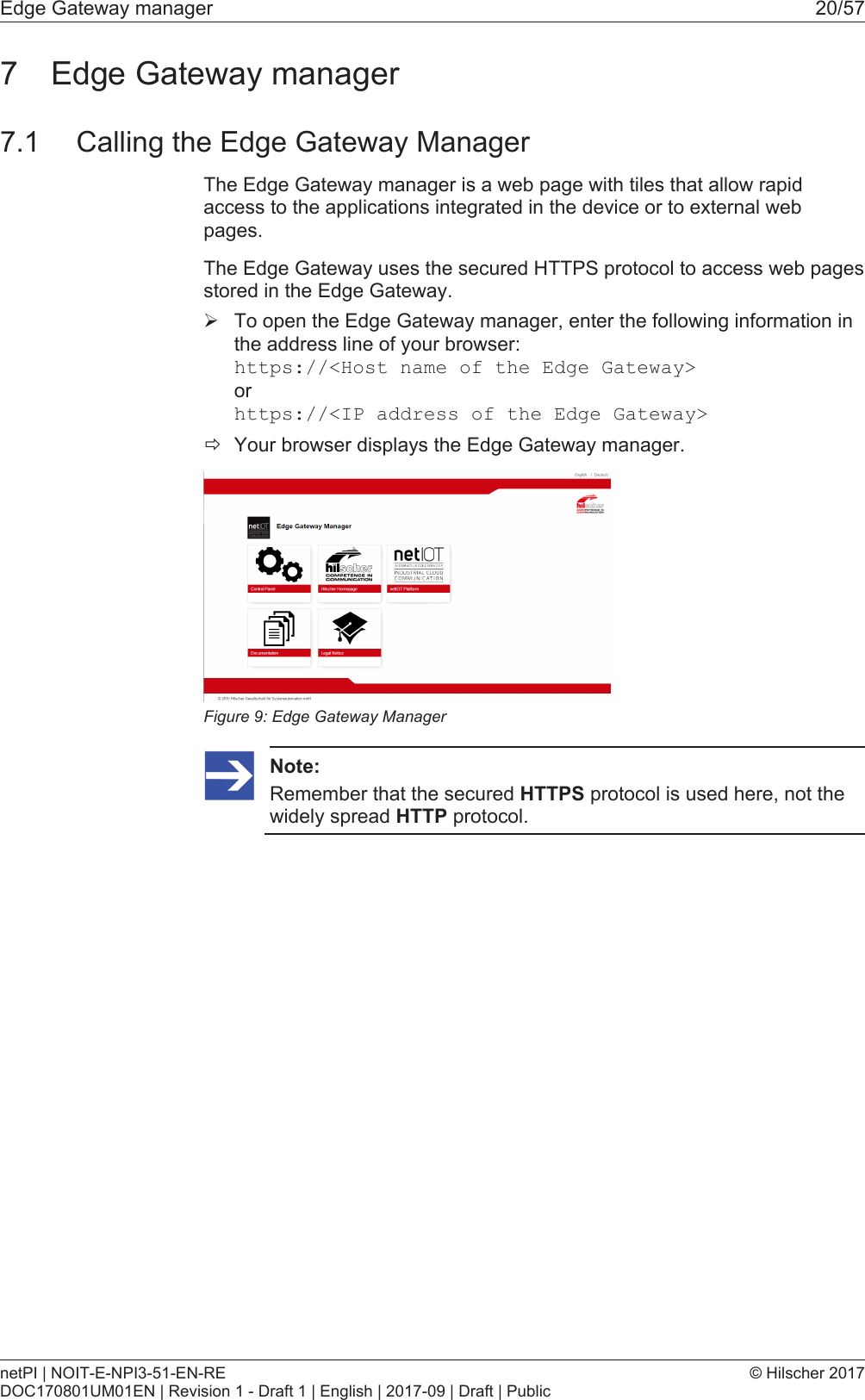
Edge Gateway manager 20/577 Edge Gateway manager7.1 Calling the Edge Gateway ManagerThe Edge Gateway manager is a web page with tiles that allow rapidaccess to the applications integrated in the device or to external webpages.The Edge Gateway uses the secured HTTPS protocol to access web pagesstored in the Edge Gateway.ØTo open the Edge Gateway manager, enter the following information inthe address line of your browser:https://<Host name of the Edge Gateway>orhttps://<IP address of the Edge Gateway>ðYour browser displays the Edge Gateway manager.Figure9: Edge Gateway ManagerNote:Remember that the secured HTTPS protocol is used here, not thewidely spread HTTP protocol.netPI | NOIT-E-NPI3-51-EN-REDOC170801UM01EN | Revision 1 - Draft 1 | English | 2017-09 | Draft | Public© Hilscher 2017
Edge Gateway manager 21/577.2 Edge Gateway manager web pageThe Edge Gateway manager displays tiles that allow rapid access to theapplications integrated in the device or external web pages.Icon FunctionOpens the control panel of the Edge Gateway.The control panel configures the Edge Gateway and displaysinformation on the system. Section Control Panel [}page22]describes the possibilities of configuration as well as the displayedinformation on the system.Opens the Docker management.See section Isolated application execution withDocker [}page48].Opens the Edge Gateway documentation stored in the device.Opens the homepage of the netIOT platform in the Internet.Requires a connection to the Internet.Opens the Hilscher homepage in the Internet.Requires a connection to the Internet.Opens legal information concerning the Edge Gateway.Requires a connection to the Internet.Table9: Starting applications with the Edge Gateway managernetPI | NOIT-E-NPI3-51-EN-REDOC170801UM01EN | Revision 1 - Draft 1 | English | 2017-09 | Draft | Public© Hilscher 2017
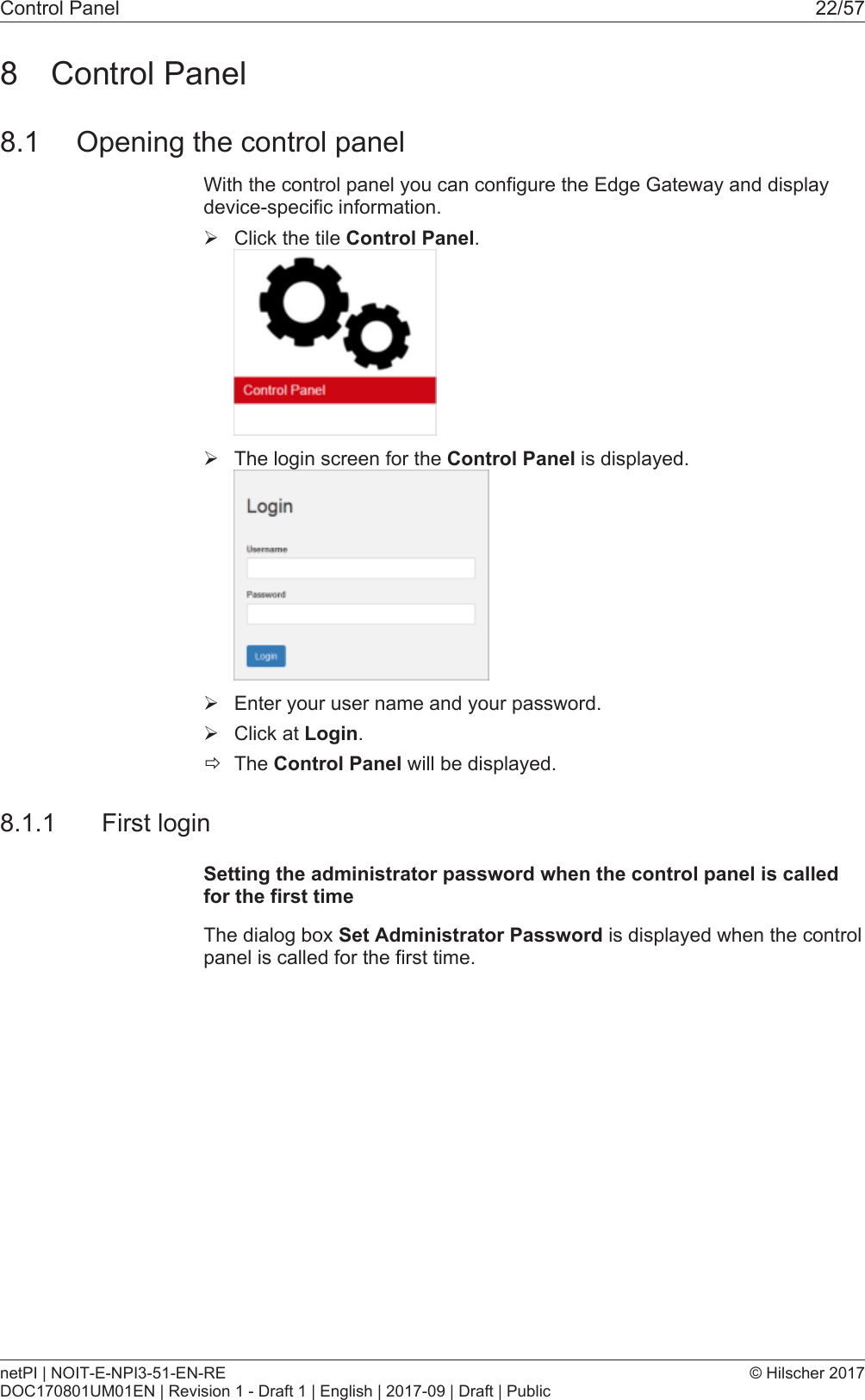
Control Panel 22/578 Control Panel8.1 Opening the control panelWith the control panel you can configure the Edge Gateway and displaydevice-specific information.ØClick the tile Control Panel.ØThe login screen for the Control Panel is displayed.ØEnter your user name and your password.ØClick at Login.ðThe Control Panel will be displayed.8.1.1 First loginSetting the administrator password when the control panel is calledfor the first timeThe dialog box Set Administrator Password is displayed when the controlpanel is called for the first time.netPI | NOIT-E-NPI3-51-EN-REDOC170801UM01EN | Revision 1 - Draft 1 | English | 2017-09 | Draft | Public© Hilscher 2017
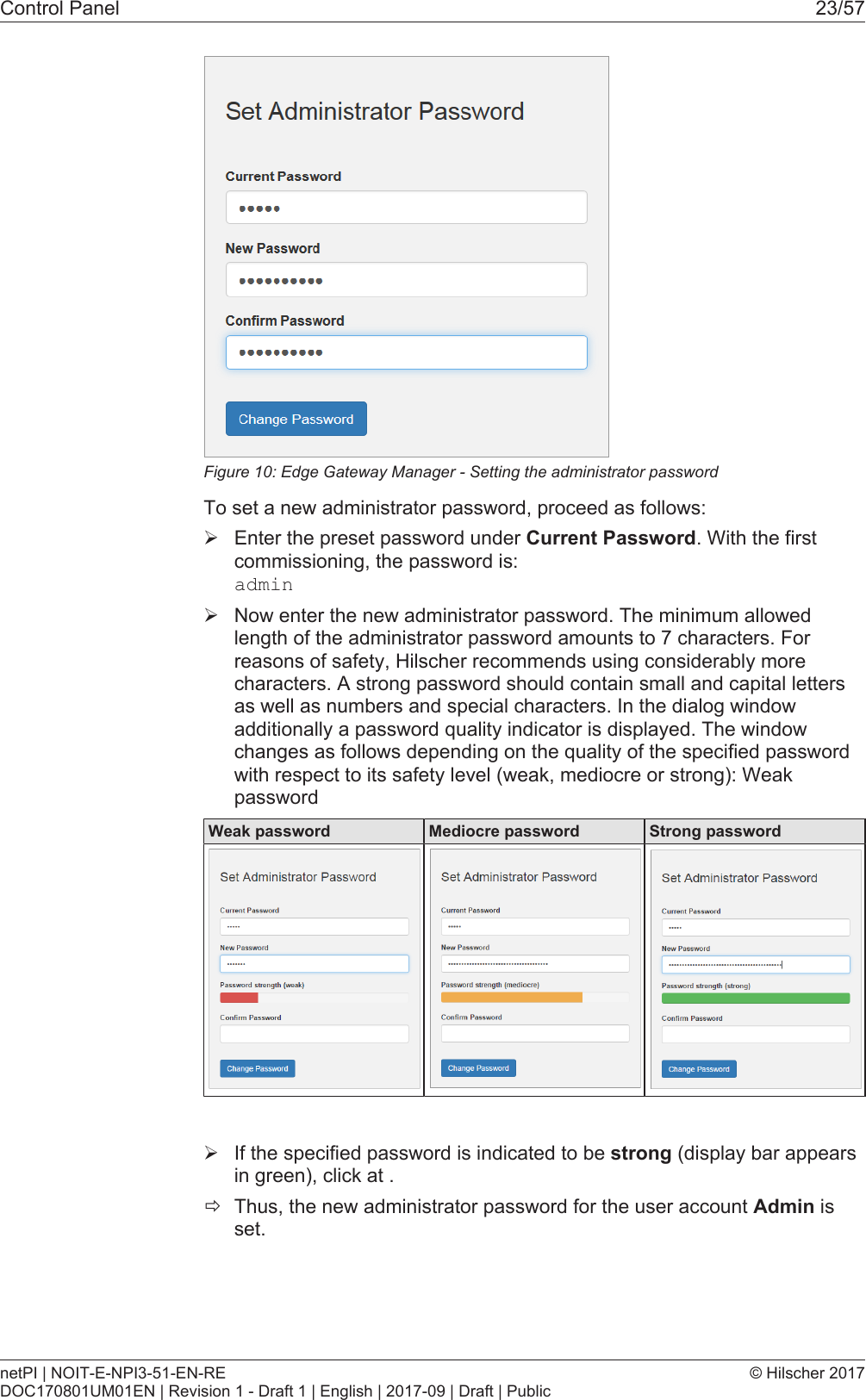
Control Panel 23/57Figure10: Edge Gateway Manager - Setting the administrator passwordTo set a new administrator password, proceed as follows:ØEnter the preset password under Current Password. With the firstcommissioning, the password is:adminØNow enter the new administrator password. The minimum allowedlength of the administrator password amounts to 7 characters. Forreasons of safety, Hilscher recommends using considerably morecharacters. A strong password should contain small and capital lettersas well as numbers and special characters. In the dialog windowadditionally a password quality indicator is displayed. The windowchanges as follows depending on the quality of the specified passwordwith respect to its safety level (weak, mediocre or strong): WeakpasswordWeak password Mediocre password Strong passwordØIf the specified password is indicated to be strong (display bar appearsin green), click at .ðThus, the new administrator password for the user account Admin isset.netPI | NOIT-E-NPI3-51-EN-REDOC170801UM01EN | Revision 1 - Draft 1 | English | 2017-09 | Draft | Public© Hilscher 2017
Control Panel 24/57ðNow, you can work with the control panel as an administrator, you cancreate further users in the user management, and assign access rights.With the specified password you can work with the control panel asadministrator.Also see about this2User management [}40]8.1.2 Secure connectionEdge Gateways support web connections secured by SSH/TSL viahttps:// accesses only.By definition, a secure connection can provide an efficient protection only ifa certificate proves that the server is secure. Only then can runningtransactions of the initiating browser and the server be considered asprotected against interception and data theft.This is why the browser at first inquires a certificate of verification from theserver (Gateway). This certificate proves that the issuer has verified thesecurity of the server. Each browser provides a preinstalled list of knownauthorized issuers of certificates.Each time the certificate of the server arrives at the browser, the browsercompares the issuer of the certificate with the issuers stored in the list ofknown authorized issuers of certificates.If the issuer of the certificate is not listed, the browser will signal acertificate error and request the user's confirmation to continue because itassumes that the connection is insecure.As standard, Edge Gateways contain a certificate issued by Hilscher that isnot on the list of the known authorized issuers of certificates. Due to that,the browser signals an insecure connection and requests the confirmationto continue. When this confirmation has been given once, any futureconnections will be established without further requests.Note:In the control panel you can replace this certificate any time by thecertificate of a known authorized issuer of certificates, see sectionUploading and installing own security certificates [}page43]).netPI | NOIT-E-NPI3-51-EN-REDOC170801UM01EN | Revision 1 - Draft 1 | English | 2017-09 | Draft | Public© Hilscher 2017
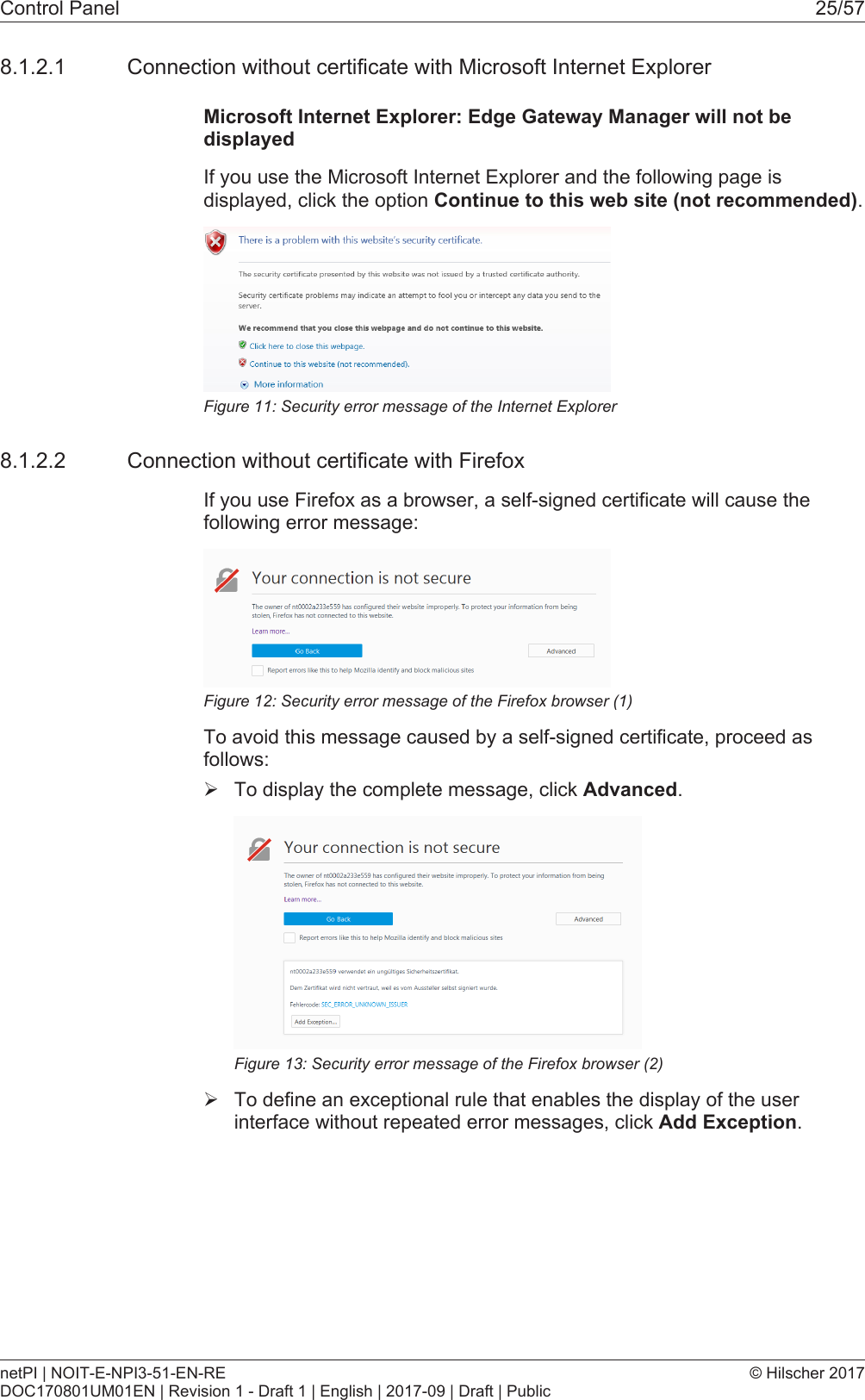
Control Panel 25/578.1.2.1 Connection without certificate with Microsoft Internet ExplorerMicrosoft Internet Explorer: Edge Gateway Manager will not bedisplayedIf you use the Microsoft Internet Explorer and the following page isdisplayed, click the option Continue to this web site (not recommended).Figure11: Security error message of the Internet Explorer8.1.2.2 Connection without certificate with FirefoxIf you use Firefox as a browser, a self-signed certificate will cause thefollowing error message:Figure12: Security error message of the Firefox browser (1)To avoid this message caused by a self-signed certificate, proceed asfollows:ØTo display the complete message, click Advanced.Figure13: Security error message of the Firefox browser (2)ØTo define an exceptional rule that enables the display of the userinterface without repeated error messages, click Add Exception.netPI | NOIT-E-NPI3-51-EN-REDOC170801UM01EN | Revision 1 - Draft 1 | English | 2017-09 | Draft | Public© Hilscher 2017
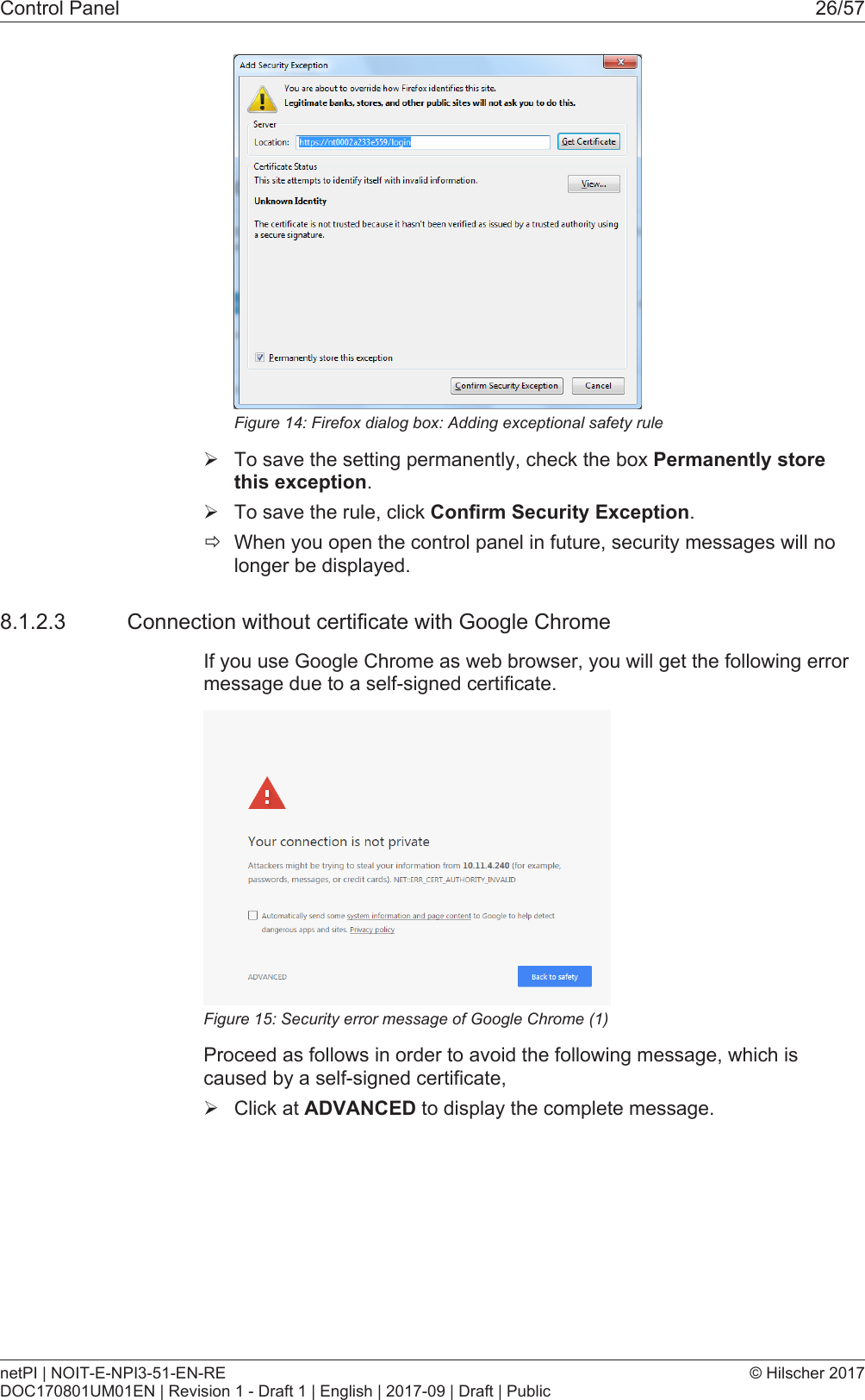
Control Panel 26/57Figure14: Firefox dialog box: Adding exceptional safety ruleØTo save the setting permanently, check the box Permanently storethis exception.ØTo save the rule, click Confirm Security Exception.ðWhen you open the control panel in future, security messages will nolonger be displayed.8.1.2.3 Connection without certificate with Google ChromeIf you use Google Chrome as web browser, you will get the following errormessage due to a self-signed certificate.Figure15: Security error message of Google Chrome (1)Proceed as follows in order to avoid the following message, which iscaused by a self-signed certificate,ØClick at ADVANCED to display the complete message.netPI | NOIT-E-NPI3-51-EN-REDOC170801UM01EN | Revision 1 - Draft 1 | English | 2017-09 | Draft | Public© Hilscher 2017
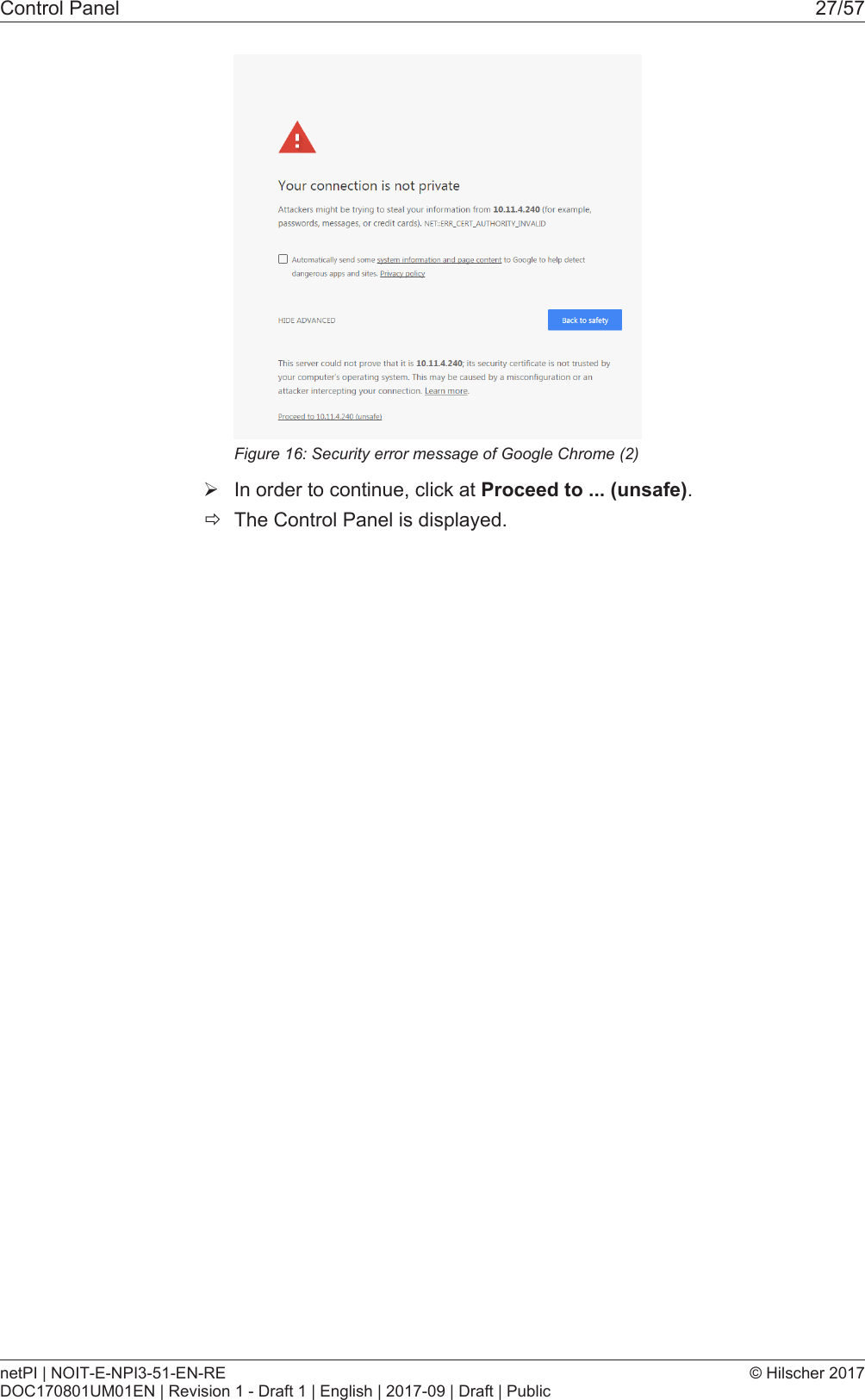
Control Panel 27/57Figure16: Security error message of Google Chrome (2)ØIn order to continue, click at Proceed to ... (unsafe).ðThe Control Panel is displayed.netPI | NOIT-E-NPI3-51-EN-REDOC170801UM01EN | Revision 1 - Draft 1 | English | 2017-09 | Draft | Public© Hilscher 2017
Control Panel 28/578.2 Control Panel commands8.2.1 Overview and main menuThe following figure displays the main menu of the Control Panel.Figure17: Main menu of the Control PanelMenu Submenu Description Details in sectionSystem Info Center Displaying the system information, monitoring ofthe processor core temperature, and a systemmonitor for the usage of CPU, main memory,and SSDDisplaying systeminformation [}page29]Time Settings of system time and timesynchronization.Setting the systemtime [}page30]Reboot Rebooting the Linux operating system of theEdge GatewayRebooting thesystem [}page32]Shutdown Shutting down the Linux operating system of theEdge GatewaySystem shutdown [}page32]PackageManagerPackages Managing the packages of the Linux-basedoperating system of the Edge Gateway.Packet management [}page33]Network LAN Configuring the Ethernet interfaces to the field orcloud.Configuring Ethernetcommunication(LAN) [}page35]WiFi Configuring the WiFi communication WiFiHostname Displaying and configuring the host nameidentifying the Edge Gateway in the network.Hostname [}page36]Services Service List Displaying, starting, and stopping the services ofthe Edge Gateway.Services [}page37]UserManagementRoles Displaying and configuring the permissions foruser roles.Managing user roles [}page40]Accounts Displaying user accounts und assigning userroles.Managing useraccounts [}page42]Security SSL Certificate Installing the SSL safety certificate. Security certificates [}page42]Help Info Displaying current software version. Help [}page46]Session User Profile Displaying the permissions of the user. User profile [}page46]Logout Logout Logout [}page47]Table10: Functional overview of the Control PanelFor the pages which can be invoked via the Control Panel, the followingapplies:If for the selected page, no access right for reading is present, this has thefollowing implications:·No data are displayed. All important controls and displays of the pageare grayed out respectively inactive.·The error message Permission denied is displayed when accessingthe page.If there is read but no write access right present, this has the followingimplications:netPI | NOIT-E-NPI3-51-EN-REDOC170801UM01EN | Revision 1 - Draft 1 | English | 2017-09 | Draft | Public© Hilscher 2017
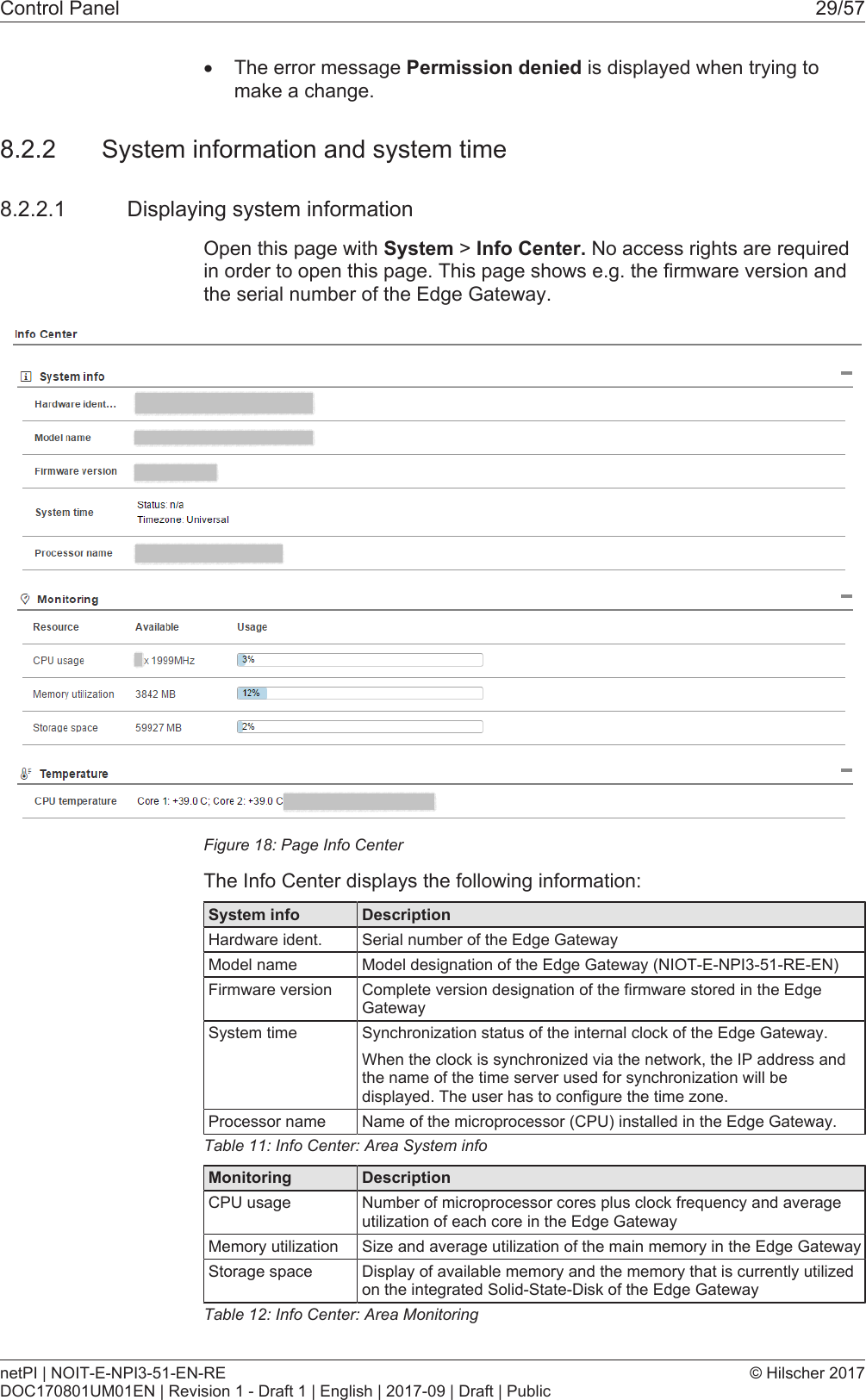
Control Panel 29/57·The error message Permission denied is displayed when trying tomake a change.8.2.2 System information and system time8.2.2.1 Displaying system informationOpen this page with System > Info Center. No access rights are requiredin order to open this page. This page shows e.g. the firmware version andthe serial number of the Edge Gateway.Figure18: Page Info CenterThe Info Center displays the following information:System info DescriptionHardware ident. Serial number of the Edge GatewayModel name Model designation of the Edge Gateway (NIOT-E-NPI3-51-RE-EN)Firmware version Complete version designation of the firmware stored in the EdgeGatewaySystem time Synchronization status of the internal clock of the Edge Gateway.When the clock is synchronized via the network, the IP address andthe name of the time server used for synchronization will bedisplayed. The user has to configure the time zone.Processor name Name of the microprocessor (CPU) installed in the Edge Gateway.Table11: Info Center: Area System infoMonitoring DescriptionCPU usage Number of microprocessor cores plus clock frequency and averageutilization of each core in the Edge GatewayMemory utilization Size and average utilization of the main memory in the Edge GatewayStorage space Display of available memory and the memory that is currently utilizedon the integrated Solid-State-Disk of the Edge GatewayTable12: Info Center: Area MonitoringnetPI | NOIT-E-NPI3-51-EN-REDOC170801UM01EN | Revision 1 - Draft 1 | English | 2017-09 | Draft | Public© Hilscher 2017
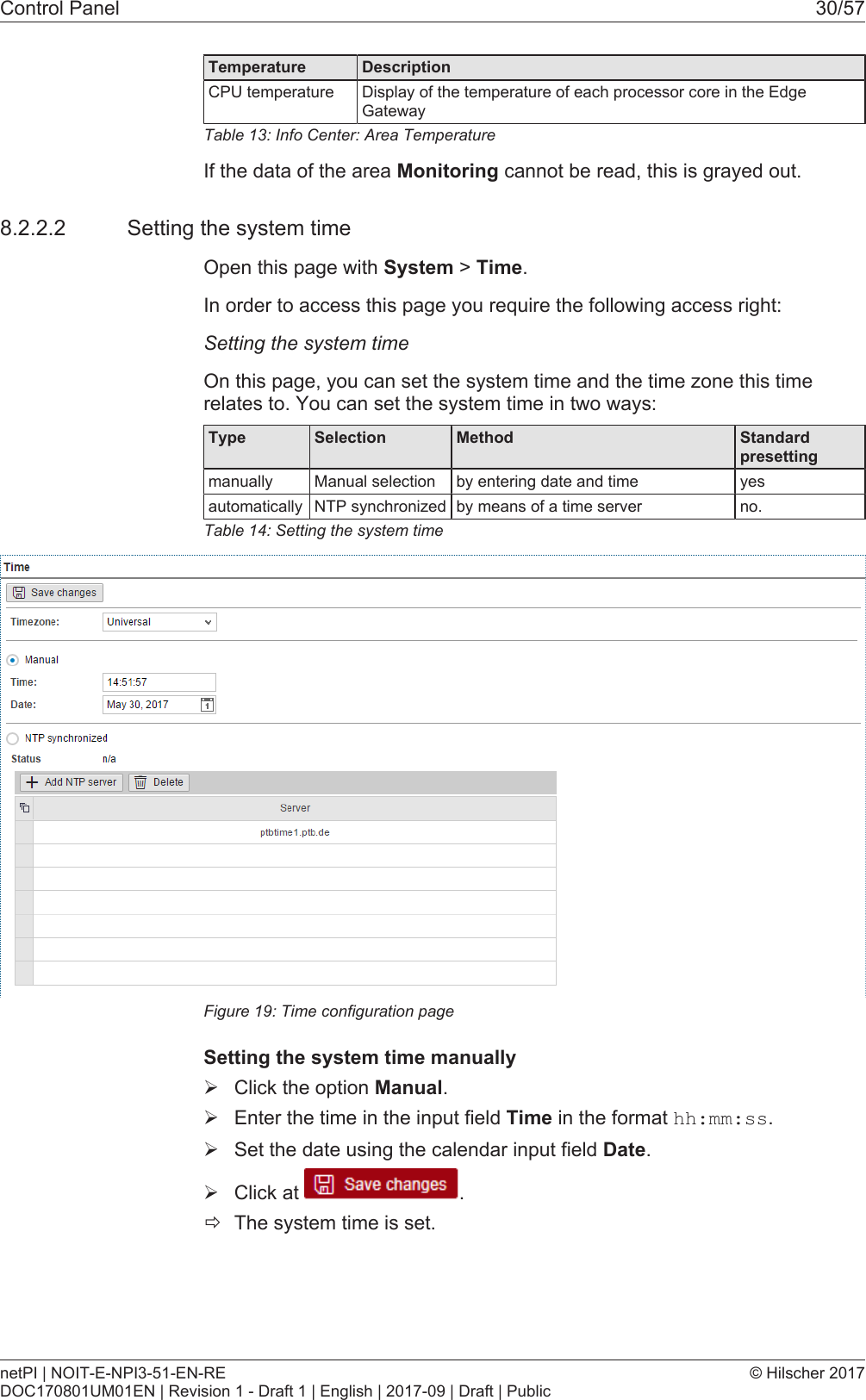
Control Panel 30/57Temperature DescriptionCPU temperature Display of the temperature of each processor core in the EdgeGatewayTable13: Info Center: Area TemperatureIf the data of the area Monitoring cannot be read, this is grayed out.8.2.2.2 Setting the system timeOpen this page with System > Time.In order to access this page you require the following access right:Setting the system timeOn this page, you can set the system time and the time zone this timerelates to. You can set the system time in two ways:Type Selection Method Standard presettingmanually Manual selection by entering date and time yesautomatically NTP synchronized by means of a time server no.Table14: Setting the system timeFigure19: Time configuration pageSetting the system time manuallyØClick the option Manual.ØEnter the time in the input field Time in the format hh:mm:ss.ØSet the date using the calendar input field Date.ØClick at  .ðThe system time is set.netPI | NOIT-E-NPI3-51-EN-REDOC170801UM01EN | Revision 1 - Draft 1 | English | 2017-09 | Draft | Public© Hilscher 2017
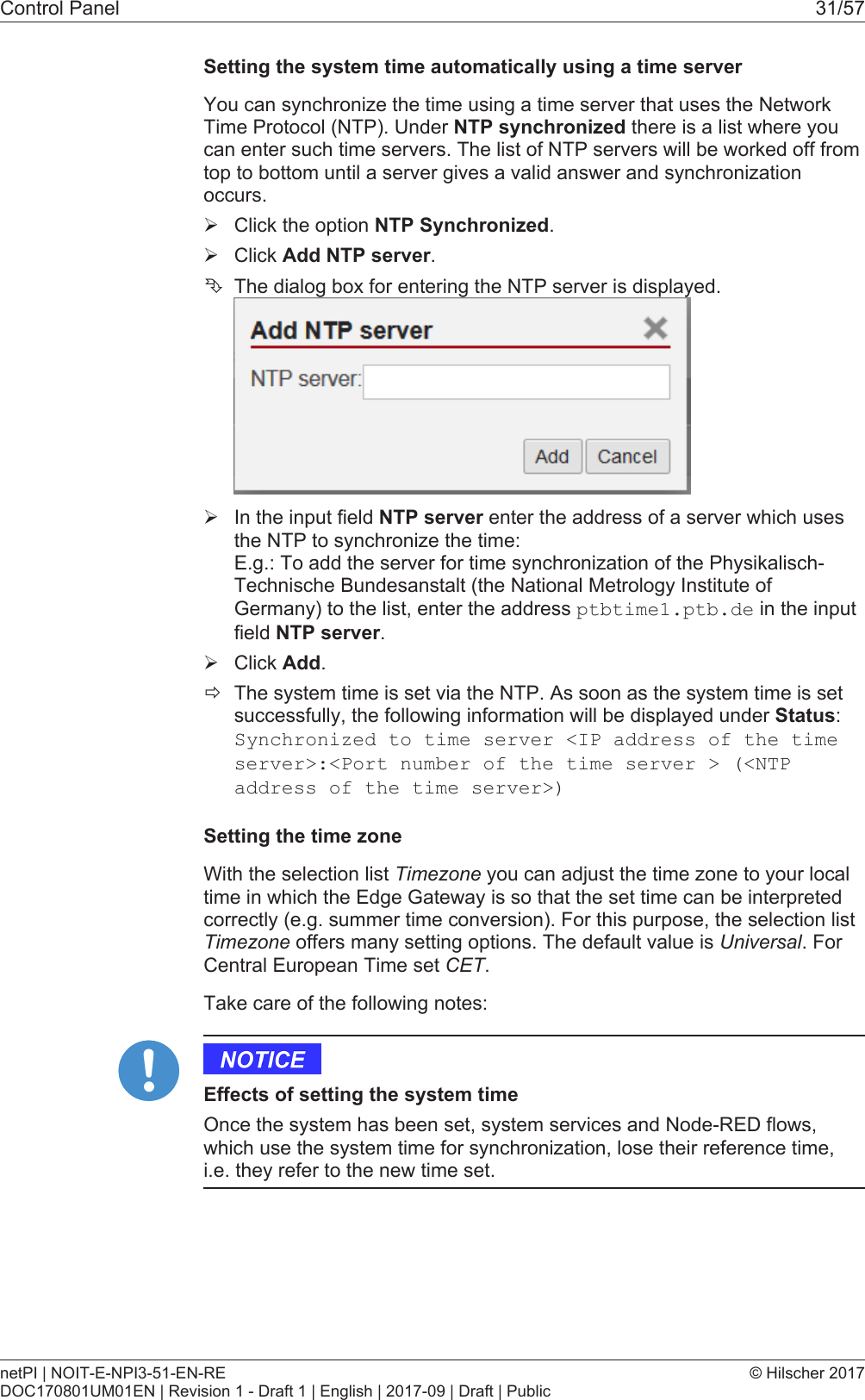
Control Panel 31/57Setting the system time automatically using a time serverYou can synchronize the time using a time server that uses the NetworkTime Protocol (NTP). Under NTP synchronized there is a list where youcan enter such time servers. The list of NTP servers will be worked off fromtop to bottom until a server gives a valid answer and synchronizationoccurs.ØClick the option NTP Synchronized.ØClick Add NTP server.ÊThe dialog box for entering the NTP server is displayed.ØIn the input field NTP server enter the address of a server which usesthe NTP to synchronize the time: E.g.: To add the server for time synchronization of the Physikalisch-Technische Bundesanstalt (the National Metrology Institute ofGermany) to the list, enter the address ptbtime1.ptb.de in the inputfield NTP server.ØClick Add.ðThe system time is set via the NTP. As soon as the system time is setsuccessfully, the following information will be displayed under Status:Synchronized to time server <IP address of the timeserver>:<Port number of the time server > (<NTPaddress of the time server>)Setting the time zoneWith the selection list Timezone you can adjust the time zone to your localtime in which the Edge Gateway is so that the set time can be interpretedcorrectly (e.g. summer time conversion). For this purpose, the selection listTimezone offers many setting options. The default value is Universal. ForCentral European Time set CET.Take care of the following notes:Effects of setting the system timeOnce the system has been set, system services and Node-RED flows,which use the system time for synchronization, lose their reference time,i.e. they refer to the new time set.netPI | NOIT-E-NPI3-51-EN-REDOC170801UM01EN | Revision 1 - Draft 1 | English | 2017-09 | Draft | Public© Hilscher 2017
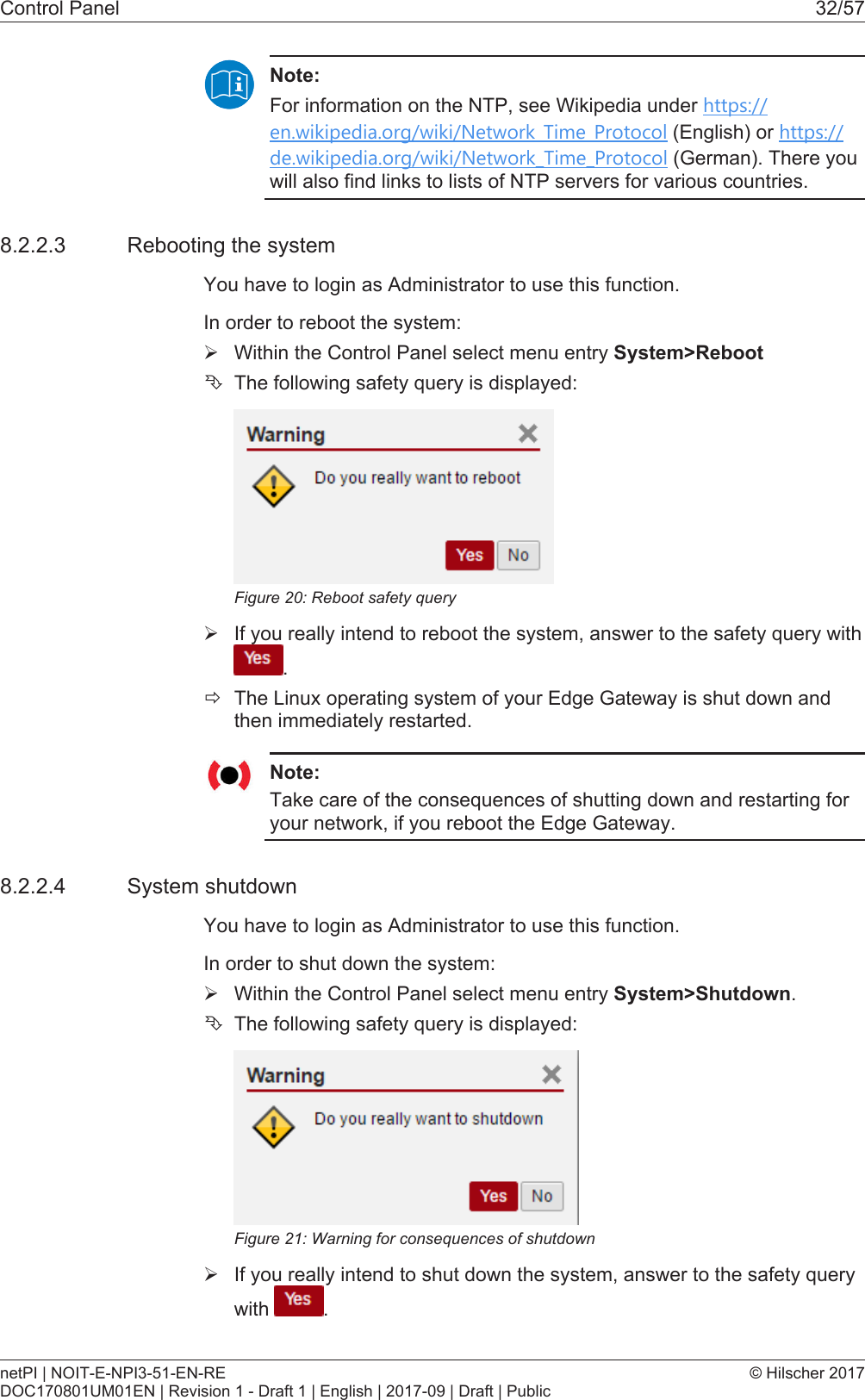
Control Panel 32/57Note:For information on the NTP, see Wikipedia under https://en.wikipedia.org/wiki/Network_Time_Protocol (English) or https://de.wikipedia.org/wiki/Network_Time_Protocol (German). There youwill also find links to lists of NTP servers for various countries.8.2.2.3 Rebooting the systemYou have to login as Administrator to use this function.In order to reboot the system:ØWithin the Control Panel select menu entry System>RebootÊThe following safety query is displayed:Figure20: Reboot safety queryØIf you really intend to reboot the system, answer to the safety query with.ðThe Linux operating system of your Edge Gateway is shut down andthen immediately restarted.Note:Take care of the consequences of shutting down and restarting foryour network, if you reboot the Edge Gateway.8.2.2.4 System shutdownYou have to login as Administrator to use this function.In order to shut down the system:ØWithin the Control Panel select menu entry System>Shutdown.ÊThe following safety query is displayed:Figure21: Warning for consequences of shutdownØIf you really intend to shut down the system, answer to the safety querywith  .netPI | NOIT-E-NPI3-51-EN-REDOC170801UM01EN | Revision 1 - Draft 1 | English | 2017-09 | Draft | Public© Hilscher 2017
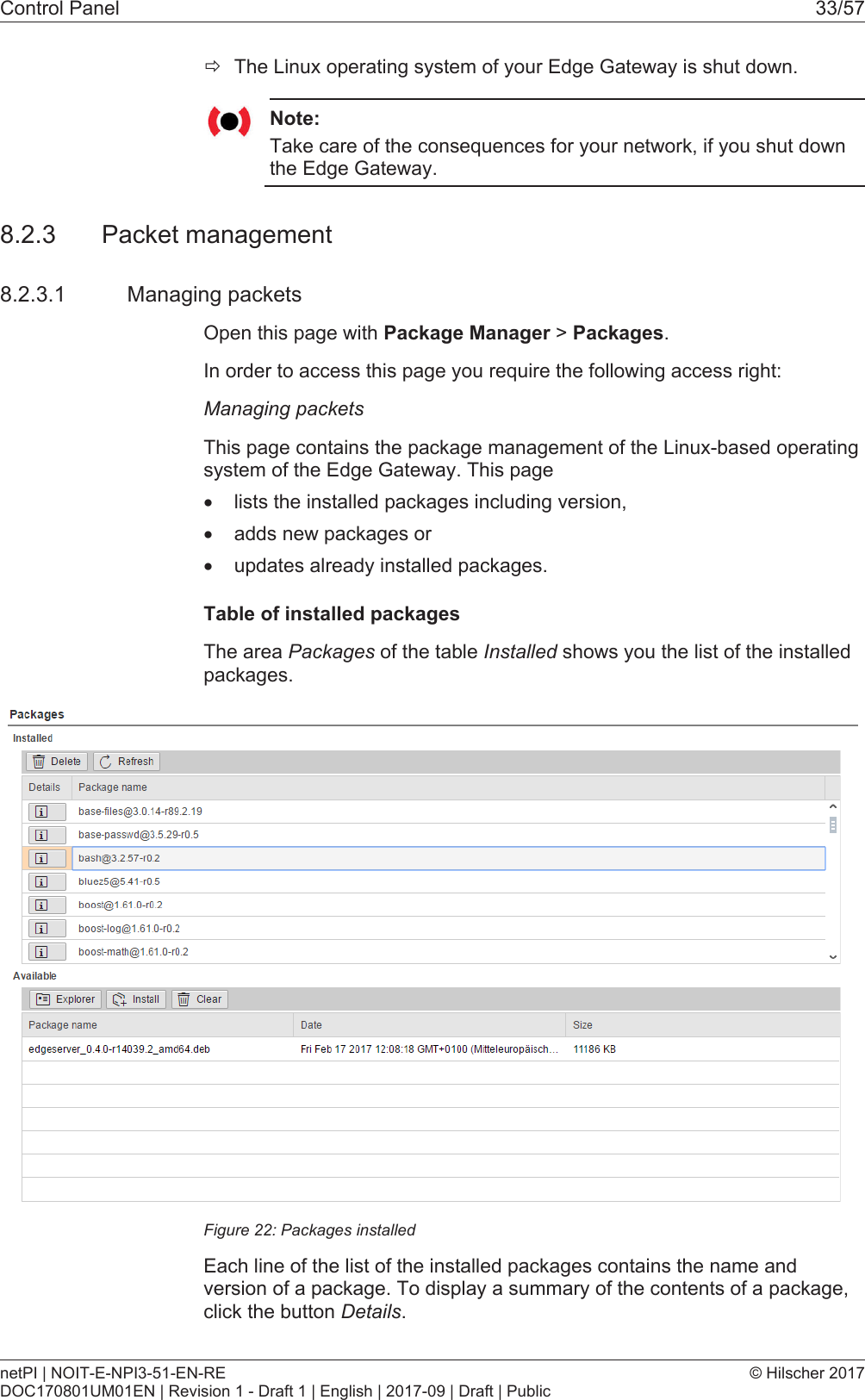
Control Panel 33/57ðThe Linux operating system of your Edge Gateway is shut down.Note:Take care of the consequences for your network, if you shut downthe Edge Gateway.8.2.3 Packet management8.2.3.1 Managing packetsOpen this page with Package Manager > Packages.In order to access this page you require the following access right:Managing packetsThis page contains the package management of the Linux-based operatingsystem of the Edge Gateway. This page·lists the installed packages including version,·adds new packages or·updates already installed packages.Table of installed packagesThe area Packages of the table Installed shows you the list of the installedpackages.Figure22: Packages installedEach line of the list of the installed packages contains the name andversion of a package. To display a summary of the contents of a package,click the button Details.netPI | NOIT-E-NPI3-51-EN-REDOC170801UM01EN | Revision 1 - Draft 1 | English | 2017-09 | Draft | Public© Hilscher 2017
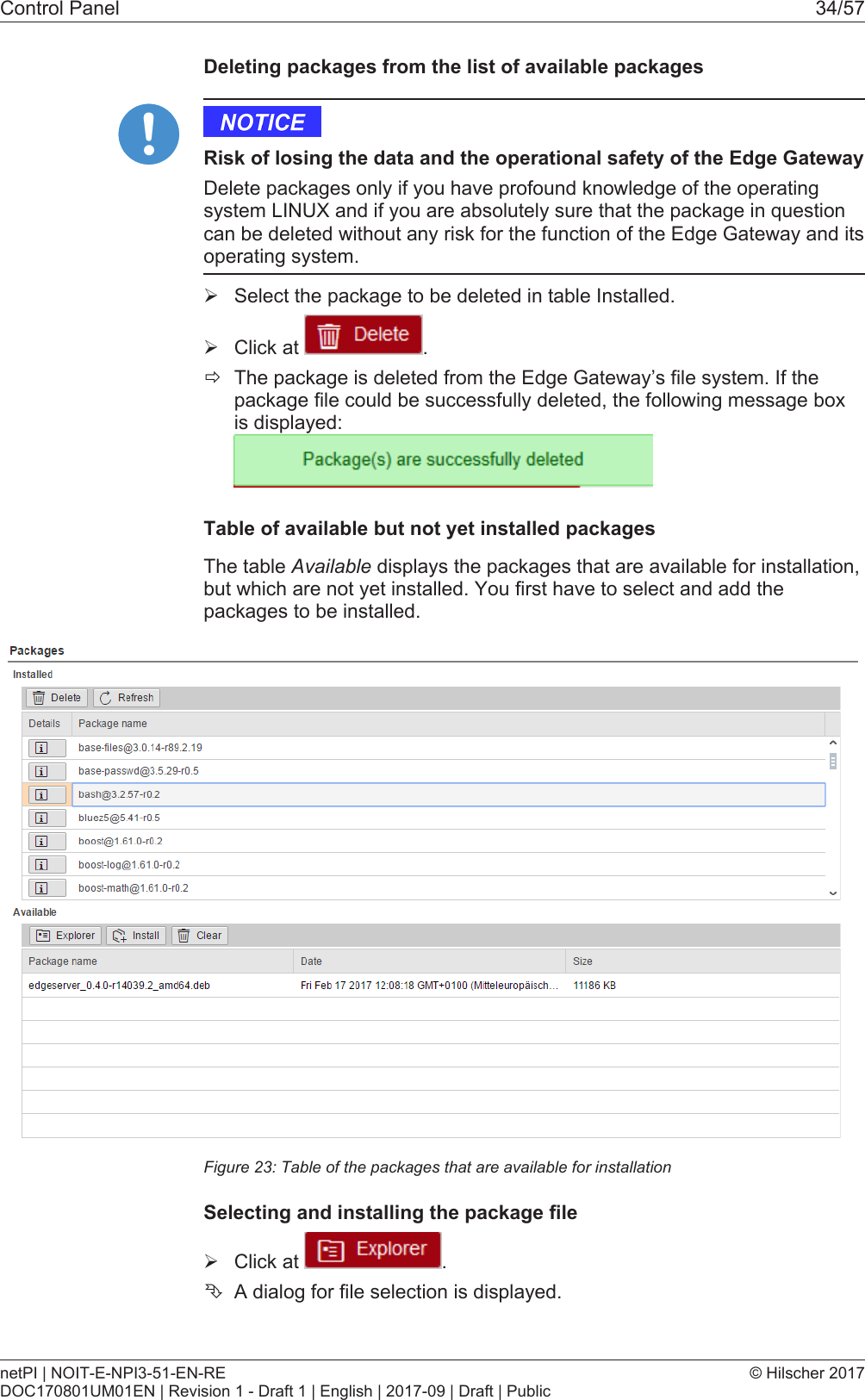
Control Panel 34/57Deleting packages from the list of available packagesRisk of losing the data and the operational safety of the Edge GatewayDelete packages only if you have profound knowledge of the operatingsystem LINUX and if you are absolutely sure that the package in questioncan be deleted without any risk for the function of the Edge Gateway and itsoperating system.ØSelect the package to be deleted in table Installed.ØClick at  .ðThe package is deleted from the Edge Gateway’s file system. If thepackage file could be successfully deleted, the following message boxis displayed:Table of available but not yet installed packagesThe table Available displays the packages that are available for installation,but which are not yet installed. You first have to select and add thepackages to be installed.Figure23: Table of the packages that are available for installationSelecting and installing the package fileØClick at  .ÊA dialog for file selection is displayed.netPI | NOIT-E-NPI3-51-EN-REDOC170801UM01EN | Revision 1 - Draft 1 | English | 2017-09 | Draft | Public© Hilscher 2017
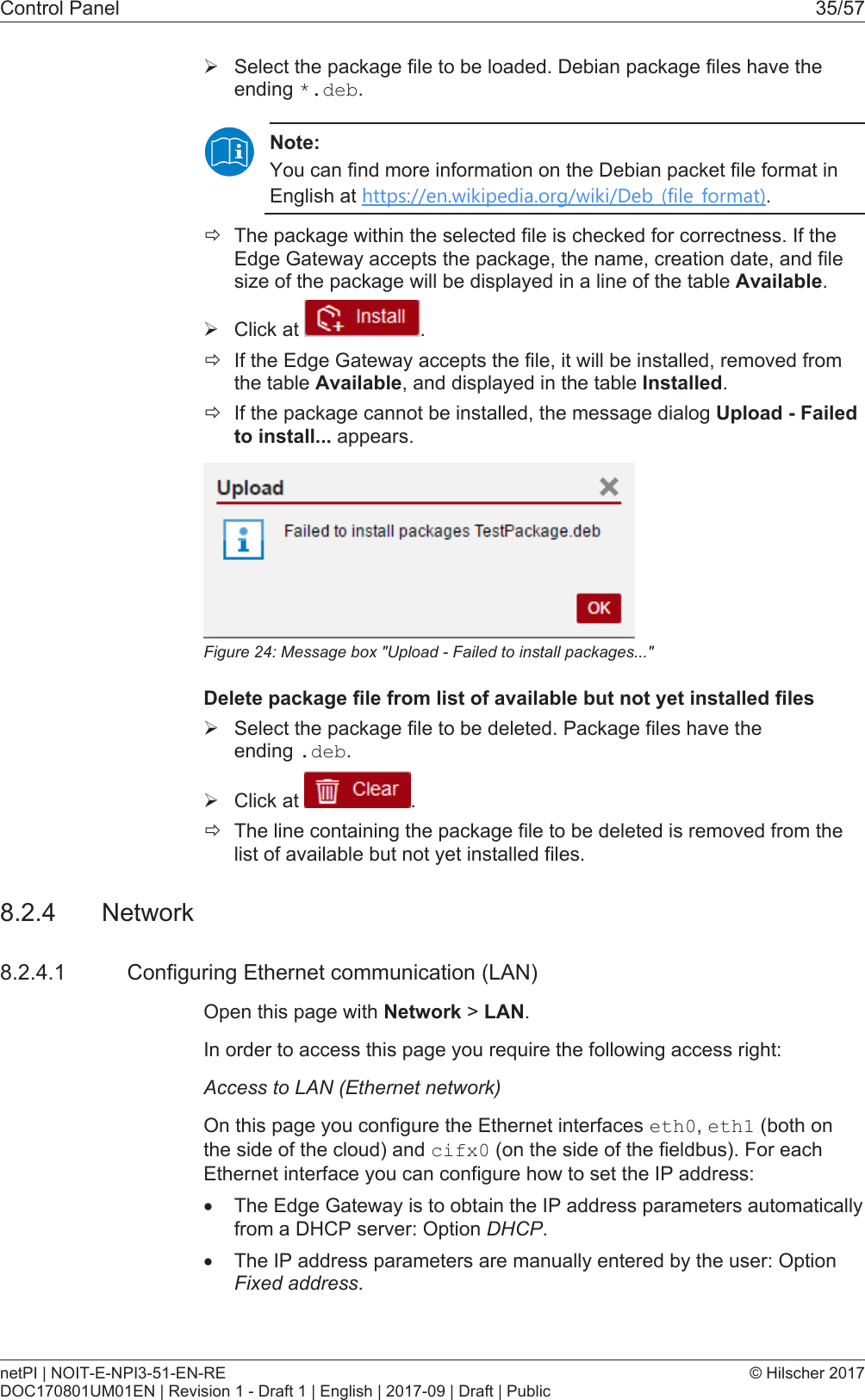
Control Panel 35/57ØSelect the package file to be loaded. Debian package files have theending *.deb.Note:You can find more information on the Debian packet file format inEnglish at https://en.wikipedia.org/wiki/Deb_(file_format).ðThe package within the selected file is checked for correctness. If theEdge Gateway accepts the package, the name, creation date, and filesize of the package will be displayed in a line of the table Available.ØClick at  .ðIf the Edge Gateway accepts the file, it will be installed, removed fromthe table Available, and displayed in the table Installed.ðIf the package cannot be installed, the message dialog Upload - Failedto install... appears.Figure24: Message box "Upload - Failed to install packages..."Delete package file from list of available but not yet installed filesØSelect the package file to be deleted. Package files have theending .deb.ØClick at  .ðThe line containing the package file to be deleted is removed from thelist of available but not yet installed files.8.2.4 Network8.2.4.1 Configuring Ethernet communication (LAN)Open this page with Network > LAN.In order to access this page you require the following access right:Access to LAN (Ethernet network)On this page you configure the Ethernet interfaces eth0, eth1 (both onthe side of the cloud) and cifx0 (on the side of the fieldbus). For eachEthernet interface you can configure how to set the IP address:·The Edge Gateway is to obtain the IP address parameters automaticallyfrom a DHCP server: Option DHCP.·The IP address parameters are manually entered by the user: OptionFixed address.netPI | NOIT-E-NPI3-51-EN-REDOC170801UM01EN | Revision 1 - Draft 1 | English | 2017-09 | Draft | Public© Hilscher 2017
Control Panel 36/57The IP address parameters include the IP address, the subnet mask, theGateway address, and the IP addresses of the 1st and 2nd domain nameserver.The default IP address of the LAN connection port 2 is 192.168.253.1with the subnet mask 255.255.255.0.Column MeaningName displays the name of the LAN interface.MAC address displays the MAC address of the LAN interface.Settings Selecting the configuration method: Here you can select between·DHCP (IP address parameters automatically obtained from a DHCPserver) or·Fixed address (IP address parameters entered by the user)If you enter the IP address manually, also always enter the subnetmask and the Gateway address.Domain NameSystemIf you enter the IP address parameters manually, enter the IP addressof the 1st and 2nd domain name server.Table15: Table LAN: Meaning of the columnsIf you want to permanently save the changes you made, click at afterwards.8.2.4.2 HostnameOpen this page with Network > Hostname.In order to access this page you require the following access right:Access to hostname of Edge GatewayOn this page you configure the host name.The host name identifies the device via the WiFi or LAN network.The default host name starts with the two letters "NT" followed by the LANMAC address of the LAN connection port 1 of the Edge Gateway. ExampleNT0002A233E559. The default host name is printed on the label at thebottom of the Edge Gateway. With the host name you can access the EdgeGateway from your PC even without knowing the IP address of the EdgeGateway (also see Using the web browser to establish a connection withthe Edge Gateway [}page18]).If the Edge Gateway does not obtain an IP address from a DHCP server,the system cannot translate the host name and you cannot access thedevice.Figure25: HostnamenetPI | NOIT-E-NPI3-51-EN-REDOC170801UM01EN | Revision 1 - Draft 1 | English | 2017-09 | Draft | Public© Hilscher 2017
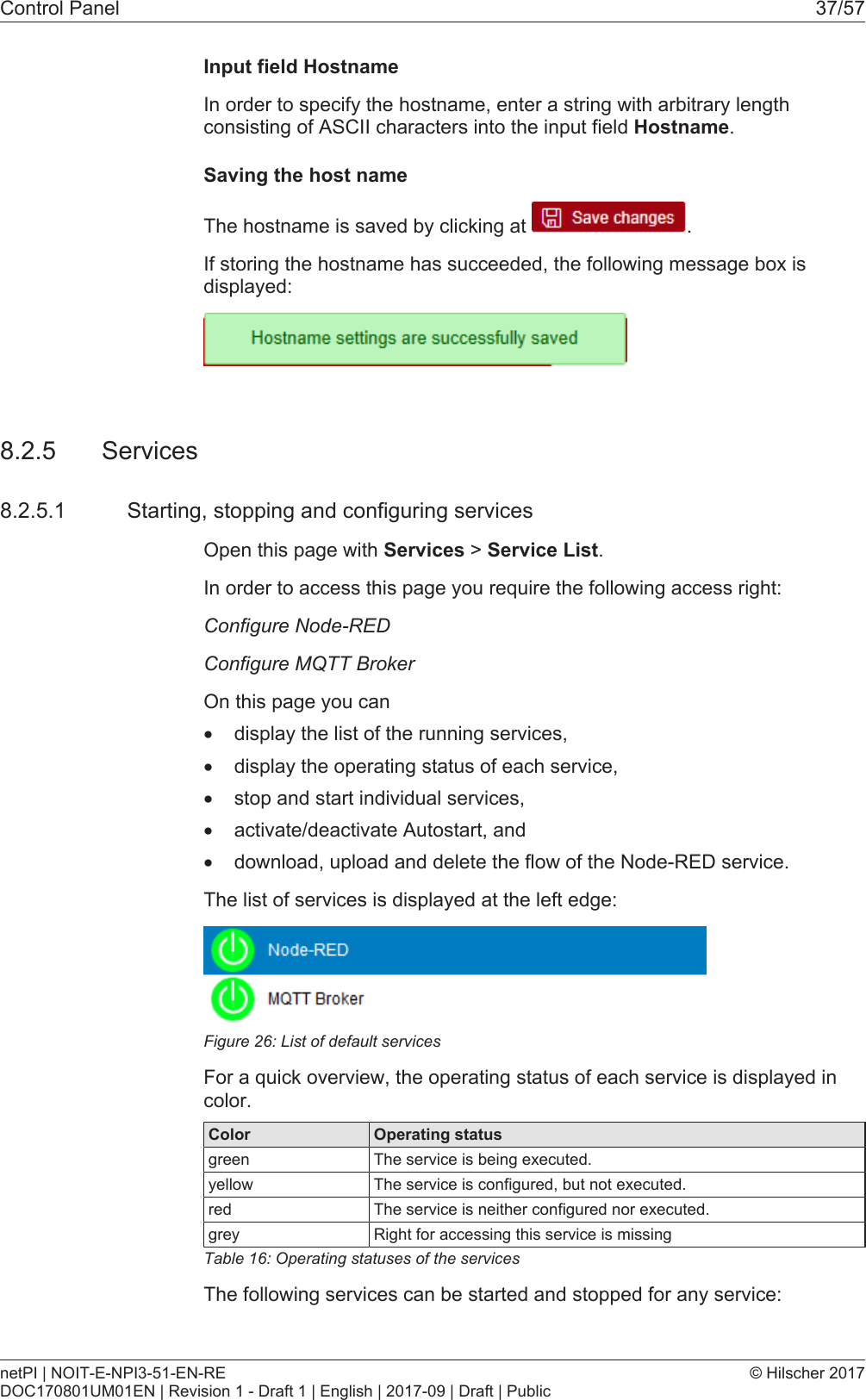
Control Panel 37/57Input field HostnameIn order to specify the hostname, enter a string with arbitrary lengthconsisting of ASCII characters into the input field Hostname.Saving the host nameThe hostname is saved by clicking at  .If storing the hostname has succeeded, the following message box isdisplayed:8.2.5 Services8.2.5.1 Starting, stopping and configuring servicesOpen this page with Services > Service List.In order to access this page you require the following access right:Configure Node-REDConfigure MQTT BrokerOn this page you can·display the list of the running services,·display the operating status of each service,·stop and start individual services,·activate/deactivate Autostart, and·download, upload and delete the flow of the Node-RED service.The list of services is displayed at the left edge:Figure26: List of default servicesFor a quick overview, the operating status of each service is displayed incolor.Color Operating statusgreen The service is being executed.yellow The service is configured, but not executed.red The service is neither configured nor executed.grey Right for accessing this service is missingTable16: Operating statuses of the servicesThe following services can be started and stopped for any service:netPI | NOIT-E-NPI3-51-EN-REDOC170801UM01EN | Revision 1 - Draft 1 | English | 2017-09 | Draft | Public© Hilscher 2017
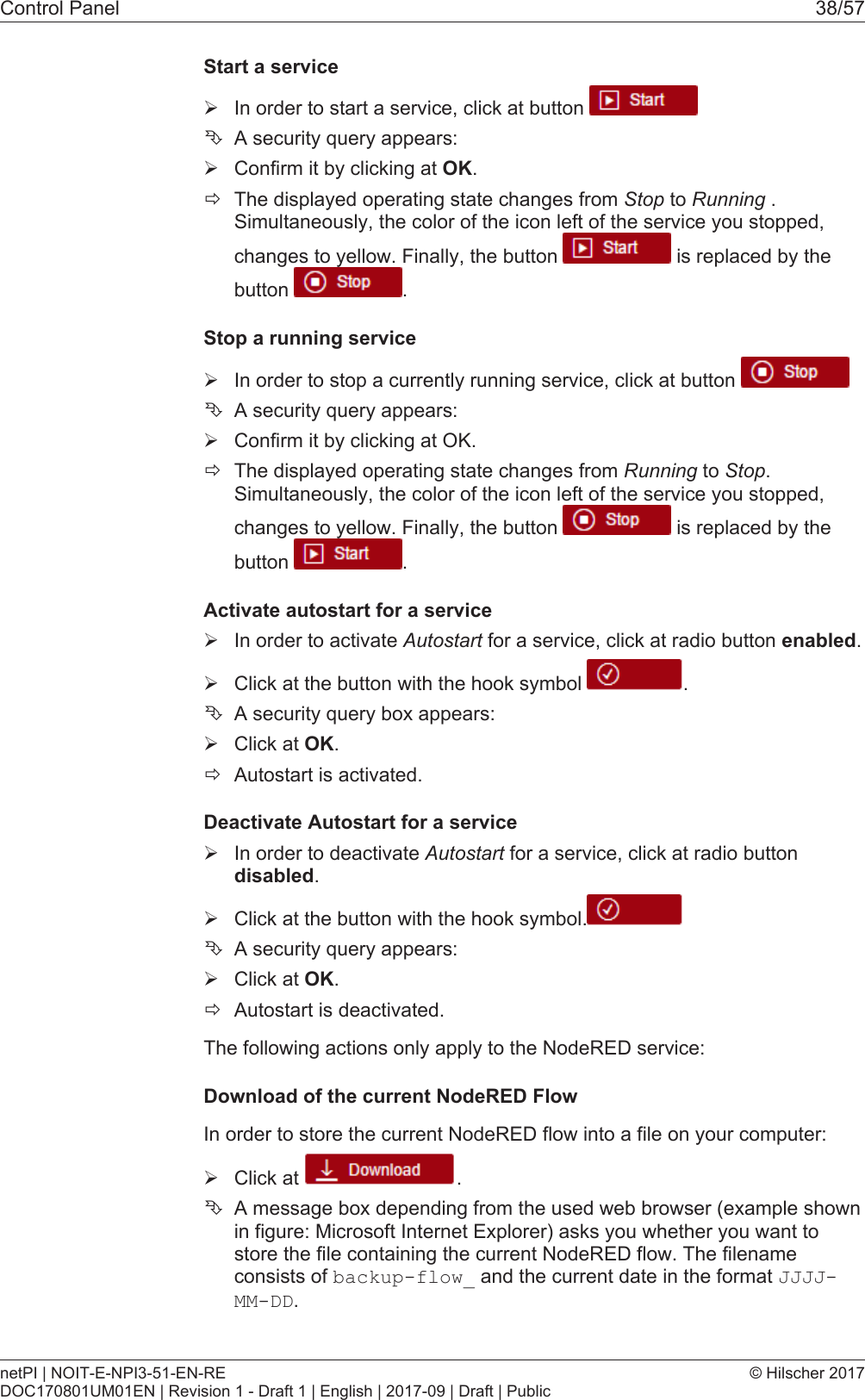
Control Panel 38/57Start a serviceØIn order to start a service, click at button ÊA security query appears:ØConfirm it by clicking at OK.ðThe displayed operating state changes from Stop to Running .Simultaneously, the color of the icon left of the service you stopped,changes to yellow. Finally, the button   is replaced by thebutton  .Stop a running serviceØIn order to stop a currently running service, click at button ÊA security query appears:ØConfirm it by clicking at OK.ðThe displayed operating state changes from Running to Stop.Simultaneously, the color of the icon left of the service you stopped,changes to yellow. Finally, the button   is replaced by thebutton  .Activate autostart for a serviceØIn order to activate Autostart for a service, click at radio button enabled.ØClick at the button with the hook symbol  .ÊA security query box appears:ØClick at OK.ðAutostart is activated.Deactivate Autostart for a serviceØIn order to deactivate Autostart for a service, click at radio buttondisabled.ØClick at the button with the hook symbol.ÊA security query appears:ØClick at OK.ðAutostart is deactivated.The following actions only apply to the NodeRED service:Download of the current NodeRED FlowIn order to store the current NodeRED flow into a file on your computer:ØClick at  .ÊA message box depending from the used web browser (example shownin figure: Microsoft Internet Explorer) asks you whether you want tostore the file containing the current NodeRED flow. The filenameconsists of backup-flow_ and the current date in the format JJJJ-MM-DD.netPI | NOIT-E-NPI3-51-EN-REDOC170801UM01EN | Revision 1 - Draft 1 | English | 2017-09 | Draft | Public© Hilscher 2017
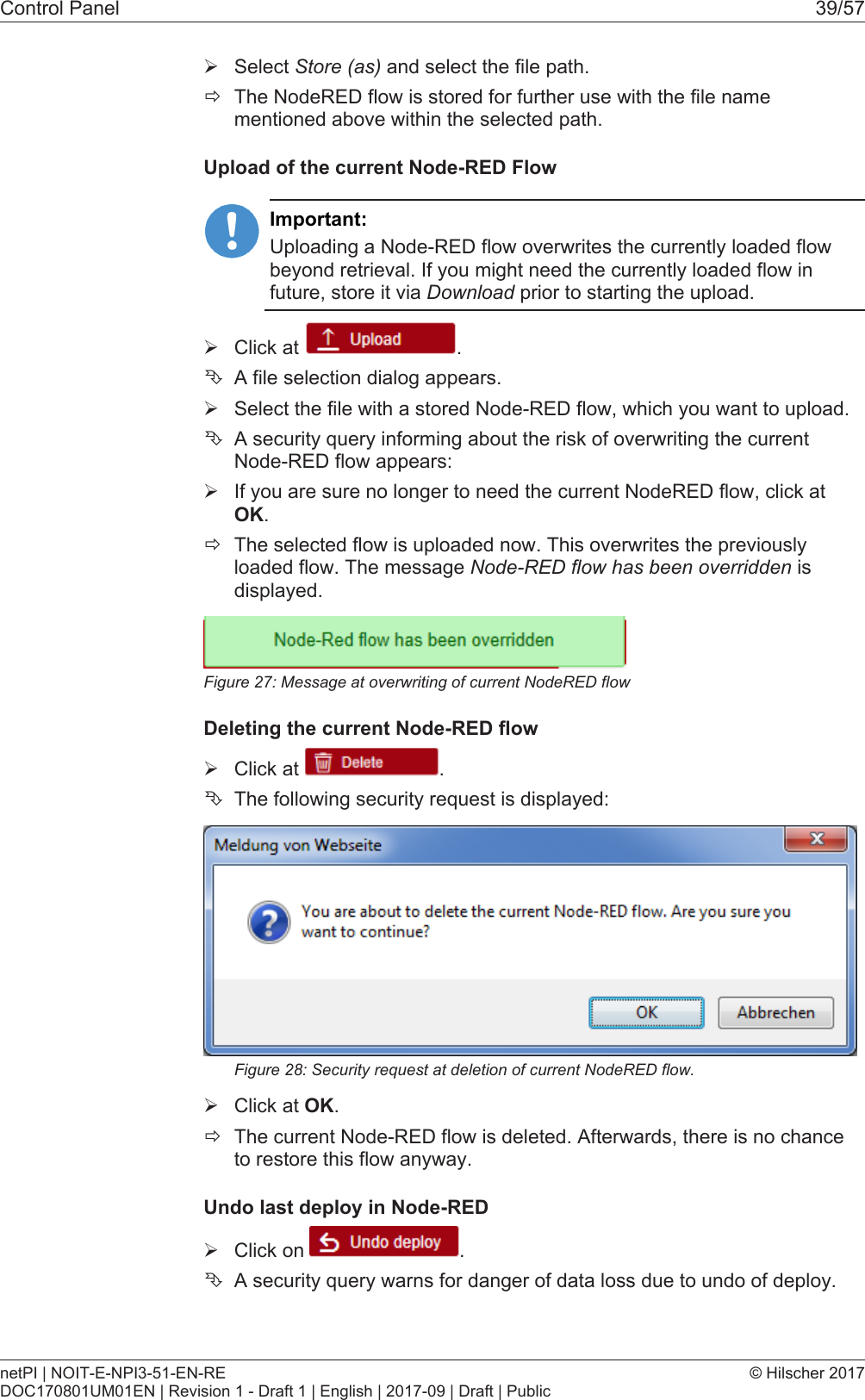
Control Panel 39/57ØSelect Store (as) and select the file path.ðThe NodeRED flow is stored for further use with the file namementioned above within the selected path.Upload of the current Node-RED FlowImportant:Uploading a Node-RED flow overwrites the currently loaded flowbeyond retrieval. If you might need the currently loaded flow infuture, store it via Download prior to starting the upload.ØClick at  .ÊA file selection dialog appears.ØSelect the file with a stored Node-RED flow, which you want to upload.ÊA security query informing about the risk of overwriting the currentNode-RED flow appears:ØIf you are sure no longer to need the current NodeRED flow, click atOK.ðThe selected flow is uploaded now. This overwrites the previouslyloaded flow. The message Node-RED flow has been overridden isdisplayed.Figure27: Message at overwriting of current NodeRED flowDeleting the current Node-RED flowØClick at  .ÊThe following security request is displayed:Figure28: Security request at deletion of current NodeRED flow.ØClick at OK.ðThe current Node-RED flow is deleted. Afterwards, there is no chanceto restore this flow anyway.Undo last deploy in Node-REDØClick on  .ÊA security query warns for danger of data loss due to undo of deploy.netPI | NOIT-E-NPI3-51-EN-REDOC170801UM01EN | Revision 1 - Draft 1 | English | 2017-09 | Draft | Public© Hilscher 2017
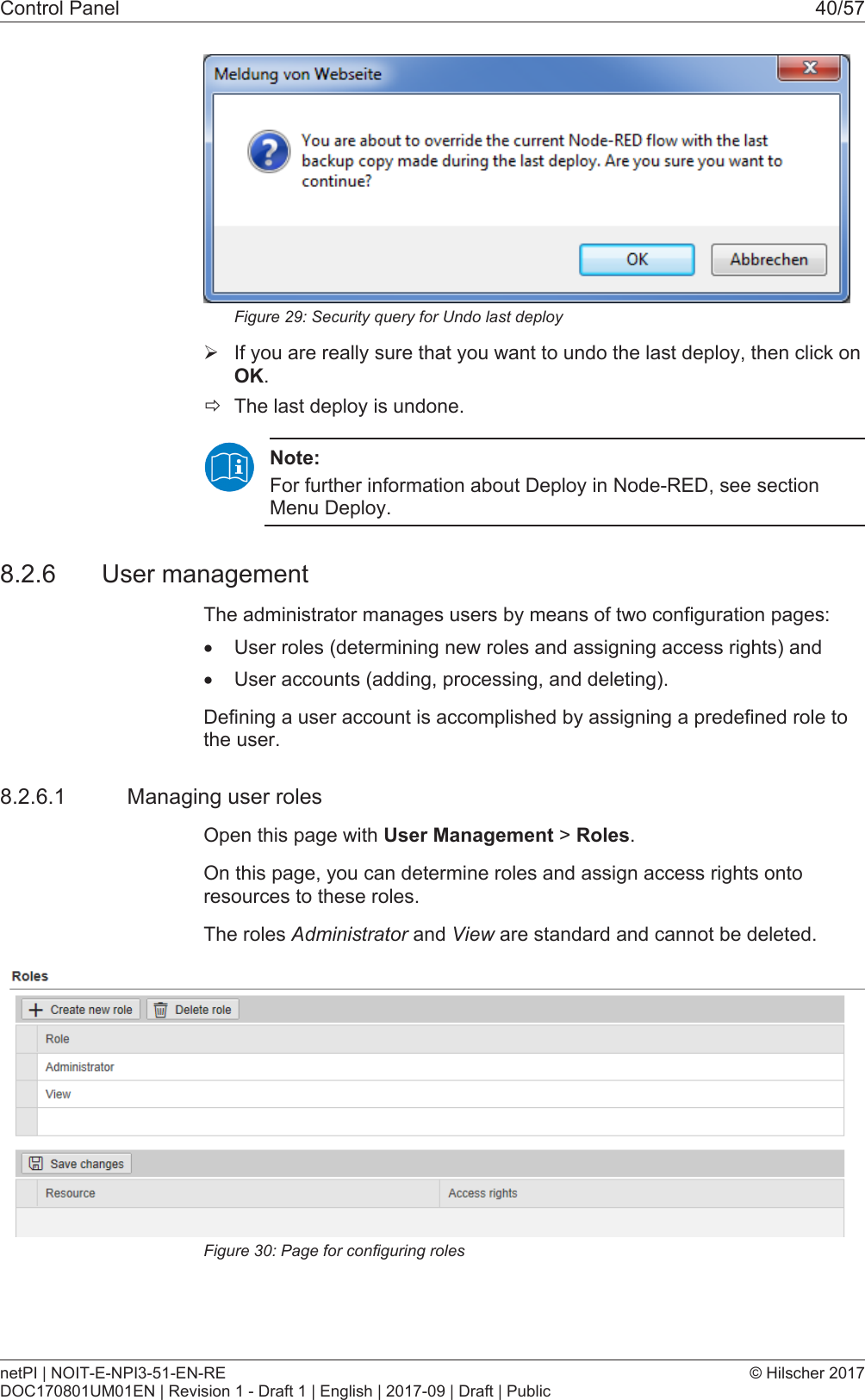
Control Panel 40/57Figure29: Security query for Undo last deployØIf you are really sure that you want to undo the last deploy, then click onOK.ðThe last deploy is undone.Note:For further information about Deploy in Node-RED, see sectionMenu Deploy.8.2.6 User managementThe administrator manages users by means of two configuration pages:·User roles (determining new roles and assigning access rights) and·User accounts (adding, processing, and deleting).Defining a user account is accomplished by assigning a predefined role tothe user.8.2.6.1 Managing user rolesOpen this page with User Management > Roles.On this page, you can determine roles and assign access rights ontoresources to these roles.The roles Administrator and View are standard and cannot be deleted.Figure30: Page for configuring rolesnetPI | NOIT-E-NPI3-51-EN-REDOC170801UM01EN | Revision 1 - Draft 1 | English | 2017-09 | Draft | Public© Hilscher 2017
Control Panel 41/57An access right is set per resource. Each configuration page of the controlpanel which contains settable device parameters is a resource. Access viaREST-API (see Functions of the Edge Server) is also a resource.An access right can be assigned to the following single resources:Access right / Resource Access to resourceaccomplished via menuentryUsageSystemSetting the system time System >Time Setting the systemtime [}page30]Packet managementManaging packets Package Manager >PackagesManaging packets [}page33]Network accessAccess to LAN (Ethernetnetwork)Network > LAN Configuring Ethernetcommunication(LAN) [}page35]Access onto WiFI (wirelessnetwork)Network > WiFi Configuring wirelesscommunication (WiFi)Access onto hostname of EdgeGatewayNetwork > Hostname Hostname [}page36]Access onto Field network(Ethernet network)Network > FieldServicesConfigure Node-RED Services > Node-RED Starting, stopping andconfiguringservices [}page37]Configure MQTT Broker Services > MQTT Broker Starting, stopping andconfiguringservices [}page37]SecurityInstall security certificates Security > SSL/TLSCerticateUploading and installing ownsecuritycertificates [}page43]Edge ServerAccess via REST-API Edge Server (REST API) Functions of the Edge ServerTable17: Access rights onto resourcesEach resource may obtain one of the following access rights:Access rights onto resource CheckboxNo access NoneRead access only ReadRead and write access Read, WriteTable18: Access rights to resourcesAdding a new roleØClick at netPI | NOIT-E-NPI3-51-EN-REDOC170801UM01EN | Revision 1 - Draft 1 | English | 2017-09 | Draft | Public© Hilscher 2017
Control Panel 42/57ðThe dialog box for entering the role name is displayed.ØEnter a name for the role, e.g. User.ØClick Add.ðThe role is added.Setting the access rights of a roleØClick a role.ðThe resources and access rights for this role will be displayed.ØAssign the access right per resource.ØClick at The following figure shows the access rights of the administrator.Also see about this2Uploading and installing own security certificates [}43]8.2.6.2 Managing user accountsOpen this page with User Management > Accounts.On this page you can·add·process·delete user accounts.Figure31: User account pageEach user account has a user name, a password, and an assigned role.8.2.7 Security certificatesThe menu Security offers you the possibility to display the contents ofsecurity certificates and to upload and install these.It looks like:Figure32: Security submenunetPI | NOIT-E-NPI3-51-EN-REDOC170801UM01EN | Revision 1 - Draft 1 | English | 2017-09 | Draft | Public© Hilscher 2017
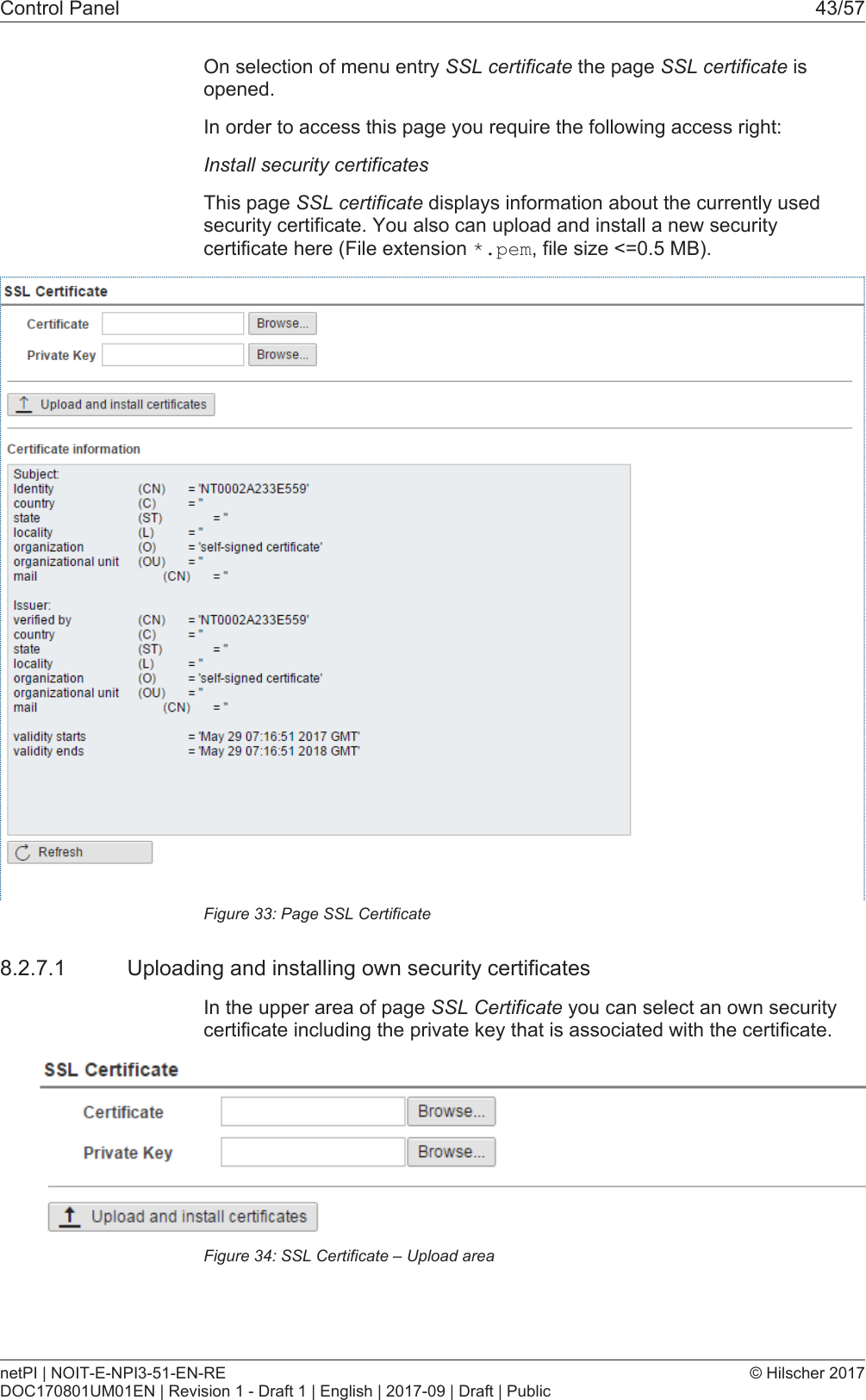
Control Panel 43/57On selection of menu entry SSL certificate the page SSL certificate isopened.In order to access this page you require the following access right:Install security certificatesThis page SSL certificate displays information about the currently usedsecurity certificate. You also can upload and install a new securitycertificate here (File extension *.pem, file size <=0.5 MB).Figure33: Page SSL Certificate8.2.7.1 Uploading and installing own security certificatesIn the upper area of page SSL Certificate you can select an own securitycertificate including the private key that is associated with the certificate.Figure34: SSL Certificate – Upload areanetPI | NOIT-E-NPI3-51-EN-REDOC170801UM01EN | Revision 1 - Draft 1 | English | 2017-09 | Draft | Public© Hilscher 2017
Control Panel 44/57Uploading and installing the certificate1. In order to upload and install the certificate, proceed as follows:ØSelect your certificate to be uploaded and installed with the Browsebutton right of the field Certificate.ØSelect the private key associated with your certificate with the Browsebutton right of the field Private Key.Note:The expected file type for security certificates and private keys is*.pem (Privacy enhanced electronic mail format). You can findmore information about this file format in Wikipedia at https://en.wikipedia.org/wiki/Privacy-enhanced_Electronic_Mail.ØClick at Upload and install certificates.ðThe security certificate is uploaded and installed.netPI | NOIT-E-NPI3-51-EN-REDOC170801UM01EN | Revision 1 - Draft 1 | English | 2017-09 | Draft | Public© Hilscher 2017
Control Panel 45/578.2.7.2 Information about the currently loaded security certificateIn the lower area of page SSL Certificate information concerning thecurrently loaded security certificate is displayed.Figure35: SSL Certificate – Info areaThe single lines have the following meanings:Information about the security certificateLine Abbreviation MeaningIdentity/verified byCN Identity/verified bycountry C Countrystate ST Statelocality L Localityorganization O OrganizationOrganizationunitOU Organization unitmail CN E-mail addressValidity starts - Start of validity duration of certificateValidity ends - End of validity duration of certificateIn factory-new state the Edge Gateway contains a self-signed certificate.You should replace this by an own certificate that you can upload andinstall in the way described above (see Uploading and installing ownsecurity certificates [}page43]).netPI | NOIT-E-NPI3-51-EN-REDOC170801UM01EN | Revision 1 - Draft 1 | English | 2017-09 | Draft | Public© Hilscher 2017
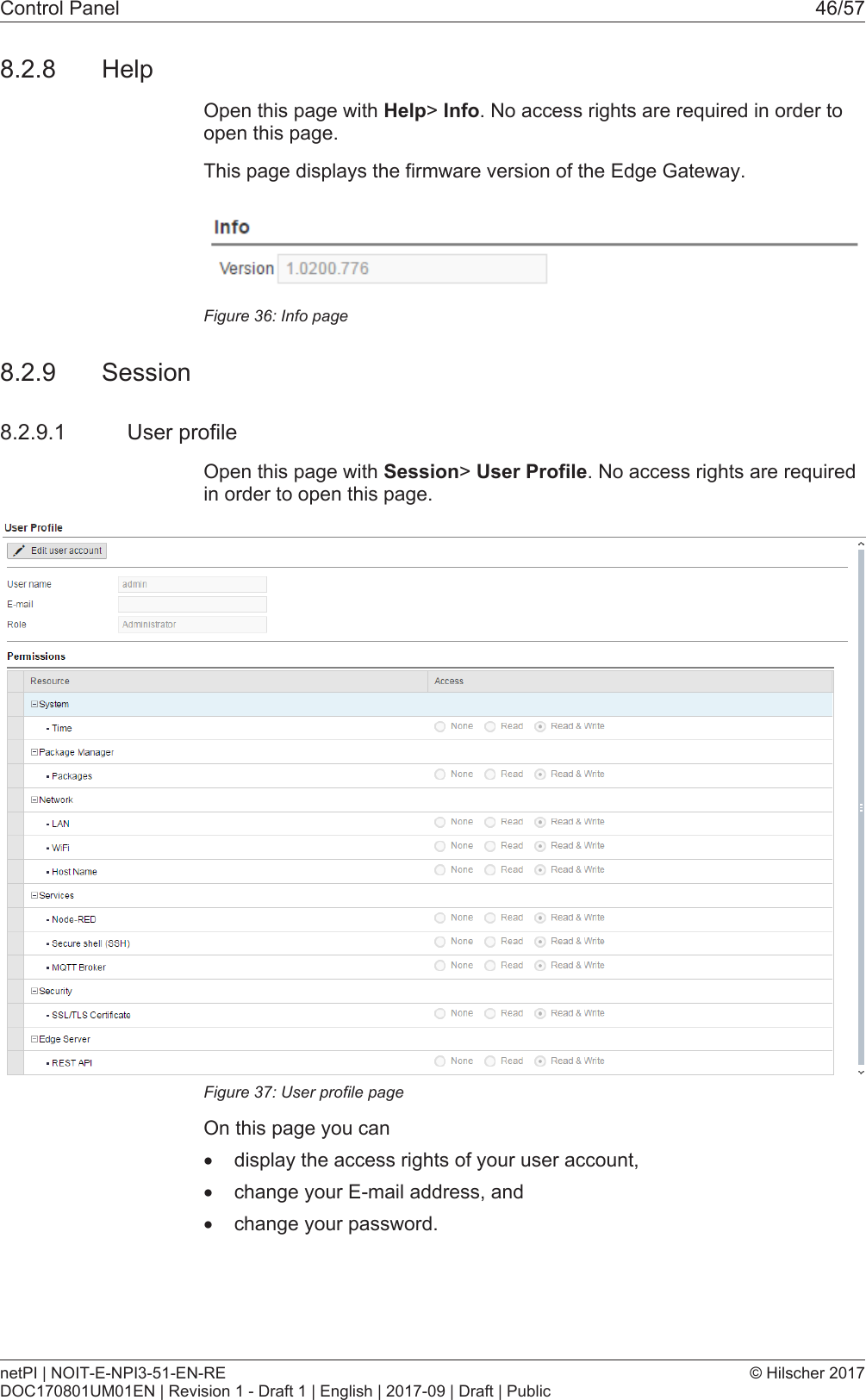
Control Panel 46/578.2.8 HelpOpen this page with Help> Info. No access rights are required in order toopen this page.This page displays the firmware version of the Edge Gateway.Figure36: Info page8.2.9 Session8.2.9.1 User profileOpen this page with Session> User Profile. No access rights are requiredin order to open this page.Figure37: User profile pageOn this page you can·display the access rights of your user account,·change your E-mail address, and·change your password.netPI | NOIT-E-NPI3-51-EN-REDOC170801UM01EN | Revision 1 - Draft 1 | English | 2017-09 | Draft | Public© Hilscher 2017
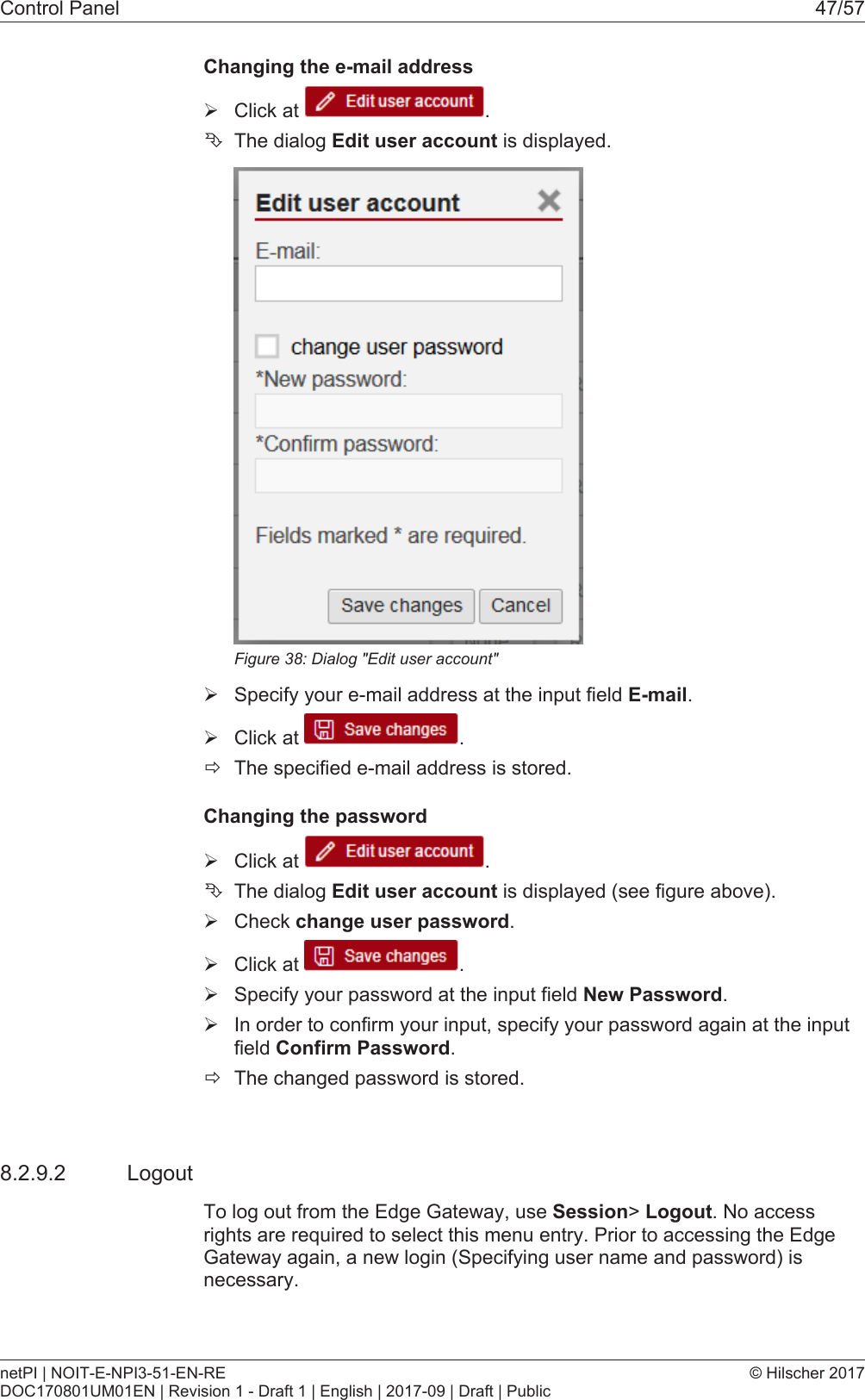
Control Panel 47/57Changing the e-mail addressØClick at  .ÊThe dialog Edit user account is displayed.Figure38: Dialog "Edit user account"ØSpecify your e-mail address at the input field E-mail.ØClick at  .ðThe specified e-mail address is stored.Changing the passwordØClick at  .ÊThe dialog Edit user account is displayed (see figure above).ØCheck change user password.ØClick at  .ØSpecify your password at the input field New Password.ØIn order to confirm your input, specify your password again at the inputfield Confirm Password.ðThe changed password is stored.8.2.9.2 LogoutTo log out from the Edge Gateway, use Session> Logout. No accessrights are required to select this menu entry. Prior to accessing the EdgeGateway again, a new login (Specifying user name and password) isnecessary.netPI | NOIT-E-NPI3-51-EN-REDOC170801UM01EN | Revision 1 - Draft 1 | English | 2017-09 | Draft | Public© Hilscher 2017
Isolated application execution with Docker 48/579 Isolated application execution with DockerThe Edge Gateway enables the user to execute his own applications withinthe protected Linux operating system. A software platform becomesnecessary to allow the execution of said applications withoutsimultaneously opening the possibility of evading the safety mechanisms ofthe Linux operating system. For that purpose, the Edge Gateway uses theopen-source software "Docker" from Docker Inc. (https://www.docker.com/).In order to work with Docker, read and write access rights at Docker UI arerequired. You can check whether you have the required access rights viathe menu entry User profile [}page46]. Granting read and right accessrights requires administrator rights and is described in section Managinguser roles [}page40].Note:For more information on Docker, see the documentation of theDocker organization under https://docs.docker.com/.9.1 Working with Docker via the web GUIThis section describes·how to operate Docker via the portainer.io interface of the browser·how to run additional software on the Edge Gateway with Docker (usingthe web server NGINX as an example).9.1.1 The portainer.io interfaceTasks of the portainer.io interfaceThe portainer.io interface serves:·to add new containers·to provide functions for controlling the code execution such as Start,Stop, Kill, Restart, Pause, Resume, and Remove·to configure the containers.Starting the portainer.io interface for working with the containersTo start the portainer.io interface, proceed as follows:ØOpen the Edge Gateway Manager, if it is not already open. For this purpose see Calling the Edge Gateway Manager [}page20]ØClick the tile Docker Management in the Edge Gateway Manager..netPI | NOIT-E-NPI3-51-EN-REDOC170801UM01EN | Revision 1 - Draft 1 | English | 2017-09 | Draft | Public© Hilscher 2017
Isolated application execution with Docker 49/57Figure39: Tile Docker in the Edge Gateway ManagerÊThe portainer.io login screen will be displayed. In the field Username,admin is already entered. This is the only predefined user name.ØEnter the password for the user name admin. This password is set inthe user management of the Edge Gateway Manager, see Usermanagement [}page40].ÊThe start page "Dashboard" of the user interface portainer.io will bedisplayed.Figure40: View of portainer.io dashboardØClick Containers in the menu on the left or Containers on the page"Dashboard".ðThe page "Container list" will be displayed. This list contains the namesand statuses of all currently known containers and provides thefunctions for controlling the code execution.netPI | NOIT-E-NPI3-51-EN-REDOC170801UM01EN | Revision 1 - Draft 1 | English | 2017-09 | Draft | Public© Hilscher 2017
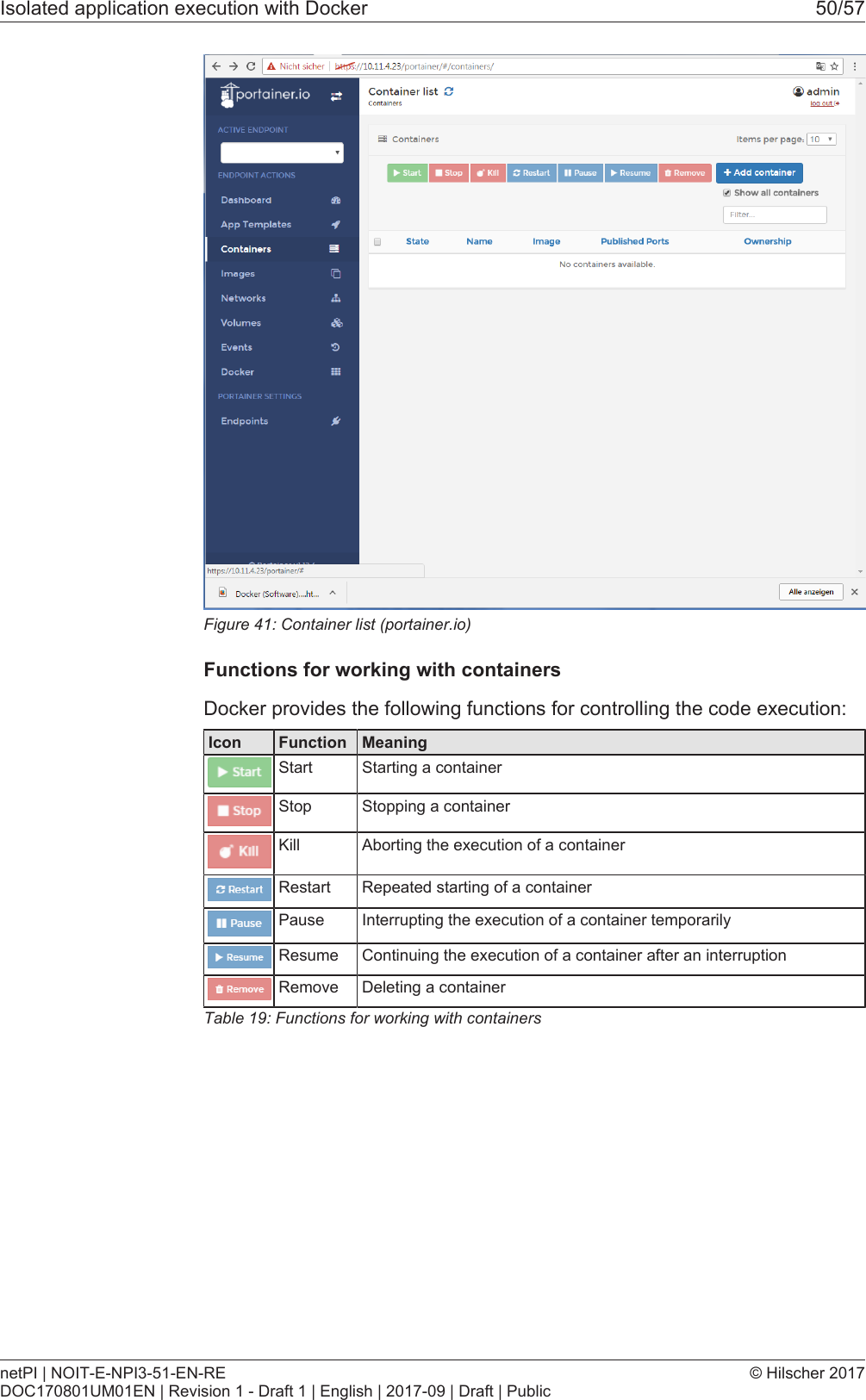
Isolated application execution with Docker 50/57Figure41: Container list (portainer.io)Functions for working with containersDocker provides the following functions for controlling the code execution:Icon Function MeaningStart Starting a containerStop Stopping a containerKill Aborting the execution of a containerRestart Repeated starting of a containerPause Interrupting the execution of a container temporarilyResume Continuing the execution of a container after an interruptionRemove Deleting a containerTable19: Functions for working with containersnetPI | NOIT-E-NPI3-51-EN-REDOC170801UM01EN | Revision 1 - Draft 1 | English | 2017-09 | Draft | Public© Hilscher 2017
Decommissioning, dismounting and disposal 51/5710 Decommissioning, dismounting and disposal10.1 Putting the device out of operationDanger of Unsafe System Operation!To prevent personal injury or property damage, make sure that the removalof the device from your plant during operation will not affect the safeoperation of the plant.ØDisconnect all communication cables from the device.ØDisconnect the power supply plug.ØRemove the device from the DIN top hat rail. .10.2 Removing device from top hat railØBefore dismounting the Edge Gateway from the top hat rail, first removethe power supply cable and all data cables from the device.ØPut a screw driver into the slot of the latch at the bottom of the device.ØTo disengage the lock of the hook, pull down the latch with the screwdriver.ØTake the device off the top hat rail.10.3 Disposal of waste electronic equipmentImportant notes from the European Directive 2002/96/EU “Waste Electricaland Electronic Equipment (WEEE)”Waste electronic equipmentThis product must not be treated as household waste.This product must be disposed of at a designated waste electronicequipment collecting point.Waste electronic equipment may not be disposed of as household waste.As a consumer, you are legally obliged to dispose of all waste electronicequipment according to national and local regulations.netPI | NOIT-E-NPI3-51-EN-REDOC170801UM01EN | Revision 1 - Draft 1 | English | 2017-09 | Draft | Public© Hilscher 2017
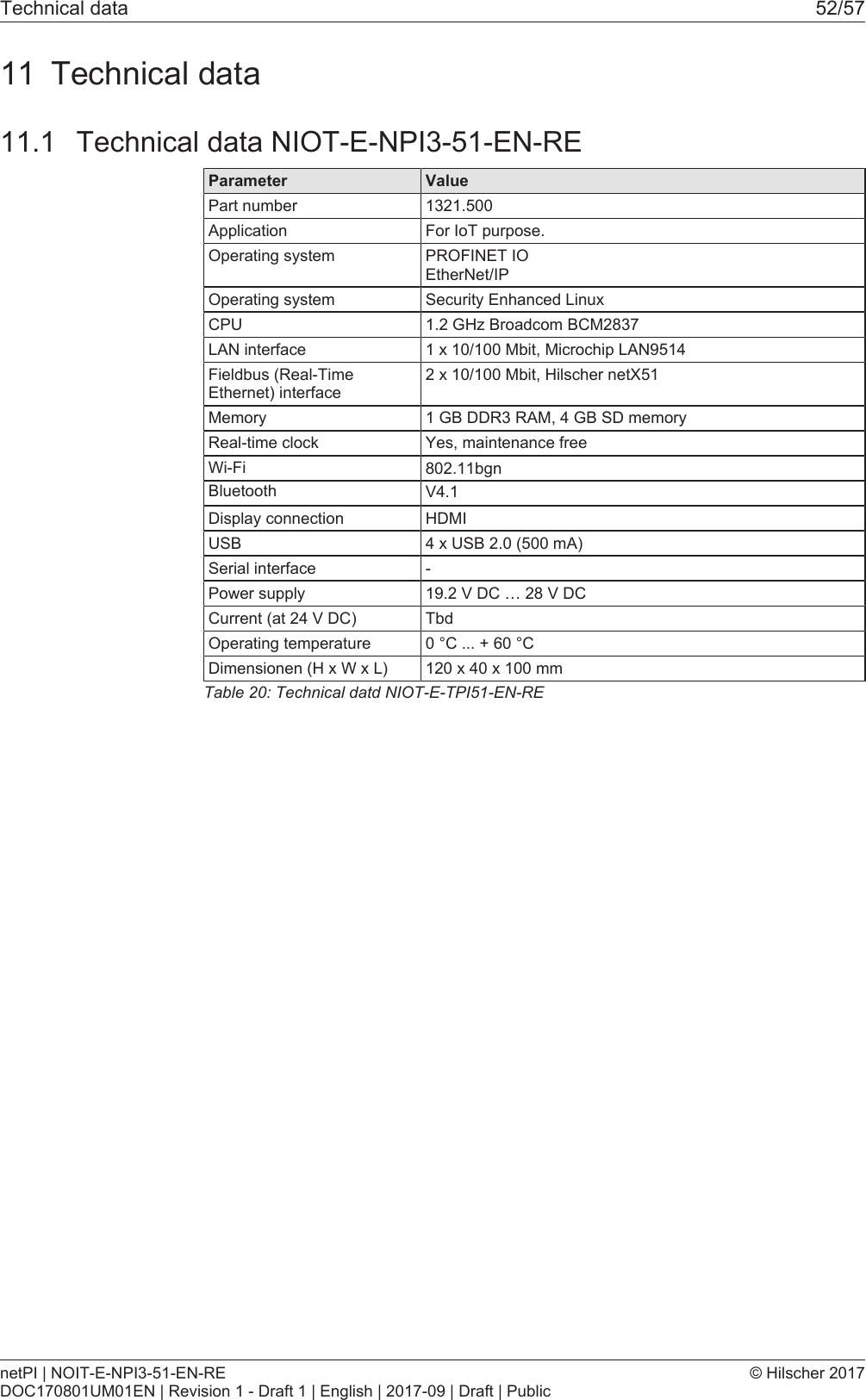
Technical data 52/5711 Technical data11.1 Technical data NIOT-E-NPI3-51-EN-REParameter ValuePart number 1321.500Application For IoT purpose.Operating system PROFINET IOEtherNet/IPOperating system Security Enhanced LinuxCPU 1.2 GHz Broadcom BCM2837LAN interface 1 x 10/100 Mbit, Microchip LAN9514Fieldbus (Real-TimeEthernet) interface2 x 10/100 Mbit, Hilscher netX51Memory 1 GB DDR3 RAM, 4 GB SD memoryReal-time clock Yes, maintenance freeWi-Fi 802.11bgnDisplay connection HDMIUSB 4 x USB 2.0 (500 mA)Serial interface -Power supply 19.2 V DC … 28 V DCCurrent (at 24 V DC) TbdOperating temperature 0 °C ... + 60 °CDimensionen (H x W x L) 120 x 40 x 100 mmTable20: Technical datd NIOT-E-TPI51-EN-REnetPI | NOIT-E-NPI3-51-EN-REDOC170801UM01EN | Revision 1 - Draft 1 | English | 2017-09 | Draft | Public© Hilscher 2017Bluetooth V4.1
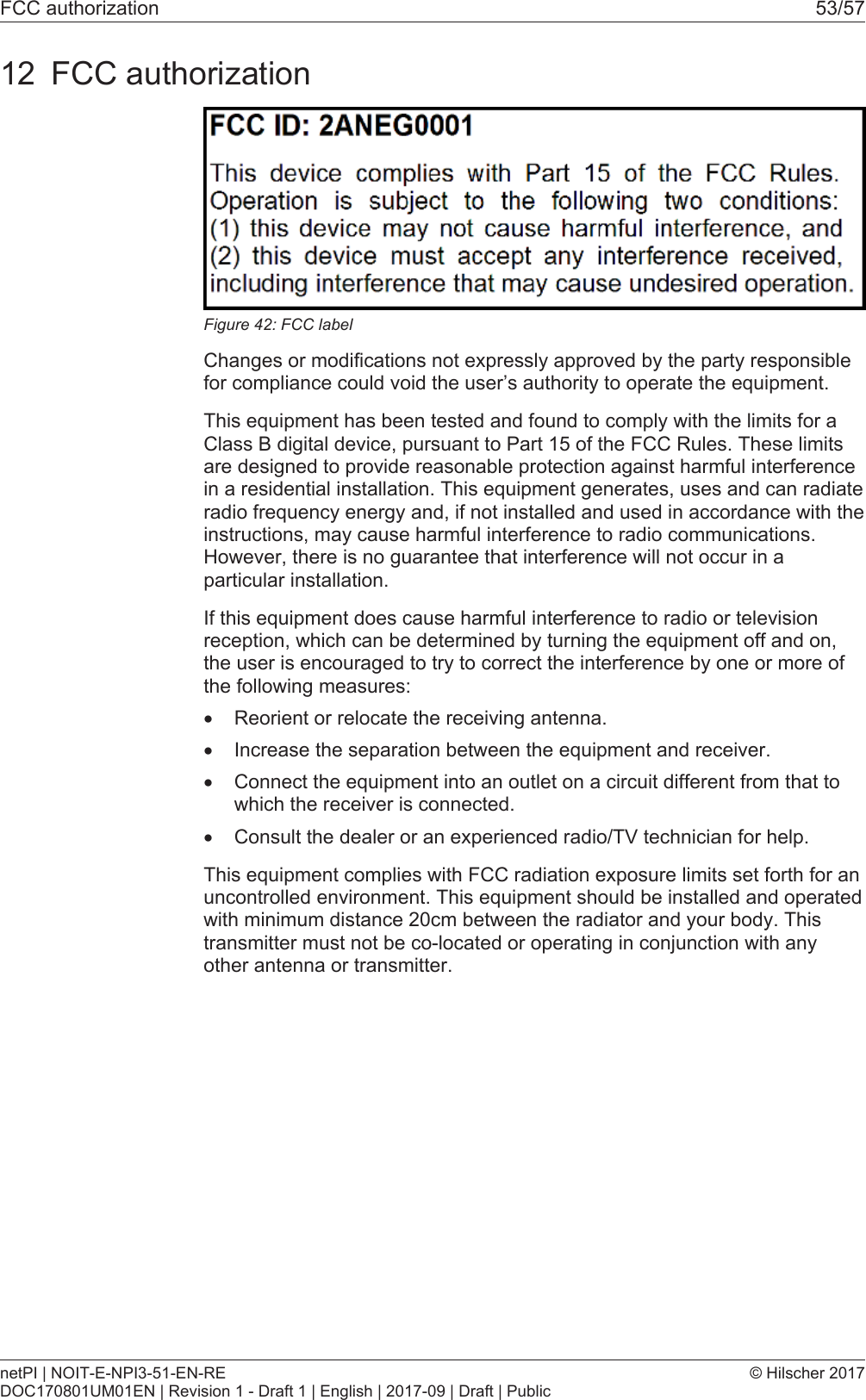
FCC authorization 53/5712 FCC authorizationFigure42: FCC labelChanges or modifications not expressly approved by the party responsiblefor compliance could void the user’s authority to operate the equipment.This equipment has been tested and found to comply with the limits for aClass B digital device, pursuant to Part 15 of the FCC Rules. These limitsare designed to provide reasonable protection against harmful interferencein a residential installation. This equipment generates, uses and can radiateradio frequency energy and, if not installed and used in accordance with theinstructions, may cause harmful interference to radio communications.However, there is no guarantee that interference will not occur in aparticular installation.If this equipment does cause harmful interference to radio or televisionreception, which can be determined by turning the equipment off and on,the user is encouraged to try to correct the interference by one or more ofthe following measures:·Reorient or relocate the receiving antenna.·Increase the separation between the equipment and receiver.·Connect the equipment into an outlet on a circuit different from that towhich the receiver is connected.·Consult the dealer or an experienced radio/TV technician for help.This equipment complies with FCC radiation exposure limits set forth for anuncontrolled environment. This equipment should be installed and operatedwith minimum distance 20cm between the radiator and your body. Thistransmitter must not be co-located or operating in conjunction with anyother antenna or transmitter.netPI | NOIT-E-NPI3-51-EN-REDOC170801UM01EN | Revision 1 - Draft 1 | English | 2017-09 | Draft | Public© Hilscher 2017
List of figures 54/57List of figuresFigure 1: NIOT-E-NPI3-51-EN-RE (Top view)..................................................................... 10Figure 2: NIOT-E-NPI3-51-EN-RE (Front view)................................................................... 10Figure 3: NIOT-E-NPI3-51-EN-RE (Bottom view)................................................................ 11Figure 4: Dimensions........................................................................................................... 11Figure 5: NIOT-E-NPI3-51-EN-RE LED positions ............................................................... 14Figure 6: Gateway state LEDs............................................................................................. 15Figure 7: netIOT Edge Gateway in the Windows network ................................................... 19Figure 8: Properties of the Edge Gateway........................................................................... 19Figure 9: Edge Gateway Manager....................................................................................... 20Figure 10: Edge Gateway Manager - Setting the administrator password ............................ 23Figure 11: Security error message of the Internet Explorer................................................... 25Figure 12: Security error message of the Firefox browser (1) ............................................... 25Figure 13: Security error message of the Firefox browser (2) ............................................... 25Figure 14: Firefox dialog box: Adding exceptional safety rule ............................................... 26Figure 15: Security error message of Google Chrome (1)..................................................... 26Figure 16: Security error message of Google Chrome (2)..................................................... 27Figure 17: Main menu of the Control Panel ........................................................................... 28Figure 18: Page Info Center .................................................................................................. 29Figure 19: Time configuration page ....................................................................................... 30Figure 20: Reboot safety query ............................................................................................. 32Figure 21: Warning for consequences of shutdown .............................................................. 32Figure 22: Packages installed................................................................................................ 33Figure 23: Table of the packages that are available for installation....................................... 34Figure 24: Message box "Upload - Failed to install packages..."........................................... 35Figure 25: Hostname ............................................................................................................. 36Figure 26: List of default services .......................................................................................... 37Figure 27: Message at overwriting of current NodeRED flow................................................ 39Figure 28: Security request at deletion of current NodeRED flow. ........................................ 39Figure 29: Security query for Undo last deploy...................................................................... 40Figure 30: Page for configuring roles..................................................................................... 40Figure 31: User account page ............................................................................................... 42Figure 32: Security submenu................................................................................................. 42Figure 33: Page SSL Certificate ............................................................................................ 43Figure 34: SSL Certificate – Upload area .............................................................................. 43Figure 35: SSL Certificate – Info area ................................................................................... 45Figure 36: Info page............................................................................................................... 46Figure 37: User profile page .................................................................................................. 46Figure 38: Dialog "Edit user account" .................................................................................... 47Figure 39: Tile Docker in the Edge Gateway Manager.......................................................... 49Figure 40: View of portainer.io dashboard............................................................................. 49netPI | NOIT-E-NPI3-51-EN-REDOC170801UM01EN | Revision 1 - Draft 1 | English | 2017-09 | Draft | Public© Hilscher 2017
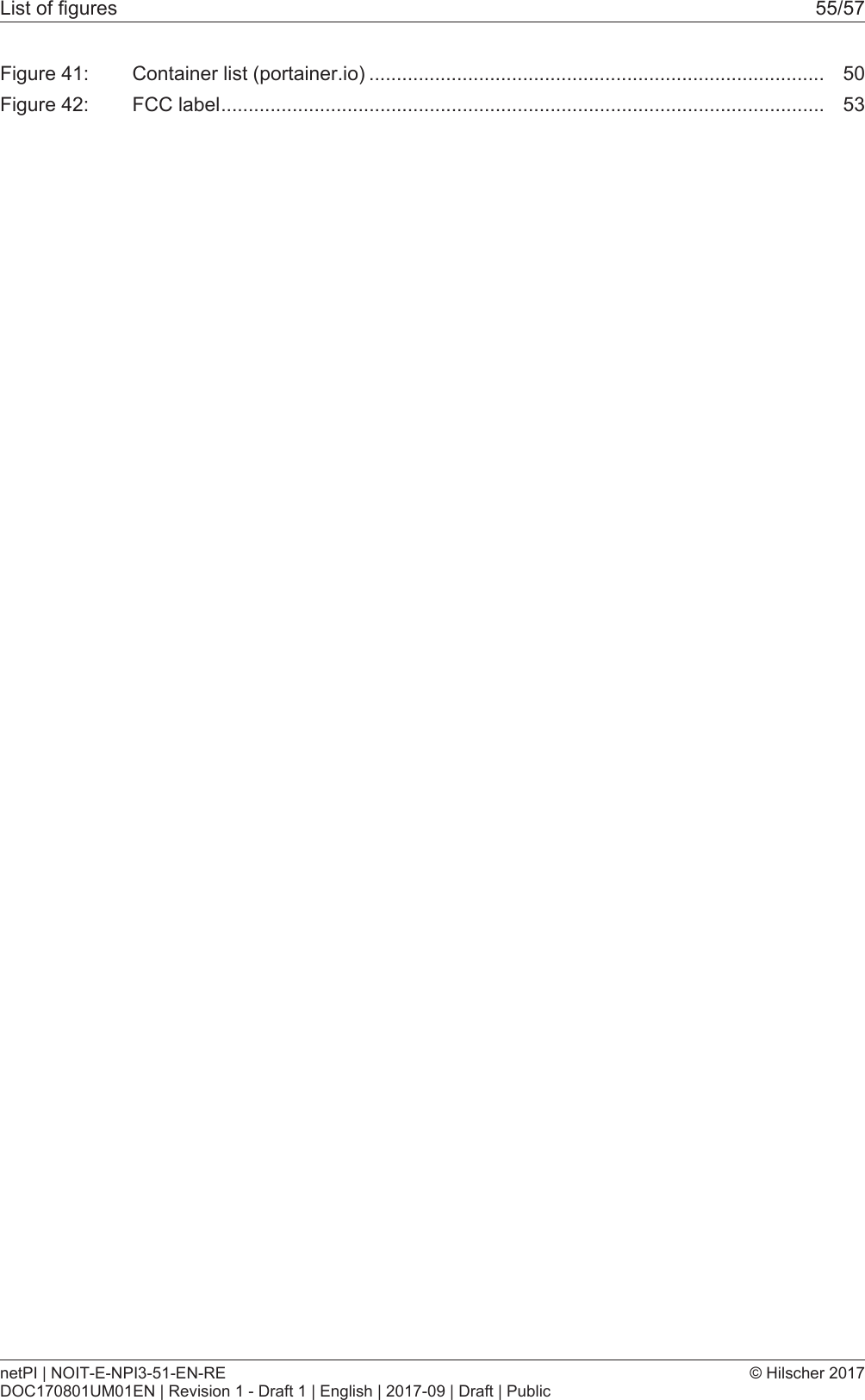
List of figures 55/57Figure 41: Container list (portainer.io) ................................................................................... 50Figure 42: FCC label.............................................................................................................. 53netPI | NOIT-E-NPI3-51-EN-REDOC170801UM01EN | Revision 1 - Draft 1 | English | 2017-09 | Draft | Public© Hilscher 2017
List of tables 56/57List of tablesTable 1: List of revisions ....................................................................................................... 4Table 2: Power supply connector NIOT-E-TPI51-EN-RE ..................................................... 12Table 3: Description of gateway status LEDs ....................................................................... 15Table 4: LEDs LAN interface NIOT-E-TPI51-EN-RE............................................................ 16Table 5: LED states for the PROFINET IO-Device protocol ................................................. 16Table 6: LED state definitions for the PROFINET IO-Device protocol.................................. 16Table 7: LED states for the EtherNet/IP Adapter protocol .................................................... 17Table 8: LED state definitions for the EtherNet/IP Adapter protocol..................................... 17Table 9: Starting applications with the Edge Gateway manager .......................................... 21Table 10: Functional overview of the Control Panel ............................................................... 28Table 11: Info Center: Area System info................................................................................. 29Table 12: Info Center: Area Monitoring................................................................................... 29Table 13: Info Center: Area Temperature............................................................................... 30Table 14: Setting the system time .......................................................................................... 30Table 15: Table LAN: Meaning of the columns....................................................................... 36Table 16: Operating statuses of the services ......................................................................... 37Table 17: Access rights onto resources.................................................................................. 41Table 18: Access rights to resources...................................................................................... 41Table 19: Functions for working with containers..................................................................... 50Table 20: Technical datd NIOT-E-TPI51-EN-RE .................................................................... 52netPI | NOIT-E-NPI3-51-EN-REDOC170801UM01EN | Revision 1 - Draft 1 | English | 2017-09 | Draft | Public© Hilscher 2017
Contacts 57/57ContactsHEADQUARTERSGermanyHilscher Gesellschaft für Systemautomation mbHRheinstrasse 15D-65795 HattersheimPhone: +49 (0) 6190 9907-0Fax: +49 (0) 6190 9907-50E-Mail: info@hilscher.comSupportPhone: +49 (0) 6190 9907-99E-Mail: de.support@hilscher.comSUBSIDIARIESChinaHilscher Systemautomation (Shanghai) Co. Ltd.200010 ShanghaiPhone: +86 (0) 21-6355-5161E-Mail: info@hilscher.cnSupportPhone: +86 (0) 21-6355-5161E-Mail: cn.support@hilscher.comFranceHilscher France S.a.r.l.69500 BronPhone: +33 (0) 4 72 37 98 40E-Mail: info@hilscher.frSupportPhone: +33 (0) 4 72 37 98 40 E-Mail: fr.support@hilscher.comIndiaHilscher India Pvt. Ltd.PunePhone: +91 8888 750 777E-Mail: info@hilscher.inItalyHilscher Italia S.r.l.20090 Vimodrone (MI)Phone: +39 02 25007068E-Mail: info@hilscher.itSupportPhone: +39 02 25007068E-Mail: it.support@hilscher.comJapanHilscher Japan KKTokyo, 160-0022Phone: +81 (0) 3-5362-0521E-Mail: info@hilscher.jpSupportPhone: +81 (0) 3-5362-0521E-Mail: jp.support@hilscher.comKoreaHilscher Korea Inc.Seongnam, Gyeonggi, 463-400Phone: +82 (0) 31-789-3715E-Mail: info@hilscher.krSwitzerlandHilscher Swiss GmbH 4500 SolothurnPhone: +41 (0) 32 623 6633E-Mail: info@hilscher.chSupportPhone: +49 (0) 6190 9907-99E-Mail: ch.support@hilscher.comUSAHilscher North America, Inc. Lisle, IL 60532Phone: +1 630-505-5301E-Mail: info@hilscher.usSupportPhone: +1 630-505-5301E-Mail: us.support@hilscher.comnetPI | NOIT-E-NPI3-51-EN-REDOC170801UM01EN | Revision 1 - Draft 1 | English | 2017-09 | Draft | Public© Hilscher 2017

Navigation menu