Honeywell Analytics 301W-1 Wireless Gas Sensor User Manual 301W E

Honeywell Analytics Wireless Gas Sensor 301W E

UserMan

DRAFTWireless Gas Monitoring Device301WInstallation and User ManualERP 5113984/07
DRAFT
DRAFT511398  301W User Manual  iii4/07 Honeywell Notices and TrademarksCopyright by Honeywell International Inc.Release 511398 April 2007While this information is presented in good faith and believed to be accurate, Honeywell disclaims the implied warranties of merchantability for a particular purpose and makes no express warranties except as may be stated in its written agreement with and for its customers.In no event is Honeywell liable to anyone for any indirect, special or consequential damages.  The information and specifications in this document are subject to change without notice.Honeywell Analytics 4005 Matte Blvd, Unit GBrossard, Quebec, J4Y 2P4
DRAFT
DRAFT511398   301W User Manual  v4/07 Honeywell ContactsWorld Wide WebThe following Honeywell Websites may be of interest to our customers:TelephoneContact us by telephone at the numbers listed below:Sales InformationsContact us at sales@vulcaininc.comHoneywell Organization WWW Address (URL)Corporate http:/www.honeywellanalytics.comLife Sciences http:/www.honeywell.comInternational http:/content.honeywell.com/global/ Organization Phone NumberUnited Statesand CanadaHoneywell Analytics International Inc.1-800-563-29671-450-619-2450Fax: 1-450-619-2448Asia Pacific Honeywell Asia Pacific Inc.Hong Kong (852) 23 31 9133Europe Honeywell PaceBrussels, Belgium [32-2]728-2711Latin America Honeywell International Inc.Sunrise, Florida, U.S.A. (954) 845-2600
DRAFT
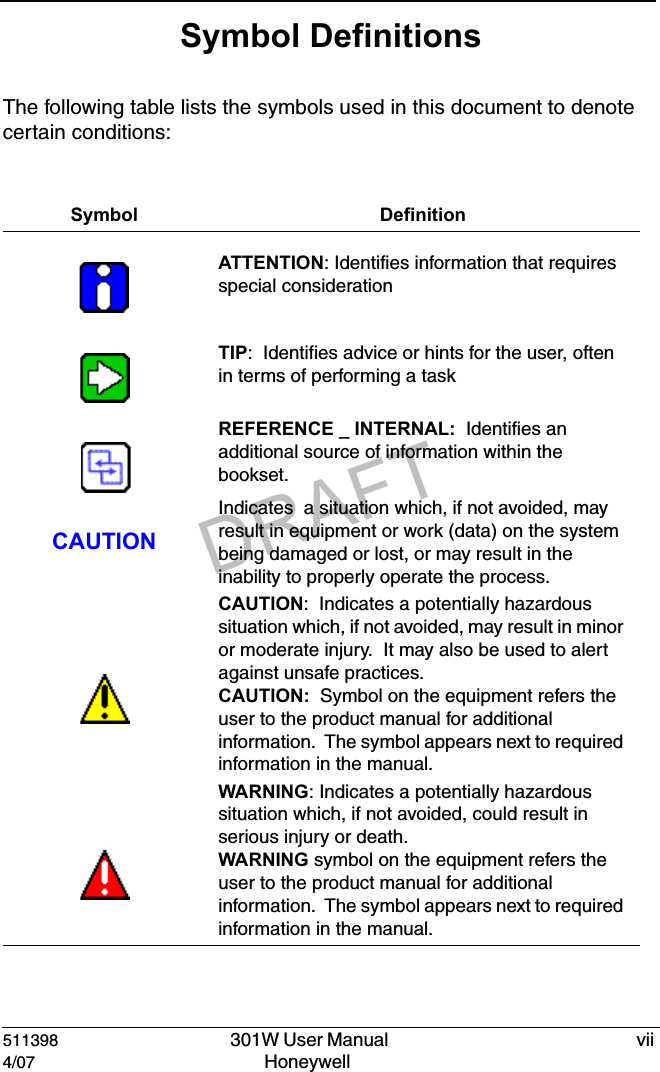
DRAFT511398   301W User Manual  vii4/07 Honeywell Symbol DefinitionsThe following table lists the symbols used in this document to denote certain conditions:Symbol DefinitionATTENTION: Identifies information that requires special considerationTIP:  Identifies advice or hints for the user, often in terms of performing a taskREFERENCE _ INTERNAL:  Identifies an additional source of information within the bookset.CAUTIONIndicates  a situation which, if not avoided, may result in equipment or work (data) on the system being damaged or lost, or may result in the inability to properly operate the process.CAUTION:  Indicates a potentially hazardous situation which, if not avoided, may result in minor or moderate injury.  It may also be used to alert against unsafe practices.CAUTION:  Symbol on the equipment refers the user to the product manual for additional information.  The symbol appears next to required information in the manual.WARNING: Indicates a potentially hazardous situation which, if not avoided, could result in serious injury or death.WARNING symbol on the equipment refers the user to the product manual for additional information.  The symbol appears next to required information in the manual.
DRAFT
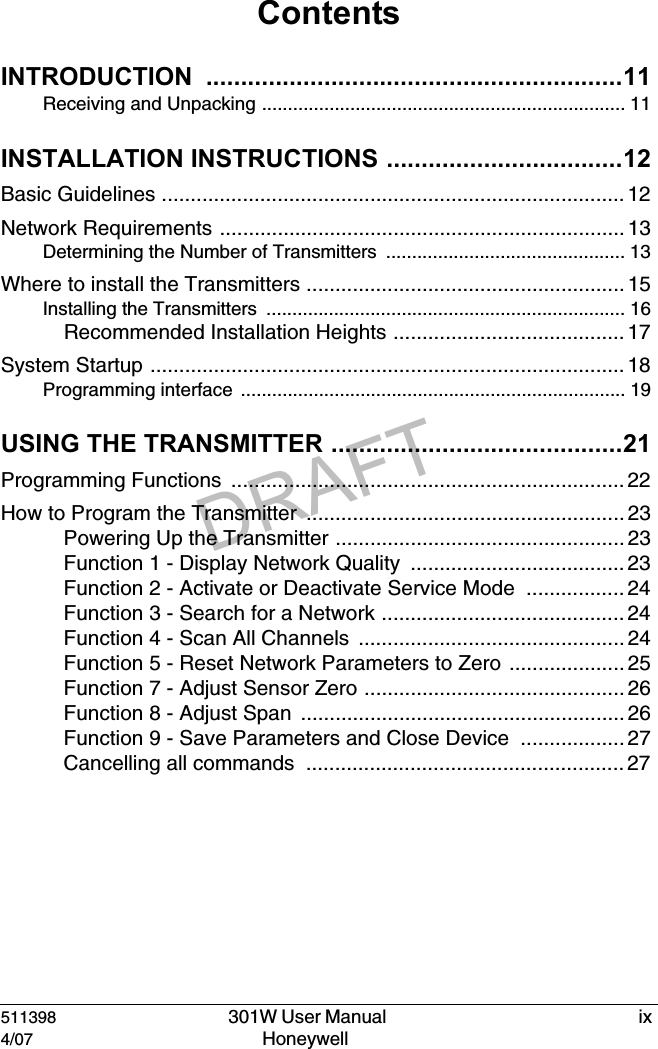
DRAFT511398   301W User Manual  ix4/07 Honeywell ContentsINTRODUCTION ............................................................11Receiving and Unpacking ...................................................................... 11INSTALLATION INSTRUCTIONS ..................................12Basic Guidelines ................................................................................ 12Network Requirements ...................................................................... 13Determining the Number of Transmitters .............................................. 13Where to install the Transmitters ....................................................... 15Installing the Transmitters  ..................................................................... 16Recommended Installation Heights ........................................ 17System Startup .................................................................................. 18Programming interface  .......................................................................... 19USING THE TRANSMITTER ..........................................21Programming Functions  .................................................................... 22How to Program the Transmitter  ....................................................... 23Powering Up the Transmitter .................................................. 23Function 1 - Display Network Quality  ..................................... 23Function 2 - Activate or Deactivate Service Mode  ................. 24Function 3 - Search for a Network .......................................... 24Function 4 - Scan All Channels  .............................................. 24Function 5 - Reset Network Parameters to Zero  .................... 25Function 7 - Adjust Sensor Zero ............................................. 26Function 8 - Adjust Span  ........................................................ 26Function 9 - Save Parameters and Close Device  .................. 27Cancelling all commands  ....................................................... 27
DRAFTx   301W User Manual  511398Honeywell  4/07CARTRIDGE REPLACEMENT AND CALIBRATION  ...28Changing the Sensor Cartridge .........................................................28Remote Calibration ............................................................................29Periodic Inspections and Calibration  .................................................31TROUBLESHOOTING ...................................................33SPECIFICATIONS .......................................................... 37Gases Detected .................................................................................37FCC Specifications  ............................................................................38LIMITED WARRANTY  ...................................................39Limited Warranty ....................................................................................39Re-Stocking Policy .................................................................................39Exclusions ..............................................................................................40Warranty Limitation and Exclusion......................................................... 40Disclaimer of Unstated Warranties  ........................................................41Limitation of Liability ...............................................................................41
DRAFT511398   301W User Manual  114/07 Honeywell IntroductionIntroductionThe 301W detector is a wireless detection device that connects to the  301C wireless controller. Although installation is completely without wiring, there are some basic principles for wireless communication that will ensure the strength and reliability of the wireless network.Receiving and UnpackingMake sure to check your order before you proceed to the installation:• Check that the package is undamaged  • Carefully open the package.  • Locate the packing slip, or purchase order, and verify that all items on the order are present and undamagedNote: If the package or any of its contents are damaged, please refer to the Warranty section at the back of the manual for instructions.
DRAFT511398   301W User Manual  124/07 Honeywell Installation InstructionsBasic GuidelinesInstallation InstructionsBasic GuidelinesFollow these instructions to the letter to ensure that the equipment will function properly.  Failure to respect these guidelines will release Honeywell Analytics from any responsibility in the event of improper functioning:• Make sure to locate all transmitters in areas easily accessible for service.• Avoid locations where instruments are subject to vibrations• Avoid locating transmitters near sources of electromagnetic interference• Avoid locating transmitters in areas subject to significant temperature swings• Transmitters should be installed  1.5 m (5 ft.) above the floor for CO transmitters to prevent signal interference by vehicles ( NO2 transmitters should be installed 30 cm [1 ft] from the ceiling.) • Install transmitters in upright position (to ensure ease of use and access to programming pushbuttons).• Place transmitters so that they are facing the center of the area• Do not install a transmitter facing a parking space; the vehicle will sever the communication link. If possible, install the transmitter perpendicular to the space.• Avoid installing the transmitters on or near metal (transformers, pipes, etc.)• Do not install transmitters on ceilings• Do not install transmitters in ceiling or wall wells (placement in these areas may impede signal transmission)
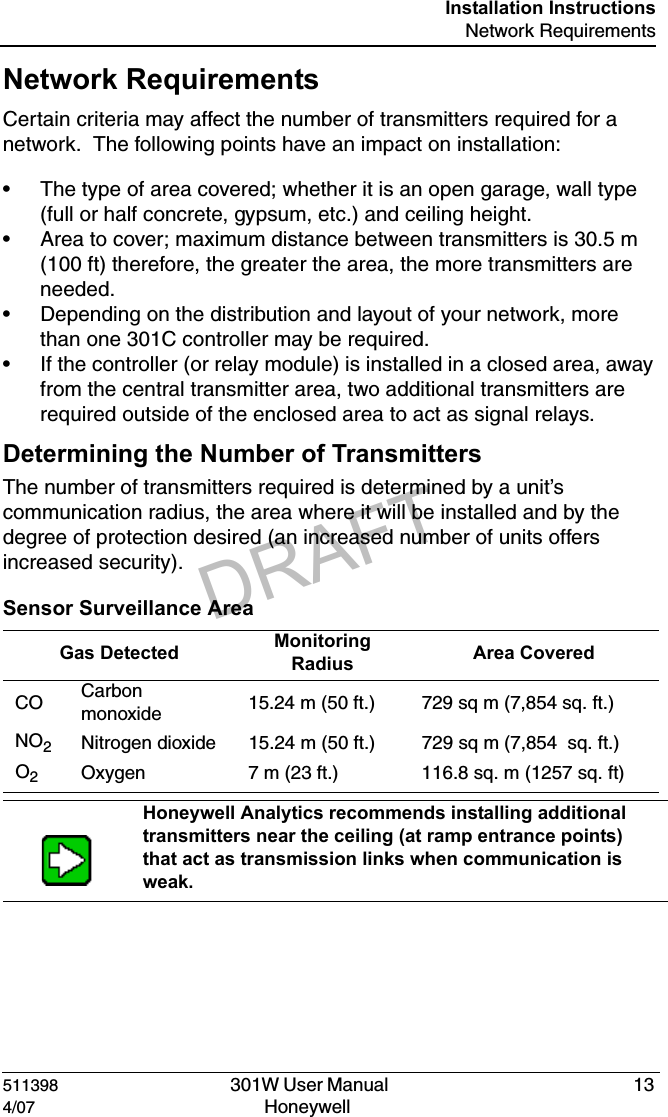
DRAFT511398   301W User Manual  134/07 Honeywell Installation InstructionsNetwork RequirementsNetwork RequirementsCertain criteria may affect the number of transmitters required for a network.  The following points have an impact on installation:• The type of area covered; whether it is an open garage, wall type (full or half concrete, gypsum, etc.) and ceiling height.• Area to cover; maximum distance between transmitters is 30.5 m (100 ft) therefore, the greater the area, the more transmitters are needed.• Depending on the distribution and layout of your network, more than one 301C controller may be required. • If the controller (or relay module) is installed in a closed area, away from the central transmitter area, two additional transmitters are required outside of the enclosed area to act as signal relays.Determining the Number of TransmittersThe number of transmitters required is determined by a unit’s communication radius, the area where it will be installed and by the degree of protection desired (an increased number of units offers increased security).Sensor Surveillance AreaGas Detected Monitoring Radius Area CoveredCO Carbon monoxide 15.24 m (50 ft.) 729 sq m (7,854 sq. ft.)NO2Nitrogen dioxide 15.24 m (50 ft.)  729 sq m (7,854  sq. ft.)O2Oxygen 7 m (23 ft.) 116.8 sq. m (1257 sq. ft)Honeywell Analytics recommends installing additional transmitters near the ceiling (at ramp entrance points) that act as transmission links when communication is weak.
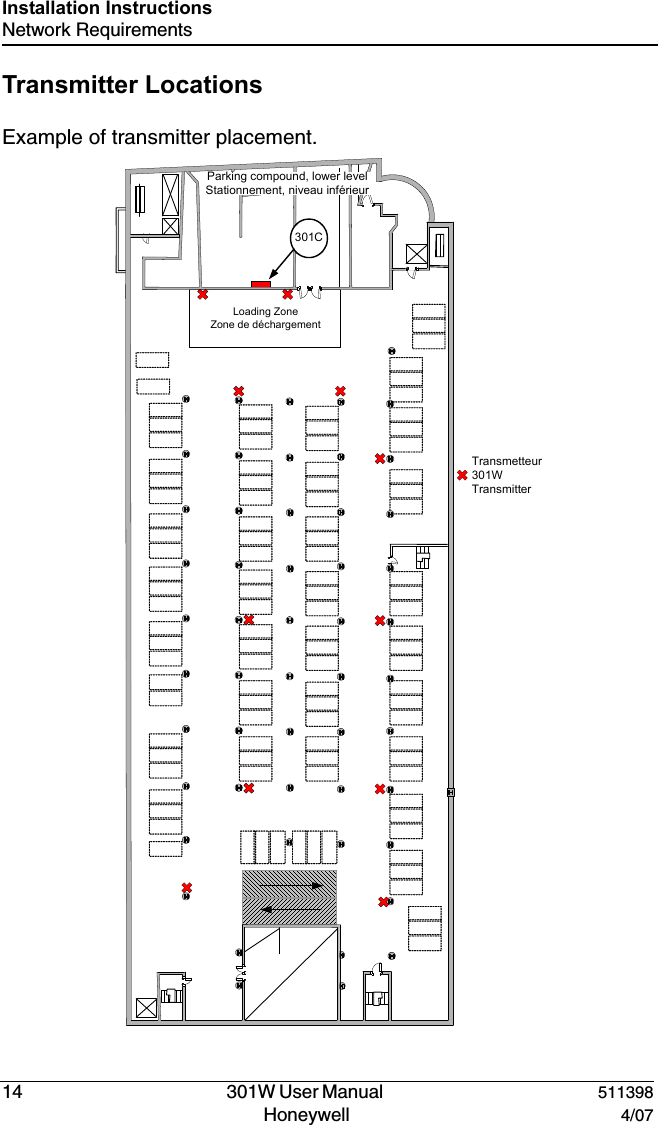
DRAFT14   301W User Manual  511398Honeywell  4/07Installation InstructionsNetwork RequirementsTransmitter LocationsExample of transmitter placement.Transmetteur301W TransmitterLoading ZoneZone de déchargementParking compound, lower levelStationnement, niveau inférieur301C
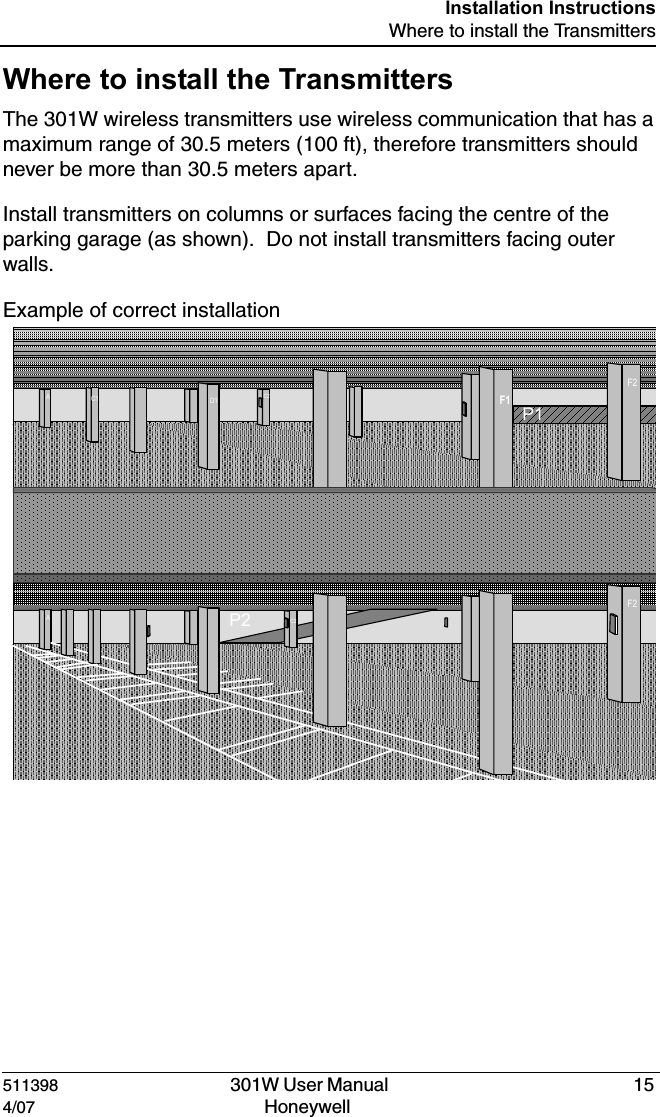
DRAFT511398   301W User Manual  154/07 Honeywell Installation InstructionsWhere to install the TransmittersWhere to install the TransmittersThe 301W wireless transmitters use wireless communication that has a maximum range of 30.5 meters (100 ft), therefore transmitters should never be more than 30.5 meters apart.Install transmitters on columns or surfaces facing the centre of the parking garage (as shown).  Do not install transmitters facing outer walls.Example of correct installationP1P2AC1 D1 F1F2C2AC1 D1 F1F2C2
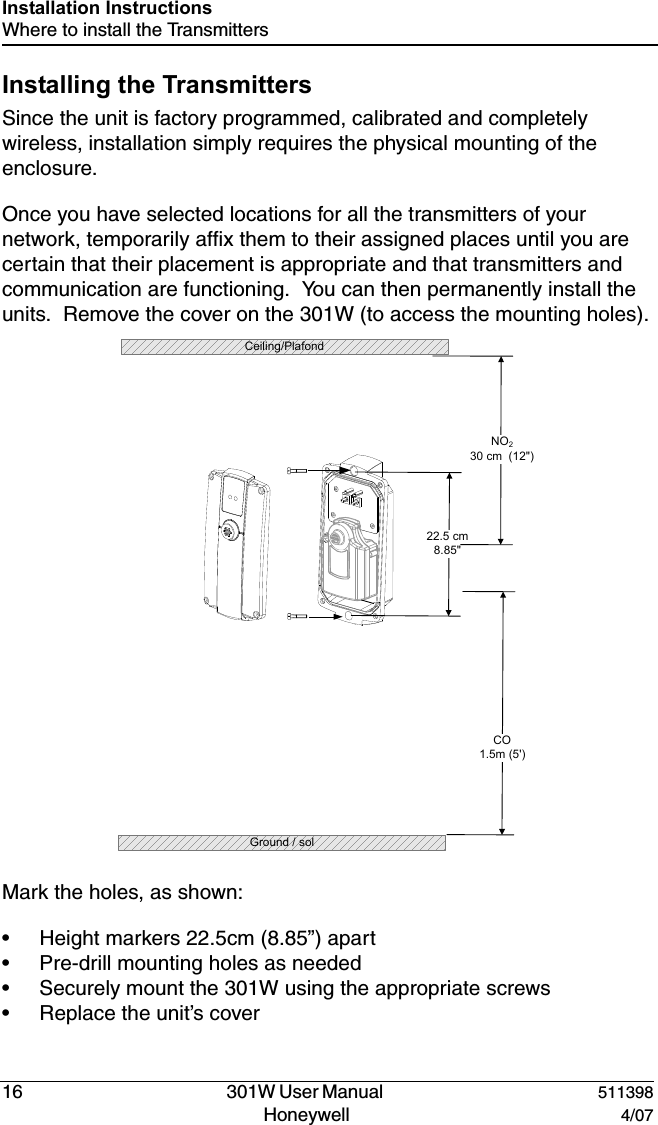
DRAFT16   301W User Manual  511398Honeywell  4/07Installation InstructionsWhere to install the TransmittersInstalling the TransmittersSince the unit is factory programmed, calibrated and completely wireless, installation simply requires the physical mounting of the enclosure.  Once you have selected locations for all the transmitters of your network, temporarily affix them to their assigned places until you are certain that their placement is appropriate and that transmitters and communication are functioning.  You can then permanently install the units.  Remove the cover on the 301W (to access the mounting holes).Mark the holes, as shown:• Height markers 22.5cm (8.85”) apart• Pre-drill mounting holes as needed• Securely mount the 301W using the appropriate screws• Replace the unit’s cover22.5 cm8.85"CO1.5m (5')Ground / solNO230 cm  (12")  Ceiling/Plafond
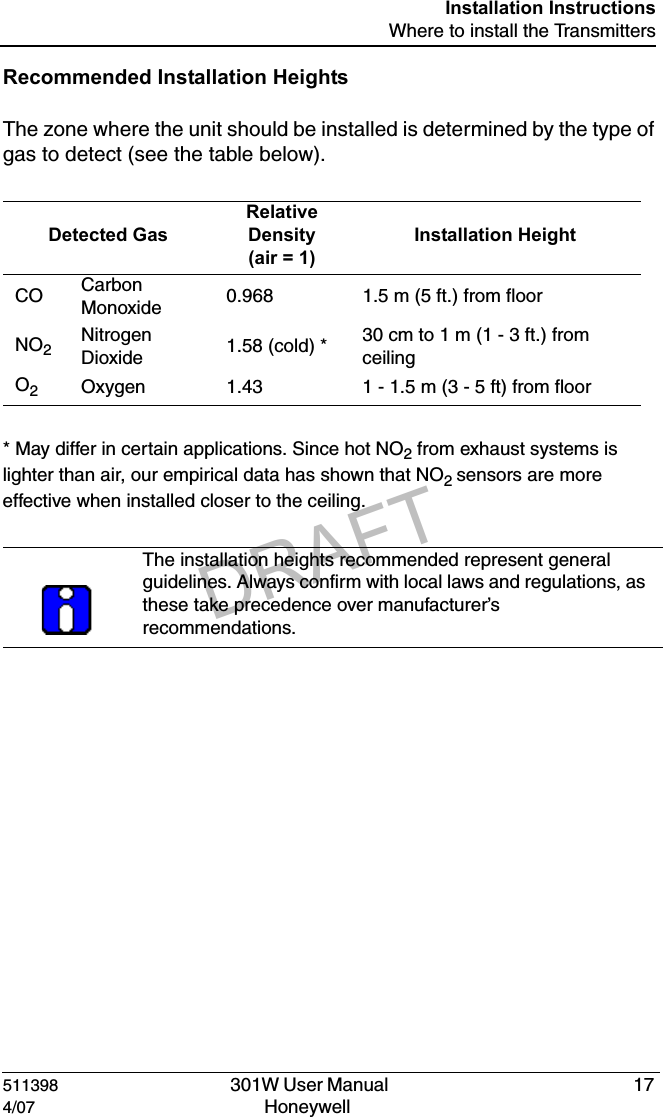
DRAFT511398   301W User Manual  174/07 Honeywell Installation InstructionsWhere to install the TransmittersRecommended Installation HeightsThe zone where the unit should be installed is determined by the type of gas to detect (see the table below).* May differ in certain applications. Since hot NO2 from exhaust systems is lighter than air, our empirical data has shown that NO2 sensors are more effective when installed closer to the ceiling.Detected GasRelative Density(air = 1)Installation HeightCO Carbon Monoxide 0.968 1.5 m (5 ft.) from floorNO2Nitrogen Dioxide 1.58 (cold) * 30 cm to 1 m (1 - 3 ft.) from ceilingO2Oxygen 1.43 1 - 1.5 m (3 - 5 ft) from floorThe installation heights recommended represent general guidelines. Always confirm with local laws and regulations, as these take precedence over manufacturer’s recommendations.
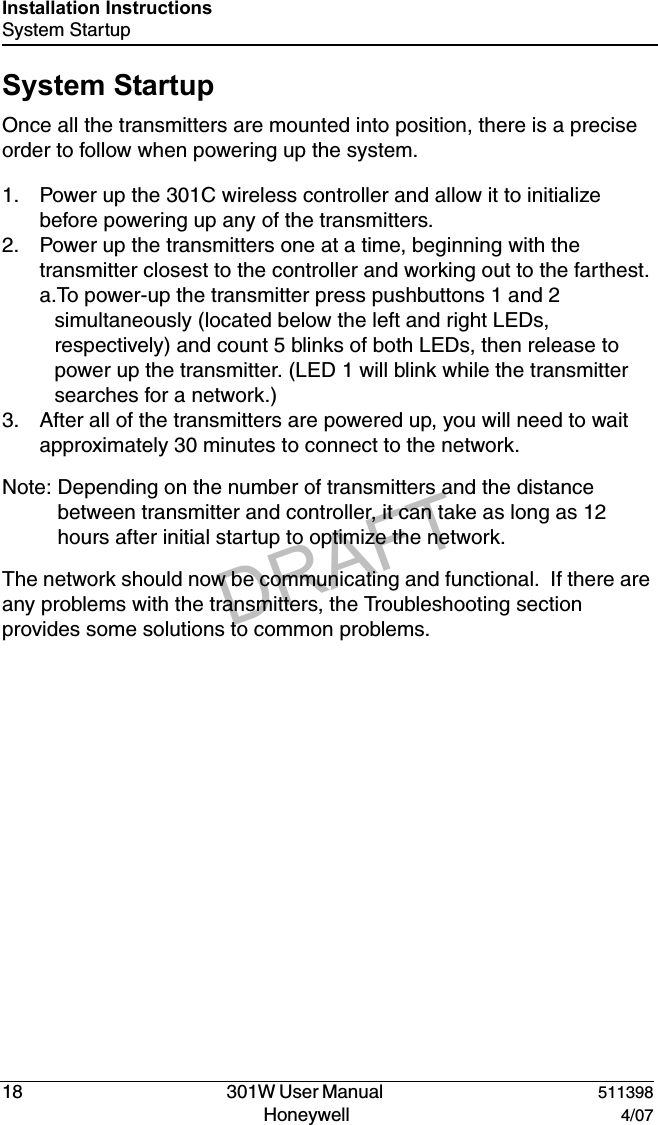
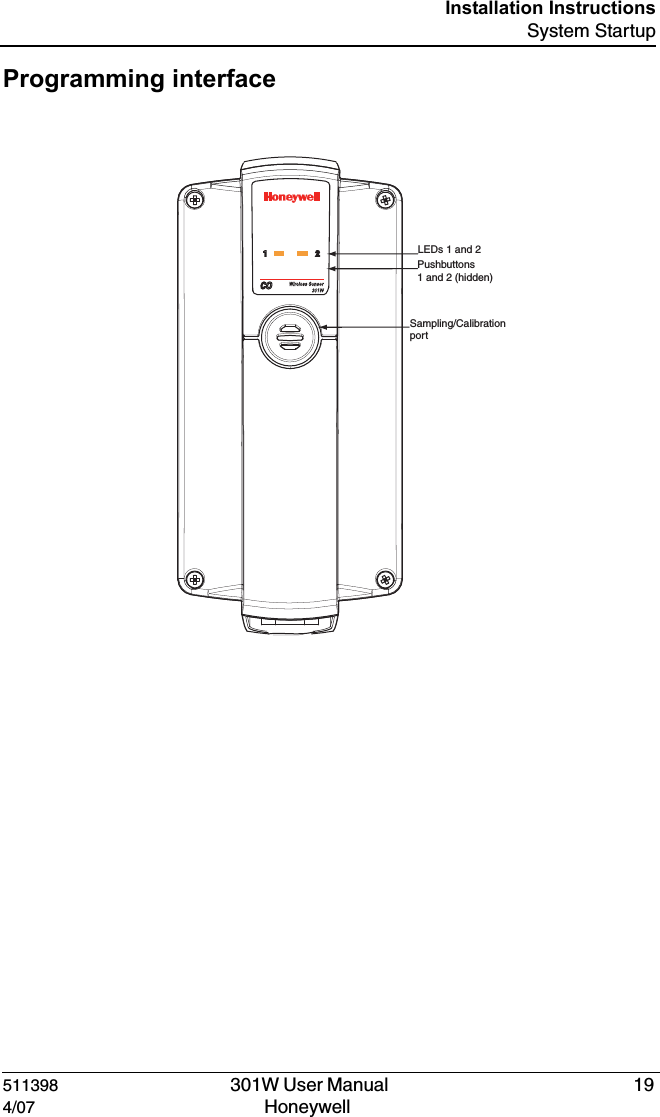
DRAFT18   301W User Manual  511398Honeywell  4/07Installation InstructionsSystem StartupSystem StartupOnce all the transmitters are mounted into position, there is a precise order to follow when powering up the system.  1. Power up the 301C wireless controller and allow it to initialize before powering up any of the transmitters.2. Power up the transmitters one at a time, beginning with the transmitter closest to the controller and working out to the farthest.a.To power-up the transmitter press pushbuttons 1 and 2  simultaneously (located below the left and right LEDs, respectively) and count 5 blinks of both LEDs, then release to power up the transmitter. (LED 1 will blink while the transmitter searches for a network.)3. After all of the transmitters are powered up, you will need to wait approximately 30 minutes to connect to the network.Note: Depending on the number of transmitters and the distance between transmitter and controller, it can take as long as 12 hours after initial startup to optimize the network.The network should now be communicating and functional.  If there are any problems with the transmitters, the Troubleshooting section provides some solutions to common problems.
DRAFT511398   301W User Manual  194/07 Honeywell Installation InstructionsSystem StartupProgramming interface,%$SååANDå0USHBUTTONSååANDååHIDDEN3AMPLING#ALIBRATIONåPORT
DRAFT
DRAFT511398   301W User Manual  214/07 Honeywell Using the TransmitterUsing the TransmitterThe 301W transmitter is designed to be plug-and-play; the product is shipped with all settings factory pre-programmed (see Specifications section for details).  Nonetheless, certain settings can be modified either through the 301C controller menus or through the transmitter programming functions.The programming functions on the transmitter should only be used by qualified personnel.  Whenever possible, it is prefereable to perform programming functions using the 301C wireless controller menus. Since programming interface is LED based, and LED functions use battery power, all programming performed directly on the transmitter will have an impact on battery life.
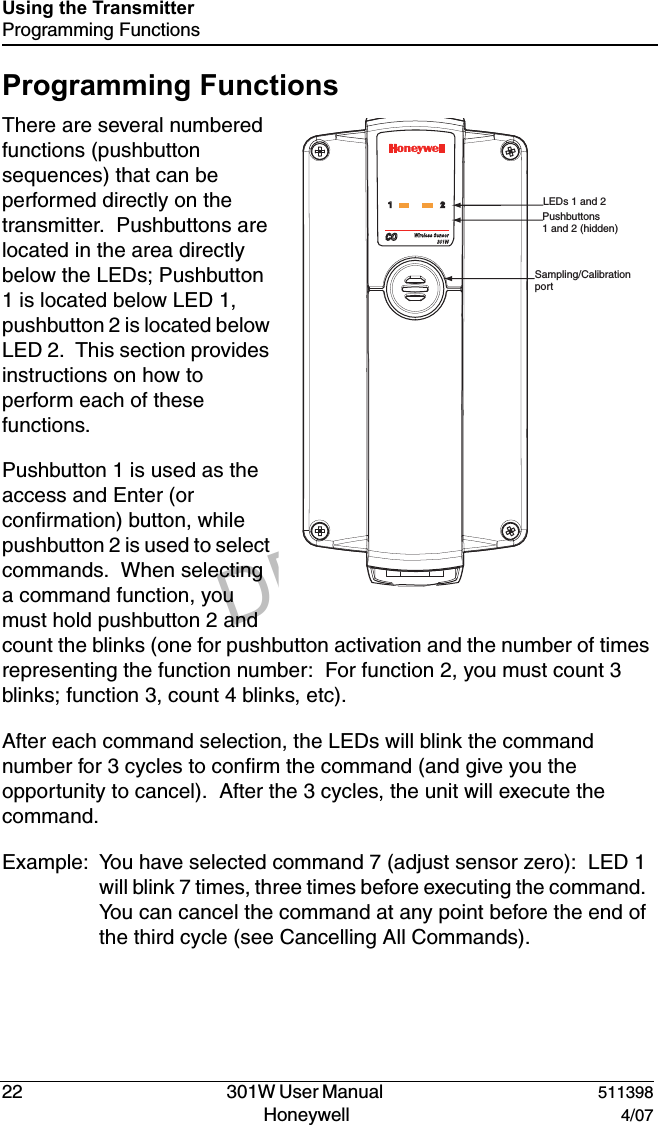
DRAFT22   301W User Manual  511398Honeywell  4/07Using the TransmitterProgramming FunctionsProgramming FunctionsThere are several numbered functions (pushbutton sequences) that can be performed directly on the transmitter.  Pushbuttons are located in the area directly below the LEDs; Pushbutton 1 is located below LED 1, pushbutton 2 is located below LED 2.  This section provides instructions on how to perform each of these functions.Pushbutton 1 is used as the access and Enter (or confirmation) button, while pushbutton 2 is used to select commands.  When selecting a command function, you must hold pushbutton 2 and count the blinks (one for pushbutton activation and the number of times representing the function number:  For function 2, you must count 3 blinks; function 3, count 4 blinks, etc). After each command selection, the LEDs will blink the command number for 3 cycles to confirm the command (and give you the opportunity to cancel).  After the 3 cycles, the unit will execute the command.Example: You have selected command 7 (adjust sensor zero):  LED 1 will blink 7 times, three times before executing the command.  You can cancel the command at any point before the end of the third cycle (see Cancelling All Commands).,%$SååANDå0USHBUTTONSååANDååHIDDEN3AMPLING#ALIBRATIONåPORT
DRAFT511398   301W User Manual  234/07 Honeywell Using the TransmitterHow to Program the TransmitterHow to Program the TransmitterIf you initiate a programming function by pressing pushbutton 1 and LED 2 lights, the transmitter is already performing a task.  You must wait until the transmitter is free before programming.LEDs will blink for one minute to display network quality after the confirmation cycles for functions related to the network.  See Function 1 - Display Network Quality for a detailed description of network quality blinking.Powering Up the Transmitter• Press and hold pushbutton 1 and 2 simultaneously• Count 5 blinks and releaseThe transmitter searches for a network.Function 1 - Display Network QualityEnables you to consult the signal quality of the link to the network.• Press pushbutton 1• Press pushbutton 2, count 2 blinks and release.• Press pushbutton 1.After the three cycle confirmation sequence, LEDs will blink for 1 minute to display network quality:If there is no signal, LED 1 will blink once and LED 2 remains off.If the signal is weak, LED 1 remains off and LED 2 will blink once.If the signal is average (or mean) the LEDs will blink in sequence: LED 1 one blink, LED 2 one blink.If the signal is strong the LEDs will blink in sequence: LED 1 one blink, LED 2 one blink, LED 1 one blink, LED 2 one blink.
DRAFT24   301W User Manual  511398Honeywell  4/07Using the TransmitterHow to Program the TransmitterFunction 2 - Activate or Deactivate Service ModeActivating the Service mode means that LEDs will be functioning at all times and not simply when programming.  This will drain power from the battery and have an impact on projected battery life.• Press pushbutton 1• Press pushbutton 2, count 3 blinks and release.• Press pushbutton 1.Once the command is activated, the transmitter will send “debug” information to its communication port dedicated to service.  It will also display its network status via its LEDs.Note: If either of the LEDs are blinking at regular intervals for more than 1 minute, the transmitter may still be in service mode.  Simply follow this procedure to deactivate service mode.Function 3 - Search for a NetworkForces the transmitter to search for a network that is in Association mode (see 301C manual for details), if the transmitter is not already connected to a network.• Press pushbutton 1• Press pushbutton 2, count 4 blinks and release.• Press pushbutton 1.Function 4 - Scan All ChannelsForces the transmitter to scan on all channels for a network that is in Association mode (see 301C manual for details), if the transmitter is not already connected to a network.• Press pushbutton 1• Press pushbutton 2, count 5 blinks and release.• Press pushbutton 1.Functions 2 through 9 are for troubleshooting purposes only and should not be used by unauthorized personnel. Refer to Troubleshooting for details.
DRAFT511398   301W User Manual  254/07 Honeywell Using the TransmitterHow to Program the TransmitterFunction 5 - Reset Network Parameters to ZeroThis function, which should only be used by authorized, fully qualified technicians, resets the transmitter’s network parameters to zero, enabling the transmitter to look for a new controller in Association mode (see 301C manual for details).• Press pushbutton 1• Press pushbutton 2, count 6 blinks and release.• Press pushbutton 1.Function 6 - Activate a Check TestThis test essentially sends a neutral command that causes the transmitter to react, thus enabling you to tell whether it is still functioning.• Press pushbutton 1• Press pushbutton 2, count 7 blinks and release.• Press pushbutton 1.Once this function has been executed, the LEDs will display the result:Success: Both LEDs blink simultaneously 6 times, for three cycles.Failure: LED 1 blinks 6 times, for 3 cycles while LED 2 blinks non-stop throughout the cycles.This function resets the transmitter; once reset, transmitters may change IDs, and thus render controller Events and Groups inoperable.
DRAFT26   301W User Manual  511398Honeywell  4/07Using the TransmitterHow to Program the TransmitterThe 301W sensors are designed to be maintenance free and do not require calibration.  The following calibration procedures (Functions 7 and 8) are provided as an exceptional troubleshooting measure.Function 7 - Adjust Sensor Zero• Press pushbutton 1• Press pushbutton 2, count 8 blinks and release.• Begin emitting the calibration gas• Press pushbutton 1.Note: Never calibrate any unit’s Zero with ambiant air. Always use Nitrogen (N2) at the calibration port to calibrate the Zero.Once this function has been executed, the LEDs will display the result:Success: Both LEDs blink simultaneously 7 times, for three cycles.Failure: LED 1 blinks 7 times, for 3 cycles while LED 2 blinks non-stop throughout the cycles.Function 8 - Adjust SpanAllows you to calibrate the sensor’s span.  Remember to begin emitting the calibration gas before starting the calibration.• Press pushbutton 1• Press pushbutton 2, count 9 blinks and release.• Press pushbutton 1.Once this function has been executed, the LEDs will display the result:Success: Both LEDs blink simultaneously 8 times, for three cycles.Failure: LED 1 blinks 8 times, for 3 cycles while LED 2 blinks non-stop throughout the cycles.
DRAFT511398   301W User Manual  274/07 Honeywell Using the TransmitterHow to Program the TransmitterFunction 9 - Save Parameters and Close DeviceSends a shutdown command to the transmitter, which will save all parameters and power down.• Press pushbutton 1• Press pushbutton 2, count 10 blinks and release.• Press pushbutton 1.Both LEDs will remain on while the transmitter saves its parameters.  When the LEDs are off, the unit has successfully powered down.Cancelling all commandsIt is always possible to stop all commands, or functions, that are being executed by the transmitter:Press on both pushbuttons simultaneously and count two blinks before releasing.All commands have been stopped.
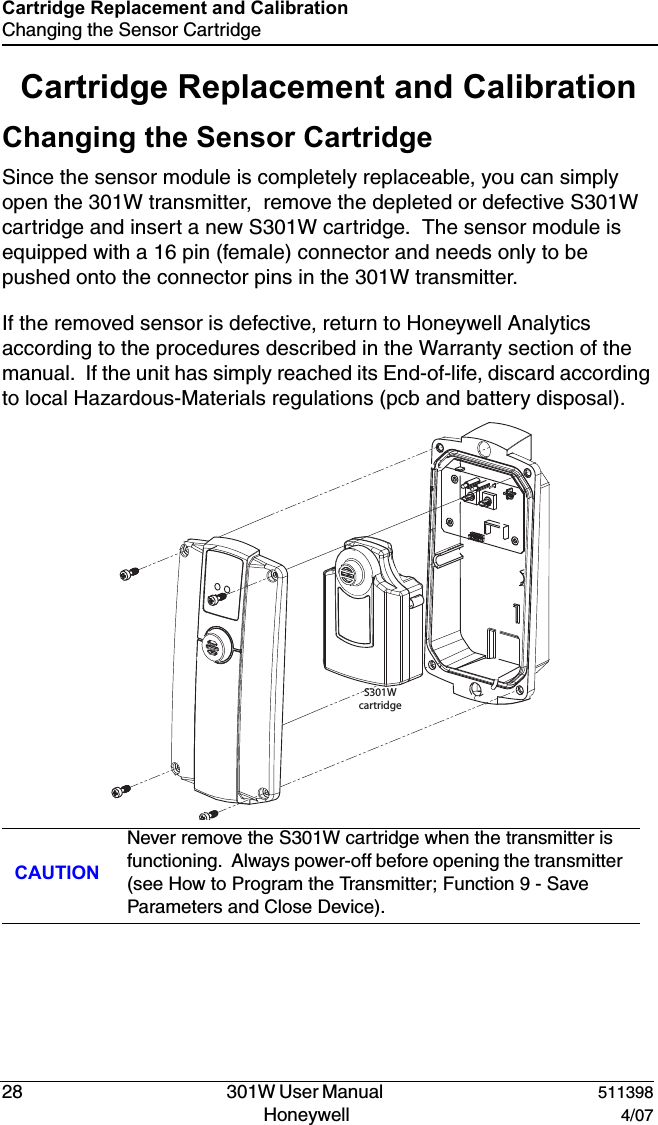
DRAFT28   301W User Manual  511398Honeywell  4/07Cartridge Replacement and CalibrationChanging the Sensor CartridgeCartridge Replacement and CalibrationChanging the Sensor CartridgeSince the sensor module is completely replaceable, you can simply open the 301W transmitter,  remove the depleted or defective S301W cartridge and insert a new S301W cartridge.  The sensor module is equipped with a 16 pin (female) connector and needs only to be pushed onto the connector pins in the 301W transmitter.If the removed sensor is defective, return to Honeywell Analytics according to the procedures described in the Warranty section of the manual.  If the unit has simply reached its End-of-life, discard according to local Hazardous-Materials regulations (pcb and battery disposal).CAUTIONNever remove the S301W cartridge when the transmitter is functioning.  Always power-off before opening the transmitter (see How to Program the Transmitter; Function 9 - Save Parameters and Close Device).S301Wcartridge
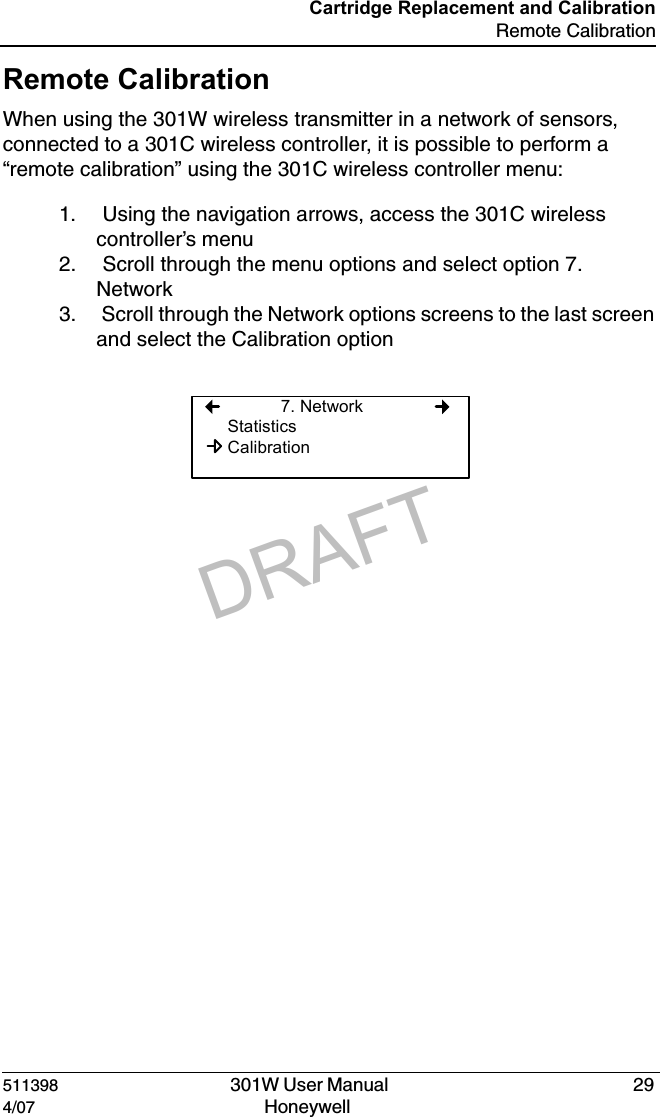
DRAFT511398   301W User Manual  294/07 Honeywell Cartridge Replacement and CalibrationRemote CalibrationRemote CalibrationWhen using the 301W wireless transmitter in a network of sensors, connected to a 301C wireless controller, it is possible to perform a “remote calibration” using the 301C wireless controller menu:1.  Using the navigation arrows, access the 301C wireless controller’s menu2.  Scroll through the menu options and select option 7. Network3.  Scroll through the Network options screens to the last screen and select the Calibration option7. NetworkStatisticsCalibration
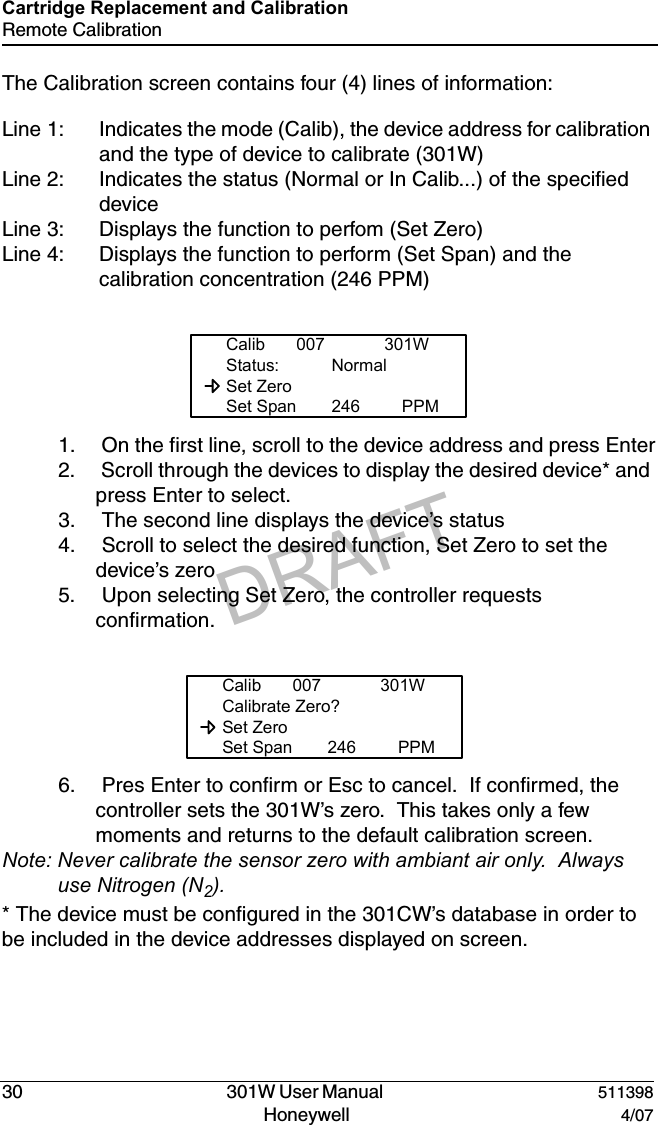
DRAFT30   301W User Manual  511398Honeywell  4/07Cartridge Replacement and CalibrationRemote CalibrationThe Calibration screen contains four (4) lines of information:Line 1: Indicates the mode (Calib), the device address for calibration and the type of device to calibrate (301W)Line 2: Indicates the status (Normal or In Calib...) of the specified deviceLine 3: Displays the function to perfom (Set Zero)Line 4: Displays the function to perform (Set Span) and the calibration concentration (246 PPM)1.  On the first line, scroll to the device address and press Enter2.  Scroll through the devices to display the desired device* and press Enter to select.3.  The second line displays the device’s status4.  Scroll to select the desired function, Set Zero to set the device’s zero5.  Upon selecting Set Zero, the controller requests confirmation.6.  Pres Enter to confirm or Esc to cancel.  If confirmed, the controller sets the 301W’s zero.  This takes only a few moments and returns to the default calibration screen.Note: Never calibrate the sensor zero with ambiant air only.  Always use Nitrogen (N2).* The device must be configured in the 301CW’s database in order to be included in the device addresses displayed on screen.Calib 007 301WStatus: Normal  Set Zero  Set Span 246 PPMCalib 007 301WCalibrate Zero?  Set Zero  Set Span 246 PPM
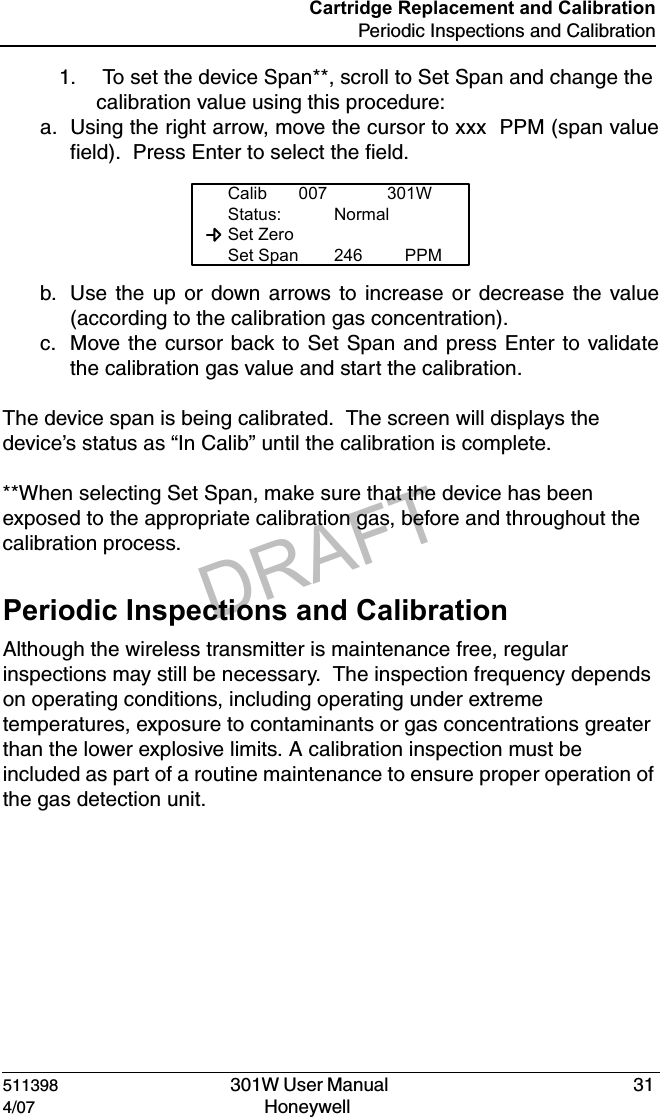
DRAFT511398   301W User Manual  314/07 Honeywell Cartridge Replacement and CalibrationPeriodic Inspections and Calibration1.  To set the device Span**, scroll to Set Span and change the calibration value using this procedure:a. Using the right arrow, move the cursor to xxx  PPM (span valuefield).  Press Enter to select the field.b. Use the up or down arrows to increase or decrease the value(according to the calibration gas concentration).c. Move the cursor back to Set Span and press Enter to validatethe calibration gas value and start the calibration.The device span is being calibrated.  The screen will displays the device’s status as “In Calib” until the calibration is complete.**When selecting Set Span, make sure that the device has been exposed to the appropriate calibration gas, before and throughout the calibration process.  Periodic Inspections and CalibrationAlthough the wireless transmitter is maintenance free, regular inspections may still be necessary.  The inspection frequency depends on operating conditions, including operating under extreme temperatures, exposure to contaminants or gas concentrations greater than the lower explosive limits. A calibration inspection must be included as part of a routine maintenance to ensure proper operation of the gas detection unit.Calib 007 301WStatus: Normal  Set Zero  Set Span 246 PPM
DRAFT
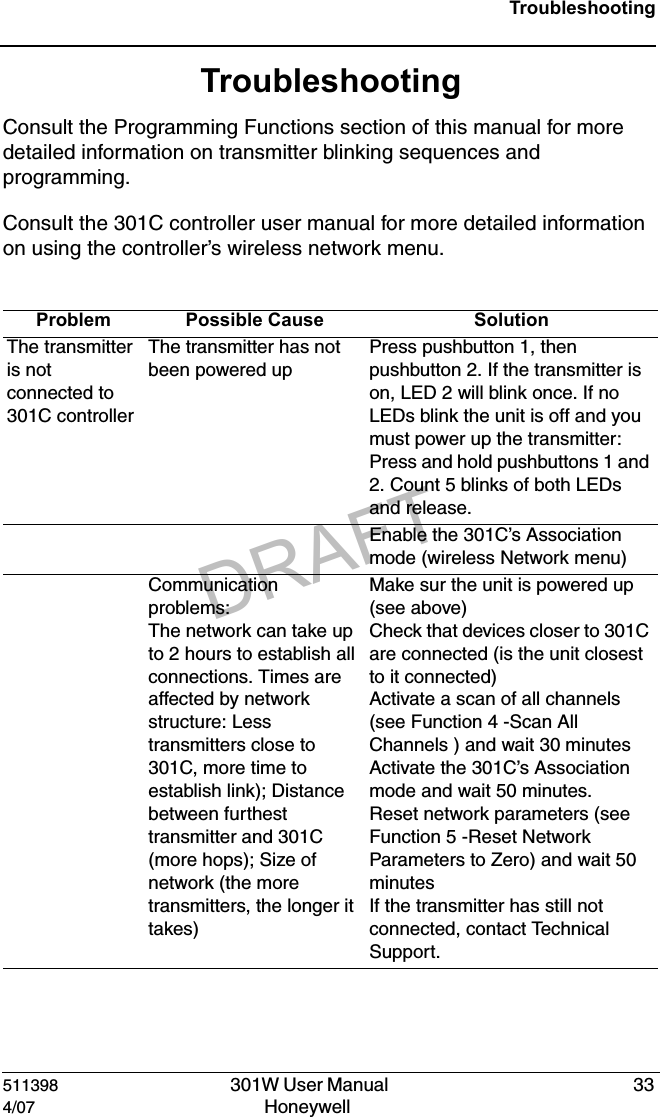
DRAFT511398   301W User Manual  334/07 Honeywell TroubleshootingTroubleshootingConsult the Programming Functions section of this manual for more detailed information on transmitter blinking sequences and programming.Consult the 301C controller user manual for more detailed information on using the controller’s wireless network menu.Problem Possible Cause SolutionThe transmitter is not connected to 301C controllerThe transmitter has not been powered upPress pushbutton 1, then pushbutton 2. If the transmitter is on, LED 2 will blink once. If no LEDs blink the unit is off and you must power up the transmitter: Press and hold pushbuttons 1 and 2. Count 5 blinks of both LEDs and release.Enable the 301C’s Association mode (wireless Network menu)Communication problems:The network can take up to 2 hours to establish all connections. Times are affected by network structure: Less transmitters close to 301C, more time to establish link); Distance between furthest transmitter and 301C (more hops); Size of network (the more transmitters, the longer it takes) Make sur the unit is powered up (see above)Check that devices closer to 301C are connected (is the unit closest to it connected)Activate a scan of all channels (see Function 4 -Scan All Channels ) and wait 30 minutesActivate the 301C’s Association mode and wait 50 minutes.Reset network parameters (see Function 5 -Reset Network Parameters to Zero) and wait 50 minutesIf the transmitter has still not connected, contact Technical Support.
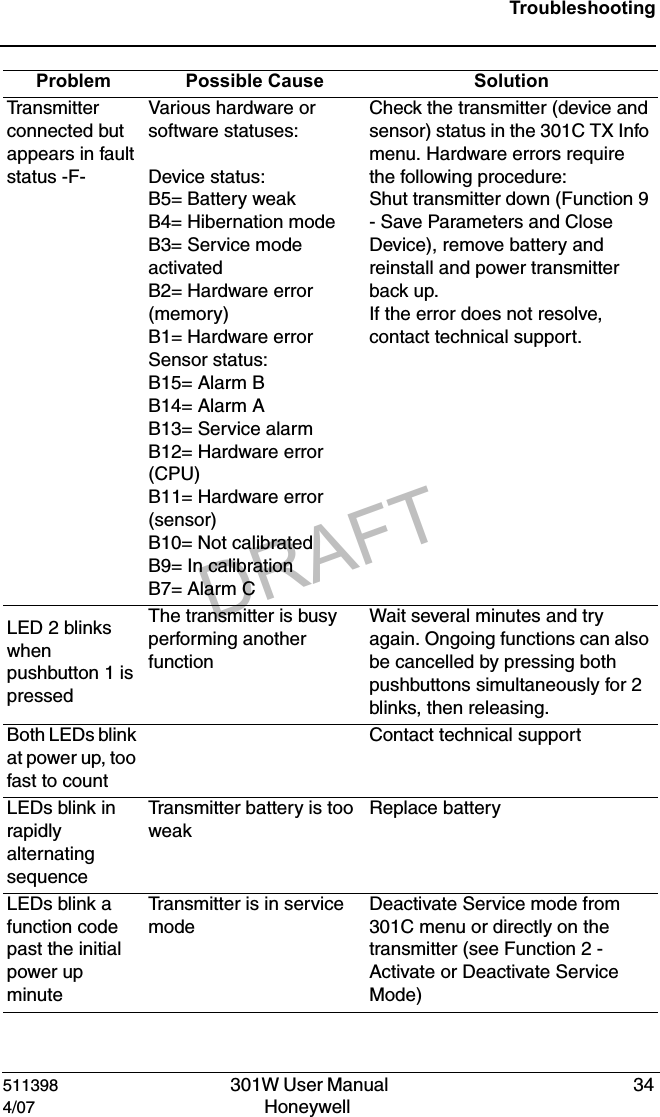
DRAFT511398   301W User Manual  344/07 Honeywell TroubleshootingTran sm i tt er  connected but  appears in fault status -F-Various hardware or software statuses:Device status: B5= Battery weakB4= Hibernation modeB3= Service mode activatedB2= Hardware error (memory)B1= Hardware errorSensor status:B15= Alarm BB14= Alarm AB13= Service alarmB12= Hardware error (CPU)B11= Hardware error (sensor)B10= Not calibratedB9= In calibrationB7= Alarm CCheck the transmitter (device and sensor) status in the 301C TX Info menu. Hardware errors require the following procedure:Shut transmitter down (Function 9 - Save Parameters and Close Device), remove battery and reinstall and power transmitter back up.If the error does not resolve, contact technical support.LED 2 blinks when pushbutton 1 is pressedThe transmitter is busy performing another functionWait several minutes and try again. Ongoing functions can also be cancelled by pressing both pushbuttons simultaneously for 2 blinks, then releasing.Both LEDs blink at power up, too fast to countContact technical supportLEDs blink in rapidly alternating sequenceTransmitter battery is too weakReplace batteryLEDs blink a function code past the initial power up minuteTransmitter is in service modeDeactivate Service mode from 301C menu or directly on the transmitter (see Function 2 -Activate or Deactivate Service Mode)Problem Possible Cause Solution
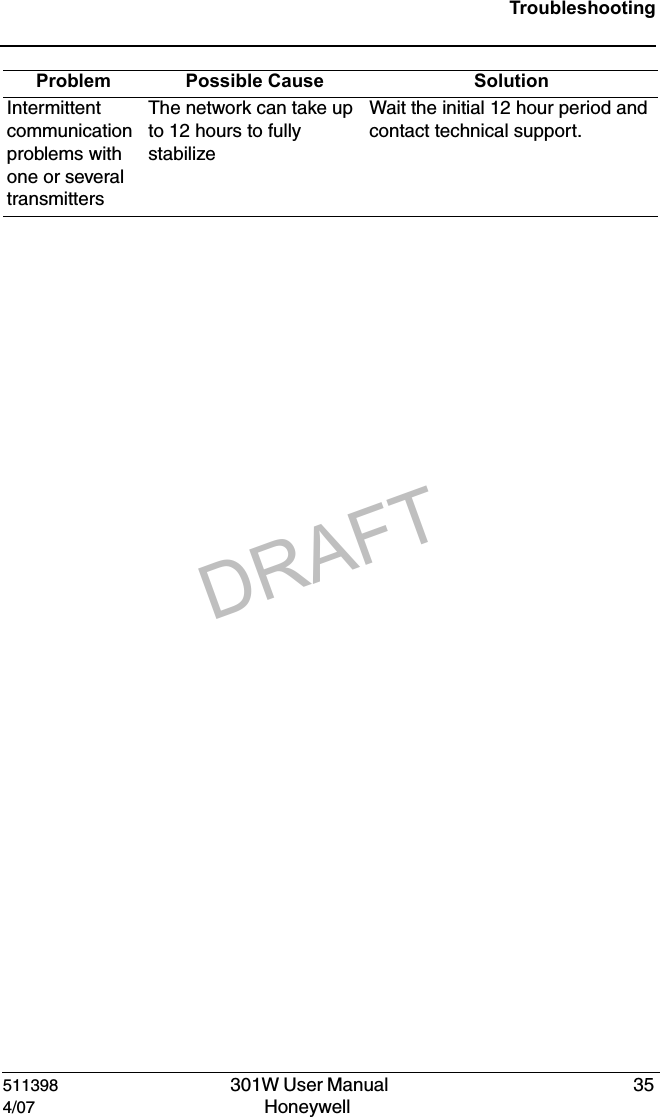
DRAFT511398   301W User Manual  354/07 Honeywell TroubleshootingIntermittent communication problems with one or several transmittersThe network can take up to 12 hours to fully stabilizeWait the initial 12 hour period and contact technical support.Problem Possible Cause Solution
DRAFT
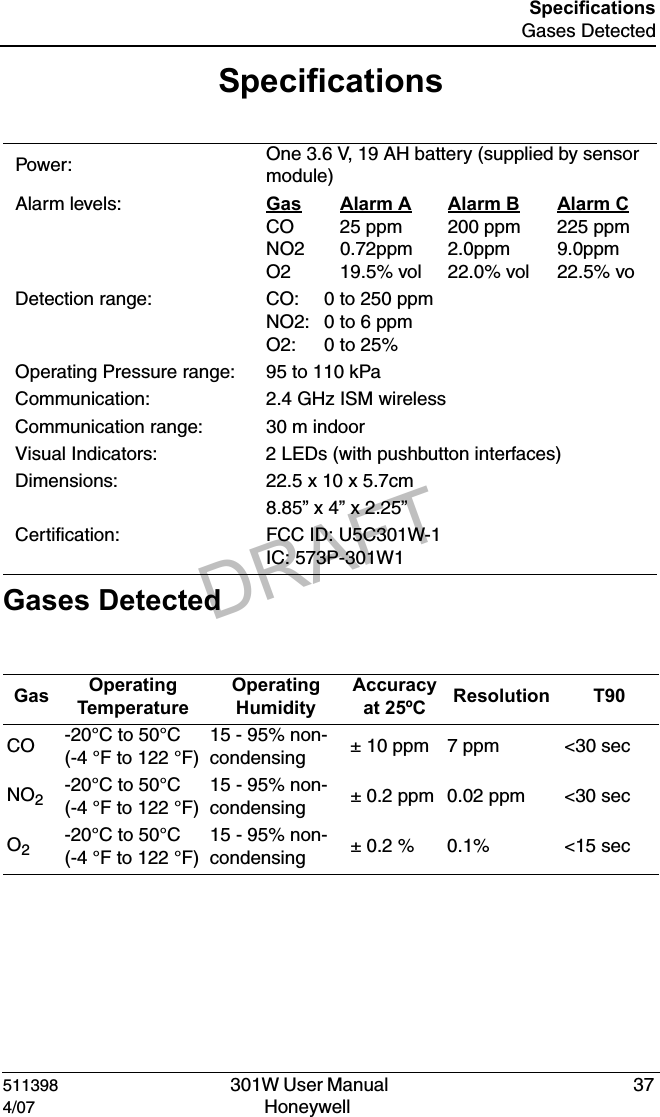
DRAFT511398   301W User Manual  374/07 Honeywell SpecificationsGases DetectedSpecifications Gases Detected Power:  One 3.6 V, 19 AH battery (supplied by sensor module)Alarm levels: Gas Alarm A Alarm B Alarm CCO 25 ppm 200 ppm 225 ppmNO2 0.72ppm 2.0ppm 9.0ppmO2  19.5% vol 22.0% vol 22.5% voDetection range: CO:   0 to 250 ppmNO2: 0 to 6 ppmO2:   0 to 25%Operating Pressure range: 95 to 110 kPaCommunication: 2.4 GHz ISM wirelessCommunication range: 30 m indoorVisual Indicators: 2 LEDs (with pushbutton interfaces)Dimensions: 22.5 x 10 x 5.7cm8.85” x 4” x 2.25”Certification: FCC ID: U5C301W-1IC: 573P-301W1Gas  Operating TemperatureOperating HumidityAccuracyat 25ºC Resolution T90CO -20°C to 50°C (-4 °F to 122 °F)15 - 95% non-condensing ± 10 ppm 7 ppm <30 secNO2-20°C to 50°C (-4 °F to 122 °F)15 - 95% non-condensing ± 0.2 ppm 0.02 ppm <30 secO2-20°C to 50°C (-4 °F to 122 °F)15 - 95% non-condensing ± 0.2 % 0.1% <15 sec
DRAFT511398   301W User Manual  384/07 Honeywell SpecificationsFCC SpecificationsFCC SpecificationsNote: This equipment has been tested and found to comply with the limits for a Class A digital device, pursuant to part 15 of the FCC Rules. These limits are designed to provide reasonable protection against harmful interference when the equipment is operated in a commercial environment. This equipment generates, uses, and can radiate radio frequency energy and, if not installed and used in accordance with the instruction manual, may cause harmful interference to radio communications. Operation of this equipment in a residential area is likely to cause harmful interference in which case the user will be required to correct the interference at his own expense.This device complies with Part 15 of the FCC Rules. Operation is subject to the following two conditions: (1) this device may not cause harmful interference, and (2) this device must accept any interference received, including interference that may cause undesired operation.The internal / external antennas used for this mobile transmitter must provide a separation distance of at least  20 cm from all persons and must not be co-located or operating in conjunction with any other antenna or transmitter."Modifications not expressly approved by this company could void the user's authority tooperate the equipment.Qualified personnel must install radio communication devices. Improper installation or selection of a transmitter’s location may cause intermittent or unreliable performance
DRAFT511398  301W User Manual  394/07 Honeywell Limited WarrantyLimited WarrantyHoneywell Analytics, Inc. warrants to the original purchaser and/or ultimate customer ("Purchaser") of Vulcain products ("Product") that if any part thereof proves to be defective in material or workmanship within twelve (12) months, such defective part will be repaired or replaced, free of charge, at Honeywell Analytics' discretion if shipped prepaid to Honeywell Analytics at 4005 Matte Blvd., Unit G, Brossard, Quebec, J4Y 2P4, in a package equal to or in the original container. The Product will be returned freight prepaid and repaired or replaced if it is determined by Honeywell Analytics that the part failed due to defective materials or workmanship. The repair or replacement of any such defective part shall be Honeywell Analytics' sole and exclusive responsibility and liability under this limited warranty.Re-Stocking PolicyThe following restocking fees will apply when customers return products for credit:• 15% restocking fee will be applied if the product is returned within 1 month following the shipping date• 30% restocking fee will be applied if the product is returned within 3 months following the shipping dateA full credit (less restocking fee) will only be issued if the product is in perfect working condition. If repairs are required on the returned product, the cost of these repairs will be deducted from the credit to be issued.No credits will be issued beyond the three month period.
DRAFT511398   301W User Manual  404/07 Honeywell Limited WarrantyExclusionsA. If Gas sensors are part of the Product, the gas sensor is covered by a twelve (12) month limited warranty of the manufacturer.B. If gas sensors are covered by this limited warranty, the gas sensor is subject to inspection by Honeywell Analytics for extended exposure to excessive gas concentrations if a claim by the Purchaser is made under this limited warranty. Should such inspection indicate that the gas sensor has been expended rather than failed prematurely, this limited warranty shall not apply to the Product.C. This limited warranty does not cover consumable items, such as batteries, or items subject to wear or periodic replacement, including lamps, fuses, valves, vanes, sensor elements, cartridges, or filter elements.  Warranty Limitation and Exclusion Honeywell Analytics will have no further obligation under this limited warranty. All warranty obligations of Honeywell Analytics are extinguishable if the Product has been subject to abuse, misuse, negligence, or accident or if the Purchaser fails to perform any of the duties set forth in this limited warranty or if the Product has not been operated in accordance with instructions, or if the Product serial number has been removed or altered.
DRAFT511398   301W User Manual  414/07 Honeywell Limited WarrantyDisclaimer of Unstated Warranties The warranty printed above is the only warranty applicable to this purchase. All other warranties, express or implied, including, but not limited to, the implied warranties of merchantability or fitness for a particular purpose are hereby disclaimed.Limitation of Liability It is understood and agreed that Honeywell Analytics’ liability, whether in contract, in tort, under any warranty, in negligence or otherwise shall not exceed the amount of the purchase price paid by the purchaser for the product and under no circumstances shall Honeywell Analytics be liable for special, indirect, or consequential damages. The price stated for the product is a consideration limiting Honeywell Analytics' liability. No action, regardless of form, arising out of the transactions under this warranty may be brought by the purchaser more than one year after the cause of actions has occurred.
DRAFT

Navigation menu