ICP HMC024KD User Manual MINI SPLIT Manuals And Guides 1006413L
User Manual: ICP HMC024KD HMC024KD ICP MINI SPLIT - Manuals and Guides View the owners manual for your ICP MINI SPLIT #HMC024KD. Home:Heating & Cooling Parts:Icp Parts:Icp MINI SPLIT Manual
Open the PDF directly: View PDF  .
.
Page Count: 26
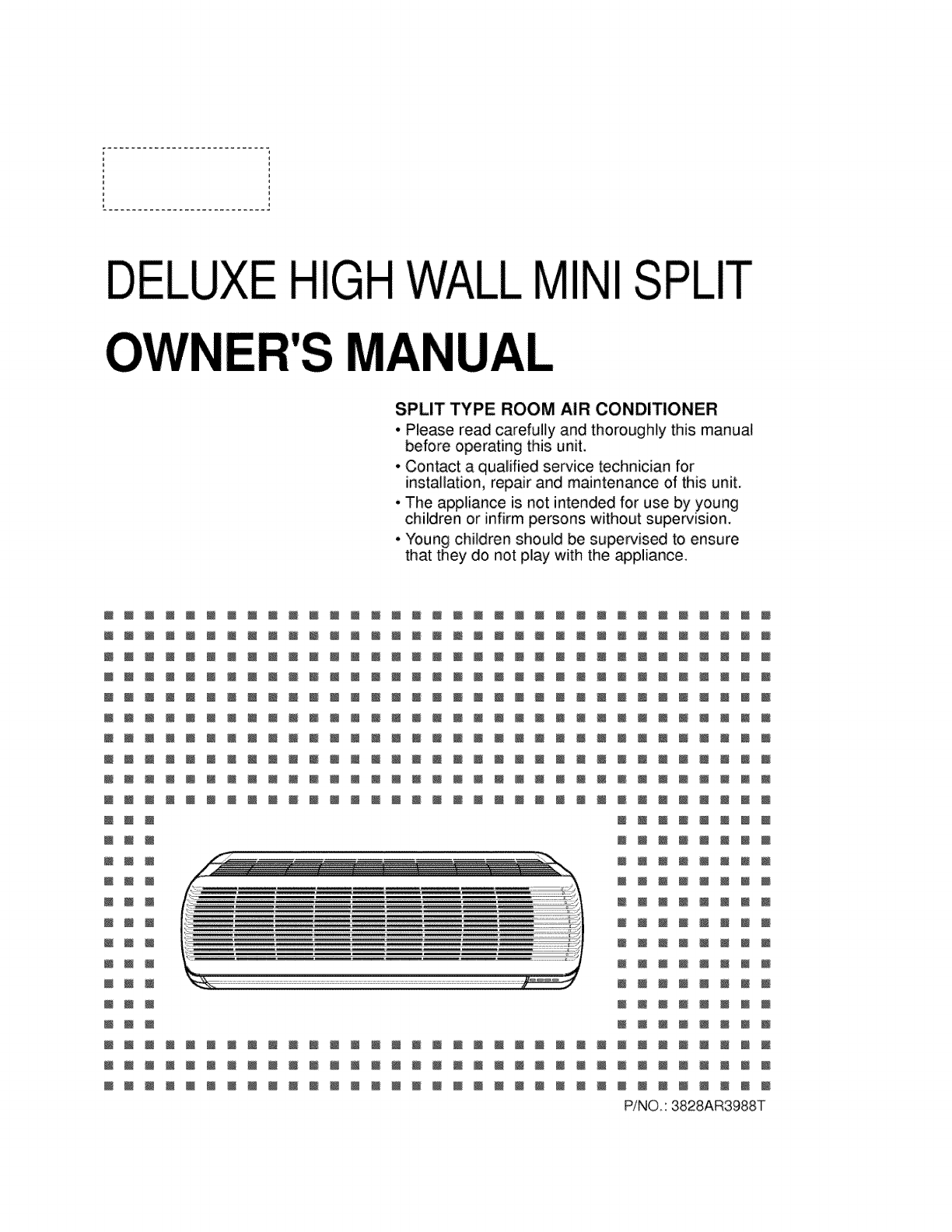
ELUXE IMINISPLIT
UAt
SPLIT TYPE ROOM AIR CONDITIONER
• Please read carefully and thoroughly this manual
before operating this unit.
° Contact a qualified service technician for
installation, repair and maintenance of this unit.
. The appliance is not intended for use by young
children or infirm persons without super¢ision.
° Young children should be supervised to ensure
that they do not play with the appliance.
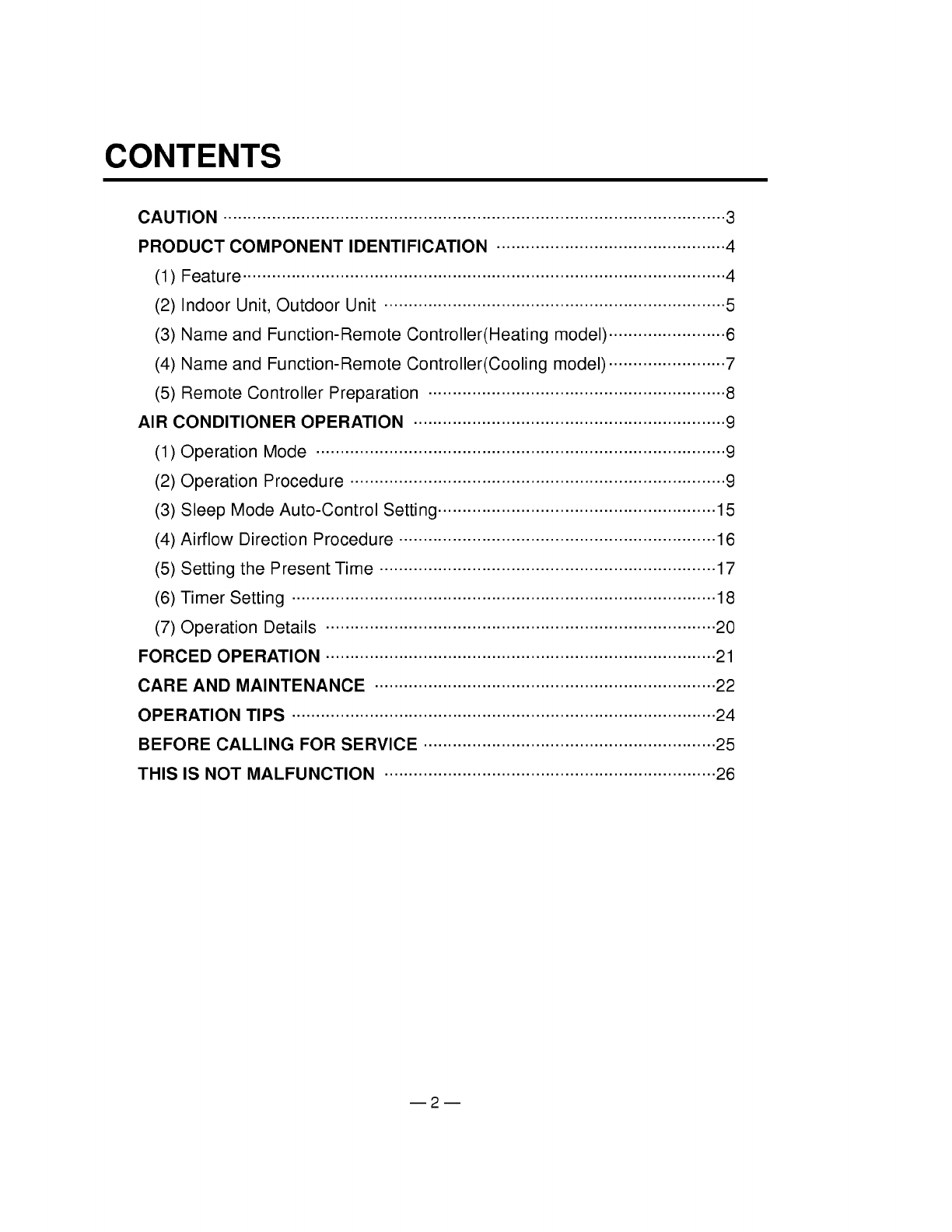
CONTENTS
CAUTION ....................................................................................................... 3
PRODUCT COMPONENT IDENTIFICATION ............................................... 4
(1) Feature ................................................................................................... 4
(2) Indoor Unit, Outdoor Unit ...................................................................... 5
(3) Name and Function-Remote Controller(Heating model) ........................ 6
(4) Name and Function-Remote Controller(Cooling model) ........................ 7
(5) Remote Controller Preparation ............................................................. 8
AIR CONDITIONER OPERATION ................................................................ 9
(1) Operation Mode .................................................................................... 9
(2) Operation Procedure ............................................................................. 9
(3) Sleep Mode Auto-Control Setting ......................................................... 15
(4) Airflow Direction Procedure ................................................................. 16
(5) Setting the Present Time ..................................................................... 17
(6) Timer Setting ....................................................................................... 18
(7) Operation Details ................................................................................ 20
FORCED OPERATION ................................................................................ 21
CARE AND MAINTENANCE ...................................................................... 22
OPERATION TIPS ....................................................................................... 24
BEFORE CALLING FOR SERVICE ............................................................ 25
THIS IS NOT MALFUNCTION .................................................................... 26
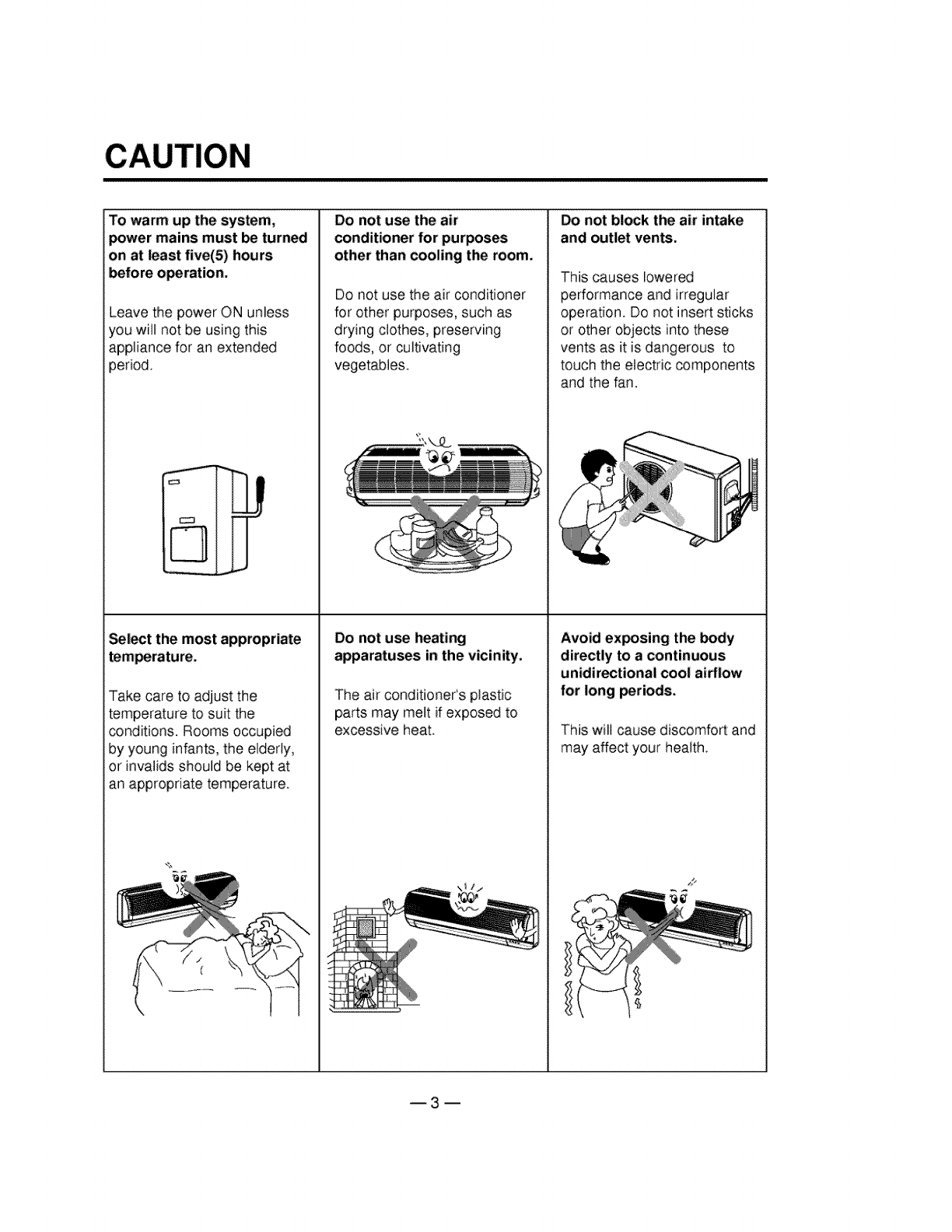
To warm up the system,
power mains must be turned
on at least five(5) hou rs
Leave the power ON unless
you will not be using this
appliance for an extended
period.
j_
_lect the most appropriate
Take care to adjust the
temperature to suit the
conditions. Rooms occupied
by young infants, the elderly,
or invalids should be kept at
an appropriate temperature.
Do not use the air
conditioner for purposes
other than cooling the room.
DO not use the air conditioner
for other purposes, such as
drying clothes, preserving
foods, or cultivating
vegetables.
Do not use heating
apparatuses in the vicinity,
The air conditioner's plastic
partsmay melt if exposed to
excessive heat.
PRODUCT COMPONENT IDENTIFICATION
(1) Feature
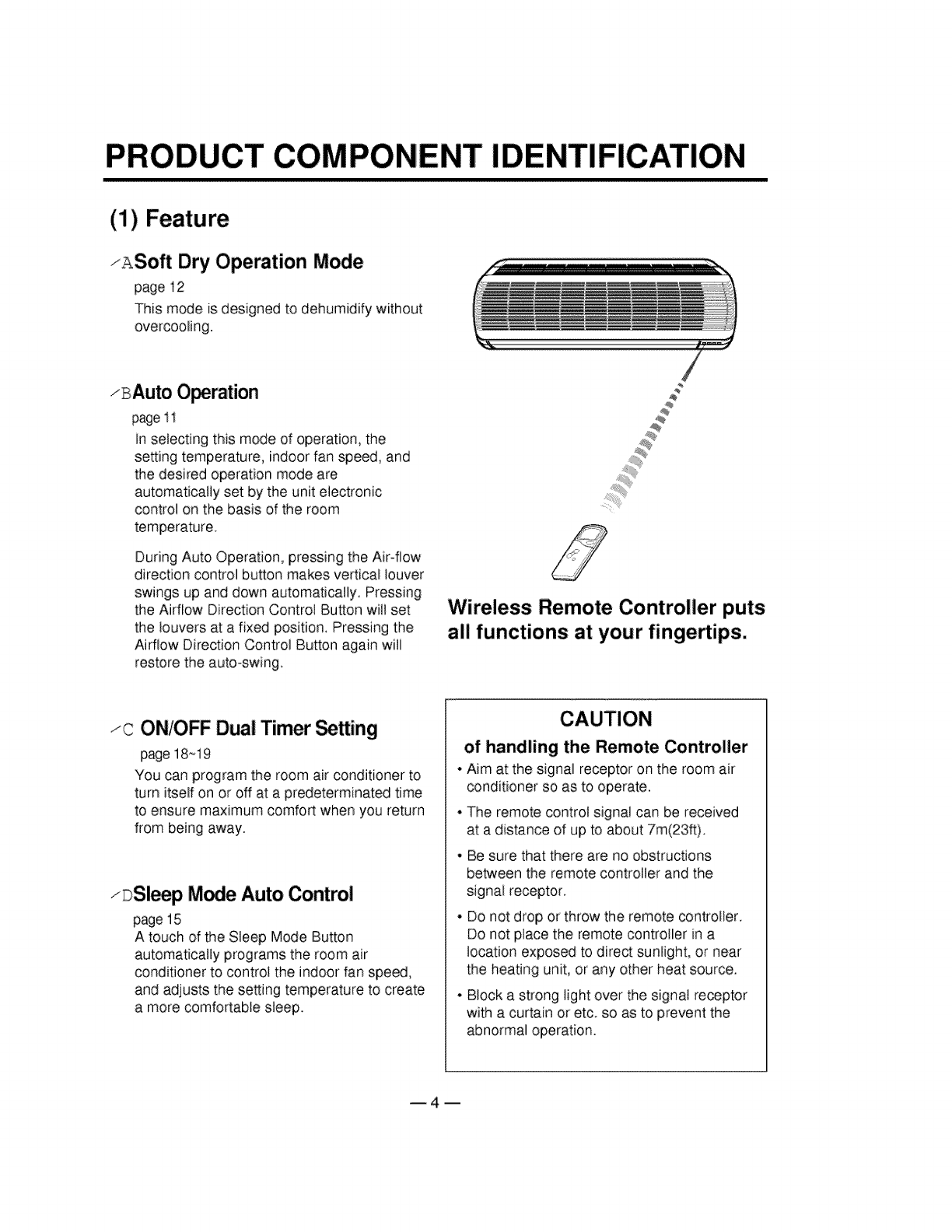
zASoft Dry Operation Mode
page 12
This mode is designed to dehumidify without
overcooling.
zBAuto O_ration
page11
In selecting this mode of operation, the
setting temperature, indoor fan speed, and
the desired operation mode are
automatically set by the unit electronic
control on the basis of the room
temperature.
During Auto Operation, pressing the Air-flow
direction control button makes vertical louver
swings up and down automatically. Pressing
the Airflow Direction Controi Button wilt set
the louvers at a fixed position. Pressing the
Airflow Direction Control Button again will
restore the auto-swing.
/
Wireless Remote Controller puts
all functions at your fingertips.
zc ONIOFF Dual Timer _ing
page 18_19
You can program the room air conditioner to
turn itself on or off at a predeterminated time
to ensure maximum comfort when you return
from being away.
zDSl_p Mode Auto Control
page 15
A touch of the Sleep Mode Button
automatically programs the room air
conditioner to control the indoor fan speed,
and adjusts the setting temperature to create
a more comfortable sleep.
of handling the Remote Controller
•Aim at the signal receptor on the room air
conditioner so as to operate.
• The remote contro_signal can be received
at a distance of up to about 7m(23_).
• Be sure that there are no obstructions
between the remote controller and the
signal receptor.
Do not drop or throw the remote controlfer.
DOnot place the remote controller in a
location exposed to direct sunlight, or near
the heating unit, or any other heat source.
, Block a strong light over the signal re_ptor
with a curtain or etc. so as to prevent the
abnormal operation.
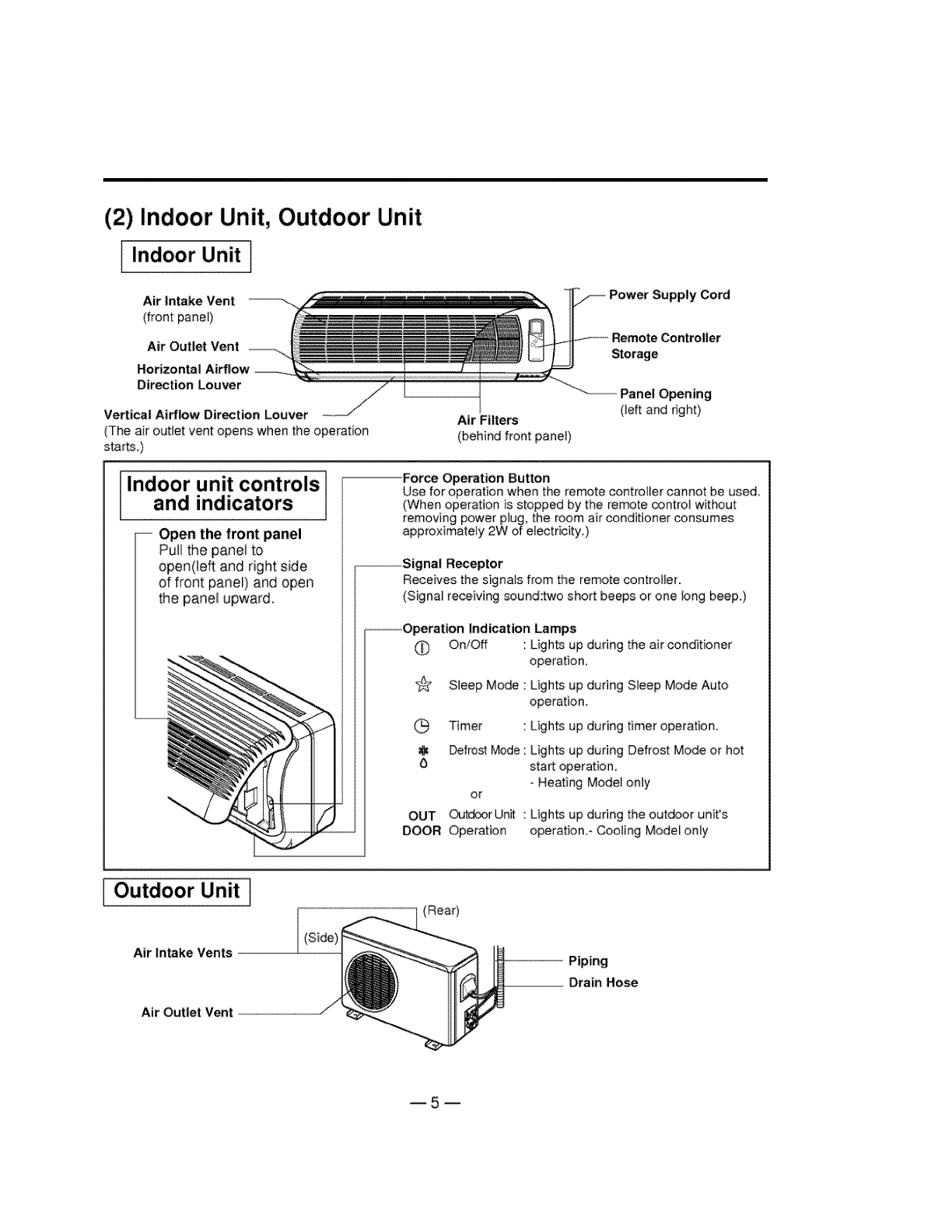
(2) Indoor Unit, Outdoor Unit
I Indoor Unit ]
Air Intake Vent
(front panel)
Air Outlet Vent
Horizontal Airflow
Direction Louver
Vertical Airflow Direction Louver
(The air outlet vent opens when the eperation
starts.)
Air Filters
(behind front panel)
Power Supply Cord
Controller
Storage
Panel Opening
(]eft and right)
Indoor unit controls
and indicators
-- Open the front panel
Pull the panel to
open(te_ and right side
of front panel) and open
the panel upward.
Force Ope_tion Button
Use for operation when the remote controller cannot be used
(When eperation is stepped by the remote _ntre] without
removing power pMg, the room air conditioner consumes
approximately 2W of electricity_)
--Signal Receptor
Receives the signats from the remote controller.
(Signal receiving sound:two short beeps or one tong beep.)
--Operation Indication Lamps
O On/Off : Lights up during the air conditioner
operation,
s_¢ Sleep Mode : Lights up during Sleep Mode Auto
operation.
G Timer : Lights up during timer operation.
Defrost Mode : Lights up during Defrost Mode or hot
6 start operation.
-Heating Model only
or
OUT _tdoer Un_ "
DOOR Operation
Lights up during the outdoor unit's
operatien.- Cooling Model only
Outdoor Unit]
Air intake Vents
Air Outlet Vent
(Rear)
Piping
Drain Hose
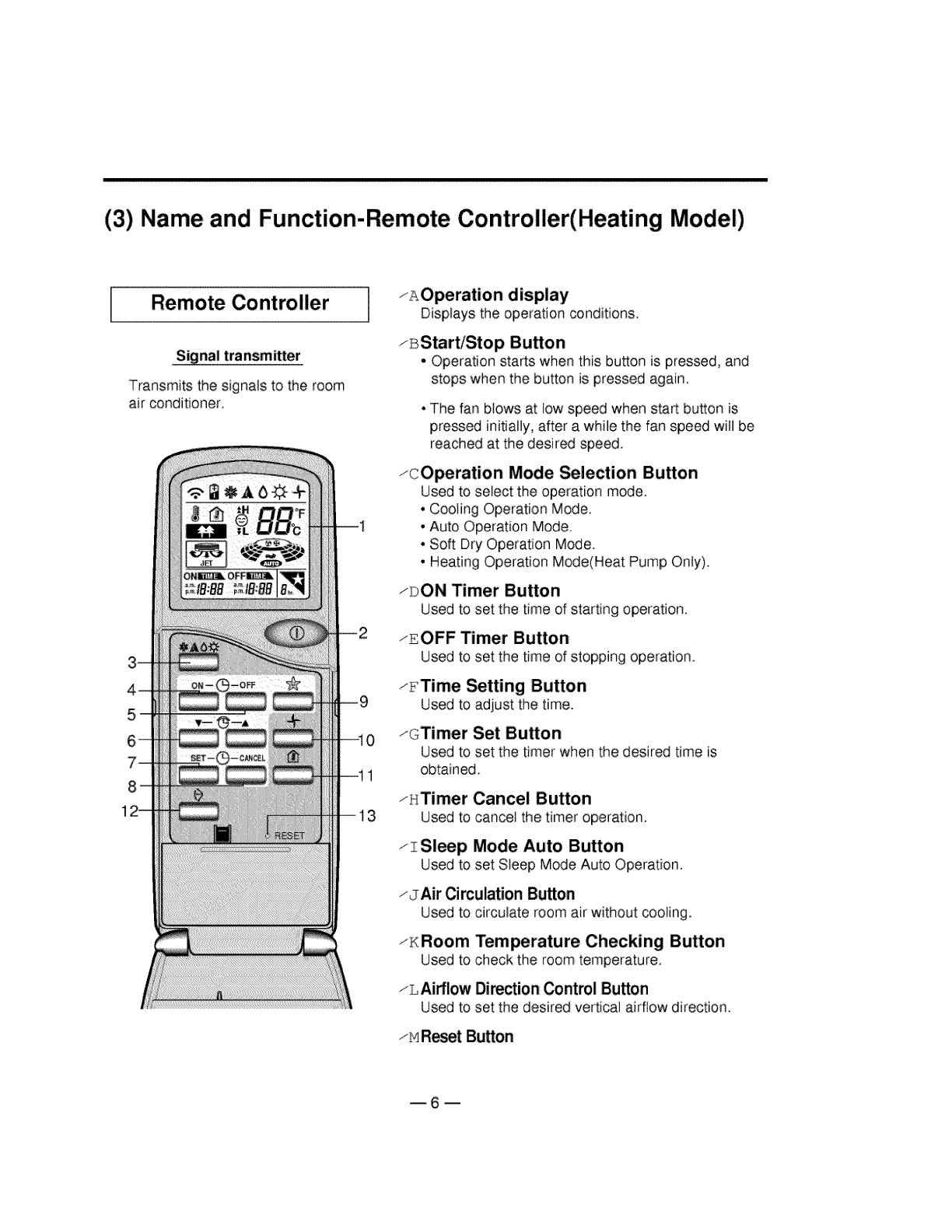
(3) Name and Function-Remote Controller(Heating Model)
Remote Controller
Signal transmitter
Transmits the signals to the room
air conditioner,
1
13
zAOperation display
Displays the operation conditions.
zBStart/Stop Button
-Operation starts when this bu_on is pressed, and
stops when the button is pressed again,
• The fan blows at low speed when start button is
pressed initially, after a while the fan speed will be
reached at the desired speed.
zcOperation Mode _lection Button
Used to select the operation mode.
• Cooling Operation Mode.
• Auto Operation Mode.
• Soft Dry Operation Mode.
• Heating Operation Mode(Heat Pump Only).
_DON Timer Button
Used to set the time of starting operation
zEOFF Timer Button
Used to set the time of stopping operation.
_FTime Setting Button
Used to adjust the time.
1@Timer Set Button
Used to set the timer when the desired time is
obtained,
zHTimer Cancel Button
Used to cancel the timer operation.
z Sleep Mode Auto Button
Used to set Steep Mode Auto Operation.
zJAir Circulation Button
Used to circulate room air without cooling.
iH Room Temperature Checking Button
Used to check the room temperature.
zLAirflow Direction Control Button
Used to set the desired vertical airflow direction.
zMR_et Button
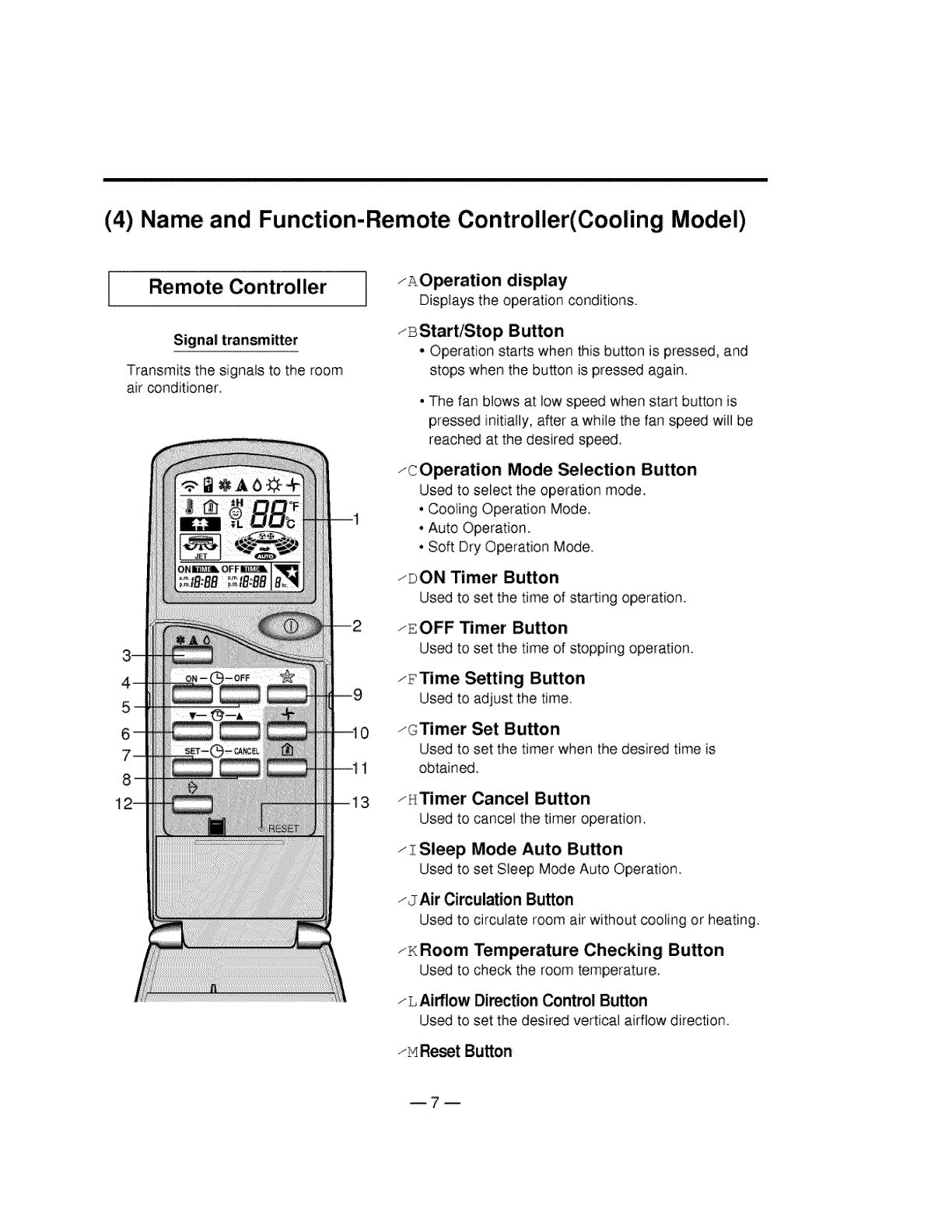
(4) Name and Function-Remote Controller(Cooling Model)
Remote Controller
Signal transmitter
Transmits the signals to the room
air conditioner
1
13
zAO_ration display
Displays the operation conditions.
zBStart/Stop Button
• Operation starts when this button is pressed, and
stops when the button is pressed again.
•The fan blows at low speed when start button is
pressed initially, after a while the fan speed will be
reached at the desired speed.
zcOperation Mode _lection Button
Used to select the operation mode.
• Cooling Operation Mode.
, Auto Operation.
° Soft Dry Operation Mode.
zDON Timer Button
Used to set the time of starting operation.
zEOFF Timer Button
Used to set the time of stopping operation.
/_iTime Setting Button
Used to adjust the time.
zcTimer Set Button
Used to set the timer when the desired time is
obtained.
zHTimer Cancel Button
Used to cancel the timer operation_
I zSleep Mode Auto Button
Used to set Sleep Mode Auto Operation
JAir Circulation Button
Used to circulate room air without cooling or heating_
_KRoom Temperature Checking Button
Used to check the room temperature.
z L Airflow Direction Control Button
Used to set the desired vertical airflow direction.
_MResetButton
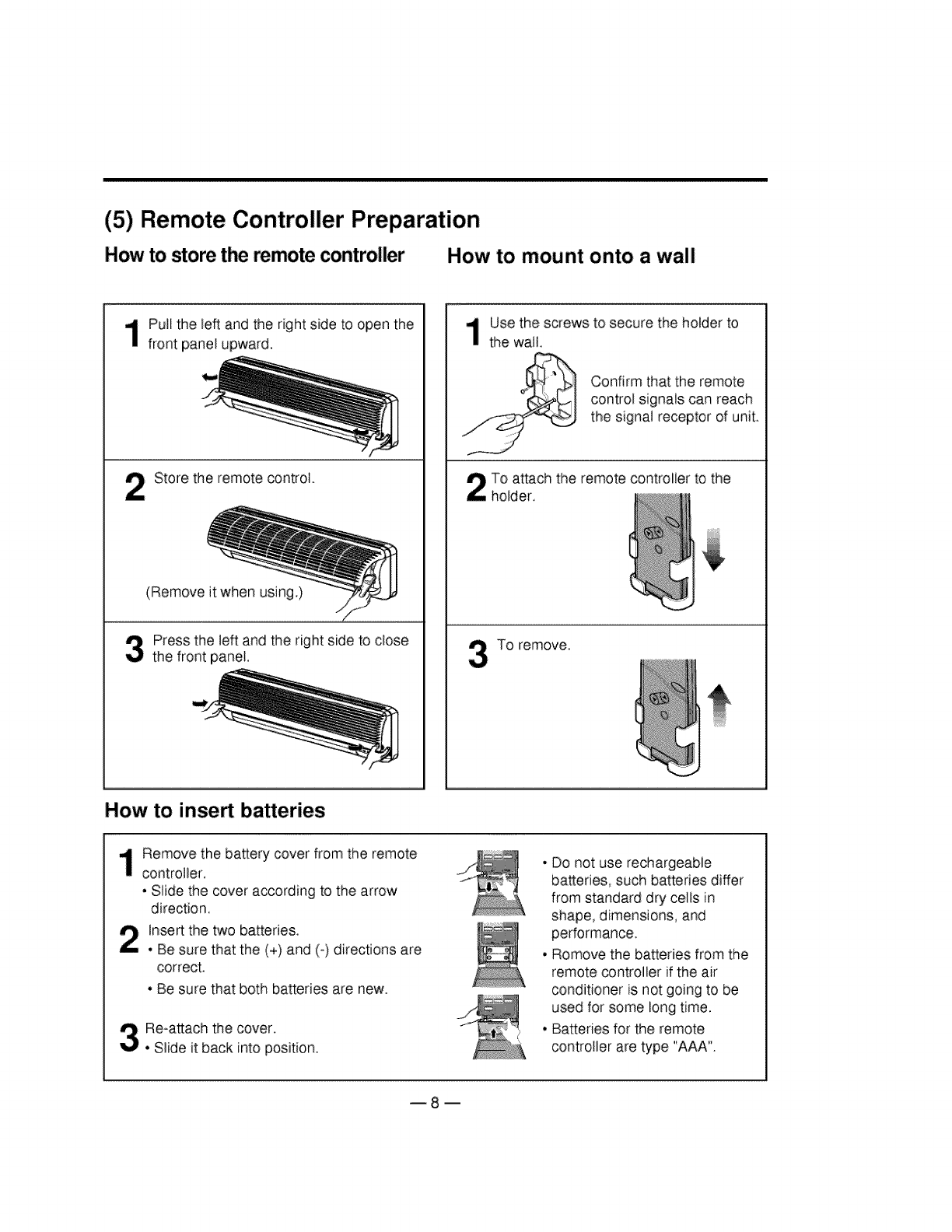
(5) Remote Controller Preparation
How to storethe remote controller How to mount onto a wall
Pull the left and the right side to open the
front pane_upward.
Store the remote control,
(Remove it when using.)
Press the left and the right side to close
the front panel.
How to insert bakeries
Use the screws to secure the holder to
the wail,
Confirm that the remote
control signals can reach
the signat receptor of unit
To attach the remote controller to the
holder
To remove,
Remove the battery cover from the remote
controller,
. Slide the cover according to the arrow
direction,
Insert the two batteries,
. Be sure that the (+) and (-) directions are
correct.
. Be sure that both batteries are new.
Re-attach the cover.
• Slide it back into position.
° Do not use rechargeable
bakeries, such batteries differ
from standard dry cells in
shape, dimensions, and
performance,
. Romove the batteries from the
remote controller if the air
conditioner is not going to be
used for some long time.
. Batteries for the remote
controller are type "AAA".
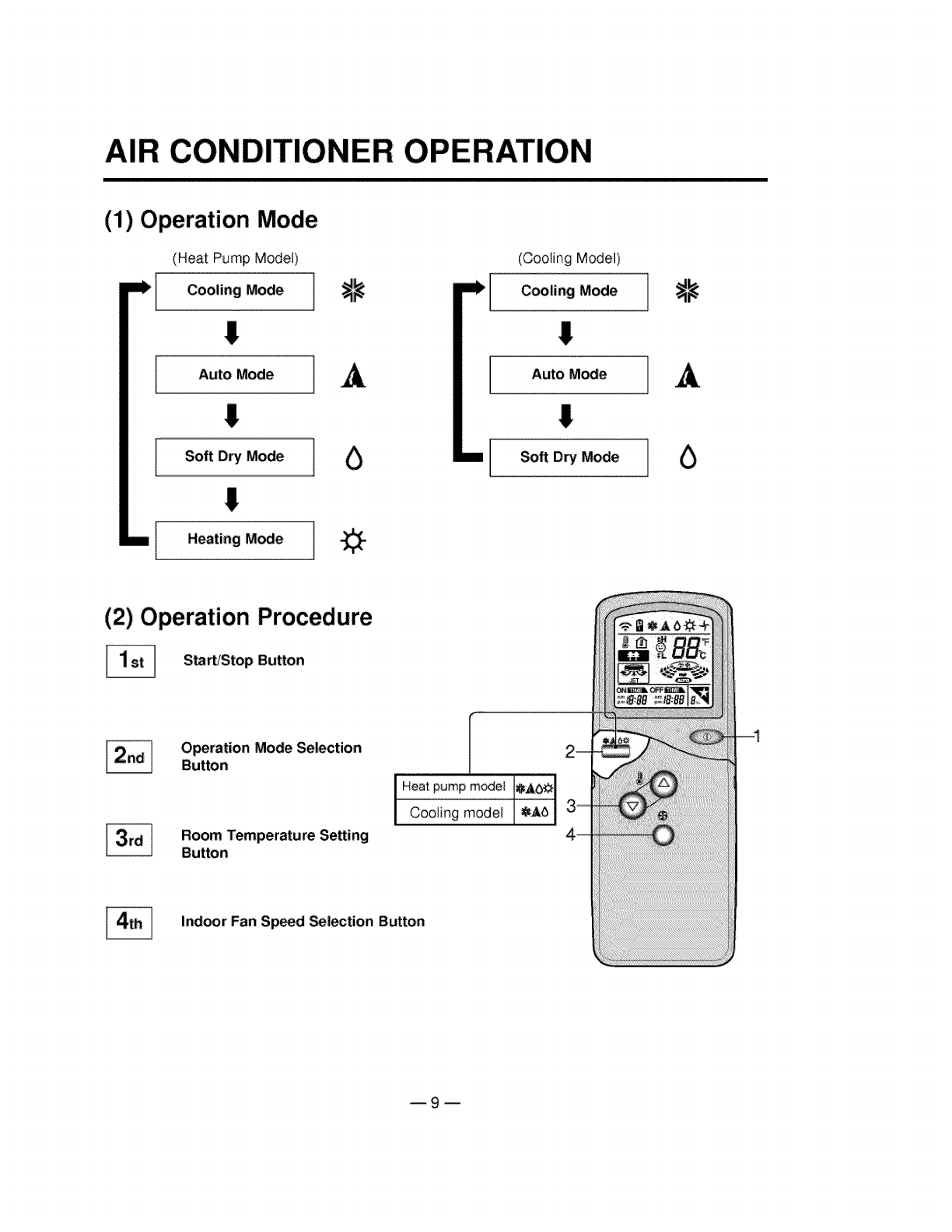
AiR CONDITIONER OPERATION
(1) Operation Mode
(Heat Pump Model)
Cooling Mode ]
I
!
!
A
Heating Mode
(Cooling Model)
Cooling Mode
I
IAuto M_e
I
ISoft Dry Mode
_11_
A
O
(2) Operation Procedure
[_ S_rb'Stop Button
[_ Operation Mode Selection
Button
Room Temperature Setting
Button
[
Heatpumpmodel 8A.1_._
Cooling model 8A5
Indoor Fan Sp_d _|ection Button
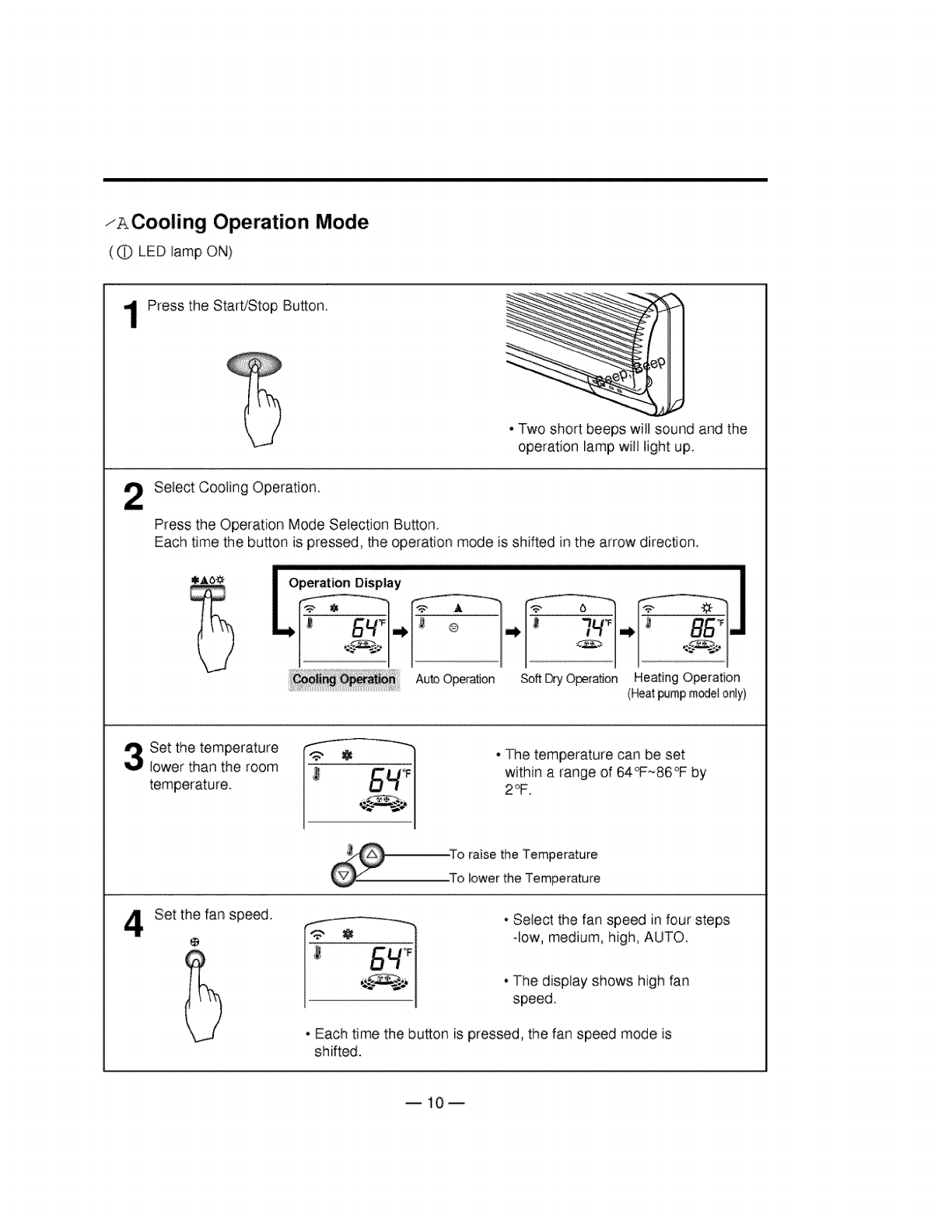
zACooling Operation Mode
(_ LED lamp ON)
2
Press the StaWStop Button.
• Two short beeps witl sound and the
operation lamp will light up.
Select Cooling Operation.
Press the Operation Mode Selection Button.
Each time the button is pressed, the operation mode is shifted in the arrow direction.
Auto Operation Soft Dry Operation Heating Operation
(Heat pumpm_el only)
Set the temperature
lower than the room
temperature.
• The temperature can be set
within a range of 64_*-86°F by
2_.
-To raise the Temperature
.To tower the Temperature
Set the fan speed.
@
__ - Select the fan speed in four steps
-low, medium, high, AUTO.
- The display shows high fan
speed
• Each time the button is pressed, the fan speed mode is
shifted.
B10m
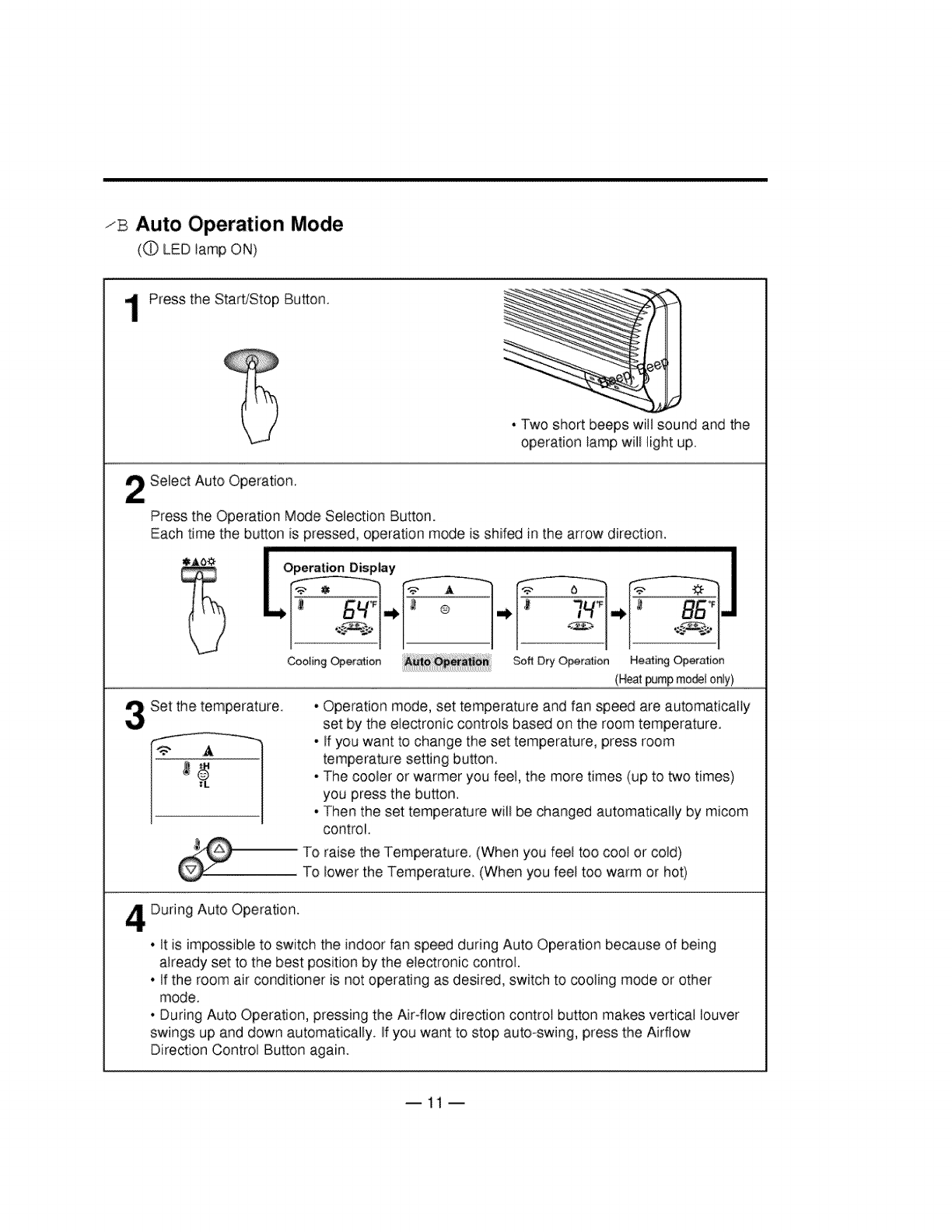
zB Auto Operation Mode
(_ LED tamp ON)
Press the Start/Stop Button.
• Two short beeps wilt sound and the
operation lamp will light up.
Select Auto Operation.
Press the Operation Mode Selection Button.
Each time the button is pressed, operation mode is shifed in the arrow direction.
Set the temperature.
Coof[ng Opera_ion Soft Dry Operation He_ing Operation
(Heat _mp rno_l only)
, Operation mode, set temperature and fan speed are automatically
set by the electronic controls based on the room temperature.
, If you want to change the set temperature, press room
temperature setting button
, The cooler or warmer you feel, the more times (up to two times)
you press the button.
, Then the set temperature wilt be changed automatically by micom
control.
To raise the Temperature. (When you feel too coot or cold)
To lower the Temperature. (When you feet too warm or hot)
During Auto Operation.
• It is impossible to switch the indoor fan speed during Auto Operation because of being
already set to the best position by the electronic control.
• If the room air conditioner is not operating as desired, switch to cooling mode or other
mode.
• During Auto Operation, pressing the Air-flow direction control button makes vertical louver
swings up and down automatically. If you want to stop auto-swing, press the Airflow
Direction Control Button again.
--11 --
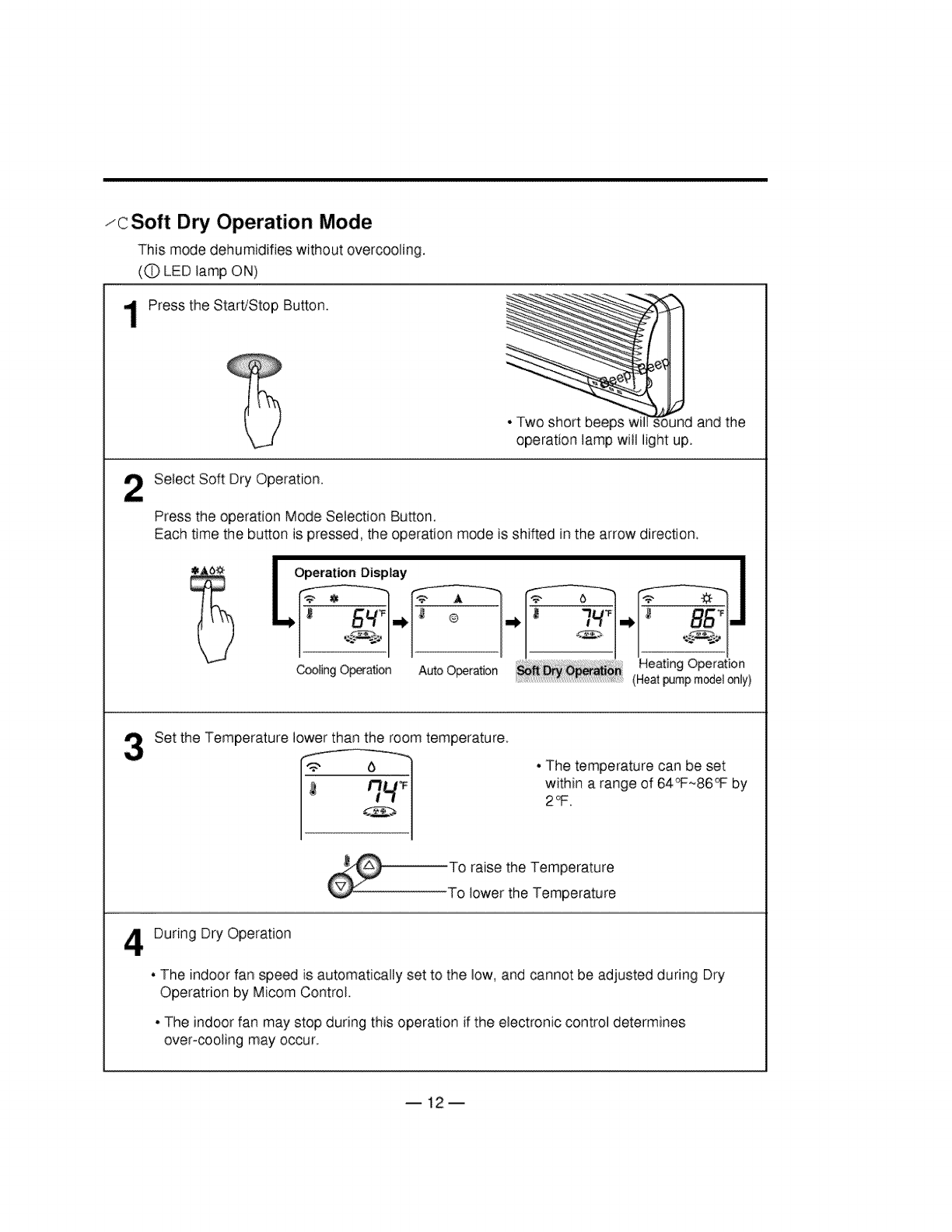
zcSoft Dry Operation Mode
This mode dehumidifies without overcooling.
(C) LED tamp ON)
Press the StaWStop Button.
i"__!_iii',_i i_'ii_
_o _ d and the
operation lamp will light up.
2Select Soft Dry Operation.
Press the operation Mode Selection Button.
Each time the button is pressed, the operation mode is shifted in the arrow direction.
Coo_o_Opera_onAo_oO_ra_oo Heating Operation
.........................................................................................(Heat pump m_et only)
Set the Temperature lower than the room temperature
• The temperature can be set
within a range of 64_~86_ by
2_.
..............................TO raise the Temperature
To lower the Temperature
During Dry Operation
, The indoor fan speed is automatically set to the low, and cannot be adjusted during Dry
Operatrion by Micom Control
- The indoorfan may stop during this operation if the electronic control determines
over-cooling may occur
--12--
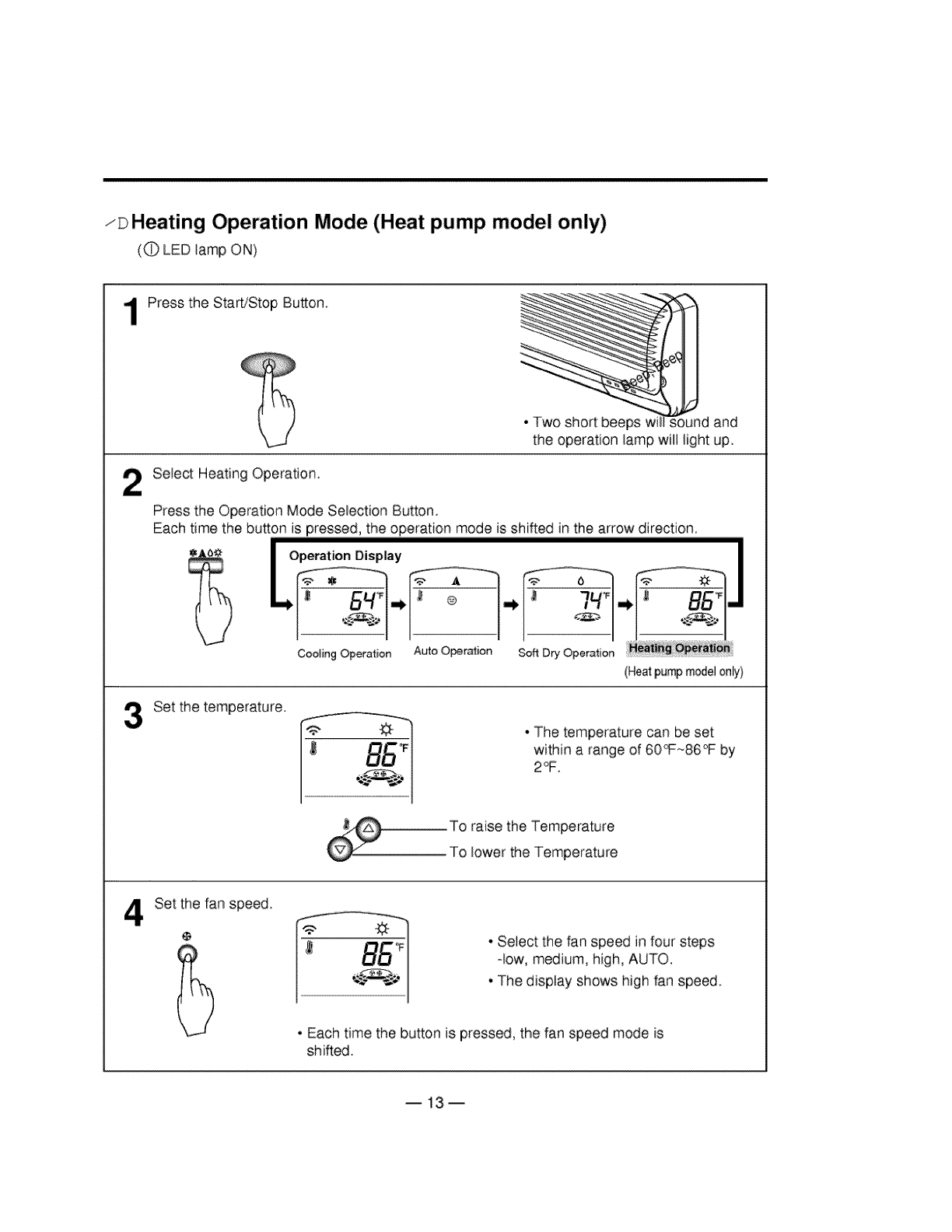
zD Heating Operation Mode (Heat pump model only)
(0 LED lamp ON)
2
Press the Start/Stop Button
ii; ilii;i i! _i; dand
the operation lamp will light up.
Select Heating Operation,
Press the Operation Mode Selection BuEon.
Each time the button is pressed, the operation mode is shifted in the arrow direction.
(Heatpumpmodelonly)
Set the temperature.
• The temperature can be set
within a range of 60_~86°F by
To raise the Temperature
To lower the Temperature
Set the fan speed_
• Select the fan speed in four steps
-tow, medium, high, AUTO.
• The display shows high fan speed.
• Each time the button _spressed, the fan speed mode is
shifted.
B13m
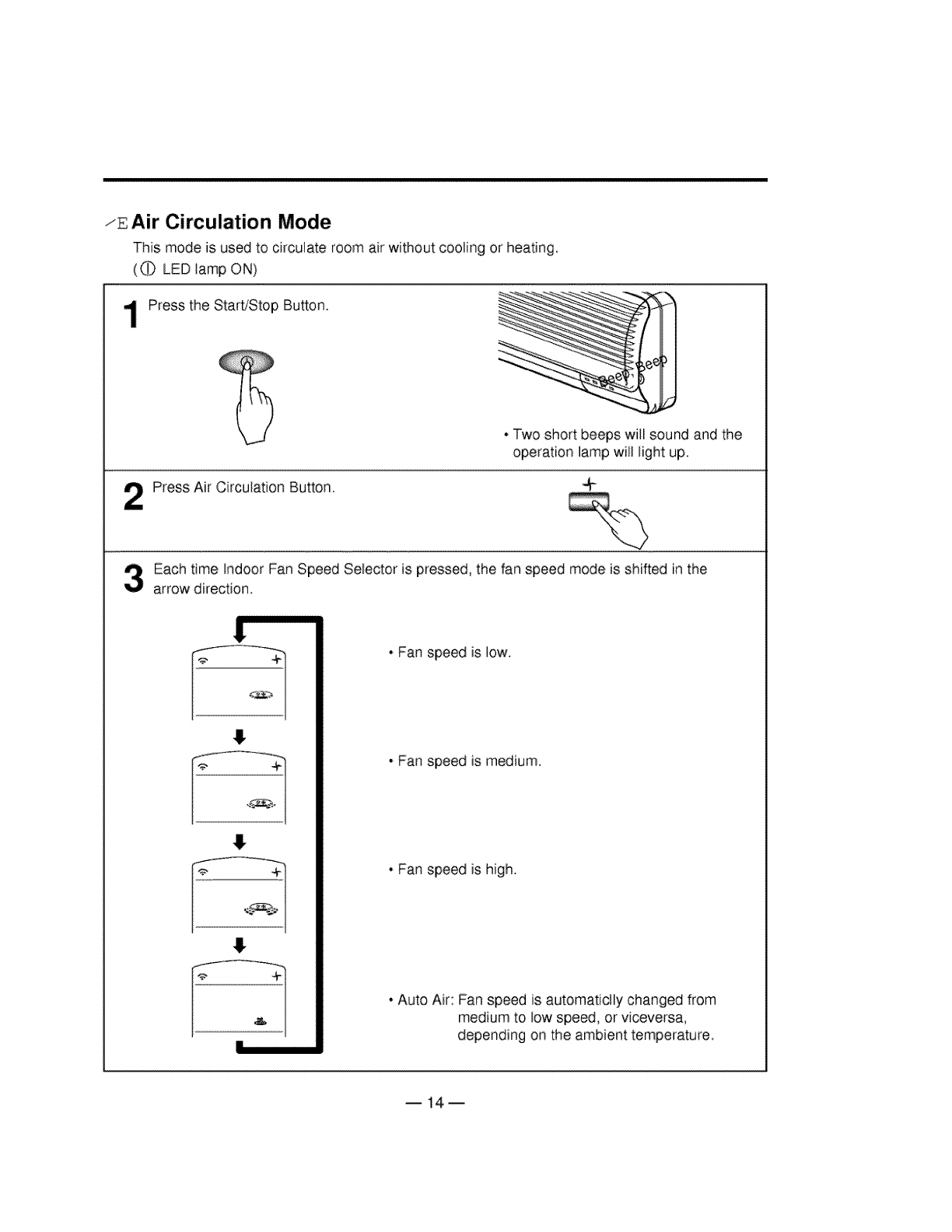
zE Air Circulation Mode
This mode is used to circulate room air without cooling or heating.
(0 LED tamp ON)
Press the StaWStop Button.
. Two short beeps will sound and the
operation lamp will light up.
Press Air Circulation Button.
Each time Indoor Fan Speed Selector is pressed, the fan speed mode is shifted in the
arrow direction.
• Fan speed is low.
• Fan speed is medium.
, Fan speed is high.
, Auto Air: Fan speed is automaticlly changed from
medium to low speed, or viceversa,
depending on the ambient temperature.
B14m
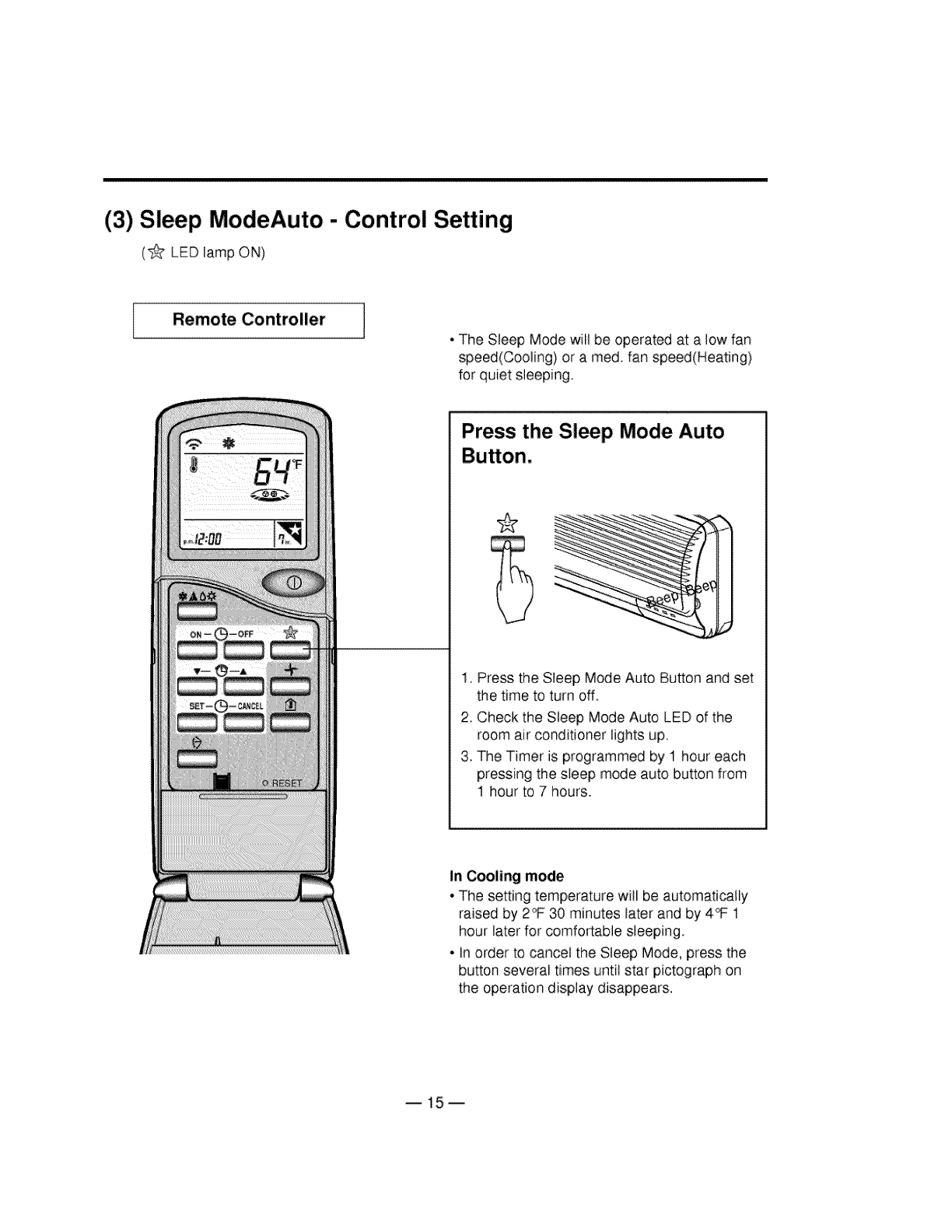
(3) Sleep ModeAuto - Control Setting
(_ LED lamp OI'.,t)
Remote Controller
,The Sleep Mode will be operated at a low fan
speed(Cooling) or a reed. fan speed(Heating)
for quiet sleeping.
Press the Sleep Mode Auto
1, Press the Sleep Mode Auto Button and set
the time to turn off.
2, Check the Sleep Mode Auto LED of the
room air conditioner lights up.
3. The Timer is programmed by 1 hour each
pressing the sleep mode auto button from
1 hour to 7 hours.
In Cooling mode
•The setting temperature will be automatically
raised by 2_ 30 minutes later and by 4_ 1
hour later for comfortable sleeping°
- In order to cancel the Sleep Mode, press the
button several times until star pictograph on
the operation display disappears,
B15m
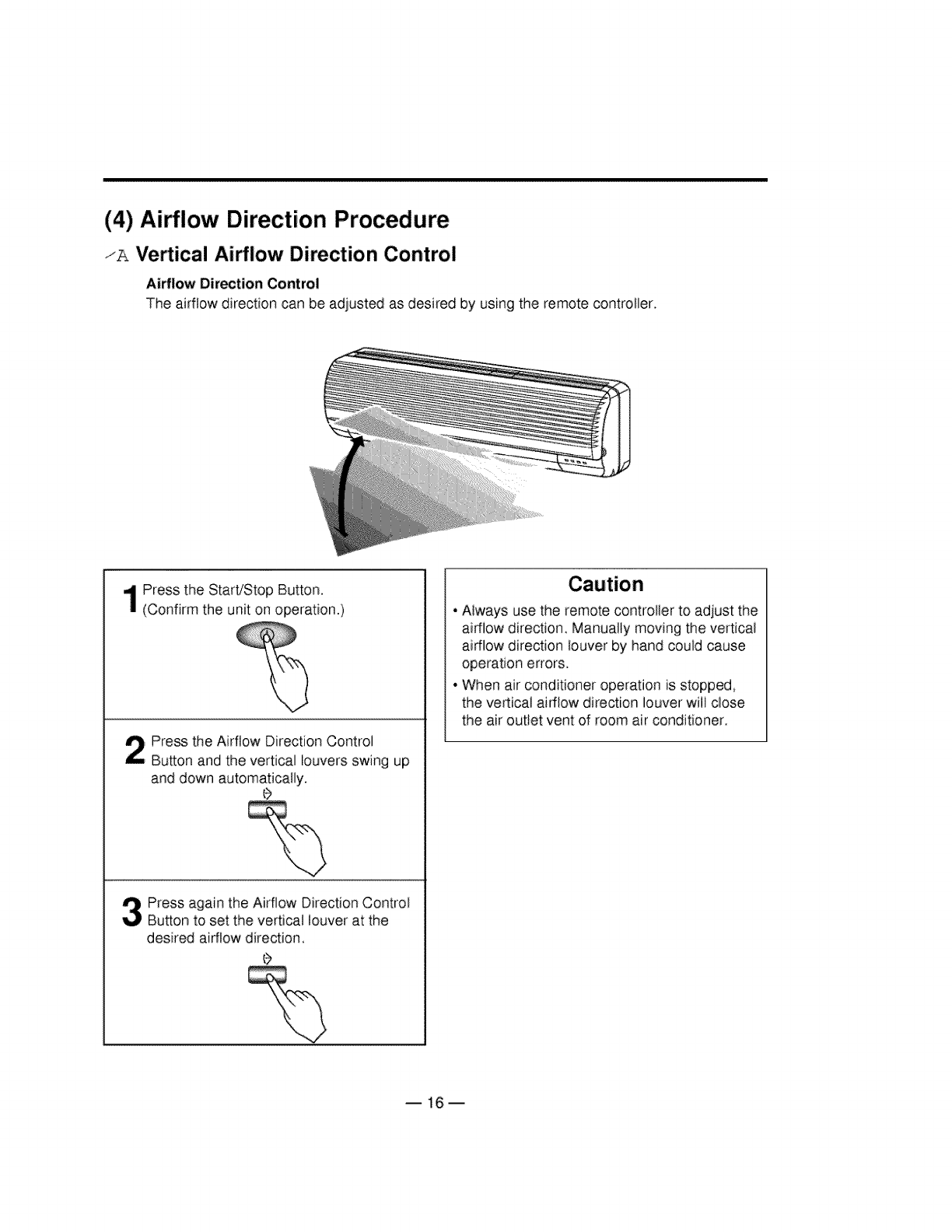
(4) Ai_low Direction Procedure
/A Vertical Ai_low Direction Control
Airflow Direction Control
The airflow direction can be adjusted as desired by using the remote controIler_
Press the Start/Stop Button.
(Confirm the unit on operation.)
Press the Airflow Direction Control
Button and the vertical louvers swing up
and down automatically.
Press again the Airflow Direction Control
Button to set the vertical louver at the
desired airflow direction,
• Always use the remote controller to adjust the
ai_low direction. Manually moving the vertical
airflow direction louver by hand could cause
operation errors.
• When air conditioner operation is stopped,
the vertical airflow direction louver will close
the air outlet vent of room air conditioner.
B16m
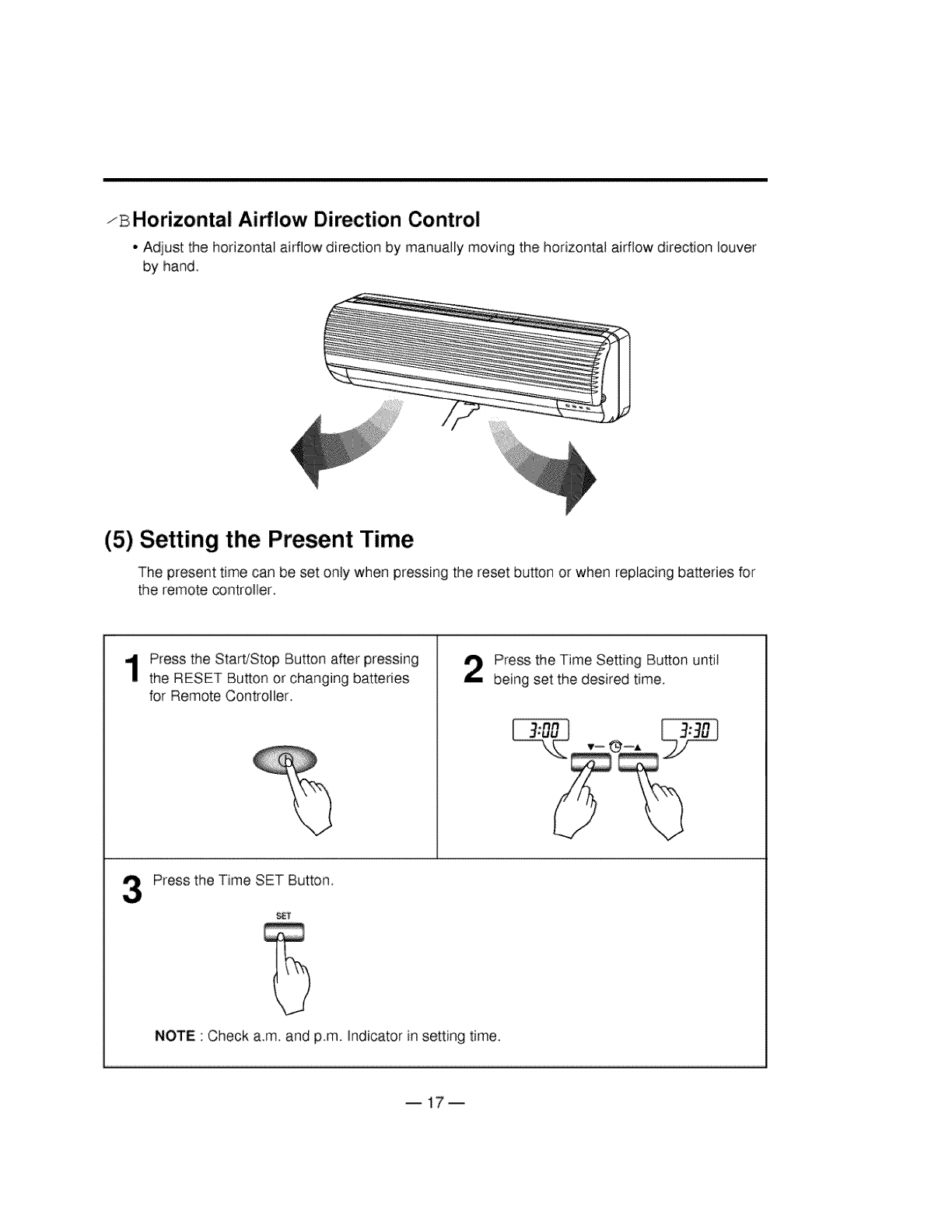
zB Horizontal Airflow Direction Control
• Adjust the horizontal; airflow direction by manually moving the horizontal airflow direction louver
by hand,
(5) Setting the Present Time
The present time can be set only when pressingthe reset button or when replacing batteries for
the remote controller.
Press the Start/Stop Button after pressing
the RESET Button or changing batteries
for Remote Controller.
Press the Time Setting Button until
being set the desired time,
Press the Time SET Button
S_
NOTE •Check a.m. and p.m. indicator in setting time.
B17m
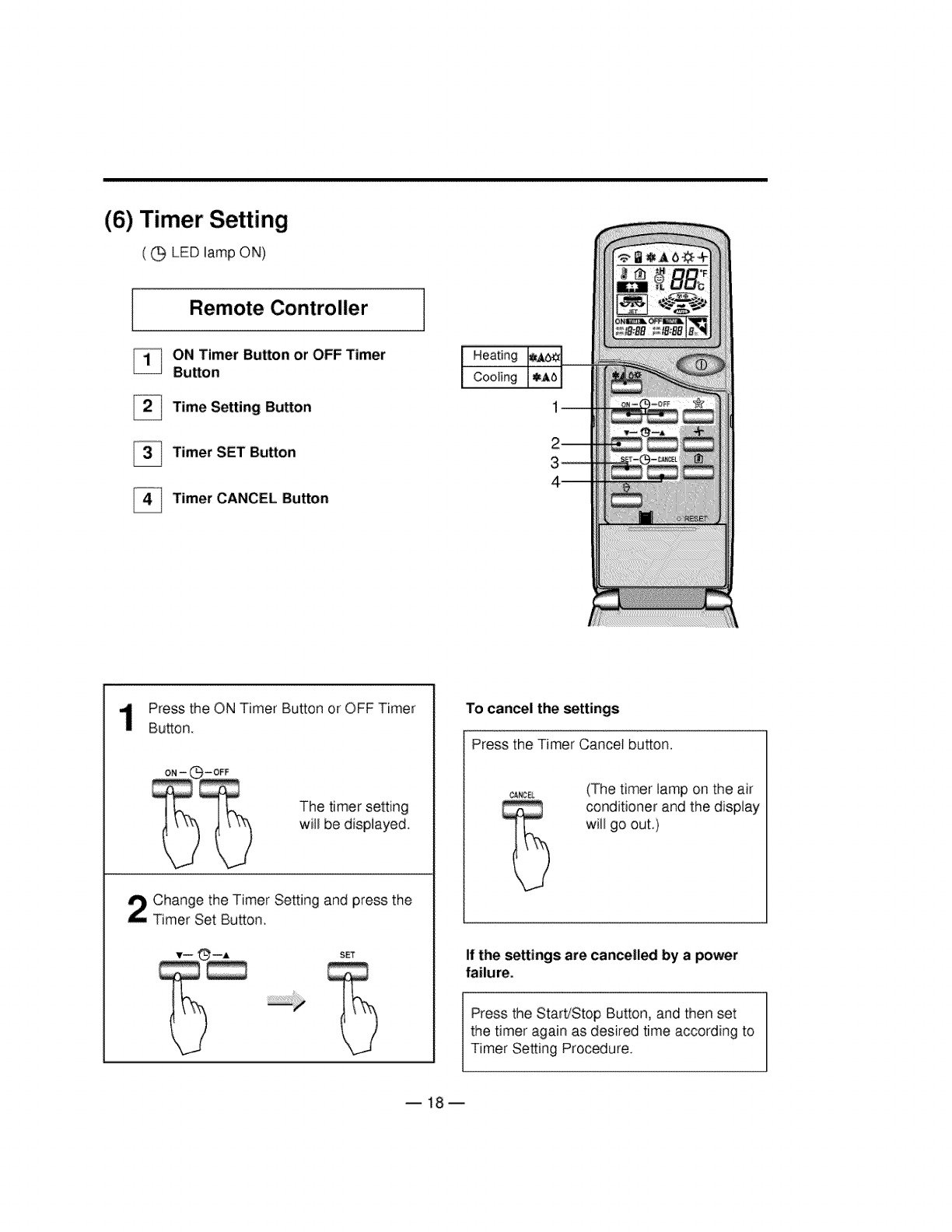
(6) Timer Setting
( G LED lamp Oh,I)
Remote Controller
ON Timer Button or OFF Timer
Button
Time Setting Button
_Timer SET Button
Timer CANCEL Button
Heating
Cooling
Press the ON Timer Button or OFF Timer
Button.
The timer setting
will be displayed.
Change the Timer Setting and press the
Timer Set Button.
SET
To canal the _ttings
Press the Timer Cancel button.
(The timer lamp on the ai:r
conditioner and the display
will go out,)
If the settings are cancelled by a power
failure.
Press the Start/Stop Button, and then set
the timer again as desired time according to
Timer Setting Procedure.
B18m
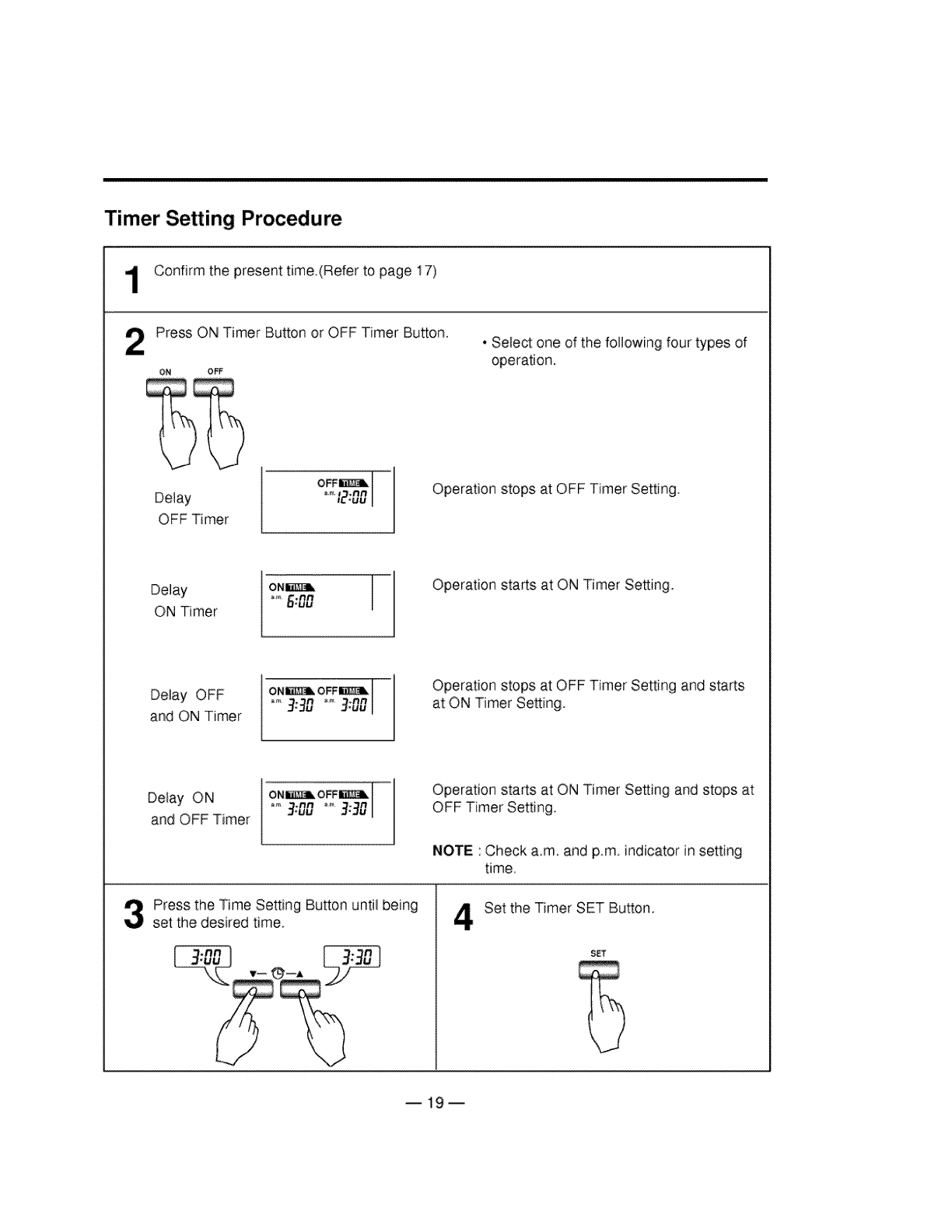
Timer Setting Procedure
Confirm the present time.(Refer to page 17)
Press ON Timer Button or OFF Timer Button.
ON OFF
• Select one of the following four types of
operation.
Delay
OFF Timer
Operation stops at OFF Timer Setting
Delay
ON Timer
Operation starts at ON Timer Setting.
Deiay OFF
and ON Timer
Operation stops at OFF Timer Setting and starts
at ON Timer Setting.
Delay ON
and OFF Timer
Press the Time Setting Button until being
set the desired time.
Operation starts at ON Timer Setting and stops at
OFF Timer Setting.
NOTE • Check a.m. and p.m indicator in setting
time.
4Set the Timer SET Bu_on.
SET
B19m
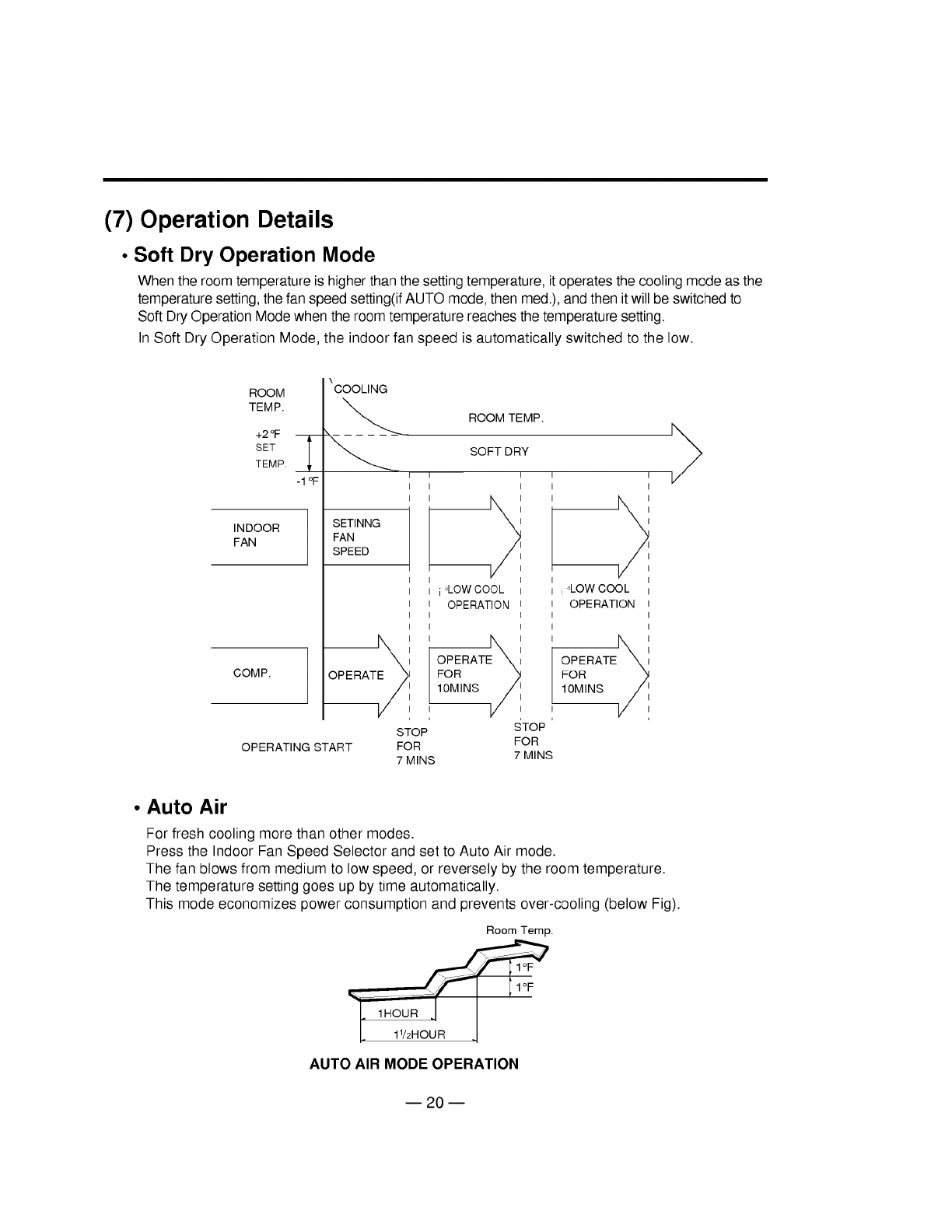
(7) Operation Details
• Soft Dry Operation Mode
When the room temperature is higher than the setting temperature, it operatesthe cooling mode as the
temperature setting, the fan speed setting(ifAUTO mode, then med.), and then it will be switchedto
Soft DryOperation Mode when the room temperature reaches the temperature setting.
In Soft Dry Operation Mode, the indoor fan speed is automatically switched to the low.
ROOM
TEMP.
+2 °F
SET
TEMP.
INDOOR
FAN
COMP.
\COOLING
-1 °F
SETINNG
FAN
SPEED
OPERATE_ I
STOP
OPERATING START FOR
ROOM TEMP.
SOFTDRY
i _LOW COOL
OPERATION
OPERATEX I
FOR
10MINS /I
STOP
FOR
I
7 MINS 7 MINS
i _LOW COOL I
OPERATION I
I
I
OPERATEXi
FOR /_
10MINS /I I
v ,,
•Auto Air
For fresh cooling more than other modes.
Press the Indoor Fan Speed Selector and set to Auto Air mode.
The fan blows from medium to low speed, or reversely by the room temperature.
The temperature setting goes up by time automatically.
This mode economizes power consumption and prevents over-cooling (below Fig).
Room Temp.
_'_ 1HI1_2R Ou R 1
AUTO AIR MODE OPERATION
m 20 m
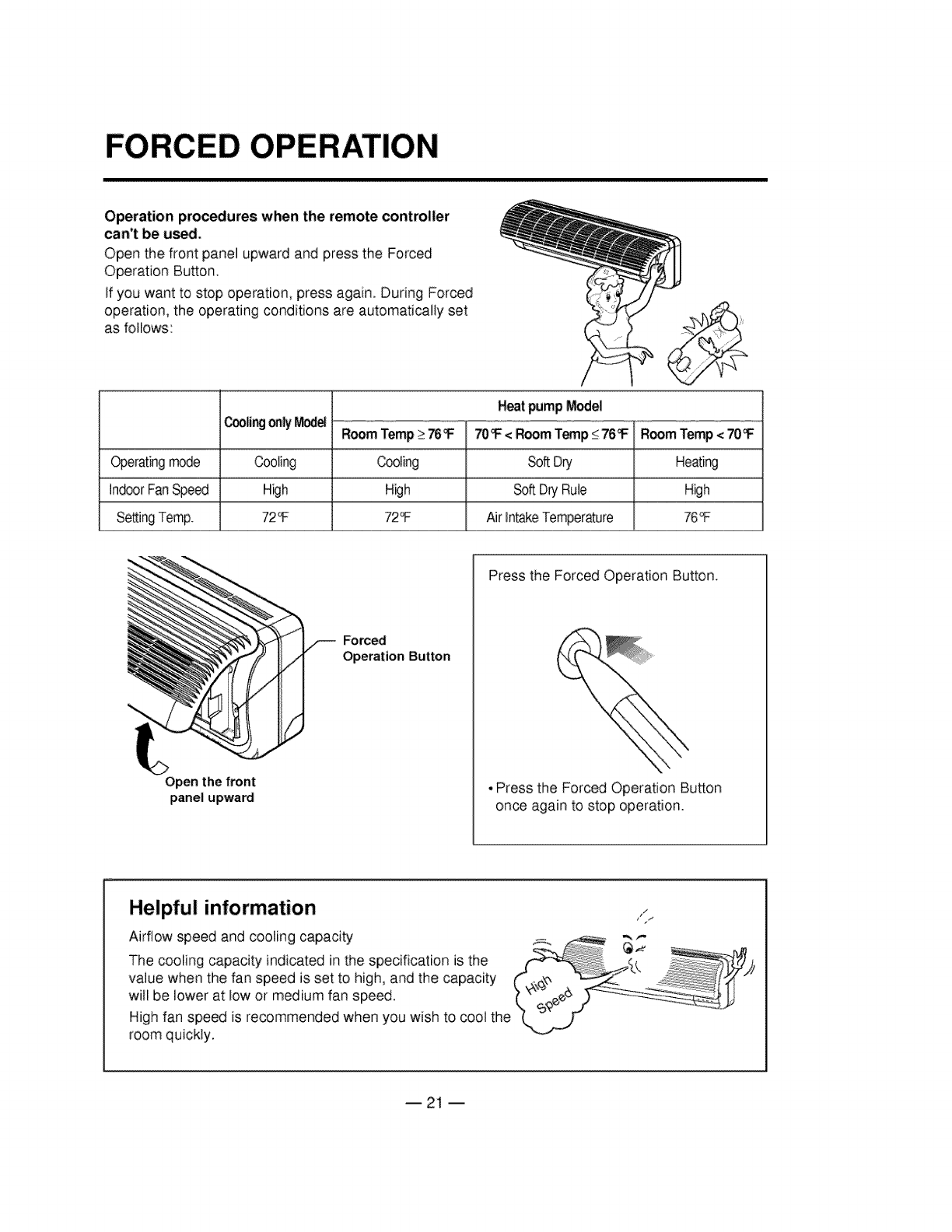
FORCED OPERATION
Operation procedures when the remote controller
can't be us_
Open the front panel upward and press the Forced
Operation Button.
If you want to stop operation, press again. During Forced
operation, the operating conditions are automatically set
as foliows:
Cooli:r_jonly fuel RoomTemp>76_ =IF70_ <RoomTemp<76_/_TRoomTemp<70_
==
Operatingmode Cooling Cooling SoftDry Heating
IndoorFanSpeed Huh High SoftDryRule Huh
SettingTemp. 72_ 72_ AirIntakeTemperature 76_
Open the front
panel upward
_rced
Operation Button
Press the Forced Operation Button.
• Press the Forced Operation Bu_on
once again to stop operation.
Helpful information
Airflow speed and cooling capacity
The cooling capacity indicated in the specification is the
value when the fan speed is set to high, and the capacity
wiil be lower at low or medium fan speed.
High fan speed is recommended when you wish to coo] the
room quickly.
--21 --
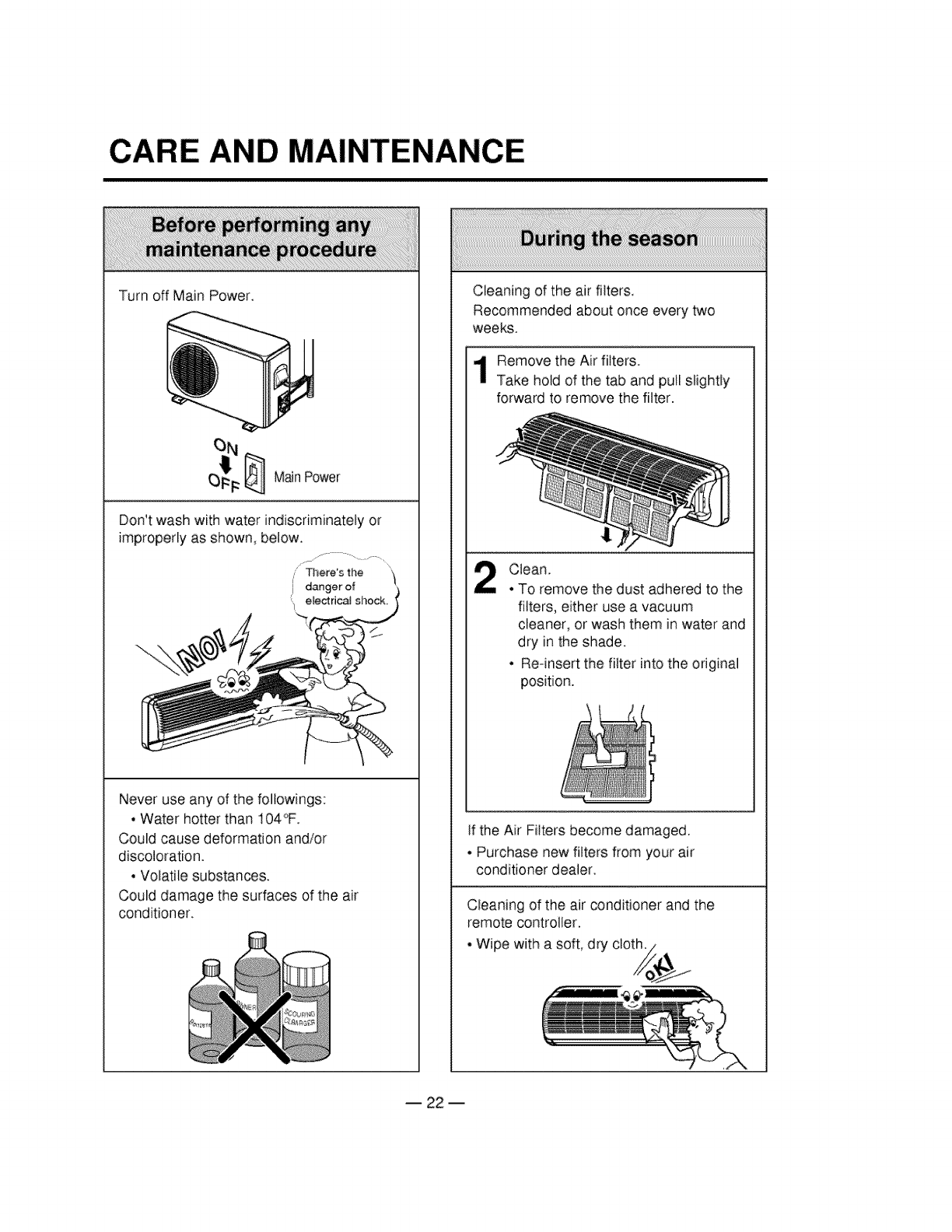
CARE AND MAINTENANCE
Turn off Main Power.
MainPower
Don't wash with water indiscriminately or
improperly as shown, below.
,' There's the
i danger of
/
Never use any of the followings:
• Water hotter than 104°F.
Could cause deformation and/or
discoloration.
• Volatile substances.
Could damage the surfaces of the air
conditioner.
Cleaning of the air filters.
Recommended about once every two
weeks.
Remove the Air filters.
Take hold of the tab and pull slightly
forward to remove the filter.
Clean.
• To remove the dust adhered to the
filters, either use a vacuum
cleaner, or wash them in water and
dry in the shade.
• Re-insert the filter into the original
position.
If the Air Filters become damaged.
• Purchase new filters from your air
conditioner dealer.
Cleaning of the air conditioner and the
remote controller.
• Wipe with a soft, dry cloth./
B 22 m
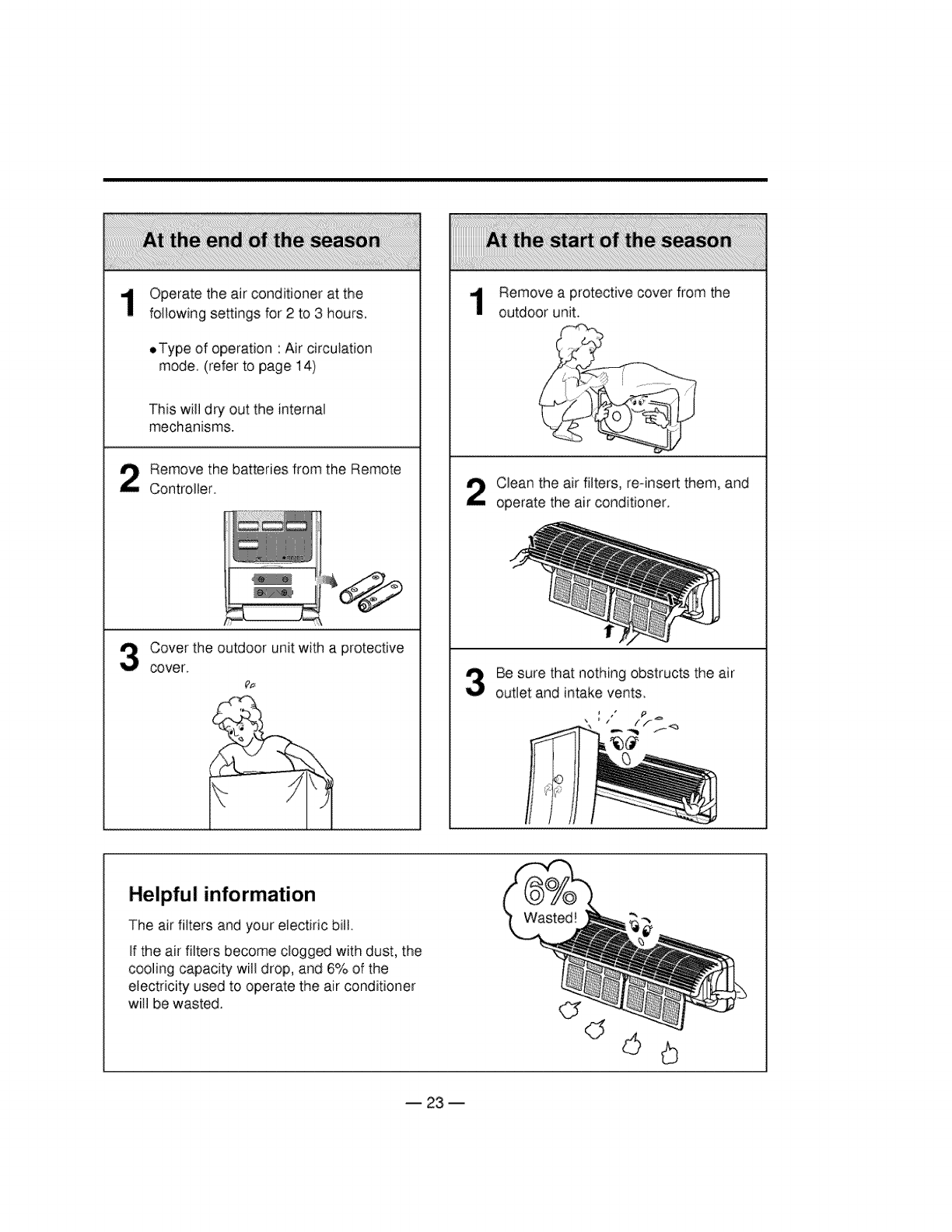
Operate the air conditioner at the
following settings for 2 to 3 hours.
oType of operation 'Air circulation
mode (refer to page 14)
This will dry out the internal
mechanisms.
Remove the batteries from the Remote
Controller.
Cover the outdoor unit with a protective
cover.
Remove a protective cover from the
outdoor unit.
Clean the air filters, re-insert them, and
operate the air conditioner.
Be sure that nothing obstructs the air
outlet and intake vents
p
Helpful information
The air filters and your electiric biil
If the air filters become clogged with dust, the
COOlingcapacity will drop, and 6% of the
electricity used to operate the air conditioner
will be wasted.
-- 23 --
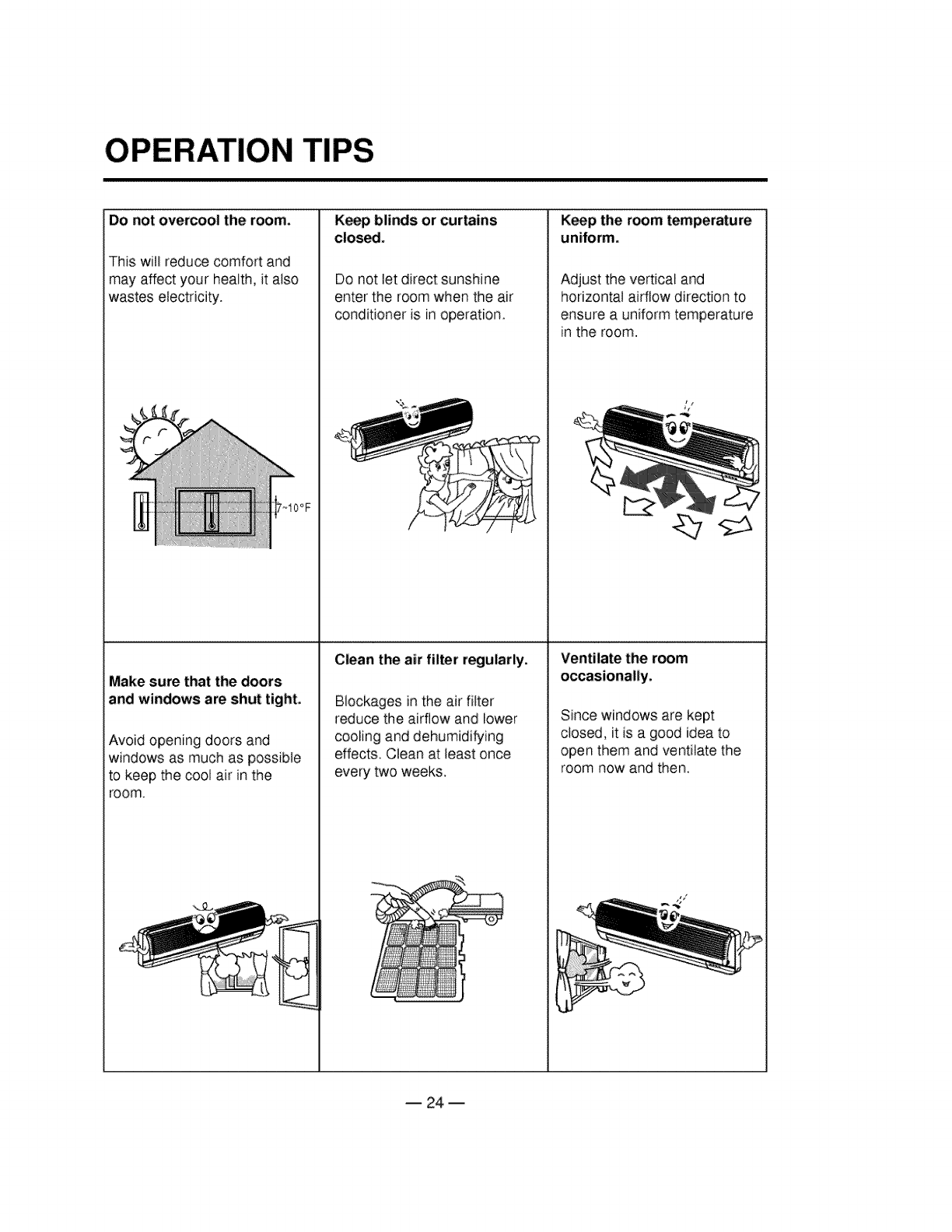
OPERATION TiPS
Do not overcool the room.
This will reduce comfort and
may affect your health, it also
wastes electricity.
~IOOF
Keep blinds or curtains
close.
Do not let direct sunshine
enter the room when the air
conditioner is in operation.
Keep the room
uniform.
Adjust the vertical and
horizontal aidlow direction to
ensure a uniform temperature
in the room.
Clean the air filter regularly. Ventilate the room
Make sure that the doors occasionally.
and windows are shut tight, Blockages inthe air filter
reduce the airflow and lower Since windows are kept
Avoid opening doors and cooling and dehumidifying closed, it is a good idea to
windows as much as possible effects. Clean at least once open them and ventilate the
to keep the cool air in the every two weeks, room now and then.
room.
dl<--
B 24 m
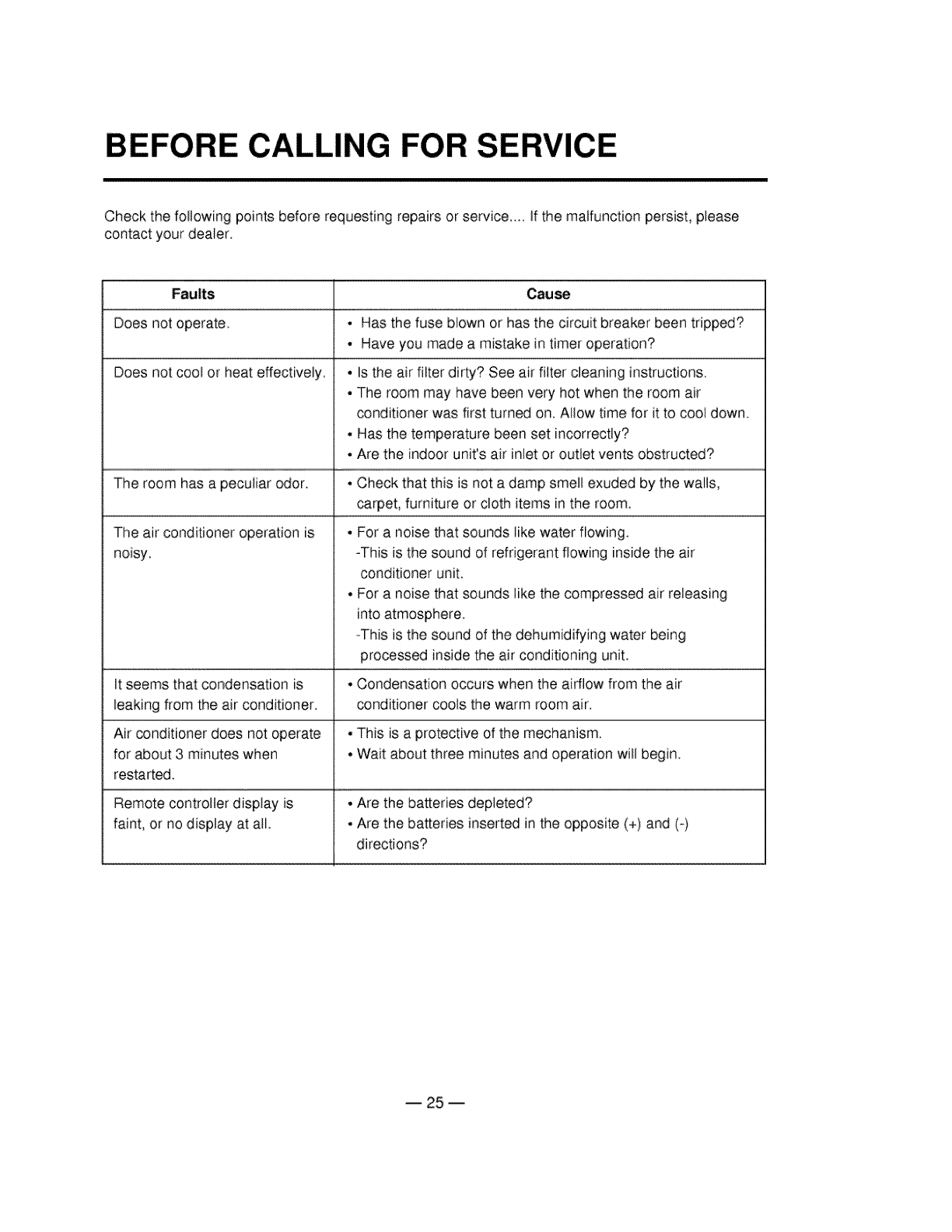
BEFORE CALLING FOR SERVICE
Check the following points before requesting repairs or service .... if the malfunction persist, please
contact your dealer.
Faults Cau_
Does not operate. • Has the fuse blown or has the circuit breaker been tripped?
• Have you made a mistake in timer operation?
Does not cool or heat effectively, • Is the air filter dirty? See air filter cleaning instructions.
• The room may have been very hot when the room air
conditioner was first turned on, Allow time for it to cool down.
• Has the temperature been set incorrectly?
• Are the indoor unit's air inlet or outlet vents obstructed?
The room has a peculiar odor_ • Check that this is not a damp smell exuded by the walls,
carpet, furniture or cloth items in the room.
The air conditioner operation is ° For a noise that sounds like water flowing.
noisy. -This is the sound of refrigerant flowing inside the air
conditioner unit,
• For a noise that sounds like the compressed air releasing
into atmosphere.
-This is the sound of the dehumidifying water being
processed inside the air conditioning unit.
It seems that condensation is • Condensation occurs when the airflow from the air
leaking from the air conditioner conditioner cools the warm room air.
Air conditioner does not operate • This is a protective of the mechanism.
for about 3 minutes when • Wait about three minutes and operation will begin.
restarted.
Remote controller display is , Are the batteries depleted?
faint, or no display at aft. • Are the batteries inserted in the opposite (+) and (-)
directions?
-- 25 --
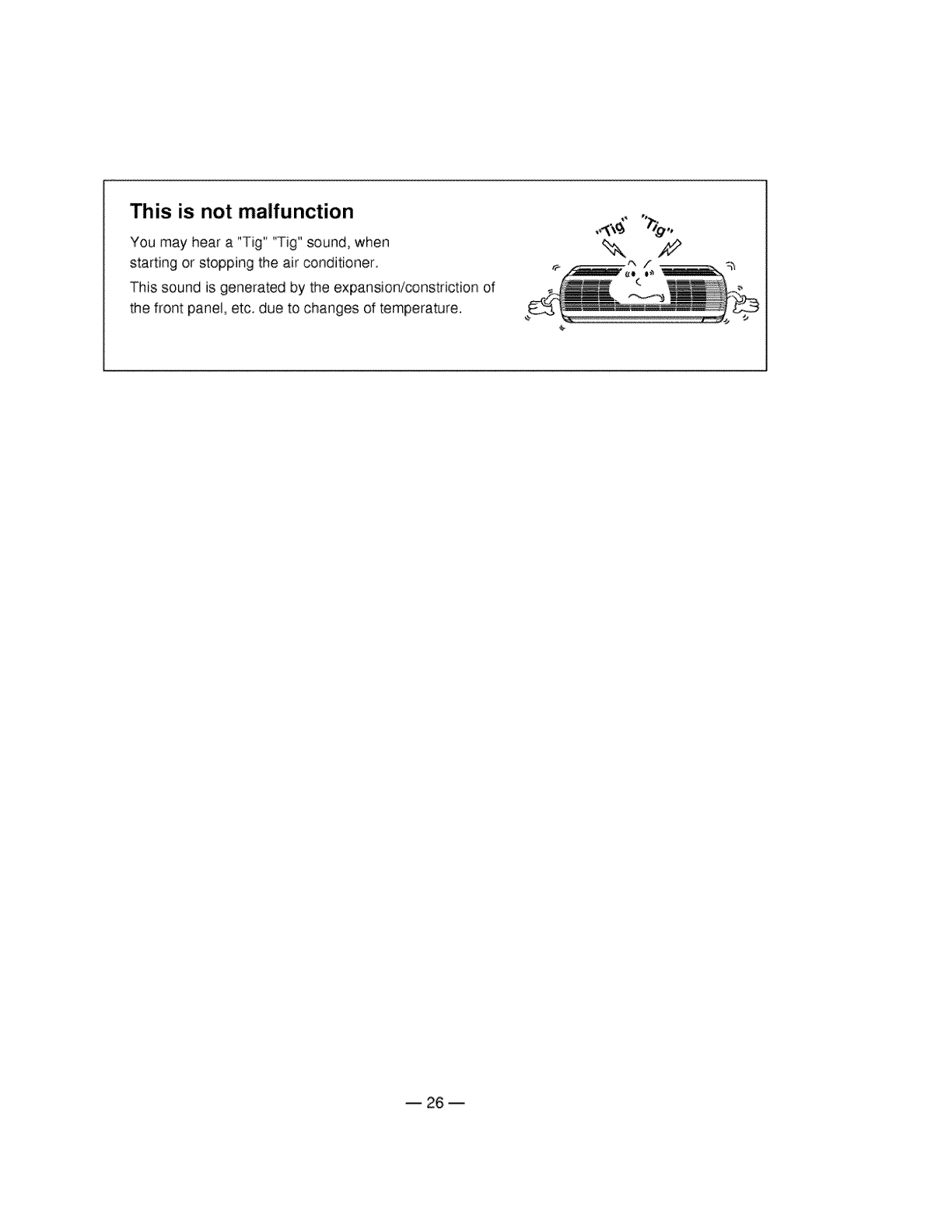
This is not malfunction
You may hear a "Tig" "Tig" sound, when
starting or stopping the air conditioner.
This sound is generated by the expansion/constriction of
the front panel, etc. due to changes of temperature.
,,<:\_
B 26 m
