IDO Intelligent Technology M3S001A01 SwiftCam M3s Mobile Stabilizer User Manual Instructions 2 re

Shenzhen IDO Intelligent Technology Co. Ltd SwiftCam M3s Mobile Stabilizer Instructions 2 re

(SC-HG-M3S) UserMan

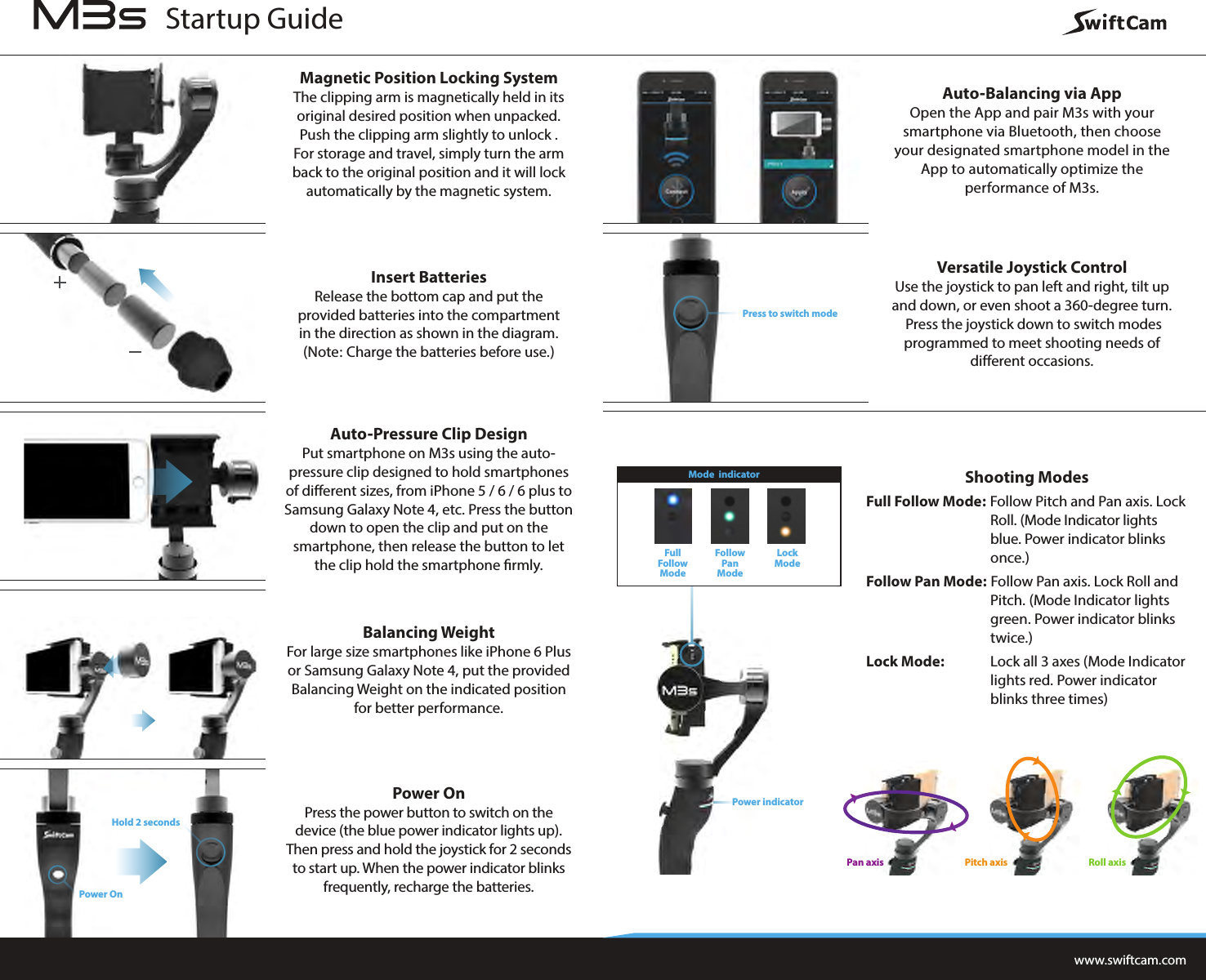
Magnetic Position Locking SystemThe clipping arm is magnetically held in its original desired position when unpacked. Push the clipping arm slightly to unlock . For storage and travel, simply turn the arm back to the original position and it will lock automatically by the magnetic system.Insert BatteriesRelease the bottom cap and put the provided batteries into the compartment in the direction as shown in the diagram. (Note: Charge the batteries before use.)Auto-Pressure Clip DesignPut smartphone on M3s using the auto-pressure clip designed to hold smartphones of different sizes, from iPhone 5 / 6 / 6 plus to Samsung Galaxy Note 4, etc. Press the button down to open the clip and put on the smartphone, then release the button to let the clip hold the smartphone rmly.Balancing WeightFor large size smartphones like iPhone 6 Plus or Samsung Galaxy Note 4, put the provided Balancing Weight on the indicated position for better performance.Power OnPress the power button to switch on the device (the blue power indicator lights up). Then press and hold the joystick for 2 seconds to start up. When the power indicator blinks frequently, recharge the batteries.Auto-Balancing via AppOpen the App and pair M3s with your smartphone via Bluetooth, then choose your designated smartphone model in the App to automatically optimize the performance of M3s.Versatile Joystick ControlUse the joystick to pan left and right, tilt up and down, or even shoot a 360-degree turn. Press the joystick down to switch modes programmed to meet shooting needs of different occasions.Shooting ModesFull Follow Mode: Follow Pitch and Pan axis. Lock   Roll. (Mode Indicator lights    blue. Power indicator blinks   once.)Follow Pan Mode: Follow Pan axis. Lock Roll and  Pitch. (Mode Indicator lights  green. Power indicator blinks   twice.)Lock Mode:   Lock all 3 axes (Mode Indicator  lights red. Power indicator  blinks three times)www.swiftcam.comPress to switch modeHold 2 secondsPower OnPower indicatorFullFollowModeFollowPan ModeLockModeMode  indicatorStartup GuideRoll axisPan axis Pitch axis
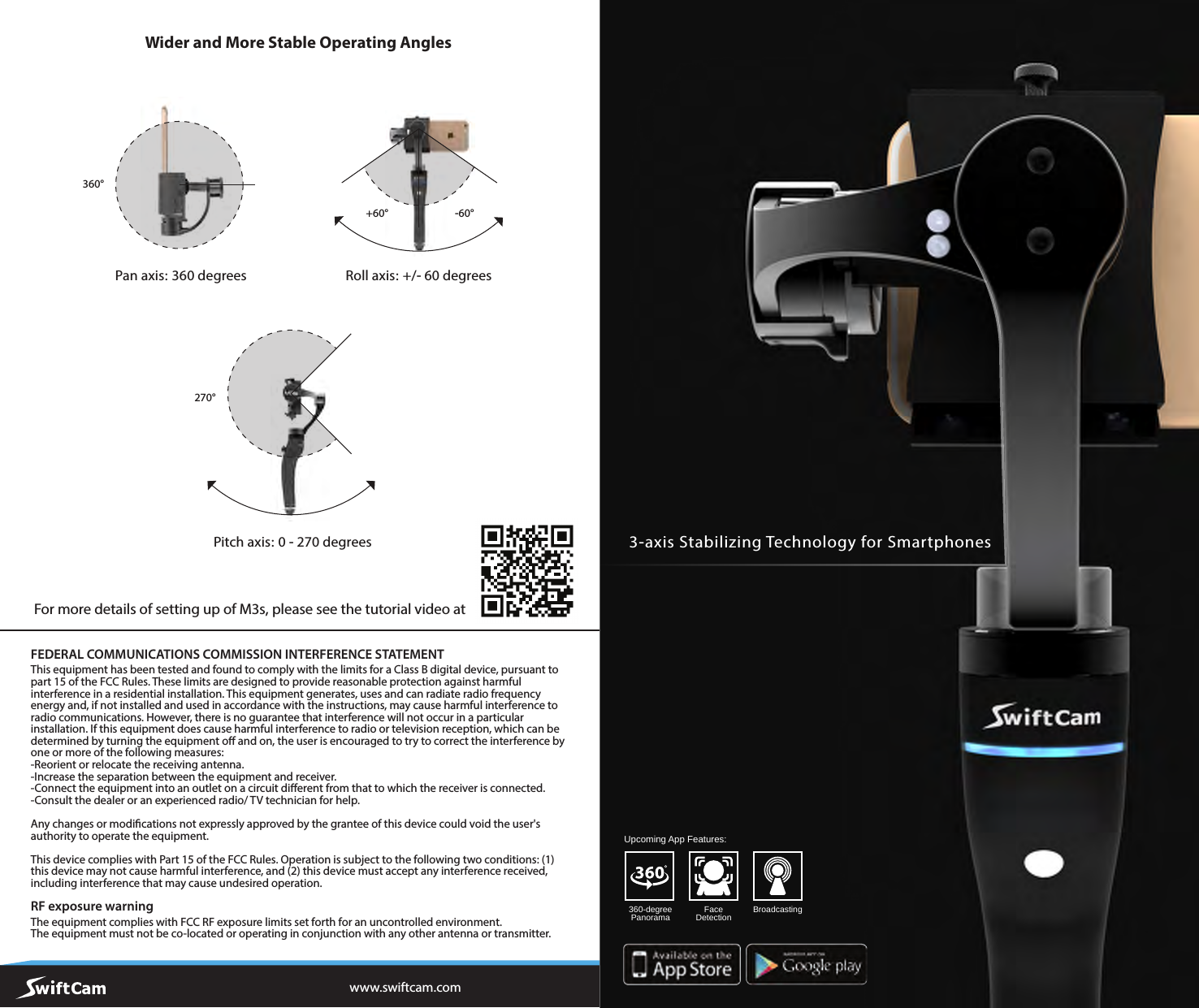
Wider and More Stable Operating Angleswww.swiftcam.comRoll axis: +/- 60 degreesPan axis: 360 degreesPitch axis: 0 - 270 degrees+60°270°360°-60°FEDERAL COMMUNICATIONS COMMISSION INTERFERENCE STATEMENT This equipment has been tested and found to comply with the limits for a Class B digital device, pursuant to part 15 of the FCC Rules. These limits are designed to provide reasonable protection against harmful interference in a residential installation. This equipment generates, uses and can radiate radio frequency energy and, if not installed and used in accordance with the instructions, may cause harmful interference to radio communications. However, there is no guarantee that interference will not occur in a particular installation. If this equipment does cause harmful interference to radio or television reception, which can be determined by turning the equipment o and on, the user is encouraged to try to correct the interference by one or more of the following measures:-Reorient or relocate the receiving antenna.-Increase the separation between the equipment and receiver.-Connect the equipment into an outlet on a circuit dierent from that to which the receiver is connected.-Consult the dealer or an experienced radio/ TV technician for help. Any changes or modications not expressly approved by the grantee of this device could void the user's authority to operate the equipment. This device complies with Part 15 of the FCC Rules. Operation is subject to the following two conditions: (1) this device may not cause harmful interference, and (2) this device must accept any interference received, including interference that may cause undesired operation. RF exposure warning  The equipment complies with FCC RF exposure limits set forth for an uncontrolled environment.The equipment must not be co-located or operating in conjunction with any other antenna or transmitter.For more details of setting up of M3s, please see the tutorial video at FaceDetection Broadcasting360-degreePanoramaUpcoming App Features:3-axis Stabilizing Technology for Smartphones

Navigation menu