IMEDIPLUS MCE12L001 Cardiart Wireless 12-Lead Electrocardiograph Monitor User Manual
IMEDIPLUS INC. Cardiart Wireless 12-Lead Electrocardiograph Monitor
User Manual
Cardiart Wireless 12-Lead Electrocardiograph Monitor
Owner’s manual
Be sure to read the original manual and follow the instructions before use
2017.09.30 Ver. 1.0
1
Contents
Warning and Precaution ........................................................................................ 2
Chapter 1 Outline .................................................................................................. 4
1. Product introduction ................................................................................ 4
2. Intended use ............................................................................................. 4
3. Principle ................................................................................................... 4
4. Features .................................................................................................... 4
Chapter 2 Composition .......................................................................................... 5
2.1 Appearance .............................................................................................. 5
2.2 Content ..................................................................................................... 6
Chapter 3 Electrode locations ............................................................................... 7
Chapter 4 Installation ............................................................................................ 9
Chapter 5 Software Operation ............................................................................. 11
5.4 VIEW/ Add/ Delete the patient data ............................................. 20
5.5 Select a patient profile to creative a profile for patient report ...... 21
5.6 View a patient report .................................................................... 21
Chapter 6 Environment and Maintenance ........................................................... 22
Chapter 7 Products Specification ........................................................................ 25
Chapter 8 Symbol Description and Manufacturer Information .......................... 26
2
Warning and Precaution
Warnings for product using
1)
The product is not intended to diagnose.
2)
Please remove the battery when not using for a long time, to avoid corrosion of the spring
if the battery holder.
3)
The product can be used continuously for at least 19 hours under normal use.
4)
Do not use the product near any flammable gas (e.g., high concentrations oxygen,
hydrogen or anesthetics), which can cause an explosion or fire.
5)
To avoid electric shock, do not disassemble or modify the product of one’s own.
6)
Please contact the manufacturer before connecting the product to other equipment.
7)
This product is a portable device, but the safety of the instrument is not able to be
ensured in the transport process with a strong impact or fall.
8)
Avoid the product from water, or the patient and the operator may involve in electric
shock and other dangers.
9)
To avoid infection, please follow the instruction bellow
Regularly clean the parts that contact with patients.
Patients of open type infectious disease do not use the product for testing.
10)
When placing the wires or cables, be aware to avoid the possibility of tripping people or
winding the patient's neck.
11)
To ensure using the equipment safely, follow the maintenance procedures contained
inthe original manual.
12)
Improper battery disposal may result in explosion or contamination. Please recycle the
battery in accordance with local regulations, do not throw the battery as common trash
13)
Do not use the product with Pacemaker.
Precaution
1)
The conductor parts of the electrode of ECG signal record box and its connector
(including the neutral electrode) should not contact with other conductor parts, including
the earth.
2)
The factory will yearly check whether the ECG signal record box and the cable are
damaged.
3)
Do not use the product with high frequency surgical equipment.
4)
The product is classified as CF type equipment, but not directly used for the patient's
heart.
5)
There will be potential risks when using the product along with installation of cardiac
rhythm or other electrical stimulator at the same time. Pay full attention to changes of the
ECG to ensure safety and to ensure that the leakage current is within the allowable range.
6)
Do not use accessories that are not included in the product system. The use of non-original
accessories may result in inaccurate patient data, damage to equipment, and invalid
warranty.
3
7)
Please use the original standard patient cable, otherwise it will reduce the minimum safety
of the product.
8)
The electrodes is suggested to be placed by professional medical personnel.
9)
To avoid the possible damage, do not contact the product with sharp or hard objects.
10)
Do not expose the patient cable to strong ultraviolet radiation.
11)
Do not stretch the patient cable for this may cause mechanical or electrical malfunction.
Before storing the patient cable should be wrapped as a loose circle.
12)
Avoid placing the patient cable where it may be caught, stretched, or stamped. Otherwise
the results may be inaccurate and may require repair.
13)
Please use the original accessories. The use of non-designated accessories may result in
degradation of equipment performance or unsafety.
14)
Portable and mobile radio frequency (RF) communication equipment will affect the
performance of the product.
15)
Other medical devices (including but not limited to defibrillators, ultrasound instruments,
pacemakers and other stimulators) can be used along with the product, but such
equipment may interfere the signal.
4
Chapter 1 Outline
1. Product introduction
Wireless ECG monitor of IMEDIPLUS (hereinafter referred as the product; model: MCE12L001
) is a compact, lightweight, easy carry, and agile product. The data is
transmitted through Bluetooth, avoided the inconvenience of the traditional data
transmission; also making transmission space and distance more flexible, convenient
and smooth.
The software can be installed on iOS devices, users can view data on iPad / iPhone /
iTouch; this kind of working mode is more flexible than the traditional system
composed of personal, laptop, the record box (with data lines ), and the printer (with
data transmission cable).
2. Intended use
The product is mainly for checking abnormalities of the adults’ heart through
recording ECG by medical staff in hospital or clinic. The product cannot be used as
the only basis for diagnosis.
3. Principle
The product collect the ECG signal through lead wire, initially amplifies the signal
through preamplifier, and filter out the polarization voltage, baseline shift, and high
frequency noise. Amplify the signal with the use of secondary amplification circuit,
and convert the analog signal to digital signal with the A / D converter. Then transmit
the signal to iOS mobile system through Bluetooth, at the same time, display on the
screen for clinicians to diagnose and study.
4. Features
Compact, lightweight, simple operation, and easy carry.
Breakthrough the limitation of traditional ECG (workstations).
Timely information transmission.
Low power-consuming Bluetooth.
5
Chapter 2 Composition
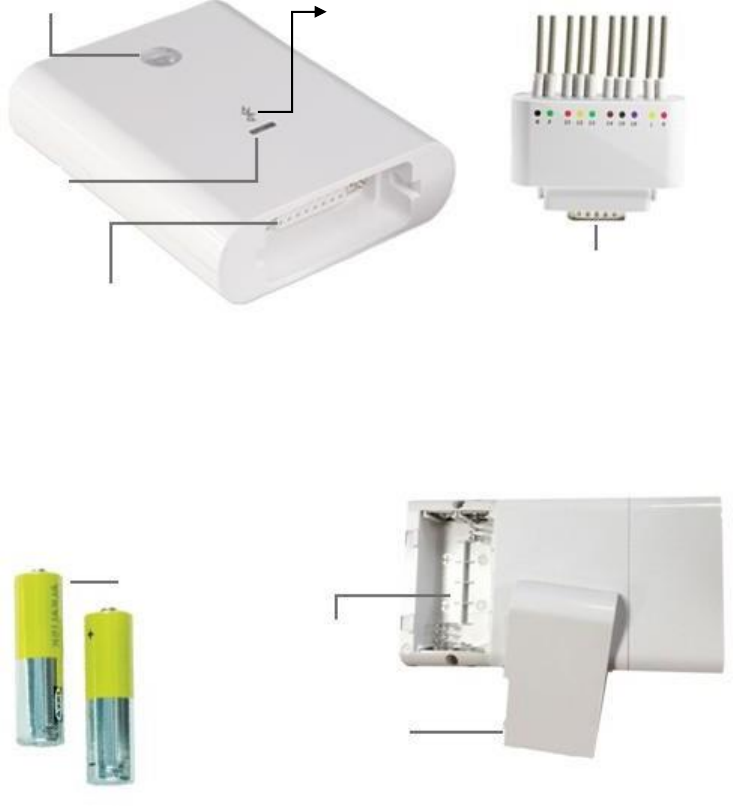
The product is composed of ECG record box, ECG lead wire, electrode patch/ suck ball and
instruction manual.
2.1 Appearance
Power button Bluetooth
Power Indicator
Green light for sufficient power;
Glint for power shortage
Lead wire port
ECG Signal Record box
Front
Lead wire plug
2 AA 1.5 V batteries
Battery compartment
Battery cover
Back
Caution: If there’s any damage between the connection of the lead wire and signal
record box, please replace with the specified lead wire.

6
2.2 Content
No. Item
Name
Amount
1
ECG Signal record box
1
2
ECG lead cable
1
3
Instruction Manual
1
4
ECG Arm clamp
4
5
ECG Suck ball
1 set
7
Chapter 3 Electrode locations
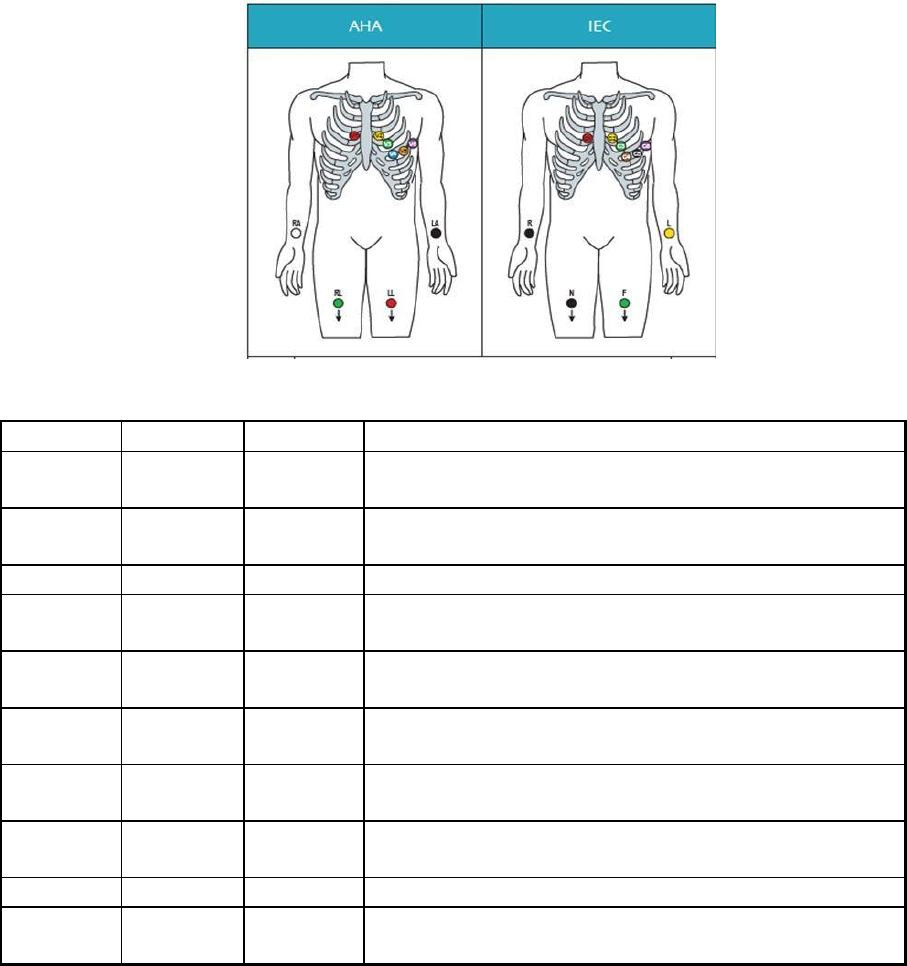
3.1
WILSON standard lead
Electrode loctions
Electrode
AHA
IEC
Hookup
A
V1 red
C1 red
The fourth intercostal space to the right of the
sternum
B
V2 yellow
C2
yellow
The fourth intercostal space to the left of the
sternum
C
V3 green
C3 green
Midway between electrode B and D
D
V4 blue
C4
brown
The fifth intercostal space in the mid-clavicular
line
E
V5
orange
C5 black
Horizontally even with D in the anterior axillary
line
F
V6
purple
C6
purple
Horizontally even with D in the midaxillary line
G
LA black
L yellow
Left arm (resting ECG) or left shoulder (exercise
test)
J
RA white
R red
Right arm (resting ECG) or right shoulder
(exercise test)
H
LL red
F green
Left foot (resting ECG) or left leg (exercise test)
I
RL green
N black
Right foot (resting ECG) or right leg (exercise
test)
8
3.2
Electrode connection and position
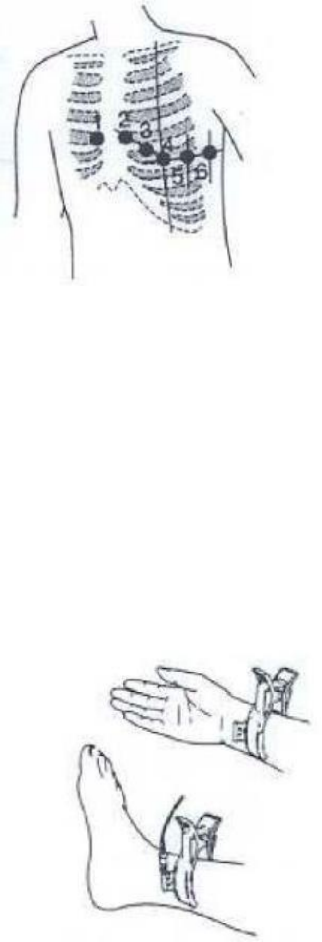
Precordial lead:Coat the patient’s chest with conductive paste or wipe with
alcohol cotton balls in correct position, then attach the lead and
suck ball to the patient in the order as below:
Precordial lead position:
V1:The fourth intercostal space to the right of the sternum
V2:The fourth intercostal space to the left of the sternum
V3:Mid-point between V2 and V4
V4:The fifth intercostal space in the left clavicular midline
V5:The fifth intercostal space in the axillary line V6:
The fifth intercostal space in the axillary midline
Electrode clip:
Limb lead:
1) Clean the skin of the patient
2) Apply conductive paste or wipe with alcohol cotton balls
3) Attach the electrode clip, preferably on the inside of limbs
4) To prevent oxidation and poor connection, please clean the clips after use
Limb leas position:
RA:Right arm
LA:Left arm RL:
Right leg LL:Left
keg
Recommendation:
1)
It is recommended that electrodes be placed by medical trained personnel.
2)
To obtain correct ECG record, please previously clean the skin.
9
Chapter 4 Installation
This chapter is divided into two parts. First, the components and the installation of hardware;
second, the components and the installation of software.
4.1
Hardware installation
The product is mobile device combines ECG record box (see 2.1 appearance) with iOS
system, please follow the instructions before use.
4.2
Download vhECG from Apple App Sore
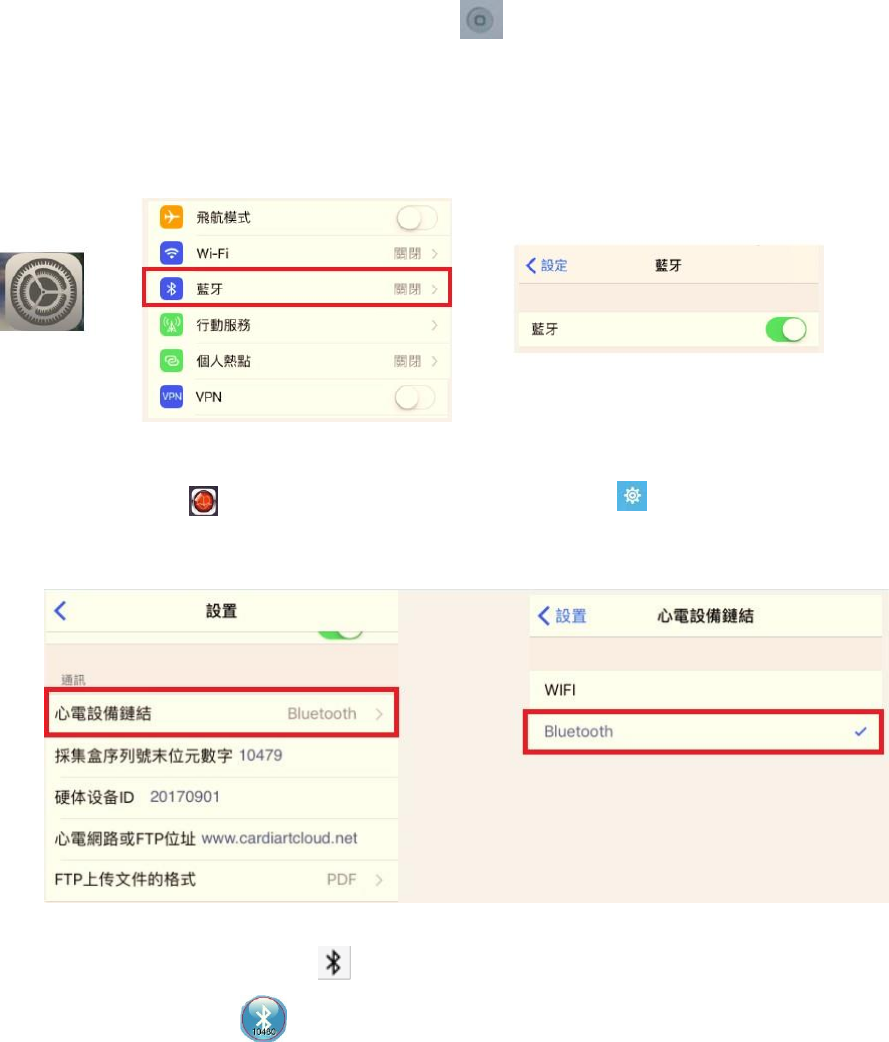
Step 1: Turn on the ECG record box; press the power , the indicator would
light (green light for sufficient power while glint for power shortage).
Step 2: Turn on the mobile device; click〝 Settings〞, select and turn on
〝Bluetooth〞.
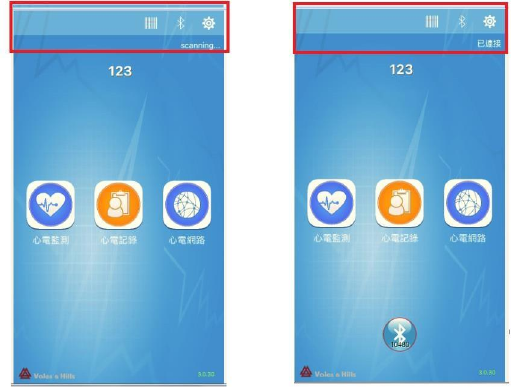
Step 3: Open the Cardiart , enter the home page, enter the settings , then
click "ECG device link" and select Bluetooth. As below:
Step 4: Back to the home page and click to scan the device. When successfully
connected, you will press to start working.
10
Device connection diagram
Notice:
The last five digits of the factory number of the ECG record box will be displayed at the
bottom of the mobile device and you will need to select the same device number to
connect.
11
Chapter 5 Software Operation
ECG software (Cardiart ECG) is an easy-to-use application that offers professional
electrocardiographic tools and an excellent user experience. Most of the operation is the same
as iOS system. If you are familiar with the Apple app and have the basic knowledge of ECG,
there won’t be any problem of operation. This chapter portrays the basic operation of the
software, please read carefully.
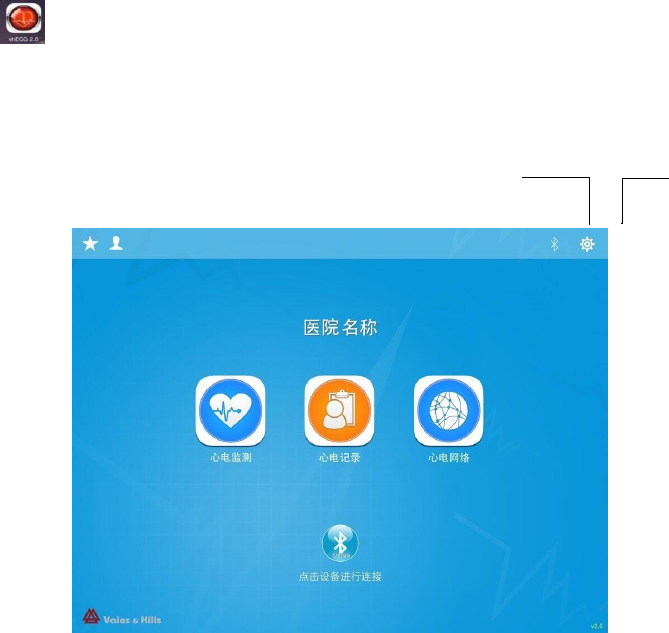
When the connection between mobile device and the record box is completed, click the
Cardiart icon to run the software and enter the home page (as below):
System settings
Home page
Communication mode display
12
●
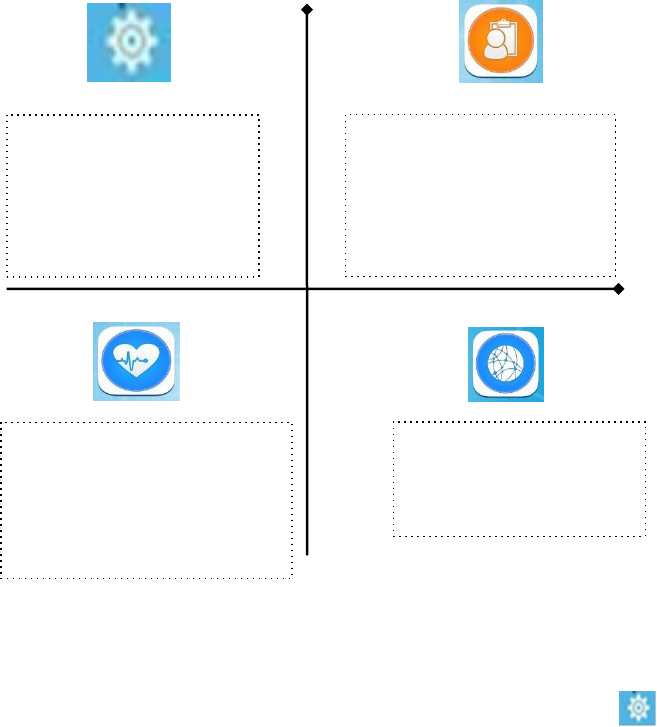
Software is mainly composed of settings, ECG monitoring, records, and network
5.1 Settings
You can customize your vhECG with your own prefernece. Click the icon to enter the
settings which consists of four parts:
1) General
Hospital Name – Input your hospital or organization name.
Physician Name - Used for diagnosis signatures.
2) ECG Signal capture
Use demo data - ON / OFF: Data DEMO in monitoring
Fallback record mode - ON / OFF, Recording mode.
High-pass Filter Frequency- Cutoff frequency of high-pass filter: 0.05-0.5Hz,
default: 70Hz.
Low-pass Filter Frequency - Cutoff frequency of low-pass filter: 30-250Hz,
default: 70Hz.
Notch Filter Frequency: Eliminate power-line interference.
Network: display the
uploaded ECG report.
ECG monitoring: ECG
recording, new medical
records, data acquisition
(record), preview, edit,
delete, print report.
ECG records: to view
the collected ECG,
remove cases and so on.
Settings: hospital basic
information, recording
time, filter, report
format and other
related parameters.
13
Anti-Baseline Drift - ON / OFF:Keep the baseline stable.
ENG filter - ON / OFF:Remove the EMG from the ECG signal
3) Communication
ECG Device Connectivity – Bluetooth
4) Report
Custom the printing form:
Title – title on the printed report
Report format – PDF or JPG
Lead layout - 12×1\2×6\3*4+1
Paper orientation – A4 or B5, vertical or horizontal
Notice:
Anti-Baseline Drift: This function can effectively remove the baseline drift due to
respiration or body movement without affecting the ECG frequency response, such as ST
segment.
Muscle noise can be removed by setting LPF with low cutoff frequency but it will
severely affect ECG high frequency component such as QRS complex. vhECG EMG
filter can effectively remove muscle noise with little affection to ECG signal.
5.2 Monitoring and Recording
This section shows the way to record ECGs.
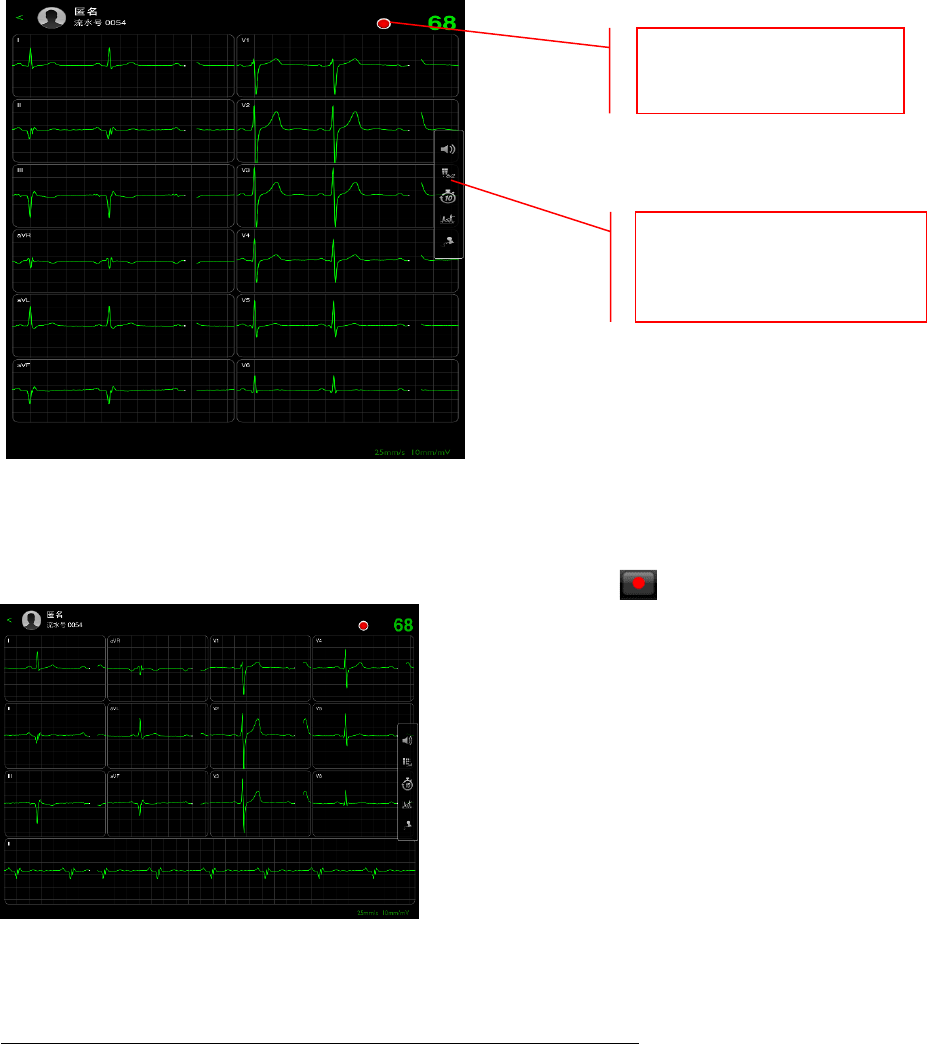
Step 1: click “ECG monitoring” to enter the recording page.
Make sure the ECG record box has successfully connected to mobile device, if
not, please refer to chapter 4 for reconnection.
Notice:
14
If successfully connected, enter the "recording" stage (as below)
"Pre -recording stage" interface
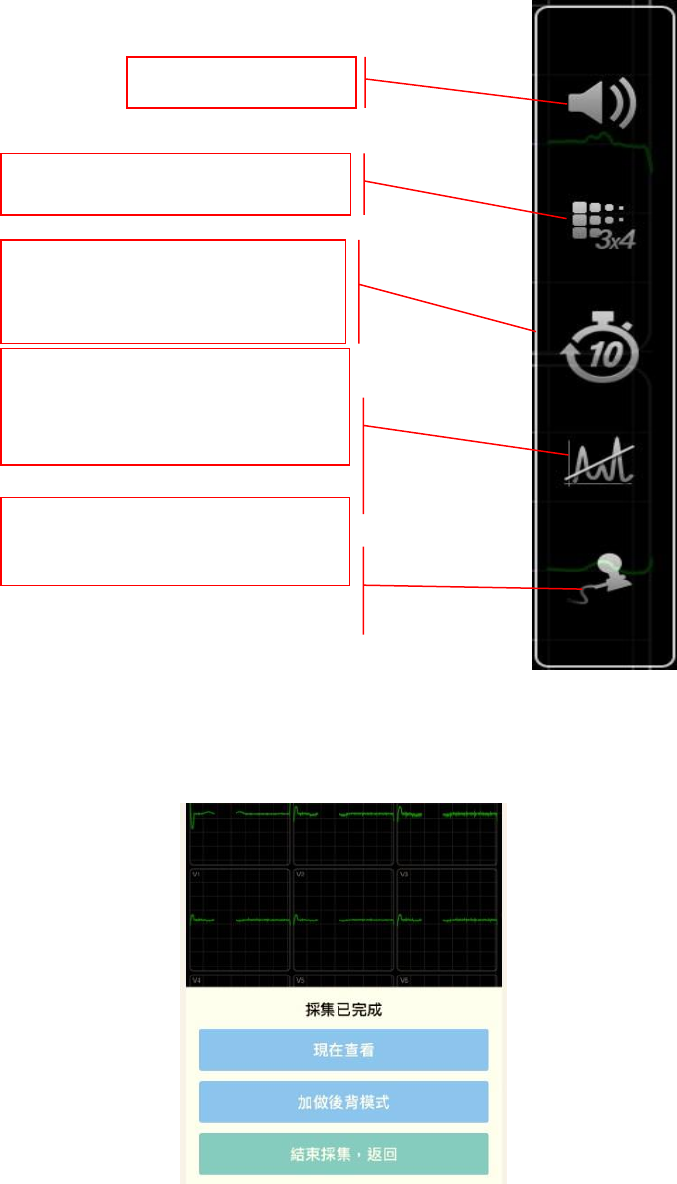
Step 2: When the ECG waveform is stable, press "Start" button to record.
"Formal recording" interface
Notice: Double-click will refresh the interface to restart recording.
Lead display switching:
12*1、6*2、3*4。
Start recording (roll
down with two fingers)
15
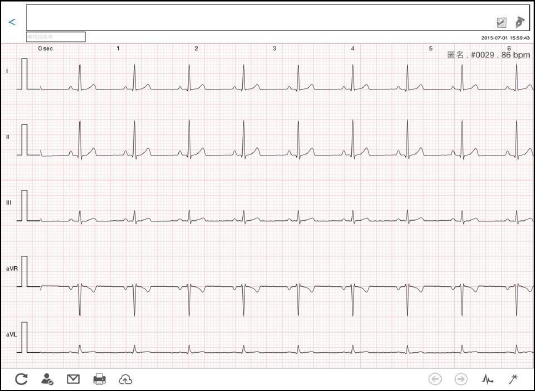
Icon description:
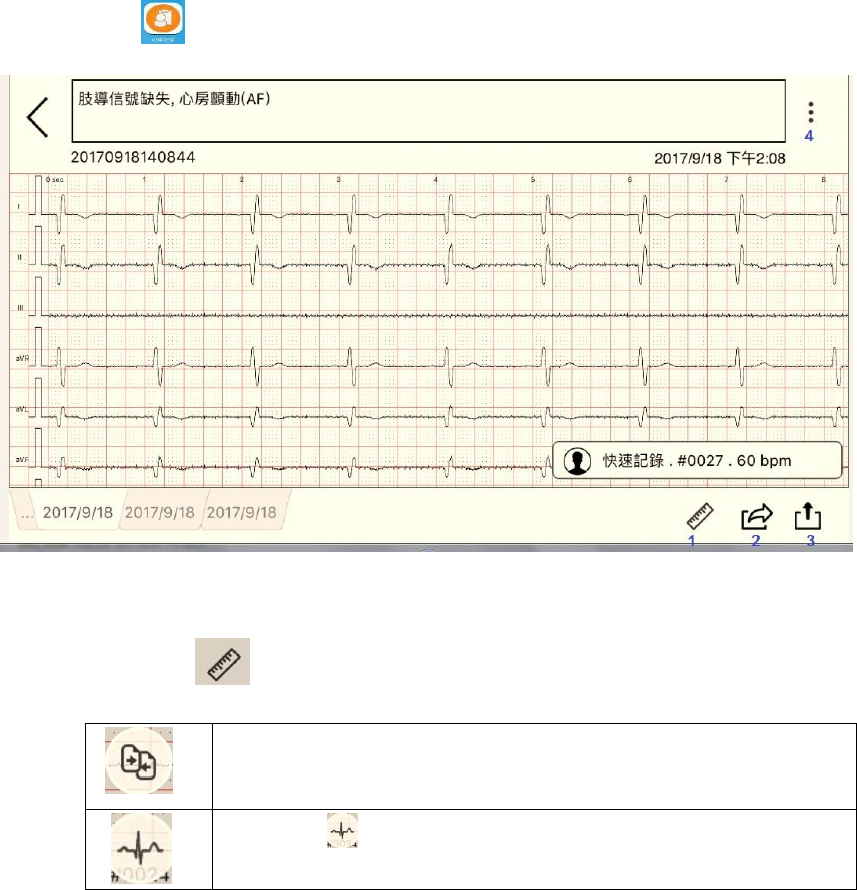
Step 3: After recording, the user can choose the operation according to the actual needs: view
now, uploading, add the back mode, end recording.
“End recording”interface
Description: shows ECG
connection
Filter selection:When the
waveform drift, click to adjust
the waveform.
Recording time selection:
10s、20s、30s、60s.
Lead Switch:3*4,6*2,12*1.
Sound switch.
16
(1)
View Now
ECG report browsing interface, drag to view the complete ECG report.
ECG report browsing
(2)
Background mode
Add background continues to ECG
(3)
End recording
Return to home page.
17
5.3 ECG records
5.3.1 View the record
(1)
Click
to view all recorded ECG.
(2)
Icon Description
Click to display the icon as the below
Compare with the previous data
Press for QRS wave adjustment window, drag left and
right to view QRS lead wave.
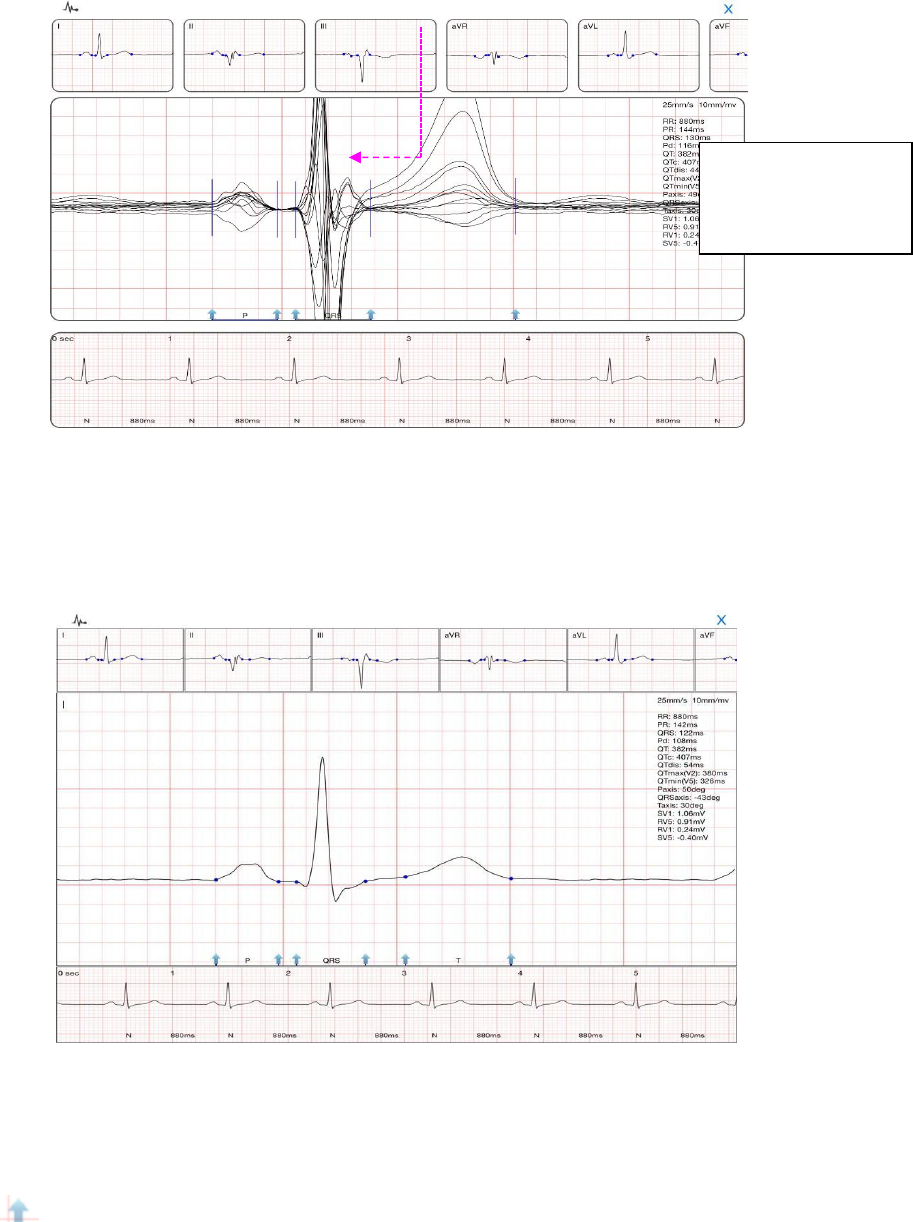
18
“QRS”window
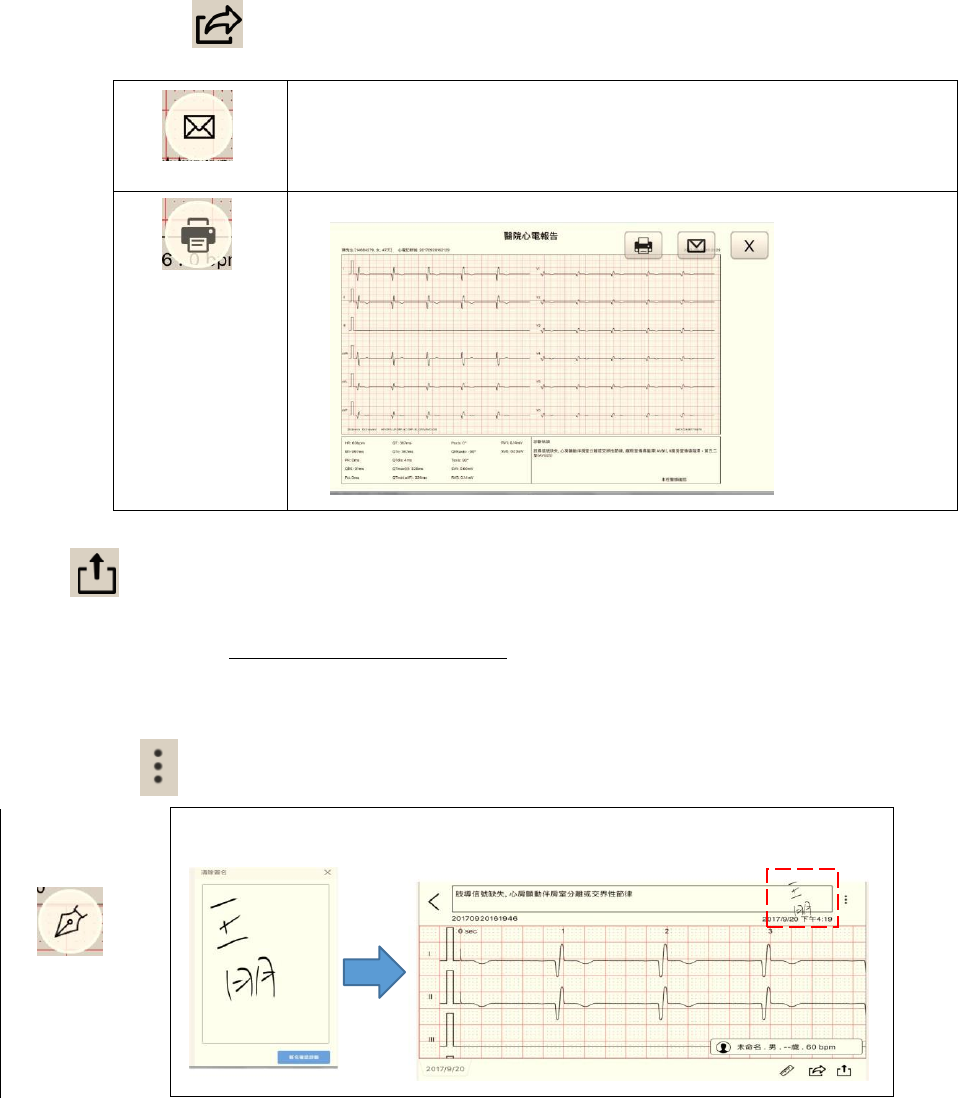
In "QRS" window, the bottom of the report shows single lead waveform. Click on a lead to
view the waveform (as below).
QRS window of Single Lead
In the operating area, slide with two fingers to call out ruler to measure the waveform (Figure:
blue dotted lines and numbers); adjust the locating point of QRS wave by dragging the blue
arr
ow
Click on a lead to
view thewaveform
(as below)
19
Click to display the icon as the below
Sending email: send the current record through email.
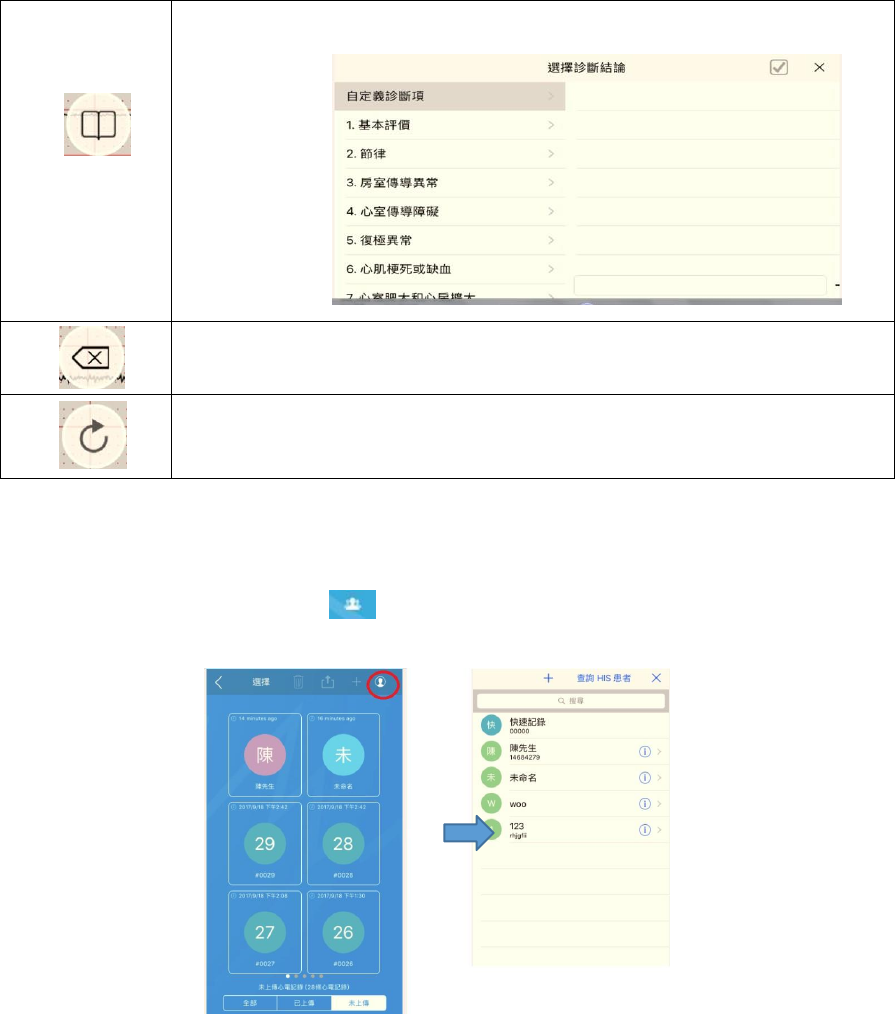
If you have not set up sender's mailbox, a prompt would bump
out (as below). Click “Yes” to exit the software, return to
desktop and set up the mailbox.
Print preview for current ECG report.
(3)
: uploading
Please link http://www.cardiartcloud.net to register your data before uploading
The recorded ECG could be uploaded to Cloud or computer.
(4)
Click
Signature for confirming diagnosis (physicians’ signature)
20
Select the diagnostic result
Delete the diagnostic result
Refresh the diagnostic results, the diagnosis and signature will all be
covered.
5.4 VIEW/ Add/ Delete the patient data
1)
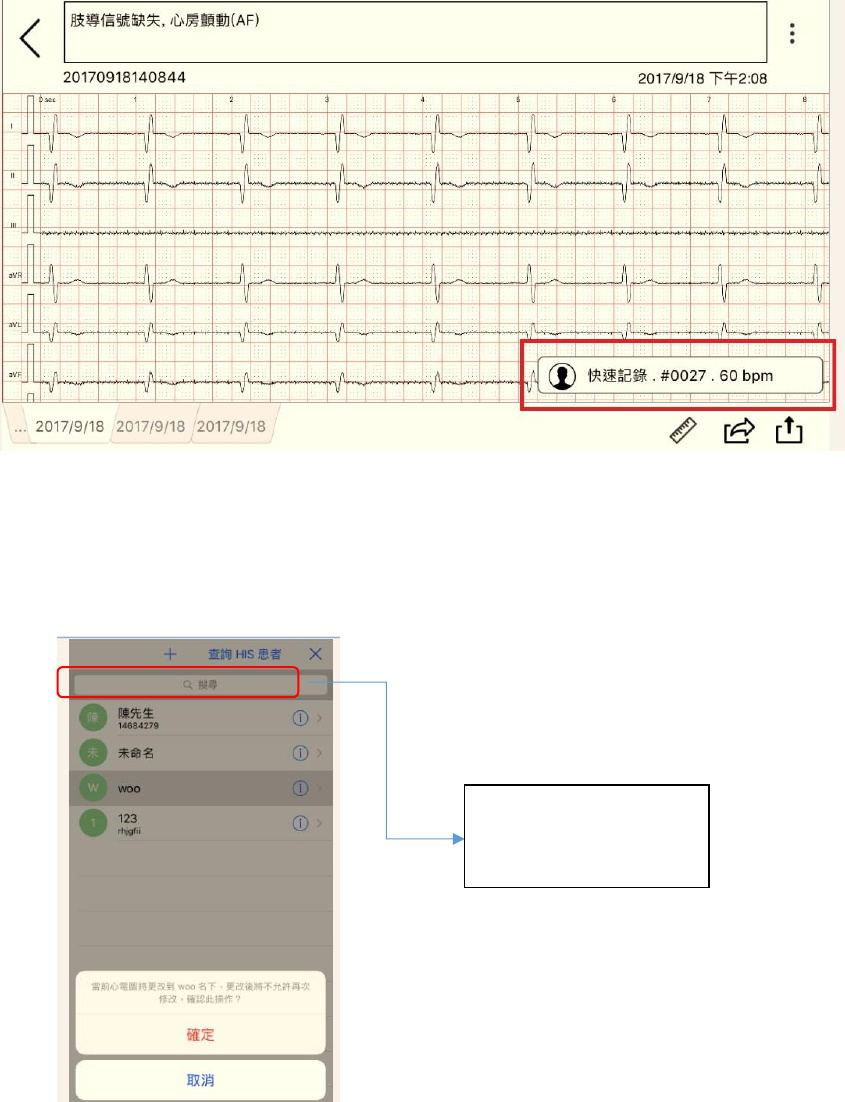
Create a patient profile: Click
and enter a patient profile interface to review the
record.
2)
Create a patient report
2.1 Enter 〝ECG record〞
2.2 Click a 〝patient report〞
2.3 Click 〝quickly record〞
21
5.5 Select a patient profile to creative a profile for patient report
5.6 View a patient report
Enter ECG record to review a patient report
If patient’s medical record
has been added, enter the
patient’s name or number
to search for the patient.

22
Chapter 6 Environment and Maintenance
6.1 Environment
Avoid sunlight and keep dry; avoid wet and dust to remain the cooling channel smooth;
keep away from strong magnetic field.
Operating temperature: 5-40℃
Humidity: 25%-95%(no condensation)
Atmospheric pressure: 700hPa~1060hPa
6.2 Transportation and Storage
Temperature: -20℃~55℃
Humidity: ≤93%
6.3 Cleansing
ECG record box
Wipe the surface with soft, damp cloth, soaked with neutral detergent.
Do not use strong detergent to avoid damaging the plastic surface.
ECG Cable
Disconnect the lead before cleaning or disinfecting.
Wipe the surface with soft, damp cloth, soaked with neutral detergent.
Do not immerse lead wires in liquid.
6.4 Maintenance
Make sure whether the record box and lead wires are damaged before using; if
damaged, stop using and contact the manufacturers in time.
The ECG record box shall be verified every two years only by the original factory or
recognized professionals.
Please remove the battery whenever the ECG will not be used for a long time to avoid
corroding the spring in the battery seat.
Forbidden to use while charging.
Warning:
23
6.5 Troubleshooting
Common problem
Solution
Unable to start the record box
Please insert a battery with sufficient power.
Unable to record
Check the connection between the mobile device and the
record box.
Restart the record box.
Collected wave form appears
straight or noise
1. Check the connection between lead wire and record
box.
2. Make sure there’s no strong magnetic field (e.g. MRI)
in the room.
Above are the common fault for mobile ECG, if the fault repeatedly occurs or there’s any
other problems, please contact the original factory.
6.6 Description of electromagnetic interference
This section is the special tips for electromagnetic compatibility. The wireless ECG
monitor of IMEDIPLUS should be installed and used according to this section. The basic
function of this product is to record common ECG for doctors to diagnose; the error of
sensitivity is ± 5%.
★ Portable and mobile RF communication devices may influence the use of mobile ECG; it
is recommended to keep away from or turn off portable and mobile RF communication
devices while using ECG.
★ The lead wire must be provided by IMEDIPLUS. Among this, the length of the cable: lead
wire: 1.7m with shelter.
★ To ensure the product can be used normally, the electromagnetic emission is not increased,
and the immunity is not reduced, please use the cable and related accessories provided by
IMEDIPLUS; the other accessories may result in increasing the electromagnetic emission
and reducing immunity.
★ This product should not be used near or stacked with other equipment with the same or
similar frequency of operation. If it is unavoidable, make sure the product works properly
in its configuration.
★ Using the product along with accessories other than the provided ones may result in
increasing equipment or system emissions or reducing immunity.
★ Bluetooth module parameters: emission frequency: 2400MHz-2483.5MHz; Modulation
type: GFSK; Effective radiated power: -30dBM ~ -40dBM
★ WARNING: The equipment or system may still be interfered, even if other equipment
complies with appropriate national standard emission requirements
Precaution:

24
FCC Warning
FCC Intentional Radiator Certification
Cardiart Wireless 12-Lead Electrocardiograph Monitor (Model no.: MCE12L001)
FCC ID: 2AM7N-MCE12L001
This device complies with Part 15 of the FCC rules. Operation is subject to the following two conditions: (1) This
device may not cause harmful interference, and (2) this device must accept any interference received, including
interference that may cause undesirable operation.
This equipment has been tested and found to comply with the limits for a Class B digital device, pursuant to
part 15 of the FCC rules. These limits are designed to provide reasonable protection against harmful
interference in a residential installation.
This equipment generates, uses and can radiate radio frequency energy and, if not installed and used in
accordance with the instructions, may cause harmful interference to radio communications. However, there is
no guarantee that interference will not occur in a particular installation. If this equipment does cause harmful
interference to radio or television reception, which can be determined by turning the equipment off and on, the
user is encouraged to try to correct the interference by one or more of the following measures:
-Reorient or relocate the receiving antenna.
-Increase the separation between the equipment and receiver.
-Connect the equipment into an outlet on a circuit different from that to which the receiver is connected.
-Consult the dealer or an experienced radio/TV technician for help.
You are cautioned that changes or modifications not expressly approved by the part responsible for
compliance could void the user’s authority to operate the equipment.
6.7 Environmental protection
Disposing of the battery and equipment shall be done within the area approved by
municipal unit, to avoid environmental pollution. The service life of the device is 5 years.

25
Chapter 7 Products Specification
Model
MCE12L001
Intended Use
The product is mainly for checking abnormalities of the
adults’ heart through recording ECG by medical staff in
hospital or clinic.
Lead
12 lead
Input circuit
Built-in anti-defibrillation protection
Recording mode
Synchronous 12-lead recording
Dynamic measurement
range
± 5mVpp
The time constant
≥ 3.2s
Frequency response
0.05Hz~150Hz(-3dB)
Calibration voltage
1mV± 3%
Sensitivity
Divided into three gear: 5mm / mv, 10mm / mv, 20mm / mv,
the error range: ± 5%.
Input resistance
≥ 50MΩ
Noise voltage level
No more than 30µ A
Anti-baseline drift
automatic / manual
Patient leakage
≦ 10μA
Common-mode
rejection ratio
≥90dB
Data transmission
wireless
Bluetooth transmission
distance
10m
Power supply
Two AA 1.5 V Alkaline battery
Sampling rate
500sps/channel
Safety classification:
Class II, CF type
26
Chapter 8 Symbol Description and Manufacturer Information
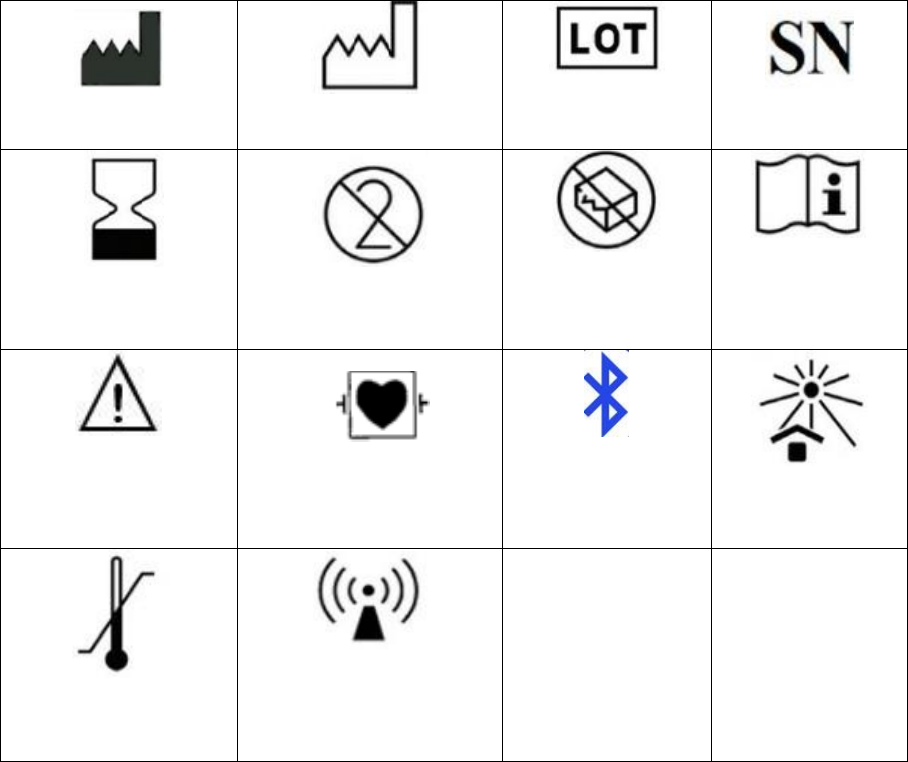
Manufacturer name
& address
Manufacturing date
(year/ month/ day)
Lot number
Serial number
Expiration
(limited to year/
month/ day)
Only for single use
Do not use if
package is
damaged
Do not use if
package is
damaged
Notice, please check
the warning /
precautions
Anti-Automated
External Defibrillator
CF type
Blue tooth
Avoid high
temperature and
sunlight
Upper / lower
temperature
limitation
Electromagnetic wave
warning
Manufacturer / Drug maker: IMEDIPLUS INC.
Address: 2F, 12, ShengYi Rd. Sec. 2, Chupei City, Hsichu County