INTELLIGENT SYSTEMS ISX Debugger and Capture User Manual IS TWL CAPTURE Setup
INTELLIGENT SYSTEMS Co.,Ltd. Debugger and Capture IS TWL CAPTURE Setup
Contents
user manual pt 3a

2008-2009 Nintendo TWL-06-0044-001-D
CONFIDENTIAL Released: March 17, 2009
IS-TWL-CAPTURE
Setup Manual
INTELLIGENT SYSTEMS CO.,LTD.
2009/03/03
The content of this document is highly confidential
and should be handled accordingly.
IS-TWL-CAPTURE Setup
TWL-06-0044-001-D 2 2008-2009 Nintendo
Released: March 17, 2009 CONFIDENTIAL
Confidential
These coded instructions, statements, and computer programs contain proprietary information of Nintendo
and/or its licensed developers and are protected by national and international copyright laws. They may not
be disclosed to third parties or copied or duplicated in any form, in whole or in part, without the prior written
consent of Nintendo.
IS-TWL-CAPTURE Setup
2008-2009 Nintendo 3TWL-06-0044-001-D
CONFIDENTIAL Released: March 17, 2009
Contents
1 Using This Product Safely.............................................................................................................................4
2 Special Notes................................................................................................................................................7
2.1 Notes.....................................................................................................................................................7
2.2 End-of-Life Equipment Disposal ...........................................................................................................8
3 Operation Environment.................................................................................................................................9
3.1 Requirements........................................................................................................................................9
4 Setup...........................................................................................................................................................10
4.1 Connections ........................................................................................................................................10
4.2 Turning the Power On and Off............................................................................................................13
4.3 Installing the Software.........................................................................................................................13
4.4 Uninstalling the Software ....................................................................................................................13
4.5 Installing Device Drivers .....................................................................................................................14
5 Support .......................................................................................................................................................18
Tables
Table 3-1 Operation Environment Requirements for IS-TWL-CAPTURE ....................................................9
Table 4-1 Setup Procedure for the IS-TWL-CAPTURE Hardware .............................................................10
Figures
Figure 2-1 Disposal Symbol..........................................................................................................................8
Figure 4-1 Found New Hardware Wizard: Welcome Dialog Box................................................................15
Figure 4-2 Found New Hardware Wizard: Installation Dialog Box .............................................................16
Figure 4-3 Found New Hardware Wizard: Compatibility Dialog Box..........................................................16
Figure 4-4 Found New Hardware Wizard: Completion Dialog Box ............................................................17

IS-TWL-CAPTURE Setup
TWL-06-0044-001-D 4 2008-2009 Nintendo
Released: March 17, 2009 CONFIDENTIAL
1 Using This Product Safely
To use IS-TWL-CAPTURE safely and ensure the unit does not malfunction and possibly cause a safety
hazard, please read the following items carefully.
•Do not modify the unit or take it apart.
•If you notice a problem, immediately stop using the unit.
•Do not allow liquids or foreign objects to enter the unit.
•Do not store the unit in a humid or dusty location.
•Never cover the unit or block ventilation.
•Do not bend, pull, or twist the cables.
•Do not subject the unit to strong impact.
•Do not use the unit in locations where the temperature is below 0°C or above 40°C.
•Do not use the unit during an electrical storm.
Regulatory Statement
•This equipment has been tested and found to comply with the limits for a Class A digital device,
pursuant to Part 15 of the FCC Rules. These limits are designed to provide reasonable protection
against harmful interference when the equipment is operated in a commercial environment.
•This equipment generates, uses, and can radiate radio frequency energy and, if not installed and used
in accordance with the instructions, may cause harmful interference to radio communications.
•Operation of this equipment in a residential area is likely to cause harmful interference, in which case
users will be required to correct the interference at their own expense.
•This equipment complies with FCC radiation exposure limits for an uncontrolled environment.
•This equipment should be installed and operated with a minimum distance of 20 cm between the radio
frequency energy radiator and body. This transmitter must not be co-located or operating in conjunction
with any antenna or transmitter.
•This device has been designed to operate with the antennas listed below, and having a maximum gain
of 2dB. Antennas not included in this list or having a gain greater than 2dB are strictly prohibited for use
with this device. The required antenna impedance is 50 ohms.
•To reduce potential radio interference to other users, the antenna type and its gain should be so chosen
that the equivalent isotropically radiated power (e.i.r.p.) is not more than that permitted for successful
communication.
IS-TWL-CAPTURE Setup
2008-2009 Nintendo 5TWL-06-0044-001-D
CONFIDENTIAL Released: March 17, 2009
•Modifications made to the product, unless expressly approved by Nintendo, could void the user’s right
to operate the equipment.
•This Class A digital apparatus complies with Canadian ICES-003. The term “IC” before the equipment
certification number only signifies that the Industry Canada technical specifications were met.
•Cet appareil numérique de la classe A est conforme à la norme NMB-003 du Canada.
•Le terme “IC” avant le numéro d’homologation ne signifie seulement que les normes d’Industrie
Canada ont été respectées.
English Hereby, INTELLIGENT SYSTEMS CO.,LTD. declares that this IS-TWL-CAPTURE is
in compliance with the essential requirements and other relevant provisions of
Directive 1999/5/EC.
Finnish INTELLIGENT SYSTEMS CO.,LTD. vakuuttaa täten että IS-TWL-CAPTURE
tyyppinen laite on direktiivin 1999/5/EY oleellisten vaatimusten ja sitä koskevien
direktiivin muiden ehtojen mukainen.
Hierbij verklaart INTELLIGENT SYSTEMS CO.,LTD. dat het toestel
IS-TWL-CAPTURE in overeenstemming is met de essentiële eisen en de andere
relevante bepalingen van richtlijn 1999/5/EG.
Dutch
Bij deze verklaart INTELLIGENT SYSTEMS CO.,LTD. dat deze IS-TWL-CAPTURE
voldoet aan de essentiële eisen en aan de overige relevante bepalingen van
Richtlijn 1999/5/EC.
Par la présente INTELLIGENT SYSTEMS CO.,LTD. déclare que l'appareil
IS-TWL-CAPTURE est conforme aux exigences essentielles et aux autres
dispositions pertinentes de la directive 1999/5/CE.
French
Par la présente, INTELLIGENT SYSTEMS CO.,LTD. déclare que
IS-TWL-CAPTURE est conforme aux exigences essentielles et aux autres
dispositions de la directive 1999/5/CE qui lui sont applicables.
Swedish Härmed intygar INTELLIGENT SYSTEMS CO.,LTD. att denna IS-TWL-CAPTURE
står I överensstämmelse med de väsentliga egenskapskrav och övriga relevanta
bestämmelser som framgår av direktiv 1999/5/EG.
Danish Undertegnede INTELLIGENT SYSTEMS CO.,LTD. erklærer herved, at følgende
udstyr IS-TWL-CAPTURE overholder de væsentlige krav og øvrige relevante krav i
direktiv 1999/5/EF.
Hiermit erklärt INTELLIGENT SYSTEMS CO.,LTD., dass sich dieser/diese/dieses
IS-TWL-CAPTURE in Übereinstimmung mit den grundlegenden Anforderungen und
den anderen relevanten Vorschriften der Richtlinie 1999/5/EG befindet". (BMWi)
German
Hiermit erklärt INTELLIGENT SYSTEMS CO.,LTD. die Übereinstimmung des
Gerätes IS-TWL-CAPTURE mit den grundlegenden Anforderungen und den
anderen relevanten Festlegungen der Richtlinie 1999/5/EG. (Wien).
IS-TWL-CAPTURE Setup
TWL-06-0044-001-D 6 2008-2009 Nintendo
Released: March 17, 2009 CONFIDENTIAL
Greek INTELLIGENT SYSTEMS CO.,LTD.
IS-TWL-CAPTURE
1999/5/.
Italian Con la presente INTELLIGENT SYSTEMS CO.,LTD. dichiara che questo
IS-TWL-CAPTURE è conforme ai requisiti essenziali ed alle altre disposizioni
pertinenti stabilite dalla direttiva 1999/5/CE.
Spanish Por medio de la presente INTELLIGENT SYSTEMS CO.,LTD. declara que el
IS-TWL-CAPTURE cumple con los requisitos esenciales y cualesquiera otras
disposiciones aplicables o exigibles de la Directiva 1999/5/CE.
Portuguese INTELLIGENT SYSTEMS CO.,LTD. declara que este IS-TWL-CAPTURE está
conforme com os requisitos essenciais e outras disposições da Directiva
1999/5/CE.
Malti Hawnhekk, INTELLIGENT SYSTEMS CO.,LTD., jiddikjara li dan IS-TWL-CAPTURE
mal-tiijiet essenzjali u ma provvedimenti orajn relevanti li hemm fid-Dirrettiva
1999/5/EC.
Estonian Käesolevaga kinnitab INTELLIGENT SYSTEMS CO.,LTD. seadme
IS-TWL-CAPTURE vastavust direktiivi 1999/5/EÜ põhinõuetele ja nimetatud
direktiivist tulenevatele teistele asjakohastele sätetele.
Hungarian Alulírott, INTELLIGENT SYSTEMS CO.,LTD. nyilatkozom, hogy a
IS-TWL-CAPTURE megfelel a vonatkozó alapvetõ követelményeknek és az
1999/5/EC irányelv egyéb elõírásainak.
Slovak INTELLIGENT SYSTEMS CO.,LTD. týmto vyhlasuje, že IS-TWL-CAPTURE spa
základné požiadavky a všetky príslušné ustanovenia Smernice 1999/5/ES.
Czech INTELLIGENT SYSTEMS CO.,LTD. tímto prohlašuje, že tento IS-TWL-CAPTURE je
ve shodse základními požadavky a dalšími píslušnými ustanoveními smrnice
1999/5/ES.
Slovene Šiuo INTELLIGENT SYSTEMS CO.,LTD. deklaruoja, kad šis IS-TWL-CAPTURE
atitinka esminius reikalavimus ir kitas 1999/5/EB Direktyvos nuostatas.
Lithuanian Šiuo INTELLIGENT SYSTEMS CO.,LTD. deklaruoja, kad šis IS-TWL-CAPTURE
atitinka esminius reikalavimus ir kitas 1999/5/EB Direktyvos nuostatas.
Latvian Ar šo INTELLIGENT SYSTEMS CO.,LTD. deklar, ka IS-TWL-CAPTURE atbilst
Direktvas 1999/5/EK btiskajm prasbm un citiem ar to saisttajiem noteikumiem.

IS-TWL-CAPTURE Setup
2008-2009 Nintendo 7TWL-06-0044-001-D
CONFIDENTIAL Released: March 17, 2009
2 Special Notes
2.1 Notes
Note the following when using IS-TWL-CAPTURE.
•Do not turn off the IS-TWL-CAPTURE device during firmware updates. The IS-TWL-CAPTURE device
may not function properly afterward.
•During use, do not do anything that would prevent heat dissipation, such as blocking the
IS-TWL-CAPTURE airflow vent, placing the IS-TWL-CAPTURE in a closed container, or placing objects
on top of the IS-TWL-CAPTURE.
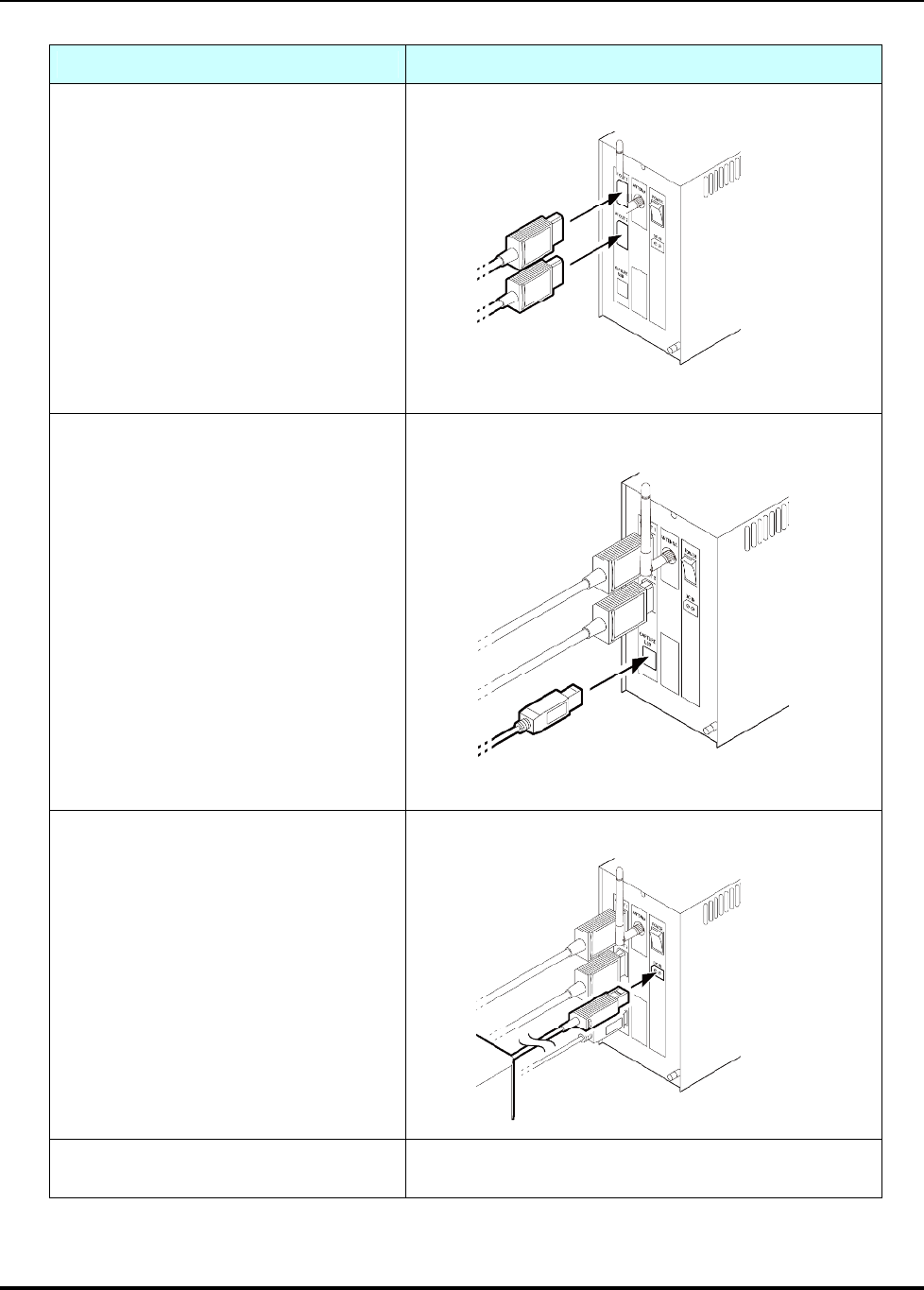
•A connector cable connects the IS-TWL-CAPTURE hardware main unit to the IS-TWL-CAPTURE
hardware controller unit ("Controller"). Connect the plug with the red band to the lower plug on the
Controller, and connect the plug with the black band to the upper plug (see Table 4-1). Be sure to tighten
the screws. A loose connection may cause damage to the hardware.
•The stylus on the Controller cannot be removed. Use the included stylus.
•The SD Memory Card slot cover of the Controller cannot be opened. Insert SD Memory Cards into the
SD memory card slot on the main unit.
•The IS-TWL-CAPTURE device can be used approximately eight seconds after the power switch is
turned on.
•Images output from the A/V output connectors are always delayed one frame compared to the images
displayed on the controller.
•Not all frames are guaranteed to be captured. Some frames may be dropped, depending on your
computer environment.
•Infringement of rights, such as copyright or portrait rights, can occur when using audio or video captured
by IS-TWL-CAPTURE. Note that Nintendo accepts absolutely no responsibility in the event that
copyright or portrait rights have been infringed, or a third party’s privacy, character, or reputation have
been damaged by the distributing, copying, or modifying of captured audio or video.
•When the IS-TWL-CAPTURE device is sent to Nintendo for repairs or to add options, the system menu
may be updated. Please back up your data and settings before sending in the device. Also, reconfigure
the device after it is returned and before using it.
•The liquid crystal display may already have pixels that are illuminated or that do not illuminate. Also, you
might observe irregularity in color or brightness, depending on the angle of view. These are properties
of the liquid crystal display and are not defects.
IS-TWL-CAPTURE Setup
TWL-06-0044-001-D 8 2008-2009 Nintendo
Released: March 17, 2009 CONFIDENTIAL
2.2 End-of-Life Equipment Disposal
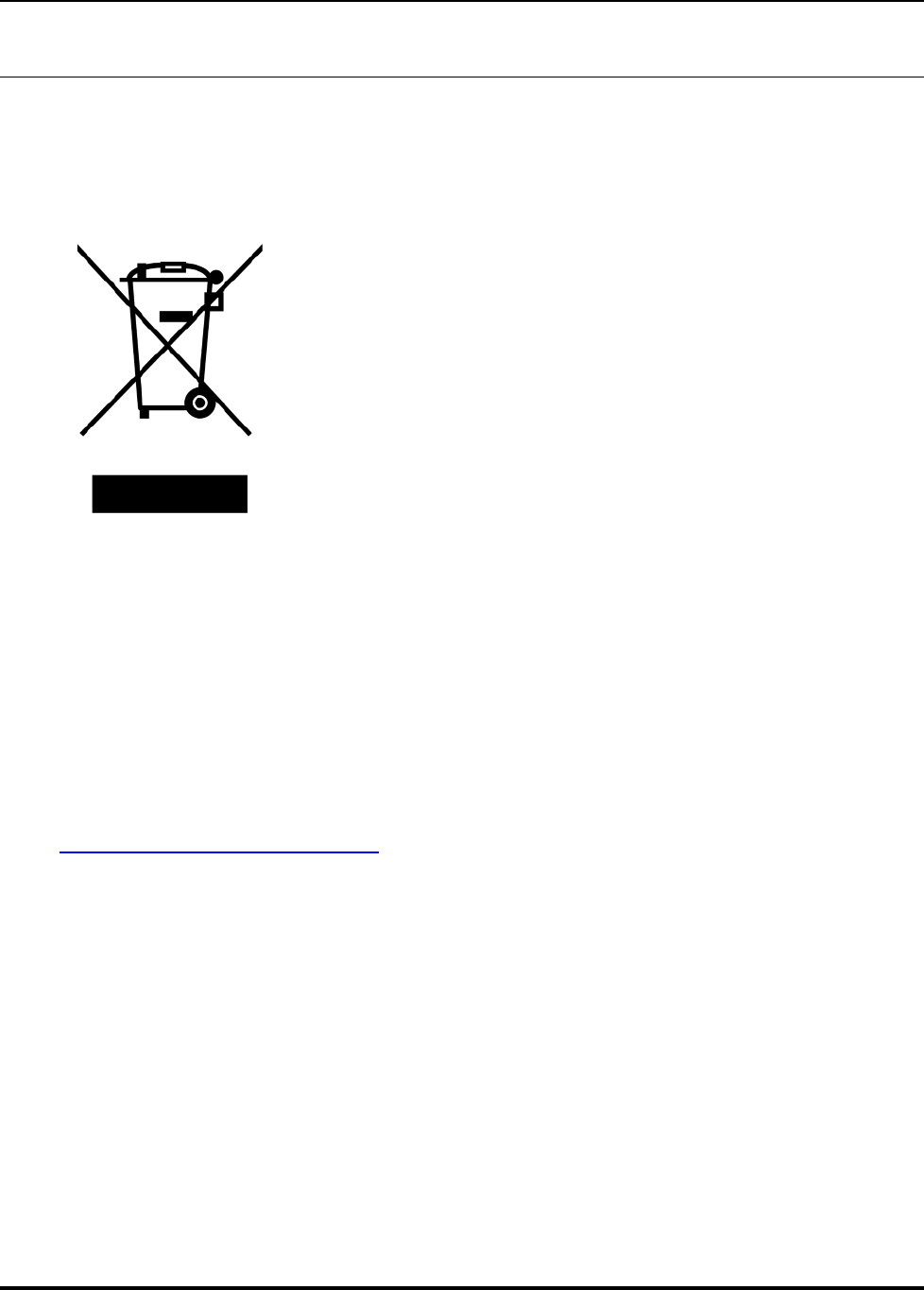
The crossed-out wheeled bin symbol in Figure 2-1 is affixed to all electrical and electronic equipment
that has been put into the European market by Nintendo on or after August 13, 2005.
Figure 2-1 Disposal Symbol
This symbol means that at the end of its life, the equipment must be treated in an environmentally sound
manner at a licensed recycling plant and its components must be recovered, recycled, or reused in
compliance with the requirements of the European Directive on Waste Electrical and Electronic
Equipment (2002/96/EC) of January 27, 2003.
Accordingly, you must use separate collection systems for waste electrical and electronic equipment
when you dispose of this equipment at the end of its life. Alternatively, you can return this equipment to
Nintendo at your own cost, and Nintendo will dispose of it appropriately. To return the equipment, please
contact the NOA Development Parts Department for instructions (425-861-2038 or
developmentparts@noa.nintendo.com). You will be given a Return Authorization and instructed to
return the equipment to an appropriate Nintendo location in your area.
IS-TWL-CAPTURE Setup
2008-2009 Nintendo 9TWL-06-0044-001-D
CONFIDENTIAL Released: March 17, 2009
3 Operation Environment
3.1 Requirements
The following components are required to operate the IS-TWL-CAPTURE by connecting it to a
computer.
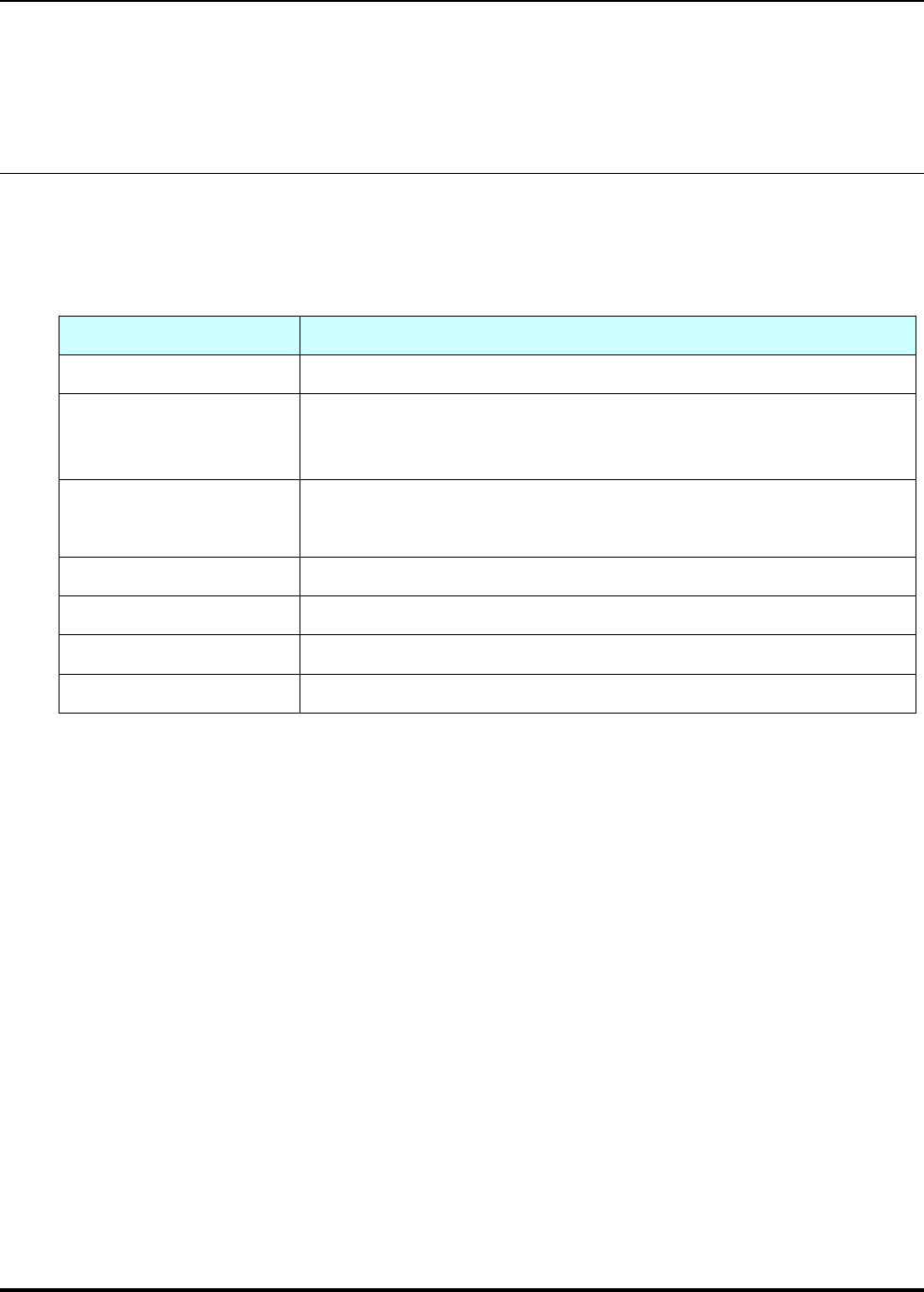
Table 3-1 Operation Environment Requirements for IS-TWL-CAPTURE
Component Description
Computer PC/AT-compatible
Operating system
One of the following operating systems must be installed:
5. Microsoft Windows Vista 32-bit version, Service Pack 1 or later
6. Microsoft Windows XP 32-bit version, Service Pack 2 or later
Memory capacity As recommended by the operating system or greater. More memory than that
recommended by the OS may sometimes be required, depending on the
operating environment.
Disk capacity 50 MB or more of free memory
Optical disc drive Drive capable of reading a CD-ROM at installation
Display XGA display with a 1024x768 resolution or higher
USB interface One port required (For video capture, USB 2.0 high-speed is recommended.)
IS-TWL-CAPTURE Setup
TWL-06-0044-001-D 10 2008-2009 Nintendo
Released: March 17, 2009 CONFIDENTIAL
4 Setup
4.1 Connections
Follow the instructions below to set up the IS-TWL-CAPTURE hardware.
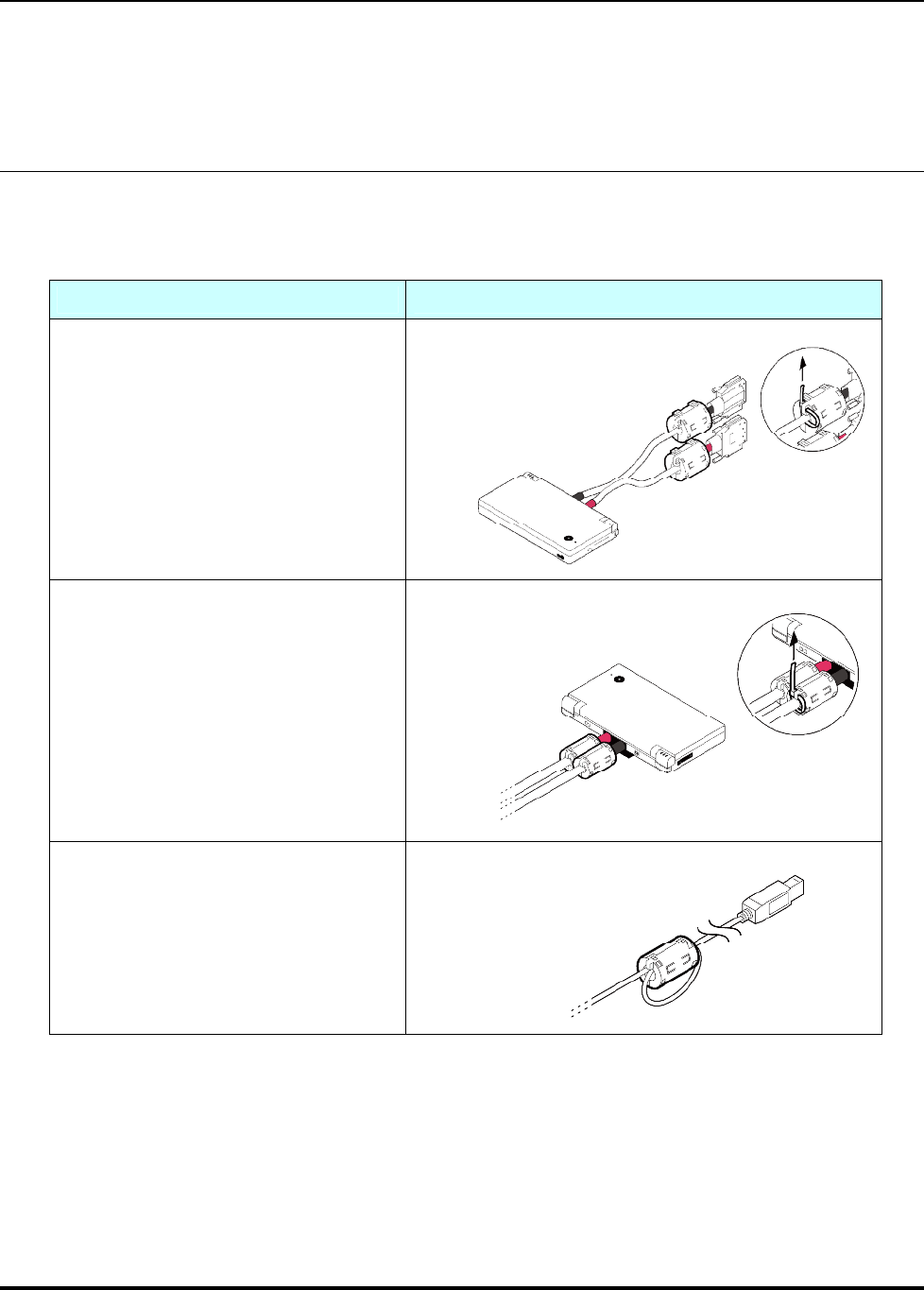
Table 4-1 Setup Procedure for the IS-TWL-CAPTURE Hardware
Step Illustration
1. Attach the large ferrite cores (made by
TDK Corporation) to the connectors on the
controller, and fasten them using the cable
ties (see the figure at right). Use scissors to
cut the excess portions of the ties you pulled
upward.
2. Attach the small ferrite cores (made by
SEIWA ELECTRIC MFG. CO.,LTD.) to the
opposite side of the controller connectors,
and fasten them using the cable ties (see the
figure at right). Use scissors to cut the excess
portions of the ties you pulled upward.
3. Attach a small ferrite core (made by
SEIWA ELECTRIC MFG. CO.,LTD.) to the
USB cable. Loop the cable approximately 30
cm from the USB-B connector and sandwich
the portion of the cable that is overlapped
with the ferrite core (see the figure at right).
IS-TWL-CAPTURE Setup
2008-2009 Nintendo 11 TWL-06-0044-001-D
CONFIDENTIAL Released: March 17, 2009
Step Illustration
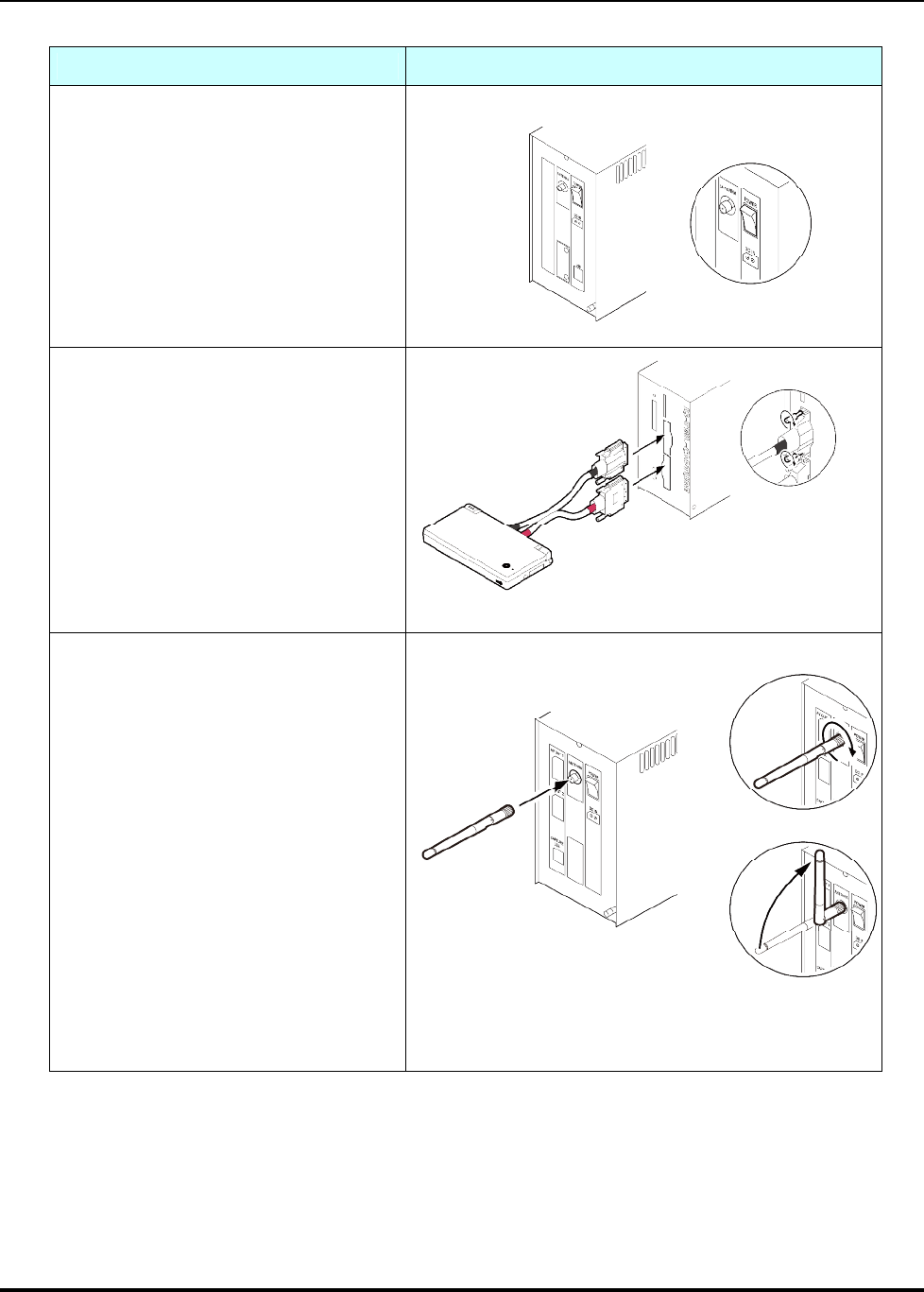
4. Check that the main unit’s power switch
is off.
5. Connect the Controller to the main unit.
Connect the plug with the red band to the
lower plug and the plug with the black band
to the upper plug. Be sure to tighten the
connector screws.
6. Attach the antenna to the ANTENNA
connector on the back panel of the main unit.
IS-TWL-CAPTURE Setup
TWL-06-0044-001-D 12 2008-2009 Nintendo
Released: March 17, 2009 CONFIDENTIAL
Step Illustration
7. When outputting video, connect the AV
cable to AV OUT 1 and AV OUT 2 on the rear
panel of the main unit.
8. Connect the main unit to the computer
with a USB cable.
9. Connect the DC plug of the AC adapter
to the DC connector on the rear panel of the
main unit.
10. Connect the AC plug of the AC adapter
to an outlet (AC 100 V).

IS-TWL-CAPTURE Setup
2008-2009 Nintendo 13 TWL-06-0044-001-D
CONFIDENTIAL Released: March 17, 2009
4.2 Turning the Power On and Off
Always use the following procedure to turn the power on.
1. Turn on the power switch on the rear panel of the main unit.
2. The POWER and SYSTEM lights on the front panel of the main unit illuminate as follows.
(1) The POWER light briefly illuminates red.
(2) The POWER and SYSTEM lights illuminate green.
(3) The SYSTEM light goes out after a few seconds.
3. The device can be used when the controller POWER light and the LCD backlight are illuminated.
Note: The device can be used approximately eight seconds after turning the power on.
To turn off the power for the IS-TWL-CAPTURE hardware, use the power switch on the rear panel of the
main unit.
4.3 Installing the Software
To install IS-TWL-CAPTURE software onto a computer:
1. Log on to Windows as a user with an Administrator account on the computer.
2. Exit all currently running programs.
3. Download the IS-TWL-CAPTURE software from the TWL Downloads page at
http://www.warioworld.com.
4. Using Explorer, browse to the location to which the IS-TWL-CAPTURE software was downloaded.
5. Open the IS-TWL-CAPTURE folder and start installation by double-clicking
IS-TWL-CAPTURE-XXX.EXE (XXX represents the version).
6. Follow the displayed instructions.
If the installation program completes normally, installation ends.
If prompted, restart the computer after installation completes.
4.4 Uninstalling the Software
To uninstall the IS-TWL-CAPTURE software from a computer:
1. Log on to Windows as a user with an Administrator account on the computer.
2. If the IS-TWL-CAPTURE software is running, exit the software.

IS-TWL-CAPTURE Setup
TWL-06-0044-001-D 14 2008-2009 Nintendo
Released: March 17, 2009 CONFIDENTIAL
3. In Control Panel, click Programs and Features to open the Remove or Change Programs dialog
box. (For Windows XP, click Add or Remove Programs to display the Add or Remove Programs
dialog box.)
4. Select IS-TWL-CAPTURE from the list of installed programs.
5. Click Delete to start deleting the IS-TWL-CAPTURE software. If deletion completes normally, the
IS-TWL-CAPTURE software has been uninstalled.
Uninstalling does not delete option settings and window position information. For this reason, the last
state can be used even when uninstalling and installing to upgrade the IS-TWL-CAPTURE software. To
delete this information, modify the registry with a registry editor after confirming that the
IS-TWL-CAPTURE software is not running.
Delete the following key and everything below it from within the registry editor:
HKEY_CURRENT_USER\Software\INTELLIGENT SYSTEMS\IS-TWL-CAPTURE
If you make a mistake while editing the registry or accidently delete the wrong folders, Windows may not
run. Use caution when performing the above actions and do so only after backing up data or creating a
restore point to allow a system restore. The results of editing the registry are your responsibility.
4.5 Installing Device Drivers
Device drivers must be installed when first connecting the IS-TWL-CAPTURE hardware to a computer
or when first connecting it to a different USB port.
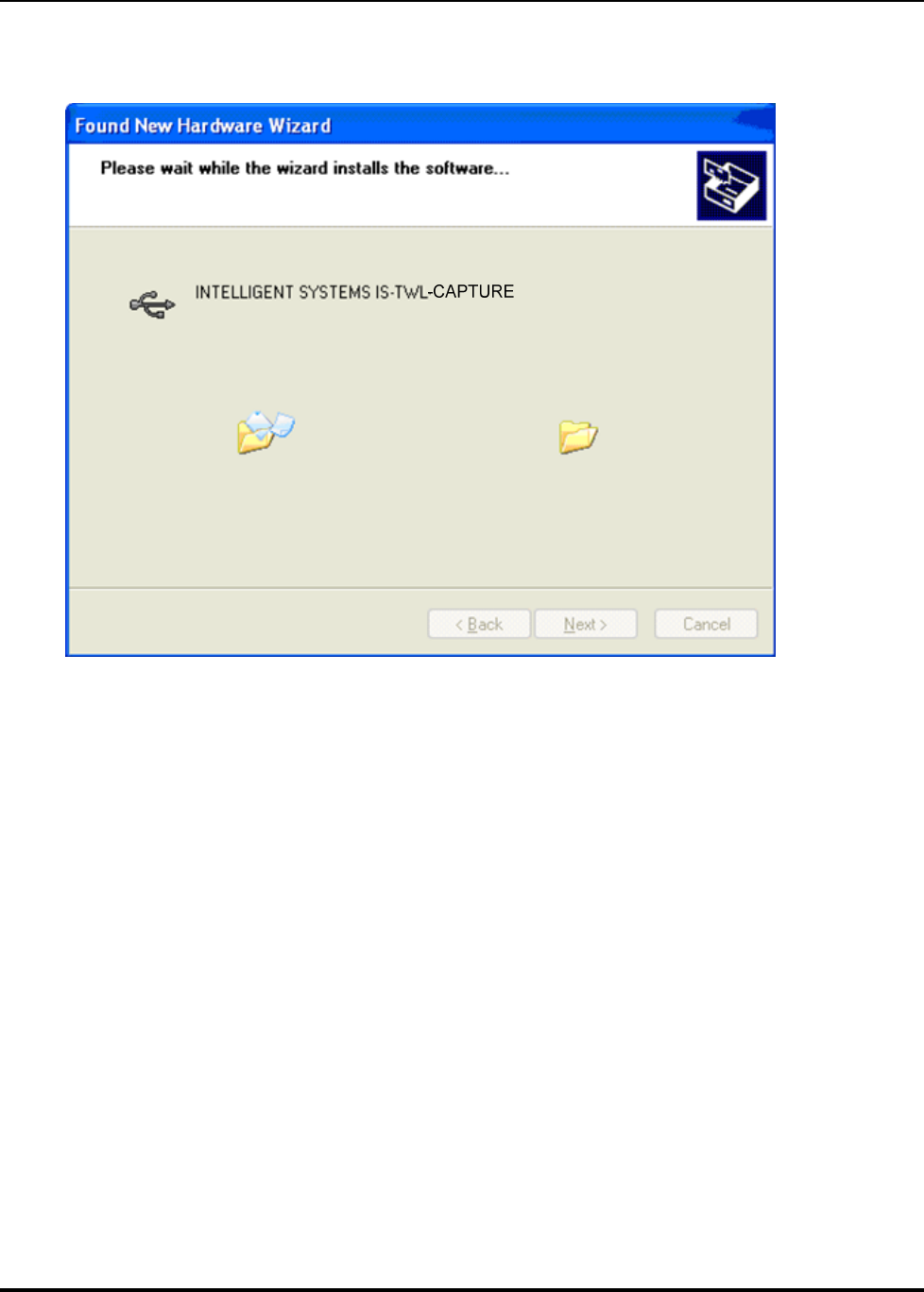
1. When the IS-TWL-CAPTURE hardware is turned on, the Found New Hardware Wizard starts and
displays a dialog box that prompts for the installation of a device driver.
IS-TWL-CAPTURE Setup
2008-2009 Nintendo 15 TWL-06-0044-001-D
CONFIDENTIAL Released: March 17, 2009
Figure 4-1 Found New Hardware Wizard: Welcome Dialog Box
2. Download the drivers from the TWL Downloads page at http://www.warioworld.com.
3. Select Install the software automatically (Recommended) and click Next.
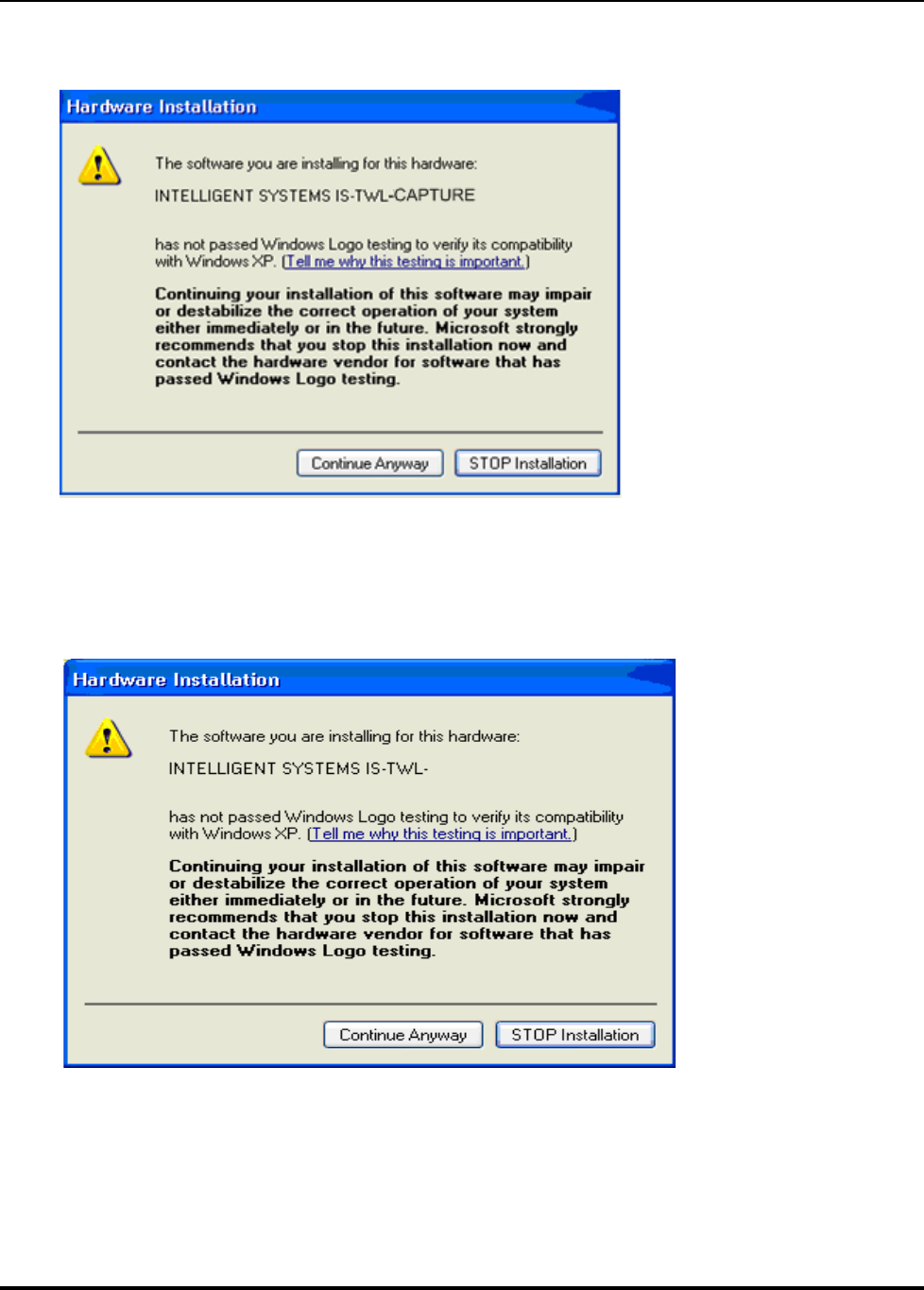
4. Please wait. When the software installation begins, the dialog box in Figure 4-2 appears.
IS-TWL-CAPTURE Setup
TWL-06-0044-001-D 16 2008-2009 Nintendo
Released: March 17, 2009 CONFIDENTIAL
Figure 4-2 Found New Hardware Wizard: Installation Dialog Box
5. The dialog box in Figure 4-3 appears during installation. Click Continue Anyway to continue
installation.
Figure 4-3 Found New Hardware Wizard: Compatibility Dialog Box
CAPTURE
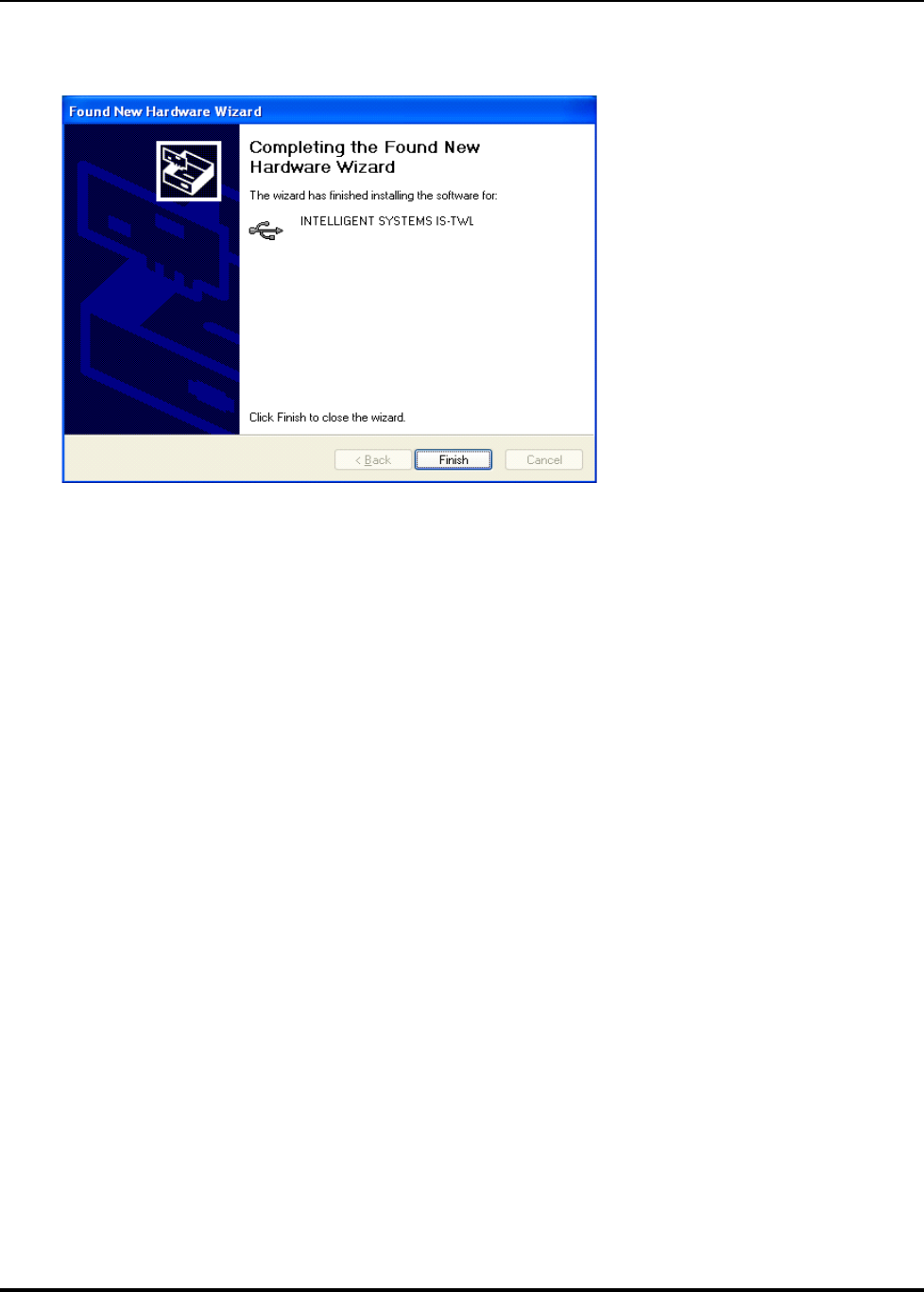
6. When the Found New Hardware Wizard completes installation normally, the dialog box in Figure
4-4 appears. Click Finish to close the wizard.
IS-TWL-CAPTURE Setup
2008-2009 Nintendo 17 TWL-06-0044-001-D
CONFIDENTIAL Released: March 17, 2009
Figure 4-4 Found New Hardware Wizard: Completion Dialog Box
CAPTURE

IS-TWL-CAPTURE Setup
TWL-06-0044-001-D 18 2008-2009 Nintendo
Released: March 17, 2009 CONFIDENTIAL
5 Support
Nintendo provides support for IS-TWL-CAPTURE users on its website and by e-mail.
•Website
•Information and documents regarding IS-TWL-CAPTURE and the latest software versions are
available on the Nintendo Software Development Support Group (SDSG) website
(http://www.warioworld.com). Only those registered in the website’s Nintendo DS group can access
and download the latest software versions. Register online at http://www.warioworld.com.
•E-mail Support
•For questions and comments about IS-TWL-CAPTURE, please contact the Software Development
Support Group at support@noa.com.

IS-TWL-CAPTURE Setup
2008-2009 Nintendo 19 TWL-06-0044-001-D
CONFIDENTIAL Released: March 17, 2009
INTELLIGENT SYSTEMS CO.,LTD.
Copyright © 2009 INTELLIGENT SYSTEMS CO.,LTD. All rights reserved.
The copyrights for the product are held by INTELLIGENT SYSTEMS CO.,LTD.
The specifications and content in the manuals or help for this product may change in the future without notice.
The software, manual, or help for this product cannot be copied or duplicated in whole or in part without the prior approval of
INTELLIGENT SYSTEMS CO.,LTD.
Be aware that we cannot be held responsible for any effects that result from the use of this product.
This product may be used only under an end user license agreement.
This product contains a wireless module that has received the Technical Conditions Compliance Certification.
Microsoft, Windows, and Windows Vista are either trademarks or registered trademarks of the Microsoft Corporation in the United States
and elsewhere.
IS-TWL-CAPTURE is the trademark of INTELLIGENT SYSTEMS CO.,LTD.
Other company and product names in this document are the trademarks or registered trademarks of the respective companies.

IS-TWL-CAPTURE Setup
TWL-06-0044-001-D 20 2008-2009 Nintendo
Released: March 17, 2009 CONFIDENTIAL
© 2008-2009 Nintendo
The contents of this document cannot be
duplicated, copied, reprinted, transferred,
distributed, or loaned in whole or in part without
the prior approval of Nintendo.