IRIDEX 65600 RF ID for Corona System User Manual IRIDEX OcuLight SL SLx Operator Manual

IRIDEX Corporation RF ID for Corona System IRIDEX OcuLight SL SLx Operator Manual

Users Manual

IRIDEX IQ 577™Operator Manual
IRIDEX IQ 577™ Operator Manual15510-EN Rev A© 2009 by IRIDEX Corporation. All rights reserved.IRIDEX, the IRIDEX logo, IRIS Medical, OcuLight, EndoProbe and SmartKey are registered trademarks; BriteLight, CW-Pulse, DioPexy, EasyFit, EasyView, FiberCheck, G-Probe, IQ 532, IQ 577, IQ 810, LongPulse, MicroPulse, MilliPulse, OtoProbe, PowerStep, Symphony, TruFocus, and TruView are trademarks of IRIDEX Corporation. All other trademarks are the property of their respective holders.
Contents15510 Rev A  iii1 Introduction. . . . . . . . . . . . . . . . . . . . . . . . . . . . . . . . . . . . . . . . . . . . . . . . . . . . . . 1Compatible Delivery Devices . . . . . . . . . . . . . . . . . . . . . . . . . . . . . . . . . . . . . . . . . . . .  1Pulse Types  . . . . . . . . . . . . . . . . . . . . . . . . . . . . . . . . . . . . . . . . . . . . . . . . . . . . . . . . . . . 1Indications for Use  . . . . . . . . . . . . . . . . . . . . . . . . . . . . . . . . . . . . . . . . . . . . . . . . . . . . .  3Warnings and Cautions . . . . . . . . . . . . . . . . . . . . . . . . . . . . . . . . . . . . . . . . . . . . . . . . .  6IRIDEX Corporation Contact Information  . . . . . . . . . . . . . . . . . . . . . . . . . . . . . . . . .  72 Setup . . . . . . . . . . . . . . . . . . . . . . . . . . . . . . . . . . . . . . . . . . . . . . . . . . . . . . . . . . . . 8Unpacking the System . . . . . . . . . . . . . . . . . . . . . . . . . . . . . . . . . . . . . . . . . . . . . . . . . .  8Choosing a Location . . . . . . . . . . . . . . . . . . . . . . . . . . . . . . . . . . . . . . . . . . . . . . . . . . . .  8Connecting the Components. . . . . . . . . . . . . . . . . . . . . . . . . . . . . . . . . . . . . . . . . . . . .  93 Operation . . . . . . . . . . . . . . . . . . . . . . . . . . . . . . . . . . . . . . . . . . . . . . . . . . . . . . . 11Front Panel Controls. . . . . . . . . . . . . . . . . . . . . . . . . . . . . . . . . . . . . . . . . . . . . . . . . . .  11Powering the Laser On and Off  . . . . . . . . . . . . . . . . . . . . . . . . . . . . . . . . . . . . . . . . .  11Treating Patients . . . . . . . . . . . . . . . . . . . . . . . . . . . . . . . . . . . . . . . . . . . . . . . . . . . . . .  12Using the IQ 577  . . . . . . . . . . . . . . . . . . . . . . . . . . . . . . . . . . . . . . . . . . . . . . . . . . . . . .  134 Troubleshooting . . . . . . . . . . . . . . . . . . . . . . . . . . . . . . . . . . . . . . . . . . . . . . . . . 19General Problems . . . . . . . . . . . . . . . . . . . . . . . . . . . . . . . . . . . . . . . . . . . . . . . . . . . . .  19Error Messages  . . . . . . . . . . . . . . . . . . . . . . . . . . . . . . . . . . . . . . . . . . . . . . . . . . . . . . .  215 Maintenance  . . . . . . . . . . . . . . . . . . . . . . . . . . . . . . . . . . . . . . . . . . . . . . . . . . . . 23Inspecting and Cleaning the Laser . . . . . . . . . . . . . . . . . . . . . . . . . . . . . . . . . . . . . . .  23Inspecting and Cleaning the Footswitch . . . . . . . . . . . . . . . . . . . . . . . . . . . . . . . . . .  23Verifying the Power Calibration. . . . . . . . . . . . . . . . . . . . . . . . . . . . . . . . . . . . . . . . .  246 Safety and Compliance . . . . . . . . . . . . . . . . . . . . . . . . . . . . . . . . . . . . . . . . . . . 26Protection for the Physician. . . . . . . . . . . . . . . . . . . . . . . . . . . . . . . . . . . . . . . . . . . . .  26Protection for All Treatment Room Personnel . . . . . . . . . . . . . . . . . . . . . . . . . . . . .  26Safety Compliance  . . . . . . . . . . . . . . . . . . . . . . . . . . . . . . . . . . . . . . . . . . . . . . . . . . . .  28Labels  . . . . . . . . . . . . . . . . . . . . . . . . . . . . . . . . . . . . . . . . . . . . . . . . . . . . . . . . . . . . . . .  29Symbols (As Applicable) . . . . . . . . . . . . . . . . . . . . . . . . . . . . . . . . . . . . . . . . . . . . . . .  31Specifications . . . . . . . . . . . . . . . . . . . . . . . . . . . . . . . . . . . . . . . . . . . . . . . . . . . . . . . . .  327 Wireless Footswitch and EMC . . . . . . . . . . . . . . . . . . . . . . . . . . . . . . . . . . . . . 33Setting Up the Wireless Footswitch . . . . . . . . . . . . . . . . . . . . . . . . . . . . . . . . . . . . . .  33Testing the Batteries . . . . . . . . . . . . . . . . . . . . . . . . . . . . . . . . . . . . . . . . . . . . . . . . . . .  33EMC Safety Information  . . . . . . . . . . . . . . . . . . . . . . . . . . . . . . . . . . . . . . . . . . . . . . .  34EMC Requirements for Console and Accessories  . . . . . . . . . . . . . . . . . . . . . . . . . .  35
Contents iv 15510 Rev A
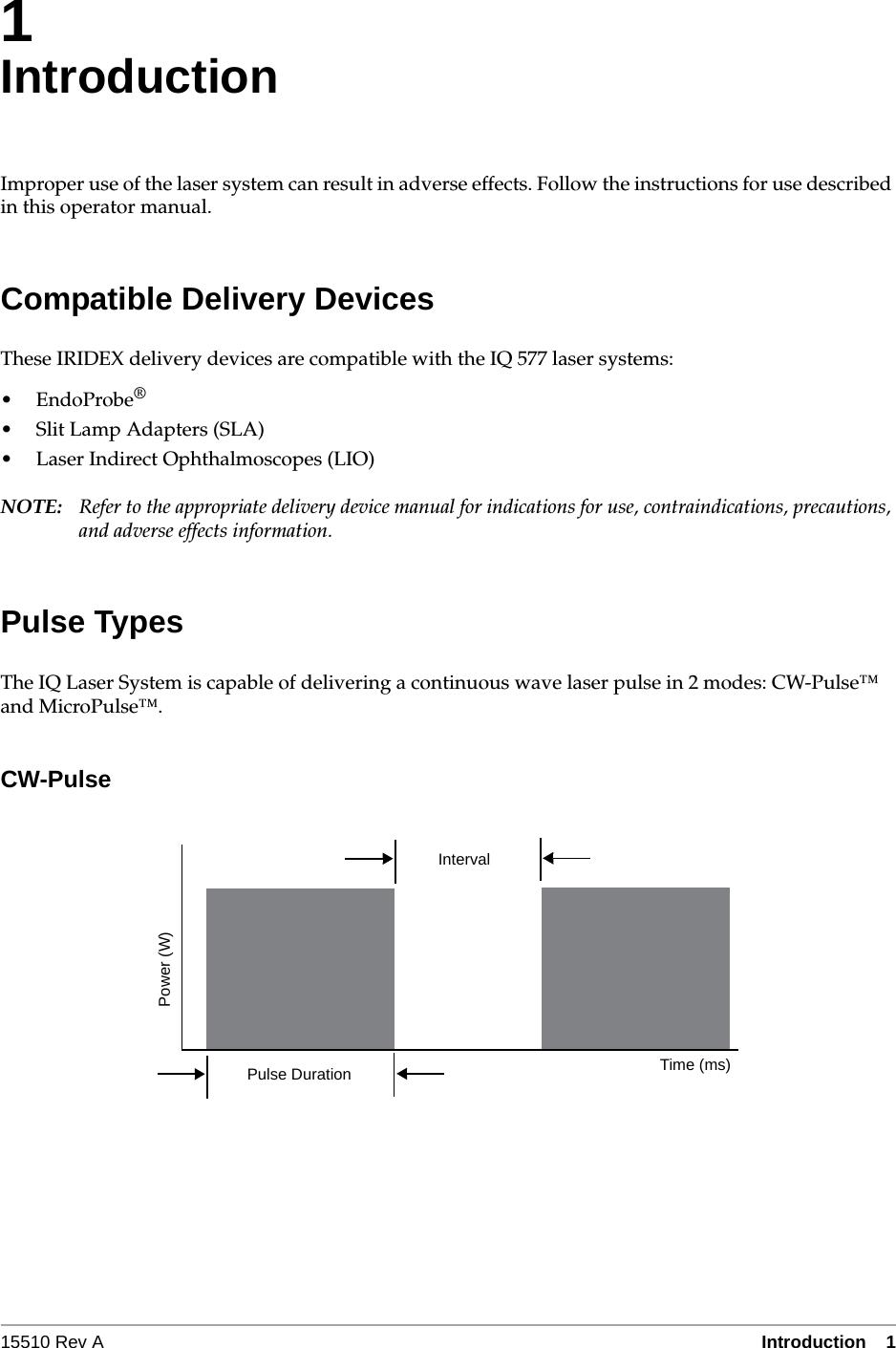
15510 Rev A Introduction  11IntroductionImproper use of the laser system can result in adverse effects. Follow the instructions for use described in this operator manual.Compatible Delivery DevicesThese IRIDEX delivery devices are compatible with the IQ 577 laser systems:•EndoProbe®• Slit Lamp Adapters (SLA)• Laser Indirect Ophthalmoscopes (LIO)NOTE: Refer to the appropriate delivery device manual for indications for use, contraindications, precautions, and adverse effects information.Pulse TypesThe IQ Laser System is capable of delivering a continuous wave laser pulse in 2 modes: CW-Pulse™ and MicroPulse™.CW-PulseIntervalPulse Duration Time (ms)Power (W)
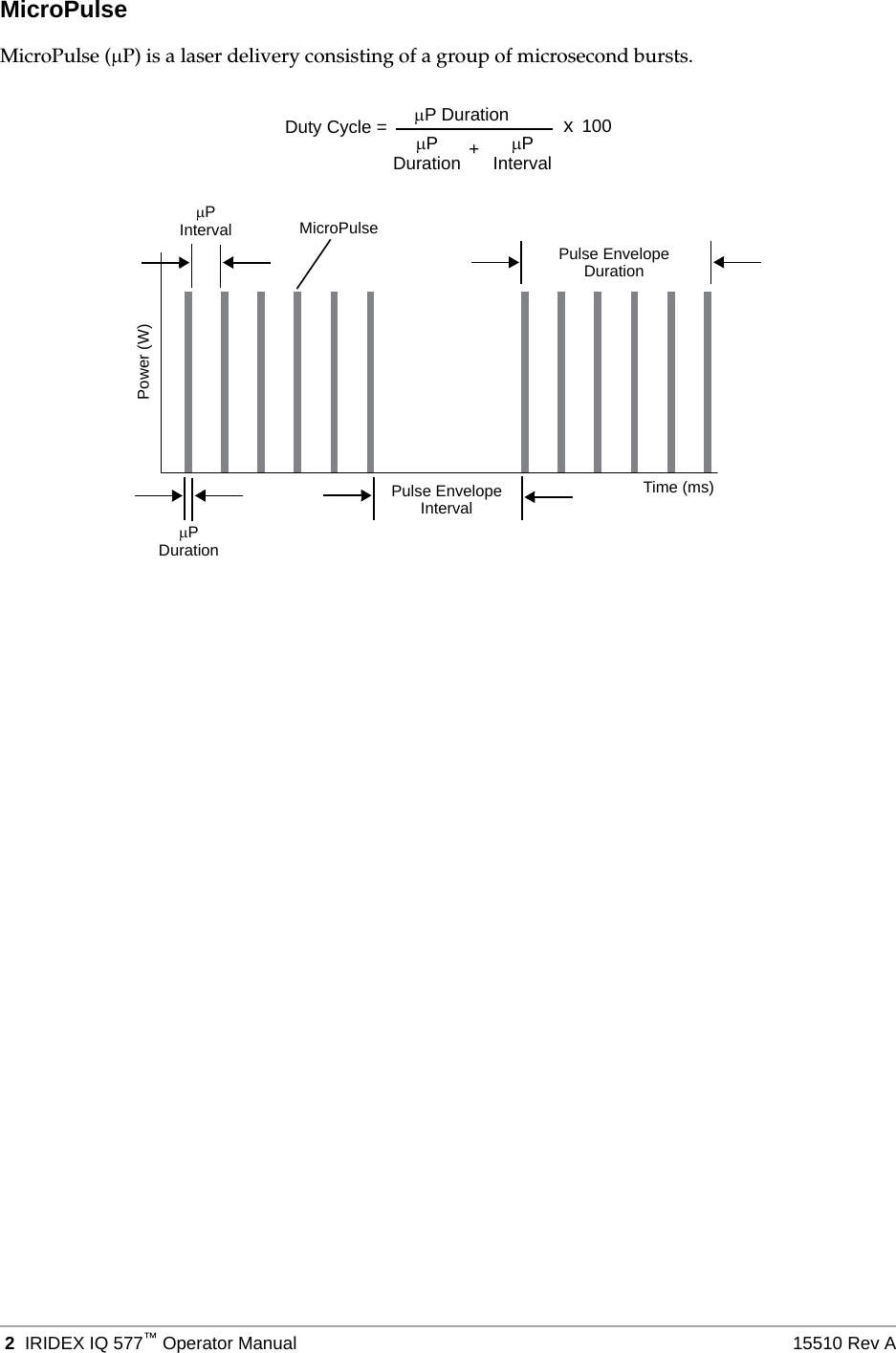
 2 IRIDEX IQ 577™Operator Manual 15510 Rev AMicroPulseMicroPulse (P) is a laser delivery consisting of a group of microsecond bursts.P Duration xPDuration PInterval+100Duty Cycle =Pulse EnvelopeIntervalPInterval MicroPulsePulse EnvelopeDurationTime (ms)Power (W)PDuration
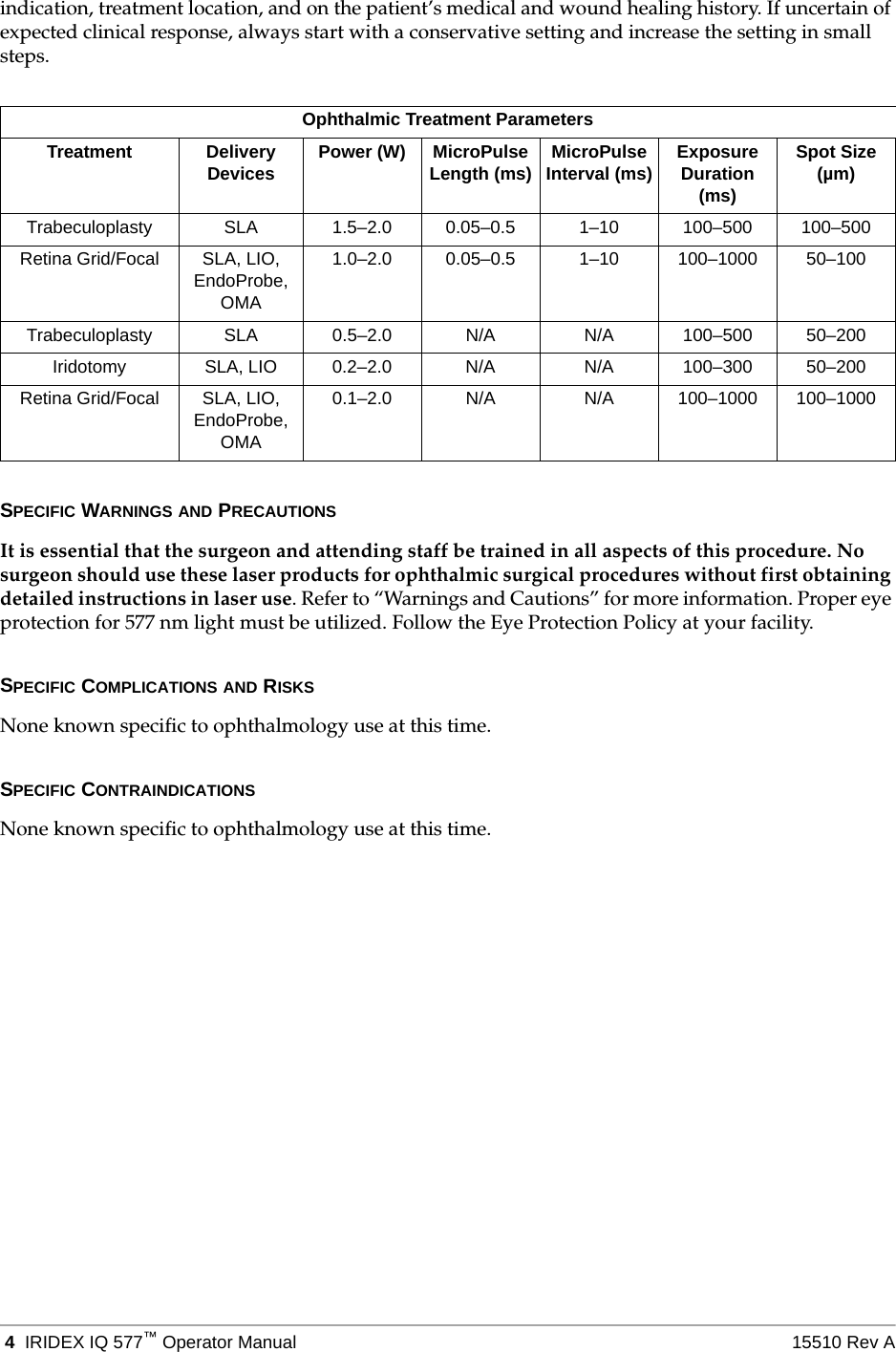
15510 Rev A Introduction  3Indications for UseThis section provides information on the use of the IQ 577 in clinical specialties. Information is provided by specialty and includes procedural recommendations along with specific indications and contraindications. This information is not intended to be all-inclusive and is not intended to replace surgeon training or experience. The regulatory information provided is applicable only in the United States. If you use the IQ 577 for indications not included herein, you will be subject to 21 CFR Part 812, the Food and Drug Administration’s Investigational Device Exemption (IDE) regulations. For information regarding the regulatory status of indications other than those listed in this manual, contact IRIDEX Regulatory Affairs.IRIDEX does not make recommendations regarding the practice of medicine. References in literature are provided as a guide. Individual treatment should be based on clinical training, clinical observation of laser tissue interaction, and appropriate clinical endpoints.The IRIDEX IQ 577 and the handpieces, delivery devices, and accessories that are used with it to deliver laser energy in either CW-Pulse™ or MicroPulse™ mode are intended for soft and fibrous tissue, including osseous tissue incision, excision, coagulation, vaporization, ablation and vessel hemostasis in Ophthalmology.OphthalmologyIndicated for use in photocoagulation of both interior and posterior segments, including:• Retinal photocoagulation, panretinal photocoagulation and intravitreal endophotocoagulation of vascular and structural abnormalities of the retina and choroids, including:– Proliferative and nonproliferative diabetic retinopathy– Choroidal neovascularization– Branch retinal vein occlusion– Age-related macular degeneration– Retinal tears and detachments– Retinopathy of prematurity• Iridotomy, iridectomy, and trabeculoplasty in angle closure glaucoma and open angle glaucomaPROCEDURAL RECOMMENDATIONSThe user is directed to review the operating instructions for the compatible delivery devices prior to treatment.TECHNIQUEThe laser energy is recommended to be administered via the EndoProbe optical fiber delivery handpiece which is utilized intra-ocularly.LASER SETTINGSBeginning at low power with short duration exposures, the surgeon should note the surgical effect and increase power, power density, or exposure duration until the desired surgical effect is obtained. The following table is intended to provide guidance only for treatment settings, which are not prescriptive for any condition. The operative needs of each patient should be individually evaluated based on the
 4 IRIDEX IQ 577™Operator Manual 15510 Rev Aindication, treatment location, and on the patient’s medical and wound healing history. If uncertain of expected clinical response, always start with a conservative setting and increase the setting in small steps.SPECIFIC WARNINGS AND PRECAUTIONSIt is essential that the surgeon and attending staff be trained in all aspects of this procedure. No surgeon should use these laser products for ophthalmic surgical procedures without first obtaining detailed instructions in laser use. Refer to “Warnings and Cautions” for more information. Proper eye protection for 577 nm light must be utilized. Follow the Eye Protection Policy at your facility.SPECIFIC COMPLICATIONS AND RISKSNone known specific to ophthalmology use at this time.SPECIFIC CONTRAINDICATIONSNone known specific to ophthalmology use at this time.Ophthalmic Treatment ParametersTreatment Delivery Devices Power (W) MicroPulse Length (ms) MicroPulse Interval (ms) Exposure Duration (ms)Spot Size (µm)Trabeculoplasty SLA 1.5–2.0 0.05–0.5 1–10 100–500 100–500Retina Grid/Focal SLA, LIO, EndoProbe, OMA1.0–2.0 0.05–0.5 1–10 100–1000 50–100Trabeculoplasty SLA 0.5–2.0 N/A N/A 100–500 50–200Iridotomy SLA, LIO 0.2–2.0 N/A N/A 100–300 50–200Retina Grid/Focal SLA, LIO, EndoProbe, OMA0.1–2.0 N/A N/A 100–1000 100–1000
15510 Rev A Introduction  5M.B. Parodi, S .Spasse, P. Iacono, G. DiStefano, T. Canziani; Subthreshold Grid Laser Treatment of Macular Edema Secondary to Branch Retinal Vein Occlusion With Micropulse Infrared (810 Nm) Diode Laser; Ophthalmology Volume 113, Number 12, December 2006.T J Desmettre, S R Mordo, D M Buzawa and M A Mainster; Micropulse and continuous wave diode retinal photocoagulation: visible and subvisible lesion parameters; British Journal of Ophthalmology 2006;90;709-712; originally published online 10 Mar 2006.JK Luttrull, DC Musch and CA Spink; Subthreshold diode micropulse panretinal and photocoagulation for proliferative diabetic retinopathy., Eye online publication, February 2007.AM Fea, A Bosone, et. al. Micropulse diode laser trabeculoplasty (MDLT): A phase II clinical study with 12 months follow-up. Clinical Ophthalmology advance online publication, 9 Apr 2008.Brancato R, Carassa R, Trabucchi G.; Diode Laser Compared With Argon Laser for Trabeculoplasty American Journal of Ophthalmology 112:50-55, 1991.Moriarty A, McHugh J, ffytche T, Marshall J, Spalton D, Moriarty B.; Diode Laser Trabeculoplasty (DLT) versus Argon Laser Trabeculoplasty (ALT) in Primary Open-Angle Glaucoma Scientific Poster #52. AAO. San Francisco, CA. October, 1994.Wong JS, Chew P, Chee C; Comparison of Corneal Transmissibility of 810 nm Diode Laser With 448 nm Argon Laser; Diode Laser Peripheral Iridoplasty/Iridotomy in Acute Angle Closure Glaucoma; [ARVO Abstract]. Invest Ophthalmology Vis Sci. 39(4): S472. Abstract nr2162, 1998Akduman L, Olk RJ. “Diode Laser (810 nm) versus Argon Green (514 nm) Modified Grid Photocoagulation for Diffuse Diabetic Macular Edema”, Ophthalmology 104:1433-1441, 1997.
 6 IRIDEX IQ 577™Operator Manual 15510 Rev AWarnings and CautionsWARN I NGS :Lasers generate a highly concentrated beam of light that may cause injury if improperly used. To protect the patient and the operating personnel, the entire laser and the appropriate delivery system operator manuals should be carefully read and comprehended before operation.Never look directly into the aiming or treatment beam apertures or the fiber-optic cables that deliver the laser beams with or without laser safety eyewear.Never look directly into the laser light source or at laser light scattered from bright reflective surfaces. Avoid directing the treatment beam at highly reflective surfaces such as metal instruments.Ensure that all personnel in the treatment room are wearing the appropriate laser safety eyewear. Never substitute prescription eyewear for laser safety eyewear.CAUTIONS:US federal law restricts this device to sale by or on the order of a healthcare practitioner licensed by the law of the State in which he/she practices to use or order the use of the device.Use of controls or adjustments or performing of procedures other than those specified herein may result in hazardous radiation exposure.Do not operate the equipment in the presence of flammables or explosives, such as volatile anesthetics, alcohol, and surgical preparation solutions.Laser plume may contain viable tissue particulates.When no delivery device is attached to the system, ensure that the fiber ports are closed.
15510 Rev A Introduction  7IRIDEX Corporation Contact InformationWarranty and Service. Each laser system carries a standard factory warranty. The warranty covers all parts and labor required to correct problems with materials or workmanship. This warranty is void if service is attempted by anyone other than certified IRIDEX service personnel.WARN I NG: Use only IRIDEX delivery devices with the IRIDEX laser system. Use of a non-IRIDEX delivery device may result in unreliable operation or inaccurate delivery of laser power. This Warranty and Service agreement does not cover any damage or defect caused by the use of non-IRIDEX devices.NOTE: This Warranty and Service statement is subject to the Disclaimer of Warranties, Limitation of Remedy, and Limitation of Liability contained in IRIDEX’s Terms and Conditions.IRIDEX Corporation1212 Terra Bella AvenueMountain View, California 94043-1824 USATelephone: (800) 388-4747 (US only)(650) 962-8100Fax: (650) 962-0486Technical Support: (650) 962-8100 (800) 388-4747 (US only)techsupport@iridex.comMedical Devices Consultants International LimitedArundel House1 Liverpool GardensWorthing, West Sussex BN11 1SLUnited KingdomWEEE Guidance. Contact IRIDEX or your distributor for disposal information.0086
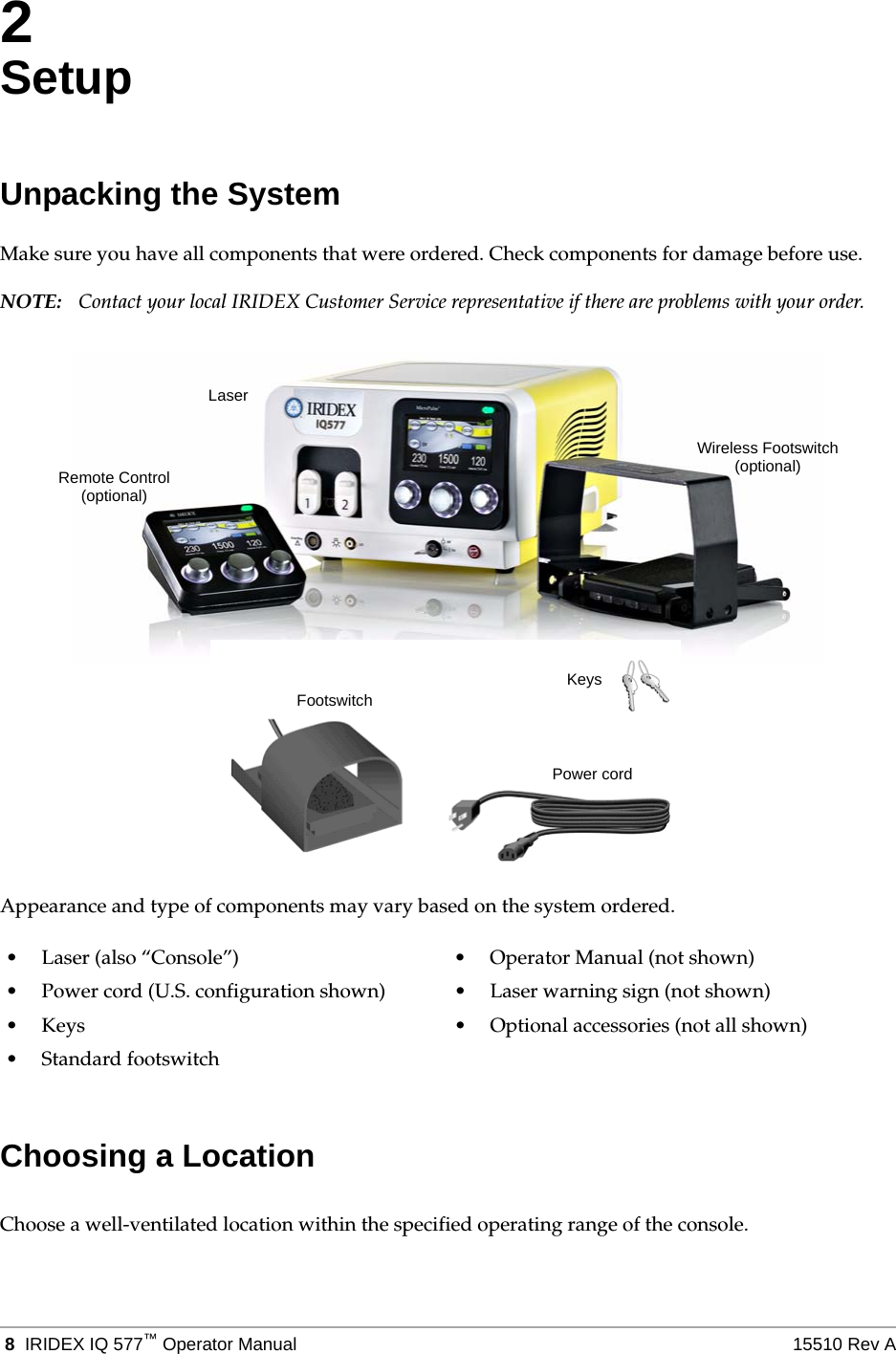
 8 IRIDEX IQ 577™Operator Manual 15510 Rev A2SetupUnpacking the SystemMake sure you have all components that were ordered. Check components for damage before use.NOTE: Contact your local IRIDEX Customer Service representative if there are problems with your order.Appearance and type of components may vary based on the system ordered.Choosing a LocationChoose a well-ventilated location within the specified operating range of the console.• Laser (also “Console”) • Operator Manual (not shown)• Power cord (U.S. configuration shown) • Laser warning sign (not shown)• Keys • Optional accessories (not all shown)•Standard footswitchKeysPower cordFootswitchLaserRemote Control(optional)Wireless Footswitch(optional)
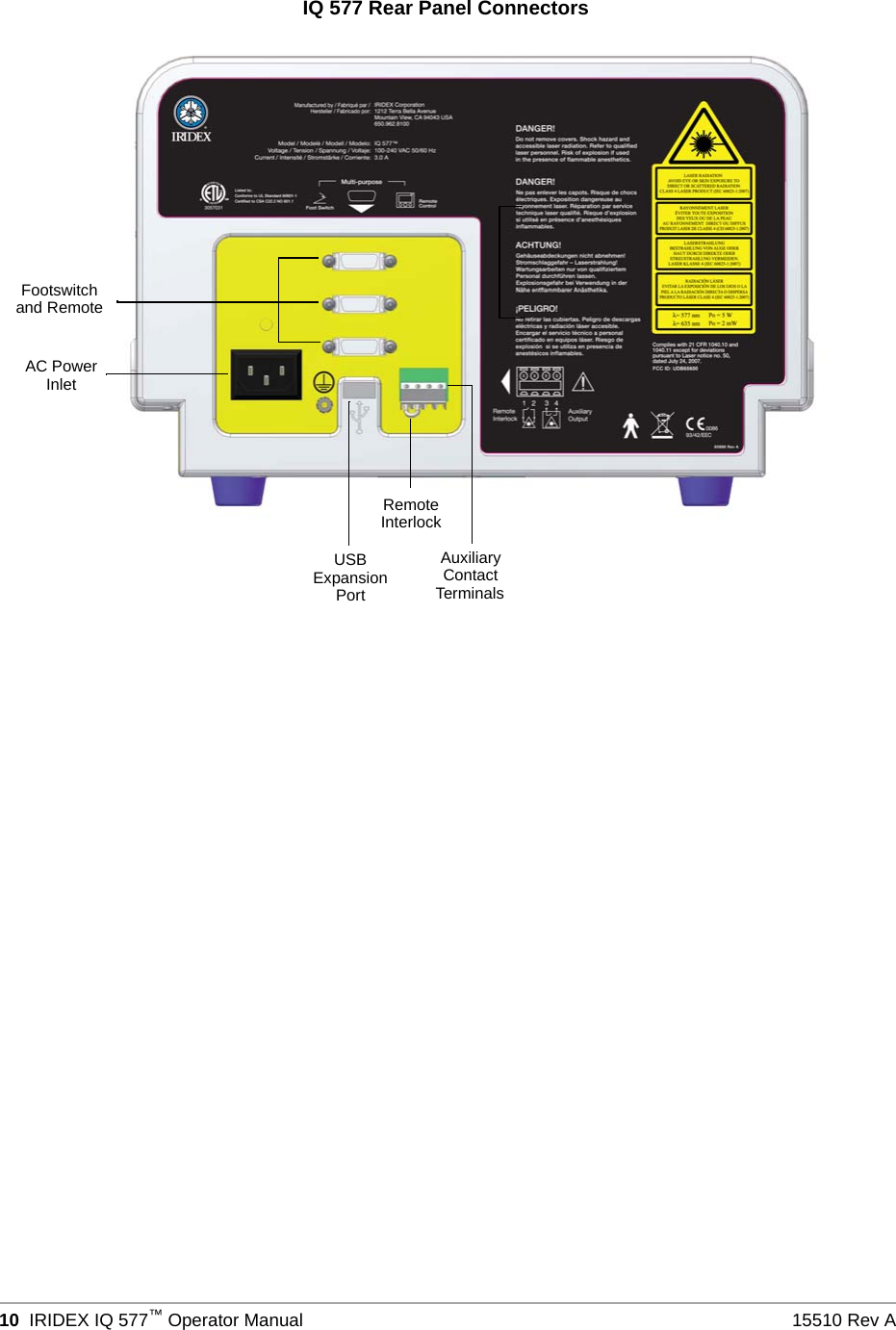
15510 Rev A Setup  9Place the laser system on a table or on existing operating room equipment. Allow at least 5 cm (2 in.) of clearance on each side.In the U.S., this equipment must be connected to an electrical supply source at 120V or 240V with a center tap.To ensure that all local electrical requirements can be met, the system is equipped with a hospital-grade (green dot) three-wire grounding plug. When choosing the location, ensure that a grounding-type AC outlet is available; it is required for safe operation.The power cord included in the packaging is appropriate for your location. Always use an approved three-wire grounding cord set. Do not alter the power inlet. To ensure proper grounding, follow local electrical codes before installing the system.CAUTIONS:Do not defeat the purpose of the grounding pin. This equipment is intended to be electrically grounded. Contact a licensed electrician if your outlet prevents you from inserting the plug.Do not position or use the system near open flames.Connecting the ComponentsCAUTION: Do not connect two footswitches to the laser console.NOTES:Refer to the appropriate delivery device manual for specific connection instructions.The Auxiliary Output contact supports low voltage electrical signaling circuits of up to five amps and 24 volts AC or DC. Ensure that all wiring conforms to local electrical codes.
 10 IRIDEX IQ 577™Operator Manual 15510 Rev AAC PowerIQ 577 Rear Panel ConnectorsRemoteInterlockAuxiliaryContactTerminalsFootswitchand RemoteInletUSBExpansionPort
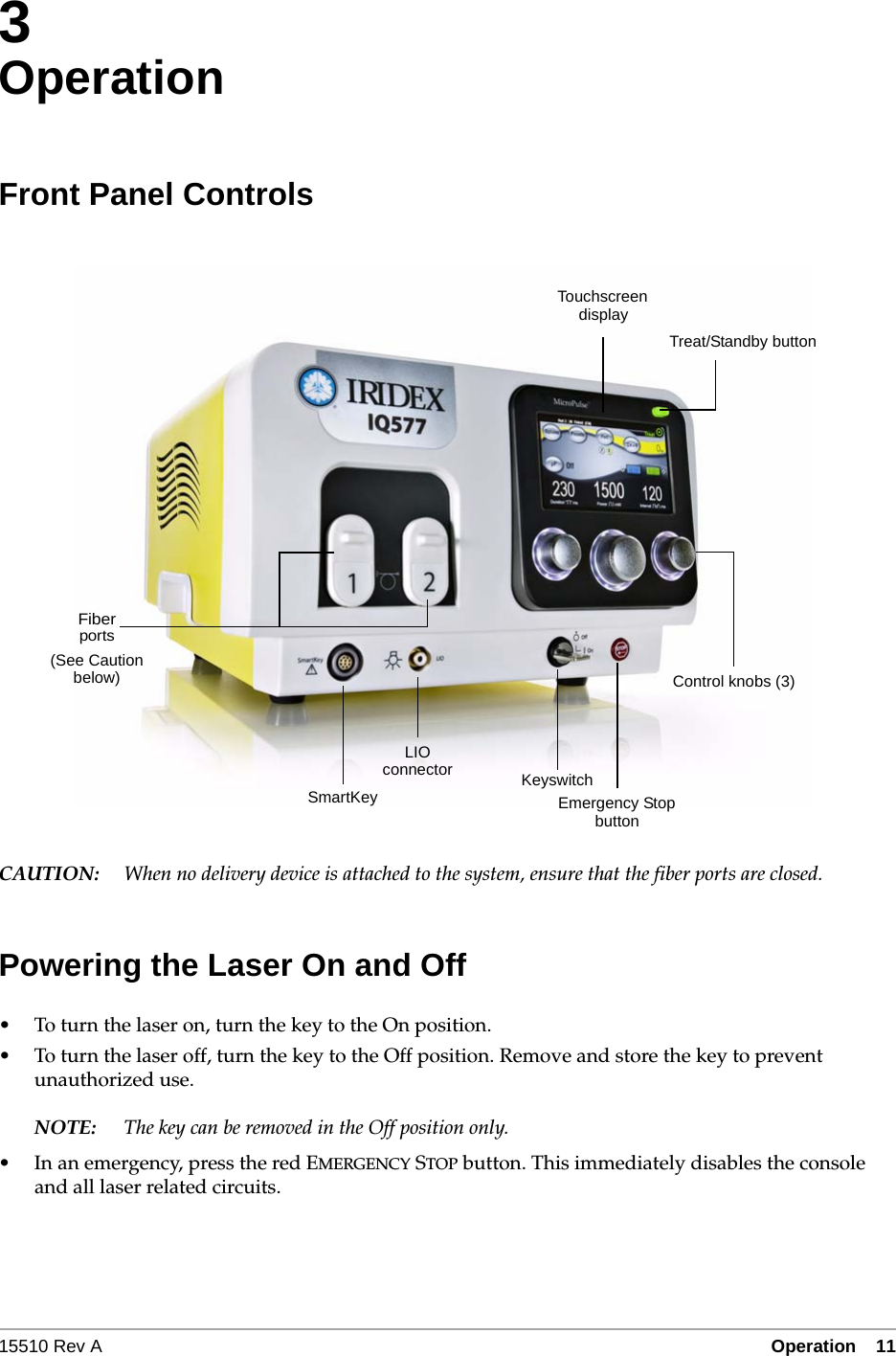
15510 Rev A Operation  11•3- 113OperationFront Panel ControlsCAUTION: When no delivery device is attached to the system, ensure that the fiber ports are closed.Powering the Laser On and Off• To turn the laser on, turn the key to the On position.• To turn the laser off, turn the key to the Off position. Remove and store the key to prevent unauthorized use.NOTE: The key can be removed in the Off position only.• In an emergency, press the red EMERGENCY STOP button. This immediately disables the console and all laser related circuits.LIOTouchscreenEmergency StopKeyswitchdisplaybuttonconnectorFiberportsControl knobs (3)SmartKeyTreat/Standby button(See Cautionbelow)
 12 IRIDEX IQ 577™Operator Manual 15510 Rev ATreating PatientsBEFORE TREATING A PATIENT:• Ensure that the eye safety filter (as appropriate) is properly installed and that the SmartKey®, if used, is selected.• Ensure that the laser components and delivery device(s) are properly connected.• Post the laser warning sign outside the treatment room door.NOTE: Refer to Chapter 6, “Safety and Compliance” and your delivery device manual(s) for important information about laser safety eyewear and eye safety filters.TO TREAT A PATIENT:1. Turn on the laser.2. Reset the counter.3. Set the treatment parameters.4. Position the patient.5. If required, select an appropriate contact lens for the treatment.6. Ensure that all ancillary personnel in the treatment room are wearing the appropriate laser safety eyewear.7. Select Treat mode.8. Position the aiming beam on the treatment site.9. Focus or adjust the delivery device as applicable.10. Press the footswitch to deliver the treatment beam.TO CONCLUDE PATIENT TREATMENT:1. Select Standby mode.2. Record the number of exposures and any other treatment parameters.3. Turn off the laser and remove the key.4. Collect the safety eyewear.5. Remove the warning sign from the treatment room door.6. Disconnect the delivery device(s).7. Disconnect the SmartKey, if used.8. If the delivery device is single-use, dispose of it properly. Otherwise, inspect and clean the delivery device(s) as instructed in your delivery device manual(s).9. If a contact lens was used, handle the lens according to the manufacturer’s instructions.
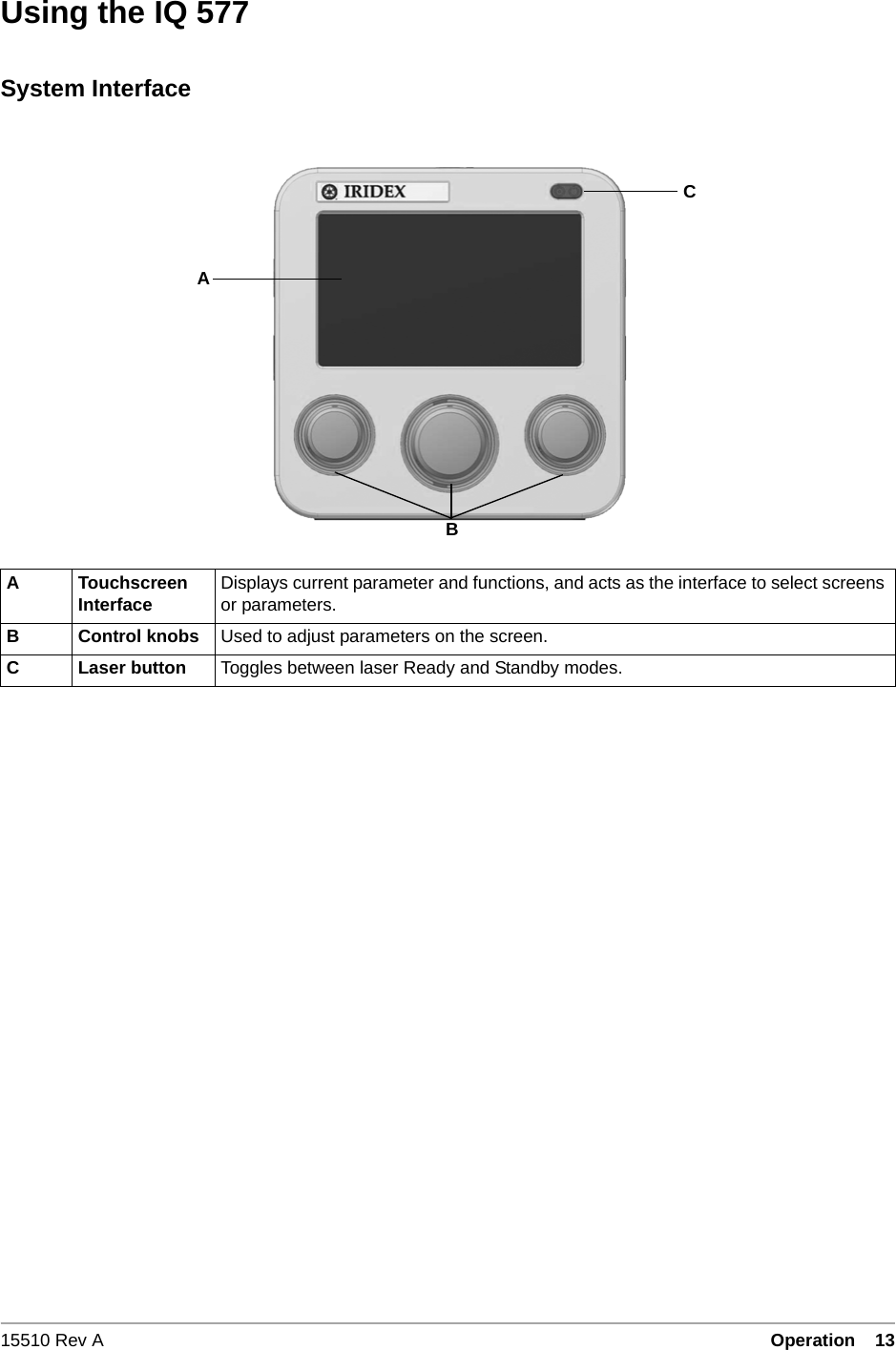
15510 Rev A Operation  13•3- 13Using the IQ 577System InterfaceA Touchscreen Interface Displays current parameter and functions, and acts as the interface to select screens or parameters.B Control knobs Used to adjust parameters on the screen.C Laser button Toggles between laser Ready and Standby modes.BAC
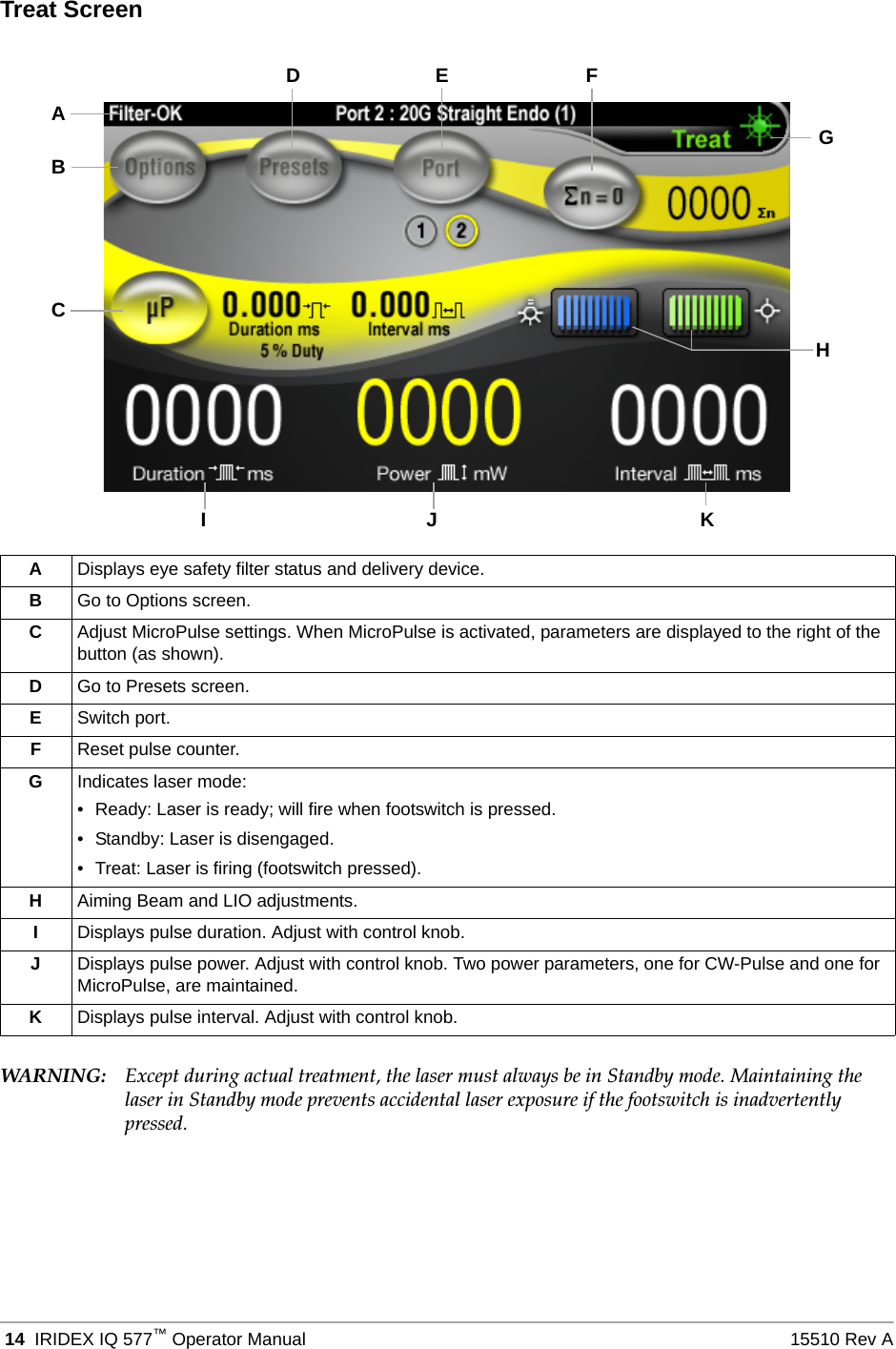
 14 IRIDEX IQ 577™Operator Manual 15510 Rev ATreat ScreenWARN I NG: Except during actual treatment, the laser must always be in Standby mode. Maintaining the laser in Standby mode prevents accidental laser exposure if the footswitch is inadvertently pressed.ADisplays eye safety filter status and delivery device.BGo to Options screen.CAdjust MicroPulse settings. When MicroPulse is activated, parameters are displayed to the right of the button (as shown).DGo to Presets screen.ESwitch port.FReset pulse counter.GIndicates laser mode:• Ready: Laser is ready; will fire when footswitch is pressed.• Standby: Laser is disengaged.• Treat: Laser is firing (footswitch pressed).HAiming Beam and LIO adjustments.IDisplays pulse duration. Adjust with control knob.JDisplays pulse power. Adjust with control knob. Two power parameters, one for CW-Pulse and one for MicroPulse, are maintained.KDisplays pulse interval. Adjust with control knob.DEACGIJ KHFB
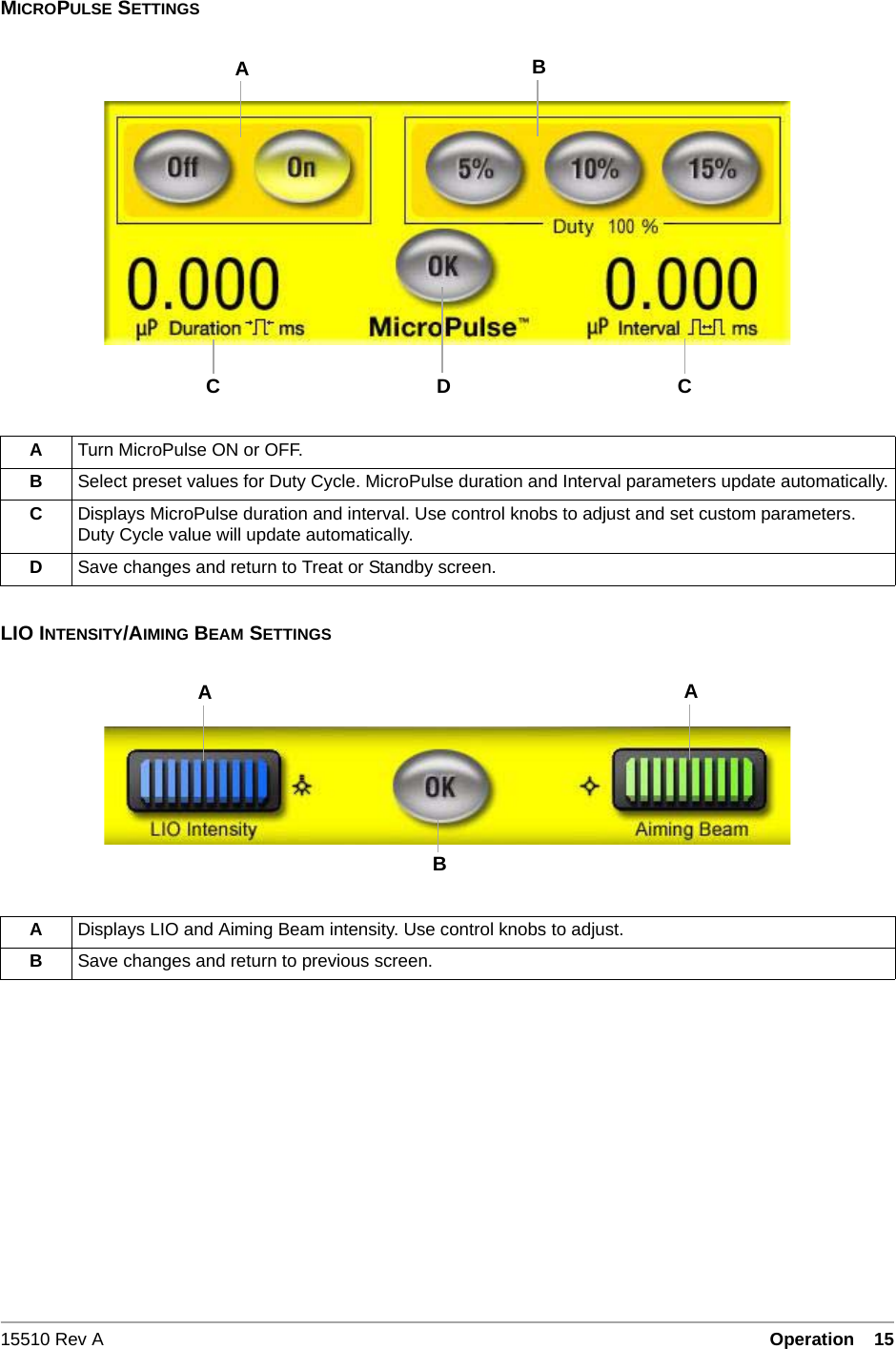
15510 Rev A Operation  15•3- 15MICROPULSE SETTINGSLIO INTENSITY/AIMING BEAM SETTINGSATurn MicroPulse ON or OFF.BSelect preset values for Duty Cycle. MicroPulse duration and Interval parameters update automatically.CDisplays MicroPulse duration and interval. Use control knobs to adjust and set custom parameters. Duty Cycle value will update automatically.DSave changes and return to Treat or Standby screen.ADisplays LIO and Aiming Beam intensity. Use control knobs to adjust.BSave changes and return to previous screen.CABDCBAA
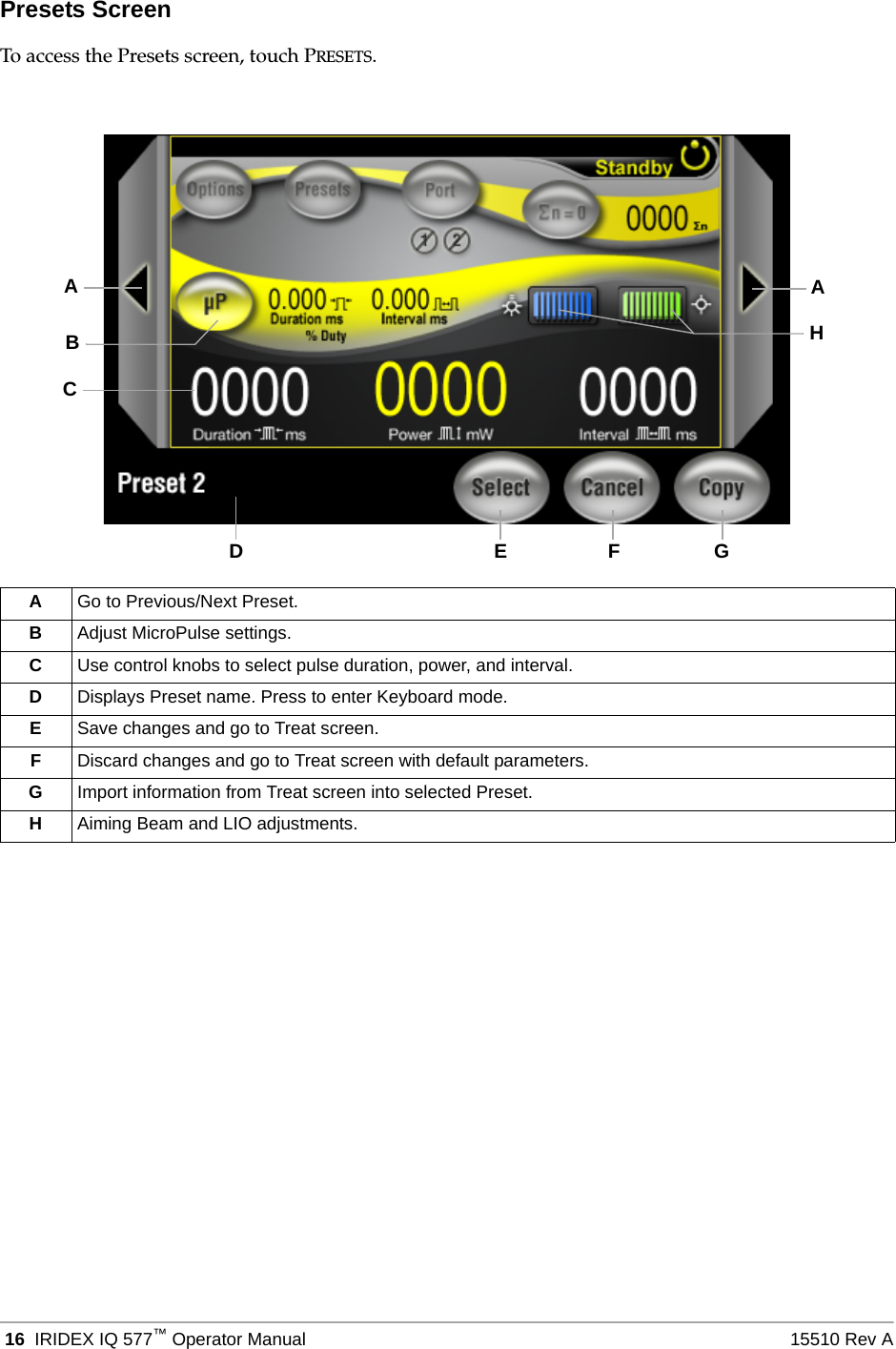
 16 IRIDEX IQ 577™Operator Manual 15510 Rev APresets ScreenTo access the Presets screen, touch PRESETS.AGo to Previous/Next Preset.BAdjust MicroPulse settings.CUse control knobs to select pulse duration, power, and interval.DDisplays Preset name. Press to enter Keyboard mode.ESave changes and go to Treat screen.FDiscard changes and go to Treat screen with default parameters.GImport information from Treat screen into selected Preset.HAiming Beam and LIO adjustments.BCAHADEF G
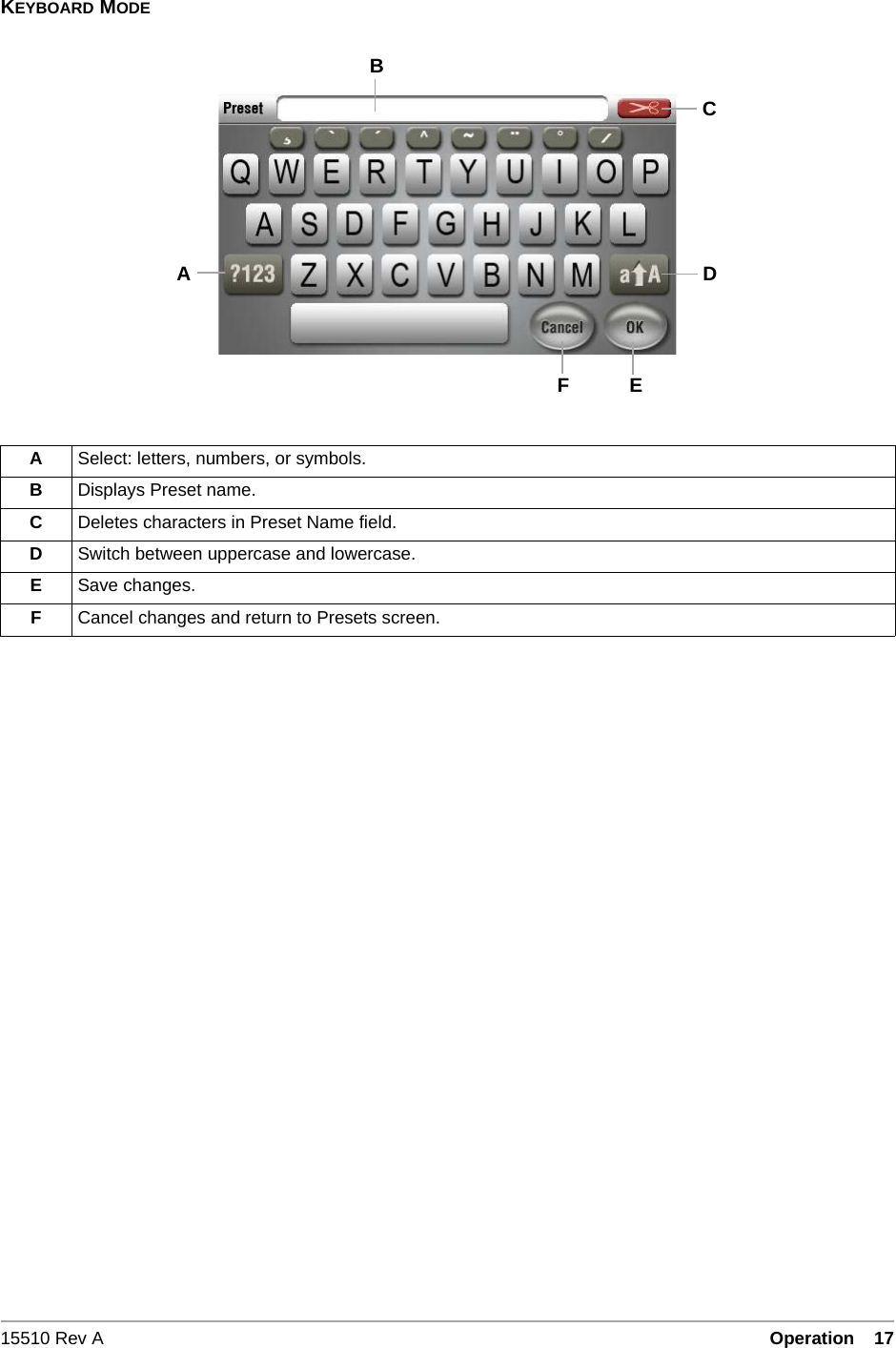
15510 Rev A Operation  17•3- 17KEYBOARD MODEASelect: letters, numbers, or symbols.BDisplays Preset name.CDeletes characters in Preset Name field.DSwitch between uppercase and lowercase.ESave changes.FCancel changes and return to Presets screen.FACEDB
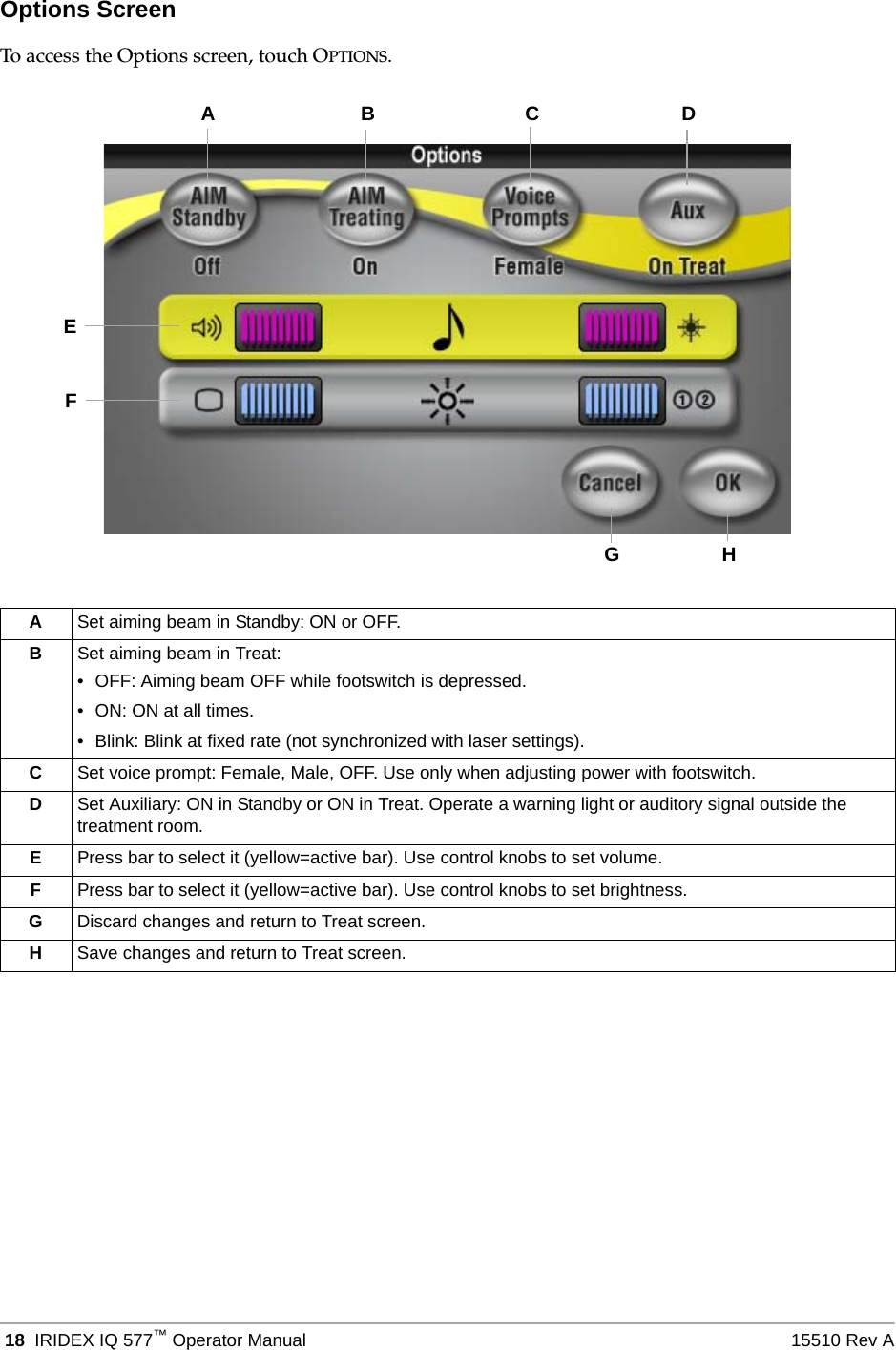
 18 IRIDEX IQ 577™Operator Manual 15510 Rev AOptions ScreenTo access the Options screen, touch OPTIONS.ASet aiming beam in Standby: ON or OFF.BSet aiming beam in Treat: • OFF: Aiming beam OFF while footswitch is depressed.• ON: ON at all times.• Blink: Blink at fixed rate (not synchronized with laser settings).CSet voice prompt: Female, Male, OFF. Use only when adjusting power with footswitch.DSet Auxiliary: ON in Standby or ON in Treat. Operate a warning light or auditory signal outside the treatment room.EPress bar to select it (yellow=active bar). Use control knobs to set volume.FPress bar to select it (yellow=active bar). Use control knobs to set brightness.GDiscard changes and return to Treat screen.HSave changes and return to Treat screen.GAHEB C DF
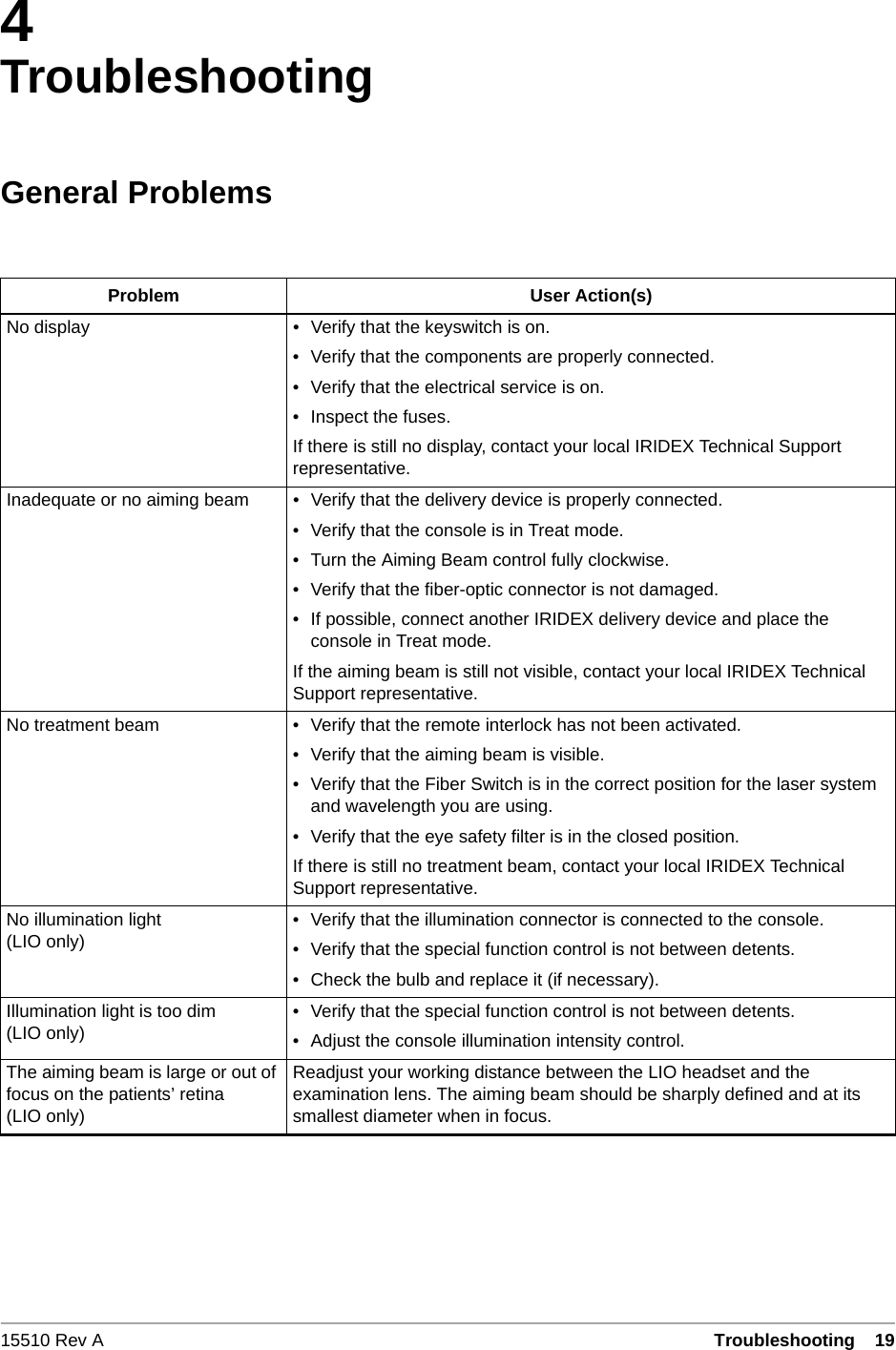
15510 Rev A Troubleshooting  194TroubleshootingGeneral ProblemsProblem User Action(s)No display • Verify that the keyswitch is on.• Verify that the components are properly connected.• Verify that the electrical service is on.• Inspect the fuses.If there is still no display, contact your local IRIDEX Technical Support representative.Inadequate or no aiming beam • Verify that the delivery device is properly connected.• Verify that the console is in Treat mode.• Turn the Aiming Beam control fully clockwise.• Verify that the fiber-optic connector is not damaged.• If possible, connect another IRIDEX delivery device and place the console in Treat mode.If the aiming beam is still not visible, contact your local IRIDEX Technical Support representative.No treatment beam • Verify that the remote interlock has not been activated.• Verify that the aiming beam is visible.• Verify that the Fiber Switch is in the correct position for the laser system and wavelength you are using.• Verify that the eye safety filter is in the closed position.If there is still no treatment beam, contact your local IRIDEX Technical Support representative.No illumination light(LIO only) • Verify that the illumination connector is connected to the console.• Verify that the special function control is not between detents.• Check the bulb and replace it (if necessary).Illumination light is too dim(LIO only) • Verify that the special function control is not between detents.• Adjust the console illumination intensity control.The aiming beam is large or out of focus on the patients’ retina(LIO only)Readjust your working distance between the LIO headset and the examination lens. The aiming beam should be sharply defined and at its smallest diameter when in focus.
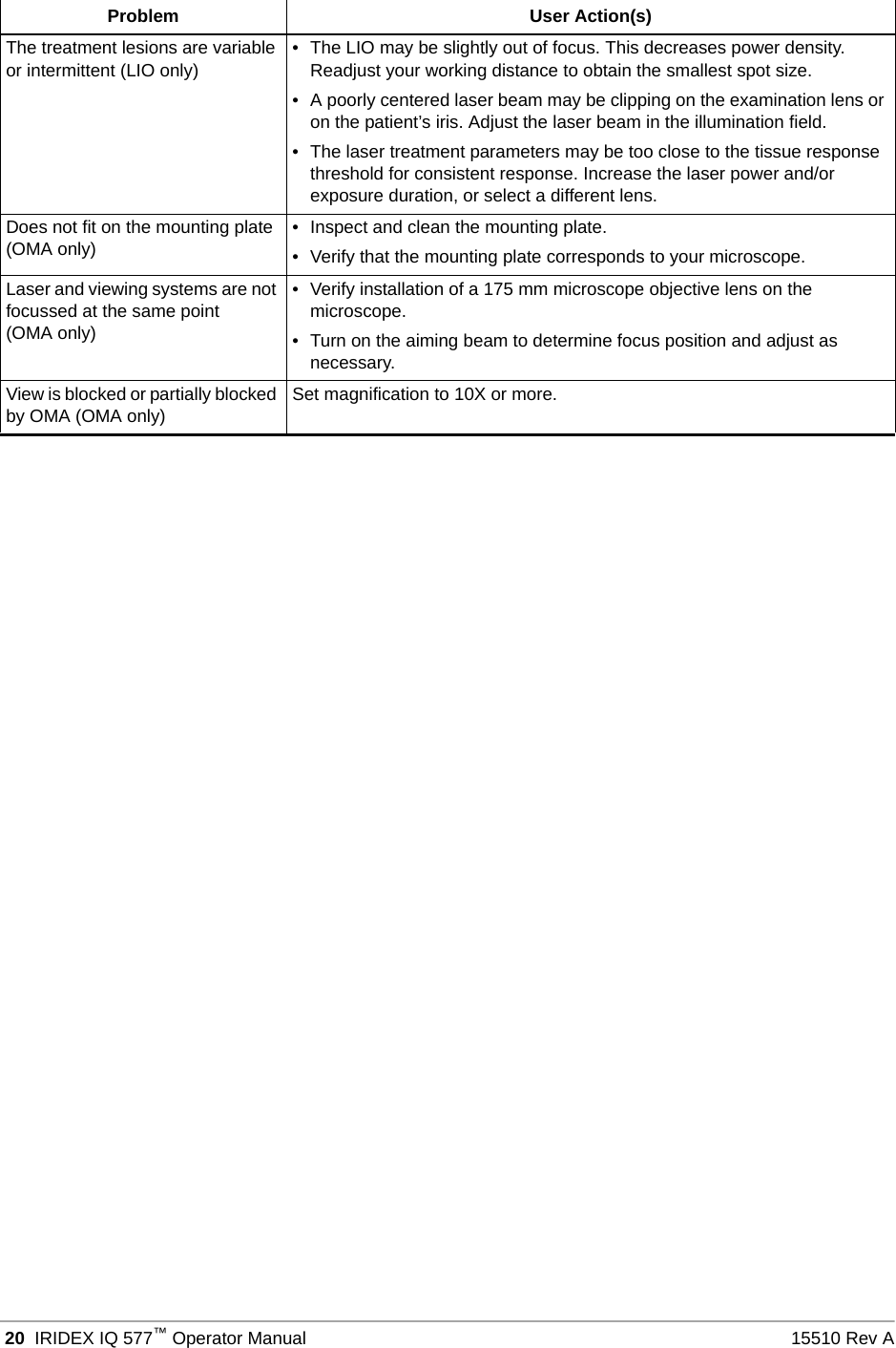
 20 IRIDEX IQ 577™Operator Manual 15510 Rev AThe treatment lesions are variable or intermittent (LIO only) • The LIO may be slightly out of focus. This decreases power density. Readjust your working distance to obtain the smallest spot size.• A poorly centered laser beam may be clipping on the examination lens or on the patient’s iris. Adjust the laser beam in the illumination field.• The laser treatment parameters may be too close to the tissue response threshold for consistent response. Increase the laser power and/or exposure duration, or select a different lens.Does not fit on the mounting plate (OMA only) • Inspect and clean the mounting plate.• Verify that the mounting plate corresponds to your microscope.Laser and viewing systems are not focussed at the same point(OMA only)• Verify installation of a 175 mm microscope objective lens on the microscope.• Turn on the aiming beam to determine focus position and adjust as necessary.View is blocked or partially blocked by OMA (OMA only) Set magnification to 10X or more.Problem User Action(s)
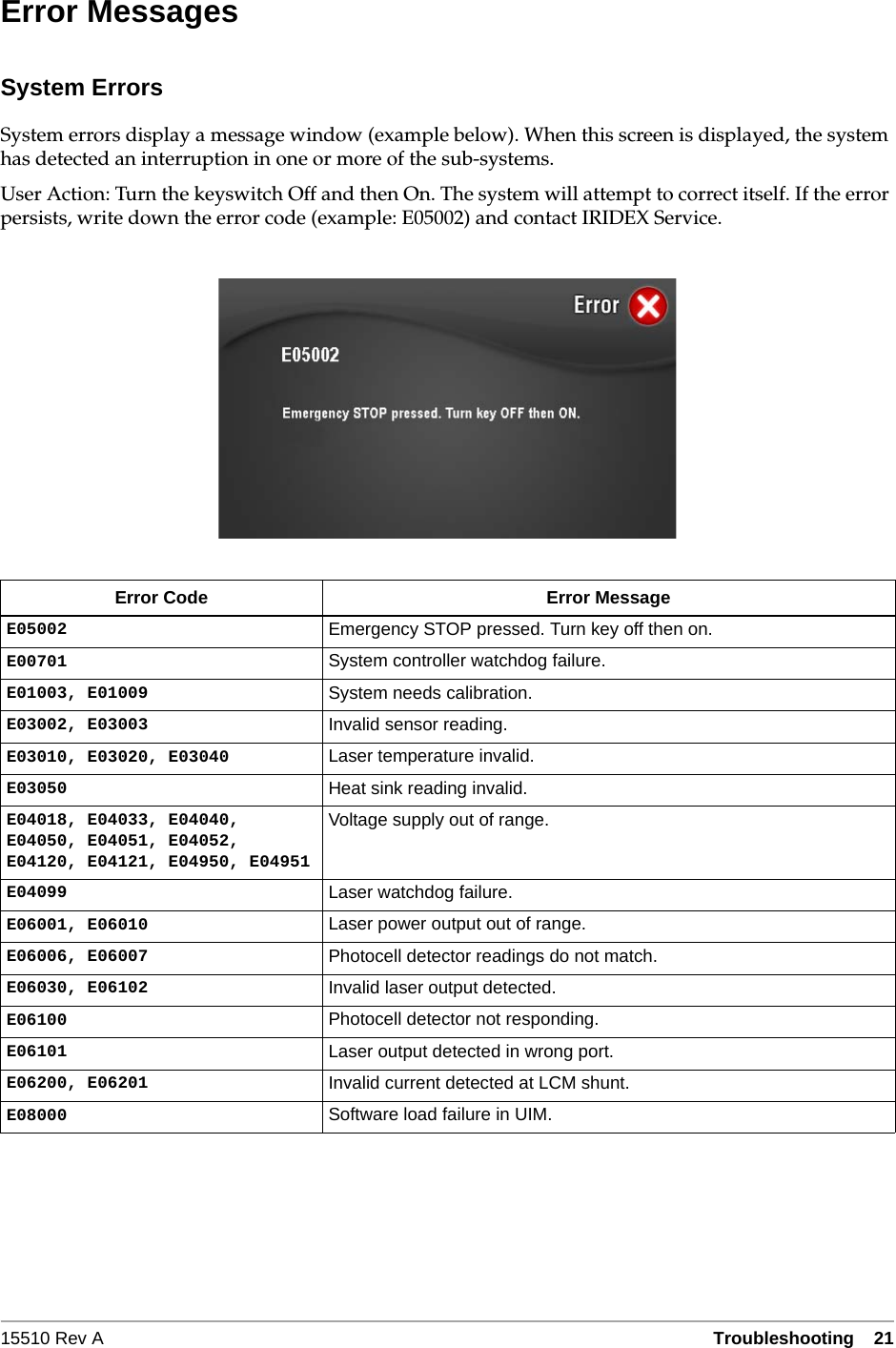
15510 Rev A Troubleshooting  21Error MessagesSystem ErrorsSystem errors display a message window (example below). When this screen is displayed, the system has detected an interruption in one or more of the sub-systems.User Action: Turn the keyswitch Off and then On. The system will attempt to correct itself. If the error persists, write down the error code (example: E05002) and contact IRIDEX Service.Error Code Error MessageE05002 Emergency STOP pressed. Turn key off then on.E00701 System controller watchdog failure.E01003, E01009 System needs calibration.E03002, E03003 Invalid sensor reading.E03010, E03020, E03040 Laser temperature invalid.E03050 Heat sink reading invalid.E04018, E04033, E04040, E04050, E04051, E04052, E04120, E04121, E04950, E04951Voltage supply out of range.E04099 Laser watchdog failure.E06001, E06010 Laser power output out of range.E06006, E06007 Photocell detector readings do not match.E06030, E06102 Invalid laser output detected.E06100 Photocell detector not responding.E06101 Laser output detected in wrong port.E06200, E06201 Invalid current detected at LCM shunt.E08000 Software load failure in UIM.
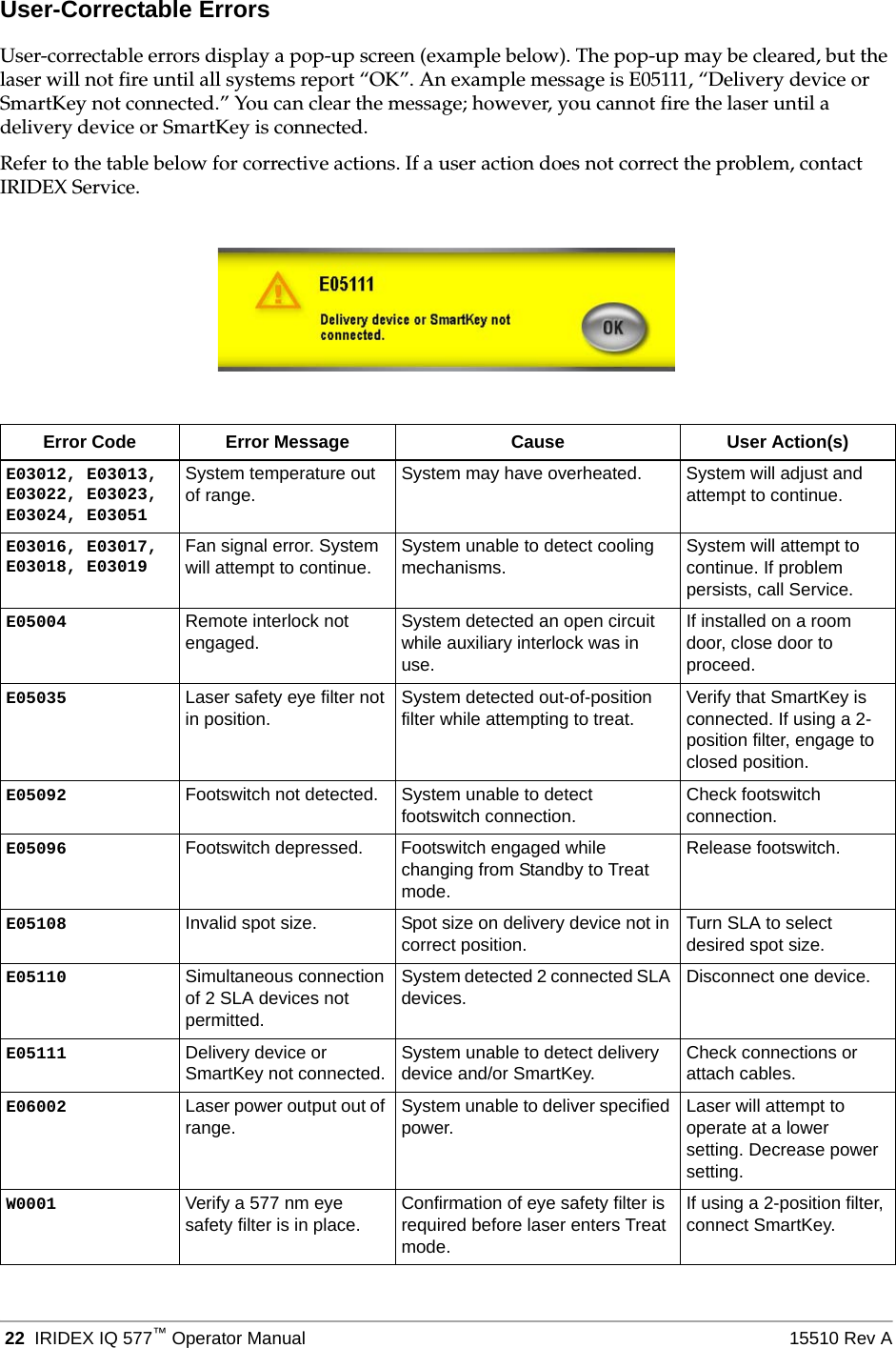
 22 IRIDEX IQ 577™Operator Manual 15510 Rev AUser-Correctable ErrorsUser-correctable errors display a pop-up screen (example below). The pop-up may be cleared, but the laser will not fire until all systems report “OK”. An example message is E05111, “Delivery device or SmartKey not connected.” You can clear the message; however, you cannot fire the laser until a delivery device or SmartKey is connected.Refer to the table below for corrective actions. If a user action does not correct the problem, contact IRIDEX Service.Error Code Error Message Cause User Action(s)E03012, E03013, E03022, E03023, E03024, E03051System temperature out of range. System may have overheated. System will adjust and attempt to continue.E03016, E03017, E03018, E03019Fan signal error. System will attempt to continue. System unable to detect cooling mechanisms. System will attempt to continue. If problem persists, call Service.E05004 Remote interlock not engaged. System detected an open circuit while auxiliary interlock was in use.If installed on a room door, close door to proceed.E05035 Laser safety eye filter not in position. System detected out-of-position filter while attempting to treat. Verify that SmartKey is connected. If using a 2-position filter, engage to closed position.E05092 Footswitch not detected. System unable to detect footswitch connection. Check footswitch connection.E05096 Footswitch depressed. Footswitch engaged while changing from Standby to Treat mode.Release footswitch.E05108 Invalid spot size. Spot size on delivery device not in correct position. Turn SLA to select desired spot size.E05110 Simultaneous connection of 2 SLA devices not permitted.System detected 2 connected SLA devices. Disconnect one device.E05111 Delivery device or SmartKey not connected. System unable to detect delivery device and/or SmartKey. Check connections or attach cables.E06002 Laser power output out of range.  System unable to deliver specified power. Laser will attempt to operate at a lower setting. Decrease power setting.W0001 Verify a 577 nm eye safety filter is in place. Confirmation of eye safety filter is required before laser enters Treat mode.If using a 2-position filter, connect SmartKey.
15510 Rev A Maintenance  235MaintenanceInspecting and Cleaning the LaserClean the outside console covers with soft cloth moistened with a mild detergent. Avoid abrasive or ammonia-based cleaners. WARN I NG: Do not remove covers! Removing covers and shields may result in exposure to dangerous optical radiation levels and electrical voltages. Only IRIDEX-trained personnel may access the interior of the laser. The laser has no user serviceable parts.CAUTIONS:Turn off the laser before inspecting any delivery device components. Keep the protective cap over the laser port when the laser is not in use. Always handle fiber-optic cables with extreme care. Do not coil the cable in a diameter less than 15 cm (6 in.).Inspecting and Cleaning the FootswitchIRIDEX footswitch labeled IPX8 is submersible (per IEC 60529). TO DECONTAMINATE AND DISINFECT THE FOOTSWITCH:1. Disconnect the footswitch from the laser (if applicable).2. Using water, isopropyl alcohol, or enzymatic detergents with mild pH, such as ENZOL®, remove all traces of blood and other body fluids from all exposed surfaces of the footswitch assembly, including the cable (if applicable).3. Stand the footswitch on end to drain all fluids.4. Immerse the footswitch in a CIDEX® (2.4% glutaraldehyde) solution:– 45 minutes at 25º C to achieve a high level of disinfection– 10 minutes at 20º C to 25º C to achieve an intermediate level of disinfection5. Remove the footswitch from the CIDEX solution.6. Stand the footswitch on end to drain all fluids. 7. Rinse by completely immersing the footswitch in clean water for one minute. Repeat two more times using clean water for each rinse.8. Stand the footswitch on end again to drain all fluids.9. Allow the footswitch to air-dry completely before reusing.10. Reconnect the footswitch to the laser.NOTE: The connector is not sealed and should not be immersed into any cleansing agent.
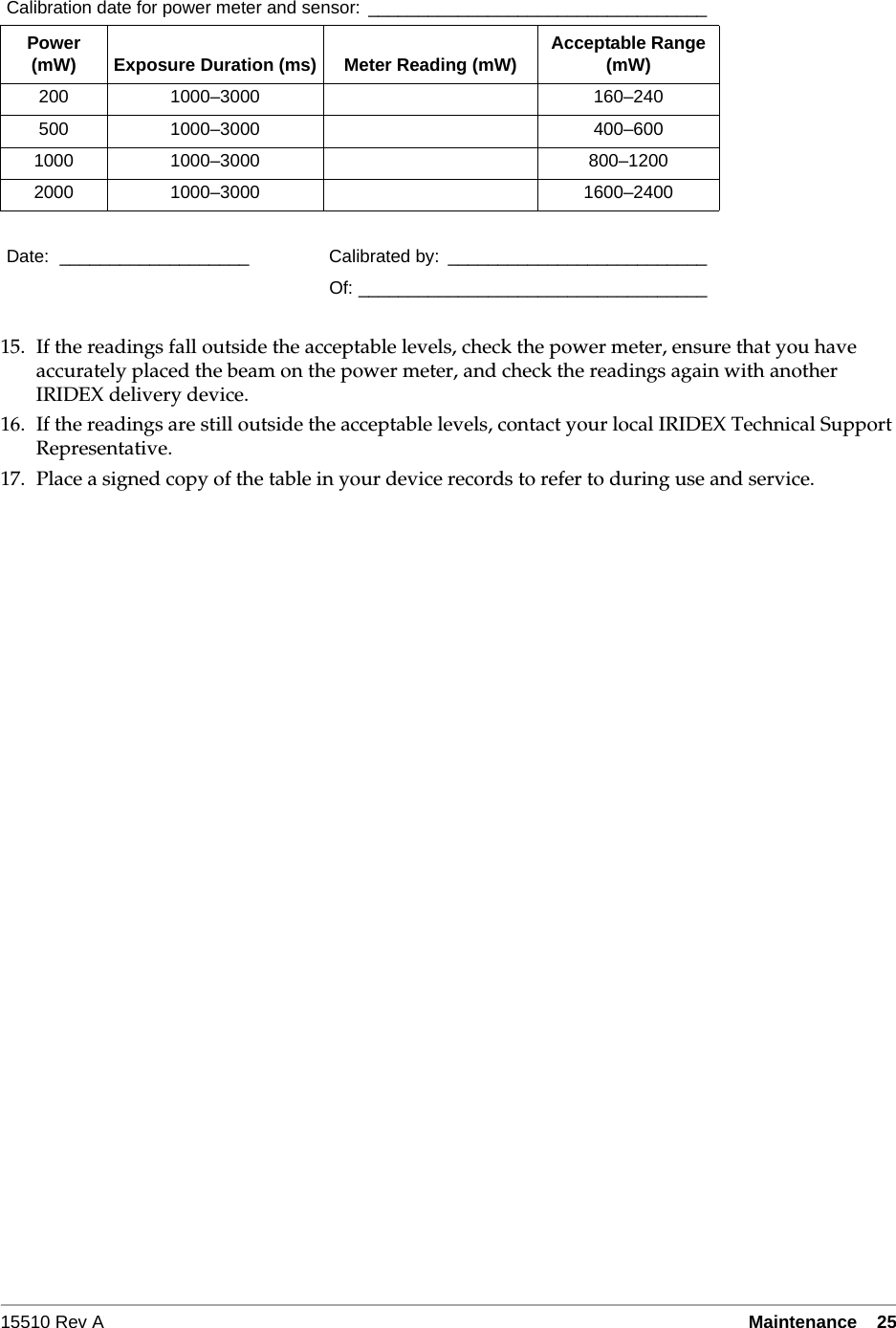
 24 IRIDEX IQ 577™Operator Manual 15510 Rev AVerifying the Power CalibrationTo ensure that calibration meets the requirements of the National Institute of Standards and Technology (NIST), the laser treatment power is calibrated at the IRIDEX factory with a power meter and an IRIDEX delivery device with previously measured transmission.Periodically, and at least annually, you should measure the actual power being delivered through your IRIDEX delivery device(s) to verify that the laser system is still operating within factory calibration parameters.Regulatory agencies require that manufacturers of US FDA CDRH Class III and IV and European EN 60825 Class 3 and 4 medical lasers supply their customers with power calibration procedures. Only IRIDEX trained factory or service personnel may adjust the power monitors.TO VERIFY THE POWER CALIBRATION:1. Make sure all persons in the room are wearing the appropriate laser safety eyewear.2. Connect a properly functioning IRIDEX delivery device.3. Set the power to 200 mW.4. Set the duration to 2000 ms and the interval to one pulse.5. Center the aiming beam at the middle of the power meter sensor.CAUTION: A spot size of less than 3 mm diameter can damage the power meter sensor.6. Place the laser in Treat mode.7. Aim the output beam from the IRIDEX delivery device into the power meter, following the power meter instructions for sampling the laser power.8. Press the footswitch to deliver the treatment beam. Record the power meter reading in the table below.9. Set the power to 500 mW.10. Press the footswitch to deliver the treatment beam, and record the reading.11. Set the power to 1000 mW.12. Press the footswitch to deliver the treatment beam, and record the reading.13. Set the power to 2000 mW.14. Press the footswitch to deliver the treatment beam, and record the reading.
15510 Rev A Maintenance  2515. If the readings fall outside the acceptable levels, check the power meter, ensure that you have accurately placed the beam on the power meter, and check the readings again with another IRIDEX delivery device.16. If the readings are still outside the acceptable levels, contact your local IRIDEX Technical Support Representative.17. Place a signed copy of the table in your device records to refer to during use and service.Calibration date for power meter and sensor:  __________________________________Power (mW) Exposure Duration (ms) Meter Reading (mW) Acceptable Range (mW)200 1000–3000 160–240500 1000–3000 400–6001000 1000–3000 800–12002000 1000–3000 1600–2400Date: ___________________ Calibrated by: __________________________Of: ___________________________________
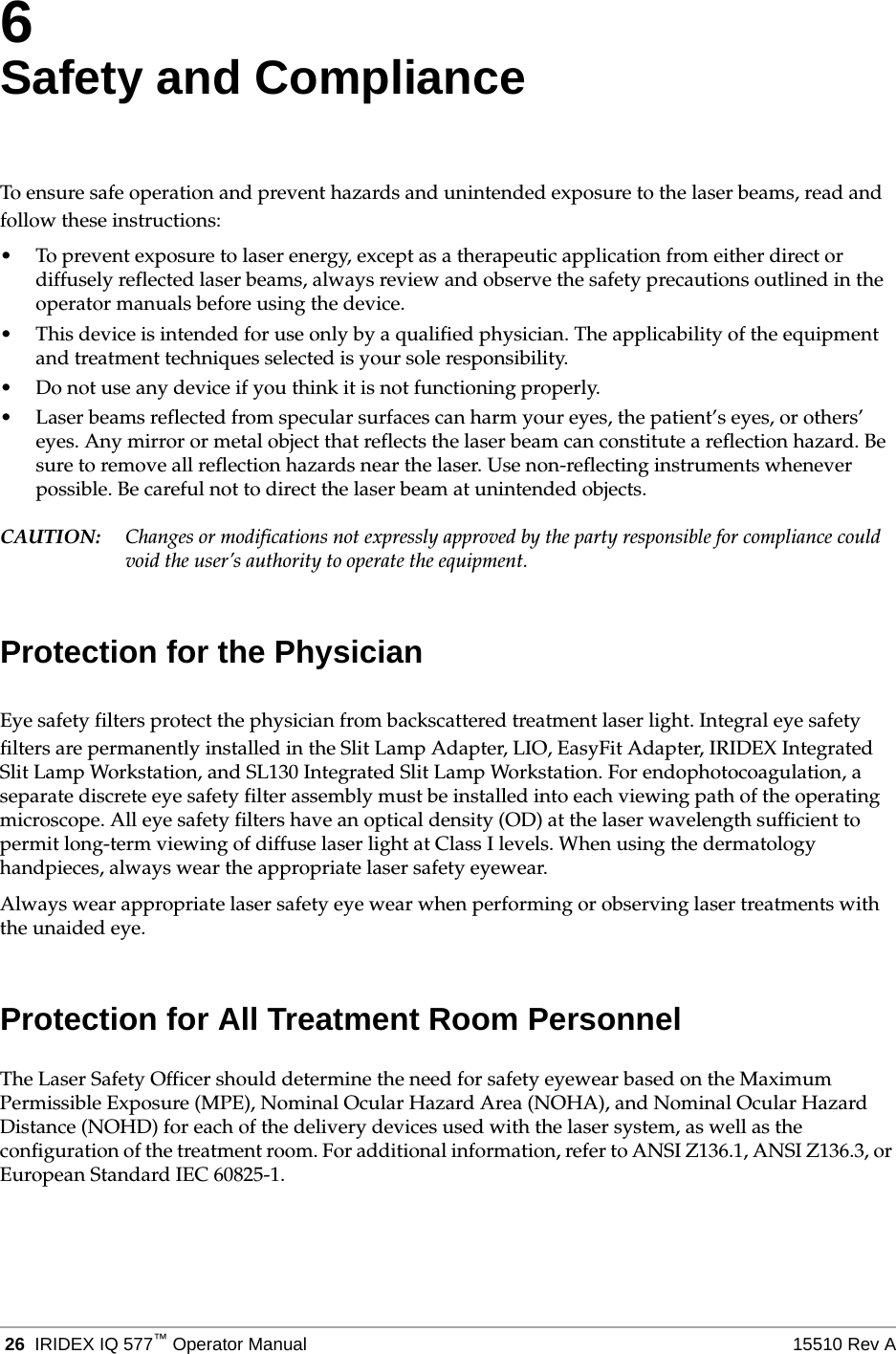
 26 IRIDEX IQ 577™Operator Manual 15510 Rev A6Safety and ComplianceTo ensure safe operation and prevent hazards and unintended exposure to the laser beams, read and follow these instructions:• To prevent exposure to laser energy, except as a therapeutic application from either direct or diffusely reflected laser beams, always review and observe the safety precautions outlined in the operator manuals before using the device.• This device is intended for use only by a qualified physician. The applicability of the equipment and treatment techniques selected is your sole responsibility.• Do not use any device if you think it is not functioning properly.• Laser beams reflected from specular surfaces can harm your eyes, the patient’s eyes, or others’ eyes. Any mirror or metal object that reflects the laser beam can constitute a reflection hazard. Be sure to remove all reflection hazards near the laser. Use non-reflecting instruments whenever possible. Be careful not to direct the laser beam at unintended objects.CAUTION: Changes or modifications not expressly approved by the party responsible for compliance could void the user’s authority to operate the equipment.Protection for the PhysicianEye safety filters protect the physician from backscattered treatment laser light. Integral eye safety filters are permanently installed in the Slit Lamp Adapter, LIO, EasyFit Adapter, IRIDEX Integrated Slit Lamp Workstation, and SL130 Integrated Slit Lamp Workstation. For endophotocoagulation, a separate discrete eye safety filter assembly must be installed into each viewing path of the operating microscope. All eye safety filters have an optical density (OD) at the laser wavelength sufficient to permit long-term viewing of diffuse laser light at Class I levels. When using the dermatology handpieces, always wear the appropriate laser safety eyewear.Always wear appropriate laser safety eye wear when performing or observing laser treatments with the unaided eye.Protection for All Treatment Room PersonnelThe Laser Safety Officer should determine the need for safety eyewear based on the Maximum Permissible Exposure (MPE), Nominal Ocular Hazard Area (NOHA), and Nominal Ocular Hazard Distance (NOHD) for each of the delivery devices used with the laser system, as well as the configuration of the treatment room. For additional information, refer to ANSI Z136.1, ANSI Z136.3, or European Standard IEC 60825-1.
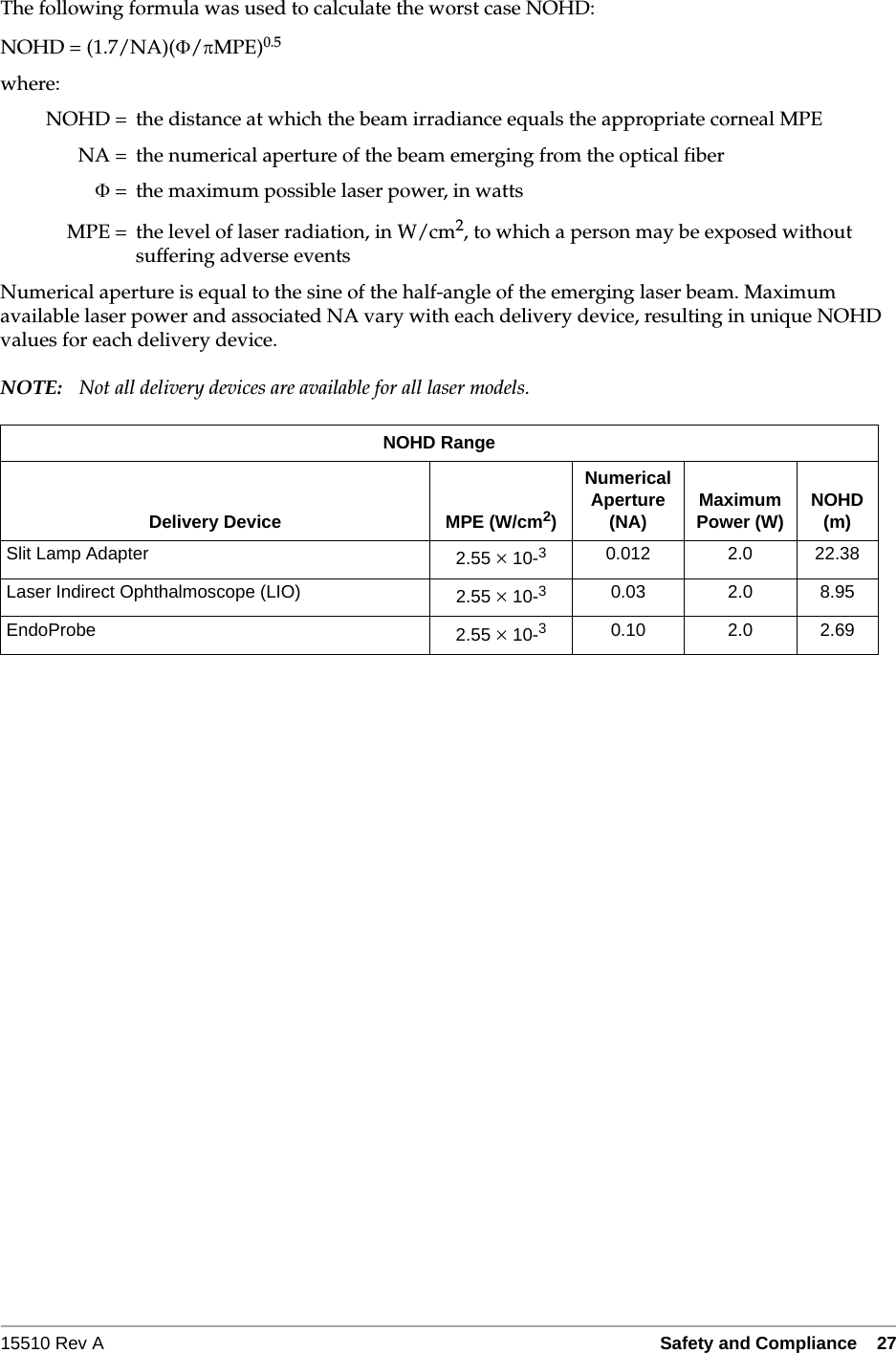
15510 Rev A Safety and Compliance   27The following formula was used to calculate the worst case NOHD:NOHD = (1.7/NA)(/MPE)0.5where:NOHD = the distance at which the beam irradiance equals the appropriate corneal MPENA = the numerical aperture of the beam emerging from the optical fiber= the maximum possible laser power, in wattsMPE = the level of laser radiation, in W/cm2, to which a person may be exposed without suffering adverse eventsNumerical aperture is equal to the sine of the half-angle of the emerging laser beam. Maximum available laser power and associated NA vary with each delivery device, resulting in unique NOHD values for each delivery device.NOTE: Not all delivery devices are available for all laser models.NOHD RangeDelivery Device MPE (W/cm2)Numerical Aperture (NA) Maximum Power (W) NOHD(m)Slit Lamp Adapter 2.55  10-30.012 2.0 22.38Laser Indirect Ophthalmoscope (LIO) 2.55  10-30.03 2.0 8.95EndoProbe 2.55  10-30.10 2.0 2.69
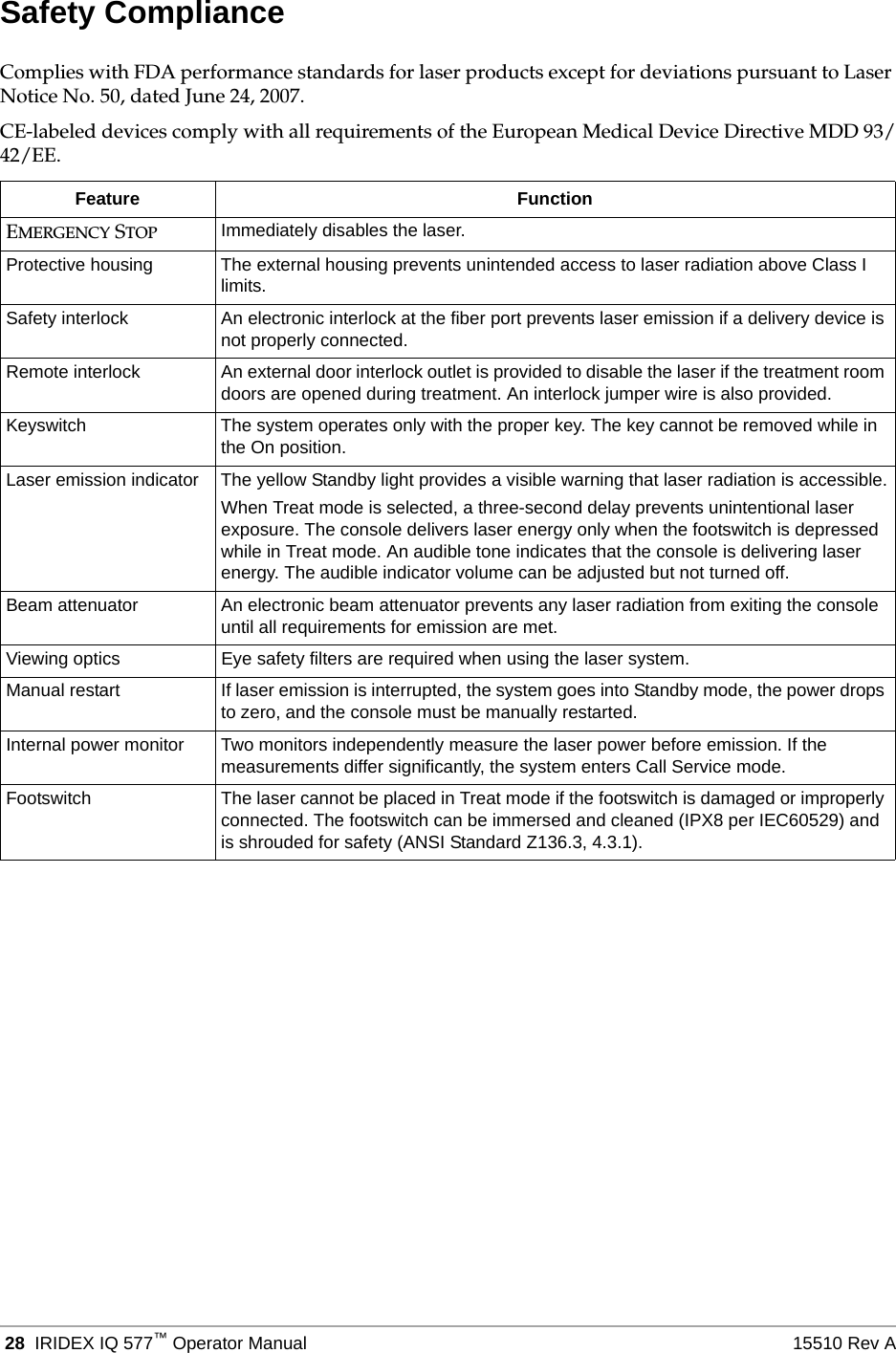
 28 IRIDEX IQ 577™Operator Manual 15510 Rev ASafety ComplianceComplies with FDA performance standards for laser products except for deviations pursuant to Laser Notice No. 50, dated June 24, 2007.CE-labeled devices comply with all requirements of the European Medical Device Directive MDD 93/42/EE.Feature FunctionEMERGENCY STOP Immediately disables the laser.Protective housing The external housing prevents unintended access to laser radiation above Class I limits.Safety interlock An electronic interlock at the fiber port prevents laser emission if a delivery device is not properly connected.Remote interlock An external door interlock outlet is provided to disable the laser if the treatment room doors are opened during treatment. An interlock jumper wire is also provided.Keyswitch The system operates only with the proper key. The key cannot be removed while in the On position.Laser emission indicator The yellow Standby light provides a visible warning that laser radiation is accessible.When Treat mode is selected, a three-second delay prevents unintentional laser exposure. The console delivers laser energy only when the footswitch is depressed while in Treat mode. An audible tone indicates that the console is delivering laser energy. The audible indicator volume can be adjusted but not turned off.Beam attenuator An electronic beam attenuator prevents any laser radiation from exiting the console until all requirements for emission are met.Viewing optics Eye safety filters are required when using the laser system.Manual restart If laser emission is interrupted, the system goes into Standby mode, the power drops to zero, and the console must be manually restarted.Internal power monitor Two monitors independently measure the laser power before emission. If the measurements differ significantly, the system enters Call Service mode.Footswitch The laser cannot be placed in Treat mode if the footswitch is damaged or improperly connected. The footswitch can be immersed and cleaned (IPX8 per IEC60529) and is shrouded for safety (ANSI Standard Z136.3, 4.3.1).
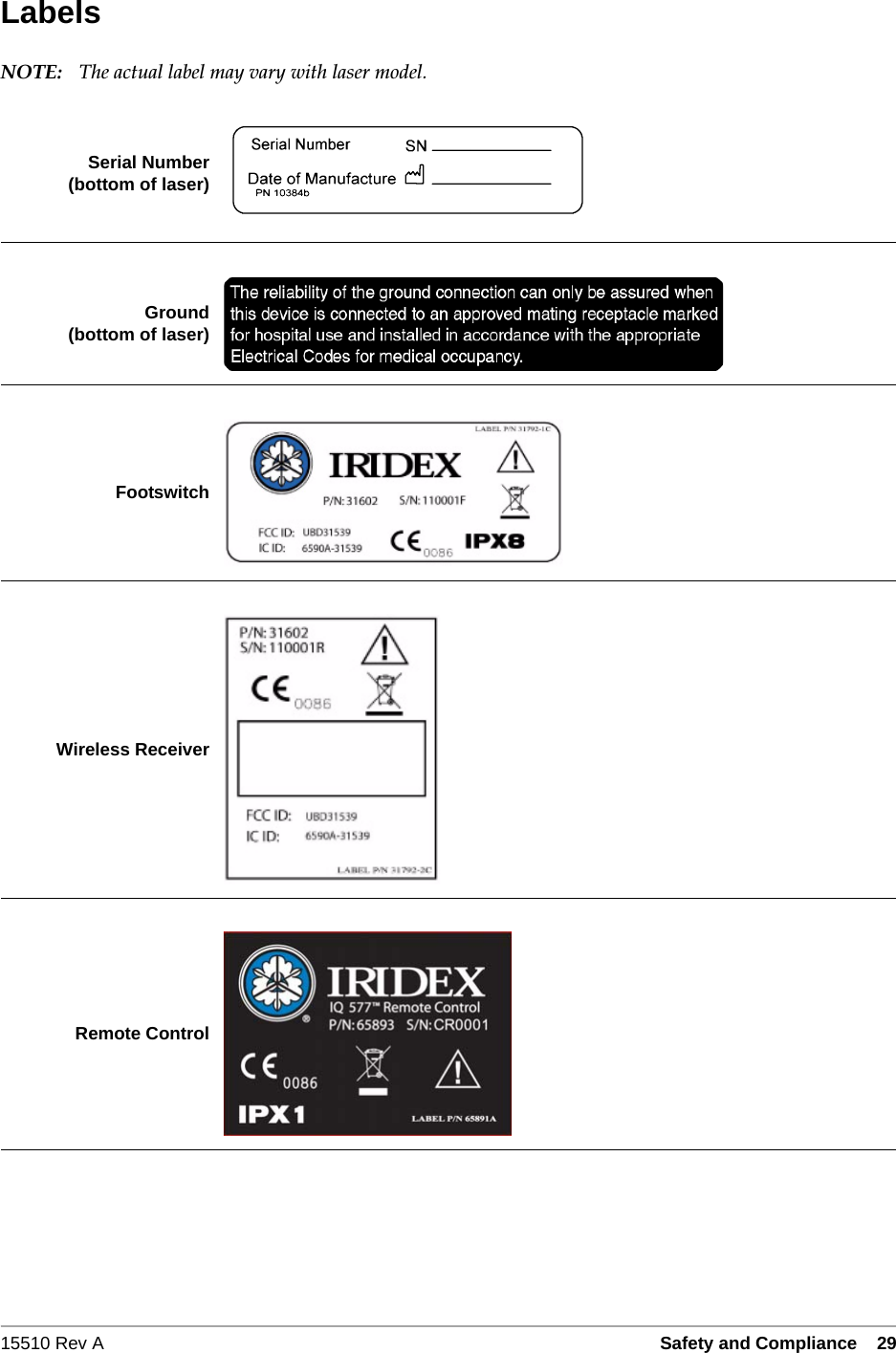
15510 Rev A Safety and Compliance   29LabelsNOTE: The actual label may vary with laser model.Serial Number(bottom of laser)Ground(bottom of laser)FootswitchWireless ReceiverRemote Control
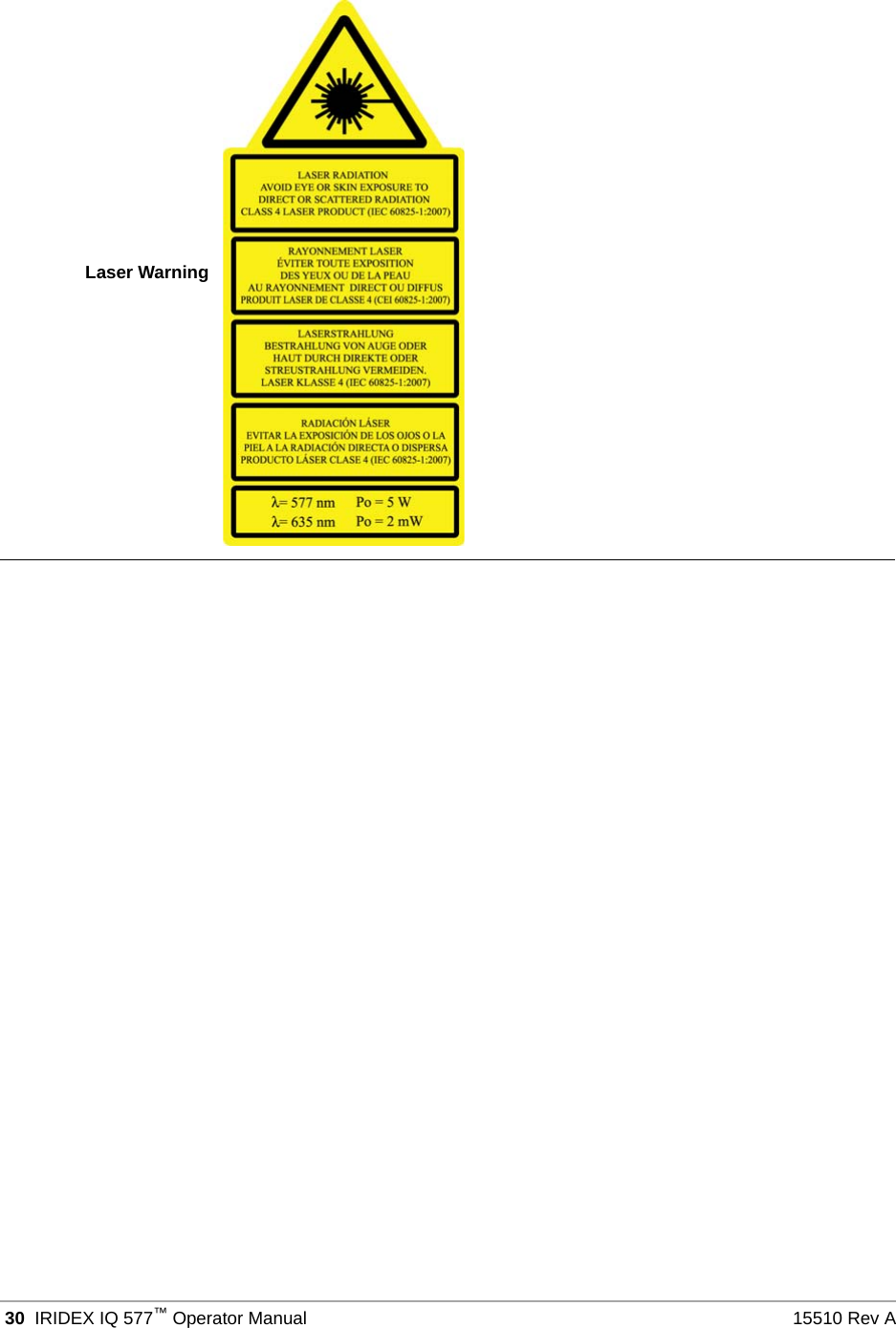
 30 IRIDEX IQ 577™Operator Manual 15510 Rev ALaser Warning
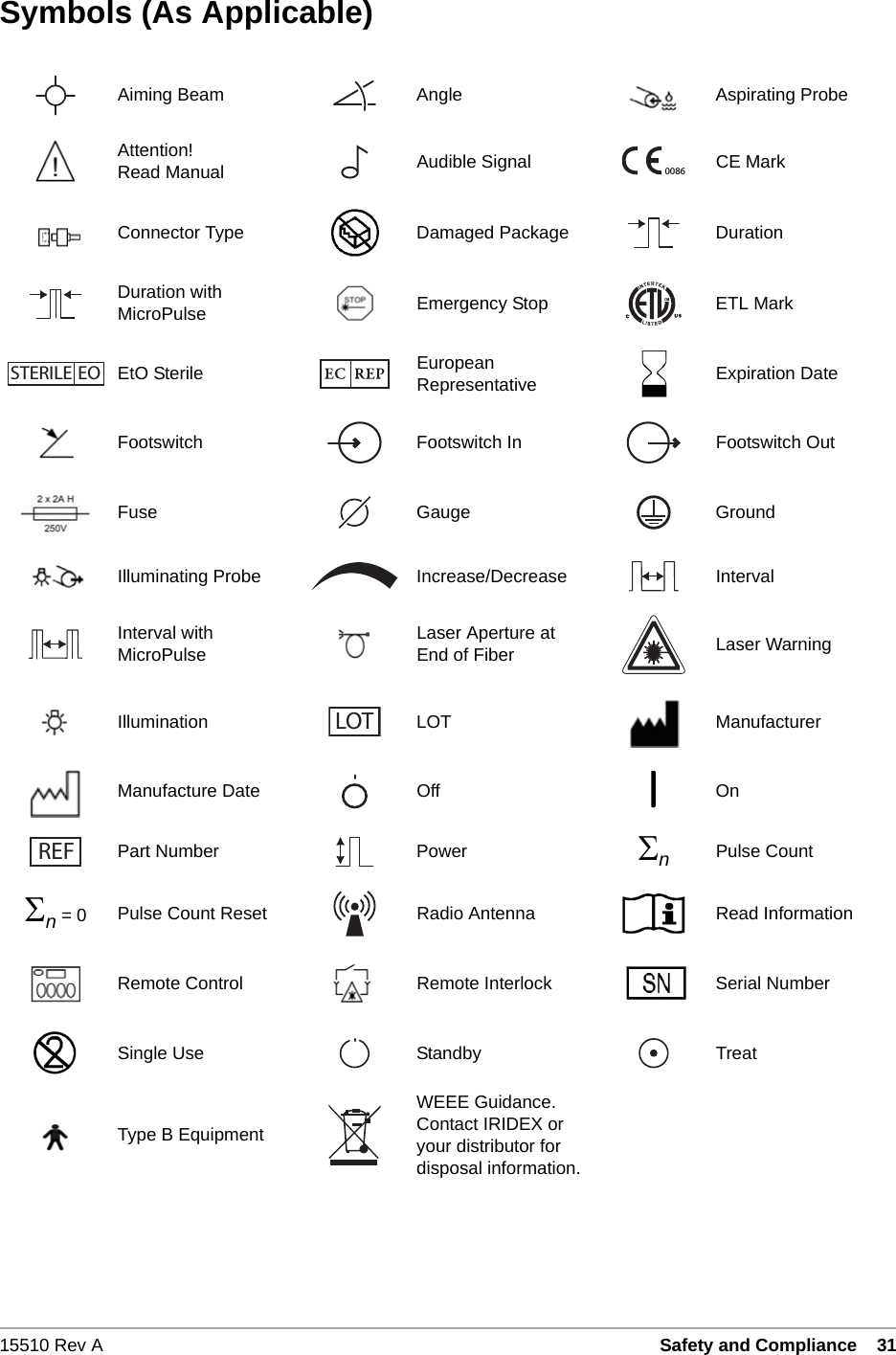
15510 Rev A Safety and Compliance   31Symbols (As Applicable)Aiming Beam Angle Aspirating ProbeAttention!Read Manual Audible Signal CE MarkConnector Type Damaged Package DurationDuration with MicroPulse Emergency Stop ETL MarkEtO Sterile European Representative Expiration DateFootswitch Footswitch In Footswitch OutFuse Gauge GroundIlluminating Probe Increase/Decrease IntervalInterval with MicroPulse Laser Aperture atEnd of Fiber Laser WarningIllumination LOT ManufacturerManufacture Date Off OnPart Number Power nPulse Countn = 0 Pulse Count Reset Radio Antenna Read InformationRemote Control Remote Interlock Serial NumberSingle Use Standby TreatType B EquipmentWEEE Guidance. Contact IRIDEX or your distributor for disposal information.0086STERILE EOLOT REF
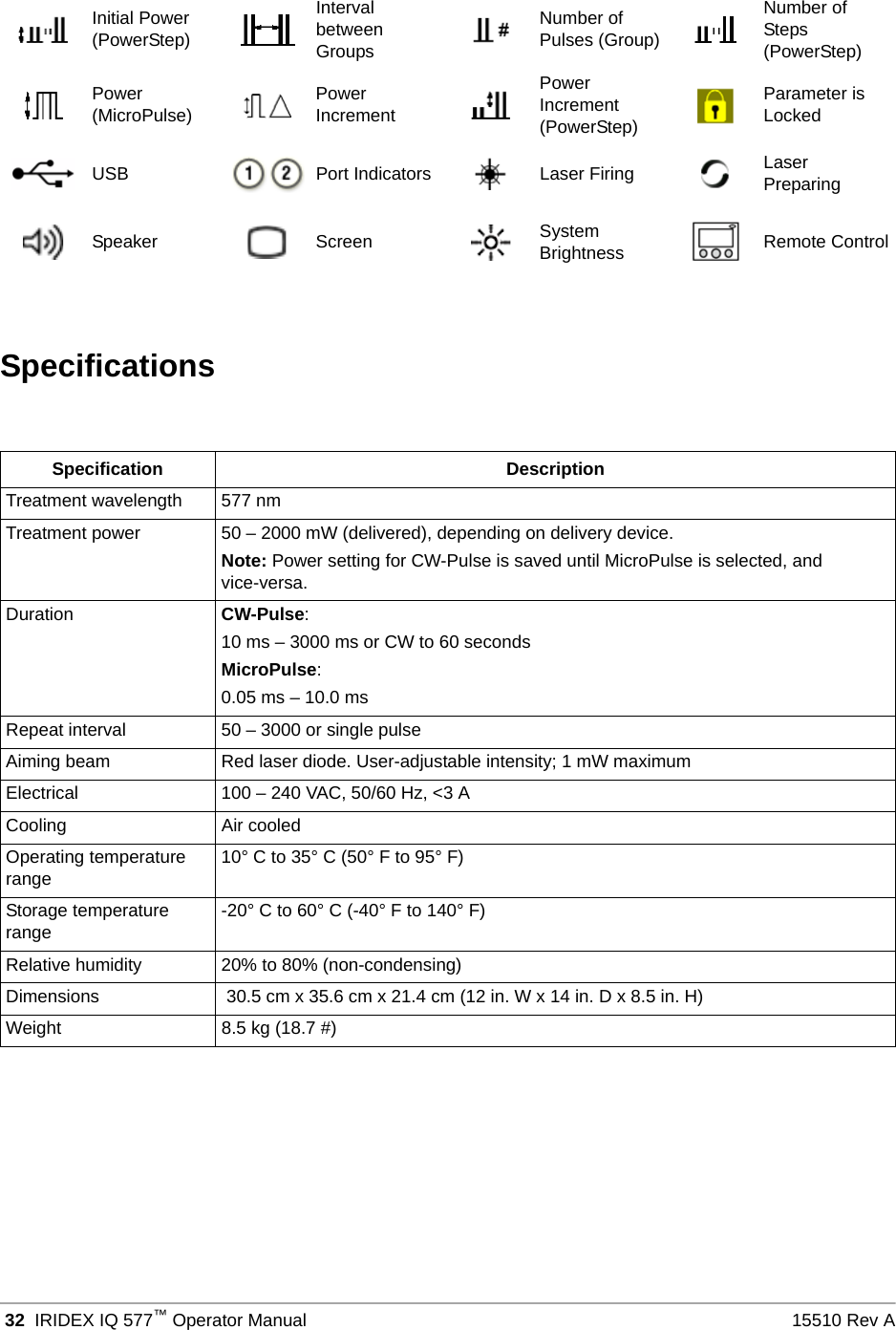
 32 IRIDEX IQ 577™Operator Manual 15510 Rev ASpecificationsInitial Power (PowerStep)Interval between GroupsNumber of Pulses (Group)Number of Steps (PowerStep)Power (MicroPulse) Power IncrementPower Increment (PowerStep)Parameter is LockedUSB Port Indicators Laser Firing Laser PreparingSpeaker Screen System Brightness Remote ControlSpecification DescriptionTreatment wavelength 577 nmTreatment power 50 – 2000 mW (delivered), depending on delivery device. Note: Power setting for CW-Pulse is saved until MicroPulse is selected, and vice-versa.Duration CW-Pulse:10 ms – 3000 ms or CW to 60 secondsMicroPulse:0.05 ms – 10.0 msRepeat interval 50 – 3000 or single pulseAiming beam Red laser diode. User-adjustable intensity; 1 mW maximumElectrical 100 – 240 VAC, 50/60 Hz, <3 ACooling Air cooledOperating temperature range 10° C to 35° C (50° F to 95° F)Storage temperature range -20° C to 60° C (-40° F to 140° F)Relative humidity 20% to 80% (non-condensing)Dimensions  30.5 cm x 35.6 cm x 21.4 cm (12 in. W x 14 in. D x 8.5 in. H)Weight 8.5 kg (18.7 #)
15510 Rev A Wireless Footswitch and EMC   337Wireless Footswitch and EMCSetting Up the Wireless FootswitchThe wireless footswitch comprises:• Battery-powered footswitch (with or without power adjust)• Laser console-powered receiverConnect the wireless receiver to the footswitch receptacle on the rear of the laser. Three pedals (as applicable) on the footswitch control the following:• Left pedal = decrease power (hold down to ramp the parameter)• Center pedal = activate laser• Right pedal = increase power (hold down to ramp the parameter)CAUTION: Each footswitch/receiver pair is uniquely linked and will not work with other IRIDEX footswitches or similar components. Clearly identify each pair to prevent separation of the linked components.NOTE: The footswitch is designed to operate within 15 feet of the laser.Testing the BatteriesNOTE: When batteries need to be replaced, contact your sales representative or IRIDEX Customer Service. The Wireless Power Adjust Footswitch was designed with a battery life expectancy of 3 – 5 years of normal operation and use. LEDs on the footswitch assist in troubleshooting and indicate battery conditions as follows:Footswitch LED Display StatusGreen flash following pedal depression Footswitch OKBatteries OKAmber flash following pedal depression Footswitch OKBatteries lowBlinking red LED for 10 seconds following pedal depression No RF communication
 34 IRIDEX IQ 577™Operator Manual 15510 Rev AEMC Safety InformationThe laser system (console and accessories) needs special precautions regarding EMC and needs to be installed and put into service according to the EMC information provided in this section. Portable and mobile RF communications equipment can affect this system.This laser system has been tested and found to comply with the limits for medical devices in IEC 60601-1-2 according to the tables in this section. These limits are designed to provide reasonable protection against harmful interference in a typical medical installation.CAUTION: Changes or modifications to this laser system not expressly approved by the party responsible for compliance could void the user’s authority to operate the equipment and may result in increased emissions or decreased immunity of the laser system.The wireless footswitch transmits and receives in the frequency range of 2.41GHz to 2.46GHz with a limited effective radiated power as described below. The transmissions are continuous transmissions at discrete frequencies within the transmission frequency range.The wireless footswitch has been tested and found to comply with the limits for a Class B digital device, pursuant to Part 15 of the FCC Rules. These limits are designed to provide reasonable protection against harmful interference in a residential installation. This equipment generates, uses, and can radiate radio frequency energy and, if not installed and used in accordance with the instructions, may cause harmful interference to radio communications. However, there is no guarantee that interference will not occur in a particular installation. If the wireless footswitch does cause harmful interference to radio or television reception, which can be determined by turning the laser system off and on, the user is encouraged to try to correct the interference by one or more of the following measures:• Reorient or relocate the receiving device.• Increase the separation between the equipment.• Connect the laser console into an outlet on a circuit different from that to which the receiver is connected.• Consult IRIDEX Customer Service for help.This Class B digital apparatus meets all requirements of the Canadian Interference-Causing Equipment Regulations.Cet appareil numérique de la classe B respecte toutes les exigences du Réglement sur le matériel brouilleur du Canada.
15510 Rev A Wireless Footswitch and EMC   35EMC Requirements for Console and AccessoriesGuidance and Manufacturer’s Declaration - Electromagnetic EmissionsThis laser system (console and accessories) is intended for use in the electromagnetic environment specified below. The customer or the user of the laser system should assure that it is used in such an environment.Emissions Test ComplianceRF emissionsCISPR 11 Group 1 The laser system uses RF energy only for its internal function. Therefore, its RF emissions are very low and are not likely to cause any interference in nearby electronic equipment.RF emissionsCISPR 11 Class AHarmonic emissionsIEC 61000-3-2 Class AVoltage fluctuations/Flicker emissions CompliesThe laser system is suitable for use in all establishments, other than domestic establishments and those directly connected to the public low-voltage power supply network that supplies buildings used for domestic purposes.
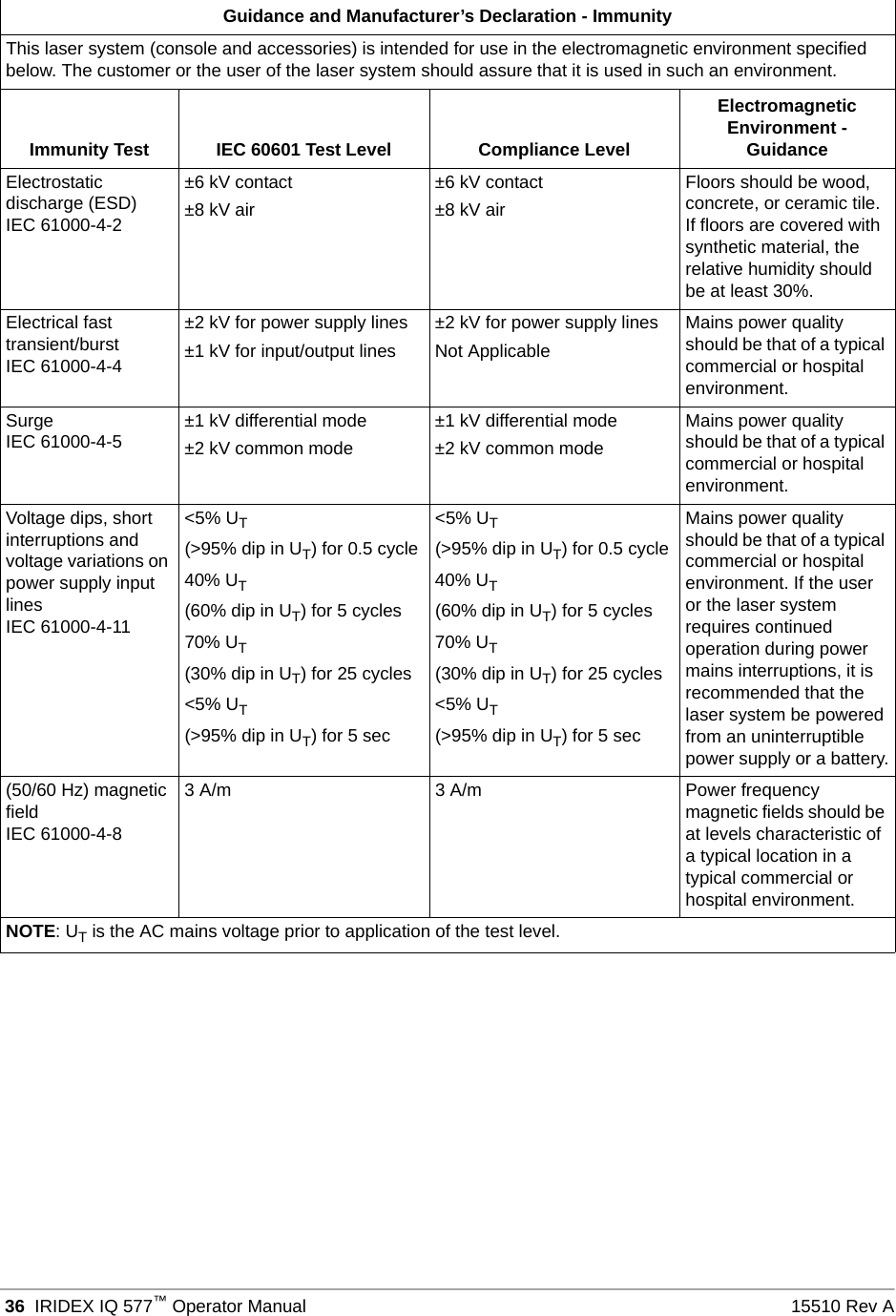
 36 IRIDEX IQ 577™Operator Manual 15510 Rev AGuidance and Manufacturer’s Declaration - ImmunityThis laser system (console and accessories) is intended for use in the electromagnetic environment specified below. The customer or the user of the laser system should assure that it is used in such an environment.Immunity Test IEC 60601 Test Level Compliance LevelElectromagnetic Environment - GuidanceElectrostatic discharge (ESD)IEC 61000-4-2±6 kV contact±8 kV air±6 kV contact±8 kV airFloors should be wood, concrete, or ceramic tile. If floors are covered with synthetic material, the relative humidity should be at least 30%.Electrical fast transient/burstIEC 61000-4-4±2 kV for power supply lines±1 kV for input/output lines±2 kV for power supply linesNot ApplicableMains power quality should be that of a typical commercial or hospital environment.SurgeIEC 61000-4-5 ±1 kV differential mode±2 kV common mode±1 kV differential mode±2 kV common modeMains power quality should be that of a typical commercial or hospital environment.Voltage dips, short interruptions and voltage variations on power supply input linesIEC 61000-4-11<5% UT(>95% dip in UT) for 0.5 cycle40% UT(60% dip in UT) for 5 cycles70% UT(30% dip in UT) for 25 cycles<5% UT(>95% dip in UT) for 5 sec<5% UT(>95% dip in UT) for 0.5 cycle40% UT(60% dip in UT) for 5 cycles70% UT(30% dip in UT) for 25 cycles<5% UT(>95% dip in UT) for 5 secMains power quality should be that of a typical commercial or hospital environment. If the user or the laser system requires continued operation during power mains interruptions, it is recommended that the laser system be powered from an uninterruptible power supply or a battery.(50/60 Hz) magnetic fieldIEC 61000-4-83 A/m 3 A/m Power frequency magnetic fields should be at levels characteristic of a typical location in a typical commercial or hospital environment.NOTE: UT is the AC mains voltage prior to application of the test level.
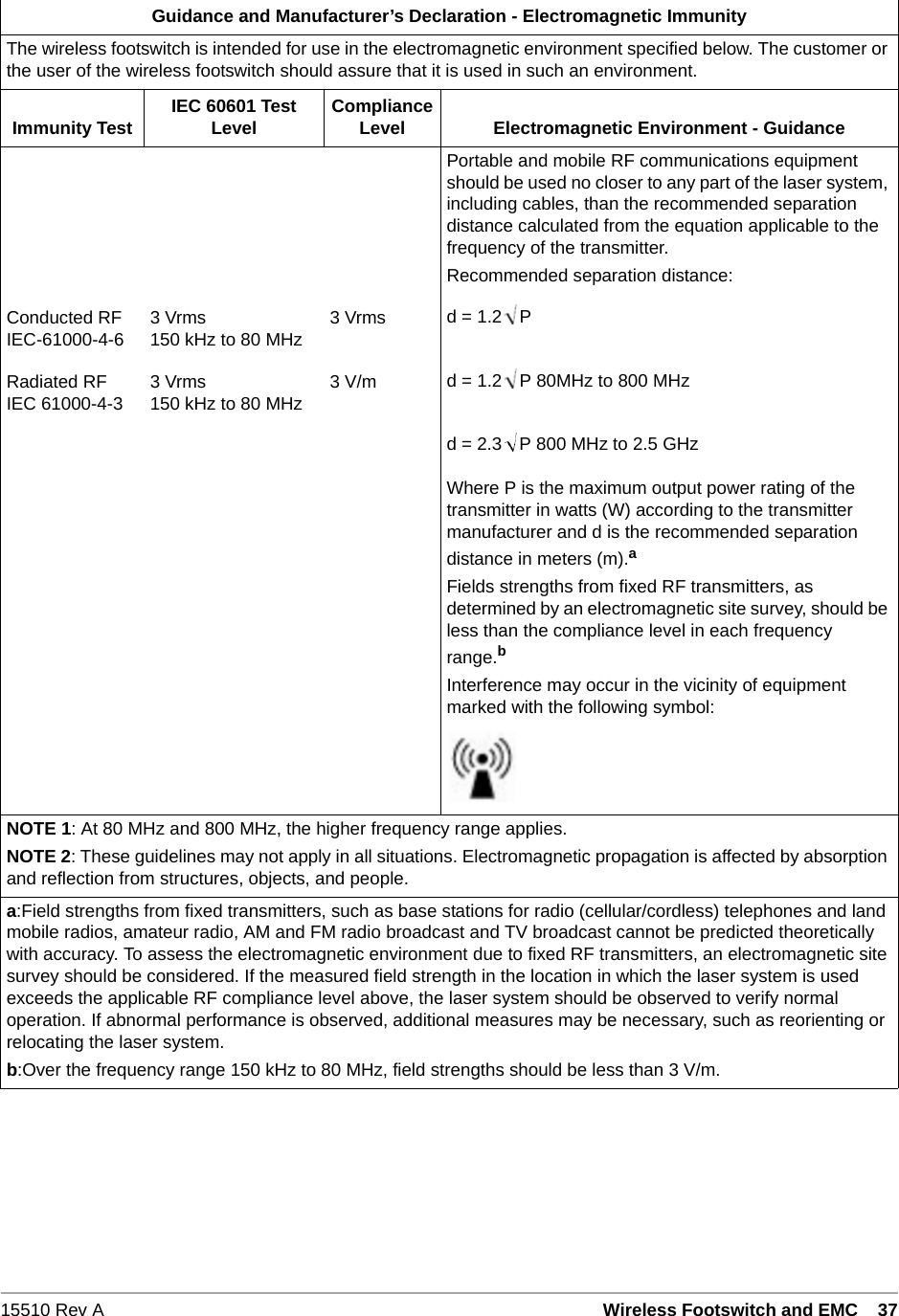
15510 Rev A Wireless Footswitch and EMC   37Guidance and Manufacturer’s Declaration - Electromagnetic ImmunityThe wireless footswitch is intended for use in the electromagnetic environment specified below. The customer or the user of the wireless footswitch should assure that it is used in such an environment.Immunity Test IEC 60601 Test Level Compliance Level Electromagnetic Environment - GuidancePortable and mobile RF communications equipment should be used no closer to any part of the laser system, including cables, than the recommended separation distance calculated from the equation applicable to the frequency of the transmitter.Recommended separation distance:Conducted RFIEC-61000-4-6 3 Vrms150 kHz to 80 MHz 3 Vrms d = 1.2 PRadiated RFIEC 61000-4-3 3 Vrms150 kHz to 80 MHz 3 V/m d = 1.2 P 80MHz to 800 MHzd = 2.3 P 800 MHz to 2.5 GHzWhere P is the maximum output power rating of the transmitter in watts (W) according to the transmitter manufacturer and d is the recommended separation distance in meters (m).aFields strengths from fixed RF transmitters, as determined by an electromagnetic site survey, should be less than the compliance level in each frequency range.bInterference may occur in the vicinity of equipment marked with the following symbol:NOTE 1: At 80 MHz and 800 MHz, the higher frequency range applies.NOTE 2: These guidelines may not apply in all situations. Electromagnetic propagation is affected by absorption and reflection from structures, objects, and people.a:Field strengths from fixed transmitters, such as base stations for radio (cellular/cordless) telephones and land mobile radios, amateur radio, AM and FM radio broadcast and TV broadcast cannot be predicted theoretically with accuracy. To assess the electromagnetic environment due to fixed RF transmitters, an electromagnetic site survey should be considered. If the measured field strength in the location in which the laser system is used exceeds the applicable RF compliance level above, the laser system should be observed to verify normal operation. If abnormal performance is observed, additional measures may be necessary, such as reorienting or relocating the laser system.b:Over the frequency range 150 kHz to 80 MHz, field strengths should be less than 3 V/m.
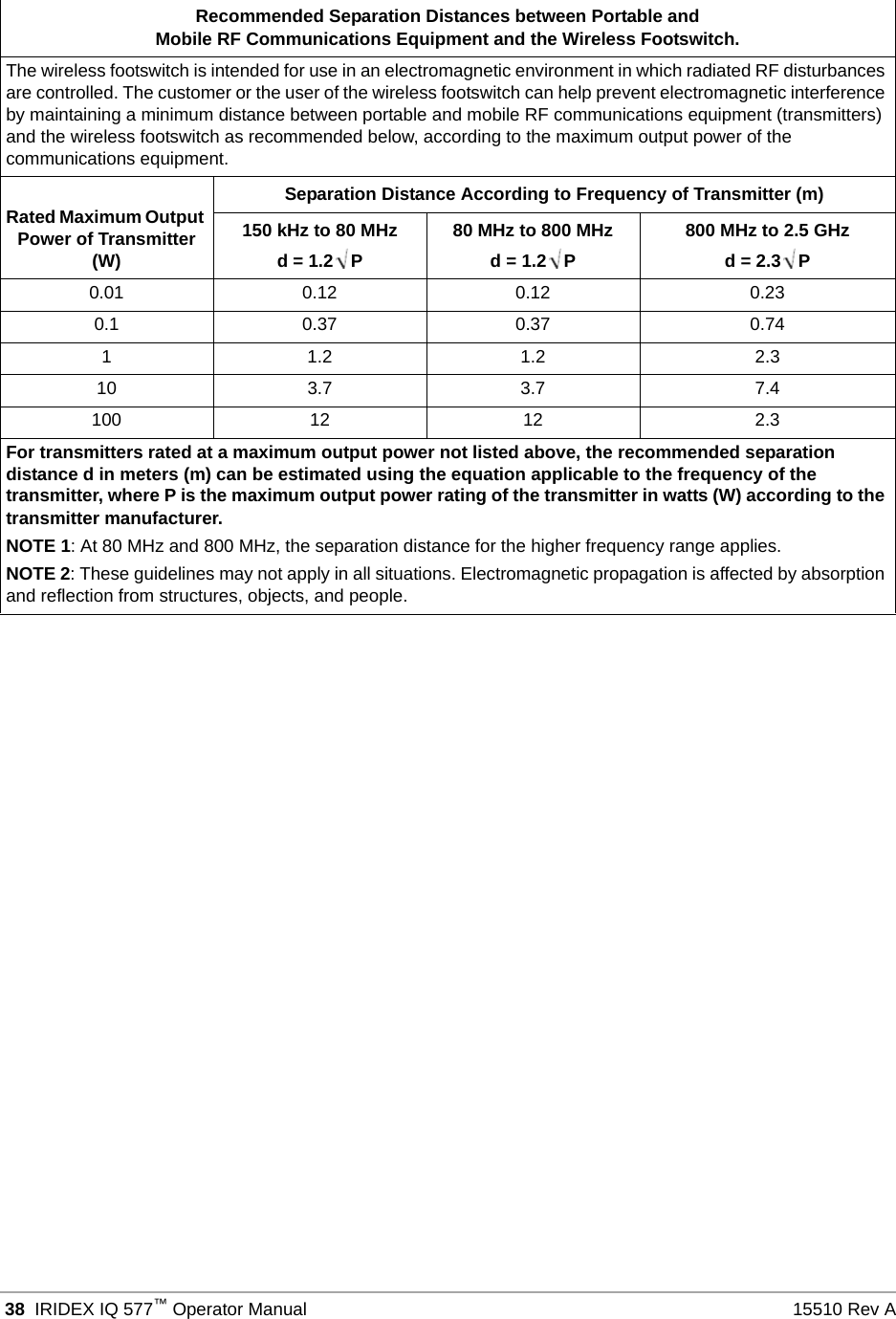
 38 IRIDEX IQ 577™Operator Manual 15510 Rev ARecommended Separation Distances between Portable andMobile RF Communications Equipment and the Wireless Footswitch.The wireless footswitch is intended for use in an electromagnetic environment in which radiated RF disturbances are controlled. The customer or the user of the wireless footswitch can help prevent electromagnetic interference by maintaining a minimum distance between portable and mobile RF communications equipment (transmitters) and the wireless footswitch as recommended below, according to the maximum output power of the communications equipment.Rated Maximum Output Power of Transmitter (W)Separation Distance According to Frequency of Transmitter (m)150 kHz to 80 MHzd = 1.2 P80 MHz to 800 MHzd = 1.2 P800 MHz to 2.5 GHzd = 2.3 P0.01 0.12 0.12 0.230.1 0.37 0.37 0.741 1.2 1.2 2.310 3.7 3.7 7.4100 12 12 2.3For transmitters rated at a maximum output power not listed above, the recommended separation distance d in meters (m) can be estimated using the equation applicable to the frequency of the transmitter, where P is the maximum output power rating of the transmitter in watts (W) according to the transmitter manufacturer.NOTE 1: At 80 MHz and 800 MHz, the separation distance for the higher frequency range applies.NOTE 2: These guidelines may not apply in all situations. Electromagnetic propagation is affected by absorption and reflection from structures, objects, and people.

Navigation menu