Immediate IMI-3000 IMI-3000 Part 15 intentional radiator User Manual 278302

Immediate Marketing, Inc. IMI-3000 Part 15 intentional radiator 278302

Manual

     IMI-3000 User Manual  October 8, 2002 Immediate Marketing Listen Here………
  IMI-3000 User Instructions Table of Contents   I. Product Description  II. FCC Regulations and Disclaimer  III. How to Get Started  IV. How to Change Frequency Settings  V. How to Change CompactFlash Card  VI. Installation Requirements  VII. Support  VIII. Attachments
I. Product Description  The IMI-3000 is a Part 15 intentional radiator designed to be installed in business locations to produce a short-range FM radio broadcast.  ImMEDIAte Marketing’s customers utilize the IMI-3000 for promotion and advertising broadcast to their customer while they are on premise in their automobiles.  The functions and components of the IMI-3000 consist of an integrated MP3 player, intentional radiator (or transmitter), and 1 to 4 distributed antennas.  The IMI-3000L is the same product from an intentional radiator and distributed antenna perspective with the difference being the broadcast play-source.  The IMI-3000L has an audio input connector, allowing customers to broadcast from a play-source of their choice (i.e. CD player, satellite receiver, etc.).    The antennas will be professionally installed outside of the buildings and mounted to fixed positions around the customer’s property in order to cover a defined area of broadcast.  Regardless of antenna locations or orientations, at no point in the broadcast area will the field strength limits of FCC 47 Code of Federal Regulation (CFR) Part 15 be exceeded.  Furthermore, the antennas will not be mounted nearer to one another than 10 meters (physical distance).  This is to avoid signal strength contribution from additional antennas that would increase field strength beyond the specifications.  There is a single CompactFlash memory card socket in the IMI-3000.  The broadcast play list is stored on the memory cards and can be changed manually by the customer.  Instructions on how to change the memory card are detailed in a later section of this document.  The standard mode of operation when the IMI-3000 is powered and contains a CompactFlash card is continuous play/broadcast.  In other words, the broadcast message is playing and broadcasting in endless loop when the IMI-3000 is powered ON.  The same is true of the IMI-3000L with the exception of the audio source.  The audio source must be correctly plugged into the IMI-3000L and providing audio to be broadcast.
II. FCC Regulations and Disclaimer  The Federal Communications Commission (FCC) 47 Code of Federal Regulation (CFR) Part 15 details the guidelines for designing manufacturing, and installing Unlicensed Intentional Radiators.  In general, the FCC details power thresholds of emissions within which all intentional radiators must operate.  The IMI-3000 is designed to be used only within the power constraints of Part 15.  Under no circumstances is the IMI-3000 to be modified, tuned, or installed in such a way as to exceed the thresholds set by the FCC.  This includes the physical distance between antenna locations (no less than 10 meters).  Specifically, the antennas will be distributed at distances equal to or greater than 10 meters apart in order to insure that the field strength at a distance of 3 meters from either antenna never exceeds the 250 micro volt parameter.  ImMEDIAte Marketing is not liable for any modification or changes to installation by the customer (or agent of the customer) that may cause the field strength of the antenna output to exceed the FCC-defined threshold.    IMPORTANT FCC NOTICE:  Any changes or modifications to the IMI-3000(L) not expressly approved by ImMEDIAte Marketing Inc. (IMI) could void the users authority to operate the IMI equipment.
III. How to get started  Once the IMI-3000 has been mounted to a wall by a professional installation crew, the unit is ready to be powered and broadcasting.  Step 1 – remove the cover door from the IMI-3000 by loosening the two screws on the front cover using a Philips head screwdriver.  Then slide the door up and pull out to remove.  Step 2 – make sure the CompactFlash card is inserted properly into the memory socket.  The label on the memory card should be facing to your right hand side.    Step 3 – locate the power input plug near the bottom of the printed circuit board inside the IMI-3000.  Insert the power cord and plug the block end of the adapter in to the wall.  Step 4 – verify that the unit is on by looking for lights on the board to be illuminated.  Step 5 – replace the cover door and tighten the screws.    NOTE:  Bending the power cord will be necessary in order to replace the front cover.  Gently bend the power cord in a downward direction trying not to apply excessive pressure to the power adapter plug.
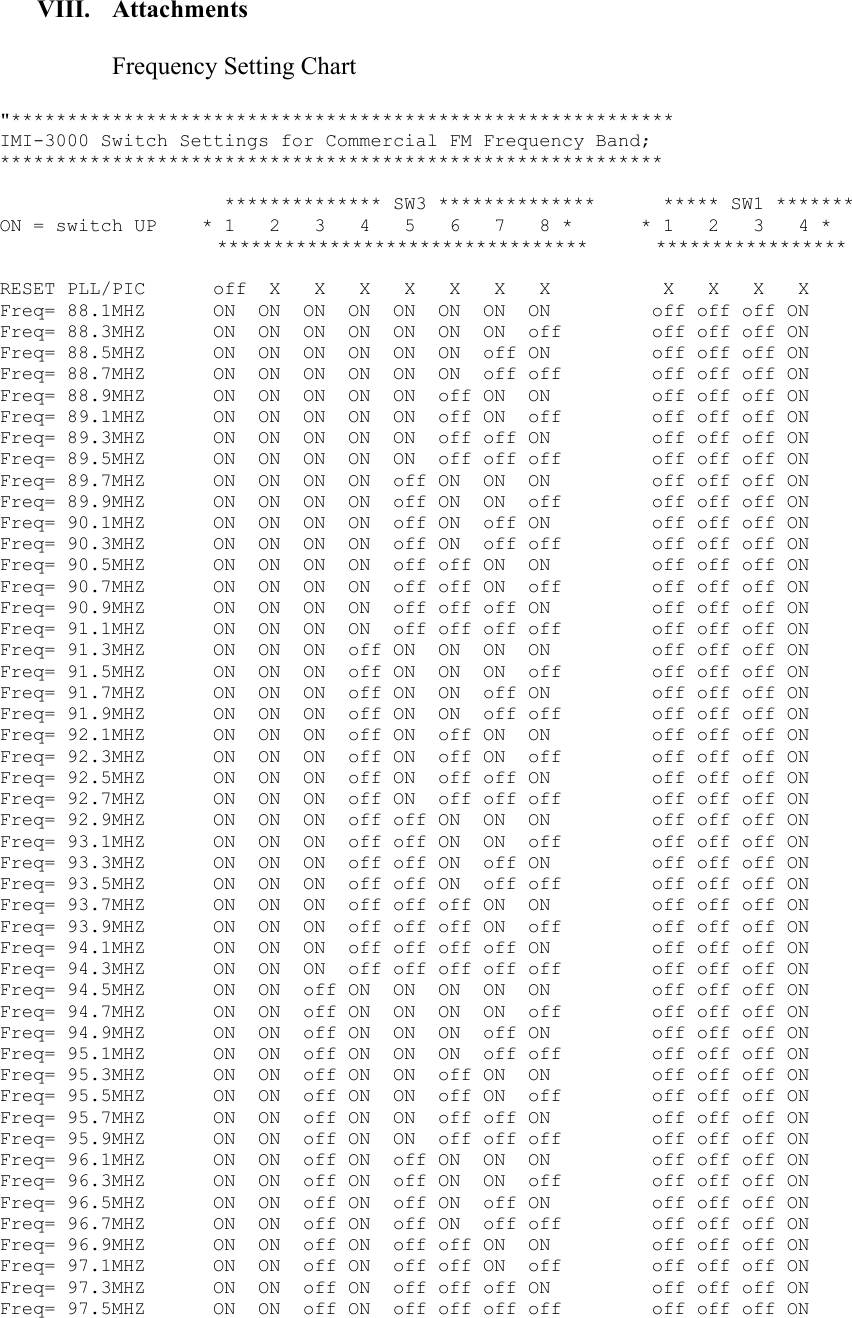
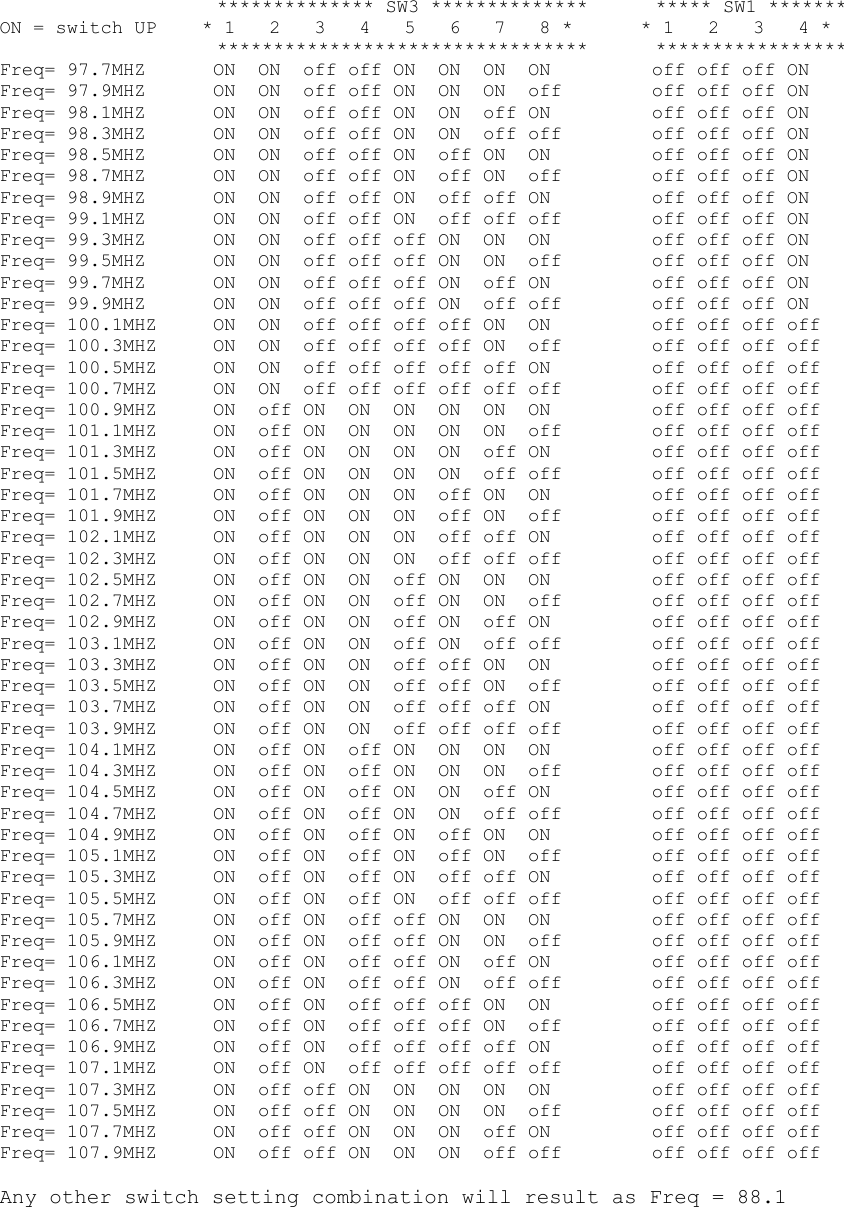
IV. How to change the broadcast frequency   Step 1 – unplug the power adapter from the wall  Step 2 – remove the front cover from the IMI-3000 by loosening the 2 screws.  Step 3 – verify that the unit is not powered by looking for illuminated lights on the board.  Step 4 – locate the dipswitch blocks mounted toward the rear of the board.  Step 5 – adjust the dipswitches according to the attached table for the desired frequency.  NOTE – verify that the desired frequency is not in use by a licensed operator prior to setting the IMI-3000.  ImMEDIAte Marketing is NOT responsible for frequency changes by the customer that result in interference with existing radio station broadcasts or other RF equipment.  Step 6 – plug the power adapter back into the wall outlet and verify that the IMI-3000 powers up.  Lights on the board will illuminate when the unit has power.  Step 7 – replace the front cover and tighten the screws.  NOTE:  Bending the power cord will be necessary in order to replace the front cover.  Gently bend the power cord in a downward direction trying not to apply excessive pressure to the power adapter plug.
V. How to change the CompactFlash Memory Card   Step 1 – unplug the power adapter from the wall  Step 2 – remove the front cover from the IMI-3000 by loosening the 2 screws  Step 3 – verify that the unit is not powered by looking for illuminated lights on the board  Step 4 – locate the CompactFlash memory card in the socket on the upper portion of the board  Step 5 – remove the memory card by pulling gently.  DO NOT twist or pull too hard on the card  Step 6 – insert the new memory card into the socket by pushing firmly.  Make sure that the label is facing to the right.  Do NOT force the CompactFlash card into the socket.  It should go in with the same amount of resistance as it did coming out.  Step 7 – plug the power adapter back into the wall outlet and verify that the IMI-3000 powers up.  Lights on the board will illuminate when the unit has power.  Step 8 – replace the front cover and tighten the screws.
VI. Installation Requirements  Installation of the IMI-3000 and distributed antenna system will be done professionally by insured installation crews that are either employees of or sub-contracted by ImMEDIAte Marketing.  Installations will include the following:  • Locate appropriate location for IMI-3000 inside the customer building (reference the site survey provided by ImMEDIAte Marketing for general area selected). • Mount the IMI-3000 to the wall near in proximity to an electrical outlet (within reach of provided 6-foot power cord. • Connect up to 4 100-foot coax cables to the IMI-3000 being certain to tighten the F-connectors securely to the female connections on the IMI-3000 printed circuit board.  • Run coax to nearest existing exit holes from the building (typically inside of drop ceiling used for cables connecting satellite, power, etc.) • Mount distributed antennas in pre-defined locations per the site survey provided by ImMEDIAte Marketing. • Connect coax cables to the antennas making sure to tighten the F-connectors securely • Seal or reseal the hole(s) through which the coax cables exit the building using weather-proof electrical sealant. • Dress the coax cables appropriately both inside and outside the building.  Installation Parameters:  • All coax cables must be no less than 100 feet long.  Cables longer than 100 feet can be used to accommodate runs requiring more than 100 feet from the IMI-3000 to the antenna(s). • Antenna locations can be no less than 10 meters (33 feet) from any other IMI-3000 antenna. • Antennas must be mounted only in a vertical position – the antenna tube perpendicular to the ground.  Specifically, they must be mounted to a horizontal surface with the tube either pointing directly up or directly down (i.e under eaves). • Any excess cable length must be coiled and stored somewhere inside the customer building.  Above the drop ceiling is the most common available space for placing the cable excess.
VII. Support  For any questions regarding installation or operation of the IMI-3000 or IMI-3000L, please call ImMEDIAte Marketing directly at 214-668-7986.
VIII. Attachments  Frequency Setting Chart  "*********************************************************** IMI-3000 Switch Settings for Commercial FM Frequency Band;  ***********************************************************             ************** SW3 **************      ***** SW1 ******* ON = switch UP    * 1   2   3   4   5   6   7   8 *      * 1   2   3   4 *                    *********************************      *****************  RESET PLL/PIC      off  X   X   X   X   X   X   X          X   X   X   X Freq= 88.1MHZ      ON  ON  ON  ON  ON  ON  ON  ON         off off off ON Freq= 88.3MHZ      ON  ON  ON  ON  ON  ON  ON  off        off off off ON Freq= 88.5MHZ      ON  ON  ON  ON  ON  ON  off ON         off off off ON Freq= 88.7MHZ      ON  ON  ON  ON  ON  ON  off off        off off off ON Freq= 88.9MHZ      ON  ON  ON  ON  ON  off ON  ON         off off off ON Freq= 89.1MHZ      ON  ON  ON  ON  ON  off ON  off        off off off ON Freq= 89.3MHZ      ON  ON  ON  ON  ON  off off ON         off off off ON Freq= 89.5MHZ      ON  ON  ON  ON  ON  off off off        off off off ON Freq= 89.7MHZ      ON  ON  ON  ON  off ON  ON  ON         off off off ON Freq= 89.9MHZ      ON  ON  ON  ON  off ON  ON  off        off off off ON Freq= 90.1MHZ      ON  ON  ON  ON  off ON  off ON         off off off ON Freq= 90.3MHZ      ON  ON  ON  ON  off ON  off off        off off off ON Freq= 90.5MHZ      ON  ON  ON  ON  off off ON  ON         off off off ON Freq= 90.7MHZ      ON  ON  ON  ON  off off ON  off        off off off ON Freq= 90.9MHZ      ON  ON  ON  ON  off off off ON         off off off ON Freq= 91.1MHZ      ON  ON  ON  ON  off off off off        off off off ON Freq= 91.3MHZ      ON  ON  ON  off ON  ON  ON  ON         off off off ON Freq= 91.5MHZ      ON  ON  ON  off ON  ON  ON  off        off off off ON Freq= 91.7MHZ      ON  ON  ON  off ON  ON  off ON         off off off ON Freq= 91.9MHZ      ON  ON  ON  off ON  ON  off off        off off off ON Freq= 92.1MHZ      ON  ON  ON  off ON  off ON  ON         off off off ON Freq= 92.3MHZ      ON  ON  ON  off ON  off ON  off        off off off ON Freq= 92.5MHZ      ON  ON  ON  off ON  off off ON         off off off ON Freq= 92.7MHZ      ON  ON  ON  off ON  off off off        off off off ON Freq= 92.9MHZ      ON  ON  ON  off off ON  ON  ON         off off off ON Freq= 93.1MHZ      ON  ON  ON  off off ON  ON  off        off off off ON Freq= 93.3MHZ      ON  ON  ON  off off ON  off ON         off off off ON Freq= 93.5MHZ      ON  ON  ON  off off ON  off off        off off off ON Freq= 93.7MHZ      ON  ON  ON  off off off ON  ON         off off off ON Freq= 93.9MHZ      ON  ON  ON  off off off ON  off        off off off ON Freq= 94.1MHZ      ON  ON  ON  off off off off ON         off off off ON Freq= 94.3MHZ      ON  ON  ON  off off off off off        off off off ON Freq= 94.5MHZ      ON  ON  off ON  ON  ON  ON  ON         off off off ON Freq= 94.7MHZ      ON  ON  off ON  ON  ON  ON  off        off off off ON Freq= 94.9MHZ      ON  ON  off ON  ON  ON  off ON         off off off ON Freq= 95.1MHZ      ON  ON  off ON  ON  ON  off off        off off off ON Freq= 95.3MHZ      ON  ON  off ON  ON  off ON  ON         off off off ON Freq= 95.5MHZ      ON  ON  off ON  ON  off ON  off        off off off ON Freq= 95.7MHZ      ON  ON  off ON  ON  off off ON         off off off ON Freq= 95.9MHZ      ON  ON  off ON  ON  off off off        off off off ON Freq= 96.1MHZ      ON  ON  off ON  off ON  ON  ON         off off off ON Freq= 96.3MHZ      ON  ON  off ON  off ON  ON  off        off off off ON Freq= 96.5MHZ      ON  ON  off ON  off ON  off ON         off off off ON Freq= 96.7MHZ      ON  ON  off ON  off ON  off off        off off off ON Freq= 96.9MHZ      ON  ON  off ON  off off ON  ON         off off off ON Freq= 97.1MHZ      ON  ON  off ON  off off ON  off        off off off ON Freq= 97.3MHZ      ON  ON  off ON  off off off ON         off off off ON Freq= 97.5MHZ      ON  ON  off ON  off off off off        off off off ON
               ************** SW3 **************      ***** SW1 ******* ON = switch UP    * 1   2   3   4   5   6   7   8 *      * 1   2   3   4 *                    *********************************      ***************** Freq= 97.7MHZ      ON  ON  off off ON  ON  ON  ON         off off off ON Freq= 97.9MHZ      ON  ON  off off ON  ON  ON  off        off off off ON Freq= 98.1MHZ      ON  ON  off off ON  ON  off ON         off off off ON Freq= 98.3MHZ      ON  ON  off off ON  ON  off off        off off off ON Freq= 98.5MHZ      ON  ON  off off ON  off ON  ON         off off off ON Freq= 98.7MHZ      ON  ON  off off ON  off ON  off        off off off ON Freq= 98.9MHZ      ON  ON  off off ON  off off ON         off off off ON Freq= 99.1MHZ      ON  ON  off off ON  off off off        off off off ON Freq= 99.3MHZ      ON  ON  off off off ON  ON  ON         off off off ON Freq= 99.5MHZ      ON  ON  off off off ON  ON  off        off off off ON Freq= 99.7MHZ      ON  ON  off off off ON  off ON         off off off ON Freq= 99.9MHZ      ON  ON  off off off ON  off off        off off off ON Freq= 100.1MHZ     ON  ON  off off off off ON  ON         off off off off Freq= 100.3MHZ     ON  ON  off off off off ON  off        off off off off Freq= 100.5MHZ     ON  ON  off off off off off ON         off off off off Freq= 100.7MHZ     ON  ON  off off off off off off        off off off off Freq= 100.9MHZ     ON  off ON  ON  ON  ON  ON  ON         off off off off Freq= 101.1MHZ     ON  off ON  ON  ON  ON  ON  off        off off off off Freq= 101.3MHZ     ON  off ON  ON  ON  ON  off ON         off off off off Freq= 101.5MHZ     ON  off ON  ON  ON  ON  off off        off off off off Freq= 101.7MHZ     ON  off ON  ON  ON  off ON  ON         off off off off Freq= 101.9MHZ     ON  off ON  ON  ON  off ON  off        off off off off Freq= 102.1MHZ     ON  off ON  ON  ON  off off ON         off off off off Freq= 102.3MHZ     ON  off ON  ON  ON  off off off        off off off off Freq= 102.5MHZ     ON  off ON  ON  off ON  ON  ON         off off off off Freq= 102.7MHZ     ON  off ON  ON  off ON  ON  off        off off off off Freq= 102.9MHZ     ON  off ON  ON  off ON  off ON         off off off off Freq= 103.1MHZ     ON  off ON  ON  off ON  off off        off off off off Freq= 103.3MHZ     ON  off ON  ON  off off ON  ON         off off off off Freq= 103.5MHZ     ON  off ON  ON  off off ON  off        off off off off Freq= 103.7MHZ     ON  off ON  ON  off off off ON         off off off off Freq= 103.9MHZ     ON  off ON  ON  off off off off        off off off off Freq= 104.1MHZ     ON  off ON  off ON  ON  ON  ON         off off off off Freq= 104.3MHZ     ON  off ON  off ON  ON  ON  off        off off off off Freq= 104.5MHZ     ON  off ON  off ON  ON  off ON         off off off off Freq= 104.7MHZ     ON  off ON  off ON  ON  off off        off off off off Freq= 104.9MHZ     ON  off ON  off ON  off ON  ON         off off off off Freq= 105.1MHZ     ON  off ON  off ON  off ON  off        off off off off Freq= 105.3MHZ     ON  off ON  off ON  off off ON         off off off off Freq= 105.5MHZ     ON  off ON  off ON  off off off        off off off off Freq= 105.7MHZ     ON  off ON  off off ON  ON  ON         off off off off Freq= 105.9MHZ     ON  off ON  off off ON  ON  off        off off off off Freq= 106.1MHZ     ON  off ON  off off ON  off ON         off off off off Freq= 106.3MHZ     ON  off ON  off off ON  off off        off off off off Freq= 106.5MHZ     ON  off ON  off off off ON  ON         off off off off Freq= 106.7MHZ     ON  off ON  off off off ON  off        off off off off Freq= 106.9MHZ     ON  off ON  off off off off ON         off off off off Freq= 107.1MHZ     ON  off ON  off off off off off        off off off off Freq= 107.3MHZ     ON  off off ON  ON  ON  ON  ON         off off off off Freq= 107.5MHZ     ON  off off ON  ON  ON  ON  off        off off off off Freq= 107.7MHZ     ON  off off ON  ON  ON  off ON         off off off off Freq= 107.9MHZ     ON  off off ON  ON  ON  off off        off off off off  Any other switch setting combination will result as Freq = 88.1

Navigation menu