Ingenitech TMU1000 In-Vehicle Telematic Computer User Manual

Ingenitech (NZ) Ltd In-Vehicle Telematic Computer

User Manual

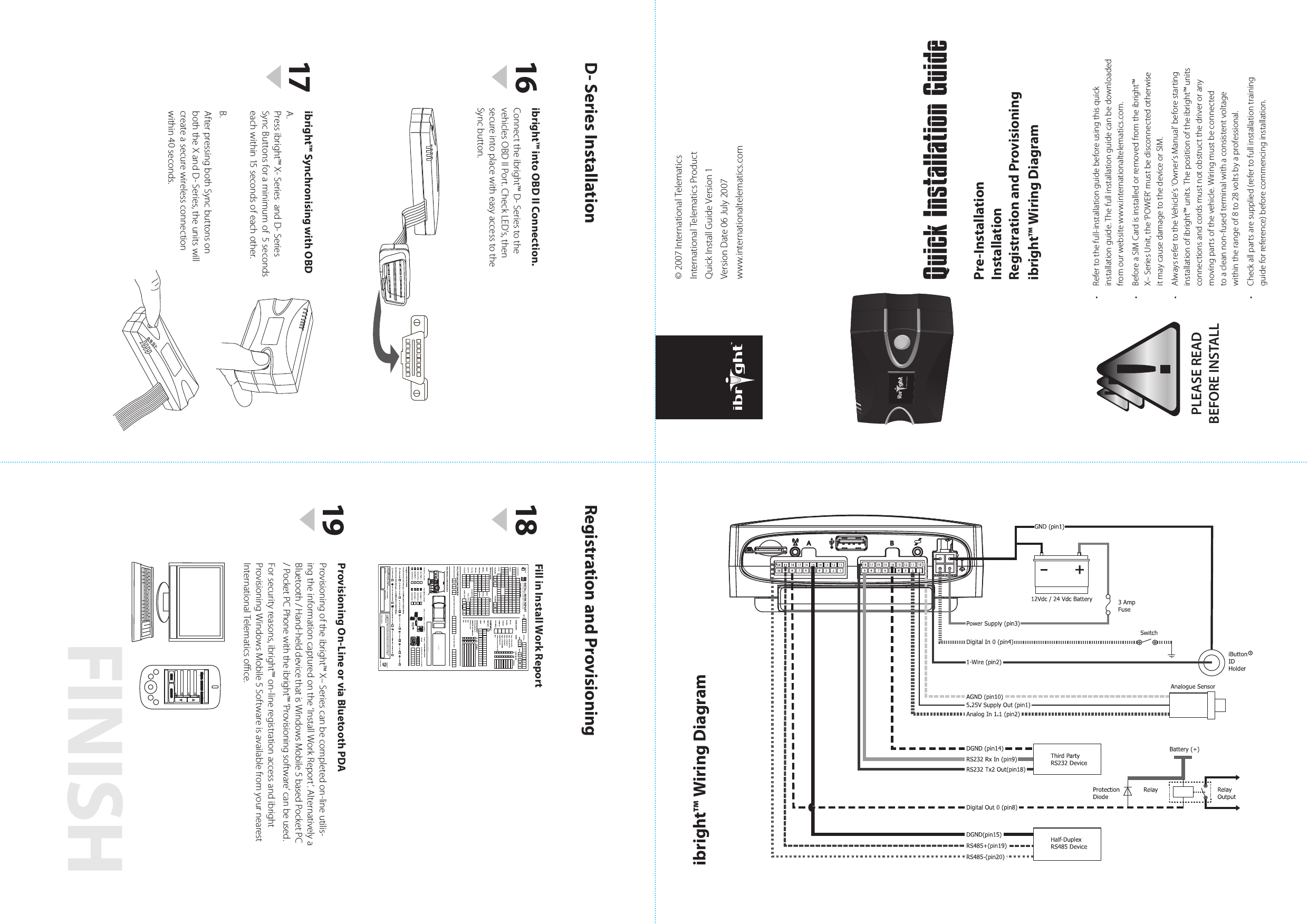
FINISH• Refertothefull-installationguidebeforeusingthisquickinstallationguide.Thefullinstallationguidecanbedownloadedfromourwebsitewww.internationaltelematics.com.• BeforeaSIMCardisinstalledorremovedfromtheibright™X–SeriesUnit,the‘POWER’mustbedisconnectedotherwiseitmaycausedamagetothedeviceorSIM.• AlwaysrefertotheVehicle’s‘Owner’sManual’beforestartinginstallationofibright™units.Thepositionoftheibright™unitsconnectionsandcordsmustnotobstructthedriveroranymovingpartsofthevehicle.Wiringmustbeconnectedtoacleannon-fusedterminalwithaconsistentvoltagewithintherangeof8to28voltsbyaprofessional.• Checkallpartsaresupplied(refertofullinstallationtrainingguideforreference)beforecommencinginstallation.PLEASE READBEFORE INSTALLQuick Installation GuideProvisioning On-Line or via Bluetooth PDA Provisioningoftheibright™X–Seriescanbecompletedon-lineutilis-ingtheinformationcapturedonthe‘InstallWorkReport’.AlternativelyaBluetooth/Hand-helddevicethatisWindowsMobile5basedPocketPC/PocketPCPhonewiththeibright™‘Provisioningsoftware’canbeused.Forsecurityreasons,ibright™on-lineregistrationaccessandibrightProvisioningWindowsMobile5SoftwareisavailablefromyournearestInternationalTelematicsoce.ibright™ Synchronising with OBDA.Pressibright™X-SeriesandD-SeriesSyncButtonsforaminimumof5secondseachwithin15secondsofeachother.B.AfterpressingbothSyncbuttonsonboththeXandD-Series,theunitswillcreateasecurewirelessconnectionwithin40seconds.Fill in Install Work ReportENTER IBRIGHT ASSET DETAILSBACK SELECT18161917Pre-InstallationInstallationRegistration and Provisioningibright™ Wiring DiagramRegistration and ProvisioningD- Series Installationibright™ Wiring Diagram©2007InternationalTelematicsInternationalTelematicsProductQuickInstallGuideVersion1VersionDate06July2007www.internationaltelematics.comibright™ into OBD II Connection.Connecttheibright™D-SeriestothevehiclesOBDIIPort.CheckLED’s,thensecureintoplacewitheasyaccesstotheSyncbutton.
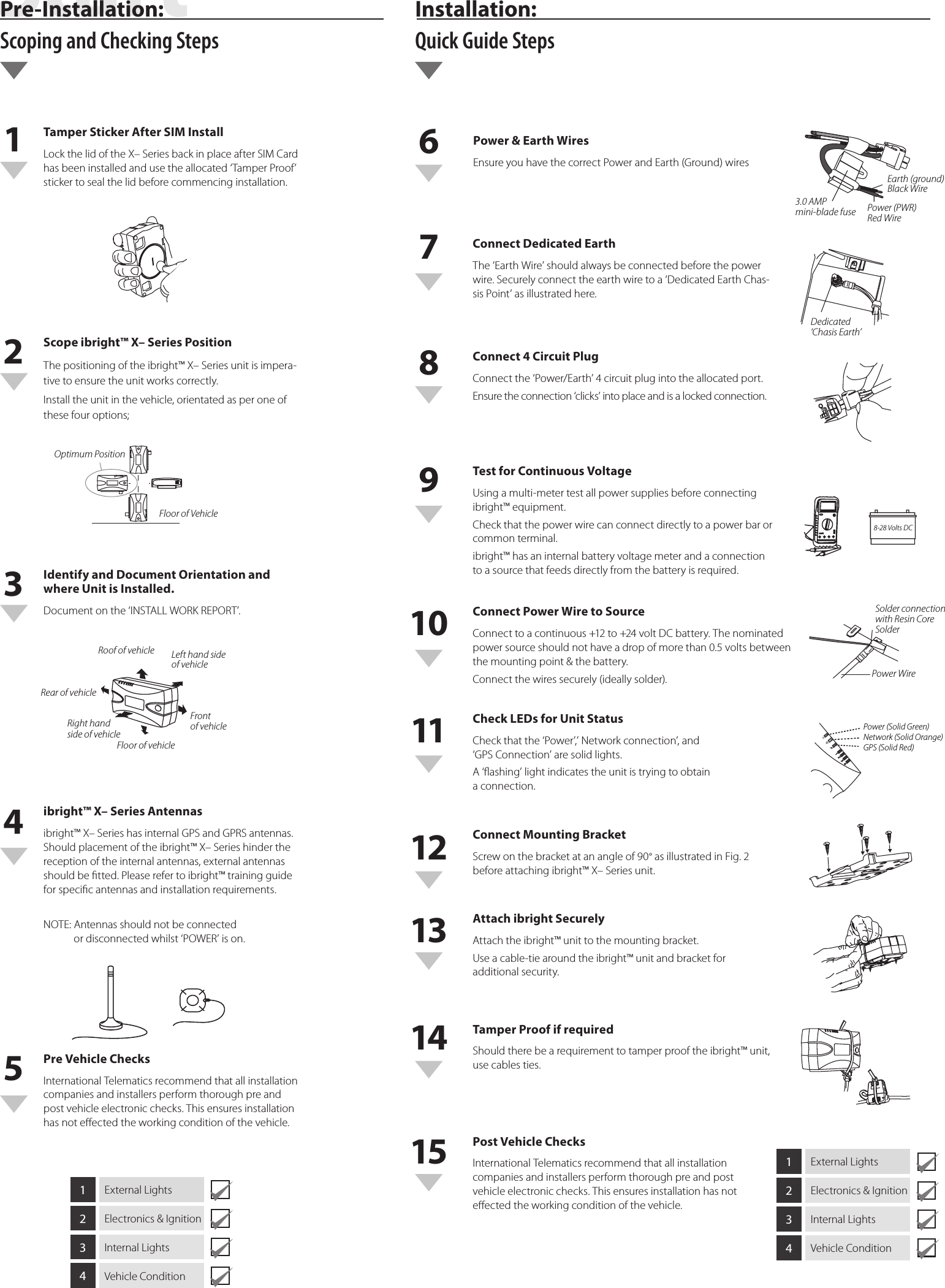
Tamper Sticker After SIM Install LockthelidoftheX–SeriesbackinplaceafterSIMCardhasbeeninstalledandusetheallocated‘TamperProof’stickertosealthelidbeforecommencinginstallation.Scope ibright™ X– Series Position Thepositioningoftheibright™X–Seriesunitisimpera-tivetoensuretheunitworkscorrectly.Installtheunitinthevehicle,orientatedasperoneofthesefouroptions;Identify and Document Orientation and where Unit is Installed.Documentonthe‘INSTALLWORKREPORT’.ibright™ X– Series Antennas ibright™X–SerieshasinternalGPSandGPRSantennas.Shouldplacementoftheibright™X–Serieshinderthereceptionoftheinternalantennas,externalantennasshouldbetted.Pleaserefertoibright™trainingguideforspecicantennasandinstallationrequirements.NOTE:Antennasshouldnotbeconnectedordisconnectedwhilst‘POWER’ison.1ExternalLights2Electronics&Ignition3InternalLights4VehicleCondition1ExternalLights2Electronics&Ignition3InternalLights4VehicleConditionPre Vehicle Checks InternationalTelematicsrecommendthatallinstallationcompaniesandinstallersperformthoroughpreandpostvehicleelectronicchecks.Thisensuresinstallationhasnoteectedtheworkingconditionofthevehicle.Roof of vehicle Left hand side  of vehicleFront  of vehicleRight hand  side of vehicleRear of vehicleFloor of vehicleOptimum PositionFloor of Vehicle162738495101112131415Power & Earth WiresEnsureyouhavethecorrectPowerandEarth(Ground)wiresConnect Dedicated Earth The‘EarthWire’shouldalwaysbeconnectedbeforethepowerwire.Securelyconnecttheearthwiretoa‘DedicatedEarthChas-sisPoint’asillustratedhere.Connect 4 Circuit Plug Connectthe‘Power/Earth’4circuitplugintotheallocatedport.Ensuretheconnection‘clicks’intoplaceandisalockedconnection.Test for Continuous Voltage Usingamulti-metertestallpowersuppliesbeforeconnectingibright™equipment.Checkthatthepowerwirecanconnectdirectlytoapowerbarorcommonterminal.ibright™hasaninternalbatteryvoltagemeterandaconnectiontoasourcethatfeedsdirectlyfromthebatteryisrequired.Connect Power Wire to Source Connecttoacontinuous+12to+24voltDCbattery.Thenominatedpowersourceshouldnothaveadropofmorethan0.5voltsbetweenthemountingpoint&thebattery.Connectthewiressecurely(ideallysolder).Check LEDs for Unit Status Checkthatthe‘Power’,’Networkconnection’,and‘GPSConnection’aresolidlights.A‘ashing’lightindicatestheunitistryingtoobtainaconnection.Connect Mounting Bracket Screwonthebracketatanangleof90°asillustratedinFig.2beforeattachingibright™X–Seriesunit.Attach ibright Securely Attachtheibright™unittothemountingbracket.Useacable-tiearoundtheibright™unitandbracketforadditionalsecurity.Tamper Proof if required Shouldtherebearequirementtotamperprooftheibright™unit,usecablesties.Post Vehicle Checks InternationalTelematicsrecommendthatallinstallationcompaniesandinstallersperformthoroughpreandpostvehicleelectronicchecks.Thisensuresinstallationhasnoteectedtheworkingconditionofthevehicle.3.0 AMP  mini-blade fuseEarth (ground) Black WirePower (PWR) Red WireDedicated‘Chasis Earth’8-28 Volts DCSolder connectionwith Resin Core SolderPower WirePower (Solid Green)Network (Solid Orange)GPS (Solid Red)Pre-Installation:  Scoping and Checking StepsInstallation:  Quick Guide StepsStartRegistration and Provisioning
Federal Communications Commission StatementDECLARATION OF CONFORMITY WITH FCC RULES FOR ELECTROMAGNETIC COM-PATIBILITYWe,Ingenitech (NZ) Limited,of3A, 125 The Strand, Parnell, Auckland 1010, New Zealand,declareunderoursoleresponsibilitythattheproduct,TMU1000 (ibright™ X-Series unit),towhichthisdeclarationrelates,complieswithPart15oftheFCCRules.Operationissubjecttothefollowingtwoconditions:Thisdevicemaynotcauseharmfulinterference,and•Thisdevicemustacceptanyinterferencereceived,includinginterferencethatmaycause•undesiredoperation.Caution: Exposure to Radio Frequency RadiationTheradiatedoutputpoweroftheTMU1000iswellbelowtheFederalCommunicationsCommission(FCC)radiofrequencyexposurelimits.Nevertheless,itisimportantthattheTMU1000isinstalledandusedinsuchamannerthatthepotentialforhumancontactduringnormaloperationisminimized.WhenconnectinganexternalantennatotheTMU1000,theantennashallbeplacedinsuchaman-nertominimizethepotentialforhumancontactduringnormaloperation.ToavoidthepossibilityofexceedingtheFCCRadiofrequencyexposurelimits,humanproximitytotheantennamustnotbelessthan20cm(8inches)duringnormaloperation.Federal Communications Commission NoticeThisequipmenthasbeentestedandfoundtocomplywiththelimitsforaClassBdigitaldevice,pursuanttoPart15oftheFCCRules.Theselimitsaredesignedtoprovidereasonableprotectionagainstharmfulinterferenceinatypicaleetassetinstallation.Thisequipmentgenerates,uses,andcanradiateradiofrequencyenergyand,ifnotinstalledandusedinaccordancewiththeinstructions,itmaycauseharmfulinterferencetoradioortelevisioncommunications.Thereisnoguaranteethatinterferencewillnotoccuratanyparticularinstallation.IftheTMU1000doescauseharmfulinterferencetoradioortelevisioncommunications,whichcanbedeterminedbyturningtheequipmentoandon,theuserisencouragedtotryandcorrecttheinterferencebyoneormoreofthefollowingmeasures:Re-orientorrelocatetheradioortelevisiondevice’sreceivingantenna.•IncreasethedistancebetweentheTMU1000andtheradioortelevisiondevice.•ConnecttheTMU1000toapowersupplyonacircuitdierenttothecircuittowhichtheradio•ortelevisiondeviceisconnected.Consultthedealeroranexperiencedradio/TVtechnicianforhelp.•ModicationsTheFCCrequirestheusertobenotiedthatanychangesormodicationstothisdevicethatarenotexpresslyapprovedbyIngenitech(NZ)Limitedmayvoidtheuser’sauthoritytooperatetheequipment.

Navigation menu