Innovative Concepts and Design UHF-04 Wireless Receiver User Manual 1
INNOVATIVE CONCEPTS AND DESIGN LLC Wireless Receiver 1
15_UHF-04 UserMan.pdf
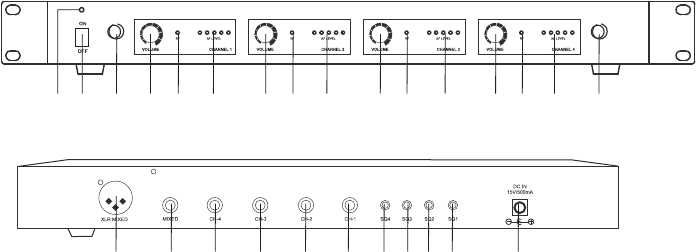
1 2 3 4 5 6 7 8 9 10 311 12 13 14 15
16 17 18 19 20 21 22 23 24 25 26
1. Power Indicator
2. Power Switch
3. Antenna socket
4. Channel 1 Volume Control
5. Channel 1 RF indicator
6. Channel 1 AF indicator
7. Channel 2 Volume Control
8. Channel 2 RF indicator
9. Channel 2 AF indicator
10. Channel 3 Volume Control
11. Channel 3 RF indicator
12. Channel 3 AF indicator
13. Channel 4 Volume Control
14. Channel 4 RF indicator
15. Channel 4 AF indicator
16. Mixed balanced XLR output
17. Mixed unbalanced 1/4" output
18. Channel 4 individual output
19. Channel 3 individual output
20. Channel 2 individual output
21. Channel 1 individual output
22. Channel 4 squelch control
23. Channel 3 squelch control
24. Channel 2 squelch control
25. Channel 1 squelch control
26. DC input
UHF-04 WIRELESS RECEIVER
Parts Description
Front
Rear
Operation
1. Connect one end of supplied 6.35mm to 6.35mm plug audio cable into AF OUT jack
on rear panel of the receiver. Connect the other end of the audio cable into "MIC
IN" or "AUX IN" of amplifier or mixer.
2. Connect DC plug of supplied AC/DC adapter to DC INPUT jack on rear panel of the
receiver. Connect AC plug of AC/DC adapter to mains power socket.
3. Turn on the wireless receiver by switching power switch to ON position and
the POWER light will illuminate to show the receiver unit is working.
4. Fully extend the aerials to the maximum height.
5. Switch ON the transmitter. The receiver RF indicator will light. When you
talk, AF LEVEL indicators will blink to show the sound level.
6. Adjust the volume and tone levels of your amplifier system as well as the
receiver as required.
Squelch
The squelch control on the rear of the receiver is preset well at the
factory, if you must use the system in an area with considerable RF
interference and there is some noises from the receiver when your
transmitter is off, you can adjust the squelch control, so the system
will receive the signal from your transmitter only but squelch or
eliminate the unwanted background RF noise.
This adjustment can cause reduction in useable range of the wireless
transmitter, so set the control to the lowest position that reliablly mutes
the unwanted RF signals.
Specifications
Frequency Range:
Frequency Response: 60Hz~18KHz
Sensitivity: 6dBuV at S/N>70dB
Image Rejection: >60dB
Stability: +/-0.005%
Max Deviation: +/-56KHz with level limiting
Dynamic Range: >110dB
S/N Ratio: >100dB
T.H.D: <0.5%
Squelch: "Pilotone & Noise lock" dual squelch circuit
Audio output: -12db/600ohms unbalanced and balanced
Power supply: 12VDC/500mA
Dimensions: 420x208x45mm
UHF-04 WIRELESS RECEIVER
517.6MHz +521.5MHz +533.7MHz + 537.2MHz

NOTE: This equipment has been tested and found to comply with the limits for a Class B digital
device, pursuant to part 15 of the FCC Rules. These limits are designed to provide reasonable protection
against harmful interference in a residential installation. This equipment generates, uses and can radiate
radio frequency energy and, if not installed and used in accordance with the instructions, may cause
harmful interference to radio communications. However, there is no guarantee that interference will not
occur in a particular installation. If this equipment does cause harmful interference to radio or television
reception, which can be determined by turning the equipment off and on, the user is encouraged to try to
correct the interference by one or more of the following measures:
—Reorient or relocate the receiving antenna.
—Increase the separation between the equipment and receiver.
—Connect the equipment into an outlet on a circuit different from that to which the receiver is
connected.
—Consult the dealer or an experienced radio/TV technician for help.
Thisdevicecomplieswithpart15oftheFCCrules.Operationissubjecttothefollowingtwo
conditions:
(1)thisdevicemaynotcauseharmfulinterference,and
(2)thisdevicemustacceptanyinterferencereceived,includinginterferencethatmaycause
undesiredoperation.
Changesormodificationstothisunitnotexpresslyapprovedbythepartyresponsiblefor
compliancecouldvoidtheuser'sauthoritytooperatetheequipment.