Innovative Concepts and Design UHF-10BP Body-worn Wireless Microphone User Manual 1
INNOVATIVE CONCEPTS AND DESIGN LLC Body-worn Wireless Microphone 1
15_UHF-10BP UserMan, r1.pdf
Operation
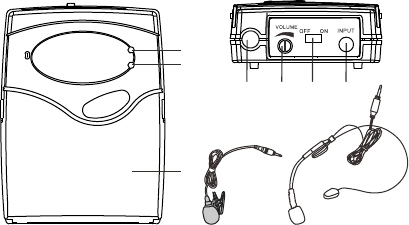
Parts Description
UHF-10BP BODY-WORN WIRELESS MICROPHONE
1. Low battery Indicator
2. Power indicator
3. Battery Compartment/Cover
4. Antenna
5. Volume control
6. Power ON/OFF Switch
7. MIC input jack
8. Lapel MIC
9. Headset MIC
1. Open battery cover and install 2PCS AA batteries into battery compartment
with correct polarity. Then close the battery cover.
2. Insert supplied headset MIC or lapel MIC into MIC IN jack. Turn the metal slip
ring on the plug clockwise to thread it on to the jack.
3. Slide power switch to "ON" position to turn on the transmitter. Power indicator
will light green. This indicates correct operation.
4. Now receiver RF indicator will light(Please confirm frequency of transmitter
same as that of receiver before operation).
5. During operation if low battery indicator lights red, this indicates the battery is
Iow. Please replace new battery.
6. After use please slide power switch to “OFF” position to turn off the transmitter.
If you are not going to use the wireless microphone system for a long period of
time please take out the batteries from the transmitter to avoid possible
battery leakage which may damage the transmitter.
1
3
2
8
4567
9
Specifications
Frequency Range:
Frequency Stability: 10ppm
RF Output: <10mW
Modulation: FM
Max Deviation: 75KHz±
Spurious Emission: ≥40dB
Power Supply: 3V(2xAA batteries)
Current Consumption: 100mA
517.6MHz or 521.5MHz or 533.7MHz or 537.2MHz

NOTE: This equipment has been tested and found to comply with the limits for a Class B digital
device, pursuant to part 15 of the FCC Rules. These limits are designed to provide reasonable protection
against harmful interference in a residential installation. This equipment generates, uses and can radiate
radio frequency energy and, if not installed and used in accordance with the instructions, may cause
harmful interference to radio communications. However, there is no guarantee that interference will not
occur in a particular installation. If this equipment does cause harmful interference to radio or television
reception, which can be determined by turning the equipment off and on, the user is encouraged to try to
correct the interference by one or more of the following measures:
—Reorient or relocate the receiving antenna.
—Increase the separation between the equipment and receiver.
—Connect the equipment into an outlet on a circuit different from that to which the receiver is
connected.
—Consult the dealer or an experienced radio/TV technician for help.
Thisdevicecomplieswithpart15oftheFCCrules.Operationissubjecttothefollowingtwo
conditions:
(1)thisdevicemaynotcauseharmfulinterference,and
(2)thisdevicemustacceptanyinterferencereceived,includinginterferencethatmaycause
undesiredoperation.
Changesormodificationstothisunitnotexpresslyapprovedbythepartyresponsiblefor
compliancecouldvoidtheuser'sauthoritytooperatetheequipment.
the microphones are for professional licensed use under 74.861 only.