Inomatic AMTEK 58KHz ACOUSTOMAGENETIC EAS System(TX, RX, Mono) User Manual

Inomatic (Suzhou) Technology Co.,Ltd. 58KHz ACOUSTOMAGENETIC EAS System(TX, RX, Mono)

User Manual

     AMTEK   250/350/700/750/800  Operation Manual   58kHzAcousto-Magnetic EAS System  valid for  AM Pro-Line electronics (TX/RX)  Hardware Version AMPRO 700V7.3, Firmware Version AT1.2
Confidential AMTEK Version 7.3F 2015-11 Page 2 ©Inomatic 2015                   SAFETY GUIDELINES      Any  manipulation  of  the  system  should  be  done  by  qualified  and trained personnel only.     Do not open the AMTEK system‟s power supply when connected to power!  High voltage!     Do not touch the antenna wire or matching circuit when connected to power! High voltage!     Before changing blown fuses or manipulating the antennas, always disconnect from 120V power source first!     Do  not  plug  in  or  out  the  power  supply  cables  to  or  from  the processor board unless the power supply is switched off!     Do not  insert  or  take-out  any  jumpers unless  the  power  supply  is switched off!     Route  the  RX-TX  cable and  power  supply  cables  through  places where they cannot be easily damaged!     Do not use the system in water condensing conditions!     Do not use the system in explosive environmental conditions!
Confidential AMTEK Version 7.3F 2015-11 Page 3 ©Inomatic 2015          LIST OF CONTENTS  SAFETY GUIDELINES .................................................................................................... 2  1.  Introduction............................................................................................................... 5  1.1.  System Description............................................................................................. 5  1.2.  Typical System Performance .............................................................................. 6  1.3.  Additional Features............................................................................................. 6  2.  AMTEK System ........................................................................................................ 8  2.1.  Component Overview ......................................................................................... 8  2.1.1 Electrical Specifications: ..................................................................................... 8  2.2.  Processor Board AMPRO 700V7.3 .................................................................... 9  2.3.  Receiver Board AMRB 700V5.1 ....................................................................... 11  2.4.  RX-TX-Connection Cable AMCTR 710 ............................................................ 12  2.5.  Dual Power Supply AMPSS 700V6 .................................................................. 13  2.5.1  Power supply cable/connector ................................................................... 15  2.6.  System Configurations ..................................................................................... 16  2.6.1.  Dual System............................................................................................... 16  2.6.2.  Split System ............................................................................................... 17  3.  System Installation ................................................................................................. 18  3.1.  Noise sources................................................................................................... 18  3.2.  System Part List ............................................................................................... 18  3.3.  Installation Requirements ................................................................................. 19  3.4.  Installation Procedure ....................................................................................... 20  4.  Tuning of the Matching Circuits .............................................................................. 21  4.1.  TX Antenna Matching ....................................................................................... 21  4.2.  Matching capacitors default setting: ................................................................. 23  4.3.  RX Matching Circuit .......................................................................................... 24
Confidential AMTEK Version 7.3F 2015-11 Page 4 ©Inomatic 2015             5.  Synchronization ...................................................................................................... 25  5.1.  AM operating principle................................................................................... 25  5.2.  Synchronization principle .............................................................................. 26  5.3.   Hardware Synchronization ................................................................................ 28  6.  LAN Connection ..................................................................................................... 31
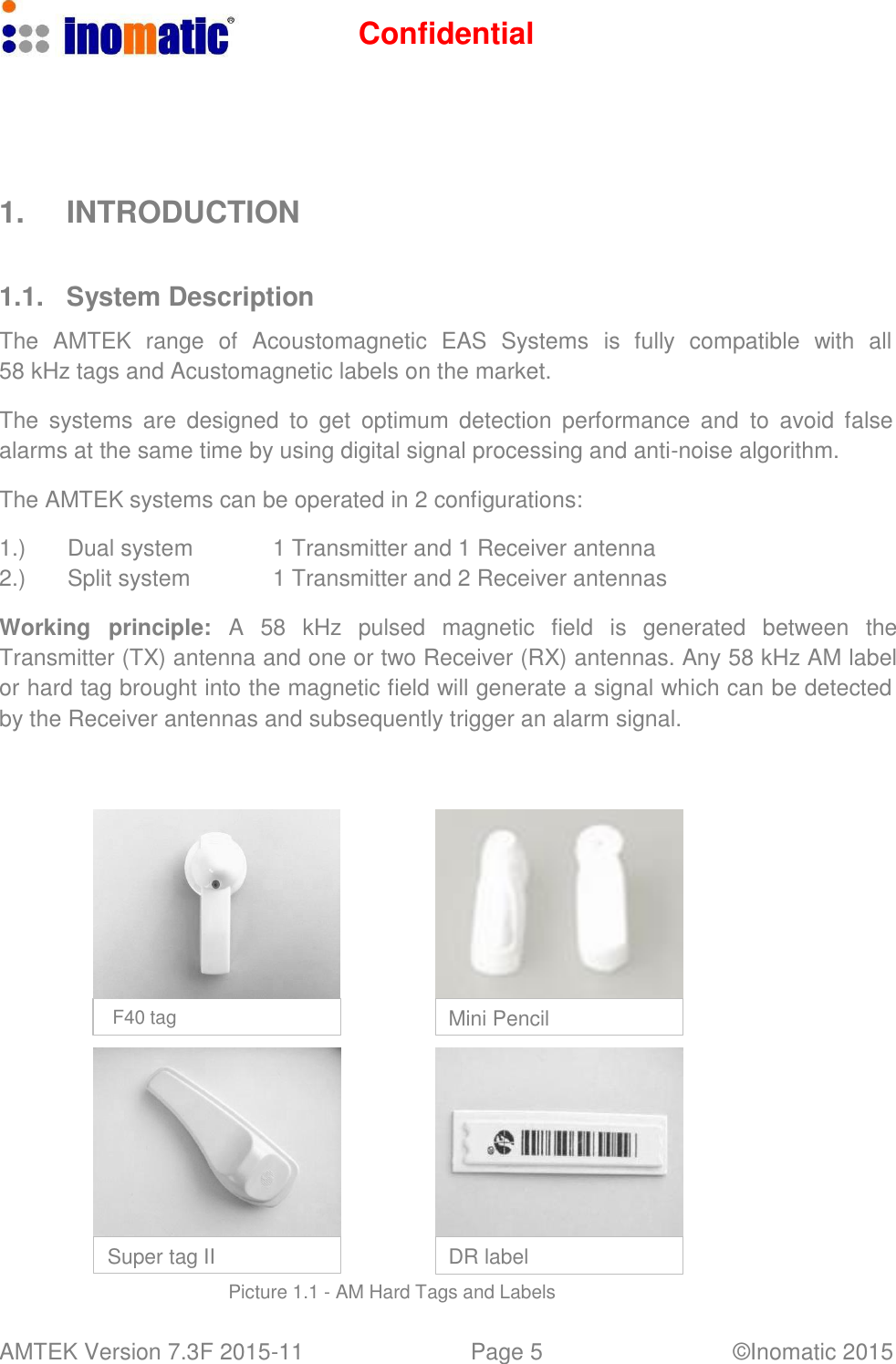
Confidential AMTEK Version 7.3F 2015-11 Page 5 ©Inomatic 2015          1.  INTRODUCTION    1.1.  System Description  The  AMTEK  range  of  Acoustomagnetic  EAS  Systems  is  fully  compatible  with  all 58 kHz tags and Acustomagnetic labels on the market.  The  systems  are designed  to  get  optimum  detection  performance  and  to  avoid  false alarms at the same time by using digital signal processing and anti-noise algorithm.  The AMTEK systems can be operated in 2 configurations:  1.) Dual system 1 Transmitter and 1 Receiver antenna 2.) Split system 1 Transmitter and 2 Receiver antennas  Working  principle:  A  58  kHz  pulsed  magnetic  field  is  generated  between  the Transmitter (TX) antenna and one or two Receiver (RX) antennas. Any 58 kHz AM label or hard tag brought into the magnetic field will generate a signal which can be detected by the Receiver antennas and subsequently trigger an alarm signal.               F40 tag  Mini Pencil            Super tag II  DR label  Picture 1.1 - AM Hard Tags and Labels
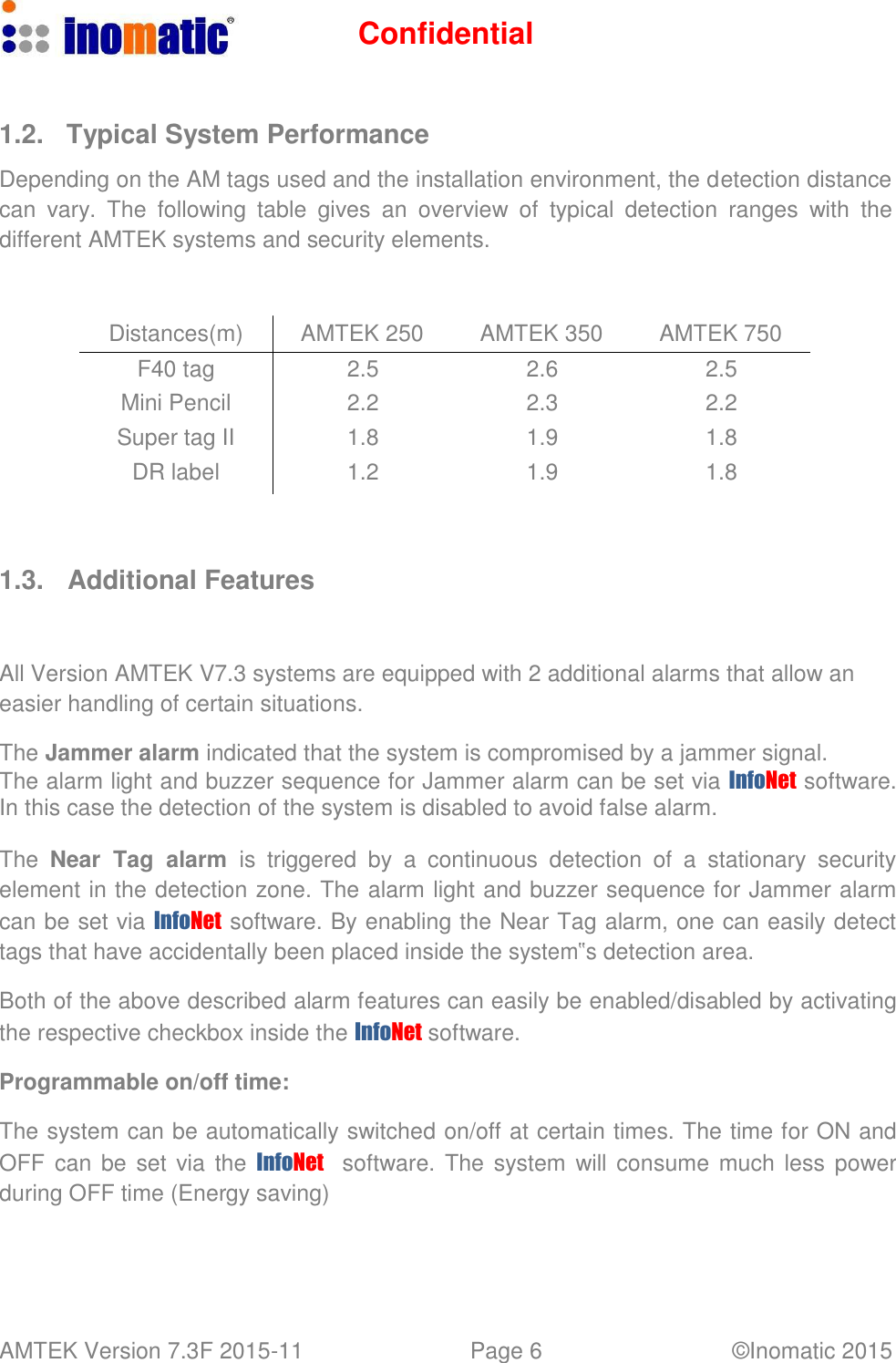
Confidential AMTEK Version 7.3F 2015-11 Page 6 ©Inomatic 2015      1.2.  Typical System Performance  Depending on the AM tags used and the installation environment, the detection distance can  vary.  The  following  table  gives  an  overview  of  typical  detection  ranges  with  the different AMTEK systems and security elements.    Distances(m) AMTEK 250 AMTEK 350 AMTEK 750 F40 tag 2.5 2.6 2.5 Mini Pencil 2.2 2.3 2.2 Super tag II 1.8 1.9 1.8 DR label 1.2 1.9 1.8     1.3.   Additional Features    All Version AMTEK V7.3 systems are equipped with 2 additional alarms that allow an easier handling of certain situations.  The Jammer alarm indicated that the system is compromised by a jammer signal. The alarm light and buzzer sequence for Jammer alarm can be set via InfoNet  software. In this case the detection of the system is disabled to avoid false alarm.  The  Near  Tag  alarm is triggered  by  a  continuous  detection  of  a  stationary  security element in the detection zone. The alarm light and buzzer sequence for Jammer alarm can be set via InfoNet  software. By enabling the Near Tag alarm, one can easily detect tags that have accidentally been placed inside the system‟s detection area.  Both of the above described alarm features can easily be enabled/disabled by activating the respective checkbox inside the InfoNet software.  Programmable on/off time:  The system can be automatically switched on/off at certain times. The time for ON and OFF  can  be set via the InfoNet    software. The  system  will consume much less power during OFF time (Energy saving)
Confidential AMTEK Version 7.3F 2015-11 Page 7 ©Inomatic 2015      Incoming/outgoing alarm (only with integrated visitor counter):  The system is able to distinguish between incoming and outgoing alarm if equipped with the optional integrated visitor counter.  The alarm indication is different for the two types of alarms allowing easy identification of incoming and outgoing alarm.     Firmware update:  If a new firmware becomes available, the processor‟s firmware can be updated via the InfoNet software allowing update of new system features without replacing the electronics.     Selection of light/sound sequence:  The system alarm light and sound can be programmed in different sequences. Different aisle could have different sound sequence enabling the identification of where the alarm came from. It is also possible to have the alarm light on longer than the alarm sound to easily identify the alarm position. For multi aisle installation this feature is especially useful.     Remote Tuning/Service/Monitoring  In order to reduce the need for service calls, especially for remote places, our PRO- LINE systems can be accessed via Internet. The system service provider can log-in from their office into the system via infoNet Cloud (provided they are authorized) and diagnose/solve potential problems.     Integrated bidirectional visitor counter     Possibility to count customers per aisle and to determine the direction of movement (in or out of the shop)    Showing the importance of the alarm (is a customer moving in or out during the alarm)    Detecting undefined alarms    Pinpoint the exact aisle where the alarm occurred    Generate reports on visitor counts and alarm counts
Confidential AMTEK Version 7.3F 2015-11 Page 8 ©Inomatic 2015      2.  AMTEK SYSTEM  2.1. Component Overview    The standard system comprises the following components:  a.) Processor Board  AMPRO 700V7.3 b.) Receiver Board  AMRB 700V5 or higher c.) Power Supply  AMPSS 700V6 or higher d.) Antenna  AMTEK 250/350 or AMTEK 750/800 e.) Connection Cable TR  AMCTR 710 f.) Computer Cable  LAN Cable AMCOM 710 g.) infoNet Software  infoNet V4or higher   Please  note  that  the  Version  7.3  processor  board  hardware  can  come  with different Firmware Versions. Please check the label on the processor if you are not aware of your board‟s firmware version.     2.1.1 Electrical Specifications:  Power supply -Output  40VDC/ 600mA or 18VDC/400mA -Input  100-240VAC, 50/60Hz 100VAC/0.31A Transmitter Operating Frequency  58 kHz (±200Hz) Transmit Burst Duration  1.5ms or 1.6ms Max. Transmit Current  12A peak Transmitter Coil Resistance  2.7 ohm (±5%) Burst Repetition Rate 50Hz Receiver Center Frequency  58 kHz  Receive Coil Resistance  4.0 ohm (±5%) Alarm Audio level  95dBA Environmental Ambient Temperature  0°C to 50°C  Relative Humidity  0 to 90% (Non-condensing)
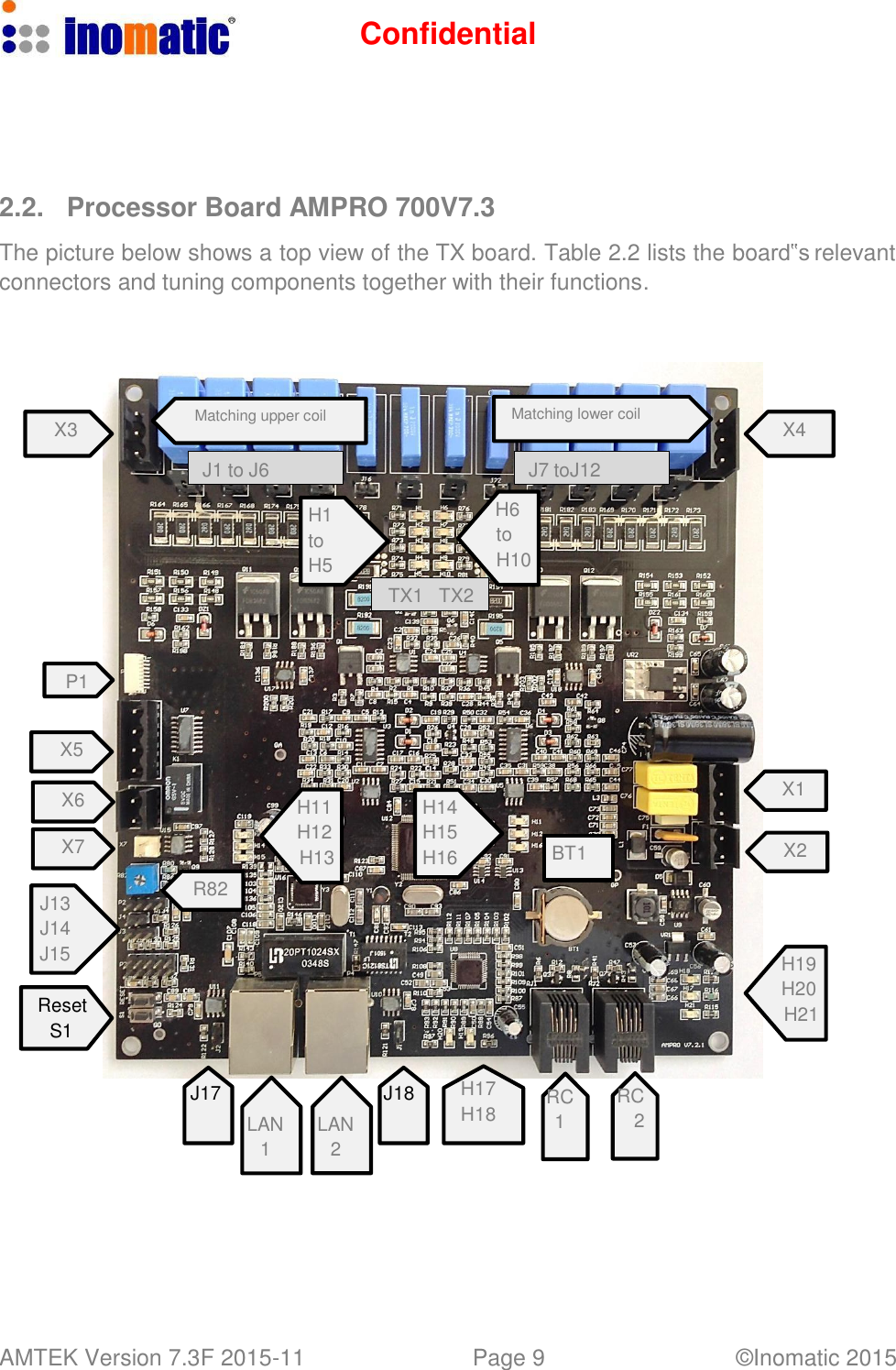
Confidential AMTEK Version 7.3F 2015-11 Page 9 ©Inomatic 2015         2.2.  Processor Board AMPRO 700V7.3  The picture below shows a top view of the TX board. Table 2.2 lists the board‟s relevant connectors and tuning components together with their functions.       Matching upper coil Matching lower coil X3  X4  J1 to J6  J7 toJ12  H1 to H5 TX1  TX2 H6 to H10    P1   X5  X6  X7   J13 J14 J15   Reset S1        R82    H11 H12 H13    H14 H15 H16       BT1   X1   X2      H19 H20 H21   J17   LAN 1   LAN 2 J18 H17 H18  RC RC 1  2
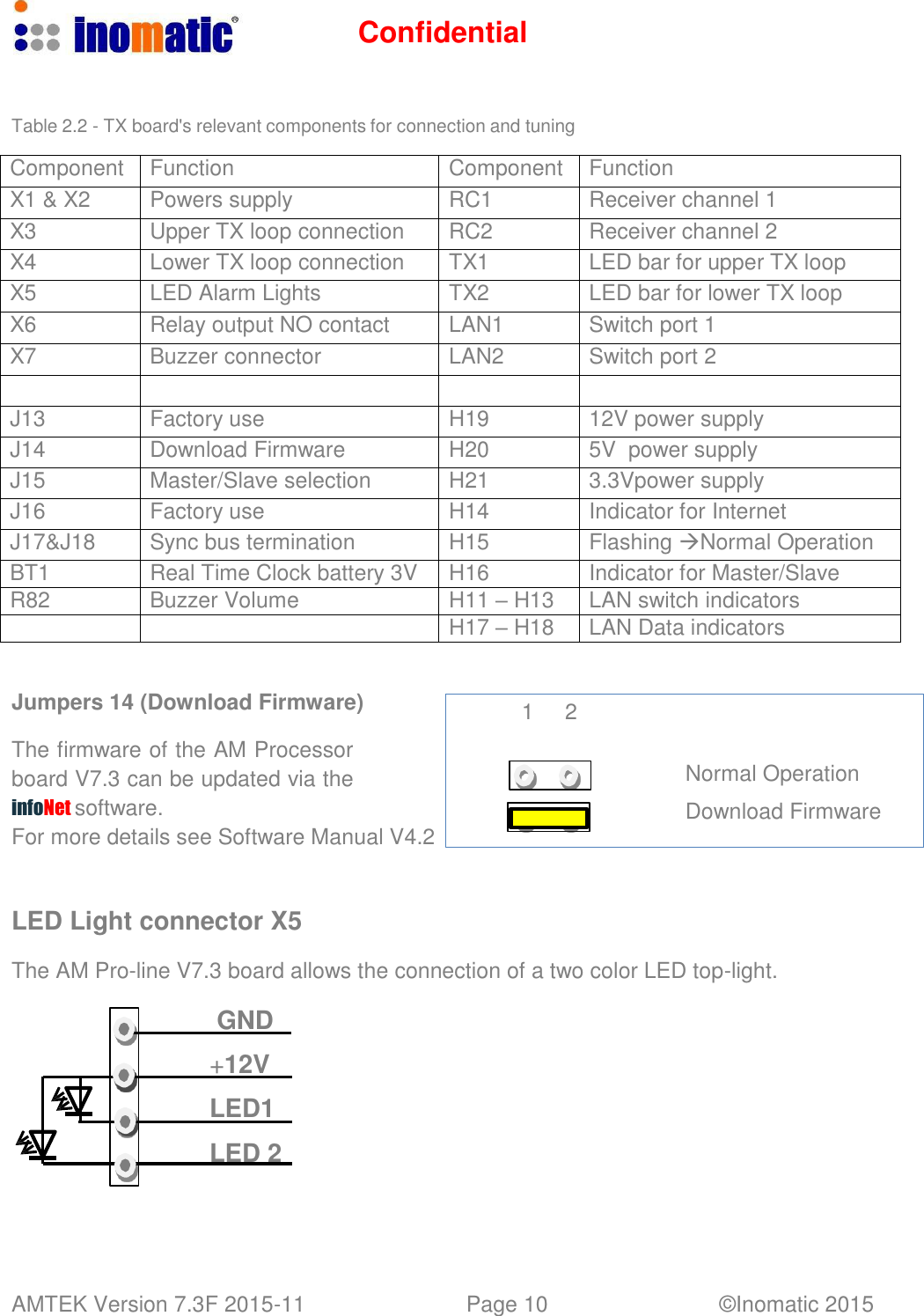
Confidential AMTEK Version 7.3F 2015-11 Page 10 ©Inomatic 2015      Table 2.2 - TX board's relevant components for connection and tuning  Component Function Component Function X1 & X2 Powers supply RC1 Receiver channel 1 X3 Upper TX loop connection RC2 Receiver channel 2 X4 Lower TX loop connection TX1 LED bar for upper TX loop X5 LED Alarm Lights TX2 LED bar for lower TX loop X6 Relay output NO contact LAN1 Switch port 1 X7 Buzzer connector LAN2 Switch port 2     J13 Factory use H19 12V power supply J14 Download Firmware H20 5V  power supply J15 Master/Slave selection H21 3.3Vpower supply J16 Factory use H14 Indicator for Internet J17&J18 Sync bus termination H15 Flashing Normal Operation BT1 Real Time Clock battery 3V H16 Indicator for Master/Slave R82 Buzzer Volume H11 – H13 LAN switch indicators   H17 – H18 LAN Data indicators   Jumpers 14 (Download Firmware)                          1     2  The firmware of the AM Processor board V7.3 can be updated via the infoNet software. For more details see Software Manual V4.2    LED Light connector X5     Normal Operation  Download Firmware  The AM Pro-line V7.3 board allows the connection of a two color LED top-light.  GND  +12V LED1 LED 2
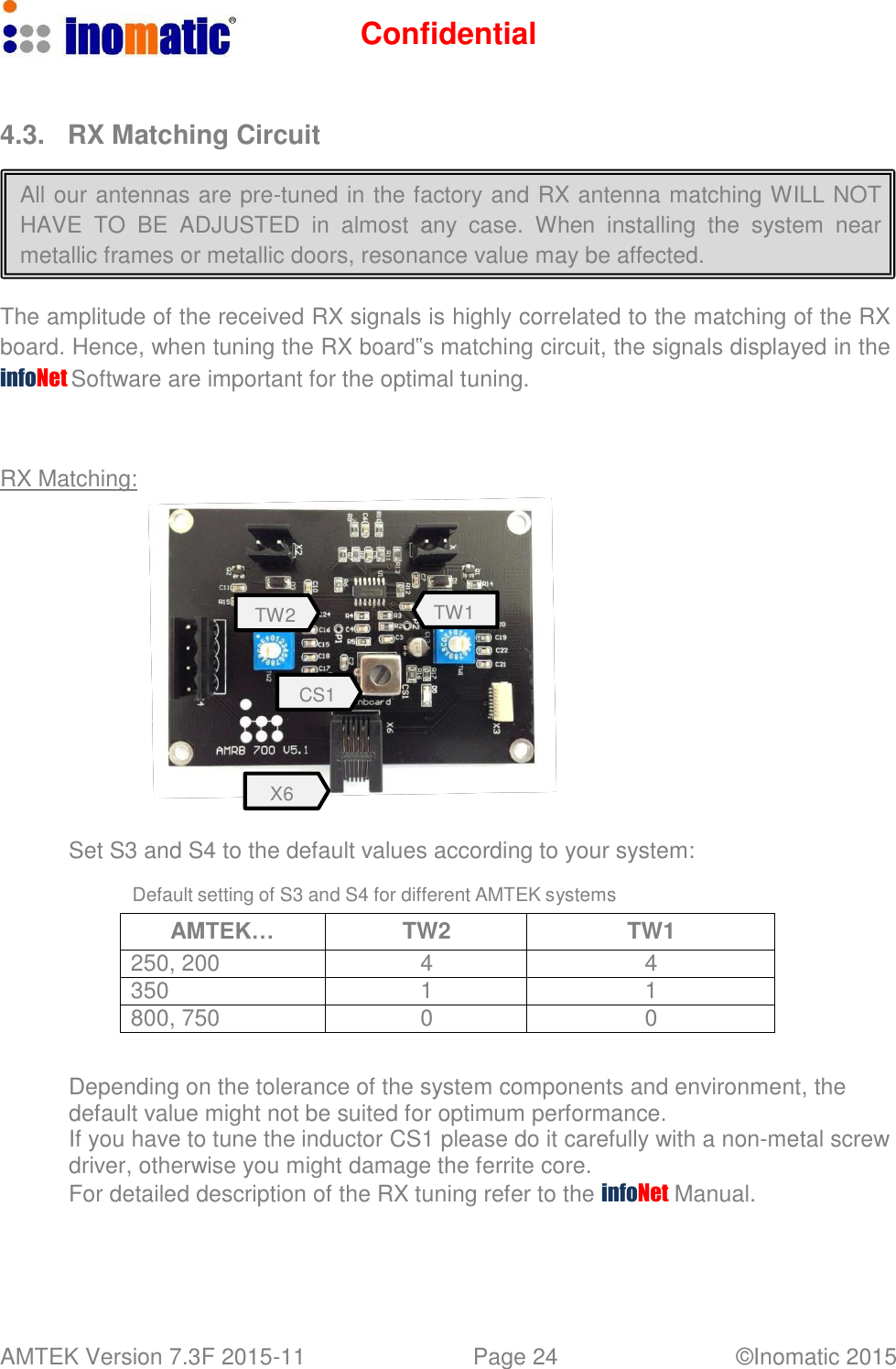
Confidential AMTEK Version 7.3F 2015-11 Page 11 ©Inomatic 2015      2.3.  Receiver Board AMRB 700V5.1    Picture 2.3 below shows the RX board and the relevant components:     X2 - Lower receiver loop connector X1 - Upper receiver loop connector          X4 - Alram Lights TW2  TW1    CS1    X3 –Integrated Visitor counter& Alarm light     X6 - Connector to Processor board    Each RX board controls the resonance of two loops in the RX antenna. The matching for the upper and lower receiver loop can be adjusted through the 2 rotary switchesTW1 and TW2. TW1 adjusts the matching for the upper loop and TW2 adjusts the matching of the lower loop.   All our antennas are pre-tuned in the factory and RX antenna matching WILL NOT HAVE  TO BE ADJUSTED in  almost  any  case.  When  installing  the  system  near metallic frames or metallic doors, resonance value may be affected.    In this case, the RX matching can be modified for the upper and lower loop using the rotary switches TW1 and TW2.
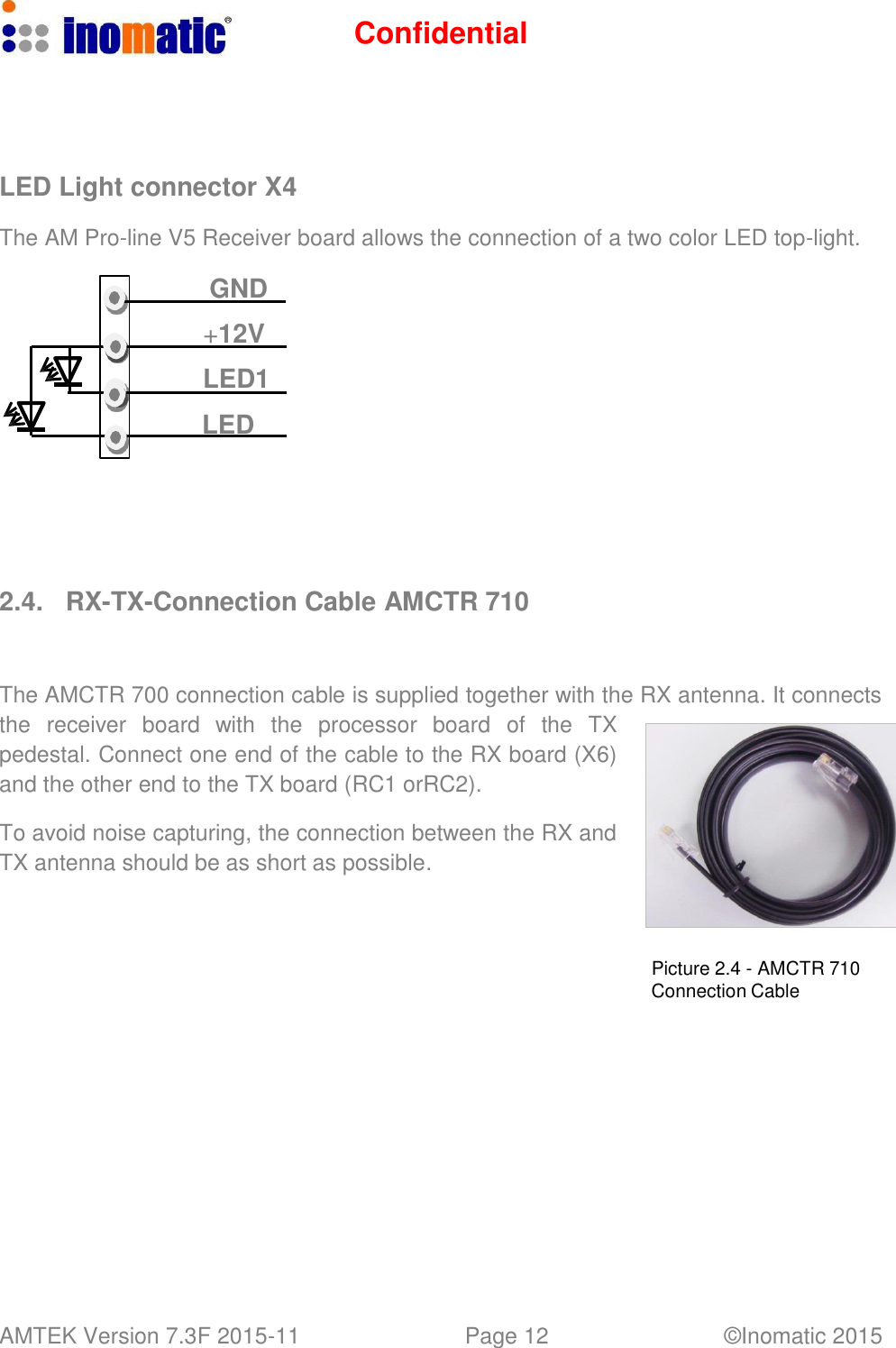
Confidential AMTEK Version 7.3F 2015-11 Page 12 ©Inomatic 2015        LED Light connector X4  The AM Pro-line V5 Receiver board allows the connection of a two color LED top-light.  GND  +12V LED1 LED         2.4.  RX-TX-Connection Cable AMCTR 710    The AMCTR 700 connection cable is supplied together with the RX antenna. It connects the  receiver  board  with  the  processor  board   of   the  TX pedestal. Connect one end of the cable to the RX board (X6) and the other end to the TX board (RC1 orRC2).  To avoid noise capturing, the connection between the RX and TX antenna should be as short as possible.     Picture 2.4 - AMCTR 710 Connection Cable
Confidential AMTEK Version 7.3F 2015-11 Page 13 ©Inomatic 2015      2.5. Dual Power Supply AMPSS 700V6    The Dual power supply AMPSS700V6 is used for all our AM systems using V4 or V6 processor boards. It provides the power and the Synchronization signal to the system electronics for maximum 2 TX antennas.    Technical specifications for AMPSS 700 Dimensions (L x W x H) 210 x 150 x 70 mm Weight 3.0 kg Input voltage / frequency / current 100-240VAC,50 / 60Hz Mains inlet type AC IEA with ON/OFF switch   Output voltage 40VDC and 18VDC Output cable 5x1mm2, 8m length. This cable can be extended to 15m using a 3x1mm2  cable or thicker. Temperature range 0 – 50C Primary fuse (FP) 220VAC – 1A slow , 100VAC – 2A slow Secondary fuses: (Inside the housing) F1 (40V, 3A), F2 (18V, 3A) F3 (18V, 2A), F4 (40V, 2A) F5 (18V, 2A), F6 (40V, 2A)    X1  Power Processor board 1 L1 40VDC (LED red/blue) L2  18VDC (LED red/blue)  X2  Power Processor board 2  L3  40VDC (LED red/blue) L4 18VDC (LED red/blue) AMPSS 700 V6 power supply  If any LED lights “red” means the respective voltage is missing
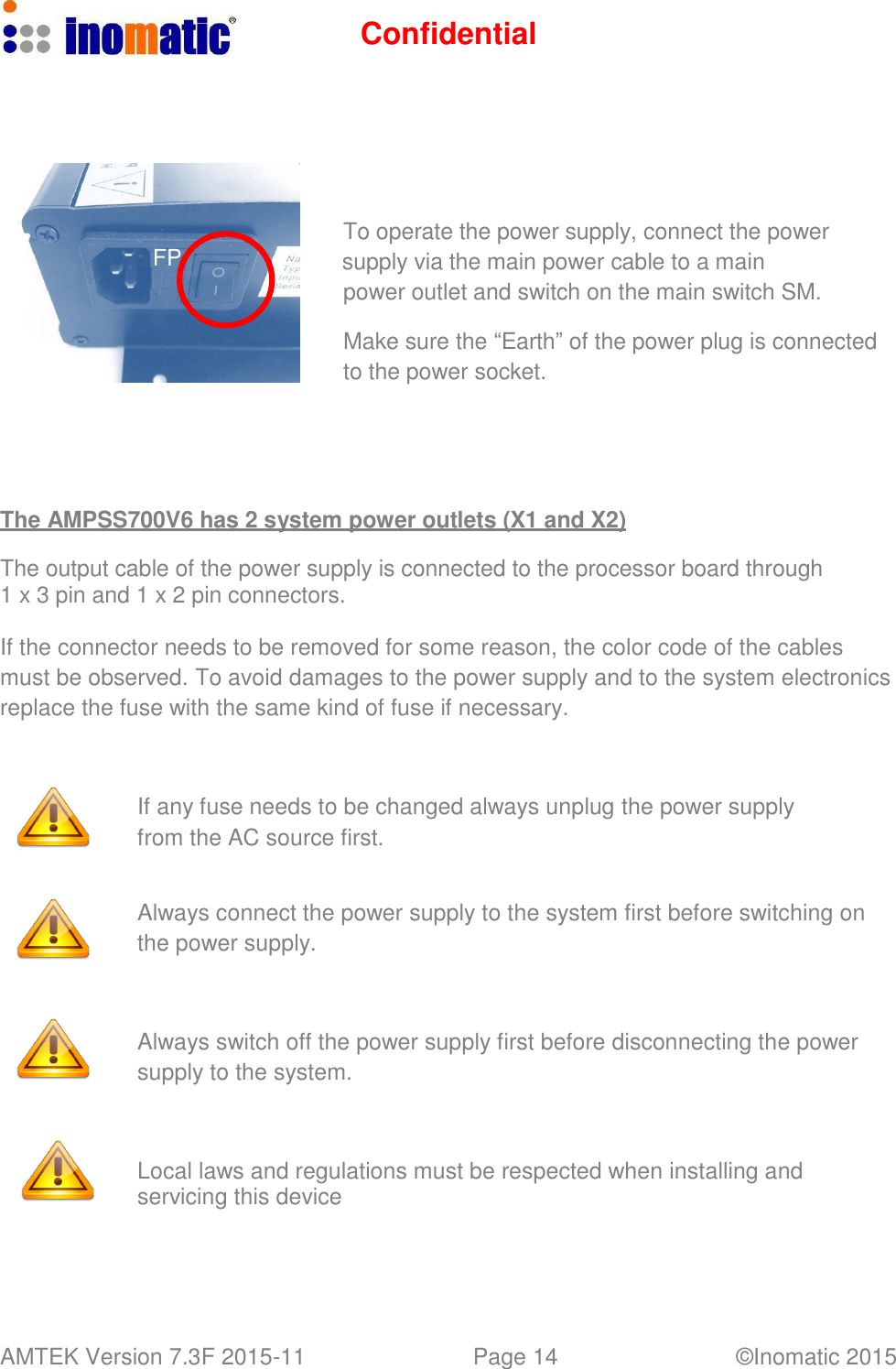
Confidential AMTEK Version 7.3F 2015-11 Page 14 ©Inomatic 2015           To operate the power supply, connect the power FP supply via the main power cable to a main power outlet and switch on the main switch SM.  Make sure the “Earth” of the power plug is connected to the power socket.       The AMPSS700V6 has 2 system power outlets (X1 and X2)  The output cable of the power supply is connected to the processor board through 1 x 3 pin and 1 x 2 pin connectors.  If the connector needs to be removed for some reason, the color code of the cables must be observed. To avoid damages to the power supply and to the system electronics replace the fuse with the same kind of fuse if necessary.     If any fuse needs to be changed always unplug the power supply from the AC source first.   Always connect the power supply to the system first before switching on the power supply.     Always switch off the power supply first before disconnecting the power supply to the system.     Local laws and regulations must be respected when installing and servicing this device
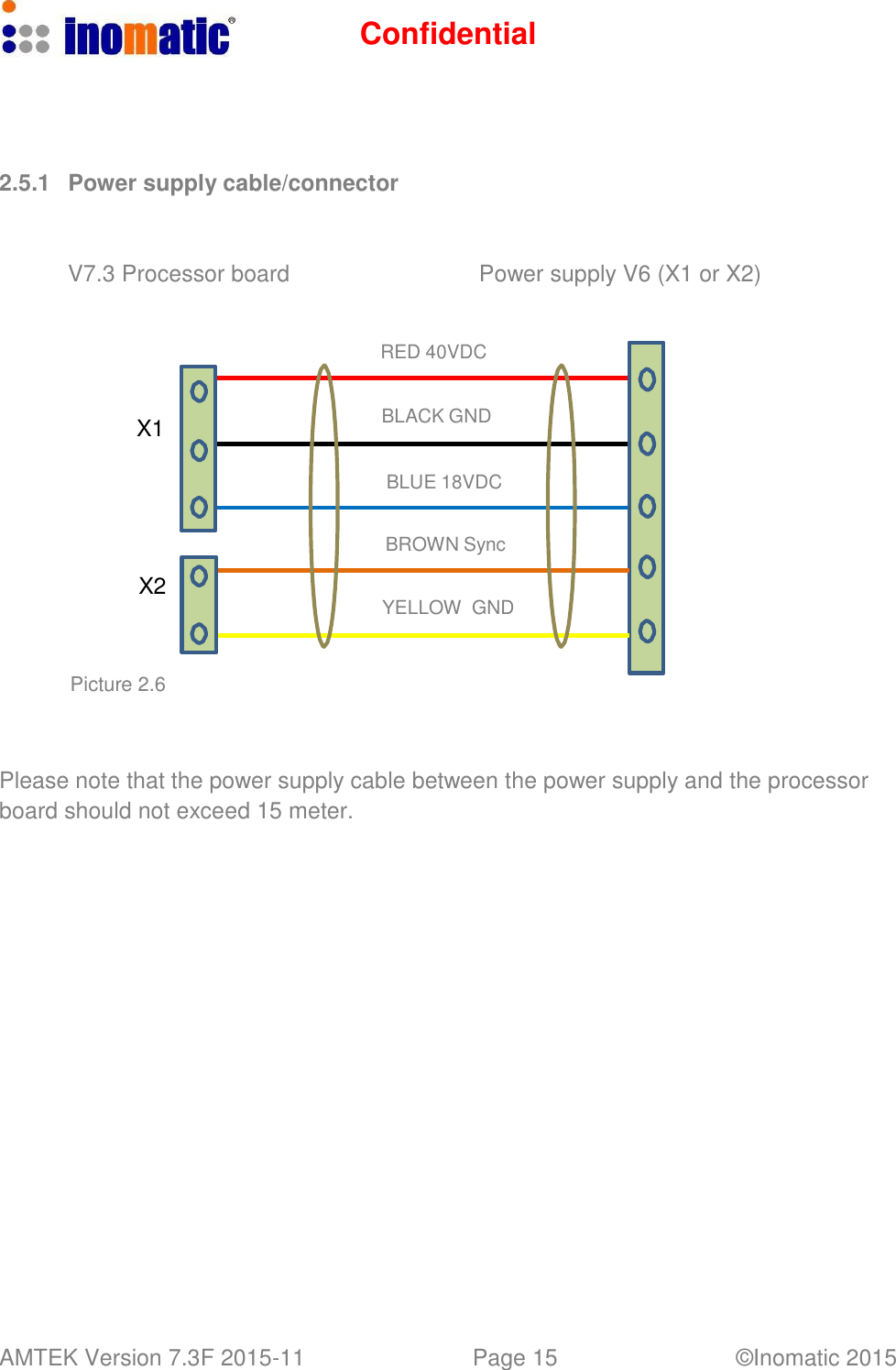
Confidential AMTEK Version 7.3F 2015-11 Page 15 ©Inomatic 2015        2.5.1   Power supply cable/connector    V7.3 Processor board  Power supply V6 (X1 or X2)    RED 40VDC   X1  BLACK GND  BLUE 18VDC     X2     Picture 2.6 BROWN Sync   YELLOW  GND     Please note that the power supply cable between the power supply and the processor board should not exceed 15 meter.
Confidential AMTEK Version 7.3F 2015-11 Page 16 ©Inomatic 2015   AM PSS 700 To X1 & X2    2.6.  System Configurations  One processor board (TX) can drive one or two RX antenna(s), thus resulting in two configuration modes: “Dual and Split system. The following gives a schematic overview about the necessary components and connections for both configurations.  2.6.1.  Dual System   RX antenna TX antenna  LED light LED light                       AMCTR 710   Shop -LAN       LAN Port     Hardware synchronization might only be necessary, if 2 or more TX antennas are used.
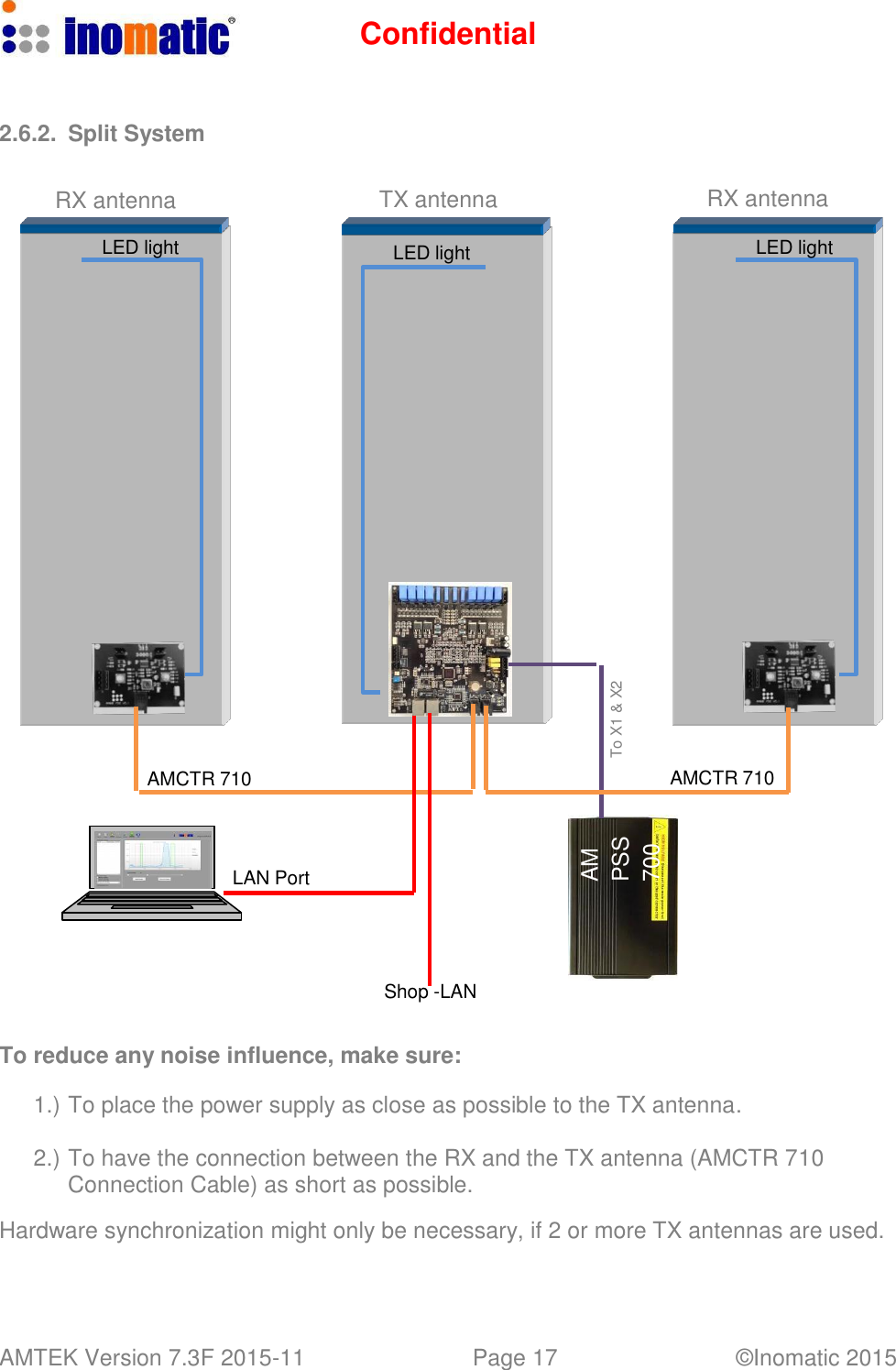
Confidential AMTEK Version 7.3F 2015-11 Page 17 ©Inomatic 2015   AM PSS 700 To X1 & X2    2.6.2.  Split System   RX antenna TX antenna RX antenna  LED light  LED light  LED light                           AMCTR 710  AMCTR 710     LAN Port      Shop -LAN   To reduce any noise influence, make sure:  1.) To place the power supply as close as possible to the TX antenna.  2.) To have the connection between the RX and the TX antenna (AMCTR 710 Connection Cable) as short as possible.  Hardware synchronization might only be necessary, if 2 or more TX antennas are used.
Confidential AMTEK Version 7.3F 2015-11 Page 18 ©Inomatic 2015      3.  SYSTEM INSTALLATION    This chapter covers the various issues related to Acoustic Magnetic systems and Electronic Article Surveillance systems in general, like:    Noise sources    Installation guidelines   3.1. Noise sources  Below there are various noise sources listed that might affect the performance of any EAS system. It is strongly recommended to either eliminate these noise sources (as far as possible) or maintain the largest possible distance to these noise sources. The following devices can create or absorb AM noise signals which can reduce the performance of an EAS system:    AM systems installed in other shops (even if they are installed up to 100m or more away from your store).    Any electronic device that operates around 58 kHz or produces harmonic frequencies around 58 kHz.    An active laptop. The back light in the screen can create a lot of noise which is detected by the EAS system and can reduce the performance dramatically. Make sure to keep laptop computers at least 3 meters away from the antennas.    (Moving) Objects containing metal, like sliding and revolving doors, elevators, escalators, roller shutters, frames, etc.    Electronic devices, like computers, laptop screens, LCD screens, cash registers, engines, transformers, etc.    Vertically positioned power cables, both low voltage and high voltage.    Lights (flashing, fluorescent, halogen, gas-de-charge, etc.)    Metal scan systems installed in close vicinity.    3.2.  System Part List  a.) 2x Pedestal AMTEK (1 TX and 1 RX) b.) 1x Power supply AMPSS 700V6 c.) 1x Connection cable TR AMCTR 710 d.) 1x Computer Cable LAN Cable AMCOM 710 e.) 1x Computer software infoNet V4 or higher
Confidential AMTEK Version 7.3F 2015-11 Page 19 ©Inomatic 2015      3.3.  Installation Requirements     Make sure all parts have arrived. Make sure there are no damaged parts. If there is any damaged part, notify the transport company.     Installation   shall   be  performed   by  a   qualified   installer   with   all  necessary national/local electrical/fire codes training.     If possible, connect a set of antennas (1 TX and 1 RX) and put them in the required position in the entrance/exit without drilling holes in the floor and bolting the antennas down. Switch on the system and test the performance. In this way the noise level and system sensitivity can be determined and if necessary (in case of high noise or poor sensitivity) the system can be moved to find a better position     The  pedestals  shall  be  placed  at  a  distance  equal  to  or  smaller  than  the maximum value depending on the kind of tag.     Avoid placing TX/RX pedestals near metallic structures (doors, frames, etc...) or neon/discharge lamps.     Metal framed doors may never swing between the EAS antennas, as this will distort the energy field of the system in such a way that it might result in high noise, poor detection and potential false alarms     Always install the TRX antenna on that side where the highest noise is or where the highest noise can be expected.     Not connected RX antennas nearby a running system  are to be avoided. They act as a big hard tag.     No power line (including power supply or TX antenna power line) shall be located in the same pipe/tube with the TX-RX interconnection cable.     Avoid unnecessary long cables. Run the power supply cables in a direct line to the EAS antennas. Never run power supply cables vertically up the wall within one meter distance of the antennas (never around the entrance/exit doorframe).     The AC source should be a clean AC source. If possible do not share the AC source with computers, neon lights/discharge lamps, or equipment with switching power supplies, make sure the “Earth” of the power supply plug is connected to the power supply socket.     Blown fuses shall be replaced with fuses of the same kind. ALWAYS UNPLUG power supply BEFORE CHANGING blown fuses!
Confidential AMTEK Version 7.3F 2015-11 Page 20 ©Inomatic 2015      3.4.  Installation Procedure       Remove base covers from pedestals.  Electronics will now be visible. Confirm all connections are firmly in place.     Place TX pedestal in the place to be installed.  Consider  the  position  of  AC  120V/60Hz  power source.  Ensure that  120V  60Hz AC source can be connected with the Power Supply and that the Power Supply output cable can be connected with the TX pedestal.  Avoid  placing  TX/RX  pedestals  very  near  metallic  structures  (doors,  frames, etc...) or neon/discharge lamps and LED, LCD monitors.     Place RX pedestal at the place to be installed.  It is  strongly  recommended  to  tune  the  system  to  its  final  working  conditions BEFORE drilling any hole! Depending on tag type, RX pedestal can be placed at different distances from TX pedestal (See “System Performance” on page 6).     Connect RX pedestal to TX pedestal using the connection cable AMCTR 710     Confirm all connections to the loops, receiver board, and processor board are firmly in place.     Before turning the system on, remove all 58 kHz tags near to it.     Connect Power Supply to the TX processor board with the 2-pin and 3-pin connectors     Connect  Power  Supply  to  AC  120V/60Hz  source,  switch  on  the  power supply.      Connect the computer via the LAN cable and start InfoNet software (for tuning please refer to the InfoNet manual)
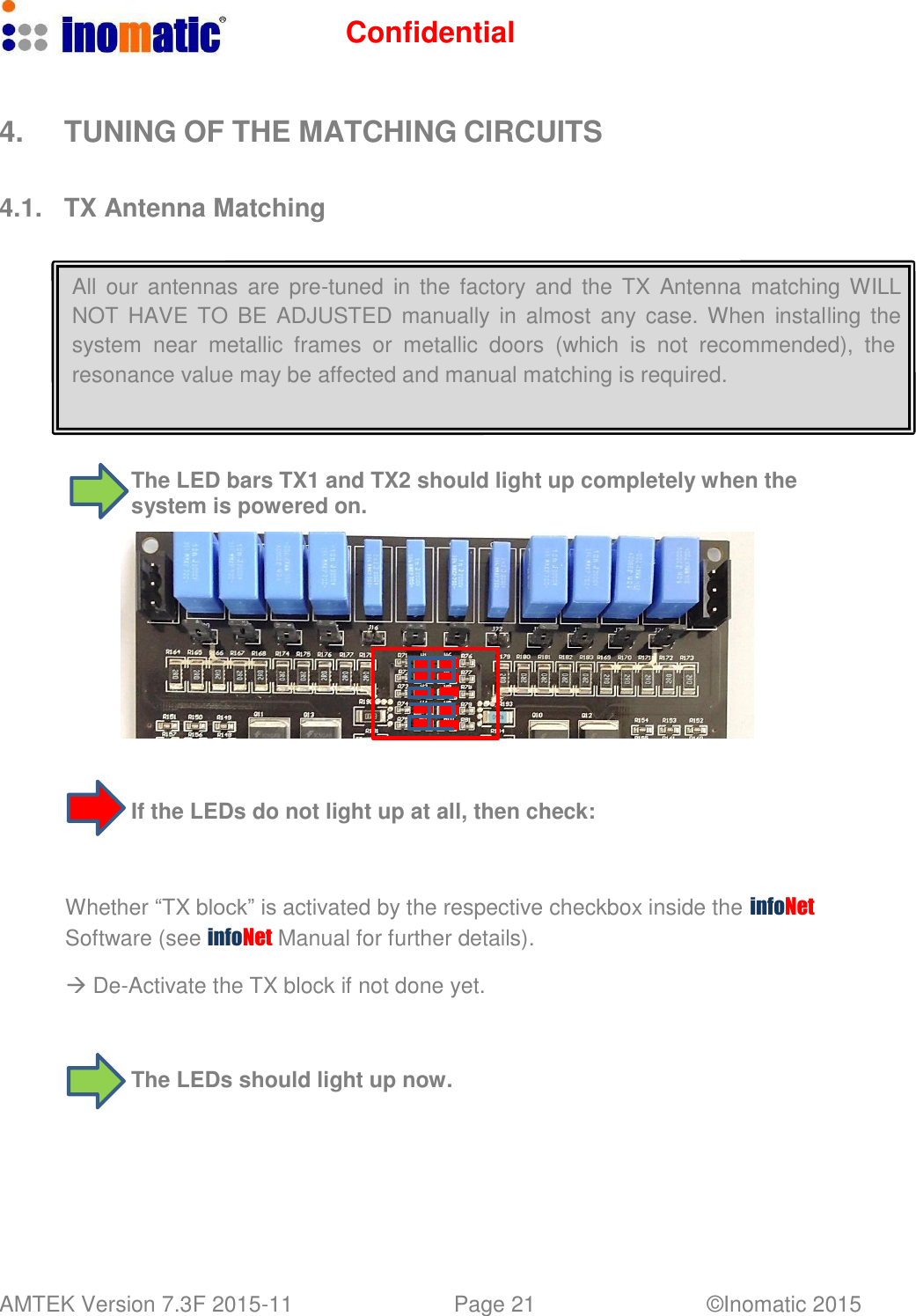
Confidential AMTEK Version 7.3F 2015-11 Page 21 ©Inomatic 2015      4.  TUNING OF THE MATCHING CIRCUITS   4.1.  TX Antenna Matching    All our  antennas are  pre-tuned  in the factory and  the  TX  Antenna matching WILL NOT  HAVE  TO  BE  ADJUSTED  manually  in  almost  any  case. When  installing  the system  near  metallic  frames  or  metallic  doors  (which  is not  recommended),  the resonance value may be affected and manual matching is required.     The LED bars TX1 and TX2 should light up completely when the system is powered on.                         If the LEDs do not light up at all, then check:     Whether “TX block” is activated by the respective checkbox inside the infoNet Software (see infoNet Manual for further details).   De-Activate the TX block if not done yet.     The LEDs should light up now.
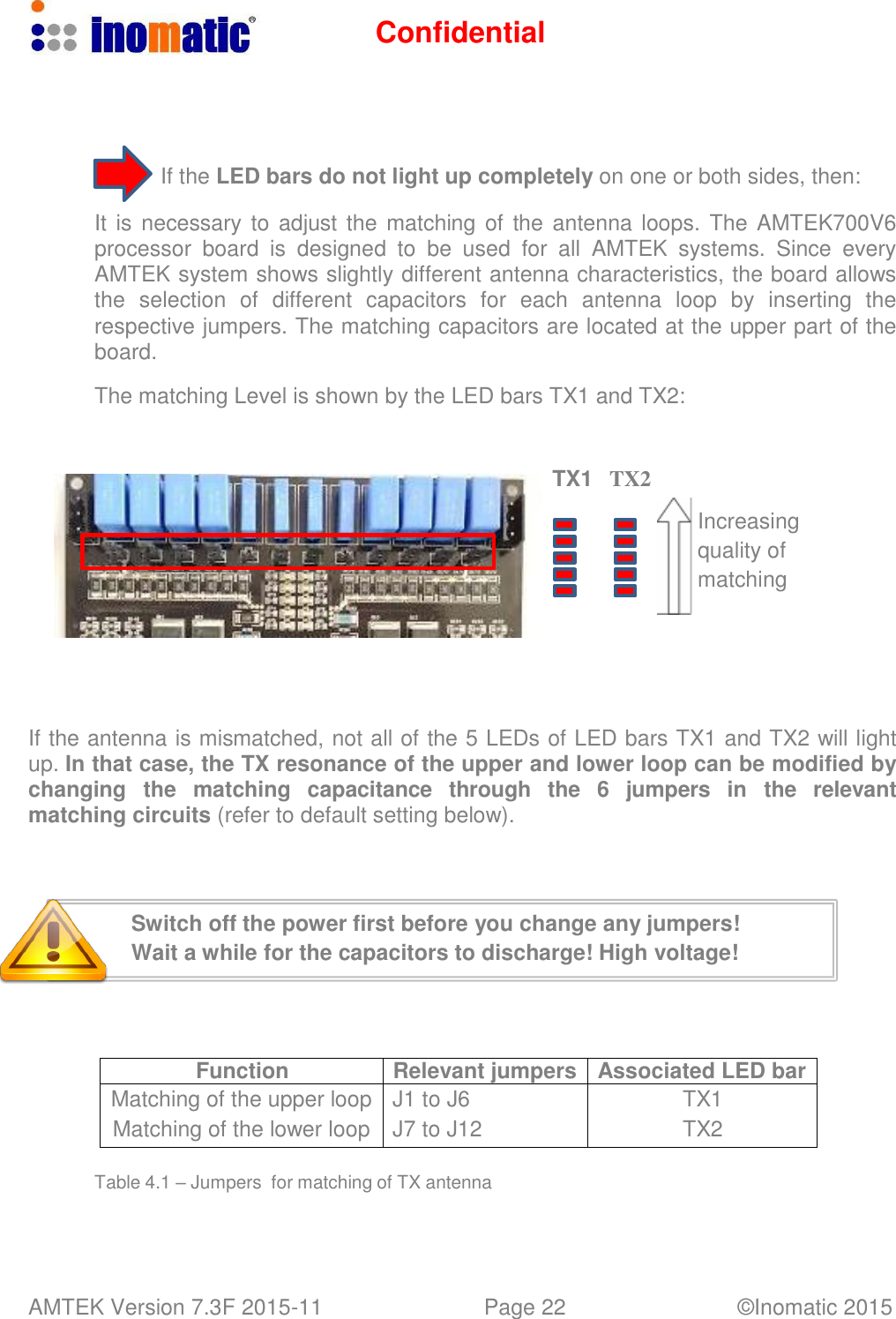
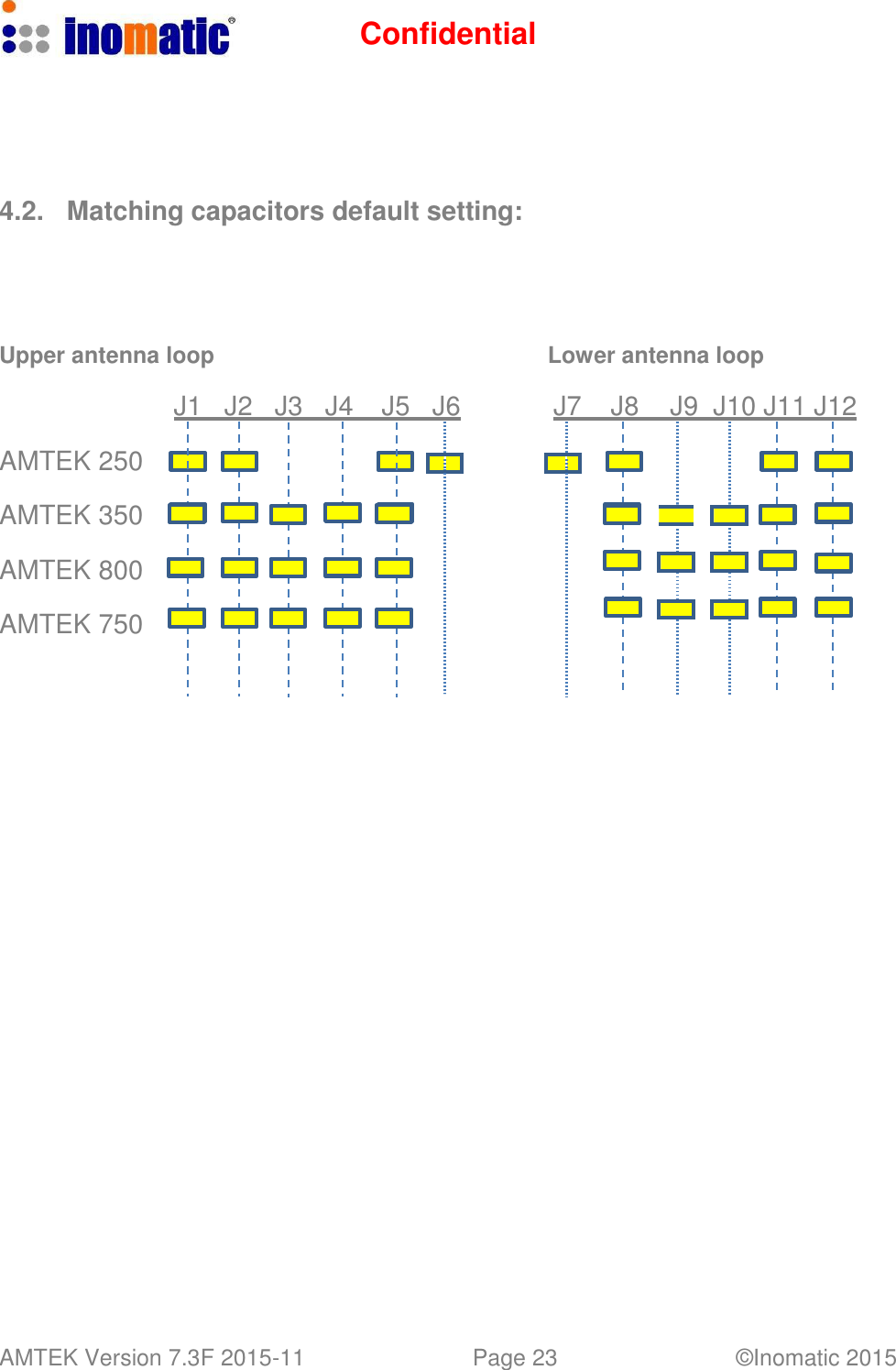
Confidential AMTEK Version 7.3F 2015-11 Page 22 ©Inomatic 2015        If the LED bars do not light up completely on one or both sides, then:  It is necessary to  adjust the matching of the antenna loops. The AMTEK700V6 processor  board is  designed  to  be  used  for  all  AMTEK  systems.  Since  every AMTEK system shows slightly different antenna characteristics, the board allows the  selection  of  different  capacitors  for  each  antenna  loop  by  inserting  the respective jumpers. The matching capacitors are located at the upper part of the board.  The matching Level is shown by the LED bars TX1 and TX2:    TX1   TX2   Increasing quality of matching        If the antenna is mismatched, not all of the 5 LEDs of LED bars TX1 and TX2 will light up. In that case, the TX resonance of the upper and lower loop can be modified by changing  the  matching   capacitance   through  the  6   jumpers   in   the  relevant matching circuits (refer to default setting below).     Switch off the power first before you change any jumpers! Wait a while for the capacitors to discharge! High voltage!      Function Relevant jumpers Associated LED bar Matching of the upper loop J1 to J6 TX1 Matching of the lower loop J7 to J12 TX2  Table 4.1 – Jumpers  for matching of TX antenna
Confidential AMTEK Version 7.3F 2015-11 Page 23 ©Inomatic 2015                                                4.2.  Matching capacitors default setting:       Upper antenna loop  Lower antenna loop  J1   J2   J3   J4   J5   J6  J7   J8   J9  J10 J11 J12  AMTEK 250  AMTEK 350  AMTEK 800  AMTEK 750
Confidential AMTEK Version 7.3F 2015-11 Page 24 ©Inomatic 2015      4.3.  RX Matching Circuit   All our antennas are pre-tuned in the factory and RX antenna matching WILL NOT HAVE  TO BE ADJUSTED in  almost  any  case.  When  installing  the  system  near metallic frames or metallic doors, resonance value may be affected.   The amplitude of the received RX signals is highly correlated to the matching of the RX board. Hence, when tuning the RX board‟s matching circuit, the signals displayed in the infoNet Software are important for the optimal tuning.     RX Matching:       TW2  TW1    CS1     X6   Set S3 and S4 to the default values according to your system:  Default setting of S3 and S4 for different AMTEK systems  AMTEK… TW2 TW1 250, 200 4 4 350 1 1 800, 750 0 0   Depending on the tolerance of the system components and environment, the default value might not be suited for optimum performance. If you have to tune the inductor CS1 please do it carefully with a non-metal screw driver, otherwise you might damage the ferrite core. For detailed description of the RX tuning refer to the infoNet Manual.
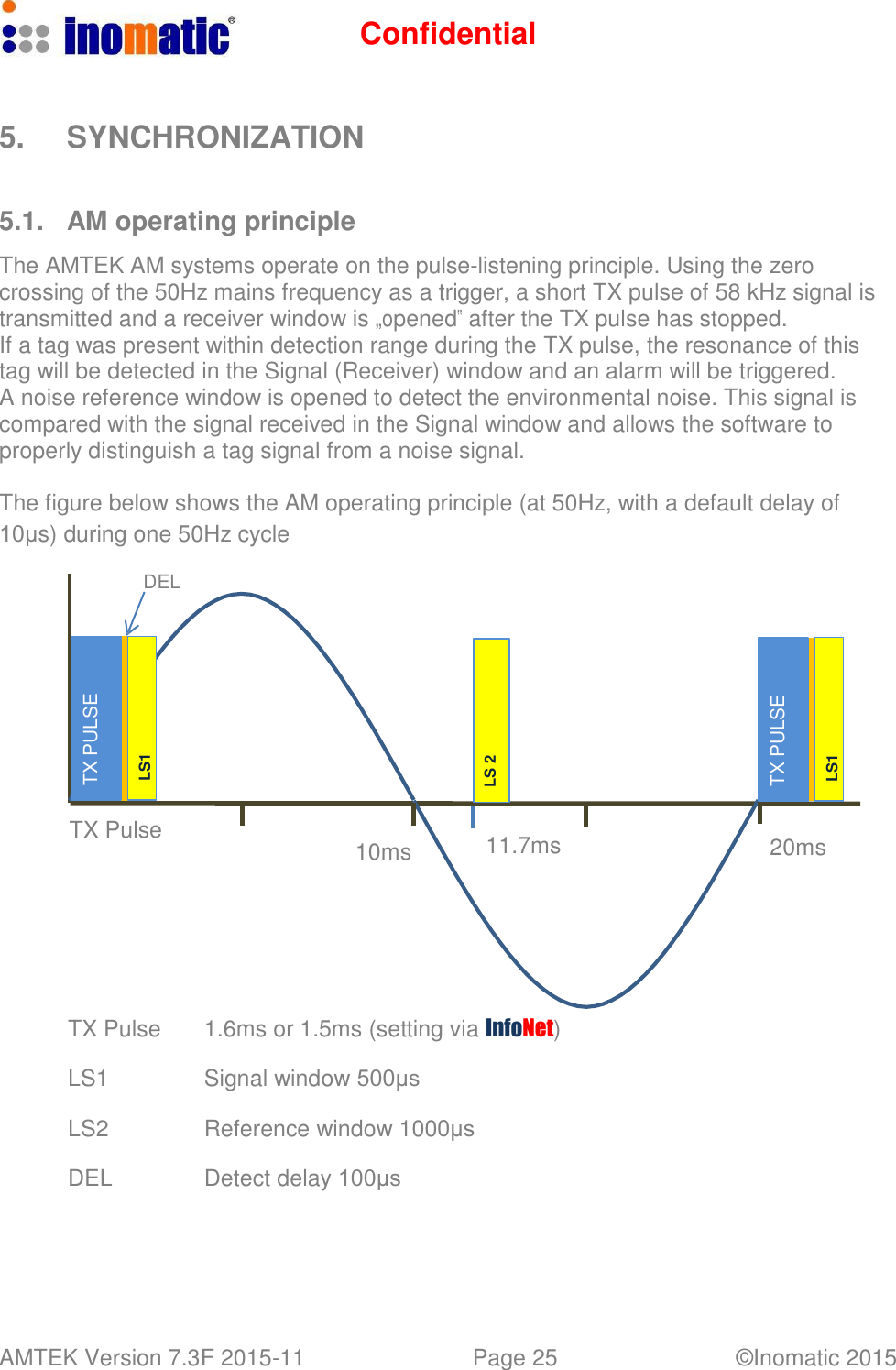
Confidential AMTEK Version 7.3F 2015-11 Page 25 ©Inomatic 2015   TX PULSE LS1 LS 2 TX PULSE LS1    5.  SYNCHRONIZATION    5.1.  AM operating principle  The AMTEK AM systems operate on the pulse-listening principle. Using the zero crossing of the 50Hz mains frequency as a trigger, a short TX pulse of 58 kHz signal is transmitted and a receiver window is „opened‟ after the TX pulse has stopped. If a tag was present within detection range during the TX pulse, the resonance of this tag will be detected in the Signal (Receiver) window and an alarm will be triggered. A noise reference window is opened to detect the environmental noise. This signal is compared with the signal received in the Signal window and allows the software to properly distinguish a tag signal from a noise signal.  The figure below shows the AM operating principle (at 50Hz, with a default delay of 10μs) during one 50Hz cycle  DEL             TX Pulse  10ms  11.7ms  20ms         TX Pulse  1.6ms or 1.5ms (setting via InfoNet) LS1 Signal window 500μs LS2 Reference window 1000μs  DEL Detect delay 100μs
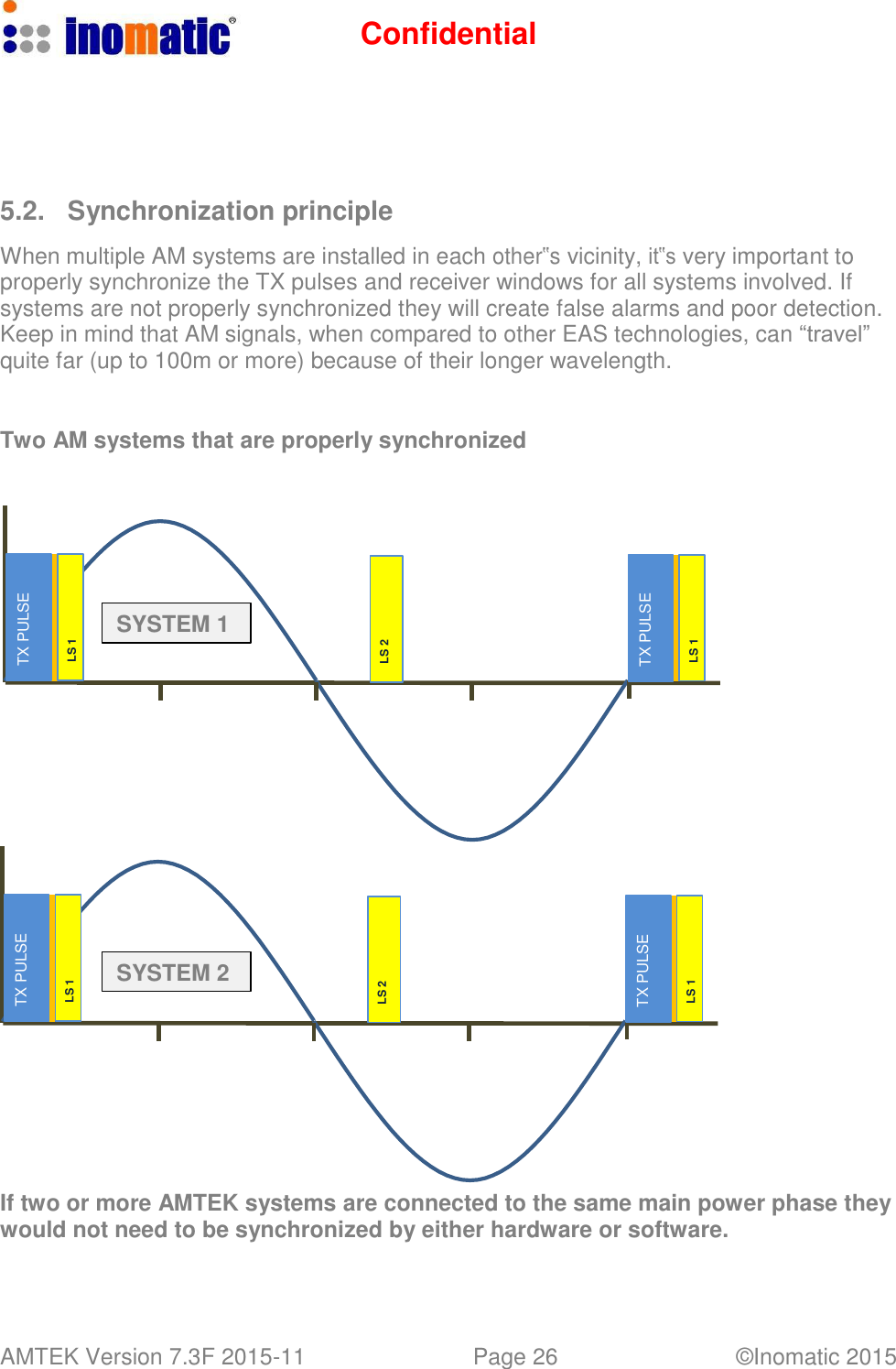
Confidential AMTEK Version 7.3F 2015-11 Page 26 ©Inomatic 2015   TX PULSE TX PULSE LS 1 LS 1 LS 2 LS 2 TX PULSE TX PULSE LS 1 LS 1        5.2.  Synchronization principle  When multiple AM systems are installed in each other‟s vicinity, it‟s very important to properly synchronize the TX pulses and receiver windows for all systems involved. If systems are not properly synchronized they will create false alarms and poor detection. Keep in mind that AM signals, when compared to other EAS technologies, can “travel” quite far (up to 100m or more) because of their longer wavelength.    Two AM systems that are properly synchronized         SYSTEM 1                  SYSTEM 2            If two or more AMTEK systems are connected to the same main power phase they would not need to be synchronized by either hardware or software.
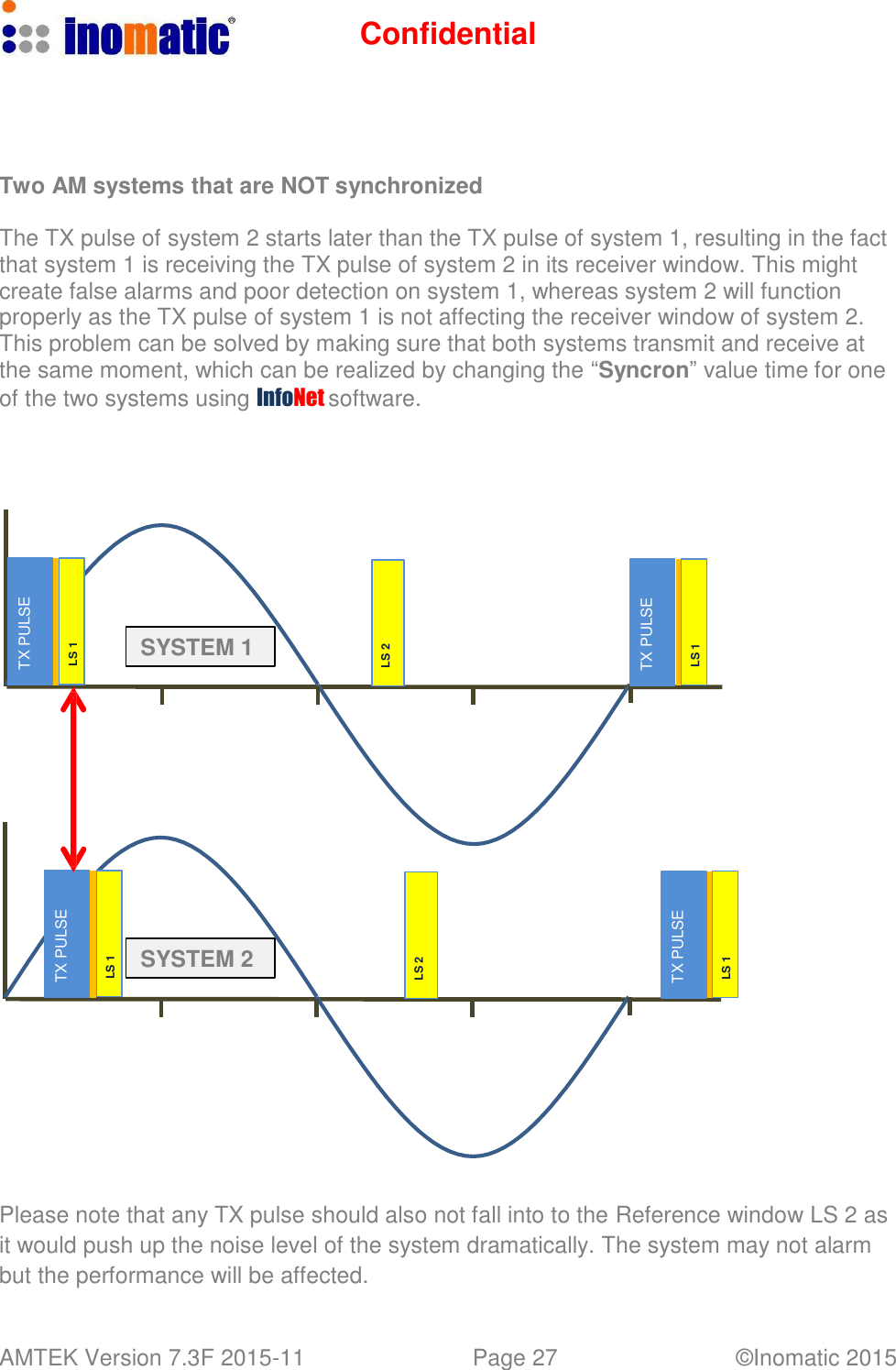
Confidential AMTEK Version 7.3F 2015-11 Page 27 ©Inomatic 2015   TX PULSE TX PULSE LS 1 LS 1 LS 2 LS 2 TX PULSE TX PULSE LS 1 LS 1      Two AM systems that are NOT synchronized  The TX pulse of system 2 starts later than the TX pulse of system 1, resulting in the fact that system 1 is receiving the TX pulse of system 2 in its receiver window. This might create false alarms and poor detection on system 1, whereas system 2 will function properly as the TX pulse of system 1 is not affecting the receiver window of system 2. This problem can be solved by making sure that both systems transmit and receive at the same moment, which can be realized by changing the “Syncron” value time for one of the two systems using InfoNet software.             SYSTEM 1                SYSTEM 2             Please note that any TX pulse should also not fall into to the Reference window LS 2 as it would push up the noise level of the system dramatically. The system may not alarm but the performance will be affected.
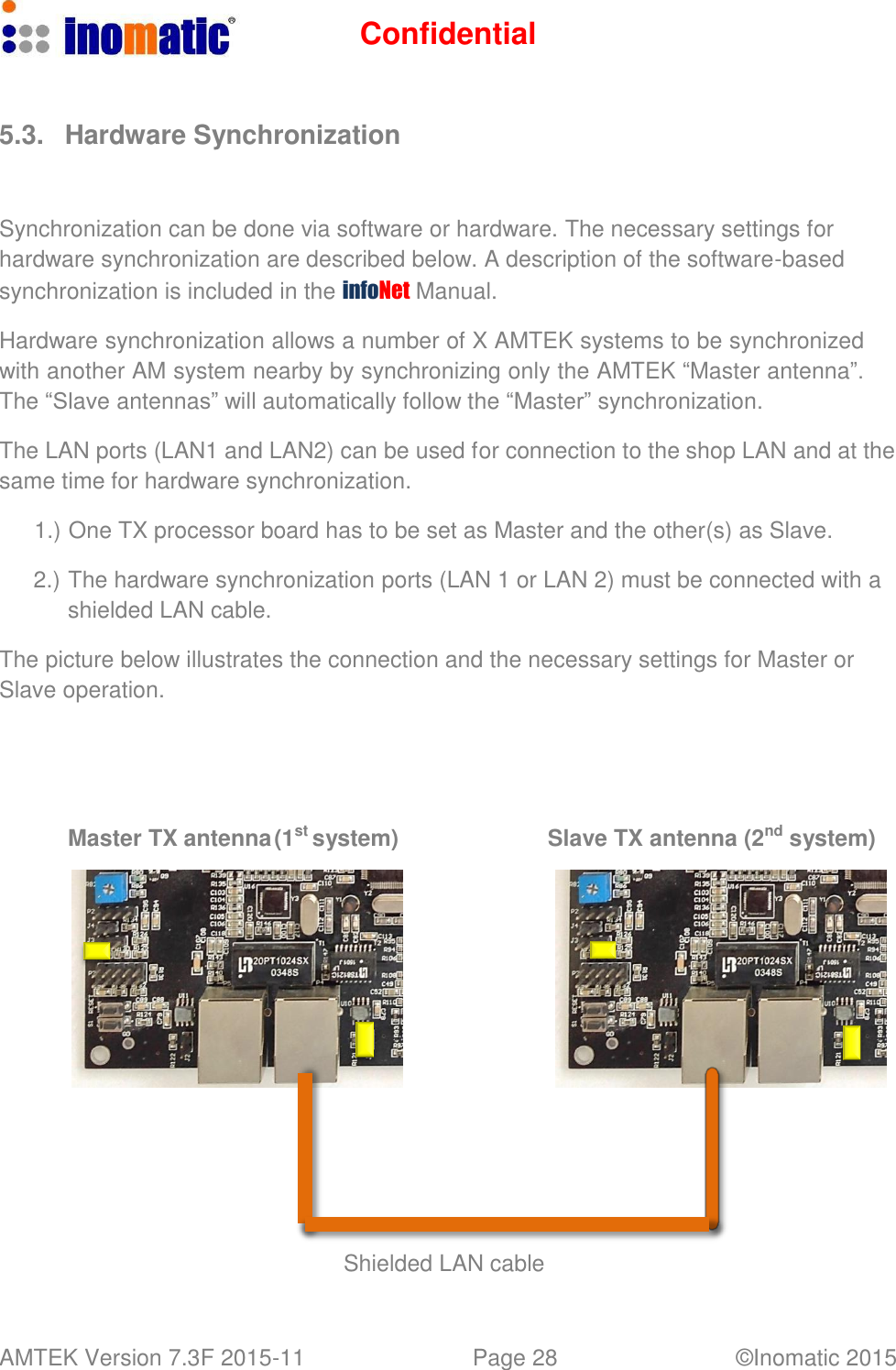
Confidential AMTEK Version 7.3F 2015-11 Page 28 ©Inomatic 2015      5.3.  Hardware Synchronization    Synchronization can be done via software or hardware. The necessary settings for hardware synchronization are described below. A description of the software-based synchronization is included in the infoNet Manual.  Hardware synchronization allows a number of X AMTEK systems to be synchronized with another AM system nearby by synchronizing only the AMTEK “Master antenna”. The “Slave antennas” will automatically follow the “Master” synchronization.  The LAN ports (LAN1 and LAN2) can be used for connection to the shop LAN and at the same time for hardware synchronization.  1.) One TX processor board has to be set as Master and the other(s) as Slave.  2.) The hardware synchronization ports (LAN 1 or LAN 2) must be connected with a shielded LAN cable.  The picture below illustrates the connection and the necessary settings for Master or Slave operation.       Master TX antenna (1st system)  Slave TX antenna (2nd system)                      Shielded LAN cable
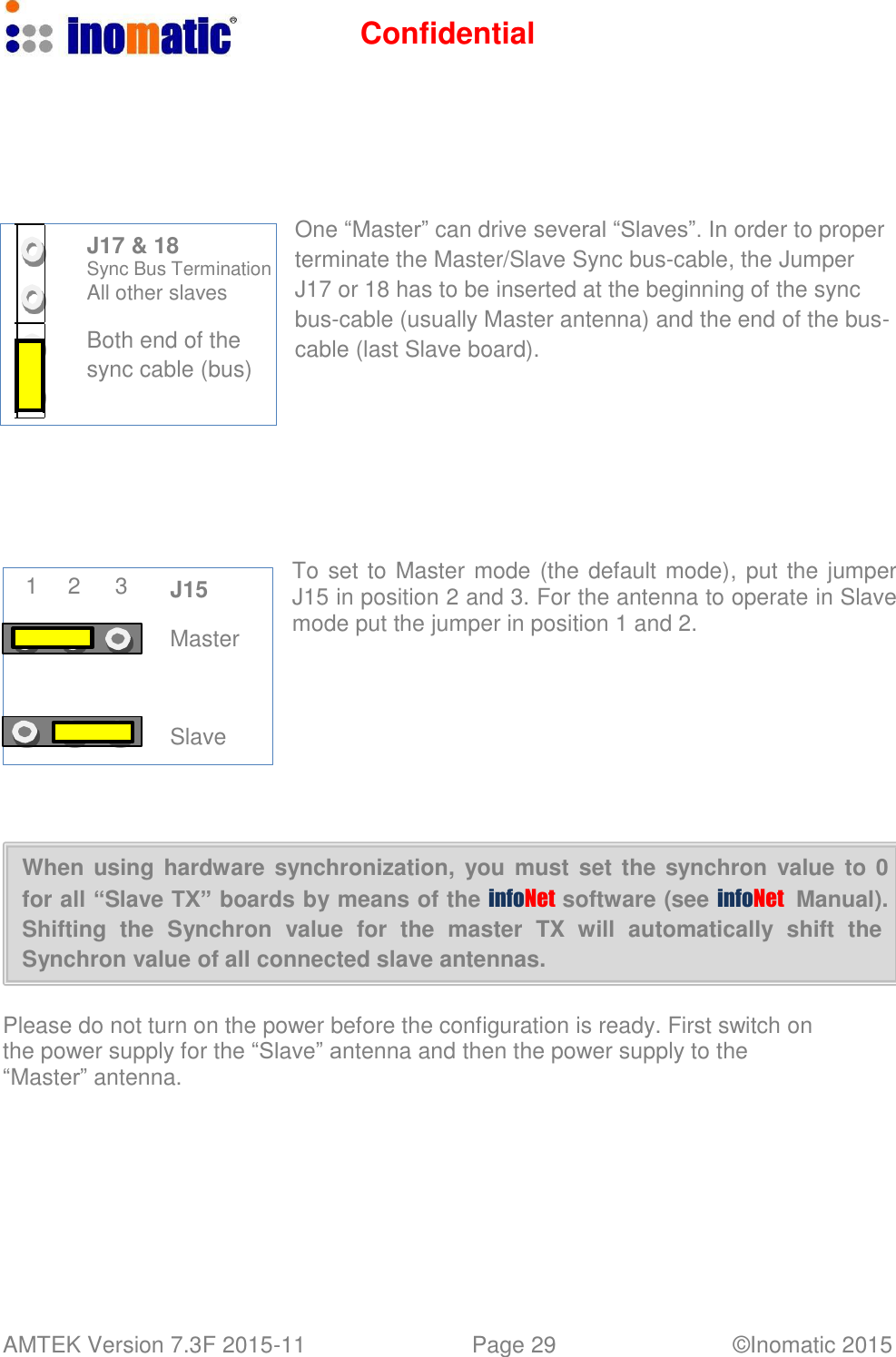
Confidential AMTEK Version 7.3F 2015-11 Page 29 ©Inomatic 2015             J17 & 18 Sync Bus Termination All other slaves  Both end of the sync cable (bus)             1  2  3  J15  Master     Slave         One “Master” can drive several “Slaves”. In order to proper terminate the Master/Slave Sync bus-cable, the Jumper J17 or 18 has to be inserted at the beginning of the sync bus-cable (usually Master antenna) and the end of the bus- cable (last Slave board).           To set to Master mode (the default mode), put the jumper J15 in position 2 and 3. For the antenna to operate in Slave mode put the jumper in position 1 and 2.      When using hardware synchronization,  you  must  set the synchron  value  to 0 for all “Slave TX” boards by means of the infoNet  software (see infoNet   Manual). Shifting  the  Synchron  value  for  the  master  TX  will  automatically  shift  the Synchron value of all connected slave antennas.   Please do not turn on the power before the configuration is ready. First switch on the power supply for the “Slave” antenna and then the power supply to the “Master” antenna.
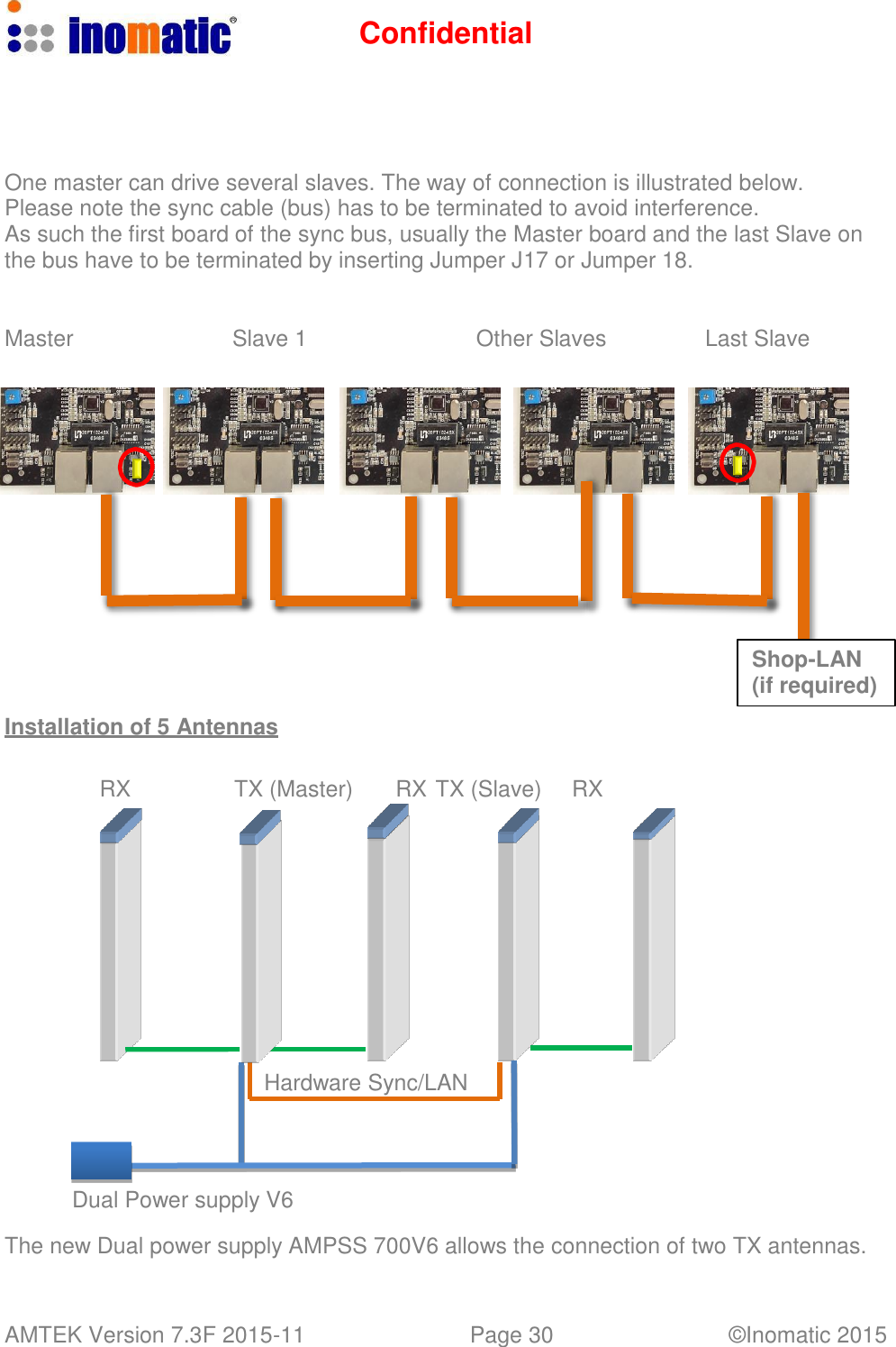
Confidential AMTEK Version 7.3F 2015-11 Page 30 ©Inomatic 2015        One master can drive several slaves. The way of connection is illustrated below. Please note the sync cable (bus) has to be terminated to avoid interference. As such the first board of the sync bus, usually the Master board and the last Slave on the bus have to be terminated by inserting Jumper J17 or Jumper 18.    Master  Slave 1  Other Slaves  Last Slave                     Installation of 5 Antennas Shop-LAN (if required)   RX  TX (Master) RX TX (Slave)  RX               Hardware Sync/LAN      Dual Power supply V6  The new Dual power supply AMPSS 700V6 allows the connection of two TX antennas.
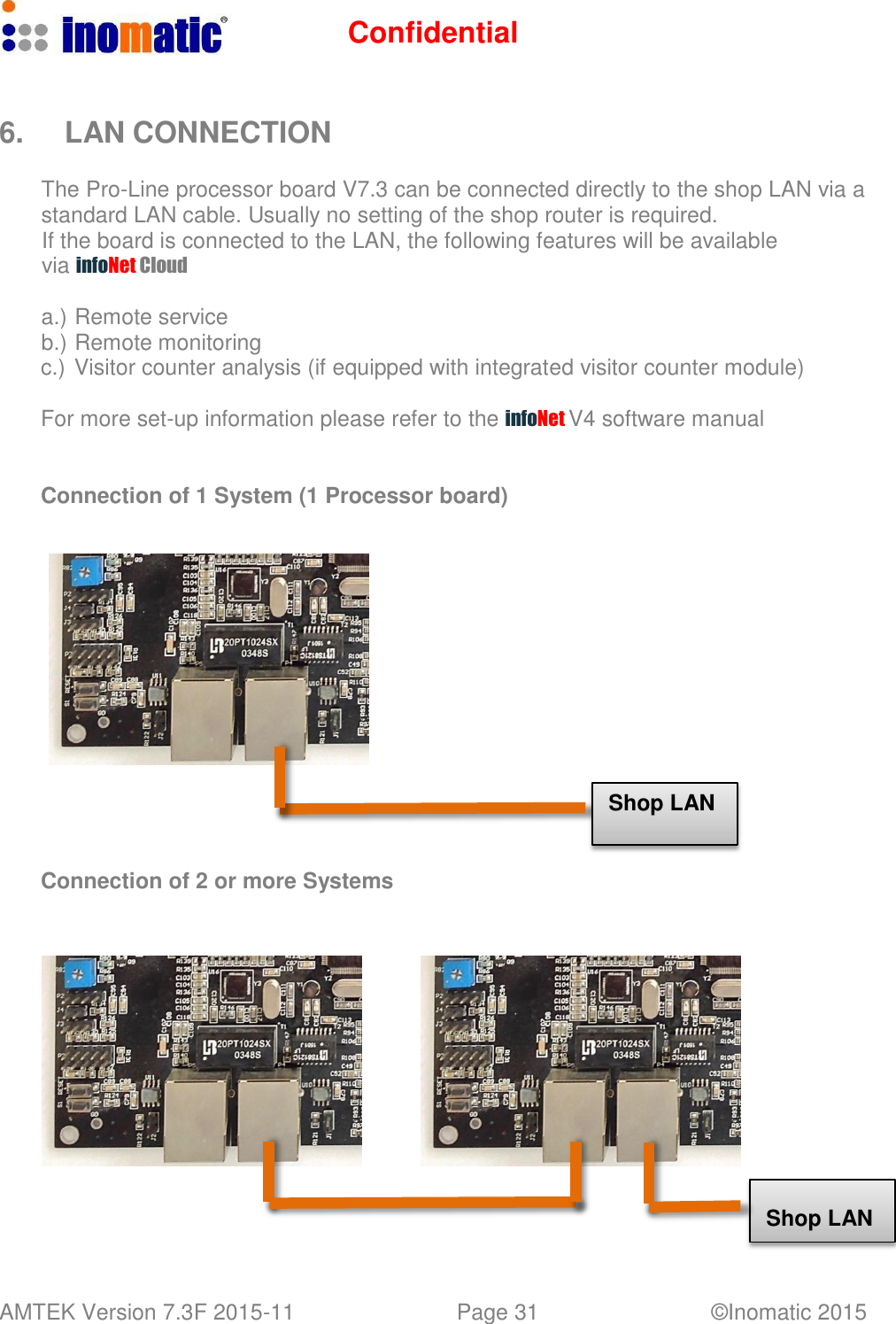
Confidential AMTEK Version 7.3F 2015-11 Page 31 ©Inomatic 2015      6.  LAN CONNECTION  The Pro-Line processor board V7.3 can be connected directly to the shop LAN via a standard LAN cable. Usually no setting of the shop router is required. If the board is connected to the LAN, the following features will be available via infoNet Cloud  a.) Remote service b.) Remote monitoring c.) Visitor counter analysis (if equipped with integrated visitor counter module) For more set-up information please refer to the infoNet V4 software manual  Connection of 1 System (1 Processor board)                Shop LAN    Connection of 2 or more Systems                  Shop LAN
Confidential AMTEK Version 7.3F 2015-11 Page 32 ©Inomatic 2015     This device complies with Part 15 of the FCC Rules. Operation is subject to the following two conditions: (1) this device may not cause harmful interference, and (2) this device must accept any interference received, including interference that may cause undesired operation. Changes or modifications not expressly approved by the party responsible for compliance could void the user's authority to operate the equipment. NOTE: This equipment has been tested and found to comply with the limits for a Class B digital device, pursuant to Part 15 of the FCC Rules. These limits are designed to provide reasonable protection against harmful interference in a residential installation. This equipment generates, uses instructions, may cause harmful interference to radio communications. However, there is no guarantee that interference will not occur in a particular installation. If this equipment does cause harmful interference to radio or television reception, which can be determined by turning the equipment off and on, the user is encouraged to try to correct the interference by one or more of the following measures: -- Reorient or relocate the receiving antenna. -- Increase the separation between the equipment and receiver. -- Connect the equipment into an outlet on a circuit different from that to which the receiver is connected. -- Consult the dealer or an experienced radio/TV technician for help.

Navigation menu