Intellian Technologies M121STM 12.1" Shelf Player User Manual

Intellian Technologies, Inc. 12.1" Shelf Player

User manual

M121STM/M156STM User Manual    Rev 1.0  M12STM and M15STM is the network based LCD media player having HD quality video. At the commercial site, school, hospital, restaurant and government building, it can be displayed HD quality contents through the wireless network. It is connected by wireless network, and all contents are stored at the Internet Server, and download contents.     This equipment has been tested and found to comply with the limits for a Class B digital device, pursuant to Part 15 of the FCC Rules.  These limits are designed to provide reasonable protection against harmful interference in a residential installation. This equipment generates, uses and can radiate radio frequency energy and, if not installed and used in accordance with the instructions, may cause harmful interference to radio communications. However, there is no guarantee that interference will not occur in a particular installation. If this equipment does cause harmful interference to radio or television reception, which can be determined by turning the equipment off and on, the user is encouraged to try to correct the interference by one of the following measures: •Reorient or relocate the receiving antenna. •Increase the separation between the equipment and receiver. •Connect the equipment into an outlet on a circuit different from that to which the receiver is connected. •Consult the dealer or an experienced radio/TV technician for help.  FCC Caution: To assure continued compliance, (example -use only shielded interface cables when connecting to computer or peripheral devices).   Any changes or modifications not expressly approved by the party responsible for compliance could void the user’s authority to operate this equipment. This device complies with Part 15 of the FCC Rules. Operation is subject to the following two conditions: (1) This device may not cause harmful interference, and (2) this device must accept any interference received, including interference that may cause undesired operation.  IMPORTANT NOTE : FCC RF Radiation Exposure Statement: This equipment complies with FCC RF radiation exposure limits set forth for an uncontrolled environment. This equipment should be installed and operated with a minimum distance of 20 centimeters between the radiator and your body. This transmitter must not be co-located or operating in conjunction with any other antenna or transmitter.   Intellian Technologies, Inc.
 ii Notice Any and all parts of this manual shall not be reproduced and distributed in any form without written prior consent  by  Intellian  Technologies,  Inc.  The  information  contained  in  this  manual  shall  be  subject  to change at any time without notice due to the functional upgrade of the product.   M121STM/M156STM  User Manual Ver 1.0  © 2009 Intellian Technologies, Inc. Intellian® are the registered trademarks of Intellian Technologies, Inc., and should not be appropriated without permission by Intellian Technologies, Inc., and the information contained in this manual is the property of Intellian Technologies, Inc.  Version Information  Date Description 2009. 11. 05  1st             Intellian Technologies, Inc. SK Ventium 104-601, 522 Dangjeong-Dong Gunpo-Si, Gyeonggi-Do 435-776, Korea Tel:  031-436-2280 Fax:  031-436-1569 Homepage:  http://www.intelliantech.com
 iii[ Index ]  1. Introduction..................................................................................................... 4 1.1  Introduction.......................................................................................... 4 1.1.1  General....................................................................................... 4 1.1.2  Specification................................................................................ 4 1.1.3  Package...................................................................................... 4 1.1.4  Product Architecture.................................................................... 5 1.1.5  Installation................................................................................... 5 1.2  Working Mode...................................................................................... 5 1.2.1  Stand-alone Mode....................................................................... 5 1.2.2  Network Mode............................................................................. 5 1.3  System Requirement ........................................................................... 6 1.3.1  Internet Server ............................................................................ 6 1.3.2  Internal Storage........................................................................... 6 1.4  Remote Control.................................................................................... 7 2. System Configuration ..................................................................................... 9 2.1  Video/Audio.......................................................................................... 9 2.1.1  Video........................................................................................... 9 2.2  Network Server .................................................................................. 10 2.3  Wireless Network............................................................................... 12 2.4  Screen ............................................................................................... 13 2.5  Time................................................................................................... 14
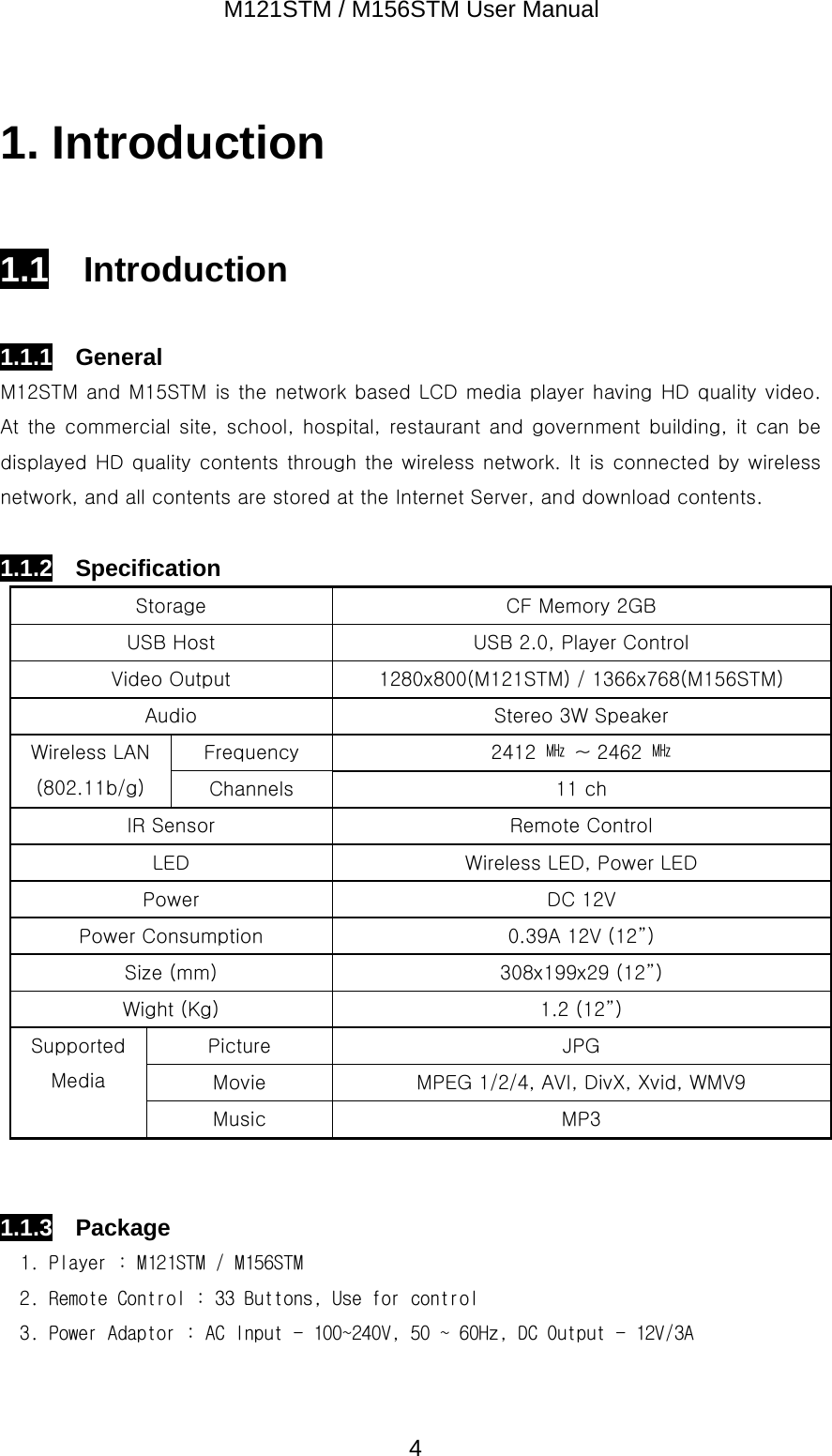
M121STM / M156STM User Manual  41. Introduction  1.1  Introduction  1.1.1  General M12STM and M15STM is the network based LCD media player having HD quality video. At the commercial site, school, hospital, restaurant and government building, it can be displayed HD quality contents through the wireless network. It  is connected by wireless network, and all contents are stored at the Internet Server, and download contents.    1.1.2  Specification Storage  CF Memory 2GB USB Host  USB 2.0, Player Control Video Output  1280x800(M121STM) / 1366x768(M156STM) Audio  Stereo 3W Speaker Frequency  2412  ㎒  ~ 2462  ㎒ Wireless LAN (802.11b/g)  Channels  11 ch IR Sensor  Remote Control LED  Wireless LED, Power LED Power  DC 12V Power Consumption  0.39A 12V (12”)   Size (mm)  308x199x29 (12”) Wight (Kg)  1.2 (12”) Picture  JPG Movie  MPEG 1/2/4, AVI, DivX, Xvid, WMV9 Supported Media Music  MP3   1.1.3  Package 1. Player : M121STM / M156STM 2. Remote Control : 33 Buttons, Use for control 3. Power Adaptor : AC Input - 100~240V, 50 ~ 60Hz, DC Output - 12V/3A
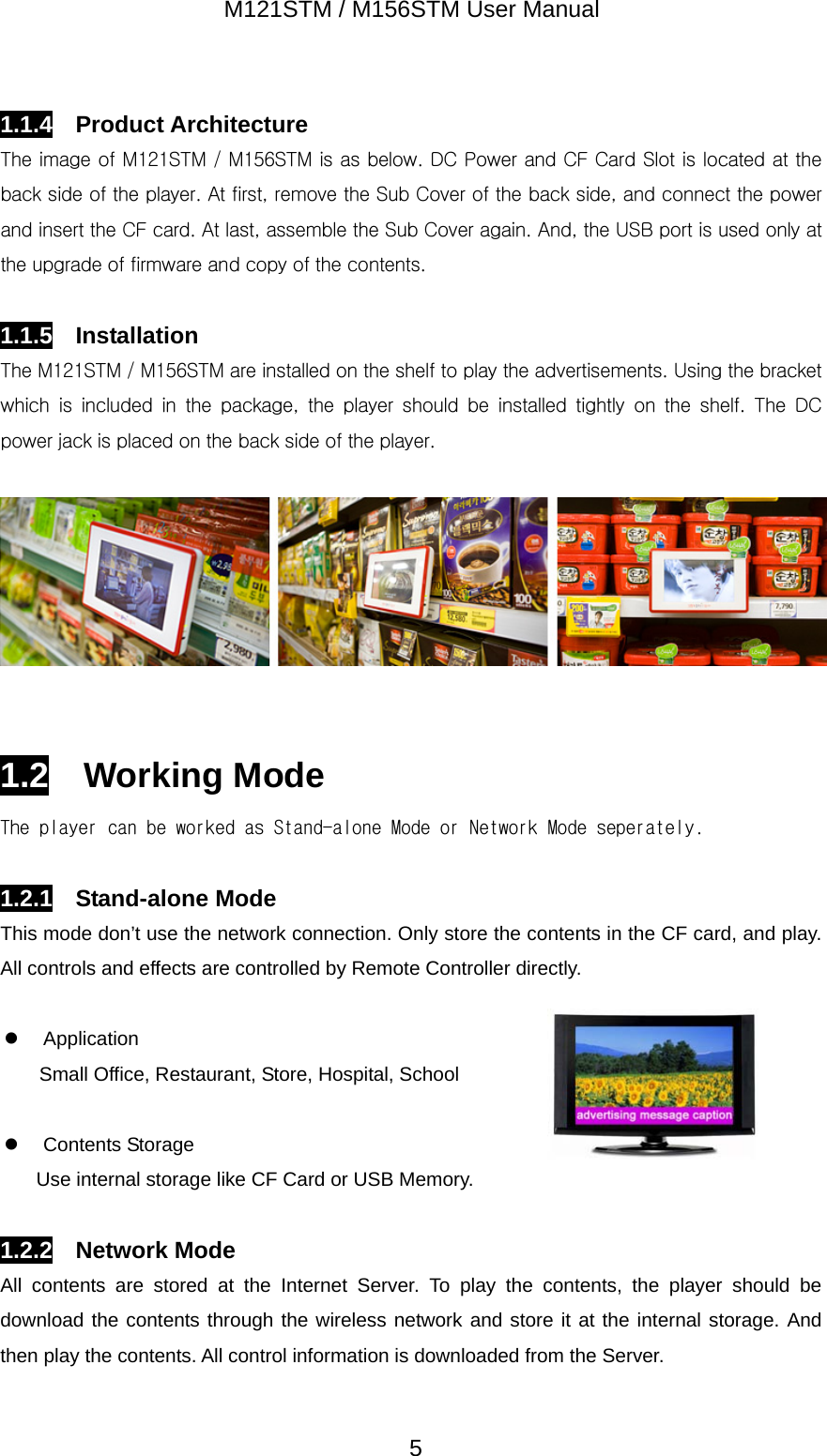
M121STM / M156STM User Manual  51.1.4  Product Architecture The image of M121STM / M156STM is as below. DC Power and CF Card Slot is located at the back side of the player. At first, remove the Sub Cover of the back side, and connect the power and insert the CF card. At last, assemble the Sub Cover again. And, the USB port is used only at the upgrade of firmware and copy of the contents.  1.1.5  Installation The M121STM / M156STM are installed on the shelf to play the advertisements. Using the bracket which  is  included  in  the  package,  the  player  should  be  installed  tightly  on  the  shelf.  The  DC power jack is placed on the back side of the player.     1.2  Working Mode The player can be worked as Stand-alone Mode or Network Mode seperately.  1.2.1  Stand-alone Mode This mode don’t use the network connection. Only store the contents in the CF card, and play. All controls and effects are controlled by Remote Controller directly.  z Application Small Office, Restaurant, Store, Hospital, School    z Contents Storage Use internal storage like CF Card or USB Memory.  1.2.2  Network Mode All contents are stored at the Internet Server. To play the contents, the player should be download the contents through the wireless network and store it at the internal storage. And then play the contents. All control information is downloaded from the Server.
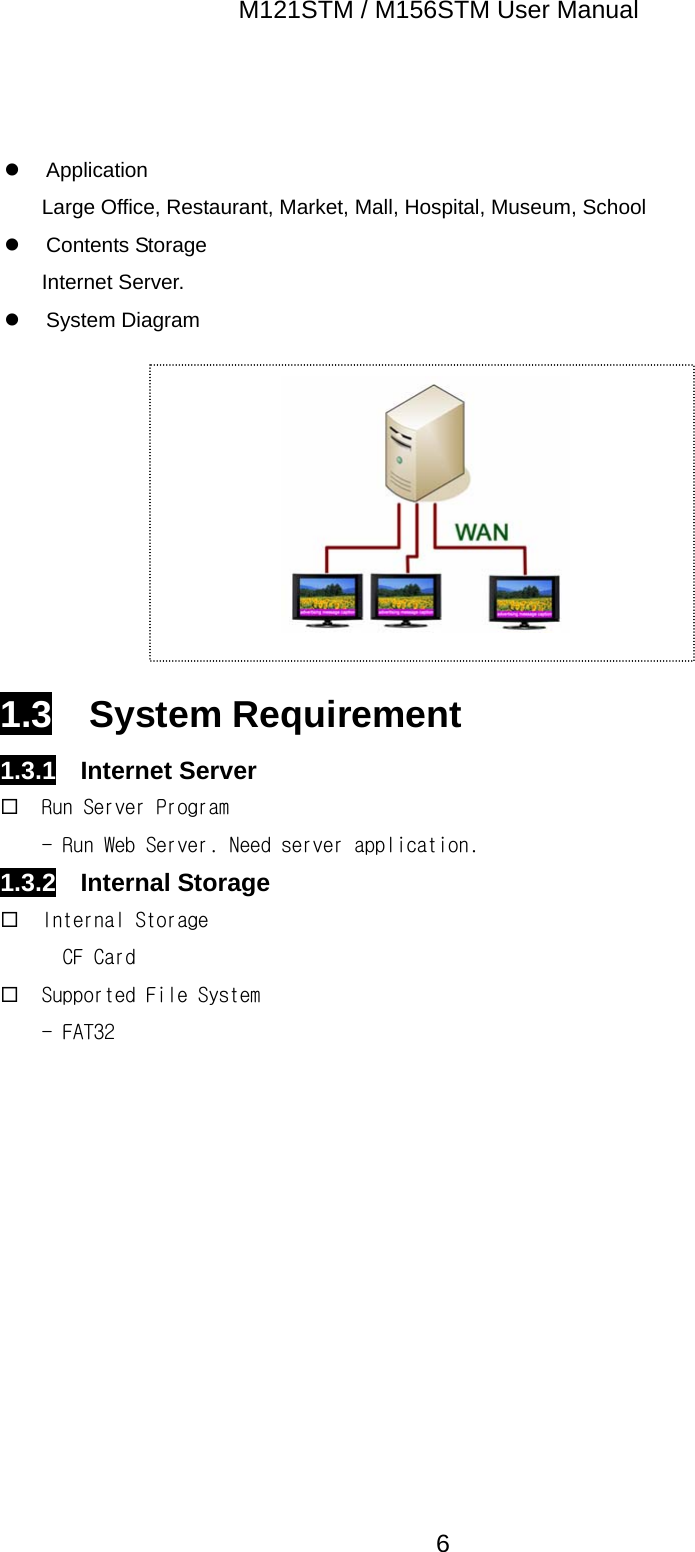
M121STM / M156STM User Manual  6 z Application Large Office, Restaurant, Market, Mall, Hospital, Museum, School z Contents Storage Internet Server. z System Diagram          1.3  System Requirement 1.3.1  Internet Server  Run Server Program - Run Web Server. Need server application. 1.3.2  Internal Storage  Internal Storage CF Card  Supported File System - FAT32
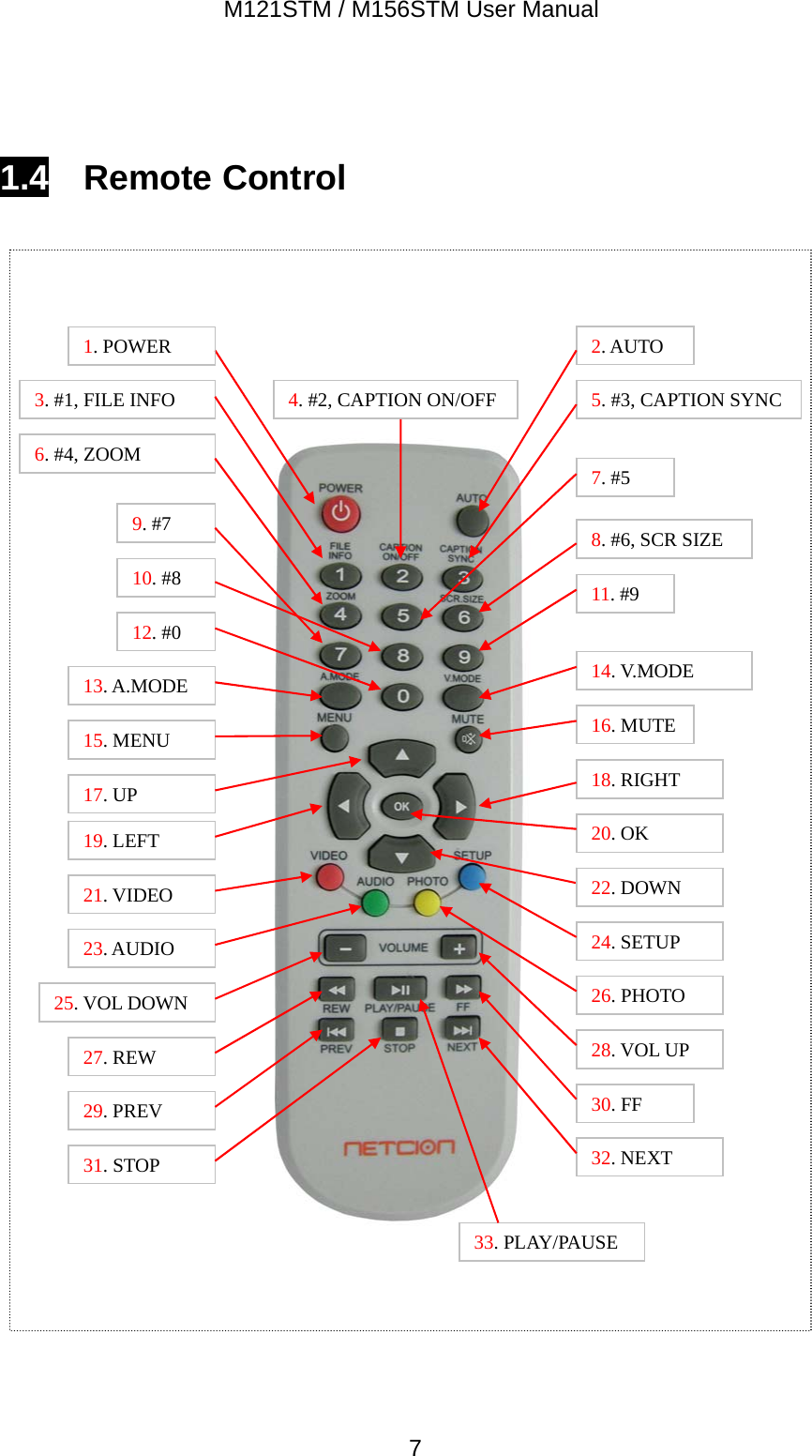
M121STM / M156STM User Manual  7 1.4  Remote Control                       1. POWER  2. AUTO 3. #1, FILE INFO 4. #2, CAPTION ON/OFF 5. #3, CAPTION SYNC 8. #6, SCR SIZE 6. #4, ZOOM 9. #7 7. #510. #8 11. #912. #013. A.MODE 14. V.MODE 15. MENU 16. MUTE 17. UP 19. LEFT 18. RIGHT 20. OK21. VIDEO 23. AUDIO 26. PHOTO 24. SETUP 25. VOL DOWN28. VOL UP 27. REW 33. PLAY/PAUSE29. PREV 30. FF31. STOP 32. NEXT 22. DOWN
M121STM / M156STM User Manual  8No Button  Menu  On Playing 1  POWER  Power On/Off  Power On/Off 2 AUTO  Auto Start  N/A 3  #1, FILE INFO  1  N/A 4 #2, CAPTION ON/OFF 2  N/A 5 #3, CAPTION SYNC 3  N/A 6 #4, ZOOM  4  N/A 7 #5  5  N/A 8 #6, SCR SIZE  6  N/A 9 #7  7  N/A 10 #8  8  N/A 11 #9  9  N/A 12 #0  0  N/A 15 MENU  N/A  N/A 16 MUTE  N/A  Mute 17 UP  Up  N/A 18 RIGHT  Right  N/A 19 LEFT  Left  N/A 20 OK  Enter or Select  N/A 21 VIDEO  N/A  N/A 22 DOWN  Down  N/A 23 AUDIO  N/A  N/A 24  SETUP  Go to Setup Menu  Go to Setup Menu 25 VOL DOWN  N/A  Volume Down 26 PHOTO  N/A  N/A 27 REW  N/A  N/A 28 VOL UP  N/A  Volume Up 29 PREV  N/A  N/A 30 FF  N/A  N/A 31  STOP  N/A  Go to Setup Menu 32 NEXT  N/A  N/A 33 PLAY/PAUSE  Play  N/A [표] Remote Control Button
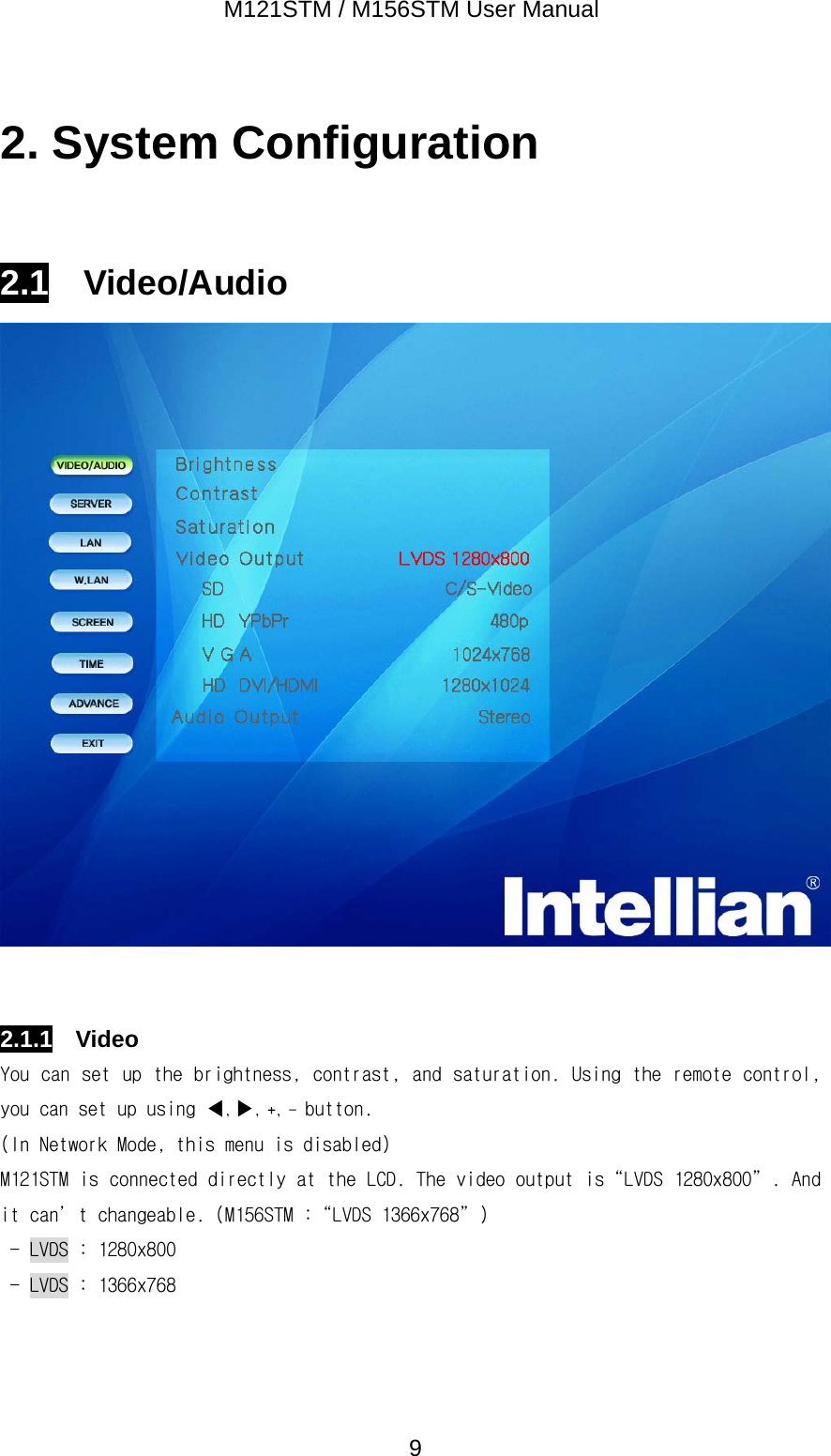
M121STM / M156STM User Manual  92. System Configuration  2.1  Video/Audio    2.1.1  Video You can set up the brightness, contrast, and saturation. Using the remote control, you can set up using ◀, ▶, +, - button. (In Network Mode, this menu is disabled) M121STM is connected directly at the LCD. The video output is“LVDS 1280x800”. And it can’t changeable. (M156STM :“LVDS 1366x768”) - LVDS : 1280x800 - LVDS : 1366x768
M121STM / M156STM User Manual  102.2  Network Server This menu is only available at Network Mode.    Connect Mode -  Internet .  Server IP You can change the IP address.        [그림] Virtual Keyboard  1 2345. 78 9 106 CancelDelete OK
M121STM / M156STM User Manual  11 Media ID Media  ID  is  the  unique  ID  of  the  media.  It  should  be  need  to  connect  the Internet Server.          [그림] Virtual Keyboard         [그림] Virtual Keyboard(After Sh key is pressed)      1234567890a b c d e f g g i jk l m n o p q r s tu v w x y z _ / ~ Sh삭제 취소 확인Delete  Cancel OK1234567890A B C D E F G H I JK L M N O P Q R S TU V W X Y Z - . ~ Sh삭제 취소 확인Delete  Cancel OK
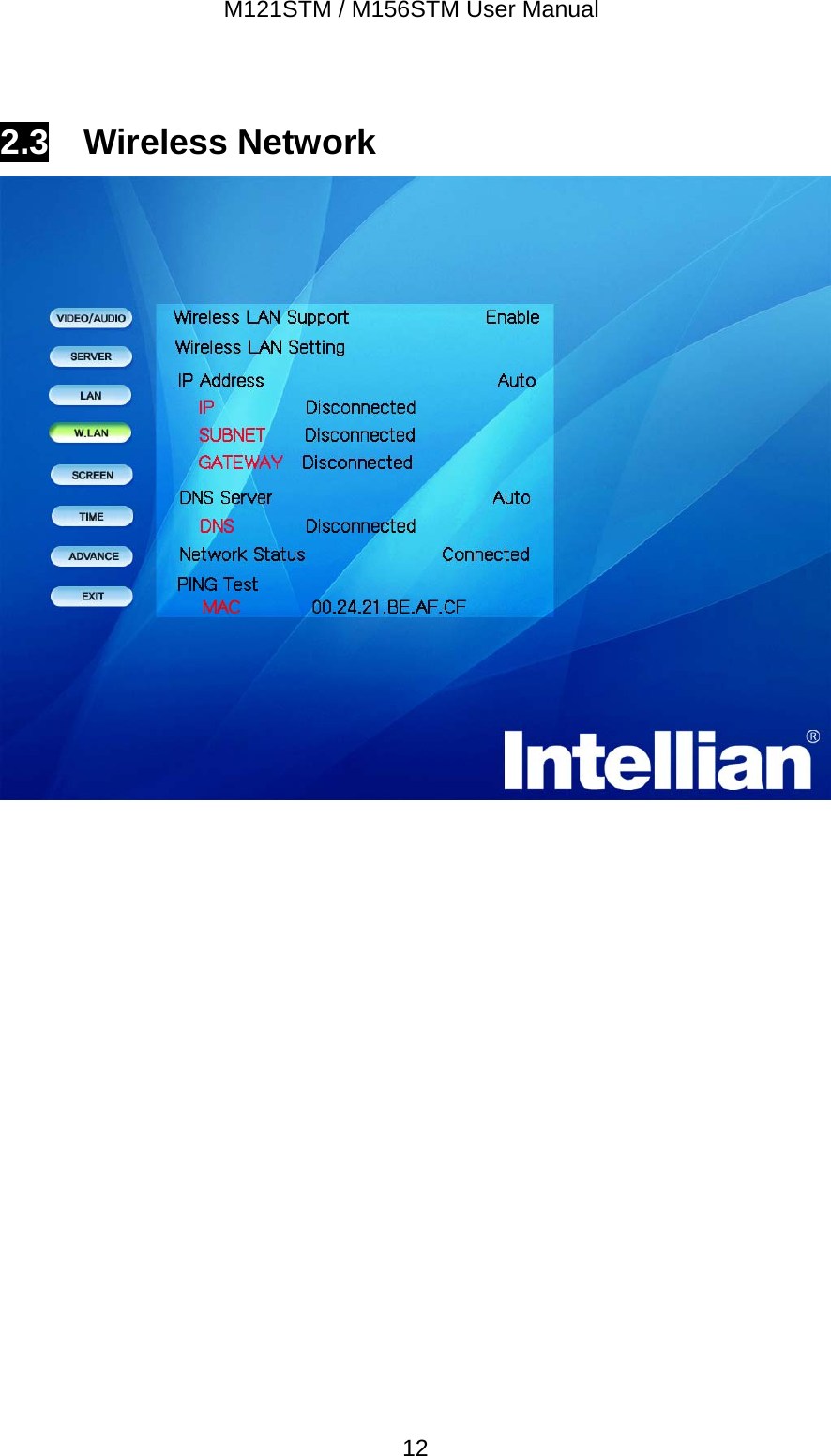
M121STM / M156STM User Manual  122.3  Wireless Network
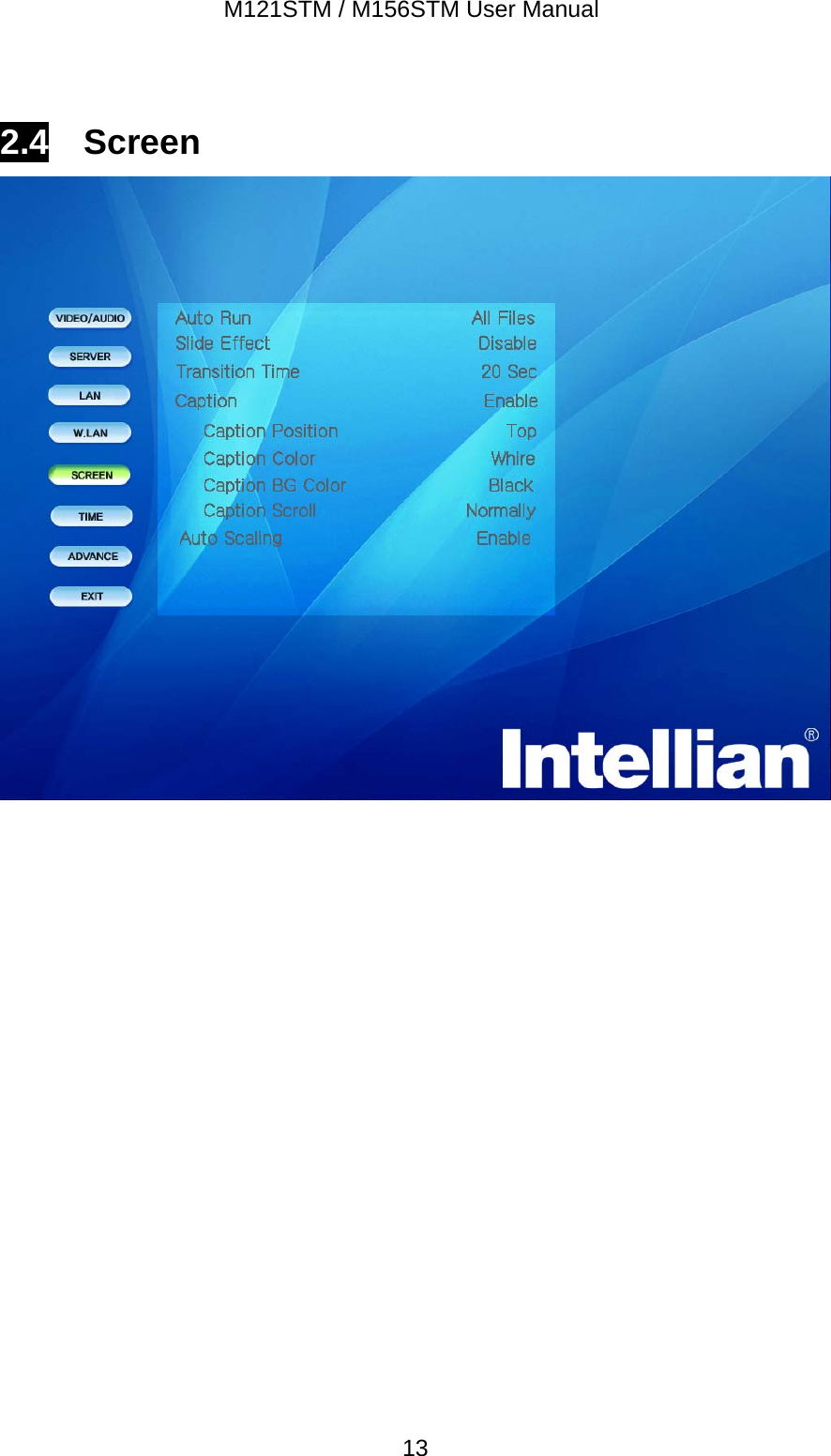
M121STM / M156STM User Manual  132.4  Screen
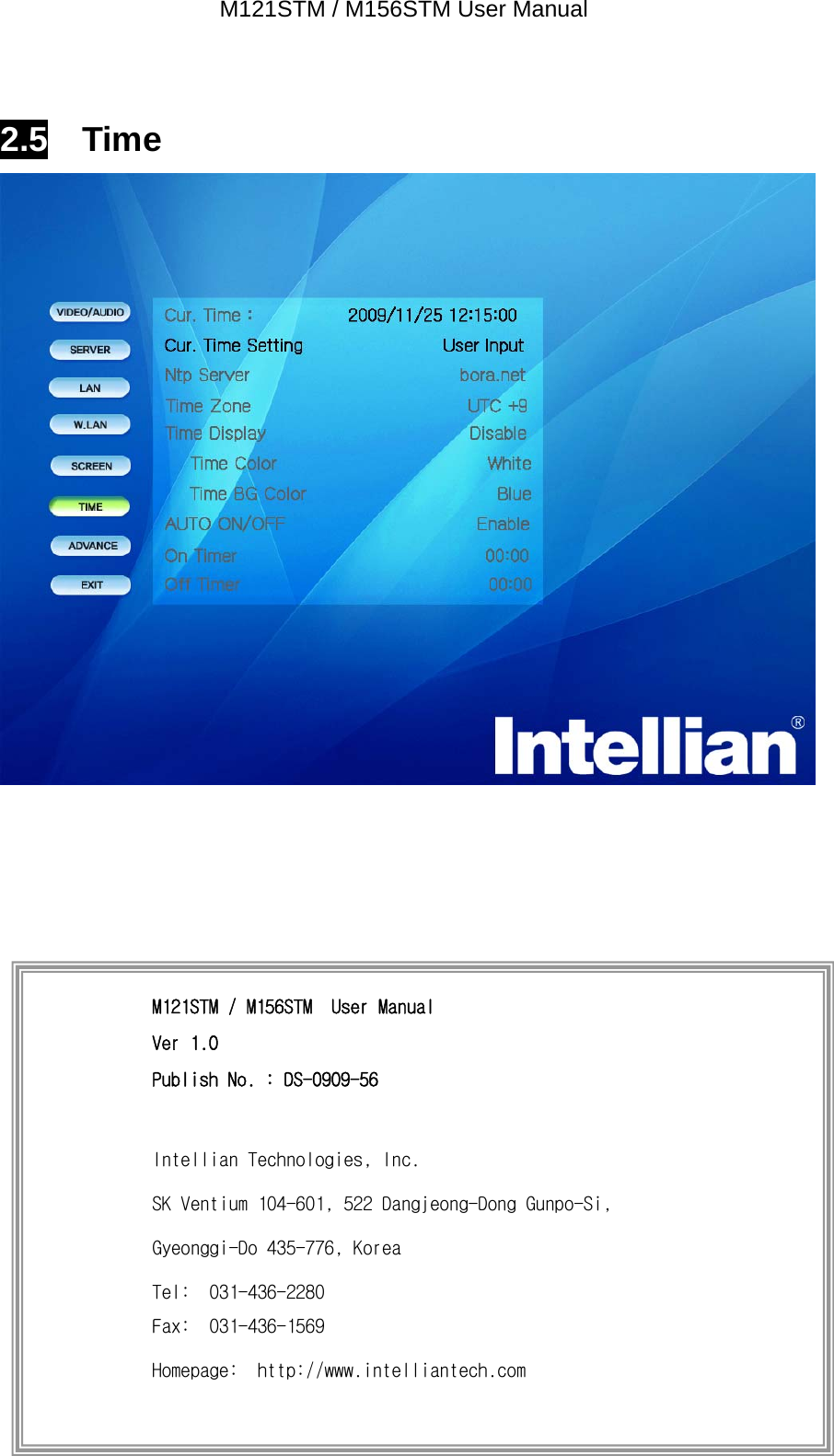
M121STM / M156STM User Manual  142.5  Time     M121STM / M156STM  User Manual Ver 1.0 Publish No. : DS-0909-56  Intellian Technologies, Inc. SK Ventium 104-601, 522 Dangjeong-Dong Gunpo-Si, Gyeonggi-Do 435-776, Korea Tel:  031-436-2280 Fax:  031-436-1569 Homepage:  http://www.intelliantech.com

Navigation menu