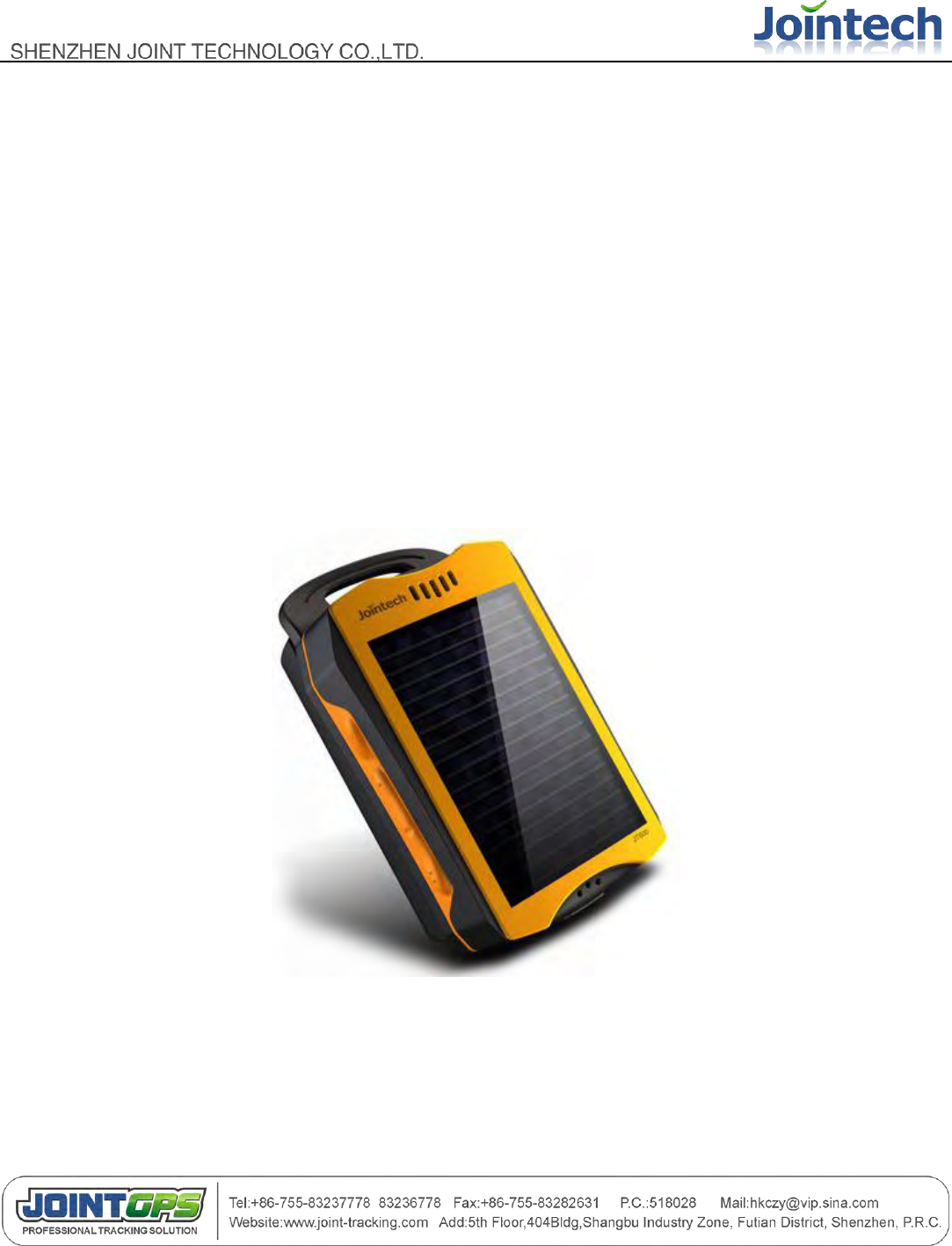
JOINT TECHNOLOGY JT600 Portable GPS Tracker User Manual BMK 12W
SHENZHEN JOINT TECHNOLOGY CO.,LTD Portable GPS Tracker BMK 12W
user manual
- 1 -
JT600 User Manual
Ver 1.2
Shenzhen joint technology co,;ltd
04-26-2011

- 2 -
Content
JT600 User Manual ....................................................................................................................................... - 1 -
Content ......................................................................................................................................................... - 2 -
ⅠPreface ...................................................................................................................................................... - 4 -
Ⅱ Version History ......................................................................................................................................... - 4 -
Ⅲ Function Table .......................................................................................................................................... - 5 -
Ⅳ Profile and Description ............................................................................................................................. - 6 -
4.1 Profile - 6 -
4.2 Operation Button ................................................................................................................................. - 7 -
4.3 Working mode ..................................................................................................................................... - 8 -
4.4 Voice communication........................................................................................................................... - 9 -
4.5 LED Indication ................................................................................................................................... - 10 -
Ⅴ Configuration and Using ......................................................................................................................... - 10 -
5.1 PC Setup software .................................................................................................................. - 10 -
5.1.1 Get started with this software ...................................................................................................... - 10 -
5.1.2 Version/Center Number/GPRS Network ...................................................................................... - 11 -
5.1.2.1 Read Firmware Version ............................................................................................. - 11 -
5.1.2.2 SMS Center Number .................................................................................................. - 12 -
5.1.2.3 VIP Numbers .............................................................................................................. - 12 -
5.1.2.4 GPRS network parameters ........................................................................................ - 13 -
5.1.2.5 APN username and password .................................................................................... - 13 -
5.1.2.6 Low Battery alert ........................................................................................................ - 13 -
5.1.2.7 Adjust Voice Call volume............................................................................................ - 14 -

- 3 -
5.1.2.8 Another Name ............................................................................................................ - 14 -
5.1.2.9 Time difference .......................................................................................................... - 14 -
5.1.3 Working Mode/Data Uploading .................................................................................................... - 15 -
5.1.3.1 Working Mode ............................................................................................................ - 15 -
5.1.3.2 Data Uploading Interval .............................................................................................. - 16 -
5.1.4 Self Geo-fence/Geo-fence ........................................................................................................... - 16 -
5.1.4.1 Self Geo-fence ........................................................................................................... - 16 -
5.1.4.2 Geo-fence .................................................................................................................. - 17 -
5.2 SMS Setting and Using ...................................................................................................................... - 19 -
5.2.1 SMS Command Framework and List ........................................................................................... - 19 -
5.2.2 Short Message Command Example ............................................................................................ - 23 -
Ⅵ Product Specification .............................................................................................................................. - 28 -
6.1 Physical Parameters and Environmental ........................................................................................... - 28 -
6.2 GPS module parameter ..................................................................................................................... - 29 -
6.3 GSM module parameter .................................................................................................................... - 30 -
Ⅶ Standard package and optional accessories........................................................................................... - 32 -
Ⅷ FAQ ........................................................................................................................................................ - 33 -
Ⅸ SAR ........................................................................................................................................................ - 33 -
- 4 -
ⅠPreface
All the content in this manual is accurate, however, with the continuous research and development of Joint
Technology Co.,Ltd, we might update the operational manual from time to time.
The manual you are reading now is reflecting of present state of art of the products described therein, we
have endeavored to give a description that is as complete and clear as possible in order to make it easy for
you to use our products. There might be content which is not described in accurate technical expression, with
the rapid technology development, we reserve the rights to incorporate technical alterations and
developments without separate notice in advance.
You can refer to the latest operation manual and relative documents by visiting www.joint-tracking.com.
Please read those simple guidelines before use, Jointech assured that the products will work properly under
normal conditions, the warranty period would be 12 months from the delivery date, the warranty shall not
apply to any defect, failure or damage which caused by improper maintenance, repair, alteration.
Ⅱ Version History
Serial
Number
Content
Date
1
Documentation release
2010-12-22
2
Edit the working mode, Add P14,P18 command
V1.1
2011-02-26
3
Edit 4.2 Operation Button and 4.3 working mode instruction
V1.2
2011-04-26
- 5 -
Ⅲ Function Table
S/N
Function List
1
SMS and GPRS transmission mode
2
Two-way voice function
3
listen-in function
4
64 Geo-fence support
5
Self Geo-fence
6
6 types of working mode
7
real-time power monitoring
8
GSM and GPS signals detecting
9
Immediate vehicle position query (the unit will reply Google Earth map link)
11
Support remote/PC setup setting
12
Lower power alert, SOS alert, enter and exit geo-fence alert
13
Solar power supply
14
backup batter of 2500mAh
15
SOS help report
16
Solar power working indication
17
flashlight function
18
Mini-USB port, cable(charging/upgrading/configuration)
19
Standby time up to 2 months
20
Vibration detecting
21
RTC
- 6 -
Ⅳ Profile and Description
4.1 Profile
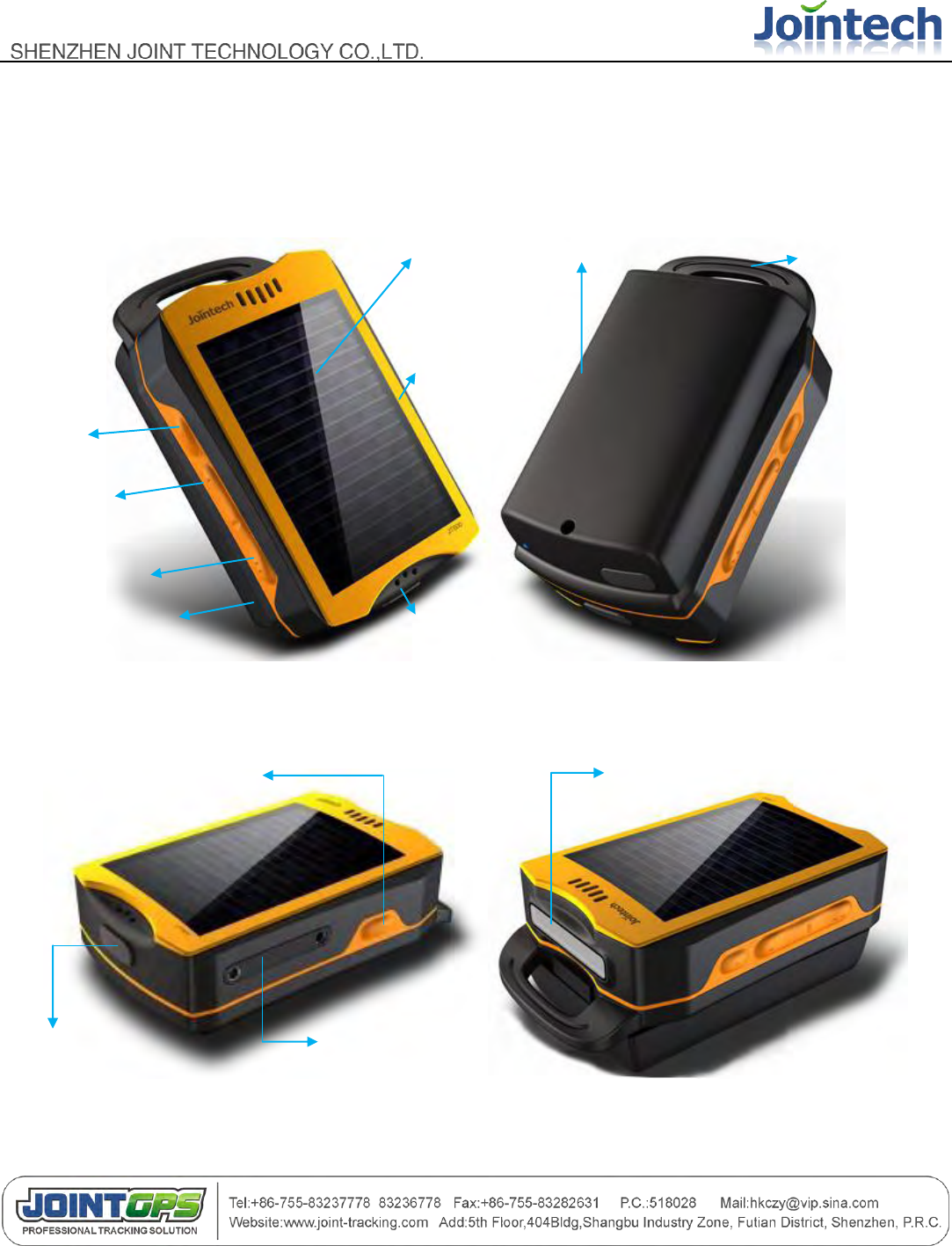
Solar battery panel
Panel
CALL Ⅱ
CALL Ⅰ
Power on/off
Water-proof
strip
Mic
Backup battery
Arc Hook
SOS button
SIM card Slot
槽
Mini USB power/data
Flashlight /indication LED
- 7 -
4.2 Operation Button
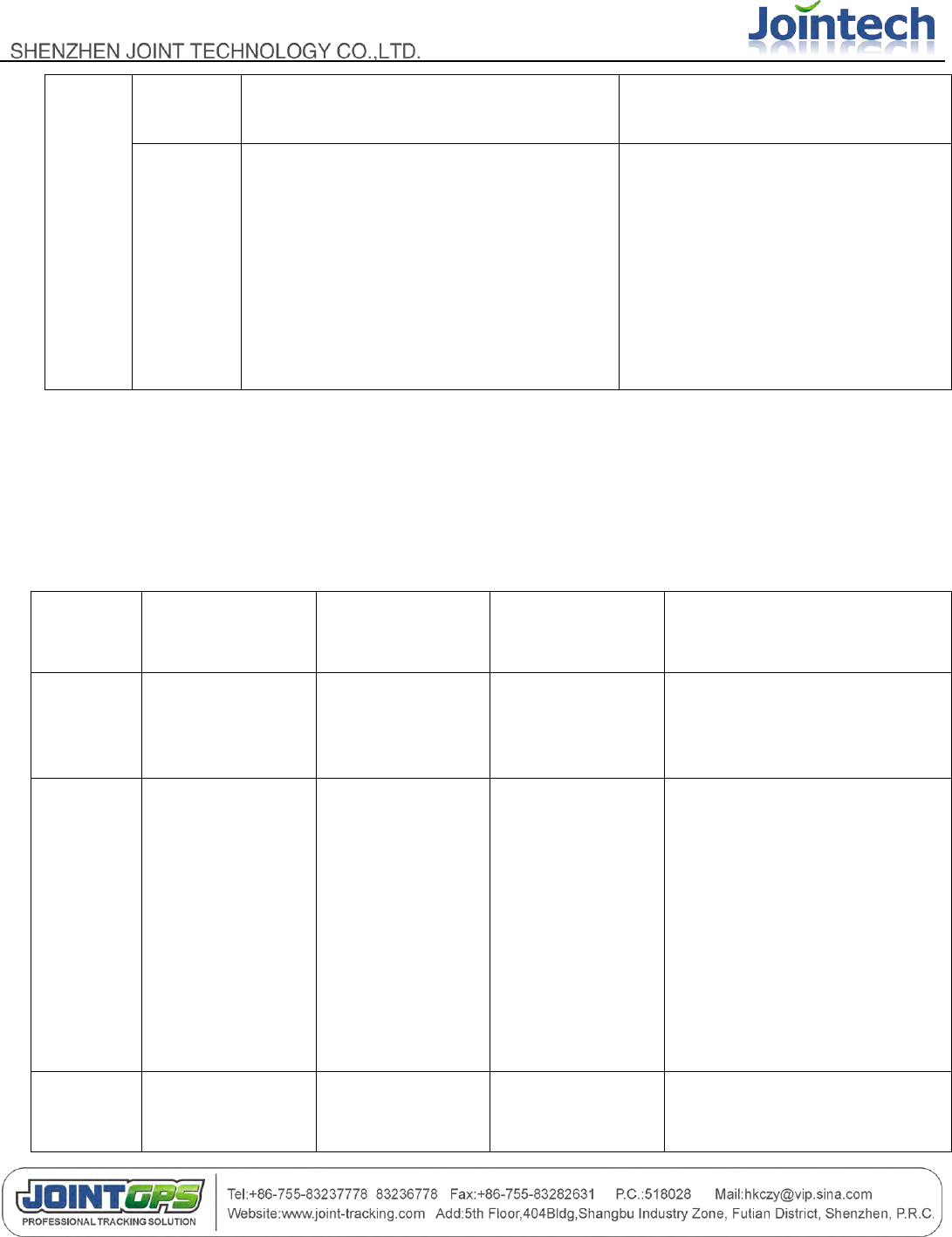
There are 4 buttons, please refer to the following details:
Button
Operation
Function
Conditions
CALL
Ⅰ
Press this
button for
3 sec
It will call the first preset VIP number .
Note: JT600 will be vibrating if you dial this
number successfully.
No incoming call is received
Press this
button
once
Answer the coming call
When an incoming call is received
CALL
Ⅱ
Press this
button for
3 sec
It will call the second preset VIP number.
Note: JT600 will be vibrating if you dial this
number successfully.
No incoming call is received
Press this
button
once
Answer the coming call
When an incoming call is received
Press this
button
twice
within
3sec
Self Geo-fence ON
Note: JT600 will be vibrating if you set this
successfully. and there is a message
which informs you the self geo-fence
latitude, longitude and radius .
No incoming call is received. and self
Geo-fence off
Power
Press this
button for
3 sec
Power off.
Note: When JT600 is in GPRS or SMS
timing mode, Press power button for 3
sec , JT600 will be waken up.
Power on
Press this
button
once
Hang up the call
When a call come or in communication
or Dialing out
Power On
Power off
And inserted sim card
SOS
Press this
Send SOS alert to VIP numbers
Normal. Power on
- 8 -
button for
3 sec
Note: JT600 wo be vibrating if SOS alert
was sent successfully.
Press this
button
once
press the SOS button once, the LED
indication of SOS would be changed in
turn, as below:
On: flashlight
Flash: the led would flash according to the
international SOS standard
Off: SOS led is off
Normal. Power on
(Table 1)
4.3 Working mode
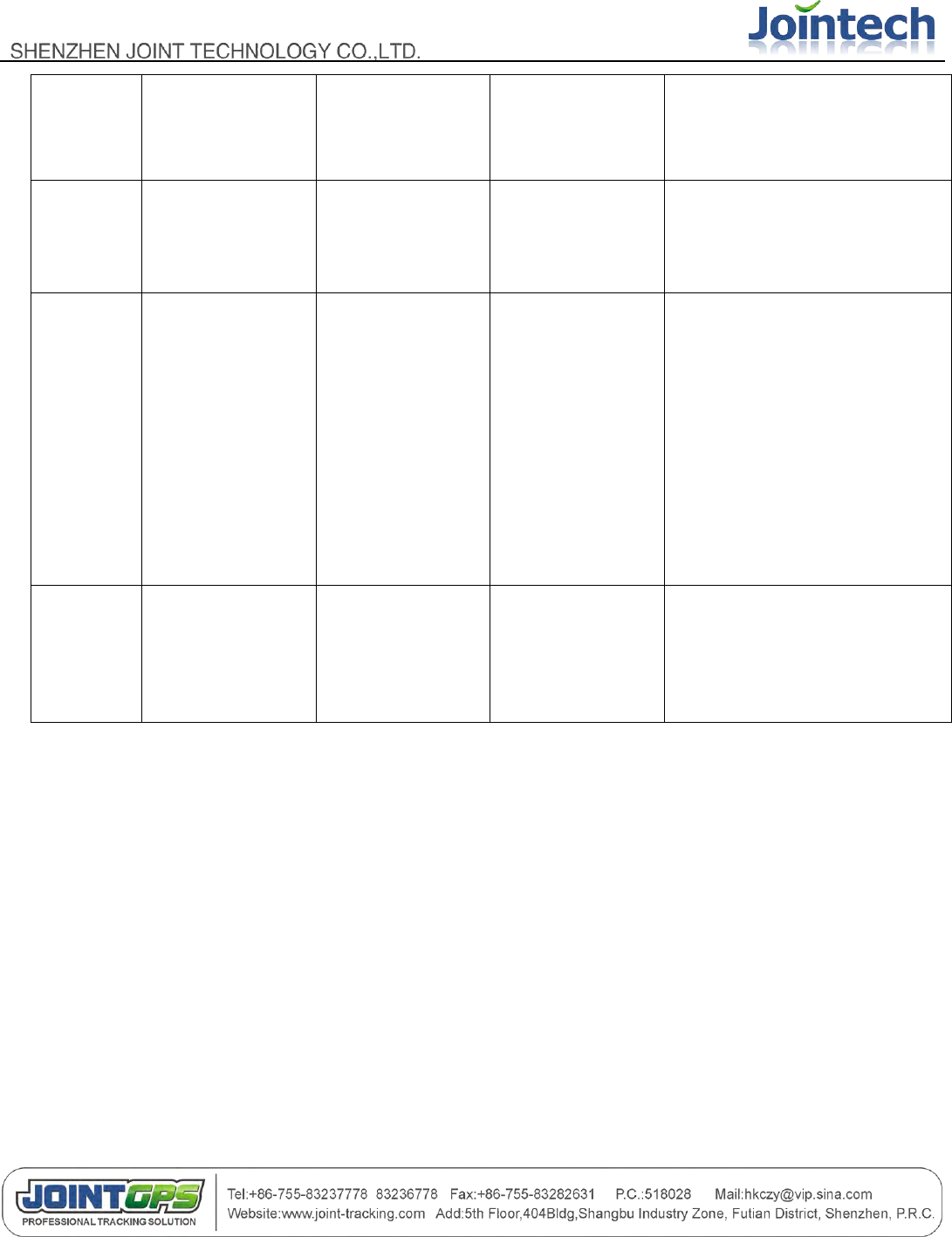
Working
mode
Wakeup condition
GSM Module while
sleeping
GPS Module while
sleeping
Note
SMS
Standby
Press any
button/coming
call/SMS
Sleep
Power off
All of the operation can be
responded.JT600 will be
always online.
SMS
Timing
Data upload
interval timer
Power off
Power off
After 1 data was sent by JT600
according to the preset interval,
then it will get into sleeping
mode immediately, under this
mode, JT600 can‟t dial any
phone number and receive any
SMS, it will respond only when
the user pressed the power
button for 3 sec.
SMS
Vibration
Vibration
Power off
Power off
When JT600 was vibrated, it
will wake up and get into
- 9 -
vibration mode in 10
minutes if there is no any
operation
GPRS
Standby
Works all the time
Sleep
Power on
All of the operation can be
responded.JT600 will be
always online.
GPRS
Timing
Data upload
interval timer
Power off
Power 0ff
After 1 data was sent by JT600
according to the preset interval,
then it will get into sleeping
mode immediately, under this
mode, JT600 can‟t dial any
phone number and receive any
SMS, it will respond only when
the user pressed the power
button for 3 sec.
GPRS
Vibration
Vibration
Power off
Power on
When JT600 was vibrated, it
will wake up and get into
vibration mode in 10 minutes if
there is no any operation
(Table 2)
Note:
GSM standby mode: GSM is on the line, the unit can receive phone call and SMS command.
4.4 Voice communication
JT600 has the two-way voice communication, which can dial preset phone numbers and receive phone call as
well. When a call coming, the unit will ring, press CALL Ⅰbutton once to receive the call.
Press CALL Ⅰ or CALL Ⅱ button for 3 seconds to call the preset VIP number.
The phone call can also be hung up by pressing power button once.
- 10 -
4.5 LED Indication
Please refer to the LED status under different working mode:
ID
Type
Color
Indication
1
GSM LED
green
When there is GSM signal, the LED will flash every 5 seconds; when
there is no GSM signal, the led will flash every 1 second.
2
GPS LED
blue
When the GPS signal is valid, the LED will flash every 10 seconds,
When the GPS signal is invalid, the LED flash every 3 seconds;the
LED won‟t flash when the module was broken.
3
Power LED
yellow
When the battery is low, the LED will flash every 3 seconds
4
Flashlight LED
white
Flashlight, LED can be on constantly(maximum 60s/time) or flash in
SOS mode
5
Charging LED
red/green
When the battery is charging, the LED would be red, when the charge
finished successfully, the LED would be green
6
Solar panel
working LED
red
When the Solar panel is working, the LED would be red, when the
charge finished successfully, the LED would be green
(Table 3)
Ⅴ Configuration and Using
5.1 PC Setup software
Notice: Before you configure JT600,Please read the manual.《JT600 Mini-USB Cable Driver InstallationV1.2.pdf》
5.1.1 Get started with this software
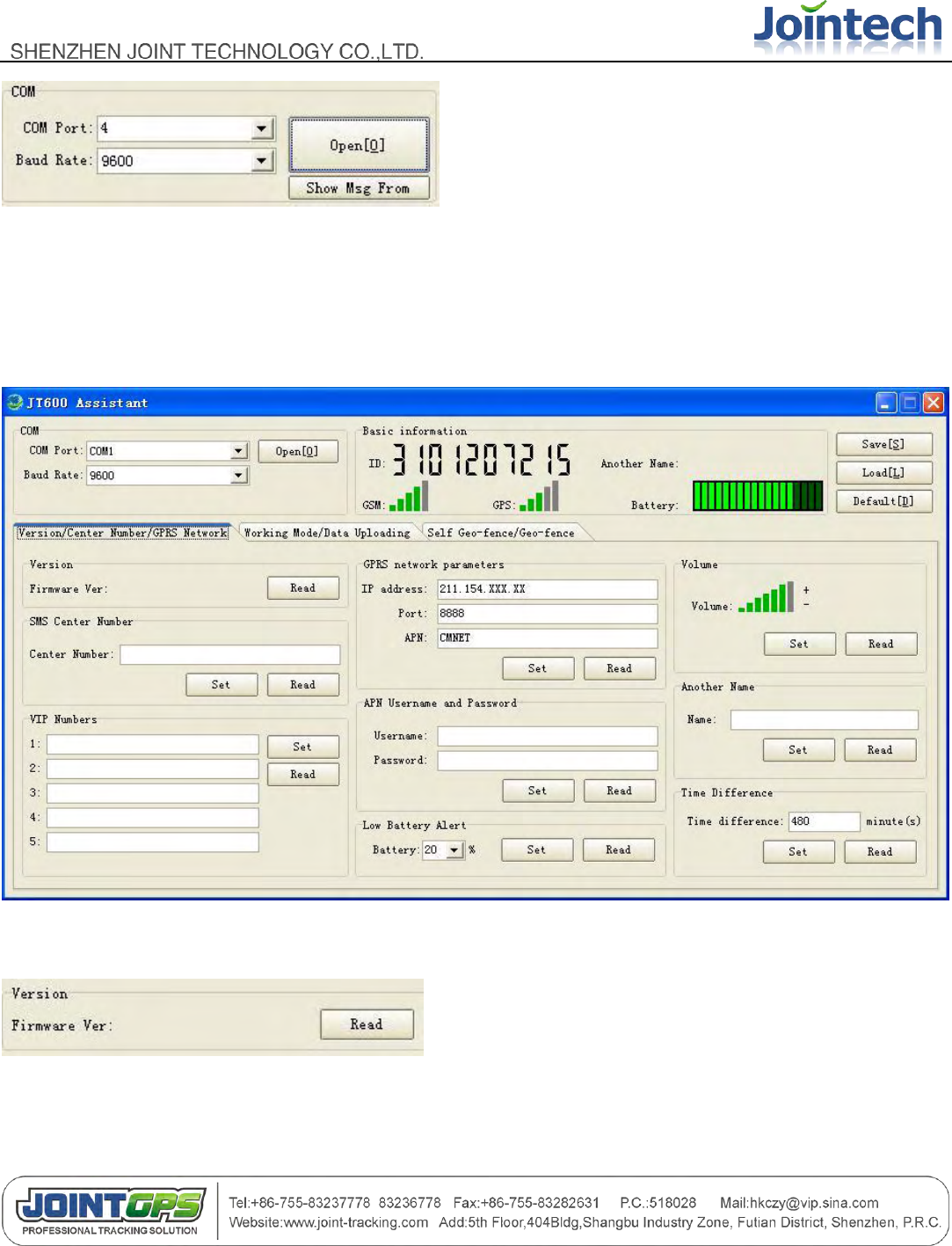
- 11 -
Choose/Input Com Port number ,and then Click “Open “button
Click “Show Msg From” ,There will be pop-up window. It is used to check the commands what you have sent.
5.1.2 Version/Center Number/GPRS Network
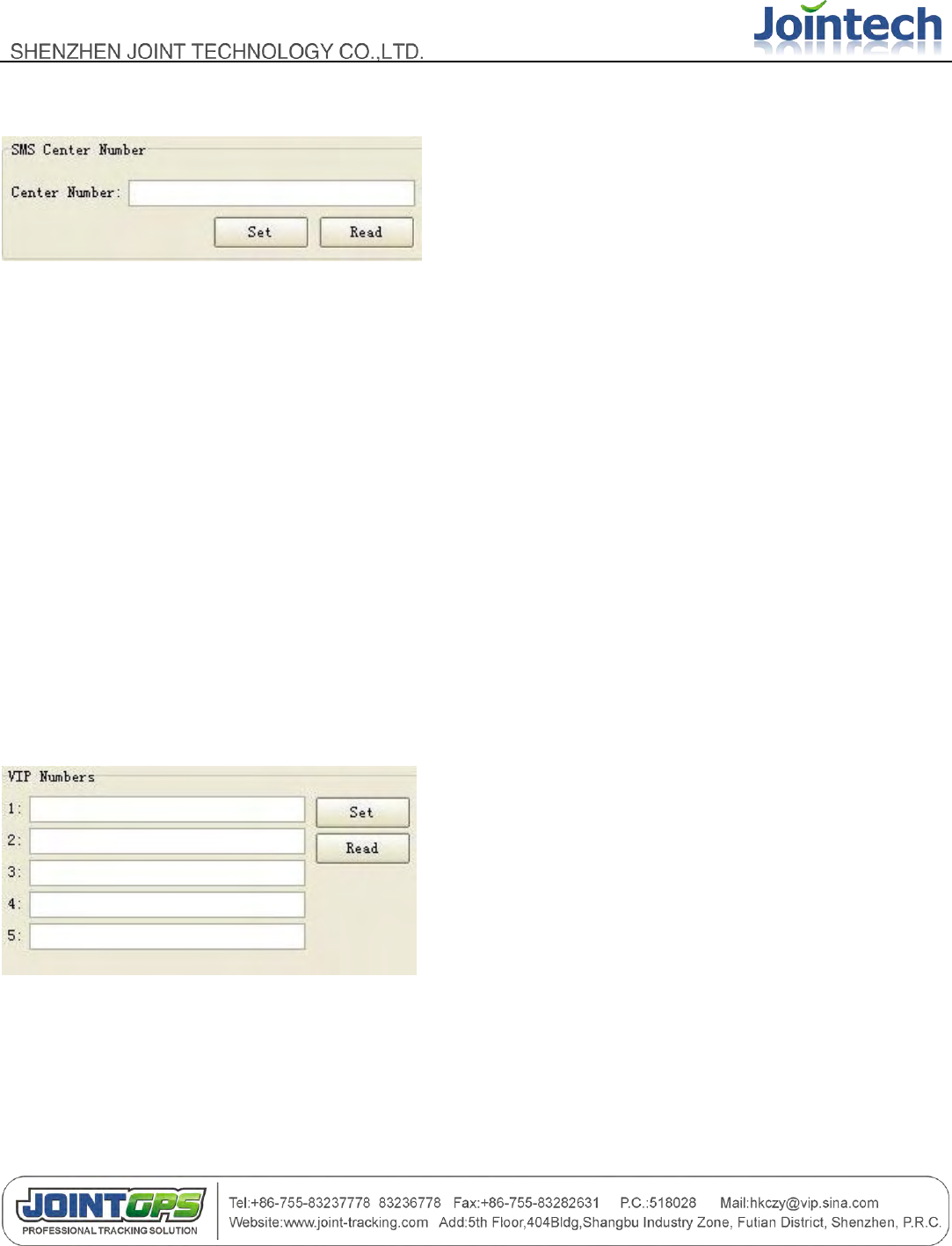
5.1.2.1 Read Firmware Version
Click “Read” button, you will get the firmware version.
- 12 -
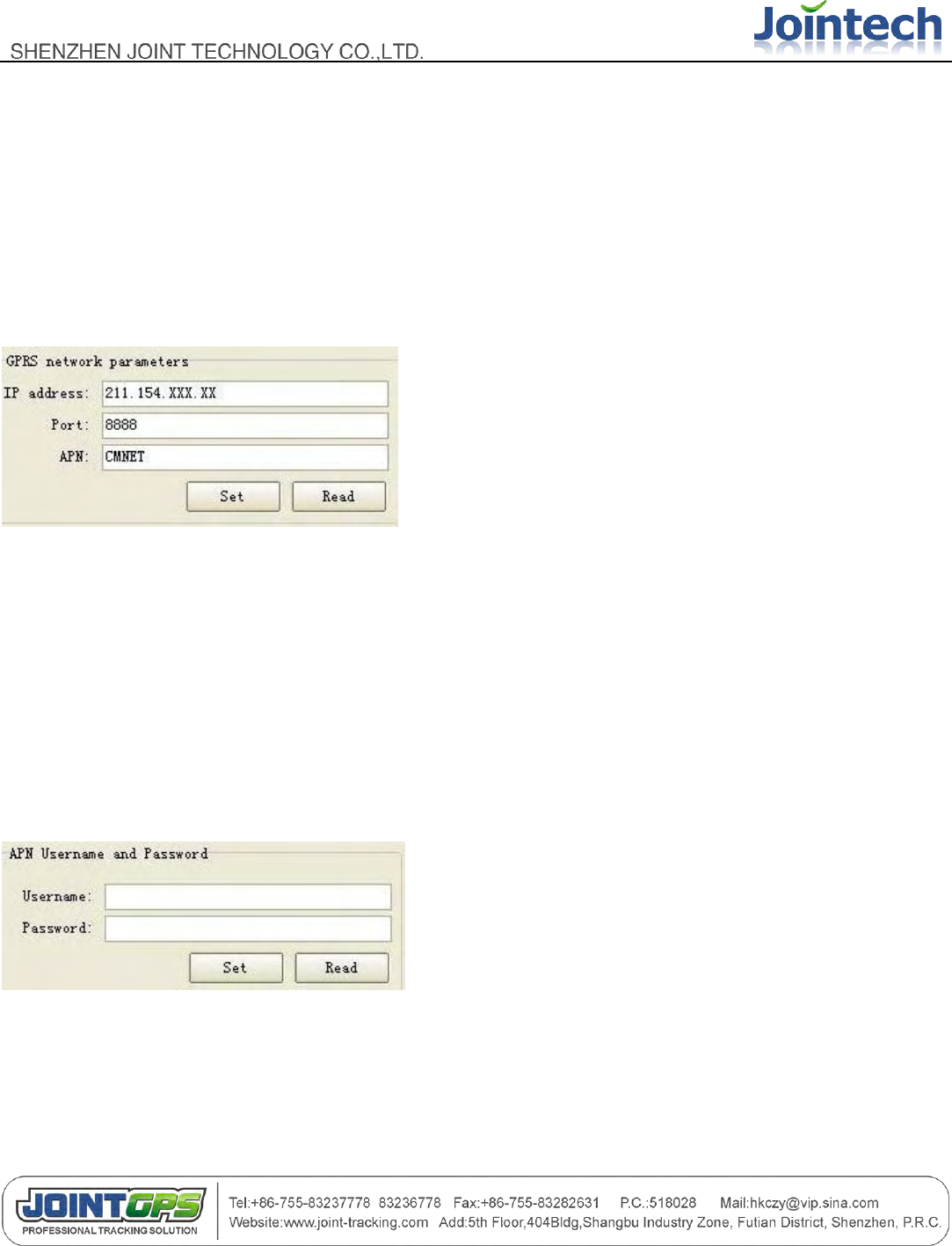
5.1.2.2 SMS Center Number
SMS Center Number(Primary SMS number) is used for getting the alert message/position data/reply
message by SMS.
The difference between SMS center Number and VIP number is that SMS Center Number can get location
data.
Note:
1) If the working mode is GPRS mode(standby/timing/vibration), SMS center number only be used for sending
short message command and receiving the reply of short message command .
2) If the working mode is SMS mode(standby/timing/vibration), SMS center number is used for getting the
position data/alert message/reply message.
5.1.2.3 VIP Numbers
VIP number is used to get the alert message /reply message from JT600.
CALL Ⅰ: Set the index 1 number
CALL Ⅱ: Set the index 2 number
Note:
- 13 -
The first time you sent short message command to JT600,this cell phone number would be preset to CALL Ⅰ
number.
Only when the cell phone number is one of the VIP numbers and SMS center number, Can this number send
short message command to JT600.Otherwise, the short message command would be omitted by JT600.
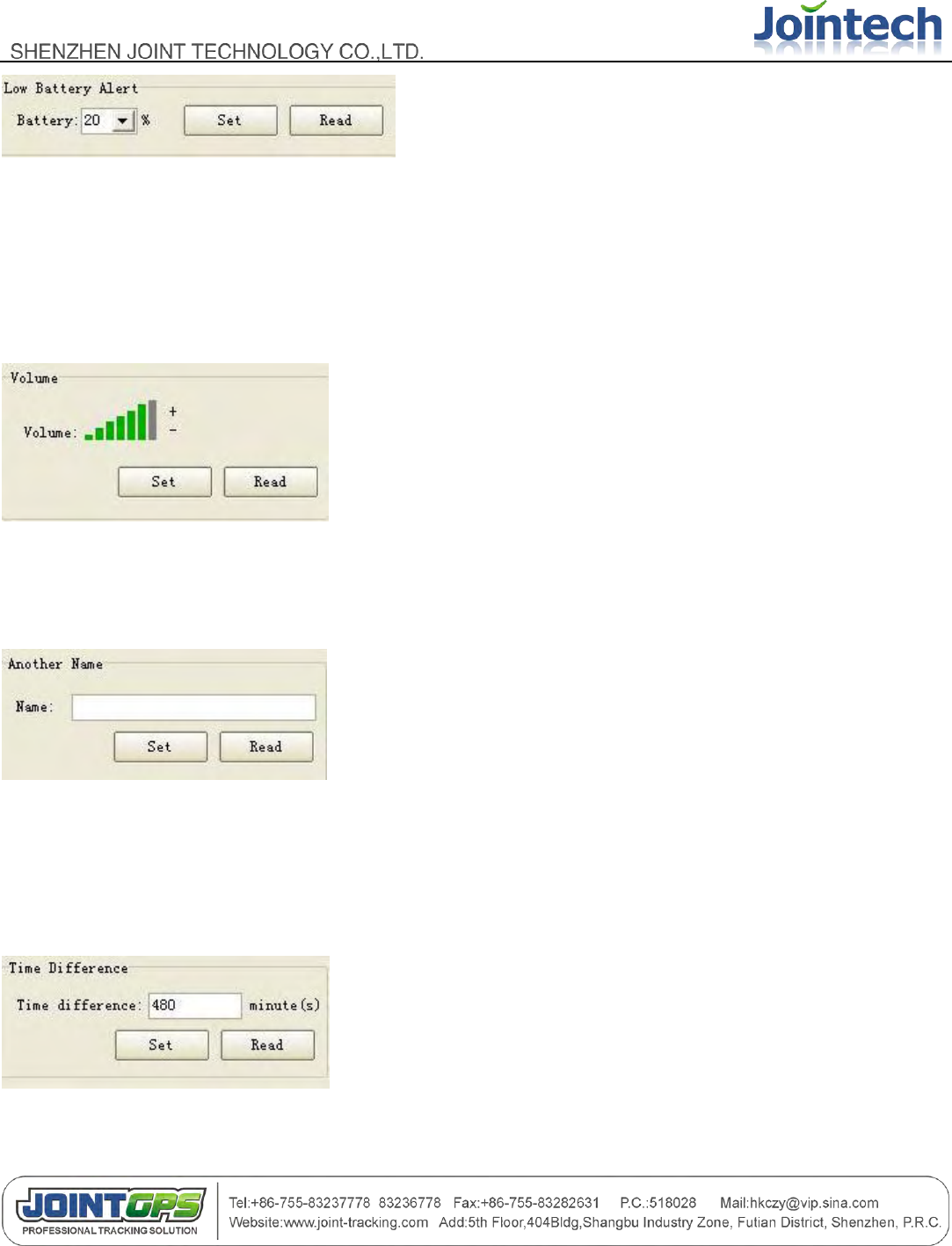
5.1.2.4 GPRS network parameters
Refer to the default information. It‟s just a example. APN : access point name at local. CMNET is in china.
And Please note:
It is used for monitoring in control center. Only you set the working mode (GPRS mode),These parameters will
be activated.
5.1.2.5 APN username and password
Please ask the SIM card service provider to check if it has APN username and password.
5.1.2.6 Low Battery alert
- 14 -
Input /select this value, when the power percent of the battery is low than this. There will be a Low Battery alert.
It alerts twice.
If JT600 is in GPRS mode, It will alert after 3 seconds .after about 20 minutes, It will alert again.
5.1.2.7 Adjust Voice Call volume
Click the “+”,”-” to adjust the ring volume.
5.1.2.8 Another Name
If you didn‟t set this, when you got a SMS reply from JT600.It just shows the unique ID.
5.1.2.9 Time difference
- 15 -
480 is a example in china.
JT600 outputs Greenwich time. So If you didn‟t set time difference. The SMS message „s time is not correct.
If it‟s ahead of Greenwich time. You can input a negative value. Like : -60
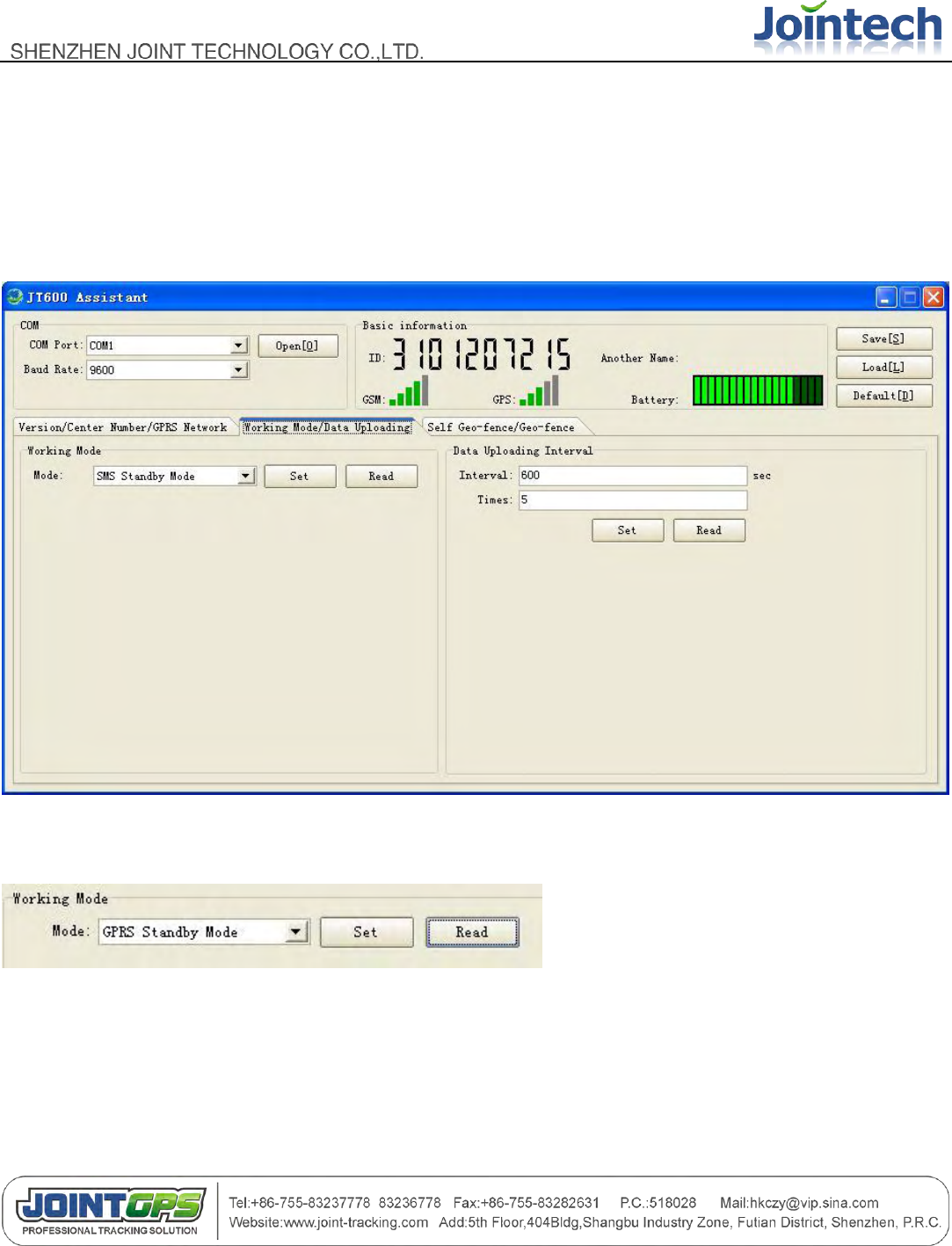
5.1.3 Working Mode/Data Uploading
5.1.3.1 Working Mode
JT600 supports six modes. There are GPRS (standby /Vibration/Timing mode) and SMS(standby
/Vibration/Timing mode).
The detailed information about the six modes ,Refer to the section: 4.3Working mode.
Default working mode is GRPS standby.
- 16 -
Note:
Because JT600 would be reboot If you set some one mode. So sometimes, You couldn‟t get the prompt message(”
operation success”)
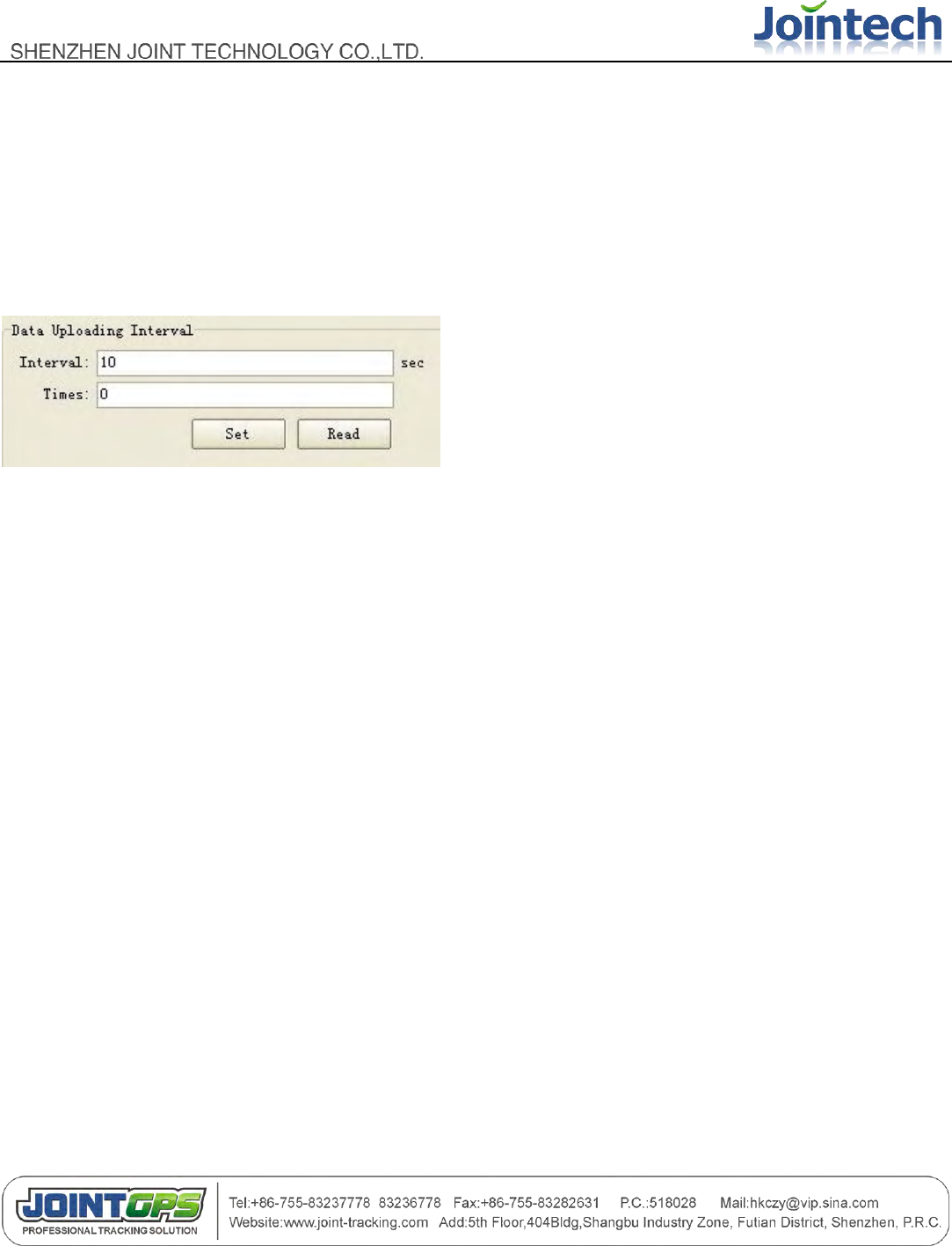
5.1.3.2 Data Uploading Interval
Example:
10 seconds It means uploading position data every 10 sec.
0 it means uploading continuously. If you input 20 ,it means uploading 20 pieces of position data via SMS or
GPRS, and then stop data transmitting.
Before set the data uploading interval ,Please check the working mode you selected.
If working mode is GPRS standby/vibration/timing ,Data would be sent to the monitor center via GPRS.
If working mode is SMS standby/vibration/timing , Data would be sent to the SMS center via SMS.
Note:
If data is sent via SMS, We suggest the time interval should be more than 120 sec. and It‟s necessary to set the
SMS center number (primary SMS number) If you want to get position data by SMS.
5.1.4 Self Geo-fence/Geo-fence
5.1.4.1 Self Geo-fence
- 17 -
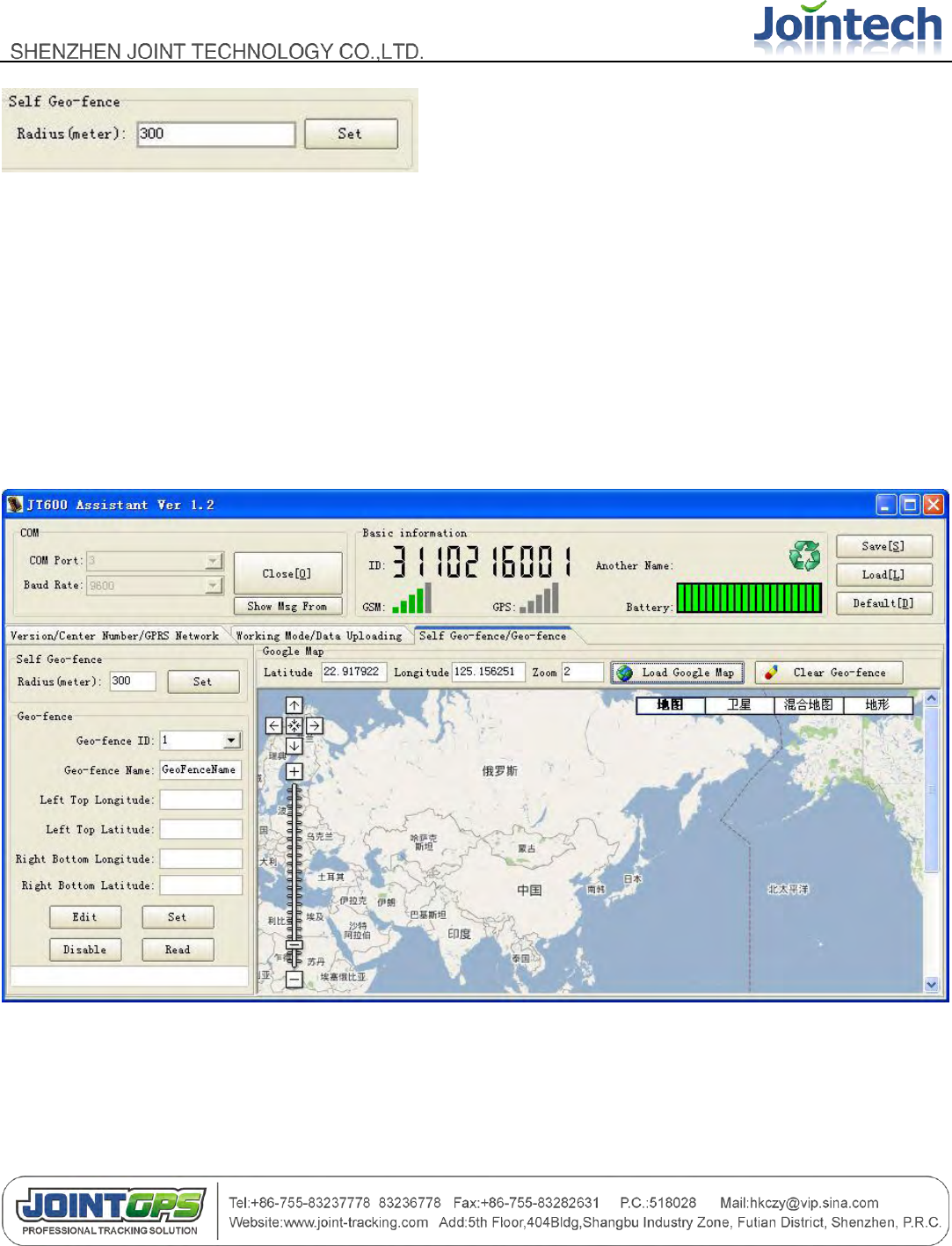
Self Geo-fence (only supported by GPRS standby and GPRS vibration mode)
Only when the GPS signal is valid, then can you set this .and A circular geo-fence will be generated according
to the current position, the radius is 300 meters.
5.1.4.2 Geo-fence
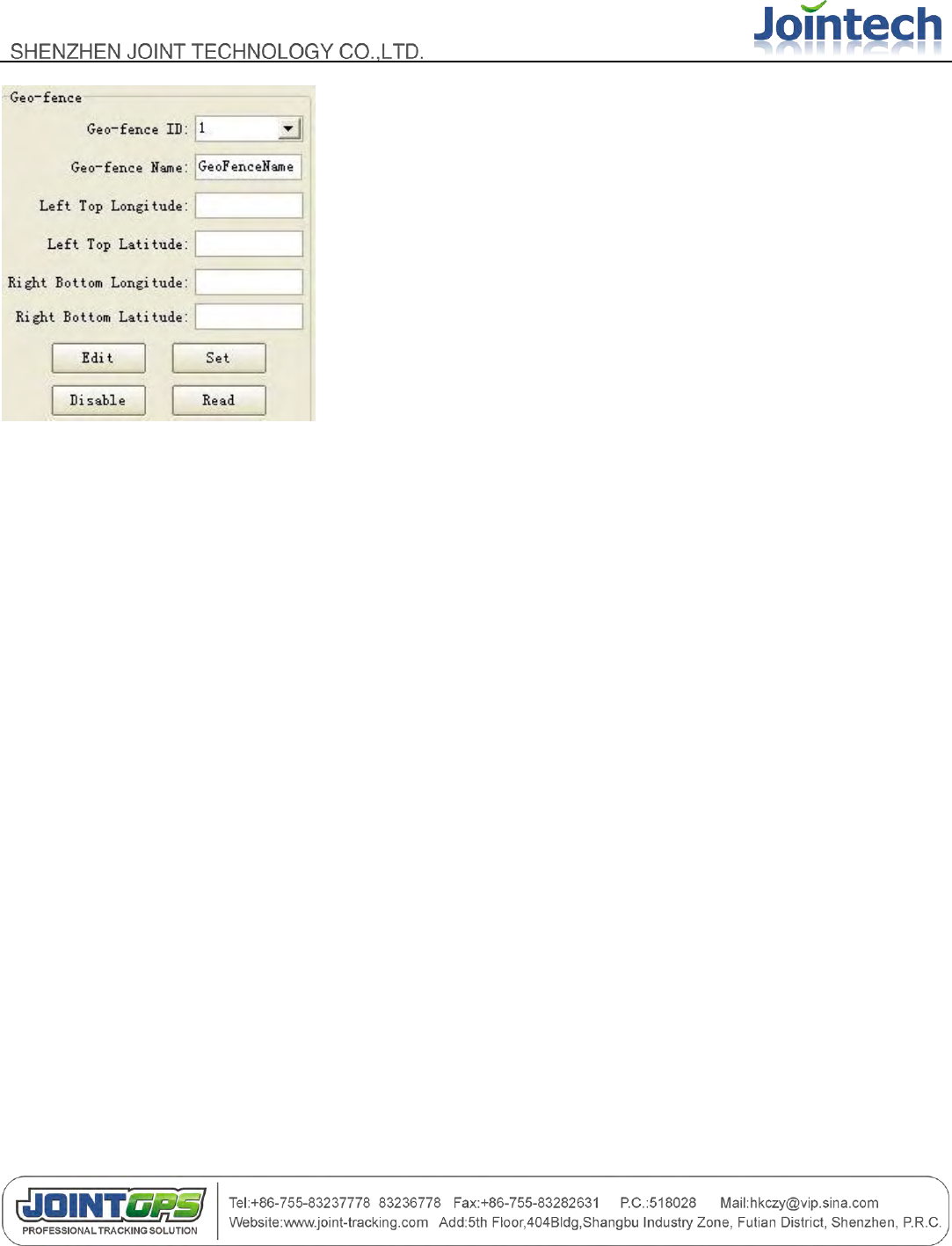
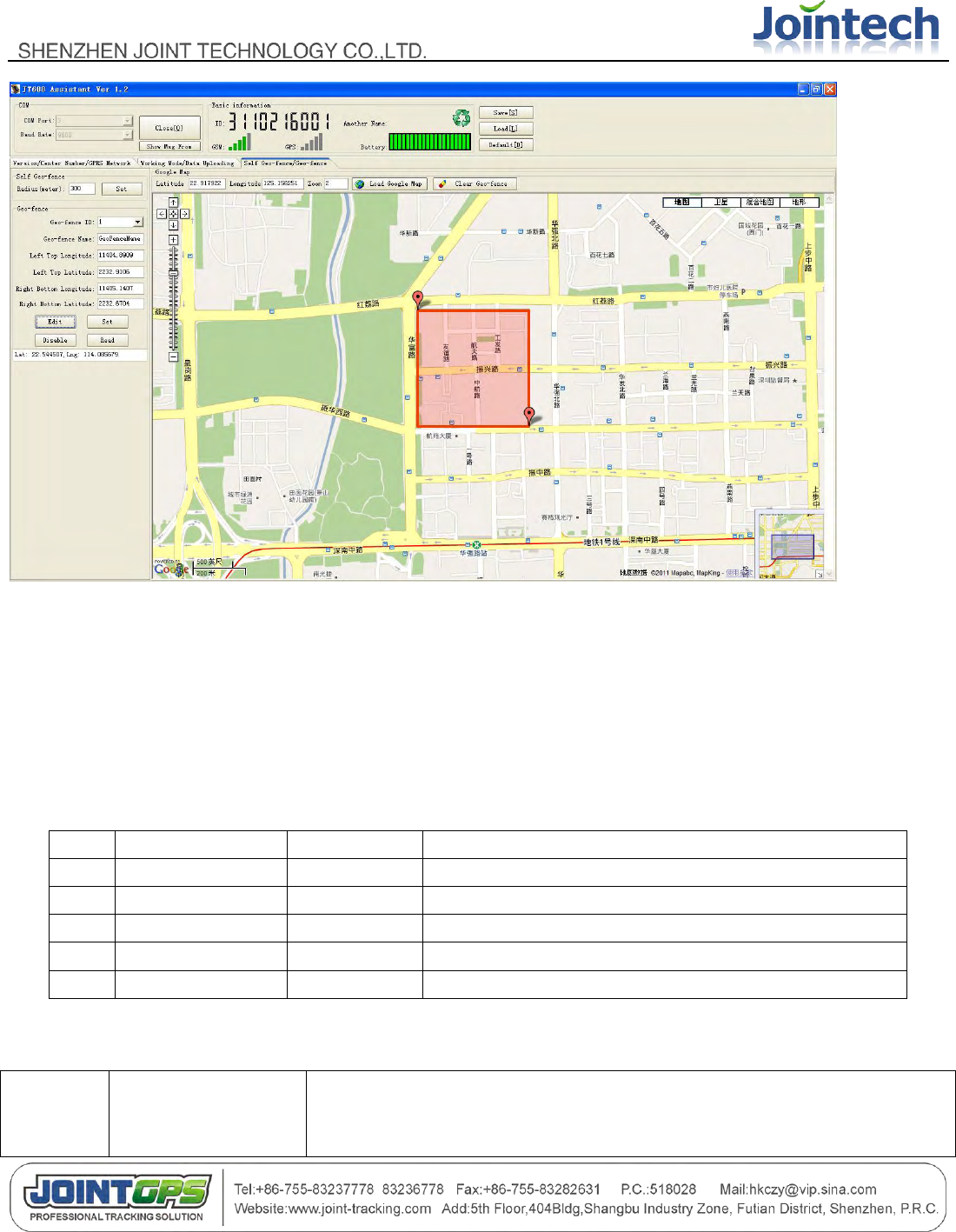
Click “Load Google Map”, and You will see the Google map.
- 18 -
JT600 supports 64 fences.
Click “Edit” button, You can get longitude and latitude from the Google map
Click “Set” button, and Set this Geo-fence.
Click “Disable” button, You can disable this Geo-fence .
Click “Read” button, You can get the Geo-fence information what you had set.
- 19 -
5.2 SMS Setting and Using
5.2.1 SMS Command Framework and List
No.
name
Length (bytes)
Note
1
Packet head
1
Fixed "("
2
command
3
Such as P03 ect…
3
separative sign
1
“,”mark
4
parameter
N
"," to separate the various parameters
5
Packet end
1
)
Command
name
Description
Example

- 20 -
P01
Enquire the firmware
version
(P01)
P02
Enquire current
position
(P02)
P03
Enquire/Set SMS
center number
(P03,1,13919192020) / (P03,0)
Parameter[1]: 1 means setting ,0 means enquiring
Parameter[2]: 13919192020 means SMS center number. Don‟t be more
than 15 digital numbers.
P04
Enquire/Set Data
uploading interval
(P04,1,60,2) / (P04,1,120,0) / (P04,0)
Parameter[1]: 1 means setting, 0 means enquiring
Parameter[2]: 60 means 60 seconds ,uploading every 60 seconds
Parameter[3]: 2 means uploading 2 times and then stops uploading
data. If you input 0 ,It will upload data constantly via GPRS
or SMS. Whether uploading via GPRS or SMS ,please
refer to the P07 command.
P05
Enquire/Set GPRS
network
parameters(IP
address, Port)
(P05,1,211.154.XXX.XXX,8000,CMNET,0) / (P05,0)
Parameter[1]: 1 means setting, 0 means enquiring
Parameter[2]: 211.154.XXX.XXX means IP address
Parameter[3]: 8000 means TCP port
Parameter[4]: CMNET means APN name .access point name at local.
CMNET is example in china.
Parameter[5]: 0 means the Data transmission is TCP. 1 indicates UDP
P06
Enquire/Set APN
username and
(P06,1,user,pass)
Parameter[1]: 1 means setting, 0 means enquiring

- 21 -
password
Parameter[2]: user means APN username. User is a example.
Parameter[3]: pass means APN password. Pass is a example.
P07
Enquire/Set Working
mode
(P07,1,4) / (P07,0)
Parameter[1]: 1 means setting, 0 means enquiring
Parameter[2]: 4 means GPRS Standby mode. There are six modes.
1 SMS Standby mode
2 SMS Timing mode
3 SMS Vibration mode
4 GPRS Standby mode
5 GPRS Timing mode
6 GPRS Vibration mode
P08
Enquire/Set
Geo-fence
(P08,1,1,11323.1234,2312.2321,11326.4312,2308.1233,area 1)
Parameter[1]: 1 means setting, 0 means enquiring
Parameter[2]: 1 means Geo-fence ID.JT600 supports 64 fences.
Parameter[3]: 11323.1234,2312.2321,11326.4312,2308.1233 means
11323.1234 left top longitude,
2312.2321 left top latitude,
11326.4312 right bottom longitude,
2308.1233 right bottom longitude.
It‟s a rectangular region. Please set Geo-fence by JT600
Assistant software.
Parameter[4]: area 1 means Geo-fence name.

- 22 -
P09
Enquire/Set Self
Geo-fence
(P09,1,300)
Parameter[1]: 1 means setting, 0 means enquiring
Parameter[2]: 300 means 300 meters.
Self Geo-fence (only supported by GPRS standby/GPRS
vibration mode)
Only when the GPS signal is valid, then can you set this .and
A circular geo-fence will be generated according to the
current position, the radius is 300 meters.
P10
Enquire/Set Low
battery alert
(P10,1,20)
Parameter[1]: 1 means setting, 0 means enquiring
Parameter[2]: 20 means 20%. when the power percent of the battery is
low than this. There would be a Low Battery alert.
P11
Enquire/Set VIP
numbers
(P11,1,1,13910102345) / (P11,0,5)
Parameter[1]: 1 means setting, 0 means enquiring
Parameter[2]: 1 means the first VIP number(CALL Ⅰ).JT600 supports 5
VIP numbers.
Parameter[3]: 13910102345 means Cell phone number
P12
Enquire/Set time
difference
(P12,1,480) / (P12,0,480) / (P12,0)
Parameter[1]: 1 means setting, 0 means enquiring
Parameter[2]: 480 means 60*8=480 minutes. 480 is example.
JT600 outputs Greenwich time. So we need to adjust it to
your local time.
- 23 -
P13
Require SOS LED
flashing
(P13,1,1) / (P13,1,0)
Parameter[1]: 1 means setting, 0 means enquiring
Parameter[2]: 1 means open the SOS LED .0 means close the SOS
LED.
P14
Set ring volume
(P14,1,5) / (P14,0,5)
Parameter[1]: 1 means setting, 0 means enquiring
Parameter[2]: 5 from 1 to 7. 1 indicates minimum volume. 7 indicates
maximum volume.
P15
Require Listen-in
remotely
(P15,13919192020)
Parameter[1]: 13919192020 means cell phone number. After you send
this command ,JT600 will call this number.
P16
Enquire current
battery
(P16)
P17
Enquire/Set another
name
(P17,1,jointech)
Parameter[1]: 1 means setting, 0 means enquiring
Parameter[2]: jointech means another name. jointech is a example.
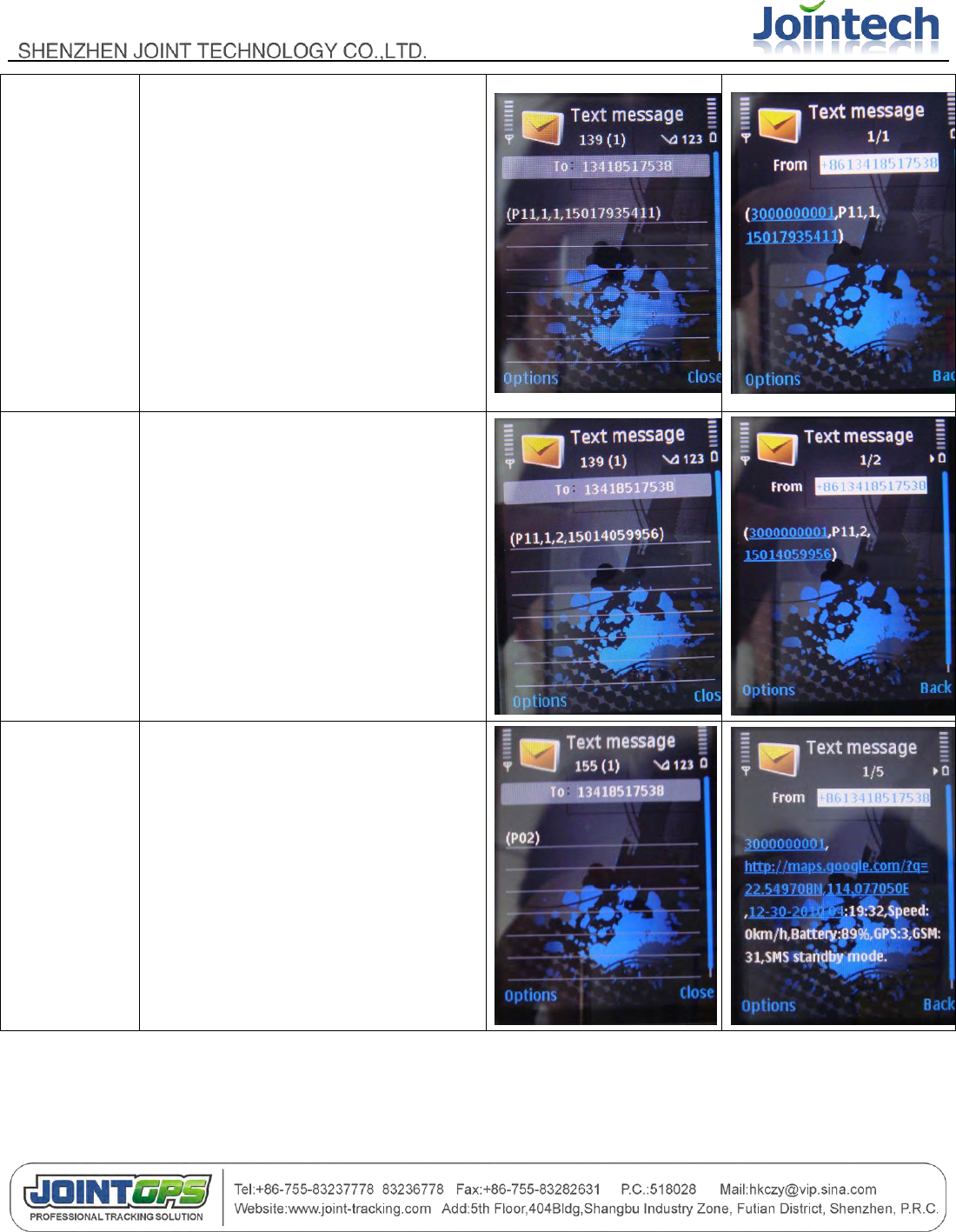
5.2.2 Short Message Command Example
Feature
Command format example
Send Short message
command via cell phone
Reply message from
JT600
- 24 -
Set
CALLⅠnumb
er
(P11,1,1,15017935411)
Set CALL Ⅱ
number
(P11,1,2,15014059956)
Enquire
current
position
(P02)
- 25 -
Set time
difference
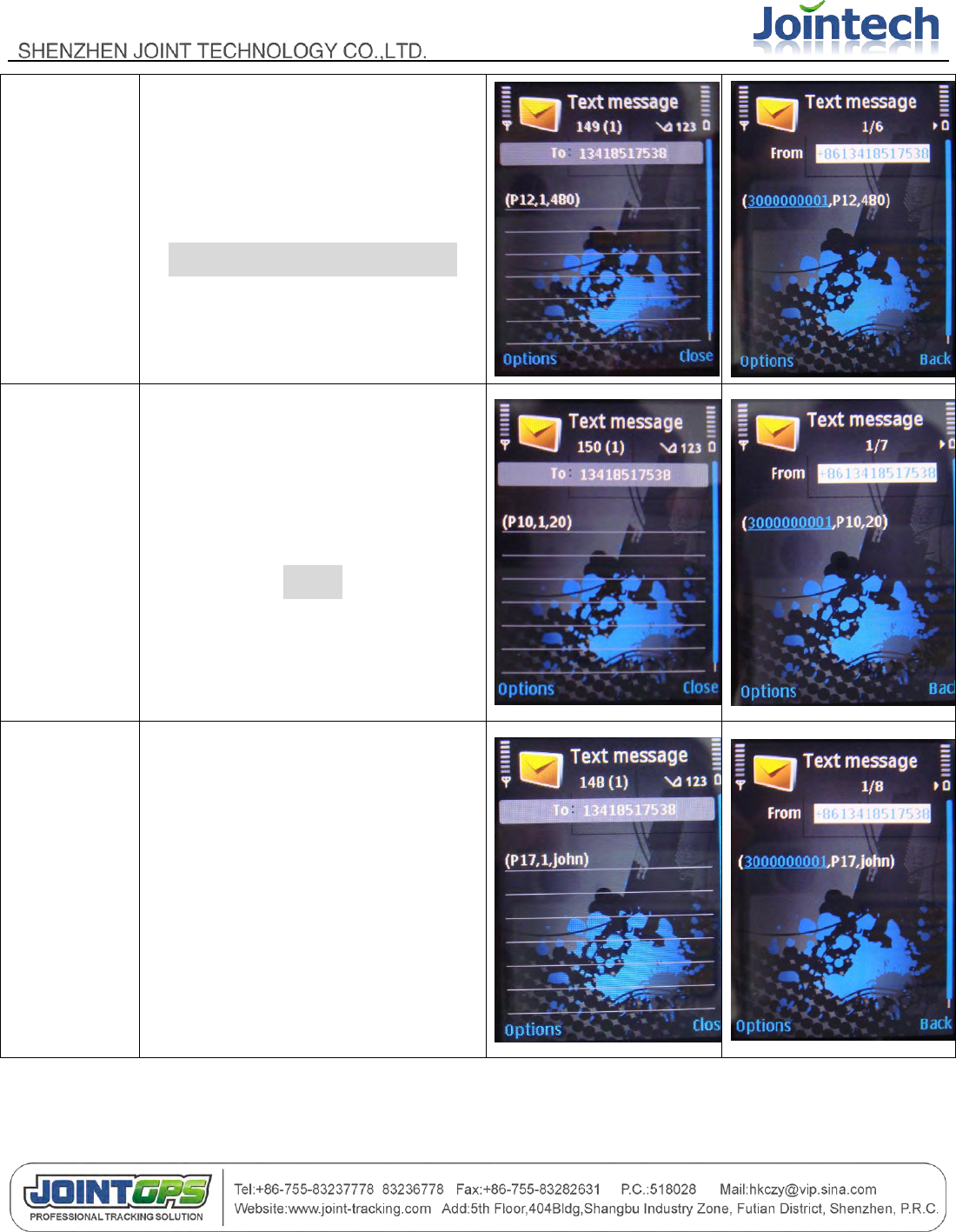
(P12,1,480)
//8*60=480 minutes in china
Set Low
battery alert
(P10,1,20)
//20%
Set Another
name
(P17,1,John)
- 26 -
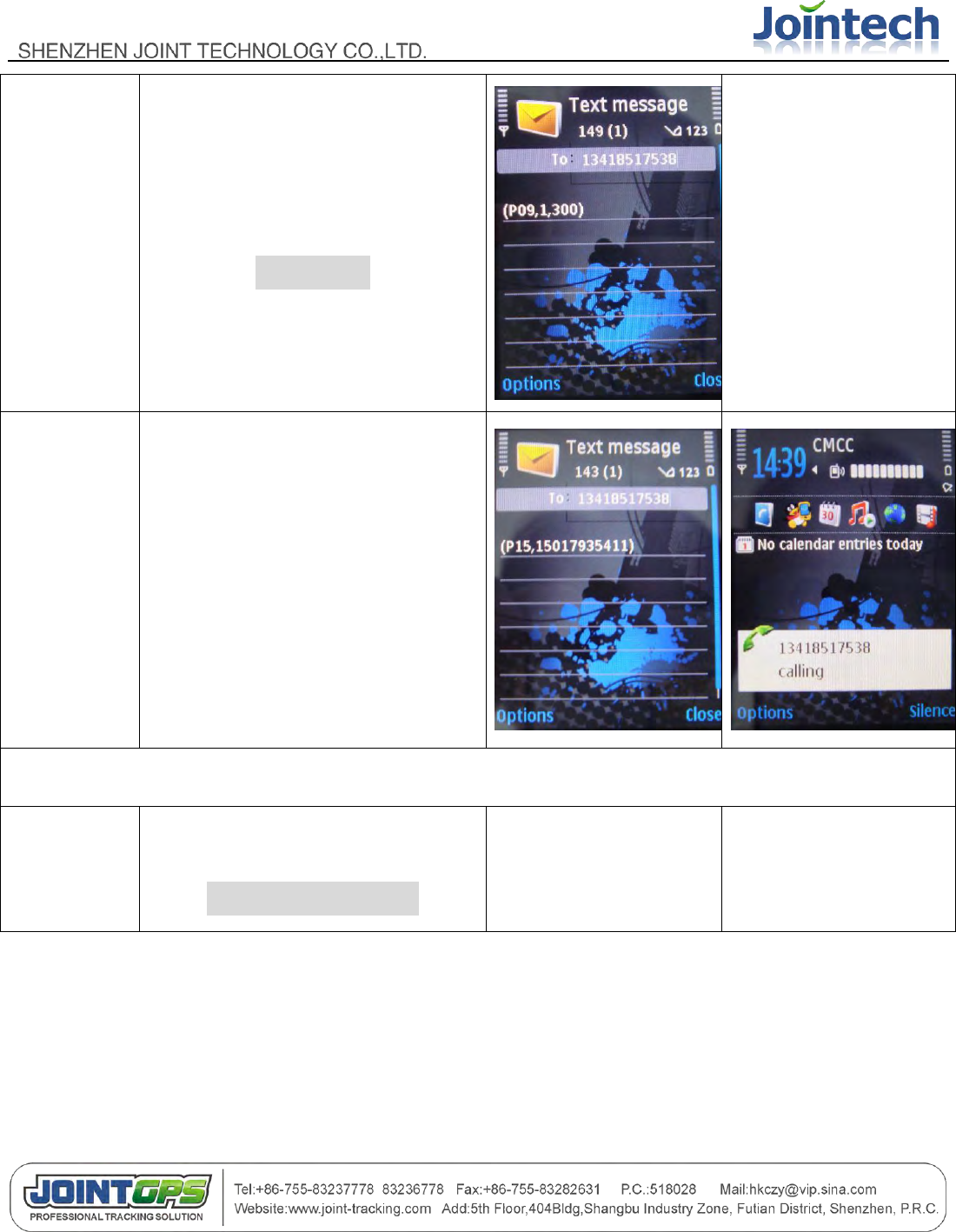
Set Self
Geo-fence
(P09,1,300)
//300 meter
(only supported by
GPRS standby and
GPRS vibration mode)
Listen-in
remotely
(P15,15017935411)
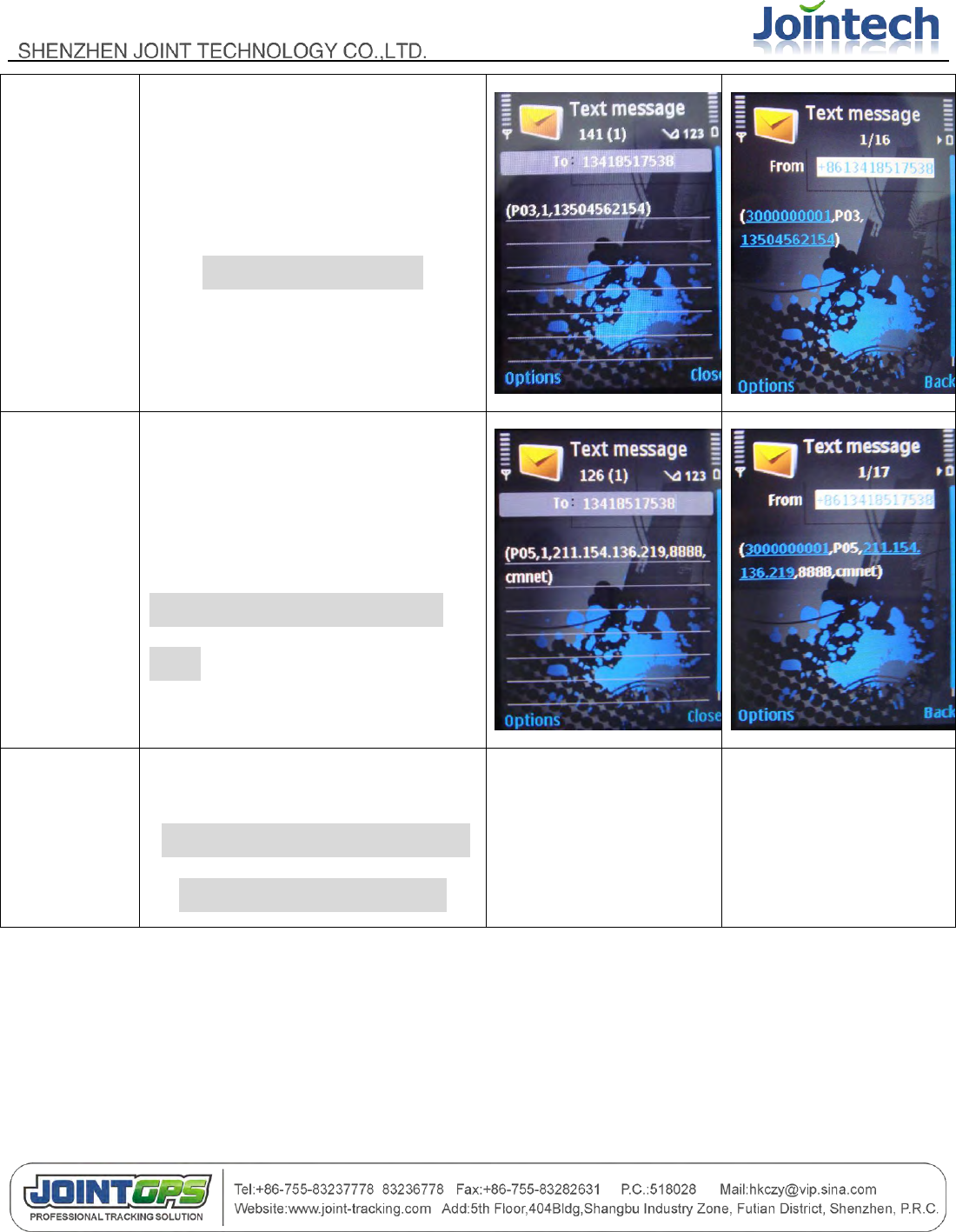
The next commands are used for real-time monitoring setting. Data transmission via GPRS.
Set working
mode
(P07,1,4)
//GPRS standby mode
No reply
- 27 -
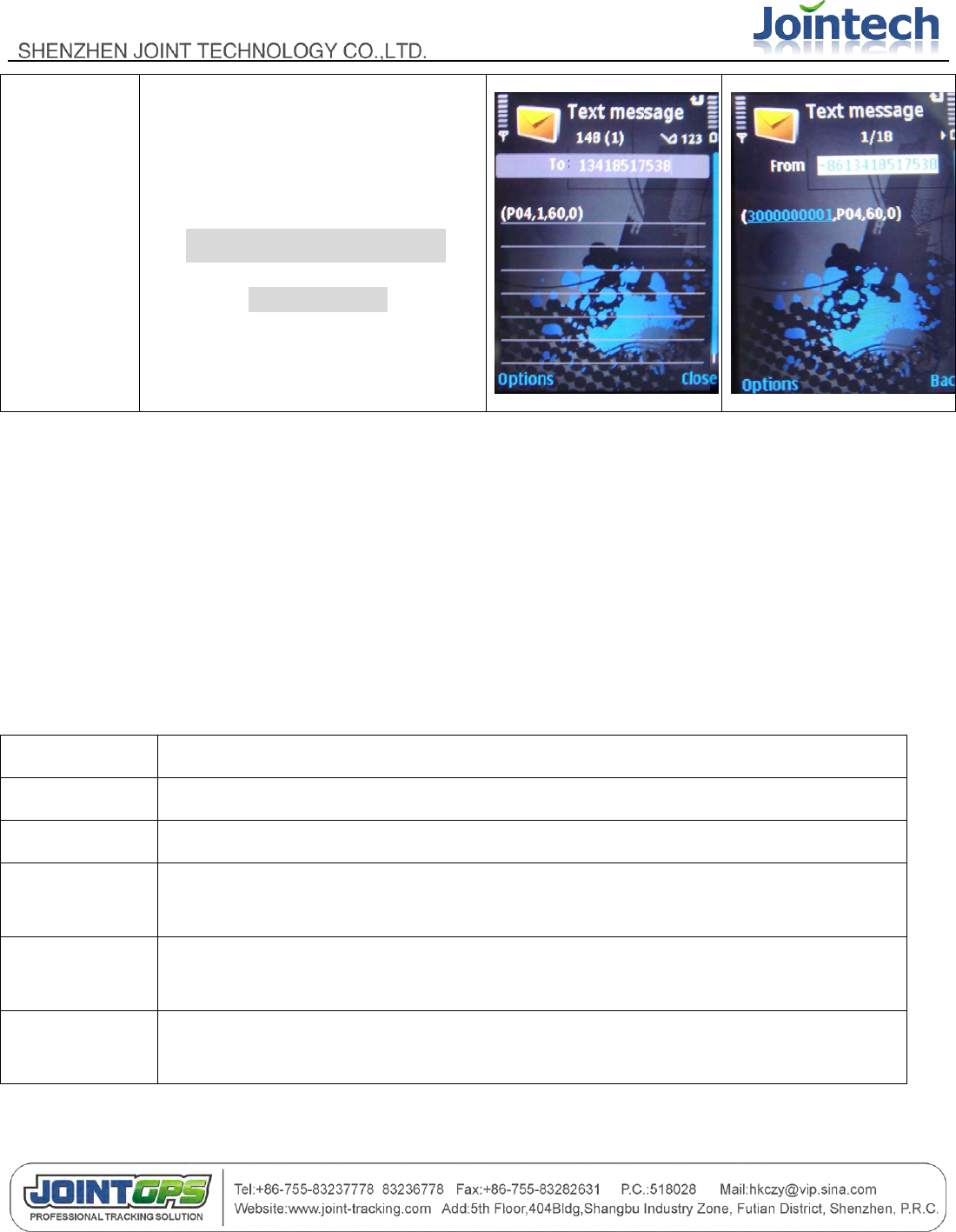
Set SMS
center
number
(P03,1,13504562154)
//primary SMS number
Set IP
address and
APN
parameter
(P05,1,211.154.136.219,8888,cmn
et,0)
//
cmnet: access point name in
china
Set APN
account
(P06,1,user,pass)
//if there is no APN account, no
need to send this command
- 28 -
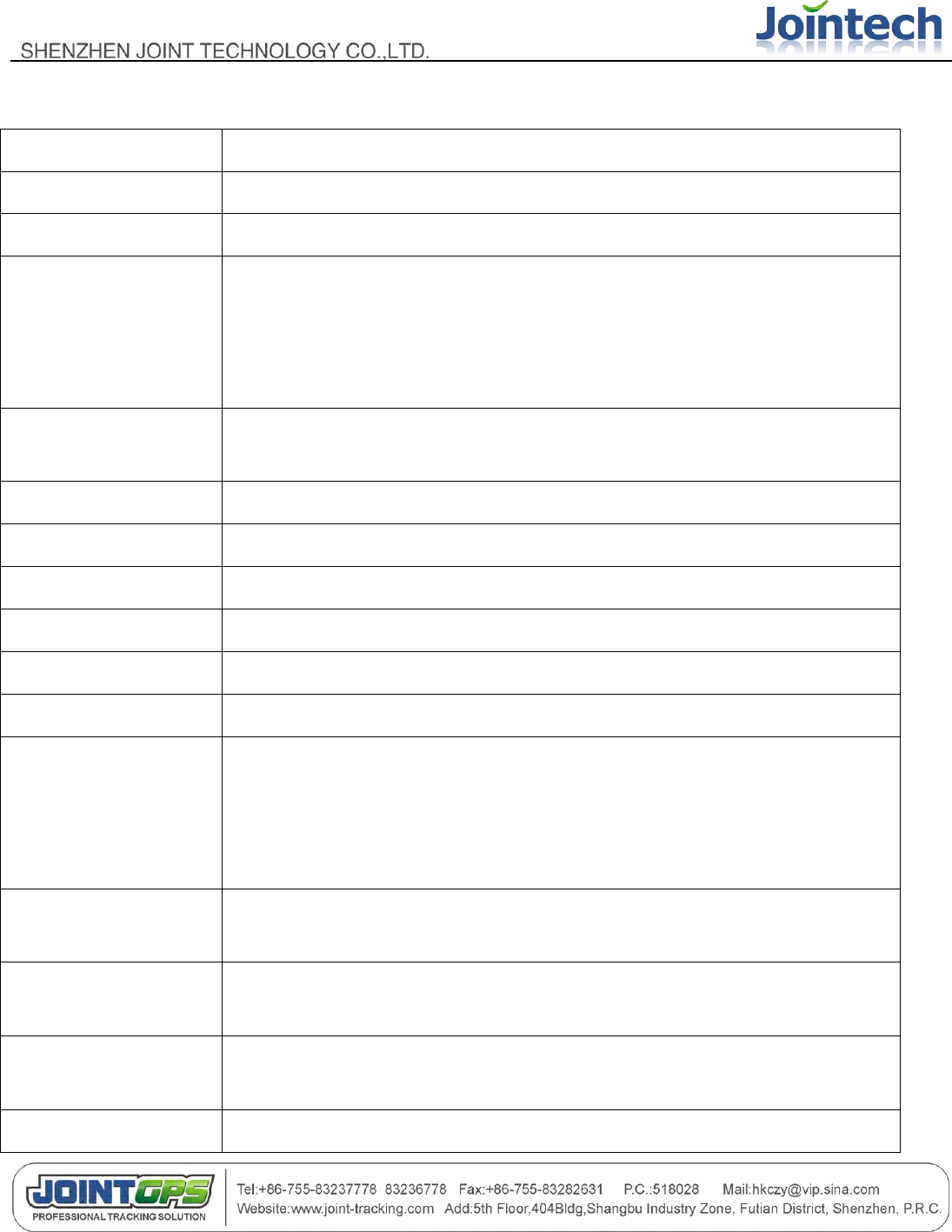
Set Data
uploading
interval for
SMS or
GPRS
(P04,1,60,0)
//upload every 60 seconds
continuously
Ⅵ Product Specification
6.1 Physical Parameters and Environmental
size
unit : 96mm * 51mm * 22mm , bake up battery
weight
unit : 80g , backup battery: 50g
housing
plastic
Working
temperature
-25~+70℃
Default battery
capacity
1800mAh
Back-up battery
capacity
2500mAh
- 29 -
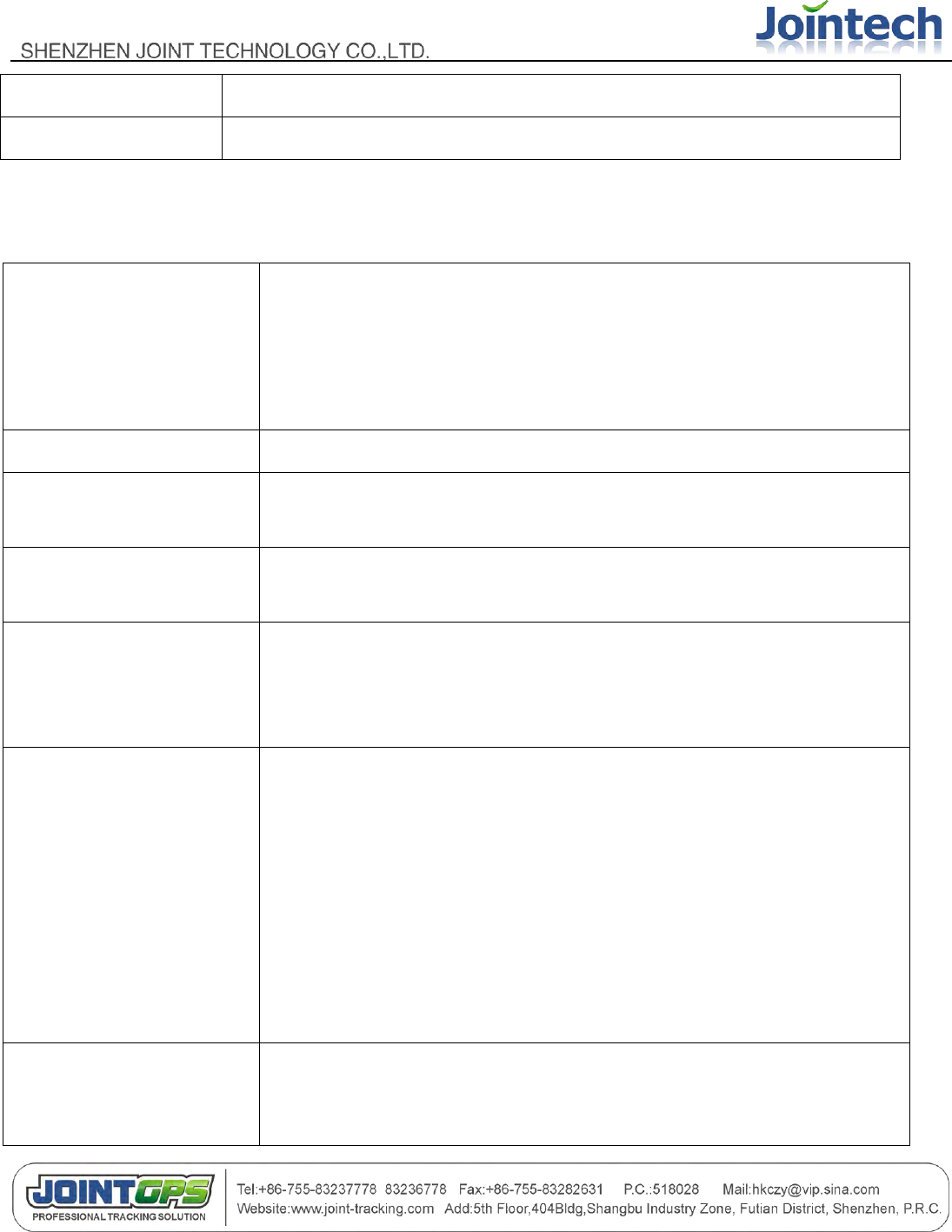
6.2 GPS module parameter
Chipset
SiRF Star III
Frequency
L1,1575.42MHz
Code
C/A Code
Protocol
NMEA 0183 V2.2
Default:GGA,GSA,GSV,RMC
Support:VTG,GLL,ZDA
SiRF binary and NMEA Command
Available Baud
Rate
4,800 to 57,600 bps adjustable
Channels
20
FLASH
4Mbits
Sensitivity
-159dBm
Cold start
42 seconds,average
Worm start
38 seconds,average
Hot start
1 second,average
Accuracy
Position : 10 meters,2D RMS
5 meters,2DRMS,WAAS enabled
Velocity : 0.1m/s
Time : 1us synchronized to GPS time
Maximum
Altitude
< 18,000 meter
Maximum
Velocity
< 515 meter/second
Maximum
Acceleration
< 4G
Update Rate
1Hz
- 30 -
DGPS
WAAS,EGNOS,MSAS
Datum
WGS-84
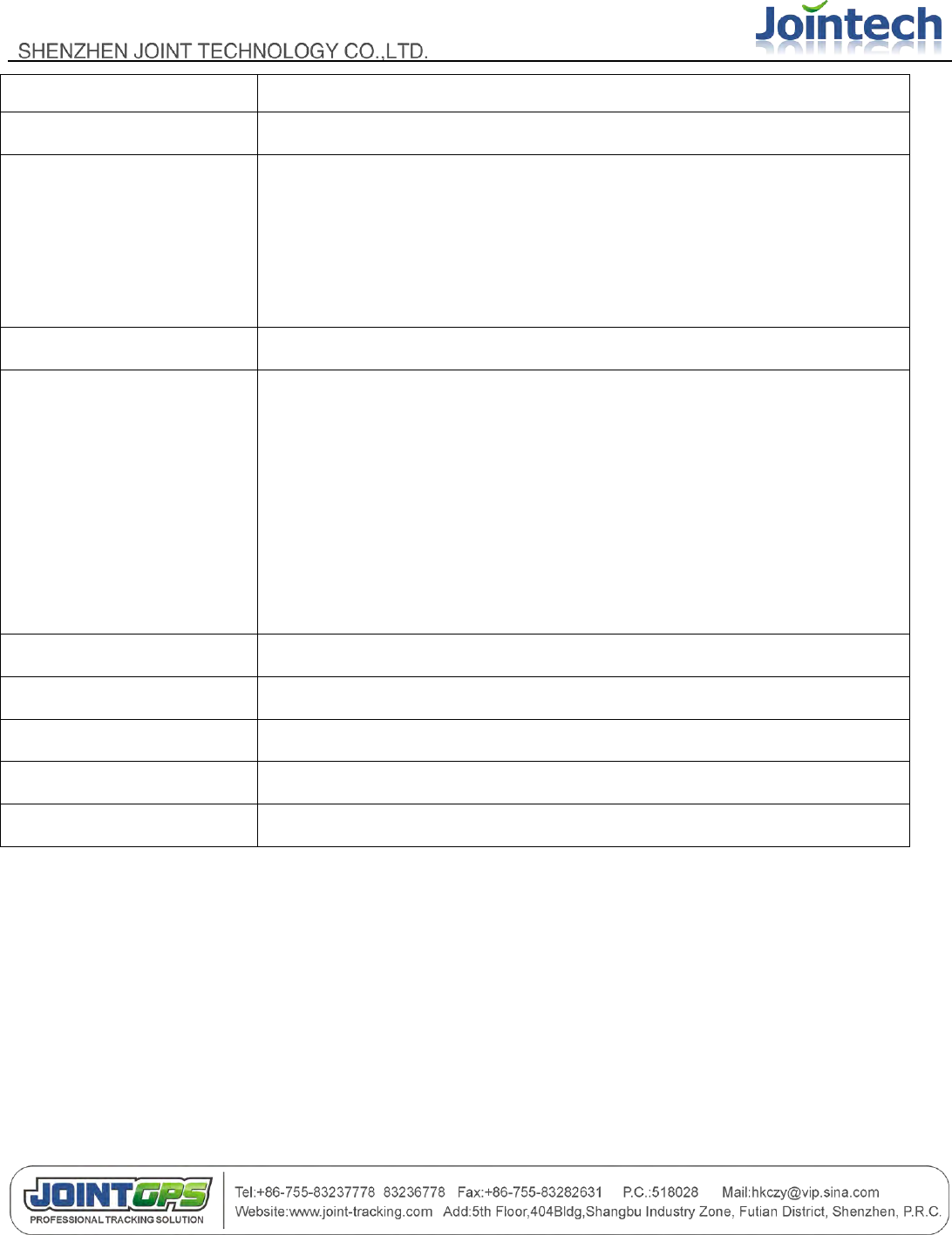
6.3 GSM module parameter
Frequency bands
SIM900
Quad-band: GMS 850,EGSM 900,DCS 1800,PCS 1900.
The band can be set by AT COMMAND, and default band is EGSM 900
and DCS 1800.
Compliant to GSM Phase 2/2+.
GSM class
Small MS
Transmit power
Class 4(2W) at EGSM900 and GSM850
Class 1(1W) at DCS1800 and PCS 1900
GPRS connectivity
GPRS multi-slot class 10
GPRS mobile station class B
Temperature range
Normal operation : -20~+55℃
Restricted operation : -25~+70℃
Data GPRS
GPRS data downlink transfer: max. 85.6 kbps
GPRS data uplink transfer: max. 42.8 kbps
Coding scheme: CS-1, CS-2, CS-3 and CS-4
SIM900 supports the protocols PAP (Password Authentication Protocol)
usually used for PPP connections.
The SIM900 integrates the TCP/IP protocol.
Support Packet Switched Broadcast Control Channel (PBCCH)
CSD transmission rates: 2.4, 4.8, 9.6, 14.4 kbps, non-transparent
Unstructured Supplementary Services Data (USSD) support
SMS
MT, MO, CB, Text and PDU mode
SMS storage: SIM card
Support transmission of SMS alternatively over CSD or GPRS. User can
- 31 -
choose preferred mode.
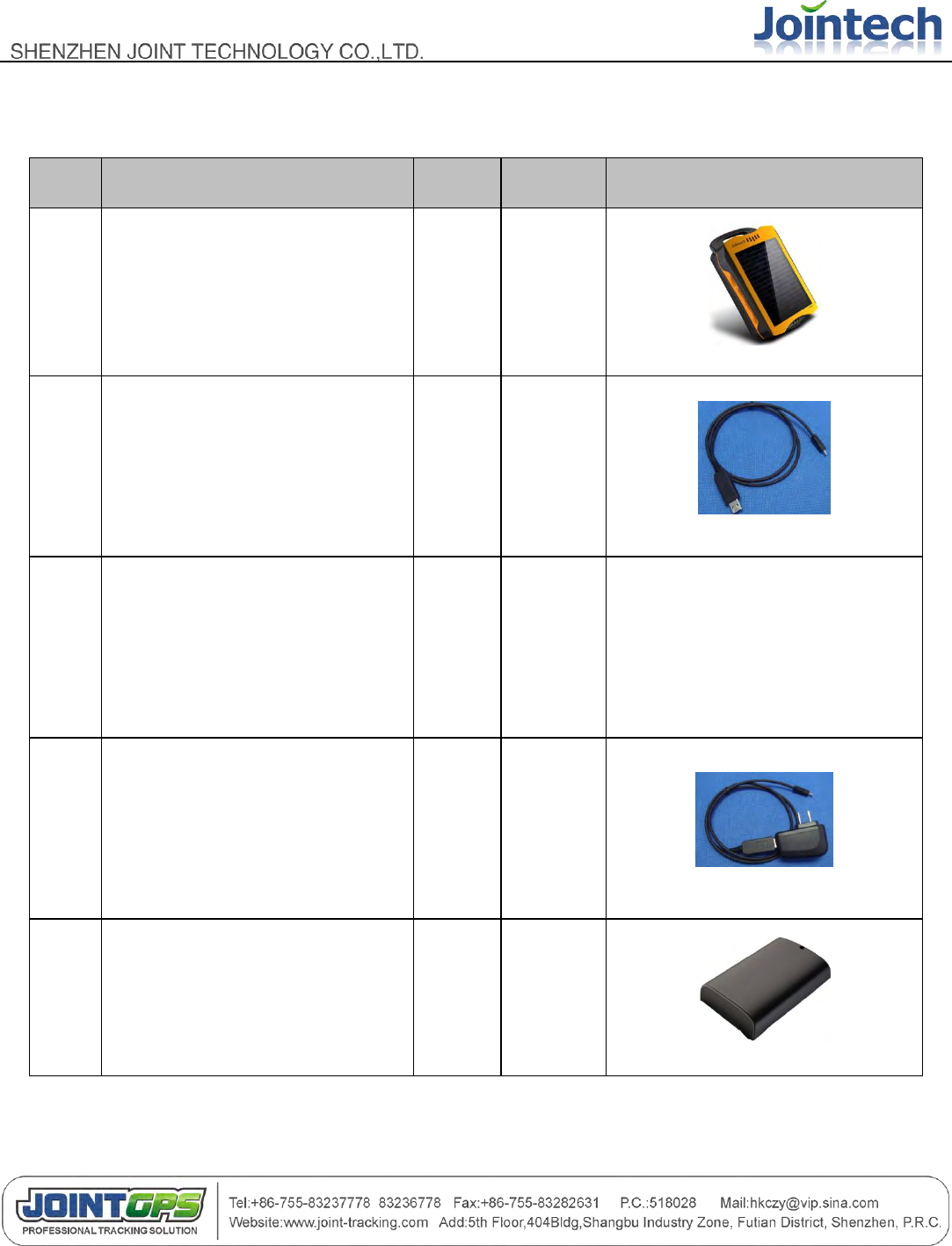
SIM interface
Supported SIM card: 1.8V ,3V
Audio features
Speech codec modes:
Half Rate (ETS 06.20)
Full Rate (ETS 06.10)
Enhanced Full Rate (ETS 06.50 / 06.60 / 06.80)
Echo suppression
External antenna
Connected via 50 Ohm antenna connector or antenna pad.
Two serial interfaces
Serial Port 1 Seven lines on Serial Port Interface
Serial Port 1 can be used for CSD FAX, GPRS service and send
AT command of controlling module.
Serial Port 1 can use multiplexing function, but you can not use the Serial
Port 2 at the same time;
Autobauding supports baud rate from 1200 bps to 115200bps.
Serial port 2 Two lines on Serial Port Interface /TXD and /RXD
Serial Port 2 only used for transmitting AT command.
Phonebook management
Supported phonebook types: SM, FD, LD, RC, ON, MC
SIM Application Toolkit
Supports SAT class 3, GSM 11.14 Release 98
Real time clock
Implemented
Timer function
Programmable via AT command
Firmware upgrade
Firmware upgradeable over serial interface
- 32 -
Ⅶ Standard package and optional accessories
Item
Accessories name
Unit
Explain
Accessories picture
1
Main body( including 1800mAh
battery)
pcs
Standard
2
Mini-USB charging/configuration
cable
pcs
Standard
3
CD(user manual/ configure
software)
pcs
Standard
The latest information can be
downloaded from
www.joint-tracking.com
4
Charging(directly)
pcs
Optional
5
Back-up battery(2500mAh)
pcs
Optional

- 33 -
6
Upgrade cable
pcs
Optional
Ⅷ FAQ
1. The default work mode would be GPRS standby mode.
2. The unit can only be powered on whiles SIM card put in. The unit will powered off as soon as the SIM card
pulled out.
3. If you connected the upgrade cable with JT600,It would be shutdown. To power on the unit, you have to pull
and plug SIM card and press power button once.
Ⅸ SAR
1. This device complies with Part 15 of the FCC Rules. Operation is subject to the following two conditions:
(1) This device may not cause harmful interference.
(2) This device must accept any interference received, including interference that may cause undesired
operation.
2. Changes or modifications not expressly approved by the party responsible for compliance could void the
user's authority to operate the equipment.
Designed and manufactured not to exceed the emission limits for exposure to radiofrequency (RF) energy set
by the Federal Communications Commission of the U.S. Government.These limits are part of comprehensive
guidelines and establish permitted levels of RF energy for the general population. The guidelines are based on
standards that were developed by independent scientific organizations through periodic and thorough
evaluation of scientific studies. The standards include a substantial safety margin designed to assure the safety
of all persons,regardless of age and health. The exposure of measurement known as the Specific Absorption

- 34 -
Rate, or SAR. The SAR limit set by the FCC is 1.6W/kg and the CE is 2.0 W/kg. transmitting at its highest
certified power level in all Your Portable GPS Tracker is a radio transmitter and receiver. It is at the highest
certified power level, the well below the maximum value. This is power levels so as to use only the power
required to reach the network. In general, the closer you are to a wireless base station antenna, the available
for sale to the public, it must be tested and certified to the FCC that it does not exceed the limit established by
the government adopted requirement for safe exposure. The tests are performed in positions and locations
(e.g., at the ear and worn on the body) as required by the FCC for each model. The FCC has granted an
Equipment Authorization for evaluated as in compliance with the FCC RF exposure guidelines. SAR
information on this model the Display Grant section of http://www.fcc.gov/ oet/fccid after searching on FCC ID:
ZO8JT600.