JVC GR D21EK+(Install) _001EN_SHEET_M3D1_EK Sheet User Manual D21EK (Install), D31EK (Install) LYT1135 001A
GR-D31EK+(Install) GR-D31EK (Install) LYT1135-001A glish,
User Manual: JVC GR-D21EK+(Install) GR-D21EK (Install), GR-D31EK (Install) glish,
Open the PDF directly: View PDF  .
.
Page Count: 8

Master Page: Sheet-Cov
_001EN_SHEET_M3D1_EK-Sheet.fm Page 1
ENGLISH
—1—
SOFTWARE INSTALLATION AND
DV CONNECTION GUIDE
LYT1135-001A Printed in Japan
COPYRIGHT © 2003 VICTOR COMPANY OF JAPAN, LTD. 1202-HO-ID-VP
M3D1 EK
The right to use the Program is granted by Victor Company of Japan, Limited (“JVC”) to You only on the
condition that You agree to the following.
Should You not agree to the terms hereof, You may not install or use the Program. HOWEVER, INSTALLING
OR USING THE PROGRAM INDICATES YOUR ACCEPTANCE OF THESE TERMS AND CONDITIONS.
1COPYRIGHT; OWNERSHIP
You acknowledge that all copyrights and other intellectual property rights in the Program are owned by
JVC and its licensor, and remain vested in JVC and such licensor. The Program is protected under the
copyright law of Japan and other countries, and related Conventions.
2GRANT OF LICENSE
(1) Subject to the conditions of this Agreement, JVC grants to You a non-exclusive right to use the Program.
You may install and use the Program on a HDD or other storage devices incorporated in Your PC.
(2) You may make one (1) copy of the Program solely for your personal backup or archival purposes.
3RESTRICTION ON THE PROGRAM
(1) You may not reverse engineer, decompile, disassemble, revise or modify the Program, except to the
extent that expressly permitted by applicable law.
(2) You may not copy or use the Program, in whole or in part, other than as expressly specified in this
Agreement.
(3) You have no right to grant a license to use the Program, and may not distribute, rent, lease or transfer
the Program to any third party or otherwise let them use the Program.
4LIMITED WARRANTY
JVC warrants that any media in which the Program is embodied are free from any defects in materials and
workmanship for a period of thirty (30) days from the date of Your purchasing any our products
accompanying the Program. JVC’s entire liability and your exclusive remedy in connection with the
Program shall be replacement of such defective media. EXCEPT FOR THE EXPRESS WARRANTIES STATED
HEREIN AND TO THE EXTENT PERMITTED BY APPLICABLE LAW, JVC AND ITS LICENSORS DISCLAIM
ANY OTHER WARRANTIES, EITHER EXPRESS OR IMPLIED, INCLUDING BUT NOT LIMITED TO
IMPLIED WARRANTIES OF MERCHANTABILITY AND FITNESS FOR A PARTICULAR PURPOSE IN
REGARD TO THE PROGRAM AND THE ACCOMPANYING PRINTED MATERIALS. SHOULD THERE BE
ANY PROBLEM ARISING FROM OR CAUSED BY THE PROGRAM, YOU SHOULD SETTLE ALL SUCH
PROBLEM AT YOUR OWN COST AND EXPENSE.
JVC SOFTWARE LICENSE AGREEMENT
IMPORTANT TO CUSTOMERS:
PLEASE MAKE SURE TO READ THIS CAREFULLY BEFORE INSTALLING
OR USING THE SOFTWARE PROGRAM NAMED “DIGITAL PHOTO
NAVIGATOR” (“Program”) ON YOUR PC.
_001EN_SHEET_M3D1_EK-Sheet.fm Page 1 Wednesday, December 18, 2002 3:12 PM

Master Page: Right
_001EN_SHEET_M3D1_EK-Sheet.fm Page 2
—2—
5LIMITED LIABILITY
TO THE EXTENT PERMITTED BY APPLICABLE LAW, IN NO EVENT SHALL JVC AND ITS LICENSORS BE
LIABLE FOR ANY INDIRECT, SPECIAL, INCIDENTAL OR CONSEQUENTIAL DAMAGES WHATSOEVER,
REGARDLESS OF THE FORM OF ACTION WHETHER IN CONTRACT, TORT OR OTHERWISE ARISING
OUT OF OR IN CONNECTION WITH THE USE OF OR INABILITY TO USE THE PROGRAM, EVEN IF
JVC HAS BEEN ADVISED OF THE POSSIBILITY OF SUCH DAMAGES. YOU WILL INDEMNIFY AND
HOLD HARMLESS JVC FROM ANY LOSS, LIABILITY OR COST ARISING OUT OF OR IN ANY WAY
CONNECTED TO CLAIMS FROM ANY THIRD PARTY RELATING TO THE USE OF THE PROGRAM.
6TERM
This Agreement will become effective on the date when You install and use the Program on Your machine,
and continue to be in effect until the termination under the following provision.
Should You breach any provision of this Agreement, JVC may terminate this Agreement without giving any
notice to You. In this event, JVC may claim against You for any damages caused by Your breach. Should
this Agreement be terminated, You must immediately destroy the Program stored in Your machine
(including the erasing from any memory in Your PC), and no longer own such Program.
7EXPORT CONTROL
You agree that You will not ship, transfer or export the Program or underlying information and technology
to any countries to which Japan and other relevant countries have initiated an embargo on such goods.
8U.S. GOVERNMENT USER
If You are an agency of the United States of America (the “Government”), You acknowledge JVC’s
representation that the Program is a “Commercial Item” as defined in Federal Acquisition Regulation (FAR)
part 2.101 (g) consisting unpublished “Commercial Computer Software” as those items are used at FAR
part 12.212 and is only licensed to You with the same use rights JVC grants all commercial end users
pursuant to the terms of this Agreement.
9GENERAL
(1) No modification, change, addition, deletion or other alternation of or to this Agreement will be valid
unless reduced to writing and signed by an authorized representative of JVC.
(2) If any part of this Agreement is held invalid by or in conflict with any law having jurisdiction over this
Agreement, the remaining provisions will remain in full force and effect.
(3) This Agreement shall be governed by and interpreted under the laws of Japan. The Tokyo District Court
has jurisdiction over all disputes which may arise with respect to the execution, interpretation and
performance of this Agreement.
Victor Company of Japan, Limited
Note:
If You acquired the Program in Germany, the provisions of Sections 4 (Limited Warranty) and 5 (Limited
Liability) provided above will be replaced with those of the German version of this Agreement.
●You can find the latest information (in English) on the provided software program at our world wide web
server at http://www.jvc-victor.co.jp/english/index-e.html
CAUTION:
●Operate this equipment according to the operating procedures described in this manual.
●Use only the provided CD-ROM. Never use any other CD-ROM to run this software.
●Do not attempt to modify this software.
●Changes or modifications not approved by JVC could void user’s authority to operate the equipment.
How to handle a CD-ROM
●Take care not to soil or scratch the mirror surface (opposite to the printed surface). Do not write anything
or put a sticker on either the front or back surface. If the CD-ROM gets dirty, gently wipe it with a soft
cloth outward from the center hole using a circular motion.
●Do not use conventional disc cleaners or cleaning spray.
●Do not bend the CD-ROM or touch its mirror surface.
●Do not store your CD-ROM in a dusty, hot or humid environment. Keep it away from direct sunlight.
_001EN_SHEET_M3D1_EK-Sheet.fm Page 2 Wednesday, December 18, 2002 3:12 PM
Master Page: Right
_001EN_SHEET_M3D1_EK-Sheet.fm Page 3
—3—
Use of this software is authorized according to the terms of the software license.
When contacting the nearest JVC office or agency in your country about this software (refer to the JVC
Worldwide Service Network at http://www.jvc-victor.co.jp/english/worldmap/index-e.html), please fill out the
following and have the appropriate information ready.
Please note that it may take some time to respond to your questions, depending on their subject matter.
JVC cannot answer questions regarding basic operation of your PC, or questions regarding specifications or
performance of the OS, other applications or drivers.
The following requirements must be satisfied to use Digital Photo Navigator.
Windows®
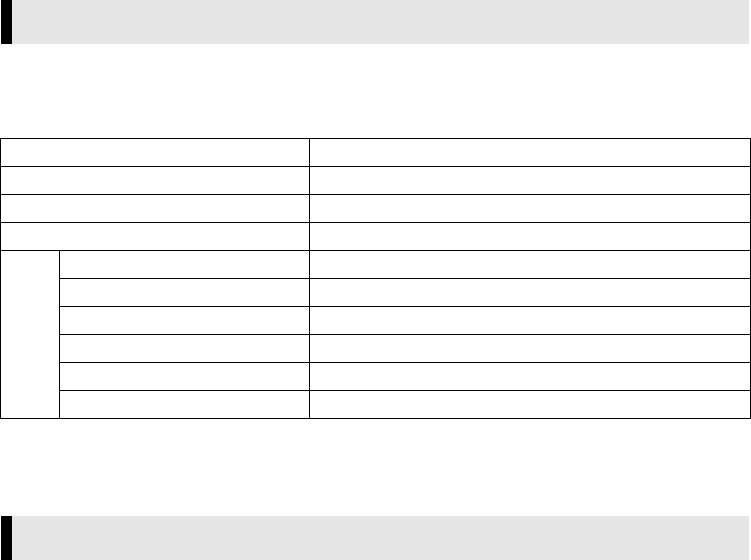
Notice for Users
Product Name
Model
Problem
Error Message
PC
Manufacturer
Model □Desktop □Laptop
CPU
OS
Memory MB
Available Hard Disk Space MB
Operating Environment
OS : Windows® Millennium Edition (Me) (pre-installed),
Windows® 2000 Professional (2000) (pre-installed),
Windows® XP Home Edition (XP) (pre-installed),
or Windows® XP Professional (XP) (pre-installed)
CPU : Intel MMX® Pentium®, at least 200 MHz
RAM : At least 64 MB recommended
Free hard disk space : At least 10 MB for installation, at least 500 MB recommended
Connector : IEEE1394 (i.LINK) connector
Display : Must be capable of displaying 800 x 600 dots with 16-bit color
Miscellaneous : Internet Explorer 5.5 or later
CONTINUED ON NEXT PAGE
_001EN_SHEET_M3D1_EK-Sheet.fm Page 3 Wednesday, December 18, 2002 4:53 PM
Master Page: Right
_001EN_SHEET_M3D1_EK-Sheet.fm Page 4
—4—
䡲For ImageMixer with VCD
In addition to the requirements on the previous page, the following requirements must be satisfied to use
ImageMixer with VCD.
●The system requirements information above is not a guarantee that the provided software will work on all
personal computers meeting those requirements.
●Microsoft® and Windows® are either registered trademarks or trademarks of Microsoft Corporation in the
United States and/or other countries.
●Other product and company names included in this instruction manual are trademarks and/or registered
trademarks of their respective holders.
OS : The same as requirements on the previous page.
CPU : For capturing video via an IEEE1394 (DV) cable, Intel Pentium® III, at least 500
MHz, at least 800 MHz recommended
Free hard disk space : At least 300 MB for installation, at least 1 GB recommended
Connector : IEEE1394 (i.LINK) connector
Miscellaneous : DirectX 8.0a or later
_001EN_SHEET_M3D1_EK-Sheet.fm Page 4 Wednesday, December 18, 2002 3:12 PM
Master Page: Right
_001EN_SHEET_M3D1_EK-Sheet.fm Page 5
—5—
Follow the procedure described below to install the software. From the [Setup] screen in step 2, you can
install the following software. Quit any other software you are using. (Check that there are no other
application icons on the status bar.)
ImageMixer with VCD 1.1
This application is used to capture still images and video clips from a camcorder through an IEEE1394
(i.LINK) connector, and is also used to manage and edit the still images and video clips, and to create Video
CDs.
Digital Photo Navigator 1.0
This application is used to organise still images on your PC and convert them into a variety of formats.
Adobe® Acrobat® Reader 5.0
This application is used to read PDF files.
1Load the provided CD-ROM in the PC.
After a moment, the [Setup] screen appears.
From the [Setup] screen, you can install the desired software.
2Click [Install] on the right side of the desired software and follow the on screen instructions to
complete the installation.
The installation of the selected software starts. The procedure differs depending on the software.
The following is the example of Digital Photo Navigator on Windows® Me.
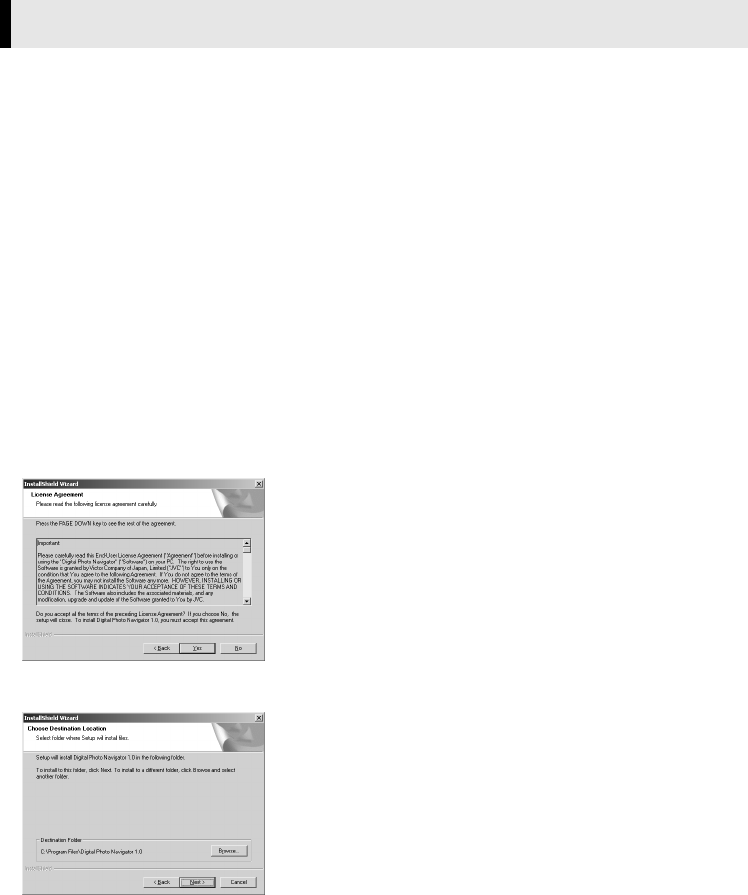
[License Agreement] screen appears.
Click [Yes].
Then, [Choose Destination Location] screen appears.
Click [Next].
Next, [Select Program Folder] screen appears.
Software Installation (Windows®)
CONTINUED ON NEXT PAGE
_001EN_SHEET_M3D1_EK-Sheet.fm Page 5 Thursday, December 19, 2002 3:36 PM
Master Page: Right
_001EN_SHEET_M3D1_EK-Sheet.fm Page 6
—6—
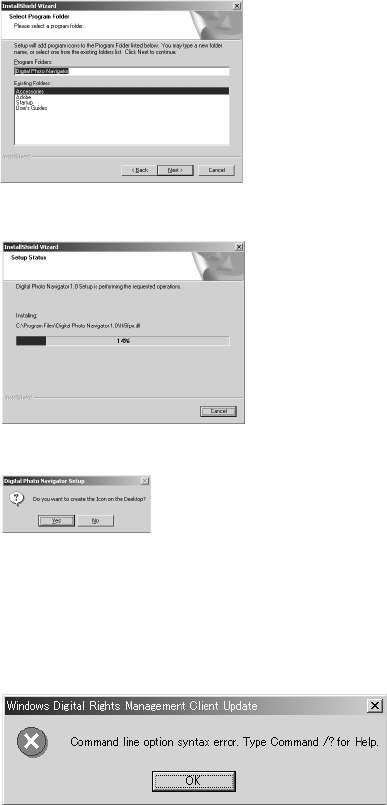
Click [Next].
[Setup Status] screen appears. Wait for a moment until the installation is finished.
When the installation is finished, [Digital Photo Navigator Setup] screen appears and asks you if you want
to create the icon on the desktop.
If you need it, click [Yes]. If not, click [No].
3When the message asking whether it is OK to restart the PC appears, click [Yes].
The PC restarts, and after a moment the [Setup] screen from step 1 appears.
4Repeat steps 2 and 3 to install all of the desired software.
Installing [ImageMixer with VCD 1.1]
When the error message below appears while installing ImageMixer, click [OK] to complete installation.
CONTINUED ON NEXT PAGE
_001EN_SHEET_M3D1_EK-Sheet.fm Page 6 Wednesday, December 18, 2002 3:12 PM
Master Page: Right
_001EN_SHEET_M3D1_EK-Sheet.fm Page 7
—7—
Connecting the DV cable
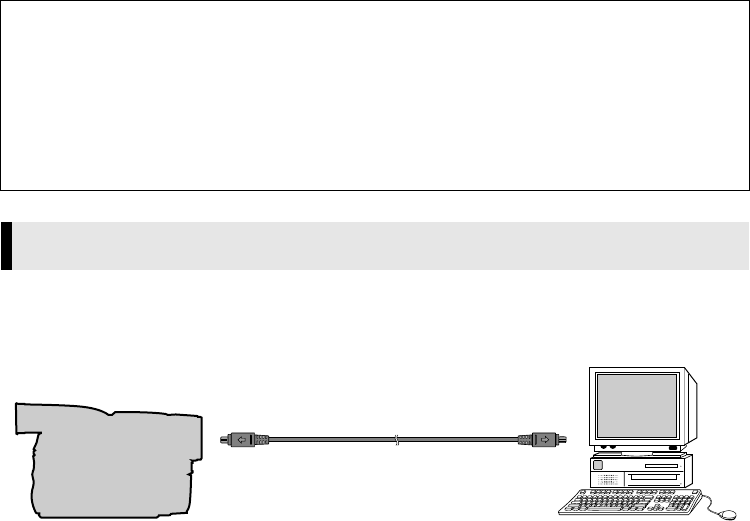
Connect the DV cable to use ImageMixer in capturing video.
1To assure safety, make sure all units are turned off before making any connections.
2Use the DV cable to connect the camcorder to the IEEE1394 connector on the PC.
●We recommend that you use the AC Adapter.
NOTE:
●When the DV cable is connected, turning on or off the camcorder causes malfunctions of the PC.
NOTES:
●The Digital Photo Navigator and ImageMixer with VCD instruction manual is included on the CD-ROM
in PDF format. Double-click the [JVC] folder and then double-click the [Docs] folder. Open the
“Instructions” file. Note that Adobe® Acrobat® Reader must be installed to read PDF files.
●When installing the [ImageMixer with VCD 1.1], select the desired language in the [Choose Setup
Language] screen.
●If you perform installation of a software that is already installed, uninstallation will start. In this case,
perform the installation again after uninstallation is finished.
●When you install ImageMixer with VCD 1.1 with Windows® 2000/XP, the [Microstaff WINASPI] screen
appears. Click [Next] to continue installation.
Connections (Windows®)
To DV connector
PC
To IEEE1394
connector
DV cable
Camcorder
_001EN_SHEET_M3D1_EK-Sheet.fm Page 7 Wednesday, December 18, 2002 3:12 PM

Master Page: Right
_001EN_SHEET_M3D1_EK-Sheet.fm Page 8
—8—
_001EN_SHEET_M3D1_EK-Sheet.fm Page 8 Wednesday, December 18, 2002 3:12 PM
