JVC KD DV5605UH Install_KD DV5606_004A_f User Manual DV5605UH, DV5606UH GET0654 004A
KD-DV5604UI KD-DV5604UI GET0654-004A English, INSTALLATION MANUAL
KD-DV5606U KD-DV5606U, KD-DV5606UH GET0654-004A English, INSTALLATION MANUAL
KD-DV5605U KD-DV5605U, KD-DV5605UH GET0654-004A English, INSTALLATION MANUAL
User Manual: JVC KD-DV5605UH KD-DV5605UH, KD-DV5606UH English, INSTALLATION MANUAL
Open the PDF directly: View PDF  .
.
Page Count: 2
1
KD-DV5606/KD-DV5605/
KD-DV5604
Installation/Connection Manual
GET0654-004A
[U/UH/UI]
0110DTSMDTJEIN
EN
This unit is designed to operate on 12 V DC, NEGATIVE ground electrical systems. If your vehicle does
not have this system, a voltage inverter is required, which can be purchased at JVC car audio dealers.
WARNINGS
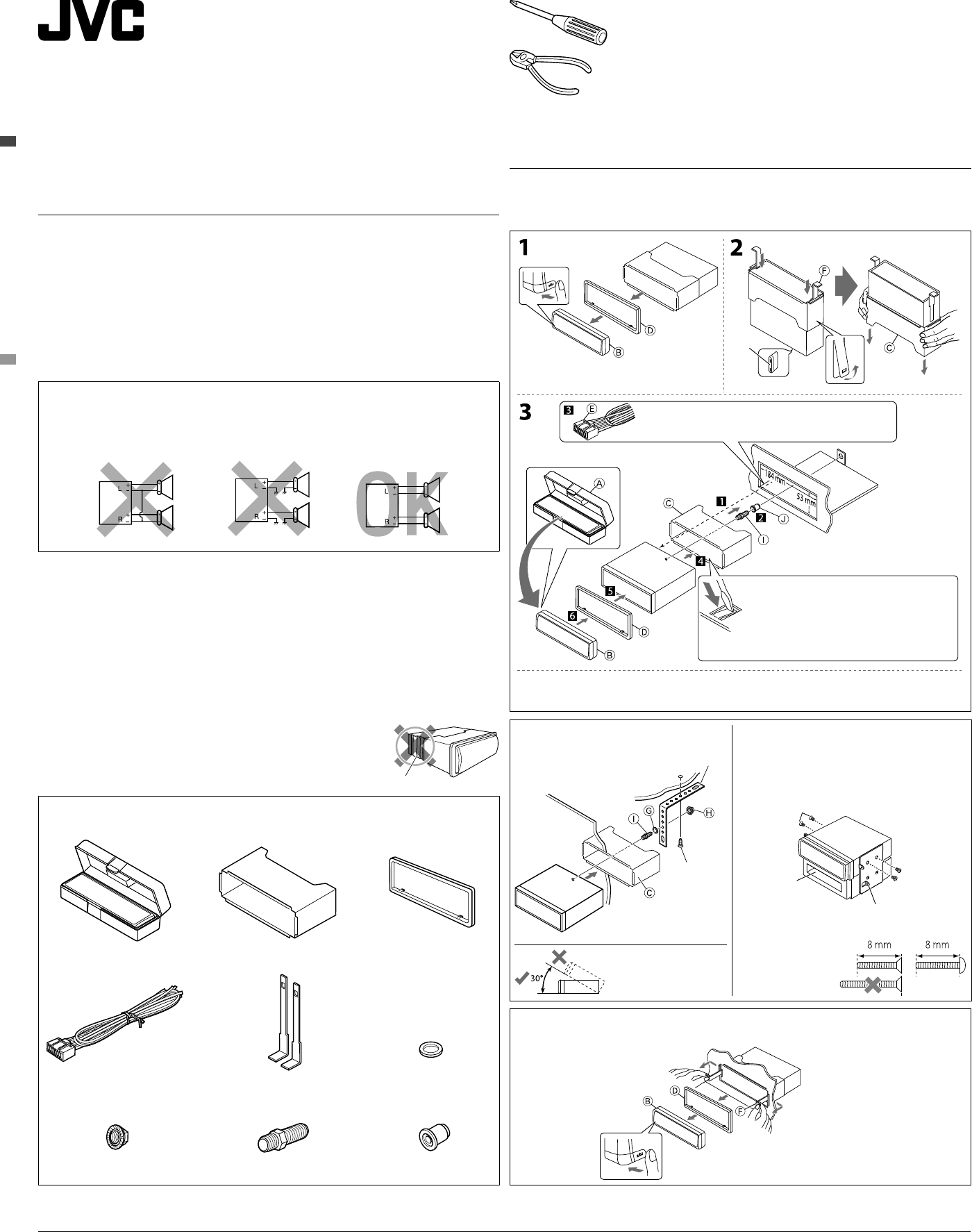
• DO NOT install any unit or wire any cable in a location where;
– it may obstruct the steering wheel and gearshift lever operations.
– it may obstruct the operation of safety devices such as air bags.
– it may obstruct visibility.
• DO NOT operate the unit while driving.
• If you need to operate the unit while driving, be sure to look around carefully.
• The driver must not watch the monitor while driving.
If the parking brake is not engaged, “DRIVER MUST NOT WATCH THE MONITOR WHILE
DRIVING.” appears on the monitor, and no playback picture will be shown.
– This warning appears only when the parking brake lead is connected to the parking brake
system built in the car.
PRECAUTIONS on power supply and speaker connections:
• DO NOT connect the speaker leads of the power cord to the car battery; otherwise, the unit
will be seriously damaged.
• BEFORE connecting the speaker leads of the power cord to the speakers, check the speaker wiring in
your car.
To prevent short circuits, we recommend that you disconnect the battery’s negative terminal and make all
electrical connections before installing the unit.
• Be sure to ground this unit to the car’s chassis again after installation.
Notes:
• Replace the fuse with one of the specified rating. If the fuse blows frequently, consult your JVC car audio
dealer.
• It is recommended to connect speakers with a maximum power of more than 50 W (both at the
rear and at the front, with an impedance of 4 Ω to 8 Ω). If the maximum power is less than 50 W,
change <AMP GAIN> setting to prevent the speakers from being damaged (see page 27 of the
INSTRUCTIONS).
• To prevent short circuits, cover the terminals of the UNUSED leads with insulating tape.
• The heat sink becomes very hot after use. Be careful not to touch it when
removing this unit.
INSTALLATION (IN-DASH MOUNTING)
The following illustration shows a typical installation. If you have any questions or require information
regarding installation kits, consult your JVC car audio dealer or a company supplying kits.
• If you are not sure how to install this unit correctly, have it installed by a qualified technician.
Removing the unit
Before removing the unit, release the rear section.
© 2010 Victor Company of Japan, Limited
Parts list for installation and connection
If any item is missing, consult your JVC car audio dealer immediately.
F Handles
I Mounting bolt (M5 × 20 mm)
G Washer (ø5)
J Rubber cushion
A / B Hard case/Control panel C Sleeve D Trim plate
E Power cord
H Lock nut (M5)
When installing the unit without
using the sleeve
In a Toyota car for example, first remove the car
radio and install the unit in its place.
When using the optional stay
Install the unit at an
angle of less than 30˚.
Bracket (not supplied)
Stay (option)
Screw (option)
Fire wall
Dashboard
Pocket
Flat head screws—M5 × 8 mm (not supplied)
Bend the appropriate tabs to hold
the sleeve firmly in place.
Do the required electrical connections.
• The fuse blows.
* Are the red and black leads connected correctly?
• Power cannot be turned on.
* Is the yellow lead connected?
• No sound from the speakers.
* Is the speaker output lead short-circuited?
• Sound is distorted.
* Is the speaker output lead grounded? ; Are the “–” terminals of L and R speakers grounded in common?
*
Heat sink
• Noise interfere with sounds.
* Is the rear ground terminal connected to the car’s chassis using shorter and thicker cords?
• This unit becomes hot.
* Is the speaker output lead grounded? ; Are the “–” terminals of L and R speakers grounded in common?
• This unit does not work at all.
* Have you reset your unit?
TROUBLESHOOTING
* When you stand the unit, be careful not to damage the fuse on the rear.
Install_KD-DV5606_004A_f.indd 1Install_KD-DV5606_004A_f.indd 1 1/29/10 9:33:38 AM1/29/10 9:33:38 AM
2
Light green
VIDEO OUT
(see diagram )
A
B
C
(see “Connecting the parking brake wire” )
15 A fuse
Black
Blue (white stripe)
Red
Yellow *2
To metallic body or chassis of the car
Ignition switch
Fuse block
To an accessory terminal in the fuse block
To the remote lead of other equipment (200 mA max.)
To a live terminal in the fuse block connecting to the car battery
(bypassing the ignition switch) (constant 12 V)
LINE OUT (REAR)
(see diagram )
Rear ground terminal
Reset the unit.
Front speaker (left) Front speaker (right) Rear speaker (left) Rear speaker (right)
PurplePurple (black stripe)GreenGreen (black stripe)GrayGray (black stripe)WhiteWhite (black stripe)
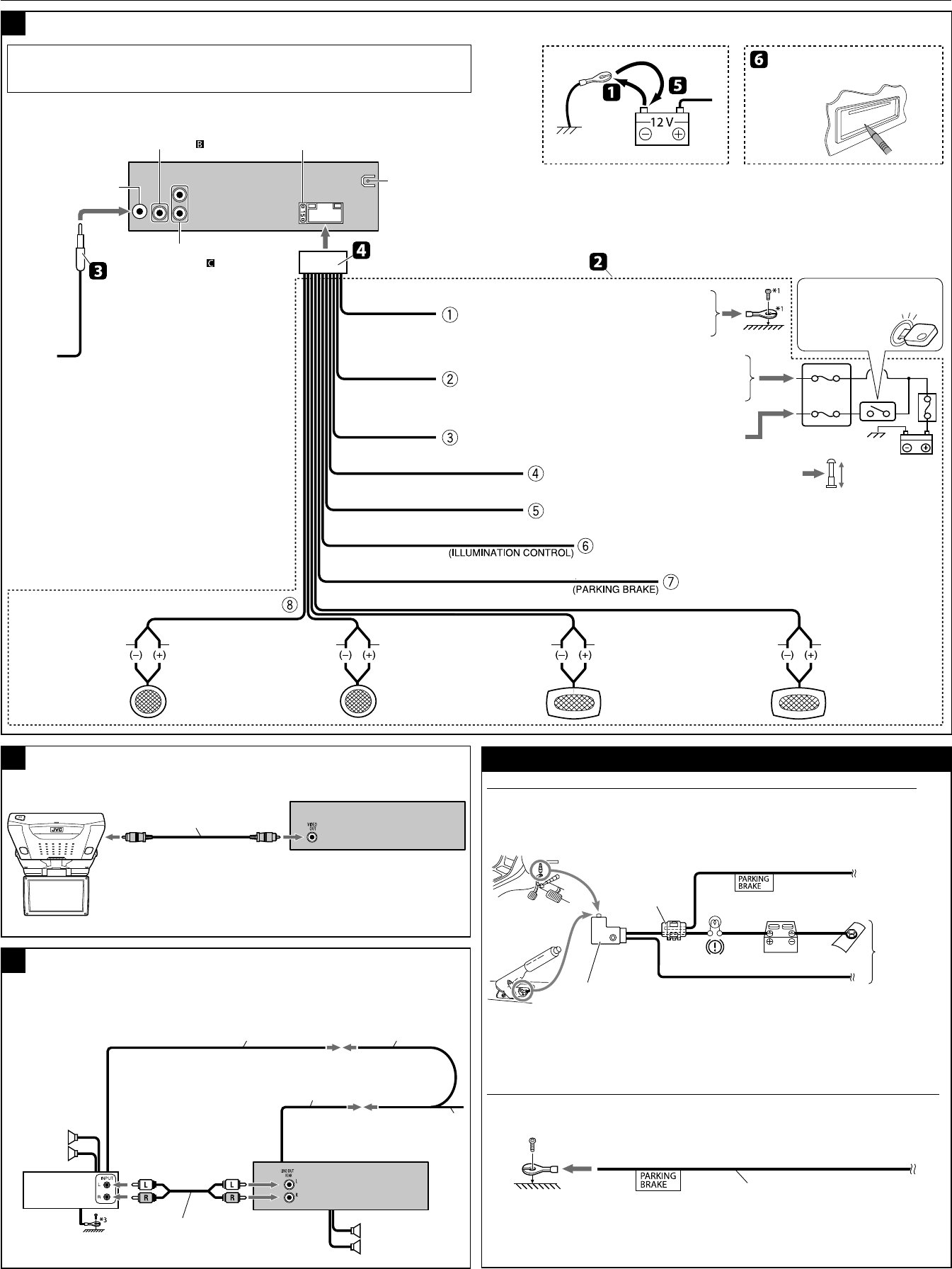
Typical connections
ELECTRICAL CONNECTIONS
Antenna terminal
To car light control switch
Orange (white stripe)
*1 Not supplied for this unit.
*2 Before checking the operation of this unit prior to installation, this lead must be connected, otherwise power cannot be turned on.
*3 Firmly attach the ground wire to the metallic body or to the chassis of the car—to the place uncoated with paint.
To the automatic antenna if any (250 mA max.)
Blue
IMPORTANT: A custom wiring harness (separately purchased) which is suitable for your car is
recommended for connection between the unit and your car.
• Consult your JVC car audio dealer or a company supplying kits for details.
Required connections for video playback
Connecting the external amplifier
Rear speakers
JVC Amplifier
Remote lead Y-connector *1
Remote lead (blue, white stripe)
To the remote lead of other equipment
or automatic antenna if any
Front speakers
Signal cord *1
KV-MR9010
9-INCH WIDESCREEN MONITOR *1
Video cord *1
Connecting the parking brake wire
(A) When installing the monitor in a location where it CAN be seen by the driver
Connect the parking brake wire to the parking brake system built in the car.
(B) When installing the monitor in a location where it CANNOT be seen by the driver
Connect the parking brake wire to metallic body or chassis of the car.
Disconnect the speakers from this unit, connect them to the amplifier. Leave the speaker leads of this
unit unused.
Parking brake wire
(light green)
To metallic body
or chassis of
the car
Parking brake switch
(inside the car)
Parking brake
Parking brake wire (light green)
Crimp connector *1
*1
*1
Install_KD-DV5606_004A_f.indd 2Install_KD-DV5606_004A_f.indd 2 1/29/10 9:33:40 AM1/29/10 9:33:40 AM
