JVC KD R816U Install_KD R816[U_UH]_006A_1 User Manual R816U, R816UH GET0652 006A
KD-R816UH KD-R816UH GET0652-006A English, Thai, INSTALLATION MANUAL
KD-R816U, KD-R816UH KD-R816U, KD-R816UH INSTALLATION MANUAL GET0652-006A
User Manual: JVC KD-R816U KD-R816U, KD-R816UH English, Thai, INSTALLATION MANUAL
Open the PDF directly: View PDF  .
.
Page Count: 2
1
KD-R816
Installation/Connection Manual
/
ENGLISH /
0110DTSMDTJEIN
EN, TH
© 2010 Victor Company of Japan, Limited
GET0652-006A
[U/UH]
Bracket / *2
Pocket /
Flat head screws (M5 × 8 mm) / (M5 × 8 mm) *2
INSTALLATION /
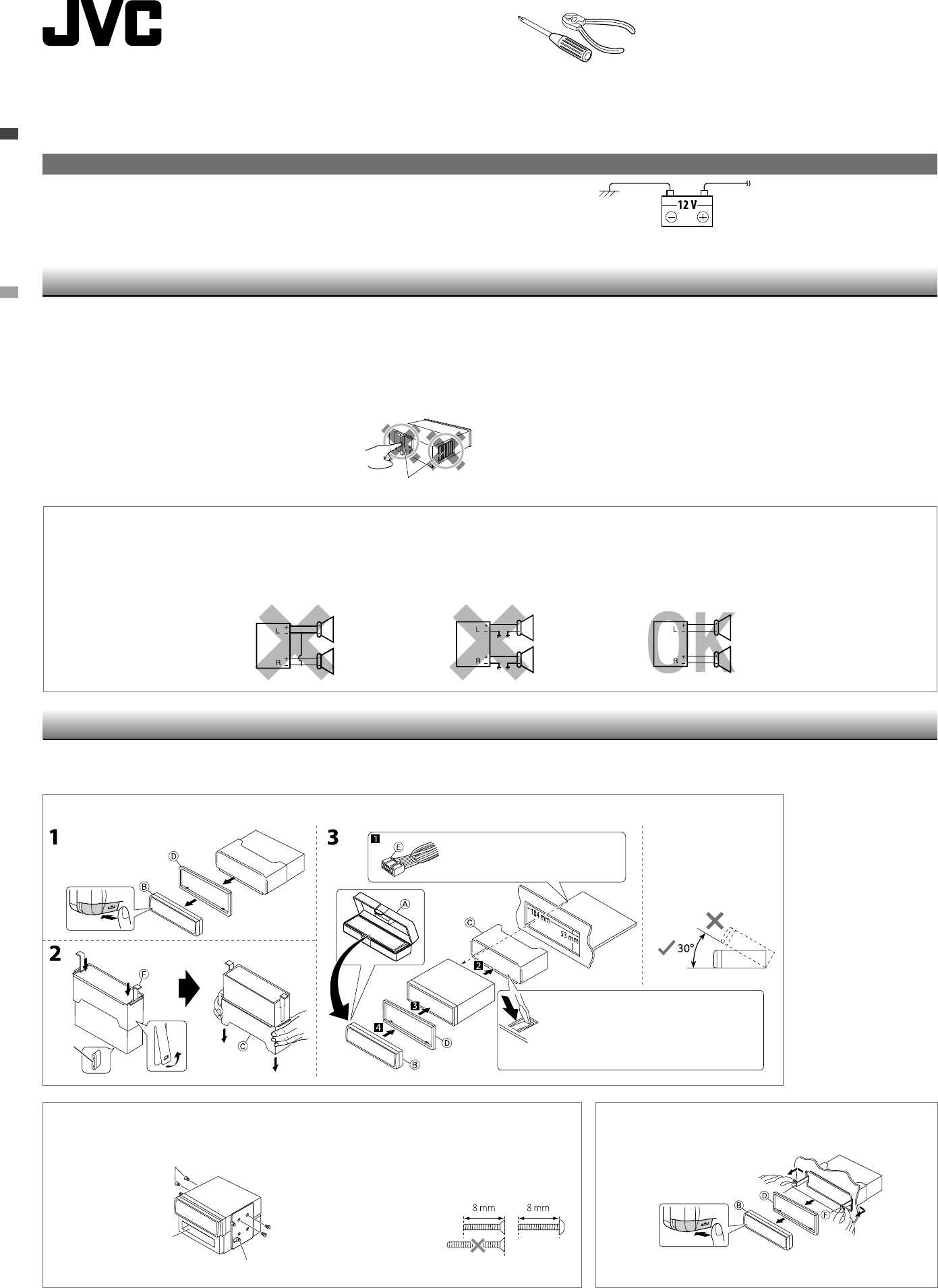
When installing the unit without using the sleeve /
In-dash mounting / In-dash
• To prevent short circuits:
– Disconnect the battery’s negative terminal and make all electrical connections before installing the unit.
– Cover the terminals of the UNUSED leads with insulating tape.
• Be sure to ground this unit to the car’s chassis again after installation.
• Replace the fuse with one of the specified rating.
• Connect speakers with a maximum power of more than 50 W (impedance of 4 Ω to 8 Ω). Otherwise,
change the <Amplifier Gain> setting. (See page 27 of the INSTRUCTIONS.)
• The heat sink becomes very hot after use. Be careful not to touch it when removing this unit.
• :
–
–
•
•
• 50 W ( 4 Ω 8 Ω) <Amplifier Gain>
( 27 )
•
12 V DC, NEGATIVE ground /
12 V,
To the car system /
You need the installation kits which corresponds to your car. /
Check the battery system in your car /
WARNINGS /
Removing the unit /
Release the rear section first... / ...
The following illustration shows a typical installation. If you have any questions or require information
regarding installation kits, consult your JVC car audio dealer or a company supplying kits.
JVC
Heat sink /
Do the required electrical connections.
Bend the appropriate tabs to hold the sleeve firmly
in place.
Install the unit at an angle of
less than 30˚.
30˚
*1
*1 When you stand the unit, be careful not to damage the fuse on the rear.
*2 Not supplied for this unit.
*1
*2
Part list /
A
Hard case / (×1)
B
Control panel / (×1)
C
Sleeve / (×1)
D
Trim plate / (×1)
E
Power cord / (×1)
F
Handles / (×2)
G Microphone / (×1)
H Microphone clips /
(×2)
I KS-UBT1: USB
Bluetooth adapter /
USB (×1)
PRECAUTIONS on power supply and speaker connections
• DO NOT connect the speaker leads of the power cord to the car battery; otherwise, the unit will be
seriously damaged.
• BEFORE connecting the speaker leads of the power cord to the speakers, check the speaker wiring in
your car.
•
•
Install_KD-R816[U_UH]_006A_1.indd 1Install_KD-R816[U_UH]_006A_1.indd 1 12/30/09 3:31:43 PM12/30/09 3:31:43 PM
2
• The fuse blows.
]
Are the red and black leads connected correctly?
• Power cannot be turned on.
]
Is the yellow lead connected?
• No sound from the speakers.
]
Is the speaker output lead short-circuited?
• Sound is distorted.
]
Is the speaker output lead grounded? ; Are the “–” terminals of L and R speakers
grounded in common?
• Noise interfere with sounds.
]
Is the rear ground terminal connected to the car’s chassis using shorter
and thicker cords?
• This unit becomes hot.
]
Is the speaker output lead grounded? ; Are the “–” terminals of L and R
speakers grounded in common?
• This unit does not work at all.
]
Have you reset your unit?
•
]
?
•
]
?
•
]
?
•
]
? ; “–” L () R ()
?
•
]
?
•
]
? ; “–” L () R ()
?
•
]
?
TROUBLESHOOTING /
To the blue (white stripe) lead
of the unit /
()
Rear ground terminal /
USB cable (approx. 1.2 m) / USB ( 1.2 .)
15 A fuse / 15 A
Antenna input /
*1 Not supplied for this unit.
*2 Firmly attach the ground wire to the metallic body or to the chassis of the car—to the place uncoated
with paint.
*3 Before checking the operation of this unit prior to installation, this lead must be connected; otherwise,
the power cannot be turned on.
*1
*2 —
*3
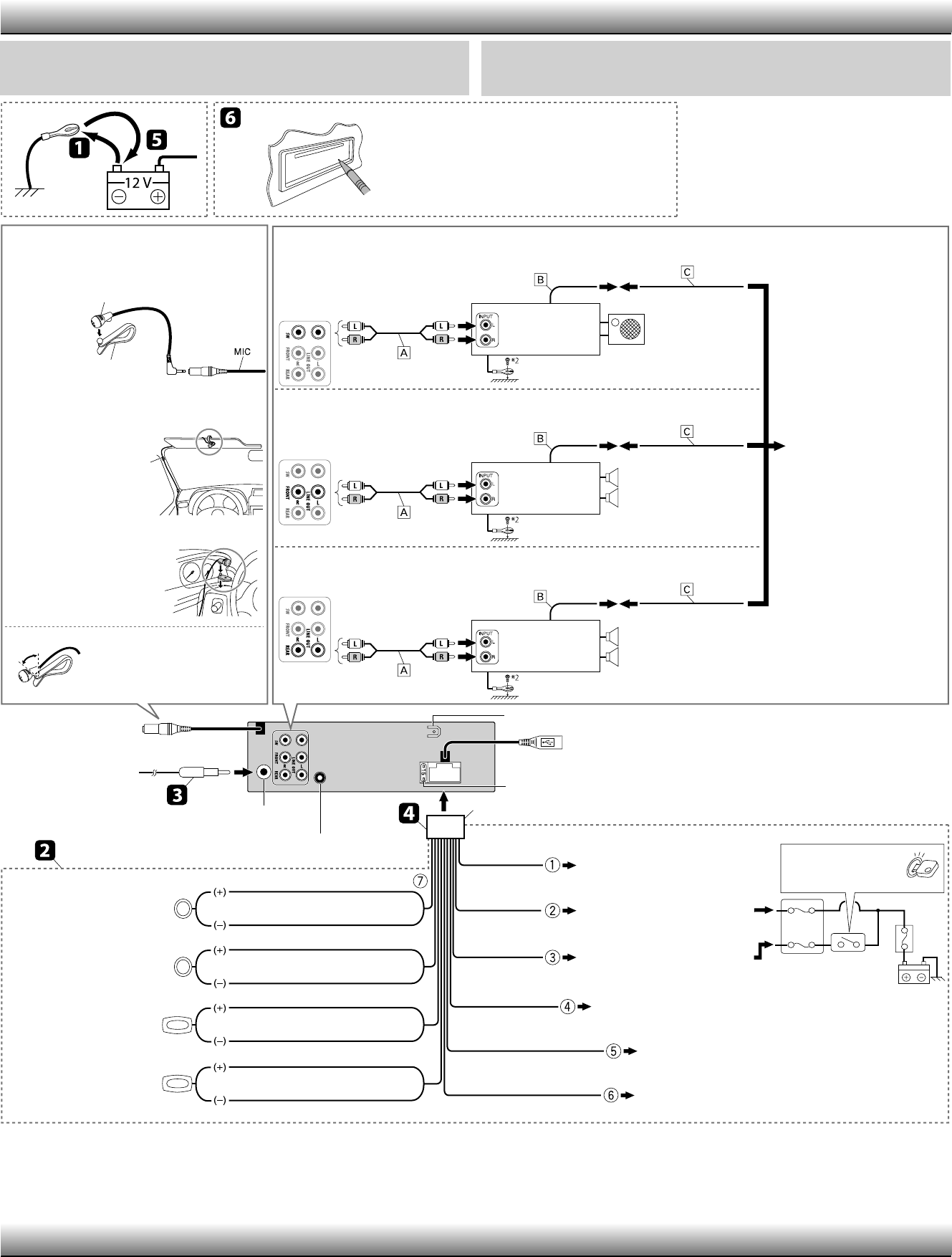
ELECTRICAL CONNECTIONS /
Reset the unit. /
JVC Amplifier /
JVC
JVC Amplifier /
JVC
JVC Amplifier /
JVC
Connecting a subwoofer (through a JVC amplifier) / ( JVC)
Connecting the front speakers (through a JVC amplifier) /
( JVC)
Connecting the rear speakers (through a JVC amplifier) /
( JVC)
IMPORTANT: A custom wiring harness (separately purchased) which is suitable for your car is
recommended for connection between the unit and your car.
• Consult your JVC car audio dealer or a company supplying kits for details.
: ()
• JVC
Front speakers /
Subwoofer /
Rear speakers /
White /
White (black stripe) / ()
Gray /
Gray (black stripe) / ()
Green /
Green (black stripe) / ()
Purple /
Purple (black stripe) / ()
Front speaker (left) /
()
Front speaker (right) /
()
Rear speaker (left) /
()
Rear speaker (right) /
()
Black /
Fuse block /
Ignition switch /
Blue (white stripe) /
()
Orange (white stripe) /
()
Red /
Yellow / *3
To the metallic body or chassis of the car /
To an accessory terminal /
To a live terminal (constant 12 V) /
( 12 V)
To the automatic antenna if any (250 mA max.) /
( 250 mA)
To the remote lead of other equipment (200 mA max.) /
( 200 mA)
To car light control switch /
Blue
/
Steering wheel remote input /
Adjust the microphone angle /
Secure the microphone cord
using cord cramps *
1
if necessary. /
* 1
H Microphone clip /
H Microphone clip /
E Power cord /
G Microphone /
– – – – – – – – – – or / – – – – – – – – – –
MIC (microphone input
terminal / )
Connecting the microphone unit /
Å Signal cord / *1
ı Remote lead /
Ç Y-connector /
Y *1
Install_KD-R816[U_UH]_006A_1.indd 2Install_KD-R816[U_UH]_006A_1.indd 2 12/30/09 9:02:34 AM12/30/09 9:02:34 AM
