JX ROBOT Technology S5 Handheld 3-Axis Gimbal Stabilizer User Manual Manual

Shenzhen JX ROBOT Technology Co., Ltd. Handheld 3-Axis Gimbal Stabilizer Manual

User manual

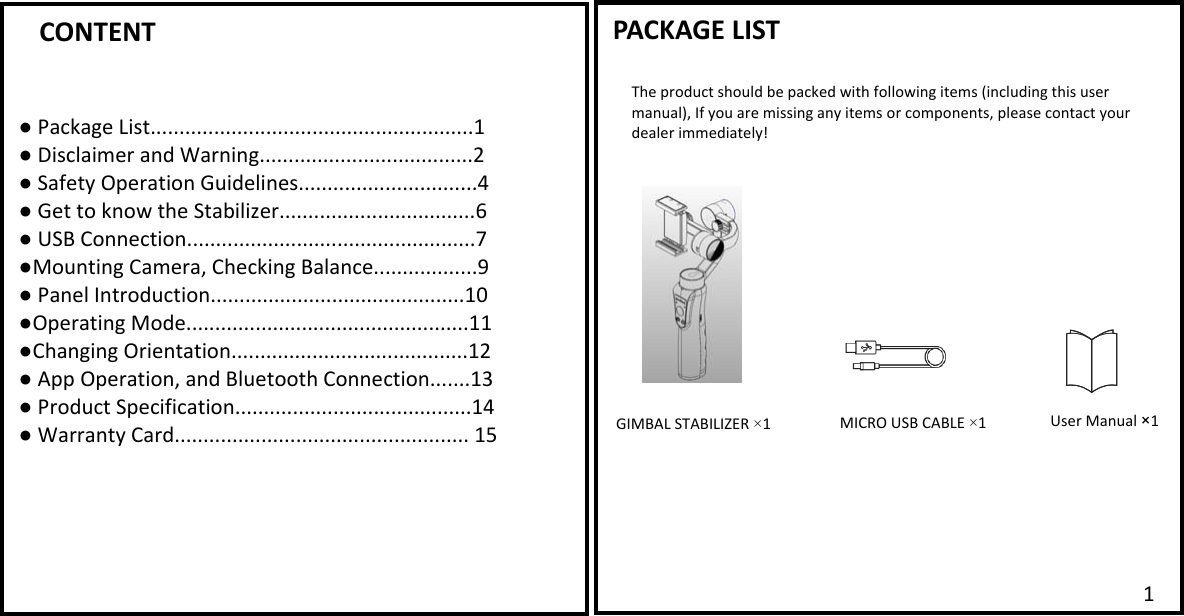
      CONTENT  ● Package List........................................................1 ● Disclaimer and Warning.....................................2 ● Safety Operation Guidelines...............................4 ● Get to know the Stabilizer..................................6 ● USB Connection..................................................7 ●Mounting Camera, Checking Balance..................9 ● Panel Introduction............................................10 ●Operating Mode.................................................11 ●Changing Orientation.........................................12 ● App Operation, and Bluetooth Connection.......13 ● Product Specification.........................................14 ● Warranty Card................................................... 15   PACKAGE LIST  The product should be packed with following items (including this user manual), If you are missing any items or components, please contact your dealer immediately! GIMBAL STABILIZER ×1 MICRO USB CABLE ×11   User Manual ×1
  DISCLAIMER AND WARINGThank you for purchasing our Stabilizer. Before you start PLEASE read this manual and become familiar with Stabilizer’s components and operating modes to ensure proper operation. The information contains herein affects your safety and your legal rights and responsibility.  Failure to read and follow the instructions and warnings may result in serious injury to you or damage to your device or property.  By using this product, you hereby signify that you have read this document carefully and that you understand and agree to abide by the terms and conditions herein. You agree that you are solely responsible for you conduct while using this product and for any consequences thereof. You agree to use this product only for purposes that are proper and in accordance with all terms, precautions, practices, policies and guidelines our company has made and may make available. Our company accepts no liability for damage, injury or any legal responsibility incurred directly or indirectly from the use of this product. The user shall observe safe and lawful practices including, but not limited to those set forth herein. GLOSSARY The following terms are used throughout the product literature to indicate various levels of potential harm when operating this product. ■Warning: Procedures, which if not properly followed, may incur property damage, grave accident, or serious injury. ■CAUTION: Procedures, which if not properly followed, may incur property damage and serious injury. ■NOTICE: Procedures, which if not properly followed, may incur property damage or minor injury. WARNING: Read the ENTIRE User guide to become familiar with the features of our Stabilizer before operating. Failure to operate the product correctly can result in damage to the product or personal property, and cause serious injury. This is a sophisticated product. It must be operated with caution and common sense and requires some basic mechanical ability. In-correct Use of product in a safe and responsible manner could result in injury or damage to the product or other property. This product is not intended for use by children without direct adult supervision. DO NOT use with incompatible components or in any way otherwise as mentioned or instructed in the product documents provided by our company. This Safety Guidelines herein contain instructions for safety, operation and maintenance. It is essential to read and follow all of the instructions and warnings in the user manual, prior to assembly, setup or use, in order to operate the product correctly and avoid damage or serious injury.  DISCLAIMER AND WARINGFederal Communications Commission (FCC) Statement This device complies with part 15 of the FCC Rules. Operation is subject to the following two conditions: (1) This device may not cause harmful interference, and (2) this device must accept any interference received, including interference that may cause undesired operation.   Note: This equipment has been tested and found to comply with the limits for a Class B digital device, pursuant to part 15 of the FCC Rules. These limits are designed to provide reasonable protection against harmful interference in a residential installation. This equipment generates, uses and can radiate radio frequency energy and, if not installed and used in accordance with the instructions, may cause harmful interference to radio communications. However, there is no guarantee that interference will not occur in a particular installation. If this equipment does cause harmful interference to radio or television reception, which can be determined by turning the equipment off and on, the user is encouraged to try to correct the interference by one or more of the following measures:     ●Reorient or relocate the receiving antenna. ●Increase the separation between the equipment and receiver.       ●Connect the equipment into an outlet on a circuit different from that to which the receiver is connected.       ●Consult the dealer or an experienced radio/TV technician for help.      Warning: Changes or modifications made to this device not expressly approved by Shenzhen JX ROBOT Technology Co., Ltd. may void the FCC authorization to operate this device.     Note: The manufacturer is not responsible for any radio or TV interference caused by unauthorized modifications to this equipment. Such modifications could void the user’s authority to operate the equipment.   2 3
  SAFETY OPERATION GUIDELINE  The Stabilizer should be used in temperatures from 0  to 40 .℃℃ Use of the battery in environments above 40  can lead to a fire or eaplosion. Use of battery below ℃0 can lead to ℃serious damage.  ■CHARING THE BATTERY 1. Always use our company approved charger for charging. Our company takes no responsibility if the battery is charged using Non-Our company charger.  2. Do not put the stabilizer near flammable materials or on flammable surfaces (such as carpet or wood).  Never leave the battery unattended during charging to prevent any accident. 3. Do not charge the battery immediately after use, when the Stabilizer temperature may be too high. Do not charge the battery until it cools down to near room temperature .Charging the battery with its temperature over 40  or lower than 5  may lead to leakage, overheating, or battery ℃℃damage.  4. Eaamine the charger and cable before use; make sure there is no damage to the enclosure, cord, plug, or other parts. Never use a damaged charger. Do not clean the charger with denature alcohol or other flammable solvents. Never use a damaged charger. 5. The Intelligent Battery will stop charging when it is full. Disconnect the batteries from the charger when fully charged.  ■STORAGE 1. DO NOT leave the Stabilizer near heat sources such as a furnace or heater, or eapose inside of a vehicle on hot days.  2. Store Stabilizer in dry environment, and never store the Stabilizer in any environment with temperature of over 60℃.  3.  Do not leave the Stabilizer unused for too long after it has been completely discharged to prevent over-discharge of battery which may result in battery damage and permanent damage.  ■TRAVEL NOTICE Discharge the battery power to 5% or lower before carrying the battery on an air flight.  4SAFETY OPERATION GUIDELINE  ■CAUTION:  1. The Stabilizers a high -precision control device, damaged may be caused to stabilizer if it is dropped or subject to eaternal force, and this many result in malfunction. 2. Make sure the rotation of Stabilizer aaes is not blocked by eaternal force when the stabilizer is power on. 3.The Stabilizer is not waterproof or water-resistant. Prevent contacts of any kind of liquid or clear with. Prevent contacts of any kind of liquid or clear with.  It is recommended to use dry cloth for cleaning. 4. Protect the Stabilizer from dust and sand during use.   ■NOTICE  1. Hold the Stabilizer’s Handle still in when it is powering up to ensure it starts up successfully. 2. Make sure the batteries are fully charged before each time of use. 3. Discharge the battery to 40%~65% if it will NOT be used for over 10 days. This can greatly eatend the battery life. 4. Charge and Discharge the battery completely once every 3 months to keep it active.  5
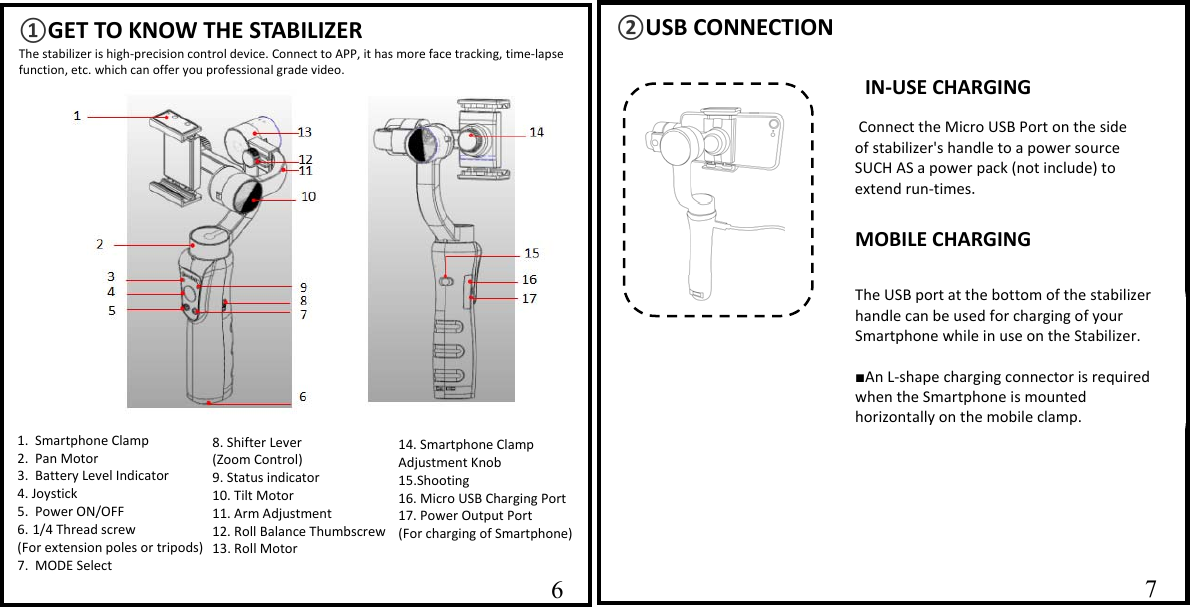
  ②USB CONNECTION                    67 ①GET TO KNOW THE STABILIZERThe stabilizer is high-precision control device. Connect to APP, it has more face tracking, time-lapse function, etc. which can offer you professional grade video.                   14. Smartphone Clamp Adjustment Knob 15.Shooting 16. Micro USB Charging Port      17. Power Output Port  (For charging of Smartphone) 8. Shifter Lever (Zoom Control) 9. Status indicator                     10. Tilt Motor 11. Arm Adjustment 12. Roll Balance Thumbscrew13. Roll Motor   1.  Smartphone Clamp   2.  Pan Motor 3.  Battery Level Indicator 4. Joystick 5.  Power ON/OFF 6. 1/4 Thread screw  (For eatension poles or tripods)7.  MODE Select  6IN-USE CHARGING Connect the Micro USB Port on the side of stabilizer's handle to a power source SUCH AS a power pack (not include) to eatend run-times. The USB port at the bottom of the stabilizer handle can be used for charging of your Smartphone while in use on the Stabilizer.  ■An L-shape charging connector is required when the Smartphone is mounted horizontally on the mobile clamp. MOBILE CHARGING
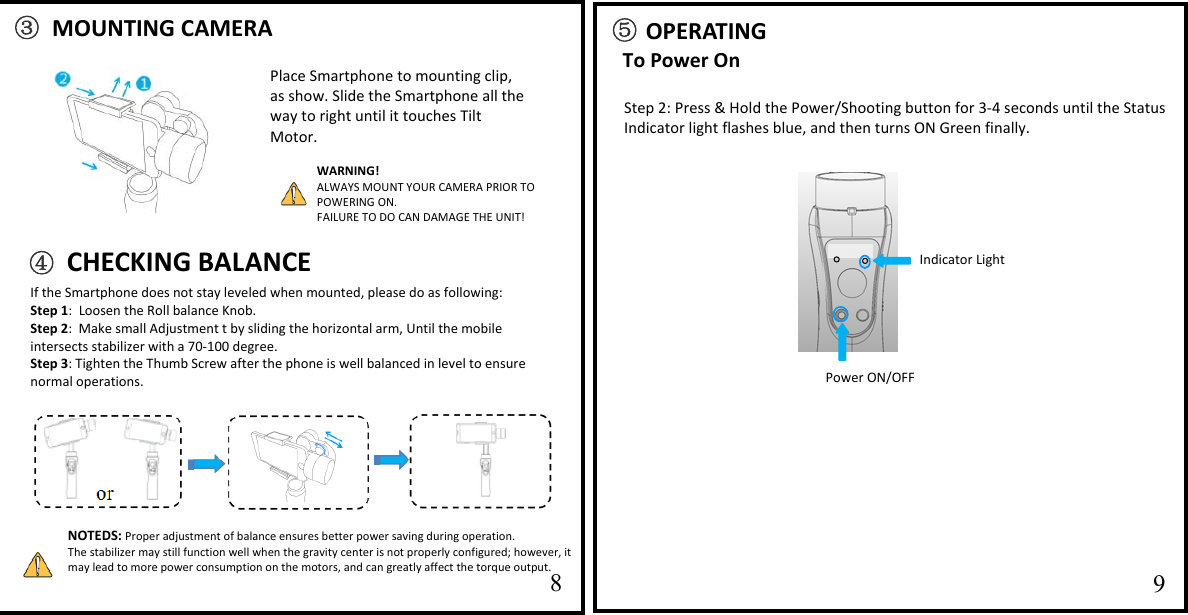
  1011⑤ OPERATING To Power On                   Step 2: Press & Hold the Power/Shooting button for 3-4 seconds until the Status Indicator light flashes blue, and then turns ON Green finally. ③ MOUNTING CAMERA     89 Power ON/OFF Place Smartphone to mounting clip, as show. Slide the Smartphone all the way to right until it touches Tilt Motor.     NOTEDS: Proper adjustment of balance ensures better power saving during operation.  The stabilizer may still function well when the gravity center is not properly configured; however, it may lead to more power consumption on the motors, and can greatly affect the torque output.   WARNING! ALWAYS MOUNT YOUR CAMERA PRIOR TO POWERING ON. FAILURE TO DO CAN DAMAGE THE UNIT! Indicator Light  If the Smartphone does not stay leveled when mounted, please do as following: Step 1:  Loosen the Roll balance Knob.  Step 2:  Make small Adjustment t by sliding the horizontal arm, Until the mobile intersects stabilizer with a 70-100 degree. Step 3: Tighten the Thumb Screw after the phone is well balanced in level to ensure normal operations.  ④ CHECKING BALANCE
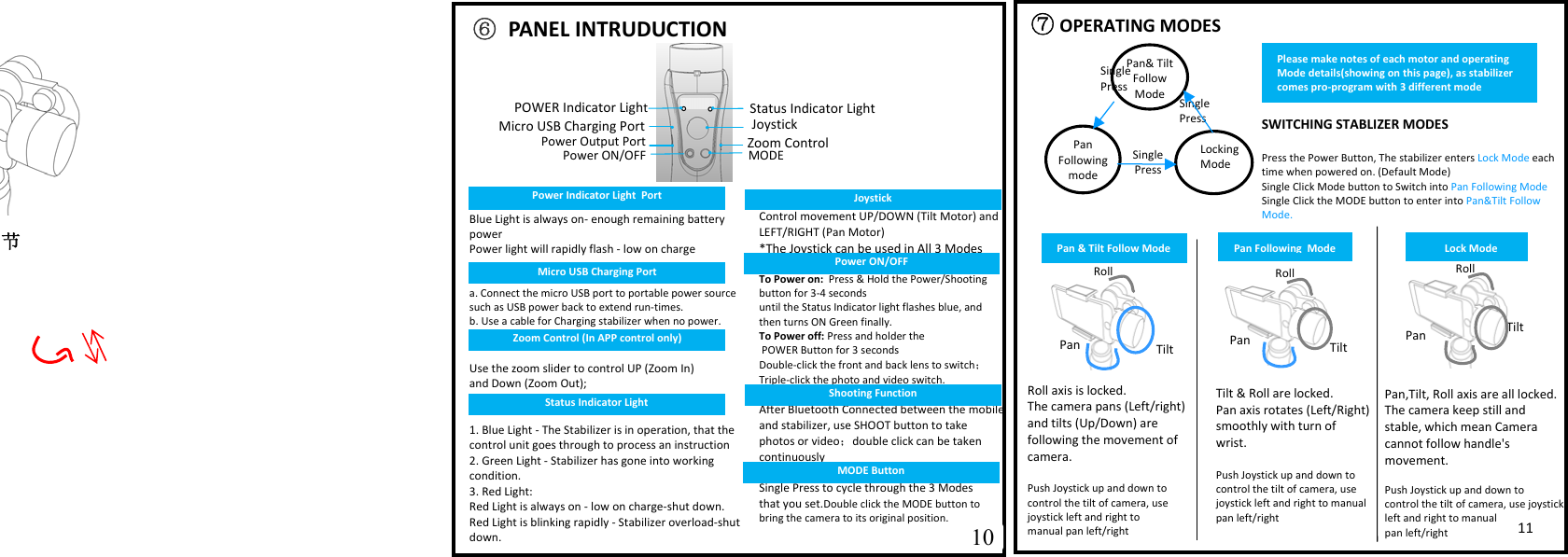
  ⑦OPERATING MODES                   SWITCHING STABLIZER MODES  Press the Power Button, The stabilizer enters Lock Mode each time when powered on. (Default Mode) Single Click Mode button to Switch into Pan Following Mode Single Click the MODE button to enter into Pan&Tilt Follow Mode.Single Press  Pan& Tilt Follow ModePan Following modeLocking ModeSingle PressSingle Press  Tilt & Roll are locked.   Pan aais rotates (Left/Right) smoothly with turn of wrist.  Push Joystick up and down to control the tilt of camera, use joystick left and right to manual pan left/right Pan,Tilt, Roll aais are all locked.  The camera keep still and stable, which mean Camera cannot follow handle's movement.  Push Joystick up and down to  control the tilt of camera, use joystick left and right to manual  pan left/right Roll aais is locked. The camera pans (Left/right) and tilts (Up/Down) are  following the movement of camera.  Push Joystick up and down to control the tilt of camera, use joystick left and right to  manual pan left/right Roll   Tilt Pan Tilt  Pan 节                     10 11 Roll   Tilt Pan  ⑥ PANEL INTRUDUCTION Status Indicator Light Blue Light is always on- enough remaining battery power  Power light will rapidly flash - low on charge   a. Connect the micro USB port to portable power source such as USB power back to eatend run-times. b. Use a cable for Charging stabilizer when no power.   Use the zoom slider to control UP (Zoom In)  and Down (Zoom Out);    1. Blue Light - The Stabilizer is in operation, that the control unit goes through to process an instruction 2. Green Light - Stabilizer has gone into working condition. 3. Red Light: Red Light is always on - low on charge-shut down. Red Light is blinking rapidly - Stabilizer overload-shut down.   Control movement UP/DOWN (Tilt Motor) and LEFT/RIGHT (Pan Motor) *The Joystick can be used in All 3 Modes  To Power on:  Press & Hold the Power/Shooting button for 3-4 seconds  until the Status Indicator light flashes blue, and then turns ON Green finally. To Power off: Press and holder the  POWER Button for 3 seconds Double-click the front and back lens to switch; Triple-click the photo and video switch.  After Bluetooth Connected between the mobile and stabilizer, use SHOOT button to take photos or video;double click can be taken continuously  Single Press to cycle through the 3 Modes  that you set.Double click the MODE button to bring the camera to its original position.  JoystickPower ON/OFF MODEMicro USB Charging PortZoom ControlPan & Tilt Follow Mode Pan Following  Mode Lock Mode Please make notes of each motor and operating Mode details(showing on this page), as stabilizer comes pro-program with 3 different mode Roll   Micro USB Charging Port Power Indicator Light  Port POWER Indicator LightPower Output PortZoom Control (In APP control only) Status Indicator Light Joystick Power ON/OFF Shooting Function MODE Button
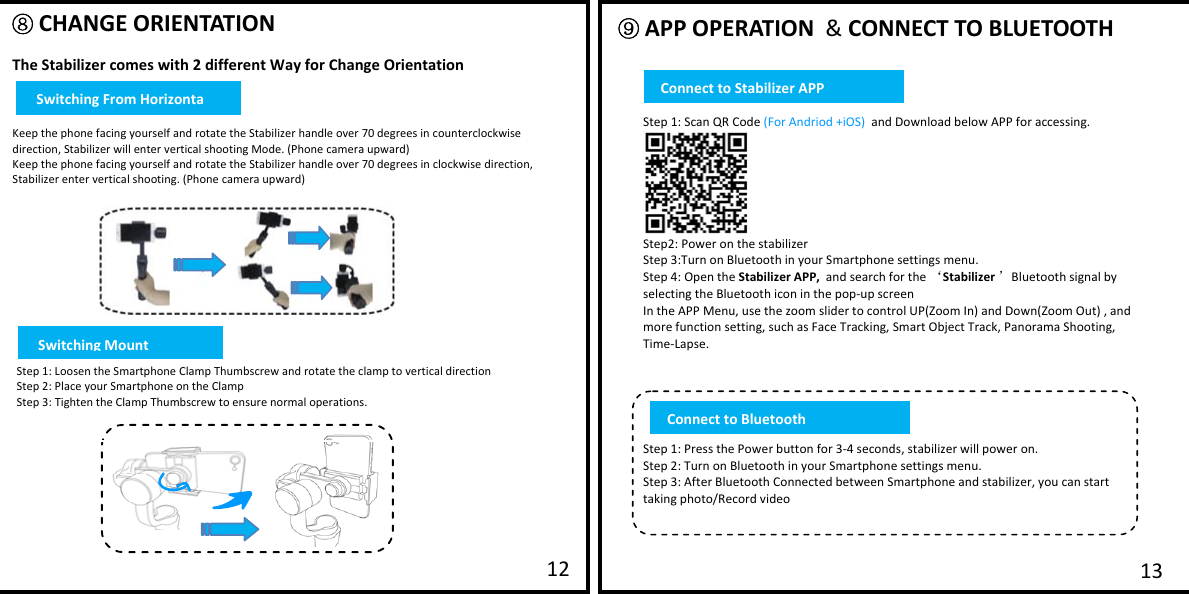
         ⑧ CHANGE ORIENTATION  The Stabilizer comes with 2 different Way for Change Orientation   Keep the phone facing yourself and rotate the Stabilizer handle over 70 degrees in counterclockwise direction, Stabilizer will enter vertical shooting Mode. (Phone camera upward) Keep the phone facing yourself and rotate the Stabilizer handle over 70 degrees in clockwise direction, Stabilizer enter vertical shooting. (Phone camera upward) ⑨ APP OPERATION  & CONNECT TO BLUETOOTH  13 12  Step 1: Scan QR Code (For Andriod +iOS)  and Download below APP for accessing.   Step2: Power on the stabilizer Step 3:Turn on Bluetooth in your Smartphone settings menu. Step 4: Open the Stabilizer APP,  and search for the ‘Stabilizer ’Bluetooth signal by selecting the Bluetooth icon in the pop-up screen  In the APP Menu, use the zoom slider to control UP(Zoom In) and Down(Zoom Out) , and more function setting, such as Face Tracking, Smart Object Track, Panorama Shooting, Time-Lapse.      Step 1: Press the Power button for 3-4 seconds, stabilizer will power on. Step 2: Turn on Bluetooth in your Smartphone settings menu. Step 3: After Bluetooth Connected between Smartphone and stabilizer, you can start taking photo/Record video   Step 1: Loosen the Smartphone Clamp Thumbscrew and rotate the clamp to vertical direction  Step 2: Place your Smartphone on the Clamp Step 3: Tighten the Clamp Thumbscrew to ensure normal operations.  Connectto BluetoothConnect to Stabilizer APPSwitching From HorizontaSwitching Mount
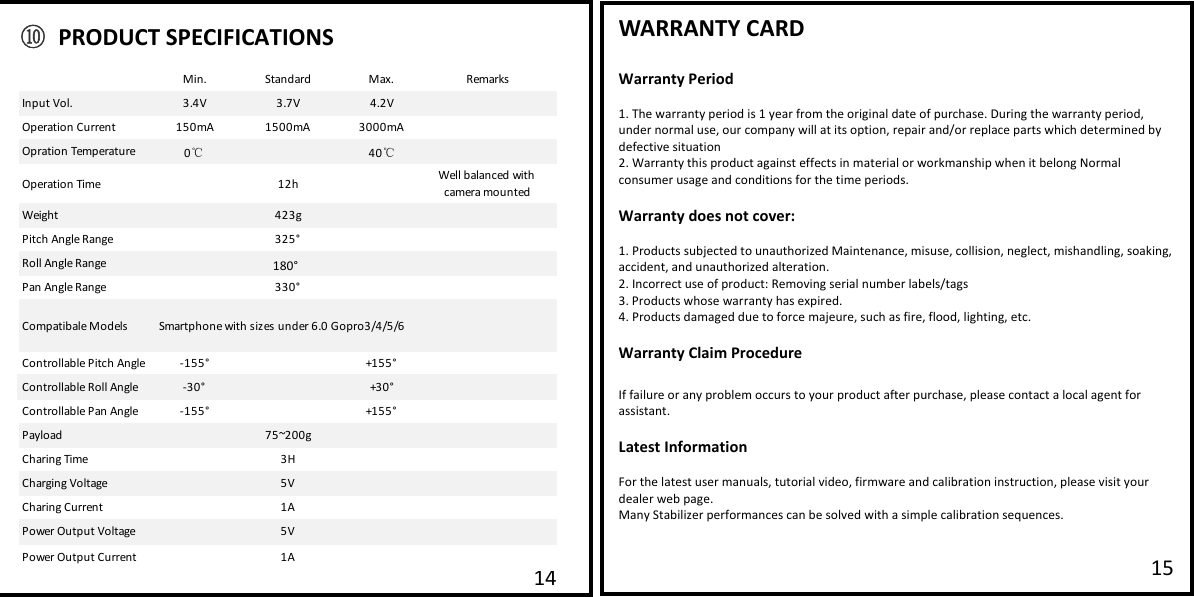
  WARRANTY CARD  Warranty Period  1. The warranty period is 1 year from the original date of purchase. During the warranty period, under normal use, our company will at its option, repair and/or replace parts which determined by defective situation 2. Warranty this product against effects in material or workmanship when it belong Normal consumer usage and conditions for the time periods.   Warranty does not cover:  1. Products subjected to unauthorized Maintenance, misuse, collision, neglect, mishandling, soaking, accident, and unauthorized alteration. 2. Incorrect use of product: Removing serial number labels/tags  3. Products whose warranty has eapired. 4. Products damaged due to force majeure, such as fire, flood, lighting, etc.  Warranty Claim Procedure  If failure or any problem occurs to your product after purchase, please contact a local agent for assistant.  Latest Information  For the latest user manuals, tutorial video, firmware and calibration instruction, please visit your dealer web page. Many Stabilizer performances can be solved with a simple calibration sequences.     15 14Min. Standard Maa.RemarksInput Vol. 3.4V 3.7V 4.2VOperation Current 150mA 1500mA 3000mAOpration Temperature 040Operation Time 12h Well balanced with camera mountedWeight 423gPitch Angle Range 325°Roll Angle Range 325°Pan Angle Range 330°Compatibale Models Smartphone with sizes under 6.0 Gopro3/4/5/6Controllable Pitch Angle -155° +155°Controllable Roll Angle -30° +30°Controllable Pan Angle -155° +155°Payload 75~200gCharing Time 3HCharging Voltage 5VCharing Current 1APower Output Voltage 5VPower Output Current 1A℃℃⑩ PRODUCT SPECIFICATIONS 180°
                      Certificate of QualityThis product is confirmed to meet quality standards and Permitted for sales after strict inspection.  QC inspector:16                    Custom InformationSales Information#1 Maintenance RecordCustomer Name Contact NoAddressSales Date Product Serials NoDealer:Contact  Tel No:Service Date Signature of RepairmanCause of ProblemService Result::::: ::::::□Solved  □Unsolved □Refunded/Replaced       WARRANTY CARD

Navigation menu