Jablotron JA80E Hard wired keypad with RFID card reader User Manual Exhibit 7 Instruction manual JA80E

Jablotron Ltd Hard wired keypad with RFID card reader Exhibit 7 Instruction manual JA80E

Instruction Manual

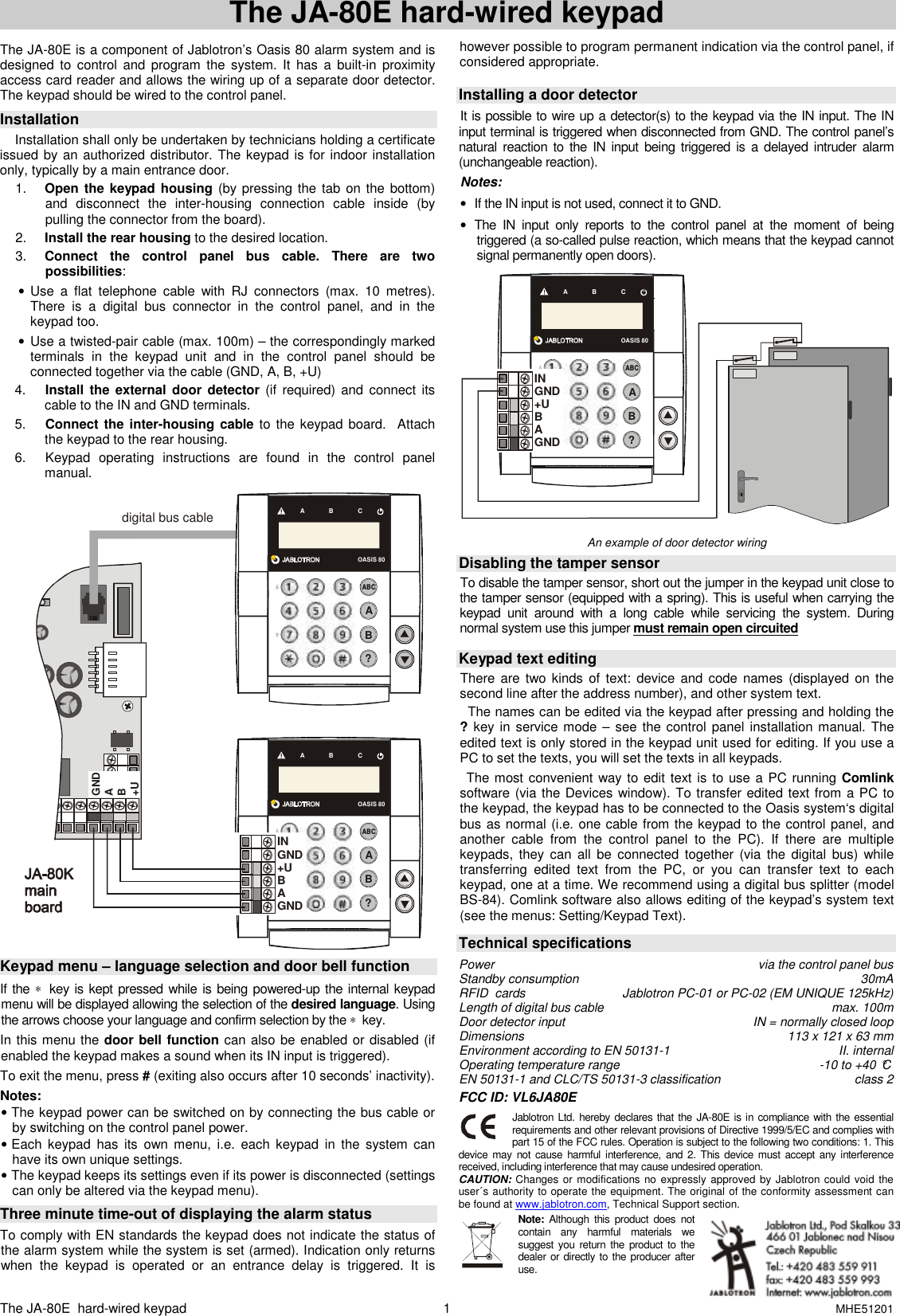
The JA-80E  hard-wired keypad      MHE51201 1 The JA-80E hard-wired keypad  The JA-80E is a component of Jablotron’s Oasis 80 alarm system and is designed  to  control  and  program  the  system. It  has  a  built-in  proximity access card reader and allows the wiring up of a separate door detector. The keypad should be wired to the control panel.    Installation  Installation shall only be undertaken by technicians holding a certificate issued by an authorized distributor. The keypad is for indoor installation only, typically by a main entrance door.  1.  Open the keypad housing (by pressing the  tab on the  bottom) and  disconnect  the  inter-housing  connection  cable  inside  (by pulling the connector from the board). 2.  Install the rear housing to the desired location. 3.  Connect  the  control  panel  bus  cable.  There  are  two possibilities:  •  Use  a  flat  telephone  cable  with  RJ  connectors  (max.  10  metres). There  is  a  digital  bus  connector  in  the  control  panel,  and  in  the keypad too.  •  Use a twisted-pair cable (max. 100m) – the correspondingly marked  terminals  in  the  keypad  unit  and  in  the  control  panel  should  be connected together via the cable (GND, A, B, +U) 4.  Install  the external door  detector (if  required) and connect  its cable to the IN and GND terminals. 5.  Connect the inter-housing cable  to the  keypad board.   Attach the keypad to the rear housing. 6.  Keypad  operating  instructions  are  found  in  the  control  panel manual.  OASIS 80A      B      CABC?BAINGND+UBAGNDGNDAB+Udigital bus cableOASIS 80A      B      CABC?BA  Keypad menu – language selection and door bell function If the ∗  key is kept pressed while  is being powered-up the internal keypad menu will be displayed allowing the selection of the desired language. Using the arrows choose your language and confirm selection by the ∗  key. In this menu the door bell function can also be enabled or disabled (if enabled the keypad makes a sound when its IN input is triggered). To exit the menu, press # (exiting also occurs after 10 seconds’ inactivity). Notes: • The keypad power can be switched on by connecting the bus cable or by switching on the control panel power. • Each  keypad  has  its  own menu,  i.e.  each  keypad  in  the  system  can have its own unique settings. • The keypad keeps its settings even if its power is disconnected (settings can only be altered via the keypad menu).  Three minute time-out of displaying the alarm status  To comply with EN standards the keypad does not indicate the status of the alarm system while the system is set (armed). Indication only returns when  the  keypad  is  operated  or  an  entrance  delay  is  triggered.  It  is however possible to program permanent indication via the control panel, if considered appropriate.    Installing a door detector It is possible to wire up a detector(s) to the keypad via the IN input. The IN input terminal is triggered when disconnected from GND. The control panel’s natural  reaction  to  the IN input being triggered is  a delayed intruder alarm (unchangeable reaction).    Notes:  •  If the IN input is not used, connect it to GND. •  The  IN  input  only  reports  to  the  control  panel  at  the  moment  of  being triggered (a so-called pulse reaction, which means that the keypad cannot signal permanently open doors).  OASIS 80A      B      CABC?BAINGND+UBAGND An example of door detector wiring   Disabling the tamper sensor To disable the tamper sensor, short out the jumper in the keypad unit close to the tamper sensor (equipped with a spring). This is useful when carrying the keypad  unit  around  with  a  long  cable  while  servicing  the  system.  During normal system use this jumper must remain open circuited   Keypad text editing  There are  two kinds  of  text: device  and code names  (displayed on  the second line after the address number), and other system text.   The names can be edited via the keypad after pressing and holding the ? key  in service mode –  see the control panel installation manual. The edited text is only stored in the keypad unit used for editing. If you use a PC to set the texts, you will set the texts in all keypads.     The most convenient way to edit text is  to use a PC running Comlink software (via the Devices window). To transfer edited text from a PC to the keypad, the keypad has to be connected to the Oasis system‘s digital bus as normal (i.e. one cable from the keypad to the control panel, and another  cable  from  the  control  panel  to  the  PC).  If  there  are  multiple keypads,  they  can  all  be  connected together (via the  digital  bus)  while transferring  edited  text  from  the  PC,  or  you  can  transfer  text  to  each keypad, one at a time. We recommend using a digital bus splitter (model BS-84). Comlink software also allows editing of the keypad’s system text (see the menus: Setting/Keypad Text).   Technical specifications  Power  via the control panel bus Standby consumption  30mA RFID  cards  Jablotron PC-01 or PC-02 (EM UNIQUE 125kHz) Length of digital bus cable  max. 100m Door detector input  IN = normally closed loop Dimensions   113 x 121 x 63 mm Environment according to EN 50131-1   II. internal Operating temperature range  -10 to +40 °C EN 50131-1 and CLC/TS 50131-3 classification   class 2  FCC ID: VL6JA80E   Jablotron Ltd.  hereby declares that the JA-80E is in compliance with the essential requirements and other relevant provisions of Directive 1999/5/EC and complies with part 15 of the FCC rules. Operation is subject to the following two conditions: 1. This device  may  not  cause  harmful interference,  and 2.  This device must accept  any  interference received, including interference that may cause undesired operation. CAUTION: Changes or modifications no expressly approved by Jablotron could void the user´s authority to operate the equipment. The original of the conformity assessment can be found at www.jablotron.com, Technical Support section. Note:  Although  this  product  does  not contain  any  harmful  materials  we suggest you  return  the  product  to  the dealer or directly to the producer after use.

Navigation menu