Jinan USR IOT Technology USRC216 Serial to WIFI Module User Manual

Jinan USR IOT Technology Limited Serial to WIFI Module Users Manual

Users Manual

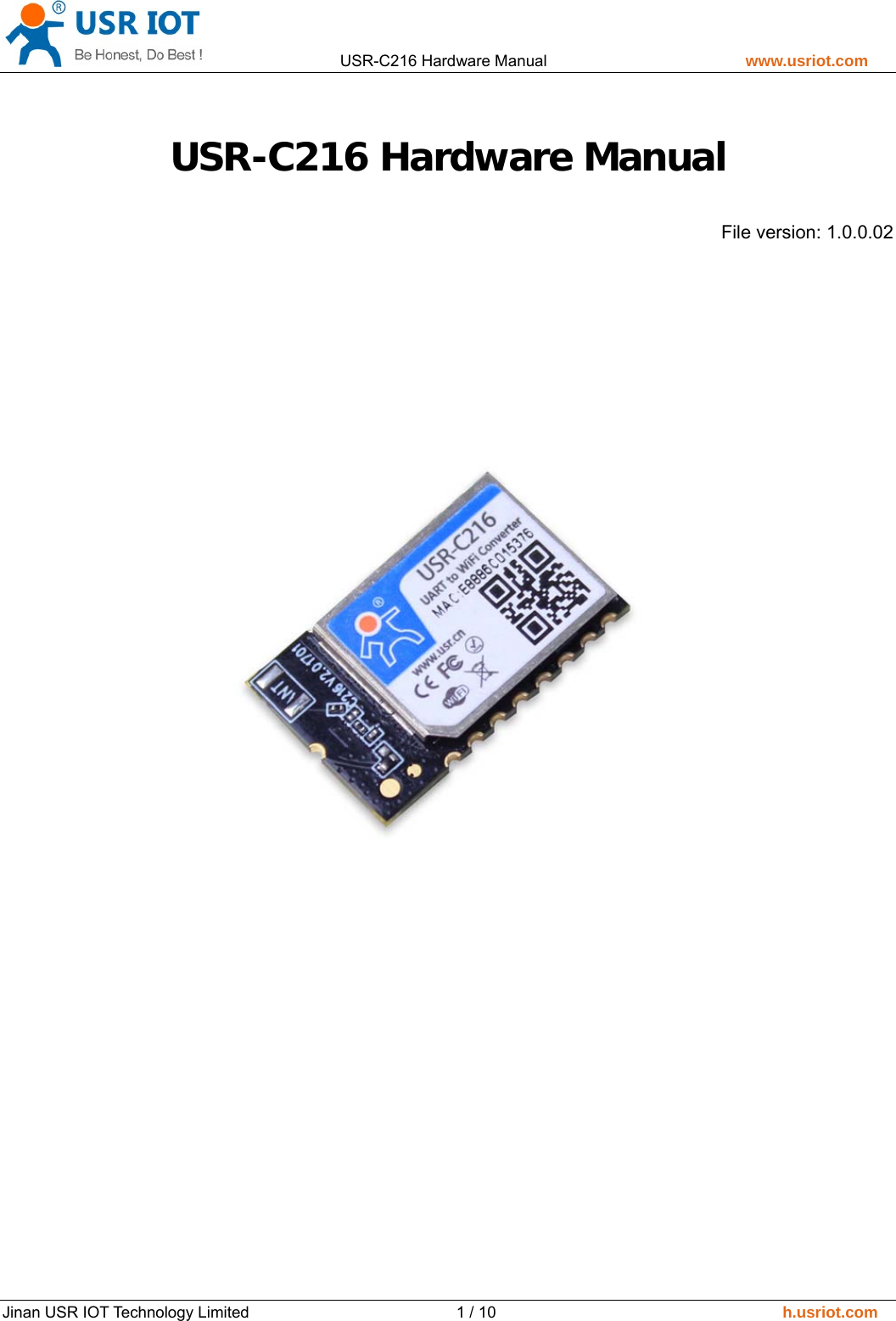
                USR-C216 Hardware Manual                         www.usriot.com   Jinan USR IOT Technology Limited                          1 / 10                                    h.usriot.com USR-C216 Hardware Manual File version: 1.0.0.02
                USR-C216 Hardware Manual                         www.usriot.com   Jinan USR IOT Technology Limited                          2 / 10                                    h.usriot.com Content USR-C216 Hardware Manual ........................................................................................................ 1 1. Product Overview ..................................................................................................................... 3 1.1. Dimension ........................................................................................................................ 3 1.2. Encapsulation Size ........................................................................................................... 3 1.3. Pin Definition ................................................................................................................... 4 2. Hardware Design ...................................................................................................................... 5 2.1. Typical Connection .......................................................................................................... 5 2.2. Power Interface ............................................................................................................... 5 2.3. UART Interface ................................................................................................................ 5 2.4. LED .................................................................................................................................. 6 2.5. Reset and Reload ............................................................................................................. 6 2.6. Antenna ........................................................................................................................... 7 3. Contact ...................................................................................................................................... 8 4. Disclaimer ................................................................................................................................. 9 5. Update History ........................................................................................................................ 10
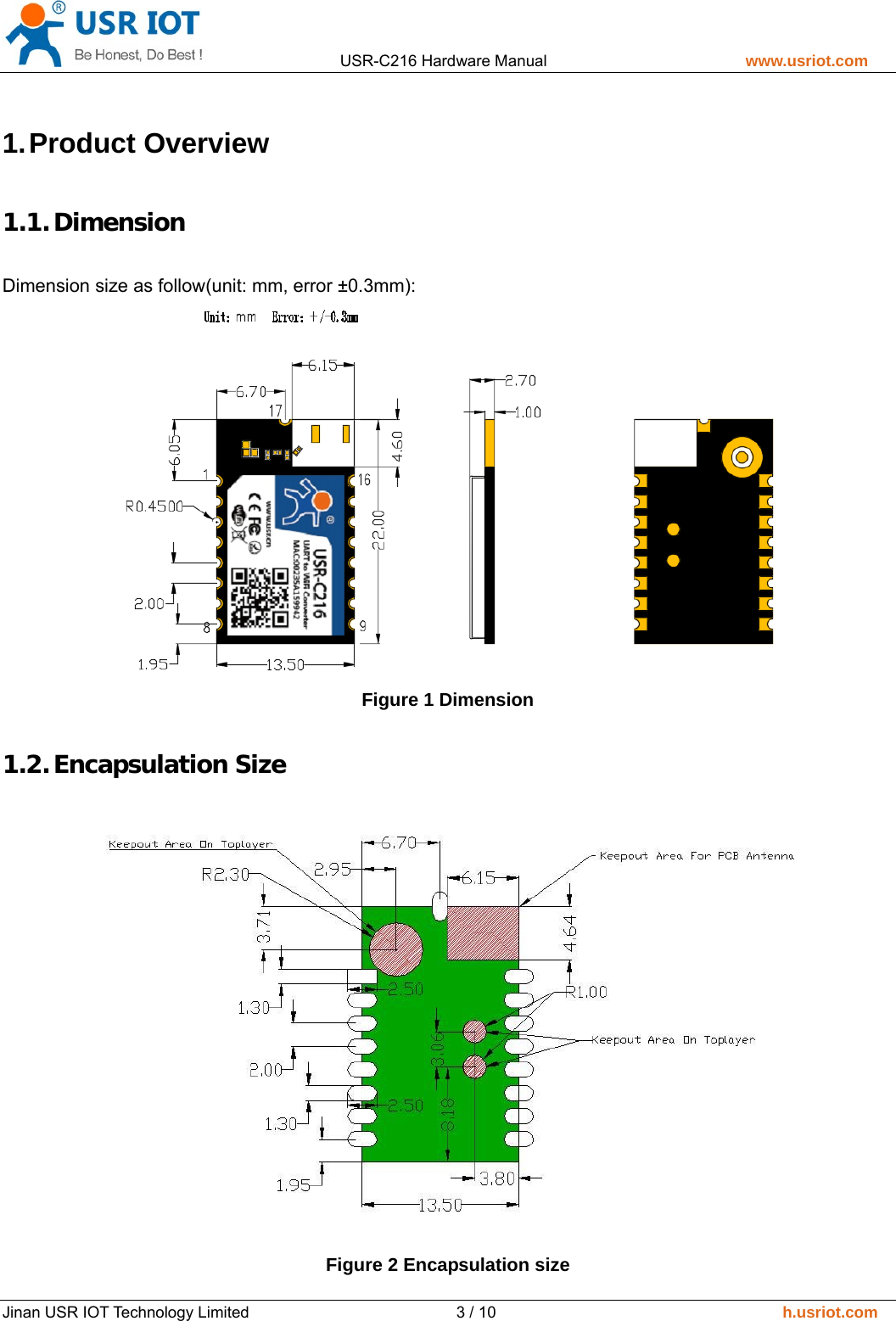
                USR-C216 Hardware Manual                         www.usriot.com   Jinan USR IOT Technology Limited                          3 / 10                                    h.usriot.com 1. Product  Overview 1.1. Dimension Dimension size as follow(unit: mm, error ±0.3mm):  Figure 1 Dimension 1.2. Encapsulation Size  Figure 2 Encapsulation size
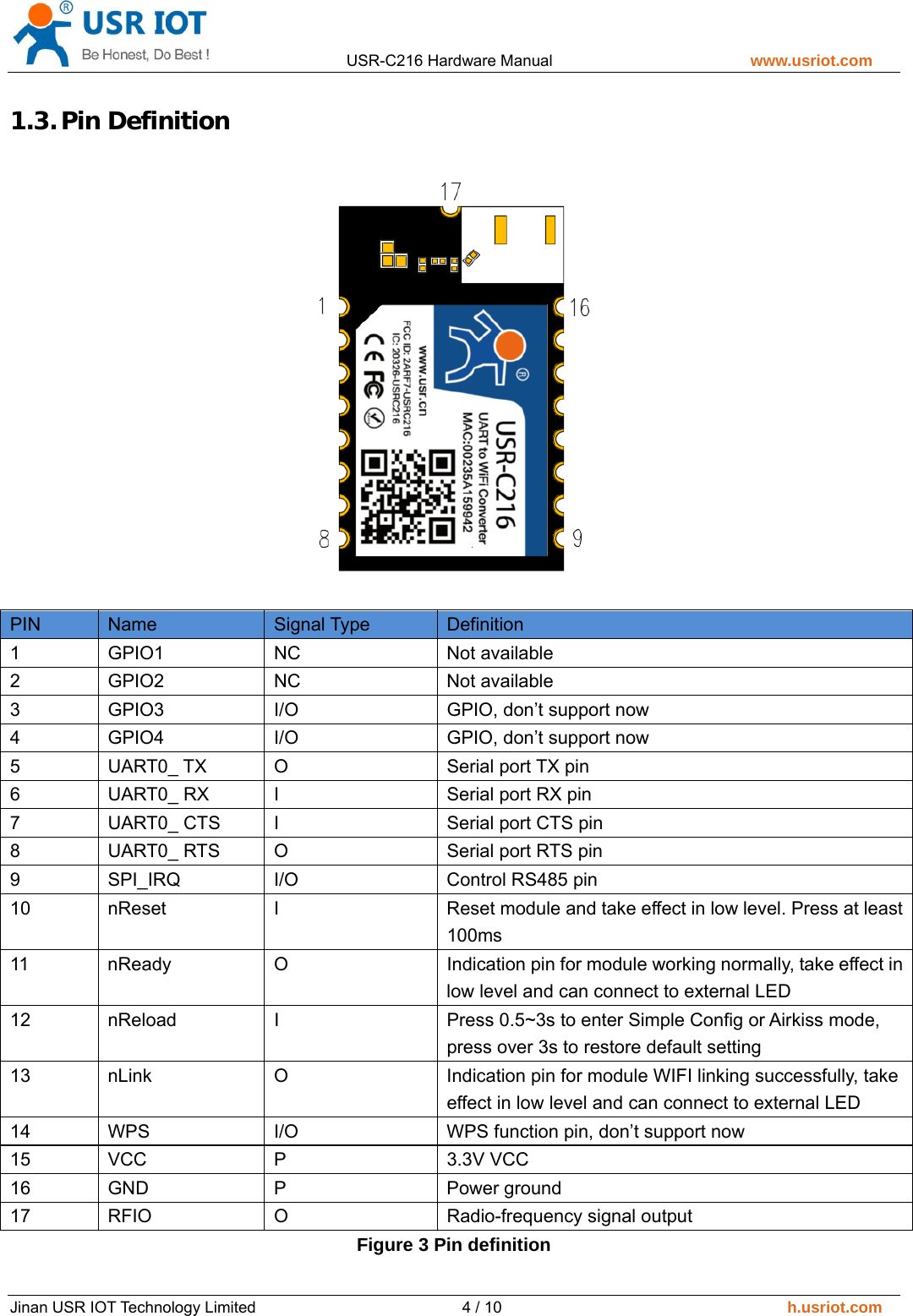
                USR-C216 Hardware Manual                         www.usriot.com   Jinan USR IOT Technology Limited                          4 / 10                                    h.usriot.com 1.3. Pin Definition   PIN  Name  Signal Type    Definition 1 GPIO1  NC  Not available 2 GPIO2  NC  Not available 3  GPIO3  I/O  GPIO, don’t support now 4  GPIO4  I/O  GPIO, don’t support now 5  UART0_ TX    O  Serial port TX pin 6  UART0_ RX  I  Serial port RX pin 7  UART0_ CTS  I  Serial port CTS pin 8  UART0_ RTS  O  Serial port RTS pin 9  SPI_IRQ  I/O  Control RS485 pin 10  nReset  I  Reset module and take effect in low level. Press at least 100ms 11  nReady  O  Indication pin for module working normally, take effect in low level and can connect to external LED 12  nReload  I  Press 0.5~3s to enter Simple Config or Airkiss mode, press over 3s to restore default setting 13  nLink  O  Indication pin for module WIFI linking successfully, take effect in low level and can connect to external LED 14  WPS  I/O  WPS function pin, don’t support now 15 VCC  P  3.3V VCC 16 GND  P  Power ground 17  RFIO  O  Radio-frequency signal output Figure 3 Pin definition
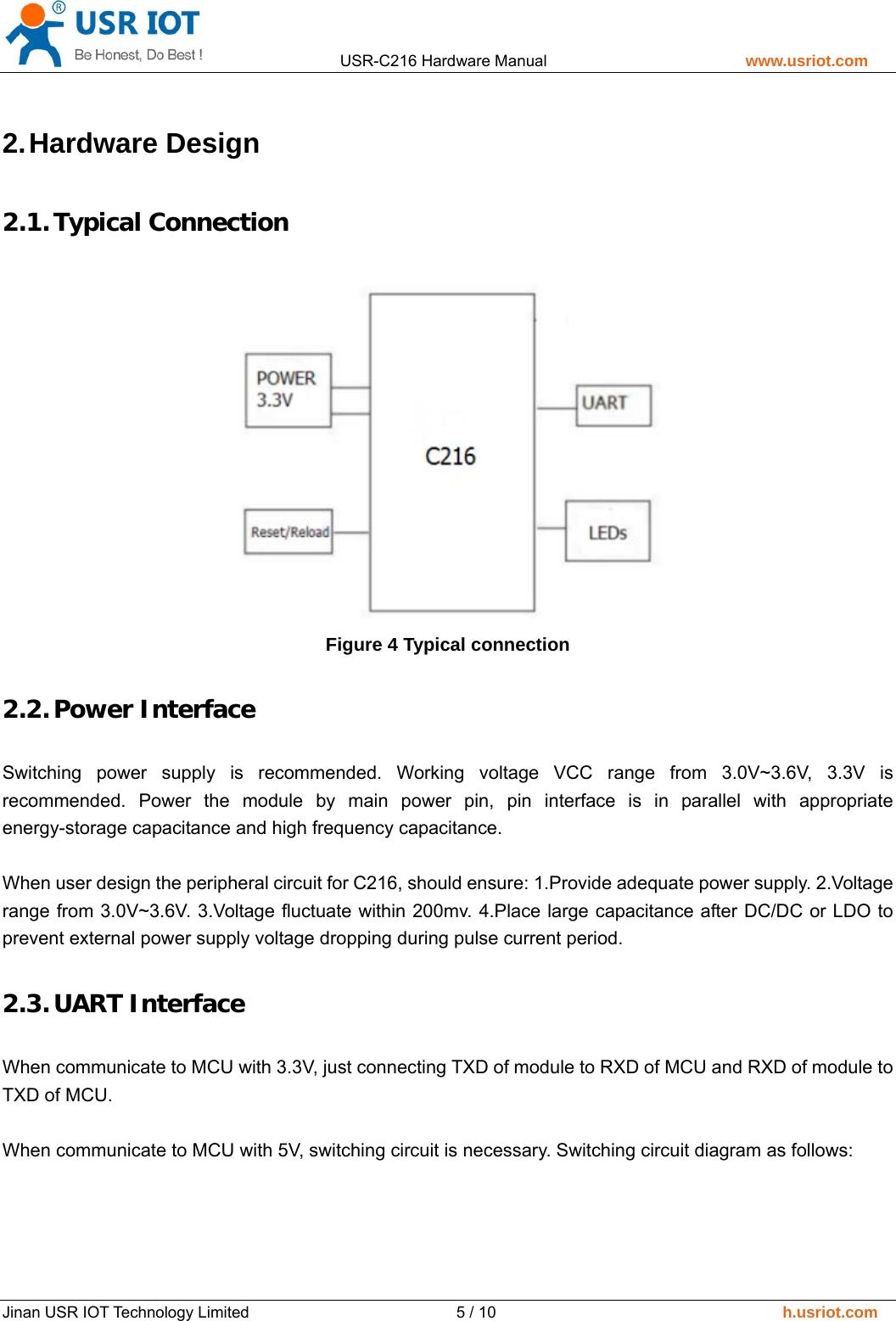
                USR-C216 Hardware Manual                         www.usriot.com   Jinan USR IOT Technology Limited                          5 / 10                                    h.usriot.com 2. Hardware  Design 2.1. Typical Connection  Figure 4 Typical connection 2.2. Power Interface Switching power supply is recommended. Working voltage VCC range from 3.0V~3.6V, 3.3V is recommended. Power the module by main power pin, pin interface is in parallel with appropriate energy-storage capacitance and high frequency capacitance.    When user design the peripheral circuit for C216, should ensure: 1.Provide adequate power supply. 2.Voltage range from 3.0V~3.6V. 3.Voltage fluctuate within 200mv. 4.Place large capacitance after DC/DC or LDO to prevent external power supply voltage dropping during pulse current period. 2.3. UART Interface When communicate to MCU with 3.3V, just connecting TXD of module to RXD of MCU and RXD of module to TXD of MCU.  When communicate to MCU with 5V, switching circuit is necessary. Switching circuit diagram as follows:
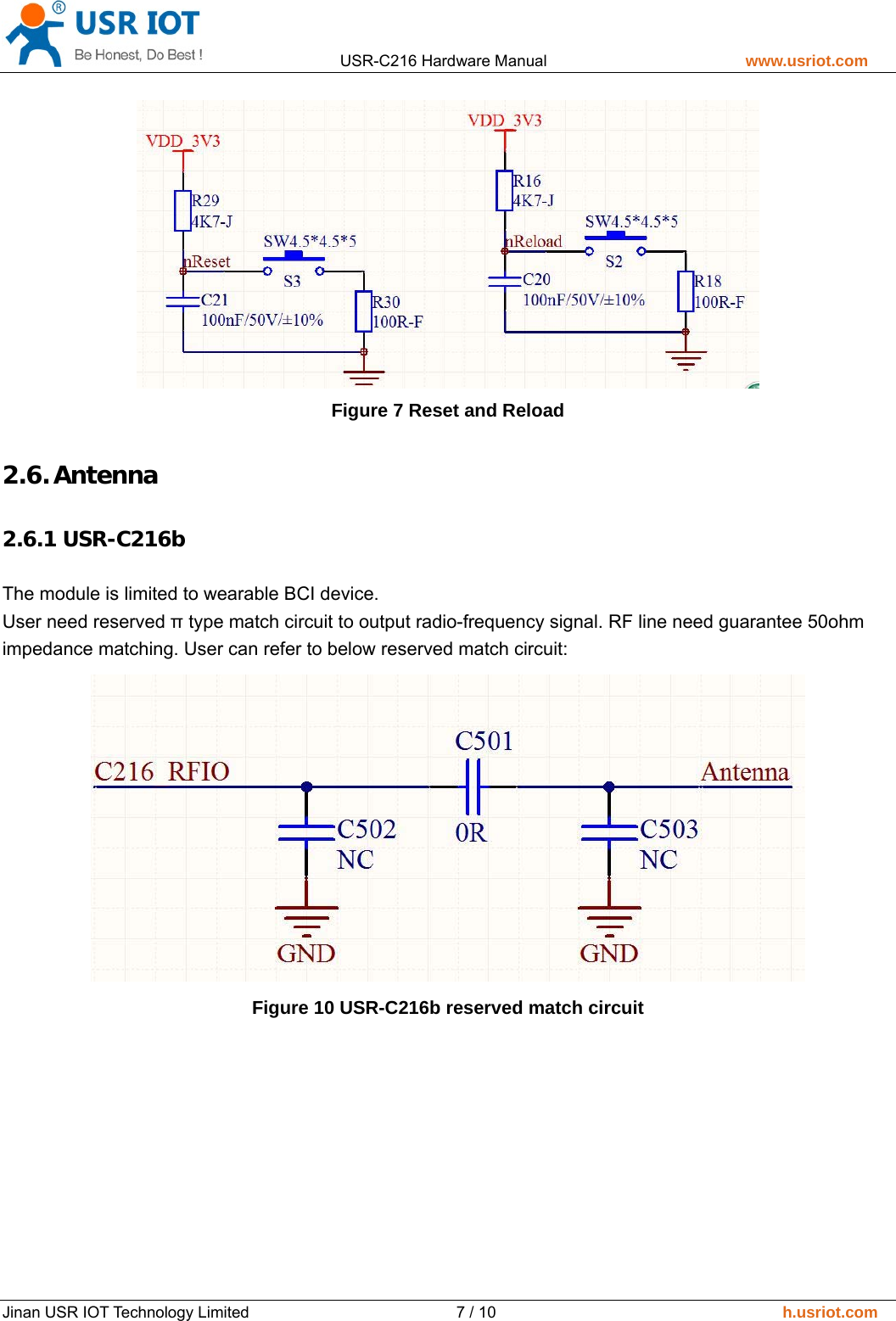
                USR-C216 Hardware Manual                         www.usriot.com   Jinan USR IOT Technology Limited                          6 / 10                                    h.usriot.com  Figure 5 UART interface 2.4. LED Module provide LED output and can display module working status by LED status. Connecting to 1K Ohm pull-up resistor to 3.3V is recommended. User can also drive LED by triode to improve LED luminance.  Figure 6 LED interface 2.5. Reset and Reload   nReload: nReload pin can connect to external button or configuration pin. Press button 1s to 3s to enter simplelink mode, press over 3s to restore default settings. nReload pin should connect to external 4.7k-10k Ohm pull-up resistor.  nReset: Resetting the module and taking effect in low level. nReset pin connect to internal 100K Ohm pull-up resistor to 3.3V. Press over 0.5s and release to reset the device.  Circuit diagram as follows:
                USR-C216 Hardware Manual                         www.usriot.com   Jinan USR IOT Technology Limited                          7 / 10                                    h.usriot.com  Figure 7 Reset and Reload 2.6. Antenna 2.6.1 USR-C216b  The module is limited to wearable BCI device. User need reserved π type match circuit to output radio-frequency signal. RF line need guarantee 50ohm impedance matching. User can refer to below reserved match circuit:    Figure 10 USR-C216b reserved match circuit
                USR-C216 Hardware Manual                         www.usriot.com   Jinan USR IOT Technology Limited                          8 / 10                                    h.usriot.com 3. Contact Company: Jinan USR IOT Technology Limited Address:  Floor 11, Building No.1, No.1166, Xinluo Street, Gaoxin District, Jinan city, Shandong province, 250101 China Tel: 86-531-88826739 Web: www.usriot.com  Support: h.usriot.com   Email: sales@usr.cn
                USR-C216 Hardware Manual                         www.usriot.com   Jinan USR IOT Technology Limited                          9 / 10                                    h.usriot.com 4. Disclaimer This document provide the information of USR-C216 products, it hasn’t been granted any intellectual property license by forbidding speak or other ways either explicitly or implicitly. Except the duty declared in sales terms and conditions, we don’t take any other responsibilities. We don’t warrant the products sales and use explicitly or implicitly, including particular purpose merchantability and marketability, the tort liability of any other patent right, copyright, intellectual property right. We may modify specification and description at any time without prior notice.
                USR-C216 Hardware Manual                         www.usriot.com   Jinan USR IOT Technology Limited                          10 / 10                                    h.usriot.com 5. Update  History   2017-09-26  V1.0.0.01 created.  2018-12-12  V1.0.0.02 created.     This device complies with Part 15 of the FCC Rules. Operation is subject to the following two conditions: (1) this device may not cause harmful interference, and (2) this device must accept any interference received, including interference that may cause undesired operation. changes  or  modifications  not  expressly approved  by  the  party  responsible for compliance could void the user’s authority to operate the equipment. Please notice that if the FCC identification number is not visible when the module is installed inside another device, then the outside of the device into which the module is installed must also display a label referring to the enclosed module. This exterior label can use wording such as the following: “Contains FCC ID: 2ARF7-USRC216” any similar wording that expresses the same meaning may be used. Manual Information to the End User The module is limited to OEM installation ONLY. The  OEM  integrator  is  responsible  for  ensuring  that  the  end-user  has  no  manual  instruction  to  remove  or  install module. A separate approval is required for all other operating configurations, including portable configurations with respect to Part 2.1093 and difference antenna configurations. There  is  requirement  that  the  grantee provide  guidance  to  the  host  manufacturer  for  compliance  with  Part  15B requirements.    This equipment complies with FCC radiation exposure limits set forth for an uncontrolled environment. End user must follow  the  specific  operating  instructions  for  satisfying  RF  exposure  compliance.  This  transmitter  must  not  be co-located or operating in conjunction with any other antenna or transmitter. The portable device is designed to meet the requirements for exposure to radio waves established by the Federal Communications Commission (USA). These requirements set a SAR limit of 1.6 W/kg averaged over one gram of tissue. The highest SAR value reported under this standard during product certification for use when properly worn on the head.

Navigation menu