Johnson Outdoors IPREM20 i-Pilot Link System User Manual 1

Johnson Outdoors, Inc. i-Pilot Link System 1

User Manual 1

INTEGRATED WIRELESS GPS TROLLING SYSTEMUSER MANUAL
© 2012 Johnson Outdoors Marine Electronics, Inc.TABLE OF CONTENTSIntroduction .....................................................................................................................Warranty and Warnings ...................................................................................................Installation ........................................................................................................................  Parts List .................................................................................................................................  Preparing for Installation ........................................................................................................  Installation of i-Pilot Link Controller .......................................................................................  Verifying Installation ...............................................................................................................Getting Started .................................................................................................................  Knowing Your Remote ...........................................................................................................  Knowing Your i-Pilot Link Controller .....................................................................................  System Startup .......................................................................................................................Manual Control .................................................................................................................GPS Motor Control ........................................................................................................... Spot-lock ................................................................................................................................ Cruise Control ........................................................................................................................ AutoPilot /Advanced AutoPilot .............................................................................................. Track Recording/Playback .....................................................................................................Frequently Asked Questions..............................................................................................Troubleshooting ................................................................................................................Glossary ...........................................................................................................................Compliance Statements ....................................................................................................Notes ...............................................................................................................................22377156 Rev XX
3INTRODUCTIONOverviewThank you for purchasing the Minn Kota i-Pilot® Link™. This revolutionary boat control system enables your Minn Kota®  trolling motor and your Humminbird® fishfinder to communicate with each other, delivering unprecedented levels of  automatic navigation. Find, store, and revisit your most productive fishing spots and tracks, taking control of it all from  either the i-Pilot Link wireless remote control or directly from the Humminbird fishfinder. Add a LakeMaster® digital map card and unlock the ability to automatically follow depth contours for even higher levels of boat control. All with GPS  accuracy so you spend less time positioning your boat  and more time catching fish.This i-Pilot Link Owner’s Manual is divided into four main sections: Installation, Getting Started, Manual Control, and GPS Motor Control.  A waterproof and easy-to-read Quick Reference Guide is included as a supplement to the User Manual.A French version of the manual is available online at minnkotamotors.comUne version français du manuel est disponible en ligne à minnkotamotors.comSafety and Cautions while using LinkYou are responsible for the safe and prudent operation of your vessel.  We have designed i-Pilot Link to be an accurate and reliable tool that will enhance boat operation and improve your ability to catch fish.  This product does not relieve you from the responsibility for safe operation of your boat.  You must avoid hazards to navigation and always maintain a permanent watch so you can respond to situations as they develop.  You must always be prepared to regain manual control of your boat.  Learn to operate your i-Pilot Link in an area free from hazards and obstacles.Warranty and RegistrationTo receive all the benefits of your product warranty please fill out and mail the warranty registration card.  You may also register your product online at minnkotamotors.com.Correctly installing i-Pilot Link on a Minn Kota trolling motor will not void the original motor warranty or the warranty of any previously installed accessories.  Installing i-Pilot Link will not extend the warranty of any Minn Kota product it is being installed into or in conjunction with.TRADEMARKSMinn Kota®, Riptide®, i-Pilot®, AutoPilot™, CoPilot™, Link™, PowerDrive™, Terrova™ are trademarked by or registered  trademarks of Johnson Outdoors Marine Electronics, Inc.
LIMITED TWO-YEAR WARRANTY ON ENTIRE  I-PILOT LINK PRODUCT:Johnson Outdoors Inc. warrants to the original purchaser that the purchaser’s entire i-Pilot Link System® accessory is free from defects in materials and workmanship appearing within two (2) years after the date of purchase. Johnson Outdoors Inc. will, at its option, either repair or replace, free of charge, any parts found to be defective during the term of this warranty. Such repair or replacement shall be the sole and exclusive liability of Johnson Outdoors Inc. and the sole and exclusive  remedy of the purchaser for breach of this warranty.These limited warranties do not apply to i-Pilot Link Systems used commercially, nor do they cover normal wear and tear, blemishes that do not affect the operation, or damage caused by accidents, abuse, alteration, modification, misuse or  improper care or maintenance. DAMAGE CAUSED BY THE USE OF OTHER REPLACEMENT PARTS NOT MEETING THE DESIGN SPECIFICATIONS OF THE ORIGINAL PARTS WILL NOT BE COVERED BY THIS LIMITED WARRANTY. The cost of normal maintenance or replacement parts that are not defective are the responsibility of the purchaser.To obtain warranty service in the U.S., the part believed to be defective and proof of original purchase (including the date of purchase) must be presented to a Minn Kota Authorized Service Center or to Minn Kota’s factory service center in Mankato, MN. Any charges incurred for service calls, transportation or shipping/freight to/from the Minn Kota Authorized Service Center or factory, labor to haul out, remove, re-install or re-rig products removed for warranty service, or any other similar items are the sole and exclusive responsibility of the purchaser. i-Pilot Link systems purchased outside of the U.S. (or parts of such systems) must be returned prepaid with proof of purchase (including the date of purchase and serial number) to any  Authorized Minn Kota Service Center in the country of purchase. Warranty service can be arranged by contacting a  Minn Kota Authorized Service Center listed on the enclosed sheet or by contacting the factory at 1-800-227-6433,  1-507-345-4623 or fax 1-800-527-4464. Note: Do not return your i-Pilot Link or parts to your retailer. Your retailer is  not authorized to repair or replace them.THERE ARE NO EXPRESS WARRANTIES OTHER THAN THESE LIMITED WARRANTIES. IN NO EVENT SHALL ANY IMPLIED WARRANTIES, INCLUDING ANY IMPLIED WARRANTIES OF MERCHANTABILITY OR FITNESS FOR  PARTICULAR PURPOSE, EXTEND BEYOND TWO YEARS FROM THE DATE OF PURCHASE. IN NO EVENT SHALL JOHNSON OUTDOORS MARINE ELECTRONICS L.L.C. BE LIABLE FOR INCIDENTAL, CONSEQUENTIAL OR  SPECIAL DAMAGES.Some states do not allow limitations on how long an implied warranty lasts or the exclusion or limitation of incidental or  consequential damages, so the above limitations and/or exclusions may not apply to you. This warranty gives you specific legal rights, and you may also have other legal rights which vary from state to state.“WARNING:  This product contains chemical(s) known to the state of California to cause cancer and/or  reproductive toxicity.”HUMMINBIRD WARRANTY AND REGISTRATIONPlease refer to your Humminbird product manual for details4
HUMMINBIRD WARNINGSWARNING! This device should not be used as a navigational aid to prevent collision, grounding, boat damage, or personal injury. When the boat is moving, water depth may change too quickly to allow time for you to react. Always operate the boat at very slow speeds if you suspect shallow water or submerged objects.WARNING! The electronic chart in your Humminbird® unit is an aid to navigation designed to facilitate the use of authorized government charts, not to replace them. Only official government charts and notices to mariners contain all of the current information needed for the safety of navigation, and the captain is responsible for their prudent use.WARNING! Humminbird® is not responsible for the loss of data files (waypoints, routes, tracks, groups, recordings, etc.) that may occur due to direct or indirect damage to the unit’s hardware or software. It is important to back up your control head’s data files periodically. Data files should also be saved to your PC before restoring the unit’s defaults or updating the software. See your Humminbird® online account at Humminbird.com and the Waypoint Management Guide on your  Humminbird® Manual CD for details.WARNING!  Do not travel at high speed with the unit cover installed. Remove the unit cover before traveling at speeds above 20 mph.WARNING! Disassembly and repair of this electronic unit should only be performed by authorized service personnel. Any modification of the serial number or attempt to repair the original equipment or accessories by unauthorized individuals will void the warranty.WARNING! This product contains chemicals known to the State of California to cause cancer and/or reproductive harm.ATTENTION INTERNATIONAL CUSTOMERS: Products sold in the U.S. are not intended for use in the international  market. Humminbird® international units provide international features and are designed to meet country and regional  regulations. Languages, maps, time zones, units of measurement, and warranty are examples of features that are customized for Humminbird® international units purchased through our authorized international distributors. To obtain a list of  authorized international distributors, please visit our Web site at humminbird.com or contact our Customer Resource  Center at (334) 687-6613. NOTE: The illustrations in this manual may not look the same as your product, but your unit will function in the same way. NOTE: Some features discussed in this manual require a separate purchase, and some features are only available on  international models. Every effort has been made to clearly identify those features. Please read the manual carefully in  order to understand the full capabilities of your model.NOTE: To purchase accessories for your control head, visit our Web site at humminbird.com or contact our Customer  Resource Center at 1-800-633-1468. NOTE: The procedures and features described in this manual are subject to change without notice. This manual was written in English and may have been translated to another language. Humminbird® is not responsible for incorrect translations or discrepancies between documents.NOTE: Product specifications and features are subject to change without notice.  NOTE: Humminbird® verifies maximum stated depth in saltwater conditions, however actual depth performance may vary due to transducer installation, water type, thermal layers, bottom composition and slope.TRADEMARKS700 Series™, 800 Series™, 900 Series™, 1100 Series™, HumminbirdPC™, Humminbird®, LakeMaster®, Side Imaging®,  Sand X-Press™ Menu are trademarked by or registered trademarks of Johnson Outdoors Marine Electronics, Inc.5
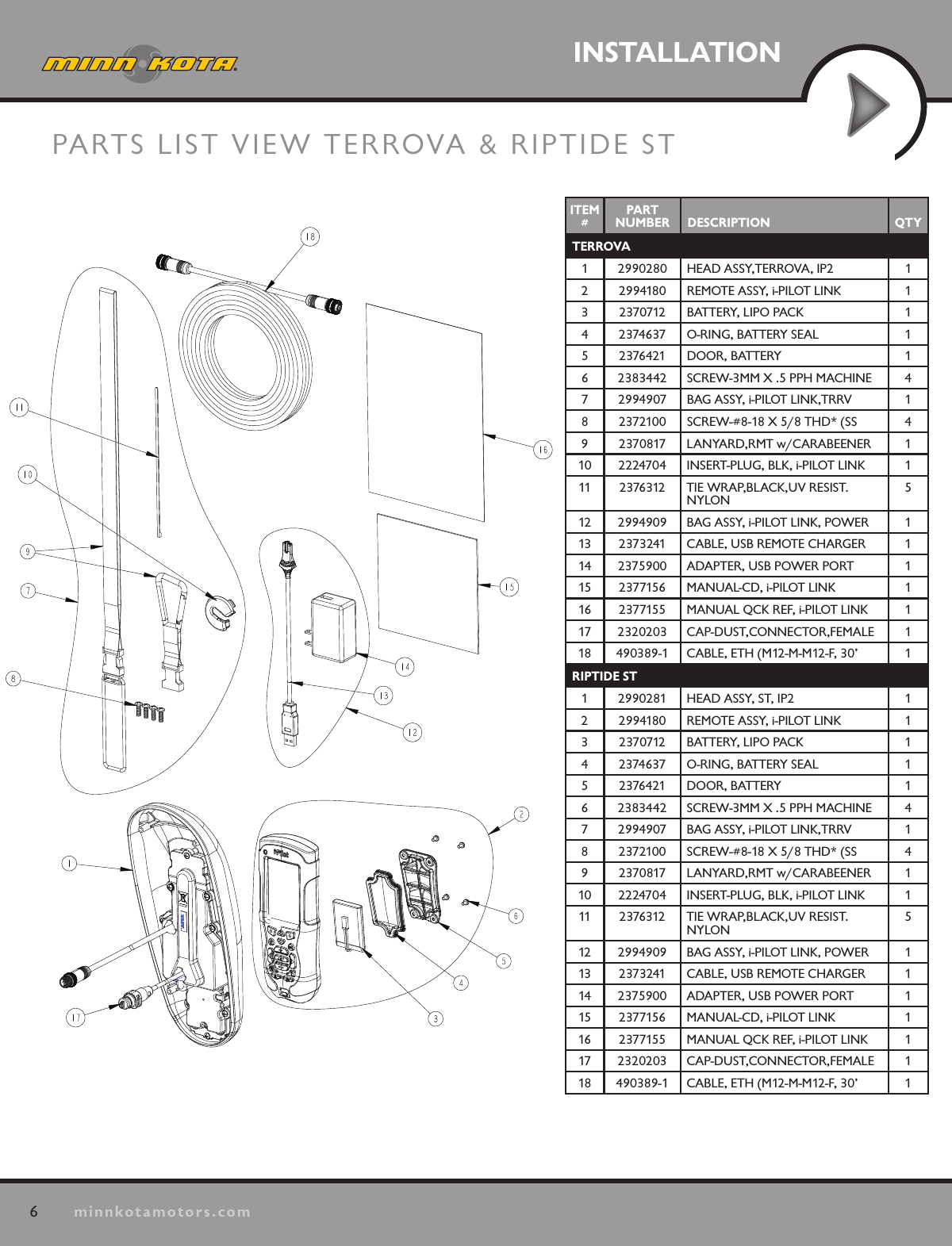
6minnkotamotors.comINSTALLATIONPARTS LIST VIEW TERROVA & RIPTIDE STITEM #PART  NUMBER DESCRIPTION QTYTERROVA1 2990280 HEAD ASSY,TERROVA, IP2 12 2994180 REMOTE ASSY, i-PILOT LINK 13 2370712 BATTERY, LIPO PACK 14 2374637 O-RING, BATTERY SEAL 15 2376421 DOOR, BATTERY 16 2383442 SCREW-3MM X .5 PPH MACHINE 47 2994907 BAG ASSY, i-PILOT LINK,TRRV 18 2372100 SCREW-#8-18 X 5/8 THD* (SS 49 2370817 LANYARD,RMT w/CARABEENER 110 2224704 INSERT-PLUG, BLK, i-PILOT LINK 111 2376312 TIE WRAP,BLACK,UV RESIST.NYLON512 2994909 BAG ASSY, i-PILOT LINK, POWER 113 2373241 CABLE, USB REMOTE CHARGER 114 2375900 ADAPTER, USB POWER PORT 115 2377156 MANUAL-CD, i-PILOT LINK 116 2377155 MANUAL QCK REF, i-PILOT LINK 117 2320203 CAP-DUST,CONNECTOR,FEMALE 118 490389-1 CABLE, ETH (M12-M-M12-F, 30’ 1RIPTIDE ST1 2990281 HEAD ASSY, ST, IP2 12 2994180 REMOTE ASSY, i-PILOT LINK 13 2370712 BATTERY, LIPO PACK 14 2374637 O-RING, BATTERY SEAL 15 2376421 DOOR, BATTERY 16 2383442 SCREW-3MM X .5 PPH MACHINE 47 2994907 BAG ASSY, i-PILOT LINK,TRRV 18 2372100 SCREW-#8-18 X 5/8 THD* (SS 49 2370817 LANYARD,RMT w/CARABEENER 110 2224704 INSERT-PLUG, BLK, i-PILOT LINK 111 2376312 TIE WRAP,BLACK,UV RESIST.NYLON512 2994909 BAG ASSY, i-PILOT LINK, POWER 113 2373241 CABLE, USB REMOTE CHARGER 114 2375900 ADAPTER, USB POWER PORT 115 2377156 MANUAL-CD, i-PILOT LINK 116 2377155 MANUAL QCK REF, i-PILOT LINK 117 2320203 CAP-DUST,CONNECTOR,FEMALE 118 490389-1 CABLE, ETH (M12-M-M12-F, 30’ 1
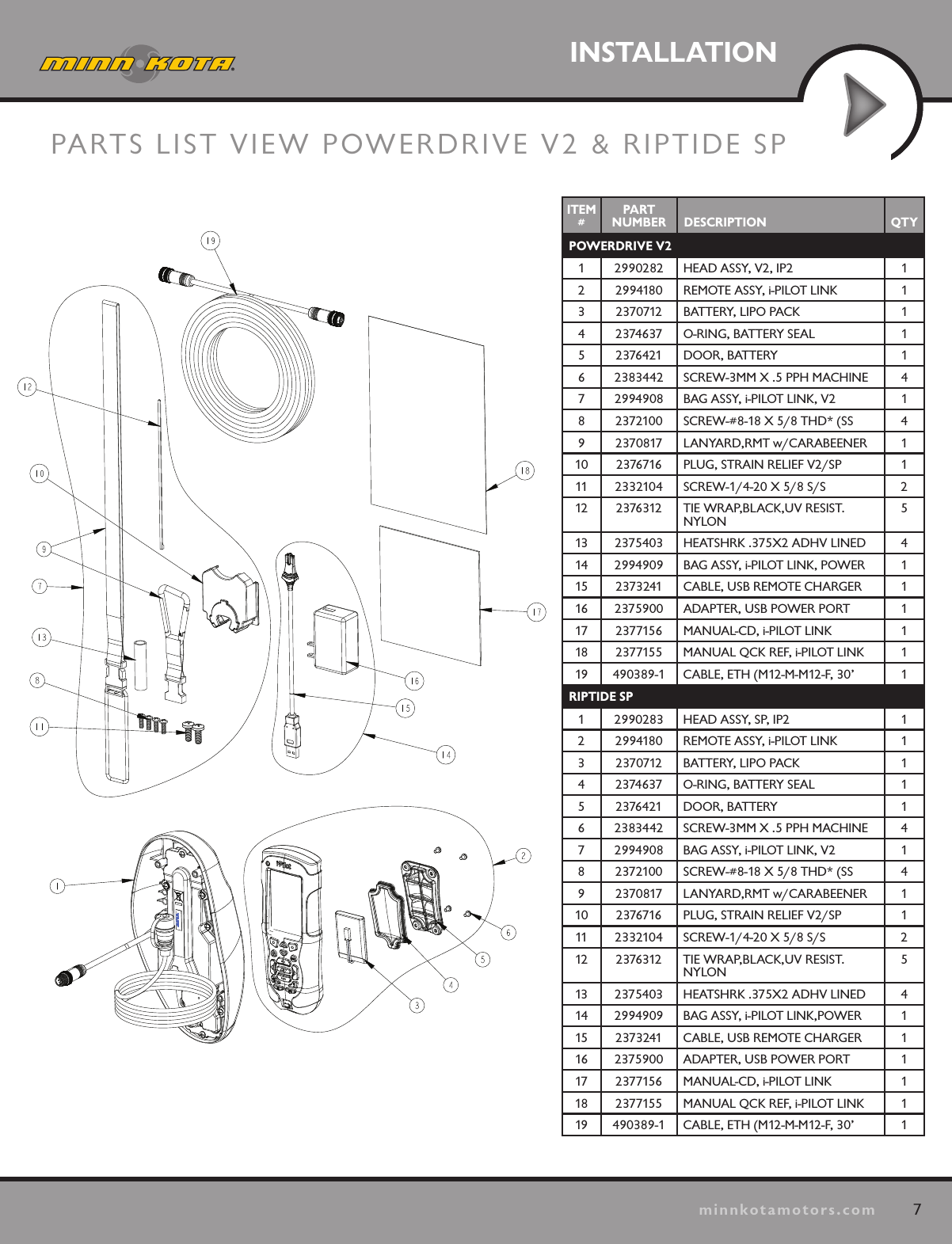
7minnkotamotors.comINSTALLATIONPARTS LIST VIEW POWERDRIVE V2 & RIPTIDE SPITEM #PART  NUMBER DESCRIPTION QTYTERROVA1 2990280 HEAD ASSY,TERROVA, IP2 12 2994180 REMOTE ASSY, i-PILOT LINK 13 2370712 BATTERY, LIPO PACK 14 2374637 O-RING, BATTERY SEAL 15 2376421 DOOR, BATTERY 16 2383442 SCREW-3MM X .5 PPH MACHINE 47 2994907 BAG ASSY, i-PILOT LINK,TRRV 18 2372100 SCREW-#8-18 X 5/8 THD* (SS 49 2370817 LANYARD,RMT w/CARABEENER 110 2224704 INSERT-PLUG, BLK, i-PILOT LINK 111 2376312 TIE WRAP,BLACK,UV RESIST.NYLON512 2994909 BAG ASSY, i-PILOT LINK, POWER 113 2373241 CABLE, USB REMOTE CHARGER 114 2375900 ADAPTER, USB POWER PORT 115 2377156 MANUAL-CD, i-PILOT LINK 116 2377155 MANUAL QCK REF, i-PILOT LINK 117 2320203 CAP-DUST,CONNECTOR,FEMALE 118 490389-1 CABLE, ETH (M12-M-M12-F, 30’ 1RIPTIDE ST1 2990281 HEAD ASSY, ST, IP2 12 2994180 REMOTE ASSY, i-PILOT LINK 13 2370712 BATTERY, LIPO PACK 14 2374637 O-RING, BATTERY SEAL 15 2376421 DOOR, BATTERY 16 2383442 SCREW-3MM X .5 PPH MACHINE 47 2994907 BAG ASSY, i-PILOT LINK,TRRV 18 2372100 SCREW-#8-18 X 5/8 THD* (SS 49 2370817 LANYARD,RMT w/CARABEENER 110 2224704 INSERT-PLUG, BLK, i-PILOT LINK 111 2376312 TIE WRAP,BLACK,UV RESIST.NYLON512 2994909 BAG ASSY, i-PILOT LINK, POWER 113 2373241 CABLE, USB REMOTE CHARGER 114 2375900 ADAPTER, USB POWER PORT 115 2377156 MANUAL-CD, i-PILOT LINK 116 2377155 MANUAL QCK REF, i-PILOT LINK 117 2320203 CAP-DUST,CONNECTOR,FEMALE 118 490389-1 CABLE, ETH (M12-M-M12-F, 30’ 1ITEM #PART  NUMBER DESCRIPTION QTYPOWERDRIVE V21 2990282 HEAD ASSY, V2, IP2 12 2994180 REMOTE ASSY, i-PILOT LINK 13 2370712 BATTERY, LIPO PACK 14 2374637 O-RING, BATTERY SEAL 15 2376421 DOOR, BATTERY 16 2383442 SCREW-3MM X .5 PPH MACHINE 47 2994908 BAG ASSY, i-PILOT LINK, V2 18 2372100 SCREW-#8-18 X 5/8 THD* (SS 49 2370817 LANYARD,RMT w/CARABEENER 110 2376716 PLUG, STRAIN RELIEF V2/SP 111 2332104 SCREW-1/4-20 X 5/8 S/S 212 2376312 TIE WRAP,BLACK,UV RESIST.NYLON513 2375403 HEATSHRK .375X2 ADHV LINED 414 2994909 BAG ASSY, i-PILOT LINK, POWER 115 2373241 CABLE, USB REMOTE CHARGER 116 2375900 ADAPTER, USB POWER PORT 117 2377156 MANUAL-CD, i-PILOT LINK 118 2377155 MANUAL QCK REF, i-PILOT LINK 119 490389-1 CABLE, ETH (M12-M-M12-F, 30’ 1RIPTIDE SP1 2990283 HEAD ASSY, SP, IP2 12 2994180 REMOTE ASSY, i-PILOT LINK 13 2370712 BATTERY, LIPO PACK 14 2374637 O-RING, BATTERY SEAL 15 2376421 DOOR, BATTERY 16 2383442 SCREW-3MM X .5 PPH MACHINE 47 2994908 BAG ASSY, i-PILOT LINK, V2 18 2372100 SCREW-#8-18 X 5/8 THD* (SS 49 2370817 LANYARD,RMT w/CARABEENER 110 2376716 PLUG, STRAIN RELIEF V2/SP 111 2332104 SCREW-1/4-20 X 5/8 S/S 212 2376312 TIE WRAP,BLACK,UV RESIST.NYLON513 2375403 HEATSHRK .375X2 ADHV LINED 414 2994909 BAG ASSY, i-PILOT LINK,POWER 115 2373241 CABLE, USB REMOTE CHARGER 116 2375900 ADAPTER, USB POWER PORT 117 2377156 MANUAL-CD, i-PILOT LINK 118 2377155 MANUAL QCK REF, i-PILOT LINK 119 490389-1 CABLE, ETH (M12-M-M12-F, 30’ 1
8minnkotamotors.comINSTALLATIONPREPARING FOR INSTALLATIONPreparing for InstallationTools you will need during installationTerrova and Riptide ST -Phillips screwdriverPowerDrive V2 -Phillips screwdriver -Needle-nose pliers -Utility knife -Heat gun or other heat source for installing heat shrinkRiptide SP -Phillips screwdriver -Needle-nose pliers -Utility knife -Heat gun or other heat source for installing heat shrinkTo help with future service work or ordering replacement parts, please refer to the information box in the Notes  section located on the back pages of this manual. Before installing i-Pilot Link on your motor, make sure the trolling motor is properly installed on your boat.  Find a clean and dry location for performing the installation.  Most importantly, disconnect all power to the trolling motor before installation.  Not only will this protect you but also the sensitive electronics you are about to install.Read through the entire installation process before performing the installation.If you need help or need further instruction on installing i-Pilot Link, please go online at minnkotamotors.com for a full step-by-step, guided installation video.  You may also call Minn Kota technical service at 1-800-227-6433 to talk to a customer service representative.
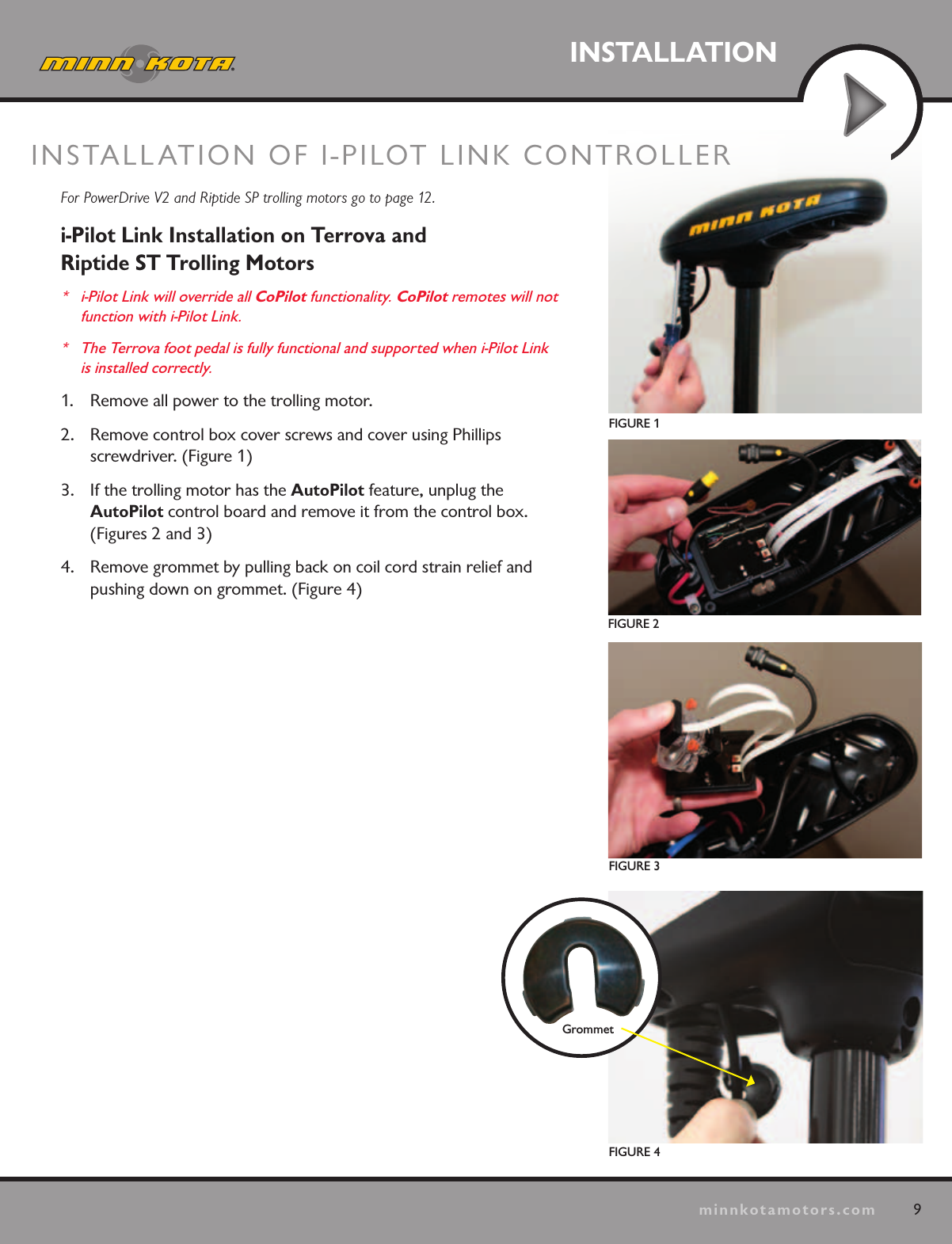
9minnkotamotors.comINSTALLATIONFIGURE 1FIGURE 2FIGURE 3For PowerDrive V2 and Riptide SP trolling motors go to page 12.i-Pilot Link Installation on Terrova and  Riptide ST Trolling Motors*  i-Pilot Link will override all CoPilot functionality. CoPilot remotes will not  function with i-Pilot Link. *  The Terrova foot pedal is fully functional and supported when i-Pilot Link is installed correctly. 1.  Remove all power to the trolling motor.2.  Remove control box cover screws and cover using Phillips  screwdriver. (Figure 1) 3.  If the trolling motor has the AutoPilot feature, unplug the  AutoPilot control board and remove it from the control box. (Figures 2 and 3)4.  Remove grommet by pulling back on coil cord strain relief and pushing down on grommet. (Figure 4)INSTALLATION OF I-PILOT LINK CONTROLLER FIGURE 4Grommet
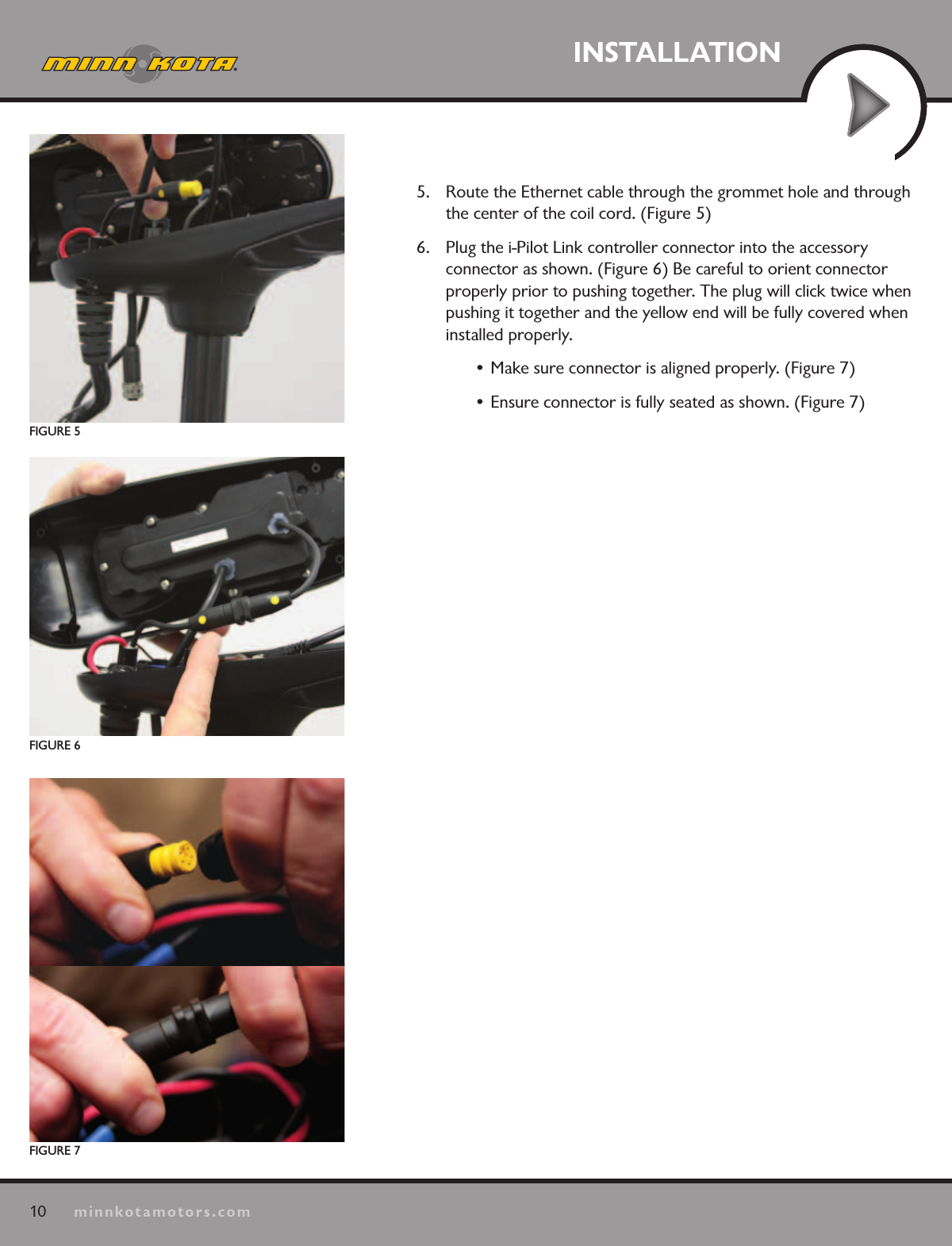
10minnkotamotors.comINSTALLATION5.  Route the Ethernet cable through the grommet hole and through the center of the coil cord. (Figure 5)6.  Plug the i-Pilot Link controller connector into the accessory  connector as shown. (Figure 6) Be careful to orient connector properly prior to pushing together. The plug will click twice when pushing it together and the yellow end will be fully covered when installed properly. • Make sure connector is aligned properly. (Figure 7)  • Ensure connector is fully seated as shown. (Figure 7)FIGURE 7FIGURE 6FIGURE 5
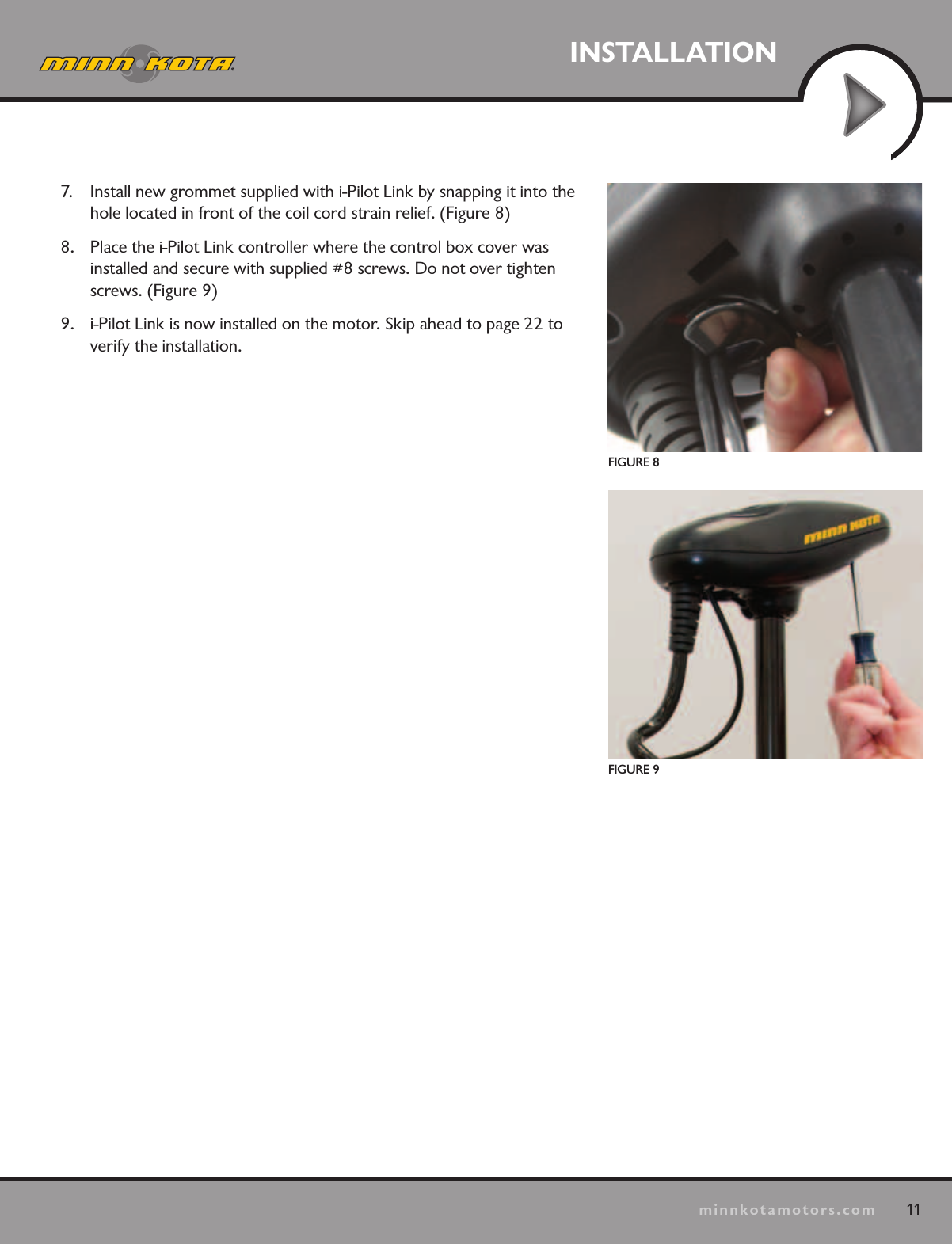
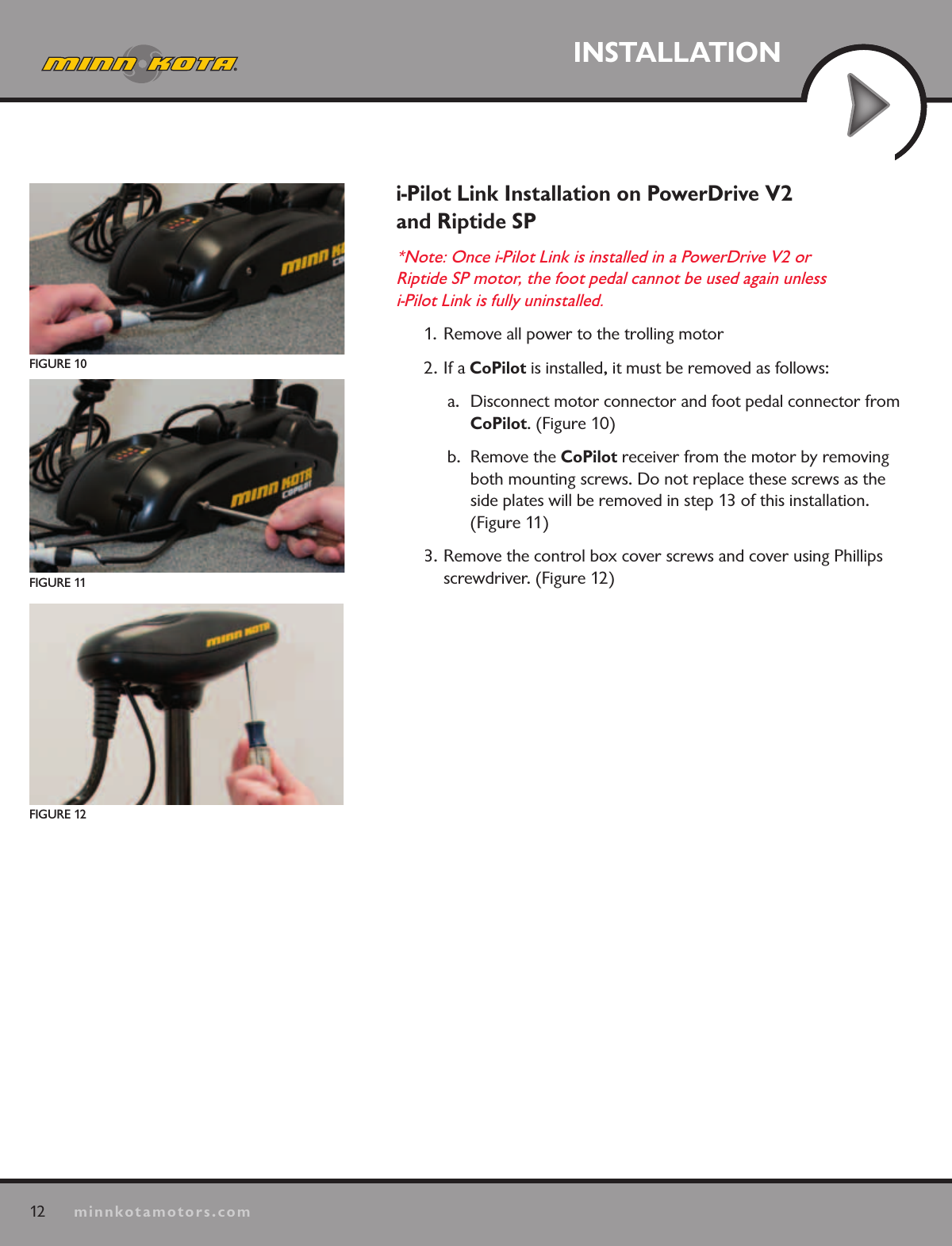
11minnkotamotors.comINSTALLATIONFIGURE 8FIGURE 97.  Install new grommet supplied with i-Pilot Link by snapping it into the hole located in front of the coil cord strain relief. (Figure 8)8.  Place the i-Pilot Link controller where the control box cover was installed and secure with supplied #8 screws. Do not over tighten screws. (Figure 9)9.  i-Pilot Link is now installed on the motor. Skip ahead to page 22 to verify the installation.
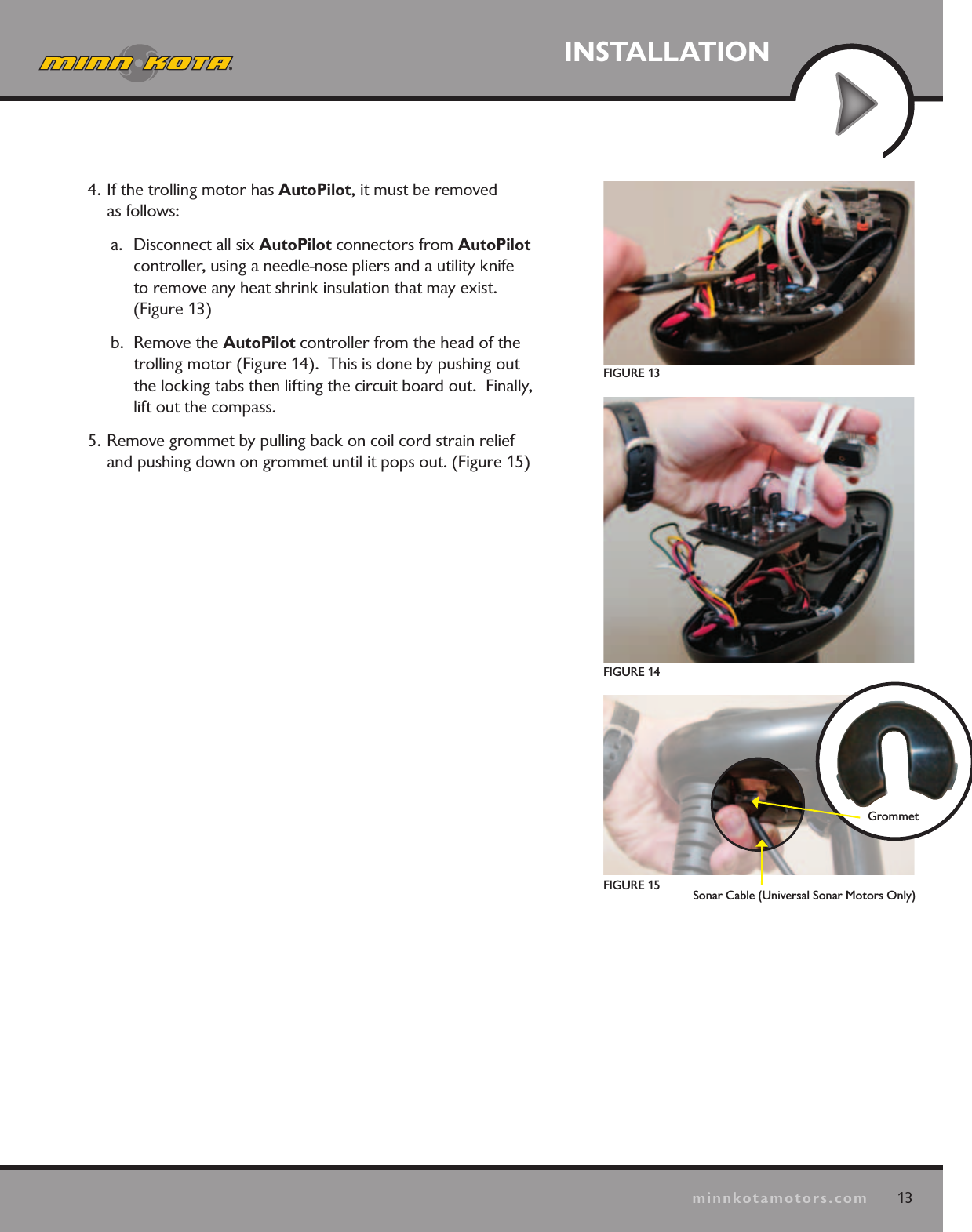
12minnkotamotors.comINSTALLATIONFIGURE 10FIGURE 11FIGURE 12i-Pilot Link Installation on PowerDrive V2  and Riptide SP*Note: Once i-Pilot Link is installed in a PowerDrive V2 or  Riptide SP motor, the foot pedal cannot be used again unless  i-Pilot Link is fully uninstalled.  1.  Remove all power to the trolling motor2. If a CoPilot is installed, it must be removed as follows:a.  Disconnect motor connector and foot pedal connector from CoPilot. (Figure 10)b.  Remove the CoPilot receiver from the motor by removing both mounting screws. Do not replace these screws as the  side plates will be removed in step 13 of this installation.  (Figure 11)3. Remove the control box cover screws and cover using Phillips screwdriver. (Figure 12)
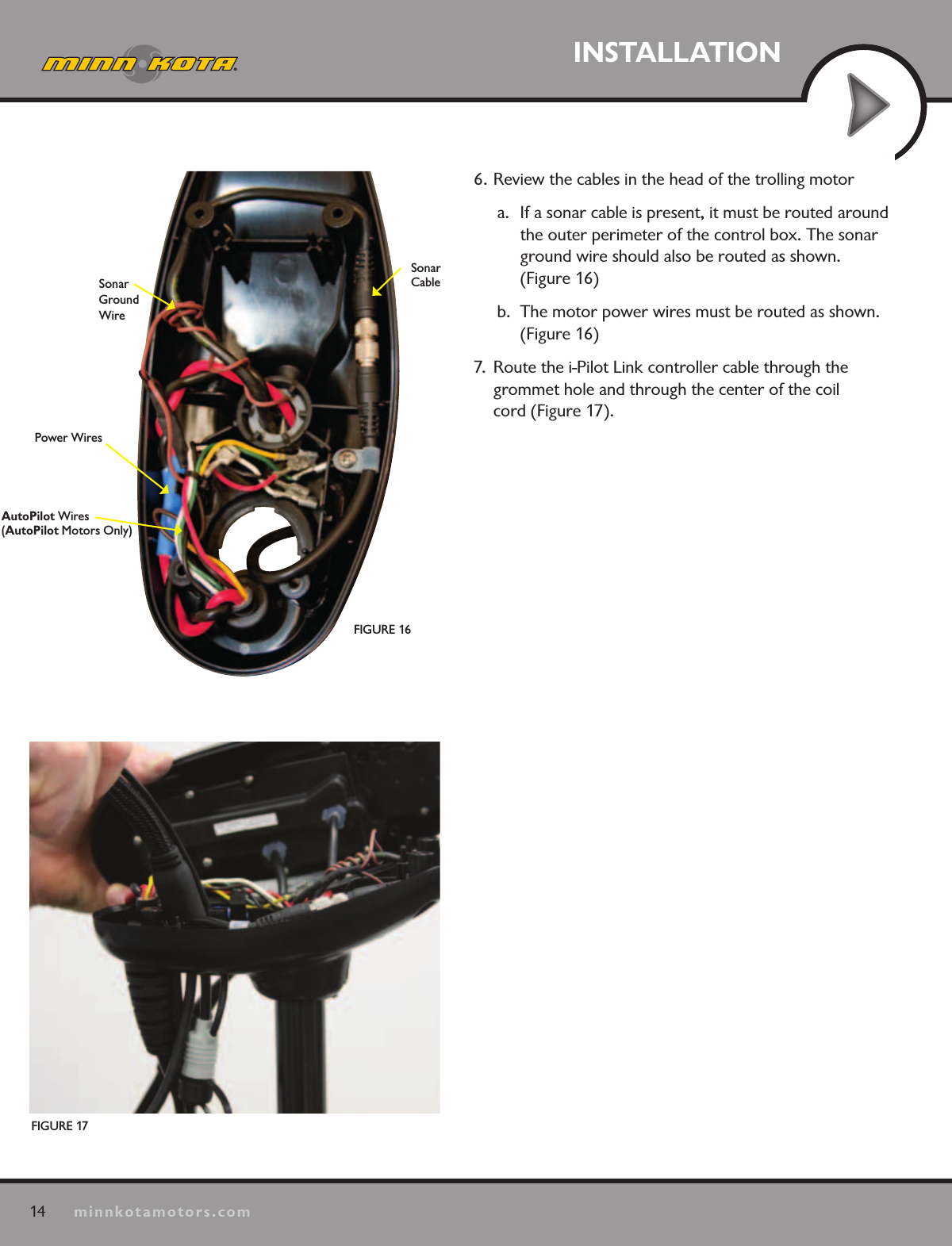
13minnkotamotors.comINSTALLATIONFIGURE 13GrommetFIGURE 15FIGURE 144. If the trolling motor has AutoPilot, it must be removed  as follows:a.  Disconnect all six AutoPilot connectors from AutoPilot  controller, using a needle-nose pliers and a utility knife  to remove any heat shrink insulation that may exist. (Figure 13)b.  Remove the AutoPilot controller from the head of the trolling motor (Figure 14).  This is done by pushing out the locking tabs then lifting the circuit board out.  Finally, lift out the compass.5. Remove grommet by pulling back on coil cord strain relief and pushing down on grommet until it pops out. (Figure 15)Sonar Cable (Universal Sonar Motors Only)
14minnkotamotors.comINSTALLATIONFIGURE 17FIGURE 16Sonar Ground WirePower WiresAutoPilot Wires (AutoPilot Motors Only)Sonar Cable6. Review the cables in the head of the trolling motora.  If a sonar cable is present, it must be routed around the outer perimeter of the control box. The sonar ground wire should also be routed as shown.  (Figure 16)b.  The motor power wires must be routed as shown. (Figure 16)7.  Route the i-Pilot Link controller cable through the  grommet hole and through the center of the coil  cord (Figure 17).
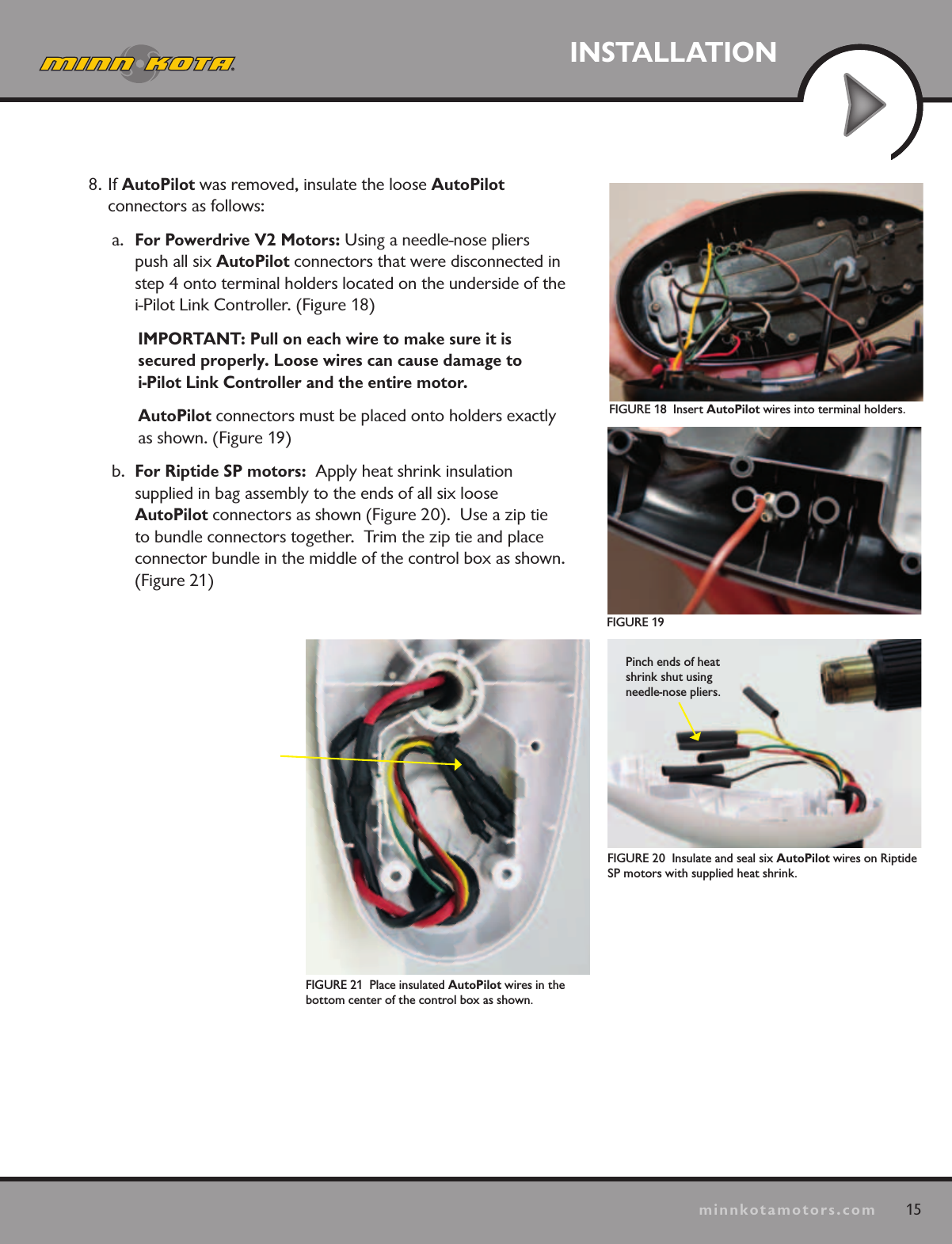
15minnkotamotors.comINSTALLATIONFIGURE 18  Insert AutoPilot wires into terminal holders.FIGURE 19FIGURE 20  Insulate and seal six AutoPilot wires on Riptide SP motors with supplied heat shrink.Pinch ends of heat shrink shut using needle-nose pliers.FIGURE 21  Place insulated AutoPilot wires in the  bottom center of the control box as shown. 8. If AutoPilot was removed, insulate the loose AutoPilot  connectors as follows:a.  For Powerdrive V2 Motors: Using a needle-nose pliers push all six AutoPilot connectors that were disconnected in step 4 onto terminal holders located on the underside of the i-Pilot Link Controller. (Figure 18)IMPORTANT: Pull on each wire to make sure it is  secured properly. Loose wires can cause damage to  i-Pilot Link Controller and the entire motor.AutoPilot connectors must be placed onto holders exactly as shown. (Figure 19)b.  For Riptide SP motors:  Apply heat shrink insulation  supplied in bag assembly to the ends of all six loose  AutoPilot connectors as shown (Figure 20).  Use a zip tie  to bundle connectors together.  Trim the zip tie and place connector bundle in the middle of the control box as shown. (Figure 21)
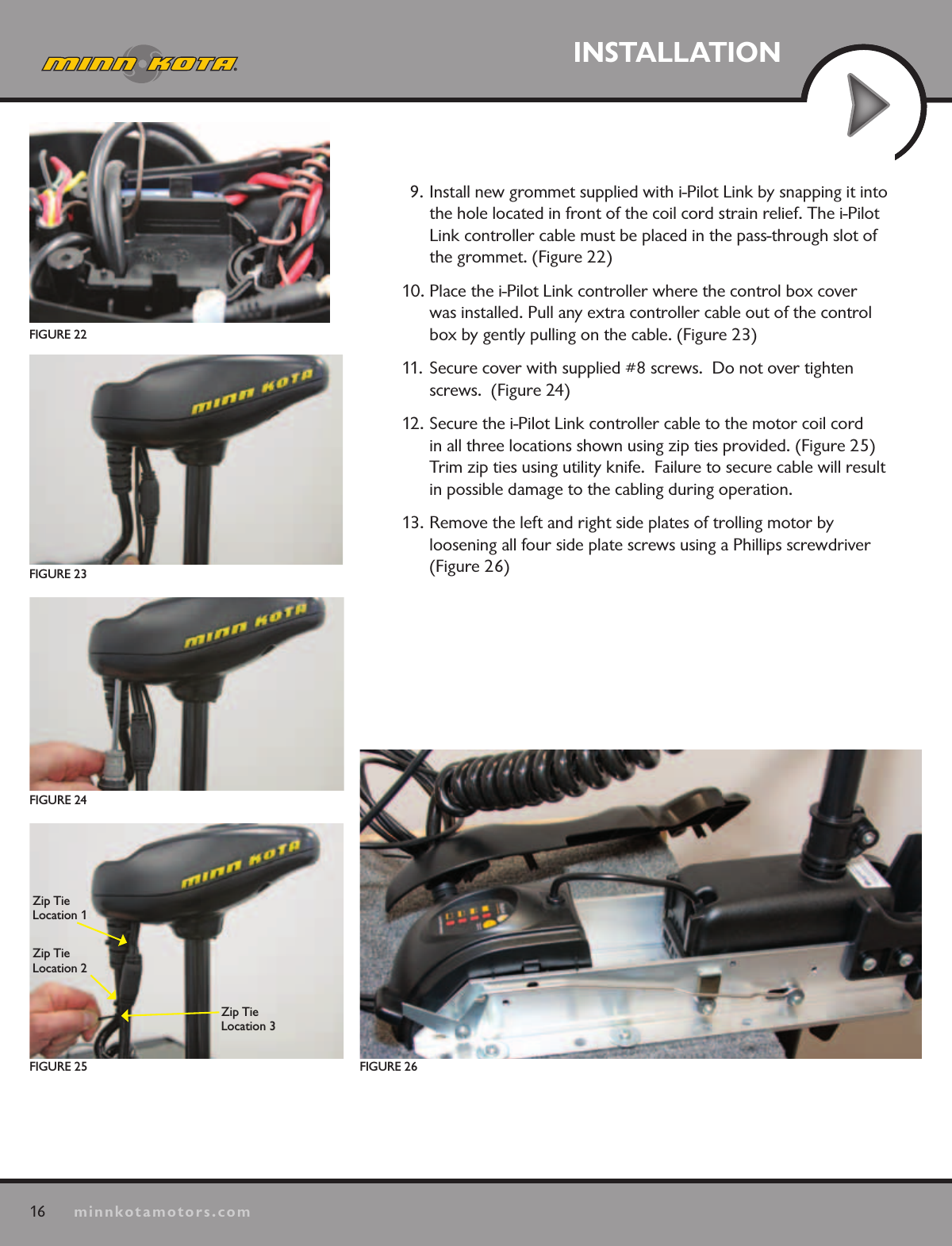
16minnkotamotors.comINSTALLATIONFIGURE 22FIGURE 26FIGURE 25Zip Tie Location 1Zip Tie Location 2Zip Tie  Location 3FIGURE 24FIGURE 239. Install new grommet supplied with i-Pilot Link by snapping it into the hole located in front of the coil cord strain relief. The i-Pilot Link controller cable must be placed in the pass-through slot of the grommet. (Figure 22)10. Place the i-Pilot Link controller where the control box cover was installed. Pull any extra controller cable out of the control box by gently pulling on the cable. (Figure 23)11. Secure cover with supplied #8 screws.  Do not over tighten screws.  (Figure 24)12. Secure the i-Pilot Link controller cable to the motor coil cord in all three locations shown using zip ties provided. (Figure 25)  Trim zip ties using utility knife.  Failure to secure cable will result in possible damage to the cabling during operation.13. Remove the left and right side plates of trolling motor by  loosening all four side plate screws using a Phillips screwdriver (Figure 26)
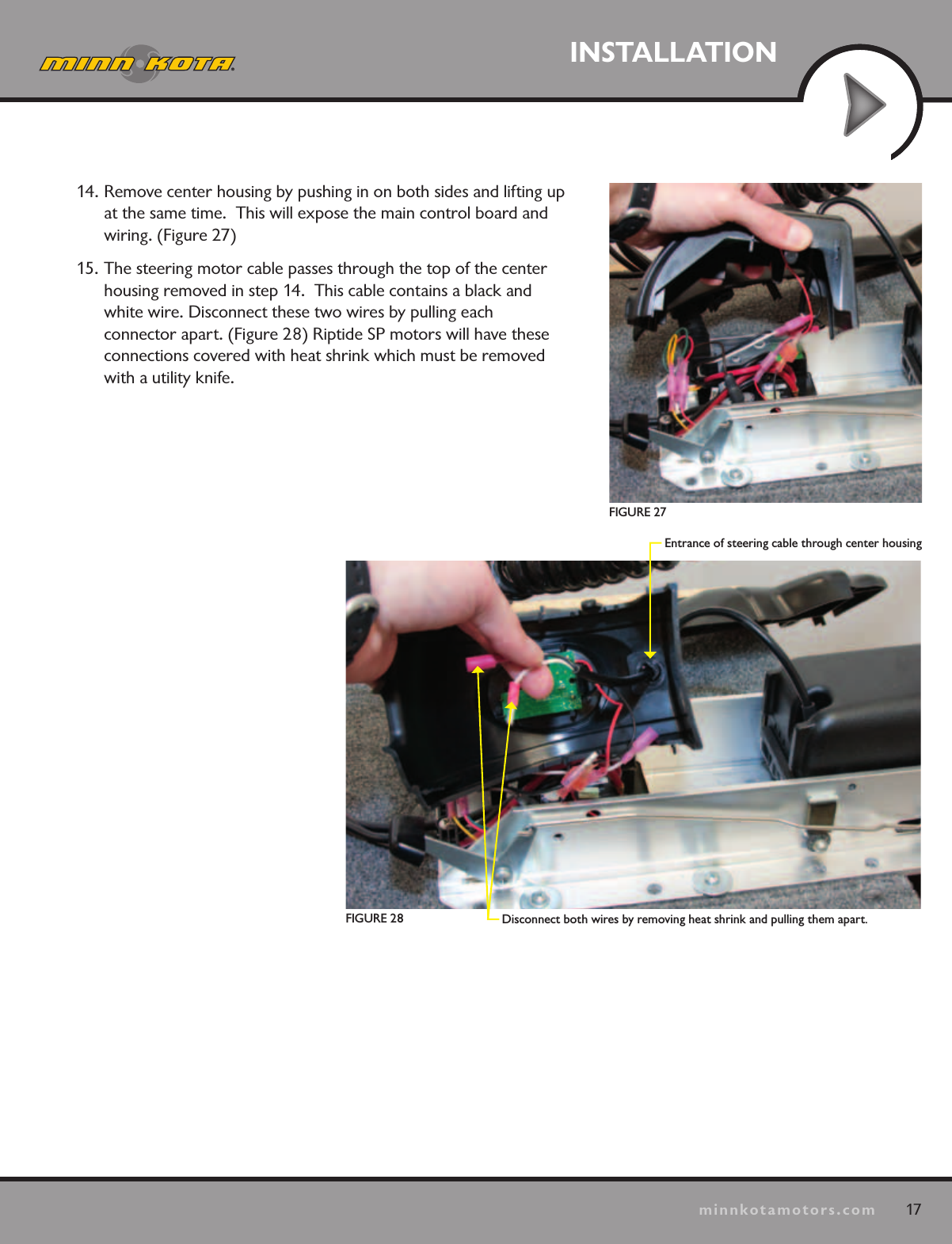
17minnkotamotors.comINSTALLATIONDisconnect both wires by removing heat shrink and pulling them apart.Entrance of steering cable through center housingFIGURE 27FIGURE 2814. Remove center housing by pushing in on both sides and lifting up at the same time.  This will expose the main control board and wiring. (Figure 27)15. The steering motor cable passes through the top of the center housing removed in step 14.  This cable contains a black and white wire. Disconnect these two wires by pulling each  connector apart. (Figure 28) Riptide SP motors will have these connections covered with heat shrink which must be removed with a utility knife.
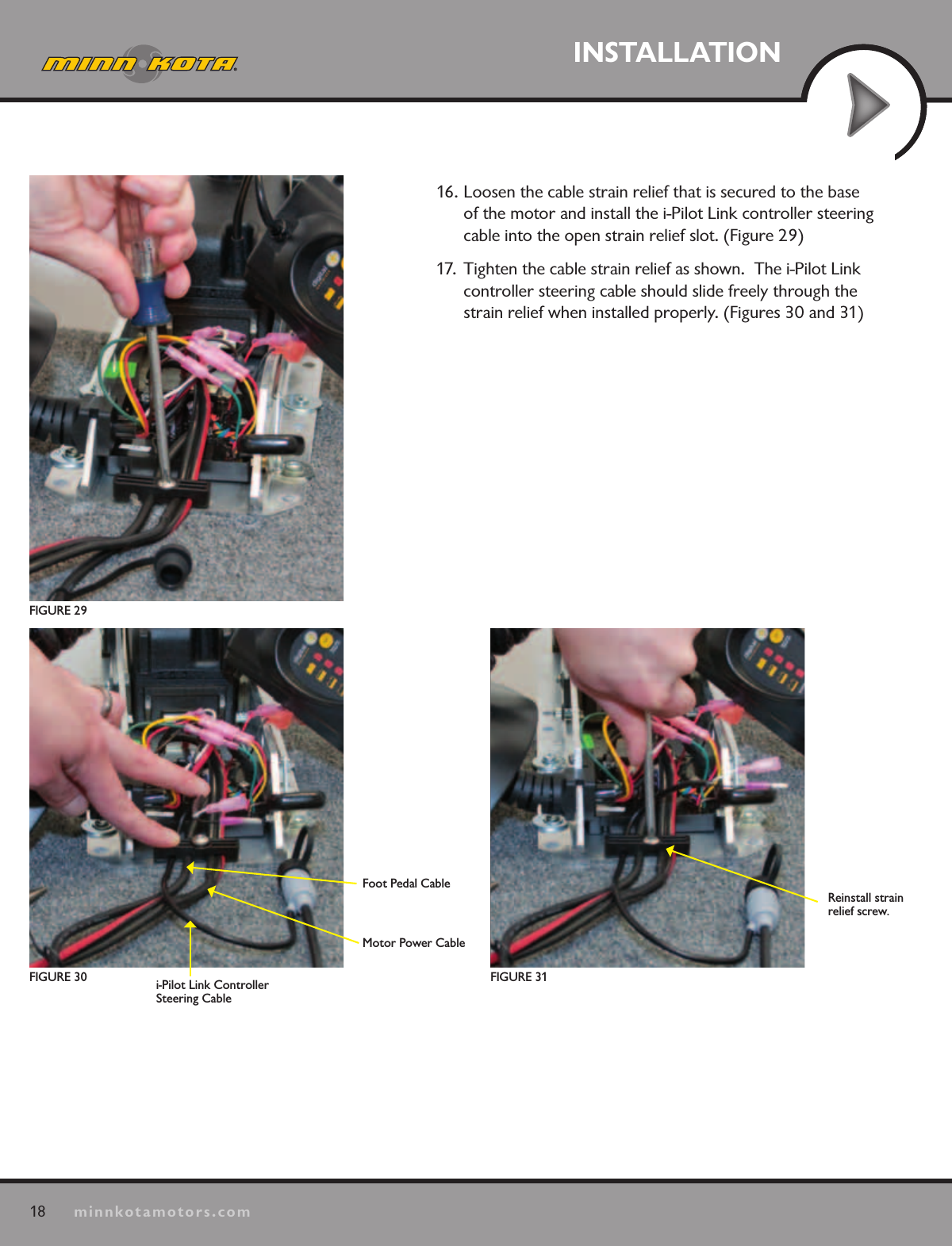
18minnkotamotors.comINSTALLATION16. Loosen the cable strain relief that is secured to the base of the motor and install the i-Pilot Link controller steering cable into the open strain relief slot. (Figure 29)17.  Tighten the cable strain relief as shown.  The i-Pilot Link controller steering cable should slide freely through the strain relief when installed properly. (Figures 30 and 31)FIGURE 29Foot Pedal CableMotor Power Cablei-Pilot Link Controller Steering CableFIGURE 31FIGURE 30Reinstall strain  relief screw.

Navigation menu