Jonter Digital D8 Bluetooth speaker User Manual

Shenzhen Jonter Digital Co., Ltd Bluetooth speaker

User Manual

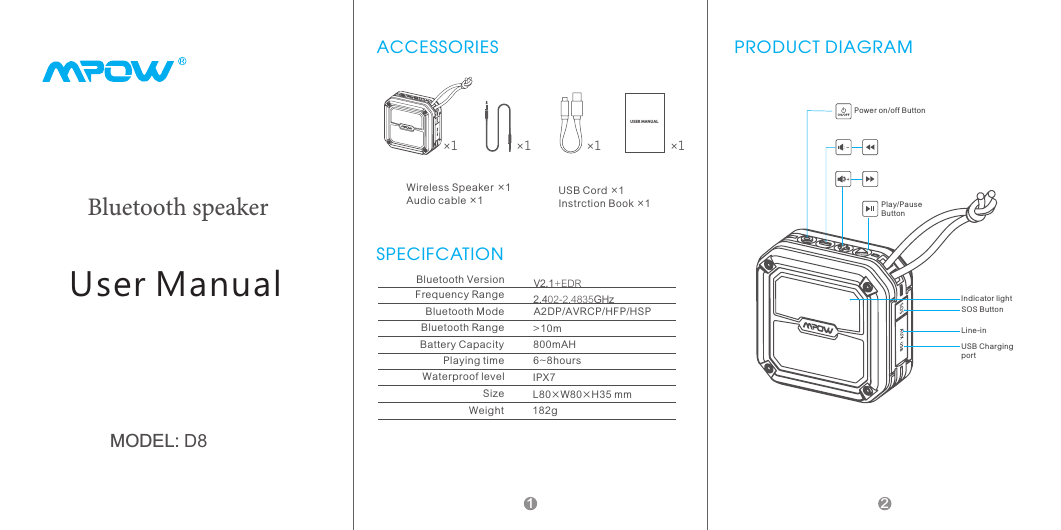
MODEL: D8User ManualBluetooth speaker1ACCESSORIES×1USE R MANUA L×1×1 ×1USB Cord ×1Instrction Book ×1Wireless Speaker ×1Audio cable ×1SPECIFCATIONBluetooth VersionFrequency RangeBluetooth ModeBluetooth RangeBattery CapacityPlaying timeWaterproof levelSizeV2.1+EDR2.402-2.4835GHzA2DP/AVRCP/HFP/HSP>10m800mAH6~8hoursIPX7L80×W80×H35 mmWeight 182gPRODUCT DIAGRAMPower on/off ButtonPlay/Pause ButtonSOS ButtonLine-inUSB Charging portIndicator light2
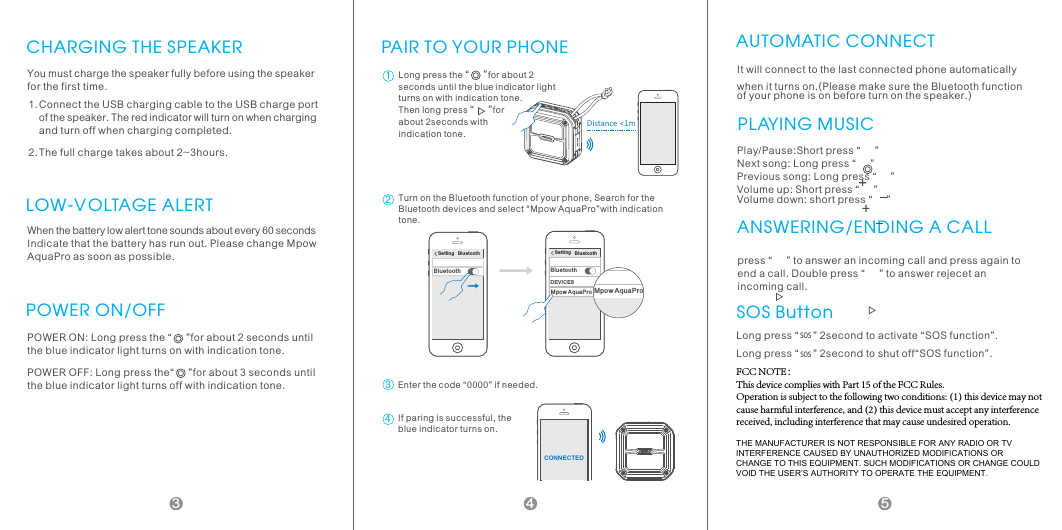
CHARGING THE SPEAKERYou must charge the speaker fully before using the speaker for the first time.Connect the USB charging cable to the USB charge port of the speaker. The red indicator will turn on when charging and turn off when charging completed.The full charge takes about 2~3hours.1.2.When the battery low alert tone sounds about every 60 seconds Indicate that the battery has run out. Please change Mpow AquaPro as soon as possible.LOW-VOLTAGE ALERTPOWER ON/OFFPOWER ON: Long press the “     ”for about 2 seconds until the blue indicator light turns on with indication tone.POWER OFF: Long press the“     ”for about 3 seconds until the blue indicator light turns off with indication tone.PAIR TO YOUR PHONE Di stan ce <1mLong press the “     ”for about 2 seconds until the blue indicator light turns on with indication tone. Then long press “     ”for about 2seconds with indication tone.12Set ti ng   B lu et oo thBlue to othTurn on the Bluetooth function of your phone, Search for the Bluetooth devices and select “Mpow AquaPro”with indication tone.Setti ng   B lu et oo thBlue to ot hDEVICESMpow Aq ua Pr oMpow AquaPro3Enter the code “0000” if needed.CONN EC TED4If paring is successful, the blue indicator turns on.AUTOMATIC CONNECTIt will connect to the last connected phone automatically when it turns on.(Please make sure the Bluetooth function of your phone is on before turn on the speaker.)PLAYING MUSICPlay/Pause:Short press “     ” Next song: Long press “     ” Previous song: Long press “     ” Volume up: Short press “     ” Volume down: short press “     ”ANSWERING/ENDING A CALLpress “     ” to answer an incoming call and press again to end a call. Double press “     ” to answer rejecet an incoming call.SOS ButtonLong pres SOs “     ” 2S second to activate “SOS function”. Long pres SOs “     ” 2S second to shut off“SOS function”.453FCC NOTE:This device complies with Part 15 of the FCC Rules.Operation is subject to the following two conditions: (1) this device may not cause harmful interference, and (2) this device must accept any interference received, including interference that may cause undesired operation.THE MANUFACTURER IS NOT RESPONSIBLE FOR ANY RADIO OR TV INTERFERENCE CAUSED BY UNAUTHORIZED MODIFICATIONS OR CHANGE TO THIS EQUIPMENT. SUCH MODIFICATIONS OR CHANGE COULD VOID THE USER’S AUTHORITY TO OPERATE THE EQUIPMENT.
6This equipment has been tested and found to comply with the limits for a Class B digital device, pursuant to part 15 of the FCC Rules. These limits are designed to provide reasonable protection against harmful interference in a residential installation. This equipment generates, uses and can radiate radio frequency energy and, if not installed and used in accordance with the instructions, may cause harmful interference to radio communications. However, there is no guarantee that interference will not occur in a particular installation. If this equipment does cause harmful interference to radio or television reception, which can be determined by turning the equipment off and on, the user is encouraged to try to correct the interference by one or more of the following measures:—Reorient or relocate the receiving antenna.—Increase the separation between the equipment and receiver.—Connect the equipment into an outlet on a circuit different from that to which the receiver is connected.—Consult the dealer or an experienced radio/TV technician for help.Caution: Any changes or modifications not expressly approved by the party responsible for compliance could void the user's authority to operate this equipment.

Navigation menu