Jvc Kd S10 Users Manual
KD-S10 to the manual 61f04230-92d3-414e-a1e2-fa808f081981
2015-01-26
: Jvc Jvc-Kd-S10-Users-Manual-321038 jvc-kd-s10-users-manual-321038 jvc pdf
Open the PDF directly: View PDF  .
.
Page Count: 25
GET0171-001B
[J]
For customer Use:
Enter below the Model No. and
Serial No. which are located on
the top or bottom of the cabinet.
Retain this information for future
reference.
Model No.
Serial No.
For installation and connections, refer to the separate manual.
Para la instalación y las conexiones, refiérase al manual separado.
Pour l’installation et les raccordements, se référer au manuel séparé.
ENGLISH
ESPAÑOL
FRANÇAIS
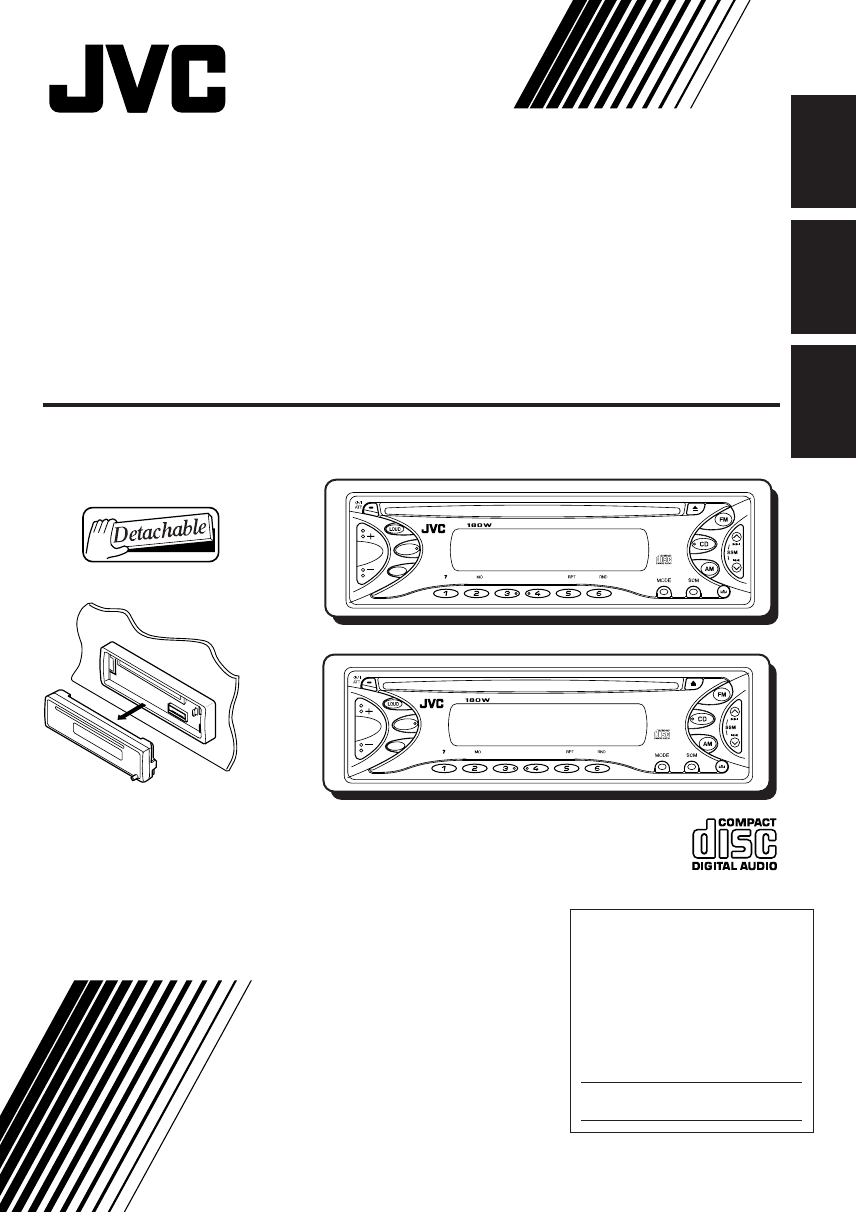
KD-S5050/KD-S10
CD RECEIVER
RECEPTOR CON CD
RECEPTEUR CD
INSTRUCTIONS
MANUAL DE INSTRUCCIONES
MANUEL D’INSTRUCTIONS
SEL
DISP
78 910 11 12
KD-S5050
DIRECT TRACK ACCESS
SEL
DISP
78 910 11 12
KD-S10
DIRECT TRACK ACCESS
Cover-KD-S5050-KD-S10[J] 11/11/03, 15*493
2
ENGLISH
INFORMATION (For U.S.A.)
This equipment has been tested and found to comply with the limits for a Class B digital device,
pursuant to Part 15 of the FCC Rules. These limits are designed to provide reasonable protection
against harmful interference in a residential installation. This equipment generates, uses, and can
radiate radio frequency energy and, if not installed and used in accordance with the instructions,
may cause harmful interference to radio communications. However, there is no guarantee that
interference will not occur in a particular installation. If this equipment does cause harmful interference
to radio or television reception, which can be determined by turning the equipment off and on, the
user is encouraged to try to correct the interference by one or more of the following measures:
– Reorient or relocate the receiving antenna.
– Increase the separation between the equipment and receiver.
– Connect the equipment into an outlet on a circuit different from that to which the receiver is
connected.
– Consult the dealer or an experienced radio/TV technician for help.
IMPORTANT FOR LASER PRODUCTS
1. CLASS 1 LASER PRODUCT
2. CAUTION: Do not open the top cover. There are no user serviceable parts inside unit; leave all
servicing to qualified service personnel.
3. CAUTION: Visible and invisible laser radiation when open and interlock failed or defeated. Avoid
direct exposure to beam.
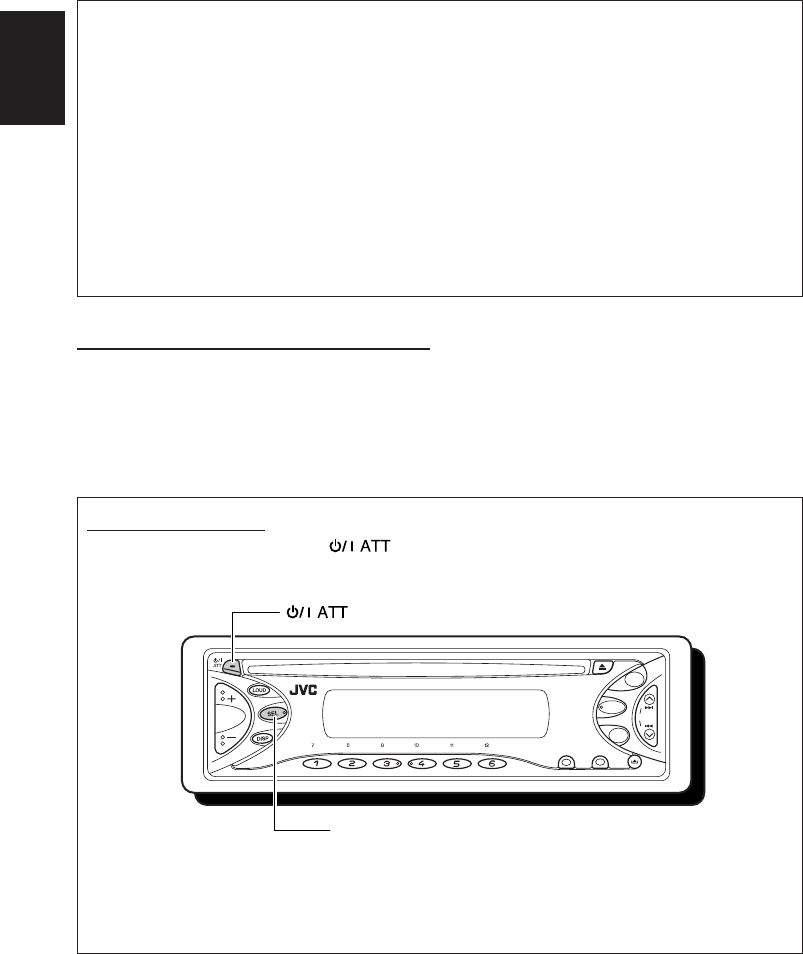
How to reset your unit
While holding SEL (Select), press (Standby/On Attenuator) for more than 2 seconds.
This will reset the built-in microcomputer.
NOTES:
• Your preset adjustments — such as preset channels or sound adjustments — will also be erased.
• If a CD is in the unit, it will eject when you reset the unit. Be careful not to drop the CD.
MO RPT RND
MODE SCM
SSM
CD
AM
FM
(Standby/On Attenuator)
SEL (Select)
EN02-03-KD-S5050[J]f 7/29/03, 10:14 AM2
3
ENGLISH
CONTENTS
Thank you for purchasing a JVC product. Please read all instructions carefully before operation,
to ensure your complete understanding and to obtain the best possible performance from the unit.
How to reset your unit .................................. 2
How to use the MODE button ...................... 3
LOCATION OF THE BUTTONS ...............4
Control panel ............................................... 4
BASIC OPERATIONS ..........................5
Turning on the power ................................... 5
RADIO OPERATIONS .........................6
Listening to the radio ................................... 6
Storing stations in memory .......................... 7
Tuning in to a preset station ........................ 8
CD OPERATIONS ..............................9
Playing a CD ................................................ 9
Locating a track or a particular portion
on a CD .................................................. 10
Selecting CD playback modes ................... 10
Prohibiting CD ejection .............................. 11
SOUND ADJUSTMENTS .................... 12
Adjusting the sound ................................... 12
Turning on/off the loudness function ............. 12
Using the Sound Control Memory (SCM) .. 13
Storing your own sound adjustments ........ 14
OTHER MAIN FUNCTIONS ................. 15
Setting the clock ........................................ 15
Canceling Advanced SCM – SCM LINK .... 15
Selecting the level display ......................... 16
Detaching the control panel ....................... 17
MAINTENANCE .............................. 18
Handling discs ........................................... 18
TROUBLESHOOTING ....................... 19
SPECIFICATIONS ............................ 20
BEFORE USE
*
For safety....
• Do not raise the volume level too much, as this
will block outside sounds, making driving
dangerous.
• Stop the car before performing any complicated
operations.
* Temperature inside the car....
If you have parked the car for a long time in hot
or cold weather, wait until the temperature in the
car becomes normal before operating the unit.
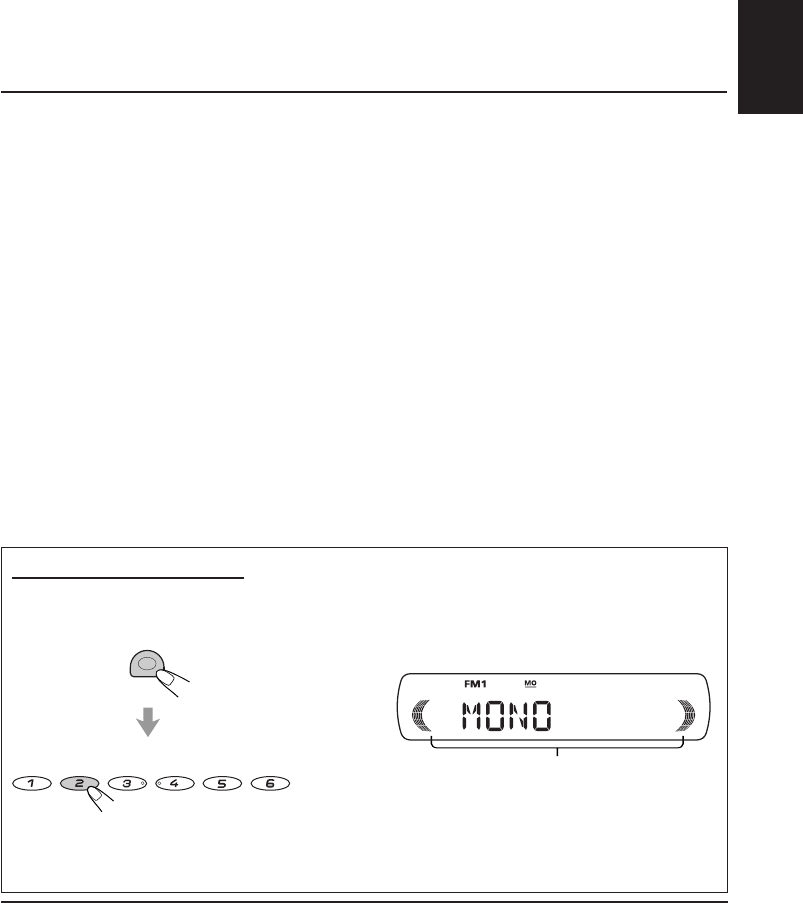
How to use the MODE button
If you press MODE, the unit goes into functions mode and the number buttons work as different
function buttons.
To use these buttons as number buttons again after pressing MODE, wait for 5 seconds without
pressing any number button until the functions mode is cleared.
• Pressing MODE again also clears the functions mode.
Time countdown indicator
MODE
MO RPT RND
78
9
10 11 12
EN02-03-KD-S5050[J]f 7/29/03, 10:14 AM3
ENGLISH
4
MO RPT RND MODE SCM
CD
AM
FM
SSM
DIRECT TRACK ACCESS
12349
8
76
t
w
p
5
qe r i
uy
o;asdf g h
k
j
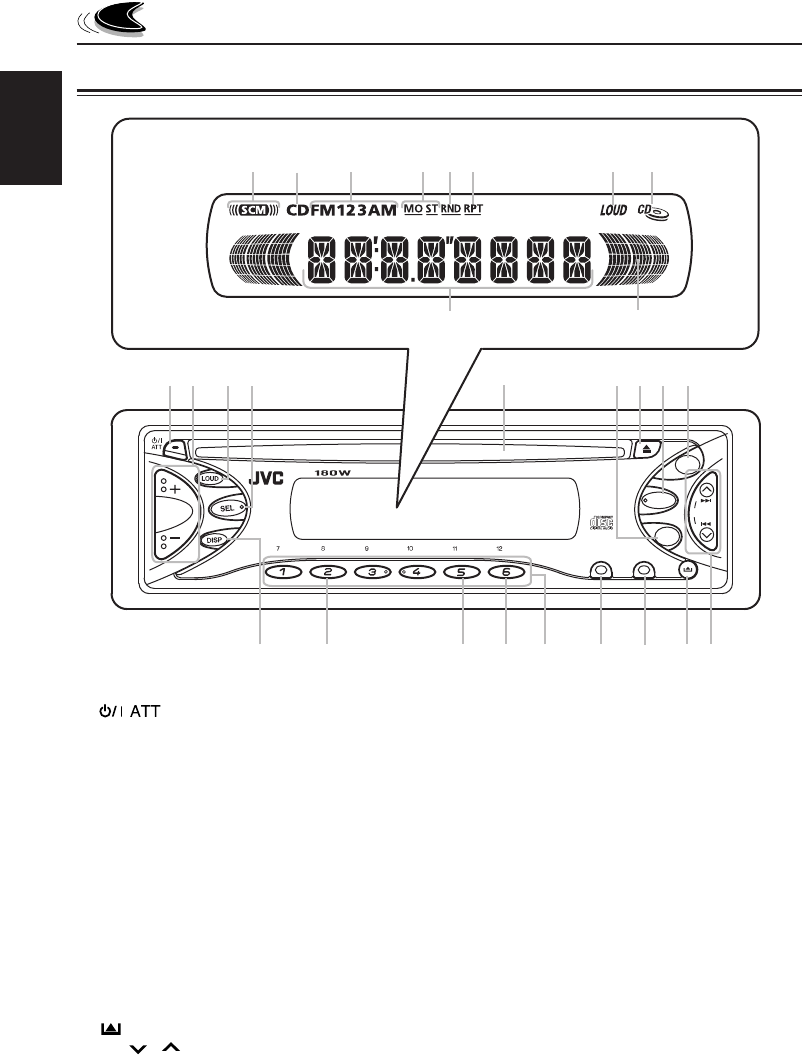
LOCATION OF THE BUTTONS
1 (Standby/On Attenuator) button
2+/– button
3LOUD (Loudness) button
4SEL (Select) button
5Loading slot
6AM button
70 (Eject) button
8CD button
9FM button
pDISP (Display) button
qMO (Monaural) button
wRPT (Repeat) button
eRND (Random) button
rNumber buttons
tMODE button
ySCM (Sound Control Memory) button
u (Control panel release) button
i4 / ¢ buttons
• Also functions as SSM buttons when
pressed together.
Display window
oSCM (Sound Control Memory) indicator
;CD indicator
aBand indicators
FM1, FM2, FM3
AM
sTuner reception indicators
MO (Monaural), ST (Stereo)
dRND (Random) indicator
fRPT (Repeat) indicator
gLOUD indicator
hCD-in indicator
jMain display
kVolume level indicator
Display window
Control panel
EN04-04-KD-S5050[J]f 7/29/03, 10:15 AM4
5
ENGLISH
4
Adjust the sound as you want (see
pages 12 – 14).
To drop the volume in a moment
Press briefly while listening to any
source. “ATT” starts flashing on the display, and
the volume level will drop in a moment.
To resume the previous volume level, press the
button briefly again.
To turn off the power
Press and hold until "SEE YOU"
appears on the display.
Note:
When you use this unit for the first time, set the built-
in clock correctly, see page 15.
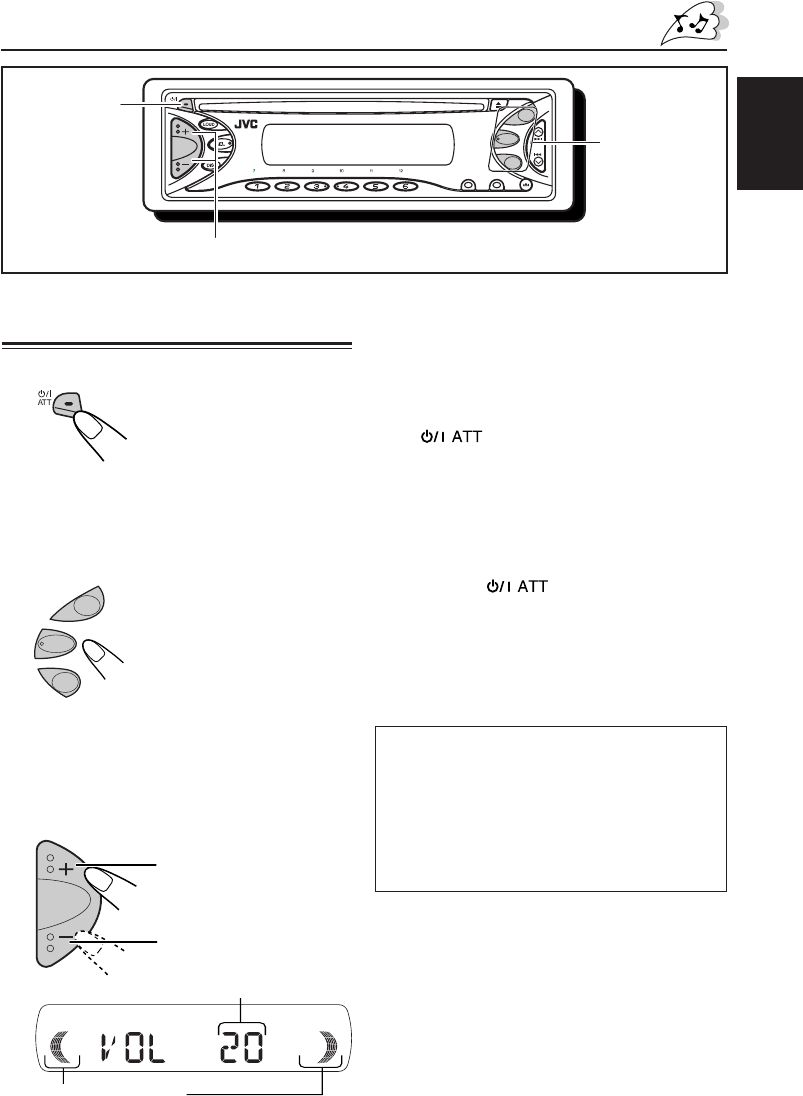
Turning on the power
1
Turn on the power.
Note on One-Touch Operation:
When you select a source in step 2 below, the
power automatically comes on. You do not have
to press this button to turn on the power.
2
Select the source.
3
Adjust the volume.
BASIC OPERATIONS
Volume level indicator
(see page 16)
Volume level appears
To increase the volume.
To decrease the volume.
To operate the tuner (FM or AM),
see pages 6 – 8.
To operate the CD,
see pages 9 – 11.
CAUTION on volume setting
CDs produce very little noise compared with other
sources. If the volume level is adjusted for the tuner,
for example, the speakers may be damaged by the
sudden increase in the output level. Therefore, lower
the volume before playing a disc and adjust it as
required during playback.
SCM
MO RPT RND
MODE
SSM
1
3
2
CD
AM
FM
CD
AM
FM
EN05-05-KD-S5050[J]f 8/20/03, 5:19 PM5
6
ENGLISH
RADIO OPERATIONS
Listening to the radio
You can use either automatic searching or manual
searching to tune in to a particular station.
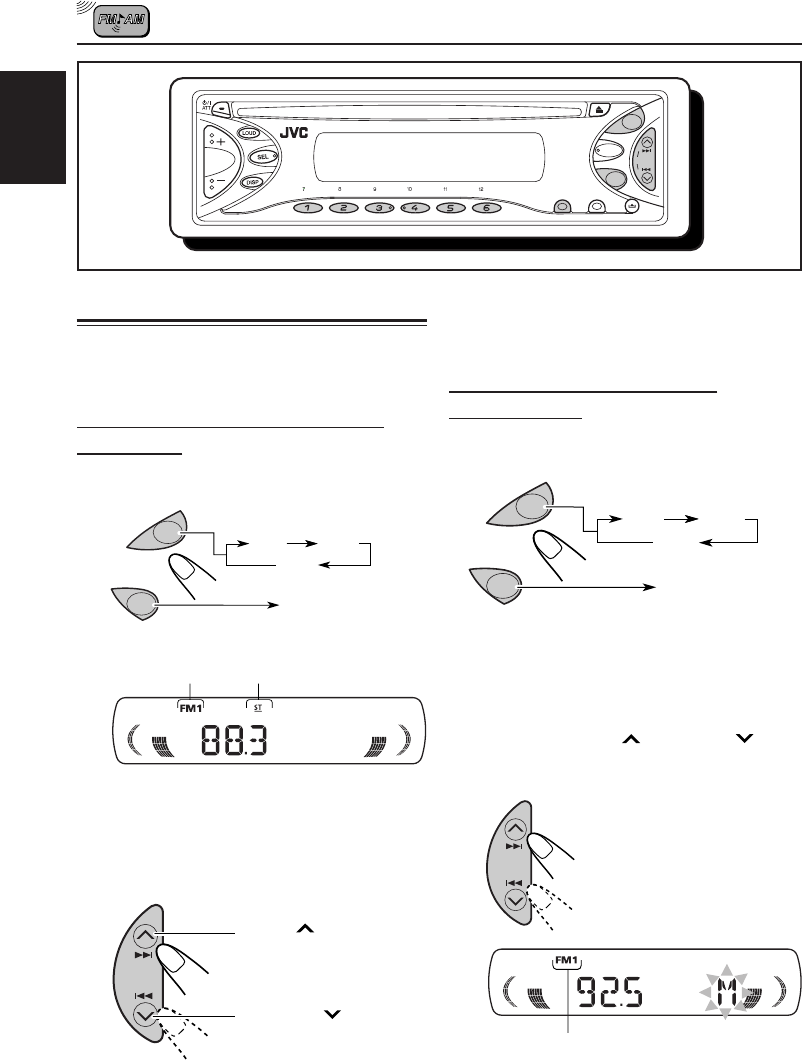
Searching a station automatically:
Auto search
1
Select the band (FM 1 – 3, AM).
Note:
This receiver has three FM bands (FM1, FM2,
FM3). You can use any one of them to listen to an
FM broadcast.
2
Start searching a station.
When a station is received, searching stops.
Selected band appears
Press ¢ to search
stations of higher
frequencies.
Press 4 to search
stations of lower
frequencies.
To stop searching before a station is received,
press the same button you have pressed for
searching.
Searching a station manually:
Manual search
1
Select the band (FM 1 – 3, AM).
Note:
This receiver has three FM bands (FM1, FM2,
FM3). You can use any one of them to listen to an
FM broadcast.
2
Press and hold ¢ or 4 until
“M” (manual) starts flashing on
the display.
MO RPT RND MODE SCM
SSM
CD
AM
FM
Selected band appears
AM
FM
FM1 FM2
FM3
AM
AM
FM FM1 FM2
FM3
AM
Lights up when receiving an
FM stereo broadcast with
sufficient signal strength
EN06-08-KD-S5050[J]f 7/17/03, 9:54 AM6
7
ENGLISH
3
Tune in to a station you want while “M”
(manual) is flashing.
• If you release your finger from the button, the
manual mode will automatically turn off after 5
seconds.
• If you hold down the button, the frequency keeps
changing (in 200 kHz intervals for FM and 10 kHz
for AM) until you release the button.
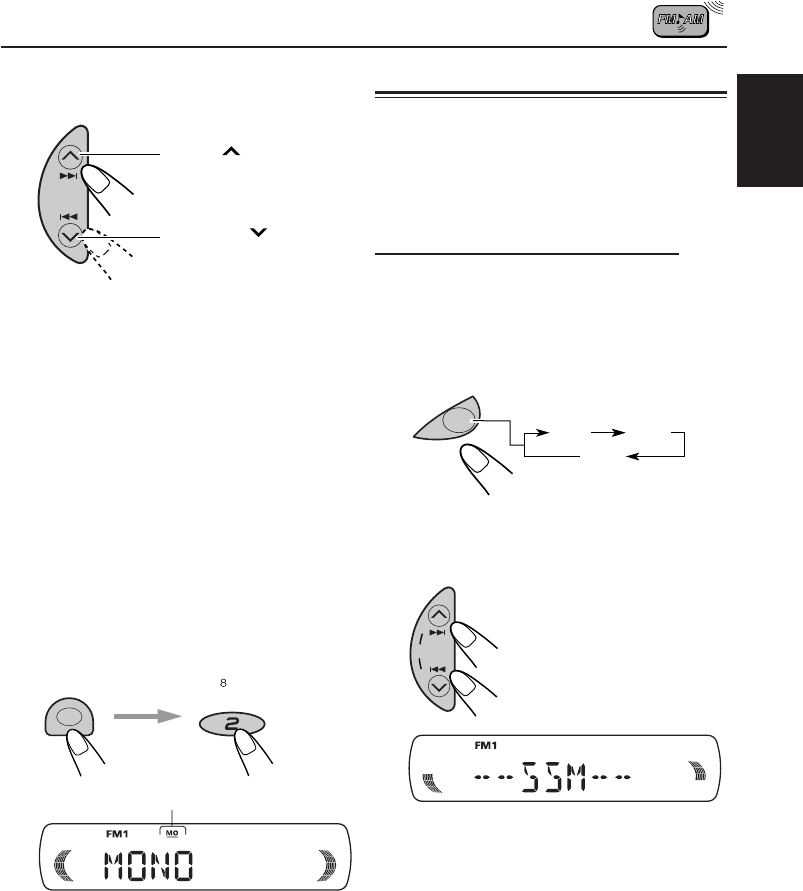
When an FM stereo broadcast is hard
to receive:
1Press MODE to enter the functions mode while
listening to an FM stereo broadcast.
2Press MO (monaural), while still in the functions
mode, so that the MO indicator lights up on
the display.
Each time you press the button, the MO indicator
lights up and goes off alternately.
When the MO indicator is lit on the display, the
sound you hear becomes monaural but the
reception will be improved.
Storing stations in memory
You can use one of the following two methods
to store broadcasting stations in memory.
• Automatic preset of FM stations: SSM (Strong-
station Sequential Memory)
• Manual preset of both FM and AM stations
FM station automatic preset: SSM
You can preset 6 local FM stations in each
FM band (FM1, FM2 and FM3).
1
Select the band (FM1 – 3) you want
to store FM stations into.
2
Press and hold both buttons for
more than 2 seconds.
Local FM stations with the strongest signals are
searched and stored automatically in the band
number you have selected (FM1, FM2 or FM3.)
These stations are preset in the number buttons –
No.1 (lowest frequency) to No.6 (highest frequency).
When automatic preset is over, the station stored
in number button 1 will be automatically tuned in.
Press ¢ to search
stations of higher
frequencies.
Press 4 to search
stations of lower
frequencies.
“SSM” appears, then disappears when automatic
preset is over.
MODE MO
SSM
FM
FM1 FM2
FM3
MO (monaural) indicator
EN06-08-KD-S5050[J]f 7/18/03, 8:56 AM7
8
ENGLISH
MO RPT RND
78
9
10 11 12
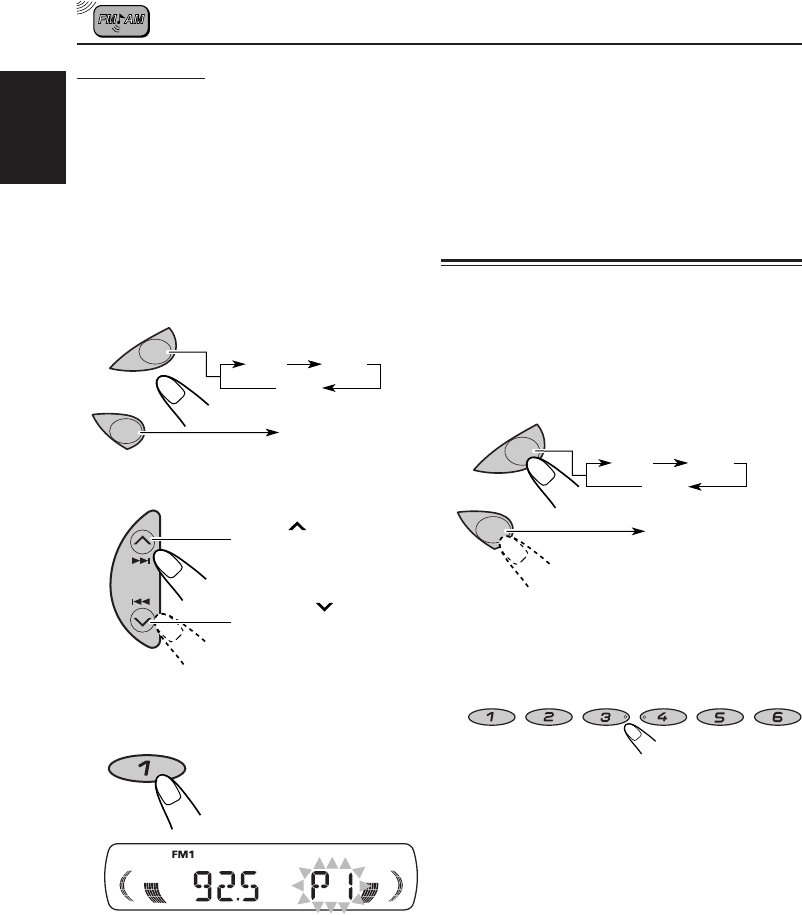
Manual preset
You can preset up to 6 stations in each band (FM1,
FM2, FM3 and AM) manually.
Ex: Storing an FM station of 92.5 MHz into the
preset number 1 of the FM1 band.
1
Select the band (FM1 – 3, AM) you
want to store FM stations into (in
this example, FM1).
•Each time you press the button, the FM
band changes as follows:
2
Tune in to a station of 92.5 MHz.
3
Press and hold the number button
(in this example, 1) for more than
2 seconds.
4
Repeat the above procedure to
store other stations into other
preset numbers.
Press ¢ to tune
stations of higher
frequencies.
Press 4 to tune
stations of lower
frequencies.
“P1” flashes for a few seconds.
Notes:
• A previously preset station is erased when a new station
is stored in the same preset number.
• Preset stations are erased when the power supply
to the memory circuit is interrupted (for example,
during battery replacement). If this occurs, preset the
stations again.
Tuning in to a preset station
You can easily tune in to a preset station.
Remember that you must store stations first. If you
have not stored them yet, see “Storing stations in
memory” on page 7 and 8.
1
Select the band (FM1 – 3, AM).
2
Select the number (1 – 6) for the preset
station you want.
AM
FM
FM1 FM2
FM3
AM
AM
FM
FM1 FM2
FM3
AM
EN06-08-KD-S5050[J]f 7/17/03, 9:54 AM8
9
ENGLISH
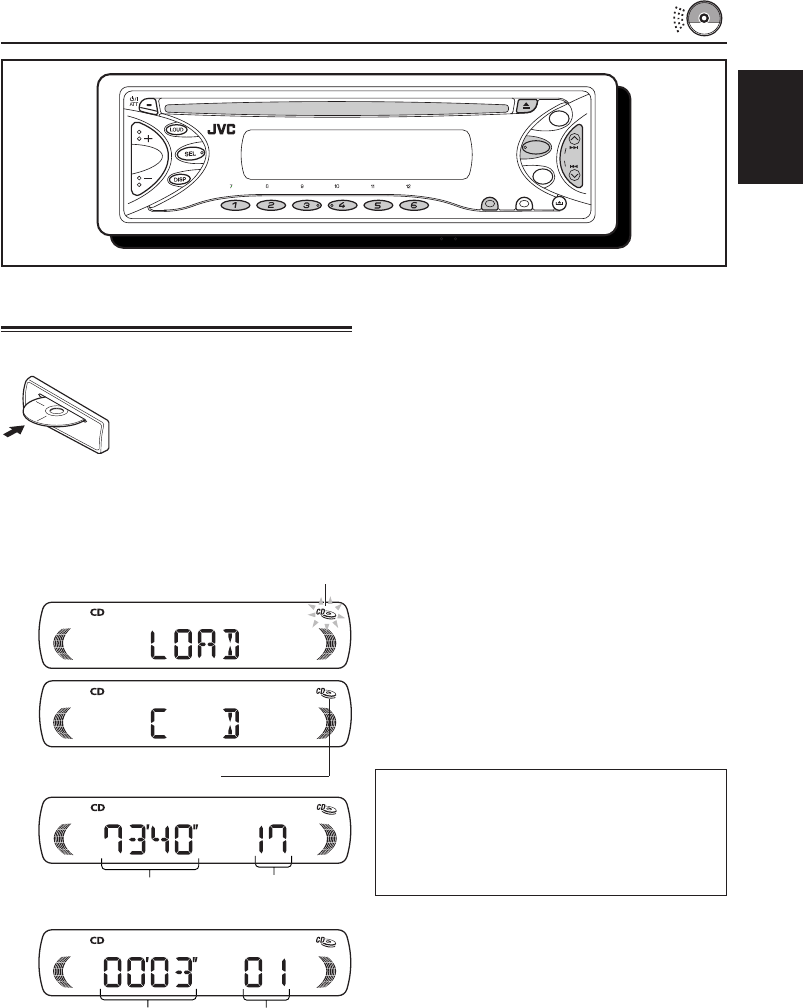
Playing a CD
Insert a disc into the loading slot.
The unit turns on, draws
a CD and starts playback
automatically.
Note on One-Touch Operation:
When a CD is already in the loading slot, pressing CD
turns on the unit and starts playback automatically.
All tracks will be played repeatedly until you
stop playback.
CD OPERATIONS
Note:
When a CD is inserted upside down, the CD automa-
tically ejects.
To stop play and eject the CD
Press 0.
CD play stops and the CD automatically ejects
from the loading slot.
• If you change the source, the CD play also
stops (without ejecting the CD).
Next time you select “CD” as the source, CD
play starts from where playback has been
stopped previously.
Notes:
• If the ejected disc is not removed for about 15
seconds, the disc is automatically inserted again
into the loading slot to protect it from dust. (CD
play will not start this time.)
• You can eject the CD even when the unit is
turned off.
Elapsed playing time
Total playing time of
the inserted disc
Total track number of
the inserted disc
Current track
The CD-in indicator lights up
MO RPT RND
MODE SCM
AM
FM
SSM
CD
The CD-in indicator flashes
About mistracking:
Mistracking may result from driving on extremely
rough roads. This does not damage the unit and
the CD, but will be annoying.
We recommend that you stop CD play while driving
on such rough roads.
EN09-11-KD-S5050[J]f 8/20/03, 5:21 PM9
10
ENGLISH
Locating a track or a particular
portion on a CD
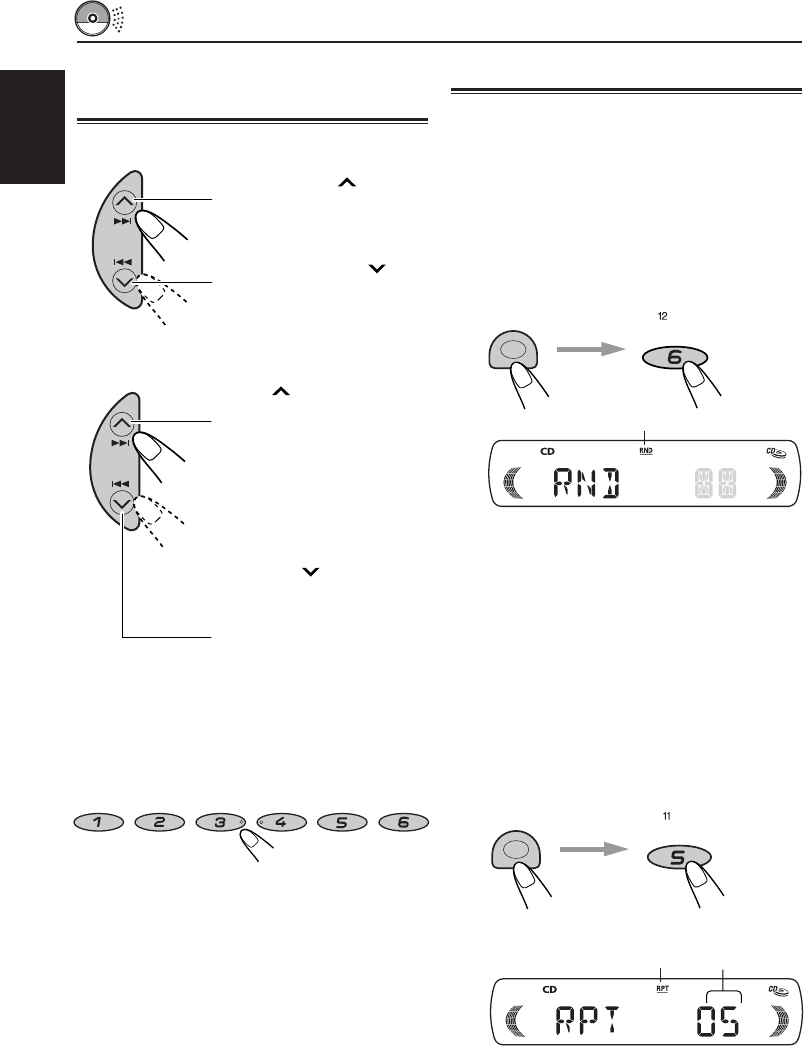
To fast-forward or reverse the track
To go to the next tracks or the previous
tracks
To go to a particular track directly
Press the number button corresponding to the
track number to start its playback.
• To select a track number from 1 – 6:
Press 1 (7) – 6 (12) briefly.
• To select a track number from 7 – 12:
Press and hold 1 (7) – 6 (12) for more than
1 second.
Press and hold ¢,
while playing a CD, to fast
forward the track.
Press and hold 4 ,
while playing a CD, to
reverse the track.
Press ¢ briefly, while
playing a CD, to go ahead
to the beginning of the next
track. Each time you press
the button consecutively,
the beginning of the next
tracks is located and played
back.
Press 4 briefly, while
playing a CD, to go back to
the beginning of the current
track. Each time you press
the button consecutively,
the beginning of the
previous tracks is located
and played back.
Selecting CD playback modes
To play back tracks at random (Random Play)
You can play back all tracks on the CD at random.
1Press MODE to enter the functions mode
while playing a CD.
2Press RND (Random), while still in the functions
mode, so that the RND indicator lights up on
the display.
Each time you press the button, CD random
play mode turns on and off alternately.
When the random play is turned on, the RND indi-
cator lights up on the display. A track randomly
selected starts playing.
To play back tracks repeatedly (Repeat Play)
You can play back the current track repeatedly.
1Press MODE to enter the functions mode
while playing a CD.
2Press RPT (Repeat), while still in the functions
mode, so that the RPT indicator lights up on
the display.
Each time you press the button, CD repeat
play mode turns on and off alternately.
When the repeat play is turned on, the RPT indicator
lights up on the display. The current track starts
playing repeatedly.
Track number
of the currently
playing track
RPT indicator
RND indicator
MO RPT RND
78
9
10 11 12
RND
MODE
RPT
MODE
EN09-11-KD-S5050[J]f 7/18/03, 9:00 AM10
11
ENGLISH
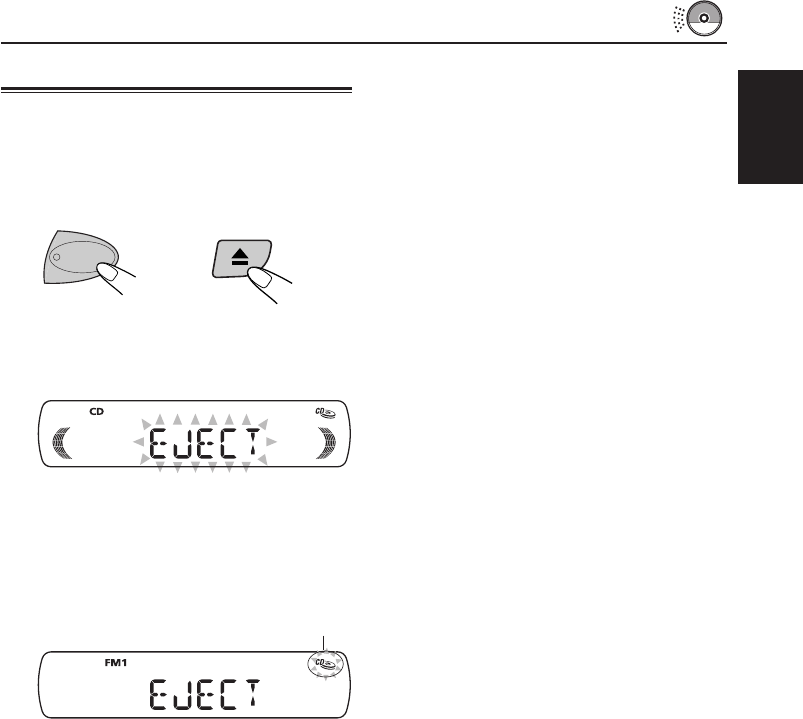
Prohibiting CD ejection
You can prohibit the CD ejection and can lock a
CD in the loading slot.
While pressing CD, press and hold 0 for
more than 2 seconds.
“EJECT” flashes on the display for about
5 seconds, and the CD is locked and cannot
be ejected.
To cancel the prohibition and unlock the CD
While pressing CD, press and hold 0 again for
more than 2 seconds.
“EJECT” appears on the display, and the CD ejects
from the loading slot.
CD
The CD-in indicator flashes
EN09-11-KD-S5050[J]f 7/17/03, 12:21 PM11
12
ENGLISH
SOUND ADJUSTMENTS
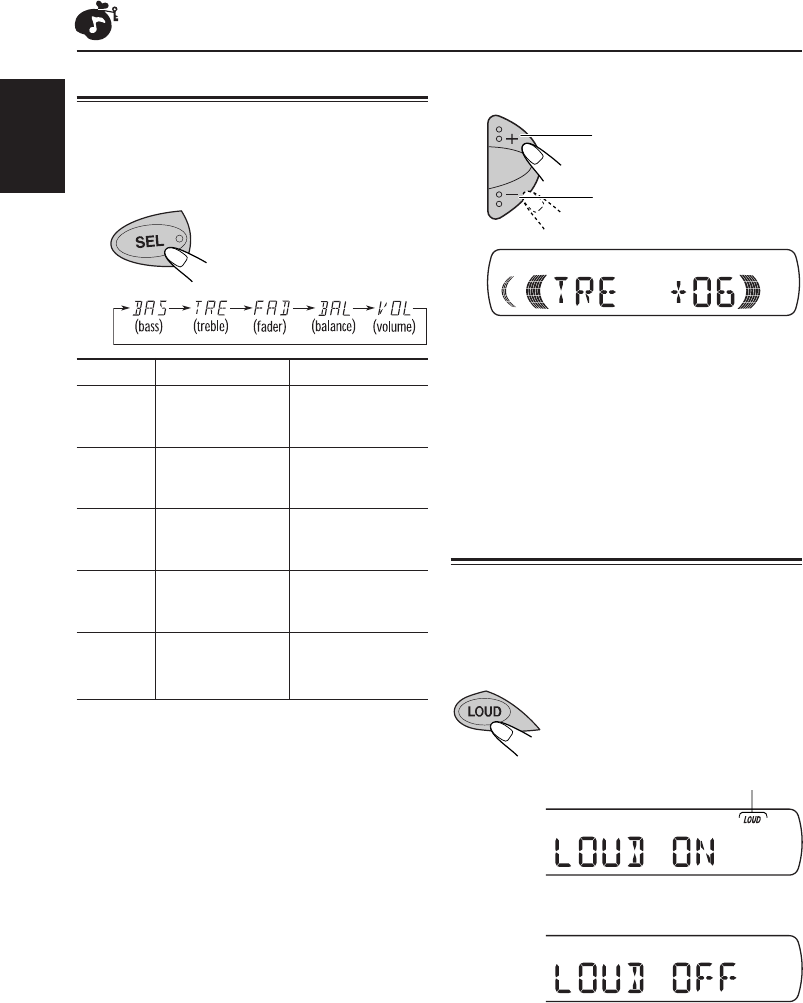
Adjusting the sound
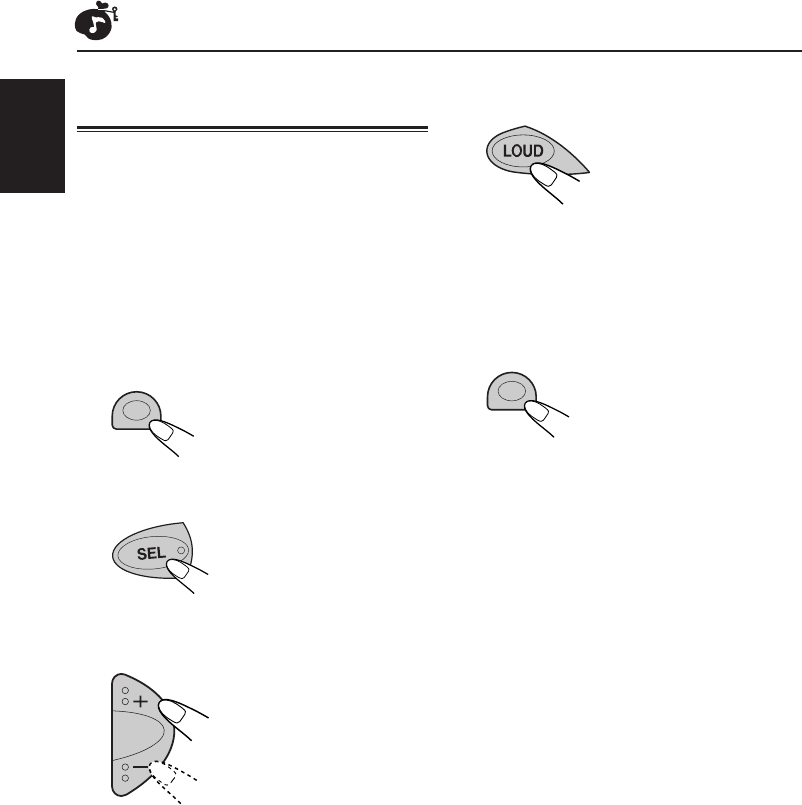
You can adjust the sound characteristics to your
preference.
1
Select the item you want to adjust.
Each time you press the
button, the adjustable
items change as follows:
Indication To do: Range
BAS Adjust the bass. –06 (min.)
(Bass) |
+06 (max.)
TRE Adjust the treble. –06 (min.)
(Treble) |
+06 (max.)
FAD Adjust the front R06 (Rear only)
(Fader)* and rear speaker |
balance. F06 (Front only)
BAL Adjust the left L06 (Left only)
(Balance) and right speaker |
balance. R06 (Right only)
VOL Adjust the volume. 00 (min.)
(Volume) |
50 (max.)
* If you are using a two-speaker system, set the fader
level to “00.”
2
Adjust the level
Ex.: when you adjust “TRE” (treble)
Note:
Normally the + and – buttons work as the volume
control. So you do not have to select “VOL” to adjust
the volume level.
Turning on/off the loudness
function
The human ear is less sensitive to low and high
frequencies at low volumes.
The loudness function can boost these
frequencies to produce well-balanced sound
at low volume level.
Each time you press LOUD, the
loudness function turns on and off
alternatively.
@A
To increase the level.
To decrease the level.
LOUD (loudness) indicator
EN12-14-KD-S5050[J]f 7/29/03, 10:23 AM12
13
ENGLISH
Recalling the sound modes
When “SCM LINK” is set to “LINK ON,”
select the source.
Each time you change the playback source, the
SCM indicator flashes on the display.
The sound mode stored in memory for the
selected source is recalled.
Notes:
• You can adjust each sound mode to your preference,
and store it in memory.
If you want to adjust and store your original sound
mode, see “Storing your own sound adjustments” on
page 14.
• To adjust the bass and treble reinforcement levels or
to turn on/off the loudness function temporarily, see
page 12. (Your adjustments will be cancelled if another
source is selected.)
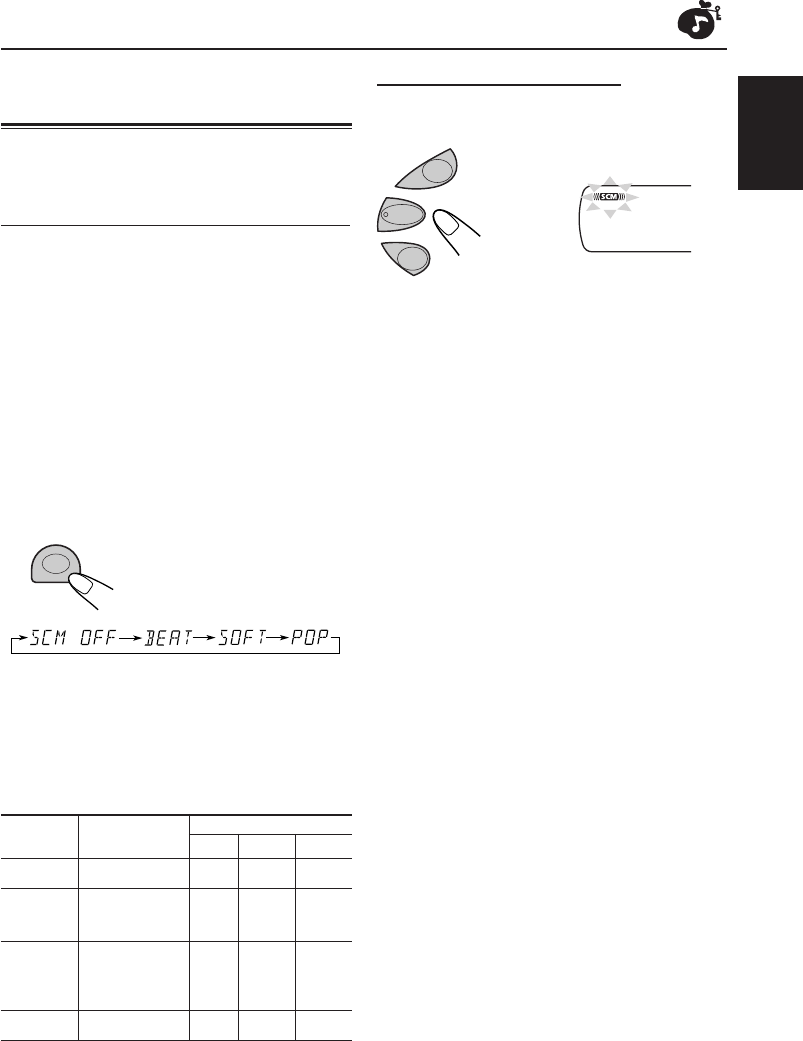
Using the Sound Control
Memory (SCM)
You can select and store a preset sound adjustment
suitable to each playback source. (Advanced SCM)
Selecting and storing the sound modes
Once you select a sound mode, it is stored in
memory. It will be recalled every time you select
the same source and will be shown on the display.
A sound mode can be stored for each of the
following sources — FM1, FM2, FM3, AM, and CD.
• If you do not want to store the sound mode
separately for each playback source, but want
to use the same sound mode for all the sources,
see “Canceling Advanced SCM – SCM LINK”
on page 15.
Select the sound mode you want.
• Each time you press the button, the sound mode
changes as follows.
• When “SCM LINK” is set to “LINK ON”, the
selected sound mode can be stored in memory
for the current source and the effect applies only
to the current source.
• When “SCM LINK” is set to “LINK OFF”, the
selected sound mode effect applies to any source.
Indication For: Preset values
BAS TRE
LOUD
SCM OFF (Flat sound) 00 00 ON
BEAT Rock or disco +02 00 ON
music
SOFT Quiet +01 –03 OFF
background
music
POP Light music +04 +01 OFF
SCM
CD
AM
FM
EN12-14-KD-S5050[J]f 7/29/03, 10:23 AM13
14
ENGLISH
Storing your own sound
adjustments
You can adjust the sound modes (BEAT, SOFT,
POP: see page 13) to your preference and store
your own adjustments in memory.
• There is a time limit in doing the following
procedure. If the setting is cancelled before you
finish, start from step 1 again.
1
Call up the sound mode you want
to adjust.
See page 13 for details.
2
Select “BAS” (bass) or “TRE” (treble).
3
Adjust the bass or treble level.
See page 12 for details.
4
Repeat steps 2 and 3 to adjust the
other items.
5
To turn on/off the loudness function.
See page 12 for details.
6
Press and hold SCM until the sound
mode you have selected in step 1
flashes on the display.
Your adjustment made for the selected sound
mode is stored in memory.
7
Repeat the same procedure to store
other sound modes.
To reset to the factory settings
Repeat the same procedure and reassign the preset
values listed in the table on page 13.
SCM
SCM
EN12-14-KD-S5050[J]f 7/31/03, 1:18 PM14
15
ENGLISH
OTHER MAIN FUNCTIONS
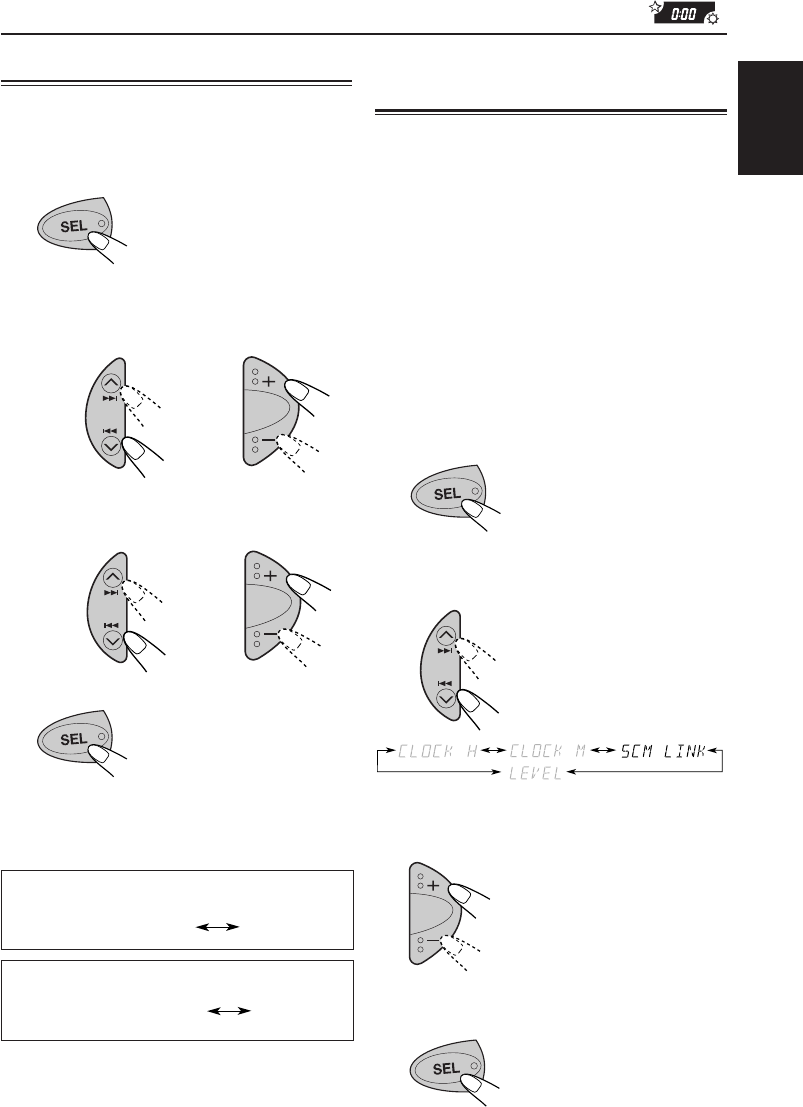
Setting the clock
1
Press and hold SEL (Select) for more
than 2 seconds.
“CLOCK H”, “CLOCK M”, “SCM LINK” or
“LEVEL” appears on the display.
2
Set the hour.
1Select “CLOCK H” if not shown on the
display.
2Adjust the hour.
3
Set the minute.
1Select “CLOCK M.”
2Adjust the minute.
4
Press SEL (Select) to finish the setting.
2
1
During tuner operation:
During CD operation:
Clock
Frequency
To check the current clock time (changing the
display mode)
Press DISP repeatedly. Each time you press the
button, the display mode changes as follows.
Cancelling Advanced SCM
– SCM LINK
You can cancel the Advanced SCM (Sound Control
Memory), and unlink the sound modes and the
playback sources.
When shipped from the factory, a different sound
mode can be stored in memory for each source so
that you can change the sound modes simply by
changing the sources.
LINK ON: Advanced SCM (different SCM for
different sources)
LINK OFF: Conventional SCM (one SCM for all
sources)
1
Press and hold SEL (Select) for more
than 2 seconds.
“CLOCK H”, “CLOCK M”, “SCM LINK” or
“LEVEL” appears on the display.
2
Select "SCM LINK" if not shown on
the display.
3
Select the desire mode — "LINK ON"
or "LINK OFF".
4
Press SEL (Select) to finish the setting.
• If the unit is not in use when you press DISP, the
power turns on, the clock time is shown for
5 seconds, then the power turns off.
2
1
Clock
Elapsed playing time
EN15-17-KD-S5050[J]f 7/31/03, 11:07 AM15
16
ENGLISH
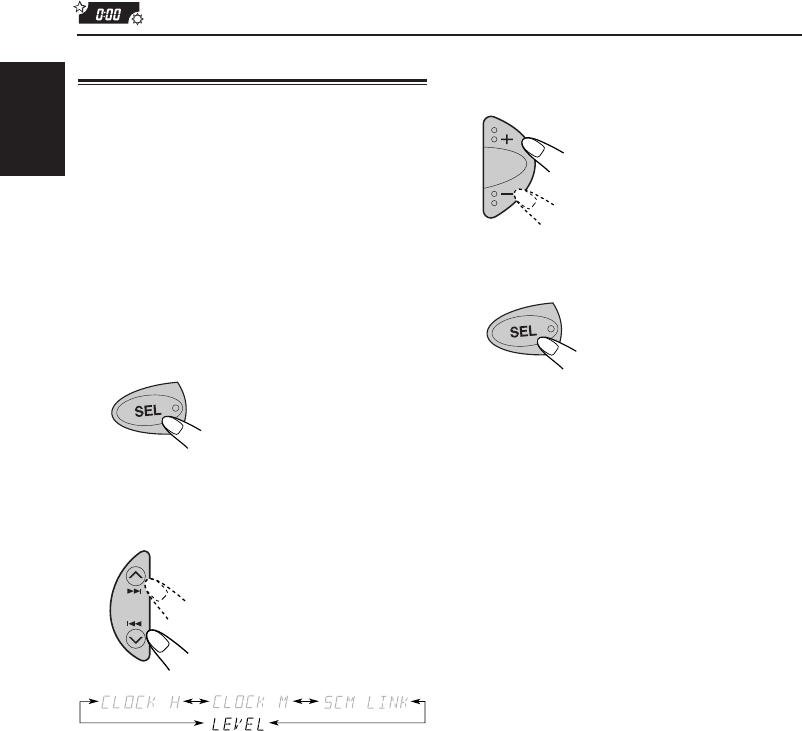
3
Select the desired mode — “VOL 1”,
“VOL 2” or “OFF”.
4
Press SEL (Select) to finish the setting.
Selecting the level display
You can select the level display according to your
preference.
When shipped from the factory, “VOL 2” is selected.
VOL 1 : Shows the volume level indicator.
VOL 2 : Alternates “VOL 1” setting and
illumination display.
OFF : Erases the volume level indicator.
1
Press and hold SEL for more than 2
seconds.
“CLOCK H”, “CLOCK M”, “SCM LINK” or
“LEVEL” appears on the display.
2
Select “LEVEL” if not shown on the
display.
EN15-17-KD-S5050[J]f 7/29/03, 10:31 AM16
17
ENGLISH
Note on cleaning the connectors:
If you frequently detach the control panel, the
connectors will deteriorate.
To minimize this possibility, periodically wipe the
connectors with a cotton swab or cloth moistened
with alcohol, being careful not to damage the
connectors.
Connectors
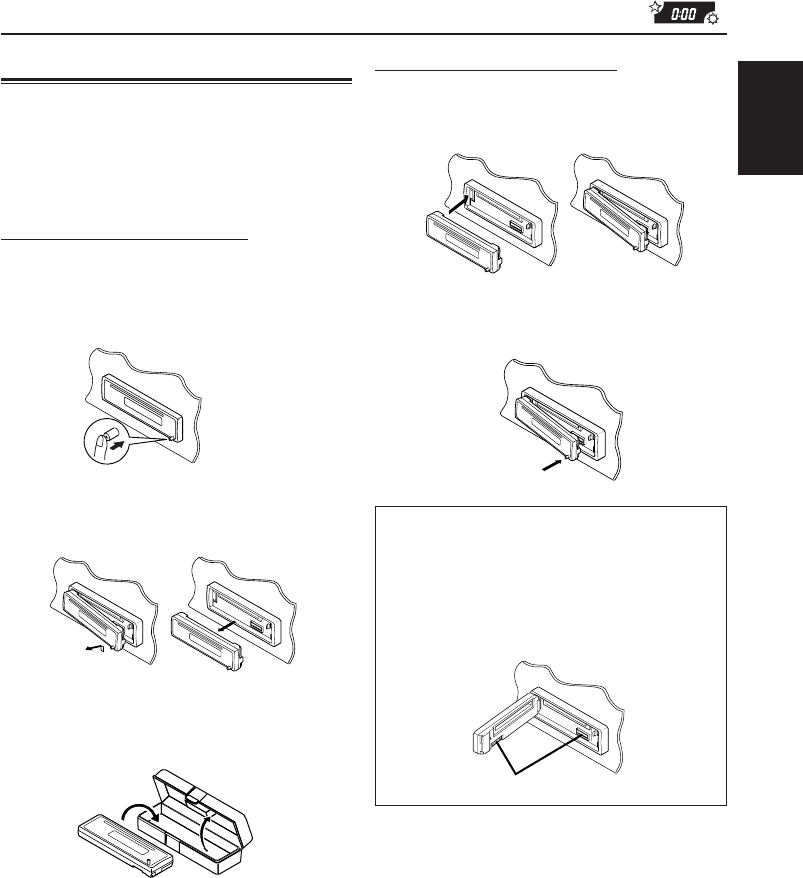
Detaching the control panel
You can detach the control panel when leaving
the car.
When detaching or attaching the control panel, be
careful not to damage the connectors on the back
of the control panel and on the panel holder.
Detaching the control panel
Before detaching the control panel, be sure to
turn off the power.
1
Unlock the control panel.
2
Lift and pull the control panel out of
the unit.
3
Put the detached control panel into
the case provided.
Attaching the control panel
1
Insert the left side of the control panel
into the groove on the panel holder.
2
Press the right side of the control
panel to fix it to the panel holder.
EN15-17-KD-S5050[J]f 7/17/03, 12:24 PM17
18
ENGLISH
MAINTENANCE
Handling discs
This unit has been designed to reproduce CDs
and CD-Rs (Recordable).
•This unit is not compatible with MP3 discs.
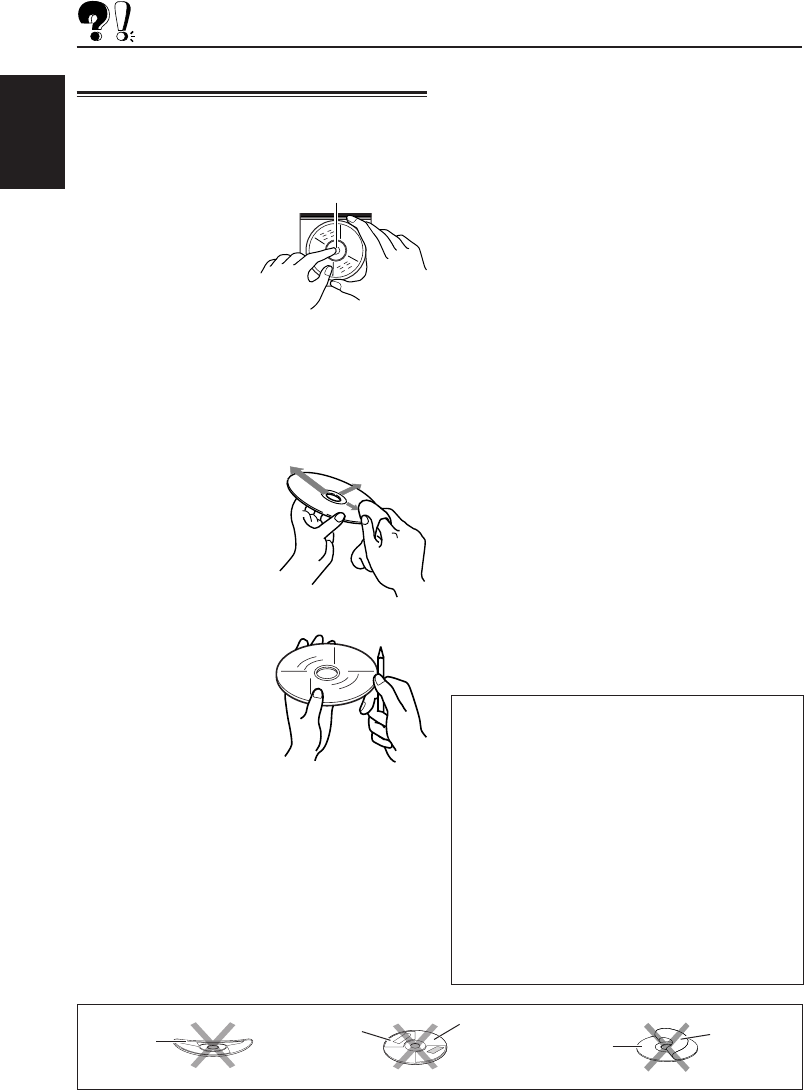
How to handle discs
When removing a disc from
its case, press down the
center holder of the case
and lift the disc out,
holding it by the edges.
• Always hold the disc by the edges. Do not
touch its recording surface.
When storing a disc into its case, gently insert
the disc around the center holder (with the
printed surface facing up).
• Make sure to store discs into the cases after use.
To keep discs clean
A dirty disc may not play
correctly. If a disc does
become dirty, wipe it with a
soft cloth in a straight line
from center to edge.
To play new discs
New discs may have some
rough spots around the
inner and outer edges. If
such a disc is used, this
unit may reject the disc.
To remove these rough
spots, rub the edges with
a pencil or ball-point pen, etc.
Moisture condensation
Moisture may condense on the lens inside the
unit in the following cases:
• After starting the heater in the car.
• If it becomes very humid inside the car.
Should this occur, the unit may malfunction. In
this case, eject the disc and leave the unit
turned on for a few hours until the moisture
evaporates.
Center holder
When playing a CD-R
Before playing back CD-Rs, read their
instructions or cautions carefully.
• Use only “finalized” CD-Rs.
• Some CD-Rs may not play back on this unit
because of their disc characteristics, and for
the following reasons:
– Discs are dirty or scratched.
– Moisture condensation on the lens inside
the unit.
– The pickup lens inside the unit is dirty.
• CD-Rs are susceptible to high temperatures or
high humidity, so do not leave them inside
your car.
• Do not use following CD-Rs:
– Discs with stickers, labels, or protective seal
stuck to the surface.
– Discs on which labels can be directly printed
by an ink jet printer.
Using these discs under high temperatures or
high humidity may cause malfunctions or damage
to discs For example,
– Stickers or labels may shrink and warp a disc.
– Stickers or lables may peel off so discs
cannot be ejected.
– Print on discs may get sticky.
Read instructions or cautions about labels and
printable discs carefully.
• CD-RWs (Rewritable) cannot be played back
on this unit.
CAUTIONS:
• Do not insert 8 cm (3 3/16") discs (single CDs)
into the loading slot. (Such discs cannot be
ejected.)
• Do not insert any disc of unusual shape — like a
heart or flower; otherwise, it will cause a
malfunction.
• Do not expose discs to direct sunlight or any heat
source or place them in a place subject to high
temperature and humidity. Do not leave them in
a car.
• Do not use any solvent (for example, conventional
record cleaner, spray, thinner, benzine, etc.) to
clean discs.
Sticker
Warped
disc
Disc Stick-on
label
Stick
residue
EN18-20-KD-S5050[J]f 7/17/03, 1:33 PM18
19
ENGLISH
TROUBLESHOOTING
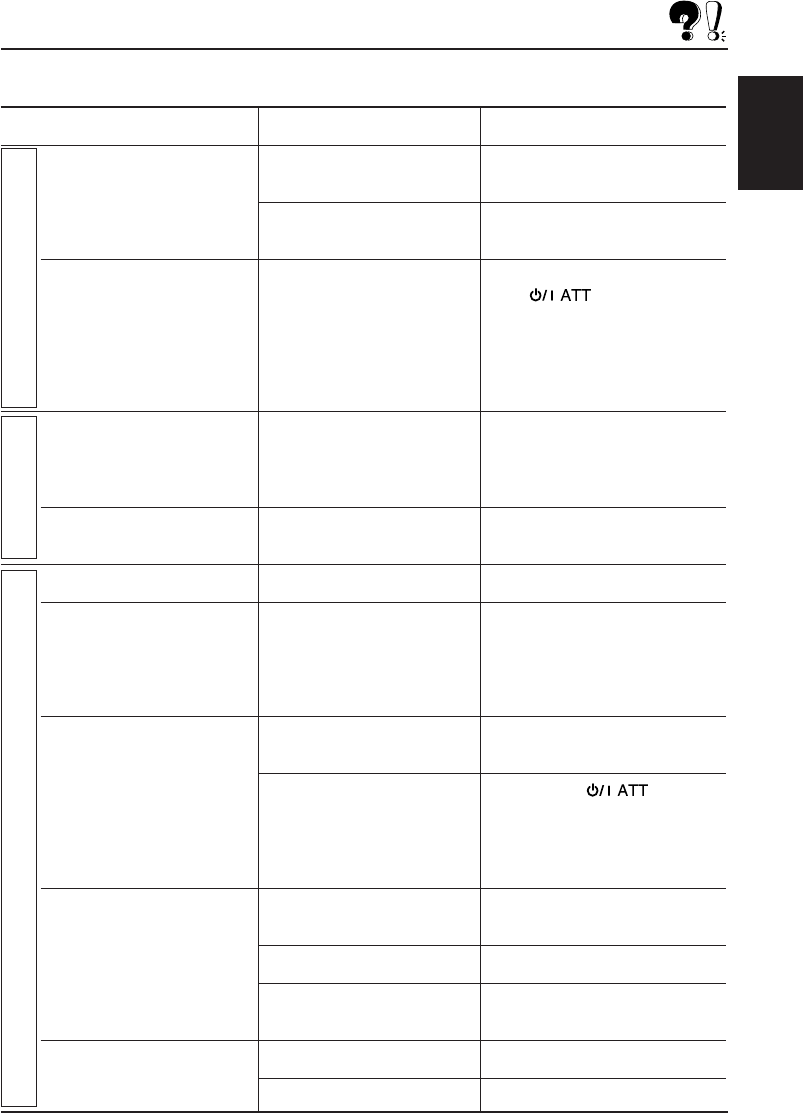
What appears to be trouble is not always serious. Check the following points before calling a service
center.
Symptoms Causes Remedies
• Sound cannot be heard The volume level is set to the Adjust it to the optimum level.
from the speakers. minimum level.
Connections are incorrect. Check the cords and
connections.
• This unit does not work at The built-in microcomputer While holding SEL (Select),
all. may have functioned press (Standby/
incorrectly due to noise, etc. On Attenuator) for more
than 2 seconds to reset the unit.
(The clock setting and preset
stations stored in memory are
erased) (See page 2)
• SSM (Strong-station Signals are too weak. Store stations manually.
Sequential Memory)
automatic preset does not
work.
• Static noise while listening The antenna is not connected Connect the antenna firmly.
to the radio. firmly.
• CD automatically ejects. CD is inserted upside down. Insert the CD correctly.
• CD-R cannot be played CD-R is not finalized. • Insert a finalized CD-R.
back.
• Tracks on the CD-R cannot • Finalize the CD-R with the
be skipped. component which you used
for recording.
• CD can be neither played CD is locked. Unlocked the CD. (See page 11)
back nor ejected.
The CD player may have While holding
functioned incorrectly. (Standby/On Attenuator), press
/ (Eject) for more than 2 seconds.
Be careful not to drop the CD
when it is ejected.
• CD sound is sometimes You are driving on rough Stop playback while driving on
interrupted. roads. rough roads.
CD is scratched. Change the CD.
Connections are incorrect. Check the cords and
connections.
• “NO DISC” appears on the No CD in the loading slot. Insert a CD into the loading slot.
display.
CD is inserted incorrectly. Insert the CD correctly.
General
FM/AM
CD Playback
EN18-20-KD-S5050[J]f 7/29/03, 10:33 AM19

20
ENGLISH
SPECIFICATIONS
AUDIO AMPLIFIER SECTION
Maximum Power Output:
Front: 45 watts per channel
Rear: 45 watts per channel
Continuous Power Output (RMS):
Front: 17 watts per channel into 4 Ω,
40 Hz to 20 000 Hz at no more than
0.8% total harmonic distortion.
Rear: 17 watts per channel into 4 Ω,
40 Hz to 20 000 Hz at no more than
0.8% total harmonic distortion.
Load Impedance: 4 Ω (4 Ω to 8 Ω allowance)
Tone Control Range
Bass: ±10 dB at 100 Hz
Treble: ±10 dB at 10 kHz
Frequency Response: 40 Hz to 20 000 Hz
Signal-to-Noise Ratio: 70 dB
Line-Out Level/Impedance:
2.0 V/20 kΩ load (full scale)
(only for KD-S5050)
Output Impedance: 1 kΩ
TUNER SECTION
Frequency Range
FM: 87.5 MHz to 107.9 MHz
AM: 530 kHz to 1 710 kHz
[FM Tuner]
Usable Sensitivity: 11.3 dBf (1.0 µV/75 Ω)
50 dB Quieting Sensitivity:
16.3 dBf (1.8 µV/75 Ω)
Alternate Channel Selectivity (400 kHz):
65 dB
Frequency Response: 40 Hz to 15 000 Hz
Stereo Separation: 35 dB
Capture Ratio: 1.5 dB
[AM Tuner]
Sensitivity: 20 µV
Selectivity: 35 dB
CD PLAYER SECTION
Type: Compact disc player
Signal Detection System: Non-contact optical
pickup (semiconductor laser)
Number of channels: 2 channels (stereo)
Frequency Response: 5 Hz to 20 000 Hz
Dynamic Range: 90 dB
Signal-to-Noise Ratio: 95 dB
Wow and Flutter: Less than measurable limit
GENERAL
Power Requirement
Operating Voltage: DC 14.4 volts (11 volts to 16
volts allowance)
Allowable Working Temperature:
0°C to +40°C (32°F to 104°F)
Grounding System: Negative ground
Dimensions (W x H x D)
Installation Size:
182 mm x 52 mm x 150 mm
(7-3/16" x 2-1/16" x 5-15/16")
Panel Size: 188 mm x 58 mm x 11 mm
(7-7/16" x 2-5/16" x 7/16")
Mass: 1.3 kg (2.9 lbs) (excluding accessories)
Design and specifications are subject to change
without notice.
If a kit is necessary for your car, consult your
telephone directory for the nearest car audio
speciality shop.
EN18-20-KD-S5050-KD-S10[J] 14/11/03, 9*5720
1103KKSFLEJEIN
EN, SP, FR
© 2003 VICTOR COMPANY OF JAPAN, LIMITED
VICTOR COMPANY OF JAPAN, LIMITED
Having TROUBLE with operation?
Please reset your unit
Refer to page of How to Reset
Still having trouble??
USA ONLY
Call 1-800-252-5722
http://www.jvc.com
We can help you!
http://www
.
j
v
cmobile.c
om
Visit us on-line for
Technical Support & Customer Satisfaction Survey.
US RESIDENTS ONLY
Cover-KD-S5050-KD-S10[J] 11/11/03, 15*492
1
53 mm
184 mm
(7-1/4")
(2-1/8")
KD-S5050/KD-S10
Installation/Connection Manual
Manual de instalación/conexión
Manuel d’installation/raccordement
ESPAÑOL
•Esta unidad está diseñada para funcionar con 12 V de CC,
con sistemas eléctricos de masa NEGATIVA.
INSTALACION (MONTAJE EN EL
TABLERO DE INSTRUMENTOS)
•La siguiente ilustración muestra una instalación típica. Sin
embargo usted deberá efectuar los ajustes correspondientes
a su automóvil. Si tiene alguna pregunta o necesita información
acerca de las herramientas para instalación, consulte con su
concesionario de JVC de equipos de audio para automóviles o
a una compañía que suministra tales herramientas.
FRANÇAIS
•
Cet appareil est conçu pour fonctionner sur des sources de
courant continu de 12 V à masse NEGATIVE.
INSTALLATION (MONTAGE DANS LE
TABLEAU DE BORD)
•
L’illustration suivante est un exemple d’installation typique.
Cependant, vous devez faire les ajustements correspondant à
votre voiture particulière. Si vous avez des questions ou avez
besoin d’information sur des kits d’installation, consulter votre
revendeur d’autoradios JVC ou une compagnie
d’approvisionnement.
ENGLISH
•This unit is designed to operate on 12 V DC, NEGATIVE ground
electrical systems.
INSTALLATION (IN-DASH
MOUNTING)
•The following illustration shows a typical installation. However,
you should make adjustments corresponding to your specific
car. If you have any questions or require information regarding
installation kits, consult your JVC car audio dealer or a company
supplying kits.
1103KKSFLEJEIN
EN, SP, FR
1
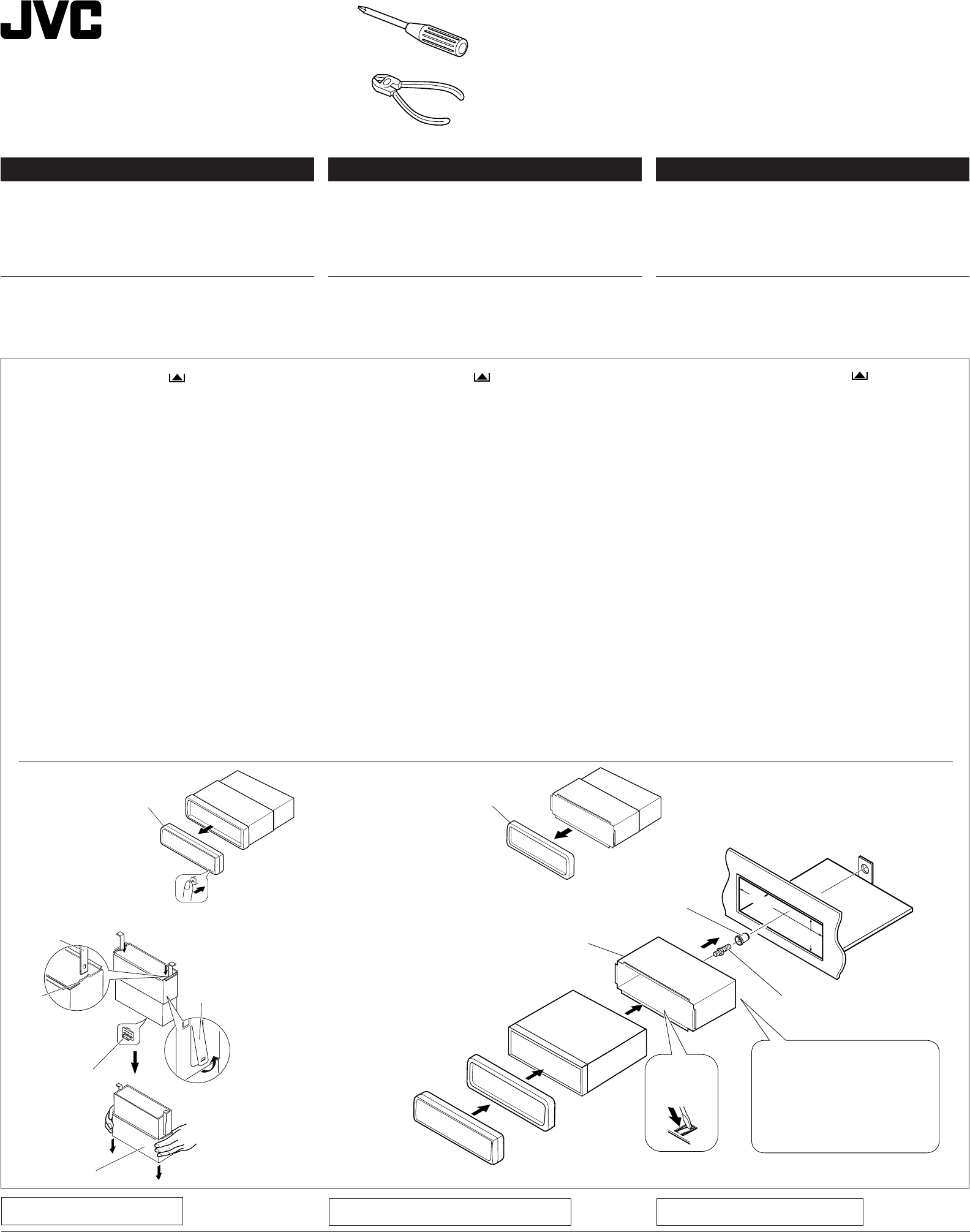
Antes de instalar: Pulse (soltar panel de control) para
separar el panel de control si ya está unido.
* Cuando se envía de la fábrica, el panel de control está
embalado en el estuche duro.
2
Retire la placa de guarnición.
3
Retire la cubierta después de desenganchar los retenes
de la cubierta.
1Ponga la unidad vertical.
Nota: Al poner la unidad vertical, tenga cuidado de no
dañar el fusible provisto en la parte posterior.
2Inserte las dos asas entre la unidad y la cubierta tal
como en la ilustración y desenganche los retenes de la
cubierta.
3Retire la cubierta.
Nota: Después de instalar la unidad, asegúrese de
guardar las asas para uso futuro.
4
Instale la cubierta en el tablero de instrumentos.
* Después de que la cubierta esté correctamente instalada
en el tablero de instrumentos, doble las lengüetas
correspondientes para sostener la cubierta firmemente
en su lugar, tal como se muestra.
5
Fixe el perno de montaje ou la parte trasera del cuerpo de la
unidad y coloque el cojín de goma sobre el extremo del perno.
6
Realice las conexiones eléctricas requeridas en base a
las explicaciones que figuran en la parte de atrás de estas
instrucciones.
7
Deslice la unidad dentro de la cubierta hasta que quede
trabada.
8
Coloque la placa de guarnición.
9
Coloque el panel de control.
1
Avant le montage:
Appuyez sur (déblocage du
panneau de commande) pour éventuellement détacher le
panneau de commande.
* Lorsque ce panneau de commande sort d’usine, il est
rangé dans un étui de transport.
2Retirer la plaque d’assemblage.
3Libérer les verrous du manchon et retirer le manchon.
1
Poser l’appareil à la verticale.
Remarque:
Lorsque vous mettez l’appareil à la verticale,
faire attention de ne pas endommager le fusible situé
sur le fond.
2
Insérer les 2 poignées entre l’appareil et le manchon
comme indiqué pour désengagé les verrous de manchon.
3
Retirer le manchon.
Remarque:
S'assurer de garder les poignées pour une
utilisation ultérieur, après l'installation de l'appareil.
4Installer le manchon dans le tableau de bord.
* Après installation correcte du manchon dans le tableau
de bord, plier les bonnes pattes pour maintenir fermement
le manchon en place, comme montré.
5Monter le boulon de montage sur l’arrière du corps de
l’appareil puis passer l’amortisseur en caoutchouc sur
l’extrémité du boulon.
6Réalisez les connexions électriques expliquées au dos de
cette page.
7Faire glisser l’appareil dans le manchon jusqu’à ce qu’il soit
verrouillé.
8Remonter la plaque d’assemblage.
9Remonter le panneau de commande.
1
Before mounting: Press (Control Panel Release
button) to detach the control panel if already attached.
* When shipped from the factory, the control panel is packed
in the hard case
2
Remove the trim plate.
3
Remove the sleeve after disengaging the sleeve locks.
1Stand the unit.
Note: When you stand the unit, be careful not to damage
the fuse on the rear.
2Insert the 2 handles between the unit and the sleeve, as
illustrated, to disengage the sleeve locks.
3Remove the sleeve.
Note: Be sure to keep the handles for future use after
installing the unit.
4
Install the sleeve into the dashboard.
* After the sleeve is correctly installed in the dashboard,
bend the appropriate tabs to hold the sleeve firmly in place,
as illustrated.
5
Fix the mounting bolt to the rear of the unit’s body and place
the rubber cushion over the end of the bolt.
6
Do the required electrical connections explained on the back
of this instructions.
7
Slide the unit into the sleeve until it is locked.
8
Attach the trim plate.
9
Attach the control panel.
LOCALIZACION DE AVERIAS
• El fusible se quema.
* ¿Están los conductores rojo y negro correctamente conectados?
• No es posible conectar la alimentación.
* ¿Está el cable amarillo conectado?
• No sale sonido de los altavoces.
* ¿Está el cable de salida del altavoz cortocircuitado?
• El sonido presenta distorsión.
* ¿Está el cable de salida del altavoz conectado a masa?
* ¿Están los terminales “–” de los altavoces L y R conectados a
una masa común?
• La unidad se calienta.
* ¿Está el cable de salida del altavoz conectado a masa?
* ¿Están los terminales “–” de los altavoces L y R conectados a
una masa común?
EN CAS DE DIFFICULTÉS
• Le fusible saute.
*
Les fils rouge et noir sont-ils racordés correctement?
• L’appareil ne peut pas être mise sous tension.
*
Le fil jaune est-elle raccordée?
• Pas de son des haut-parleurs.
*
Le fil de sortie de haut-parleur est-il court-circuité?
• Le son est déformé.
*
Le fil de sortie de haut-parleur est-il à la masse?
*
Les bornes “–” des haut-parleurs gauche et droit sont-elles mises
ensemble à la masse?
• L’appareil devient chaud.
*
Le fil de sortie de haut-parleur est-il à la masse?
*
Les bornes “–” des haut-parleurs gauche et droit sont-elles mises
ensemble à la masse?
TROUBLESHOOTING
•The fuse blows.
* Are the red and black leads connected correctly?
•Power cannot be turned on.
* Is the yellow lead connected?
•No sound from the speakers.
* Is the speaker output lead short-circuited?
•Sound is distorted.
* Is the speaker output lead grounded?
* Are the “–” terminals of L and R speakers grounded in common?
•Unit becomes hot.
* Is the speaker output lead grounded?
* Are the “–” terminals of L and R speakers grounded in common?
GET0171-002B
[J]
Control Panel
Panel de control
Panneau de command
1
3
2
7
Sleeve
Cubierta
Manchon
4
8
9
Trim plate
Placa de guarnición
Plaque d’assemblage
Dashboard
Tablero de instrumentos
Tableau de bord
Rubber cushion
Cojín de goma
Amortisseur en caoutchouc
Mounting bolt
Perno de montaje
Boulon de montage
5
Handle
Manija
Poignée
Lock Plate
Placa de bloqueo
Plaque de verrouillage
Sleeve
Cubierta
Manchon
Fuse
Fusible
Fusible
Slot
Ranura
Fente
Trim plate
Placa de guarnición
Plaque d’assemblage
46
*
Control Panel
Panel de control
Panneau de command
See “ELECTRICAL CONNECTIONS”.
Véase “CONEXIONES ELECTRICAS”.
Référez-vous “RACCORDEMENTS
ELECTRIQUES” .
install_KD-S5050-KD-S10[J] 11/11/03, 2:54 PM1
2
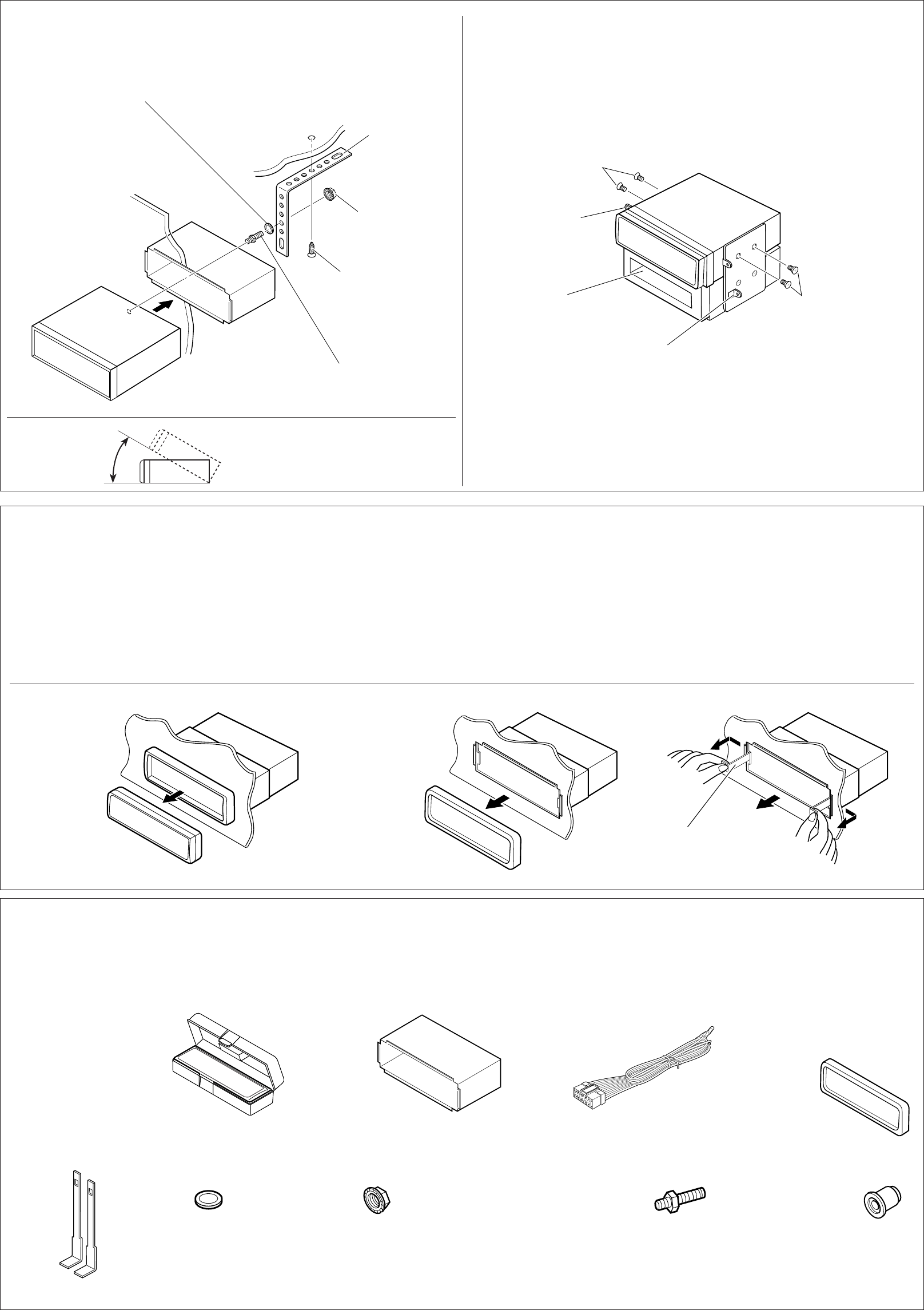
• When installing the unit without using the sleeve
• Instalación de la unidad sin utilizar la cubierta
• Lors de l'installation de l’appareil sans utiliser de manchon
In a Toyota for example, first remove the car radio and install the unit in its place.
En un Toyota por ejemplo, primero extraiga la radio del automóvil y luego instale la unidad en su
lugar.
Par exemple dans une Toyota, retirer d’abord l’autoradio et installer l’appareil à la place.
• When using the optional stay
• Cuando emplea un soporte opcional
• Lors de l'utilisation du hauban en option
Bracket*
Ménsula*
Support*
Flat type screws M5 x 8 mm (M5 x 3/8")*
Tornillos tipo plano M5 x 8 mm (M5 x 3/8 pulgada)*
Vis à tête plate M5 x 8 m (M5 x 3/8 pouces)*
Flat type screws M5 x 8 mm (M5 x 3/8")*
Tornillos tipo plano M5 x 8 mm ((M5 x 3/8 pulgada)*
Vis à tête plate M5 x 8 m (M5 x 3/8 pouces)*
* Not included with this unit.
* No suministrado con esta unidad.
*
Non fourni avec cet appareil.
Note: When installing the unit on the mounting bracket, make sure to use the 8 mm (3/8")-long
screws. If longer screws are used, they could damage the unit.
Nota: Cuando instala la unidad en la ménsula de montaje, asegúrese de utilizar los tornillos de
8 mm (3/8 pulgada) de longitud. Si se utilizan tornillos más largos, éstos pueden dañar la unidad.
Remarque:
Lors de l'installation de l’appareil sur le support de montage, s’assurer d’utiliser des vis
d’une longueur de 8 mm (3/8 pouces). Si des vis plus longues sont utilisées, elles peuvent
endommager l’appareil.
Removing the unit
• Before removing the unit, release the rear section.
1
Remove the control panel.
2
Remove the trim plate.
3
Insert the 2 handles into the slots, as shown. Then, while gently
pulling the handles away from each other, slide out the unit.
(Be sure to keep the handles after installing it.)
Extracción de la unidad
• Antes de extraer la unidad, libere la sección trasera.
1
Extraiga el panel de control.
2
Retire la placa de guarnición.
3
Inserte las 2 manijas entre las ranuras, como se muestra.
Luego, separe gentilmente las manijas y extraiga la unidad.
(Asegúrese de conservar las manijas después de
instalarlo.)
Retrait de l’appareil
•
Avant de retirer l’appareil, libérer la section arrière.
1Retirer le panneau de commande.
2Retirer la plaque d’assemblage.
3Introduire les deux poignées dans les fentes, comme montré.
Puis, tout en tirant doucement les poignées écartées, faire
glisser l’appareil pour le sortir.
(S'assurer de conserver les
poignées après l’installation de l’appareil.)
3
2
1
Lista de piezas para instalación y conexión
Con esta unidad se suministran las siguientes piezas.
Después de inspeccionarlas, colóquelas correctamente.
Liste des pièces pour l’installation et
raccordement
Les pièces suivantes sont fournies avec cet appareil.
Après vérification, veuillez les placer correctement.
Hard case/Control Panel
Estuche duro/Panel de
control
Etui de transport /Panneau
de command
Power cord
Cordón de alimentación
Cordon d’alimentation
Handles
Manijas
Poignées
Rubber cushion
Cojín de goma
Amortisseur en caoutchouc
Mounting bolt M5 x 20 mm (M5 x 13/16")
Perno de montaje M5 x 20 mm (M5 x 13/16 pulgada)
Boulon de montage (M5 x 20 mm (M5 x 13/16 pouces)
Lock nut (M5)
Tuerca de seguridad (M5)
Ecrou d’arrêt (M5)
Washer (ø5)
Arandela (ø5)
Rondelle (ø5)
Sleeve
Cubierta
Manchon
Trim plate
Placa de guarnición
Plaque d’assemblage
Parts list for installation and connection
The following parts are provided with this unit.
After checking them, please set them correctly.
Dashboard
Tablero de instrumentos
Tableau de bord
Fire wall
Tabique a prueba de incendios
Cloison
Mounting bolt
Perno de montaje
Boulon de montage
Sleeve
Cubierta
Manchon
Screw (option)
Tornillo (opción)
Vis (en option)
Stay (option)
Soporte (opción)
Hauban (en option)
Lock nut
Tuerca de seguridad
Ecrou d’arrêt
Washer
Arandela
Rondelle
Pocket
Compartimiento
Poche
Bracket*
Ménsula*
Support*
Control Panel
Panel de control
Panneau de command
Trim plate
Placa de guarnición
Plaque d’assemblage
Handle
Manija
Poignée
Less than 30°
Menos de 30˚
Moins de 30°
Install the unit at an angle of less than 30°
Instale la unidad a un ángulo de menos de 30˚
Installez l’appareil avec un angle de moins de 30°
install_KD-S5050-KD-S10[J] 11/11/03, 2:54 PM2
3
ENGLISH
ELECTRICAL CONNECTIONS
To prevent short circuits, we recommend that you disconnect the
battery’s negative terminal and make all electrical connections
before installing the unit. If you are not sure how to install this unit
correctly, have it installed by a qualified technician.
Note:
This unit is designed to operate only on 12 V DC, NEGATIVE
ground electrical systems. If your vehicle does not have this
system, a voltage inverter is required, which can be purchased at
JVC car audio dealers.
• Replace the fuse with one of the specified rating. If the fuse
blows frequently, consult your JVC car audio dealer.
• If noise is a problem...
This unit incorporates a noise filter in the power circuit. However,
with some vehicles, clicking or other unwanted noise may occur.
If this happens, connect the unit’s rear ground terminal (See
connection diagram below.) to the car’s chassis using shorter
and thicker cords, such as copper braiding or gauge wire. If noise
still persists, consult your JVC car audio dealer.
• Maximum input of the speakers should be more than 45 W at
the rear and 45 W at the front, with an impedance of 4 to 8 Ω.
•Be sure to ground this unit to the car’s chassis.
• The heat sink becomes very hot after use. Be careful not to
touch it when removing this unit.
FRANÇAIS
RACCORDEMENTS ELECTRIQUES
Pour éviter tout court-circuit, nous vous recommandons de
débrancher la borne négative de la batterie et d’effectuer tous les
raccordements électriques avant d’installer l’appareil. Si l'on n’est
pas sûr de pouvoir installer correctement cet appareil, le faire
installer par un technicien qualifié.
Remarque:
Cet appareil est conçu pour fonctionner sur des sources de
courant continu de
12 V à masse NEGATIVE
seulement. Si votre
véhicule n’offre pas ce type d’alimentation, il vous faut un
convertisseur de tension, que vous pouvez acheter chez un
revendeur d’autoradios JVC.
•
Remplacer le fusible par un de la valeur précisée. Si le fusible
saute souvent, consulter votre revendeur d’autoradios JVC.
•
Si le bruit est un problème...
Cet appareil incorpore un filtre de bruit dans le circuit
d’alimentation. Cependant, avec certains véhicules, quelques
claquements ou autres bruits non désirés risquent de se produire.
Si cela arrive, raccorder la
borne de masse arrière
de l’appareil
au châssis de la voiture (voir le schéma de raccordement ci-
dessous) en utilisant des cordons les plus gros et les plus courts
possibles telle qu'une barre de cuivre ou une tresse. Si le bruit
persiste, consulter votre revendeur d’autoradios JVC.
•
La puissance admissible des haut-parleurs doit être supérieure
à 45 W à l’arrière et à 45 W l’avant, avec une impédance de
4 à 8 Ω
.
• S'assurer de raccorder la mise à la masse de cet appareil
au châssis de la voiture.
•
Le radiateur devient très chaud après usage. Faire attention de
ne pas le toucher en retirant cet appareil.
ESPAÑOL
CONEXIONES ELECTRICAS
Para evitar cortocircuitos, recomendamos que desconecte el
terminal negativo de la batería y que efectúe todas las conexiones
eléctricas antes de instalar la unidad. Si usted no está seguro de
cómo instalar correctamente la unidad, hágala instalar por un
técnico cualificado.
Nota:
Esta unidad está diseñada para funcionar con 12 V de CC, con
sistemas eléctricos de masa NEGATIVA solamente. Si su
vehículo no posee este sistema, será necesario un inversor de
tensión, que puede ser adquirido en los concesionarios de JVC
de equipos de audio para automóviles.
• Reemplace el fusible por uno con la corriente especificada. Si
el fusible se quemase frecuentemente consulte con su
concesionario de JVC de equipos de audio para automóviles.
• Si el ruido fuese un problema...
Esta unidad tiene un filtro de ruido en el circuito de alimentación.
Sin embargo, en algunos vehículos, pueden producirse
chasquidos u otros ruidos indeseados. En tal caso conecte el
terminal de tierra posterior (Ver diagrama de conexión abajo.)
del receptor al chasis del automóvil, utilizando cordones más
gruesos y cortos tales como alambre de cobre trenzado o de
grueso calibre. Si el ruido persiste, consulte a su concesionario
de JVC de equipos de audio para automóvil.
• La entrada máxima de los altavoces traseros debe ser mayor
de 45 W y la de los delanteros de 45 W, con una impedancia de
4 a 8 Ω.
•Asegúrese de conectar esta unidad a tierra en el chasis del
automóvil.
• El sumidero térmico estará muy caliente después del uso.
Asegúrese de no tocarlo al desmontar esta unidad.
Heat sink
Sumidero térmico
Dissipateur de chaleur
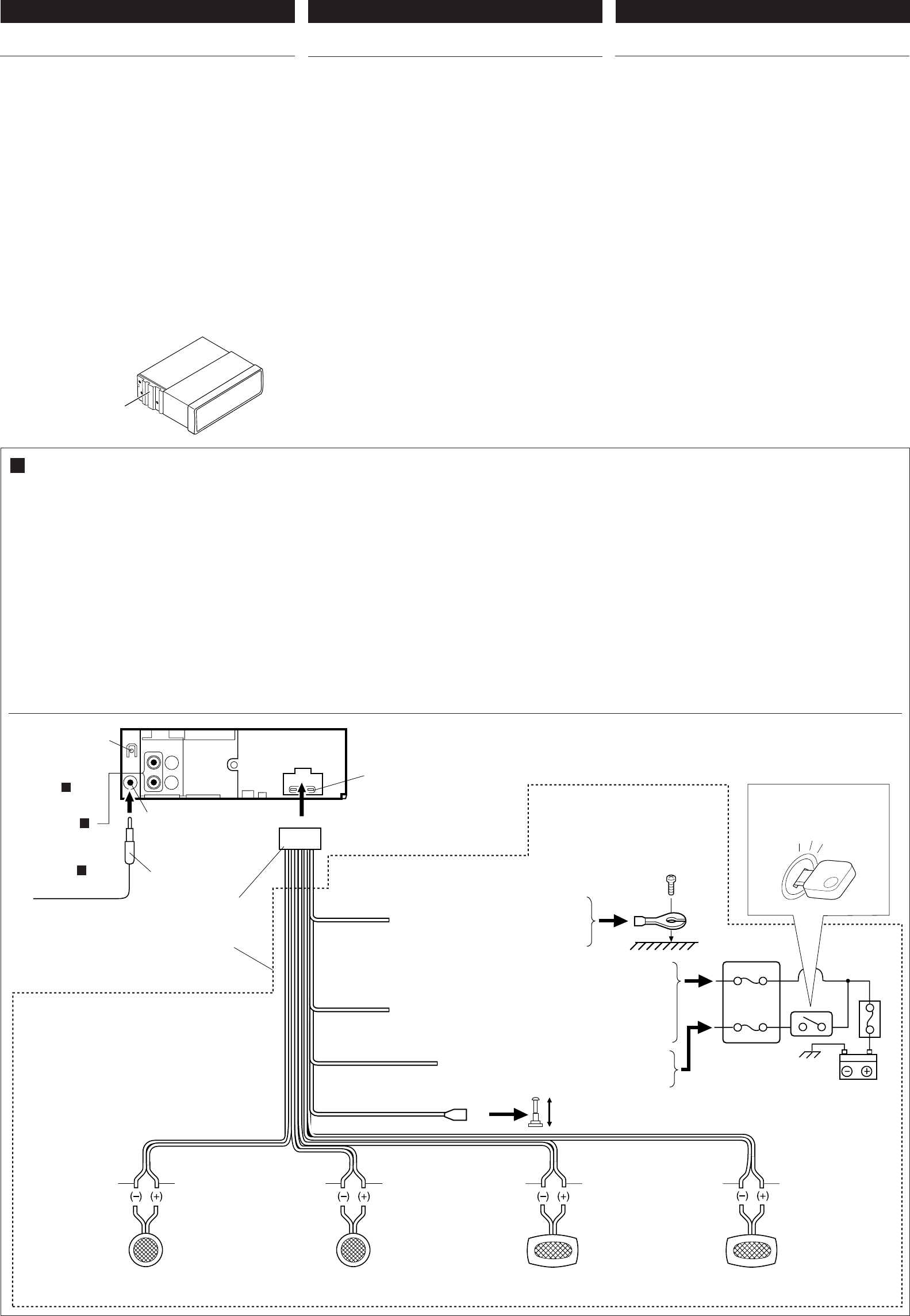
A Typical Connections / Conexiones típicas / Raccordements typiques
Before connecting: Check the wiring in the vehicle carefully not
to fail in connecting this unit. Incorrect connection may cause a
serious damage to this unit. The leads of the power cord and those
of the connector from the car body may be different in color.
1
Connect the colored leads of the power cord to the car battery,
speakers and automatic antenna (if any) in the following
sequence.
1Black: ground
2Yellow: to car battery (constant 12V)
3Red: to an accessory terminal
4Blue with white stripe: to remote lead of other equipment
or automatic antenna if any (200 mA max.)
5Others: to speakers
2
Connect the antenna cord.
3
Finally connect the wiring harness to the unit.
Antes de la conexión: Verifique atentamente el conexionado
del vehículo para no cometer errores al conectar esta unidad.
Una conexión incorrecta podría producir daños graves en la
unidad. Los cordones del cable de alimentación y los del
conector procedentes de la carrocería del automóvil podrían
ser de diferentes en color.
1
Conecte los conductores de color del cable de alimentación
a la batería del automóvil, altavoces y antena automática (si
la hubiere) en la secuencia siguiente.
1 Negro: a tierra.
2 Amarillo: a la batería del automóvil (12V constantes)
3 Rojo: a un terminal de accesorio
4Azul con rayas blancas: al conductor remoto de
otro equipo o de la antena automática, si hubiere (máx.
200 mA)
5Otros: a los altavoces
2
Conecte el cable de antena.
3
Por último, conecte a la unidad el cableado preformado.
Avant de commencer la connexion:
vérifiez attentivement le
câblage du véhicule pour ne pas connecter incorrectement cet
appareil. Une connexion incorrecte peut endommager
sérieusement l’appareil. Le fil du cordon d’alimentation et ceux
des connecteurs du châssis de la voiture peuvent être différents
en couleur.
1Connectez les fils de couleur du cordon d’alimentation à la
batterie de la voiture, aux enceintes et à l’antenne automatique
(s’il y en a une) dans l’ordre suivant.
1
Noir: a la masse
2
Jaune: a la batterie de la voiture (12V constant)
3
Rouge: à la prise accessoire
4
Bleu avec bande blanche: au fil de télécommande de
l’autre appareil ou à l’antenne automatique s’il y en a une
(200 mA max.)
5
Autres: aux enceintes
2Connectez le cordon d’antenne.
3Finalement, connectez le faisceau de fils à l’appareil.
3
4
5
2
1
2
1
3
10
White
Blanco
Blanc
Gray
Gris
Gris
Green
Verde
Vert
Purple
Púrpura
Violet
*1: Before checking the operation of this unit prior to installation,
this lead must be connected, otherwise power cannot be
turned on.
*1: Antes de comprobar el funcionamiento de esta unidad previa
a de la instalación, es necesario conectar este cable, de lo
contrario no se podrá conectar la alimentación.
*1: Pour vérifier le fonctionnement de cet appareil avant
installation, ce fil doit être raccordé, sinon l’appareil ne peut
pas être mis sous tension.
To antenna
A la antena
A l'antenne
Left speaker (front)
Altavoz izquierdo (frontal)
Haut-parleur gauche (avant)
Right speaker (front)
Altavoz derecho (frontal)
Haut-parleur droit (avant)
Left speaker (rear)
Altavoz izquierdo (trasero)
Haut-parleur gauche (arrière)
Right speaker (rear)
Altavoz derecho (trasero)
Haut-parleur droit (arrière)
Black
Negro
Noire
15A fuse
Fusible de 15A
Fusible 15A
Antenna terminal
Terminal de la antena
Borne de l’antenne
Fuse block
bloque de fusibles
porte-fusible
To metallic body or chassis of the car
A un cuerpo metálico o chasis del
automóvil
Vers corps métallique ou châssis du
véhicule
*
*
Ignition switch
Interruptor de encendido
Interrupteur d'allumage
Not supplied with this unit.
No suministrado con esta unidad.
Non fourni avec cet appareil.
*
To a live terminal in the fuse block connecting to the car battery
(bypassing the ignition switch).
A A un terminal activo del bloque de fusibles conectado a la
batería del automóvil (desviando el interruptor de encendido)
A une borne sous tension du porte-fusible connectée à la batterie
de la voiture (en dérivant l’interrupteur d’allumage)
Yellow*1
Amarillo*1
Jaune*
1
Red
Rojo
Rouge
Blue with white stripe
Azul con rayas blancas
Bleu avec bande blanche
To remote lead of other equipment or automatic antenna if any
Al conductor remoto de otro equipo o de la antena automática, si hubiere
Au fil de télécommande de l’autre appareil ou à l’antenne automatique s’il y en a une
To an accessory terminal in the fuse block
A un terminal accesorio del bloque de fusibles
Vers borne accessoire du porte-fusible
Rear ground terminal
Terminal de tierra posterior
Borne arrière de masse
White with black stripe
Blanco con rayas negras
Blanc avec bande noire
Gray with black stripe
Gris con rayas negras
Gris avec bande noire
Green with black stripe
Verde con rayas negras
Vert avec bande noire
Purple with black stripe
Púrpura con rayas negras
Violet avec bande noire
Line out
(only for KD-S5050)
(see diagram B )
Salida de línea
(sólo para KD-S5050)
(véase diagrama B )
Sortie de ligne
(seulement pour le
KD-S5050)
(voir le diagramme
B
)
install_KD-S5050-KD-S10[J] 11/11/03, 6:08 PM3
4
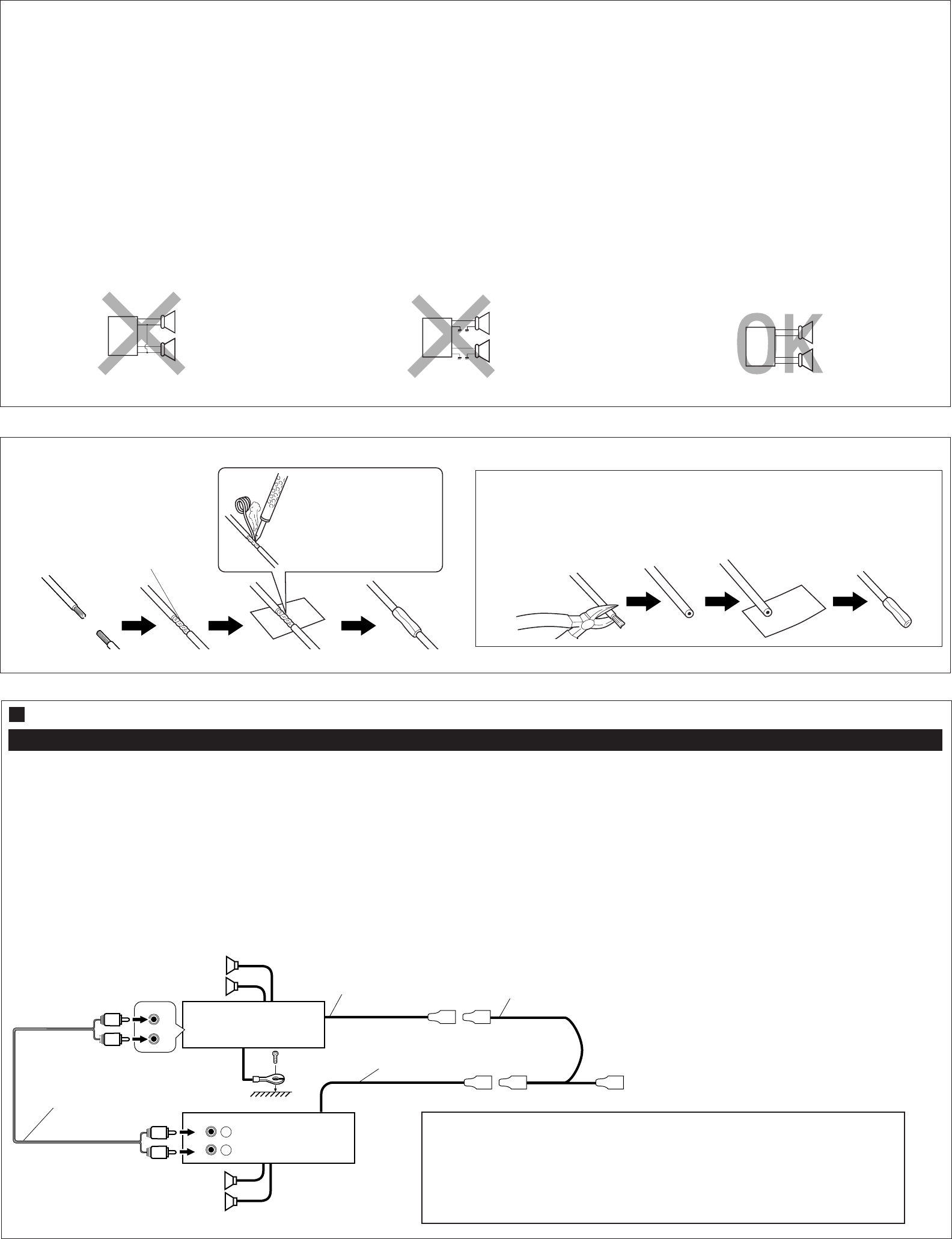
PRECAUTIONS on power supply and speaker
connections:
•DO NOT connect the speaker leads of the power cord to
the car battery; otherwise, the unit will be seriously
damaged.
• Connect the black lead (ground), yellow lead (to car battery,
constant 12V), and red lead (to an accessory terminal) correctly.
• BEFORE connecting the speaker leads of the power cord to
the speakers, check the speaker wiring in your car.
– If the speaker wiring in your car is as illustrated in Fig. 1
and Fig. 2 below, DO NOT connect the unit using that original
speaker wiring. If you do, the unit will be seriously damaged.
Redo the speaker wiring so that you can connect the unit to
the speakers as illustrated in Fig. 3.
– If the speaker wiring in your car is as illustrated in Fig. 3,
you can connect the unit using the original speaker wiring in
your car.
– If you are not sure of the speaker wiring of your car, consult
your car dealer.
PRECAUCIONES sobre las conexiones de la
fuente de alimentación y de los altavoces:
•NO conecte los conductores de altavoz del cable de
alimentación a la batería de automóvil, pues podrían
producirse graves daños en la unidad.
• Conecte correctamente el conductor negro (a tierra), el
conductor amarillo (a la batería del automóvil, 12V constantes),
y el conductor rojo (a un terminal de accesorio).
• ANTES de conectar a los altavoces los conductores de altavoz
del cable de alimentación, verifique el conexionado de altavoz
de su automóvil.
–Si el conexionado de altavoz de su automóvil es como
se indica en las Figs. 1 y 2 de abajo, NO conecte la unidad
utilizando ese conexionado de altavoz original. Si lo hace,
se producirán daños graves en la unidad.
Vuelva a efectuar el conexionado de altavoz de manera que
pueda conectar la unidad a los altavoces de la manera
indicada en la Fig.3.
–Si el conexionado de altavoz de su automóvil es como
se indica en la Fig.3, podrá conectar la unidad utilizando el
conexionado de altavoz original de su automóvil.
– Si tiene dudas sobre el conexionado de altavoz de su
automóvil, consulte con su concesionario.
PRECAUTIONS sur l’alimentation et la
connexion des enceintes:
•
NE CONNECTEZ PAS les fils d’enceintes du cordon
d’alimentation à la batterie; sinon, l’appareil serait
sérieusement endommagé.
•Connectez correctement le fil noir (a la masse), le fil jaune (a la
batterie de la voiture,12V constant) et le fil rouge (à la prise
accessoire).
•AVANT de connecter les fils d’enceintes du cordon
d’alimentation aux enceintes, vérifiez le câblage des enceintes
de votre voiture.
–
Si le câblage des enceintes de votre voiture est réalisé
comme montré sur la Fig. 1 ou Fig. 2 ci-dessous,
NE
CONNECTEZ PAS l’appareil en utilisant ce câblage original
d’enceintes. Si vous le faites, l’appareil sera sérieusement
endommagé.
Recommencez le câblage des enceintes de façon que vous
puissiez connecter l’appareil aux enceintes comme montré
sur la Fig. 3.
–
Si le câblage des enceintes de votre voiture est comme
montré sur la Fig. 3,
vous pouvez connecter l’appareil en
utilisant ce câblage original d’enceintes pour votre voiture.
–Si vous n’êtes pas sûrs du câblage d’enceintes de votre
voiture, consulter le concessionnaire de votre voiture.
Amplifier / Amplificador / Amplificateur
B Connections Adding Other Equipment / Conexiones para añadir otros equipos / Raccordement pour ajouter d’autres appareils
Only for KD-S5050:
You can connect an amplifier to upgrade your car stereo system.
• Connect the remote lead (blue with white stripe) to the remote
lead of the other equipment so that it can be controlled through
this unit.
• Connect this unit’s line-out terminals to the amplifier’s line-in
terminals.
•Disconnect the speakers from this unit, connect them
to the amplifier. Leave the speaker leads of this unit
unused. (Cover the terminals of these unused leads with
insulating tape, as illustrated above.)
Sólo para KD-S5050:
Usted podrá conectar un amplificador para mejorar el sistema
estéreo de su automóvil.
• Conecte el cable remoto (azul con rayas blancas) al cable
remoto del otro equipo para que pueda ser controlado a través
de esta unidad.
• Conecte los terminales de salida de línea de esta unidad con
los terminales de entrada de línea del amplificador.
•Desconecte los altavoces de esta unidad y conéctelos al
amplificador. Los cables de los altavoces de esta unidad
quedan sin usar. (Cubra los terminales de estos cables
sin usar con cinta aislante, tal comose indica en la figura
de arriba).
Seulement pour le KD-S5050:
Vous pouvez connecter un amplificateur pour améliorer votre
système autoradio.
•Connecter le fil d'alimentation à distance (bleu avec des bandes
blanches) au fil d'alimentation à distance de l'autre appareil
de façon qu'il puisse être controlé par cet appareil.
•Raccorder les bornes de sortie ligne de cet appareil aux bornes
d’entrée ligne de l’amplificateur.
•
Déconnectez les enceintes de cet appareil et connectez-
les à l’amplificateur. Laissez les fils d’enceintes de
cet appareil inutilisés. (Recouvrir les extrémités de
ces fils inutilisés avec de la bande isolante comme montré
ci-dessus.)
L
R+
-
+
-
+
-
+
-
L
R+
-
+
-
+
-
+
-
L
R+
-
+
-
+
-
+
-
Fig. 2 Fig. 3
Fig. 1
Connecting the leads / Conexión de los conductores / Raccordement des fils
CAUTION / PRECAUCION / PRECAUTION:
•To prevent short-circuit, cover the terminals of the UNUSED leads with insulating
tape.
•Para evitar cortocircuitos, cubra los cables NO UTILIZADOS con cinta aislante.
•Pour éviter les court-circuits, couvrir les bornes des fils qui ne sont PAS utilisés
avec de la bande isolante
Solder the core wires to
connect them securely.
Suelde los alambres de alma
para conectarlos con firmeza.
Souder les âmes desfils pour
les raccorder entre eux de
façon sûre.
Twist the core wires when connecting.
Retuerza los alambres de alma para
conectarlos.
Torsader les âmes des fils en les raccordant.
INPUT
R
L
R
L
LINE OUT
REAR
L
R
L
R
*2
Signal cord (not supplied with this unit)
Cable de señal (no suministrado con esta unidad)
Cordon de signal (non fourni avec cet appareil)
Y-connector (not supplied with this unit)
Conector en Y (no suministrado con esta unidad)
Connecteur Y (non fourni avec cet appareil)
Rear speakers
Altavoces posteriores
Haut-parleur arrière
JVC amplifier
Amplificador de JVC
Amplificateur JVC
Blue with white stripe
Azul con rayas blancas
Bleu avec bande blanche
KD-S5050
Front speakers
Altavoces delanteros
Haut-parleur avant
Remote lead
Cable remoto
Fil d'alimentation à distance
To automatic antenna if any
A la antena automática, si la hubiere
Vers l’antenne automatique, s’il y en a une
*2 Firmly attach the ground wire to the metallic body or to the chassis of the car—to the place not
coated with paint (if coated with paint, remove the paint before attaching the wire). Failure to do
so may cause damage to this unit.
*2 Fije firmemente el cable de tierra a la carrocería metálica o al chasis—a un lugar no cubierto
con pintura (si está cubierto con pintura, quítela antes de fijar el cable). De lo contrario, se
podrían producir daños en la unidad.
*2 Attachez solidement le fil de mise à la masse au châssis métallique de la voiture—à un endroit
qui n’est pas recouvert de peinture (s’il est recouvert de peinture, enlevez d’abord la peinture
avant d’attacher le fil). L’appareil peut être endommagé si cela n’est pas fait correctement.
install_KD-S5050-KD-S10[J] 11/11/03, 2:55 PM4
